

Yapay zekâ dokümantasyon araçları, ekip bilgi tabanınızı veya teknik belgelerinizi daha hızlı oluşturmanıza, düzenlemenize ve güncellemenize yardımcı olmak için yapay zekâdan yararlanır. Dokümantasyonu güncel tutmanın, manuel işi azaltmanın veya ekibinizin yanıtları bulmasını kolaylaştırmanın yollarını arıyorsanız doğru yerdesiniz. Bu rehberde, 2026 yılında kullanabileceğiniz en iyi yapay zekâ dokümantasyon araçlarını, her birini benzersiz kılan özellikleri ve iş akışınıza nasıl uyabileceklerini net bir şekilde inceleyeceksiniz. Ürün belgelerini, işe alıştırma rehberlerini veya şirket içi vikileri yönetiyor olsanız da dokümantasyonunuzu düzenli ve güncel tutmanıza yardımcı olabilecek seçenekleri burada bulabilirsiniz.
Why Trust Our Software Recommendations
6,700+
Reviews
20
Industry experts
16+
Evaluation factors
14
Years
Our team has been testing and reviewing software since 2012. As product managers ourselves, we know how difficult—and important—it is to choose the right software.
For this guide, we evaluated tools using hands-on testing and independent research, scoring tools using our selection criteria.
Our reviews reflect our human editorial judgment, not a sales pitch.
Expert reviewers:
- Andrew LumbySenior TPM
- Cristiano ValimSenior UI/UX Lead


Yapay Zekâ Dokümantasyon Araçları Karşılaştırma Tablosu
Bu karşılaştırma tablosu, en iyi yapay zekâ dokümantasyon aracı seçimlerim için fiyatlandırma ayrıntılarını özetlemektedir:
Score legend (out of 5)
- Excellent4.5–5
- Good4–4.4
- Average3–3.9
- Below average2–2.9
- Poor1–1.9
Sorted by: Default
| Tool | Starting Price | Website | |||||||
|---|---|---|---|---|---|---|---|---|---|
Best for multi-channel self-service portals | 3.8 out of 5 | 4 | 4 | 4 | 3 | 4 | 4 | Pricing upon request 14-day free trial + free demo available | Website |
Best for browser-captured SOP creation | 3.2 out of 5 | 4 | 2 | 4 | 2 | 4 | 3 | $15/user/month Free plan available | Website |
Best for automated step-by-step process capture | 3.8 out of 5 | 5 | 3 | 4 | 3 | 4 | 4 | $12/seat/month Free plan + free demo available | Website |
Best for AI Q&A across a shared wiki | 3.8 out of 5 | 4 | 4 | 4 | 3 | 4 | 4 | $10/user/month Free plan + free trial + free demo available | Website |
Best for verification-driven team knowledge bases | 3.8 out of 5 | 4 | 4 | 3 | 4 | 4 | 4 | $10/user/month 14-day free trial + free demo available | Website |
Best for large-scale team documentation | 3.8 out of 5 | 4 | 4 | 4 | 3 | 4 | 4 | $5.78/user/month Free plan + 7-day trial available | Website |
Best for in-code documentation generation | 3.7 out of 5 | 4 | 4 | 2 | 4 | 4 | 4 | Pricing upon request Free demo available | Website |
Best for structured technical content creation | 4.0 out of 5 | 4 | 4 | 4 | 4 | 4 | 4 | $77/month Free plan + 14-day trial + demo available | Website |
Best for OpenAPI-generated interactive API docs | 4.0 out of 5 | 4 | 4 | 4 | 4 | 4 | 4 | $250/month Free plan + free trial + free demo available | Website |
Best for advanced search in knowledge bases | 3.8 out of 5 | 4 | 5 | 3 | 3 | 4 | 4 | $249/month Free demo + 14-day free trial available | Website |


Yapay Zekâ Dokümantasyon Araçları İncelemeleri
Aşağıda, kısa listeme giren yapay zekâ dokümantasyon araçlarının ayrıntılı özetlerini bulabilirsiniz. İncelemelerim, sizin için en uygun olanı bulmanıza yardımcı olmak amacıyla her platformun özelliklerini, en iyi kullanım alanlarını ve entegrasyonlarını ayrıntılı olarak ele almaktadır.
 Best for multi-channel self-service portals
- 14-day free trial + free demo available
- Pricing upon request
Visit WebsiteCustomer Rating:4.7/5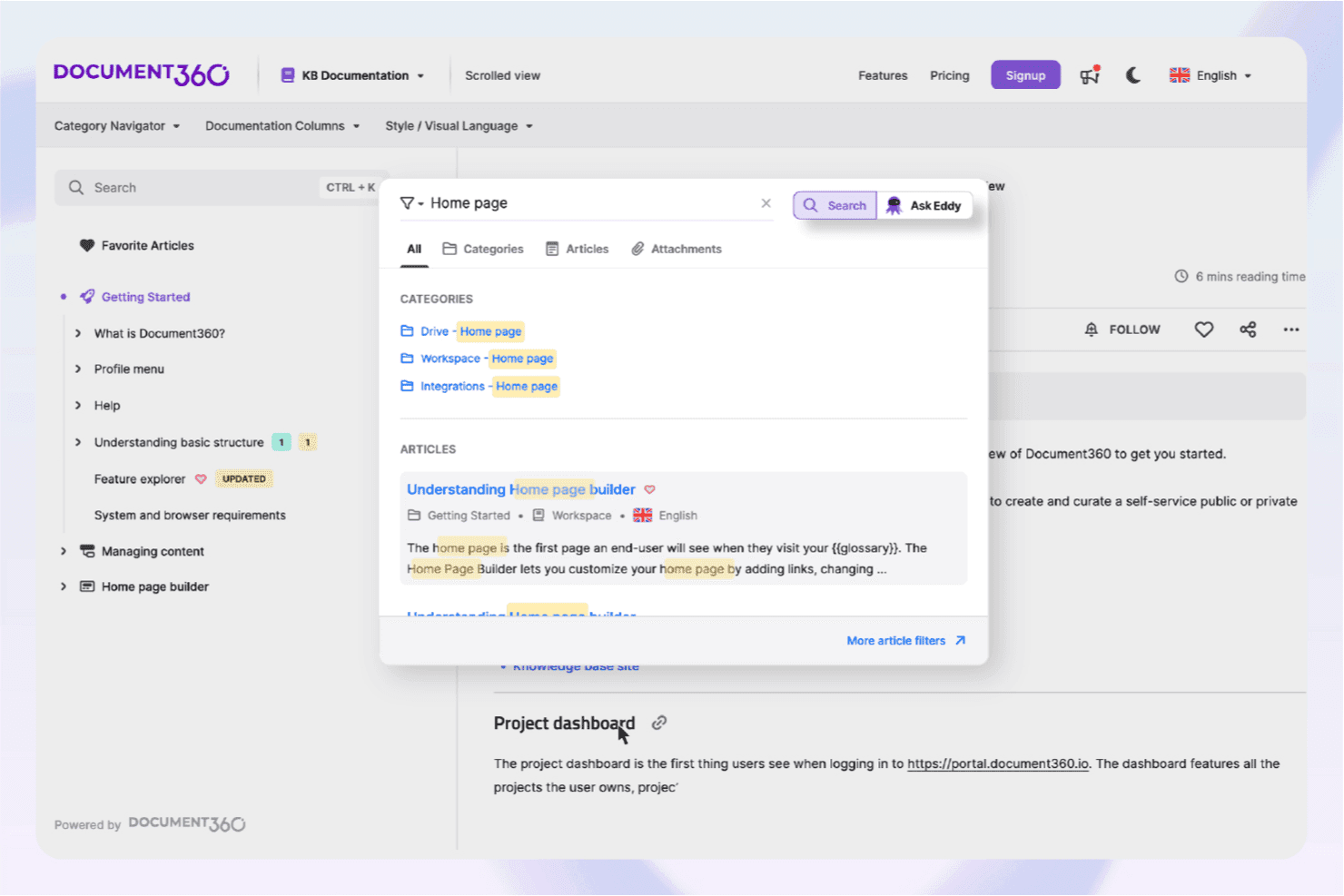
Document360’s AI assistive search helps users quickly locate relevant knowledge base content. Document360 is an AI-powered knowledge base platform that lets teams build, publish, and manage self-service documentation across multiple channels, with tools for AI content generation, semantic search, and an embeddable chatbot.
Who Is Document360 Best For?
Document360 is a strong fit for product marketing managers and customer-facing teams that need to publish and maintain help centers, release notes, and self-service portals across multiple channels.
Why I Picked Document360
Document360 earns its spot on my shortlist because it's built from the ground up for multi-channel self-service delivery, covering public knowledge bases, embeddable help widgets, and contextual in-product help mapped to specific pages. I especially like the MCP Server, which connects your knowledge base directly to AI assistants like ChatGPT and Claude for live, permission-aware querying. The Eddy AI chatbot pulls from articles, PDFs, and connected ticket systems to surface cited answers across every channel your users already rely on.
Document360 Key Features
- AI Writing Agent: Generates structured documentation drafts from uploaded meeting transcripts, videos, audio files, and prompts directly in the editor.
- Revision history with rollback: Tracks every article version and lets you restore any previous draft without manual backup.
- Custom workflow builder: Assigns documentation tasks to specific team members with review stages, due dates, and publishing approvals.
- GitHub integration: Converts Markdown repositories into structured, published documentation without leaving your existing code workflow.
Document360 Integrations
Document360 offers 60+ integrations, including Zendesk, Freshdesk, Slack, Microsoft Teams, Salesforce, GitHub, Intercom, and Make. It also provides a REST API, webhooks, MCP Server connectivity, and Zapier.
Pros and Cons
Pros:
- Multi-channel publishing supports embedded contextual help
- Meeting transcripts become structured documentation drafts
- Eddy AI cites answers across source content
Cons:
- Research feedback lacks multi-source synthesis
- No native PRD or roadmap templates
Learn more about Document360: Best for browser-captured SOP creation
- Free plan available
- From $15/user/month (billed annually)
Visit WebsiteCustomer Rating:4.8/5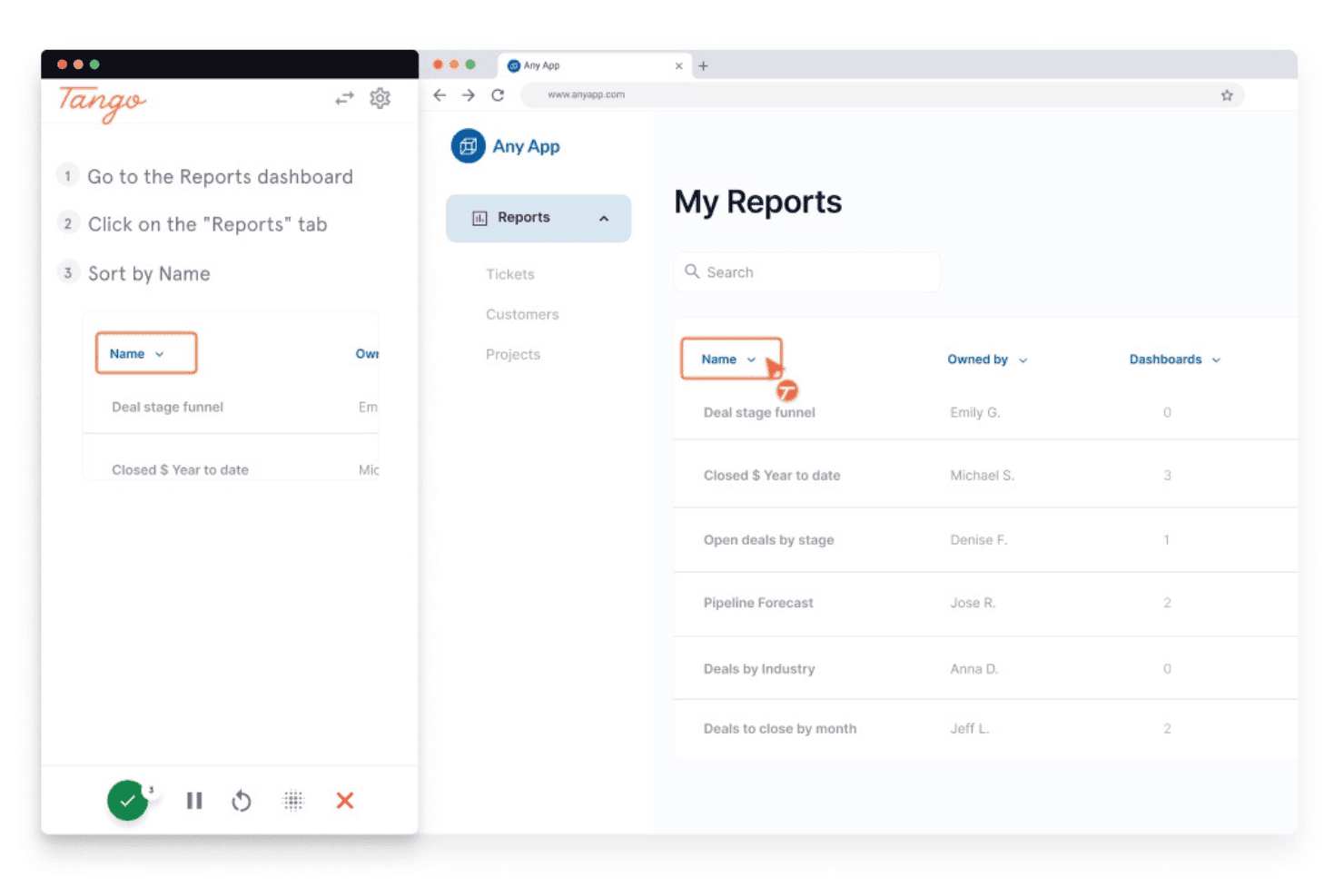
Tango guides users through sorting reports step-by-step. Tango is a process documentation and digital adoption platform that captures browser-based workflows in real time, automatically generating step-by-step guides, annotated screenshots, and SOPs.
Who Is Tango Best For?
Tango is a strong fit for operations, IT, and enablement teams that need to document browser-based processes and build step-by-step SOPs without manual effort.
Why I Picked Tango
Tango earns its spot on my list because it's the best tool I've found for capturing browser-based SOPs without any manual documentation effort. As you click through a workflow, Tango records every step in real time, producing annotated screenshots and structured guides automatically. I especially like the SOP Creator, which instantly formats captured processes into polished, shareable standard operating procedures that embed directly into Notion or Confluence.
Tango Key Features
- Voice transcription: Records spoken narration during workflow capture and converts it to text, automatically generating step descriptions from your commentary.
- Viewer analytics: Tracks which guides are being viewed, how far users progress, and which steps cause drop-off, so you can identify gaps in your documentation.
- Automatic PII redaction: Detects and blurs sensitive information captured during workflow recording before a guide is published or shared.
- Multi-path workflows: Documents branching processes with multiple decision points in a single guide, supporting non-linear workflows rather than just simple step sequences.
Tango Integrations
Tango supports embed-based integrations with Notion, Confluence, and Coda, plus learning management systems and ticketing tools. It also has a Zapier connector, but no native bidirectional integrations with Jira, Linear, Figma, Dovetail, Gong, or Slack.
Pros and Cons
Pros:
- Can embed SOPs directly into knowledge bases
- Annotated screenshots generated automatically in real time
- Instantly captures processes as step-by-step guides
Cons:
- No AI-powered search functionality for docs
- Cannot generate PRDs or release notes
Learn more about Tango: Best for automated step-by-step process capture
- Free plan + free demo available
- From $12/seat/month (billed annually)
Visit WebsiteCustomer Rating:4.8/5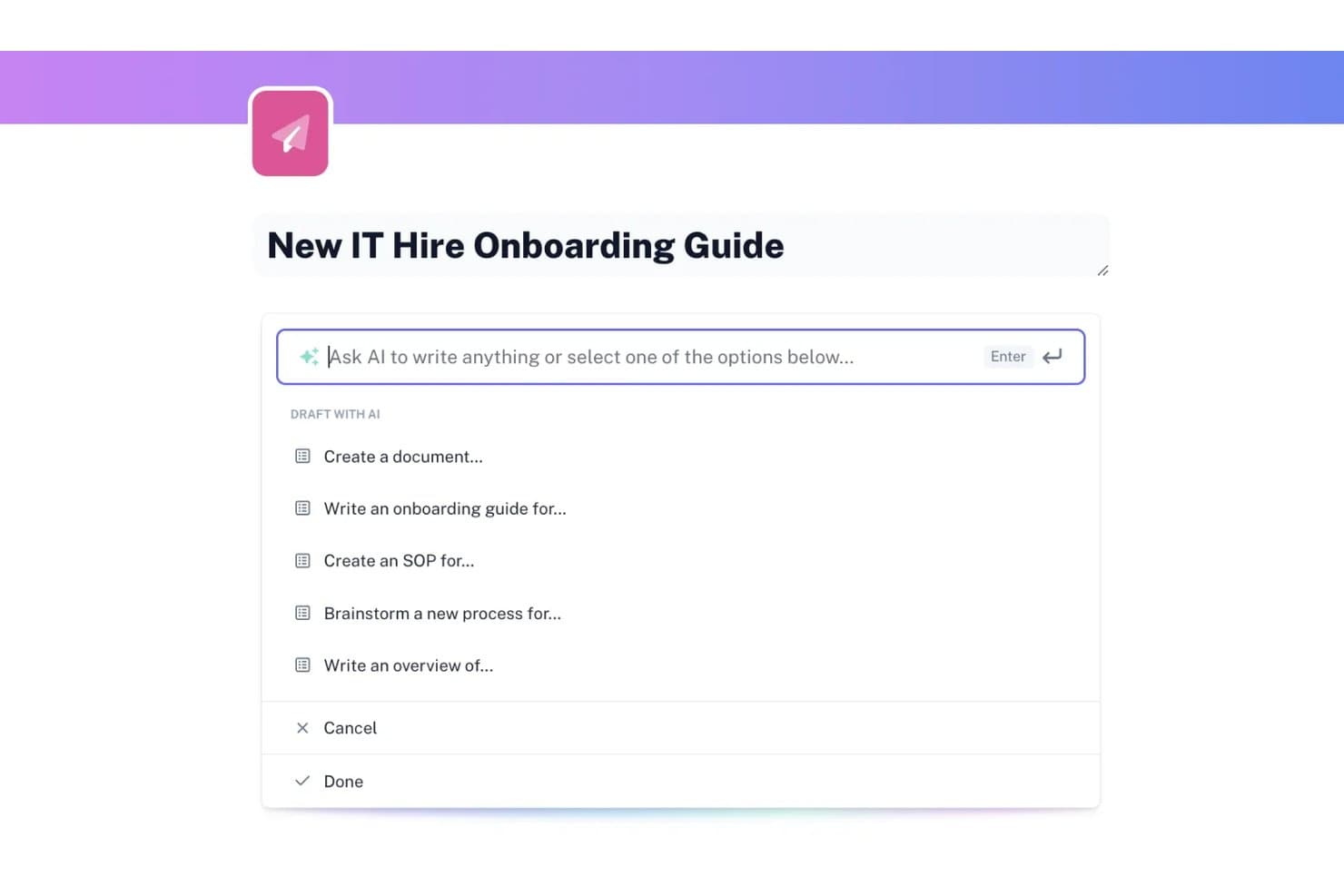
Scribe lets users draft documents with AI-powered writing prompts. Scribe is an AI documentation tool that automatically captures workflows as you work and turns them into step-by-step guides, with additional AI writing tools for generating SOPs, onboarding guides, and other process documents.
Who Is Scribe Best For?
Scribe is a strong fit for IT, operations, and support teams that need to document processes quickly without spending hours writing guides from scratch.
Why I Picked Scribe
I picked Scribe as one of the best because no other tool on this list captures process documentation as automatically as it does. Install the browser extension, run through a workflow once, and Scribe generates an annotated, step-by-step guide without any manual writing. I especially like Autocapture, which surfaces recurring workflows in approved apps in the background, so your team's most-used processes get documented without anyone pressing record.
Scribe Key Features
- Scribe AI writing tools: Generate SOPs, onboarding guides, tool overviews, and help centers from a prompt directly within Pages.
- On-screen walkthroughs: Pin step-by-step guidance to specific elements inside a web app so users get in-context instructions as they work.
- Version history: Review a full edit log showing who changed a guide and when, with the option to revert to any previous version.
- Multi-format export: Export guides to PDF, HTML, or Markdown, or share them as embeds, links, or videos across your existing tools.
Scribe Integrations
Scribe lists integrations with Confluence, SharePoint, Slack, Microsoft Teams, Zendesk, Salesforce Knowledge, Notion, and ClickUp. It also offers an API and Model Context Protocol access for custom integrations and AI clients.
Pros and Cons
Pros:
- Guides are easy to reuse across teams
- Autocapture surfaces undocumented recurring workflows
- Turns screen actions into annotated guides
Cons:
- Generated screenshots often need manual corrections
- Complex workflows need workarounds and manual formatting
Learn more about Scribe: Best for AI Q&A across a shared wiki
- Free plan + free trial + free demo available
- From $10/user/month
Visit WebsiteCustomer Rating:4.6/5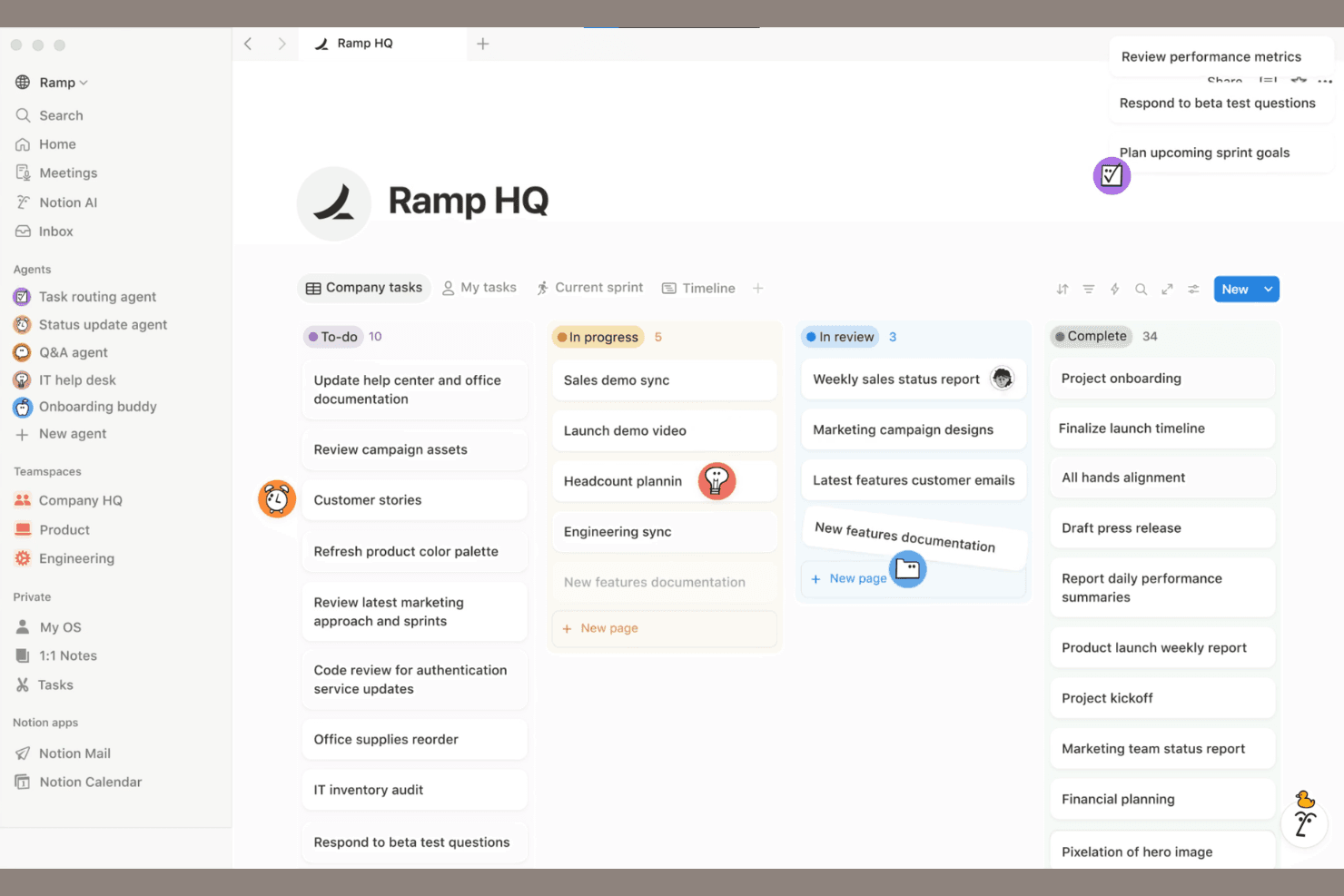
Notion combines AI docs, collaboration, and databases in one workspace. Notion is an AI-powered workspace that combines wikis, databases, and block-based docs with AI writing, search, and retrieval tools to help teams capture and organize knowledge in one place.
Who Is Notion Best For?
Notion works well for teams that want to centralize knowledge in a shared wiki and use AI to answer questions directly from that content.
Why I Picked Notion
I've included Notion in my top picks because it's genuinely one of the best tools for asking questions directly across a shared team wiki. Notion AI searches your workspace content and connected apps, then cites the exact source it pulled from, so you're not just getting an answer but a pointer back to the page that contains it. I also like the verified pages feature, which lets knowledge managers badge content as current so AI answers prioritize trustworthy material over outdated pages.
Notion Key Features
- AI Meeting Notes: Automatically transcribes meetings and generates summaries and action items directly inside your Notion workspace.
- Notion Sites publishing: Publishes pages to the web and syncs updates automatically whenever the underlying Notion page changes.
- Version history with change highlights: Tracks edits with author attribution and timestamps, letting you preview and restore earlier versions of any page.
- Block-based document editor: Supports over 50 content types—including code snippets, toggles, tables of contents, and embedded media—for building structured docs.
Notion Integrations
Notion offers marketplace integrations with Slack, Google Drive, GitHub, Jira, Figma, Salesforce, Box, and OneDrive. It also provides a public API, webhooks, MCP, CLI, SDK, and External Agents API for custom integrations.
Pros and Cons
Pros:
- Wikis, databases, and docs share one workspace
- Meeting notes become documented action items
- AI answers cite source pages
Cons:
- Large knowledge bases complicate search
- AI retrieval can miss database details
Learn more about Notion: Best for verification-driven team knowledge bases
- 14-day free trial + free demo available
- From $10/user/month (billed annually)
Visit WebsiteCustomer Rating:4.7/5
Slite offers verified docs, AI search, and collaborative knowledge management. Slite is a collaborative documentation platform for teams that brings together structured note-taking, AI-powered search, and knowledge base organization in one workspace.
Who Is Slite Best For?
Slite is a good fit for distributed teams and startups that need to organize and share internal knowledge.
Why I Picked Slite
I picked Slite as one of the best because I can organize team knowledge into channels and collections, making it easy to keep documentation structured as my team grows. I like using the AI-powered Ask feature to surface answers from our docs instantly. My team is able to collaborate in real time on meeting notes, project docs, and internal wikis without losing context.
Slite Key Features
- Document version history: Track and restore previous versions of any document.
- Access permissions: Set granular access controls for teams and individuals.
- Templates library: Use pre-built templates for meeting notes, project plans, and more.
- Markdown support: Format documentation with markdown for structured, readable content.
Slite Integrations
Slite offers native integrations with Slack, Google Drive, Google Docs, Jira, Trello, Asana, Figma, Notion, Airtable, ClickUp, and Zapier, and provides an API for custom integrations.
Pros and Cons
Pros:
- Built-in templates for quick documentation setup
- Organized channels for structured team knowledge
- AI-powered Ask feature for instant answers
Cons:
- No offline editing mode available
- Lacks granular user permission controls
Learn more about Slite: Best for large-scale team documentation
- Free plan + 7-day trial available
- From $5.78/user/month (billed annually)
Visit WebsiteCustomer Rating:4.3/5
Confluence offers AI insights with inline definitions and smart tooltips. Confluence is a collaborative documentation platform from Atlassian that lets teams create, organize, and manage knowledge bases, project documentation, and internal wikis with AI-powered content features.
Who Is Confluence Best For?
Confluence is a strong fit for large organizations and enterprises that need to manage extensive internal documentation across distributed teams.
Why I Picked Confluence
I picked Confluence as one of the best because I can organize massive volumes of team documentation in structured spaces and pages. I like using its AI features to summarize meeting notes and auto-generate content from prompts. My team relies on its granular permissions to manage access across departments.
Confluence Key Features
- Page version history: Track and restore previous versions of any page.
- Templates library: Access pre-built templates for meeting notes, project plans, and more.
- Inline comments: Add feedback and questions directly on specific sections of a page.
- Macros support: Embed dynamic content like task lists, calendars, and roadmaps within documentation.
Confluence Integrations
Confluence offers native integrations with Jira, Trello, Slack, Microsoft 365, Google Drive, Dropbox, GitHub, Salesforce, Zoom, and Box, and provides an API for custom integrations.
Pros and Cons
Pros:
- Page versioning supports detailed audit trails
- Extensive template library for structured content
- Deep integration with Jira for project tracking
Cons:
- Search can be slow with large spaces
- AI features require premium plans
 Best for in-code documentation generation
- Free demo available
- Pricing upon request
Visit WebsiteCustomer Rating:4.4/5
Swimm offers AI code docs with auto-syncing snippets and dev workflow integration. Swimm is an AI-powered documentation platform for engineering teams that generates, maintains, and syncs in-code documentation directly with your codebase.
Who Is Swimm Best For?
Swimm is a good fit for software development teams who need to generate and maintain in-code documentation directly within their repositories.
Why I Picked Swimm
I picked Swimm as one of the best because I can generate documentation directly from code, keeping docs synced with code changes through auto-updating snippets. I like using its AI-powered doc generation to create walkthroughs and explanations that stay relevant as the codebase evolves. My team is able to review, edit, and maintain documentation right inside our development workflow, which fits how we work day to day.
Swimm Key Features
- IDE plugins: Integrate documentation workflows directly into popular code editors.
- Smart doc suggestions: Get context-aware prompts for adding or updating documentation.
- Code-coupled tutorials: Create step-by-step guides linked to specific code sections.
- Documentation review workflows: Assign, review, and approve documentation changes within your team.
Swimm Integrations
Swimm offers native integrations with GitHub, GitLab, Bitbucket, and Slack, and provides an API for custom integrations.
Pros and Cons
Pros:
- Offers IDE plugins for in-context editing
- Supports code walkthroughs linked to codebase
- Syncs documentation with code automatically
Cons:
- Lacks advanced formatting for complex docs
- Limited integrations beyond code repositories
Learn more about Swimm: Best for structured technical content creation
- Free plan + 14-day trial + demo available
- From $77/month (billed annually)

GitBook offers AI-powered docs with Git sync, editing, and collaboration tools. GitBook is an AI-powered documentation platform designed for technical teams to create, organize, and publish structured content, with features for collaborative editing, version control, and custom branding.
Who Is GitBook Best For?
GitBook is a good fit for technical writers and engineering teams at SaaS companies who need to create and maintain structured product documentation.
Why I Picked GitBook
I picked GitBook as one of the best because I can structure technical documentation with nested pages, custom navigation, and markdown support. I like using its AI assistant to generate summaries and improve clarity in API docs and developer guides. My team is able to collaborate on content with granular version control and review workflows, which keeps our technical documentation organized and up to date.
GitBook Key Features
- Custom domains: Publish documentation to your own branded web address.
- Access controls: Set granular permissions for teams and external collaborators.
- Content embedding: Embed rich media, code snippets, and interactive elements in docs.
- Public and private spaces: Organize documentation into spaces with configurable visibility.
GitBook Integrations
GitBook offers native integrations with GitHub, Slack, and Google Analytics, and provides an API for custom integrations.
Pros and Cons
Pros:
- Version history and branching for safe editing
- Offers structured content blocks
- AI generates technical documentation from prompts
Cons:
- API access is restricted to higher plans
- No native multi-language documentation support
Learn more about GitBook: Best for OpenAPI-generated interactive API docs
- Free plan + free trial + free demo available
- From $250/month (billed annually)
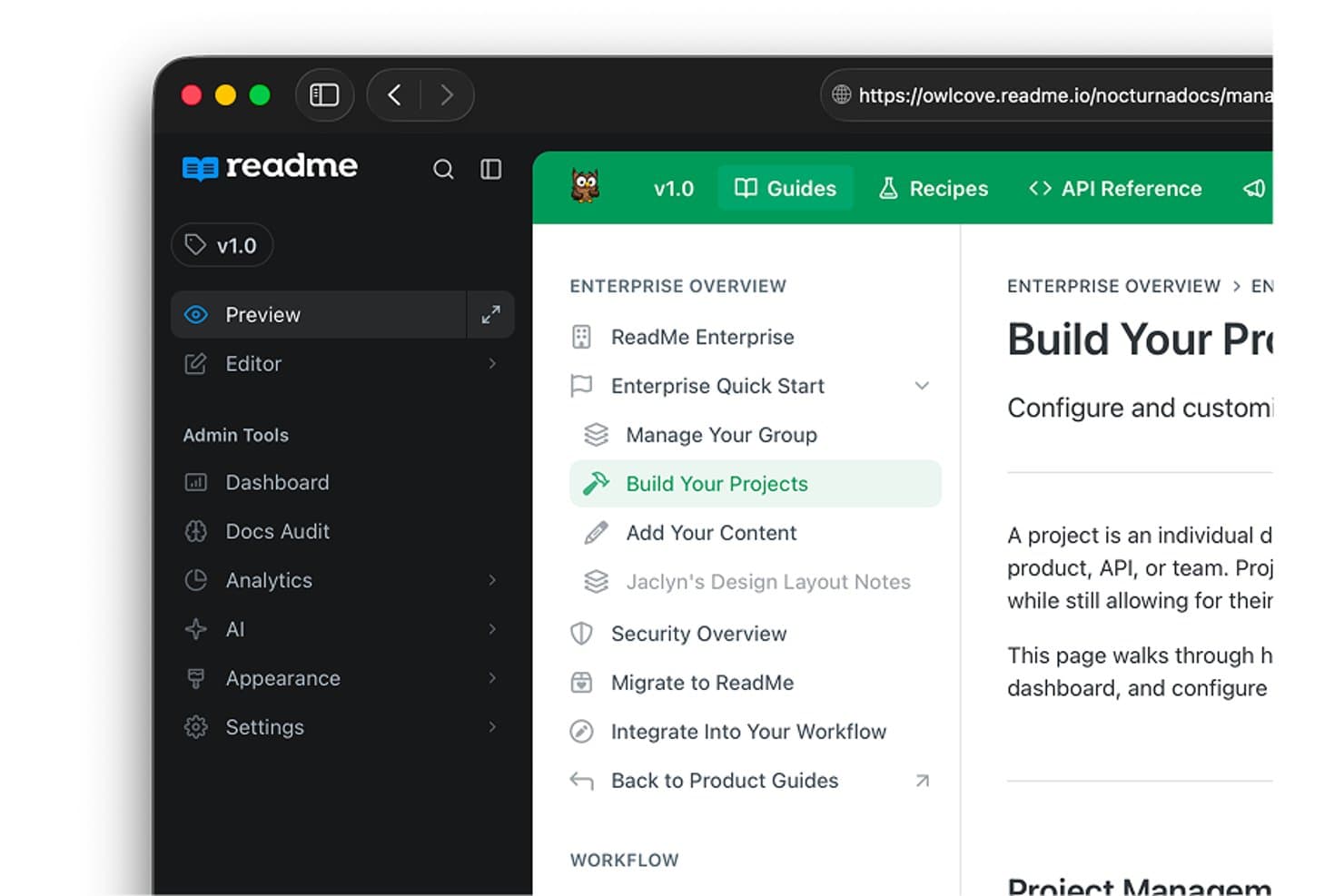
ReadMe organizes documentation into structured project sidebars. ReadMe is an API documentation platform that combines interactive API references, OpenAPI-based reference generation, AI-assisted content drafting and auditing, and an AI knowledge assistant for developer-facing documentation sites.
Who Is ReadMe Best For?
ReadMe is a strong fit for developer relations and API teams who need to ship interactive, OpenAPI-driven documentation that developers can explore and test directly in the browser.
Why I Picked ReadMe
ReadMe earns its spot on my shortlist because it's purpose-built for OpenAPI-driven API documentation, which makes it the strongest option I've seen for developer relations teams shipping interactive references. I particularly like how the Agent drafts full guides directly from an OpenAPI spec, so you're not starting from scratch every time your API evolves. The GitHub AI Writer also monitors pull requests and proposes documentation updates on a review branch, keeping your published docs in sync with code changes without ever bypassing human review.
ReadMe Key Features
- Ask AI knowledge assistant: Answers developer questions using your published documentation, with links to source pages so readers can verify and explore further.
- Multiplayer editing: Multiple team members can edit documentation simultaneously, with branching and review workflows to manage changes before publishing.
- AI Linter: Checks documentation pages against configured style rules and flags issues, helping teams maintain consistent quality across their docs.
- Multilingual publishing: Teams can publish documentation in 11 supported languages, with localized navigation and search returning results in the reader's selected language.
ReadMe Integrations
ReadMe offers nine native integrations, including GitHub, GitLab, Bitbucket, Slack, Zendesk, Intercom, Segment, Google Analytics, and Statuspage. It also supports an API for custom integrations and bi-directional documentation sync.
Pros and Cons
Pros:
- GitHub AI Writer proposes reviewed documentation updates
- AI drafts guides from OpenAPI specifications
- Interactive API references support live test calls
Cons:
- Users report maintenance and pipeline friction
- A reviewer reported buggy documentation search
Learn more about ReadMe: Best for advanced search in knowledge bases
- Free demo + 14-day free trial available
- From $249/month

Helpjuice offers an AI knowledge base with docs and article management. Helpjuice is a cloud-based AI knowledge base platform for creating, organizing, and managing internal and external documentation with advanced search, analytics, and collaborative editing features.
Who Is Helpjuice Best For?
Helpjuice is a strong fit for support teams and knowledge managers at midsize to large organizations who need advanced search and analytics in their documentation.
Why I Picked Helpjuice
I picked Helpjuice as one of the best because its AI-powered search lets me surface relevant documentation instantly, even from large, complex knowledge bases. I like using its advanced analytics to see what users are searching for and where gaps exist. The article versioning and collaborative editing features help my team keep content accurate and up to date.
Helpjuice Key Features
- Custom branding: Apply your company’s logo, colors, and domain to the knowledge base.
- Rich text editor: Format articles with images, videos, tables, and code blocks.
- Access permissions: Set user roles and restrict access to specific content.
- Multi-language support: Create and manage documentation in multiple languages.
Helpjuice Integrations
Native integrations are not clearly documented. The tool supports integrations via its API for custom connections.
Pros and Cons
Pros:
- Custom branding for company-specific knowledge bases
- Analytics show article performance and gaps
- AI search delivers highly relevant results
Cons:
- Higher starting price than many competitors
- No built-in workflow automation tools
Learn more about Helpjuice:
Diğer Yapay Zekâ Dokümantasyon Araçları
Kısa listeme giremeyen ancak yine de göz atmaya değer bazı ek yapay zekâ dokümantasyon aracı seçenekleri şunlardır:
- 11GuruBest for AI wiki suggestions
- 12MintlifyBest for developer-focused docs automation
- 13NuclinoBest for lightweight team knowledge with AI
- 14TrainualBest for AI-assisted SOP and process docs
- 15ClickHelpBest for AI-assisted technical doc authoring
- 16BloomfireBest for deep indexing of video content
- 17ArchbeeBest for multi-product knowledge portals
- 18Bit.aiBest for interactive rich media integration
- 19SlabBest for GitHub-synced team knowledge bases
- 20Aha! KnowledgeBest for connecting docs to product roadmaps
How I Evaluate AI Documentation Tools
To make this list, a tool's AI must handle real documentation work, like turning workflows into guides and updating content as processes change. From there, I evaluate three things. Core functionality carries the most weight: creating and editing docs, plus organizing and finding them. Then I consider automated workflow capture and how well each tool fits your team's documentation needs.
Core Functionality (Table Stakes For This List)
When I'm selecting tools for my list, I score each one on a scale from 0 (does not offer the functionality) to 5 (excels in this area) for each core functionality listed below. I then convert the total into a percentage to help assess each tool's overall fit, with extra weight on any functionalities I’ve deemed essential.
- AI Documentation Support (Essential): I look for AI that can turn meeting notes, workflows, or product changes into useful documentation with limited manual cleanup.
- Documentation Creation (Essential): I assess how easily teams can draft, capture, and edit content such as release notes, setup guides, or internal procedures.
- Organization & Management: I consider whether teams can structure docs with spaces, categories, permissions, or version history as product knowledge grows.
- Sharing & Publishing: I check whether teams can publish customer help, share internal guides, or export content while keeping updates manageable.
- Search & Retrieval: I look for reliable ways to find answers across a knowledge base, especially when support teams need a specific troubleshooting step.
- Maintenance & Updates: I evaluate how teams can revise docs after a feature or process changes, including change tracking and AI-assisted update workflows.
Once I have a list of tools that meet the criteria, I consider what sets each platform apart.
Differentiating Factors (What Sets Vendors Apart)
Here's how I compare and contrast different vendors:
Standout Features
I look for automated workflow capture that records clicks and screenshots, then turns them into step-by-step guides your team can use immediately. Tools like Scribe and Tango handle this differently, so I evaluate how much cleanup each output needs. I also check for AI knowledge assistants that answer questions using your existing docs and link back to sources. When a process changes, automated documentation synchronization matters—I want to see whether the tool detects updates in connected systems and flags outdated content before it causes confusion.
Beyond Features
I evaluate how well a tool fits your actual documentation mix—whether that's API references, internal wikis, or customer help centers. A platform like Swimm targets developer docs, while Document360 covers both technical and support content, so alignment matters more than feature count. I also check integration depth with tools like Jira, GitHub, and Slack, since docs that live outside your team's workflow go stale fast. Finally, I look at AI accuracy controls—specifically whether a tool surfaces source references and supports human review before publishing.
Yapay Zekâ Dokümantasyon Araçları Nasıl Seçilir?
Uzun özellik listeleri ve karmaşık fiyatlandırma yapılarına kendinizi kaptırmanız kolaydır. Kendinize özgü yazılım seçim sürecinizde ilerlerken odağınızı korumanıza yardımcı olmak için göz önünde bulundurmanız gereken faktörleri içeren bir kontrol listesi hazırladım:
| Faktör | Göz önünde bulundurulması gerekenler |
|---|---|
| FaktörÖlçeklenebilirlik | Göz önünde bulundurulması gerekenlerEkibiniz veya şirketiniz büyüdükçe araç dokümantasyon hacminizi kaldırabilecek mi? Kullanıcı sınırlarını, depolama alanını ve büyük bilgi tabanlarındaki performansı kontrol edin. |
| FaktörEntegrasyonlar | Göz önünde bulundurulması gerekenlerTemel sistemlerinize (Slack, Jira, Google Workspace vb.) yerel olarak bağlanabiliyor mu? Özel iş akışları için API erişimini değerlendirin. |
| FaktörÖzelleştirilebilirlik | Göz önünde bulundurulması gerekenlerYapıyı, markalamayı ve izinleri kuruluşunuzun ihtiyaçlarına uyacak şekilde düzenleyebilir misiniz? Esnek şablonlara ve rol yönetimine sahip araçları tercih edin. |
| FaktörKullanım kolaylığı | Göz önünde bulundurulması gerekenlerEkibiniz aracı hızlı bir şekilde benimseyecek mi? Arayüzü, gezinmeyi ve teknik olmayan kullanıcılar için ne kadar eğitim gerektiğini değerlendirin. |
| FaktörUygulama ve işe alıştırma | Göz önünde bulundurulması gerekenlerAracı kullanıma hazır hâle getirmek ne kadar sürecek? Taşıma araçlarını, işe alıştırma desteğini ve eğitim kaynaklarının kullanılabilirliğini değerlendirin. |
| FaktörMaliyet | Göz önünde bulundurulması gerekenlerÖlçek büyüttükçe fiyatlandırma kademeleri anlaşılır ve öngörülebilir mi? Gizli ücretlere, kullanıcı bazlı fiyatlandırmaya ve gelişmiş özelliklerin maliyetlerine dikkat edin. |
| FaktörGüvenlik önlemleri | Göz önünde bulundurulması gerekenlerAraç, veri koruma standartlarınızı karşılıyor mu? Şifreleme, SSO, denetim günlükleri ve sektörünüzle ilgili düzenlemelere uyumluluk özelliklerini arayın. |
| FaktörDestek olanakları | Göz önünde bulundurulması gerekenlerHangi destek kanalları sunuluyor ve hangi saatlerde kullanılabiliyor? Canlı sohbet, telefon veya özel hesap yönetimine ihtiyacınız olup olmadığını değerlendirin. |
Yapay Zekâ Dokümantasyon Araçları Nedir?
Yapay zekâ dokümantasyon araçları, ekiplerin bilgi tabanları veya teknik dokümantasyon oluşturmasına, düzenlemesine ve yönetmesine yardımcı olmak için yapay zekâ kullanan yazılım platformlarıdır. Bu araçlar içerik oluşturma, arama ve kategorilere ayırma gibi görevleri otomatikleştirerek dokümantasyonun doğru ve erişilebilir kalmasını kolaylaştırır. İş birliğini, sürüm denetimini ve analizleri destekleyerek kuruluşların çalışanlar veya müşteriler için güncel kaynakları korumasına yardımcı olurlar.
Yapay Zekâ Dokümantasyon Araçlarının Özellikleri
Yapay zekâ dokümantasyon araçlarını seçerken aşağıdaki temel özelliklere dikkat edin:
- Yapay zekâ destekli arama: Büyük bilgi tabanlarından ilgili sonuçlar sunmak için yapay zekâ kullanır ve kullanıcıların yanıtları hızlı ve doğru bir şekilde bulmasına yardımcı olur.
- Otomatik içerik oluşturma: Dokümantasyon içeriği taslağı hazırlamak, içeriği özetlemek veya içerik önermek için yapay zekâdan yararlanır; böylece manuel yazma gereksinimini azaltır ve içerik oluşturmayı hızlandırır.
- Sürüm denetimi: Makalelerdeki değişiklikleri zaman içinde izleyerek ekiplerin daha iyi içerik yönetimi için önceki sürümleri incelemesine, geri yüklemesine veya karşılaştırmasına olanak tanır.
- İş birliği araçları: Birden fazla kullanıcının dokümantasyonu aynı anda düzenlemesini, yorum yapmasını ve incelemesini sağlayarak ekip tabanlı içerik geliştirmeyi destekler.
- Erişim izinleri: Yöneticilerin belirli belgeleri kimlerin görüntüleyebileceğini, düzenleyebileceğini veya yayımlayabileceğini denetlemesine olanak tanır ve hassas bilgilerin korunmasını sağlar.
- Analizler ve raporlama: Makale kullanımı, arama eğilimleri ve içerik eksiklikleri hakkında içgörüler sunarak ekiplerin dokümantasyonun kalitesini ve uygunluğunu geliştirmesine yardımcı olur.
- Özel markalama: Kuruluşların kendi logolarını, renklerini ve alan adlarını uygulamasına olanak tanıyarak tutarlı ve profesyonel bir bilgi tabanı deneyimi oluşturur.
- Çoklu dil desteği: Dokümantasyonun birden fazla dilde oluşturulmasını ve yönetilmesini destekleyerek kaynakları küresel ekiplerin erişimine sunar.
- Entegrasyonlar: İş akışlarını basitleştirmek ve bilgileri merkezileştirmek için proje yönetimi, iletişim veya müşteri ilişkileri yönetimi platformları gibi diğer iş araçlarına bağlanır.
- Zengin metin düzenleyicisi: Metin, görsel, video ve kod blokları için biçimlendirme seçenekleri sunarak dokümantasyonu anlaşılır, ilgi çekici ve takip edilmesi kolay hâle getirir.
Yapay Zekâ Dokümantasyon Araçlarının Faydaları
Yapay zekâ dokümantasyon araçlarını uygulamak ekibiniz ve işletmeniz için çeşitli faydalar sağlar. Yararlanabileceğiniz birkaç fayda şunlardır:
- Daha hızlı içerik oluşturma: Otomatik içerik oluşturma ve yapay zekâ önerileri, ekiplerin dokümantasyonu daha hızlı ve daha az manuel çabayla üretmesine yardımcı olur.
- Geliştirilmiş arama doğruluğu: Yapay zekâ destekli arama, son derece ilgili sonuçlar sunarak kullanıcıların ihtiyaç duydukları bilgileri bulmasını kolaylaştırır.
- Tutarlı ve güncel bilgi: Sürüm denetimi ve iş birliği araçları, dokümantasyonun doğru kalmasını ve en son güncellemeleri yansıtmasını sağlar.
- Geliştirilmiş ekip iş birliği: Gerçek zamanlı düzenleme, yorum yapma ve erişim denetimleri, departmanlar veya konumlar arasındaki ekip çalışmasını destekler.
- Uygulanabilir içgörüler: Analiz ve raporlama özellikleri, içerik eksikliklerini ve kullanım eğilimlerini öne çıkararak bilgi tabanınızın sürekli iyileştirilmesine yön verir.
- Büyüyen ekipler için ölçeklenebilirlik: Çoklu dil desteği ve esnek izinler, kuruluşunuz büyüdükçe dokümantasyonu genişletmenizi kolaylaştırır.
- Profesyonel sunum: Özel markalama ve zengin metin düzenleme, hem iç hem de dış kitleler için özenli ve kullanıcı dostu bir deneyim oluşturur.
Yapay Zekâ Dokümantasyon Araçlarının Maliyetleri ve Fiyatlandırması
Yapay zekâ dokümantasyon araçlarını seçmek, mevcut çeşitli fiyatlandırma modellerinin ve planların anlaşılmasını gerektirir. Maliyetler özelliklere, ekip büyüklüğüne, eklentilere ve diğer unsurlara göre değişir. Aşağıdaki tabloda yaygın planlar, bunların ortalama fiyatları ve yapay zekâ dokümantasyon aracı çözümlerinde genellikle sunulan özellikler özetlenmektedir:
Yapay Zekâ Dokümantasyon Araçları için Plan Karşılaştırma Tablosu
| Plan Türü | Ortalama Fiyat | Yaygın Özellikler |
|---|---|---|
| Plan TürüÜcretsiz Plan | Ortalama Fiyat$0 | Yaygın ÖzelliklerTemel içerik oluşturma, sınırlı yapay zekâ araması, tek kullanıcı erişimi, sınırlı depolama ve topluluk desteği. |
| Plan TürüKişisel Plan | Ortalama Fiyat$5-$25/kullanıcı/ay | Yaygın ÖzelliklerYapay zekâ destekli arama, temel analizler, sınırlı entegrasyonlar, tek kullanıcı ve e-posta desteği. |
| Plan Türüİşletme Planı | Ortalama Fiyat$20-$60/kullanıcı/ay | Yaygın ÖzelliklerÇok kullanıcılı iş birliği, gelişmiş analizler, özel markalama, API erişimi ve öncelikli destek. |
| Plan TürüKurumsal Plan | Ortalama Fiyat$60-$120/kullanıcı/ay | Yaygın ÖzelliklerSınırsız kullanıcı, gelişmiş güvenlik, özel entegrasyonlar, özel hesap yöneticisi ve uyumluluk özellikleri. |
Yapay Zekâ Dokümantasyon Araçları SSS
Yapay zekâ dokümantasyon araçları hakkında sık sorulan bazı soruların yanıtları:
Yapay zekâ dokümantasyon araçları bilgi yönetimini nasıl geliştirir?
Yapay zekâ destekli dokümantasyon araçları, içerik düzenlemesini otomatikleştirerek ve akıllı arama aracılığıyla ilgili bilgileri öne çıkararak bilgi yönetimini geliştirir. Güçlü bir LLM (Büyük Dil Modeli) kullanan bu araçlar, güncelliğini yitirmiş içerikleri belirleyebilir ve tüm makalelerin yüksek kalitede kalmasını sağlamak için teknik yazım konusunda yardımcı olabilir. Bu, ekiplerin süreç dokümantasyonunu ve SOP’leri doğru, erişilebilir ve iş gereksinimleri değiştikçe kolayca güncellenebilir tutmasına yardımcı olur.
Yapay zekâ dokümantasyon araçları diğer iş yazılımlarıyla entegre olabilir mi?
Evet, çoğu yapay zekâ dokümantasyon aracı Slack, Jira, Google Workspace ve proje yönetimi araçları gibi popüler iş platformlarıyla entegrasyonlar sunar. Birçoğu ayrıca API dokümantasyonu için özel destek sağlayarak geliştiricilerin kod depolarını senkronize etmesine ve belge işleme süreçlerini otomatikleştirmesine olanak tanır. Bu iş birliği özellikleri, bilgileri merkezileştirmeye ve dokümantasyonu ekibinizin mevcut sistemleri içinde daha erişilebilir hâle getirmeye yardımcı olur; çoğu zaman kurum içi bilgi için uzmanlaşmış bir yardımcı pilot görevi görür.
Yapay zekâ dokümantasyon araçları hassas bilgiler için güvenli midir?
Evet, tescilli ve açık kaynaklı çözümler de dâhil olmak üzere birçok yapay zekâ dokümantasyon aracı şifreleme, SSO ve denetim günlükleri gibi güvenlik özellikleri içerir. Yapay zekâ modellerini değerlendirirken sağlayıcının, hassas bilgilerinizin ChatGPT’nin veya diğer harici modellerin herkese açık sürümlerini eğitmek için kullanılmasını önlemek üzere katı veri gizliliği protokollerine sahip olduğundan emin olun.
Mevcut dokümantasyonu taşırken nelere dikkat etmeliyim?
Taşıma sırasında aracın içe aktarma seçeneklerini, çeşitli dosya biçimlerini destekleyip desteklemediğini ve biçimlendirme ile meta verileri koruyup korumadığını değerlendirin. Ekibinizin değerli bilgileri kaybetmeden sorunsuz bir geçiş yapmasına yardımcı olacak işe alıştırma kaynakları, taşıma kılavuzları veya özel destek sunan çözümleri tercih edin.
Yapay zekâ dokümantasyon araçları birden fazla dili destekler mi?
Evet, birçok yapay zekâ dokümantasyon aracı çok dilli destek sunarak dokümantasyonu birden fazla dilde oluşturmanıza ve yönetmenize olanak tanır. Bu özellik, küresel ekipler veya uluslararası müşterilere hizmet veren kuruluşlar için özellikle yararlıdır. Bir çözüm seçmeden önce dil özelliklerini mutlaka doğrulayın.