

10 Best AI App Builders in 2026

Best AI App Builders Shortlist


AI app builders let you create apps powered by artificial intelligence, often without any coding. If you’re searching for the best AI app builders, you probably want to launch something fast—whether it’s a smart chatbot, predictive tool, or workflow automation. The right platform lets you focus on your idea, not technical roadblocks or lengthy development cycles. In this guide, you’ll find vetted options that help you compare features, flexibility, and how each one fits your specific project. Get a clear sense of which AI app builder matches your needs so you can build and iterate with confidence.
Why Trust Our Software Recommendations
Our team has been testing and reviewing software since 2012. As product managers ourselves, we know how difficult—and important—it is to choose the right software.
For this guide, we evaluated tools using hands-on testing and independent research, scoring tools using our selection criteria.
Our reviews reflect our human editorial judgment, not a sales pitch.
AI App Builders Comparison Table
This comparison table summarizes pricing details for my top AI app builders selections:
| Tool | Best For | Trial Info | Price | ||
|---|---|---|---|---|---|
| 1 | Best for creating AI web apps from Airtable | Free plan + free demo available | From $19/month (billed annually) | Website | |
| 2 | Best for building complex workflows visually | Free plan + free trial available | From $29/month (billed annually) | Website | |
| 3 | Best for connecting AI to business data sources | Free plan + free demo | From $10/builder/month (billed annually) | Website | |
| 4 | Best for collaborative AI-powered coding online | Free plan available | From $18/month (billed annually) | Website | |
| 5 | Best for cross-platform mobile UI design | Free plan available | From $29.25/month (billed annually) | Website | |
| 6 | Best for visual app prototyping with AI | Free plan + free demo | From $21/month (billed annually) | Website | |
| 7 | Best for building with AI-driven workflows | Free plan available | From $18/month (billed annually) | Website | |
| 8 | Best for customizable AI chatbot creation | Free plan | From $19/month (billed annually) | Website | |
| 9 | Best for native mobile deployment speed | Free plan | From $20/month | Website | |
| 10 | Best for intuitive drag-and-drop AI design | Free plan + free demo | From $16/month (billed annually) | Website |
Best AI App Builders Reviews
Below are my detailed summaries of the best AI app builders that made it onto my shortlist. My reviews offer a detailed look at the features, capabilities, and integrations of each platform to help you find the best one for you.

Softr
Best for creating AI web apps from Airtable
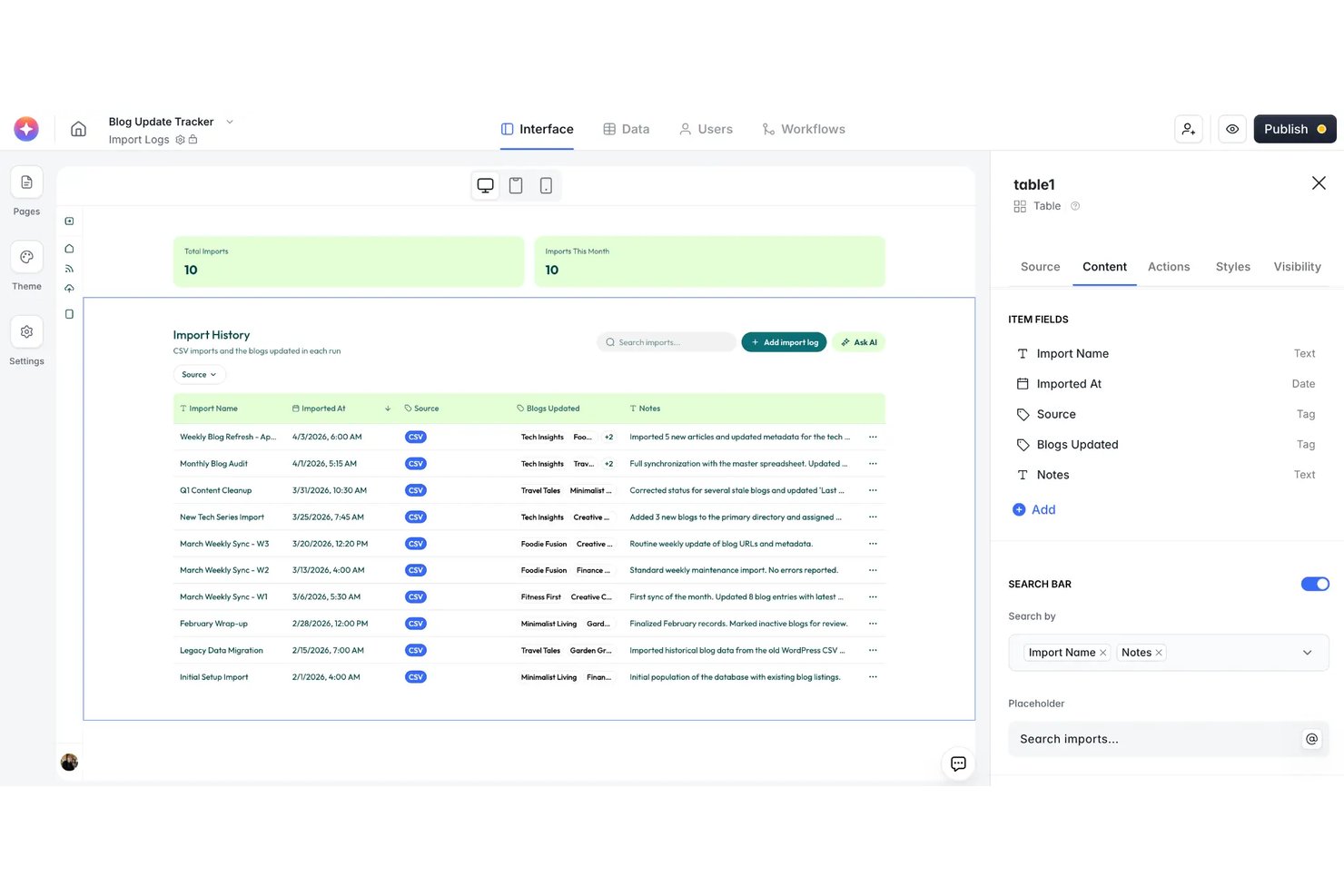
Softr is a no-code AI app builder that lets you generate web apps, internal tools, client portals, and databases from natural language prompts, with built-in workflow automation and connections to external data sources.
Who Is Softr Best For?
Softr is a strong fit for non-technical product and operations teams at small to mid-size companies who already manage data in Airtable, Google Sheets, or HubSpot.
Why I Picked Softr
I picked Softr as one of the best because its AI Co-Builder handles the full setup: it asks clarifying questions, builds a relational database, populates sample data, and wires up permissions before assembling the interface. What impresses me most is how tightly this connects to live Airtable data, so I can turn an existing base into a functional client portal without rebuilding anything from scratch. The Database AI Agents then let me query and manipulate that data through natural language directly inside the app.
Softr Key Features
- Visual app editor: Build, preview, and iterate on apps using a drag-and-drop, component-based interface.
- Workflow automation: Automate tasks and processes triggered by user actions or data changes using Softr Workflows.
- Role-based access controls: Set custom permissions and user groups to manage who can view or edit specific data and app sections.
- Template library: Start projects faster with 90+ pre-built app templates covering portals, CRMs, marketplaces, and more.
Softr Integrations
Softr offers native integrations with Airtable, Google Sheets, Notion, HubSpot, Monday, BigQuery, Supabase, MariaDB, Xano, and SmartSuite. It connects with Zapier and provides an API for custom integrations.
Pros and Cons
Pros:
- Directly connects to multiple live databases
- AI Co-Builder creates multi-page layouts instantly
- Generates full web apps from text prompts
Cons:
- Lacks source code export options
- No exportable app code for developers

Bubble
Best for building complex workflows visually
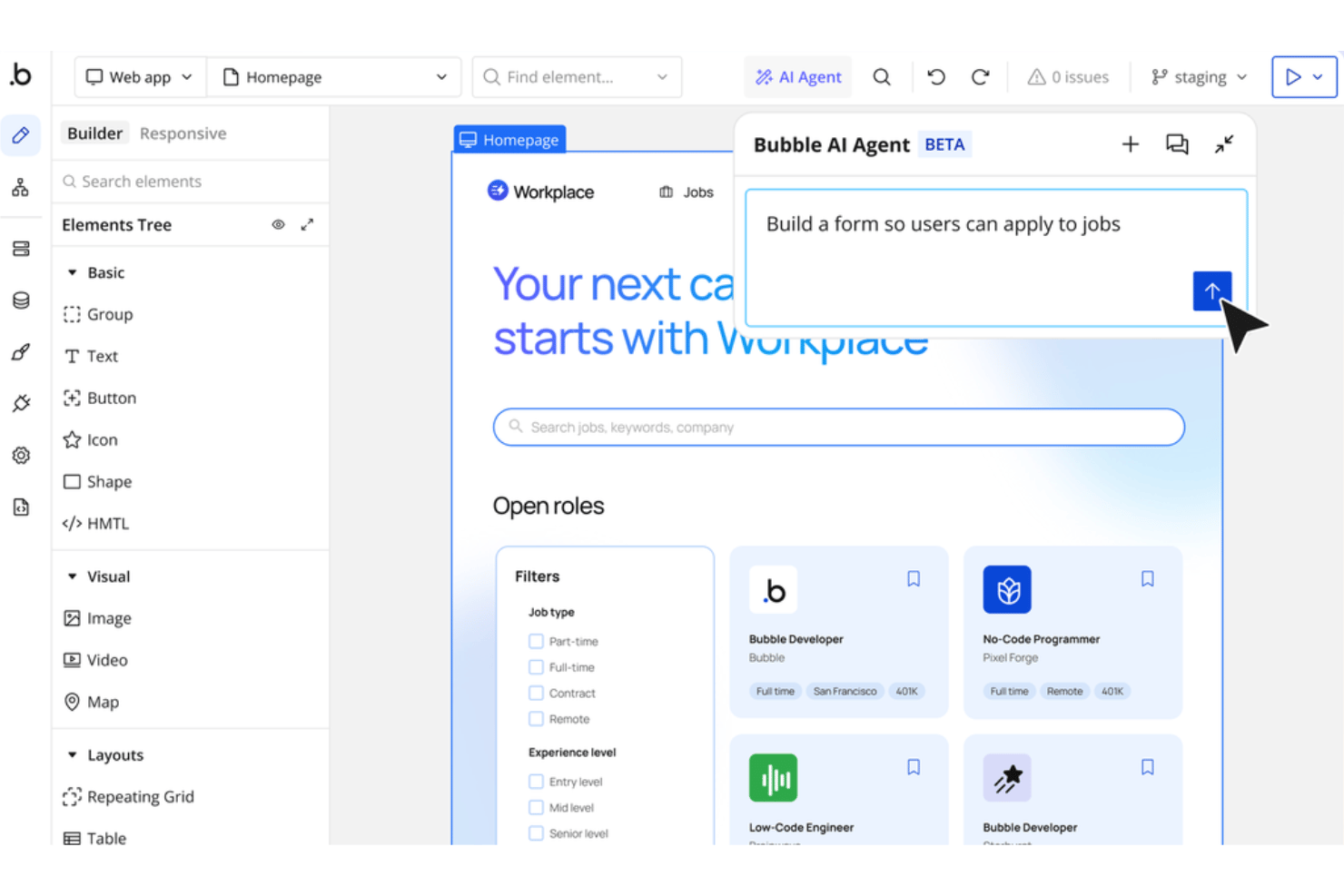
Bubble is a no-code AI app builder that lets you generate full-stack web and mobile applications from text prompts, then visually edit them using a drag-and-drop editor with a built-in database, workflow engine, and API connector.
Who Is Bubble Best For?
Bubble is a strong fit for technical founders and small product teams who want to build and ship SaaS products or marketplaces without dedicated engineering resources.
Why I Picked Bubble
I've included Bubble in my top picks because its visual workflow engine is genuinely unlike anything else in the AI app builder space. Where most tools generate a static UI and leave the logic to you, Bubble lets me build multi-step conditional workflows visually, connecting database operations, API calls, and UI triggers in a single canvas. I can describe an app with AI, then immediately drill into the workflow layer to add branching logic, scheduled backend jobs, and custom data operations.
Bubble Key Features
- AI app generator: Describe your idea in natural language and let Bubble build a working multi-page app draft with logic and UI.
- Native mobile editor: Build and preview mobile apps that can be published on iOS and Android, in addition to web applications.
- Plugin marketplace: Extend app functionality with over 3,000 available plugins covering payments, AI models, analytics, and more.
- Built-in version control: Manage multiple app versions and branches with features like history, rollbacks, and permission controls.
Bubble Integrations
Bubble offers native integrations with Stripe, Google, and Mailchimp, a native SQL connector for Postgres and MySQL, and supports over 3,000 plugins through its marketplace. An API is available for custom integrations.
Pros and Cons
Pros:
- Extensible with thousands of marketplace plugins
- AI generates working database and UI structure
- Visual editor supports complex, multi-step logic
Cons:
- Steep curve before building production apps
- Apps cannot be exported off the platform

Retool
Best for connecting AI to business data sources
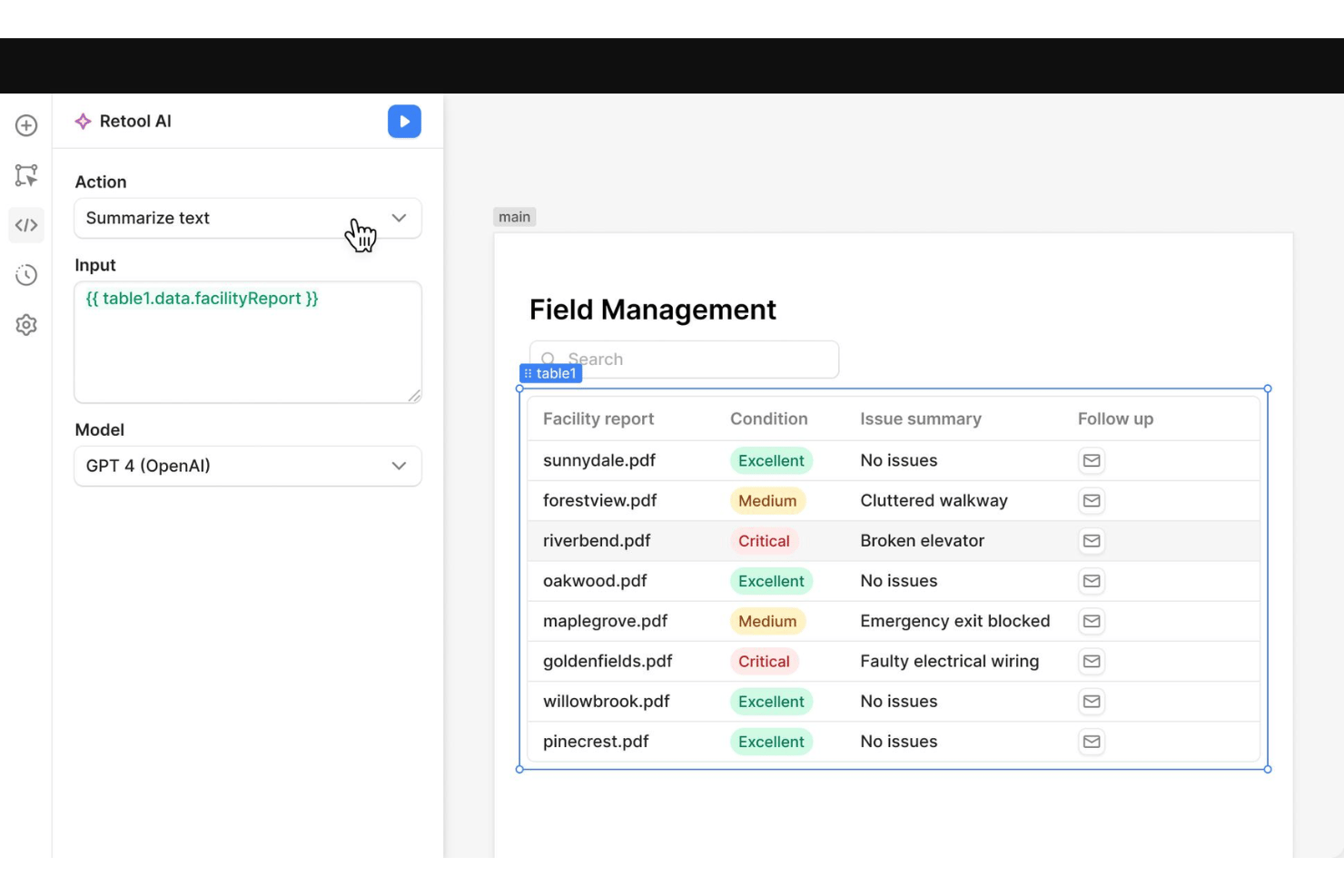
Retool is an AI-native app builder that combines natural language app generation, a drag-and-drop visual editor, and an extensive library of database and API connectors to help teams build and deploy internal tools on a governed enterprise platform.
Who Is Retool Best For?
Retool is a strong fit for technical product teams and product managers at mid-size to enterprise companies who need to ship internal tools on top of existing business data infrastructure.
Why I Picked Retool
I picked Retool as one of the best because its one-click RAG capability, backed by a managed vector store, lets me ground AI responses in real business data like product catalogues, support docs, or internal policies. I can ingest from websites, documents, and databases, then surface that knowledge through AI-powered search inside any built app. Connecting external AI coding agents via MCP means I can generate and deploy apps from my terminal, straight into a governed environment.
Retool Key Features
- AI-native app builder: Describe your app in natural language or upload files to generate fully functional apps.
- Drag-and-drop visual editor: Build and modify interfaces using a component-based WYSIWYG editor with 100+ pre-built elements.
- Database and API connectors: Connect to SQL, NoSQL, REST, GraphQL, and a wide array of out-of-the-box integrations.
- Role-based access controls (RBAC): Set granular permissions for users and teams using built-in security and governance tools.
Retool Integrations
Retool offers over 30 native integrations, including Salesforce, PostgreSQL, MongoDB, Snowflake, BigQuery, Amazon S3, Microsoft SQL Server, Google Sheets, Slack, Jira, and HubSpot, and provides an API for custom integrations.
Pros and Cons
Pros:
- Advanced data source and backend connectivity
- Centralized enterprise governance and permissions controls
- Includes native managed vector database
Cons:
- Cannot export standalone mobile apps
- Limited support for external-facing apps

Replit
Best for collaborative AI-powered coding online
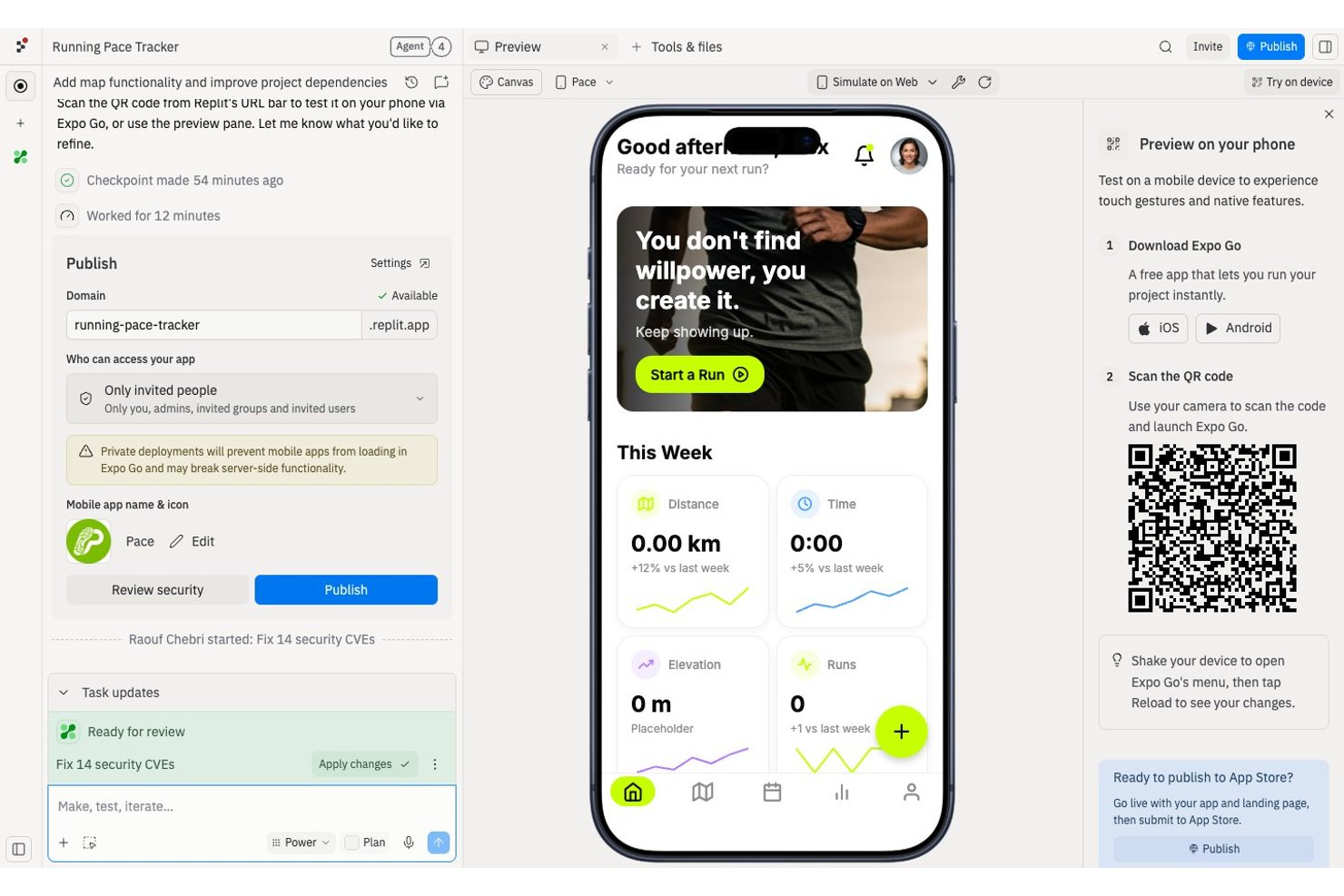
Replit is a browser-based AI app builder that lets you generate, code, and deploy full-stack web and mobile apps from natural language prompts, with a built-in IDE, database, and real-time collaboration tools.
Who Is Replit Best For?
Replit suits product managers, early-stage startup teams, and technically curious builders who want to prototype and ship apps without a dedicated engineering team.
Why I Picked Replit
Replit earns its spot on my shortlist because of how it weaves real-time collaboration directly into the AI build loop. When my team submits tasks to Agent 4, it sequences and executes them together, so multiple contributors can shape the same project without conflicting. The Parallel Agents feature lets us run up to 10 simultaneous agents (on Pro), and the checkpoint system means I can roll back to any earlier state if the agent breaks something while fixing something else.
Replit Key Features
- Natural language app generation: Turn plain-English prompts into working web or mobile apps using Replit Agent.
- Infinite Canvas design workspace: Explore, tweak, and apply visual changes to your app in a drag-to-edit environment.
- Built-in database integration: Access and manage a Neon PostgreSQL database directly within your Replit project.
- One-click deployment and publishing: Publish fully functional projects with hosting, private links, and custom domains straight from the platform.
Replit Integrations
Replit offers 100+ native integrations, including OpenAI, Stripe, GitHub, Google Workspace, Anthropic, and Databricks. An API is available for custom integrations.
Pros and Cons
Pros:
- Checkpoint system allows instant rollbacks
- Full-stack AI generation, including production deployment
- Real-time code collaboration for distributed teams
Cons:
- Performance can stall on complex, multi-agent projects
- Requires an active network connection constantly

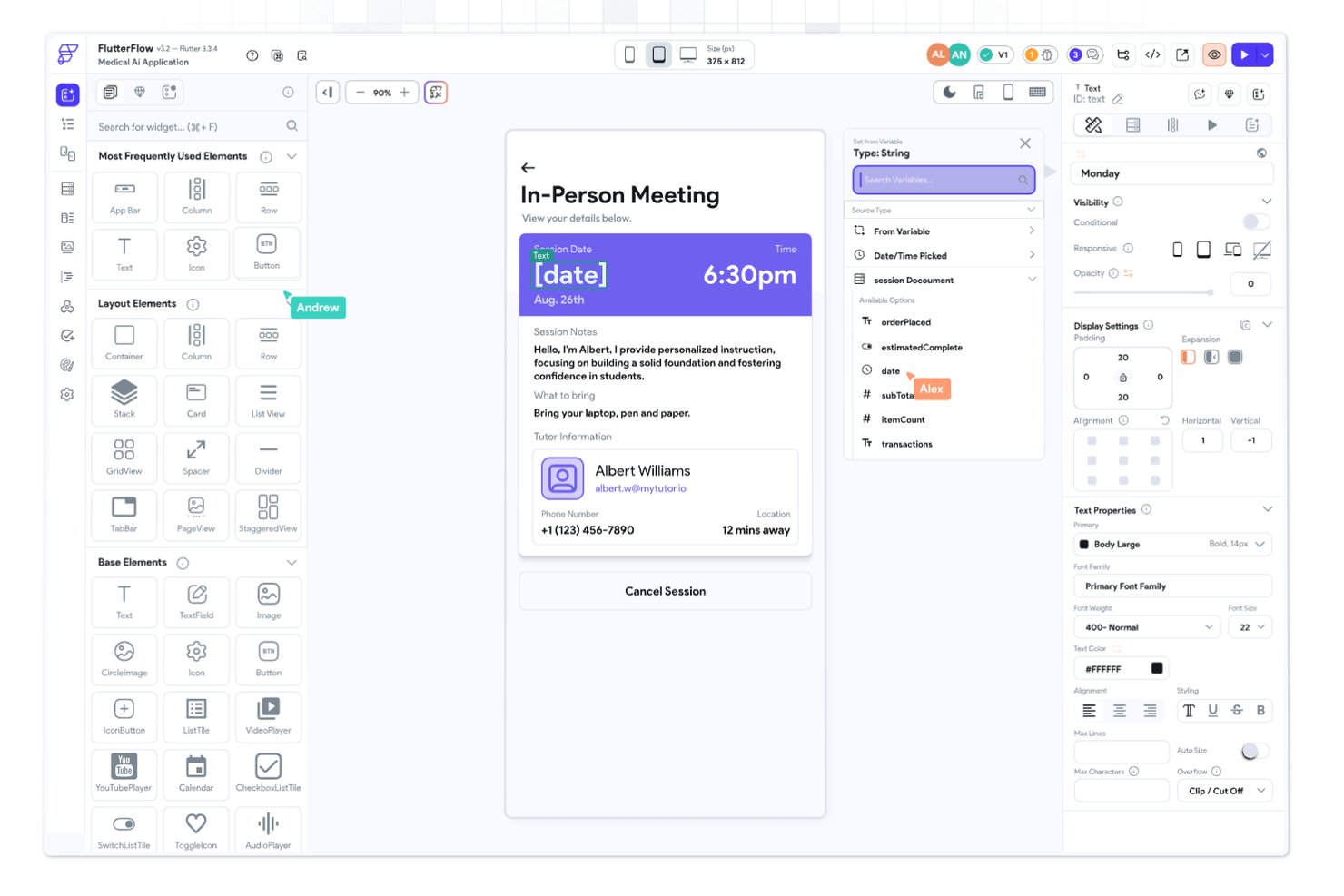
FlutterFlow is a visual, low-code app builder that uses AI-assisted generation and a drag-and-drop editor to create native cross-platform apps for iOS, Android, and web from a single codebase.
Who Is FlutterFlow Best For?
FlutterFlow suits technical product managers and prototyping teams who need to ship native mobile apps across iOS, Android, and web without a full engineering build.
Why I Picked FlutterFlow
FlutterFlow earns its spot on my shortlist because no other AI app builder comes close to its native cross-platform UI design capabilities. I particularly like the Figma frame import and the granular widget property controls, which let me translate a design into a deployable iOS and Android app without rebuilding layouts for each platform. The Visual Action Flow Editor then handles the logic layer visually, so I'm not switching between a designer and a code editor mid-build.
FlutterFlow Key Features
- AI Gen assistant: Use artificial intelligence to generate UI components, styles, and database schemas from prompts.
- Action Flow Editor: Visually define app logic and interactions using a flow-based logic builder with no manual coding required.
- Native API integration: Connect to Firebase, Supabase, or any RESTful backend for live data and external service connectivity.
- Real-time collaboration: Invite team members and work together with branching, comments, and assignable tasks within projects.
FlutterFlow Integrations
FlutterFlow offers native integrations with Firebase, Supabase, Swagger/OpenAPI, and GitHub, and supports connections to any RESTful API. An API and CLI are also available for custom integrations.
Pros and Cons
Pros:
- Code export directly from the visual builder
- AI generates live app logic and components
- True native iOS and Android app outputs
Cons:
- AI lacks full app conversational context
- Advanced logic requires Dart scripting skills

Lovable
Best for visual app prototyping with AI
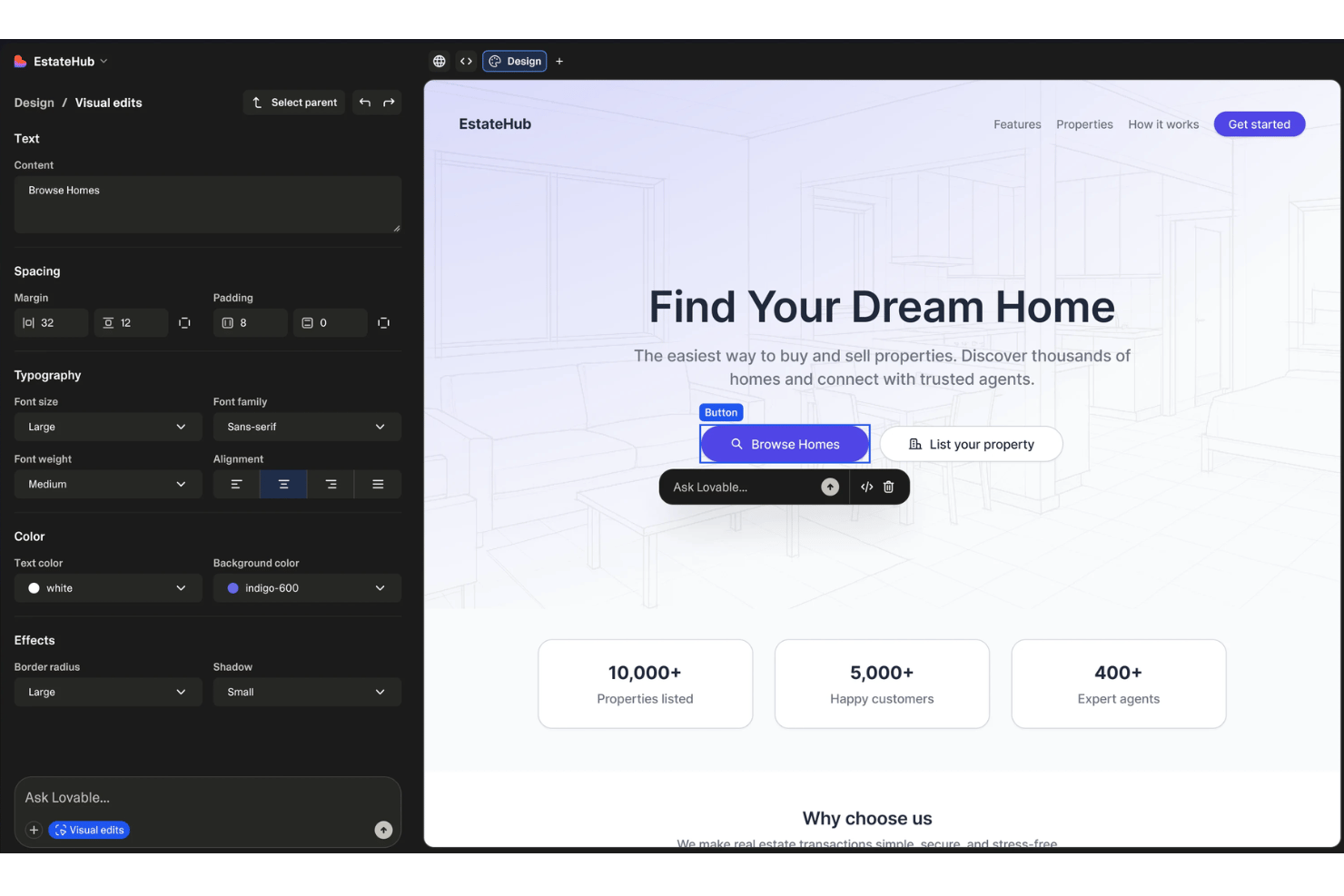
Lovable is a full-stack AI app builder that generates functional web applications from natural language prompts, handling frontend code, database setup via Supabase, authentication, and one-click deployment.
Who Is Lovable Best For?
Lovable suits early-stage founders and non-technical product managers who need to turn an idea into a testable, working web app without involving engineering.
Why I Picked Lovable
I picked Lovable as one of the best because its visual preview and iterative prompt loop make prototyping feel genuinely fast. You can tweak text and colours directly in the preview toolbar, then use Plan Mode to map out a feature change before Lovable writes a single line of code. Version history with one-click revert from the chat means I can experiment aggressively without breaking a working build.
Lovable Key Features
- Supabase integration: Connects directly to Supabase for database, authentication, storage, and real-time updates.
- Full code export: Lets you download the source code or push projects to GitHub or GitLab for further development.
- Third-party API connectivity: Supports building app features that incorporate APIs like Stripe, Clerk, and OpenAI via prompts.
- Cloud credits system: Uses a unified credit model to manage app builds, hosting, and AI-driven app features across workspaces.
Lovable Integrations
Lovable offers native integrations with Supabase, GitHub, GitLab, Stripe, Clerk, and OpenAI. An API is available for custom integrations.
Pros and Cons
Pros:
- Supabase-backed database with full schema control
- Prompt-driven builds from text or screenshots
- Own and edit real, production-grade app code
Cons:
- Pricing model based on per-credit usage
- No drag-and-drop canvas-style editor

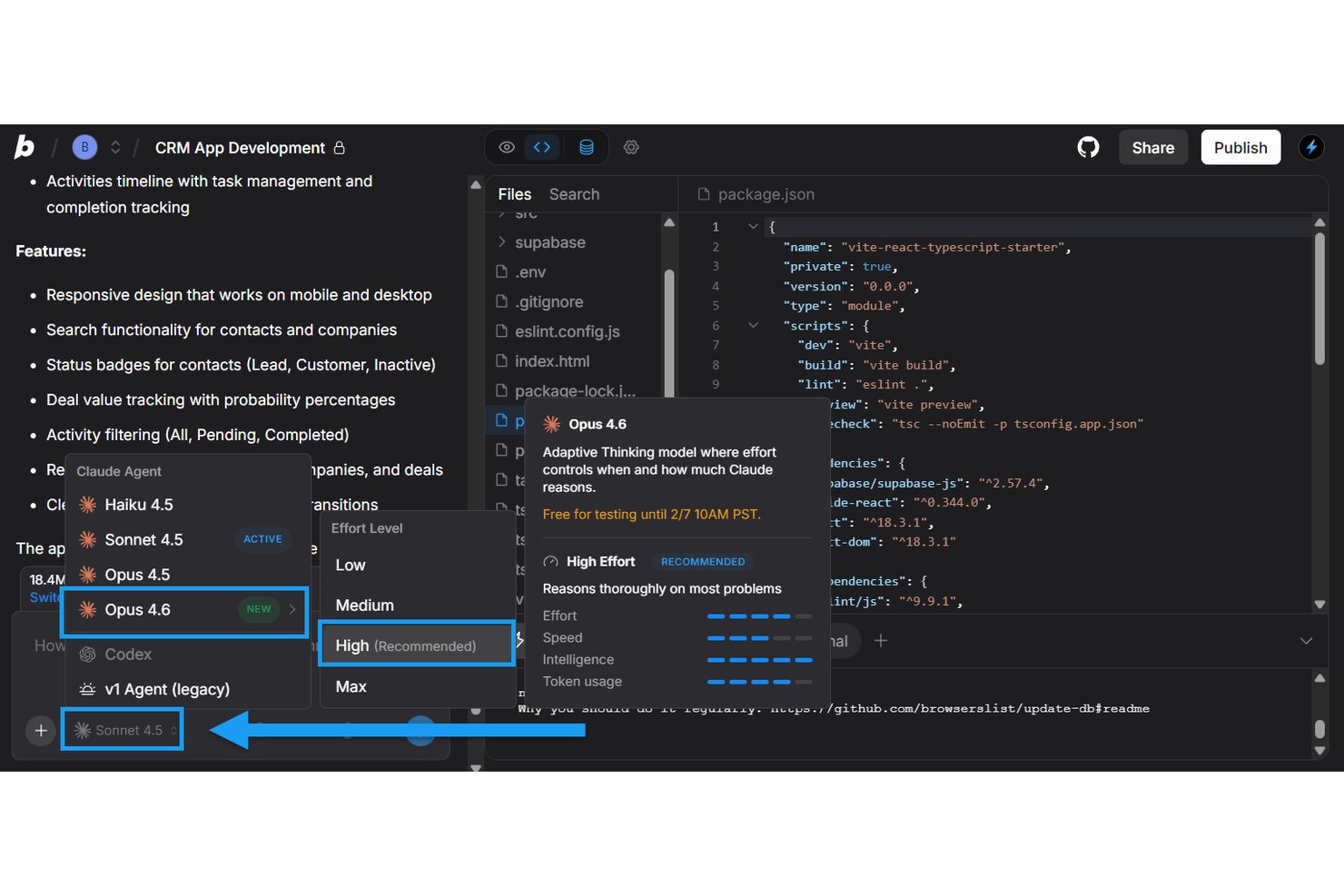
Bolt.new is a browser-based AI app builder that generates full-stack applications from natural language prompts, producing editable and deployable code across frontend, backend, and database layers without any local setup.
Who Is Bolt Best For?
Bolt.new is a strong fit for technical product managers and innovation leads who need to move quickly from idea to working prototype without waiting on engineering resources.
Why I Picked Bolt
Bolt earns its spot on my shortlist because of how it handles AI-driven workflows through three distinct interaction modes: Build, Plan, and Discussion. I use Plan Mode to map out architecture with the AI before committing any code, then shift into Build Mode to execute. Bolt Agent automatically routes each prompt to the right underlying model, so the AI is actively optimizing across the workflow rather than just reacting to input.
Bolt Key Features
- Figma and GitHub import: Import design assets or code directly from Figma or GitHub repositories.
- Native database support: Spin up unlimited databases for each project within the Bolt environment.
- One-click app deployment: Publish applications instantly with built-in hosting and custom domain support.
- Supabase integration: Connect projects to Supabase for advanced backend and storage options.
Bolt Integrations
Bolt offers native integrations with Figma, GitHub, Supabase, Stripe, and Netlify. It also supports authentication through providers like Okta and Azure AD. An API is available for custom integrations.
Pros and Cons
Pros:
- Figma import enables instant UI scaffolding
- Supports chat-driven architecture and code iteration
- Rapidly generates full-stack production code
Cons:
- No drag-and-drop visual app builder
- Code output requires technical review before deployment

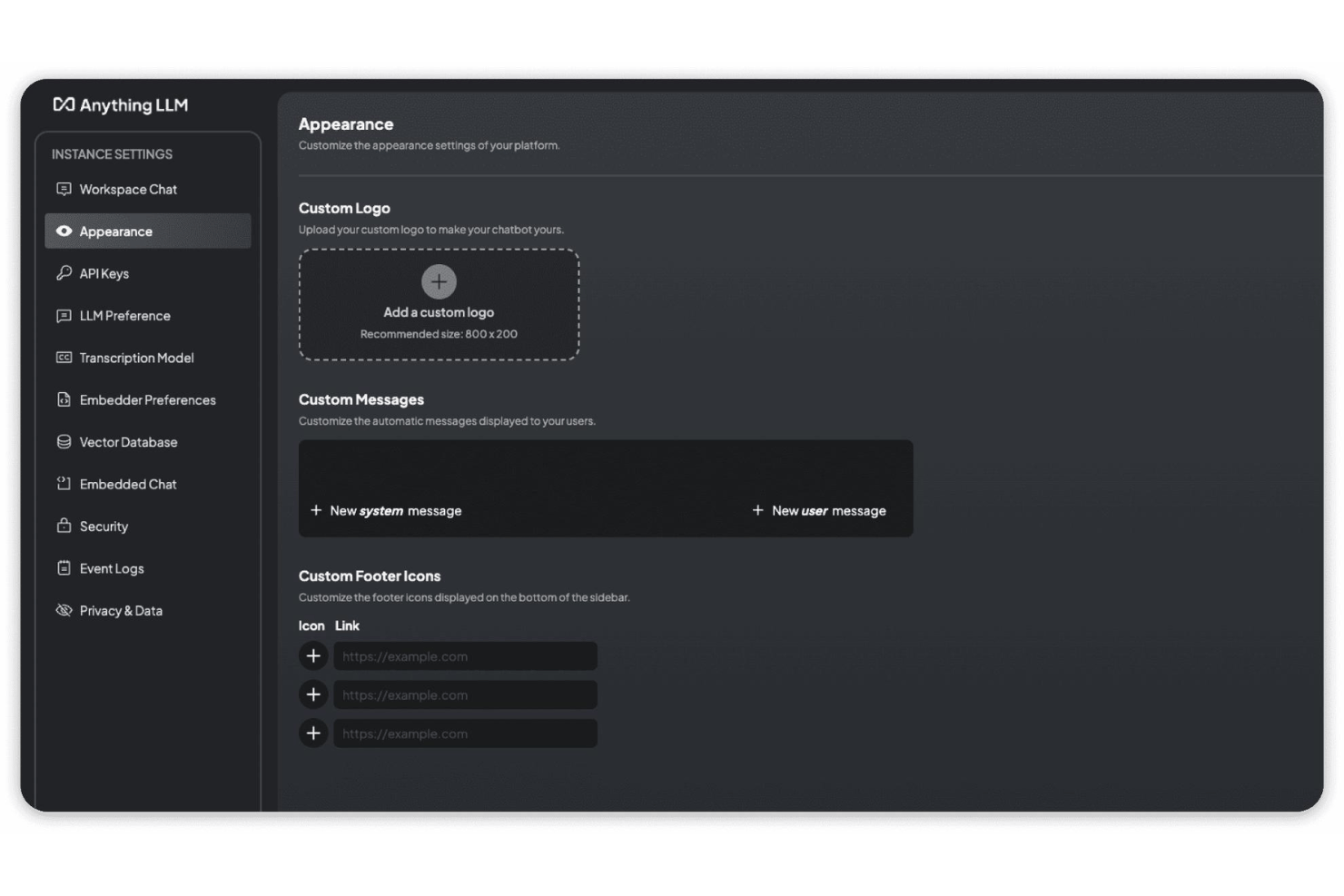
Anything is an AI app builder that converts natural language prompts into full-stack web and native iOS/Android apps, with built-in database, authentication, payments, and 100+ integrations included out of the box.
Who Is Anything Best For?
Anything is a strong fit for solo founders and non-technical product managers who need to ship a functional MVP without relying on engineering resources.
Why I Picked Anything
I've included Anything in my top picks because its multi-model AI routing, switching between GPT-5, Claude, and Gemini depending on the task, gives you real control over how your chatbot thinks and responds. You describe the behaviour you want conversationally, and Anything writes the full-stack code in real time. On the Max tier, its autonomous agent opens your app in a live browser, tests every interaction, and patches broken logic automatically.
Anything Key Features
- Native mobile app output: Instantly generates iOS and Android apps alongside web versions from a shared, full-stack codebase.
- Integrated PostgreSQL database: Provides a native, zero-config database for app data storage and management.
- 100+ built-in integrations: Supports connections to third-party services like Stripe, Google Maps, Zapier, and file storage.
- Code export and ownership: Allows exporting full source code at any time for editing or migrating off-platform.
Anything Integrations
Anything offers 100+ native integrations, including Stripe, Google Maps, Resend, Google Search, Zapier, and PDF Parser. An API is available for custom integrations.
Pros and Cons
Pros:
- Routes prompts across multiple LLMs
- No-code prompt-to-production workflow
- Native iOS and Android app generation
Cons:
- Needs cloud connection for generation
- Requires manual version control setup

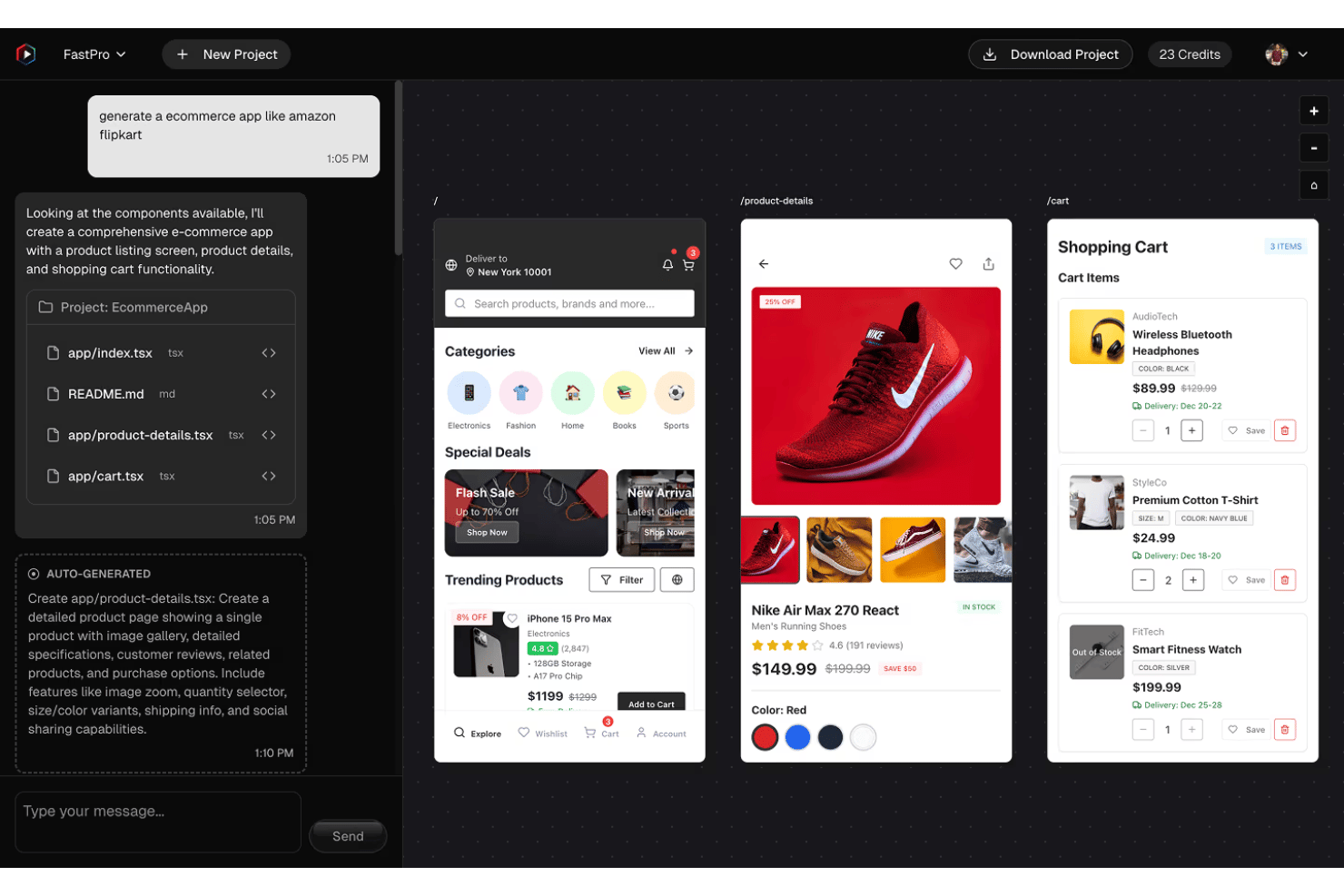
RapidNative is an AI app builder purpose-built for mobile, generating production-ready React Native and Expo apps from natural language prompts, Figma files, or PRDs, with a connected backend, authentication, and real-time team editing.
Who Is RapidNative Best For?
RapidNative is a strong fit for product managers and early-stage product teams shipping mobile apps to the App Store or Google Play without a dedicated mobile engineering team.
Why I Picked RapidNative
RapidNative earns its spot on my shortlist because it's the only AI app builder I've found that generates actual React Native and Expo code, not a wrapped web view, and pushes it straight to the App Store or Google Play. I also like the built-in PWA export: share a QR code and stakeholders can install a working app on their phone in under two minutes. Where most AI builders output prototypes, I get production-ready, exportable code I can hand to developers immediately.
RapidNative Key Features
- Multi-input app generation: Build from plain English, Figma files, sketches, or PRDs.
- Real-time team collaboration: Multiple users can edit and iterate on the same project at once.
- Native device feature support: Integrate camera, GPS, push notifications, and biometrics in created apps.
- Admin dashboard: Manage users, content, and data within a unified interface.
RapidNative Integrations
RapidNative offers native integrations with RevenueCat, Google Maps, Figma, Lovable, AI SDK, NativeWind, and Expo Go. An API is available for custom integrations.
Pros and Cons
Pros:
- Accepts PRDs, Figma, sketches, or plain English
- Publishes directly to App Store and Google Play
- Generates production-ready React Native code
Cons:
- Lacks built-in testing tools
- Limited support for web-only app projects

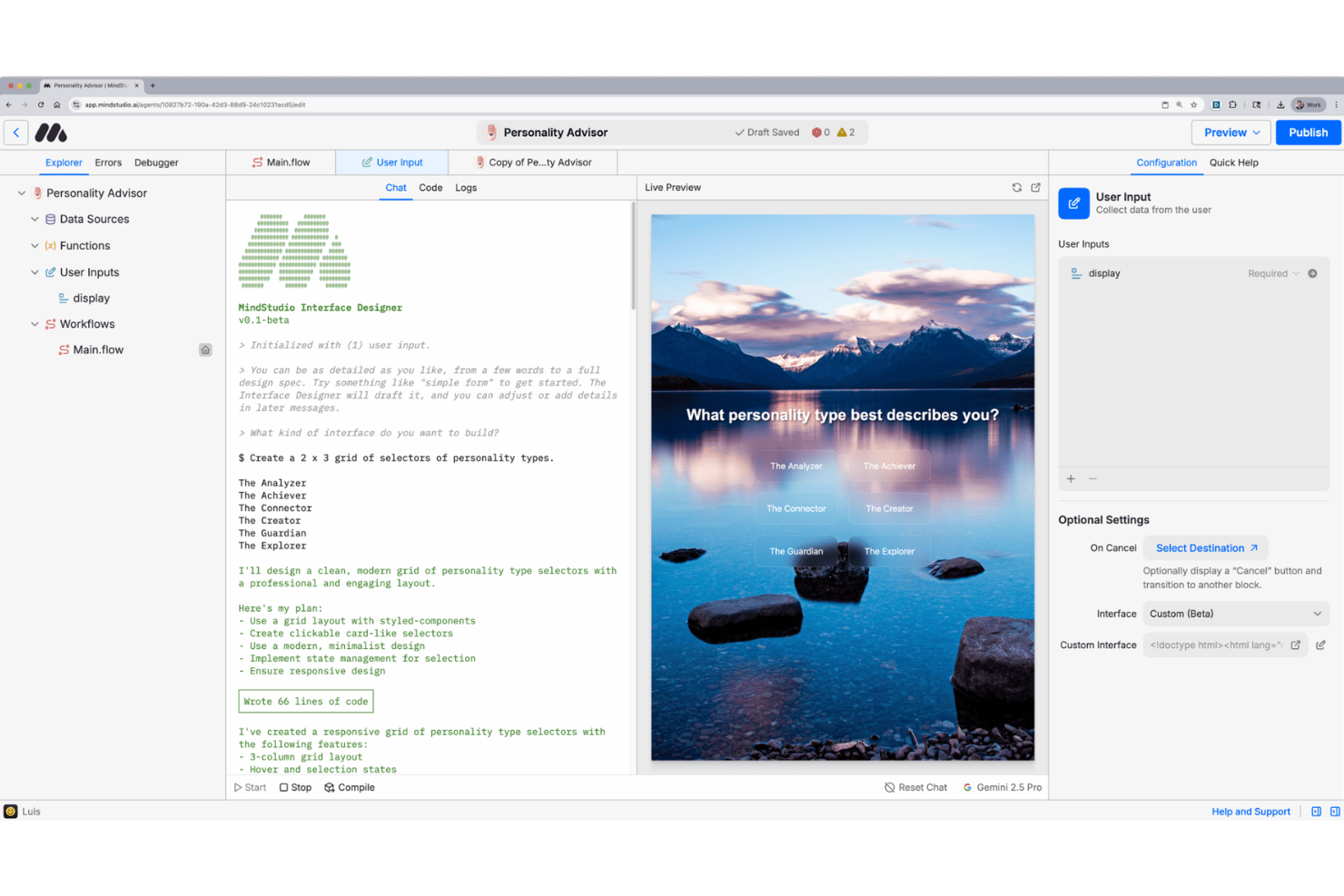
MindStudio Remy is a no-code AI app builder that combines a visual drag-and-drop agent editor with a natural language product agent that generates, deploys, and iterates on full-stack applications across 200+ AI models.
Who Is MindStudio Remy Best For?
MindStudio Remy suits non-technical product managers and product ops teams who need to ship functional AI-powered apps without relying on engineering resources.
Why I Picked MindStudio Remy
MindStudio Remy earns its spot as one of the best on my shortlist because the drag-and-drop builder goes well beyond surface-level visual editing. The 189+ capability blocks let me wire together multi-step agent logic, model routing, and conditional branching without writing a single line of code. MindStudio Architect then auto-scaffolds an entire agent structure from a plain text description, so I'm starting from a working skeleton rather than a blank canvas every time I prototype a new app concept.
MindStudio Remy Key Features
- Remy product agent: Generate entire applications—from natural language descriptions to deployed products—using the Remy AI assistant.
- 200+ AI model integrations: Access and switch between leading models like GPT-4o, Claude, and Gemini directly within one platform.
- Multi-channel deployment: Launch agents as web apps, browser extensions, automated workflows, or public APIs in just a few clicks.
- Human-in-the-loop triggers: Add custom forms, user inputs, and approval steps to workflows for more interactive or complex automation scenarios.
MindStudio Remy Integrations
MindStudio Remy provides native integrations with Google Workspace tools (Docs, Sheets, Gmail, Calendar, Drive), Slack, Salesforce, HubSpot, Airtable, Notion, Coda, LinkedIn, YouTube, and X, and offers an API for custom integrations.
Pros and Cons
Pros:
- Wide selection of AI models available
- Supports advanced logic and conditional workflows
- Supports multi-channel agent deployment
Cons:
- Remy is currently only in alpha
- UI customization is limited for public apps
Other AI App Builders
Here are some additional AI app builder options that didn’t make it onto my shortlist, but are still worth checking out:
- v0
For turning prompts into live apps instantly
- Base44
For enterprise-grade AI integration
- Appsmith
For crafting custom internal tools
- Glide
For spreadsheet-based app creation
- Microsoft Power Apps
For integrating Microsoft ecosystem data
- Adalo
For launching interactive mobile prototypes
- Thunkable
For deploying apps to both iOS and Android
- Tooljet
For open-source extensibility in app creation
- Figma Make
For building AI-powered interfaces in Figma
- Airtable Omni
For connecting workflow with databases


How I Evaluate AI App Builders
To earn a spot on my list, an AI app builder needs to do more than wrap a chatbot around a template—it should let a PM go from a product spec to a working prototype without filing an engineering ticket. I evaluate each platform across the core functionality it must deliver and the differentiating factors that set one tool apart from another.
Core Functionality (Table Stakes For This List)
When I'm selecting tools for my list, I rank each one on a scale from 0 (does not offer the functionality) to 5 (excels in this area) for each core functionality listed below. Then, I calculate the tool's total score as a percentage. Each tool needs to achieve a minimum total score of 75% to be considered for inclusion.
- Natural Language App Generation: I evaluate how well a platform turns a plain-text prompt into a working app—like describing a customer feedback portal and getting a functional multi-page build back.
- AI Code Generation: The platform should produce real application code behind the scenes, not just static layouts. I look for tools that generate frontend and backend logic you can actually inspect and extend.
- Visual App Editor: I check whether the generated output is editable through a drag-and-drop or component-based interface, so a PM can tweak layouts, swap elements, or adjust styling without reopening a prompt.
- Data Integration: A useful app needs live data. I look for native database support alongside API connectors, so you can wire up sources like Airtable, Supabase, or your own REST endpoints.
- Deployment & Hosting: I evaluate how quickly you can get a built app in front of real users. Publishing to a hosted URL with custom domain support matters when you're sharing an MVP with stakeholders.
- Iterative AI Refinement: Follow-up prompts should modify specific parts of the app without regenerating everything. I look for context-aware editing where the AI remembers prior decisions as you iterate.
Once I have a list of tools that meet the criteria, I consider what sets each platform apart.
Differentiating Factors (What Sets Vendors Apart)
Here's how I compare and contrast different vendors:
Standout Features
Code export and GitHub sync matter when your prototype graduates to production—I look for platforms that let you pull generated code into your own repo so your engineering team can extend it without rebuilding from scratch. Built-in backend provisioning is another big separator. Tools that spin up a database and auth layer alongside the frontend let you ship a working MVP with user login, not just a clickable mockup. I also evaluate multi-model flexibility, since switching between LLMs like Claude or GPT during a build gives you more control over output quality and cost.
Beyond Features
Pricing model matters more than sticker price in this category. Credit-based platforms can burn through budget fast during iterative prompting, so I check whether a tool offers flat-rate plans that stay predictable as you scale from prototype to production. Technical skill requirement is another factor I weigh—some platforms expect you to write custom logic or craft detailed prompts, while others let a non-technical PM describe a feature request tracker and get a usable app back. I also evaluate security and compliance posture, especially SSO, role-based access, and clarity on how prompts and generated code are handled.
How to Choose AI App, Builders
It’s easy to get bogged down in long feature lists and complex pricing structures. To help you stay focused as you work through your unique software selection process, here’s a checklist of factors to keep in mind:
| Factor | What to Consider |
|---|---|
| Scalability | Will the platform handle growth from MVP to widespread production use without big migrations? |
| Integrations | Can the tool connect to your needed data sources, SaaS services, or authentication providers? |
| Customizability | How easily can you adapt generated apps to unique workflows without workarounds or heavy rewriting? |
| Ease of use | Is the builder accessible to your non-technical team or will it require developer support? |
| Implementation and onboarding | What internal training, setup, or stakeholder buy-in will adoption require for your team? |
| Cost | How predictable are pricing and usage fees as you iterate and scale apps over time? |
| Security safeguards | Are there clear controls for access, data handling, and user permissions consistent with your needs? |
| Support availability | Will you get help troubleshooting issues or scaling up when your team needs it, and on what terms? |
What Are AI App Builders?
AI app builders are platforms that automatically generate functional applications using artificial intelligence, often from simple text prompts or requirements. These tools let you turn ideas or specifications into working apps, usually through natural language input and a visual editor. They’re designed so product managers and teams can rapidly build, refine, and deploy apps without deep coding expertise.
Features of AI App Builders
When selecting AI app builders, keep an eye out for the following key features:
- Natural language prompts: Generate entire apps or key components by describing your requirements in plain language without writing code.
- AI code generation: Automatically translate user inputs into working, production-ready code behind the scenes, handling both frontend and backend logic.
- Visual editor: Drag and drop UI elements, modify layouts, and preview changes in real time without needing technical skills.
- Data integration: Connect to external databases, APIs, or spreadsheets to power dynamic app functionality and enable real business workflows.
- Iterative AI refinement: Update or extend your app by giving follow-up prompts, so you can make changes quickly without starting over.
- Built-in deployment: Instantly publish apps to a live URL with hosting handled by the platform—no separate server or infrastructure setup required.
- User authentication: Include secure login, roles, and permissions to control access and safeguard sensitive information in your apps.
- Customizable templates: Start faster with ready-made layouts and workflows that can be adapted to your unique use cases.
- Export and source control: Download generated code or sync with version control tools to enable ongoing development and full code ownership.
- Third-party integrations: Connect with SaaS tools, messaging platforms, and payment gateways to extend functionality beyond basic app building.
Benefits of AI App Builders
Implementing AI app builders provides several benefits for your team and your business. Here are a few you can look forward to:
- Faster prototyping: Quickly turn concepts or specs into working applications using natural language prompts and automated code generation.
- Reduced development costs: Lower reliance on engineering resources by allowing non-technical users to build, modify, and deploy apps without custom coding.
- Iterative refinement: Refine your app on the fly with conversational AI or visual editors, supporting rapid feedback cycles and MVP validation.
- Greater accessibility: Empower product managers and business teams to create and launch apps without waiting for dedicated technical support.
- Direct data connectivity: Integrate external databases and APIs, ensuring your apps can interact with real business data and existing workflows.
- Easy deployment: Instantly publish functional, secure apps to live URLs or custom domains without DevOps setup.
- Enhanced flexibility: Export or extend generated code, so your team retains ownership and can scale or customize as your needs evolve.
Costs and Pricing of AI App Builders
Selecting AI app builders requires an understanding of the various pricing models and plans available. Costs vary based on features, team size, add-ons, and more. The table below summarizes common plans, their average prices, and typical features included in AI app builder solutions:
Plan Comparison Table for AI App Builders
| Plan Type | Average Price | Common Features |
|---|---|---|
| Free Plan | $0 | Basic natural language app generation, limited templates, preview deployment, and community support. |
| Personal Plan | $10-$30/user/month | Full visual editor, more templates, basic data integrations, simple deployment, and email support. |
| Business Plan | $30-$80/user/month | Team collaboration, advanced integrations, custom domains, role-based access, and priority support. |
| Enterprise Plan | $80-$200+/user/month | Compliance options, SSO, full code export, dedicated onboarding, enhanced security, and enterprise integrations. |
AI App Builders FAQs
Here are some answers to common questions about AI app builders:
Can non-technical users build real apps with AI app builders?
Yes, most AI app builders allow beginners with zero coding experience to turn an app idea into reality. You can build apps, publish a landing page, and handle complex logic using visual interfaces and natural language prompts. While these AI tools simplify app development, complex projects may still benefit from occasional developer support.
How secure are AI app builders?
Security varies by vendor. Look for platforms that offer encryption, user authentication, role-based access, and compliance options like SOC 2 or GDPR if you handle sensitive or regulated data.
Do AI app builders offer integrations with my existing tools?
Yes, many platforms provide connectors for popular SaaS tools, APIs, databases, and authentication providers. It’s important to check if the integrations you rely on are supported out of the box or require additional setup.
Can I export or own the code generated by an AI app builder?
Some platforms let you export, modify, and host the generated code independently, while others keep your app locked within the platform. If code ownership or migration is important, confirm export and syncing options before committing.
How do AI app builders handle app deployment?
Most solutions offer one-click deployment to a live URL or custom domain, including SSL and hosting. You typically don’t need to set up your own servers or manage infrastructure unless you want full control with code export.