

As ferramentas de documentação com IA utilizam inteligência artificial para ajudar a criar, organizar e atualizar mais rapidamente a base de conhecimento ou a documentação técnica da sua equipa. Se procura formas de manter a documentação precisa, reduzir o trabalho manual ou facilitar a pesquisa de respostas pela sua equipa, está no sítio certo. Neste guia, ficará a conhecer claramente as principais ferramentas de documentação com IA disponíveis em 2026, o que torna cada uma delas única e de que forma podem integrar-se no seu fluxo de trabalho. Quer esteja a gerir documentação de produtos, guias de integração ou wikis internos, encontrará aqui opções que podem ajudar a manter a sua documentação organizada e atualizada.
Why Trust Our Software Recommendations
6,700+
Reviews
20
Industry experts
16+
Evaluation factors
14
Years
Our team has been testing and reviewing software since 2012. As product managers ourselves, we know how difficult—and important—it is to choose the right software.
For this guide, we evaluated tools using hands-on testing and independent research, scoring tools using our selection criteria.
Our reviews reflect our human editorial judgment, not a sales pitch.
Expert reviewers:
- Andrew LumbySenior TPM
- Cristiano ValimSenior UI/UX Lead


Tabela comparativa de ferramentas de documentação com IA
Esta tabela comparativa resume os detalhes de preços das minhas principais escolhas de ferramentas de documentação com IA:
| Tool | Best For | Trial Info | Price | ||
|---|---|---|---|---|---|
| 1 | Best for multi-channel self-service portals | Free trial + demo available | Pricing upon request | Website | |
| 2 | Best for browser-captured SOP creation | Free plan available | From $15/user/month (billed annually) | Website | |
| 3 | Best for automated step-by-step process capture | Free plan + free demo available | From $12/seat/month (billed annually) | Website | |
| 4 | Best for AI Q&A across a shared wiki | Free plan + free trial + free demo available | From $10/user/month | Website | |
| 5 | Best for verification-driven team knowledge bases | 14-day free trial + demo available | From $10/user/month (billed annually) | Website | |
| 6 | Best for large-scale team documentation | Free plan + 7-day trial available | From $5.78/user/month (billed annually) | Website | |
| 7 | Best for in-code documentation generation | Free demo available | Pricing upon request | Website | |
| 8 | Best for structured technical content creation | Free plan + 14-day trial + demo available | From $65/site/month + $12/user/month (billed annually) | Website | |
| 9 | Best for OpenAPI-generated interactive API docs | Free plan + free trial + free demo available | From $250/month (billed annually) | Website | |
| 10 | Best for advanced search in knowledge bases | Free demo + 14-day free trial available | From $249/month | Website |


Análises de ferramentas de documentação com IA
Apresentamos abaixo os meus resumos detalhados das ferramentas de documentação com IA que entraram na minha lista restrita. As minhas análises proporcionam uma visão detalhada das funcionalidades, dos casos de utilização mais adequados e das integrações de cada plataforma, para ajudar a encontrar a melhor opção para si.
 Best for multi-channel self-service portals
- Free trial + demo available
- Pricing upon request
Visit WebsiteCustomer Rating:4.7/5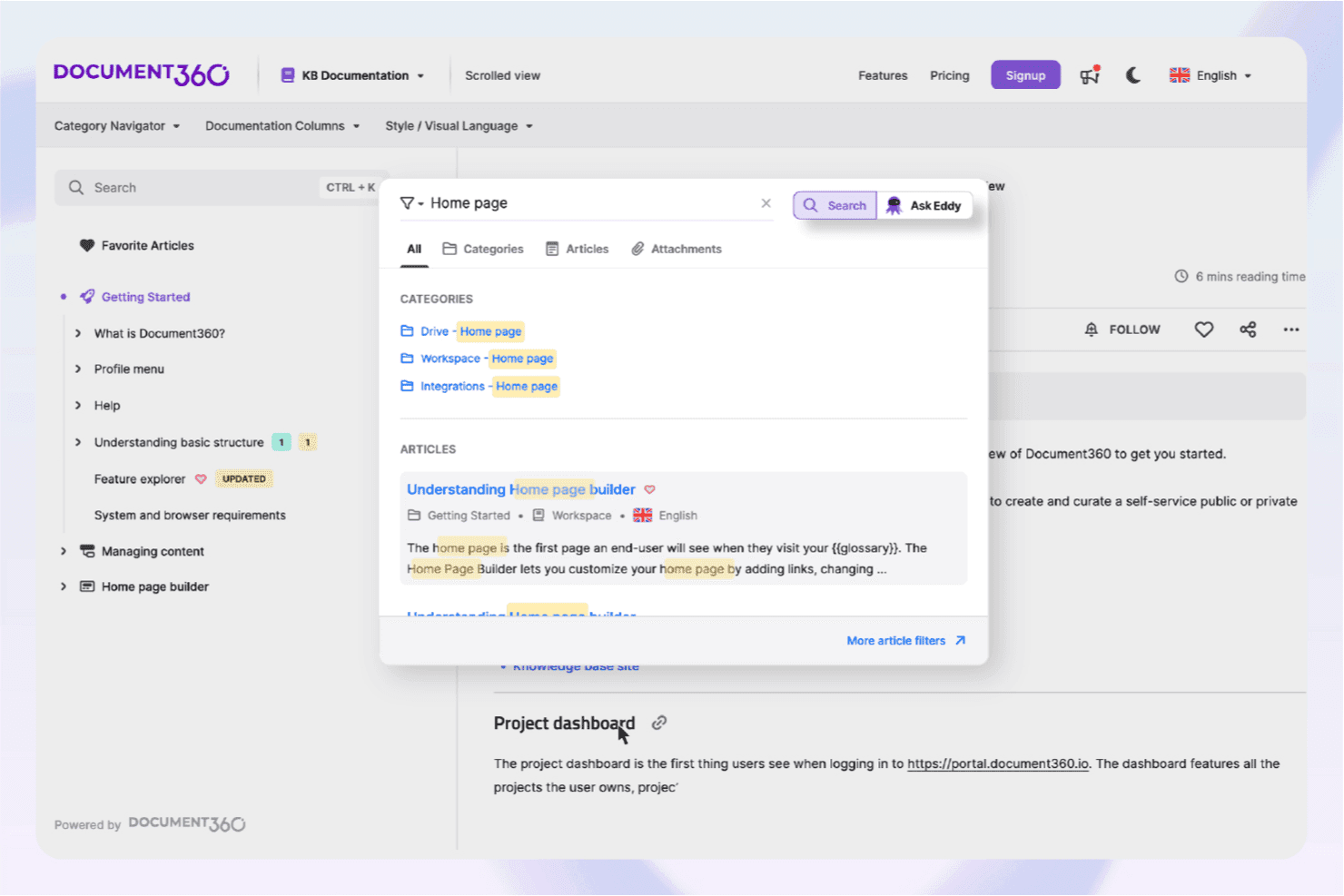
Document360’s AI assistive search helps users quickly locate relevant knowledge base content. Document360 is an AI-powered knowledge base platform that lets teams build, publish, and manage self-service documentation across multiple channels, with tools for AI content generation, semantic search, and an embeddable chatbot.
Who Is Document360 Best For?
Document360 is a strong fit for product marketing managers and customer-facing teams that need to publish and maintain help centers, release notes, and self-service portals across multiple channels.
Why I Picked Document360
Document360 earns its spot on my shortlist because it's built from the ground up for multi-channel self-service delivery, covering public knowledge bases, embeddable help widgets, and contextual in-product help mapped to specific pages. I especially like the MCP Server, which connects your knowledge base directly to AI assistants like ChatGPT and Claude for live, permission-aware querying. The Eddy AI chatbot pulls from articles, PDFs, and connected ticket systems to surface cited answers across every channel your users already rely on.
Document360 Key Features
- AI Writing Agent: Generates structured documentation drafts from uploaded meeting transcripts, videos, audio files, and prompts directly in the editor.
- Revision history with rollback: Tracks every article version and lets you restore any previous draft without manual backup.
- Custom workflow builder: Assigns documentation tasks to specific team members with review stages, due dates, and publishing approvals.
- GitHub integration: Converts Markdown repositories into structured, published documentation without leaving your existing code workflow.
Document360 Integrations
Document360 offers 60+ integrations, including Zendesk, Freshdesk, Slack, Microsoft Teams, Salesforce, GitHub, Intercom, and Make. It also provides a REST API, webhooks, MCP Server connectivity, and Zapier.
Pros and Cons
Pros:
- Multi-channel publishing supports embedded contextual help
- Meeting transcripts become structured documentation drafts
- Eddy AI cites answers across source content
Cons:
- Research feedback lacks multi-source synthesis
- No native PRD or roadmap templates
Learn more about Document360: Best for browser-captured SOP creation
- Free plan available
- From $15/user/month (billed annually)
Visit WebsiteCustomer Rating:4.8/5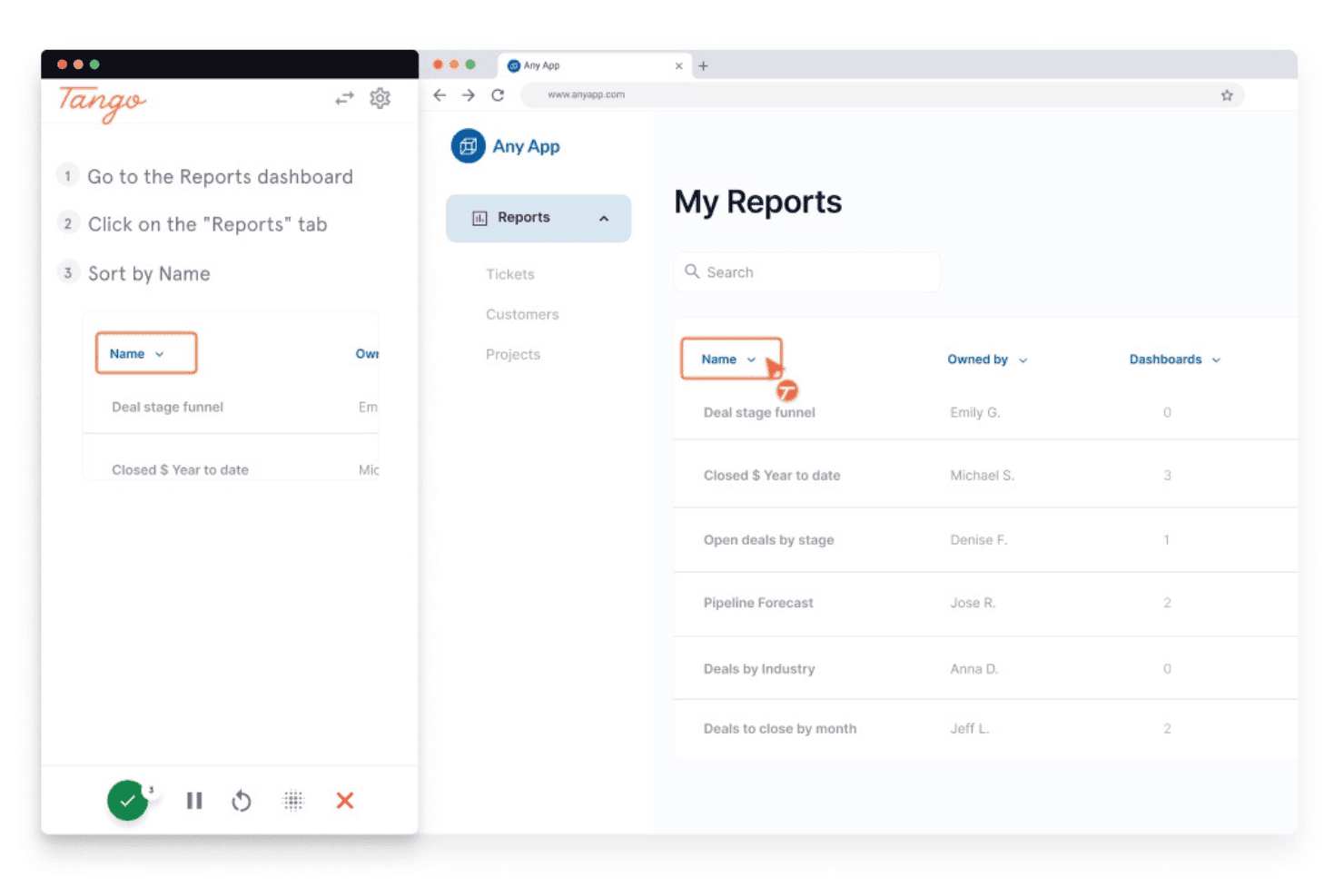
Tango guides users through sorting reports step-by-step. Tango is a process documentation and digital adoption platform that captures browser-based workflows in real time, automatically generating step-by-step guides, annotated screenshots, and SOPs.
Who Is Tango Best For?
Tango is a strong fit for operations, IT, and enablement teams that need to document browser-based processes and build step-by-step SOPs without manual effort.
Why I Picked Tango
Tango earns its spot on my list because it's the best tool I've found for capturing browser-based SOPs without any manual documentation effort. As you click through a workflow, Tango records every step in real time, producing annotated screenshots and structured guides automatically. I especially like the SOP Creator, which instantly formats captured processes into polished, shareable standard operating procedures that embed directly into Notion or Confluence.
Tango Key Features
- Voice transcription: Records spoken narration during workflow capture and converts it to text, automatically generating step descriptions from your commentary.
- Viewer analytics: Tracks which guides are being viewed, how far users progress, and which steps cause drop-off, so you can identify gaps in your documentation.
- Automatic PII redaction: Detects and blurs sensitive information captured during workflow recording before a guide is published or shared.
- Multi-path workflows: Documents branching processes with multiple decision points in a single guide, supporting non-linear workflows rather than just simple step sequences.
Tango Integrations
Tango supports embed-based integrations with Notion, Confluence, and Coda, plus learning management systems and ticketing tools. It also has a Zapier connector, but no native bidirectional integrations with Jira, Linear, Figma, Dovetail, Gong, or Slack.
Pros and Cons
Pros:
- Can embed SOPs directly into knowledge bases
- Annotated screenshots generated automatically in real time
- Instantly captures processes as step-by-step guides
Cons:
- No AI-powered search functionality for docs
- Cannot generate PRDs or release notes
Learn more about Tango: Best for automated step-by-step process capture
- Free plan + free demo available
- From $12/seat/month (billed annually)
Visit WebsiteCustomer Rating:4.8/5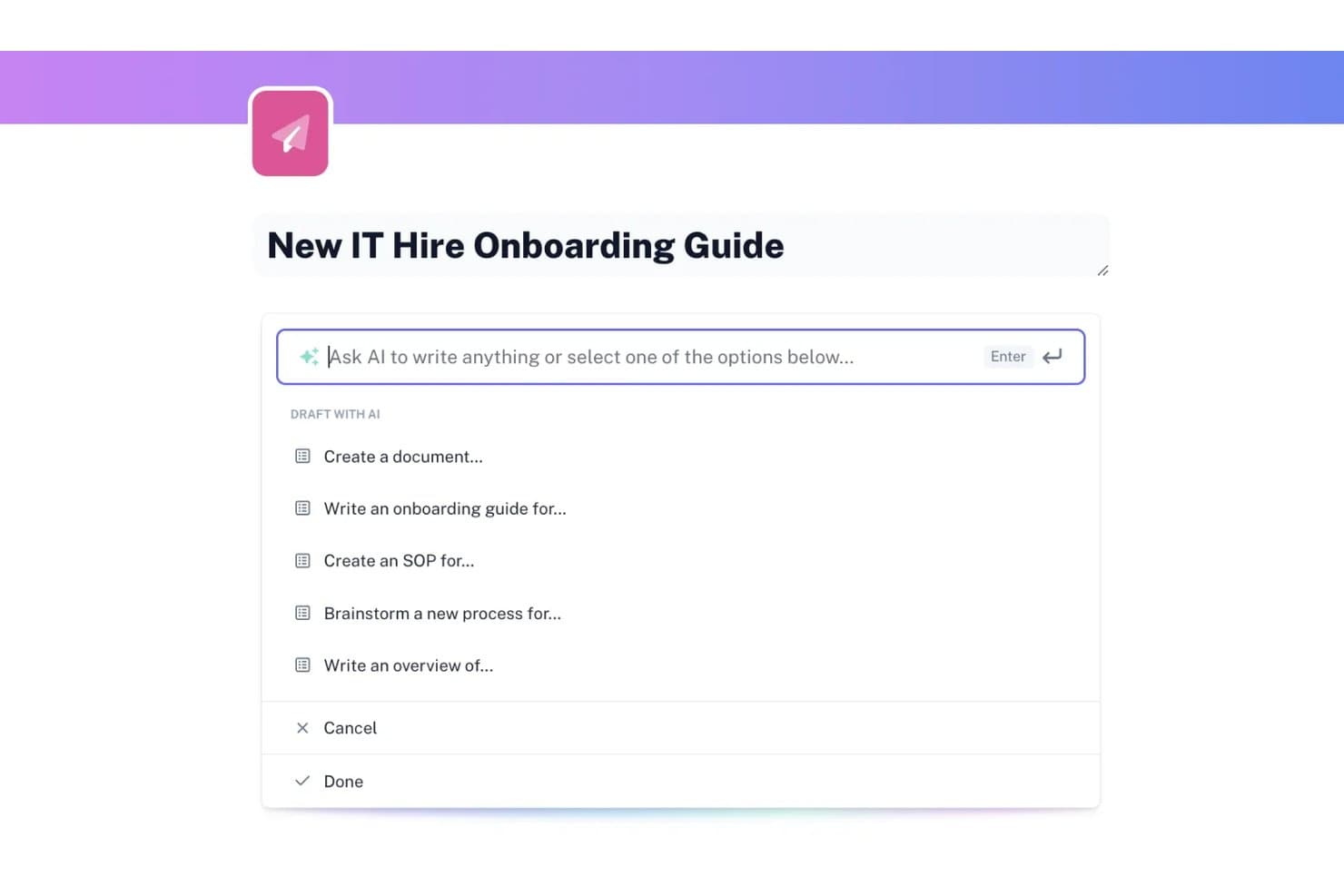
Scribe lets users draft documents with AI-powered writing prompts. Scribe is an AI documentation tool that automatically captures workflows as you work and turns them into step-by-step guides, with additional AI writing tools for generating SOPs, onboarding guides, and other process documents.
Who Is Scribe Best For?
Scribe is a strong fit for IT, operations, and support teams that need to document processes quickly without spending hours writing guides from scratch.
Why I Picked Scribe
I picked Scribe as one of the best because no other tool on this list captures process documentation as automatically as it does. Install the browser extension, run through a workflow once, and Scribe generates an annotated, step-by-step guide without any manual writing. I especially like Autocapture, which surfaces recurring workflows in approved apps in the background, so your team's most-used processes get documented without anyone pressing record.
Scribe Key Features
- Scribe AI writing tools: Generate SOPs, onboarding guides, tool overviews, and help centers from a prompt directly within Pages.
- On-screen walkthroughs: Pin step-by-step guidance to specific elements inside a web app so users get in-context instructions as they work.
- Version history: Review a full edit log showing who changed a guide and when, with the option to revert to any previous version.
- Multi-format export: Export guides to PDF, HTML, or Markdown, or share them as embeds, links, or videos across your existing tools.
Scribe Integrations
Scribe lists integrations with Confluence, SharePoint, Slack, Microsoft Teams, Zendesk, Salesforce Knowledge, Notion, and ClickUp. It also offers an API and Model Context Protocol access for custom integrations and AI clients.
Pros and Cons
Pros:
- Guides are easy to reuse across teams
- Autocapture surfaces undocumented recurring workflows
- Turns screen actions into annotated guides
Cons:
- Generated screenshots often need manual corrections
- Complex workflows need workarounds and manual formatting
Learn more about Scribe: Best for AI Q&A across a shared wiki
- Free plan + free trial + free demo available
- From $10/user/month
Visit WebsiteCustomer Rating:4.6/5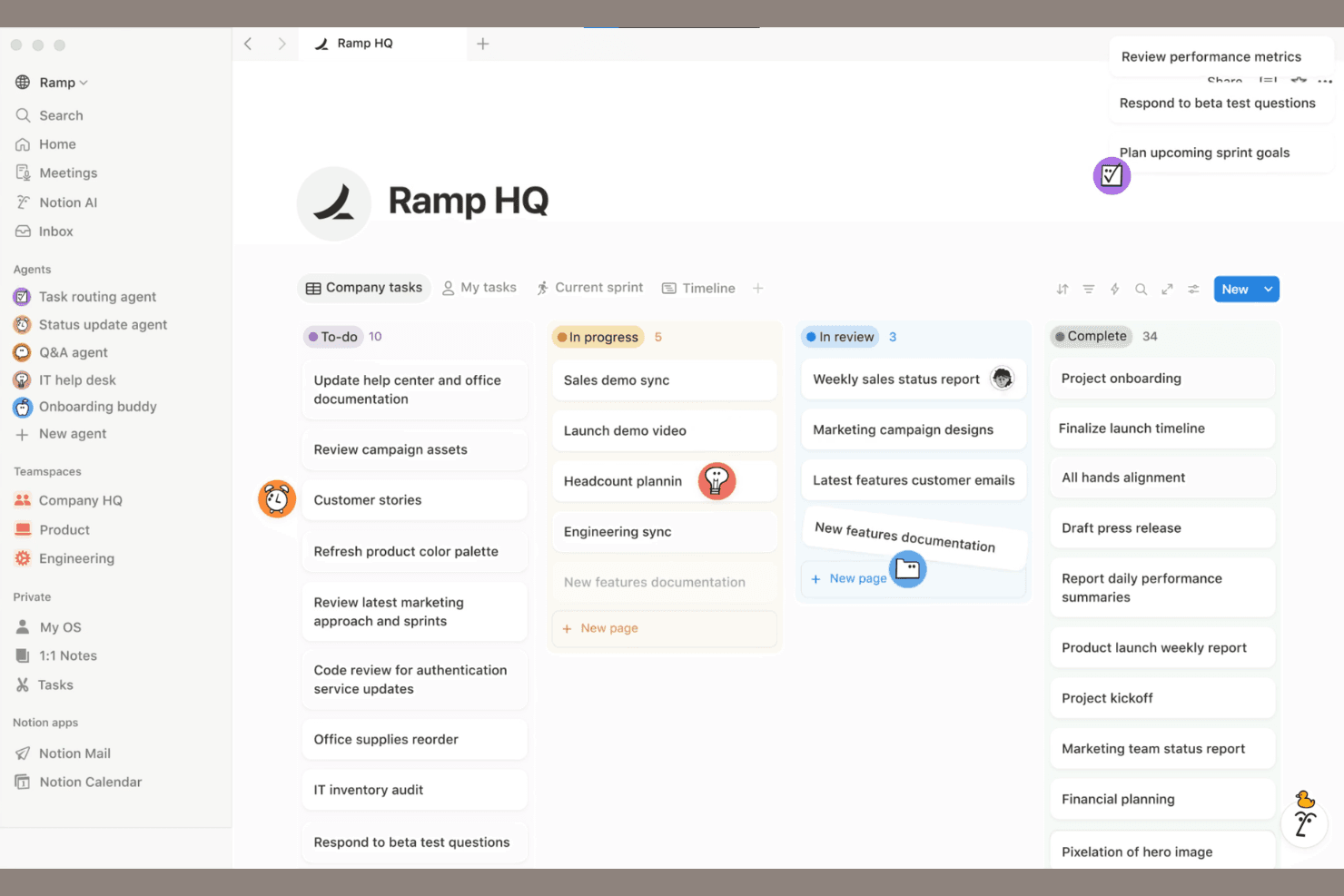
Notion combines AI docs, collaboration, and databases in one workspace. Notion is an AI-powered workspace that combines wikis, databases, and block-based docs with AI writing, search, and retrieval tools to help teams capture and organize knowledge in one place.
Who Is Notion Best For?
Notion works well for teams that want to centralize knowledge in a shared wiki and use AI to answer questions directly from that content.
Why I Picked Notion
I've included Notion in my top picks because it's genuinely one of the best tools for asking questions directly across a shared team wiki. Notion AI searches your workspace content and connected apps, then cites the exact source it pulled from, so you're not just getting an answer but a pointer back to the page that contains it. I also like the verified pages feature, which lets knowledge managers badge content as current so AI answers prioritize trustworthy material over outdated pages.
Notion Key Features
- AI Meeting Notes: Automatically transcribes meetings and generates summaries and action items directly inside your Notion workspace.
- Notion Sites publishing: Publishes pages to the web and syncs updates automatically whenever the underlying Notion page changes.
- Version history with change highlights: Tracks edits with author attribution and timestamps, letting you preview and restore earlier versions of any page.
- Block-based document editor: Supports over 50 content types—including code snippets, toggles, tables of contents, and embedded media—for building structured docs.
Notion Integrations
Notion offers marketplace integrations with Slack, Google Drive, GitHub, Jira, Figma, Salesforce, Box, and OneDrive. It also provides a public API, webhooks, MCP, CLI, SDK, and External Agents API for custom integrations.
Pros and Cons
Pros:
- Wikis, databases, and docs share one workspace
- Meeting notes become documented action items
- AI answers cite source pages
Cons:
- Large knowledge bases complicate search
- AI retrieval can miss database details
Learn more about Notion: Best for verification-driven team knowledge bases
- 14-day free trial + demo available
- From $10/user/month (billed annually)
Visit WebsiteCustomer Rating:4.7/5
Slite offers verified docs, AI search, and collaborative knowledge management. Slite is a collaborative documentation platform for teams that brings together structured note-taking, AI-powered search, and knowledge base organization in one workspace.
Who Is Slite Best For?
Slite is a good fit for distributed teams and startups that need to organize and share internal knowledge.
Why I Picked Slite
I picked Slite as one of the best because I can organize team knowledge into channels and collections, making it easy to keep documentation structured as my team grows. I like using the AI-powered Ask feature to surface answers from our docs instantly. My team is able to collaborate in real time on meeting notes, project docs, and internal wikis without losing context.
Slite Key Features
- Document version history: Track and restore previous versions of any document.
- Access permissions: Set granular access controls for teams and individuals.
- Templates library: Use pre-built templates for meeting notes, project plans, and more.
- Markdown support: Format documentation with markdown for structured, readable content.
Slite Integrations
Slite offers native integrations with Slack, Google Drive, Google Docs, Jira, Trello, Asana, Figma, Notion, Airtable, ClickUp, and Zapier, and provides an API for custom integrations.
Pros and Cons
Pros:
- Built-in templates for quick documentation setup
- Organized channels for structured team knowledge
- AI-powered Ask feature for instant answers
Cons:
- No offline editing mode available
- Lacks granular user permission controls
Learn more about Slite: Best for large-scale team documentation
- Free plan + 7-day trial available
- From $5.78/user/month (billed annually)
Visit WebsiteCustomer Rating:4.3/5
Confluence offers AI insights with inline definitions and smart tooltips. Confluence is a collaborative documentation platform from Atlassian that lets teams create, organize, and manage knowledge bases, project documentation, and internal wikis with AI-powered content features.
Who Is Confluence Best For?
Confluence is a strong fit for large organizations and enterprises that need to manage extensive internal documentation across distributed teams.
Why I Picked Confluence
I picked Confluence as one of the best because I can organize massive volumes of team documentation in structured spaces and pages. I like using its AI features to summarize meeting notes and auto-generate content from prompts. My team relies on its granular permissions to manage access across departments.
Confluence Key Features
- Page version history: Track and restore previous versions of any page.
- Templates library: Access pre-built templates for meeting notes, project plans, and more.
- Inline comments: Add feedback and questions directly on specific sections of a page.
- Macros support: Embed dynamic content like task lists, calendars, and roadmaps within documentation.
Confluence Integrations
Confluence offers native integrations with Jira, Trello, Slack, Microsoft 365, Google Drive, Dropbox, GitHub, Salesforce, Zoom, and Box, and provides an API for custom integrations.
Pros and Cons
Pros:
- Page versioning supports detailed audit trails
- Extensive template library for structured content
- Deep integration with Jira for project tracking
Cons:
- Search can be slow with large spaces
- AI features require premium plans
 Best for in-code documentation generation
- Free demo available
- Pricing upon request
Visit WebsiteCustomer Rating:4.4/5
Swimm offers AI code docs with auto-syncing snippets and dev workflow integration. Swimm is an AI-powered documentation platform for engineering teams that generates, maintains, and syncs in-code documentation directly with your codebase.
Who Is Swimm Best For?
Swimm is a good fit for software development teams who need to generate and maintain in-code documentation directly within their repositories.
Why I Picked Swimm
I picked Swimm as one of the best because I can generate documentation directly from code, keeping docs synced with code changes through auto-updating snippets. I like using its AI-powered doc generation to create walkthroughs and explanations that stay relevant as the codebase evolves. My team is able to review, edit, and maintain documentation right inside our development workflow, which fits how we work day to day.
Swimm Key Features
- IDE plugins: Integrate documentation workflows directly into popular code editors.
- Smart doc suggestions: Get context-aware prompts for adding or updating documentation.
- Code-coupled tutorials: Create step-by-step guides linked to specific code sections.
- Documentation review workflows: Assign, review, and approve documentation changes within your team.
Swimm Integrations
Swimm offers native integrations with GitHub, GitLab, Bitbucket, and Slack, and provides an API for custom integrations.
Pros and Cons
Pros:
- Offers IDE plugins for in-context editing
- Supports code walkthroughs linked to codebase
- Syncs documentation with code automatically
Cons:
- Lacks advanced formatting for complex docs
- Limited integrations beyond code repositories
Learn more about Swimm: Best for structured technical content creation
- Free plan + 14-day trial + demo available
- From $65/site/month + $12/user/month (billed annually)

GitBook offers AI-powered docs with Git sync, editing, and collaboration tools. GitBook is an AI-powered documentation platform designed for technical teams to create, organize, and publish structured content, with features for collaborative editing, version control, and custom branding.
Who Is GitBook Best For?
GitBook is a good fit for technical writers and engineering teams at SaaS companies who need to create and maintain structured product documentation.
Why I Picked GitBook
I picked GitBook as one of the best because I can structure technical documentation with nested pages, custom navigation, and markdown support. I like using its AI assistant to generate summaries and improve clarity in API docs and developer guides. My team is able to collaborate on content with granular version control and review workflows, which keeps our technical documentation organized and up to date.
GitBook Key Features
- Custom domains: Publish documentation to your own branded web address.
- Access controls: Set granular permissions for teams and external collaborators.
- Content embedding: Embed rich media, code snippets, and interactive elements in docs.
- Public and private spaces: Organize documentation into spaces with configurable visibility.
GitBook Integrations
GitBook offers native integrations with GitHub, Slack, and Google Analytics, and provides an API for custom integrations.
Pros and Cons
Pros:
- Version history and branching for safe editing
- Offers structured content blocks
- AI generates technical documentation from prompts
Cons:
- API access is restricted to higher plans
- No native multi-language documentation support
Learn more about GitBook: Best for OpenAPI-generated interactive API docs
- Free plan + free trial + free demo available
- From $250/month (billed annually)
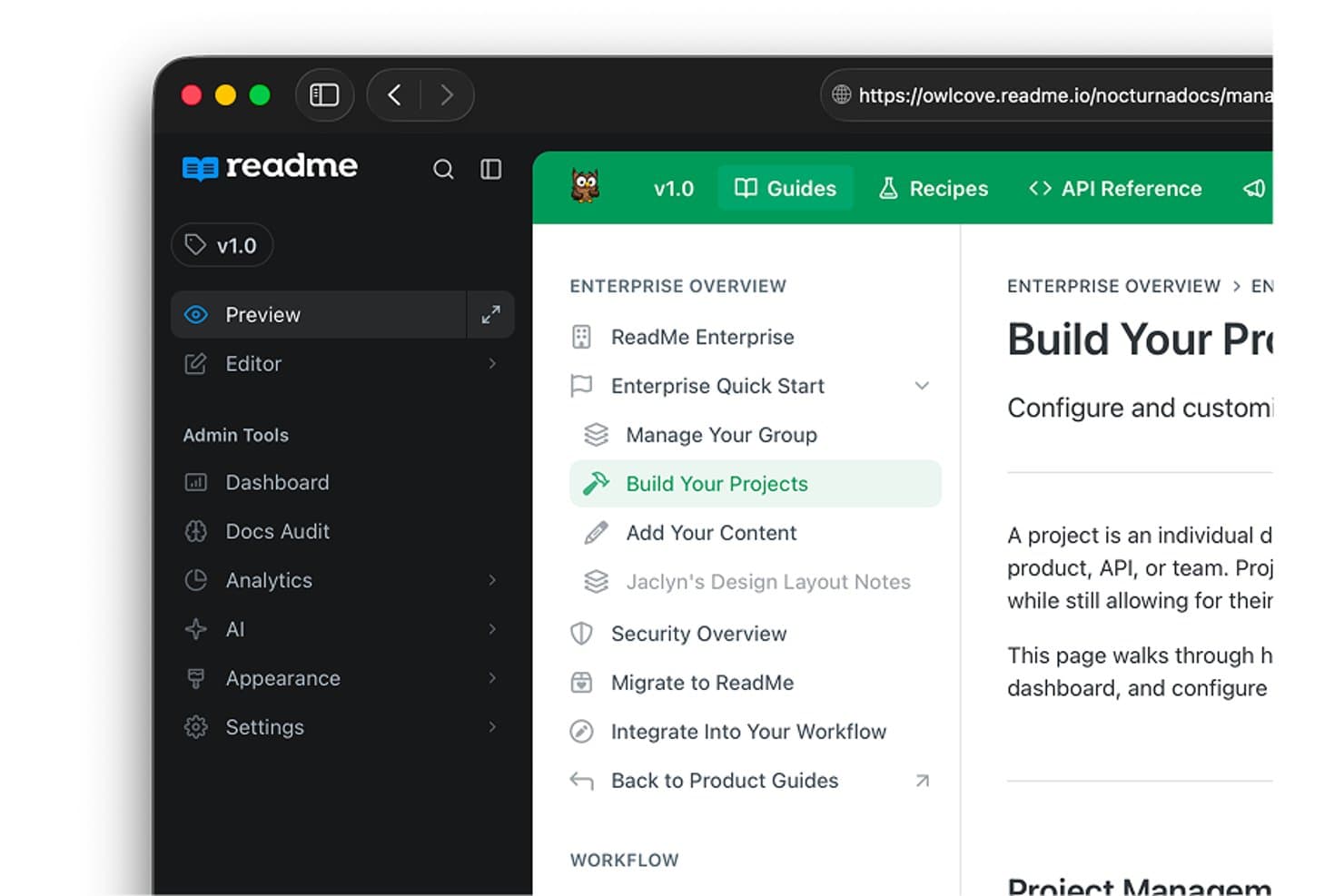
ReadMe organizes documentation into structured project sidebars. ReadMe is an API documentation platform that combines interactive API references, OpenAPI-based reference generation, AI-assisted content drafting and auditing, and an AI knowledge assistant for developer-facing documentation sites.
Who Is ReadMe Best For?
ReadMe is a strong fit for developer relations and API teams who need to ship interactive, OpenAPI-driven documentation that developers can explore and test directly in the browser.
Why I Picked ReadMe
ReadMe earns its spot on my shortlist because it's purpose-built for OpenAPI-driven API documentation, which makes it the strongest option I've seen for developer relations teams shipping interactive references. I particularly like how the Agent drafts full guides directly from an OpenAPI spec, so you're not starting from scratch every time your API evolves. The GitHub AI Writer also monitors pull requests and proposes documentation updates on a review branch, keeping your published docs in sync with code changes without ever bypassing human review.
ReadMe Key Features
- Ask AI knowledge assistant: Answers developer questions using your published documentation, with links to source pages so readers can verify and explore further.
- Multiplayer editing: Multiple team members can edit documentation simultaneously, with branching and review workflows to manage changes before publishing.
- AI Linter: Checks documentation pages against configured style rules and flags issues, helping teams maintain consistent quality across their docs.
- Multilingual publishing: Teams can publish documentation in 11 supported languages, with localized navigation and search returning results in the reader's selected language.
ReadMe Integrations
ReadMe offers nine native integrations, including GitHub, GitLab, Bitbucket, Slack, Zendesk, Intercom, Segment, Google Analytics, and Statuspage. It also supports an API for custom integrations and bi-directional documentation sync.
Pros and Cons
Pros:
- GitHub AI Writer proposes reviewed documentation updates
- AI drafts guides from OpenAPI specifications
- Interactive API references support live test calls
Cons:
- Users report maintenance and pipeline friction
- A reviewer reported buggy documentation search
Learn more about ReadMe: Best for advanced search in knowledge bases
- Free demo + 14-day free trial available
- From $249/month

Helpjuice offers an AI knowledge base with docs and article management. Helpjuice is a cloud-based AI knowledge base platform for creating, organizing, and managing internal and external documentation with advanced search, analytics, and collaborative editing features.
Who Is Helpjuice Best For?
Helpjuice is a strong fit for support teams and knowledge managers at midsize to large organizations who need advanced search and analytics in their documentation.
Why I Picked Helpjuice
I picked Helpjuice as one of the best because its AI-powered search lets me surface relevant documentation instantly, even from large, complex knowledge bases. I like using its advanced analytics to see what users are searching for and where gaps exist. The article versioning and collaborative editing features help my team keep content accurate and up to date.
Helpjuice Key Features
- Custom branding: Apply your company’s logo, colors, and domain to the knowledge base.
- Rich text editor: Format articles with images, videos, tables, and code blocks.
- Access permissions: Set user roles and restrict access to specific content.
- Multi-language support: Create and manage documentation in multiple languages.
Helpjuice Integrations
Native integrations are not clearly documented. The tool supports integrations via its API for custom connections.
Pros and Cons
Pros:
- Custom branding for company-specific knowledge bases
- Analytics show article performance and gaps
- AI search delivers highly relevant results
Cons:
- Higher starting price than many competitors
- No built-in workflow automation tools
Learn more about Helpjuice:
Outras ferramentas de documentação com IA
Eis algumas opções adicionais de ferramentas de documentação com IA que não entraram na minha lista restrita, mas que ainda vale a pena conhecer:
- 11GuruBest for AI wiki suggestions
- 12MintlifyBest for developer-focused docs automation
- 13NuclinoBest for lightweight team knowledge with AI
- 14TrainualBest for AI-assisted SOP and process docs
- 15ClickHelpBest for AI-assisted technical doc authoring
- 16BloomfireBest for deep indexing of video content
- 17ArchbeeBest for multi-product knowledge portals
- 18Bit.aiBest for interactive rich media integration
- 19SlabBest for GitHub-synced team knowledge bases
- 20Aha! KnowledgeBest for connecting docs to product roadmaps
How I Evaluate AI Documentation Tools
To make this list, a tool's AI must handle real documentation work, like turning workflows into guides and updating content as processes change. From there, I evaluate three things. Core functionality carries the most weight: creating and editing docs, plus organizing and finding them. Then I consider automated workflow capture and how well each tool fits your team's documentation needs.
Core Functionality (Table Stakes For This List)
When I'm selecting tools for my list, I score each one on a scale from 0 (does not offer the functionality) to 5 (excels in this area) for each core functionality listed below. I then convert the total into a percentage to help assess each tool's overall fit, with extra weight on any functionalities I’ve deemed essential.
- AI Documentation Support (Essential): I look for AI that can turn meeting notes, workflows, or product changes into useful documentation with limited manual cleanup.
- Documentation Creation (Essential): I assess how easily teams can draft, capture, and edit content such as release notes, setup guides, or internal procedures.
- Organization & Management: I consider whether teams can structure docs with spaces, categories, permissions, or version history as product knowledge grows.
- Sharing & Publishing: I check whether teams can publish customer help, share internal guides, or export content while keeping updates manageable.
- Search & Retrieval: I look for reliable ways to find answers across a knowledge base, especially when support teams need a specific troubleshooting step.
- Maintenance & Updates: I evaluate how teams can revise docs after a feature or process changes, including change tracking and AI-assisted update workflows.
Once I have a list of tools that meet the criteria, I consider what sets each platform apart.
Differentiating Factors (What Sets Vendors Apart)
Here's how I compare and contrast different vendors:
Standout Features
I look for automated workflow capture that records clicks and screenshots, then turns them into step-by-step guides your team can use immediately. Tools like Scribe and Tango handle this differently, so I evaluate how much cleanup each output needs. I also check for AI knowledge assistants that answer questions using your existing docs and link back to sources. When a process changes, automated documentation synchronization matters—I want to see whether the tool detects updates in connected systems and flags outdated content before it causes confusion.
Beyond Features
I evaluate how well a tool fits your actual documentation mix—whether that's API references, internal wikis, or customer help centers. A platform like Swimm targets developer docs, while Document360 covers both technical and support content, so alignment matters more than feature count. I also check integration depth with tools like Jira, GitHub, and Slack, since docs that live outside your team's workflow go stale fast. Finally, I look at AI accuracy controls—specifically whether a tool surfaces source references and supports human review before publishing.
Como escolher ferramentas de documentação com IA
É fácil perder-se em listas extensas de funcionalidades e estruturas de preços complexas. Para o ajudar a manter o foco enquanto analisa o seu processo específico de seleção de software, apresentamos uma lista de verificação dos fatores a ter em conta:
| Fator | O que deve considerar |
|---|---|
| FatorEscalabilidade | O que deve considerarA ferramenta conseguirá gerir o volume de documentação à medida que a sua equipa ou empresa cresce? Verifique os limites de utilizadores, o armazenamento e o desempenho com bases de conhecimento de grandes dimensões. |
| FatorIntegrações | O que deve considerarEstabelece ligação nativa aos seus sistemas principais (Slack, Jira, Google Workspace, etc.)? Considere o acesso à API para fluxos de trabalho personalizados. |
| FatorPossibilidade de personalização | O que deve considerarPode adaptar a estrutura, a marca e as permissões às necessidades da sua organização? Procure modelos flexíveis e gestão de funções. |
| FatorFacilidade de utilização | O que deve considerarA sua equipa conseguirá adotá-la rapidamente? Avalie a interface, a navegação e a formação necessária para utilizadores não técnicos. |
| FatorImplementação e integração inicial | O que deve considerarQuanto tempo será necessário para começar a utilizar a ferramenta? Avalie as ferramentas de migração, o apoio à integração inicial e a disponibilidade de recursos de formação. |
| FatorCusto | O que deve considerarOs escalões de preços são claros e previsíveis à medida que cresce? Tenha atenção a taxas ocultas, preços baseados no número de utilizadores e custos de funcionalidades avançadas. |
| FatorMedidas de segurança | O que deve considerarA ferramenta cumpre as suas normas de proteção de dados? Procure encriptação, início de sessão único, registos de auditoria e conformidade com os regulamentos relevantes para o seu setor. |
| FatorDisponibilidade do apoio | O que deve considerarQue canais de apoio são disponibilizados e em que horários? Considere se precisa de chat em direto, apoio telefónico ou gestão dedicada da conta. |
O que são ferramentas de documentação com IA?
As ferramentas de documentação com IA são plataformas de software que utilizam inteligência artificial para ajudar as equipas a criar, organizar e gerir bases de conhecimento ou documentação técnica. Estas ferramentas automatizam tarefas como a geração de conteúdos, a pesquisa e a categorização, facilitando a manutenção de uma documentação precisa e acessível. Suportam a colaboração, o controlo de versões e a análise, ajudando as organizações a manter recursos atualizados para colaboradores ou clientes.
Funcionalidades das ferramentas de documentação com IA
Ao selecionar ferramentas de documentação com IA, procure as seguintes funcionalidades principais:
- Pesquisa baseada em IA: Utiliza inteligência artificial para fornecer resultados relevantes a partir de grandes bases de conhecimento, ajudando os utilizadores a encontrar respostas de forma rápida e precisa.
- Geração automática de conteúdos: Utiliza a IA para elaborar, resumir ou sugerir conteúdos de documentação, reduzindo a escrita manual e acelerando a criação de conteúdos.
- Controlo de versões: Regista as alterações efetuadas nos artigos ao longo do tempo, permitindo às equipas rever, reverter ou comparar versões anteriores para uma melhor gestão dos conteúdos.
- Ferramentas de colaboração: Permitem que vários utilizadores editem, comentem e revejam a documentação em simultâneo, apoiando o desenvolvimento de conteúdos baseado no trabalho em equipa.
- Permissões de acesso: Permitem aos administradores controlar quem pode consultar, editar ou publicar documentos específicos, garantindo a proteção das informações sensíveis.
- Análise e relatórios: Fornecem informações sobre a utilização dos artigos, as tendências de pesquisa e as lacunas de conteúdos, ajudando as equipas a melhorar a qualidade e a relevância da documentação.
- Personalização da marca: Permite às organizações aplicar os seus próprios logótipos, cores e domínio, criando uma experiência de base de conhecimento consistente e profissional.
- Suporte para vários idiomas: Permite criar e gerir documentação em vários idiomas, tornando os recursos acessíveis a equipas de todo o mundo.
- Integrações: Liga-se a outras ferramentas empresariais, como plataformas de gestão de projetos, comunicação ou CRM, para simplificar os fluxos de trabalho e centralizar as informações.
- Editor de texto formatado: Disponibiliza opções de formatação para texto, imagens, vídeos e blocos de código, tornando a documentação clara, apelativa e fácil de acompanhar.
Benefícios das ferramentas de documentação com IA
A implementação de ferramentas de documentação com IA proporciona vários benefícios à sua equipa e à sua empresa. Eis alguns dos benefícios que pode esperar:
- Criação mais rápida de conteúdos: A geração automática de conteúdos e as sugestões da IA ajudam as equipas a produzir documentação mais rapidamente e com menos esforço manual.
- Maior precisão nas pesquisas: A pesquisa baseada em IA fornece resultados altamente relevantes, facilitando aos utilizadores a localização das informações de que necessitam.
- Conhecimento consistente e atualizado: O controlo de versões e as ferramentas de colaboração garantem que a documentação se mantém precisa e reflete as atualizações mais recentes.
- Colaboração reforçada entre equipas: A edição, os comentários e os controlos de acesso em tempo real apoiam o trabalho em equipa entre departamentos ou localizações.
- Informações acionáveis: As funcionalidades de análise e elaboração de relatórios destacam lacunas nos conteúdos e tendências de utilização, orientando a melhoria contínua da sua base de conhecimento.
- Escalabilidade para equipas em crescimento: O suporte para vários idiomas e as permissões flexíveis facilitam a expansão da documentação à medida que a sua organização cresce.
- Apresentação profissional: A personalização da marca e a edição de texto formatado criam uma experiência aperfeiçoada e fácil de utilizar para públicos internos e externos.
Custos e preços das ferramentas de documentação com IA
A seleção de ferramentas de documentação com IA exige uma compreensão dos vários modelos de preços e planos disponíveis. Os custos variam consoante as funcionalidades, a dimensão da equipa, os complementos, entre outros fatores. A tabela abaixo resume os planos comuns, os respetivos preços médios e as funcionalidades normalmente incluídas nas soluções de ferramentas de documentação com IA:
Tabela comparativa de planos para ferramentas de documentação com IA
| Tipo de plano | Preço médio | Funcionalidades comuns |
|---|---|---|
| Tipo de planoPlano gratuito | Preço médio$0 | Funcionalidades comunsCriação básica de conteúdos, pesquisa de IA limitada, acesso para um único utilizador, armazenamento limitado e apoio da comunidade. |
| Tipo de planoPlano pessoal | Preço médio$5-$25/utilizador/mês | Funcionalidades comunsPesquisa baseada em IA, análise básica, integrações limitadas, um único utilizador e apoio por e-mail. |
| Tipo de planoPlano empresarial | Preço médio$20-$60/utilizador/mês | Funcionalidades comunsColaboração entre vários utilizadores, análise avançada, personalização da marca, acesso à API e apoio prioritário. |
| Tipo de planoPlano empresarial avançado | Preço médio$60-$120/utilizador/mês | Funcionalidades comunsUtilizadores ilimitados, segurança avançada, integrações personalizadas, gestor de conta dedicado e funcionalidades de conformidade. |
Perguntas frequentes sobre ferramentas de documentação com IA
Eis algumas respostas a perguntas comuns sobre ferramentas de documentação com IA:
Como é que as ferramentas de documentação com IA melhoram a gestão do conhecimento?
As ferramentas de documentação baseadas em IA melhoram a gestão do conhecimento ao automatizarem a organização de conteúdos e ao apresentarem informações relevantes através de uma pesquisa inteligente. Ao utilizarem um LLM (modelo de linguagem de grande dimensão) potente, estas ferramentas conseguem identificar conteúdos desatualizados e ajudar na redação técnica, garantindo que todos os artigos se mantêm de elevada qualidade. Isto ajuda as equipas a manter a documentação de processos e os SOPs precisos, acessíveis e fáceis de atualizar à medida que as necessidades da empresa mudam.
As ferramentas de documentação com IA podem integrar-se com outro software empresarial?
Sim, a maioria das ferramentas de documentação com IA oferece integrações com plataformas empresariais populares, como o Slack, o Jira, o Google Workspace e ferramentas de gestão de projetos. Muitas também disponibilizam suporte especializado para documentação de API, permitindo aos programadores sincronizar repositórios de código e automatizar o processamento de documentos. Estas funcionalidades de colaboração ajudam a centralizar a informação e tornam a documentação mais acessível nos sistemas que a sua equipa já utiliza, funcionando frequentemente como um copiloto especializado para o conhecimento interno.
As ferramentas de documentação com IA são seguras para informações sensíveis?
Sim, muitas ferramentas de documentação com IA, incluindo soluções proprietárias e de código aberto, incluem funcionalidades de segurança como encriptação, SSO e registos de auditoria. Ao avaliar modelos de IA, certifique-se de que o fornecedor dispõe de protocolos rigorosos de privacidade de dados para impedir que as suas informações sensíveis sejam utilizadas para treinar versões públicas do ChatGPT ou outros modelos externos.
O que devo ter em conta ao migrar a documentação existente?
Durante a migração, tenha em conta as opções de importação da ferramenta, o suporte para vários formatos de ficheiro e a possibilidade de preservar a formatação e os metadados. Procure recursos de integração, guias de migração ou suporte dedicado para ajudar a sua equipa a fazer a transição sem problemas e sem perder informações valiosas.
As ferramentas de documentação com IA suportam vários idiomas?
Sim, muitas ferramentas de documentação com IA oferecem suporte para vários idiomas, permitindo-lhe criar e gerir documentação em diversas línguas. Isto é especialmente útil para equipas globais ou organizações que prestam serviços a clientes internacionais. Verifique sempre as capacidades linguísticas antes de escolher uma solução.