

O software de gestão de ideias de código aberto proporciona-lhe total visibilidade e controlo sobre a forma como a sua equipa promove a melhoria contínua, permitindo-lhe alojar, personalizar e expandir a plataforma conforme entender. Se pretende capacitar a sua equipa, garantir a transparência, evitar a dependência de um fornecedor ou simplesmente precisa de uma solução económica para a gestão de ideias, as opções de código aberto colocam-no no controlo. Nesta lista, encontrará as minhas escolhas das melhores ferramentas para recolher, estabelecer prioridades e agir sobre ideias, permitindo transformar contributos de todas as áreas da sua organização em progresso mensurável.
Why Trust Our Software Recommendations
6,700+
Reviews
20
Industry experts
16+
Evaluation factors
14
Years
Our team has been testing and reviewing software since 2012. As product managers ourselves, we know how difficult—and important—it is to choose the right software.
For this guide, we evaluated tools using hands-on testing and independent research, scoring tools using our selection criteria.
Our reviews reflect our human editorial judgment, not a sales pitch.
Expert reviewers:
- Andrew LumbySenior TPM
- Cristiano ValimSenior UI/UX Lead


Tabela comparativa: software de gestão de ideias de código aberto
Esta tabela comparativa resume os detalhes de preços das minhas principais escolhas de software de gestão de ideias de código aberto.
| Tool | Best For | Trial Info | Price | ||
|---|---|---|---|---|---|
| 1 | Best for kanban-based idea tracking via self-hosting | Free plan available | From €50/year (billed annually) | Website | |
| 2 | Best for self-hosted project-to-roadmap workflows | Free plan available; 14-day free trial available for Enterprise Cloud and on-premises | From €5.95/user/month (billed annually) | Website | |
| 3 | Best for agile teams tracking ideas to delivery | Free plan available | From 5€/month | Website | |
| 4 | Best for community-driven idea voting at scale | Free plan + 14-day free trial available | From $100/month | Website | |
| 5 | Best for AI-powered duplicate triage | 14-day free trial available | From $19/month (billed annually) | Website | |
| 6 | Best for unlimited feedback boards | Free plan available | From $25/month | Website | |
| 7 | Best for integrated public roadmaps | 14-day free trial + free plan + free demo available | From $9/month | Website | |
| 8 | Best for revenue-weighted B2B feedback boards | Free plan available | From $15/user/month | Website | |
| 9 | Best for MIT-licensed feedback with GitHub sync | Free plan available | Free, open-source | Website | |
| 10 | Best for developer-facing public feedback boards | Free plan available | From $3/user/month | Website |


Avaliações dos melhores softwares de gestão de ideias de código aberto
Abaixo, apresento os meus resumos detalhados dos melhores softwares de gestão de ideias de código aberto que entraram na minha lista restrita. As minhas avaliações analisam detalhadamente as funcionalidades, integrações e melhores casos de utilização de cada plataforma, para o ajudar a otimizar o seu processo de inovação.
 Best for kanban-based idea tracking via self-hosting
- Free plan available
- From €50/year (billed annually)
Visit WebsiteCustomer Rating:4.8/5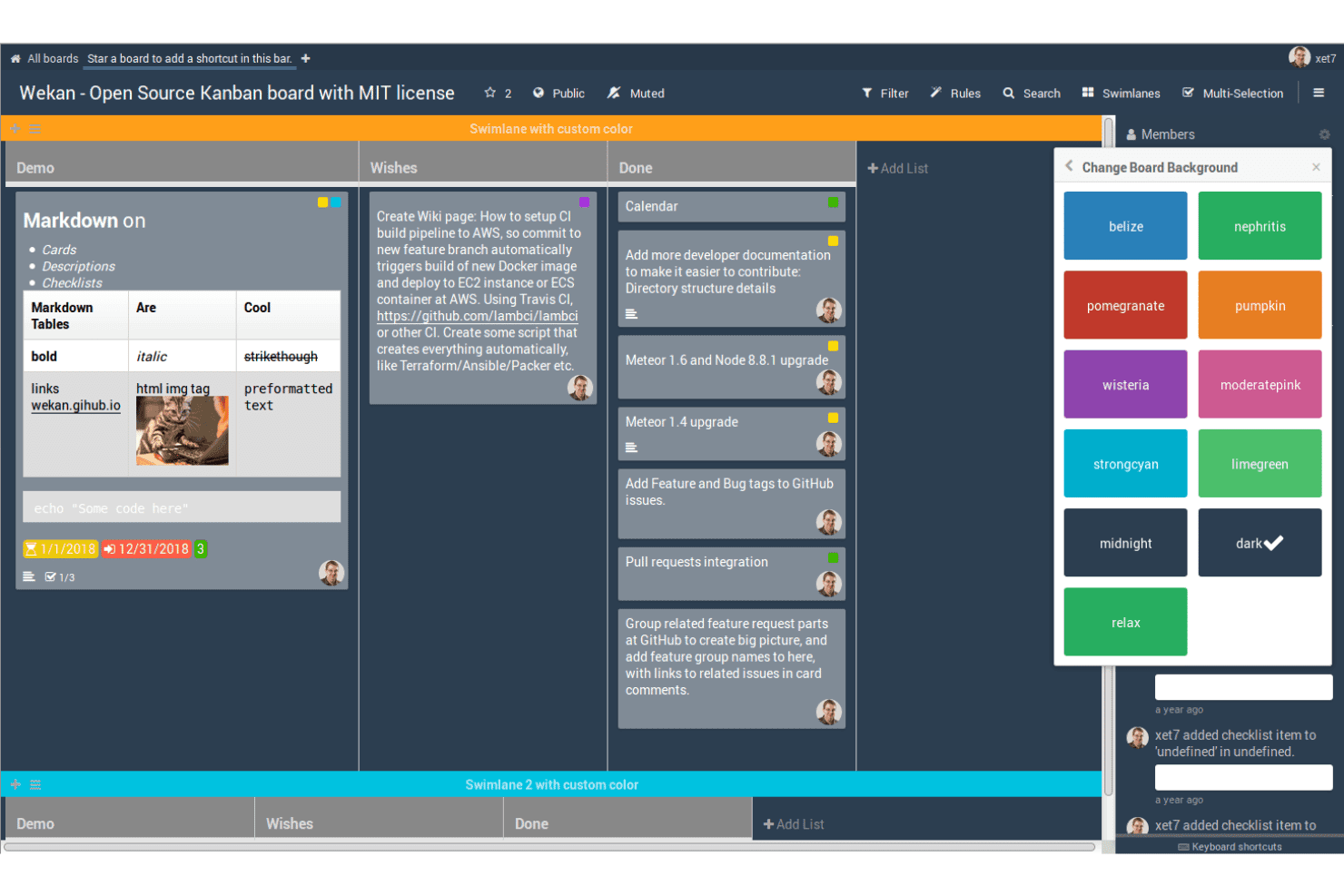
WeKan helps teams capture and organize ideas on open-source Kanban boards using customizable cards, lists, labels, and swimlanes. WeKan is a self-hosted, MIT-licensed kanban tool that organizes ideas as cards across customizable boards, with built-in voting, label-based categorization, automation rules, and a REST API for extending workflows.
Who Is WeKan Best For?
WeKan suits technically capable teams that want to self-host a kanban-based idea tracker and have the ability to configure it to fit their workflow.
Why I Picked WeKan
I picked WeKan as one of the best because it gives you complete control over your idea data through self-hosting, with deployment options spanning Docker, Helm, Snap, and a standalone zip bundle that runs without a container. I like that you can model a full idea workflow using lists as stages, like "Under Review → Planned → In Progress," and layer on automation rules that move cards automatically when conditions are met. The MIT license means zero proprietary restrictions on what you can customize or extend.
WeKan Key Features
- Card voting: Each card includes a built-in For/Against vote with an optional end date, public or private visibility, and a toggle to allow non-board members to participate.
- Nine-tier role system: Boards support nine distinct roles, including comment-only, read-only, and worker, giving you precise control over who can submit, comment, or edit.
- Automation rules: A trigger-and-action rule engine moves cards, updates fields, or fires actions across boards automatically when set conditions are met.
- Broad import support: WeKan imports boards from Trello, Jira, Asana, Kanboard, GitLab, and several other tools, reducing the friction of switching platforms.
WeKan Integrations
WeKan offers documented import and export connectivity with Jira, Asana, GitLab, OpenProject, Kanboard, Nextcloud Deck, and Zenkit. Its REST API, Python client, outgoing webhooks, and LDAP, CAS, OIDC/OAuth2, and SAML support enable custom workflows and authentication.
Pros and Cons
Pros:
- Granular roles support controlled participation
- Flexible boards model idea workflows
- MIT license enables deep customization
Cons:
- No portal for anonymous idea submissions
- For/Against voting lacks ranked prioritization
Learn more about WeKan: Best for self-hosted project-to-roadmap workflows
- Free plan available; 14-day free trial available for Enterprise Cloud and on-premises
- From €5.95/user/month (billed annually)
Visit WebsiteCustomer Rating:4.5/5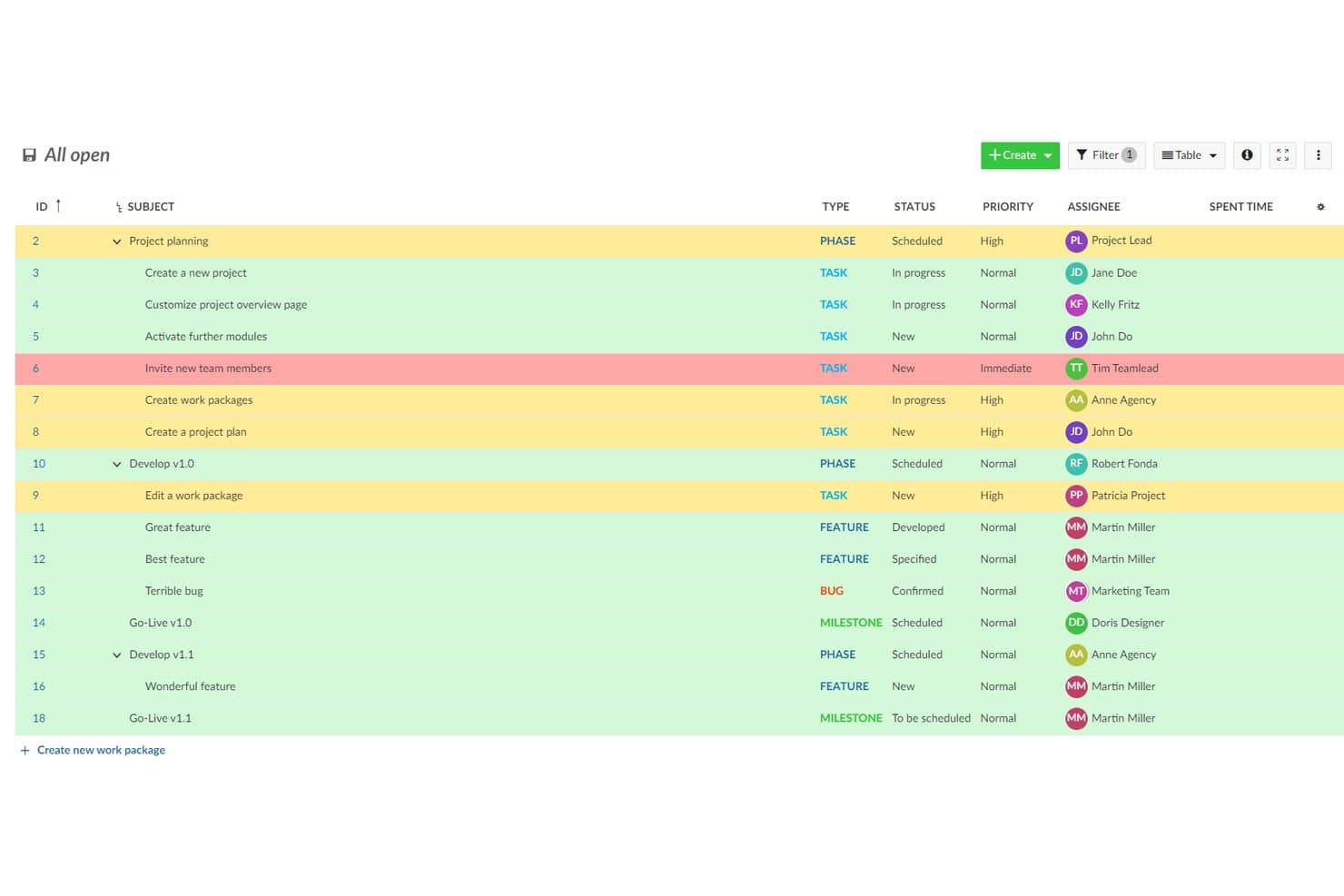
OpenProject organizes ideas and tasks with priority highlighting. OpenProject is a GPL-3.0 open-source project management suite that lets teams log and track ideas as work packages, organize them through customizable workflows, and move them into Kanban boards, Gantt charts, and product roadmaps.
Who Is OpenProject Best For?
OpenProject suits product and engineering teams that need to self-host their tooling and want a single place to move ideas through planning, delivery, and roadmap tracking.
Why I Picked OpenProject
I picked OpenProject as one of the best because it's the only tool on this list built to carry ideas all the way through delivery without leaving your infrastructure. Ideas log as work packages, get custom statuses, and move through configurable workflows into Kanban boards, Gantt charts, and a full product roadmap view in one GPL-3.0 codebase you fully own. I especially like that self-hosting is mature here, with Docker Compose, Helm, and Kubernetes options backed by active monthly releases and published security advisories.
OpenProject Key Features
- Custom work package types: Administrators can create dedicated task types like "Idea" or "Feature Request," each with its own fields, statuses, and workflow rules.
- REST API and webhooks: OpenProject exposes a full REST API and event-based webhooks for projects, tasks, and comments, letting teams build custom idea intake or reporting pipelines.
- Role-based workflow rules: Administrators define which status transitions each role can trigger per task type, so ideas move through review stages in a controlled, repeatable way.
- Forums module: Built-in threaded forums support structured discussion separate from individual work packages, with sticky posts, locking, and email notifications for followers.
OpenProject Integrations
OpenProject has documented native integrations with GitHub, GitLab, Nextcloud, OneDrive, and SharePoint, plus Git and SVN repositories for on-premises installations. Its REST API and webhooks support custom connections.
Pros and Cons
Pros:
- Workflows connect ideas to product roadmaps
- Self-hosting keeps idea data under control
- GPL-3.0 codebase supports full customization
Cons:
- External feedback requires accounts and permissions
- No native voting or idea rankings
Learn more about OpenProject: Best for agile teams tracking ideas to delivery
- Free plan available
- From 5€/month
Visit WebsiteCustomer Rating:4.3/5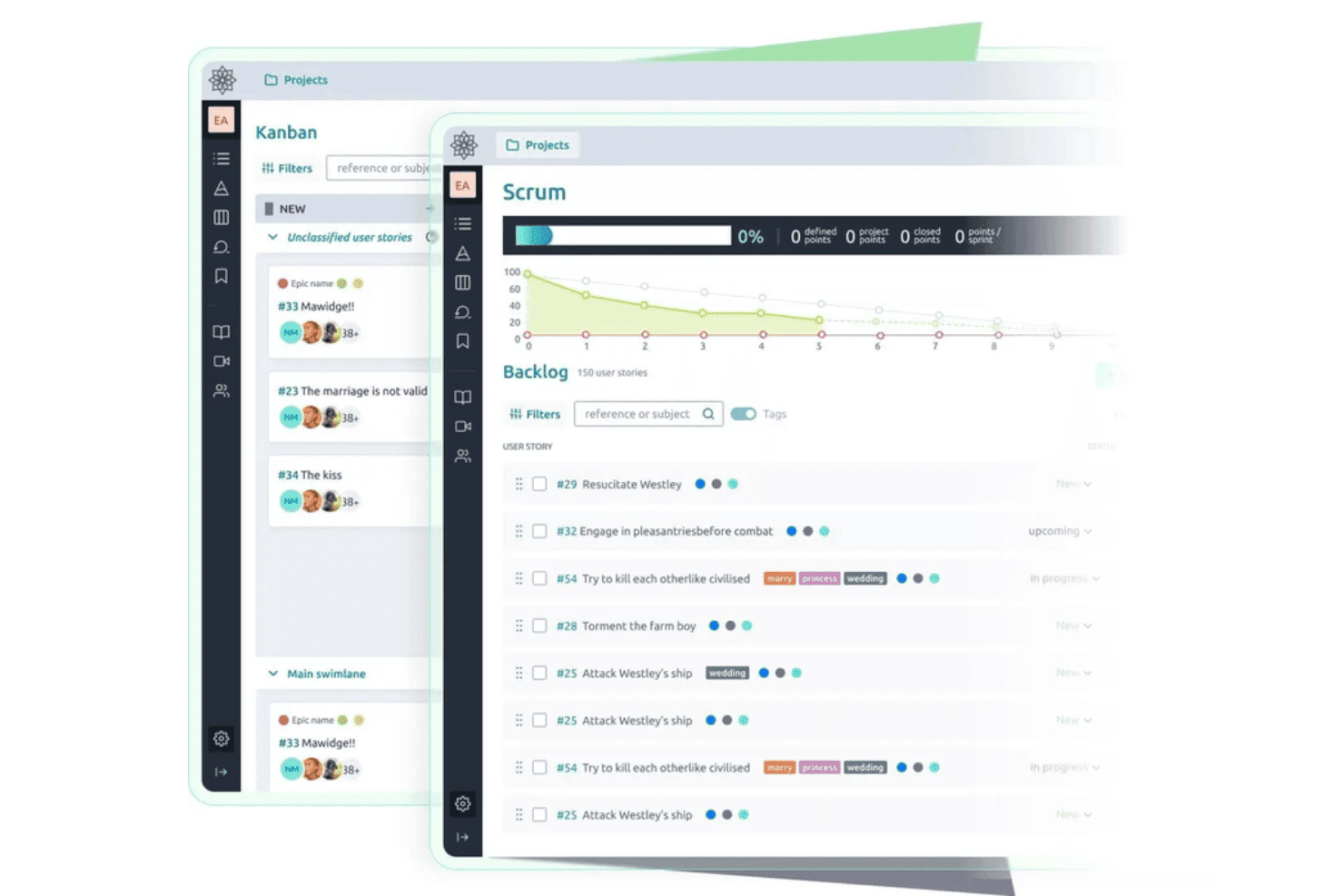
Taiga helps teams capture and develop ideas through open-source Kanban and Scrum workflows with backlogs and user stories. Taiga is an open-source agile project management tool that lets teams capture issues, user stories, and epics, vote on them, track them through customizable Scrum and Kanban workflows, and self-host the entire platform under an MPL-2.0 license.
Who Is Taiga Best For?
Taiga fits agile development teams that want to self-host their project tooling and track ideas from backlog through sprint delivery under a single open-source platform.
Why I Picked Taiga
I've included Taiga in my top picks because it's one of the few genuinely open-source tools that tracks an idea all the way from raw backlog item to sprint delivery under MPL-2.0 licensing with a documented Docker Compose setup. I like that teams can vote on issues directly from the issue detail page, sort by vote count, and promote a top-voted issue into a user story without switching tools. Custom statuses, colored tags, and custom fields let you shape the workflow around how your team actually moves ideas forward.
Taiga Key Features
- Public project discovery: Teams can list projects on Taiga's Discover page, letting external users browse and submit ideas without a project membership.
- Custom fields on all item types: Admins can add text, dropdown, date, number, and checkbox fields to epics, stories, tasks, and issues to capture structured idea metadata.
- REST API with voting endpoints: Taiga exposes upvote, downvote, and voter-list endpoints for epics, user stories, and issues, making it easy to build custom intake workflows.
- Docker Compose self-hosting: A supported
taiga-dockerrepo with a.envfile and launch scripts lets teams deploy and manage their own instance with full data control.
Taiga Integrations
Taiga offers native integrations with GitHub, GitLab, Bitbucket, Gogs, and Slack, plus importers for Jira, Trello, Asana, and more. Its REST API and webhooks support custom integrations, and it’s available on Zapier.
Pros and Cons
Pros:
- Public projects invite community voting
- Custom statuses carry ideas through delivery
- MPL-2.0 licensing supports genuine self-hosting
Cons:
- Flat comments limit community discussion
- No duplicate detection or idea merging
Learn more about Taiga: Best for community-driven idea voting at scale
- Free plan + 14-day free trial available
- From $100/month
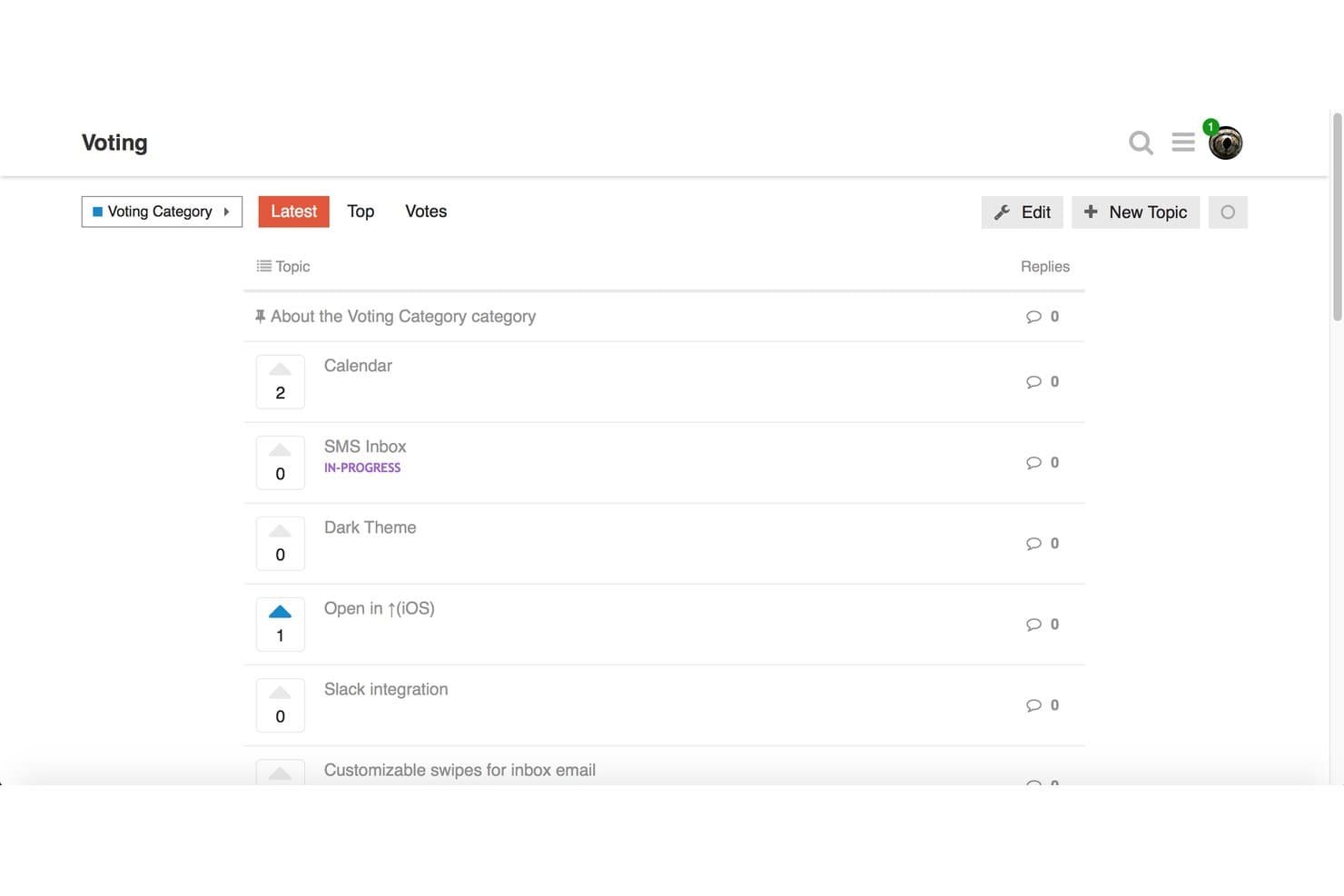
Discourse lets users vote on feature ideas to prioritize community requests. Discourse is a GPL-licensed, open-source forum platform that supports community idea submission, topic-based voting, threaded discussion, and category-based organization.
Who Is Discourse Best For?
Discourse works best for community managers and product teams that want open-source forum infrastructure where members can submit, vote on, and discuss ideas at a large scale.
Why I Picked Discourse
Discourse earns its spot on my shortlist because it handles community-driven idea voting at a scale that purpose-built tools struggle to match. I love that Topic Voting is now baked into core, so self-hosters can enable vote-based idea categories, sort submissions by recent vote activity, and award badges like "Brainstormer" without installing anything extra. The experimental Ideas category type also lets you remove per-user vote limits entirely, which is a meaningful option when you're running a large, open community with thousands of active contributors.
Discourse Key Features
- GPL-licensed open-source codebase: Discourse's full source code is publicly available on GitHub under the GPL license, so you can inspect, modify, and self-host it without restrictions.
- Docker-based self-hosting: A single command installs Discourse in a Docker container, with one-click upgrades and automatic backups built into the admin panel.
- Trust levels and community moderation: Members earn moderation abilities over time through a built-in trust level system, letting your community help manage content without admin intervention.
- Chat Integration plugin: Connects your Discourse forum to Slack, Microsoft Teams, Discord, and other messaging platforms, routing new topics and posts to the channels you choose.
Discourse Integrations
Discourse offers native integrations with Slack, Microsoft Teams, Discord, Jira, Zendesk, Salesforce, and GitHub, with availability varying by plan. Its REST API and webhooks support custom integrations.
Pros and Cons
Pros:
- Moderation tools support large-scale discussions
- Topic Voting supports community-driven prioritization
- GPL codebase supports genuine self-hosting
Cons:
- Upvotes lack weighted or negative scoring
- Status tracking relies on tags
Learn more about Discourse: Best for AI-powered duplicate triage
- 14-day free trial available
- From $19/month (billed annually)

Quackback offers boards for sorting and triaging feedback requests. Quackback is an open source idea management platform designed for collecting, organizing, and sorting your best ideas with collaborative features and advanced AI-driven workflows.
Who Is Quackback Best For?
Teams looking for a collaborative platform to manage idea submissions and automate duplicate detection with AI.
Why I Picked Quackback
I picked Quackback as one of the best because its AI-powered duplicate triage lets my team quickly identify and merge similar ideas. I like that I can set custom rules for how duplicates are flagged and review suggestions in a single dashboard.
Quackback Key Features
- Idea voting system: Allow team members and stakeholders to upvote or downvote submitted ideas.
- Category-based organization: Sort and browse ideas by custom categories for easier discovery.
- Commenting threads: Enable focused discussions on each idea with threaded conversations.
- AI-powered duplicate triage: Automatically identify, flag, and review similar idea submissions to quickly merge duplicates
Quackback Integrations
Quackback offers native integrations with Slack, Microsoft Teams, Discord, Linear, Jira, Asana, ClickUp, Hubspot, Zendesk, Salesforce, and more. It integrates with Zapier and supports custom integrations via API.
Pros and Cons
Pros:
- Open source with regular updates on GitHub
- Customizable workflow and triage controls
- AI highlights and suggests idea consolidations
Cons:
- Requires self-hosting for free tier
- Limited documentation for complex setup
Learn more about Quackback:

Fider offers voting, sorting, and search tools for managing user feedback. Fider is a community-driven open source project and idea management platform for collecting, organizing, and discussing user suggestions with voting, comment threads, status updates, and moderation controls.
Who Is Fider Best For?
Fider works well for product managers and community teams who need to collect feedback to drive informed decision-making across a large user base.
Why I Picked Fider
I picked Fider as one of the best because I can create unlimited boards to collect, organize, and prioritize feedback from different teams or products. I like how easy it is to set up public or private boards for separate communities without worrying about volume or user limits.
Fider Key Features
- Status tracking: Assign and update statuses on feedback items to reflect progress or decisions.
- Voting system: Let users upvote or downvote feedback to signal demand and priorities.
- SSO support: Integrate with external authentication providers for secure, centralized login management.
- Privacy controls: Create public or private boards to manage feedback visibility for specific communities or teams.
Fider Integrations
Fider offers an API for custom integrations. Native integrations are not publicly listed.
Pros and Cons
Pros:
- Active open-source development community
- Voting system for feedback prioritization
- Intuitive interface for feature requests
Cons:
- No built-in reporting dashboard
- Lacks built-in public product roadmaps
Learn more about Fider: Best for integrated public roadmaps
- 14-day free trial + free plan + free demo available
- From $9/month

ClearFlask offers tools to review, update, convert, and merge feedback. ClearFlask is an open source idea management platform that lets you collect, sort, and crowdsource user suggestions with voting, comment threads, project roadmaps, and customizable feedback boards.
Who Is ClearFlask Best For?
ClearFlask suits product managers and customer success teams at SaaS companies who need direct user input and want to share public product roadmaps.
Why I Picked ClearFlask
I picked ClearFlask as one of my top choices because I can set up public product roadmaps that are directly connected to user feedback. I like having votes, status updates, and idea discussions all visible beside a live roadmap, something my team finds transparent and actionable.
ClearFlask Key Features
- Customizable submission forms: Collect ideas with tailored forms matching your feedback process.
- User segmentation: Organize and analyze feedback by different user groups or customer segments.
- Advanced moderation tools: Approve, reject, or edit ideas and comments before they appear publicly.
- Public product roadmaps: Connect user feedback directly to a live roadmap to keep stakeholders aligned on feature progress.
ClearFlask Integrations
ClearFlask offers native integrations with Jira, Slack, Hotjar, GotLab, GitHub, Intercom, Segment, and Discord. It integrates with Zapier, and an API is available for custom integrations.
Pros and Cons
Pros:
- Open source codebase enables advanced self-hosting
- Idea boards can be fully customized
- Public roadmap updates are visible to users
Cons:
- Fewer collaboration features than larger competitors
- Operational setup is highly complex
Learn more about ClearFlask: Best for revenue-weighted B2B feedback boards
- Free plan available
- From $15/user/month
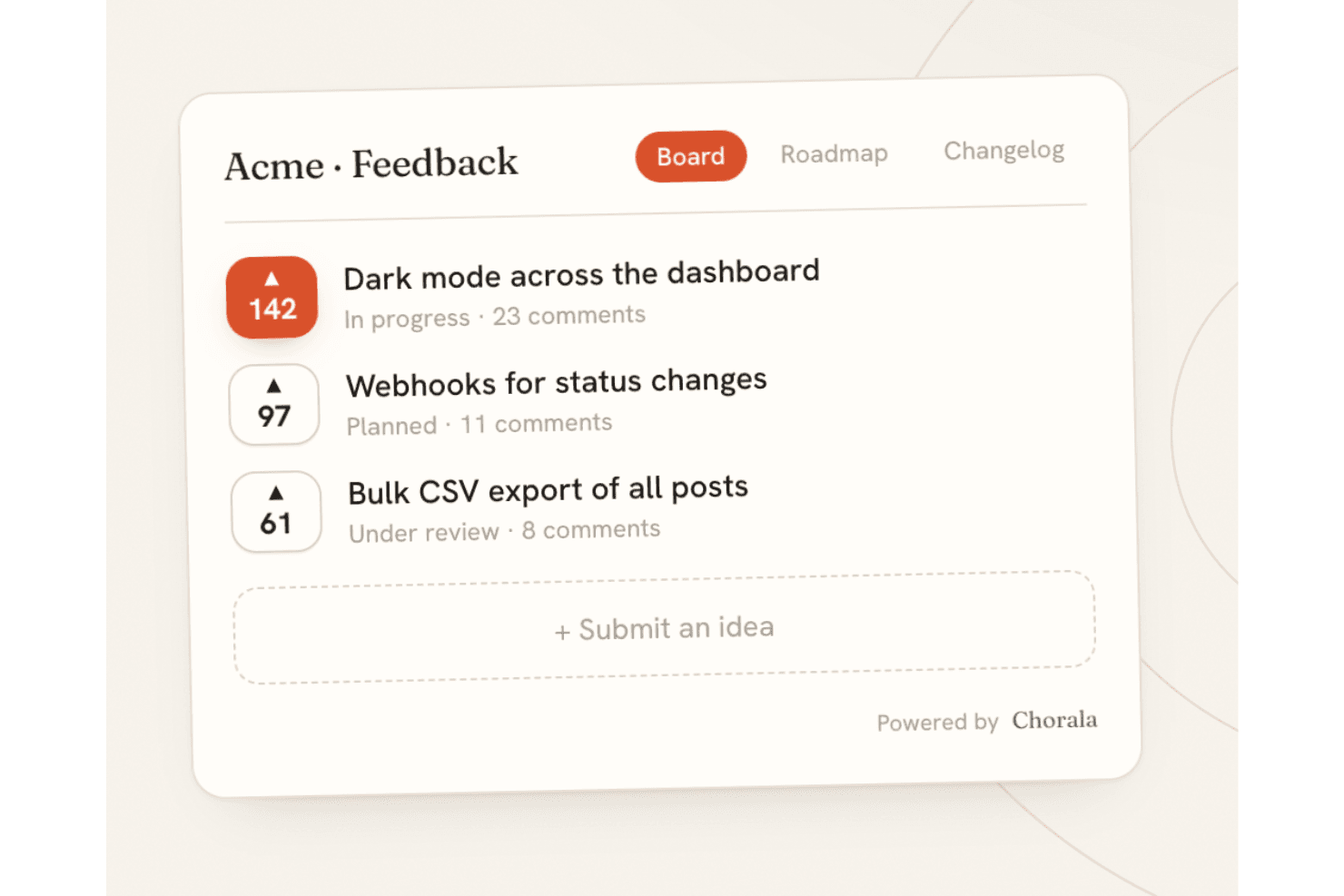
Chorala lets teams collect, vote on, and prioritize ideas through an open-source feedback board. Chorala is an open-core, self-hostable feedback platform that combines idea submission and voting, revenue-weighted prioritization, public roadmaps, changelogs, and AI-assisted triage across embeddable multilingual boards.
Who Is Chorala Best For?
Chorala is a strong fit for B2B product managers who need to prioritize feature requests by customer revenue rather than raw vote count.
Why I Picked Chorala
I picked Chorala as one of the best because it solves a real B2B prioritization problem: knowing that a feature is wanted by $200k of MRR carries far more weight than 50 anonymous upvotes. Chorala's revenue weighting syncs each company's MRR and surfaces figures like "$40k of revenue wants this" directly on the feedback board. I also like that admins can add custom RICE/ICE scoring fields and filter ideas by minimum MRR, company, or plan, so prioritization decisions are grounded in actual business impact rather than loudest voice.
Chorala Key Features
- AI Autopilot: Paste a support thread and Chorala extracts feature requests as drafts, groups similar ideas into clusters, and answers questions about your feedback in plain English.
- Self-hosted deployment: Run the full platform on your own servers via Docker Compose, with automatic migrations, unlimited admin seats, and no billing restrictions.
- Signed outbound webhooks: Chorala fires HMAC-SHA256-signed webhook events on post creation, status changes, merges, comments, and votes, with automatic retry on failure.
- Audience-targeted changelogs: Build audiences from any user attribute—plan, locale, or MRR—and send personalized changelog announcements to specific customer segments.
Chorala Integrations
Native integrations are not currently listed.
Pros and Cons
Pros:
- AI clustering turns feedback into grouped themes
- Self-hosting includes every platform feature
- Revenue-weighted prioritization reflects customer MRR
Cons:
- Self-hosters lack documented scaling guidance
- Young project has limited community validation
Learn more about Chorala: Best for MIT-licensed feedback with GitHub sync
- Free plan available
- Free, open-source
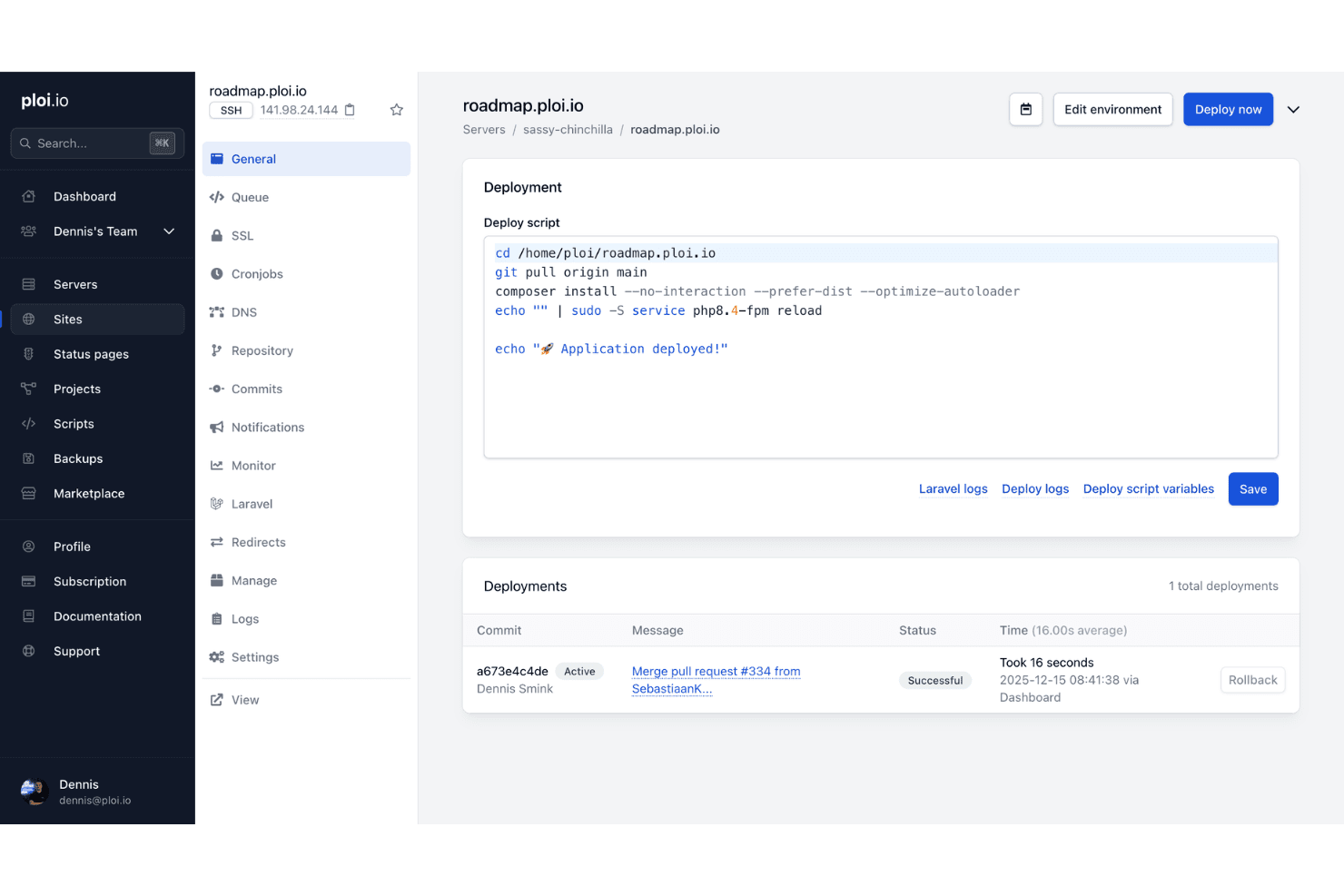
Ploi Roadmap helps teams manage and deploy an open-source idea management environment with configurable scripts and deployment tracking. Ploi Roadmap is a self-hostable, MIT-licensed idea management tool built on Laravel that lets teams collect feature requests, organize submissions across boards and projects, enable user voting and threaded comments, and sync items directly with GitHub issues.
Who Is Ploi Roadmap Best For?
Ploi Roadmap is a strong fit for PHP development teams that want full control over their feedback infrastructure without licensing restrictions.
Why I Picked Ploi Roadmap
I picked Ploi Roadmap as one of the best because its MIT license is the real differentiator: you can fork it, rebrand it, and modify it freely with zero copyleft obligations. I particularly like how GitHub sync lets you link feedback items directly to existing issues or create new ones without leaving the board, which keeps product and engineering aligned. The duplicate merging feature also stands out to me, as it consolidates votes and comments from redundant submissions into a single item without double-counting voters.
Ploi Roadmap Key Features
- Multi-project boards: Organize feedback across multiple projects, each with its own boards, visibility settings, and member access controls.
- 80+ language translations: The interface ships with locale files for over 80 languages, including Arabic, Japanese, and Chinese variants.
- Embeddable feedback widget: A JavaScript widget lets you collect feedback directly from your app, with options for button position, color, domain restriction, and user prefill.
- OAuth 2 SSO: Users can authenticate via any OAuth 2 provider, giving teams centralized login management without a separate identity system.
Ploi Roadmap Integrations
Ploi Roadmap has native GitHub integration for linking feedback to issues or creating new ones. It also supports Slack and Discord webhooks for notifications.
Pros and Cons
Pros:
- Private projects support controlled feedback collection
- Duplicate merging preserves votes and comments
- MIT license permits unrestricted customization
Cons:
- Manual deployment requires PHP expertise
- Documentation relies heavily on the README
Learn more about Ploi Roadmap:
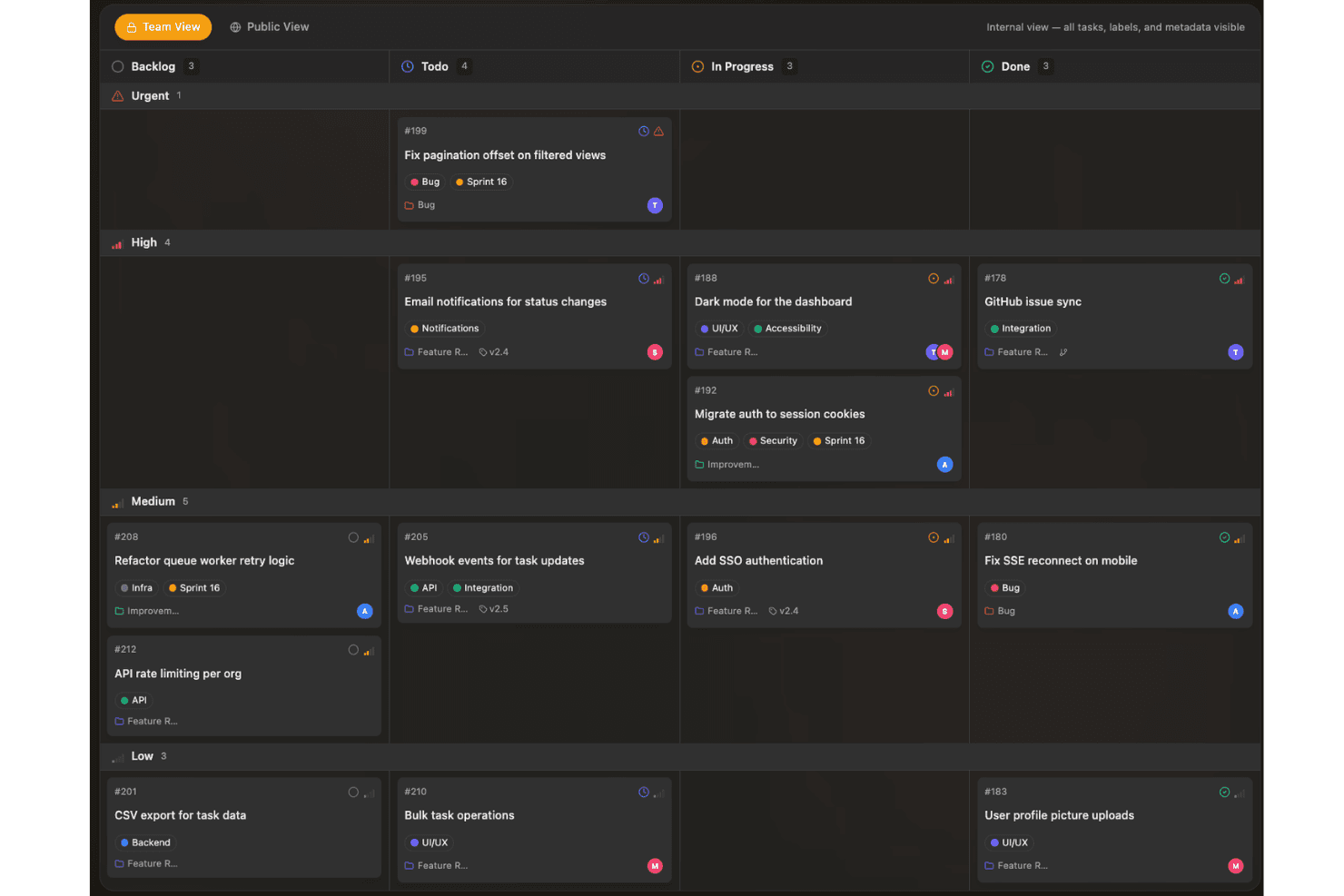
Sayr helps teams capture and prioritize ideas on a visual board organized by status, urgency, and development progress. Sayr is a source-available project management tool with a public feedback portal that lets teams collect, vote on, and discuss feature requests and bug reports through a self-hosted or cloud-hosted board with GitHub integration and Discord bot support.
Who Is Sayr Best For?
Sayr is a strong fit for developer teams and open source projects that want a self-hosted, GitHub-connected feedback board where community members can submit and vote on feature requests.
Why I Picked Sayr
I picked Sayr as one of the best because its two-way GitHub sync is genuinely built for developer-facing feedback boards. When a pull request merges with
Fixes #Nin the commit message, Sayr automatically closes the linked task on the public board, so your community always sees accurate, live status without manual updates. I also love the granular visibility controls: you can mark individual comments, labels, and timeline entries as internal, keeping engineering context private while showing customers only what's relevant.Sayr Key Features
- Public voting board: Visitors can browse, upvote, and sort feature requests by popularity, newest, or trending without needing an admin account.
- Internal vs. public comments: Team members can post internal-only comments on any task, keeping engineering discussion private while public replies stay visible to submitters.
- Discord bot integration: The
/sayr createcommand lets community members submit tasks directly from Discord using your predefined issue templates. - Releases and milestones: You can group tasks into releases with progress tracking, giving your community a visible changelog and roadmap view.
Sayr Integrations
Sayr offers native integrations with GitHub and Discord, including two-way GitHub task and issue sync and Discord task creation through
/sayr create. It also provides a REST API and CLI for custom integrations.Pros and Cons
Pros:
- Live roadmap status tracking
- Rich threaded discussion and moderation
- Granular public-private visibility controls
Cons:
- No duplicate merging or weighted voting
- Source-available, not OSI-approved
Learn more about Sayr:
Outros softwares de gestão de ideias de código aberto
Eis algumas opções adicionais de software de gestão de ideias de código aberto que não entraram na minha lista restrita, mas que ainda vale a pena conhecer:
- 11FeatulBest for EU-hosted feedback boards with MIT licensing
- 12FeedlogBest for AI-native self-hosted feedback loops
- 13eXo PlatformBest for shared enterprise workspaces
- 14KanboardBest for MIT-licensed kanban-style idea tracking
- 15OpenideaLBest for Drupal-based idea lifecycle management
- 16LogChimpBest for customizable self-hosted portals
- 17FeedbacklandBest for AI-generated ranked roadmaps
How I Evaluate Open Source Idea Management Software
I split my evaluation into three parts, with core functionality carrying the most weight: let users submit and vote on ideas, and self-host openly licensed code. Next, I consider standout features such as API and webhook access. Finally, I weigh factors beyond features, including maintainer activity, setup guidance, and upkeep costs.
Core Functionality (Table Stakes For This List)
When I'm selecting tools for my list, I score each one on a scale from 0 (does not offer the functionality) to 5 (excels in this area) for each core functionality listed below. I then convert the total into a percentage to help assess each tool's overall fit, with extra weight on any functionalities I’ve deemed essential.
- Idea Submission & Voting (Essential): I look for a clear way for customers or employees to suggest ideas, vote, and see which requests attract support.
- Open Source Codebase (Essential): I check for a clearly licensed codebase that teams can inspect, modify, and self-host, with setup guidance and signs of active maintenance.
- Idea Status Tracking: I assess whether teams can update visible statuses, such as under review, planned, or completed, so contributors can follow decisions.
- Comments & Discussion: I look for comments that let contributors add context, discuss tradeoffs, and follow up on a suggestion.
- Self-Hosting: I consider whether deployment instructions and options, such as Docker, make it practical to run the tool on your own infrastructure.
- Categories & Tags: I check whether teams can group and filter requests by topic or board as feedback grows.
Once I have a list of tools that meet the criteria, I consider what sets each platform apart.
Differentiating Factors (What Sets Vendors Apart)
Here's how I compare and contrast different vendors:
Standout Features
I look for API and webhook access first because it determines whether ideas can flow into your existing roadmap or project tracking tools without manual copy-pasting. SSO and user management matter just as much—teams collecting internal feedback need OAuth or SAML so employees log in with existing credentials instead of managing yet another account. I also evaluate moderation controls, like duplicate merging and spam filtering, since unmanaged boards get noisy fast and bury the requests that actually matter.
Beyond Features
I check GitHub commit frequency and release cadence because a stale repo means security patches and bug fixes fall on your team. Self-hosting costs matter too—server, database, and DevOps time for backups and updates can quietly exceed a SaaS subscription. I also evaluate how easily each codebase supports custom fields or workflows, since some tools offer plugin architectures while others force you to fork core code just to add a field. Finally, native connectors to tools like Jira or Slack reduce the manual work of moving validated ideas into delivery.
Como escolher um software de gestão de ideias de código aberto
É fácil ficar preso a longas listas de funcionalidades e estruturas de preços complexas. Para o ajudar a manter-se concentrado enquanto analisa o seu processo específico de seleção de software, eis uma lista de verificação dos fatores a ter em conta:
| Fator | O que considerar |
|---|---|
| FatorEscalabilidade | O que considerarO software conseguirá suportar mais utilizadores, equipas ou ideias à medida que a sua organização cresce? Analise os limites de utilizadores, armazenamento e módulos. |
| FatorIntegrações | O que considerarEstabelece ligação com as suas ferramentas de comunicação, documentação ou gestão de projetos? Confirme o suporte para APIs e plataformas essenciais. |
| FatorPersonalização | O que considerarPode adaptar formulários, fluxos de trabalho e permissões aos processos específicos e às necessidades de segurança da sua organização? |
| FatorFacilidade de utilização | O que considerarDe quanto tempo de formação precisará a sua equipa para adotar a ferramenta com confiança? Procure uma interface clara e bem estruturada. |
| FatorImplementação e integração inicial | O que considerarQue recursos são necessários para a configuração: documentação, conhecimentos técnicos, migração de dados? Avalie se consegue implementar a solução e integrar os utilizadores dentro do seu prazo. |
| FatorCusto | O que considerarPara além das taxas de licença, considere os requisitos do servidor, a manutenção e a sobrecarga administrativa contínua. Inclua estes custos na sua previsão orçamental. |
| FatorMedidas de segurança | O que considerarA ferramenta pode ser alojada autonomamente, encriptada ou limitada por uma firewall? Verifique os registos de auditoria, as opções de autenticação e a propriedade dos dados. |
| FatorDisponibilidade de suporte | O que considerarQue tipo de suporte contínuo existe: fóruns da comunidade, contratos pagos, sistemas de acompanhamento de problemas ou fornecedores terceiros? Saiba onde obter ajuda caso precise. |
O que é um software de gestão de ideias de código aberto?
O software de gestão de ideias de código aberto é uma plataforma que permite às equipas recolher, organizar e estabelecer prioridades para sugestões, feedback e projetos de inovação, utilizando código-fonte acessível publicamente e personalizável. Estas ferramentas ajudam os grupos a promover a colaboração, acompanhar o ciclo de vida das ideias e adaptar os fluxos de trabalho aos seus processos, dando simultaneamente às organizações controlo total sobre a implementação, a segurança e o desenvolvimento futuro.
Características
Ao selecionar software de gestão de ideias de código aberto, tenha em atenção as seguintes características principais:
- Portal de submissão de ideias: Disponibiliza um espaço dedicado para os utilizadores proporem novas ideias, sugestões ou comentários, frequentemente com formulários personalizáveis para diferentes tipos de contributos.
- Ferramentas de colaboração: Permitem aos utilizadores discutir, comentar e aperfeiçoar ideias através de conversas organizadas por tópicos, menções ou edição partilhada, promovendo a inovação coletiva.
- Votação e definição de prioridades: Permite aos utilizadores votar a favor, votar contra ou classificar ideias, para que as equipas possam identificar rapidamente as sugestões populares ou de maior impacto para análise.
- Acompanhamento do estado: Permite aos administradores atribuir estados como “em análise”, “planeado” ou “implementado” a cada ideia, melhorando a transparência e a visibilidade dos projetos.
- Controlos de acesso: Permitem aos administradores gerir quem pode criar, ver, editar ou moderar ideias ou comentários, protegendo informações sensíveis e garantindo a responsabilização.
- Pesquisa e filtragem: Disponibiliza capacidades de pesquisa avançada e filtros para que os utilizadores encontrem ideias por palavras-chave, categorias, etiquetas ou autores, acelerando a navegação e a descoberta.
- Automatização de fluxos de trabalho: Suporta notificações, atribuições ou progressão automatizadas das ideias através de diferentes fases de análise e aprovação, minimizando o esforço manual.
- Relatórios e análises: Fornece informações sobre tendências de submissão de ideias, níveis de participação e taxas de implementação através de painéis e relatórios exportáveis.
- Suporte para integrações: Liga-se a ferramentas como plataformas de conversação, software de gestão de projetos ou armazenamento na nuvem, facilitando a integração da gestão de ideias nos fluxos de trabalho existentes.
Benefícios
A implementação de software de gestão de ideias de código aberto proporciona vários benefícios à sua equipa e à sua empresa. Eis alguns dos benefícios que pode esperar:
- Propriedade e controlo dos dados: Pode implementar a plataforma na sua própria infraestrutura, garantindo a privacidade dos dados e a supervisão de informações sensíveis.
- Fluxos de trabalho personalizáveis: A flexibilidade do código aberto permite-lhe recolher ideias inovadoras e adaptar formulários de submissão, aprovações e estados aos seus processos internos específicos.
- Poupança de custos: Evite taxas de subscrição recorrentes e a dependência de um fornecedor, aproveitando soluções disponíveis gratuitamente ou alojadas autonomamente.
- Colaboração melhorada: As funcionalidades integradas de comunicação e feedback permitem que toda a sua equipa participe em conjunto no aperfeiçoamento e na definição de prioridades das ideias.
- Potencial de integração: Pode ligar a gestão de ideias às suas ferramentas existentes de conversação, gestão de projetos ou armazenamento através de APIs abertas e conectores documentados.
- Acompanhamento transparente da inovação: As funcionalidades de gestão de estados e elaboração de relatórios mantêm visível o progresso das ideias, promovendo a responsabilização e o envolvimento.
Custos e preços
A seleção de software de gestão de ideias de código aberto exige uma compreensão dos vários modelos de preços e planos disponíveis. Os custos variam consoante as funcionalidades, a dimensão da equipa, os complementos, entre outros fatores. A tabela abaixo resume os planos comuns, os respetivos preços médios e as funcionalidades normalmente incluídas nas soluções de software de gestão de ideias de código aberto:
Tabela de comparação de planos para software de gestão de ideias de código aberto
| Tipo de plano | Preço médio | Funcionalidades comuns |
|---|---|---|
| Tipo de planoPlano gratuito | Preço médio$0 | Funcionalidades comunsSuporte da comunidade, submissão básica de ideias, ferramentas essenciais de colaboração e personalização limitada. |
| Tipo de planoPlano pessoal | Preço médio$5-$10/utilizador/mês | Funcionalidades comunsPermissões melhoradas, suporte prioritário, pesquisa avançada e integrações limitadas. |
| Tipo de planoPlano empresarial | Preço médio$10-$25/utilizador/mês | Funcionalidades comunsFluxos de trabalho personalizados, ferramentas de elaboração de relatórios, vários espaços de trabalho, controlos de administração e acesso à API. |
| Tipo de planoPlano empresarial de grande dimensão | Preço médio$25-$50/utilizador/mês | Funcionalidades comunsAlojamento próprio, registos de auditoria, segurança avançada, funcionalidades de conformidade, suporte dedicado e utilizadores ilimitados. |
Perguntas frequentes sobre software de gestão de ideias de código aberto
Eis algumas respostas a perguntas comuns sobre software de gestão de ideias de código aberto:
É possível alojar autonomamente software de gestão de ideias de código aberto?
Sim, a maioria dos softwares de gestão de ideias de código aberto permite o alojamento na sua própria infraestrutura. Isto dá-lhe controlo total sobre a segurança dos dados, as configurações de privacidade e as integrações personalizadas adaptadas aos requisitos da sua organização.
Qual é a dificuldade de personalizar ferramentas de gestão de ideias de código aberto?
A personalização varia consoante a ferramenta, mas, em geral, as plataformas de código aberto permitem uma elevada flexibilidade se tiver algumas competências técnicas. Convém consultar a documentação da comunidade e considerar os seus recursos de desenvolvimento antes de efetuar alterações extensivas.
Quais são as vantagens e desvantagens entre software de gestão de ideias de código aberto e comercial?
As ferramentas de código aberto proporcionam poupanças de custos e flexibilidade, mas podem exigir mais esforço de configuração, suporte técnico e manutenção contínua. As plataformas comerciais oferecem normalmente uma experiência de utilizador mais aperfeiçoada e suporte dedicado, mas implicam custos recorrentes mais elevados.
Existem custos ocultos associados à utilização de software de gestão de ideias de código aberto?
Sim, mesmo que o software seja gratuito, deverá prever custos como o alojamento do servidor, atualizações, suporte técnico e qualquer trabalho de desenvolvimento personalizado de que a sua equipa necessite para obter a configuração pretendida.
Como lidam as ferramentas de código aberto com atualizações e correções de segurança?
A maioria dos projetos depende de atualizações orientadas pela comunidade e de versões de correções publicadas. Precisará de um processo para acompanhar estas atualizações e aplicar correções de segurança para proteger os seus dados, especialmente em implementações alojadas autonomamente.