

Overvåking av brukeropplevelsen handler ikke bare om å følge med på tall – det handler om å oppdage øyeblikkene der brukerne fortvilet gir opp før de avslutter bruken av produktet ditt i frustrasjon. Har du noen gang hatt en funksjon du syntes var genial, bare for å oppdage at brukerne ikke engang finner den? Eller sett på øktopptak som får deg til å stille spørsmål ved alle designvalgene du noen gang har gjort?
Det riktige verktøyet for overvåking av brukeropplevelsen hjelper deg med å oppdage friksjonspunkter, forstå hvor brukerne sliter, og gjøre gjetting om til reelle forbedringer. Jeg har gått gjennom alternativene, testet dem og skilt ut det overflødige for å fremheve det som faktisk betyr noe. Denne veiledningen hjelper deg med å finne et verktøy som passer teamets behov – slik at du kan fokusere på å gjøre produktet ditt smidigere, smartere og mer minneverdig (på de riktige måtene).
Hvorfor du kan stole på våre programvareanbefalinger
6,700+
Reviews
20
Industry experts
16+
Evaluation factors
14
Years
Teamet vårt har testet og anmeldt programvare siden 2012. Vi er selv produktledere, så vi vet hvor vanskelig og hvor viktig det er å velge riktig programvare.
I denne guiden har vi vurdert verktøyene gjennom praktisk testing og uavhengig research og gitt dem poeng ut fra våre utvelgelseskriterier.
Anmeldelsene våre bygger på vår egen redaksjonelle vurdering. De er ikke et salgsargument.
Ekspertanmeldere:
- Andrew LumbySenior TPM
- Cristiano ValimSenior UI/UX Lead


Sammenligningstabell: Verktøy for overvåking av brukeropplevelse
Denne sammenligningstabellen oppsummerer prisopplysningene for mine beste utvalgte verktøy for overvåking av brukeropplevelse.
| Tool | Best For | Trial Info | Price | ||
|---|---|---|---|---|---|
| 1 | Best for quantifying friction across user journeys | Free plan available | From $25/month | Website | |
| 2 | Best for AI-driven root cause analysis | 15-day free trial | From $7/month | Website | |
| 3 | Best for session replay insights | Free plan available | Pricing upon request | Website | |
| 4 | Best for mobile app behavior analytics | Free demo + 14-day free trial available | Pricing upon request | Website | |
| 5 | Best for product and funnel behavior analysis | Free plan available | Pricing upon request | Website | |
| 6 | Best for revenue-tied friction prioritization | Free demo available | Pricing upon request | Website | |
| 7 | Best for enterprise feedback and behavior pairing | Free demo available | Pricing upon request | Website | |
| 8 | Best for heatmap analytics | Free plan available | From $39/month (billed annually) | Website | |
| 9 | Best for friction detection in regulated industries | Free demo available | Pricing upon request | Website | |
| 10 | Best for full-stack frontend and backend correlation | Free demo + 14-day free trial available | From $2.50/1,000 sessions/month (billed annually) | Website |


Anmeldelser av de beste verktøyene for overvåking av brukeropplevelse
Nedenfor finner du mine detaljerte sammendrag av de beste verktøyene for overvåking av brukeropplevelse som kom med på kortlisten min. Anmeldelsene mine gir en detaljert gjennomgang av de viktigste funksjonene, fordelene og ulempene, integrasjonene og de ideelle bruksområdene for hvert verktøy, slik at du kan finne det beste alternativet for deg.
 Best for quantifying friction across user journeys
- Free plan available
- From $25/month
Visit WebsiteCustomer Rating:4.7/5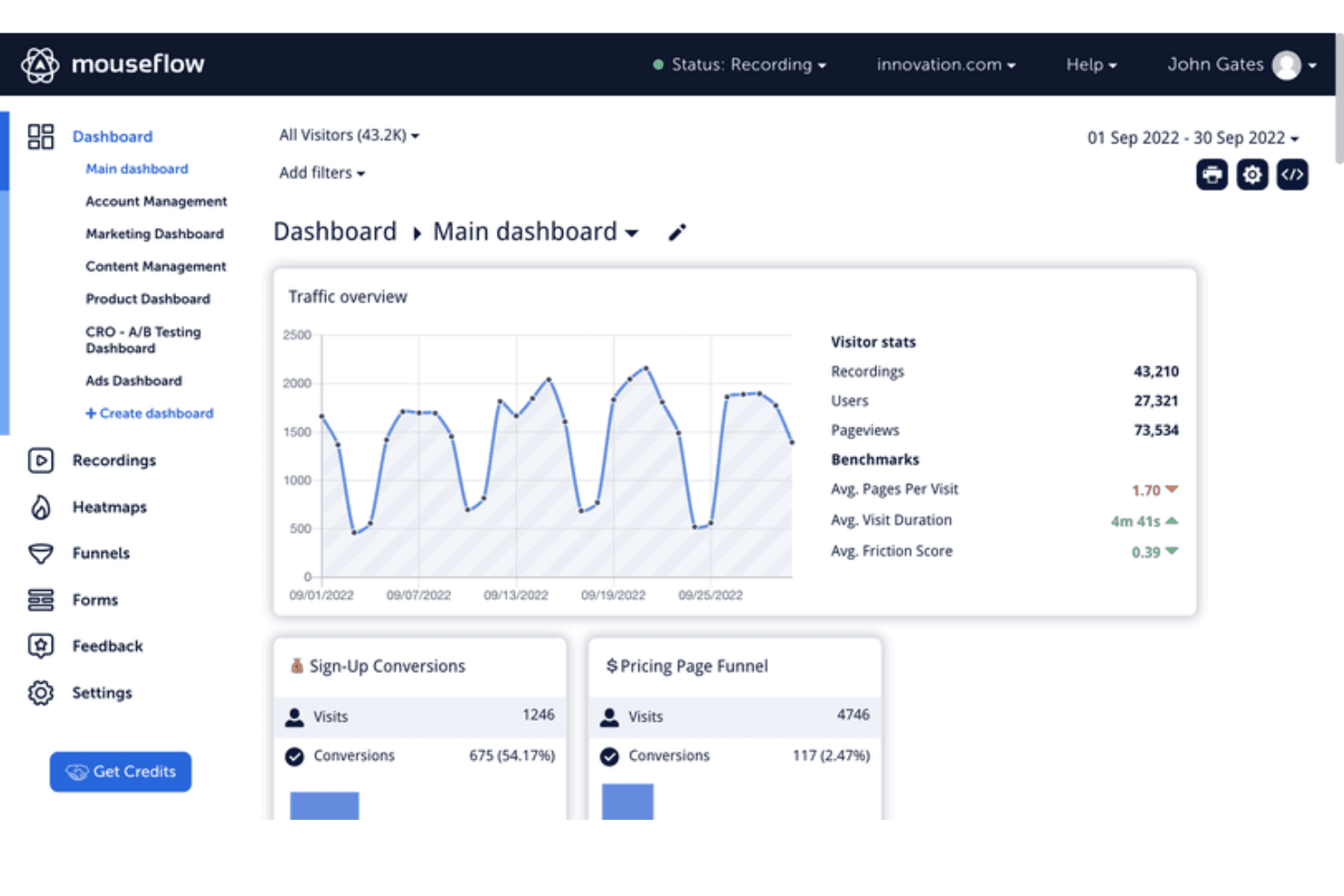
Mouseflow's dashboard tracks traffic, conversions, and visitor behavior metrics. Mouseflow is a web behavior analytics platform that combines session replay, seven heatmap types, friction scoring, form analytics, funnel tracking, and user journey mapping.
Who Is Mouseflow Best For?
Mouseflow is a strong fit for product and UX teams who need to see exactly where users struggle on web products and tie that friction directly to conversion impact.
Why I Picked Mouseflow
Mouseflow earns its spot on my shortlist because no other tool I've tested makes friction as measurable and actionable as this one does. Its proprietary Friction Score rates frustration at the session and page level, and the Friction Insights dashboard ranks your highest-friction pages automatically, so you're never guessing where to start. I also like that friction heatmaps show rage clicks, dead clicks, and stuck points visually, making it easy to connect a spike in frustration to a specific element on a specific page.
Mouseflow Key Features
- Session replay filtering: Filter recorded sessions by device, traffic source, rage clicks, Friction Score, and more to zero in on the sessions that matter most.
- Form analytics: Track field-level hesitation, skipped fields, blank submissions, and abandonment across native, third-party, and embedded forms.
- Conversion funnel tracking: Build no-code funnels with regex support, compare multiple funnels side by side, and see missed revenue at each drop-off step.
- Mina AI summaries: An AI assistant that analyzes friction signals across replays, heatmaps, and funnels and surfaces actionable UX recommendations in natural language.
Mouseflow Integrations
Mouseflow offers 42 documented native integrations, including Google Analytics, Adobe Analytics, Google Tag Manager, Google Ads, Shopify, WordPress, HubSpot, Slack, Microsoft Teams, and Zendesk. Its Open REST API supports custom integrations.
Pros and Cons
Pros:
- Captures seven distinct heatmap views
- Links replay insights to conversion impact
- Quantifies friction with proprietary scoring
Cons:
- Offers limited technical performance diagnostics
- Lacks native mobile app tracking
Learn more about Mouseflow: Best for AI-driven root cause analysis
- 15-day free trial
- From $7/month
Visit WebsiteCustomer Rating:4.5/5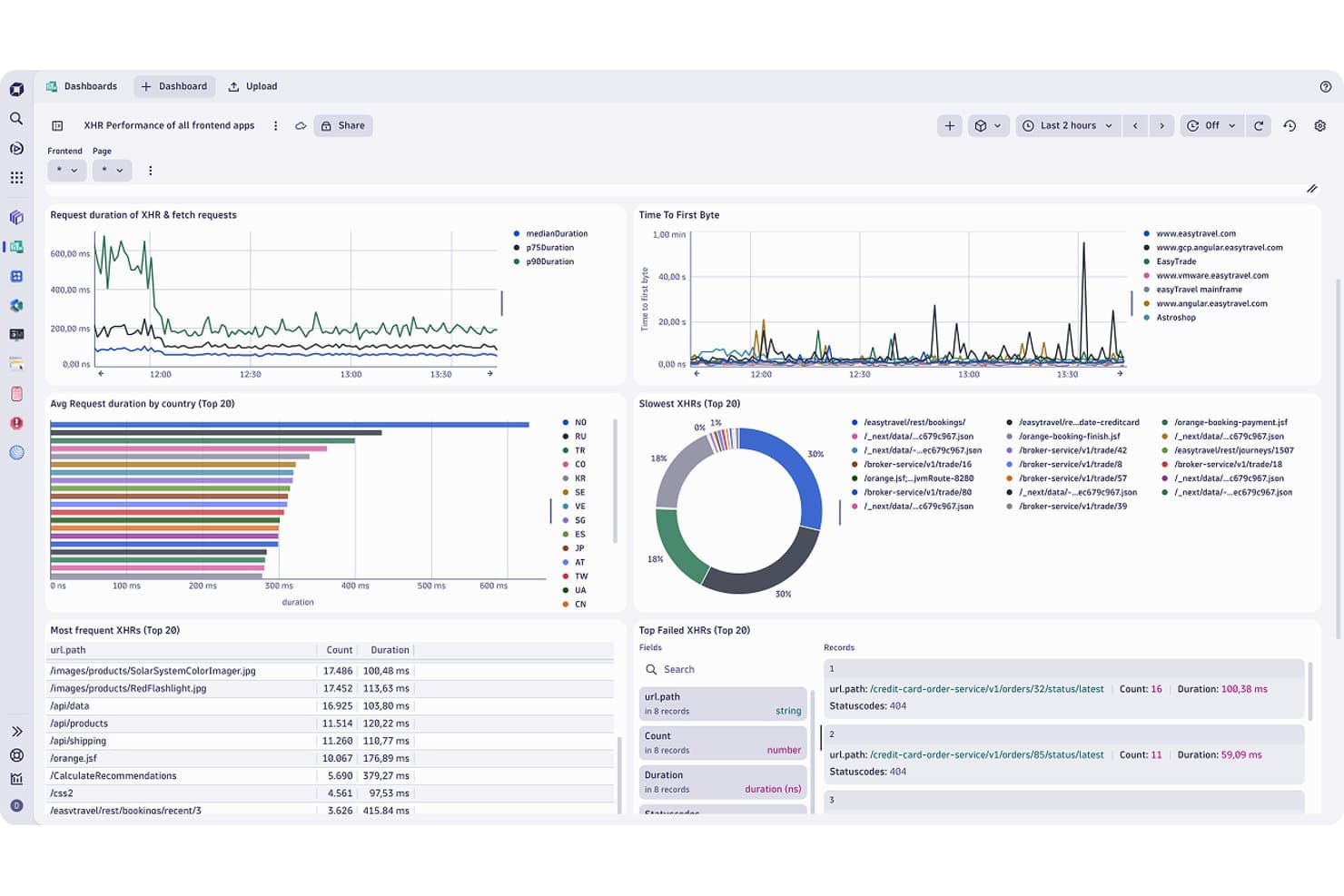
Dynatrace tracks XHR performance, request duration, and failed requests in real time. Dynatrace is a digital experience monitoring platform that combines real user session capture, session replay, frontend performance monitoring, AI-driven error detection, and full-stack observability across web and mobile applications.
Who Is Dynatrace Best For?
Dynatrace is a strong fit for enterprise engineering and IT/ops teams that need end-to-end visibility from frontend user sessions all the way through to backend traces and infrastructure.
Why I Picked Dynatrace
I picked Dynatrace as one of the best because its Davis AI doesn't just flag problems—it traces them automatically from a frustrated user session all the way back to a slow database query or a failing microservice. I love that the new Session Replay links directly to backend traces, logs, and error stack traces in one view, so you're not jumping between tools to diagnose why a checkout flow broke. On-demand AI session summarization surfaces exactly where things went wrong, in plain language, without you having to scrub through recordings manually.
Dynatrace Key Features
- Experience Vitals app: Tracks Core Web Vitals, waterfall analysis, mobile crash rates, and frontend error rates in a single dashboard with up to two years of metric retention.
- Health alerts with adaptive analyzers: Configures static, seasonal, or auto-adaptive alert thresholds across LCP, INP, CLS, crash rate, and traffic anomalies, feeding directly into Davis AI problem correlation.
- Error Inspector: Groups and prioritizes frontend errors and crashes by severity and user impact, with source-map drill-down and direct Jira integration for developer handoff.
- Privacy masking controls: Applies recording-time and playback-time data masking across web and mobile sessions, with role-based access to unmasked content and retroactive rule application.
Dynatrace Integrations
Dynatrace offers native integrations with Jira, Slack, PagerDuty, Microsoft Teams, and ServiceNow. It also supports OpenTelemetry, configuration-as-code, the Settings API, Workflows, and custom integrations through DQL.
Pros and Cons
Pros:
- Tracks Core Web Vitals alongside mobile crashes
- Session replays connect actions with error traces
- AI traces frontend issues to backend causes
Cons:
- Custom funnels require DQL query work
- No native heatmaps for visual behavior analysis
Learn more about Dynatrace: Best for session replay insights
- Free plan available
- Pricing upon request
Visit WebsiteCustomer Rating:4.5/5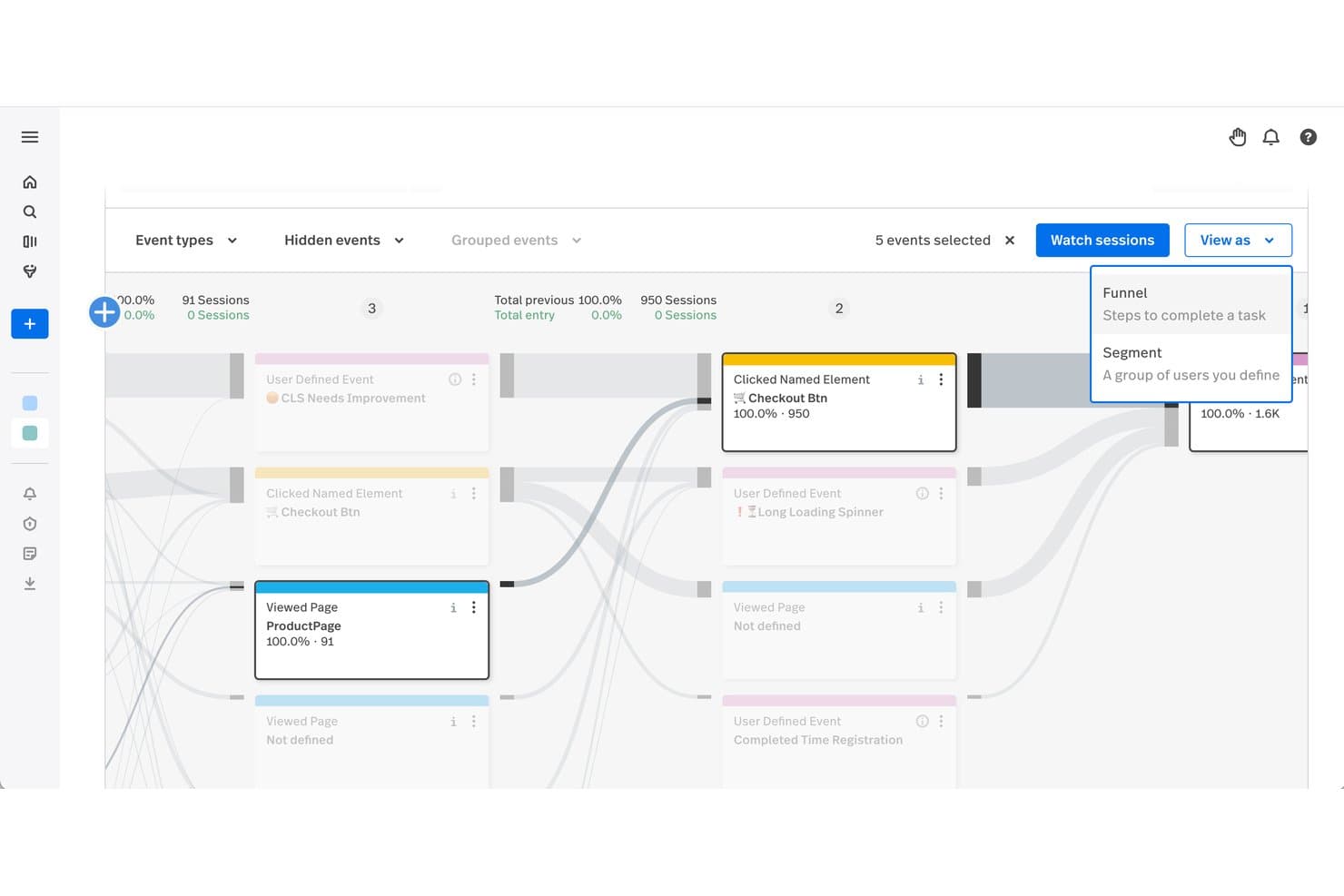
Fullstory lets users visualize user journeys across key interaction events. Fullstory is a user experience monitoring platform that captures sessions through tagless autocapture and combines session replay, heatmaps, funnel analysis, friction detection, and AI-powered behavioral summaries across web and native mobile apps.
Who Is Fullstory Best For?
Fullstory is a strong fit for product managers and UX teams who need to connect session replay data directly to funnel drop-off, friction signals, and revenue impact.
Why I Picked Fullstory
Fullstory earns its spot on my shortlist because session replay here isn't just video playback—it's tied directly to friction signals like rage clicks, dead clicks, and thrashed cursor movement, so I can pinpoint exactly where users struggle without manually scrubbing through recordings. I particularly like StoryAI Opportunities, which automatically surfaces friction points ranked by revenue impact, turning hours of replay review into a prioritized action list. The Frustrated Sessions card, available even on the free plan, surfaces the 10 most friction-heavy sessions instantly.
Fullstory Key Features
- Tagless autocapture: Fullstory records all user interactions automatically, with no manual event tagging required.
- Dev Tools sync: Console logs, network request waterfalls, and JavaScript errors are captured and synced directly to the session replay timeline.
- Journeys analysis: Multi-step user paths are mapped across single or multiple sessions, with segment comparison and session filtering at each step.
- Privacy masking: Sensitive elements are redacted on-device before transmission, with customizable masking rules that can be updated without redeploying your app.
Fullstory Integrations
Fullstory documents integrations with Jira, Slack, Microsoft Teams, Google Analytics, Google Tag Manager, Salesforce, Shopify, Tealium, Twilio Segment, and Zendesk. It also offers APIs, webhooks, data exports, and Zapier for custom connectivity.
Pros and Cons
Pros:
- Developer errors align with user behavior
- StoryAI ranks issues by revenue impact
- Session replays reveal friction context
Cons:
- Replay review still demands substantial time
- Advanced analysis requires higher-tier plans
Learn more about Fullstory: Best for mobile app behavior analytics
- Free demo + 14-day free trial available
- Pricing upon request
Visit WebsiteCustomer Rating:4.6/5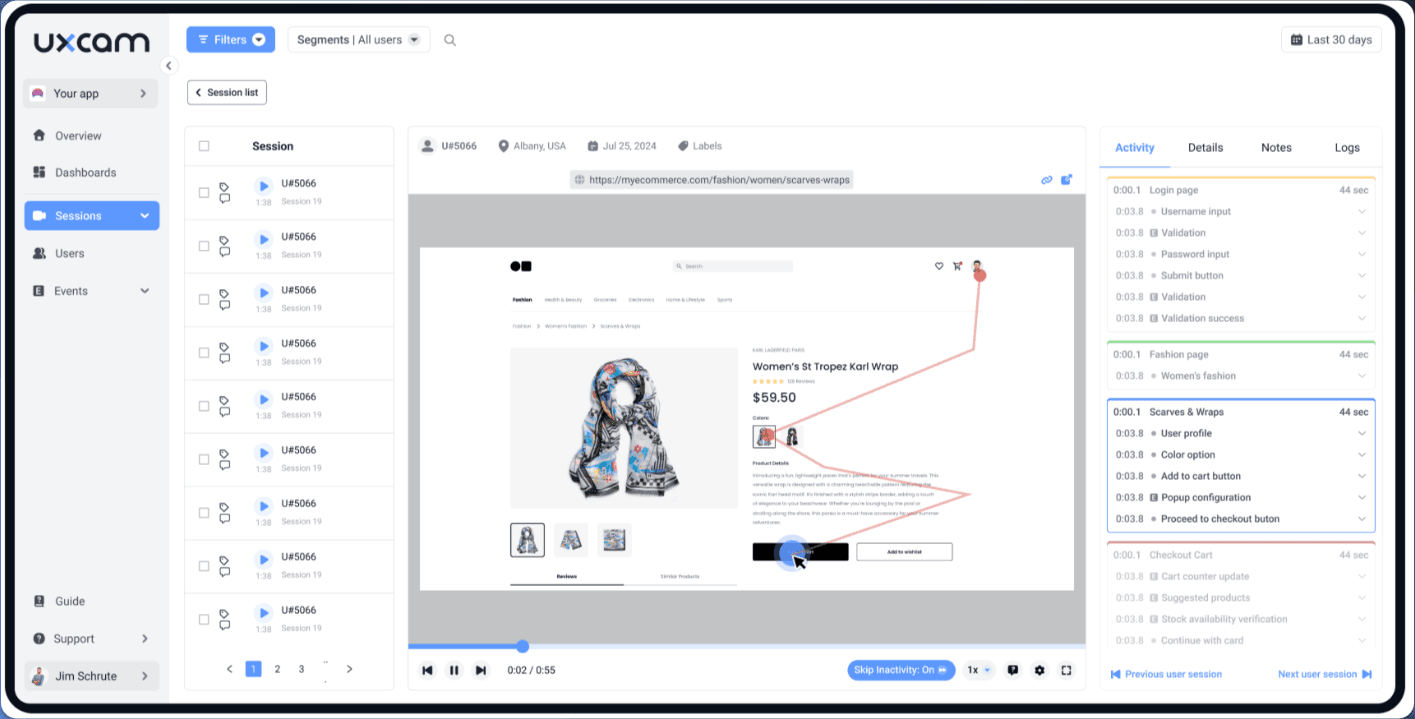
UXCam offers mobile app analytics for product managers and developers. UXCam is a mobile-first product analytics platform that combines session replay, touch and web heatmaps, funnel analysis, journey mapping, and AI-driven friction detection across native and cross-platform mobile apps and websites.
Who Is UXCam Best For?
UXCam is a strong fit for mobile product teams who need to understand in-app user behavior across iOS, Android, and cross-platform frameworks.
Why I Picked UXCam
UXCam earns its spot on my shortlist because no other tool I've tested matches its depth of mobile-native behavior analytics. I love how rage tap detection, UI freeze tracking, and Screen Flow journey mapping all feed directly into session replays, so when I see a drop-off in a funnel, I can click straight into the recordings of users who abandoned. Tara AI takes it further by surfacing the friction points I'd otherwise spend hours finding manually.
UXCam Key Features
- Smart Filters: Search sessions using natural-language queries like "sessions with crashes in the last 7 days" without manually setting up complex filter rules.
- Cross-platform SDK support: A single SDK covers native iOS, Android, React Native, Flutter, and other frameworks, capturing mobile behavior across all of them.
- Privacy masking controls: Automatically occludes passwords and detected PII patterns, with dashboard-configurable screen-blur rules that don't require a developer to update.
- Retention analytics: Track user cohorts over time and reuse saved cohorts as filters across funnels, dashboards, and other reports.
UXCam Integrations
UXCam has eight documented integrations, including Segment, Amplitude, Firebase Crashlytics, Firebase Google Analytics, Intercom, Survicate, Slack, and Microsoft Teams. Its Data Access API supports custom connections and exports raw and aggregated data.
Pros and Cons
Pros:
- Tara prioritizes friction by user impact
- Funnels connect drop-offs to session replays
- Mobile-native crash and freeze diagnostics
Cons:
- Dashboard can overwhelm with data
- Web performance monitoring remains limited
Learn more about UXCam: Best for product and funnel behavior analysis
- Free plan available
- Pricing upon request
Visit WebsiteCustomer Rating:4.5/5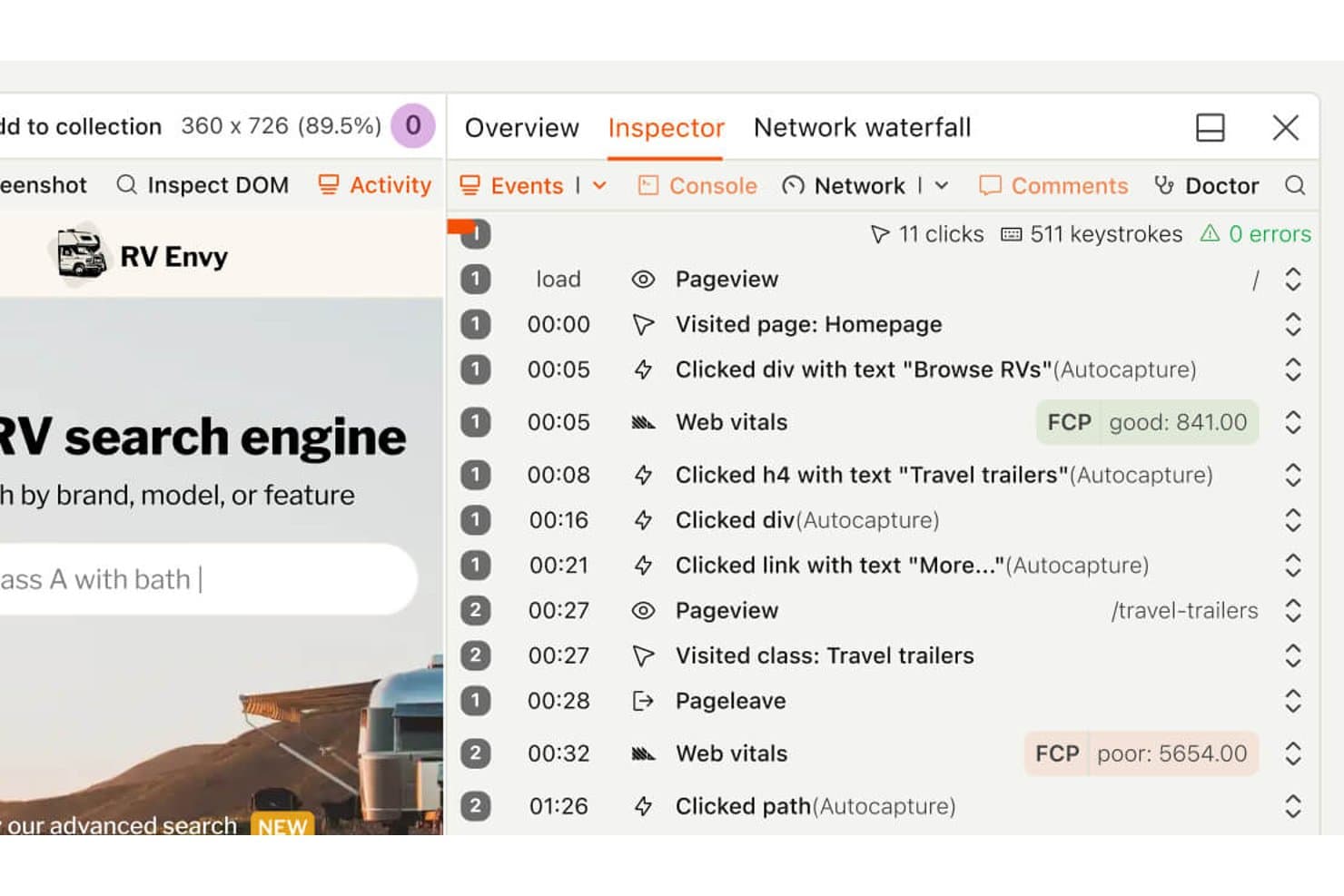
PostHog's session replay timeline tracks user clicks and page vitals. PostHog is a product analytics and user experience monitoring platform that combines session replay, heatmaps, funnel analysis, user paths, error tracking, and web vitals into a single connected toolset.
Who Is PostHog Best For?
PostHog is a strong fit for product managers and developers at tech-forward teams who want session replay, funnels, and behavioral analytics in one place without paying per seat.
Why I Picked PostHog
I picked PostHog as one of the best because its funnel and path analysis is the tightest I've seen in this category. When a funnel step shows drop-off, I can click directly into the sessions behind that cohort—no exporting, no switching tools. The correlation analysis then surfaces which user properties or events actually predict conversion, so I'm not just watching replays blindly.
PostHog Key Features
- Session replay with DevTools sync: Each recording includes a synced panel showing console logs, network requests, and errors at the exact moment they occurred in the session.
- Rage click and dead click autocapture: PostHog automatically captures rage clicks and dead clicks without manual instrumentation, flagging them as friction signals you can filter replays by.
- Replay Vision AI scanners: AI-powered scanners review recordings and classify sessions by user intent, frustration score, and outcome, storing results as queryable events you can alert on.
- Threshold and anomaly-detection alerts: Set alerts on trends, funnels, or SQL insights using statistical or machine-learning detectors, with notifications via Slack, email, Teams, Discord, or webhook.
PostHog Integrations
PostHog offers native integrations with GitHub, GitLab, Linear, Jira, Slack, Discord, and Microsoft Teams, plus dozens of real-time data destinations and webhook support. Its API and MCP server support custom workflows and AI coding tools.
Pros and Cons
Pros:
- Error tracking links issues to recordings
- Autocaptures rage clicks and dead clicks
- Funnels connect directly to session replays
Cons:
- Native frustration scoring requires Replay Vision
- Performance monitoring covers few web vitals
Learn more about PostHog: Best for revenue-tied friction prioritization
- Free demo available
- Pricing upon request
Visit WebsiteCustomer Rating:4.7/5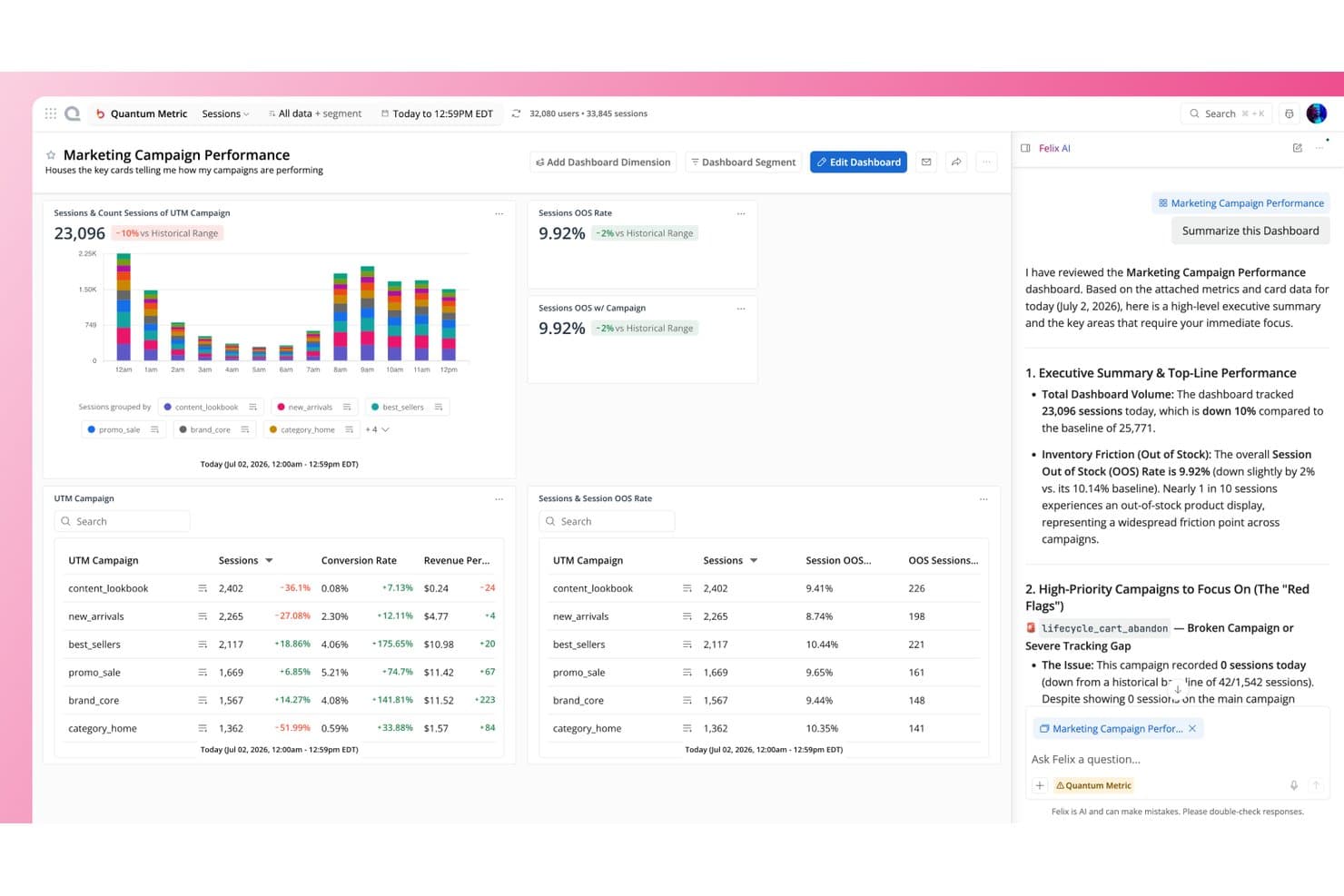
Quantum Metric's Felix AI summarizes campaign dashboards instantly. Quantum Metric is a digital experience analytics platform that combines session replay, heatmaps, journey analysis, friction detection, and AI-driven opportunity analysis across web, mobile, and kiosk.
Who Is Quantum Metric Best For?
Quantum Metric is a strong fit for enterprise product and digital teams who need to tie UX friction directly to revenue impact before deciding what to fix first.
Why I Picked Quantum Metric
Quantum Metric earns its spot on my shortlist because it's the only tool I've seen that automatically ranks friction points by revenue impact, so your team isn't guessing what to fix first. Its Opportunity Analysis does this out of the box: one click sizes the dollar cost of any issue across a funnel step, and it pulls up session replays of affected users instantly. Felix Agentic agents then monitor KPIs like funnel drop-off continuously and explain root causes in plain language.
Quantum Metric Key Features
- Felix AI session summarization: An AI layer built on Gemini Pro summarizes individual sessions and cross-session journeys, then answers follow-up questions in plain language.
- Experience Alerts: Pre-configured, anomaly-based alerts monitor frustration signals, conversion funnels, and page-speed drops in real time, with multi-channel delivery via email, Slack, or webhook.
- Autocapture with visual event editor: A single JS tag or SDK captures 60+ behavioral and friction indicators automatically, and non-engineers can define custom events through a point-and-click editor.
- Device-side PII encryption: Personal data is encrypted on the user's device using RSA 2048 and AES 256 before transmission, with only the customer holding the private key.
Quantum Metric Integrations
Quantum Metric offers integrations with Optimizely, AB Tasty, Split, Salesforce Service Cloud, Qualtrics, Medallia, Adobe Analytics, Looker, Splunk, Slack, and 50+ more. It also supports REST API access and webhooks for custom connectivity.
Pros and Cons
Pros:
- Mobile journeys support cross-device analysis
- Replays connect behavior with technical errors
- Revenue impact clarifies friction priorities
Cons:
- Mobile capture can reduce frame rates
- Search and segment loading can lag
Learn more about Quantum Metric: Best for enterprise feedback and behavior pairing
- Free demo available
- Pricing upon request
Visit WebsiteCustomer Rating:4.6/5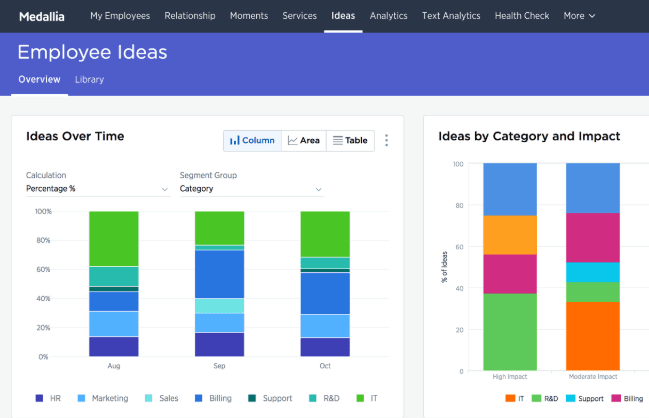
Medallia enhances business transformation for customers and employees. Medallia Digital Experience Analytics (DXA) is a user experience monitoring platform that captures session replays, heatmaps, funnel and journey analysis, real-time experience scoring, and in-app feedback—all paired with AI-driven behavioral insights across web and native mobile.
Who Is Medallia Best For?
Medallia DXA is built for enterprise teams that need to connect behavioral data—replays, heatmaps, and journey analysis—directly to voice-of-customer feedback programs.
Why I Picked Medallia
Medallia earns its spot on my shortlist because it's the only tool I've seen that genuinely closes the loop between what users do and what they say. I love how each Digital Feedback survey response pairs directly with its session replay, so you can watch the exact journey behind a frustrated score. The Digital Experience Score adds another layer, rating every session from 0 to 10 across five behavioral pillars and surfacing revenue-ranked pages so your team knows which friction points cost the most.
Medallia Key Features
- Sunburst journey visualization: Maps every unique path users take through your site or app, so you can see where sessions diverge and where drop-off happens.
- Multiple heatmap types: Offers behavioral, scroll and dot, attribution, and hybrid attention heatmaps, each surfacing a different layer of on-page interaction data.
- Real-time interaction triggers: Detects frustration or engagement signals as they happen and fires live chat, promotions, or surveys in response.
- Native mobile SDK support: Covers iOS, Android, Flutter, and React Native with session replay, heatmaps, crash reporting, and network error tracking built in.
Medallia Integrations
Medallia offers native integrations with Adobe Analytics, Adobe Target, Adobe Audience Manager, Adobe Experience Platform, Slack, and Invoca. It also supports open APIs, webhooks, data streams, Google Tag Manager, and marketplace connectivity through Medallia Xchange.
Pros and Cons
Pros:
- Scores sessions across five experience pillars
- Ranks friction by potential revenue impact
- Pairs feedback responses with session replays
Cons:
- Advanced replays require a Chrome extension
- Web performance lacks confirmed Core Web Vitals
Learn more about Medallia: Best for heatmap analytics
- Free plan available
- From $39/month (billed annually)
Visit WebsiteCustomer Rating:4.5/5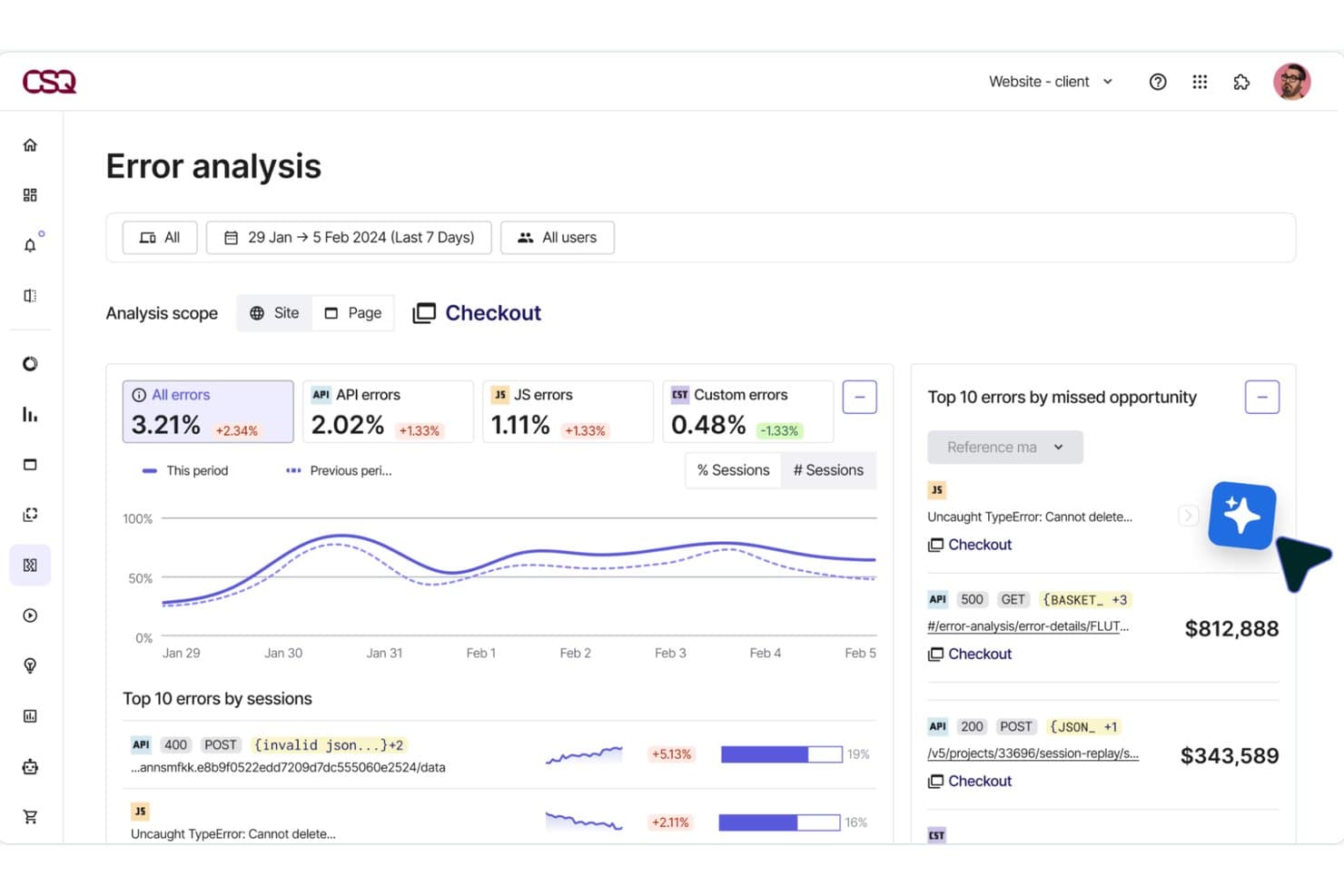
Hotjar (by Contentsquare) surfaces revenue lost to checkout errors. Hotjar (by Contentsquare) is a user experience monitoring platform that combines session replay, heatmaps, funnel analysis, friction detection, and frontend performance monitoring in a single tool.
Who Is Hotjar (by Contentsquare) Best For?
Hotjar is a strong fit for UX researchers and product managers who need visual behavior data—heatmaps, session replays, and funnel drop-off analysis—without a steep learning curve.
Why I Picked Hotjar (by Contentsquare)
Hotjar earns its spot on my shortlist because its heatmap capabilities go further than any other tool I've tested. Beyond standard click maps, it generates zone-based revenue heatmaps that show conversion rate and revenue per page element, so you can see exactly which CTA or product image is pulling its weight. I also love how one click takes you from a heatmap directly into the matching session replays, closing the loop between aggregate behavior and individual user context.
Hotjar (by Contentsquare) Key Features
- Frustration score: Automatically detects rage clicks, dead clicks, and repeated form field errors, then ranks each issue by its estimated business impact.
- Smart Capture: Records every user interaction automatically with no manual tagging, including privacy masking of sensitive input fields before data leaves the browser.
- Funnel analysis: Lets you build multi-step funnels without code and links each drop-off point directly to the matching session replays for immediate context.
- Sense AI summaries: Generates plain-language summaries of individual replays and heatmaps, with cross-session summaries available on Pro and Enterprise plans.
Hotjar (by Contentsquare) Integrations
Contentsquare lists 10+ integrations, including Google Analytics, Jira, Slack, Microsoft Teams, HubSpot, Segment, Mixpanel, Optimizely, Shopify, and Zapier. Pro plans include API access for custom integrations.
Pros and Cons
Pros:
- AI summaries reduce manual replay review
- Session replays connect friction to context
- Revenue-ranked heatmaps clarify UX priorities
Cons:
- Advanced error diagnostics require higher tiers
- Replay sampling limits full behavioral coverage
Learn more about Hotjar (by Contentsquare): Best for friction detection in regulated industries
- Free demo available
- Pricing upon request
Visit WebsiteCustomer Rating:4.7/5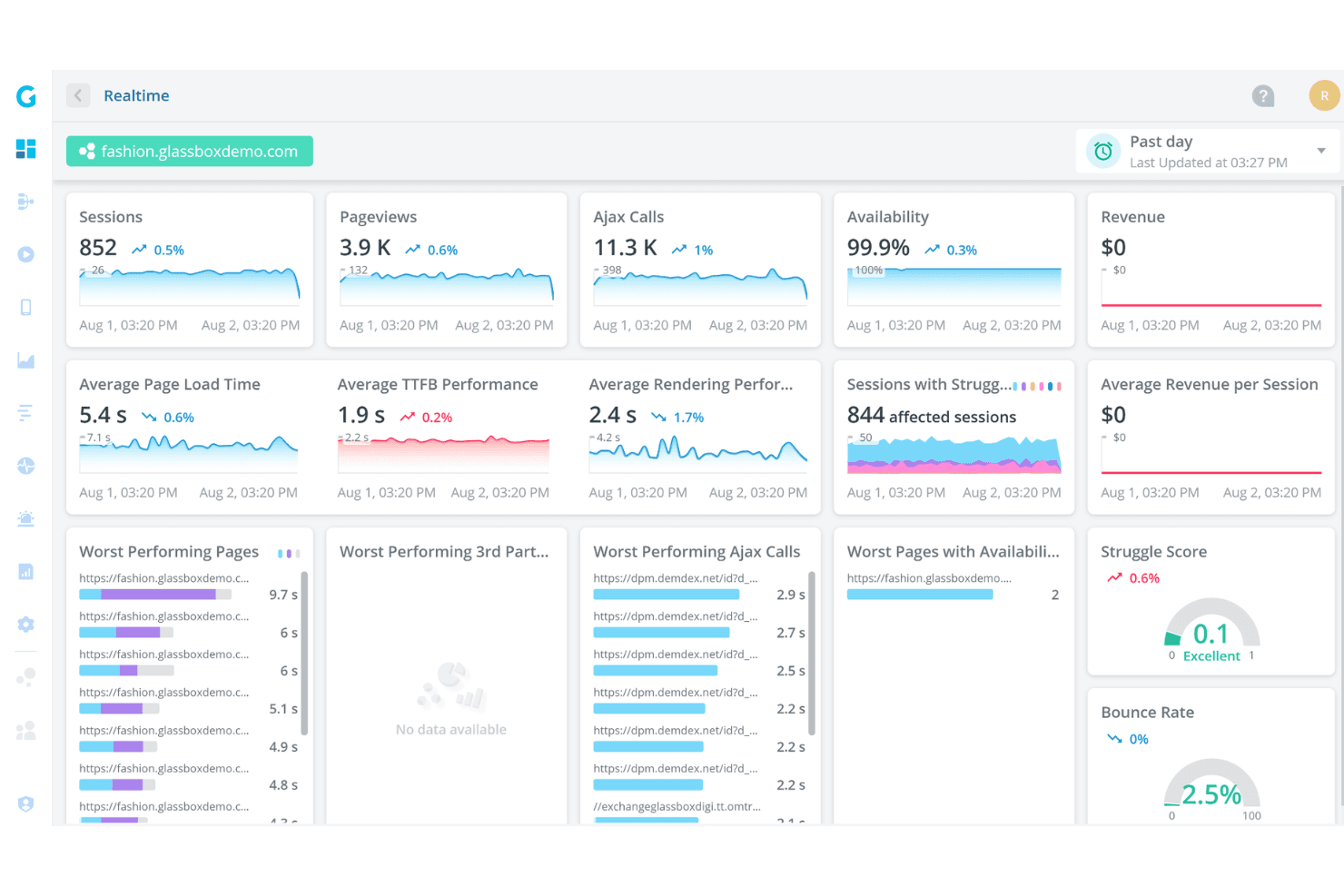
Glassbox offers a real-time analytics dashboard displaying sessions, pageviews, Ajax calls, availability, page load times, and struggle scores for a demo fashion website. Glassbox is a digital experience analytics platform that captures 100% of user sessions with tagless technology, combining session replay, interaction maps, funnel analysis, struggle detection, and real user monitoring across web and native mobile apps.
Who Is Glassbox Best For?
Glassbox is a strong fit for enterprise teams in regulated industries—like financial services and insurance—where compliance, privacy controls, and audit-ready session records are non-negotiable.
Why I Picked Glassbox
I picked Glassbox as one of the best because its Struggle Score and Session Vault combination is purpose-built for regulated industries where friction isn't just a UX problem—it's a compliance risk. The Struggle Score flags problem pages using patterns trained on trillions of sessions, while Session Vault stores time-stamped, tamper-proof session records for audit and complaint handling. I also like that its 30+ automatically detected struggle behaviors tie directly to revenue impact, so I can prioritize fixes with real business context.
Glassbox Key Features
- Tagless session capture: Records 1,000+ events per session automatically across web and native mobile apps, with no manual tagging required.
- Augmented Journey Map™: Visualizes cross-channel user journeys with 25+ dimensions, node-level flow analysis, and segmentation by VoC or A/B test data.
- GIA natural-language search: Lets you query sessions in plain language and get AI-generated summaries of sessions and reports through a chat interface.
- Interaction maps: Show click rate, focus time, errors, struggles, and revenue impact per page element, with side-by-side segment comparison tools.
Glassbox Integrations
Glassbox offers documented integrations with Jira, Slack, Microsoft Teams, AppDynamics, New Relic, Splunk, Adobe Analytics, Google Analytics, Qualtrics, and Optimizely. An open API supports custom integrations, and tag management connects through Google Tag Manager, Adobe Launch, and Tealium.
Pros and Cons
Pros:
- Preserves tamper-proof sessions for audits
- Links friction to revenue impact
- Captures every interaction without manual tagging
Cons:
- Filters and reports can confuse new users
- Replay coverage varies by package
Learn more about Glassbox: Best for full-stack frontend and backend correlation
- Free demo + 14-day free trial available
- From $2.50/1,000 sessions/month (billed annually)
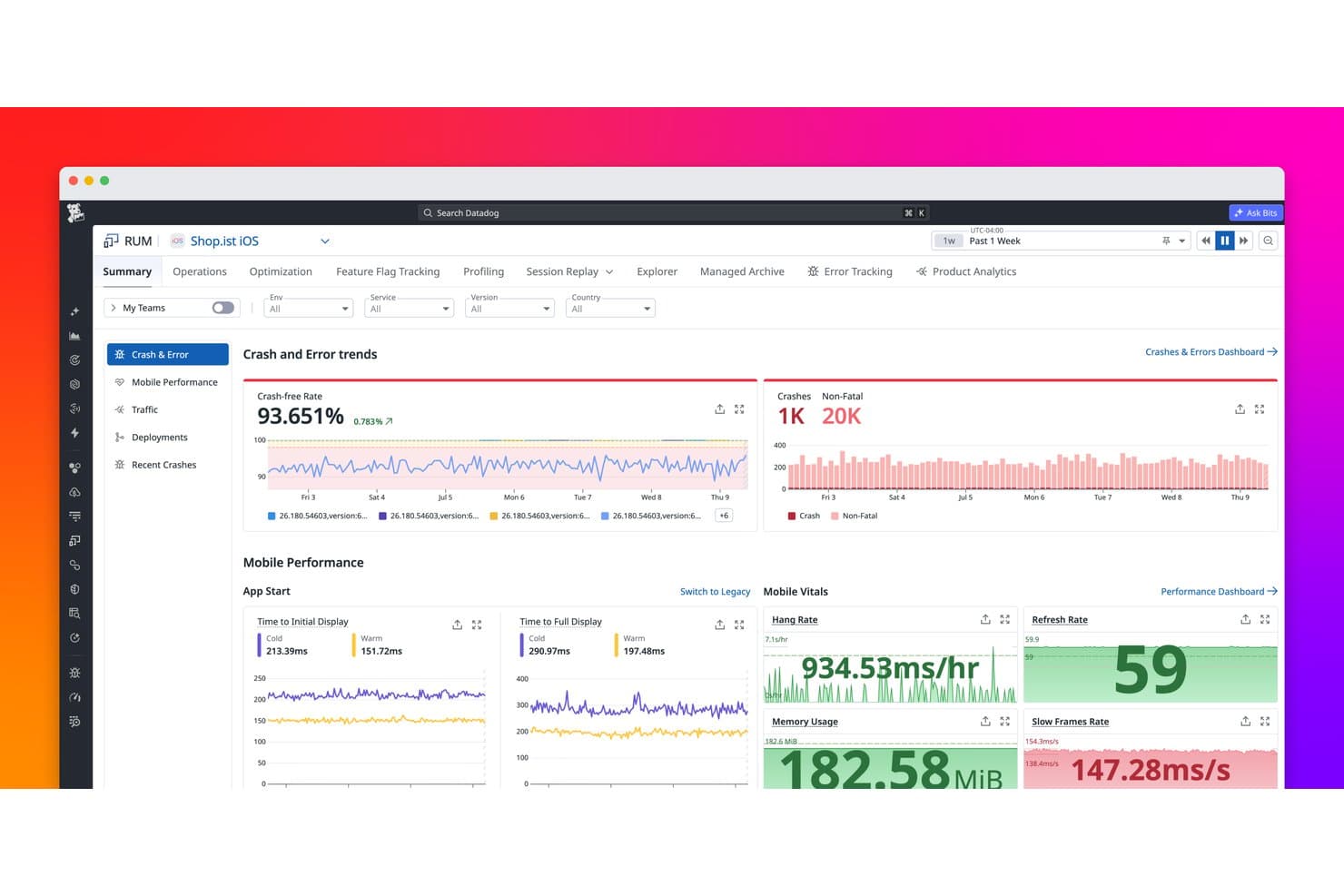
Datadog Real User Monitoring tracks crash rates, errors, and mobile performance metrics. Datadog Real User Monitoring is a digital experience monitoring platform that captures real user sessions, surfaces behavioral data through heatmaps and funnels, tracks frontend performance metrics, and connects user-facing signals directly to backend traces and logs.
Who Is Datadog Real User Monitoring Best For?
Datadog RUM is a strong fit for engineering and product teams that need to connect frontend user behavior directly to backend performance data in a single platform.
Why I Picked Datadog Real User Monitoring
Datadog RUM earns its spot on my shortlist because it's the only tool I've used where a rage click on a checkout button connects directly to a backend trace showing a slow database query. I love that RUM Without Limits lets you ingest every session, calculate performance metrics across all of them, and then selectively retain only the ones that matter, like sessions with errors or abandoned purchases. Watchdog Insights automatically surfaces outliers, flagging when a specific app version or browser is driving a spike in frustration signals.
Datadog Real User Monitoring Key Features
- RUM Without Limits: Ingest 100% of user sessions and use no-code retention filters to keep only the sessions that matter, such as those with errors or abandoned purchases.
- Frustration signals dashboard: Automatically collects rage clicks, dead clicks, and error clicks, and surfaces them in a dedicated dashboard with replay timeline markers.
- Mobile session replay: Captures native iOS and Android sessions as wireframe-based replays, with separate privacy controls for text, images, and touches.
- Error Tracking: Groups frontend errors into issues with source-mapped stack traces, crash reports, and visibility into which user segments are affected.
Datadog Real User Monitoring Integrations
Datadog RUM integrates natively with APM, Log Management, Synthetics, Error Tracking, Profiling, Feature Flags, Jira, Slack, and Confluence. It also offers a Zendesk Marketplace app, APIs for custom integrations, and access to more than 1,000 integrations across the Datadog platform.
Pros and Cons
Pros:
- Surfaces rage clicks and error outliers
- Captures every session before retention filtering
- Correlates frontend friction with backend traces
Cons:
- Requires manually building experience scores
- Heatmaps exclude mobile sessions
Learn more about Datadog Real User Monitoring:
Andre verktøy for overvåking av brukeropplevelse
Her er noen flere alternativer for verktøy for overvåking av brukeropplevelse som ikke kom med på kortlisten min, men som likevel er verdt å sjekke ut:
- 11LogRocketBest for AI-driven error and friction triage
- 12New Relic Browser MonitoringBest for engineering-led UX and frontend debugging
- 13Crazy EggBest for A/B testing with behavioral data
- 14SmartlookBest for web and mobile behavior analysis
- 15SplunkBest for visualizing UX data across full-stack traces
- 16OpenReplayBest for open-source session replay and debugging
- 17Microsoft ClarityBest for free, no-limit behavioral analytics
How I Evaluate User Experience Monitoring Tools
I split my evaluation into three parts. Core functionality—capturing real user sessions and visualizing behavior through heatmaps—carries the most weight. Then I look at distinguishing features like privacy masking controls, and finally consider onboarding speed and pricing value.
Core Functionality (Table Stakes For This List)
When I'm selecting tools for my list, I score each one on a scale from 0 (does not offer the functionality) to 5 (excels in this area) for each core functionality listed below. I then convert the total into a percentage to help assess each tool's overall fit, with extra weight on any functionalities I've deemed essential.
- Session Capture (Essential): I evaluate replay fidelity, search filters, and cross-device coverage to see if I can trace a single user's path from entry to drop-off.
- Behavioral Visualization (Essential): Heatmap variety matters here. I look for click, scroll, and movement maps with segment filtering so I can compare behavior across cohorts.
- Frontend Performance Monitoring: I check whether the tool ties page load times and latency back to specific user sessions, not just aggregate dashboards disconnected from real behavior.
- Friction and Error Detection: Rage clicks and dead clicks are table stakes. I look for tools that surface JavaScript errors alongside the session where they occurred.
- Funnel and Journey Analysis: I evaluate how easily I can build multi-step funnels and spot where users abandon a flow, like a checkout sequence or onboarding wizard.
- Experience Scoring and Alerting: Real-time alerts that flag experience degradations before users complain are what I'm after. Tools like Dynatrace and Contentsquare approach this differently.
Once I have a list of tools that meet the criteria, I consider what sets each platform apart.
Differentiating Factors (What Sets Vendors Apart)
Here's how I compare and contrast different vendors:
Standout Features
Privacy masking controls matter most when your product handles sensitive data. I evaluate how granularly each tool lets you redact PII—Hotjar and FullStory handle this differently, and the gap shows up fast in regulated industries. Cross-platform mobile support is the other dealbreaker. I check whether heatmaps and session replay extend to native iOS and Android apps, not just mobile web views. If your team ships across platforms, tools that only cover the browser leave major blind spots in your behavioral data.
Beyond Features
I evaluate how quickly a tool gets to first insight. Some platforms, like FullStory, offer tag-manager deployment that skips lengthy engineering cycles, while others require dedicated SDK work that can stall a rollout. Compliance alignment matters just as much—I check for built-in consent management and data residency options, especially for teams shipping products across multiple jurisdictions. I also look at native integrations with tools like Jira, Amplitude, and Slack, since behavioral insights lose value when they sit outside your team's actual workflow.
Slik velger du et verktøy for overvåking av brukeropplevelse
Det er lett å gå seg vill i lange funksjonslister og komplekse prismodeller. For å hjelpe deg med å holde fokus mens du går gjennom den unike prosessen med å velge programvare, får du her en sjekkliste over faktorer du bør ha i tankene:
| Faktor | Hva du bør vurdere |
| Skalerbarhet | Kontroller at verktøyet kan vokse med virksomheten din. Vurder om det kan håndtere økte datamengder om brukerne uten å bli tregere. |
| Integrasjoner | Kontroller om verktøyet kan integreres med eksisterende systemer som CRM, CMS eller analyseplattformer for å effektivisere arbeidsflytene. |
| Tilpasningsmuligheter | Se etter alternativer for å tilpasse instrumentpaneler og rapporter til teamets spesifikke behov og mål. |
| Brukervennlighet | Velg et verktøy med et intuitivt grensesnitt som reduserer opplæringsbehovet for teamet. |
| Budsjett | Vurder om verktøyet gir god valuta for pengene, og om prisen samsvarer med budsjettbegrensningene dine. |
| Sikkerhetstiltak | Kontroller at verktøyet overholder personvern- og databeskyttelsesregelverk og har tiltak på plass for å beskytte brukerdata. |
| Støtte | Vurder kvaliteten på og tilgjengeligheten til kundestøtten, inkludert alternativer som direktechat, e-post og telefon. |
| Ytelse | Vurder hvor godt verktøyet fungerer ved behandling av data i sanntid, og hvor pålitelig det er ved kontinuerlig overvåking. |
Trender innen verktøy for overvåking av brukeropplevelse
I researcharbeidet mitt hentet jeg inn utallige produktoppdateringer, pressemeldinger og lanseringslogger fra forskjellige leverandører av verktøy for overvåking av brukeropplevelse. Her er noen av trendene som er i ferd med å vokse frem, og som jeg følger med på:
- AI-drevne innsikter: Mange verktøy bruker nå AI for å gi dypere innsikt i brukeratferd. Dette hjelper team med å forutsi brukernes behov og tilpasse opplevelsene deretter. Leverandører som Dynatrace utnytter AI for å forbedre overvåkingsfunksjonene sine.
- Samarbeid i sanntid: Verktøy legger til funksjoner som gjør det mulig for team å samarbeide om brukerdata i sanntid. Dette legger til rette for raskere beslutningstaking og problemløsning. Fullstory tilbyr for eksempel funksjoner for samarbeid i sanntid for å forbedre teamenes arbeidsflyt.
- Personvernfokuserte funksjoner: Etter hvert som bekymringen for personvern øker, integrerer verktøy funksjoner som gjør det mulig for virksomheter å overvåke brukeropplevelser samtidig som personvernet ivaretas. Dette omfatter anonymisering av brukerdata og tilbud om verktøy for overholdelse av regelverk, noe som blir standard i mange plattformer.
- Analyse på tvers av enheter: Det blir stadig viktigere å forstå brukeratferd på tvers av flere enheter. Verktøy tilbyr nå mer omfattende analyse på tvers av enheter for å gjøre det enklere å følge brukernes reiser. Nexthink har introdusert funksjoner som muliggjør detaljert sporing på tvers av enheter.
- Kartlegging av brukerreisen: Verktøy fokuserer på å tilby detaljerte kart over brukerreisen for å visualisere hvert trinn en bruker tar. Dette hjelper virksomheter med å identifisere friksjonspunkter og optimalisere brukeropplevelsen. Selskaper som Contentsquare leder an med avanserte funksjoner for kartlegging av brukerreisen.
Hva er et verktøy for overvåking av brukeropplevelsen?
Verktøy for overvåking av brukeropplevelsen er programvareløsninger som er utviklet for å spore og analysere hvordan brukere samhandler med et nettsted eller en applikasjon. Disse verktøyene brukes ofte av UX-designere, produktledere og digitale markedsførere for å forbedre brukertilfredsheten og optimalisere digitale opplevelser. Sanntidsanalyse, øktavspillinger og varmekart hjelper team med å forstå brukeratferd og identifisere områder som kan forbedres. Samlet sett gir disse verktøyene verdifull innsikt som fører til forbedrede brukeropplevelser og bedre forretningsresultater.
Funksjoner i verktøy for overvåking av brukeropplevelsen
- Sanntidsanalyse: Spor ytelsesmålinger og oppdag forsinkelsesproblemer umiddelbart, slik at team får hjelp med feilsøking og analyse av rotårsaker, samt automatiske varsler om eventuelle oppdateringer.
- Øktavspillinger & varmekart: Analyser atferd fra sluttbrukerens perspektiv ved å visualisere friksjonspunkter og ytelsesflaskehalser som påvirker engasjementet.
- AI-drevet innsikt: Bruk AI-drevet analyse til å avdekke mønstre, forutsi atferd, etablere referanseverdier og forbedre målinger av brukeropplevelsen.
- Sporing på tvers av enheter: Sørg for en konsekvent brukeropplevelse på tvers av enheter, samtidig som du overvåker innlastingstider for sider og tilkobling til backend.
- Tilpassbare kontrollpaneler: Fokuser på viktige KPI-er og ytelsesindikatorer med tilpasset rapportering.
- Personvernfokuserte funksjoner & funksjoner for overholdelse av regelverk: Skybaserte løsninger beskytter brukerdata med anonymiseringsverktøy og innebygd observerbarhet for overholdelse av regelverk.
- Samarbeidsverktøy: Del innsikt på tvers av team for å sammenstille data og forbedre beslutningstakingen.
Fordeler med verktøy for overvåking av brukeropplevelsen
Implementering av verktøy for overvåking av sluttbrukeropplevelsen (EUEM) gir flere fordeler for teamet og virksomheten din:
- Bedre brukertilfredshet: Denne typen overvåkingsløsning gjør det mulig å bruke øktavspillinger og varmekart for å identifisere og løse friksjonspunkter, noe som forbedrer sluttbrukeropplevelsen totalt sett.
- Datadrevet beslutningstaking: Med sanntidsanalyse og AI-drevet innsikt kan team ta velbegrunnede valg basert på ytelsesdata og brukeratferd.
- Forbedret nettstedytelse: Ytelsesovervåking sikrer raskere innlastingstider for sider, reduserer fluktfrekvensen og øker engasjementet.
- Forbedret feilsøking: Identifiser rotårsakene til ytelsesflaskehalser med observerbarhetsverktøy, noe som fører til raskere utbedring av problemer.
- Bedre samarbeid på tvers av team: Samarbeidsverktøy gjør det enkelt å dele funn, noe som forbedrer samkjøringen mellom DevOps-, markedsførings- og IT-team.
- Høyere konverteringsfrekvenser: Optimalisering av brukerreiser basert på reelle interaksjonsdata kan øke konverteringsfrekvensene og inntektene.
- Overholdelse av personvernregler: Innebygde personvernkontroller bidrar til å opprettholde overholdelse av regelverk samtidig som brukernes tillit bevares.
- Konsekvent opplevelse på tvers av enheter: Sluttbrukerovervåking sikrer at brukerne får en enkel opplevelse på tvers av alle enheter og plattformer.
Kostnader og priser for verktøy for overvåking av brukeropplevelsen
Ved valg av verktøy for overvåking av brukeropplevelsen er det nødvendig å forstå de ulike prismodellene og planene som er tilgjengelige. Kostnadene varierer basert på funksjoner, teamstørrelse, tillegg og mer. Tabellen nedenfor oppsummerer vanlige planer, gjennomsnittsprisene deres og typiske funksjoner som inngår i løsninger for overvåking av brukeropplevelsen:
Sammenligningstabell for verktøy for overvåking av brukeropplevelse
| Abonnementstype | Gjennomsnittspris | Vanlige funksjoner |
| Gratisabonnement | $0 | Grunnleggende analyse, begrensede øktavspillinger og minimal datalagring. |
| Privatabonnement | $5-$25 /bruker /måned | Avansert analyse, varmekart, øktavspillinger og e-poststøtte. |
| Bedriftsabonnement | $30-$100 /bruker /måned | Omfattende analyse, kartlegging av brukerreiser, prioritert støtte og tilpassede API-integrasjoner. |
| Virksomhetsabonnement | $100+ /bruker/måned | Tilpassbare dashbord, dedikert kontoadministrasjon, full datatilgang og SLA-støttet brukerstøtte. |
Vanlige spørsmål om verktøy for overvåking av brukeropplevelse
Her er noen svar på vanlige spørsmål om verktøy for overvåking av brukeropplevelse:
Hvilket overvåkingsverktøy brukes til å overvåke brukerens opplevelse ved bruk av en applikasjon eller et nettsted?
Verktøy for overvåking av ekte brukere (RUM) brukes til å registrere og analysere alle brukerinteraksjoner i en programvareapplikasjon i sanntid. De gir innsikt basert på faktiske brukeropplevelser, i motsetning til syntetiske overvåkingsverktøy som simulerer brukere. RUM hjelper deg med å forstå brukerinteraksjoner i den virkelige verden og forbedre applikasjonsopplevelsen.
Hva er forskjellen mellom APM og overvåking av digital opplevelse?
Applikasjonsytelsesstyring (APM) fokuserer på å overvåke applikasjonsytelsen fra et teknisk perspektiv og optimalisere teknologistakken. Overvåking av digital opplevelse (DEM) måler hvordan applikasjonsytelsen påvirker brukeren. Det gir innsikt i hvordan ytelsesproblemer påvirker brukertilfredshet og engasjement.
Hvordan måler man sluttbrukeropplevelsen?
Måling av sluttbrukeropplevelsen innebærer å analysere både kvantitative og kvalitative data. Kvantitative målinger omfatter fullføringsgrad for oppgaver, feilrate og tidsbruk på oppgaver. Disse målingene hjelper deg med å forstå brukervennlighet og effektivitet, og gir innsikt i hvordan brukere samhandler med applikasjonen din.
Hvordan kan overvåking av brukeropplevelse forbedre virksomheten min?
Overvåking av brukeropplevelse hjelper virksomheten din ved å identifisere friksjonspunkter og muligheter for forbedring. Ved å forstå brukeratferd kan du optimalisere de digitale produktene dine for å øke tilfredsheten og konverteringsfrekvensen. Dette fører til bedre kundebevaring og generell virksomhetsvekst.
Hvilke utfordringer finnes ved implementering av verktøy for overvåking av brukeropplevelse?
Utfordringene omfatter integrering av verktøyene med eksisterende systemer, sikring av personvern og håndtering av store datamengder. Det er viktig å velge et verktøy som samsvarer med teamets tekniske kompetanse og infrastruktur. Riktig implementering sikrer at du får størst mulig verdi ut av overvåkingsverktøyene.
Hvordan påvirker personvernregler overvåking av brukeropplevelse?
Personvernregler krever at du håndterer brukerdata på en ansvarlig måte. Overvåkingsverktøy må overholde lover som GDPR og sørge for at data anonymiseres og lagres sikkert. Dette beskytter brukernes personvern samtidig som du kan samle inn innsikten du trenger for å forbedre brukeropplevelser.