

Det kan være krevende å håndtere prosjekter, særlig når de nåværende verktøyene dine ikke strekker til. Som produktleder opplever du et konstant press for å holde alt på rett spor, og selv om Asana kan være et godt verktøy for bestemte bruksområder, passer det noen ganger rett og slett ikke til behovene dine.
Kanskje jobber du med komplekse prosjekter, eller kanskje trenger du bedre funksjoner for tilpasning eller samarbeid. Uansett hva situasjonen er, kan det å finne riktig verktøy utgjøre en stor forskjell for teamet ditt.
Jeg har testet og vurdert ulike alternativer, og jeg vil dele objektive innsikter om de beste Asana-alternativene. Her finner du praktiske løsninger tilpasset dine unike utfordringer. Dette er mine beste programvareanbefalinger.
Hva er Asana?
Asana er et sentralt verktøy for produktstyring som er utviklet for å hjelpe team med å organisere, følge opp og håndtere arbeidet sitt. Det brukes ofte av prosjektledere, teamledere og fagfolk innen produktutvikling som trenger å holde prosjekter i rute og sikre godt samarbeid. Funksjoner for tildeling av oppgaver, oppfølging av tidsfrister og prosjektvisualisering, som kalendere og Kanban-tavler, bidrar til å håndtere arbeidsflyter og forbedre teamets effektivitet. Alt i alt forenkler Asana prosjektstyringen ved å gi en tydelig oversikt over oppgaver og fremdrift.
Why Trust Our Software Recommendations
6,700+
Reviews
20
Industry experts
16+
Evaluation factors
14
Years
Our team has been testing and reviewing software since 2012. As product managers ourselves, we know how difficult—and important—it is to choose the right software.
For this guide, we evaluated tools using hands-on testing and independent research, scoring tools using our selection criteria.
Our reviews reflect our human editorial judgment, not a sales pitch.
Expert reviewers:
- Andrew LumbySenior TPM
- Cristiano ValimSenior UI/UX Lead


Sammenligningstabell: Asana-alternativer
Denne sammenligningstabellen oppsummerer prisdetaljene for mine beste utvalgte Asana-alternativer.
| Tool | Best For | Trial Info | Price | ||
|---|---|---|---|---|---|
| 1 | Best for built-in time tracking | Free plan + 15-day free trial + free demo available | From $4/user/month (billed annually) | Website | |
| 2 | Best for customizable project workflows | Free plan + 14-day free trial available | From $10/user/month (billed annually) | Website | |
| 3 | Best for dev-team project tracking | Free plan available | From $7.91/user/month | Website | |
| 4 | Best for AI-assisted cross-team work tracking | Free plan available | From $9/user/month (billed annually) | Website | |
| 5 | Best for spreadsheet-style project planning | 30-day free trial | From $9/user/month (billed annually) | Website | |
| 6 | Best for deeply layered task customization | Free plan available | From $9/user/month (billed annually) | Website | |
| 7 | Best for flat-rate team pricing | Free plan + 14-day free trial + free demo available | From $79/user/month (billed annually) | Website | |
| 8 | Best for productivity and goal analytics | Free plan + 14-day free trial + free demo available | From $5/user/month (billed annually) | Website | |
| 9 | Best for agency and client delivery teams | Free plan + 14-day free trial available | From $9.99/user/month (billed annually) | Website | |
| 10 | Best for agencies managing client projects | 14-day free trial + free demo available | From $9.99/user/month (billed annually) | Website |


Anmeldelser av de beste Asana-alternativene
Nedenfor finner du mine detaljerte sammendrag av de beste Asana-alternativene som kom med på kortlisten. Anmeldelsene mine gir en grundig gjennomgang av de viktigste funksjonene, fordelene & ulempene, integrasjonene og ideelle bruksområdene for hvert verktøy, slik at du kan finne det beste alternativet for deg.
 Best for built-in time tracking
- Free plan + 15-day free trial + free demo available
- From $4/user/month (billed annually)
Visit WebsiteCustomer Rating:4.3/5
Zoho Projects shows a Kanban-style task board with built-in automation options, helping teams manage complex project workflows more efficiently. Zoho Projects is designed for teams seeking a flexible project management solution that caters to diverse industries such as IT, construction, and marketing. It addresses the need for efficient task management and collaboration, offering tools like time tracking and Gantt charts to streamline workflows. By integrating with a wide range of applications, Zoho Projects ensures that your team can maintain productivity without switching platforms, making it an appealing choice for those looking to transition from Asana.
Why I Picked Zoho Projects
When considering an Asana alternative, I picked Zoho Projects for its advanced task automation capabilities. This feature allows your team to automate repetitive tasks, saving time and reducing manual effort. Additionally, Zoho Projects offers extensive customization options, enabling you to tailor workflows to your specific needs, which is crucial for teams with unique project requirements. These functionalities, combined with intuitive collaboration tools, make Zoho Projects a strong contender for those seeking an alternative to Asana.
Zoho Projects Key Features
In addition to its automation and customization capabilities, Zoho Projects offers several other features that enhance its utility as an Asana alternative.
- Time Tracking: Enables your team to monitor how much time is spent on tasks, helping improve productivity and accountability.
- Gantt Charts: Provides a visual timeline for project tasks, allowing for better planning and deadline management.
- Issue Tracking: Facilitates the identification and resolution of project-related issues, ensuring smooth project progression.
- Team Collaboration: Supports communication and collaboration among team members through forums and chat, fostering a collaborative work environment.
Zoho Projects Integrations
Integrations include Slack, Microsoft Teams, Google Drive, Dropbox, Zapier, Zoho CRM, Zoho Desk, GitHub, Jira, and Microsoft Office 365.
Pros and Cons
Pros:
- Strong Zoho ecosystem integrations
- Built-in time tracking included
- Advanced workflow automation tools
Cons:
- Interface can feel complex
- Steeper learning curve initially
Learn more about Zoho Projects: Best for customizable project workflows
- Free plan + 14-day free trial available
- From $10/user/month (billed annually)
Visit WebsiteCustomer Rating:4.3/5
Visual workload breakdown of the project team in Wrike, showing individual task allocations and capacity percentages across the week. Wrike is a project management platform built for teams managing both simple and complex projects across departments. It’s ideal for organizations looking for flexible work views, automation, and deep integrations to support collaborative project management.
Why Wrike is a good Asana alternative: I picked Wrike because it offers more flexibility for managing complex projects with multiple teams involved. While Asana is great for straightforward task management, Wrike excels with advanced tools like customizable request forms, Gantt charts, and real-time dashboards that help you stay on top of project timelines and workloads. Wrike also supports AI-driven features like risk prediction and automation to help reduce manual work, giving your team more time to focus on what matters.
Standout features & integrations:
Features include AI-powered automation tools to reduce repetitive tasks, customizable work views like Gantt charts and Kanban boards for better project visualization, and a centralized data hub to consolidate information from across your projects. Wrike also offers fully functional mobile apps so you can manage work on-the-go.
Integrations include 400+ pre-built native connections, including Microsoft, Google, Dropbox, Salesforce, and Marketo.
Pros and Cons
Pros:
- Individuals and teams can track workloads
- Easily visualize workflow performance
- In-app chat to reduce switch cost for collaboration
Cons:
- Limited to 10 workflows per space
- Not suitable for small organizations

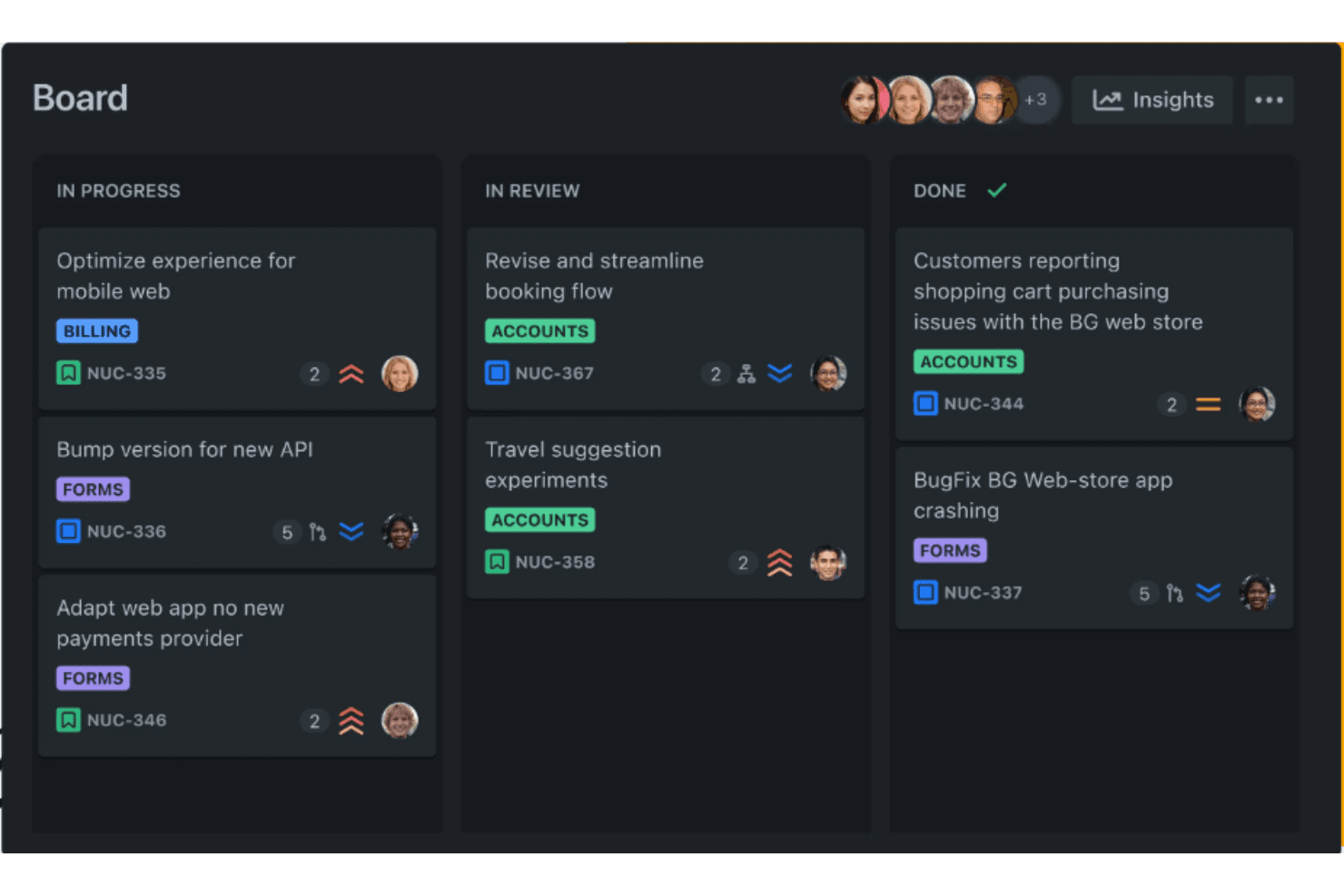
Jira is a project management solution equipped to handle complex projects with issue tracking, agile boards, and detailed reporting. Jira is a project management platform for software development teams that connects issue tracking, agile planning, and engineering workflows in one workspace.
Who Is Jira Best For?
Jira suits software development teams that need structured issue tracking, sprint planning, and visibility across engineering workflows.
Why Jira Is a Good Best Asana Alternatives Review
I picked Jira because it’s built for dev-team project tracking, with issue types, backlogs, and sprint boards tied to engineering work. I use custom workflows and release tracking to move bugs and features from intake through deployment. This gives my team a clearer view of sprint scope and delivery progress than general-purpose work management tools.
Jira Key Features
- Custom dashboards: Build personalized views with configurable gadgets and project data.
- Automation rules: Trigger actions from events, conditions, and schedules without code.
- Reports: Generate charts for workload, cycle time, velocity, and resolution trends.
- App integrations: Connect Jira with tools for documentation, communication, and development.
Jira Integrations
Jira’s built-in automation supports connections with Slack, Microsoft Teams, Bitbucket, GitHub, and Opsgenie. It also offers 3,000+ Marketplace apps, including Confluence, Trello, Zoom, Figma, Zendesk, and Power BI, plus REST APIs for custom integrations.
Pros and Cons
Pros:
- Release reports connect work to outcomes
- Sprint boards support backlog prioritization
- Issue workflows fit software delivery teams
Cons:
- Advanced planning needs careful configuration
- Setup can overwhelm nontechnical teams
Learn more about Jira: Best for AI-assisted cross-team work tracking
- Free plan available
- From $9/user/month (billed annually)
Visit WebsiteCustomer Rating:4.6/5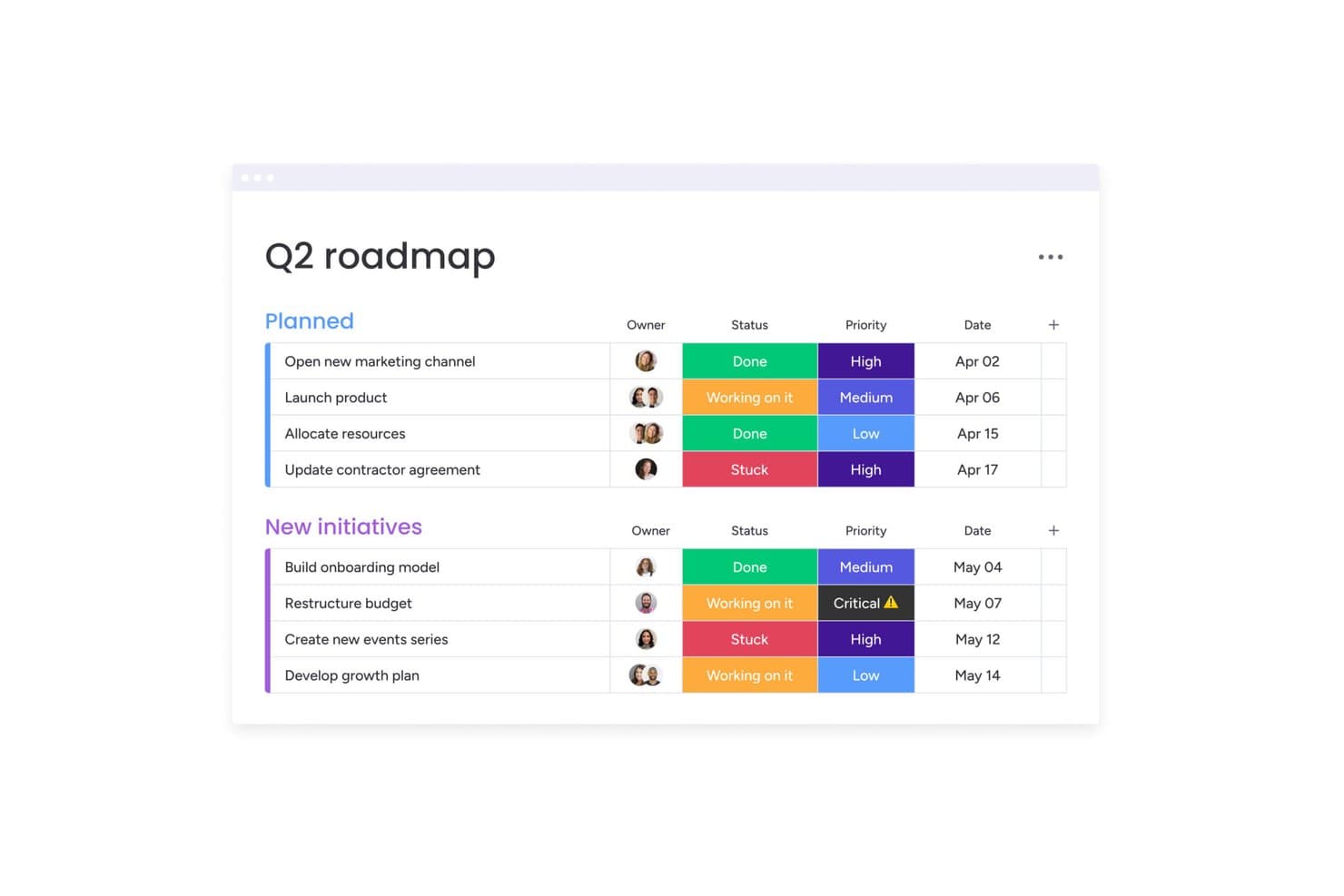
monday AI Workspace organizes milestones by status, priority, and date. monday AI Workspace is a flexible project management platform for product and cross-functional teams that unifies planning, task coordination, and collaboration, helping replace fragmented tools and keep priorities aligned.
Who Is monday AI Workspace Best For?
Product and operations teams that need AI-assisted planning, task tracking, and collaboration across engineering, design, marketing, and business functions.
Why monday AI Workspace Is a Good Best Asana Alternatives Review
I picked monday AI Workspace because its AI features turn scattered team updates into actionable work. My team uses AI to summarize board activity, extract action items, and flag blockers across engineering, design, and marketing. Cross-board dashboards then give us one view of launch progress, dependencies, and ownership.
monday AI Workspace Key Features
- Customizable boards: Configure columns, views, and statuses for each workflow.
- Timeline views: Map tasks across dates and monitor schedule changes.
- Workflow automations: Trigger updates, assignments, and notifications from board actions.
- Workload view: Compare team capacity against assigned tasks and deadlines.
monday AI Workspace Integrations
monday AI Workspace offers native integrations with Slack, Microsoft Teams, Outlook, Google Drive, Google Calendar, Salesforce, Jira, GitHub, and Asana. It also connects with Zapier and provides an API for custom integrations.
Pros and Cons
Pros:
- Flexible boards fit varied team workflows
- Cross-board dashboards expose launch dependencies
- AI turns updates into actionable work
Cons:
- AI-generated summaries still need human review
- Board sprawl can obscure portfolio priorities
Learn more about monday AI Workspace: Best for spreadsheet-style project planning
- 30-day free trial
- From $9/user/month (billed annually)
Visit WebsiteCustomer Rating:4.5/5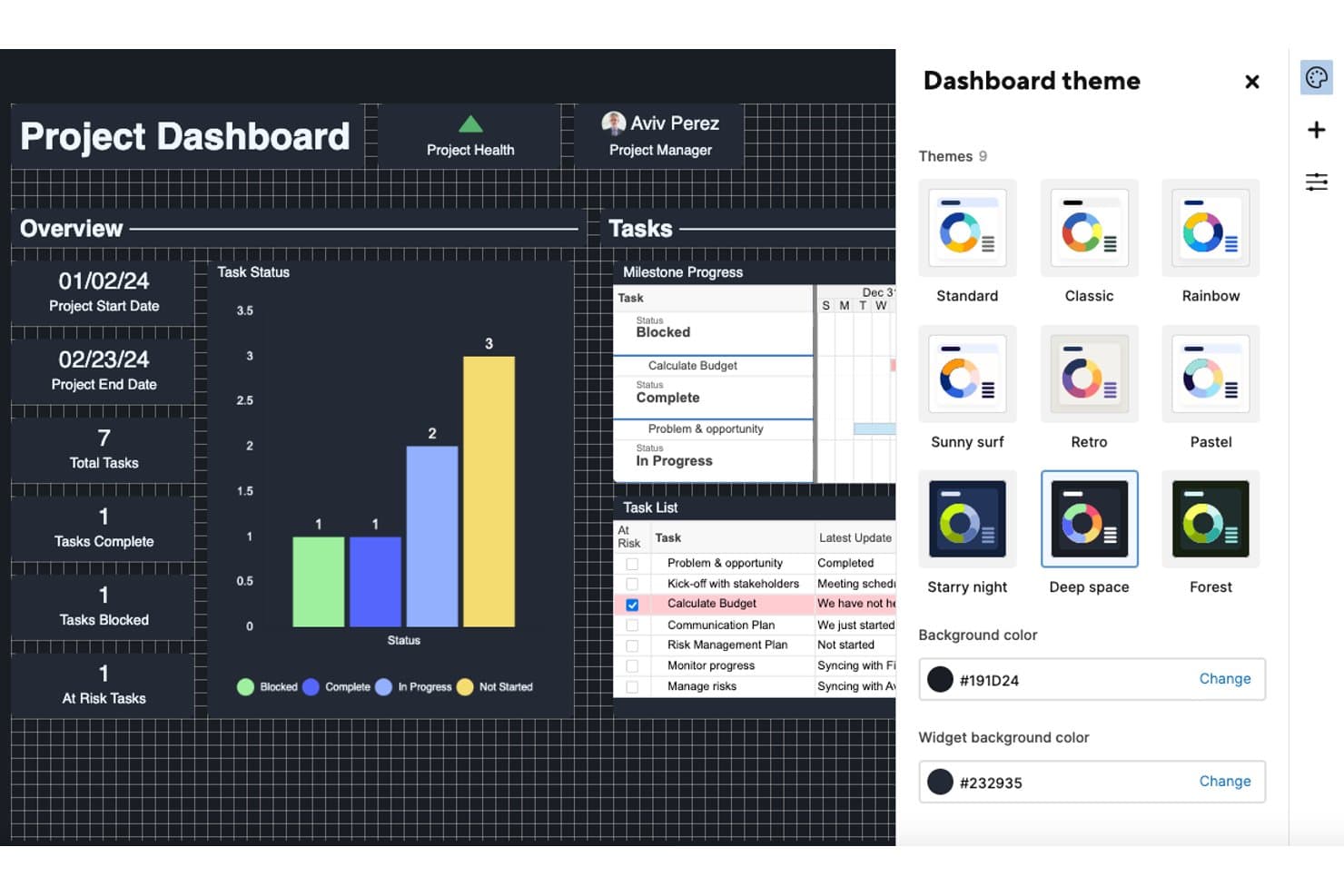
Smartsheet lets users personalize dashboards with nine color themes. Smartsheet is a collaborative work management platform for product, operations, and project teams that need familiar planning tools, resource coordination, and clear status visibility.
Who Is Smartsheet Best For?
Smartsheet fits project managers and operations teams that prefer grid-based plans for coordinating schedules, dependencies, resources, and status updates.
Why Smartsheet Is a Good Best Asana Alternatives Review
I picked Smartsheet because its spreadsheet-style project planning suits teams that manage schedules, dependencies, and resources in grid-based workspaces. I use Gantt views to map product launches, formulas to flag overdue tasks, and dashboards to report progress without rebuilding project data.
Smartsheet Key Features
- Forms: Collect standardized project requests through customizable forms.
- Automated workflows: Trigger alerts, reminders, and approval requests automatically.
- Proofing: Review and approve files with comments tied to specific content.
- Update requests: Ask collaborators to submit changes without opening the sheet.
Smartsheet Integrations
Smartsheet offers 175+ integrations, including Jira Software, Slack, Microsoft Teams, Salesforce, Tableau, Power BI, Miro, and Zapier.
Pros and Cons
Pros:
- Forms and update requests reduce status chasing
- Gantt dependencies support launch coordination
- Spreadsheet interface suits structured planning
Cons:
- Reports need manual configuration for clarity
- Grid-heavy workflows can feel rigid
Learn more about Smartsheet: Best for deeply layered task customization
- Free plan available
- From $9/user/month (billed annually)
Visit WebsiteCustomer Rating:4.6/5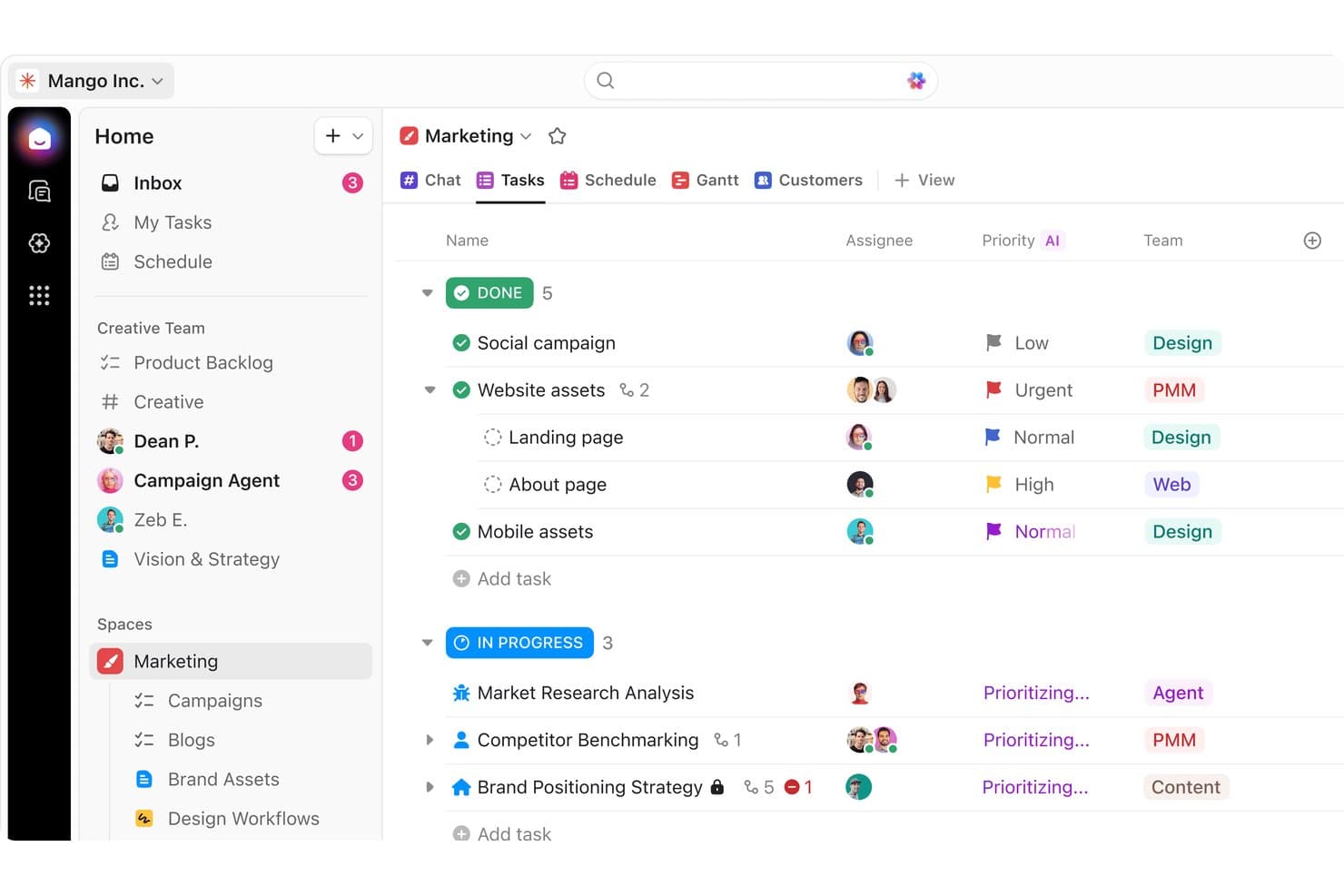
ClickUp organizes marketing tasks by status, priority, and team. ClickUp is a project management platform for product teams, agencies, and growing businesses that need one place to plan work, coordinate collaboration, and connect day-to-day tasks with broader project goals.
Who Is ClickUp Best For?
ClickUp suits cross-functional product teams that need granular task structures, custom workflows, and detailed project views.
Why ClickUp Is a Good Best Asana Alternatives Review
I picked ClickUp because its deeply layered task customization suits complex product work. I use nested subtasks, custom fields, and task dependencies to break an initiative into epics, stories, and release tasks. Custom statuses also help my team reflect discovery, delivery, and launch workflows in one workspace.
ClickUp Key Features
- Goals: Set measurable targets and track progress.
- Dashboards: Display project metrics in customizable panels.
- Automations: Trigger actions from defined task events.
- Time tracking: Record time directly within tasks.
ClickUp Integrations
ClickUp offers built-in integrations with Slack, Microsoft Teams, Google Drive, Google Calendar, GitHub, GitLab, Jira, Figma, Dropbox, and OneDrive. It also connects with Zapier and provides a public API for custom integrations.
Pros and Cons
Pros:
- Dashboards connect execution with outcome tracking
- Custom statuses mirror discovery-to-launch workflows
- Nested subtasks support detailed product hierarchies
Cons:
- Task views may feel cluttered at scale
- Dense configuration can overwhelm smaller teams
Learn more about ClickUp: Best for flat-rate team pricing
- Free plan + 14-day free trial + free demo available
- From $79/user/month (billed annually)
Visit WebsiteCustomer Rating:4.6/5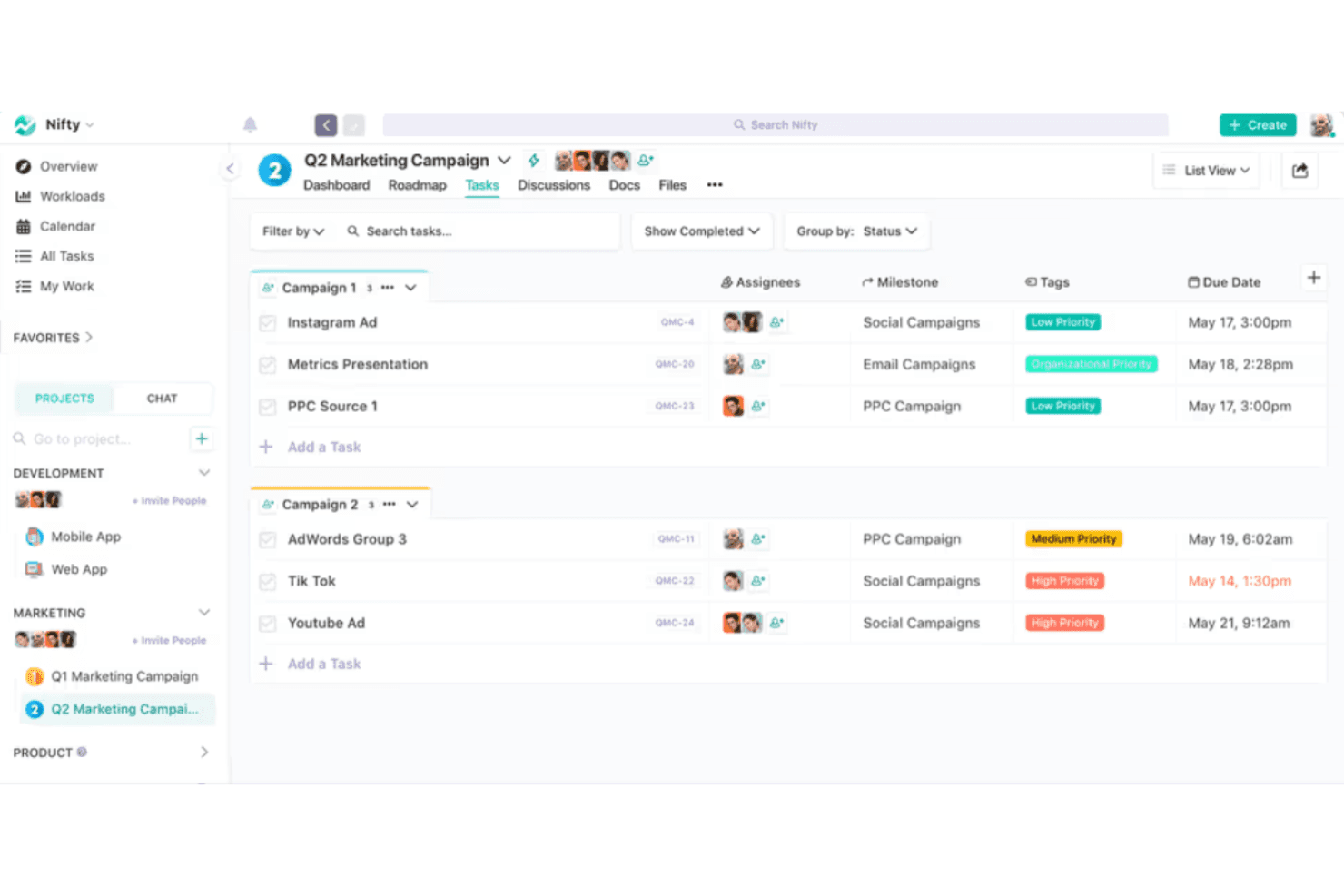
Nifty integrates task management, tracking, and communication for cohesive workflows. Nifty is project management software for product and cross-functional teams that combines roadmaps, tasks, discussions, and project documentation to align priorities and keep delivery work organized.
Who Is Nifty Best For?
Nifty suits product and cross-functional teams that need roadmaps, delivery workflows, and project documentation in one shared workspace.
Why Nifty Is a Good Best Asana Alternatives Review
I picked Nifty because its flat-rate team pricing helps me budget project work without tracking every seat change. I use its roadmaps to connect strategic goals with delivery tasks, while project discussions and documentation keep decisions beside the work. That combination suits product teams comparing Asana alternatives for cross-functional planning.
Nifty Key Features
- Time tracking: Record time spent on individual tasks.
- Task dependencies: Link tasks to define their completion order.
- Custom fields: Add structured data fields to tasks.
- Workload view: Review team capacity across active projects.
Nifty Integrations
Nifty offers native integrations with Harvest, Webex, Zoom, Slack, GitHub, Microsoft 365, Google Drive, Google Calendar, and Miro, plus Zapier. It also provides an API for custom integrations.
Pros and Cons
Pros:
- Workload views expose capacity across projects
- Project discussions keep decisions beside work
- Roadmaps connect goals to delivery tasks
Cons:
- Advanced reporting is less developed than Asana’s
- Large projects can make task views crowded
Learn more about Nifty: 8Best for productivity and goal analytics
Hive
- Free plan + 14-day free trial + free demo available
- From $5/user/month (billed annually)
Visit WebsiteCustomer Rating:4.5/5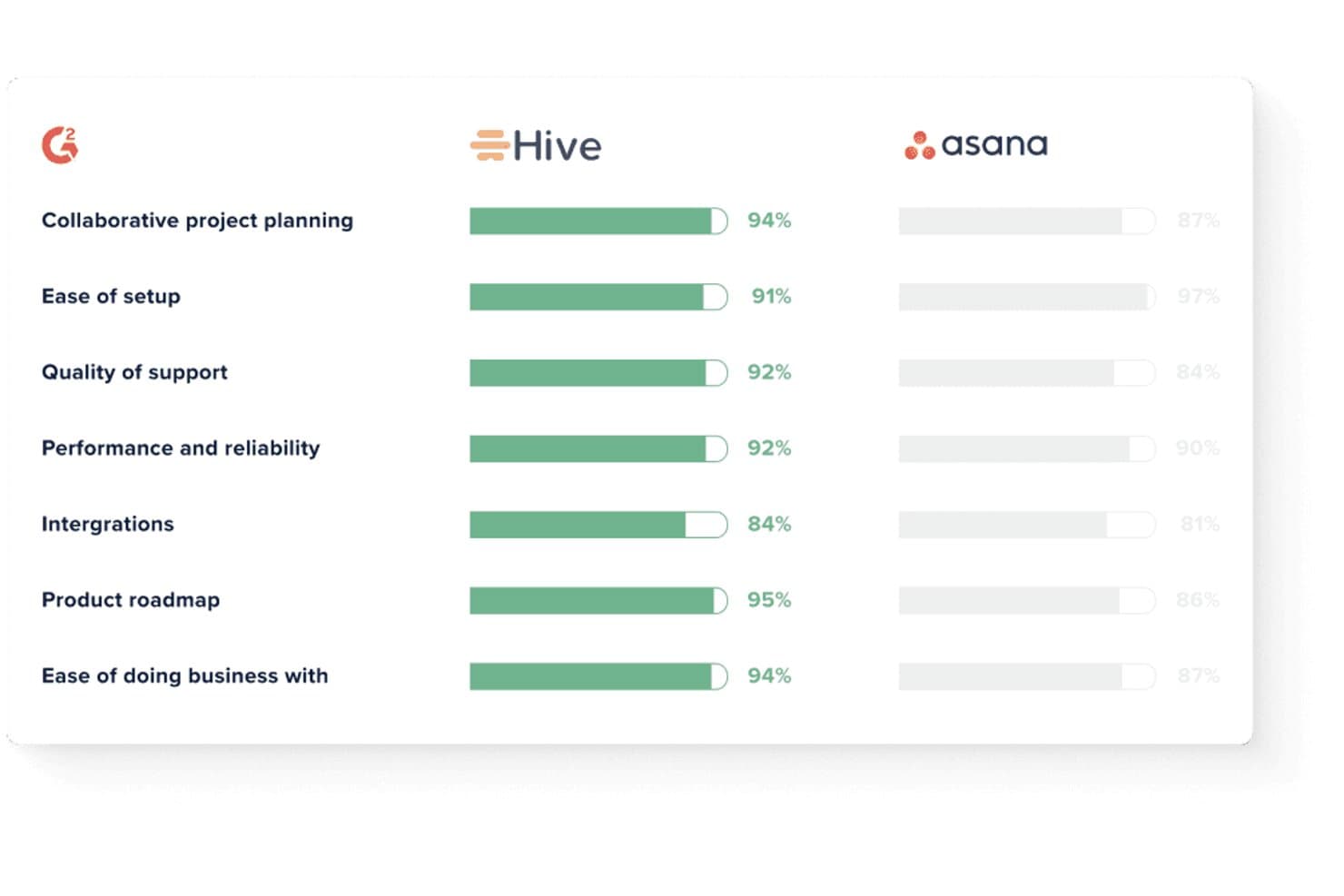
Hive outscores Asana across key G2 satisfaction metrics. Hive is a project management and collaboration platform for cross-functional teams that need flexible workflows, shared workspaces, and centralized communication to coordinate projects without juggling multiple tools.
Who Is Hive Best For?
Hive suits cross-functional teams that need shared workspaces, flexible workflows, and goal analytics in one platform.
Why Hive Is a Good Best Asana Alternatives Review
I picked Hive because its productivity and goal analytics connect project activity with measurable outcomes. I use Hive Goals to track objectives and key results, then review project dashboards to spot delivery gaps. That helps my team link weekly tasks to product targets instead of measuring progress by completed work alone.
Hive Key Features
- Task management: Assign owners, due dates, priorities, and subtasks.
- Project views: Switch between Kanban, Gantt, calendar, and table views.
- Workflow automation: Trigger actions when task conditions change.
- Time tracking: Record time spent on tasks and projects.
Hive Integrations
Hive offers native integrations with Google Drive, Google Calendar, Dropbox, Microsoft Teams, Zoom, Jira, Slack, GitHub, and QuickBooks. It also provides an API for custom integrations and connects with Zapier.
Pros and Cons
Pros:
- Task comments keep project discussions contextual
- Kanban, Gantt, calendar, and table views
- Goal analytics connect tasks to outcomes
Cons:
- Mobile experience needs further refinement
- Cross-project visibility weakens at larger scale
Learn more about Hive: Best for agency and client delivery teams
- Free plan + 14-day free trial available
- From $9.99/user/month (billed annually)
Visit WebsiteCustomer Rating:4.4/5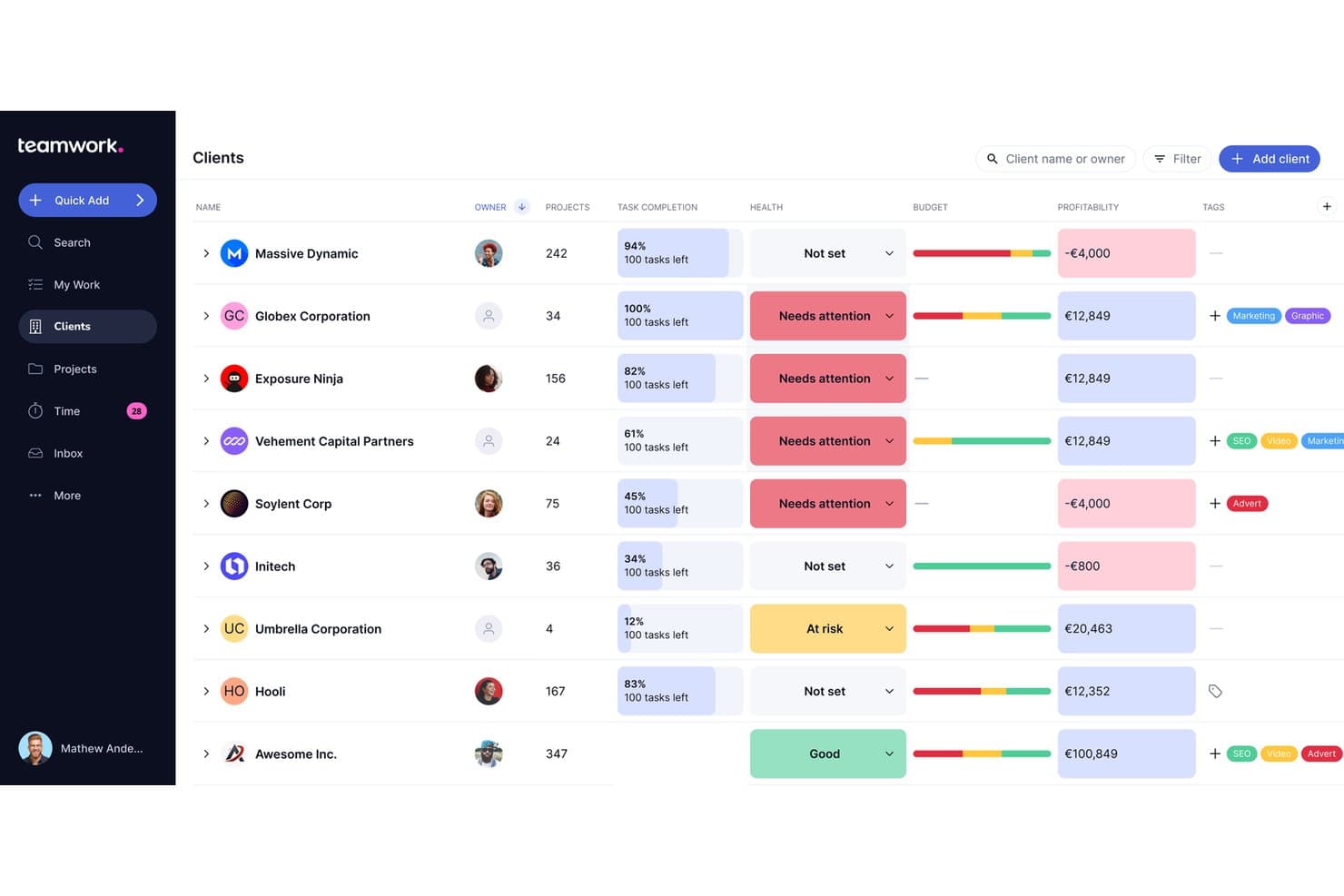
Teamwork.com lets users track client health, budget, and profitability in one view. Teamwork.com is project management software for agencies and client-service teams that need to coordinate projects, resources, client feedback, and delivery work in one place.
Who Is Teamwork.com Best For?
Teamwork.com fits agencies and client-service teams that manage delivery, resources, and client collaboration across multiple projects.
Why Teamwork.com Is a Good Best Asana Alternatives Review
I picked Teamwork.com because my team manages agency projects and client delivery in one workspace. Client users, project budgets, and time tracking help us share progress while protecting internal details. Resource planning also shows who can take on work before we commit to another client deadline.
Teamwork.com Key Features
- Task lists: Organize project work into structured task groups.
- Milestones: Mark important deadlines and project checkpoints.
- Task dependencies: Link tasks to show required completion order.
- Project templates: Reuse predefined structures for recurring projects.
Teamwork.com Integrations
Teamwork.com supports 150+ integrations, including Slack, Google Workspace, Microsoft Teams, Dropbox, and QuickBooks. It also connects with Zapier and provides an API for custom integrations.
Pros and Cons
Pros:
- Budgets and time tracking improve delivery visibility
- Resource planning supports agency capacity decisions
- Client access protects internal project details
Cons:
- Reporting setup takes time for new teams
- Advanced workflows can feel administratively heavy
Learn more about Teamwork.com: 10Best for agencies managing client projects
Teamwork
- 14-day free trial + free demo available
- From $9.99/user/month (billed annually)
Visit WebsiteCustomer Rating:4.5/5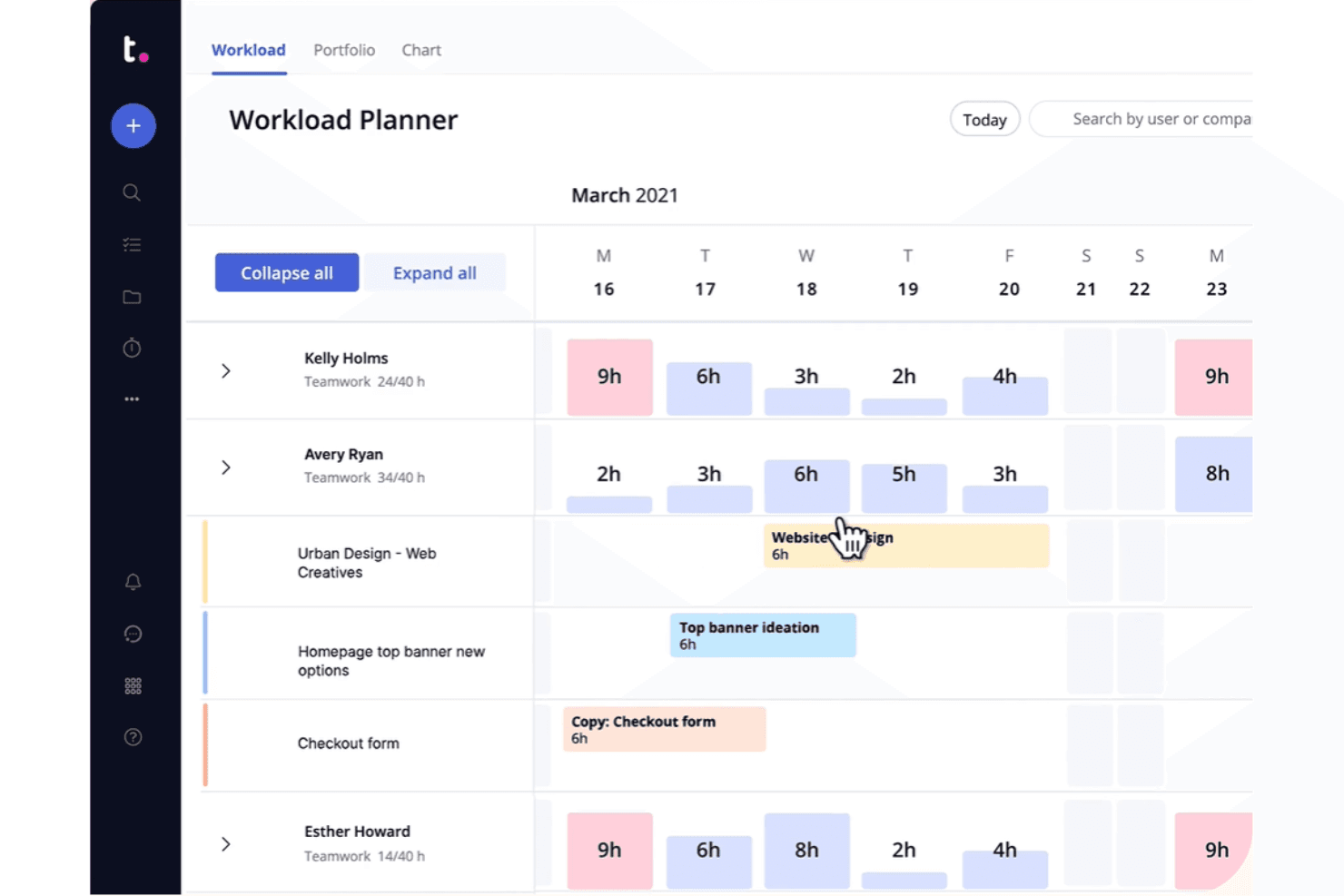
Teamwork offers time tracking, billing, and client management for effective project handling. Teamwork is project management software for agencies and service teams that need to coordinate tasks, timelines, resources, and client collaboration across multiple projects.
Who Is Teamwork Best For?
Teamwork suits agency project managers who coordinate client work, deadlines, resources, and collaboration across multiple accounts.
Why Teamwork Is a Good Best Asana Alternatives Review
I picked Teamwork as a strong Asana alternative because it’s built for agencies managing client projects. I use its client portals and Proofs to collect approvals without exposing internal workspaces, while resource planning shows capacity across accounts. Its budgets, billable time tracking, and profitability dashboards also connect delivery work to project margins.
Teamwork Key Features
- Task lists: Organize project work into structured, assignable task groups.
- Gantt charts: Map tasks across timelines and visualize project schedules.
- Milestones: Mark major deliverables and track progress toward project goals.
- Task dependencies: Define task relationships to show required completion order.
Teamwork Integrations
Teamwork lists 150+ integrations across its products, including Slack, Microsoft Office, Google Workspace, Dropbox, QuickBooks, and HubSpot. It also supports Zapier.
Pros and Cons
Pros:
- Budgets connect delivery work with profitability
- Resource planning tracks capacity across client accounts
- Client portals separate external and internal work
Cons:
- Reporting setup requires considerable configuration time
- Agency-specific features can overwhelm simple projects
Learn more about Teamwork:
Andre Asana-alternativer
Her er noen flere Asana-alternativer som ikke kom med på kortlisten min, men som likevel er verdt å se nærmere på:
- 11CeloxisBest for enterprise-level portfolio oversight
- 12GoodDayBest for low-cost Asana migration
- 13RavetreeBest for client-facing project approvals
- 14AirtableBest for building custom workflows without code
- 15NotionBest for docs, wikis, and tasks in one workspace
- 16Aha!Best for linking tasks to product strategy
- 17LinearBest for dev-team issue and roadmap tracking
- 18TrelloBest for Kanban boards with built-in automation
How I Evaluate Asana Alternatives
I split my evaluation into three parts. First, core functionality—specifically whether a tool can organize tasks across multiple projects and surface dependencies clearly; this carries the most weight. Second, I look for standout features like native goal tracking or portfolio-level visibility. Third, I consider onboarding quality and pricing transparency.
Core Functionality (Table Stakes For This List)
When I'm selecting tools for my list, I score each one on a scale from 0 (does not offer the functionality) to 5 (excels in this area) for each core functionality listed below. I then convert the total into a percentage to help assess each tool's overall fit, with extra weight on any functionalities I’ve deemed essential.
- Task & Project Management (Essential): I look for assignments, subtasks, dependencies, milestones, and ownership across linked projects, from discovery through launch.
- Views & Visualization (Essential): I compare synced list, board, calendar, and timeline views for roadmap planning, sprint tracking, and deadline reviews.
- Workflow Automation: I check triggers and actions for recurring work, such as assigning intake tasks or updating status after approval.
- Team Collaboration: I assess task comments, @mentions, files, and threaded discussions for decisions shared across product and engineering.
- Reporting & Progress: Dashboards should show workload, delivery status, milestones, and goal progress without requiring manual spreadsheet updates.
- Third-Party Integrations: I look for connections to chat, calendars, storage, and development tools, plus API or webhook support for existing workflows.
Once I have a list of tools that meet the criteria, I consider what sets each platform apart.
Differentiating Factors (What Sets Vendors Apart)
Here's how I compare and contrast different vendors:
Standout Features
I look for native goal tracking that links daily tasks and sprints directly to OKRs, so a VP can trace a shipped feature back to a strategic objective without leaving the tool. Two-way dev tool sync matters just as much—when Jira or GitHub updates flow back into the product view in real time, nobody wastes cycles on duplicate status updates. I also evaluate portfolio-level visibility, especially for leaders juggling multiple product lines who need one rollup view for investment decisions across roadmaps.
Beyond Features
I evaluate how quickly cross-functional teammates—designers, engineers, marketers—can actually adopt a tool without formal training. Guided setup wizards and starter templates, like those offered by monday.com and ClickUp, cut onboarding time when migrating from Asana. Migration fidelity matters just as much: I check whether a vendor preserves custom fields, attachments, and task history during import, since losing that context forces teams to rebuild months of work. I also look at total cost of ownership, especially how per-seat pricing treats occasional collaborators who only need view or comment access.
Hvorfor se etter et Asana-alternativ?
Selv om Asana er et godt valg for produktstyring, finnes det flere grunner til at noen brukere ser etter alternative løsninger. Det kan hende du ser etter et Asana-alternativ av en eller flere av følgende grunner.
- Du trenger flere tilpasningsmuligheter
- Teamet ditt trenger avanserte rapporteringsverktøy
- Du synes brukergrensesnittet er komplisert
- Du opplever at det mangler integrasjon med bestemte apper
- Du ser etter rimeligere prisplaner
- Teamet ditt vokser og trenger bedre skalerbarhet
- Du trenger samsvar med bestemte personvernregler
Hvis noe av dette høres kjent ut, har du kommet til rett sted. Listen min inneholder flere sentrale alternativer innen produktstyring som passer bedre for team som møter disse utfordringene med Asana og ser etter alternative løsninger.
Viktige funksjoner i Asana
Her er noen av de viktigste funksjonene i Asana, slik at du kan sammenligne hva alternative løsninger tilbyr:
- Oppgavehåndtering: Lar deg opprette, tildele og følge opp oppgaver for å holde prosjektene dine organiserte.
- Prosjekttidslinjer: Hjelper med å visualisere prosjektplaner og tidsfrister, slik at teamet ditt holder seg på rett spor.
- Tavler og kalendere: Tilbyr visuelle verktøy for prosjektplanlegging og -styring, noe som hjelper teamet ditt med organiseringen.
- Oppdateringer i sanntid: Holder teamet ditt informert med umiddelbare varsler, noe som forbedrer samarbeidet og ansvarliggjøringen.
- Porteføljer: Dette lar deg organisere prosjekter etter konto eller team, noe som er nyttig for effektiv håndtering av mange prosjekter.
- Asana Intelligence: Tilbyr KI-drevet innsikt og forslag for å forbedre prosjektresultater og spare tid.
- Samarbeidsverktøy: Forenkler kommunikasjonen med meldingstavler og filvedlegg i oppgavene.
- Gantt-visning: Hjelper med å bygge prosjekter, angi avhengigheter og visualisere tidslinjer med et dra-og-slipp-grensesnitt.
- Funksjon for korrektur: Gjør tilbakemeldinger om til deloppgaver, slik at team kan håndtere innholdsproduksjon effektivt.
- Tilpassede felt: Dette lar deg tilpasse prosjektdetaljer etter behovene i den spesifikke arbeidsflyten din. Det ser ut til at meldingen din er tom. Hvordan kan jeg hjelpe deg videre? Hvis du har instruksjoner eller spørsmål, er det bare å gi beskjed!