

En produktmockupgenerator er et digitalt verktøy som hjelper deg med å lage realistiske produktvisualiseringer uten fysiske prøver. Mange moderne verktøy fungerer som en AI-mockupgenerator, slik at du kan generere mockuper av høy kvalitet og et gjennomarbeidet mockupbilde med bare ett klikk. Disse plattformene simulerer virkelige produktmiljøer, og hjelper team med å presentere design mer effektivt, teste merkevarebygging og fremskynde kreative arbeidsflyter uten behov for manuelt designarbeid. Ved å velge riktig verktøy kan teamet ditt visualisere konsepter, samarbeide raskere og levere gjennomarbeidede presentasjoner som legger til rette for beslutninger. I denne listen finner du en rekke mockupgeneratorer som er egnet for ulike designbehov, slik at du kan velge den som passer best til arbeidsprosessen og forretningsmålene dine.
Hvorfor du kan stole på våre programvareanbefalinger
6,700+
Reviews
20
Industry experts
16+
Evaluation factors
14
Years
Teamet vårt har testet og anmeldt programvare siden 2012. Vi er selv produktledere, så vi vet hvor vanskelig og hvor viktig det er å velge riktig programvare.
I denne guiden har vi vurdert verktøyene gjennom praktisk testing og uavhengig research og gitt dem poeng ut fra våre utvelgelseskriterier.
Anmeldelsene våre bygger på vår egen redaksjonelle vurdering. De er ikke et salgsargument.
Ekspertanmeldere:
- Andrew LumbySenior TPM
- Cristiano ValimSenior UI/UX Lead


Sammenligningstabell for produktmockupgeneratorer
Denne sammenligningstabellen oppsummerer prisdetaljene for mine beste utvalg av produktmockupgeneratorer:
| Tool | Best For | Trial Info | Price | ||
|---|---|---|---|---|---|
| 1 | Best for quick drag-and-drop mockup creation | Free trial + free plan available | From $144/user/year (billed annually) | Website | |
| 2 | Best for design-team device frame mockups | Free plan available | From $3/user/month | Website | |
| 3 | Best for prompt-driven product scene creation | Free plan available | From $3.99/user/month (billed annually) | Website | |
| 4 | Best for brand-kit-driven mockup consistency | Free plan available | From $7.99/user/month (billed annually) | Website | |
| 5 | Best for wireframe-style mockup creation | 14-day free trial | From $16/user/month (billed annually) | Website | |
| 6 | Best with advanced scene customization | Free plan available | From $9/month (billed annually) | Website | |
| 7 | Best with AI-driven UX enhancement tools | Free plan available | From $14/month | Website | |
| 8 | Best for collaborative design workflows | Free plan available | From $7/user/month (billed annually) | Website | |
| 9 | Best for print-ready AI-generated mockup scenes | Free plan available | From $10/month (billed annually) | Website | |
| 10 | Best for e-commerce AI scene and 3D mockups | Free plan available | From $5.7/month (billed annually) | Website |


Anmeldelser av produktmockupgeneratorer
Nedenfor finner du mine detaljerte sammendrag av produktmockupgeneratorene som kom med på utvalgslisten min. Anmeldelsene mine gir en detaljert gjennomgang av funksjonene, de beste bruksområdene og egenskapene til hvert verktøy, slik at du kan finne det beste alternativet for behovene dine.
 Best for quick drag-and-drop mockup creation
- Free trial + free plan available
- From $144/user/year (billed annually)
Visit WebsiteCustomer Rating:4.7/5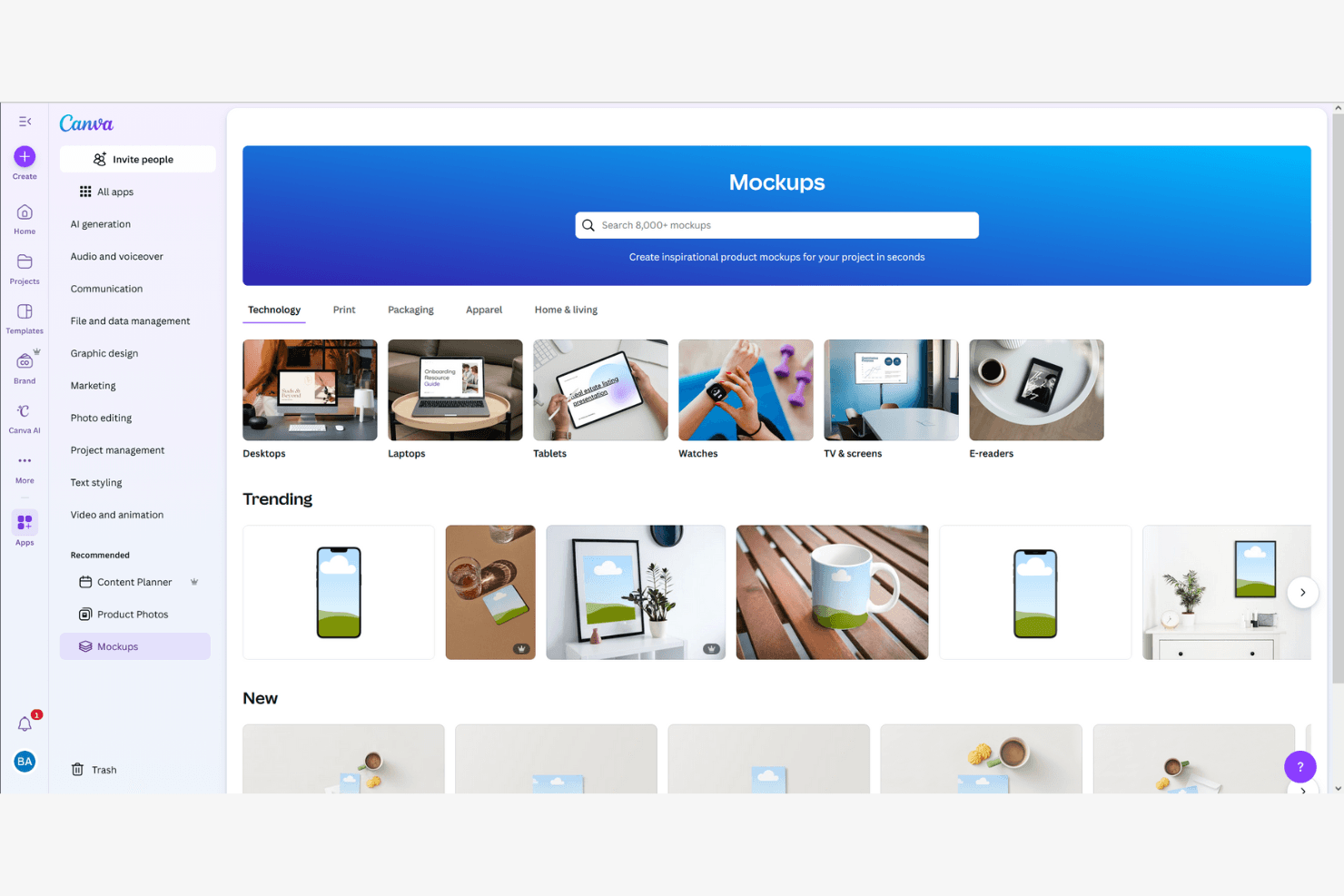
Canva lets users create product mockups across tech and lifestyle categories. Canva is a browser-based design tool that combines a drag-and-drop editor, an AI mockup generator, and a library of over 400 mockup scenes and 3.6 million templates for creating visual product mockups, pitch decks, and marketing assets.
Who Is Canva Best For?
Canva is a strong fit for product managers, founders, and product marketers who need to turn rough concepts into polished visuals fast—without relying on a designer.
Why I Picked Canva
I picked Canva as one of the best because its drag-and-drop mockup creation genuinely removes the bottleneck of waiting on design resources. Its library of 400+ mockup scenes lets you drop a UI screenshot onto a phone frame or product surface in seconds, and the AI Mockup Generator can produce a polished website or app mockup from a single click. I also love that Magic Design generates full layouts from a text prompt, so you can go from concept to stakeholder-ready visual before your next standup.
Canva Key Features
- Brand Kit: Store your brand's colors, fonts, and logos in one place so every mockup your team produces stays on-brand without extra effort.
- Real-time co-editing: Multiple teammates can work on the same design simultaneously, with comments and to keep feedback in context.
- Magic Resize: Instantly reformat a design to fit different canvas dimensions, so one mockup can cover multiple presentation formats.
- 300+ app integrations: Connect Canva to tools like Slack, Asana, HubSpot, and Google Workspace directly from the editor.
Canva Integrations
Integrations include Slack, Asana, Microsoft Teams, and Google Workspace.
Pros and Cons
Pros:
- AI generates visuals from simple prompts
- Massive library of ready-made mockup templates
- Drag-and-drop mockup creation needs no training
Cons:
- No developer handoff or spec exports
- No interactive prototype or user flow support
Learn more about Canva: Best for design-team device frame mockups
- Free plan available
- From $3/user/month
Visit WebsiteCustomer Rating:4.7/5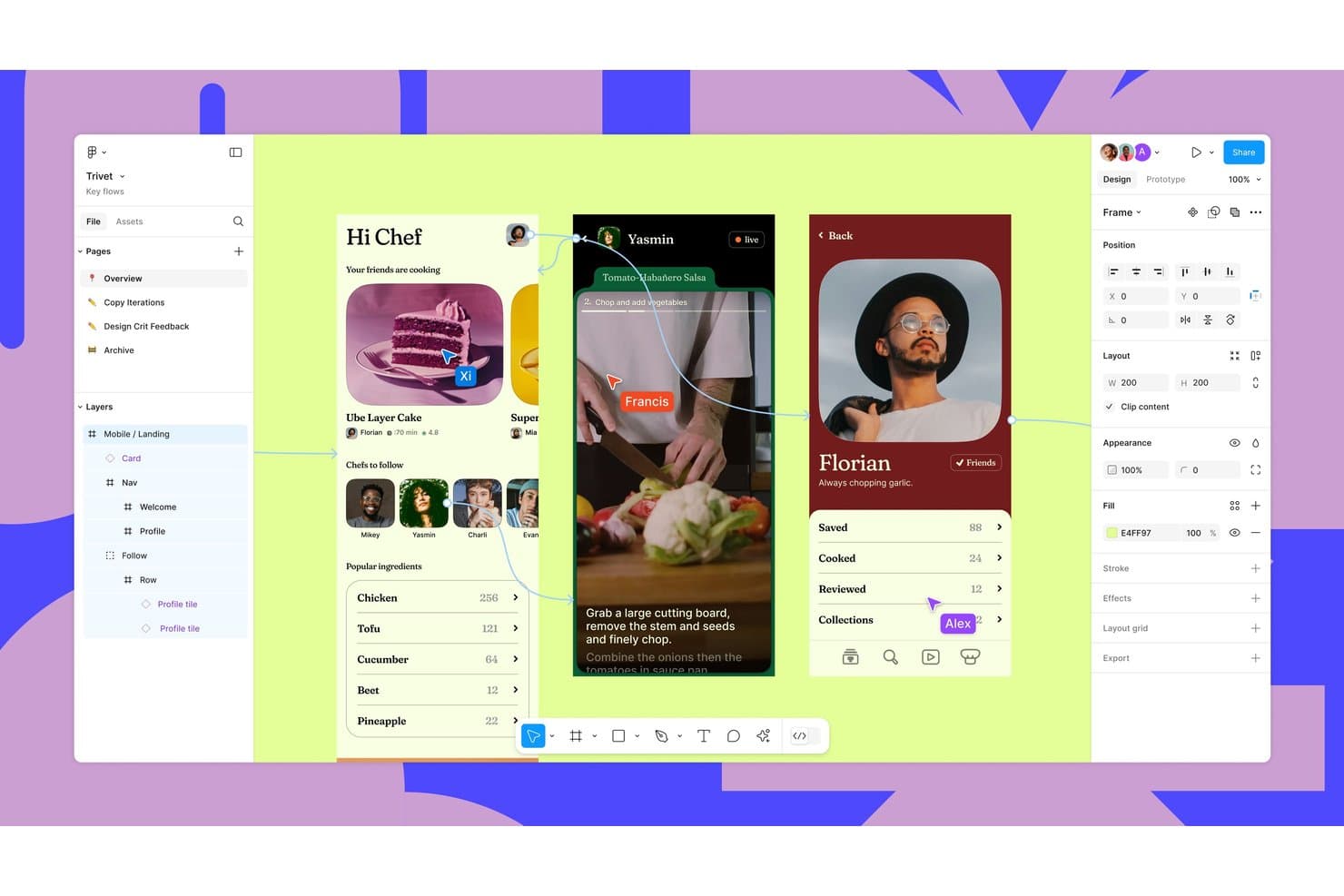
Figma supports collaborative design with real-time multiplayer cursors and prototyping. Figma is a browser-based design and collaboration platform that supports product mockup creation through its Community library of 4,700+ device templates, third-party plugins like Artboard Studio and Mockuups Studio, and AI-powered image editing tools.
Who Is Figma Best For?
Figma is a strong fit for product and UX teams that already live in Figma and need to drop app screens into device frames for stakeholder presentations without switching tools.
Why I Picked Figma
I've included Figma in my top picks because it's the only tool on this list where your mockup workflow lives inside the same file as your actual designs. When your team is presenting app screens to stakeholders, you can pull from 4,700+ community device frame templates and drop your live designs directly into labeled placeholders without switching tools. Plugins like Mokker add 3D device rendering with lighting and shadows for more polished outputs.
Figma Key Features
- Figma Buzz bulk create: Upload a CSV or XLSX file to map data columns to design layers and generate one asset per row automatically.
- AI image editing tools: Edit designs using text prompts, remove backgrounds, expand images, and boost resolution directly within your Figma file.
- Figma Community template library: Access 4,700+ device mockup templates plus packaging, apparel, and print files published by community members.
- Real-time multiplayer collaboration: Co-edit files simultaneously with teammates, leave comments, and share links with unlimited free viewers.
Figma Integrations
Figma supports integrations with Cursor, VS Code and Google Drive links for Buzz bulk-create data.
Pros and Cons
Pros:
- Layer-level editing supports branded mockup variations
- Real-time collaboration simplifies stakeholder mockup reviews
- 4,700-plus device templates support rapid screen presentations
Cons:
- Plugin quality varies across photorealistic mockups
- Manual placement replaces native smart-object warping
 Best for prompt-driven product scene creation
- Free plan available
- From $3.99/user/month (billed annually)
Visit WebsiteCustomer Rating:4.4/5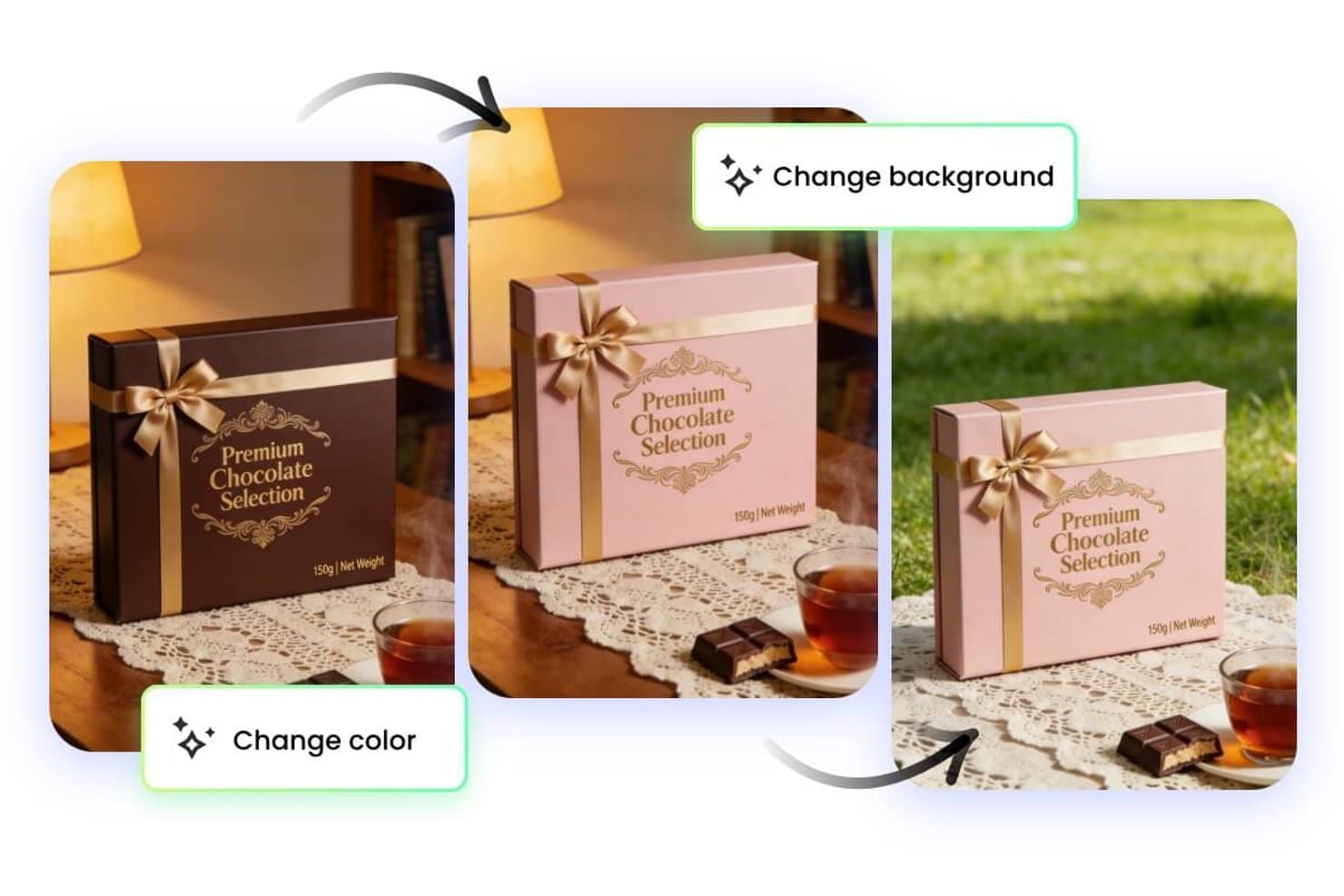
Fotor lets users change mockup colors and backgrounds instantly. Fotor is an AI-powered photo editing and mockup generation tool that lets you create product scenes, remove backgrounds, and generate lifestyle imagery using text prompts.
Who Is Fotor Best For?
Fotor is a great fit for solo creators and small ecommerce teams who want to generate polished product scenes quickly without a dedicated design background.
Why I Picked Fotor
Fotor earns its spot on my shortlist because of how well its text-to-image prompt engine translates simple descriptions into polished, contextual product scenes. I particularly like the AI background generator, which lets you swap a plain studio shot into a lifestyle setting (think a skincare bottle on a marble bathroom counter) without any manual compositing. The AI object removal tool also keeps product shots clean before scenes are generated.
Fotor Key Features
- Batch image editing: Apply edits, filters, or resizing adjustments to multiple product photos at once from a single workspace.
- AI image enhancer: Automatically sharpen, denoise, and upscale product images to meet platform resolution requirements.
- One-click background remover: Instantly isolate product subjects from existing photos to prepare them for new scene generation.
- Pre-built photo effect templates: Apply curated visual styles and color treatments to product shots using a library of ready-made templates.
Fotor Integrations
Native integrations are not currently listed.
Pros and Cons
Pros:
- Batch editing supports multiple product variants
- Background removal prepares products for mockups
- Prompt-driven scenes suit rapid concept testing
Cons:
- No documented native mockup workflow integrations
- Generated scenes can require prompt refinement
Learn more about Fotor: Best for brand-kit-driven mockup consistency
- Free plan available
- From $7.99/user/month (billed annually)
Visit WebsiteCustomer Rating:4.5/5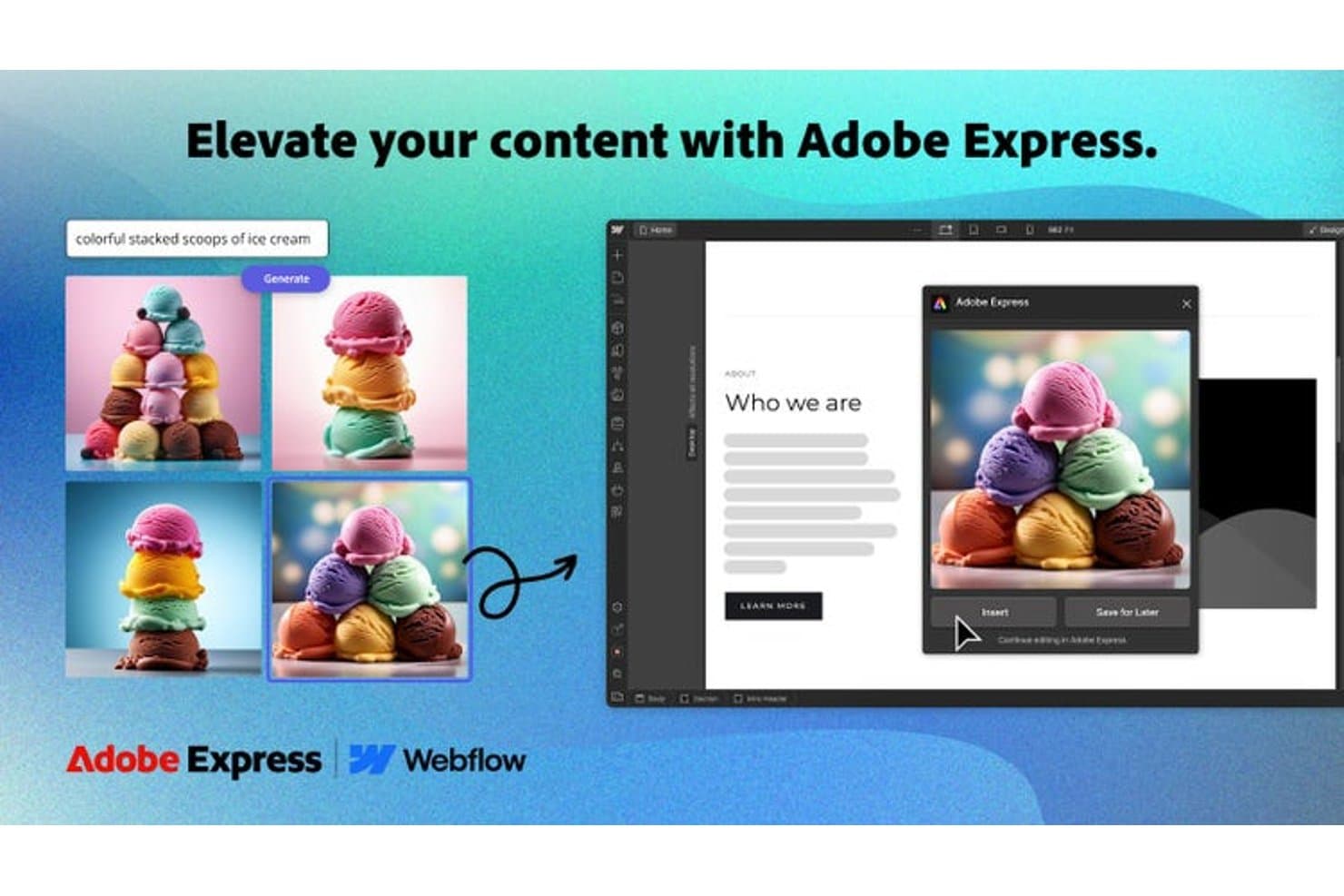
Adobe Express generates AI images directly into web mockups. Adobe Express is a design and mockup creation tool that lets you build product visuals using branded templates, a built-in brand kit, and a library of customizable assets across print, digital, and social formats.
Who Is Adobe Express Best For?
Adobe Express is a strong fit for brand and marketing teams that need to produce consistent, on-brand mockups at scale without relying on a dedicated designer.
Why I Picked Adobe Express
I picked Adobe Express because its brand kit feature is genuinely useful for keeping mockups consistent across every asset your team produces. You upload your logos, set your brand colors, and define your typography once, and Adobe Express applies that kit automatically to any template you work from. I also like that it supports mockups across print, digital, and social formats from a single workspace, so a product launch doesn't require juggling three different tools.
Adobe Express Key Features
- One-click background remover: Instantly strips the background from product images so you can place them on any mockup scene without manual editing.
- AI-powered text effects: Applies stylized, editable text treatments directly onto mockup designs using Adobe's generative AI tools.
- Content scheduler: Lets you publish or schedule mockup-ready assets directly to social channels from within the platform.
- Template resizing tool: Automatically resizes any mockup design to fit multiple formats and dimensions in a single action.
Adobe Express Integrations
Adobe Express maintains an ecosystem of native add-ons and integrations, including Slack, Microsoft Copilot, ChatGPT, Figma, Bynder, Frontify, Hootsuite, Sprout Social, and Google Drive.
Pros and Cons
Pros:
- Background removal simplifies product image placement
- Templates cover print, digital, and social formats
- Brand kits preserve visual consistency across mockups
Cons:
- Advanced product presentation controls remain limited
- Dedicated mockup scenes feel less realistic
Learn more about Adobe Express: Best for wireframe-style mockup creation
- 14-day free trial
- From $16/user/month (billed annually)
Visit WebsiteCustomer Rating:4.3/5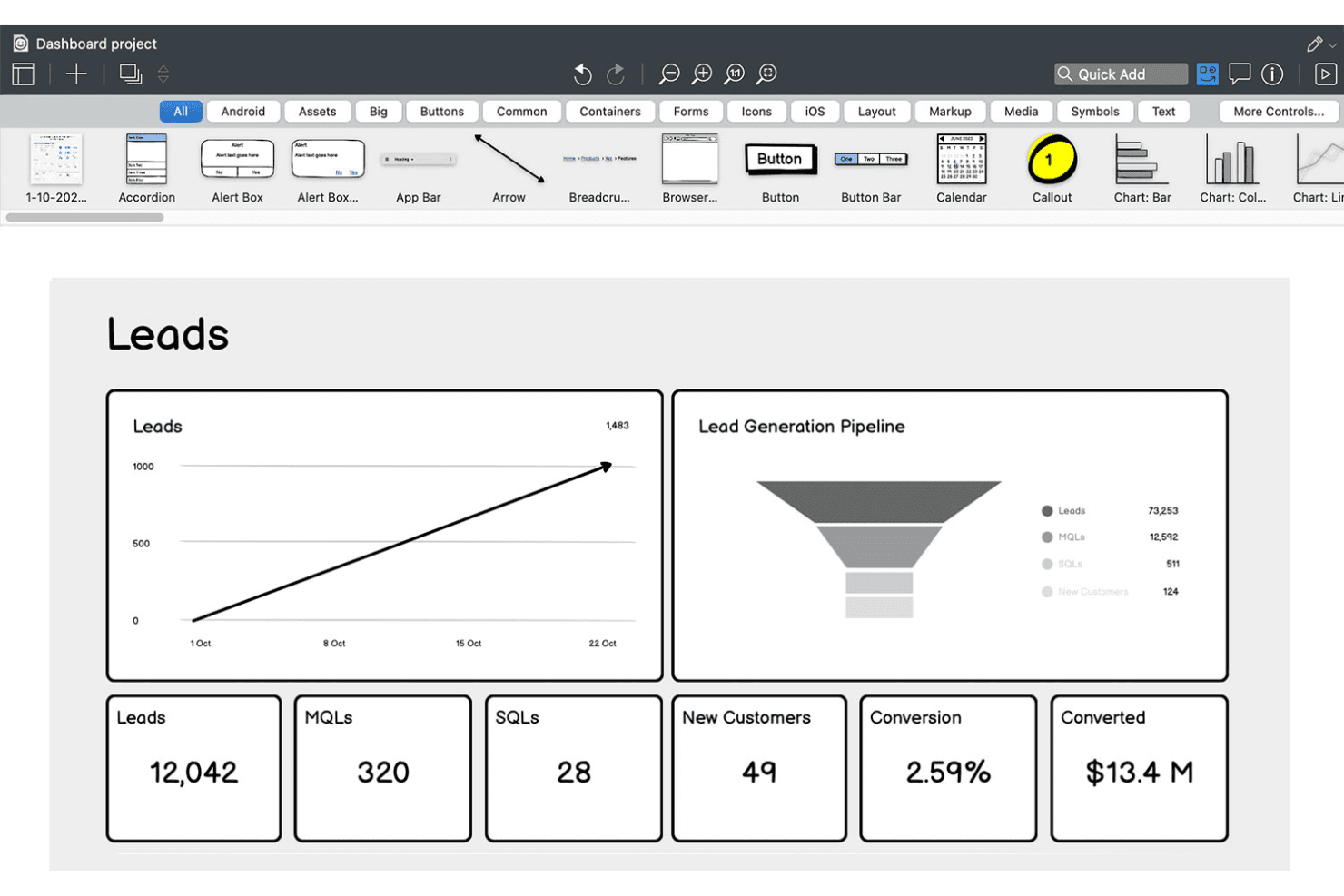
Balsamiq lets users wireframe sales dashboards with charts and KPIs. Balsamiq is a low-fidelity wireframing and mockup tool that lets you sketch out UI concepts using a drag-and-drop editor, a hand-drawn component library, and AI-assisted wireframe generation from text prompts, screenshots, or rough sketches.
Who Is Balsamiq Best For?
Balsamiq is a natural fit for product managers, founders, and business analysts who need to communicate UI concepts quickly without relying on a designer.
Why I Picked Balsamiq
Balsamiq earns its spot on my shortlist because its hand-drawn, sketch-style wireframing keeps early product conversations focused on structure and flow, not pixel polish. I love that the AI layer lets you drop in a rough napkin sketch or a screenshot of a competitor's app and get an editable wireframe back in seconds. The one-click prototype generation from existing screens is something I find genuinely useful when I need to walk stakeholders through a user flow without burning time on transitions or animations.
Balsamiq Key Features
- Unlimited reviewers: Any number of stakeholders can view and comment on wireframes without needing a paid editor seat.
- Tailwind-inspired UI controls: A library of 138 Tailwind-style buttons, inputs, toggles, and dropdowns is available directly in the UI Elements panel.
- MCP server integration: Connects Balsamiq boards to AI coding tools like Claude, Cursor, and GitHub Copilot to generate code, user stories, and QA plans from wireframes.
- Jira and Confluence embedding: Wireframes and clickable prototypes embed directly into Jira issues and Confluence pages for in-context stakeholder review.
Balsamiq Integrations
Balsamiq offers native integrations with Jira, Confluence, and Slack, plus Trello integration and embeds for Notion and Linear. Its MCP server connects Claude, Cursor, VS Code/GitHub Copilot, and ChatGPT to Balsamiq boards.
Pros and Cons
Pros:
- Low-fidelity style keeps focus on structure
- Unlimited reviewers can comment without paid seat
- Fast AI-powered wireframe from text or sketch
Cons:
- Prototyping lacks animation or advanced interactivity
- No high-fidelity or design system features
Learn more about Balsamiq: Best with advanced scene customization
- Free plan available
- From $9/month (billed annually)
Visit WebsiteCustomer Rating:3.3/5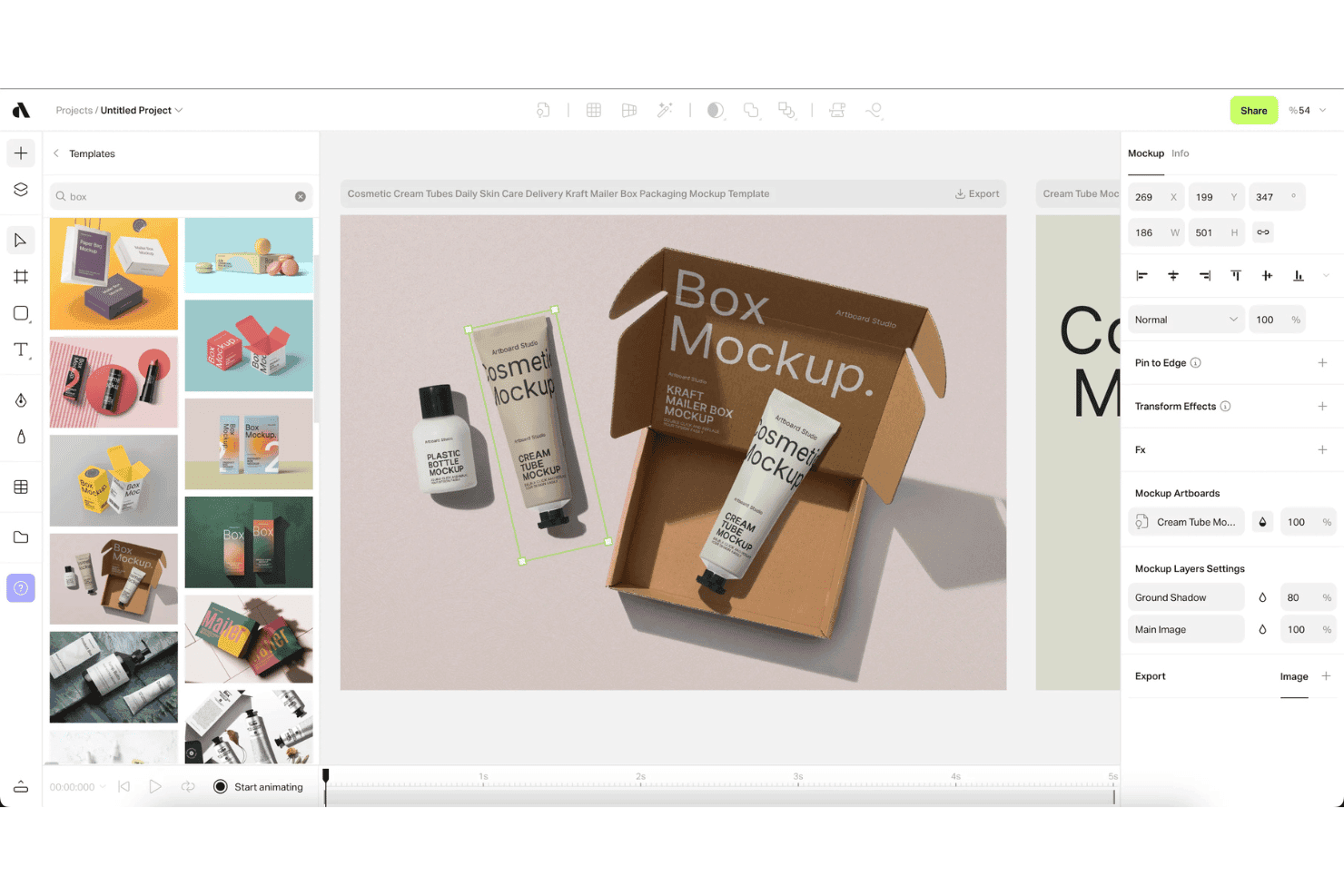
Artboard Studio lets users apply packaging mockups using drag-and-drop templates. Artboard Studio is a browser-based mockup generator and motion design editor that combines a 5,000+ mockup library, AI-powered scene generation, video mockup support, and creative automation tools.
Who Is Artboard Studio Best For?
Artboard Studio is a strong fit for product marketing managers and founders who need polished product visuals, launch assets, and pitch deck imagery without relying on a dedicated design team.
Why I Picked Artboard Studio
Artboard Studio earns its spot on my shortlist because of how deep its scene customization goes. I'm talking about a 5,000+ mockup library with smart object layers that auto-adjust perspective, lighting, and shadow, plus an AI mockup generator that builds entire scenes from a text prompt. What really sets it apart is video mockup support combined with a timeline-based motion design editor, so I can produce animated product visuals and launch assets, not just static images.
Artboard Studio Key Features
- Figma and Adobe Express plugins: Access Artboard Studio's full mockup library directly inside Figma or Adobe Express without switching between apps.
- Bulk export: Export multiple mockup variations simultaneously in PNG, JPEG, WEBP, MP4, MOV, GIF, or WebM formats.
- Google Sheets and Shopify integration: Sync real-time data from Google Sheets or Shopify to auto-populate and update mockup content at scale.
- Project version history: Save and revisit previous versions of your projects, with shareable presentation links for stakeholder reviews.
Artboard Studio Integrations
Artboard Studio has four documented integrations: Figma, Adobe Express, Google Sheets, and Shopify. Native integrations with Jira, Confluence, Notion, Slack, or Zapier, plus a public API, aren’t documented.
Pros and Cons
Pros:
- Video motion design editor for animated assets
- Huge variety of device and branding mockups
- AI-powered scene and mockup generation
Cons:
- No developer handoff or code export options
- No interactive prototyping features available
Learn more about Artboard Studio:
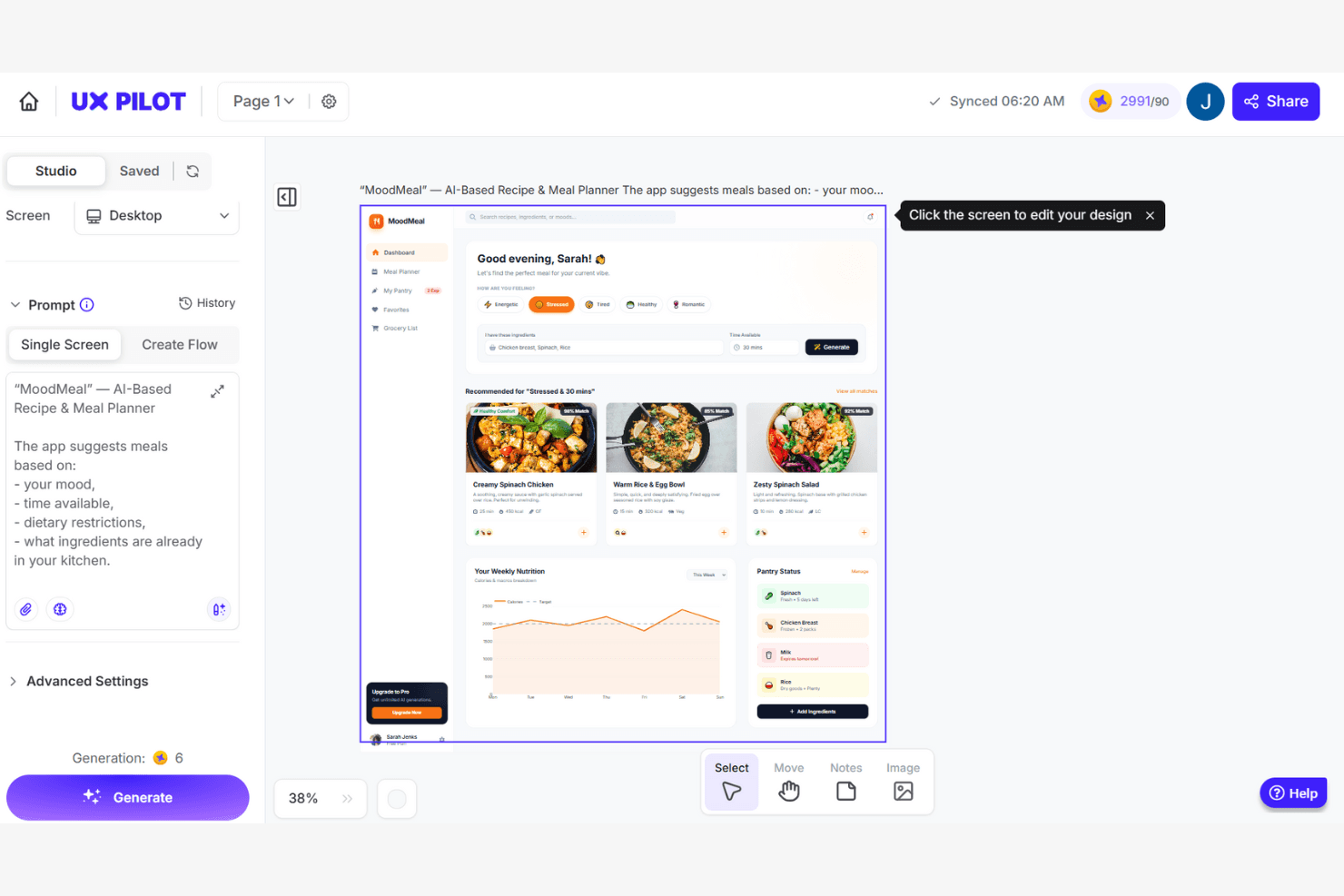
UX Pilot generates AI-based app UI designs from a text prompt. UX Pilot is an AI-powered mockup and UI generation platform that creates wireframes, high-fidelity screens, and multi-screen product flows from text prompts, PRDs, sketches, or reference screenshots.
Who Is UX Pilot Best For?
UX Pilot is a strong fit for product managers and non-designer founders who need to turn written specs or rough ideas into polished, multi-screen UI flows without a design background.
Why I Picked UX Pilot
I've included UX Pilot in my top picks because its AI-driven UX enhancement tools go beyond generation into validation. Predictive heatmaps simulate eye-tracking patterns on your screens before a single user sees them, surfacing hierarchy issues early. The automated design review then flags contrast, spacing, and platform-guideline conflicts across iOS, Android, and web in one pass—a combination I rarely see at this price point.
UX Pilot Key Features
- PRD-to-design automation: Upload a product requirements document and UX Pilot generates a complete, multi-screen UI flow directly from your written specs.
- Autoflow multi-screen generation: Describe a product concept in a text prompt and get a logically consistent, end-to-end user journey built across multiple linked screens.
- React Focus Mode: Build and publish fully interactive React prototypes with a visual editor, natural language chat edits, and one-click AI code fixes.
- GitHub sync: Export your full React codebase and sync it directly to a GitHub repository for a clean handoff to engineering.
UX Pilot Integrations
UX Pilot offers native integrations with Figma and GitHub for editable design exports and code handoff. Enterprise customers can access an API for custom integrations.
Pros and Cons
Pros:
- Figma plugin preserves layers and auto-layout
- PRD-to-design turns specs into screens fast
- Predictive heatmaps surface hierarchy issues early
Cons:
- Multi-screen flows can lack style consistency
- Credits deducted for failed or incomplete outputs
Learn more about UX Pilot: Best for collaborative design workflows
- Free plan available
- From $7/user/month (billed annually)
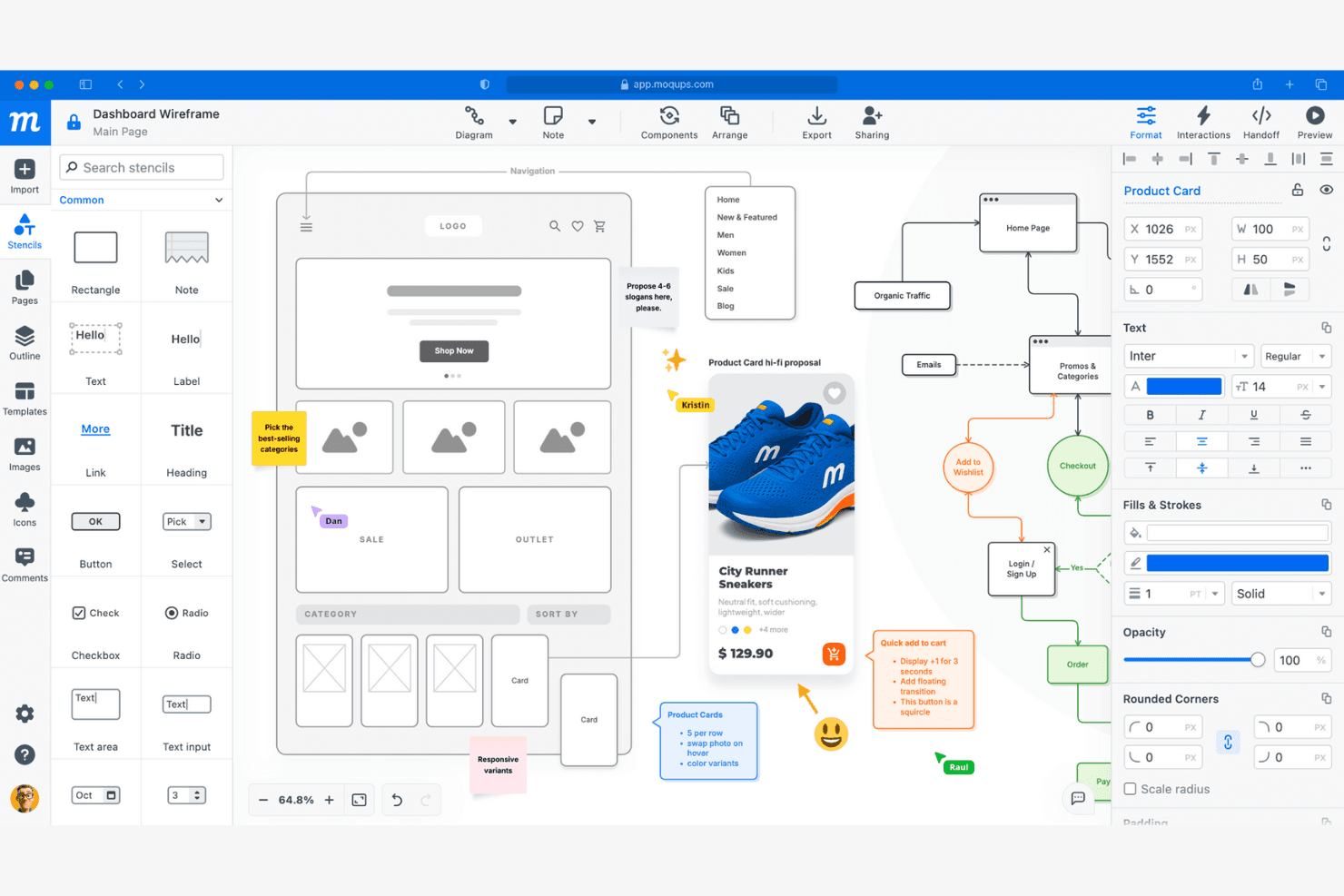
Moqups lets users wireframe, annotate, and collaborate on UI designs. Moqups is a browser-based mockup and wireframing tool that combines drag-and-drop UI design, interactive prototyping, diagramming, and real-time collaboration in a single cloud platform.
Who Is Moqups Best For?
Moqups is a great fit for cross-functional product teams—especially product managers and founders—who need a browser-based tool that keeps design, feedback, and iteration in one shared space.
Why I Picked Moqups
Moqups earns its spot on my shortlist because of how well it keeps cross-functional teams aligned without anyone needing to leave their existing workflow. I love that product managers can embed live wireframes directly into Jira issues and Confluence pages, so engineers and stakeholders always see the current design alongside tickets. Real-time co-editing, threaded pinned comments, and in-app chat mean my team can give and receive feedback without bouncing between tools.
Moqups Key Features
- Synced components: Edit a component once and changes automatically apply across every page in your project.
- Developer handoff panel: Generates CSS and JSX code snippets alongside object specs like coordinates, fonts, and colors for engineering handoff.
- Browser extension: Converts live webpages or screenshots into fully editable Moqups layouts directly from Chrome or Firefox.
- Interactive prototype preview mode: Activates all hotspots and object interactions so stakeholders can click through flows before development begins.
Moqups Integrations
Moqups documents integrations with Jira Cloud, Confluence Cloud, Google Drive, Slack, Dropbox, Box, Trello, Figma via plugin, and Balsamiq import, plus Chrome and Firefox extensions. Jira and Confluence integrations require a Business plan or higher.
Pros and Cons
Pros:
- Drag-and-drop editor enables fast mockup creation
- Synced components update across all project pages
- Real-time co-editing supports team collaboration
Cons:
- Interactive prototypes lack conditional logic
- No version control or branching available
Learn more about Moqups: Best for print-ready AI-generated mockup scenes
- Free plan available
- From $10/month (billed annually)
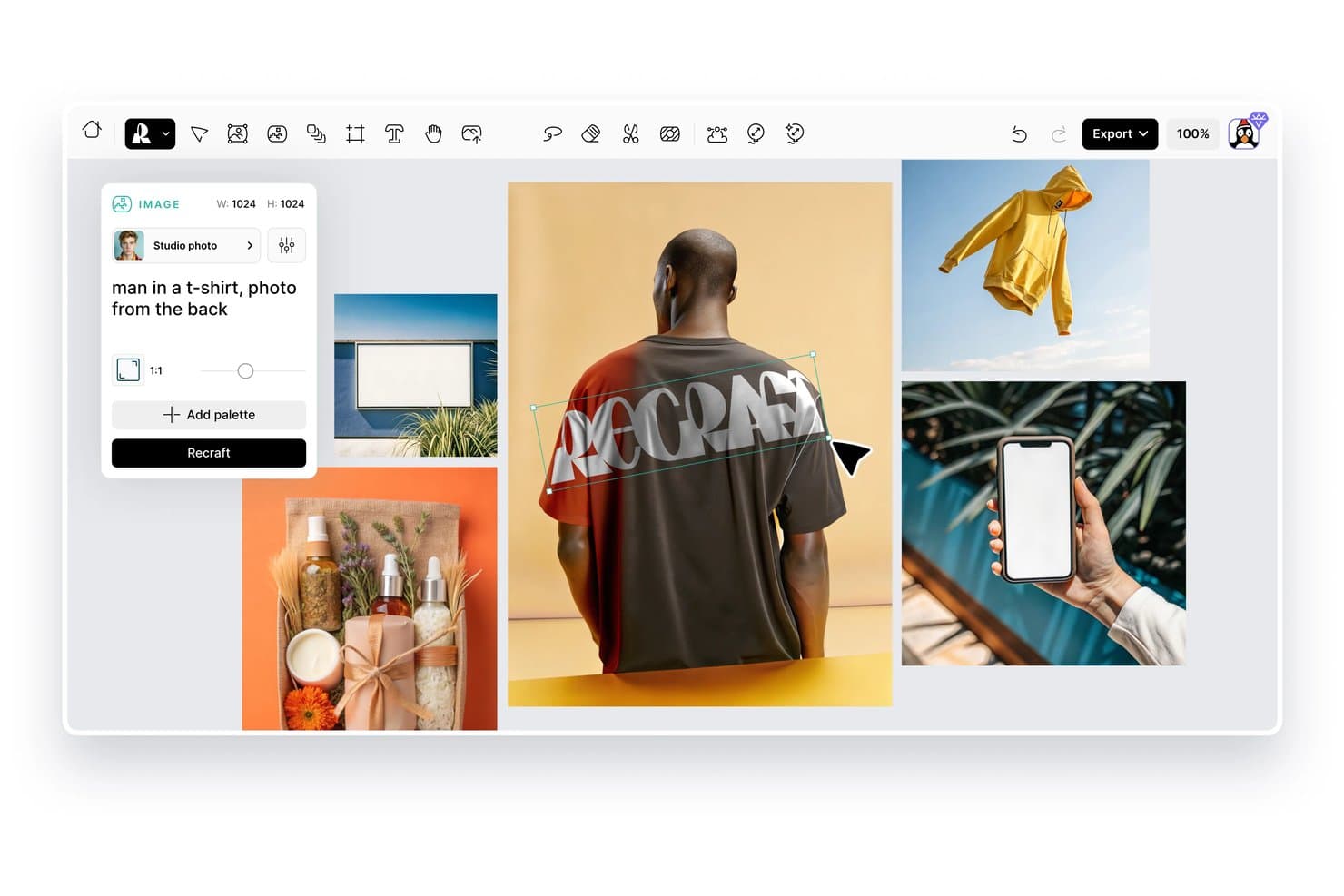
Recraft lets users generate product mockup images from text prompts. Recraft is an AI design tool that lets you generate and edit product mockup scenes, vector illustrations, and brand visuals using text prompts and image controls.
Who Is Recraft Best For?
Recraft is a strong fit for designers and brand teams who need print-ready mockup scenes with precise visual controls and AI-generated imagery.
Why I Picked Recraft
Recraft earns its spot on my shortlist because it generates print-ready mockup scenes at a quality level that's genuinely hard to replicate with standard design tools. I love how its vector output and style locking features let me keep brand visuals consistent across multiple mockup variations without manual rework. The AI scene generation also handles realistic lighting and surface texture in product placements, which matters when you're preparing assets for packaging or print campaigns.
Recraft Key Features
- Text-to-image generation: Create original product visuals and mockup scenes from written prompts without starting from scratch in a design tool.
- Style library: Save and apply custom visual styles across generated images to keep brand assets consistent across different outputs.
- Background removal tool: Isolate product images from their backgrounds automatically so you can drop them into new scenes or compositions.
- Image upscaling: Increase the resolution of generated mockup images to meet high-quality output requirements for print or large-format display.
Recraft Integrations
Recraft offers official native plugins/add-ons/extensions for Figma, Framer, Google Docs, Google Slides, Chrome, and OpenClaw. Its REST API supports custom integrations, and enterprise plans support MCP connections to internal tools.
Pros and Cons
Pros:
- Realistic lighting improves product placement
- Vector output supports brand consistency
- Print-ready scenes suit packaging workflows
Cons:
- Scene control varies across prompts
- Generations can miss exact product details
Learn more about Recraft: 10Best for e-commerce AI scene and 3D mockups
Mockey
- Free plan available
- From $5.7/month (billed annually)
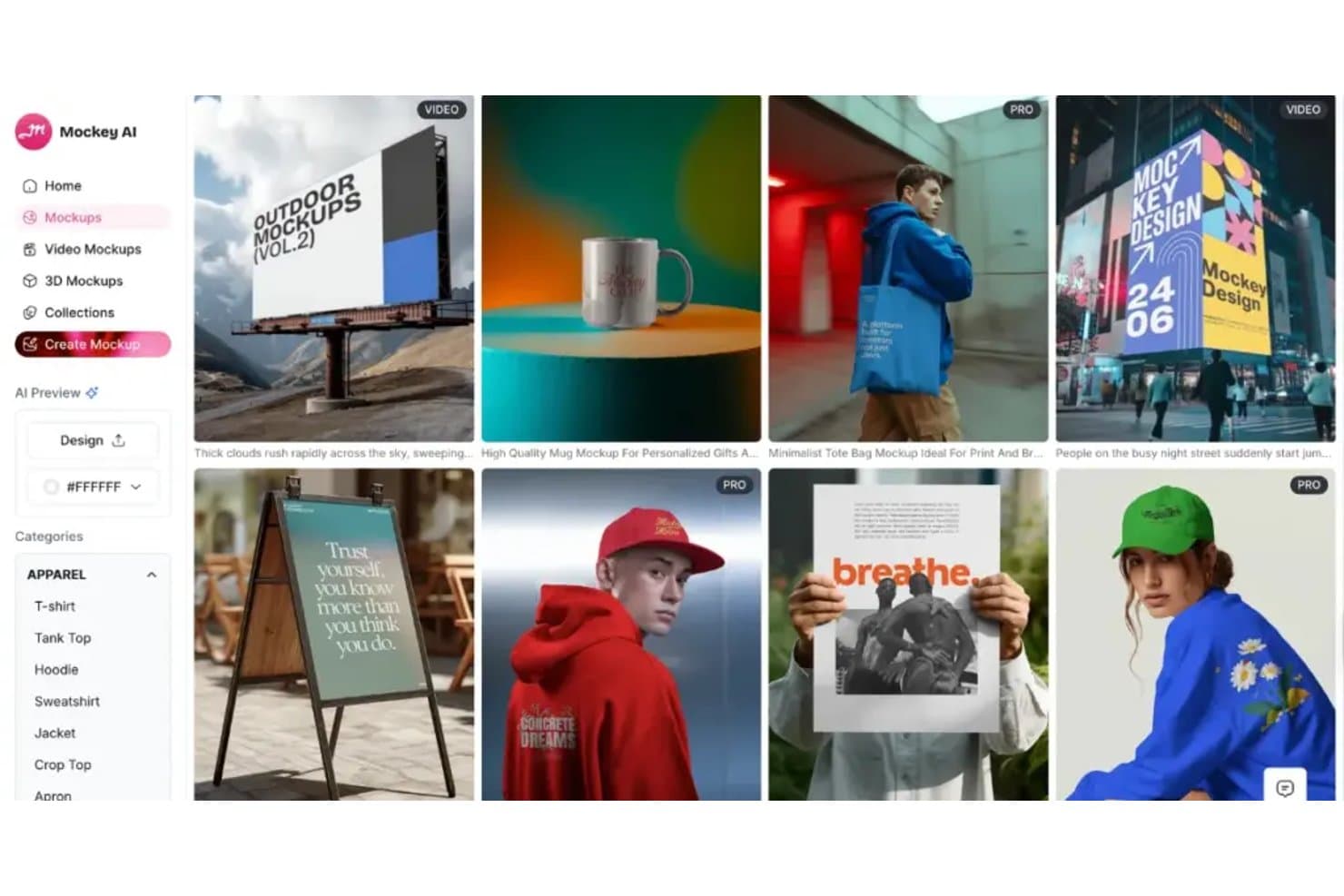
Mockey offers diverse mockup categories for apparel, outdoor, and print. Mockey is an AI-powered mockup generator that lets you place designs on products, scenes, and 3D renders across a large library of ecommerce-ready templates.
Who Is Mockey Best For?
Mockey is a strong fit for ecommerce sellers and product designers who need quick, polished AI-generated scene and 3D mockups without a complex design workflow.
Why I Picked Mockey
Mockey earns its spot on my shortlist because of how well it handles AI-generated scene placement and 3D mockups for ecommerce products. I love that you can drop a design onto a product and instantly get a lifestyle scene rendered around it, which saves the time and cost of a full photo shoot. The 3D mockup rendering is particularly strong for things like packaging, apparel, and print-on-demand items.
Mockey Key Features
- Bulk mockup generation: Upload multiple designs at once and generate mockups across several product templates in a single batch.
- Background remover: Automatically strips the background from uploaded product or design images before placing them into a mockup scene.
- Custom color editor: Adjust the color of mockup products directly within the editor to match specific brand or design requirements.
- Social media format export: Download finished mockups in preset dimensions sized for platforms like Instagram, Facebook, and Pinterest.
Mockey Integrations
Mockey offers native integrations including a Shopify App, a Figma Plugin, and Etsy Shop.
Pros and Cons
Pros:
- 3D renders suit packaging and apparel
- Bulk generation supports multiple product designs
- AI-generated scenes reduce photoshoot costs
Cons:
- Template breadth may vary by product
- Scene results depend on source design quality
Learn more about Mockey:
Andre produktmockupgeneratorer
Her er noen flere alternativer for produktmockupgeneratorer som ikke kom med på utvalgslisten min, men som likevel er verdt å se nærmere på:
- 11RotatoBest for app screen animations and video exports
- 12BoxshotBest for print-spec packaging renders at scale
- 13RenderforestBest for all-in-one branding and mockup creation
- 14KittlBest for creative template variety
- 15PlaceitBest for lifestyle scene mockup selection
- 16Mockuuups StudioBest for desktop app integration
- 17MediamodifierBest for bulk mockup generation
- 18PixeliedBest for non-designers creating brand mockups
- 19ProVisualBest for browser-based 3D product rendering
- 20PackifyBest for brief-to-dieline packaging mockups
How I Evaluate Product Mockup Generators
I split my evaluation into three parts, giving the most weight to core functionality: placing artwork in realistic device, packaging, or print scenes and exporting presentation-ready previews. Next, I consider differentiators such as AI-generated backgrounds or saved brand kits. Finally, I weigh licensing, plan value, client-review needs, and onboarding support.
Core Functionality (Table Stakes For This List)
When I'm selecting tools for my list, I score each one on a scale from 0 (does not offer the functionality) to 5 (excels in this area) for each core functionality listed below. I then convert the total into a percentage to help assess each tool's overall fit, with extra weight on any functionalities I’ve deemed essential.
- Template Library (Essential): I look for realistic options across devices, apparel, packaging, and print, so teams can match mockups to the product or campaign.
- Smart Placement (Essential): I assess how reliably uploaded artwork or screenshots fit a surface’s shape and perspective, such as a label on curved packaging.
- Customization: I check whether teams can adjust backgrounds, colors, textures, or scene elements to reflect a brand or campaign.
- High-Resolution Export: I consider whether exports suit their intended use, from social posts and stakeholder decks to print previews.
- Batch Generation: I look for ways to create multiple design or size variations from one source file for campaign reviews or product lines.
- Sharing And Review: I evaluate link sharing, embeds, and feedback options to see how teams can review concepts and gather stakeholder input.
Once I have a list of tools that meet the criteria, I consider what sets each platform apart.
Differentiating Factors (What Sets Vendors Apart)
Here's how I compare and contrast different vendors:
Standout Features
I check whether a tool offers AI background generation, which lets teams describe a scene in a text prompt and get a custom environment instead of scrolling through static presets. That's useful when you need a seasonal campaign backdrop or a lifestyle setting no stock template covers. I also evaluate API and automation access, since ecommerce sellers and print-on-demand teams often need to generate hundreds of mockups from a single design file without manual effort. Brand kit integration matters too—I look for saved palettes, logos, and fonts that keep every mockup on-brand across collaborators.
Beyond Features
I check whether mockup output is cleared for commercial and resale use, since agencies and print-on-demand sellers can run into licensing issues on lower-tier plans. Ecommerce connectivity matters too—tools that sync with Shopify or Etsy cut out repetitive upload steps when you're managing dozens of SKUs. I also evaluate onboarding support, because product managers without design backgrounds need guided templates and tutorials to get value fast.
Slik velger du en produktmockupgenerator
Det er lett å gå seg vill i lange funksjonslister og kompliserte prisstrukturer. For å hjelpe deg med å holde fokus mens du arbeider deg gjennom den unike prosessen med å velge programvare, får du her en sjekkliste over faktorer du bør ha i tankene:
| Faktor | Hva du bør vurdere |
|---|---|
| FaktorSkalerbarhet | Hva du bør vurdereVil verktøyet støtte en voksende produktkatalog eller teamstørrelse? Se etter begrensninger på prosjekter, brukere eller lagring. |
| FaktorIntegrasjoner | Hva du bør vurdereKan verktøyet kobles til e-handelsplattformen, designprogramvaren eller systemet for ressursforvaltning? Bekreft innebygde integrasjoner, ikke bare API-tilgang. |
| FaktorTilpasningsmuligheter | Hva du bør vurdereKan du tilpasse mockuper slik at de samsvarer med merkevareretningslinjene eller unike produkttyper? Vurder hvor fleksible malene er, og hvilke redigeringsmuligheter som finnes. |
| FaktorBrukervennlighet | Hva du bør vurdereHvor raskt kan nye brukere lage mockuper uten opplæring? Se etter intuitive arbeidsflyter og få trinn fra opplasting til eksport. |
| FaktorImplementering og innføring | Hva du bør vurdereHvilke ressurser er tilgjengelige for å hjelpe teamet ditt i gang? Vurder veiledninger, innføringsguider og malbiblioteker. |
| FaktorKostnad | Hva du bør vurderePasser prisen med budsjettet og behovet for bruk? Vær oppmerksom på skjulte gebyrer, modeller med betaling per nedlasting eller nødvendige oppgraderinger for viktige funksjoner. |
| FaktorSikkerhetstiltak | Hva du bør vurdereHvordan beskytter leverandøren designene og dataene du laster opp? Se etter kryptering, personvernregler og praksis for lagring av data. |
| FaktorTilgjengelig kundestøtte | Hva du bør vurdereHvilke kundestøttekanaler tilbys, og i hvilket tidsrom? Vurder om du trenger chat i sanntid, e-post eller telefonstøtte for hastesaker. |
Hva er en produktmockupgenerator?
En generator for produktmockuper er et digitalt verktøy som lar deg plassere designene dine på realistiske produktmaler og lage visuelle forhåndsvisninger for markedsføring, netthandel eller presentasjoner for kunder. Disse plattformene hjelper deg med raskt å visualisere hvordan illustrasjonene, merkevareprofilen eller emballasjen din vil se ut på produkter som klær, emballasje eller teknologiske enheter – uten behov for fysiske prøver eller avanserte designferdigheter.
Funksjoner i generatorer for produktmockuper
Når du velger en generator for produktmockuper, bør du se etter følgende viktige funksjoner:
- Malbibliotek: Et stort utvalg ferdiglagde produktmaler som dekker kategorier som klær, emballasje, teknologiske enheter og trykksaker, slik at du raskt kan finne en mockup som passer behovene dine.
- Opplasting av design: Muligheten til å laste opp egne illustrasjoner, logoer eller merkevarefiler og bruke dem direkte på mockupmaler for umiddelbar visualisering.
- Scenetilpasning: Verktøy for å justere bakgrunner, rekvisitter, belysning og produktplassering, slik at du kan lage unike visuelle uttrykk som samsvarer med merkevaren.
- Eksport i høy oppløsning: Muligheter for å laste ned ferdige mockuper i formater med høy oppløsning, egnet for trykk, nett eller presentasjoner.
- Dra-og-slipp-redigering: Et intuitivt grensesnitt som lar deg plassere, endre størrelse på og rotere designene dine på produktet ved hjelp av enkle dra-og-slipp-kontroller.
- Støtte for flere formater: Muligheten til å eksportere mockuper i ulike filtyper, for eksempel PNG, JPG eller til og med videoformater, for å dekke forskjellige bruksområder.
- Batchbehandling: Funksjoner som lar deg bruke ett enkelt design på flere mockuper eller produkter samtidig, slik at du sparer tid på repetitive oppgaver.
- Merkevareverktøy: Innebygde alternativer for å legge til vannmerker, merkevarefarger eller egendefinert tekst i mockupene dine for å oppnå et helhetlig uttrykk.
- Filtrering og søk etter maler: Avanserte søke- og filtreringsalternativer som hjelper deg med raskt å finne riktig mal basert på produkttype, stil eller scene.
- Versjonshistorikk: Muligheten til å spore endringer og gå tilbake til tidligere versjoner av mockupene dine, noe som støtter samarbeid og iterativ design.
Fordeler med generatorer for produktmockuper
Ved å ta i bruk en generator for produktmockuper får teamet og virksomheten din flere fordeler. Her er noen av fordelene du kan se frem til:
- Raskere designvalidering: Visualiser raskt hvordan illustrasjonene eller merkevareprofilen din vil se ut på ekte produkter, uten å vente på fysiske prøver.
- Kostnadsbesparelser: Unngå behovet for dyre prototyper eller fotograferinger ved å generere digitale mockuper av høy kvalitet.
- Forbedrede kundepresentasjoner: Presenter gjennomarbeidede, realistiske visuelle uttrykk for kunder eller interessenter, slik at det blir enklere å kommunisere designkonsepter og få godkjenninger.
- Større kreativ fleksibilitet: Eksperimenter med ulike produkttyper, farger og scener ved hjelp av et stort malbibliotek og tilpasningsverktøy.
- Ensartet merkevarerepresentasjon: Bruk merkevareelementene og retningslinjene dine på tvers av alle mockuper, slik at du sikrer et helhetlig uttrykk i markedsførings- og netthandelsmateriell.
- Forenklet arbeidsflyt: Bruk batchbehandling og dra-og-slipp-redigering for å redusere repetitive oppgaver og fremskynde opprettelsen av flere mockuper.
- Bedre samarbeid: Del redigerbare mockuper eller versjonshistorikk med teammedlemmer, slik at du støtter tilbakemeldinger og iterative designprosesser.
Kostnader og priser for generatorer for produktmockuper
Når du velger en generator for produktmockuper, må du forstå de ulike prismodellene og abonnementene som er tilgjengelige. Kostnadene varierer basert på funksjoner, teamstørrelse, tillegg og mer. Tabellen nedenfor oppsummerer vanlige abonnementer, gjennomsnittsprisene deres og typiske funksjoner som er inkludert i løsninger for generatorer for produktmockuper:
Sammenligningstabell for abonnementer for generatorer for produktmockuper
| Abonnementstype | Gjennomsnittspris | Vanlige funksjoner |
|---|---|---|
| AbonnementstypeGratisabonnement | Gjennomsnittspris$0 | Vanlige funksjonerTilgang til et begrenset malbibliotek, grunnleggende designopplastinger, vannmerkede nedlastinger og begrensede eksportalternativer. |
| AbonnementstypePersonlig abonnement | Gjennomsnittspris$5-$20/user/month | Vanlige funksjonerFull tilgang til maler, nedlastinger i høy oppløsning, grunnleggende scenetilpasning og lisens for personlig bruk. |
| AbonnementstypeForretningsabonnement | Gjennomsnittspris$20-$50/user/month | Vanlige funksjonerVerktøy for teamsamarbeid, batchbehandling, avansert tilpasning, prioritert kundestøtte og rettigheter til kommersiell bruk. |
| AbonnementstypeVirksomhetsabonnement | Gjennomsnittspris$50-$100+/user/month | Vanlige funksjonerEgendefinerte integrasjoner, dedikert kontoadministrasjon, forbedret sikkerhet, hjelp med oppstart og kundestøtte med avtalt tjenestenivå. |
Vanlige spørsmål om produktmockupgeneratoren
Her er noen svar på vanlige spørsmål om produktmockupgeneratoren:
Kan jeg bruke produktmockupgeneratorer til kommersielle prosjekter?
Ja, de fleste betalte produktmockupgeneratorer tillater kommersiell bruk, men du bør alltid gå gjennom lisensvilkårene for hver mal og eksport. Noen gratisabonnementer kan begrense bruken eller kreve kreditering, så sjekk detaljene før du bruker mockups i markedsføring eller netthandel.
Trenger jeg ferdigheter innen grafisk design for å bruke en produktmockupgenerator?
Nei, de fleste produktmockupgeneratorer er utviklet for personer uten designbakgrunn og tilbyr intuitive dra-og-slipp-grensesnitt. Du kan laste opp grafikken din, plassere den på maler og tilpasse scener uten avansert designkunnskap eller programvare.
Hvilke filformater kan jeg eksportere mockupene mine i?
De fleste produktmockupgeneratorer støtter eksport i vanlige formater som PNG og JPG, mens noen tilbyr eksport som PDF eller video. Sjekk om verktøyet tilbyr filtypene du trenger til den tiltenkte bruken, for eksempel utskrift, nett eller presentasjoner.
Finnes det begrensninger på hvor mange mockups jeg kan lage eller laste ned?
Ja, mange plattformer setter begrensninger basert på abonnementet ditt. Gratisabonnementer begrenser ofte antallet nedlastinger eller legger til vannmerker, mens betalte abonnementer vanligvis tilbyr høyere eller ubegrenset bruk. Gå gjennom abonnementsdetaljene for å sikre at de passer til arbeidsflytbehovene dine.
Kan jeg tilpasse bakgrunnen eller scenen i mockupene mine?
Ja, de fleste moderne produktmockupgeneratorer lar deg justere bakgrunner, rekvisitter og belysning for å lage unike scener. Graden av tilpasning varierer imidlertid, så test redigeringsverktøyet for å se om det oppfyller de kreative behovene dine.