

Produktstyring innebærer mange bevegelige deler – stramme tidsfrister, innspill fra teamet og presset med å holde ideene på rett spor. Det er her storyboard-programvare kan hjelpe. Den gir form til konseptene dine og hjelper alle med å holde seg på samme side.
Basert på min erfaring kan det riktige verktøyet redusere forvirring og gi struktur til den kreative prosessen. Jeg har undersøkt de mest pålitelige alternativene som finnes, og satt sammen en kortliste som er verdt å vurdere.
I denne artikkelen får du en tydelig oversikt over de beste storyboard-verktøyene – funksjonene deres, hva de gjør bra, og hvor de kan ha mangler – slik at du kan avgjøre hvilket som fungerer best for teamet ditt.
Why Trust Our Software Recommendations
6,700+
Reviews
20
Industry experts
16+
Evaluation factors
14
Years
Our team has been testing and reviewing software since 2012. As product managers ourselves, we know how difficult—and important—it is to choose the right software.
For this guide, we evaluated tools using hands-on testing and independent research, scoring tools using our selection criteria.
Our reviews reflect our human editorial judgment, not a sales pitch.
Expert reviewers:
- Andrew LumbySenior TPM
- Cristiano ValimSenior UI/UX Lead


Sammenligningstabell for storyboard-programvare
Denne sammenligningstabellen oppsummerer prisopplysningene for mine utvalgte storyboard-programmer:
| Tool | Best For | Trial Info | Price | ||
|---|---|---|---|---|---|
| 1 | Best for Figma-native product team ideation | Free plan available | From $16/user/month | Website | |
| 2 | Best for AI-generated storyboards from text prompts | Free plan available | From $14/user/month | Website | |
| 3 | Best for cross-functional storyboard workshops | Free plan available | From $9.99/user/month (billed annually) | Website | |
| 4 | Best for speed-focused manual storyboarding | Free trial available | From $12/user/month (billed annually) | Website | |
| 5 | Best for real-time camera and scene previsualization | Free demo available | From $39.99/month | Website | |
| 6 | Best for polished storyboard slides for non-designers | Free trial + free plan available | From $144/user/year (billed annually) | Website | |
| 7 | Best for educational use | Free trial + free plan available | From $14.99/month | Website | |
| 8 | Best for script-synced animatic collaboration | Free plan + free trial available | From $50/month (billed annually) | Website | |
| 9 | Best for animation studio pre-production | 14-day free trial | From $90/month | Website | |
| 10 | Best for script-to-animated pitch deck export | Free plan + free demo available | From $12/month (billed annually) | Website |


Anmeldelse av den beste storyboard-programvaren
Nedenfor finner du mine detaljerte sammendrag av den beste storyboard-programvaren som kom med på kortlisten min. Anmeldelsene mine gir en detaljert oversikt over de viktigste funksjonene, fordelene og ulempene, integrasjonene og ideelle bruksområdene for hvert verktøy, slik at du kan finne det beste alternativet for deg.
 Best for Figma-native product team ideation
- Free plan available
- From $16/user/month
Visit WebsiteCustomer Rating:4.7/5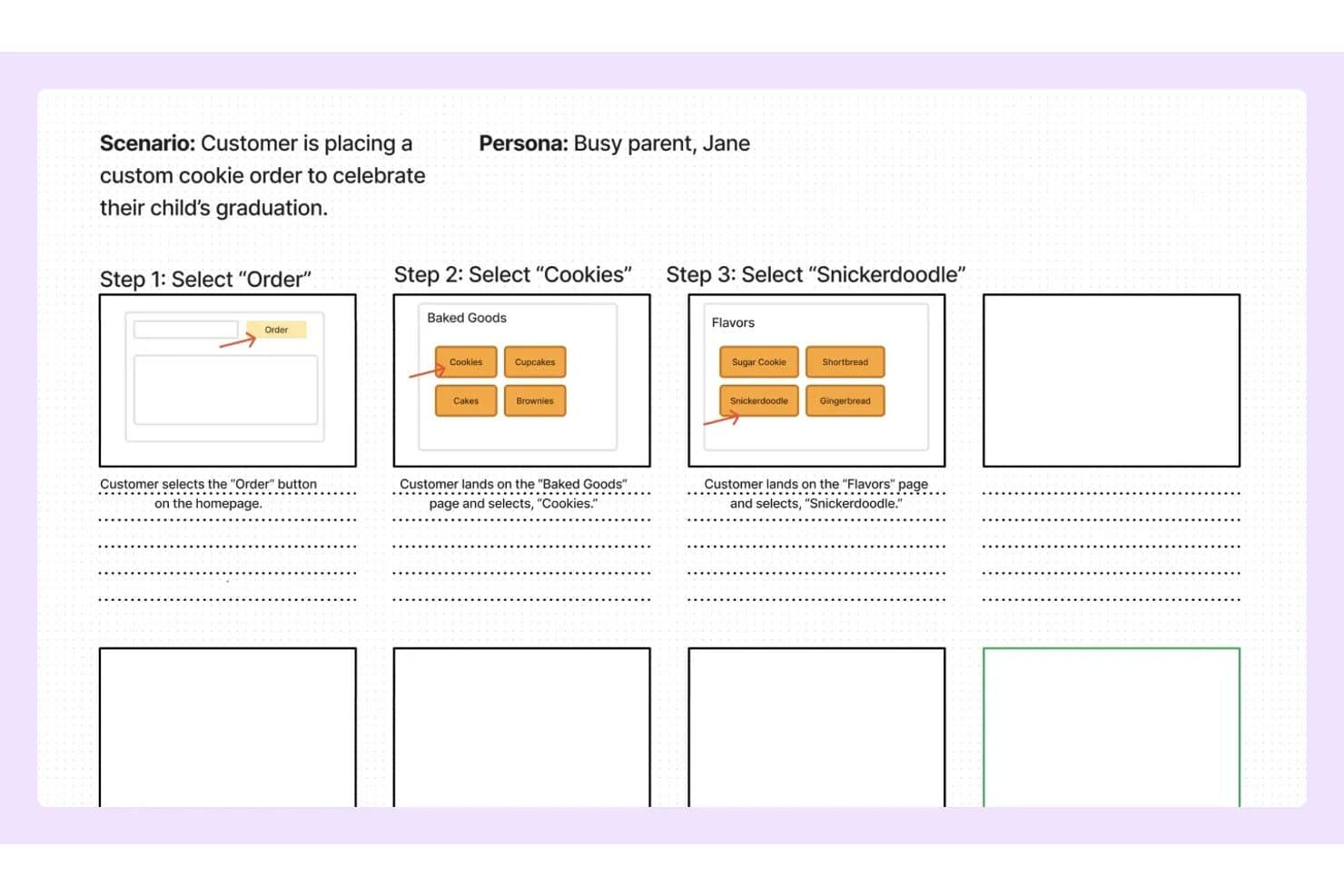
FigJam lets users map storyboard steps with wireframes and notes. FigJam is Figma's collaborative whiteboard tool that combines an infinite canvas, pre-built product and UX templates, real-time multi-user editing, and AI-assisted board generation for ideation and visual mapping.
Who Is FigJam Best For?
FigJam is a natural fit for product and UX teams already working in Figma who want their ideation and storyboarding to live in the same ecosystem as their design work.
Why I Picked FigJam
I picked FigJam as one of the best because it lives where product teams already work: inside Figma. If your team is mapping a user journey in FigJam one day and building the actual screens in Figma Design the next, that handoff is instant, not a file export ritual. I especially like FigJam AI's ability to generate a fully structured board from a single text prompt, which makes spinning up a storyboard for a sprint or discovery session genuinely fast. The customer journey map and storyboard templates are purpose-built for product workflows, not generic placeholders.
FigJam Key Features
- Real-time multi-user editing: Unlimited collaborators can work on the same board simultaneously, with live cursors and cursor chat for in-session communication.
- Audio huddles: Built-in voice calls let your team talk through a storyboard or discovery session without switching to an external conferencing tool.
- Jira widget: Embed Jira issue cards and task boards directly on the canvas to connect storyboard work to your active sprint backlog.
- Guest open sessions: External stakeholders can join and collaborate on a board for up to 24 hours without needing a Figma account.
FigJam Integrations
FigJam offers native integrations with Jira, Asana, Slack, Microsoft Teams, Google Workspace, Figma Design, and more. It also supports Confluence and Notion embeds, marketplace widgets, Zapier, and a REST API for custom integrations.
Pros and Cons
Pros:
- Specialized templates for product and UX workflows
- Real-time collaboration supports unlimited editors
- AI can generate storyboard templates instantly
Cons:
- Cannot export as video or animated file
- No built-in storyboard sequencing tools
Learn more about FigJam: Best for AI-generated storyboards from text prompts
- Free plan available
- From $14/user/month
Visit WebsiteCustomer Rating:4.8/5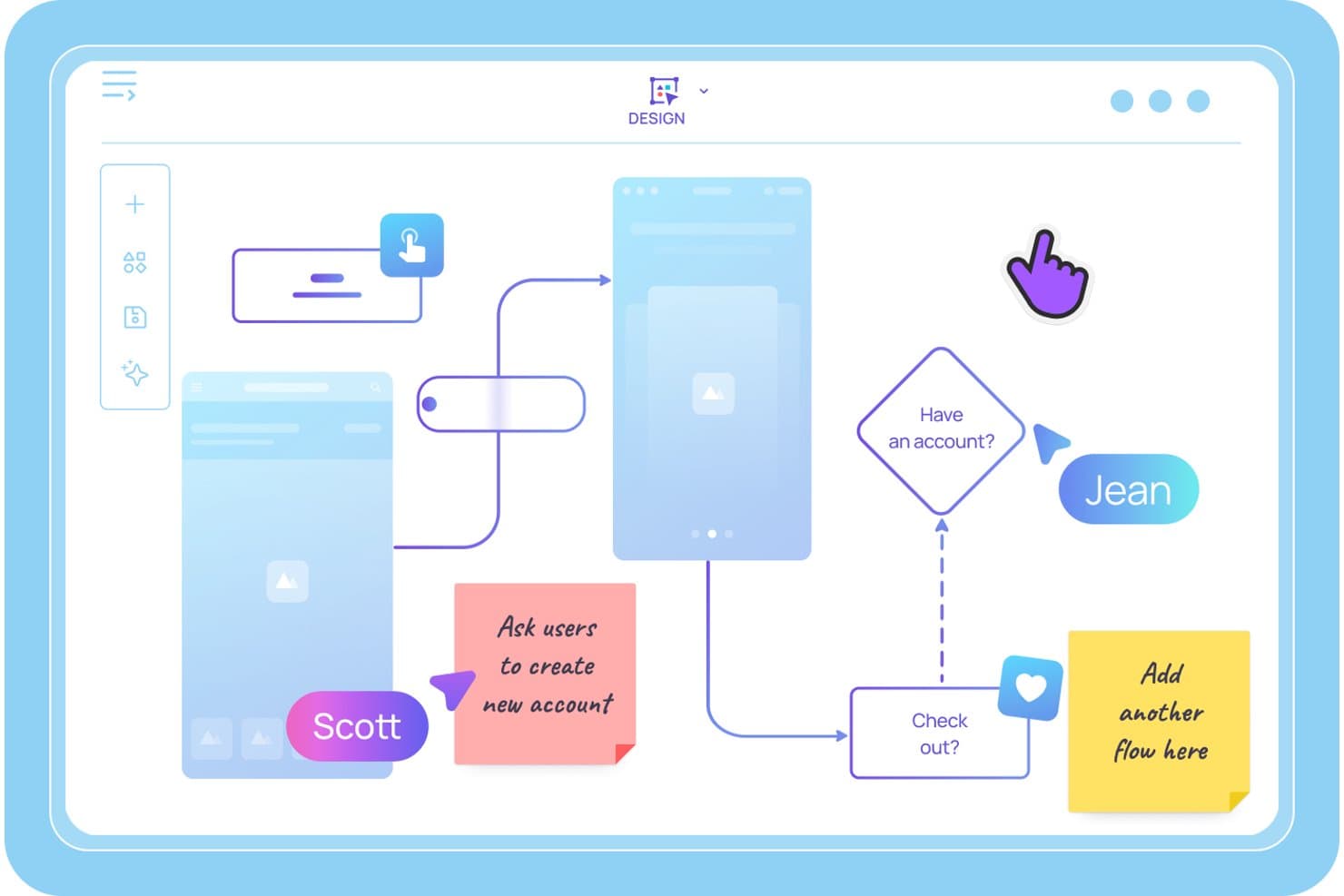
Visily lets users map user flows and storyboards with sticky notes. Visily is an AI-powered storyboard and wireframing tool that lets product teams generate sequential storyboard panels from text prompts, build interactive prototypes, and collaborate on user journey maps and UX flows in real time.
Who Is Visily Best For?
Visily is a strong fit for product managers and agile product owners who need to turn ideas into storyboards and interactive prototypes quickly—without relying on a dedicated designer.
Why I Picked Visily
I picked Visily as one of the best because it's the only tool I've seen that lets you type a plain-language scene description and get a structured, editable storyboard panel back in seconds. The AI Storyboard Maker turns a rough scenario into a sequenced set of frames, and Auto-Prototype then links those frames into a clickable user flow without any manual wiring. I've found that combination especially useful when you need to pressure-test a user journey before a sprint kickoff.
Visily Key Features
- Multimodal AI input: Combine text prompts, screenshots, existing diagrams, and canvas selections into a single AI generation request to build storyboard panels from wherever your ideas already live.
- Real-time co-editing with Cursor Chat: Multiple teammates can edit the same board simultaneously, with live cursors and in-canvas chat visible to everyone in the session.
- Workspace Library: Share custom templates, themes, and synced assets across all projects in your workspace, keeping storyboards consistent across your product team.
- Draw Mode: Use a freehand pen or highlighter directly on the canvas to sketch ideas or annotate storyboard panels without switching to a separate tool.
Visily Integrations
Visily connects with Figma, Claude Code, Cursor, Lovable, and ChatGPT via a plugin, and offers native integrations with Notion, Jira, and Slack.
Pros and Cons
Pros:
- Real-time collaboration supports cross-functional teams
- Auto-Prototyping links storyboard frames instantly
- AI turns text prompts into storyboard panels
Cons:
- Editing with AI overwrites manual screen changes
- No video or animation export options
Learn more about Visily: Best for cross-functional storyboard workshops
- Free plan available
- From $9.99/user/month (billed annually)
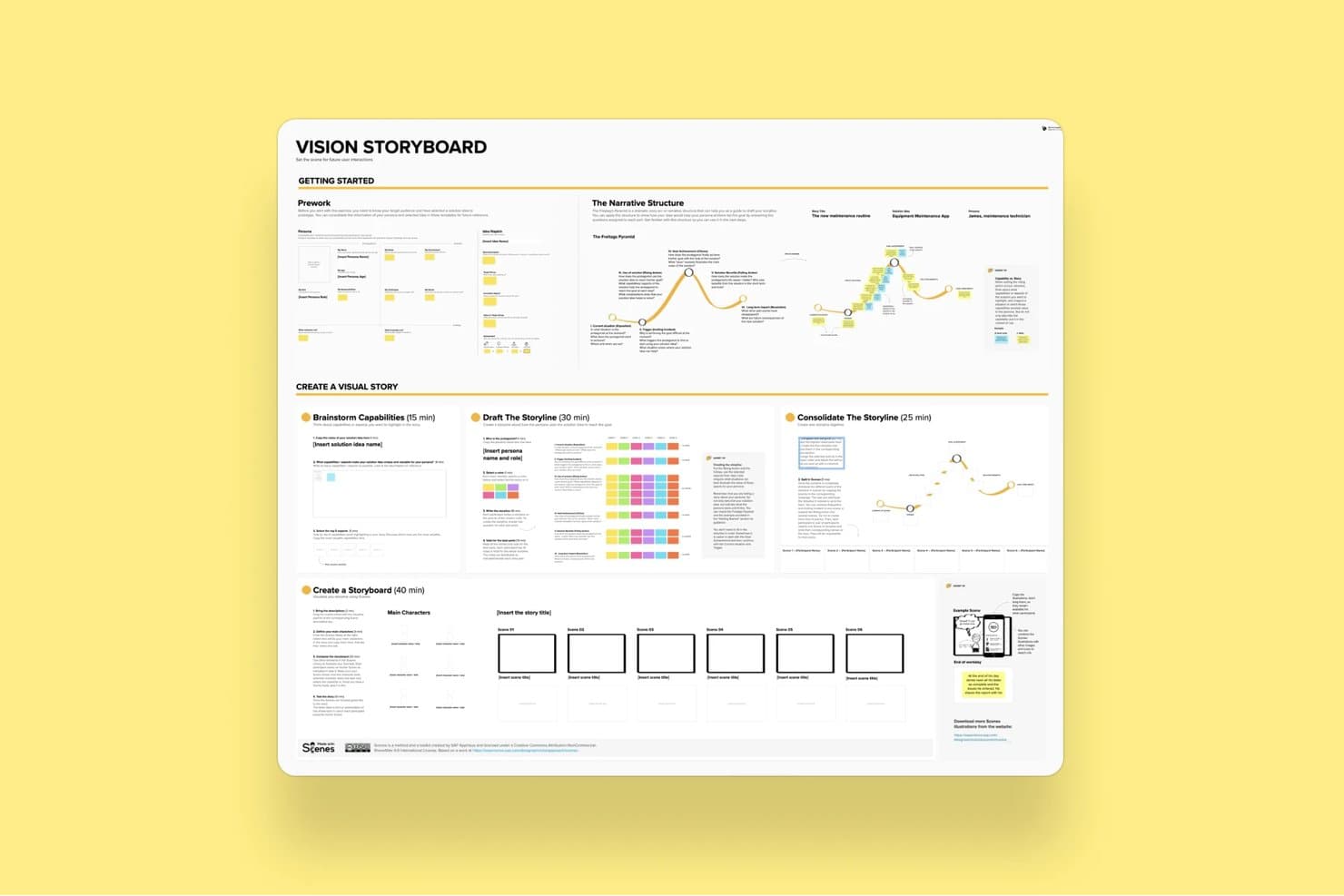
Mural's Vision Storyboard template guides users through building visual stories. Mural is a visual collaboration platform that combines an infinite canvas, a storyboard template, drag-and-drop editing, real-time co-editing, and facilitation tools for running structured ideation and product workshops.
Who Is Mural Best For?
Mural fits cross-functional product teams that run structured workshops, design sprints, or discovery sessions with multiple stakeholders involved in real time.
Why I Picked Mural
Mural earns its spot on my shortlist because its Facilitation Superpowers® toolkit is purpose-built for the kind of messy, multi-stakeholder storyboard sessions that product teams actually run. I love that features like Private Mode and Anonymous Voting let every participant contribute to a storyboard sequence without groupthink shaping the output. The dedicated Storyboard Template gives cross-functional teams a shared structure to build on, while the Summon feature lets me redirect everyone's view to a specific frame mid-session.
Mural Key Features
- Storyboard template: A pre-built, panel-based framework that guides teams through sequential frame creation using sticky notes and captions.
- Mural AI clustering: Automatically groups sticky notes by topic and rearranges them by criteria to help teams synthesize ideas across storyboard frames.
- Anonymous voting: Lets participants vote on storyboard ideas without seeing others' selections, reducing groupthink during collaborative sessions.
- PowerPoint export: Converts your mural canvas directly into a PowerPoint file for sharing storyboard work with stakeholders outside the tool.
Mural Integrations
Mural offers native integrations with Figma, Jira, Azure DevOps, GitHub, Confluence, Notion, Microsoft Teams, and more. It also provides an API for custom integrations and supports Zapier.
Pros and Cons
Pros:
- Extensive template and asset library for PMs
- Powerful real-time facilitation tools for teams
- Dedicated storyboard template for product sessions
Cons:
- Cluttered interface with many objects
- No video or animation export supported
Learn more about Mural: Best for speed-focused manual storyboarding
- Free trial available
- From $12/user/month (billed annually)
Visit WebsiteCustomer Rating:4.7/5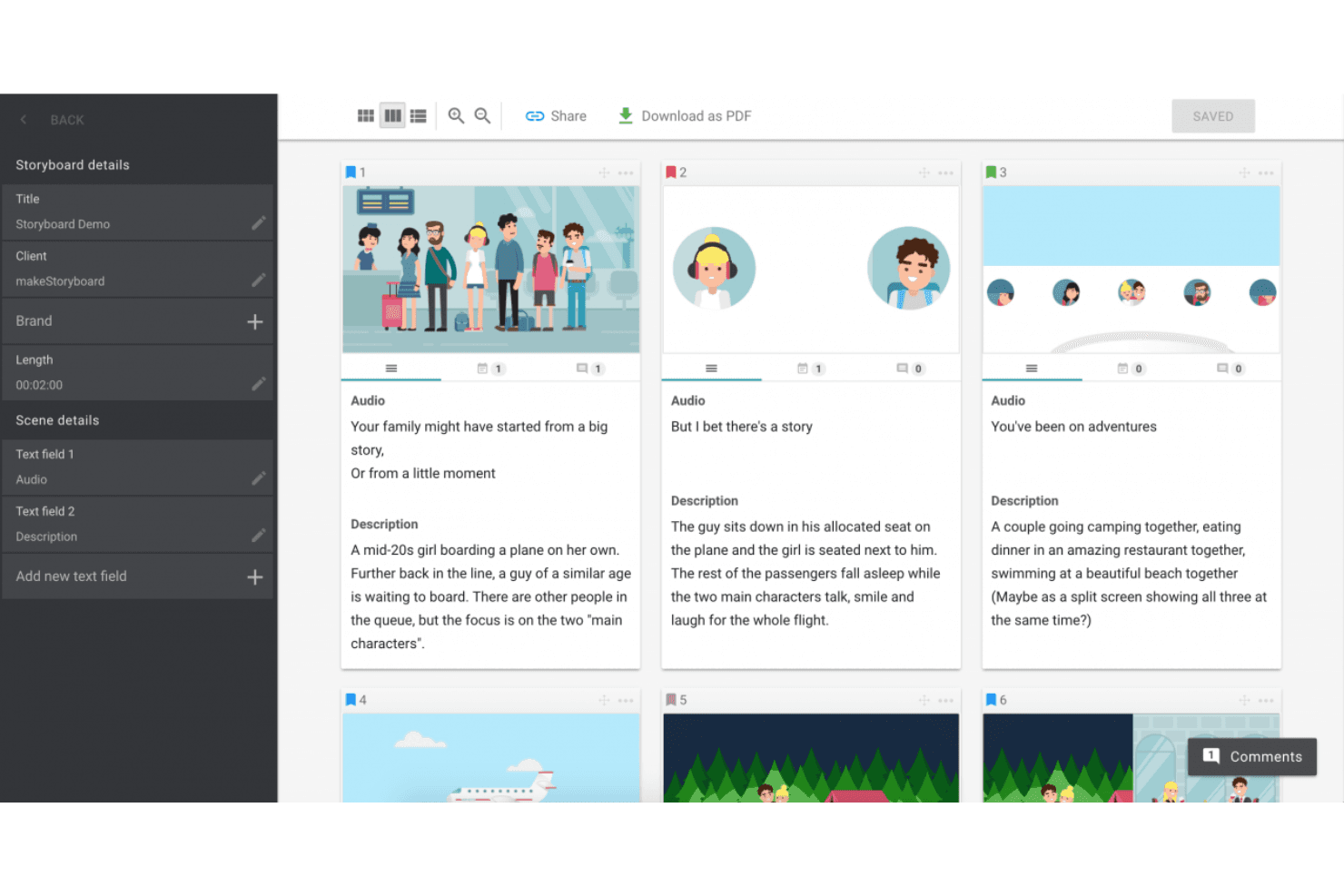
MakeStoryboard simplifies scene planning with organized frames, audio integration, and easy PDF exports. MakeStoryboard is a browser-based storyboarding tool built around frame-by-frame sequencing, a drag-and-drop canvas editor, real-time collaboration, and animatic MP4 export.
Who Is MakeStoryboard Best For?
MakeStoryboard is a good fit for video producers, animators, and content teams who need to build and present storyboards quickly without a steep learning curve.
Why I Picked MakeStoryboard
I picked MakeStoryboard as one of the best because it's purpose-built for getting storyboards done fast, without fighting the tool. The script-to-frames feature is what I find most useful: paste in a script, split it into frames automatically, then drop images and set camera angles per frame. When I need to hand off work to a client quickly, the animatic export lets me stitch frames into a playable MP4 with audio, which lands far better than a static PDF ever does.
MakeStoryboard Key Features
- Real-time collaboration: Multiple team members can edit the same storyboard simultaneously, with per-frame commenting and role-based access controls.
- Passphrase-protected review links: Share storyboards with external clients via a dedicated review link that doesn't require them to create an account.
- Custom branding on exports: Add your company logo and a bespoke cover page to PDF exports before sending them to clients or stakeholders.
- Camera angle indicators: Each frame supports predefined, industry-standard camera motion and shot angle labels for production-ready documentation.
MakeStoryboard Integrations
Native integrations are not publicly listed.
Pros and Cons
Pros:
- Camera angle indicators for production notes
- Passphrase-protected client review links
- Animatic MP4 export for visual storytelling
Cons:
- Lacks templates for user journeys or personas
- No AI-assisted frame or scene generation
Learn more about MakeStoryboard: Best for real-time camera and scene previsualization
- Free demo available
- From $39.99/month
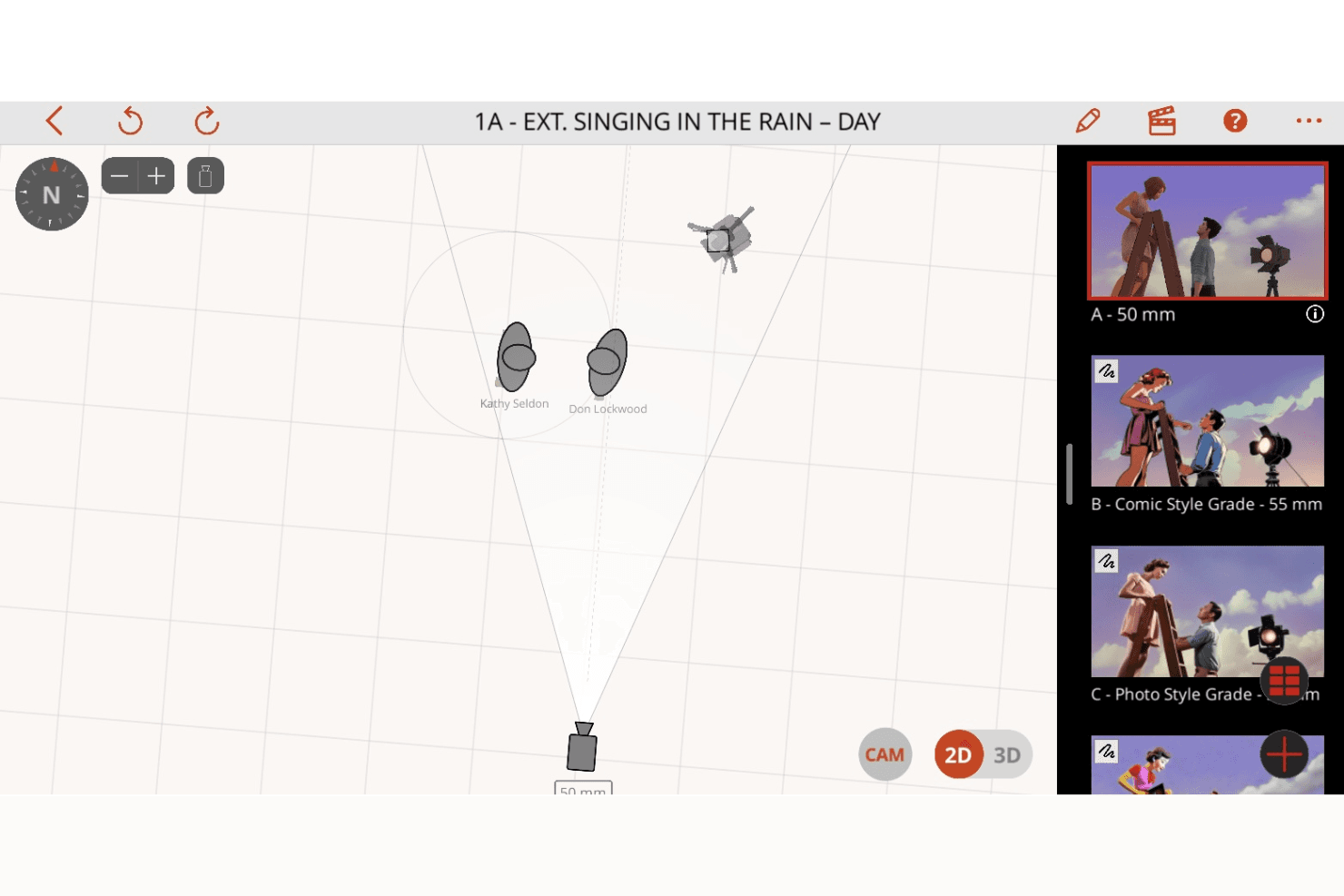
Previs Pro enhances shot planning with 2D and 3D scene visualization, camera controls, and dynamic storyboard creation. Previs Pro is a 3D storyboard and previsualization tool for film and TV production that lets you build scenes with real lens physics, animate shots on an editorial timeline, and import screenplays to auto-generate shot outlines.
Who Is Previs Pro Best For?
Previs Pro is built for film and TV professionals—directors, cinematographers, and previs artists—who need to block shots and visualize camera setups before stepping on set.
Why I Picked Previs Pro
Previs Pro earns its spot as one of the best on my shortlist because it simulates real camera optics inside a 3D scene builder, letting directors and cinematographers block shots with accurate lens physics before a single crew member steps on set. I love how the Virtual Camera feature lets you walk through an actual location with your iPhone and preview character blocking in AR against the real environment. Screenplay import is another standout: drop in a Final Draft or Fountain file and Previs Pro auto-generates a shot outline, complete with scene and cast details.
Previs Pro Key Features
- Animatics timeline: Sequence and animate shots across a multi-scene editorial timeline with four dedicated audio lanes for dialogue, music, SFX, and voiceover.
- Screenplay import: Drop in a Final Draft, Fountain, Fade In, or Celtx file and Previs Pro auto-populates scene descriptions, cast details, and shot outlines directly from the script.
- AI prop and character generation: Use text descriptions to generate custom props and characters via PropGen and ActorGen without sourcing external 3D assets.
- NLE timeline export: Export your storyboard as an FCP7 XML file for direct handoff into Premiere Pro, DaVinci Resolve, or Final Cut Pro.
Previs Pro Integrations
Native integrations are not publicly listed.
Pros and Cons
Pros:
- AI generates props and characters from text
- Imports screenplays and auto-generates storyboards
- Animates shots with real lens physics
Cons:
- No live, real-time collaborative editing
- Only available for Mac, iPad, iPhone
Learn more about Previs Pro: Best for polished storyboard slides for non-designers
- Free trial + free plan available
- From $144/user/year (billed annually)
Visit WebsiteCustomer Rating:4.7/5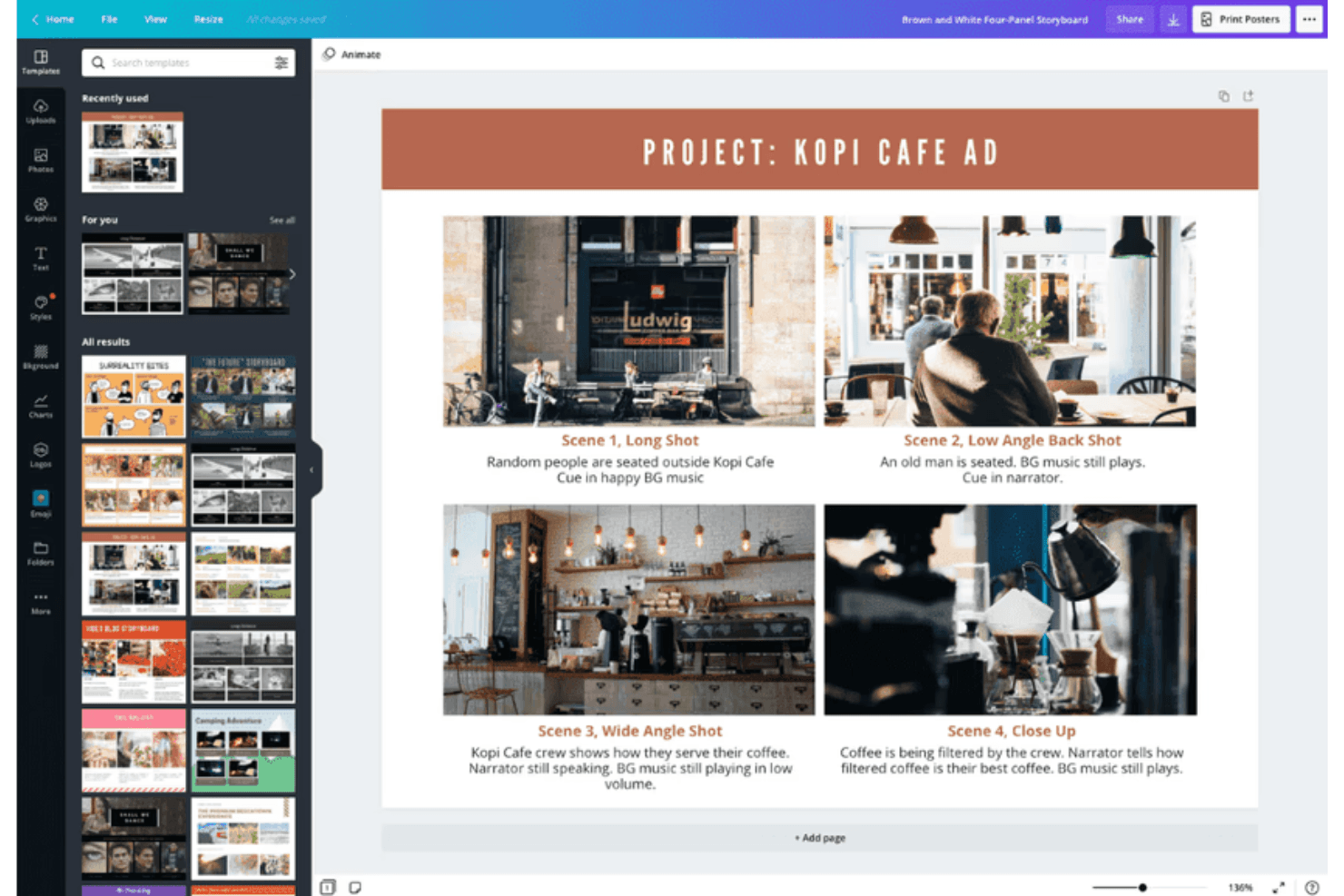
Canva supports storyboard creation with customizable templates for visuals. Canva is a general-purpose visual design tool that supports storyboard creation through a drag-and-drop editor, a large template library, real-time collaboration, AI-assisted design generation, and multi-format export including video and animation.
Who Is Canva Best For?
Canva is a great fit for product managers and product marketing managers who need to produce polished storyboard slides quickly, without relying on a designer.
Why I Picked Canva
I've included Canva in my top picks because it's the tool I'd hand to any product manager who needs a polished storyboard by end of day without touching a single design tool before. The template library includes dedicated storyboard and customer journey map templates, so you're not starting from scratch. Magic Studio's AI suite can generate layouts and captions from a text prompt, which cuts the time from "blank canvas" to "share-ready slides" significantly.
Canva Key Features
- Magic Studio AI suite: Over 20 AI tools—including text-to-design generation, AI writing, and conversational editing—let you build storyboard frames from a text prompt.
- Real-time co-editing: Multiple team members can edit the same storyboard simultaneously, with comments and threaded feedback on individual frames.
- Video and animation export: Animate individual frames with Magic Animate and export finished storyboards as MP4 or GIF files for stakeholder presentations.
- Customer journey map templates: Dedicated templates for user journey mapping and product scenario storyboards are available on both free and paid plans.
Canva Integrations
Canva offers native integrations with Slack, Google Photos, YouTube Embed, Pinterest, Brandfetch, Dropbox, Notion, Asana, and more. Zapier and Canva’s API support additional connections, with custom apps and integrations available on Enterprise.
Pros and Cons
Pros:
- Real-time co-editing with approval workflows
- Magic Studio AI rapidly generates storyboard slides
- Millions of storyboard and journey map templates
Cons:
- No native Jira, Figma, or Notion connections
- No interactive prototyping between storyboard frames
Learn more about Canva: Best for educational use
- Free trial + free plan available
- From $14.99/month
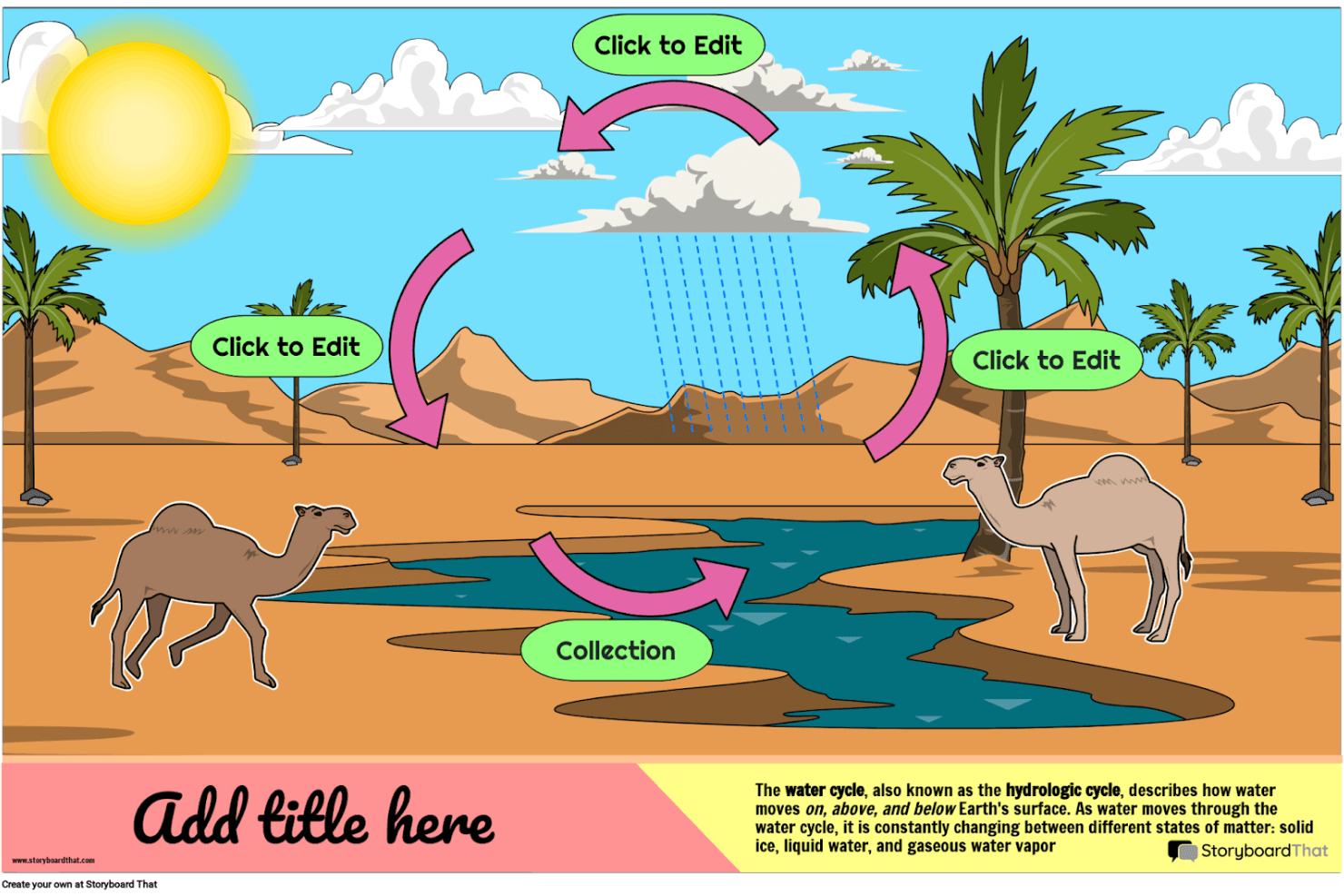
Storyboard That helps you create engaging visual stories and educational diagrams with customizable characters, scenes, and templates. Storyboard That is a drag-and-drop storyboard tool with a large illustrated asset library, business and education templates, and export options including PDF, PowerPoint, and animated GIF.
Who Is Storyboard That Best For?
Storyboard That is a strong fit for educators, instructional designers, and academic teams who need an approachable visual storytelling tool with built-in LMS integrations and student-safe privacy compliance.
Why I Picked Storyboard That
I've included Storyboard That in my top picks because it's built from the ground up for educational environments in a way no other tool on this list matches. It connects directly with Google Classroom, Canvas, and Schoology via LTI, so teachers can assign storyboard projects without leaving their LMS. Its FERPA and COPPA compliance also means student data is genuinely protected, which is a requirement most education teams can't compromise on.
Storyboard That Key Features
- Drag-and-drop canvas editor: Build storyboards by dragging characters, scenes, props, and text elements onto frames without any design expertise required.
- Animated GIF export: Convert finished storyboards into animated GIFs directly from the platform, alongside PDF and PowerPoint export options.
- Audio narration recording: Record and attach spoken narration to individual storyboard frames on paid plans.
- Presentation mode: Walk stakeholders through storyboard frames in a built-in slideshow view without leaving the tool.
Storyboard That Integrations
Storyboard That offers native integrations with Google Classroom, Clever, ClassLink, Canvas, Schoology, Blackbaud, Buzz LMS, and D2L.
Pros and Cons
Pros:
- Supports recorded audio narration per frame
- Extensive illustrated library with business templates
- Built-in presentation mode for direct walkthroughs
Cons:
- Only exports static or animated GIF formats
- No AI or interactive prototyping features
Learn more about Storyboard That: Best for script-synced animatic collaboration
- Free plan + free trial available
- From $50/month (billed annually)
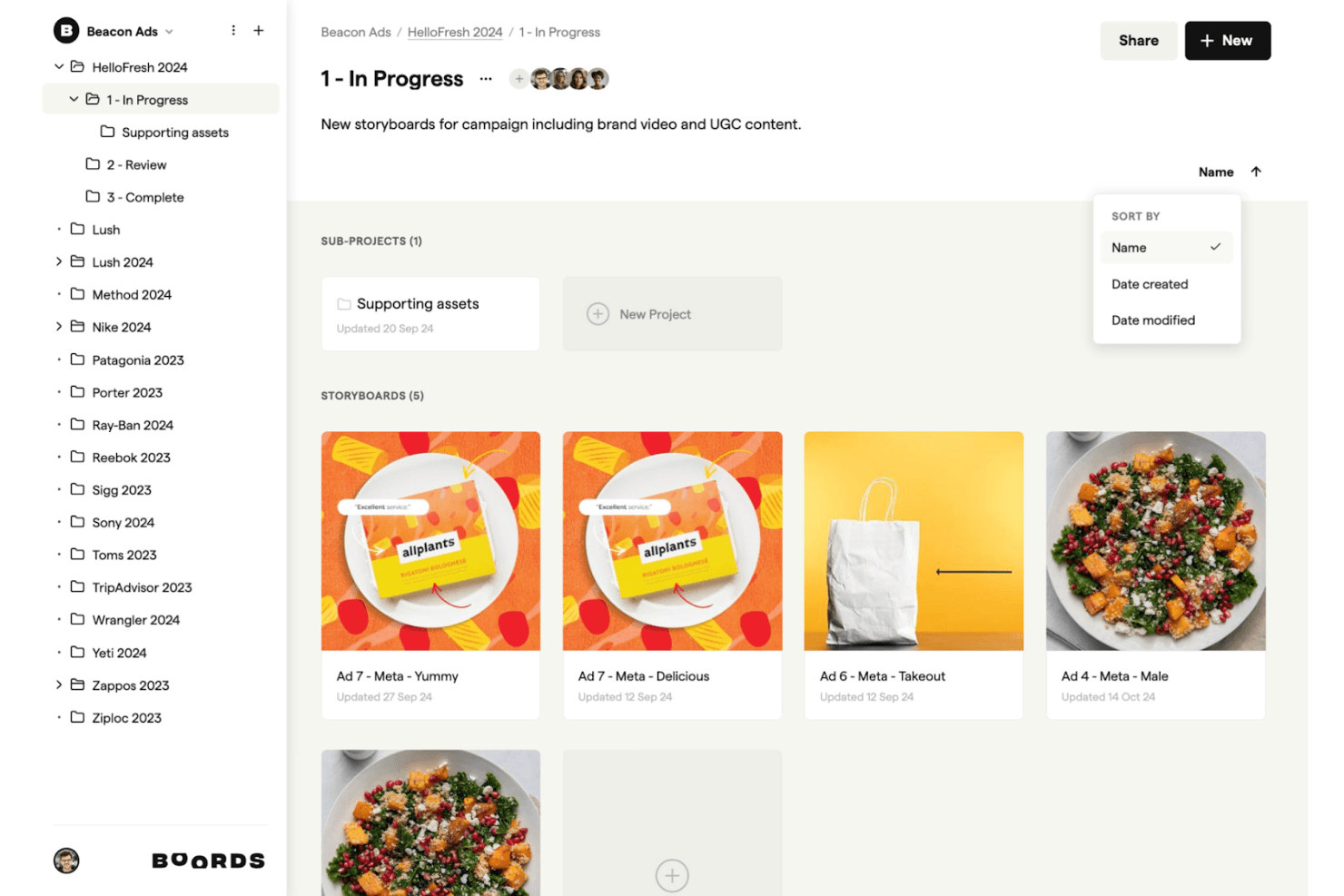
Boords supports your creative process by allowing you to intuitively organize, edit, and share storyboards for campaigns and branded content. Boords is a browser-based storyboard software that combines a script editor, AI storyboard generation, frame-by-frame sequencing, and an in-browser animatic editor with MP4 export.
Who Is Boords Best For?
Boords is a strong fit for creative teams and product marketers who need to build script-synced animatics and share polished video previews with clients or stakeholders.
Why I Picked Boords
Boords earns its spot on my shortlist because the script-to-animatic pipeline it offers is genuinely hard to replicate in a single tool. I love how the built-in script editor syncs directly with the storyboard timeline, so when I adjust voiceover timing, the frame sequence updates alongside it. The in-browser animatic editor then lets me export a finished MP4 without touching any external software, which is exactly what I need when presenting a narrative vision to stakeholders fast.
Boords Key Features
- AI storyboard generator: Paste a script or brief and Boords automatically builds a structured storyboard with AI-generated images for each frame.
- PDF Builder: Customize and export your storyboard as a formatted PDF, giving you full control over how frames and text fields appear in client deliverables.
- Team asset library: Upload and organize shared images in a centralized library so your whole team can reuse approved visuals across multiple projects.
- Guest review links: Share storyboards with clients via password-protected links that require no account signup to view or comment.
Boords Integrations
Boords has 3 documented native integrations: Slack, Dropbox, and Google Drive. It also offers a public API and webhooks for custom integrations with product and design tools.
Pros and Cons
Pros:
- Guest review links require no signup
- In-browser animatic editor with MP4 export
- Script-to-storyboard automation with AI images
Cons:
- Lacks UX or product journey templates
- No interactive prototyping or clickable flows
Learn more about Boords: Best for animation studio pre-production
- 14-day free trial
- From $90/month
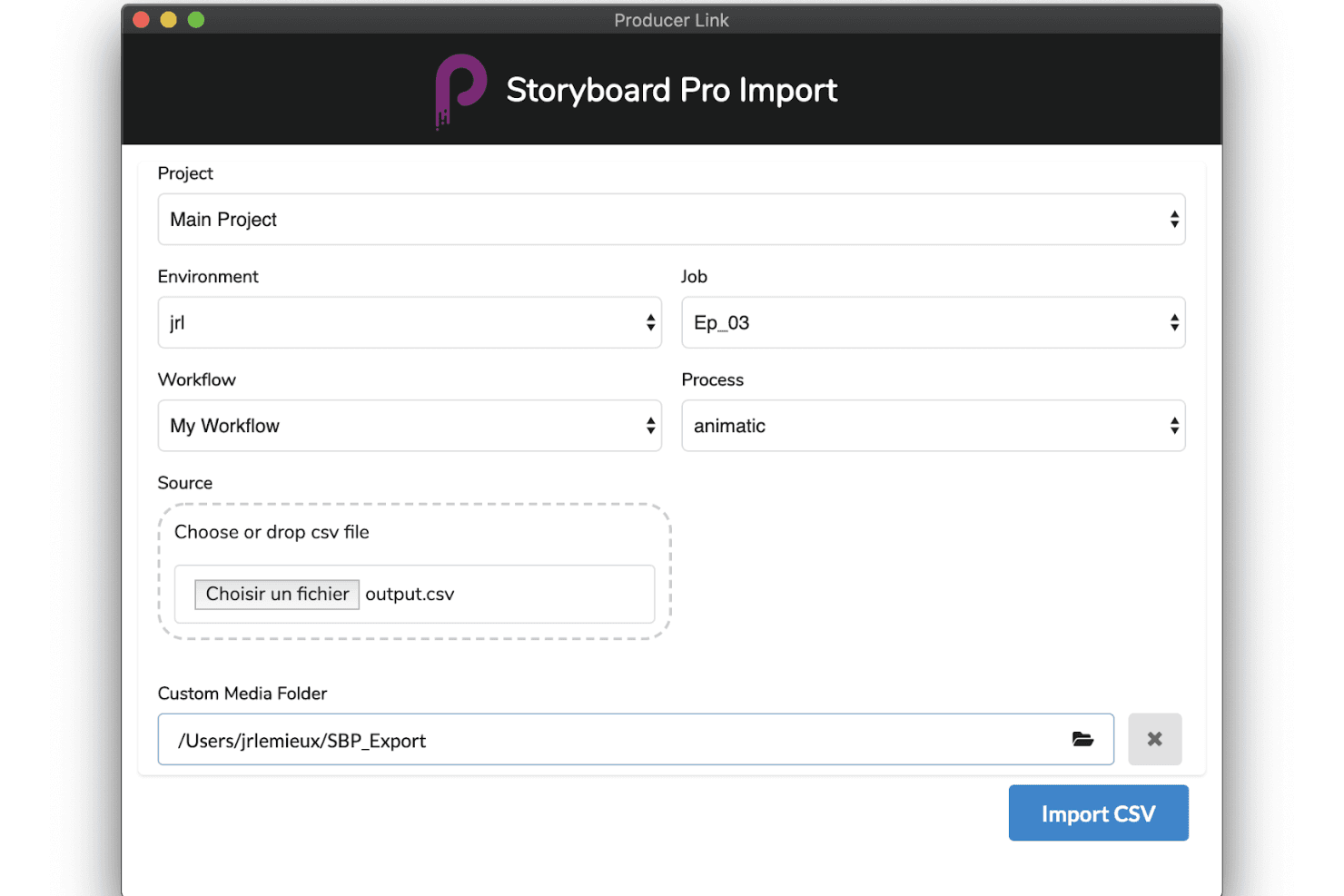
Toon Boom Storyboard Pro supports production with advanced importing tools, customizable workflows, and smooth animatic creation. Toon Boom Storyboard Pro is a professional desktop storyboarding application built for animation pre-production, offering panel-based sequencing, a full animatic timeline, 3D camera tools, multi-track audio sync, and AI-assisted script breakdown via its Ember toolset.
Who Is Toon Boom Storyboard Pro Best For?
Toon Boom Storyboard Pro is built for professional animators and animation studios that need a dedicated pre-production pipeline from script to animatic.
Why I Picked Toon Boom Storyboard Pro
Toon Boom Storyboard Pro earns its spot on my shortlist because it's the closest thing animation studios have to a dedicated pre-production command center. I love how the Panel Timer lets you capture live panel timing by tapping along to a performance, which is a genuinely unique feature for studios building animatics frame by frame. Paired with the 3D camera system and multi-track audio sync, you can move directly from a rough script to a fully timed, camera-animated preview without switching tools.
Toon Boom Storyboard Pro Key Features
- 3D camera system: Animate virtual camera moves—pan, zoom, and tilt—within a 3D environment directly inside your storyboard panels.
- Toon Boom Ember AI script breakdown: Analyzes screenplays to auto-identify scenes, characters, and assets, then auto-populates dialogue and action panels.
- Multi-track audio sync: Import, layer, and scrub multiple audio tracks with waveform display for precise panel-level synchronization.
- Harmony scene export: Exports full storyboard scenes—including layers and timing—directly into Toon Boom Harmony for animation production.
Toon Boom Storyboard Pro Integrations
Toon Boom Storyboard Pro offers native integrations with Toon Boom Harmony and Adobe Photoshop, plus AAF/XML workflows for Pro Tools and video editing software.
Pros and Cons
Pros:
- Integrated 3D camera and asset support
- AI-assisted script breakdown speeds up workflow
- Comprehensive animatic tools for animation storyboarding
Cons:
- Requires professional illustration or animation skills
- No real-time cloud-based collaboration features
Learn more about Toon Boom Storyboard Pro: Best for script-to-animated pitch deck export
- Free plan + free demo available
- From $12/month (billed annually)
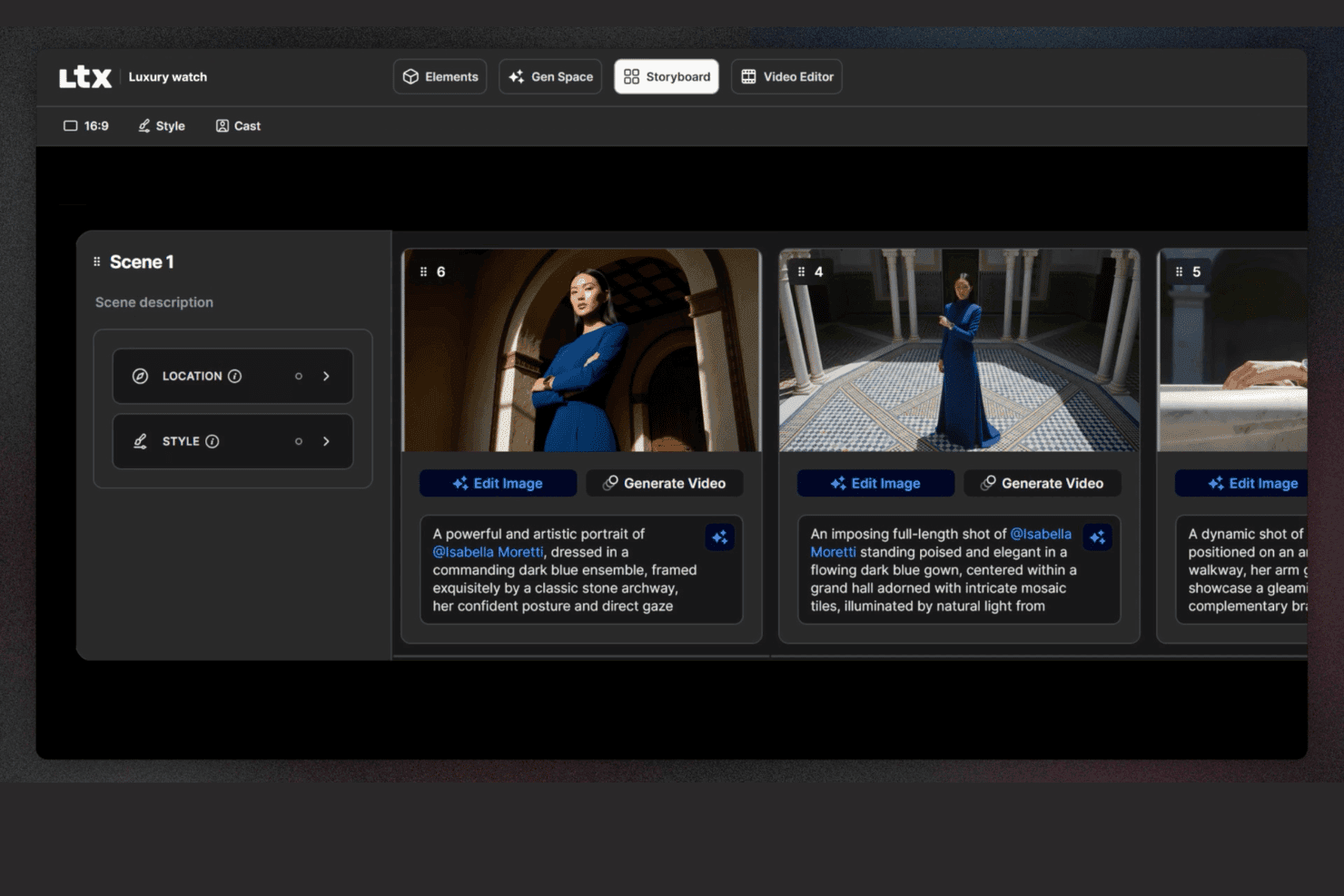
LTX Studio lets users edit storyboards with descriptions, locations, and image editing. LTX Studio is an AI-driven storyboard platform that generates scene-by-scene visual sequences from scripts or text prompts, with built-in timeline editing, animated MP4 export, and a pitch deck generator.
Who Is LTX Studio Best For?
LTX Studio fits product marketing managers and creative teams who need to turn a script or concept into an animated, presentation-ready pitch deck without relying on a designer.
Why I Picked LTX Studio
I picked LTX Studio as one of the best because it's the only tool on my list that takes a raw script and turns it into an animated, presentation-ready pitch deck without a single design asset required. Paste in your product narrative, and the AI breaks it into sequenced shots, generates cinematic frames, and assembles everything into an exportable MP4 or PDF. The Pitch Deck Generator then compiles those visuals into a structured format you can put in front of stakeholders the same day.
LTX Studio Key Features
- AI model selection: Choose from multiple AI generation models—including Google Veo 3.1, Kling 2.6/3.0 Pro, and the proprietary LTX-2—at the project, board, or frame level.
- Persistent character elements: Define a character's appearance once, and the platform maintains consistent facial details, wardrobe, and style across every frame automatically.
- Built-in audio generation: Generate and sync background music, ambient audio, and voice-over narration directly within the timeline editor without a separate audio tool.
- Node-based automation flows: Build custom AI generation workflows using a visual node-based system, available on Standard and above plans.
LTX Studio Integrations
Native integrations are not publicly listed.
Pros and Cons
Pros:
- Exports as MP4 and structured pitch deck
- Persistent characters and elements stay consistent
- AI generates animated storyboards from scripts
Cons:
- Collaboration is limited on non-enterprise plans
- No canvas-based editor or UX templates
Learn more about LTX Studio:
Annen storyboard-programvare
Her er noen flere alternativer for storyboard-programvare som ikke kom med på kortlisten min, men som likevel er verdt å sjekke ut:
- 11MiroBest for storyboards linked to your dev backlog
- 12LucidsparkBest for mapping user journeys across product teams
- 13WhimsicalBest for lo-fi wireframe and flow storyboarding
- 14Adobe FireflyBest for brand-governed AI visual ideation
- 15StudioBinderBest for film production team storyboarding
- 16KatalistBest for script-to-video storyboard production
How I Evaluate Storyboard Software
I split my evaluation into two layers: whether a tool can build and annotate sequential product flows, then what sets the strongest options apart.
Core Functionality (Table Stakes For This List)
When I'm selecting tools for my list, I rank each one on a scale from 0 (does not offer the functionality) to 5 (excels in this area) for each core functionality listed below. Then, I calculate the tool's total score into a percentage. Each tool needs to achieve a minimum total score of 65% to be considered for inclusion.
- Frame-by-Frame Sequencing: I evaluate how each tool handles building ordered panels, like mapping a user's onboarding flow from sign-up through activation step by step.
- Drag-and-Drop Visual Editor: The editor should let PMs place characters, UI elements, and scenes on a canvas without needing design skills or external tools.
- Pre-Built Asset Library: I check for template variety and asset relevance, looking for things like persona placeholders, device mockups, and environment scenes.
- Real-Time Collaboration: Product teams co-create during discovery sprints, so I look for live co-editing, commenting, and presence indicators within the workspace.
- Annotation & Text Overlays: Each frame should support captions, speech bubbles, or contextual notes that explain what's happening at each step of the story.
- Export & Sharing Options: I consider whether you can share storyboards as PDFs, images, or links for async reviews with stakeholders who don't have tool access.
Once I have a list of tools that meet the criteria, I consider what sets each platform apart.
Differentiating Factors (What Sets Vendors Apart)
Here's how I compare and contrast different vendors:
Standout Features
AI-assisted generation is a big differentiator. Tools that can turn a text prompt into a rough storyboard give PMs a faster path from idea to visual during early discovery. I also look for interactive prototyping, where clickable hotspots on frames let you simulate a user flow and gather feedback before any design handoff. Pre-built user journey templates matter too. Starting from a customer onboarding or feature adoption template saves hours compared to building frames from scratch every sprint.
Beyond Features
Integrations with the broader product stack matter a lot. I check whether storyboards can link to Jira epics or embed in Confluence pages, since that's where most PM teams already work. Learning curve is another key factor. Most PMs aren't designers, so I evaluate how quickly someone can produce a share-ready storyboard in their first session. Pricing structure also plays a role, especially whether guest access lets stakeholders review and comment without requiring paid seats for everyone on the team.
Slik velger du storyboard-programvare
Det er lett å gå seg vill i lange funksjonslister og kompliserte prismodeller. For å hjelpe deg med å holde fokus mens du går gjennom den unike prosessen din for valg av programvare, finner du her en sjekkliste over faktorer du bør ha i mente:
| Faktor | Hva du bør vurdere |
| Skalerbarhet | Forsikre deg om at programvaren kan vokse med teamet ditt og håndtere flere brukere eller prosjekter uten problemer. Tenk på fremtidige behov og om verktøyet kan håndtere økt etterspørsel. |
| Integrasjoner | Kontroller om den kan integreres med andre verktøy du bruker, for eksempel Adobe Creative Suite eller apper for prosjektstyring, for å effektivisere arbeidsflyten og øke produktiviteten. |
| Tilpasningsmuligheter | Se etter funksjoner som lar deg tilpasse programvaren til arbeidsflyten din, for eksempel maler som kan tilpasses, slik at du sparer tid og dekker teamets spesifikke behov. |
| Brukervennlighet | Programvaren bør være intuitiv og ha en kort læringskurve. Se etter dra-og-slipp-grensesnitt eller veiledninger som gjør det enklere for teamet å komme raskt i gang. |
| Budsjett | Vurder kostnaden for programvaren opp mot budsjettet ditt. Se etter fleksible prisplaner eller rabatter ved lengre bindingstid for å sikre at den passer økonomisk. |
| Sikkerhetstiltak | Teamets data bør være beskyttet. Se etter funksjoner som kryptering, sikre tilgangskontroller og samsvar med personvern- og datasikkerhetsforskrifter. |
| Samarbeid | Forsikre deg om at verktøyet støtter samarbeid i sanntid, slik at teammedlemmene kan jobbe effektivt sammen og gi tilbakemeldinger direkte i plattformen. |
| Kundestøtte | Vurder nivået på kundestøtten som er tilgjengelig. Se etter alternativer med døgnåpen kundestøtte, detaljert dokumentasjon og rask hjelp til å løse eventuelle problemer. |
Trender
I undersøkelsen min hentet jeg inn utallige produktoppdateringer, pressemeldinger og lanseringslogger fra ulike leverandører av storyboard-programvare. Her er noen av de fremvoksende trendene jeg følger med på:
- AI-assistert storyboardarbeid: AI brukes til å foreslå storyboardoppsett og scener, noe som sparer tid og setter i gang kreativiteten. Noen verktøy tilbyr nå AI-genererte bilder, slik at brukerne raskt kan visualisere konsepter.
- 3D-visualisering: Stadig mer storyboard-programvare tar i bruk 3D-funksjoner, slik at brukerne kan opprette og vise scener i tre dimensjoner. Denne trenden hjelper team med å forstå romlige forhold og scenedynamikk bedre.
- Interaktive storyboards: Verktøyene utvikler seg til å inkludere interaktive elementer, slik at brukerne kan legge til klikkbare lenker, lyd og video. Dette gjør storyboardene mer engasjerende og nyttige i presentasjoner.
- Samarbeid i sanntid: Forbedrede samarbeidsfunksjoner lar team arbeide med storyboards samtidig fra ulike steder. Denne trenden er avgjørende for eksterne team som trenger å opprettholde effektivitet og samkjøring.
- Skybaserte løsninger: Skylagring og tilgang via skyen blir standard, slik at team kan arbeide hvor som helst uten å miste data. Denne trenden støtter fjernarbeid og sikrer at storyboardene alltid er tilgjengelige og oppdaterte.
Hva er storyboard-programvare?
Storyboard-programvare er et digitalt verktøy som hjelper brukere med å lage visuelle fremstillinger av historier, og brukes ofte innen film, animasjon og markedsføring. Filmskapere, animatører og kreative fagfolk bruker vanligvis disse verktøyene til å planlegge scener og visualisere fortellinger, noe som forbedrer kommunikasjonen og prosjektplanleggingen. Dra-og-slipp-grensesnitt, AI-assisterte oppsett og samarbeidsfunksjoner i sanntid støtter kreative arbeidsprosesser og samkjøring i teamet. Alt i alt hjelper disse verktøyene brukerne med å spare tid og forbedre tydeligheten og effektiviteten i den visuelle historiefortellingen.
Funksjoner
Når du velger storyboard-programvare, bør du se etter følgende viktige funksjoner:
- Dra-og-slipp-grensesnitt: Dette lar deg raskt ordne, flytte og endre størrelsen på storyboardruter med enkle klikk og draoperasjoner. Du kan visualisere prosjektflyten akkurat slik du ser den for deg – uten teknisk ekspertise.
- Tilpassbare maler: Velg blant en rekke ferdiglagde maler tilpasset ulike typer historiefortelling, for eksempel reklamer, filmscener eller animasjoner. Maler sparer tid og hjelper deg med å holde orden, særlig når du raskt utvikler ideer.
- Samarbeidsverktøy: Del storyboards i sanntid, tildel oppgaver eller legg igjen kommentarer til teammedlemmer. Disse funksjonene sørger for at alle er på samme side, bokstavelig talt, og gjør gruppearbeid raskere og morsommere.
- Integrert manusredigering: Koble bildene dine sammen med dialog og beskrivelser direkte i verktøyet – du trenger ikke å veksle mellom apper. Dette effektiviserer den kreative prosessen og holder alt i riktig kontekst.
- Alternativer for eksport og deling: Lagre storyboardene som PDF-filer, bilder eller presentasjonsbilder, eller del dem med en rask lenke. På denne måten kan du presentere ideene dine for kunder eller kolleger uten tekniske hindringer.
- Versjonskontroll: Spor endringer, gjenopprett gamle versjoner og se hvem som har gjort endringer. Dette er uvurderlig når du trenger å gå tilbake til tidligere ideer eller angre en utilsiktet redigering.
- Støtte for lyd og video: Legg til stemmeopptak, lydeffekter eller videoklipp for å gi storyboardet liv. Muligheten til å integrere multimedieinnhold gjør at du kan kommunisere visjonen din tydeligere.
- Organisering og merking: Grupper scener etter akter, bruk fargemerker eller legg til etiketter for å holde orden på alt. Når prosjektet blir komplekst, hjelper disse verktøyene deg med å finne frem på en enkel måte.
Vanlige AI-funksjoner
I tillegg til standardfunksjonene i storyboard-programvare som er nevnt ovenfor, innlemmer mange av disse løsningene AI med funksjoner som:
- Tale-til-tekst-inndata: Konverter muntlige ideer direkte til tekstelementer i storyboardet. Du kan idémyldre høyt, og verktøyet organiserer ordene dine i beskrivelser eller dialog i storyboardene dine.
- Automatisk bildegenerering: AI oppretter visuelle ruter basert på de skriftlige beskrivelsene dine, gjør manusideene dine raskt om til bilder og reduserer tiden som brukes på manuell illustrasjon.
- Smarte sceneforslag: Programvaren anbefaler mulige neste bilder, kameravinkler eller sceneoverganger basert på konteksten i historien din, slik at du opprettholder den kreative fremdriften.
- Automatisk dialogforbedring: AI gjennomgår manuset ditt og foreslår forbedringer eller markerer klønete formuleringer, slik at rollefigurene dine høres mer autentiske og engasjerende ut.
- Analyse av historiens struktur: AI skanner storyboardet ditt og identifiserer problemer med tempo, mangler i historien eller områder som mangler spenning, slik at du kan finjustere fortellingen.
Fordeler
Å ta i bruk digitale storyboardverktøy kan endre hvordan teamet ditt planlegger, deler og videreutvikler kreative prosjekter. Her er hva du kan forvente:
- Økt kreativitet: AI-assisterte oppsett og fleksible maler gir deg rom til å utforske nye retninger uten å måtte begynne helt fra grunnen av.
- Enklere teamsamarbeid: Oppdateringer i sanntid og skybasert tilgang gjør at teamet ditt kan bidra fra hvor som helst, slik at alle holder kontakten.
- Raskere arbeidsflyter: Dra-og-slipp-verktøy og ferdiglagde maler reduserer oppsettstiden, slik at du kan konsentrere deg om selve historiefortellingen.
- Bedre visuell kommunikasjon: Med 3D-storyboarder og interaktive funksjoner kan teamet og interessentene dine visualisere konseptet tydeligere.
- Fjernbasert storyboardoppretting: Skybasert tilgang sikrer at du ikke er bundet til ett sted, noe som er spesielt nyttig for distribuerte team.
- Detaljert planleggingsstøtte: Tidslinje- og tegneverktøy hjelper deg med å planlegge scener, håndtere kompleksitet og opprettholde kreativ kvalitet.
- Fleksibel deling: Med ulike eksportalternativer er det enkelt å dele arbeidet ditt på sosiale medier eller i det formatet som passer best for samarbeidspartnerne eller kundene dine.
Kostnader og priser
Når du velger storyboardprogramvare, må du forstå de ulike prismodellene og abonnementene som er tilgjengelige. Kostnadene varierer basert på funksjoner, teamstørrelse, tillegg og mer, og gratis storyboardprogramvare dekker den ene enden av spekteret for team som kan arbeide innenfor begrensede funksjoner.
Tabellen nedenfor oppsummerer vanlige abonnementer, gjennomsnittsprisene deres og typiske funksjoner som er inkludert i storyboardprogramvareløsninger:
Sammenligningstabell for storyboardprogramvare
| Plantype | Gjennomsnittspris | Vanlige funksjoner |
| Gratisabonnement | $0 | Grunnleggende storyboardoppretting, begrenset antall maler og grunnleggende eksportalternativer. |
| Personlig abonnement | $5-$30/bruker/ måned | Tilpassbare maler, dra-og-slipp-grensesnitt og skybasert tilgang. |
| Bedriftsabonnement | $30-$80/ bruker/måned | Samarbeid i sanntid, avanserte tegneverktøy og tidslinjehåndtering. |
| Enterprise-abonnement | $80-$100+/ bruker/måned | 3D-visualisering, AI-assisterte oppsett, dedikert brukerstøtte og omfattende sikkerhetstiltak. |
Vanlige spørsmål om storyboardprogramvare
Her er noen svar på vanlige spørsmål om storyboardprogramvare:
Kan et storyboard opphavsrettsbeskyttes?
Ja, du kan få opphavsrett til et storyboard. Når det er laget, er det beskyttet som et originalt verk, noe som betyr at andre ikke kan kopiere eller distribuere det lovlig uten tillatelse. Husk bare at opphavsretten beskytter selve innholdet, ikke den generelle ideen eller konseptet bak det.
Hva bør et storyboard ikke inneholde?
Et storyboard bør ikke inneholde noe som distraherer fra hovedhistorien. Det betyr at du bør unngå unødvendige scener, overdrevent detaljerte illustrasjoner eller for mye tekst. Målet er å formidle prosjektets grunnleggende flyt tydelig, ikke overvelde teamet med hver minste detalj.
Hvordan velger jeg riktig storyboardprogramvare for teamet mitt?
Begynn med å tenke på hvordan teamet ditt arbeider. Trenger dere samarbeid i sanntid? Tegneverktøy? Integrasjon med andre plattformer? Se etter programvare som oppfyller disse behovene, er enkel å lære og passer budsjettet deres. Det er en fordel om den kan skaleres i takt med teamet etter hvert som prosjektene vokser.
Hva er fordelene ved å bruke storyboardprogramvare fremfor tradisjonelle metoder?
Storyboardprogramvare hjelper deg med å arbeide raskere og holde orden. Det blir enklere å oppdatere illustrasjonene, dele tilbakemeldinger og samarbeide med teamet – uten å måtte skrive ut eller skanne noe. Sammenlignet med penn og papir er det mer fleksibelt, spesielt for team som arbeider i høyt tempo eller eksternt.
Finnes det gratis alternativer for storyboardprogramvare?
Ja, ganske mange verktøy tilbyr gratis abonnementer med grunnleggende funksjoner. Disse passer godt for frilansere, studenter eller små team som nettopp har kommet i gang. Vær bare oppmerksom på at gratisversjoner ofte har begrensninger – for eksempel færre maler eller begrensede eksportalternativer – så det kan hende du vokser fra dem over tid.
Hvordan sørger jeg for at storyboardprogramvaren er sikker?
Se etter verktøy som bruker kryptering, tilbyr brukertillatelser eller tilgangskontroller, og følger standardpraksis for databeskyttelse. Det er også verdt å undersøke hvor ofte programvaren får oppdateringer eller sikkerhetsoppdateringer. Å holde programvaren oppdatert er en av de enkleste måtene å være beskyttet på.