

Å administrere prosjekter kan være en stor utfordring, særlig når de nåværende verktøyene dine ikke helt dekker behovene dine. Det kan hende at Planview ikke passer perfekt for teamet ditt på grunn av spesifikke funksjoner, skalerbarhet eller integrasjonsproblemer. Det er her det kan være nyttig å se nærmere på alternativer.
I denne artikkelen deler jeg mine beste anbefalinger til alternativer til Planview. Jeg har testet og vurdert disse løsningene uavhengig, slik at du får objektiv innsikt. Målet mitt er å hjelpe deg med å finne den rette løsningen for teamets unike utfordringer.
Du vil oppdage alternativer med funksjoner som kan forbedre samarbeidet, effektivisere arbeidsflyten og oppfylle bransjekravene dine. La oss se nærmere på verdenen av programvare for produktstyring og finne det beste alternativet for behovene dine.
Hva er Planview?
Planview er en programvare for produktstyring som hjelper team med å administrere ressurser og prosjekter effektivt. Den brukes ofte av produktledere, prosjektledere og porteføljeledere for å samordne arbeidet med virksomhetens mål.
Funksjoner som porteføljestyring, ressursplanlegging og oppgavehåndtering gjør det enklere å organisere arbeidsmengder og nå strategiske mål. Alt i alt skaper Planview verdi ved å gi bedre oversikt over prosjekter og samordne ressursene med virksomhetens mål.
Sammenligningstabell for alternativer til Planview
Denne sammenligningstabellen oppsummerer prisopplysningene for mine beste utvalgte alternativer til Planview:
| Tool | Best For | Trial Info | Price | ||
|---|---|---|---|---|---|
| 1 | Best for resource-based portfolio scenario planning | 30-day free trial; free demo available | Pricing upon request | Website | |
| 2 | Best for Adobe-native portfolio management | Free demo available | Pricing upon request | Website | |
| 3 | Best for Microsoft-stack portfolio planning | Free trial available | From $10/user/month (billed annually) | Website | |
| 4 | Best for product-centric roadmap strategy | 30-day free trial + free demo available | From $59/user/month (billed annually) | Website | |
| 5 | Best for enterprise capacity and portfolio planning | Free demo available | Pricing upon request | Website | |
| 6 | Best for PMO-to-strategy portfolio alignment | 14-day free trial | Pricing upon request | Website | |
| 7 | Best for IT-native portfolio and resource planning | Not available | Pricing upon request | Website | |
| 8 | Best for AI-driven portfolio scenario planning | Free demo available | Pricing upon request | Website | |
| 9 | Best for outcome-based portfolio roadmapping | Free demo available | Pricing upon request | Website | |
| 10 | Best for enterprise work management at scale | 14-day free trial | Pricing upon request | Website |


Hvorfor du kan stole på våre programvareanbefalinger
6,700+
Reviews
20
Industry experts
16+
Evaluation factors
14
Years
Teamet vårt har testet og anmeldt programvare siden 2012. Vi er selv produktledere, så vi vet hvor vanskelig og hvor viktig det er å velge riktig programvare.
I denne guiden har vi vurdert verktøyene gjennom praktisk testing og uavhengig research og gitt dem poeng ut fra våre utvelgelseskriterier.
Anmeldelsene våre bygger på vår egen redaksjonelle vurdering. De er ikke et salgsargument.
Ekspertanmeldere:
- Andrew LumbySenior TPM
- Cristiano ValimSenior UI/UX Lead


Anmeldelser av de beste alternativene til Planview
Nedenfor finner du mine detaljerte sammendrag av de beste alternativene til Planview som kom med på kortlisten. I anmeldelsene ser jeg nærmere på de viktigste funksjonene, fordeler & ulemper, integrasjoner og ideelle bruksområder for hvert verktøy, slik at du kan finne det som passer best for deg.
 Best for resource-based portfolio scenario planning
- 30-day free trial; free demo available
- Pricing upon request
Visit WebsiteCustomer Rating:4.7/5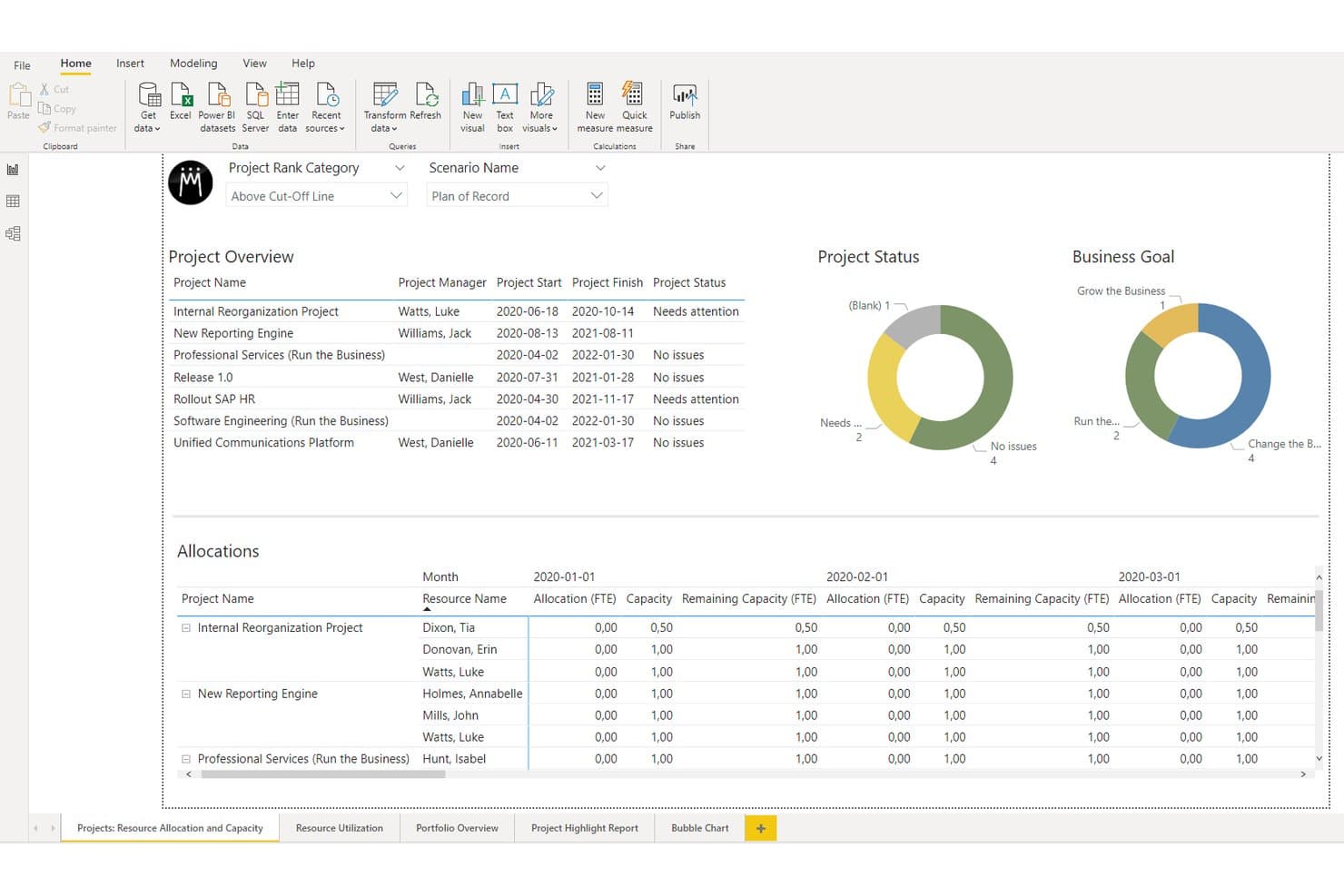
Meisterplan tracks project status and resource allocation in one dashboard. Meisterplan is a project portfolio management platform for organizations that need to align capacity, budgets, and priorities across complex portfolios while evaluating tradeoffs and delivery scenarios.
Who Is Meisterplan Best For?
Portfolio managers and PMO leaders in complex organizations who need to balance people, budgets, and priorities across multiple initiatives.
Why Meisterplan Is a Good Best Planview Alternatives Reviewed
I picked Meisterplan because I can model portfolio scenarios around real resource capacity, budgets, and priorities. I use its capacity planning and scenario comparison to test whether teams can deliver proposed initiatives before committing. That helps me assess tradeoffs when staffing or business priorities change.
Meisterplan Key Features
- Portfolio dashboard: Track key portfolio metrics in real time.
- Reporting templates: Create stakeholder reports from reusable templates.
- Data drilldowns: Open project details to investigate portfolio issues.
- Reporting API: Connect Meisterplan data with preferred business intelligence tools.
Meisterplan Integrations
Meisterplan offers documented integrations with Jira, Asana, ClickUp, Microsoft Azure DevOps, monday.com, Wrike, Salesforce, ServiceNow, and Smartsheet, and connects with Zapier. It also provides a REST API for custom integrations and supports Microsoft Power BI for portfolio reporting.
Pros and Cons
Pros:
- Reveals priority conflicts and bottlenecks
- Compares scenarios before committing resources
- Models shared-resource capacity across portfolios
Cons:
- Structure may not fit specialized project teams
- Project execution workflows remain relatively limited
Learn more about Meisterplan: Best for Adobe-native portfolio management
- Free demo available
- Pricing upon request
Visit WebsiteCustomer Rating:4.3/5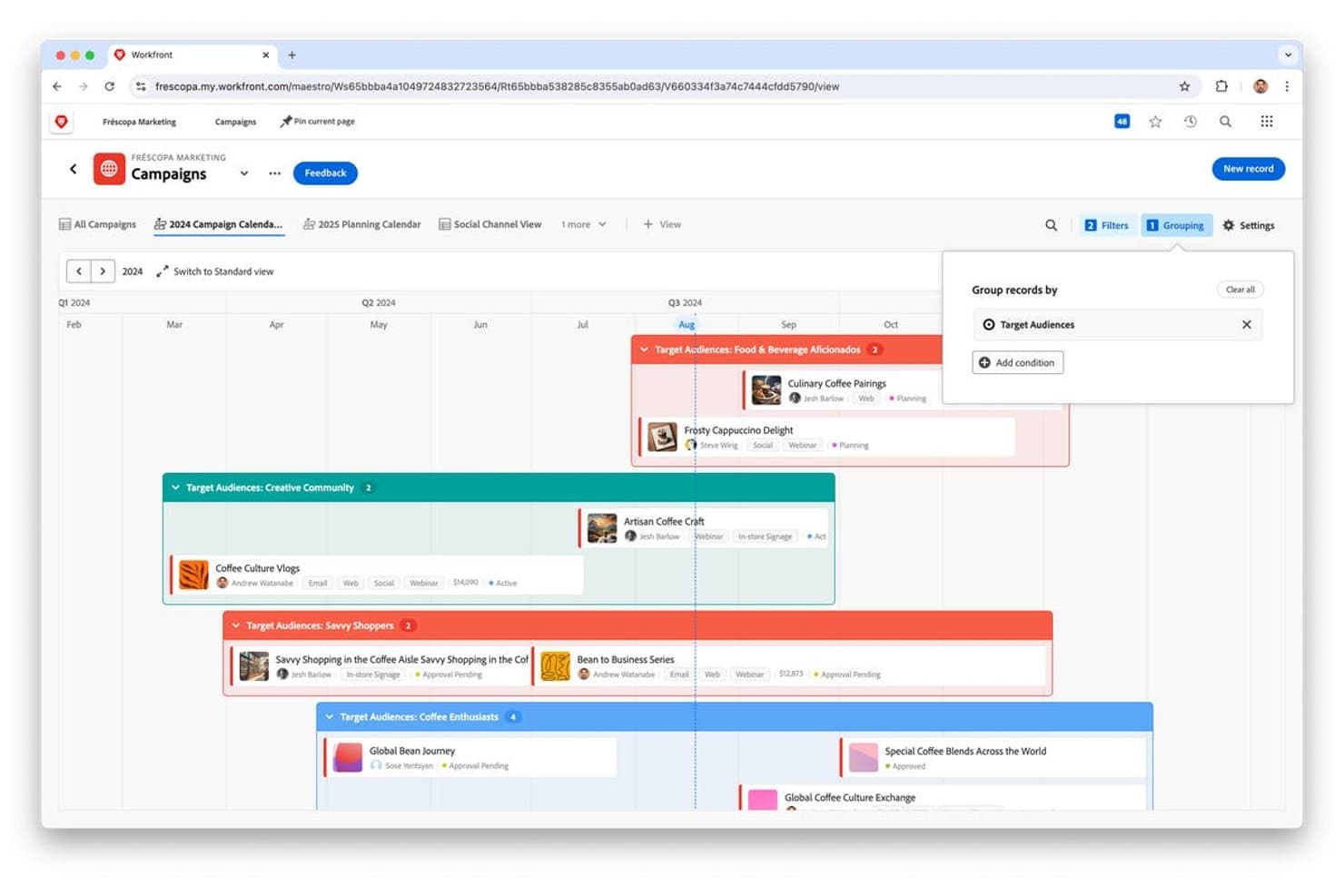
Adobe Workfront groups campaigns by target audience on a timeline calendar. Adobe Workfront is a project portfolio management platform for organizations that need to align Adobe workflows, strategic priorities, resources, and cross-functional delivery in one system.
Who Is Adobe Workfront Best For?
Adobe Workfront suits product operations and marketing teams managing complex portfolios across Adobe-centered workflows.
Why Adobe Workfront Is a Good Best Planview Alternatives Reviewed
I picked Adobe Workfront because it provides Adobe-native portfolio management for teams coordinating complex product portfolios. I use its strategic alignment and resource planning capabilities to connect initiatives with business goals and capacity. Its portfolio views also help my team prioritize cross-functional work across Adobe-centered workflows.
Adobe Workfront Key Features
- Request queues: Capture and route work requests through customizable intake forms.
- Proofing: Review, annotate, and approve creative assets within Workfront.
- Custom forms: Add tailored fields to projects, tasks, and requests.
- Reports and dashboards: Build configurable views for project and portfolio data.
Adobe Workfront Integrations
Adobe Workfront offers native integrations with Adobe Creative Cloud, Adobe Experience Manager Assets, Slack, Microsoft Teams, Box, Dropbox, Google Drive, Microsoft OneDrive, and SharePoint. It also provides a REST API and Workfront Fusion for custom integrations, while its legacy Jira integration has been discontinued.
Pros and Cons
Pros:
- Request queues organize cross-functional intake
- In-context proofing speeds creative approvals
- Adobe-native portfolio and work management
Cons:
- Some users report slow interface performance
- Complex setup requires administrator support
Learn more about Adobe Workfront: Best for Microsoft-stack portfolio planning
- Free trial available
- From $10/user/month (billed annually)
Visit WebsiteCustomer Rating:4.5/5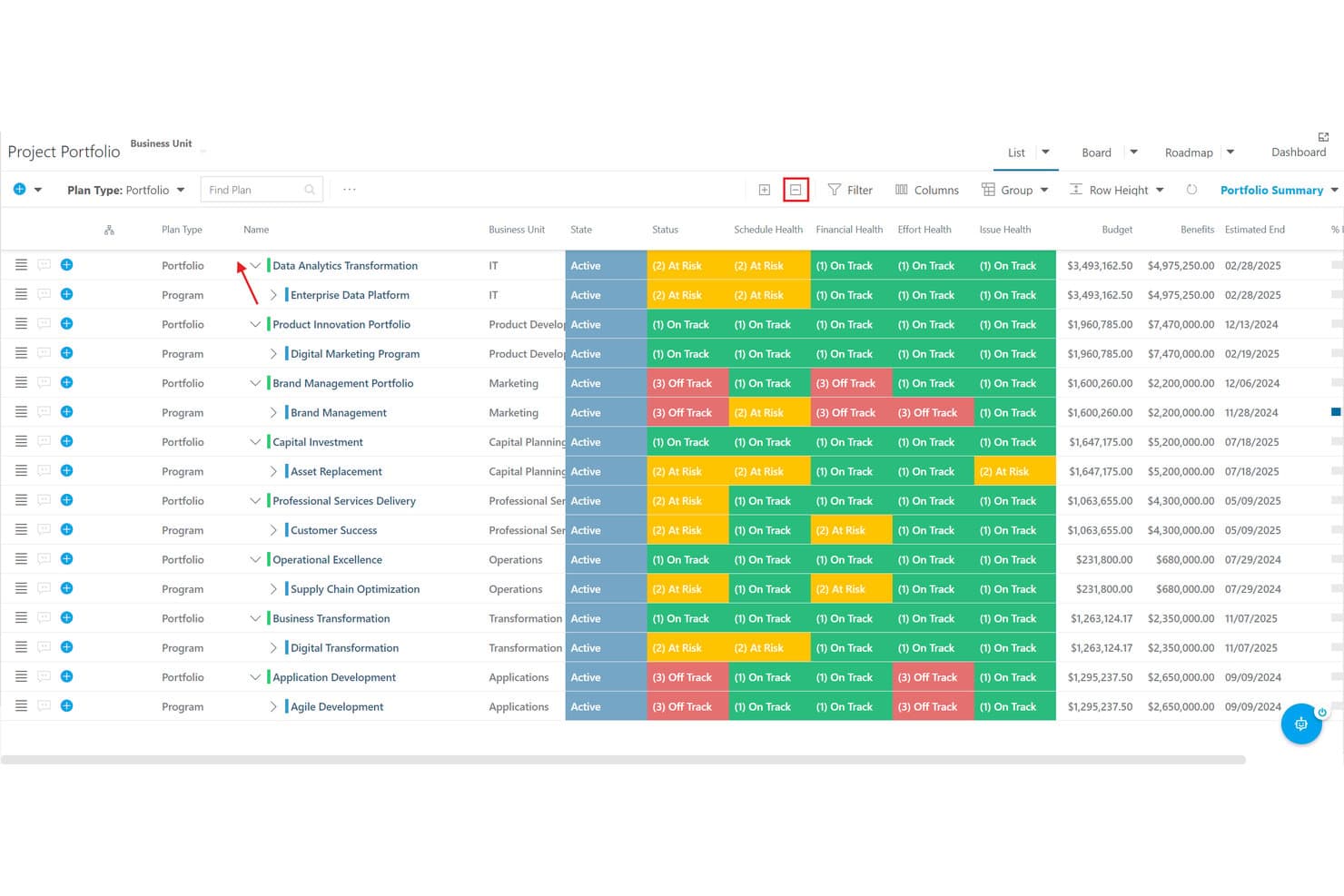
OnePlan lets users track portfolio and program health across multiple dimensions. OnePlan is a project portfolio management platform for organizations that need to align strategy, resources, budgets, and delivery across Microsoft 365, Teams, Power BI, and related tools.
Who Is OnePlan Best For?
OnePlan suits PMO leaders and product operations teams coordinating portfolios across Microsoft 365, Teams, Power BI, and Project.
Why OnePlan Is a Good Best Planview Alternatives Reviewed
I picked OnePlan because it brings Microsoft-stack portfolio planning into one connected workspace. I use its strategy, resource, and budget views to compare initiatives, then track delivery through Microsoft Project, Teams, and Power BI. That helps my team connect portfolio decisions with execution data.
OnePlan Key Features
- Interactive dashboards: Explore portfolio, project, and work data through real-time dashboards.
- Pre-built reports: Use ready-made PPM reports instead of creating every view from scratch.
- Trend analysis: Review historical patterns and predictive insights for project performance.
- Mobile access: View timesheets, assigned work, conversations, and Insights AI from mobile devices.
OnePlan Integrations
OnePlan offers native integrations across the Microsoft ecosystem, including Microsoft Teams, Power BI, Microsoft Project, Project for the web, and Power Apps. It also provides integrations with Aha!, Asana, Jira, SAP, Trello, Workday, and Wrike, plus Zapier.
Pros and Cons
Pros:
- Forecasts resource capacity across portfolios
- Connects strategy to initiative outcomes
- Centralized dashboard improves portfolio visibility
Cons:
- Reporting often needs manual setup
- Configuration requires thoughtful upfront setup
Learn more about OnePlan: Best for product-centric roadmap strategy
- 30-day free trial + free demo available
- From $59/user/month (billed annually)
Visit WebsiteCustomer Rating:4.1/5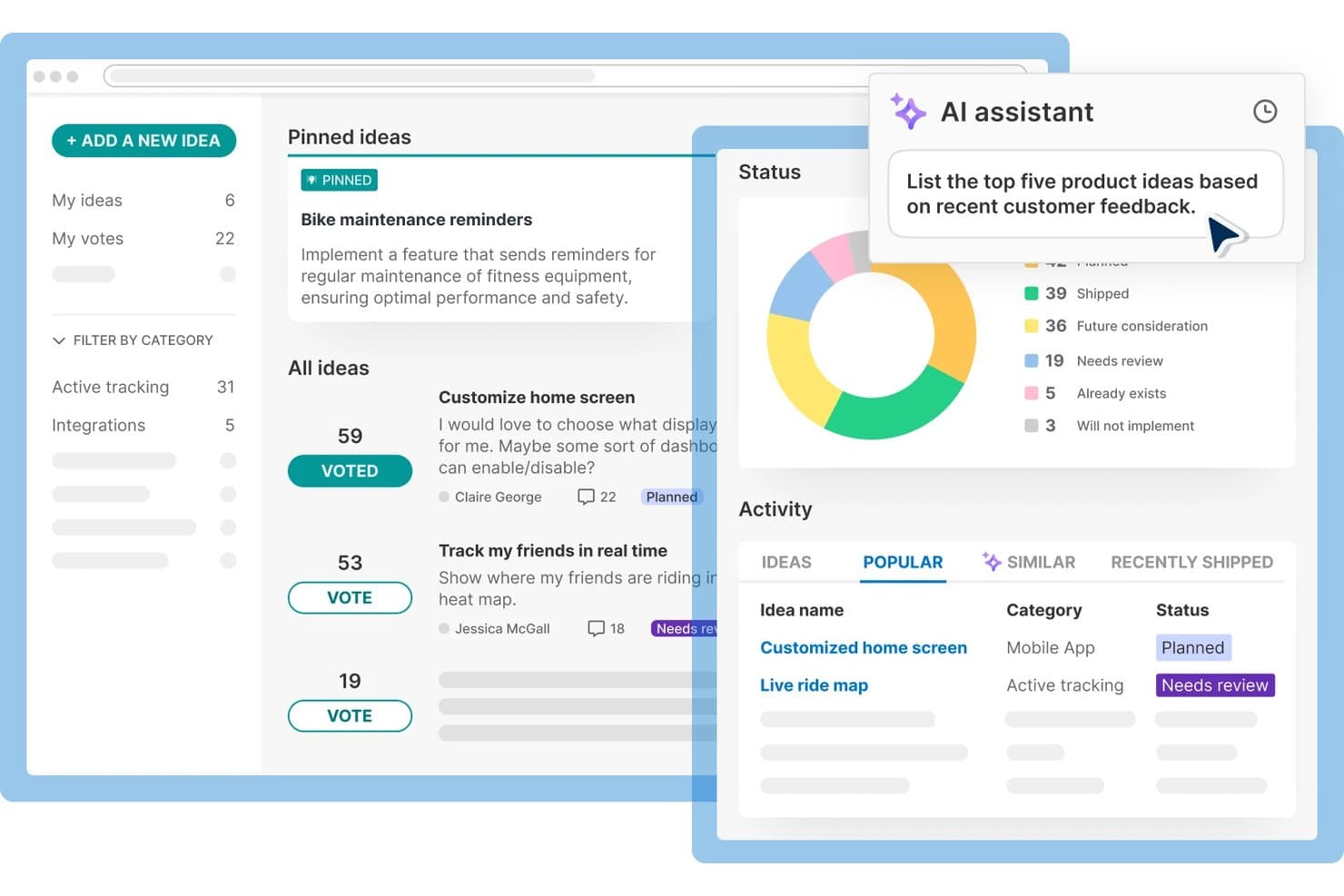
Aha! Roadmaps collects and prioritizes product feedback with AI assistance. Aha! Roadmaps is product management software for teams that need to connect customer insights, business goals, product strategy, and delivery priorities in one planning workspace.
Who Is Aha! Roadmaps Best For?
Aha! Roadmaps suits product managers and cross-functional teams that connect customer insights, product strategy, and delivery priorities.
Why Aha! Roadmaps Is a Good Best Planview Alternatives Reviewed
I picked Aha! Roadmaps because it is Best for product-centric roadmap strategy. I use goals, initiatives, releases, and features to connect company objectives with planned product work. Its visual roadmaps help my team show priorities, dependencies, and delivery timing to engineering and business stakeholders.
Aha! Roadmaps Key Features
- Idea portals: Collect and prioritize customer feedback in branded portals.
- Custom reports: Build reports from configurable product data.
- Workspace permissions: Control access by workspace, role, or user.
- Jira integration: Sync product data with Jira for development tracking.
Aha! Roadmaps Integrations
Aha! Roadmaps offers 65+ integrations, including Jira, Microsoft Azure DevOps, GitHub, Rally, Microsoft Teams, Salesforce, Slack, Zendesk, Asana, and Trello. It also provides a REST API and webhooks for custom integrations.
Pros and Cons
Pros:
- Idea portals capture customer feedback centrally
- Custom views support varied stakeholder updates
- Links strategic goals to feature delivery
Cons:
- Dense screens overwhelm occasional contributors
- Detailed setup can delay initial adoption
Learn more about Aha! Roadmaps: Best for enterprise capacity and portfolio planning
- Free demo available
- Pricing upon request
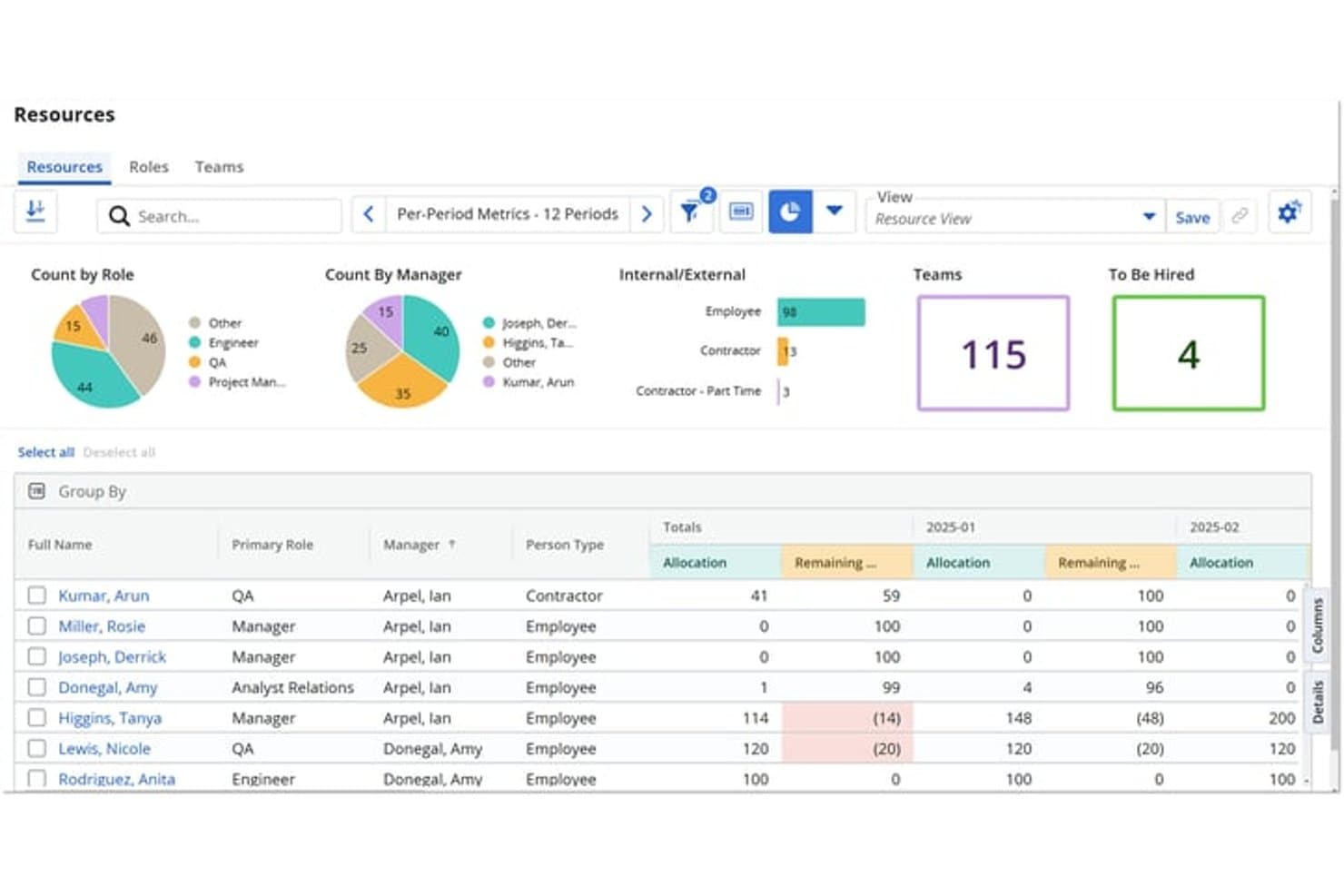
Broadcom Clarity tracks workforce allocation and roles across time periods. Broadcom Clarity is enterprise project portfolio management software for product and portfolio leaders who need to connect strategy, investments, roadmaps, and delivery while reducing fragmented planning and limited visibility.
Who Is Broadcom Clarity Best For?
Product portfolio leaders at large, complex organizations can use Broadcom Clarity to connect strategic priorities with capacity, investment, and delivery planning.
Why Broadcom Clarity Is a Good Best Planview Alternatives Reviewed
I picked Broadcom Clarity because it connects enterprise capacity planning with investment decisions and product roadmaps. I use its portfolio views to compare strategic priorities, available resources, and planned initiatives before approving work. That makes it a strong choice for enterprise capacity and portfolio planning across complex organizations.
Broadcom Clarity Key Features
- Configurable dashboards: Build role-based views for portfolio, project, and product data.
- Timesheets: Capture work hours against projects, tasks, and assignments.
- Workflow approvals: Route requests and changes through configurable approval steps.
- Risk and issue registers: Record, assign, and monitor project risks and issues.
Broadcom Clarity Integrations
Broadcom Clarity’s product page does not clearly document named native integrations. It is part of the ValueOps portfolio alongside Rally, Insights, and ConnectALL, which supports integrations across tools; API availability for custom integrations isn’t specified.
Pros and Cons
Pros:
- Configurable dashboards support role-specific decision-making
- Supports portfolio-level resource and scenario planning
- Connects strategy, investments, capacity, and delivery
Cons:
- Initial setup requires substantial process configuration
- Project plan interface feels difficult to navigate
Learn more about Broadcom Clarity: Best for PMO-to-strategy portfolio alignment
- 14-day free trial
- Pricing upon request
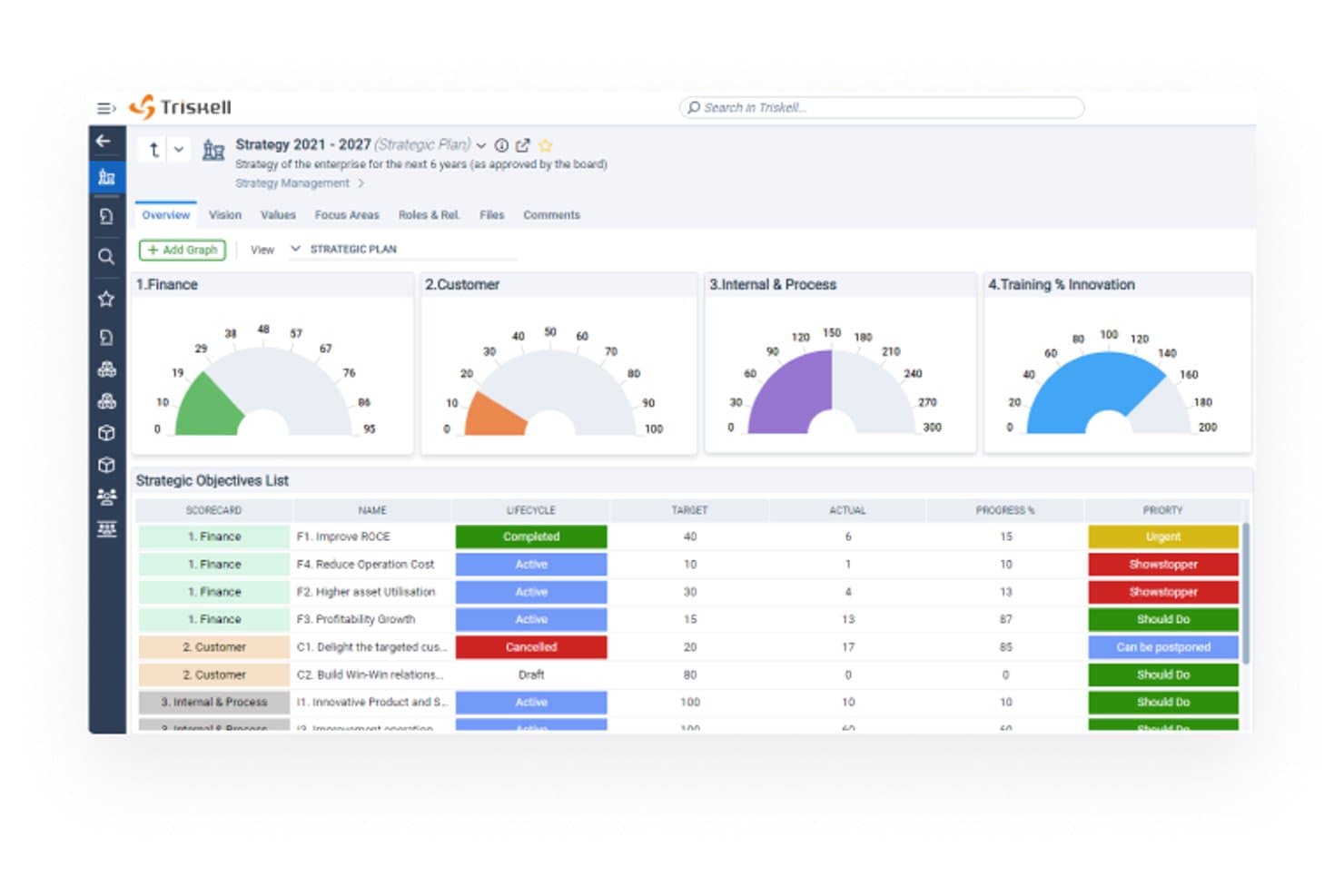
Triskell Software tracks strategic objectives across scorecards with progress metrics. Triskell Software is a project portfolio management platform for PMOs and enterprise product teams that connects strategic goals with project planning, resource capacity, financial oversight, and delivery decisions.
Who Is Triskell Software Best For?
PMOs and portfolio leaders at larger organizations that need to connect strategic priorities with project investments and delivery plans.
Why Triskell Software Is a Good Best Planview Alternatives Reviewed
I picked Triskell Software because it connects strategic goals with project planning and portfolio decisions. I like how PMOs can compare initiatives against business priorities, review resource capacity, and track financial impact before approving work. That makes it a strong choice for PMO-to-strategy portfolio alignment when teams need to link investment decisions with delivery plans.
Triskell Software Key Features
- Kanban boards: Track work across projects, programs, and strategic plans.
- Scrum boards: Manage deliverables, risks, incidents, tickets, and requests.
- Workflow management: Configure stages, roles, approvals, and lifecycle histories.
- Timesheets: Record time against projects, products, and other work items.
Triskell Software Integrations
Triskell Software offers native integrations with Jira, Azure DevOps, SAP, Power BI, Salesforce, Microsoft Project, Microsoft Teams, Microsoft Dynamics, PeopleSoft, and Adobe Workfront. It also provides a REST API for custom integrations, data synchronization, imports, exports, and reporting.
Pros and Cons
Pros:
- Combines resource, financial, and delivery views
- Supports configurable workflows across project lifecycles
- Links strategic goals to portfolio investments
Cons:
- Configuration can require substantial administrator effort
- Some users report a clunky interface
Learn more about Triskell Software: Best for IT-native portfolio and resource planning
- Not available
- Pricing upon request
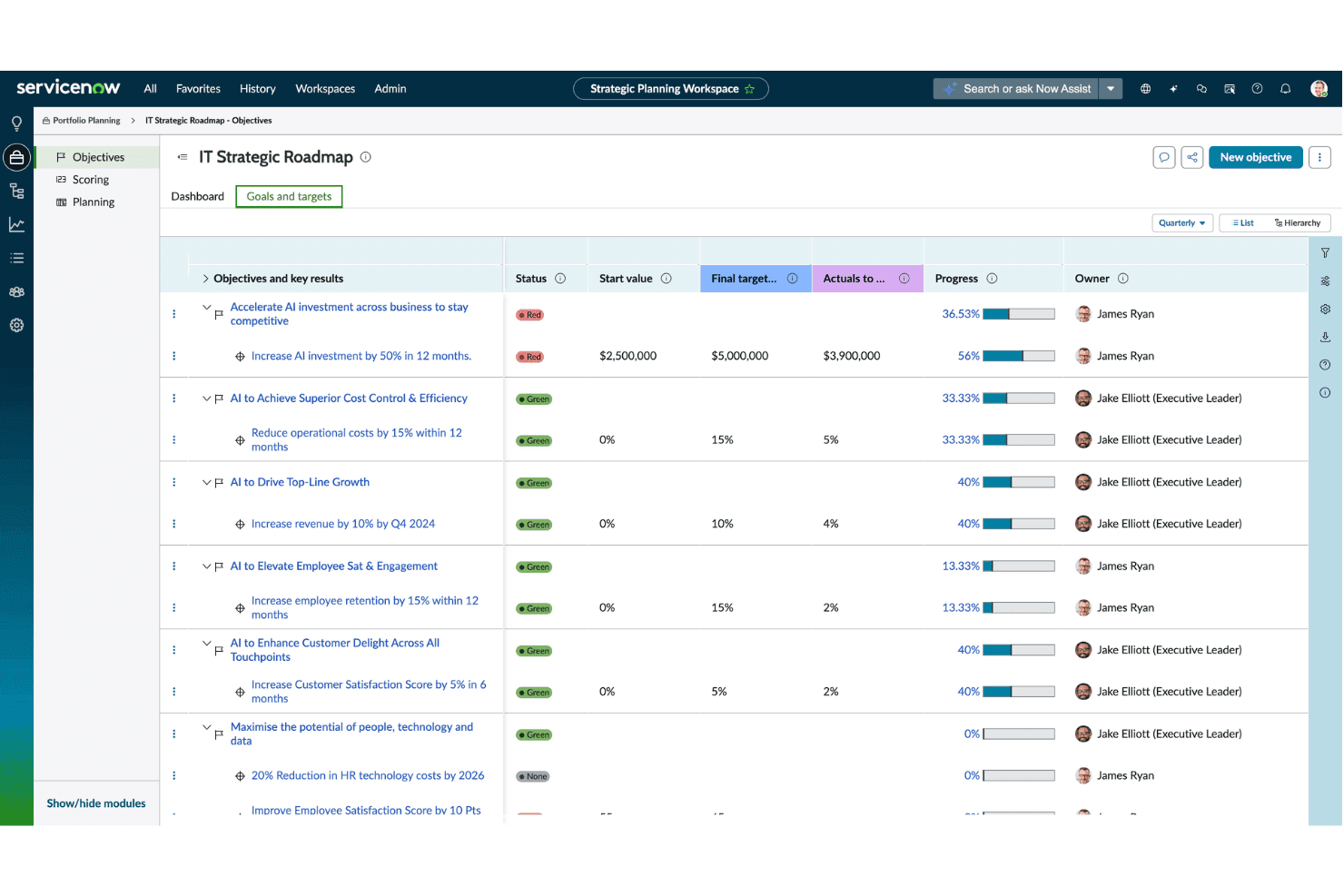
ServiceNow Strategic Portfolio Management tracks strategic objectives, key results, targets, and progress across product initiatives. ServiceNow Strategic Portfolio Management is an enterprise platform for IT teams that connects strategy, project portfolios, demand, and resources to improve prioritization and delivery. Best for IT-native portfolio and resource planning.
Who Is ServiceNow Strategic Portfolio Management Best For?
IT portfolio leaders at larger organizations who need to connect demand, resources, projects, and strategic priorities in one platform.
Why ServiceNow Strategic Portfolio Management Is a Good Best Planview Alternatives Reviewed
I picked ServiceNow Strategic Portfolio Management because it connects IT strategy to demand, project portfolios, and resource plans in one workspace. I use strategic planning and demand management to assess incoming initiatives, while resource management shows capacity before work enters delivery. My team can compare a new platform request against active IT commitments before approving it.
ServiceNow Strategic Portfolio Management Key Features
- Project workspace: Track project schedules, milestones, tasks, risks, and issues.
- Financial tracking: Monitor project budgets, costs, forecasts, and financial benefits.
- Portfolio dashboards: View portfolio status, performance metrics, and executive reports.
- Time cards: Record project hours and submit time for approval.
ServiceNow Strategic Portfolio Management Integrations
ServiceNow Strategic Portfolio Management supports integrations with Atlassian Jira, Microsoft Azure DevOps, Slack, and Microsoft Teams. It also provides REST and SOAP web services for custom integrations.
Pros and Cons
Pros:
- Supports scenario planning before resource commitments
- Gives leaders centralized portfolio and performance visibility
- Connects strategy, demand, and delivery decisions
Cons:
- Interface can feel confusing despite broad functionality
- Initial setup requires experienced ServiceNow administrators
Learn more about ServiceNow Strategic Portfolio Management: Best for AI-driven portfolio scenario planning
- Free demo available
- Pricing upon request
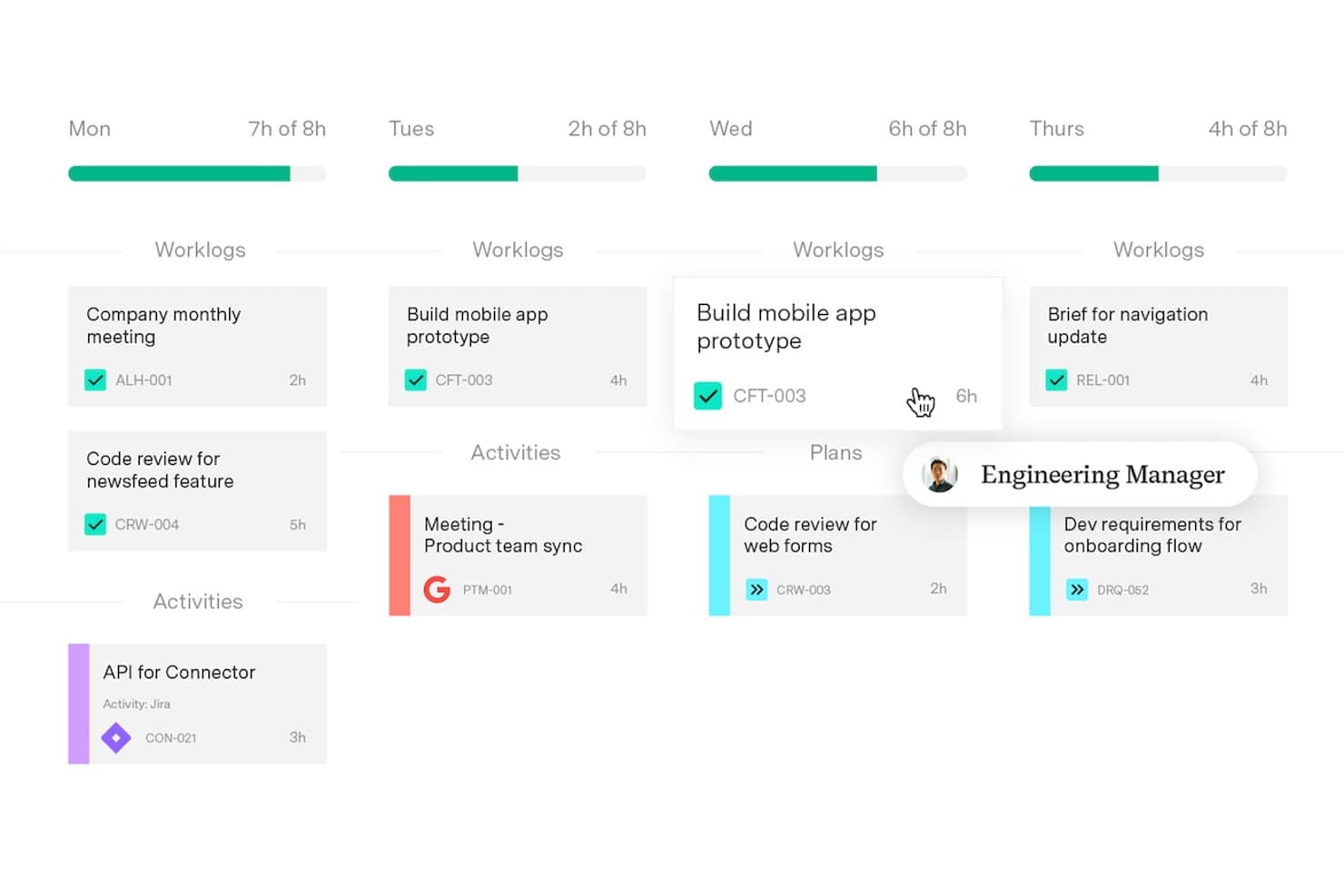
Tempo Loop tracks daily worklogs and planned tasks across the week. Tempo Loop is a product portfolio management platform for product leaders and delivery teams that connects strategy, capacity, and investment decisions to help prioritize work and align portfolios with business goals.
Who Is Tempo Loop Best For?
Tempo Loop suits product portfolio leaders who need to model investment scenarios, compare tradeoffs, and align capacity with strategy across multiple teams.
Why Tempo Loop Is a Good Best Planview Alternatives Reviewed
I picked Tempo Loop because its AI-driven portfolio scenario planning helps me compare investment choices before committing capacity. I use its strategy, capacity, and investment views to model tradeoffs, such as shifting teams toward a high-value initiative. That makes portfolio decisions easier to connect with business goals.
Tempo Loop Key Features
- Program drift detection: Flags changes that move work away from the approved plan.
- Blocking work alerts: Identifies work items preventing progress across initiatives.
- Automatic task resequencing: Reorders tasks when dates or dependencies change.
- Native tool updates: Sends revised dates back to systems such as Jira and Azure DevOps.
Tempo Loop Integrations
Tempo Loop integrates with Jira and Azure DevOps, plus Tempo products including Structure PPM, Timesheets, Financial Manager, Capacity Planner, Workforce Intelligence, and Strategic Roadmaps.
Pros and Cons
Pros:
- Automatically resequences tasks after plan changes
- Scenario modeling connects priorities, capacity, and investment
- AI flags program drift between portfolio reviews
Cons:
- Recommendations depend on accurate portfolio data
- Independent Loop reviews remain limited
Learn more about Tempo Loop: Best for outcome-based portfolio roadmapping
- Free demo available
- Pricing upon request
Visit WebsiteCustomer Rating:4.8/5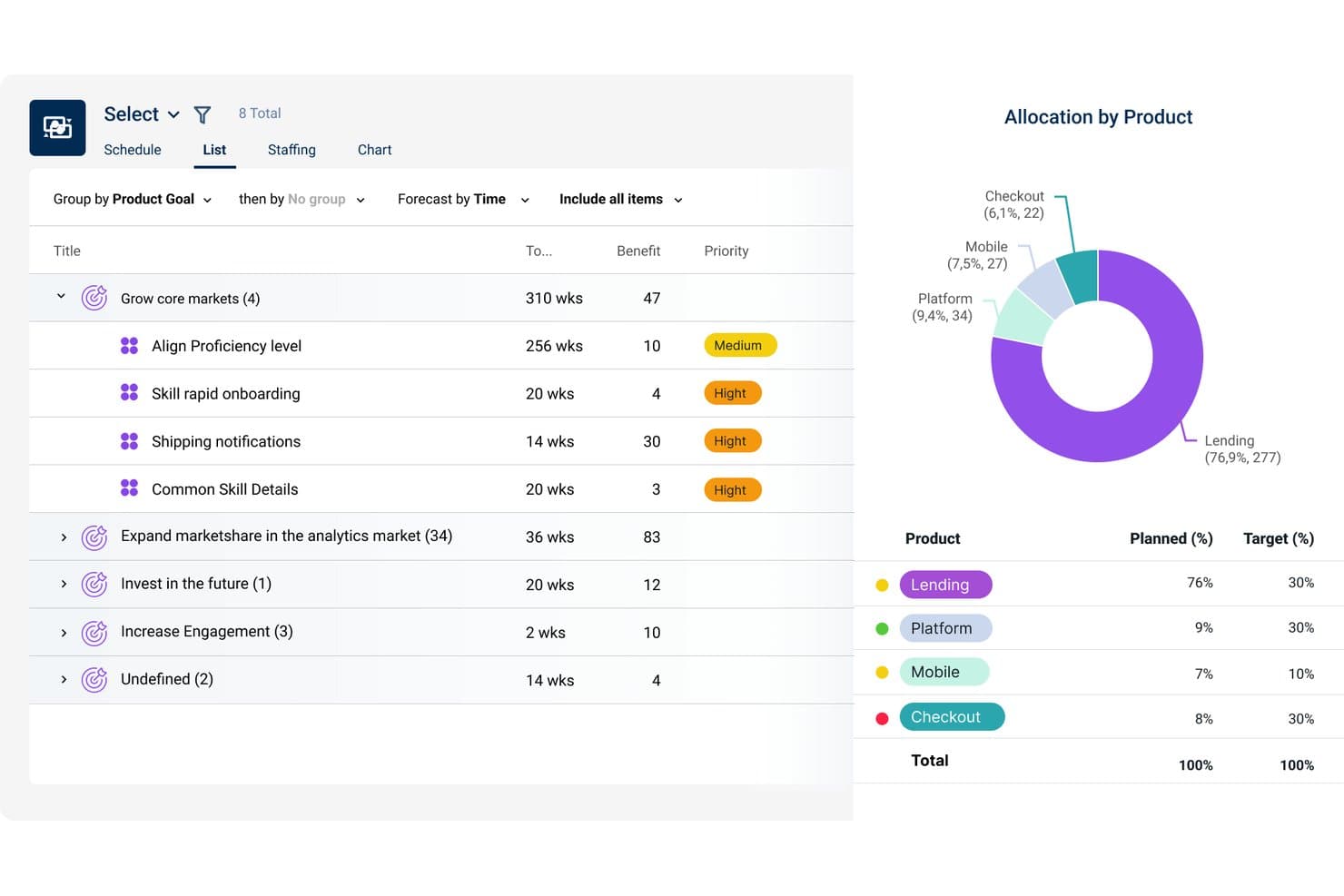
Dragonboat lets users balance resource allocation across multiple products visually. Dragonboat is a product portfolio management platform for product leaders who need to connect strategy, customer needs, and delivery plans while replacing spreadsheet-based planning and improving cross-functional alignment.
Who Is Dragonboat Best For?
Product leaders who need to connect strategic outcomes, customer needs, and delivery priorities across multiple teams.
Why Dragonboat Is a Good Best Planview Alternatives Reviewed
I picked Dragonboat because its outcome-based portfolio roadmapping connects strategic outcomes, customer needs, and delivery plans. I use it to replace spreadsheet-based planning and give cross-functional teams a shared view of priorities. This helps my team assess proposed work against measurable outcomes before committing delivery capacity.
Dragonboat Key Features
- Capacity forecasting:** Project available team capacity across planning periods.
- Scenario planning:** Compare resource and timeline options before committing.
- Dependency tracking:** Map relationships between initiatives and delivery work.
- Integrations:** Sync data with tools across your product development stack.
Dragonboat Integrations
Dragonboat offers 200+ flexible integrations across native, API, and MCP connections, including Jira, Azure DevOps, Rally, Asana, Shortcut, Salesforce, Zendesk, Tableau, Power BI, and Slack. It also provides REST APIs and an MCP server for custom integrations and AI client access.
Pros and Cons
Pros:
- Portfolio dependencies remain visible across teams
- Capacity forecasts expose tradeoffs across planning periods
- Outcome-based roadmaps connect strategy to delivery
Cons:
- Detailed task execution remains outside core scope
- Portfolio modeling requires upfront outcome definitions
Learn more about Dragonboat: 10Best for enterprise work management at scale
Wrike
- 14-day free trial
- Pricing upon request
Visit WebsiteCustomer Rating:4.3/5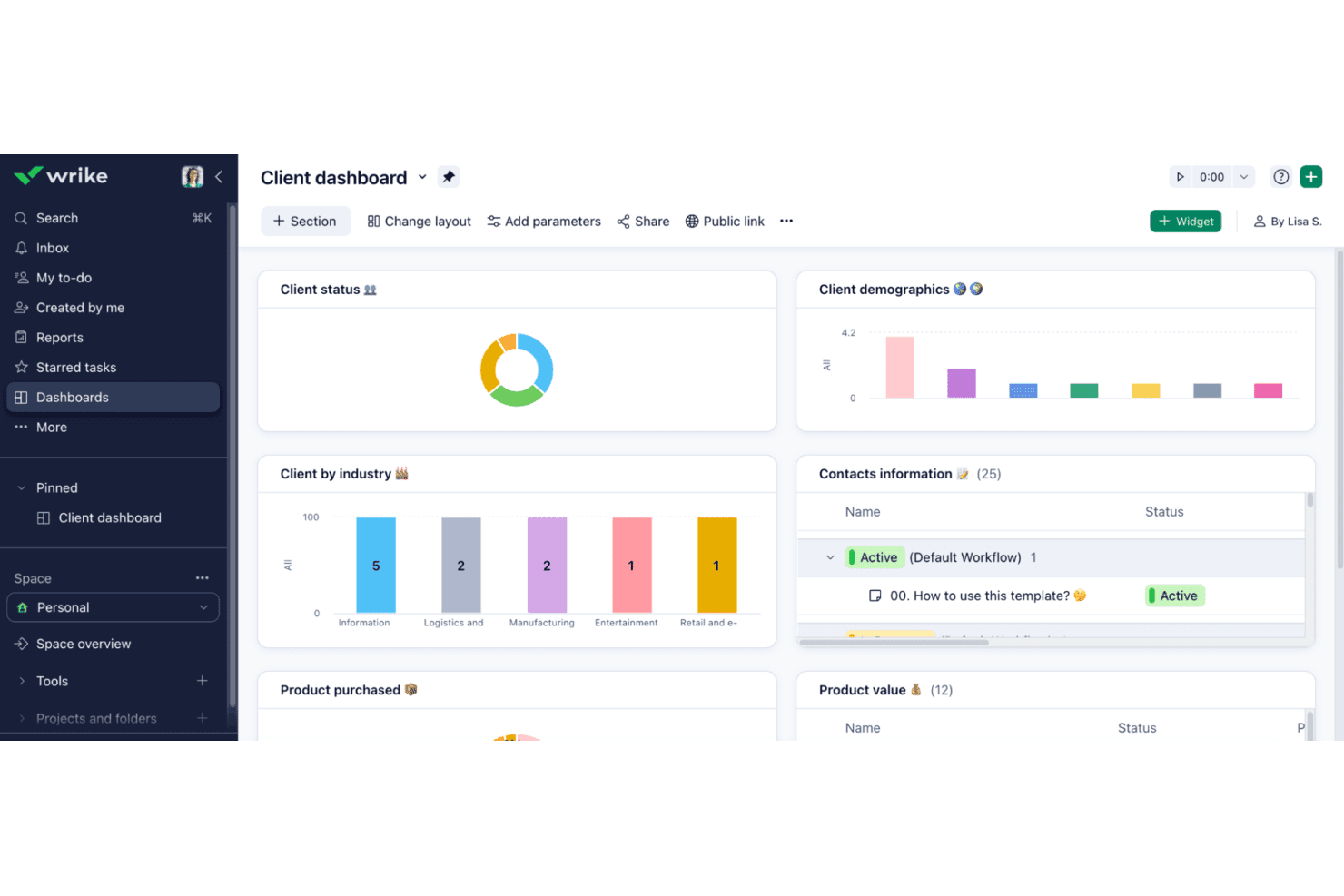
Wrike coordinates enterprise work across teams with structured project planning and execution Wrike is a work management platform for enterprise product teams that connects strategy, planning, execution, and reporting while improving visibility across complex, cross-functional initiatives.
Who Is Wrike Best For?
Wrike suits enterprise product and operations teams coordinating complex, cross-functional portfolios across departments.
Why Wrike Is a Good Best Planview Alternatives Reviewed
I picked Wrike as Best for enterprise work management at scale because it connects product strategy, planning, execution, and reporting in one workspace. I use its cross-functional visibility to track dependencies across product, engineering, and operations. Its portfolio-level reporting helps my team review progress across complex initiatives without losing delivery details.
Wrike Key Features
- Gantt charts: Map tasks, milestones, and project timelines.
- Request forms: Capture work requests through customizable forms.
- Workload view: Compare assigned work across team members.
- Proofing and approvals: Review files with annotations and approval steps.
Wrike Integrations
Wrike’s apps directory lists 60 integrations, including Slack, Salesforce, Microsoft 365, Google Sheets, Miro, Tableau, Power BI, Jira, GitHub, and QuickBooks. Wrike also supports Zapier, provides an API for custom integrations, and offers Wrike Integrate for connecting cloud and on-premises applications.
Pros and Cons
Pros:
- Proofing and approvals support product reviews
- Workload views expose cross-team capacity conflicts
- Portfolio reporting connects strategy to delivery
Cons:
- Dense interfaces can slow everyday navigation
- Initial workspace setup requires substantial administration
Andre alternativer til Planview
Her er noen flere alternativer til Planview som ikke kom med på kortlisten min, men som likevel er verdt å sjekke ut:
- 11PlaniswareBest for data-driven portfolio optimization
- 12Prism PPMBest for what-if resource scenario planning
- 13SmartsheetBest for spreadsheet-style portfolio tracking
- 14AsanaBest for tracking tasks across product portfolios
- 15monday AI WorkspaceBest for cross-team portfolio visibility
- 16CeloxisBest for portfolio-wide capacity planning
- 17airfocusBest for modular product roadmap prioritization
- 18Craft.ioBest for OKR-linked roadmap planning
- 19BusinessmapBest for Lean portfolio OKR tracking
- 20Jira AlignBest for SAFe-aligned enterprise portfolio planning
How I Evaluate Planview Alternatives
I split my evaluation into three parts. First, I check that a tool can build and share visual roadmaps across portfolios and support multi-criteria prioritization—these carry the most weight. Then I look for what-if scenario modeling and dependency mapping. Finally, I consider migration support, onboarding, and pricing transparency.
Core Functionality (Table Stakes For This List)
When I'm selecting tools for my list, I score each one on a scale from 0 (does not offer the functionality) to 5 (excels in this area) for each core functionality listed below. I then convert the total into a percentage to help assess each tool's overall fit, with extra weight on any functionalities I’ve deemed essential.
- Roadmapping & Visualization (Essential): I look for shareable, customizable roadmaps across teams and timeframes, with dependencies visible when launch plans overlap.
- Portfolio Prioritization (Essential): I check for configurable scoring against strategic criteria, so teams can rank initiatives and compare trade-offs when priorities shift.
- Resource & Capacity Planning: I assess whether teams can compare planned work with people’s availability across product lines and spot over-allocation.
- Strategic Alignment: I look for clear links from company goals or product themes to initiatives, so leaders can trace investment decisions.
- Collaboration & Approvals: I consider how stakeholders review, comment on, and approve portfolio decisions, especially when work crosses product and engineering teams.
- Reporting & Dashboards: I check whether leaders can see initiative status, progress, and investment across portfolios, with enough detail to discuss trade-offs.
Once I have a list of tools that meet the criteria, I consider what sets each platform apart.
Differentiating Factors (What Sets Vendors Apart)
Here's how I compare and contrast different vendors:
Standout Features
I evaluate how each tool handles what-if scenario modeling—whether teams can compare alternate portfolio mixes or resourcing plans before committing headcount. Dependency mapping across portfolios also matters. When two product teams share a platform service, I check if the tool surfaces that overlap before it becomes a bottleneck. I also look for outcome-based roadmaps that tie initiatives to measurable business results rather than feature lists, which makes executive alignment far easier.
Beyond Features
I check whether a vendor offers migration tooling or assisted onboarding, because moving years of portfolio history out of Planview without losing context is a real project in itself. Total cost of ownership matters too—I look for licensing that scales predictably with user count rather than locking key modules behind add-ons. Security certifications like SOC 2 and configurable role-based access are table stakes for any enterprise shortlist, especially when financial data lives inside the tool.
Hvorfor se etter et alternativ til Planview?
Selv om Planview er et godt valg av programvare for produktstyring, finnes det flere grunner til at noen brukere ser etter alternative løsninger. Det kan hende du ser etter et alternativ til Planview fordi …
- Du trenger mer fleksible prismodeller
- Teamet ditt trenger enklere innføring
- Du ser etter bedre integrasjonsmuligheter
- Du trenger bedre kundestøtte
- Teamet ditt ønsker enklere tilpasning
- Du ser etter mer brukervennlige grensesnitt
Hvis noe av dette høres kjent ut, har du kommet til rett sted. Listen min inneholder flere alternativer innen programvare for produktstyring som passer bedre for team som møter disse utfordringene med Planview og ser etter alternative løsninger.
Funksjoner
Her er noen av de viktigste funksjonene i Planview, slik at du kan sammenligne hva alternative løsninger tilbyr:
- Strategisk porteføljestyring: Tilpasser prosjekter og produkter til virksomhetens strategi og hjelper teamet med å fokusere på strategiske mål.
- Prosjektporteføljestyring: Legger til rette for effektiv prosjektleveranse i stor skala og sikrer at prosjektene fullføres i tide og innenfor rammene.
- Produktporteføljestyring: Fremskynder leveringen av produktutviklingsplanen, slik at teamet kan lansere produkter raskere.
- Automatisering av profesjonelle tjenester: Øker inntekter og marginer for tjenester og hjelper teamet med å optimalisere tjenesteleveransen.
- Utvikling av digitale produkter: Gir oversikt over prosessene for digitale produkter og sikrer at teamet kan følge fremdriften og ta informerte beslutninger.
- Verdistrømstyring: Måler effektiviteten i programvareutviklingen, slik at teamet kan identifisere flaskehalser og forbedre prosessene.
- Utgivelsesstyring: Forenkler prosessene for utgivelse av programvare og gjør det enklere for teamet å administrere utgivelser og redusere risiko.
- Integrasjon av programvareverktøykjeder: Kobler sammen verktøy som Jira og ServiceNow og sikrer at teamet kan arbeide på tvers av ulike plattformer.
- Styring av testmiljøer: Optimaliserer testressursene og hjelper teamet med å redusere konflikter og forbedre testdekningen.
- Smidig virksomhetsplanlegging: Støtter smidig transformasjon i hele organisasjonen og gjør det mulig for teamet å ta i bruk smidige arbeidsmetoder på en effektiv måte.