

La gestione dei prodotti comporta molte parti in movimento: scadenze ravvicinate, contributi del team e la pressione di mantenere le idee sulla giusta rotta. È qui che il software per storyboard può essere utile. Dà forma ai tuoi concetti e aiuta tutti a essere sulla stessa lunghezza d’onda.
In base alla mia esperienza, lo strumento giusto può ridurre la confusione e dare struttura al tuo processo creativo. Ho esaminato le opzioni più affidabili disponibili e preparato una selezione che vale la pena prendere in considerazione.
In questo articolo troverai una panoramica chiara dei migliori strumenti per storyboard, delle loro funzionalità, dei loro punti di forza e dei possibili svantaggi, così potrai decidere quale funziona meglio per il tuo team.
Perché fidarsi dei nostri consigli sui software
6,700+
Reviews
20
Industry experts
16+
Evaluation factors
14
Years
Il nostro team testa e recensisce software dal 2012. In quanto product manager noi stessi, sappiamo quanto sia difficile — e importante — scegliere il software giusto.
Per questa guida, abbiamo valutato gli strumenti attraverso test pratici e ricerche indipendenti, assegnando un punteggio agli strumenti in base ai nostri criteri di selezione.
Le nostre recensioni riflettono il nostro giudizio editoriale umano, non un discorso di vendita.
Revisori esperti:
- Andrew LumbySenior TPM
- Cristiano ValimSenior UI/UX Lead


Tabella comparativa dei software per storyboard
Questa tabella comparativa riassume i dettagli sui prezzi delle mie migliori selezioni di software per storyboard:
| Tool | Best For | Trial Info | Price | ||
|---|---|---|---|---|---|
| 1 | Ideale per l'ideazione dei team di prodotto nativi di Figma | Piano gratuito disponibile | A partire da $3/utente/mese (fatturato annualmente) | Website | |
| 2 | Ideale per creare sequenze grafiche con l'intelligenza artificiale a partire da istruzioni testuali | Piano gratuito disponibile | A partire da $11/editor/mese (con fatturazione annuale) | Website | |
| 3 | Ideale per workshop di storyboard interfunzionali | Piano gratuito + demo gratuita disponibile | A partire da $9.99/utente/mese (con fatturazione annuale) | Website | |
| 4 | Ideale per storyboard manuali orientati alla velocità | Prova gratuita disponibile | A partire da $12/utente/mese (fatturato annualmente) | Website | |
| 5 | Ideale per la previsualizzazione in tempo reale di videocamere e scene | Demo gratuita disponibile | A partire da $39.99/mese | Website | |
| 6 | Ideale per diapositive di storyboard curate destinate a chi non è designer | Piano gratuito disponibile | A partire da $15/utente/mese | Website | |
| 7 | Ideale per l'uso educativo | Prova gratuita + piano gratuito disponibile | A partire da $14.99/mese | Website | |
| 8 | Ideale per animatiche collaborative con sincronizzazione integrata dello script | Piano gratuito + prova gratuita disponibile | A partire da $50/mese (fatturato annualmente) | Website | |
| 9 | Ideale per gli studi di animazione | Prova gratuita di 14 giorni | A partire da $90/mese | Website | |
| 10 | Ideale per esportare presentazioni animate a partire da copioni | Piano gratuito + demo gratuita disponibile | A partire da $12/mese (fatturato annualmente) | Website |


Recensione dei migliori software per storyboard
Di seguito trovi le mie sintesi dettagliate dei migliori software per storyboard inclusi nella mia selezione. Le mie recensioni offrono una panoramica approfondita delle funzionalità principali, dei pro e dei contro, delle integrazioni e dei casi d’uso ideali di ogni strumento, per aiutarti a trovare quello più adatto a te.
 Ideale per l'ideazione dei team di prodotto nativi di Figma
- Piano gratuito disponibile
- A partire da $3/utente/mese (fatturato annualmente)
Visit WebsiteCustomer Rating:4.7/5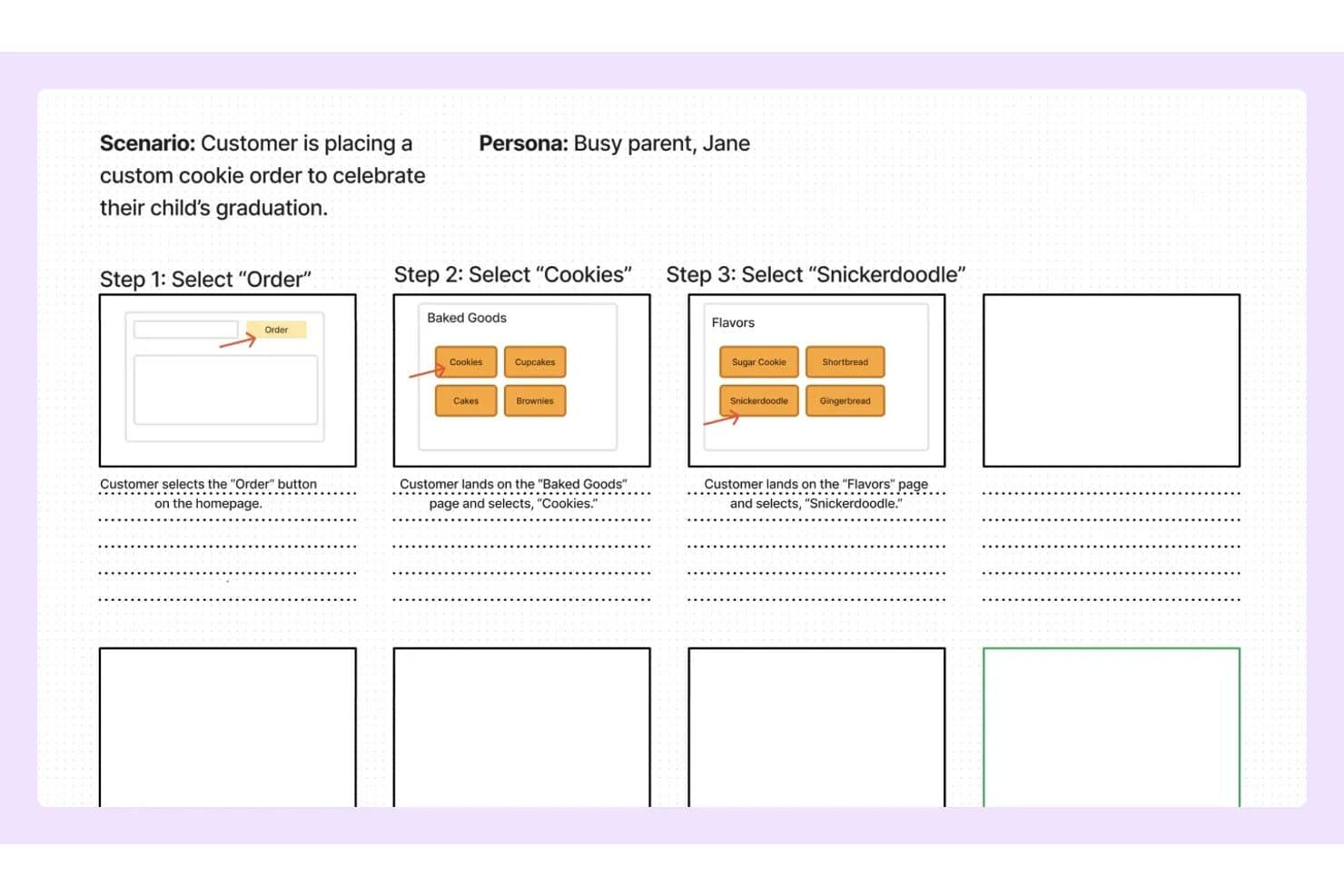
FigJam consente agli utenti di mappare le fasi dello storyboard con schemi strutturali e note. FigJam è lo strumento di lavagna collaborativa di Figma che combina una tela infinita, modelli predefiniti per prodotti e UX, modifica multiutente in tempo reale e generazione di lavagne assistita dall'IA per l'ideazione e la mappatura visiva.
Per chi è più adatto FigJam?
FigJam è particolarmente adatto ai team di prodotto e UX che lavorano già in Figma e vogliono che l'ideazione e lo storyboard risiedano nello stesso ecosistema del loro lavoro di progettazione.
Perché ho scelto FigJam
Ho scelto FigJam come uno dei migliori strumenti perché si trova nel luogo in cui i team di prodotto lavorano già: Figma. Se un giorno il tuo team mappa il percorso di un utente in FigJam e il giorno successivo crea le schermate effettive in Figma Design, il passaggio è immediato, senza la procedura rituale di esportazione di un file. Apprezzo soprattutto la capacità dell'IA di FigJam di generare una lavagna completamente strutturata a partire da un unico prompt testuale, rendendo davvero rapida la creazione di uno storyboard per uno sprint o una sessione di scoperta. I modelli per la mappa del percorso del cliente e per lo storyboard sono progettati appositamente per i flussi di lavoro dei prodotti, non sono segnaposto generici.
Funzionalità principali di FigJam
- Modifica multiutente in tempo reale: Un numero illimitato di collaboratori può lavorare contemporaneamente sulla stessa lavagna, con cursori in tempo reale e chat tramite cursore per comunicare durante la sessione.
- Riunioni audio: Le chiamate vocali integrate consentono al team di discutere uno storyboard o una sessione di scoperta senza passare a uno strumento di videoconferenza esterno.
- Widget Jira: Incorpora le schede dei problemi di Jira e le bacheche delle attività direttamente sulla tela per collegare il lavoro sullo storyboard all'elenco delle attività del ciclo di lavoro attivo.
- Sessioni aperte per gli ospiti: Gli stakeholder esterni possono partecipare e collaborare a una lavagna per un massimo di 24 ore senza dover creare un account Figma.
Integrazioni di FigJam
FigJam offre integrazioni native con Jira, Asana, Slack, Microsoft Teams, Google Workspace, Figma Design e altro ancora. Supporta inoltre incorporamenti di Confluence e Notion, componenti del catalogo, Zapier e un'API REST per integrazioni personalizzate.
Pros and Cons
Pros:
- L'IA può generare istantaneamente modelli di storyboard
- La collaborazione in tempo reale supporta un numero illimitato di editor
- Modelli specializzati per i flussi di lavoro di prodotto e UX
Cons:
- Nessuno strumento integrato per la sequenziazione dello storyboard
- Non è possibile esportare come video o file animato
Learn more about FigJam: Ideale per creare sequenze grafiche con l'intelligenza artificiale a partire da istruzioni testuali
- Piano gratuito disponibile
- A partire da $11/editor/mese (con fatturazione annuale)
Visit WebsiteCustomer Rating:4.8/5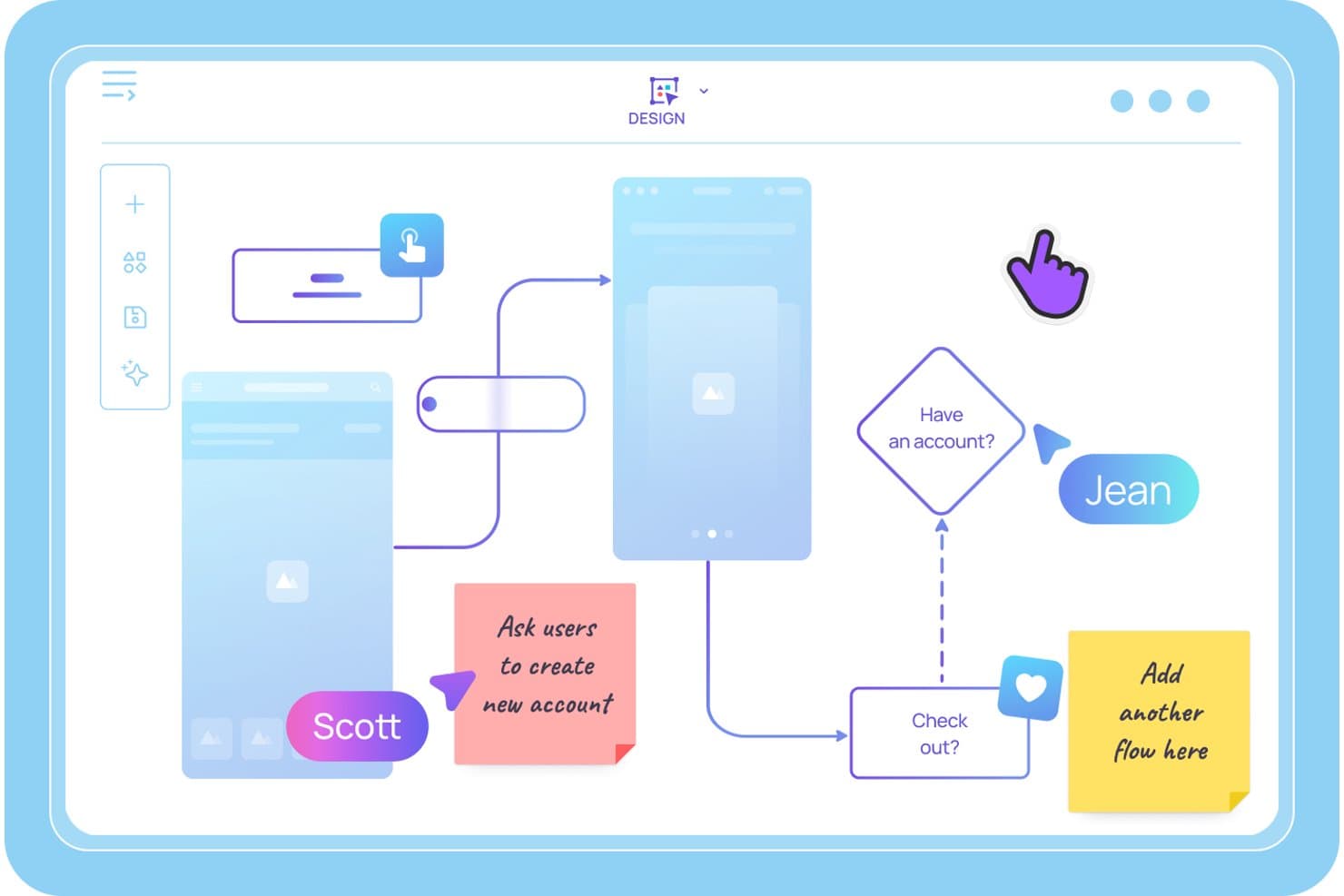
Visily consente agli utenti di mappare flussi utente e sequenze grafiche con note adesive. Visily è uno strumento basato sull'intelligenza artificiale per la creazione di sequenze grafiche e strutture schematiche che consente ai team di prodotto di generare pannelli sequenziali a partire da istruzioni testuali, creare prototipi interattivi e collaborare in tempo reale su mappe dei percorsi utente e flussi UX.
Per chi è più adatto Visily?
Visily è particolarmente adatto a responsabili di prodotto e responsabili del prodotto che lavorano con metodologie agili e devono trasformare rapidamente le idee in sequenze grafiche e prototipi interattivi, senza dover ricorrere a un designer dedicato.
Perché ho scelto Visily
Ho scelto Visily come uno dei migliori strumenti perché è l'unico che ho visto consentire di digitare una descrizione della scena in linguaggio naturale e ottenere in pochi secondi un pannello strutturato e modificabile. Il creatore di sequenze grafiche basato sull'intelligenza artificiale trasforma uno scenario abbozzato in una serie sequenziale di fotogrammi, mentre la prototipazione automatica collega poi questi fotogrammi in un flusso utente cliccabile senza alcun collegamento manuale. Ho trovato questa combinazione particolarmente utile quando è necessario mettere alla prova un percorso utente prima dell'inizio di un'iterazione.
Funzionalità principali di Visily
- Input multimodale basato sull'intelligenza artificiale: Combina istruzioni testuali, schermate, diagrammi esistenti e selezioni della tela in un'unica richiesta di generazione per creare pannelli ovunque si trovino già le tue idee.
- Modifica collaborativa in tempo reale con Cursor Chat: Più membri del team possono modificare contemporaneamente la stessa bacheca, con cursori attivi e chat integrata nella tela visibili a tutti i partecipanti alla sessione.
- Libreria dell'area di lavoro: Condividi modelli personalizzati, temi e risorse sincronizzate tra tutti i progetti dell'area di lavoro, mantenendo coerenti le sequenze grafiche all'interno del team di prodotto.
- Modalità Disegno: Usa direttamente sulla tela una penna a mano libera o un evidenziatore per abbozzare idee o annotare i pannelli senza passare a uno strumento separato.
Integrazioni di Visily
Visily si connette a Figma, Claude Code, Cursor, Lovable e ChatGPT tramite un modulo aggiuntivo e offre integrazioni native con Notion, Jira e Slack.
Pros and Cons
Pros:
- L'intelligenza artificiale trasforma le istruzioni testuali in pannelli
- La prototipazione automatica collega istantaneamente i fotogrammi della sequenza grafica
- La collaborazione in tempo reale supporta i team interfunzionali
Cons:
- Non sono disponibili opzioni per esportare video o animazioni
- La modifica con l'intelligenza artificiale sovrascrive le modifiche manuali alle schermate
Learn more about Visily: Ideale per workshop di storyboard interfunzionali
- Piano gratuito + demo gratuita disponibile
- A partire da $9.99/utente/mese (con fatturazione annuale)
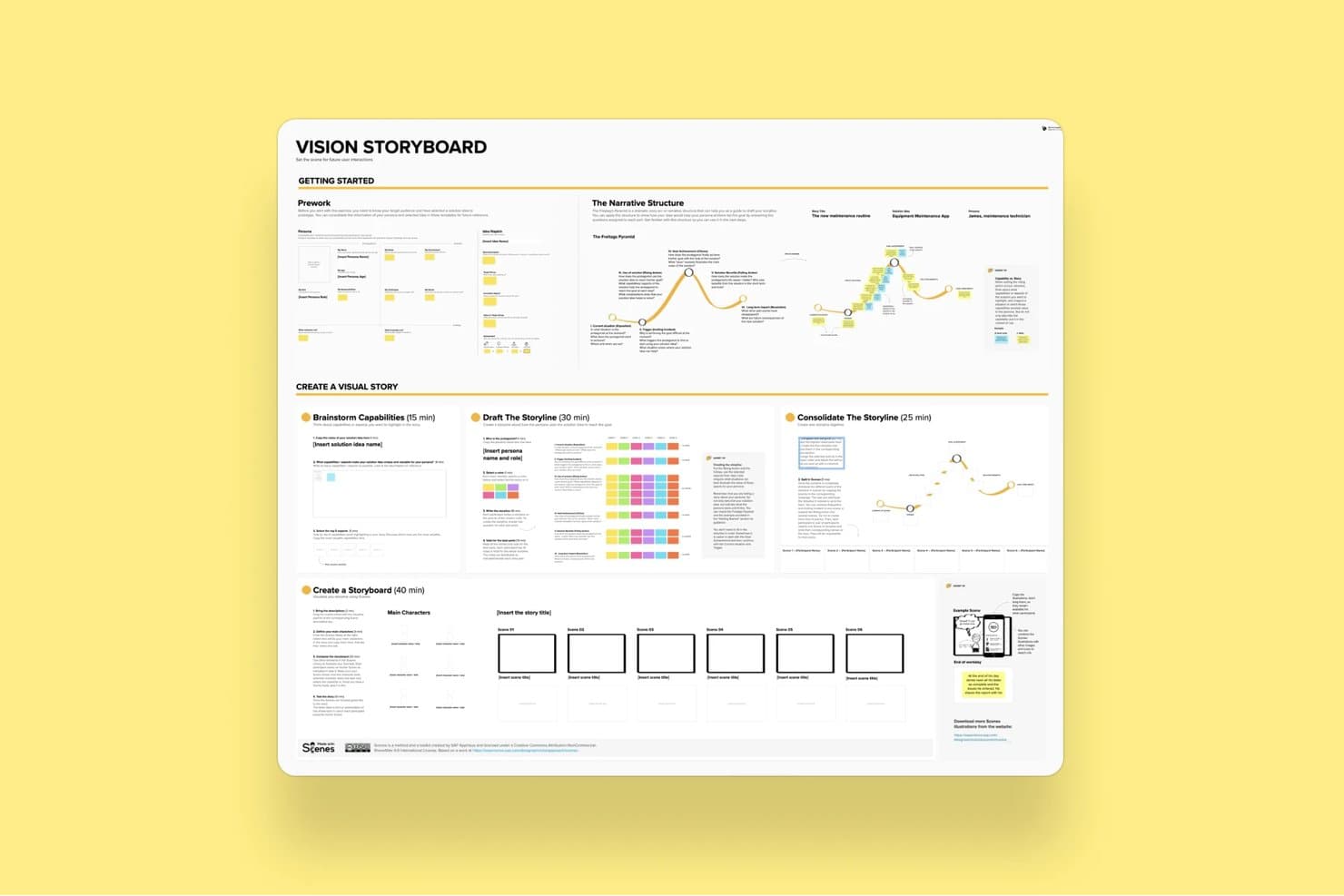
Il modello di storyboard della visione di Mural guida gli utenti nella creazione di storie visive. Mural è una piattaforma di collaborazione visiva che combina una tela infinita, un modello di storyboard, la modifica tramite trascinamento, la co-modifica in tempo reale e strumenti di facilitazione per condurre sessioni strutturate di ideazione e workshop di prodotto.
A chi è più adatto Mural?
Mural è adatto ai team di prodotto interfunzionali che organizzano workshop strutturati, sprint di progettazione o sessioni di analisi esplorativa con più parti interessate coinvolte in tempo reale.
Perché ho scelto Mural
Mural è entrato nella mia rosa dei preferiti perché il suo kit di strumenti Superpoteri di facilitazione® è progettato appositamente per il tipo di sessioni di storyboard complesse e con molte parti interessate che i team di prodotto svolgono realmente. Adoro il fatto che funzionalità come la Modalità privata e il Voto anonimo permettano a ogni partecipante di contribuire a una sequenza di storyboard senza che il pensiero di gruppo influenzi il risultato. Il modello di storyboard dedicato offre ai team interfunzionali una struttura condivisa su cui lavorare, mentre la funzionalità Richiama permette di reindirizzare la visualizzazione di tutti verso un riquadro specifico durante la sessione.
Funzionalità principali di Mural
- Modello di storyboard: Una struttura predefinita basata su pannelli che guida i team nella creazione sequenziale dei riquadri utilizzando note adesive e didascalie.
- Raggruppamento con l'IA di Mural: Raggruppa automaticamente le note adesive per argomento e le riordina in base a criteri specifici per aiutare i team a sintetizzare le idee tra i diversi riquadri dello storyboard.
- Voto anonimo: Permette ai partecipanti di votare le idee dello storyboard senza vedere le selezioni degli altri, riducendo il pensiero di gruppo durante le sessioni collaborative.
- Esportazione in PowerPoint: Converte direttamente la tela di Mural in un file PowerPoint per condividere il lavoro sullo storyboard con le parti interessate esterne allo strumento.
Integrazioni di Mural
Mural offre integrazioni native con Figma, Jira, Azure DevOps, GitHub, Confluence, Notion, Microsoft Teams e altri strumenti. Fornisce inoltre un'API per integrazioni personalizzate e supporta Zapier.
Pros and Cons
Pros:
- Modello di storyboard dedicato alle sessioni di prodotto
- Potenti strumenti di facilitazione in tempo reale per i team
- Ampia libreria di modelli e risorse per i responsabili di prodotto
Cons:
- Nessun supporto per l'esportazione di video o animazioni
- Interfaccia affollata con numerosi oggetti
Learn more about Mural: Ideale per storyboard manuali orientati alla velocità
- Prova gratuita disponibile
- A partire da $12/utente/mese (fatturato annualmente)
Visit WebsiteCustomer Rating:4.7/5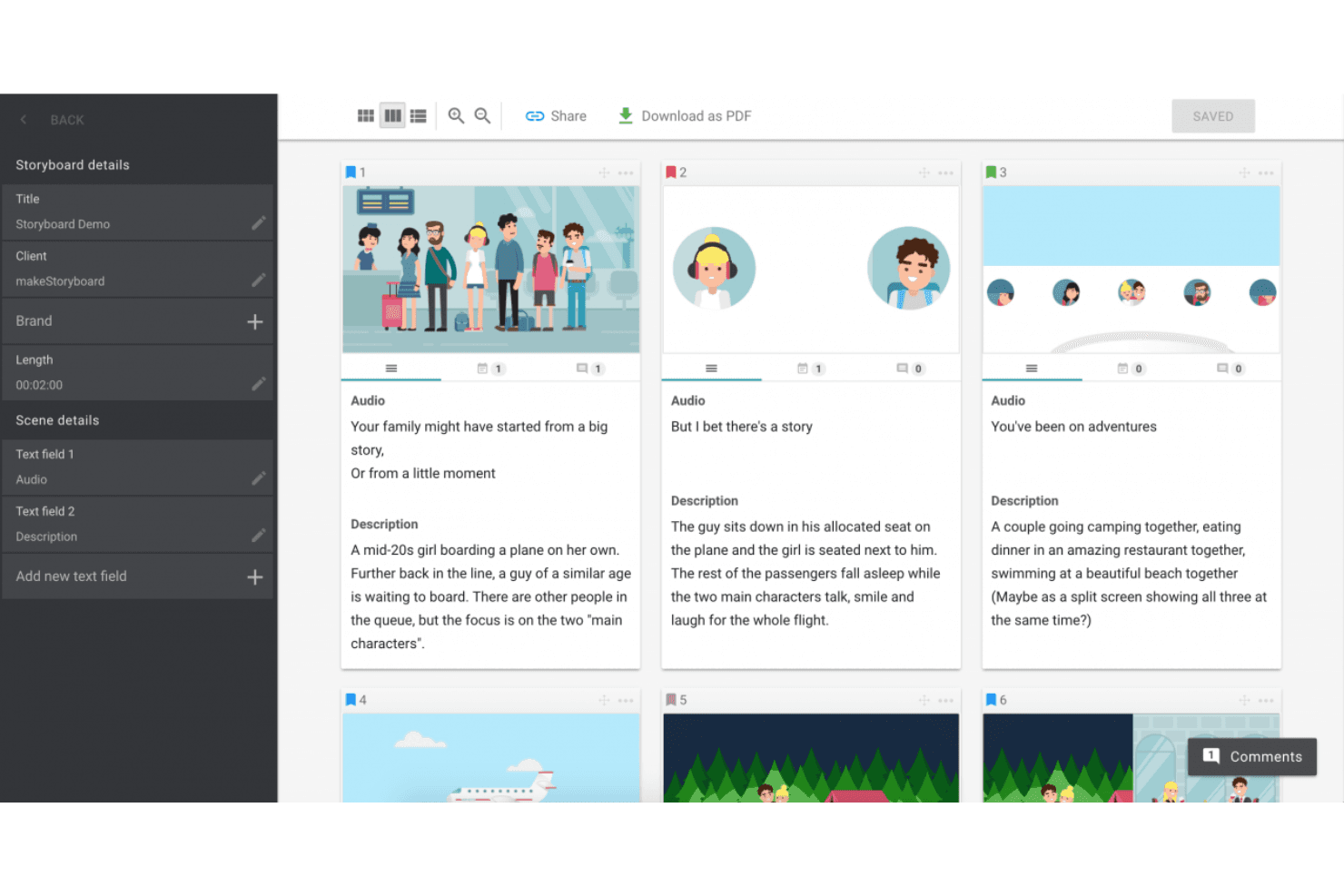
MakeStoryboard semplifica la pianificazione delle scene con fotogrammi organizzati, integrazione audio ed esportazioni PDF semplici. MakeStoryboard è uno strumento per la creazione di storyboard basato sul browser, incentrato sul sequenziamento fotogramma per fotogramma, su un editor con area di lavoro e trascinamento, sulla collaborazione in tempo reale e sull'esportazione di animatic in formato MP4.
Per chi è più adatto MakeStoryboard?
MakeStoryboard è adatto a produttori video, animatori e team di contenuti che devono creare e presentare storyboard rapidamente senza una curva di apprendimento ripida.
Perché ho scelto MakeStoryboard
Ho scelto MakeStoryboard come uno dei migliori perché è progettato appositamente per completare rapidamente gli storyboard, senza dover lottare con lo strumento. La funzione dal copione ai fotogrammi è quella che trovo più utile: incolla un copione, suddividilo automaticamente in fotogrammi, quindi inserisci le immagini e imposta le angolazioni della telecamera per ogni fotogramma. Quando devo consegnare rapidamente il lavoro a un cliente, l'esportazione dell'animatic mi permette di unire i fotogrammi in un MP4 riproducibile con audio, che risulta molto più efficace di un semplice PDF statico.
Funzionalità principali di MakeStoryboard
- Collaborazione in tempo reale: Più membri del team possono modificare contemporaneamente lo stesso storyboard, con commenti per ogni fotogramma e controlli di accesso basati sui ruoli.
- Link di revisione protetti da frase segreta: Condividi gli storyboard con clienti esterni tramite un link di revisione dedicato che non richiede la creazione di un account.
- Marchio personalizzato nelle esportazioni: Aggiungi il logo della tua azienda e una pagina di copertina personalizzata alle esportazioni in PDF prima di inviarle a clienti o parti interessate.
- Indicatori dell'angolazione della telecamera: Ogni fotogramma supporta etichette predefinite e standard del settore per i movimenti della telecamera e le angolazioni delle inquadrature, per una documentazione pronta per la produzione.
Integrazioni di MakeStoryboard
Le integrazioni native non sono elencate pubblicamente.
Pros and Cons
Pros:
- Esportazione di animatic in formato MP4 per la narrazione visiva
- Link di revisione dei clienti protetti da frase segreta
- Indicatori dell'angolazione della telecamera per le note di produzione
Cons:
- Nessuna generazione assistita dall'IA di fotogrammi o scene
- Mancano modelli per percorsi utente o profili utente
Learn more about MakeStoryboard: Ideale per la previsualizzazione in tempo reale di videocamere e scene
- Demo gratuita disponibile
- A partire da $39.99/mese
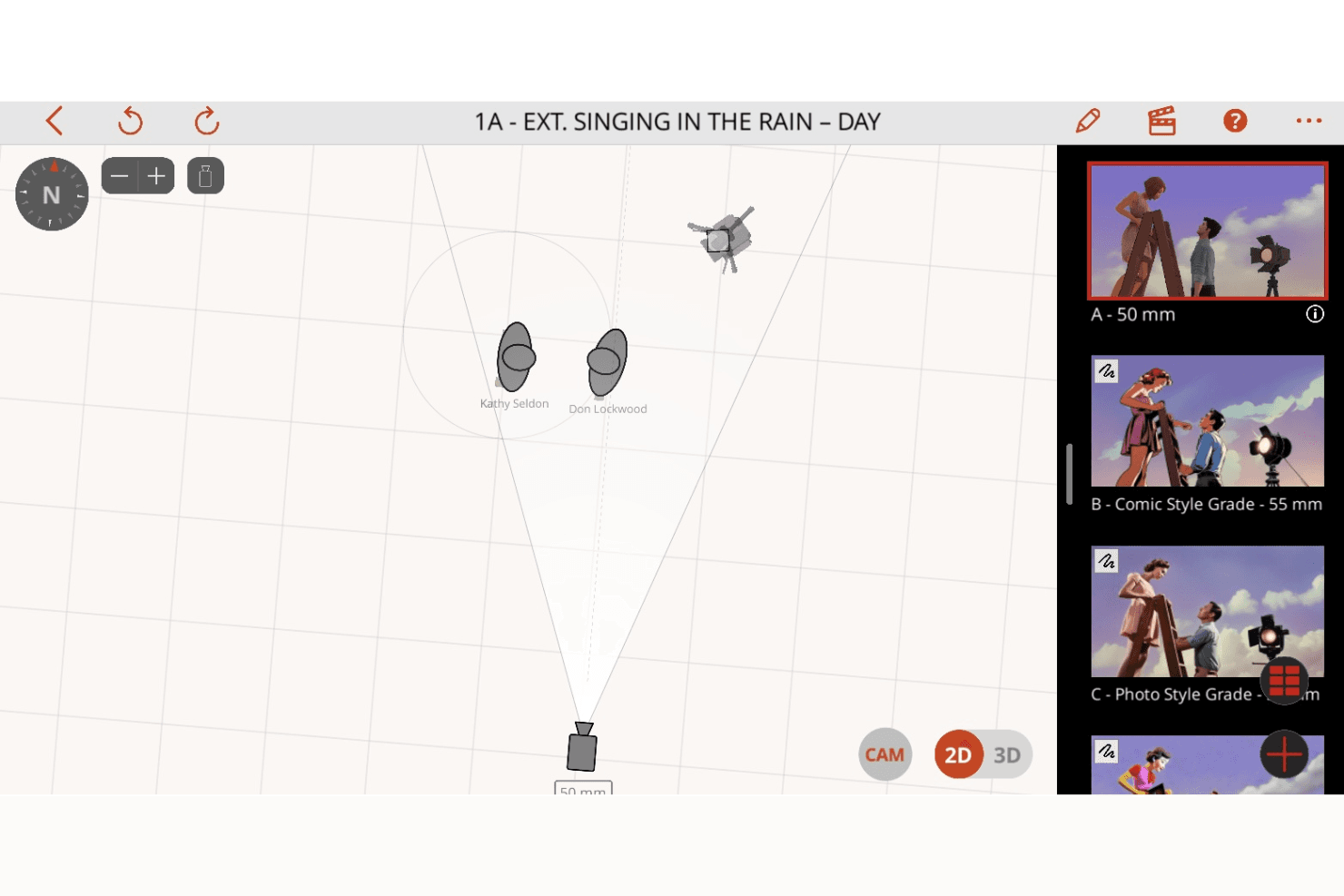
Previs Pro migliora la pianificazione delle inquadrature con la visualizzazione delle scene in 2D e 3D, i controlli della videocamera e la creazione dinamica di storyboard. Previs Pro è uno strumento di storyboard 3D e previsualizzazione per la produzione cinematografica e televisiva che consente di creare scene con la fisica reale degli obiettivi, animare le inquadrature su una timeline di montaggio e importare sceneggiature per generare automaticamente schemi delle inquadrature.
Per chi è più adatto Previs Pro?
Previs Pro è pensato per i professionisti del cinema e della televisione—registi, direttori della fotografia e artisti della previsualizzazione—che hanno bisogno di impostare le inquadrature e visualizzare le configurazioni della videocamera prima di arrivare sul set.
Perché ho scelto Previs Pro
Previs Pro merita un posto tra le migliori soluzioni della mia selezione perché simula l'ottica reale della videocamera all'interno di un ambiente 3D per la costruzione delle scene, consentendo a registi e direttori della fotografia di impostare le inquadrature con una fisica degli obiettivi accurata prima ancora che un solo membro della troupe metta piede sul set. Adoro il modo in cui la funzione Videocamera virtuale consente di muoversi all'interno di una location reale con il proprio iPhone e visualizzare in anteprima il posizionamento dei personaggi in AR sull'ambiente reale. Anche l'importazione delle sceneggiature è una funzione di rilievo: basta inserire un file Final Draft o Fountain e Previs Pro genera automaticamente uno schema delle inquadrature completo di dettagli sulle scene e sul cast.
Funzionalità principali di Previs Pro
- Timeline per gli animatic: Organizza e anima le inquadrature su una timeline di montaggio con più scene e quattro tracce audio dedicate a dialoghi, musica, effetti sonori e voce fuori campo.
- Importazione delle sceneggiature: Inserisci un file Final Draft, Fountain, Fade In o Celtx e Previs Pro compila automaticamente descrizioni delle scene, dettagli sul cast e schemi delle inquadrature direttamente dalla sceneggiatura.
- Generazione IA di oggetti di scena e personaggi: Usa descrizioni testuali per generare oggetti di scena e personaggi personalizzati tramite PropGen e ActorGen senza dover cercare risorse 3D esterne.
- Esportazione della timeline NLE: Esporta lo storyboard come file XML FCP7 per trasferirlo direttamente in Premiere Pro, DaVinci Resolve o Final Cut Pro.
Integrazioni di Previs Pro
Le integrazioni native non sono elencate pubblicamente.
Pros and Cons
Pros:
- Anima le inquadrature con la fisica reale degli obiettivi
- Importa le sceneggiature e genera automaticamente gli storyboard
- L'IA genera oggetti di scena e personaggi a partire dal testo
Cons:
- Disponibile solo per Mac, iPad e iPhone
- Nessuna modifica collaborativa dal vivo e in tempo reale
Learn more about Previs Pro: Ideale per diapositive di storyboard curate destinate a chi non è designer
- Piano gratuito disponibile
- A partire da $15/utente/mese
Visit WebsiteCustomer Rating:4.7/5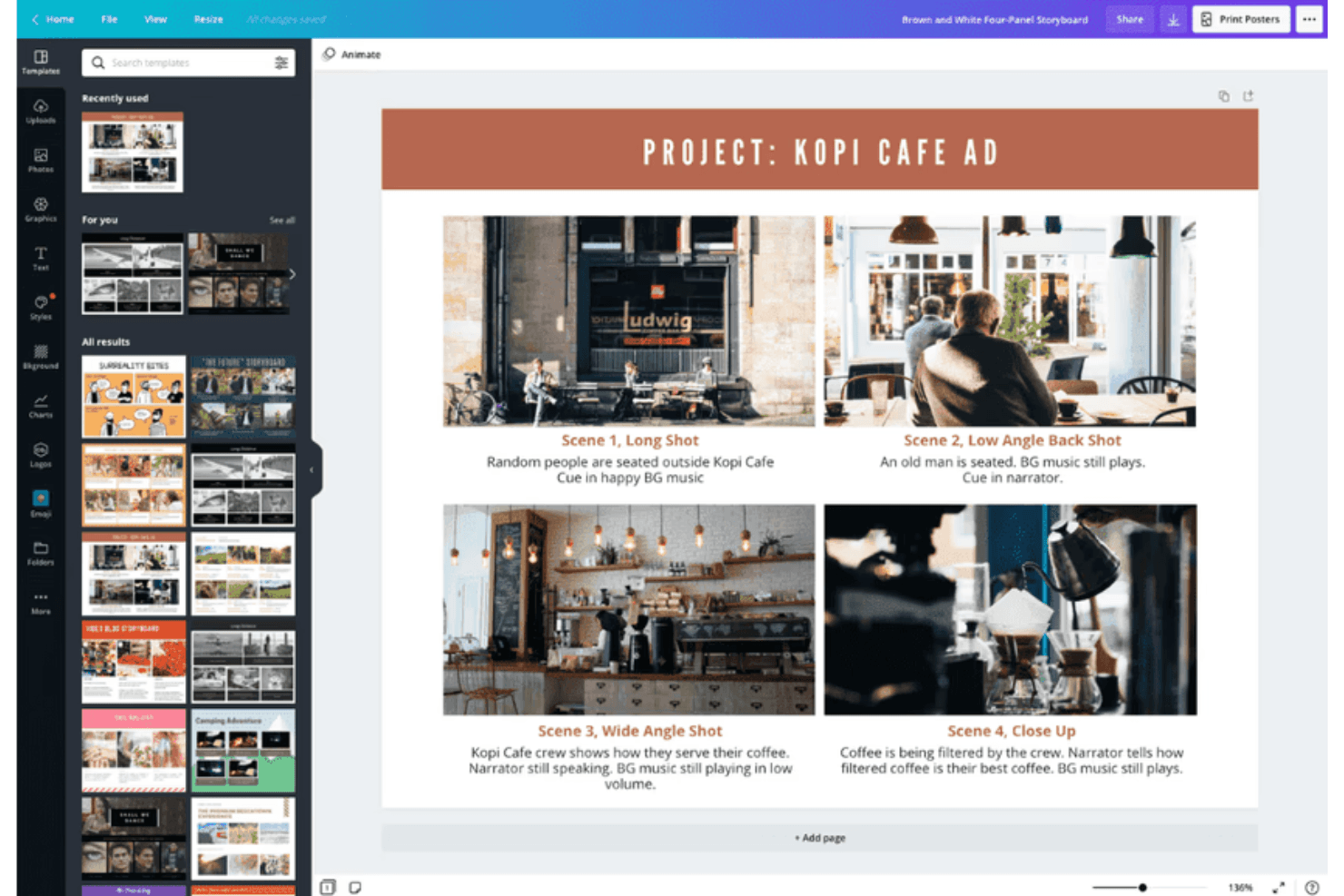
Canva supporta la creazione di storyboard con modelli personalizzabili per gli elementi visivi. Canva è uno strumento di progettazione visiva generico che supporta la creazione di storyboard tramite un editor con trascinamento, un'ampia libreria di modelli, la collaborazione in tempo reale, la generazione di design assistita dall'intelligenza artificiale e l'esportazione in più formati, inclusi video e animazioni.
Per chi è più adatto Canva?
Canva è ideale per i product manager e i product marketing manager che devono creare rapidamente diapositive di storyboard curate, senza dover ricorrere a un designer.
Perché ho scelto Canva
Ho incluso Canva tra le mie scelte principali perché è lo strumento che affiderei a qualsiasi product manager che abbia bisogno di uno storyboard curato entro la fine della giornata, senza aver mai utilizzato prima uno strumento di progettazione. La libreria di modelli include modelli dedicati agli storyboard e alle mappe del percorso del cliente, quindi non è necessario partire da zero. La suite di intelligenza artificiale Magic Studio può generare layout e didascalie a partire da un prompt testuale, riducendo significativamente il tempo necessario per passare da una 'tela vuota' a 'diapositive pronte da condividere'.
Funzionalità principali di Canva
- Suite di intelligenza artificiale Magic Studio: Oltre 20 strumenti di intelligenza artificiale—tra cui la generazione di design da testo, la scrittura assistita dall'intelligenza artificiale e l'editing conversazionale—consentono di creare le sequenze dello storyboard a partire da un prompt testuale.
- Modifica collaborativa in tempo reale: Più membri del team possono modificare contemporaneamente lo stesso storyboard, aggiungendo commenti e feedback organizzati in thread sui singoli fotogrammi.
- Esportazione di video e animazioni: È possibile animare singoli fotogrammi con Magic Animate ed esportare gli storyboard completati come file MP4 o GIF per le presentazioni agli stakeholder.
- Modelli di mappe del percorso del cliente: Sono disponibili modelli dedicati alla mappatura del percorso dell'utente e agli storyboard di scenari di prodotto, sia nei piani gratuiti sia in quelli a pagamento.
Integrazioni di Canva
Canva offre integrazioni native con Slack, Google Photos, YouTube Embed, Pinterest, Brandfetch, Dropbox, Notion, Asana e altri servizi. Zapier e l'API di Canva supportano connessioni aggiuntive, mentre su Enterprise sono disponibili app e integrazioni personalizzate.
Pros and Cons
Pros:
- Milioni di modelli per storyboard e mappe del percorso
- Magic Studio AI genera rapidamente diapositive di storyboard
- Modifica collaborativa in tempo reale con flussi di approvazione
Cons:
- Nessuna prototipazione interattiva tra i fotogrammi dello storyboard
- Nessuna connessione nativa con Jira, Figma o Notion
Learn more about Canva: Ideale per l'uso educativo
- Prova gratuita + piano gratuito disponibile
- A partire da $14.99/mese
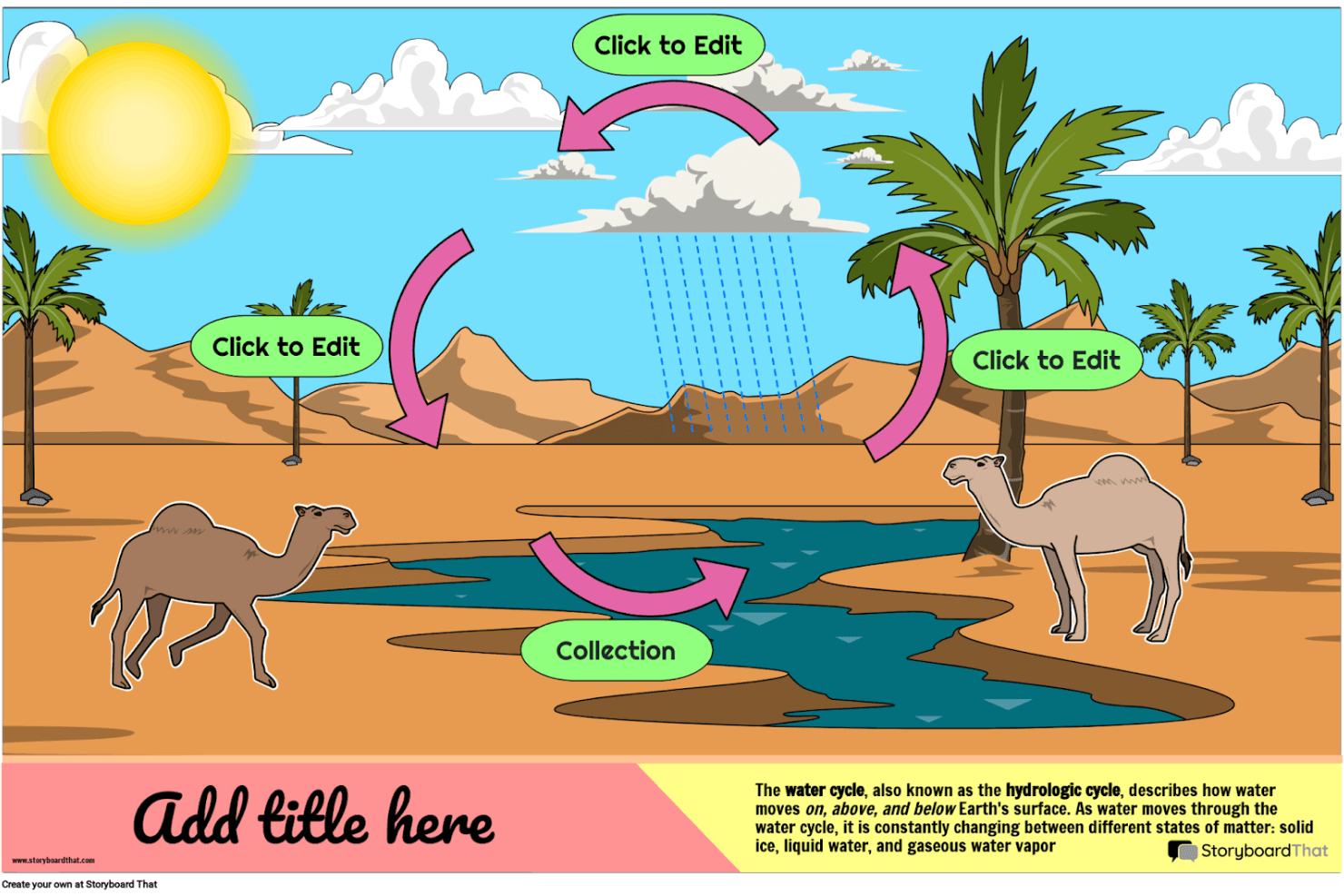
Storyboard That ti aiuta a creare storie visive e diagrammi educativi coinvolgenti con personaggi, scene e modelli personalizzabili. Storyboard That è uno strumento per creare storyboard con funzionalità di trascinamento, un'ampia libreria di risorse illustrate, modelli per aziende e istituti scolastici e opzioni di esportazione tra cui PDF, PowerPoint e GIF animate.
Per chi è più adatto Storyboard That?
Storyboard That è particolarmente indicato per educatori, progettisti didattici e team accademici che hanno bisogno di uno strumento accessibile per la narrazione visiva, con integrazioni LMS integrate e conformità alla privacy per la sicurezza degli studenti.
Perché ho scelto Storyboard That
Ho incluso Storyboard That tra le mie scelte principali perché è stato progettato fin dall'inizio per gli ambienti educativi in un modo che nessun altro strumento di questo elenco è in grado di eguagliare. Si collega direttamente a Google Classroom, Canvas e Schoology tramite LTI, consentendo agli insegnanti di assegnare progetti di storyboard senza uscire dal proprio LMS. La conformità a FERPA e COPPA garantisce inoltre che i dati degli studenti siano realmente protetti, un requisito irrinunciabile per la maggior parte dei team educativi.
Funzionalità principali di Storyboard That
- Strumento di modifica della tela con trascinamento: Crea storyboard trascinando personaggi, scene, oggetti di scena ed elementi di testo all'interno dei riquadri, senza bisogno di competenze di progettazione.
- Esportazione in GIF animate: Converti gli storyboard completati in GIF animate direttamente dalla piattaforma, insieme alle opzioni di esportazione in PDF e PowerPoint.
- Registrazione della narrazione audio: Registra e allega una narrazione parlata ai singoli riquadri dello storyboard nei piani a pagamento.
- Modalità presentazione: Accompagna le parti interessate nella visualizzazione dei riquadri dello storyboard tramite una modalità di presentazione a diapositive integrata, senza uscire dallo strumento.
Integrazioni di Storyboard That
Storyboard That offre integrazioni native con Google Classroom, Clever, ClassLink, Canvas, Schoology, Blackbaud, Buzz LMS e D2L.
Pros and Cons
Pros:
- Modalità presentazione integrata per accompagnare direttamente gli utenti nella visualizzazione
- Ampia libreria di illustrazioni con modelli aziendali
- Supporta la narrazione audio registrata per ogni riquadro
Cons:
- Nessuna funzionalità di intelligenza artificiale o prototipazione interattiva
- Esporta solo in formati statici o GIF animate
Learn more about Storyboard That: Ideale per animatiche collaborative con sincronizzazione integrata dello script
- Piano gratuito + prova gratuita disponibile
- A partire da $50/mese (fatturato annualmente)
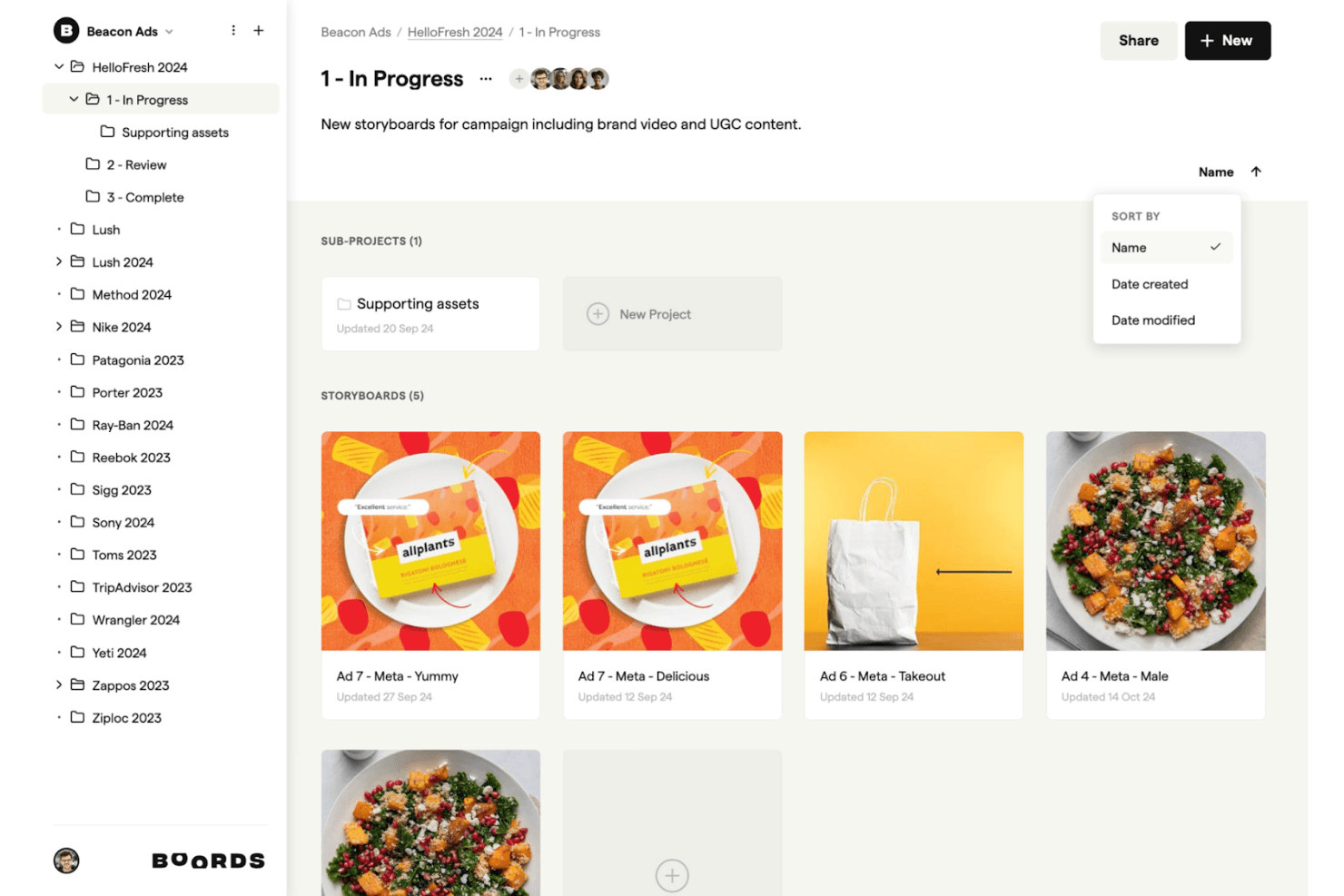
Boords supporta il tuo processo creativo permettendoti di organizzare, modificare e condividere in modo intuitivo gli storyboard per campagne e contenuti brandizzati. Boords è un software per storyboard basato su browser che combina un editor di script, la generazione di storyboard con l'IA, la sequenza fotogramma per fotogramma e un editor di animatic direttamente nel browser con esportazione in MP4.
Per chi è più adatto Boords?
Boords è particolarmente adatto ai team creativi e ai responsabili del marketing di prodotto che devono creare animatic sincronizzati con lo script e condividere anteprime video curate con clienti o stakeholder.
Perché ho scelto Boords
Boords si è guadagnato un posto nella mia lista ristretta perché la pipeline dallo script all'animatic che offre è davvero difficile da replicare in un unico strumento. Mi piace molto il fatto che l'editor di script integrato si sincronizzi direttamente con la timeline dello storyboard, così quando modifico la tempistica del voice-over, la sequenza dei fotogrammi si aggiorna di conseguenza. L'editor di animatic nel browser mi permette poi di esportare un MP4 completo senza utilizzare software esterni, esattamente ciò di cui ho bisogno quando devo presentare rapidamente una visione narrativa agli stakeholder.
Funzionalità principali di Boords
- Generatore di storyboard basato sull'IA: Incolla uno script o un brief e Boords crea automaticamente uno storyboard strutturato con immagini generate dall'IA per ogni fotogramma.
- Generatore di PDF: Personalizza ed esporta il tuo storyboard come PDF formattato, ottenendo il pieno controllo sull'aspetto dei fotogrammi e dei campi di testo nei materiali destinati ai clienti.
- Libreria di risorse del team: Carica e organizza le immagini condivise in una libreria centralizzata, così tutto il team può riutilizzare elementi visivi approvati in più progetti.
- Link per la revisione degli ospiti: Condividi gli storyboard con i clienti tramite link protetti da password che non richiedono la creazione di un account per visualizzare o commentare.
Integrazioni di Boords
Boords dispone di 3 integrazioni native documentate: Slack, Dropbox e Google Drive. Offre inoltre un'API pubblica e webhook per integrazioni personalizzate con strumenti di prodotto e design.
Pros and Cons
Pros:
- Automazione dallo script allo storyboard con immagini generate dall'IA
- Editor di animatic nel browser con esportazione in MP4
- I link per la revisione degli ospiti non richiedono la registrazione
Cons:
- Nessuna prototipazione interattiva o flusso cliccabile
- Mancano modelli per l'esperienza utente o il percorso del prodotto
Learn more about Boords: Ideale per gli studi di animazione
- Prova gratuita di 14 giorni
- A partire da $90/mese
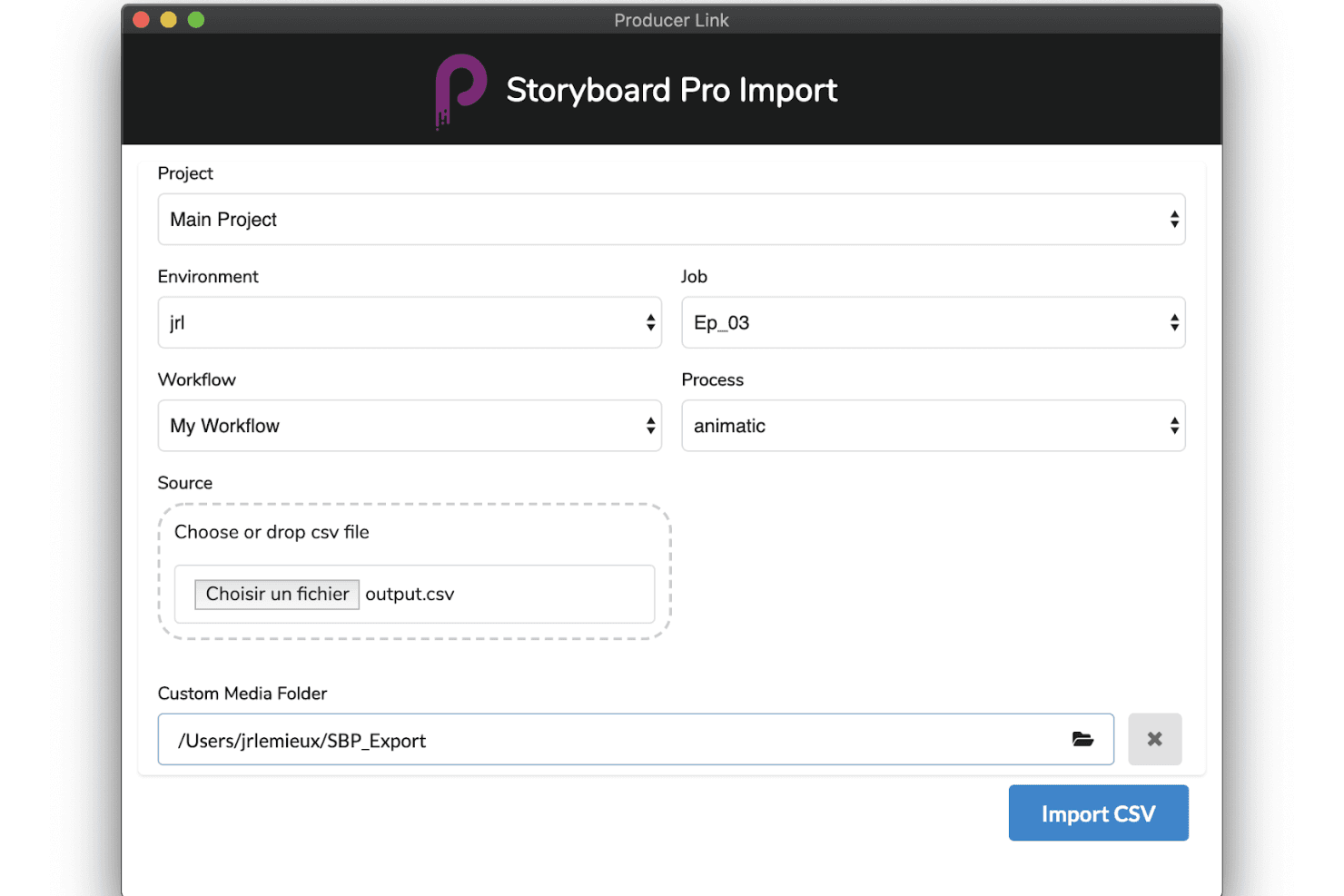
Toon Boom Storyboard Pro supporta la produzione con strumenti avanzati di importazione, flussi di lavoro personalizzabili e una creazione fluida di animatic. Toon Boom Storyboard Pro è un'applicazione professionale per storyboard su computer progettata per la pre-produzione dell'animazione, che offre sequenze basate su pannelli, una timeline completa per gli animatic, strumenti per telecamere 3D, sincronizzazione audio multitraccia e analisi assistita dall'intelligenza artificiale delle sceneggiature tramite il relativo set di strumenti Ember.
Per chi è più indicato Toon Boom Storyboard Pro?
Toon Boom Storyboard Pro è progettato per animatori professionisti e studi di animazione che necessitano di una pipeline di pre-produzione dedicata, dalla sceneggiatura all'animatic.
Perché ho scelto Toon Boom Storyboard Pro
Toon Boom Storyboard Pro si è guadagnato un posto nella mia rosa di candidati perché è la soluzione più simile a un centro di comando dedicato alla pre-produzione di cui dispongono gli studi di animazione. Mi piace molto il modo in cui il Timer dei pannelli consente di acquisire la temporizzazione dal vivo dei pannelli seguendo il ritmo di una performance, una funzione davvero unica per gli studi che realizzano animatic fotogramma per fotogramma. In combinazione con il sistema di telecamere 3D e la sincronizzazione audio multitraccia, puoi passare direttamente da una sceneggiatura preliminare a un'anteprima completamente temporizzata e animata con la telecamera, senza dover cambiare strumento.
Caratteristiche principali di Toon Boom Storyboard Pro
- Sistema di telecamere 3D: Anima i movimenti delle telecamere virtuali—panoramiche, zoom e inclinazioni—all'interno di un ambiente 3D direttamente nei pannelli dello storyboard.
- Analisi delle sceneggiature con l'intelligenza artificiale Toon Boom Ember: Analizza le sceneggiature per identificare automaticamente scene, personaggi e risorse, quindi compila automaticamente i pannelli dei dialoghi e delle azioni.
- Sincronizzazione audio multitraccia: Importa, sovrapponi e fai scorrere più tracce audio con visualizzazione della forma d'onda per una sincronizzazione precisa a livello di pannello.
- Esportazione delle scene in Harmony: Esporta scene complete dello storyboard—inclusi livelli e temporizzazione—direttamente in Toon Boom Harmony per la produzione dell'animazione.
Integrazioni di Toon Boom Storyboard Pro
Toon Boom Storyboard Pro offre integrazioni native con Toon Boom Harmony e Adobe Photoshop, oltre a flussi di lavoro AAF/XML per Pro Tools e i software di montaggio video.
Pros and Cons
Pros:
- Strumenti completi per la creazione di animatic destinati agli storyboard di animazione
- L'analisi assistita dall'intelligenza artificiale delle sceneggiature velocizza il flusso di lavoro
- Supporto integrato per telecamere 3D e risorse
Cons:
- Nessuna funzionalità di collaborazione in tempo reale basata su server remoti
- Richiede competenze professionali di illustrazione o animazione
Learn more about Toon Boom Storyboard Pro: Ideale per esportare presentazioni animate a partire da copioni
- Piano gratuito + demo gratuita disponibile
- A partire da $12/mese (fatturato annualmente)
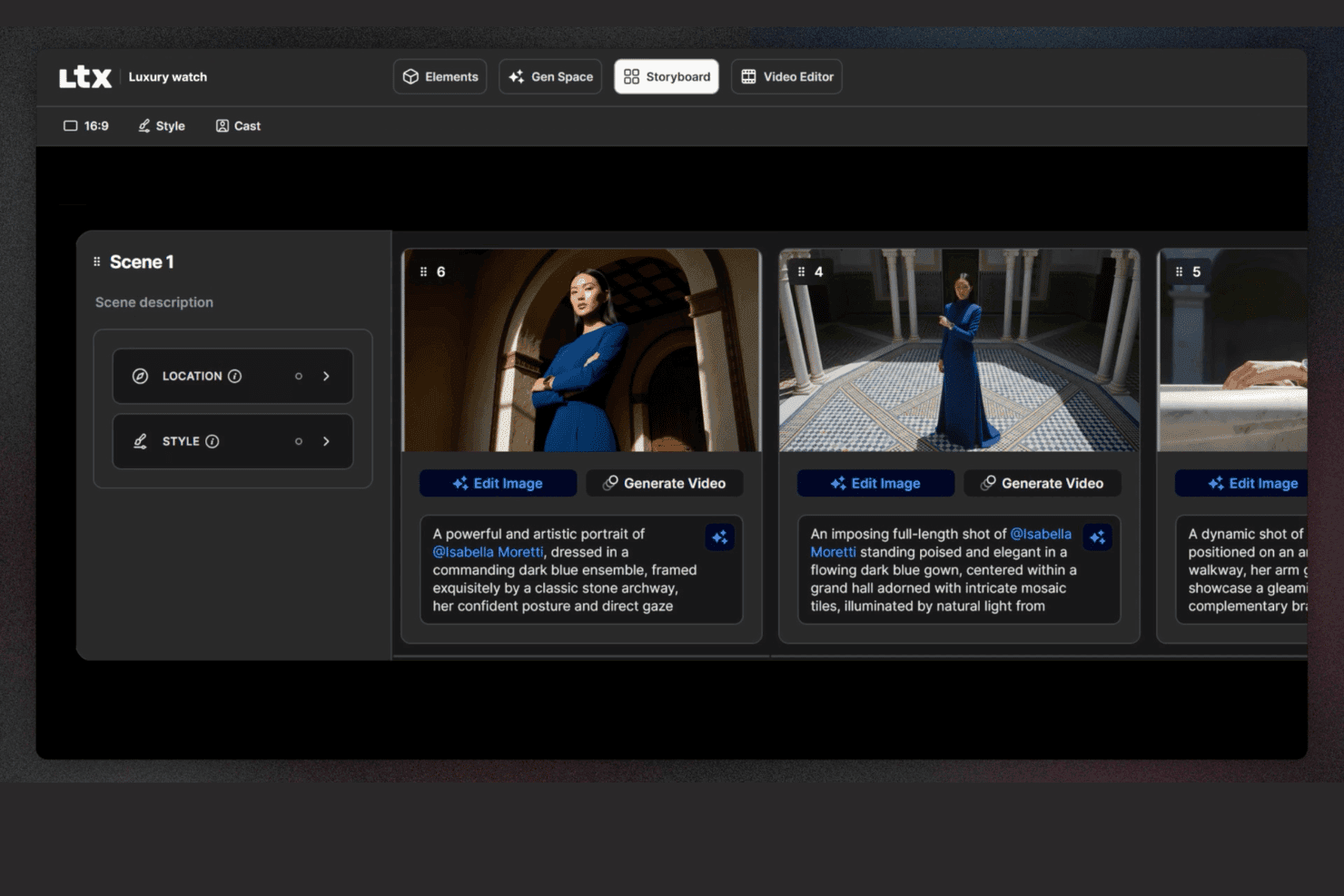
LTX Studio consente agli utenti di modificare gli storyboard con descrizioni, luoghi e modifica delle immagini. LTX Studio è una piattaforma per storyboard basata sull'intelligenza artificiale che genera sequenze visive scena per scena a partire da copioni o prompt testuali, con editing della timeline integrato, esportazione MP4 animata e un generatore di presentazioni.
Per chi è più adatto LTX Studio?
LTX Studio è adatto ai responsabili del marketing di prodotto e ai team creativi che devono trasformare un copione o un'idea in una presentazione animata e pronta per essere mostrata, senza dipendere da un designer.
Perché ho scelto LTX Studio
Ho scelto LTX Studio come uno dei migliori perché è l'unico strumento del mio elenco che trasforma un copione grezzo in una presentazione animata e pronta per essere mostrata, senza richiedere nemmeno una risorsa grafica. Incolla la descrizione del tuo prodotto e l'intelligenza artificiale la suddivide in inquadrature sequenziali, genera fotogrammi cinematografici e assembla tutto in un file MP4 o PDF esportabile. Il generatore di presentazioni raccoglie quindi questi elementi visivi in un formato strutturato che puoi mostrare agli stakeholder lo stesso giorno.
Funzionalità principali di LTX Studio
- Selezione del modello di intelligenza artificiale: scegli tra diversi modelli di generazione basati sull'intelligenza artificiale, tra cui Google Veo 3.1, Kling 2.6/3.0 Pro e il modello proprietario LTX-2, a livello di progetto, tavola o fotogramma.
- Elementi persistenti dei personaggi: definisci una volta l'aspetto di un personaggio e la piattaforma mantiene automaticamente coerenti i dettagli del viso, l'abbigliamento e lo stile in ogni fotogramma.
- Generazione audio integrata: genera e sincronizza musica di sottofondo, audio ambientale e narrazione fuori campo direttamente nell'editor della timeline, senza utilizzare uno strumento audio separato.
- Flussi di automazione basati su nodi: crea flussi di lavoro personalizzati per la generazione con l'intelligenza artificiale usando un sistema visivo basato su nodi, disponibile nei piani Standard e superiori.
Integrazioni di LTX Studio
Le integrazioni native non sono elencate pubblicamente.
Pros and Cons
Pros:
- L'intelligenza artificiale genera storyboard animati a partire dai copioni
- Personaggi ed elementi persistenti rimangono coerenti
- Esportazione come MP4 e presentazione strutturata
Cons:
- Nessun editor basato su canvas o modello UX
- La collaborazione è limitata nei piani non aziendali
Learn more about LTX Studio:
Altri software per storyboard
Ecco alcune ulteriori opzioni di software per storyboard che non sono entrate nella mia selezione, ma che vale comunque la pena valutare:
- 11MiroIdeale per tavole narrative collegate al backlog di sviluppo
- 12WhimsicalIdeale per schemi a bassa fedeltà e storyboard dei flussi
- 13Adobe FireflyIdeale per l'ideazione visiva con IA conforme alle linee guida del brand
- 14StudioBinderIdeale per lo storyboard dei team di produzione cinematografica
- 15KatalistIdeale per la produzione di storyboard da script a video
Come Valuto i Software per Storyboard
Dal regista che abbozza le inquadrature prima di iniziare le riprese, al team marketing che presenta un'idea video a un cliente, fino all'animatore che traccia le transizioni tra scene fotogramma per fotogramma, il software per storyboard è al centro di alcuni dei lavori di comunicazione visiva più critici svolti dai professionisti. Quando valuto gli strumenti in questa categoria, li considero su due livelli: cosa deve fare uno strumento solo per meritare un posto in questa lista, e cosa rende una scelta realmente migliore di un'altra per un determinato tipo di utente.
Funzionalità Essenziali (Requisiti Minimi per Questa Lista)
Per il software per storyboard, le funzionalità essenziali che testo e valuto sono:
- Creazione e organizzazione dei frame: Esamino come ogni strumento gestisce l'unità base dello storyboard — la creazione di pannelli individuali e il loro riordino in una sequenza visiva. Che io stia progettando uno spot pubblicitario di 30 secondi o un cortometraggio completo, il riordino tramite drag-and-drop e la possibilità di inserire, duplicare o cancellare frame a metà sequenza senza interrompere il flusso sono imprescindibili.
- Metodo di input visivo: Ogni strumento necessita almeno di un modo efficace per inserire immagini nei frame, che si tratti di strumenti di disegno integrati, caricamento di immagini da Photoshop o Procreate, librerie di asset predefiniti o generazione tramite IA. Verifico se il metodo di input principale è sufficientemente avanzato da produrre storyboard usabili anziché solo demo convincenti.
- Annotazioni di inquadratura e scena: Controllo se posso allegare etichette di tipo inquadratura, note sui movimenti di camera, dialoghi e descrizioni d'azione direttamente a ciascun frame. Quando un direttore della fotografia prende in mano il tuo storyboard sul set, quelle annotazioni sono ciò che trasforma un'immagine in un piano di ripresa concreto.
- Organizzazione di scene e progetti: Uno storyboard di cinque scene è gestibile ovunque, ma un progetto di lungometraggio con dozzine di sequenze mette subito in evidenza eventuali debolezze organizzative. Valuto come ogni strumento gestisce intestazioni di scena, raggruppamenti di sequenze e la navigazione tra progetti di grandi dimensioni.
- Esportazione e condivisione: Testo la qualità dell'esportazione in PDF e immagine, le opzioni di layout e se i link condivisibili funzionano realmente per gli stakeholder che non hanno un account. Uno storyboard che non può uscire dall'applicazione e arrivare integra nella casella email di un produttore o in una presentazione al cliente è un vicolo cieco.
- Metadati a livello di frame: Oltre alle annotazioni visive, cerco campi come numerazione dei frame, impostazioni di formato/aspect ratio e valori di durata che rendano gli storyboard pronti per la produzione. Questi dettagli contano non appena il tuo storyboard deve entrare in una shot list o in una timeline per animatic.
- Riproduzione e timing: Valuto se i frame possono essere riprodotti in sequenza con controlli di tempistica basilari, anche a un livello rudimentale. Poter vedere la sequenza delle tavole come un animatic è essenziale per permettere a registi e montatori di verificare il ritmo prima di impegnarsi in una giornata di riprese.
Se uno strumento non svolge queste funzioni in modo affidabile, non è stato incluso a prescindere da qualsiasi altra caratteristica offerta.
Caratteristiche Distintive (Cosa Distingue le Scelte)
Oltre ai requisiti minimi, presto molta attenzione a funzionalità come la collaborazione in tempo reale, la creazione di animatic, l'integrazione con la sceneggiatura, la generazione di immagini tramite IA e le librerie di asset predefiniti. Ad esempio, verifico quanto facilmente un team può commentare insieme sulle tavole, se una sceneggiatura genera automaticamente delle sequenze, o se lo strumento offre un controllo della timeline per animatic davvero utilizzabile dal regista in pre-produzione.
Cosa Considero Oltre le Funzionalità
Valuto anche l'adattabilità alle diverse tipologie di acquirenti, il modello di prezzo e l'integrazione nel workflow di produzione. Un animatore freelance ha esigenze differenti rispetto a un'agenzia che gestisce approvazioni con clienti. Esamino se uno strumento esporta in formati editoriali come EDL o XML per i montatori che usano Premiere, se è compatibile con processi di gestione della produzione e se la struttura di prezzo si adatta a freelance, piccoli studi o team aziendali. Anche la piattaforma conta — cloud, desktop o tablet determinano chi può realmente utilizzare lo strumento e dove.
Come scegliere il software per storyboard
È facile perdersi tra lunghi elenchi di funzionalità e strutture di prezzo complesse. Per aiutarti a rimanere concentrato mentre affronti il tuo particolare processo di selezione del software, ecco una lista di controllo dei fattori da tenere a mente:
| Fattore | Cosa considerare |
| Scalabilità | Assicurati che il software possa crescere insieme al tuo team, accogliendo più utenti o progetti senza problemi. Pensa alle esigenze future e valuta se lo strumento è in grado di gestire una domanda crescente. |
| Integrazioni | Verifica se si integra con gli altri strumenti che utilizzi, come Adobe Creative Suite o le app per la gestione dei progetti, per semplificare il flusso di lavoro e aumentare la produttività. |
| Personalizzazione | Cerca funzionalità che ti consentano di adattare il software al tuo flusso di lavoro, come modelli personalizzabili, per risparmiare tempo e soddisfare le esigenze specifiche del tuo team. |
| Facilità d’uso | Il software dovrebbe essere intuitivo e richiedere un periodo di apprendimento minimo. Cerca interfacce con funzionalità di trascinamento o tutorial che aiutino il tuo team a iniziare rapidamente. |
| Budget | Valuta il costo del software rispetto al tuo budget. Cerca piani tariffari flessibili o sconti per impegni di durata maggiore, per assicurarti che sia sostenibile dal punto di vista finanziario. |
| Misure di sicurezza | I dati del tuo team devono essere protetti. Verifica la presenza di funzionalità come la crittografia, controlli di accesso sicuri e conformità alle normative sulla protezione dei dati. |
| Collaborazione | Assicurati che lo strumento supporti la collaborazione in tempo reale, consentendo ai membri del team di lavorare insieme in modo efficiente e fornire riscontri direttamente all’interno della piattaforma. |
| Assistenza | Considera il livello di assistenza clienti disponibile. Cerca opzioni di supporto 24 ore su 24, 7 giorni su 7, documentazione dettagliata e assistenza tempestiva per risolvere rapidamente eventuali problemi. |
Tendenze
Nella mia ricerca, ho raccolto innumerevoli aggiornamenti sui prodotti, comunicati stampa e registri delle versioni di diversi fornitori di software per storyboard. Ecco alcune delle tendenze emergenti che sto monitorando:
- Storyboard assistiti dall'IA: l'IA viene utilizzata per suggerire layout e scene per gli storyboard, facendo risparmiare tempo e stimolando la creatività. Alcuni strumenti offrono ora immagini generate dall'IA, aiutando gli utenti a visualizzare rapidamente i concetti.
- Visualizzazione 3D: sempre più software per storyboard integrano funzionalità 3D, consentendo agli utenti di creare e visualizzare scene in tre dimensioni. Questa tendenza aiuta i team a comprendere meglio le relazioni spaziali e le dinamiche delle scene.
- Storyboard interattivi: gli strumenti si stanno evolvendo per includere elementi interattivi, consentendo agli utenti di aggiungere collegamenti cliccabili, audio e video. Questo rende gli storyboard più coinvolgenti e utili per le presentazioni.
- Collaborazione in tempo reale: le funzionalità collaborative avanzate consentono ai team di lavorare contemporaneamente sugli storyboard da luoghi diversi. Questa tendenza è fondamentale per i team remoti che devono mantenere efficienza e allineamento.
- Soluzioni basate sul cloud: l'archiviazione e l'accesso tramite cloud stanno diventando standard, consentendo ai team di lavorare da qualsiasi luogo senza perdere dati. Questa tendenza supporta il lavoro da remoto e garantisce che gli storyboard siano sempre accessibili e aggiornati.
Che cos'è il software per storyboard?
Il software per storyboard è uno strumento digitale che aiuta gli utenti a creare rappresentazioni visive delle storie, spesso utilizzato nel cinema, nell'animazione e nel marketing. Registi, animatori e professionisti creativi usano generalmente questi strumenti per pianificare le scene e visualizzare le narrazioni, migliorando la comunicazione e la pianificazione dei progetti. Le interfacce con trascinamento, i layout assistiti dall'IA e le funzionalità di collaborazione in tempo reale supportano i flussi di lavoro creativi e l'allineamento del team. Nel complesso, questi strumenti aiutano gli utenti a risparmiare tempo e a migliorare la chiarezza e l'efficacia della narrazione visiva.
Funzionalità
Quando scegli il software per storyboard, presta attenzione alle seguenti funzionalità chiave:
- Interfaccia con trascinamento: consente di disporre, spostare e ridimensionare rapidamente i riquadri dello storyboard con semplici clic e trascinamenti. Puoi visualizzare il flusso del progetto proprio come lo immagini, senza bisogno di competenze tecniche.
- Modelli personalizzabili: scegli tra una varietà di modelli predefiniti pensati per diversi tipi di narrazione, come spot pubblicitari, scene cinematografiche o animazioni. I modelli fanno risparmiare tempo e aiutano a mantenere l'organizzazione, soprattutto quando devi sviluppare rapidamente le idee.
- Strumenti di collaborazione: condividi gli storyboard in tempo reale, assegna attività o lascia commenti per i membri del team. Queste funzionalità mantengono tutti sulla stessa lunghezza d'onda, rendendo i progetti di gruppo più rapidi e divertenti.
- Editor di script integrato: abbina le immagini ai dialoghi e alle descrizioni direttamente nello strumento, senza dover passare continuamente da un'app all'altra. Questo semplifica il processo creativo e mantiene tutto nel giusto contesto.
- Opzioni di esportazione e condivisione: salva gli storyboard come PDF, immagini o diapositive di presentazione oppure condividili tramite un collegamento rapido. In questo modo puoi presentare le tue idee a clienti o compagni di squadra senza ostacoli tecnici.
- Controllo delle versioni: tieni traccia delle revisioni, ripristina le versioni precedenti e scopri chi ha apportato modifiche. È una funzionalità preziosa quando devi recuperare idee passate o annullare una modifica accidentale.
- Supporto audio e video: aggiungi voci fuori campo, effetti sonori o clip video per dare vita al tuo storyboard. La possibilità di integrare contenuti multimediali consente di comunicare più chiaramente la tua visione.
- Organizzazione e assegnazione di tag: raggruppa le scene per atti, usa tag colorati o aggiungi etichette per mantenere tutto in ordine. Quando il progetto diventa complesso, questi strumenti ti aiutano a spostarti con facilità.
Funzionalità comuni dell'IA
Oltre alle funzionalità standard del software per storyboard elencate sopra, molte di queste soluzioni stanno integrando l'IA con funzionalità come:
- Input da voce a testo: converte le idee pronunciate direttamente in elementi di testo dello storyboard. Puoi fare brainstorming ad alta voce e lo strumento organizza le tue parole in descrizioni o dialoghi all'interno dei tuoi riquadri.
- Generazione automatica di immagini: l'IA crea riquadri visivi sulla base delle descrizioni scritte, trasformando rapidamente le idee dello script in immagini e riducendo il tempo necessario per le illustrazioni manuali.
- Suggerimenti intelligenti per le scene: il software consiglia possibili inquadrature successive, angolazioni della telecamera o transizioni di scena in base al contesto della storia, mantenendo vivo lo slancio creativo.
- Miglioramento automatico dei dialoghi: l'IA esamina lo script e suggerisce miglioramenti oppure segnala formulazioni poco naturali, aiutando i personaggi a risultare più autentici e coinvolgenti.
- Analisi della struttura narrativa: l'IA analizza lo storyboard e individua problemi di ritmo, lacune nella storia o aree prive di tensione, così puoi perfezionare la narrazione.
Vantaggi
L'adozione di strumenti digitali per storyboard può trasformare il modo in cui il tuo team pianifica, condivide e perfeziona i progetti creativi. Ecco cosa puoi aspettarti:
- Creatività potenziata: i layout assistiti dall'intelligenza artificiale e i modelli flessibili ti permettono di esplorare nuove direzioni senza dover partire da zero.
- Collaborazione del team semplificata: gli aggiornamenti in tempo reale e l'accesso basato sul cloud permettono al tuo team di contribuire da qualsiasi luogo, mantenendo tutti connessi.
- Flussi di lavoro più rapidi: gli strumenti di trascinamento e rilascio e i modelli predefiniti riducono i tempi di configurazione, così puoi concentrarti sulla narrazione vera e propria.
- Comunicazione visiva più efficace: grazie agli storyboard 3D e alle funzionalità interattive, il tuo team e i soggetti interessati possono visualizzare il concetto con maggiore chiarezza.
- Creazione di storyboard da remoto: l'accesso basato sul cloud garantisce che tu non sia vincolato a un'unica sede, un aspetto particolarmente utile per i team distribuiti.
- Supporto per una pianificazione dettagliata: gli strumenti per la linea temporale e il disegno aiutano a delineare le scene, gestire la complessità e mantenere la qualità creativa.
- Condivisione flessibile: grazie alle diverse opzioni di esportazione, è facile condividere il tuo lavoro sui social media o nel formato più adatto ai tuoi collaboratori o clienti.
Costi e prezzi
La scelta di un software per storyboard richiede la comprensione dei vari modelli di prezzo e dei piani disponibili. I costi variano in base alle funzionalità, alle dimensioni del team, ai componenti aggiuntivi e ad altro ancora, con i software gratuiti per storyboard che rappresentano un'estremità dello spettro per i team in grado di lavorare entro i limiti delle funzionalità disponibili.
La tabella seguente riassume i piani più comuni, i relativi prezzi medi e le funzionalità generalmente incluse nelle soluzioni software per storyboard:
Tabella comparativa dei piani per software per storyboard
| Tipo di piano | Prezzo medio | Funzionalità comuni |
| Piano gratuito | $0 | Creazione di storyboard di base, modelli limitati e opzioni di esportazione di base. |
| Piano personale | $5-$30/utente/ mese | Modelli personalizzabili, interfaccia con trascinamento e rilascio e accesso basato sul cloud. |
| Piano aziendale | $30-$80/ utente/mese | Collaborazione in tempo reale, strumenti di disegno avanzati e gestione della linea temporale. |
| Piano per grandi aziende | $80-$100+/ utente/mese | Visualizzazione 3D, layout assistiti dall'intelligenza artificiale, supporto dedicato e misure di sicurezza complete. |
Domande frequenti sul software per storyboard
Ecco alcune risposte alle domande comuni sul software per storyboard:
Uno storyboard può essere protetto da copyright?
Sì, puoi proteggere uno storyboard con il copyright. Una volta creato, è protetto in quanto opera originale, il che significa che altri non possono copiarlo o distribuirlo legalmente senza autorizzazione. Tieni presente che il copyright protegge il contenuto effettivo, non l’idea generale o il concetto alla base.
Che cosa non dovrebbe includere uno storyboard?
Uno storyboard non dovrebbe includere nulla che distolga l’attenzione dalla storia principale. Questo significa evitare scene non necessarie, elementi visivi eccessivamente dettagliati o troppo testo. L’obiettivo è comunicare chiaramente il flusso essenziale del progetto, senza sovraccaricare il team con ogni minimo dettaglio.
Come scelgo il software per storyboard più adatto al mio team?
Inizia pensando a come lavora il tuo team. Avete bisogno di collaborazione in tempo reale? Di strumenti di disegno? Di integrazioni con altre piattaforme? Cerca un software che soddisfi queste esigenze, sia facile da imparare e rientri nel tuo budget. È un vantaggio se può crescere insieme al tuo team man mano che i progetti aumentano.
Quali sono i vantaggi dell'utilizzo di un software per storyboard rispetto ai metodi tradizionali?
Il software per storyboard ti aiuta a lavorare più velocemente e a mantenere l’organizzazione. Semplifica l’aggiornamento degli elementi visivi, la condivisione dei feedback e la collaborazione con il team, il tutto senza dover stampare o scansionare nulla. Rispetto a carta e penna, è più flessibile, soprattutto per i team che lavorano a ritmi serrati o da remoto.
Sono disponibili opzioni gratuite di software per storyboard?
Sì, diversi strumenti offrono piani gratuiti con funzionalità di base. Sono ottimi per liberi professionisti, studenti o piccoli team che hanno appena iniziato. Tieni presente che le versioni gratuite spesso presentano limitazioni, come un numero inferiore di modelli o esportazioni limitate, quindi potresti superarle con il tempo.
Come posso assicurarmi che il mio software per storyboard sia sicuro?
Cerca strumenti che utilizzino la crittografia, offrano autorizzazioni utente o controlli degli accessi e seguano pratiche standard di protezione dei dati. Vale anche la pena verificare con quale frequenza il software riceve aggiornamenti o patch di sicurezza. Mantenere il software aggiornato è uno dei modi più semplici per rimanere protetti.