

Con così tante soluzioni diverse per il monitoraggio degli utenti disponibili, capire quale sia quella giusta per te è difficile. Sai di voler raccogliere dati relativi al comportamento, alle preferenze e al coinvolgimento degli utenti e ottenere informazioni utili per ottimizzare i tuoi prodotti, ma devi capire quale strumento sia il migliore. Ci penso io! In questo articolo ti aiuterò a scegliere facilmente, condividendo la mia esperienza personale con decine di diversi strumenti di monitoraggio utilizzati con grandi team e prodotti eterogenei, oltre alle mie scelte per il miglior software di monitoraggio degli utenti.
Perché fidarsi dei nostri consigli sui software
6,700+
Reviews
20
Industry experts
16+
Evaluation factors
14
Years
Il nostro team testa e recensisce software dal 2012. In quanto product manager noi stessi, sappiamo quanto sia difficile — e importante — scegliere il software giusto.
Per questa guida, abbiamo valutato gli strumenti attraverso test pratici e ricerche indipendenti, assegnando un punteggio agli strumenti in base ai nostri criteri di selezione.
Le nostre recensioni riflettono il nostro giudizio editoriale umano, non un discorso di vendita.
Revisori esperti:
- Andrew LumbySenior TPM
- Cristiano ValimSenior UI/UX Lead


Tabella comparativa: software per il monitoraggio degli utenti
Questa tabella comparativa riassume i dettagli dei prezzi delle mie migliori selezioni di software per il monitoraggio degli utenti.
| Tool | Best For | Trial Info | Price | ||
|---|---|---|---|---|---|
| 1 | Ideale per combinare mappe di calore e riproduzione delle sessioni | Piano gratuito disponibile | A partire da $25/mese (con fatturazione annuale) | Website | |
| 2 | Ideale per l'analisi dei prodotti basata sugli eventi | Piano gratuito disponibile | A partire da $120/mese (fatturati annualmente) | Website | |
| 3 | Ideale per il monitoraggio delle sessioni nei settori regolamentati | Demo gratuita disponibile | Prezzo su richiesta | Website | |
| 4 | Ideale per valutare e monitorare l'adozione del prodotto | Prova gratuita di 30 giorni | Prezzi disponibili su richiesta | Website | |
| 5 | Ideale per mappe di calore senza codice e monitoraggio CRO | Prova gratuita di 30 giorni disponibile | A partire da $29/mese | Website | |
| 6 | Ideale per l'analisi dei percorsi e delle sessioni multipiattaforma | Demo gratuita disponibile | Prezzi su richiesta | Website | |
| 7 | Ideale per la riproduzione delle sessioni associata ai percorsi di conversione quantitativi | Piano gratuito disponibile | Prezzi su richiesta | Website | |
| 8 | Beste voor het bijhouden van SaaS-gedrag en trechteranalyse | Gratis proefperiode van 14 dagen | Vanaf $299/maand | Website | |
| 9 | Ideale per l'analisi retroattiva degli eventi senza configurazione dei tag | Piano gratuito disponibile | Prezzi disponibili su richiesta | Website | |
| 10 | Ideale per il monitoraggio degli utenti open source e nativo per il data warehouse | Piano gratuito + demo gratuita disponibile | A partire da $34/mese | Website |


Recensioni dei migliori software per il monitoraggio degli utenti
Di seguito trovi i miei riepiloghi dettagliati dei migliori software per il monitoraggio degli utenti inclusi nella mia selezione. Le mie recensioni offrono uno sguardo approfondito alle funzionalità principali, ai pro e contro, alle integrazioni e ai casi d’uso ideali di ciascuno strumento, per aiutarti a trovare quello più adatto a te.
 Ideale per combinare mappe di calore e riproduzione delle sessioni
- Piano gratuito disponibile
- A partire da $25/mese (con fatturazione annuale)
Visit WebsiteCustomer Rating:4.7/5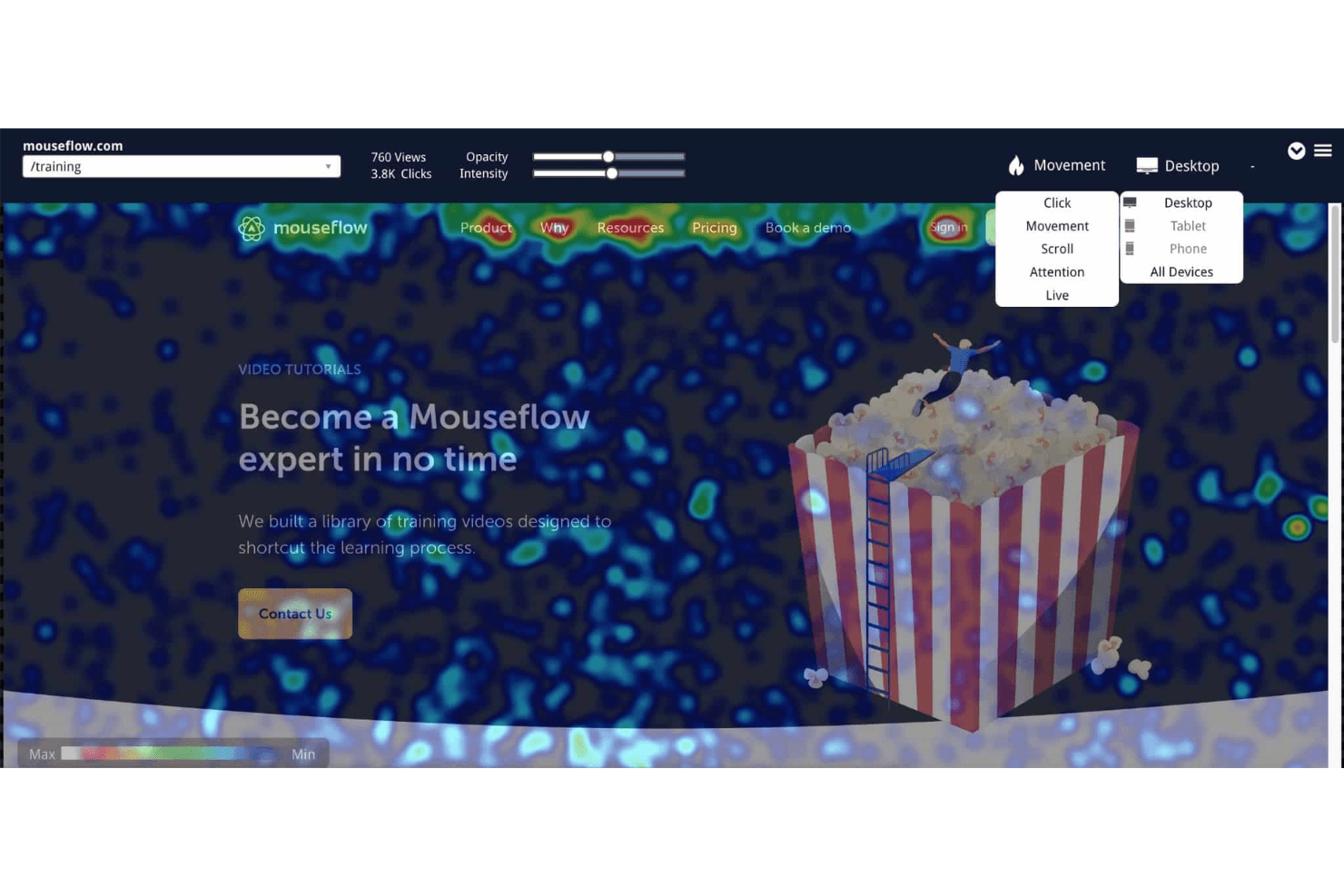
Le mappe di calore di Mouseflow visualizzano il comportamento degli utenti raccogliendo e mostrando dati su clic, scorrimento, attenzione e movimento. Mouseflow è una piattaforma di monitoraggio degli utenti che registra riproduzioni delle sessioni, mappe di calore, canalizzazioni di conversione, analisi dei moduli e rilevamento degli elementi di frizione nelle esperienze web.
Per chi è più adatto Mouseflow?
Mouseflow è particolarmente adatto ai designer UX e ai professionisti del marketing digitale che necessitano di dati visivi dettagliati sul comportamento — mappe di calore, riproduzioni delle sessioni e rilevamento degli elementi di frizione — senza dover gestire uno stack di analisi complesso.
Perché ho scelto Mouseflow
Mouseflow si è guadagnato un posto nella mia selezione perché è uno dei pochi strumenti che eccelle davvero sia nelle mappe di calore sia nella riproduzione delle sessioni, senza trattare nessuna delle due funzionalità come secondaria. Apprezzo in particolare il modo in cui i suoi sei tipi di mappe di calore, comprese le mappe di calore dell'attrito che individuano automaticamente i clic rabbiosi e i clic a vuoto, si integrano direttamente con la riproduzione delle sessioni: posso individuare un problema nella mappa di calore e recuperare immediatamente le registrazioni esatte che lo documentano. Mina AI aggiunge un ulteriore livello, permettendomi di porre domande in linguaggio naturale come 'Perché gli utenti abbandonano il pagamento?' e collegando le risposte a sessioni specifiche.
Funzionalità principali di Mouseflow
- Analisi dei moduli: Tiene traccia dei campi dei moduli che causano l'abbandono, degli invii non riusciti e dei punti in cui gli utenti interrompono la compilazione prima di completare un modulo.
- Analisi dei percorsi: Mappa i percorsi effettivi seguiti dai visitatori sul sito ed evidenzia i punti in cui escono.
- Canalizzazioni di conversione: Visualizza i flussi utente composti da più passaggi, con metriche relative a ricavi ed elementi di frizione, per mostrare esattamente dove si verifica l'abbandono.
- Sondaggi di feedback: Distribuisce sondaggi durante la sessione, incluso l'NPS, che possono essere attivati automaticamente quando un visitatore incontra un punto di frizione.
Integrazioni di Mouseflow
Mouseflow elenca 42 integrazioni, tra cui Google Analytics, Google Tag Manager, Google Ads, HubSpot, Salesforce, Shopify, WordPress, Slack e Microsoft Teams. Offre inoltre un'API REST e un server MCP per l'accesso personalizzato ai dati.
Pros and Cons
Pros:
- Combina mappe di calore e riproduzione delle sessioni
- La raccolta automatica rivela gli elementi di frizione senza codifica manuale
- Mina AI collega i modelli alle sessioni
Cons:
- I limiti mensili sulle sessioni possono interrompere il monitoraggio
- Nessun SDK nativo per app mobili
Learn more about Mouseflow: Ideale per l'analisi dei prodotti basata sugli eventi
- Piano gratuito disponibile
- A partire da $120/mese (fatturati annualmente)
Visit WebsiteCustomer Rating:4.5/5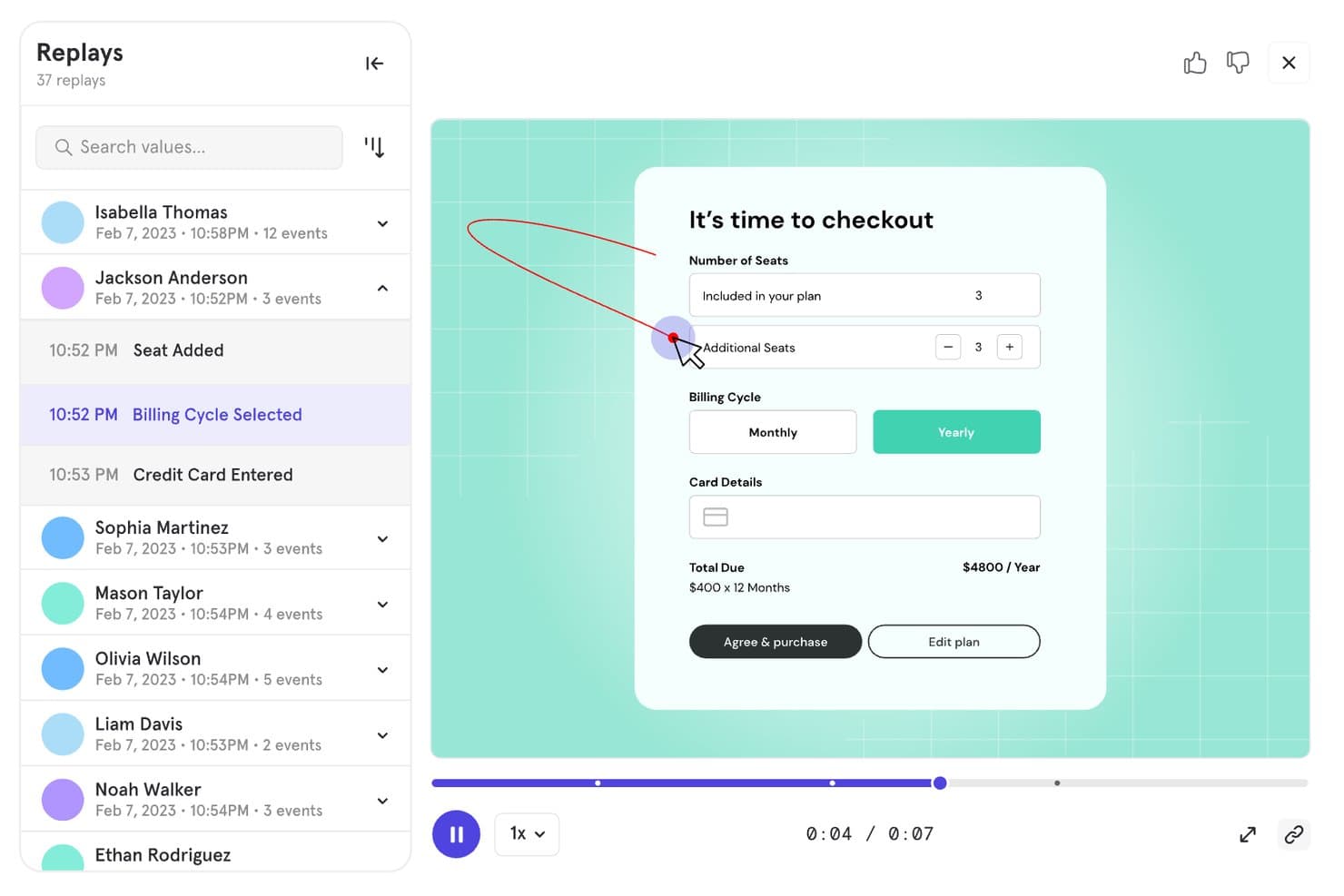
Mixpanel consente agli utenti di riprodurre le sessioni per monitorare il comportamento durante la procedura di pagamento. Mixpanel è una piattaforma di analisi dei prodotti e monitoraggio degli utenti che combina il monitoraggio basato sugli eventi, la riproduzione delle sessioni, l'analisi dei funnel e della fidelizzazione, le coorti comportamentali e la sperimentazione e i flag delle funzionalità integrati, per fonti di dati web, mobili e lato server.
Per chi è più adatto Mixpanel?
Mixpanel è una soluzione ideale per i team di prodotto e di crescita che devono analizzare in profondità il comportamento degli utenti, monitorando gli eventi, analizzando i funnel e conducendo esperimenti in un unico luogo.
Perché ho scelto Mixpanel
Mixpanel si è guadagnato un posto nella mia rosa dei preferiti perché eccelle davvero nel monitoraggio basato sugli eventi. Mi piace il fatto che si possa passare direttamente da un abbandono nel funnel alle riproduzioni delle sessioni filtrate degli utenti esatti che hanno abbandonato in quel passaggio, senza cambiare strumento né perdere il contesto. La raccolta automatica gestisce automaticamente la registrazione delle interazioni sul web e sui dispositivi mobili, mentre le coorti comportamentali consentono di suddividere i report sulla fidelizzazione e sui flussi in base a qualsiasi proprietà o azione dell'utente.
Funzionalità principali di Mixpanel
- Monitoraggio degli eventi multipiattaforma: Acquisisce le azioni degli utenti su web, iOS, Android, Flutter e sulle fonti lato server o nei magazzini di dati in un'unica sequenza temporale unificata.
- Coorti comportamentali: Consente di raggruppare gli utenti in base a qualsiasi combinazione di azioni, proprietà o sequenze di eventi per filtrare i report e l'analisi della fidelizzazione.
- Sperimentazione integrata: Esegue test A/B multivariati con metodi statistici tra cui frequentista, sequenziale e CUPED, oltre al rilevamento delle discrepanze nel rapporto tra campioni.
- Flag delle funzionalità: Supporta distribuzioni percentuali, targeting basato sulle coorti, varianti persistenti e memorizzazione nella cache offline con una traccia di controllo completa.
Integrazioni di Mixpanel
Mixpanel supporta integrazioni con Segment e mParticle, oltre a connettori per magazzini di dati e pipeline di dati. Le sue API supportano l'acquisizione personalizzata dei dati, le esportazioni e le query.
Pros and Cons
Pros:
- Collega direttamente i funnel alle riproduzioni delle sessioni
- Acquisisce il comportamento dettagliato degli utenti su più piattaforme
- Combina analisi, sperimentazione e flag delle funzionalità
Cons:
- La configurazione degli eventi richiede una pianificazione tecnica
- I costi aumentano con la crescita del volume monitorato
 Ideale per il monitoraggio delle sessioni nei settori regolamentati
- Demo gratuita disponibile
- Prezzo su richiesta
Visit WebsiteCustomer Rating:4.7/5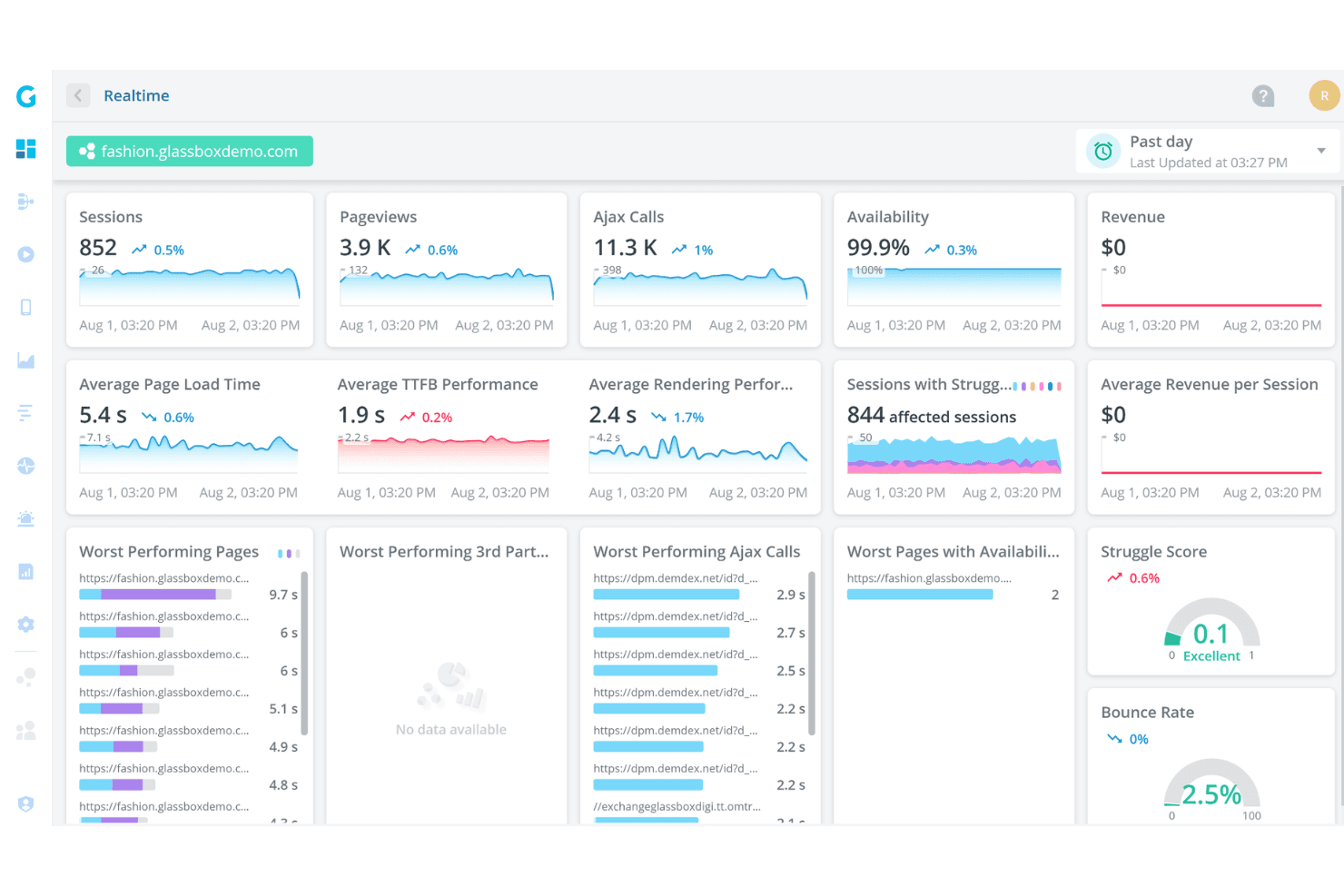
Glassbox offre un pannello di controllo di analisi in tempo reale che mostra sessioni, visualizzazioni di pagina, chiamate Ajax, disponibilità, tempi di caricamento delle pagine e punteggi di difficoltà per un sito demo di moda. Glassbox è una piattaforma di analisi dell'esperienza digitale che combina l'acquisizione automatica senza tag, la riproduzione delle sessioni, le mappe di calore (mappe delle interazioni), l'analisi dei funnel e il rilevamento dei comportamenti assistito dall'IA sul web e nelle app mobili native.
Per chi è più adatto Glassbox?
Glassbox è particolarmente adatto ai team aziendali del settore bancario, finanziario e di altri settori regolamentati che necessitano di un monitoraggio delle sessioni con controlli di conformità integrati.
Perché ho scelto Glassbox
Glassbox si è guadagnato un posto nella mia lista ristretta perché affronta la conformità con grande serietà senza sacrificare la profondità degli approfondimenti. Apprezzo il fatto che includa controlli integrati per HIPAA, PCI, GDPR e GLBA, oltre alle certificazioni SOC 2 Type II e ISO 27001, il che significa che i team dei settori regolamentati non devono aggiungere a posteriori la privacy a uno strumento di analisi. La sua acquisizione automatica senza tag registra oltre 1.000 eventi per sessione, con i campi sensibili mascherati per impostazione predefinita, mentre il punteggio di difficoltà segnala automaticamente i momenti di attrito, consentendo ai team soggetti a rigorosi requisiti di conformità di agire sui dati comportamentali senza dover contrassegnare manualmente un singolo elemento.
Funzionalità principali di Glassbox
- Mappa del percorso aumentata™: Una mappa visiva dei percorsi degli utenti sul sito o nell'app che evidenzia i punti in cui gli utenti abbandonano il percorso a ogni passaggio.
- Riepilogo delle sessioni GIA: Un assistente IA che genera riepiloghi in linguaggio semplice delle singole sessioni e consente di cercare le registrazioni utilizzando query in linguaggio naturale.
- Voce del silenzioso: Uno strumento integrato per il feedback dei clienti che raccoglie input qualitativi direttamente nella piattaforma, insieme ai dati comportamentali.
- Implementazione a tenant singolo e in sede: Glassbox supporta l'implementazione sulla propria infrastruttura o su un'istanza cloud dedicata su AWS o Azure.
Integrazioni di Glassbox
Glassbox offre integrazioni con Adobe Analytics, Google Analytics, Google Tag Manager, Adobe Launch, Tealium, Jira, Slack, Qualtrics, Optimizely e VWO. Fornisce inoltre un'API aperta per integrazioni personalizzate.
Pros and Cons
Pros:
- L'acquisizione senza tag evita l'assegnazione manuale dei tag agli eventi
- Gestisce i percorsi web e mobili nativi
- I controlli di conformità sono adatti ai team di prodotto dei settori regolamentati
Cons:
- La conservazione delle riproduzioni può limitare le analisi storiche
- L'elevato volume di dati può confondere i nuovi utenti
Learn more about Glassbox: Ideale per valutare e monitorare l'adozione del prodotto
- Prova gratuita di 30 giorni
- Prezzi disponibili su richiesta
Visit WebsiteCustomer Rating:4.4/5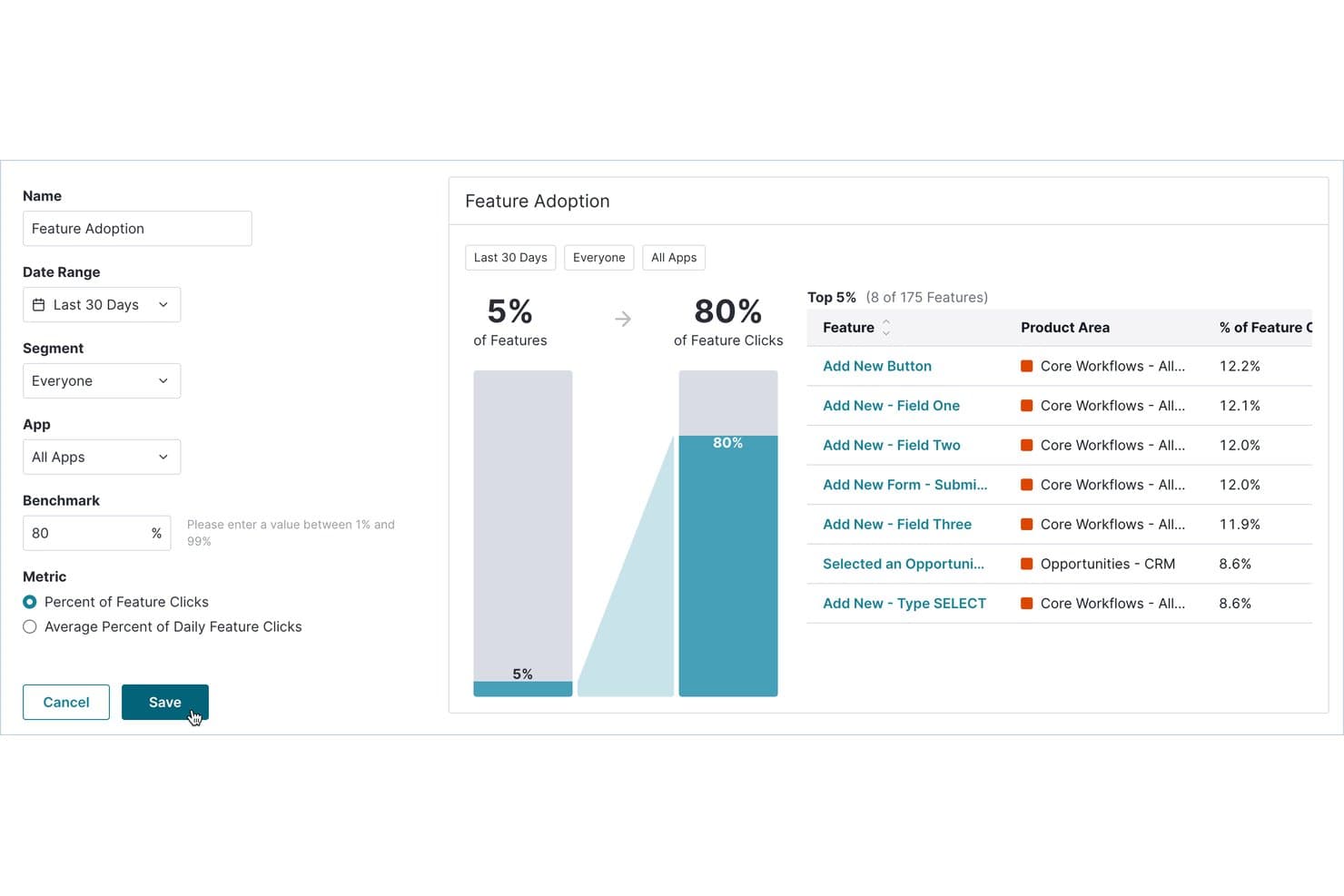
Pendo monitora quali funzionalità generano il maggior numero di clic e il livello più elevato di adozione da parte degli utenti. Pendo è una piattaforma di analisi dei prodotti e monitoraggio degli utenti che combina il monitoraggio automatico del comportamento, la riproduzione delle sessioni, l'analisi degli imbuti e dei percorsi, le guide nell'app e i sondaggi NPS in un unico strumento.
Per chi è più adatto Pendo?
Pendo è particolarmente adatto ai responsabili di prodotto e alle squadre di crescita di aziende di medie e grandi dimensioni che hanno bisogno di collegare direttamente i dati sul comportamento degli utenti ai risultati in termini di adozione e fidelizzazione.
Perché ho scelto Pendo
Pendo si è guadagnato un posto nella mia rosa ristretta grazie al suo Punteggio di coinvolgimento del prodotto (PES), che riunisce adozione, frequenza d'uso e crescita in un'unica metrica che indica esattamente a che punto del percorso si trovano gli utenti. Mi piace molto anche il fatto che l'acquisizione automatica registri ogni interazione dal momento in cui installi il frammento di codice, così puoi applicare etichette alle funzionalità anche retroattivamente e visualizzarne comunque l'intera cronologia. Questo significa che non perdo mai l'accesso ai dati storici solo perché non ho predisposto il monitoraggio di qualcosa fin dall'inizio.
Funzionalità principali di Pendo
- Riproduzione delle sessioni: Guarda le sessioni reali degli utenti sulle applicazioni web e mobili, con clic ripetuti e inversioni di percorso segnalati automaticamente.
- Analisi di imbuti e percorsi: Monitora il modo in cui gli utenti attraversano flussi composti da più passaggi e individua esattamente il punto in cui abbandonano.
- Assistente IA Leo: Poni domande in linguaggio naturale sui dati del tuo prodotto e ottieni risposte direttamente dai dati Pendo in tempo reale.
- Sincronizzazione dei dati: Esporta i dati sull'utilizzo del prodotto e i metadati degli utenti verso magazzini di dati come Snowflake, S3, Azure o Google Cloud.
Integrazioni di Pendo
Pendo offre oltre 85 integrazioni, tra cui Salesforce, Zendesk, Atlassian, Snowflake, Amazon S3, Azure e Google Cloud. La sua funzionalità di sincronizzazione dei dati invia i dati sull'utilizzo del prodotto e i metadati degli account ai magazzini di dati e agli archivi cloud supportati.
Pros and Cons
Pros:
- L'acquisizione automatica consente di analizzare retroattivamente gli eventi
- Il Punteggio di coinvolgimento del prodotto monitora le tendenze di adozione
- Le riproduzioni illimitate delle sessioni rivelano i segnali di frizione
Cons:
- Le mappe di calore coprono solo le funzionalità contrassegnate
- La conservazione delle riproduzioni è impostata su 30 giorni per impostazione predefinita
Learn more about Pendo: Ideale per mappe di calore senza codice e monitoraggio CRO
- Prova gratuita di 30 giorni disponibile
- A partire da $29/mese
Visit WebsiteCustomer Rating:4.3/5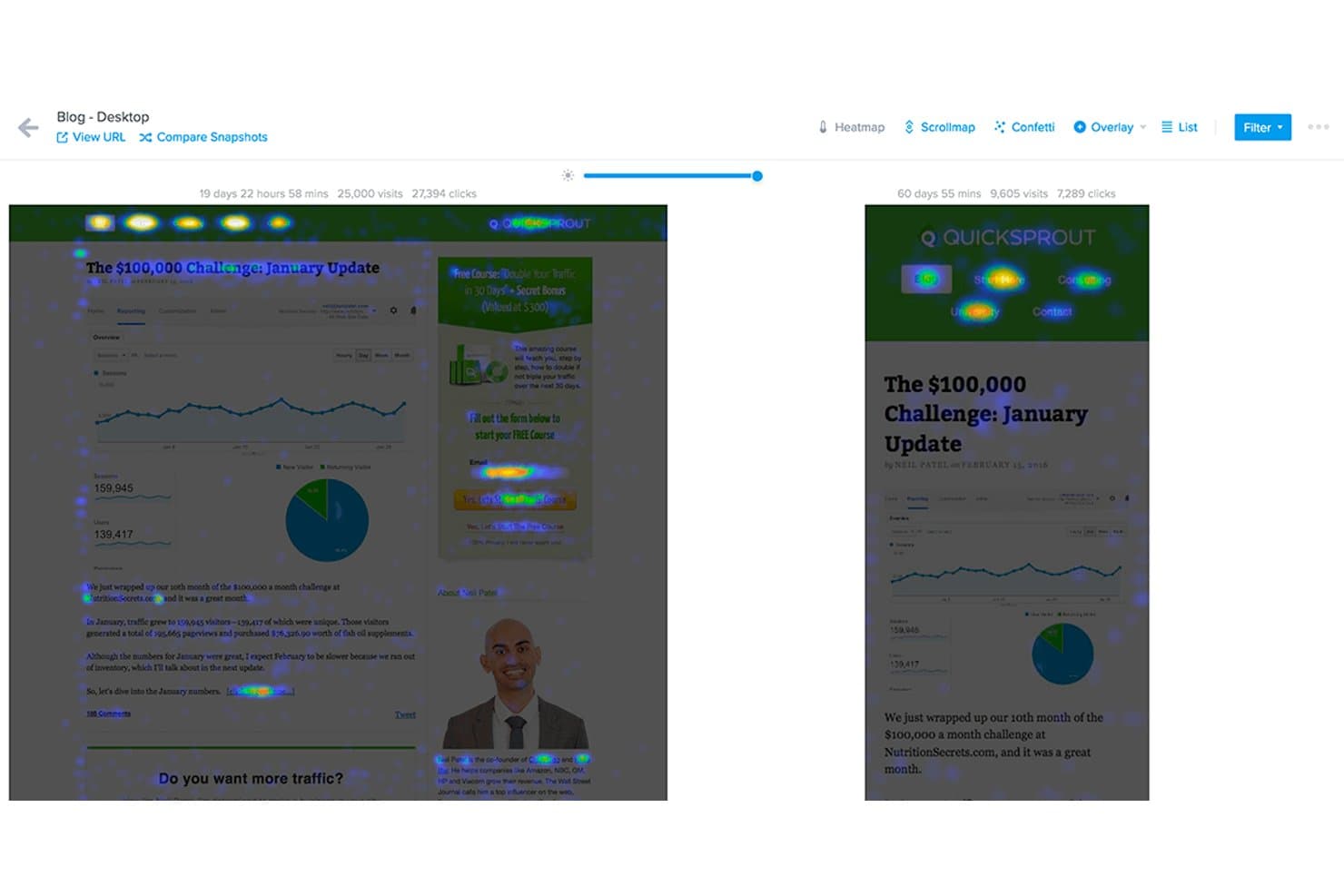
Crazy Egg confronta affiancate le mappe di calore di due istantanee della pagina. Crazy Egg è uno strumento per il monitoraggio del comportamento sui siti web che combina mappe di calore, registrazioni delle sessioni, monitoraggio degli imbuti, test A/B e sondaggi sul sito in un'unica piattaforma senza codice.
Per chi è più adatto Crazy Egg?
Crazy Egg è particolarmente adatto ai responsabili del marketing digitale e ai designer UX che hanno bisogno di una visibilità rapida e senza codice sul comportamento degli utenti sul sito web, senza dover gestire un insieme complesso di strumenti di analisi.
Perché ho scelto Crazy Egg
Crazy Egg è entrato nella mia rosa di candidati perché i suoi cinque tipi di mappe di calore offrono un livello di dettaglio visivo davvero difficile da trovare in un unico strumento senza codice. Apprezzo in particolare la mappa a coriandoli, che suddivide i singoli clic in base a oltre 20 attributi, come fonte UTM, dispositivo e tipo di traffico, permettendoti di vedere esattamente quale segmento di pubblico sta ignorando la tua CTA. Se a questo aggiungi le registrazioni delle sessioni segnalate dall'intelligenza artificiale e filtrate in base all'abbandono dell'imbuto, ottieni un ciclo di riscontro efficace tra i dati sul comportamento e le decisioni sulle conversioni.
Funzionalità principali di Crazy Egg
- Mappa di calore dello scorrimento: mostra esattamente fino a che punto della pagina scorrono i visitatori, così puoi vedere dove cala l'attenzione prima che gli utenti raggiungano i contenuti chiave.
- Test A/B: ti consente di eseguire test con suddivisione del traffico illimitati direttamente sulla piattaforma senza modificare il codice.
- Sondaggi sul sito: raccoglie feedback qualitativi dai visitatori in punti specifici del loro percorso utilizzando richieste di sondaggio mirate all'interno della pagina.
- Monitoraggio degli errori: segnala automaticamente gli errori JavaScript e le interazioni non funzionanti che potrebbero compromettere l'esperienza utente sul sito.
Integrazioni di Crazy Egg
Crazy Egg offre integrazioni con Google Tag Manager, Segment, Shopify, WordPress, Wix, Squarespace, Magento, Drupal, Joomla, Google, Meta e TikTok. Supporta inoltre il monitoraggio delle conversioni lato server tramite un'API.
Pros and Cons
Pros:
- Cinque tipi di mappe di calore rivelano dettagliati modelli di comportamento
- L'intelligenza artificiale segnala le registrazioni utili per un'analisi più rapida
- Gli imbuti collegano gli abbandoni nelle conversioni alle registrazioni
Cons:
- I limiti delle registrazioni possono mettere in pausa la raccolta dei dati
- Il monitoraggio limitato ai siti web esclude i percorsi nelle app mobili
Learn more about Crazy Egg: Ideale per l'analisi dei percorsi e delle sessioni multipiattaforma
- Demo gratuita disponibile
- Prezzi su richiesta
Visit WebsiteCustomer Rating:4.7/5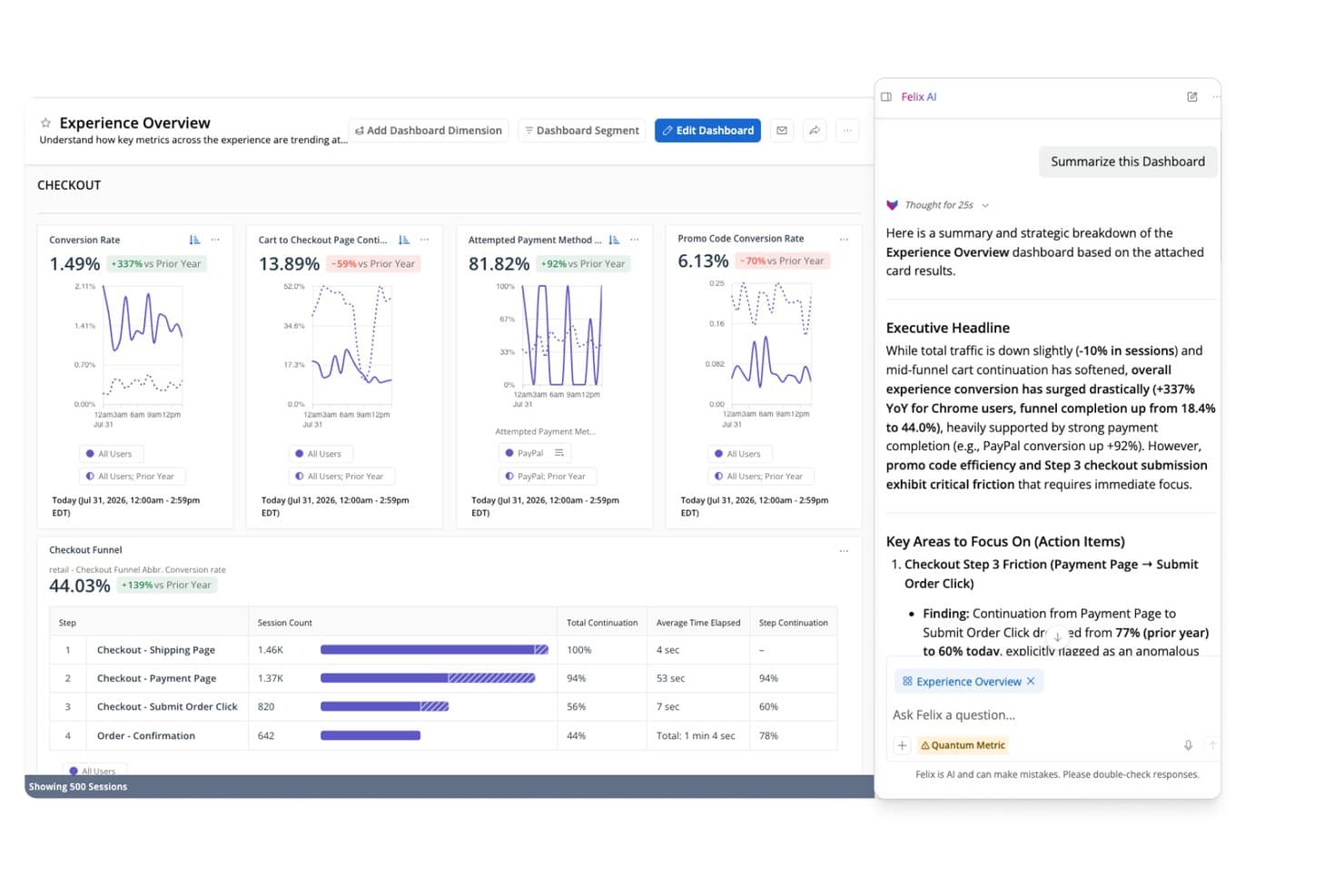
Felix AI di Quantum Metric riepiloga istantaneamente gli approfondimenti sul percorso di conversione del pagamento. Quantum Metric è una piattaforma aziendale per il monitoraggio degli utenti che combina la riproduzione automatica delle sessioni, mappe di calore delle interazioni in tempo reale, analisi dei percorsi di conversione e dei percorsi e analisi del comportamento basata sull'IA per applicazioni web e mobili native.
Per chi è più indicato Quantum Metric?
Quantum Metric è progettato per i team aziendali che si occupano di prodotto, UX e analisi e che hanno bisogno di collegare i dati sul comportamento web e mobile nativo in un'unica piattaforma.
Perché ho scelto Quantum Metric
Quantum Metric è entrato nella mia lista ristretta perché unisce le sessioni web e mobili native in una visualizzazione unica e continua del percorso, senza richiedere strumenti separati. Apprezzo molto il modo in cui l'Analisi delle opportunità classifica automaticamente i punti di attrito in base all'impatto aziendale, così il mio team non deve indovinare quale abbandono sia davvero importante. Felix AI aggiunge un ulteriore livello, scrivendo riepiloghi delle sessioni e segnalando le anomalie in un linguaggio semplice, trasformando i dati grezzi delle riproduzioni in informazioni su cui è possibile agire in pochi minuti.
Funzionalità principali di Quantum Metric
- Rilevamento preciso degli eventi: consente di definire e acquisire eventi personalizzati oltre agli oltre 300 segnali acquisiti automaticamente per impostazione predefinita, offrendo un monitoraggio mirato nei casi in cui il solo contesto comportamentale non sia sufficiente.
- Analisi della fidelizzazione per coorti: raggruppa gli utenti in base a comportamenti o attributi condivisi e monitora il loro ritorno nel tempo, consentendo di individuare i punti in cui il coinvolgimento diminuisce dopo momenti chiave del prodotto.
- Componente aggiuntivo per la trasmissione dei dati: trasferisce i dati delle sessioni e del comportamento direttamente in Snowflake, BigQuery, Redshift, Databricks e altre destinazioni di archiviazione dei dati, applicando filtri e allineamento dello schema prima dell'esportazione.
- Controlli della privacy con crittografia a livello di dispositivo: cifra i dati sensibili sul dispositivo dell'utente prima della trasmissione e consente di escludere input o componenti specifici dalla cattura a un livello granulare.
Integrazioni di Quantum Metric
Le integrazioni documentate includono Optimizely, Adobe Customer Journey Analytics, Alchemer, Snowflake, BigQuery, Redshift, Databricks, Amazon S3 e Oracle. Il componente aggiuntivo per la trasmissione dei dati di Quantum Metric collega i dati comportamentali a queste destinazioni di archiviazione dei dati.
Pros and Cons
Pros:
- L'unificazione dei percorsi multipiattaforma collega web e mobile
- Felix AI riepiloga le sessioni e segnala le anomalie
- L'Analisi delle opportunità collega gli attriti all'impatto aziendale
Cons:
- Il caricamento delle riproduzioni e delle sessioni può essere lento
- La navigazione nella ricerca e nei segmenti frustra i revisori
Learn more about Quantum Metric: Ideale per la riproduzione delle sessioni associata ai percorsi di conversione quantitativi
- Piano gratuito disponibile
- Prezzi su richiesta
Visit WebsiteCustomer Rating:4.5/5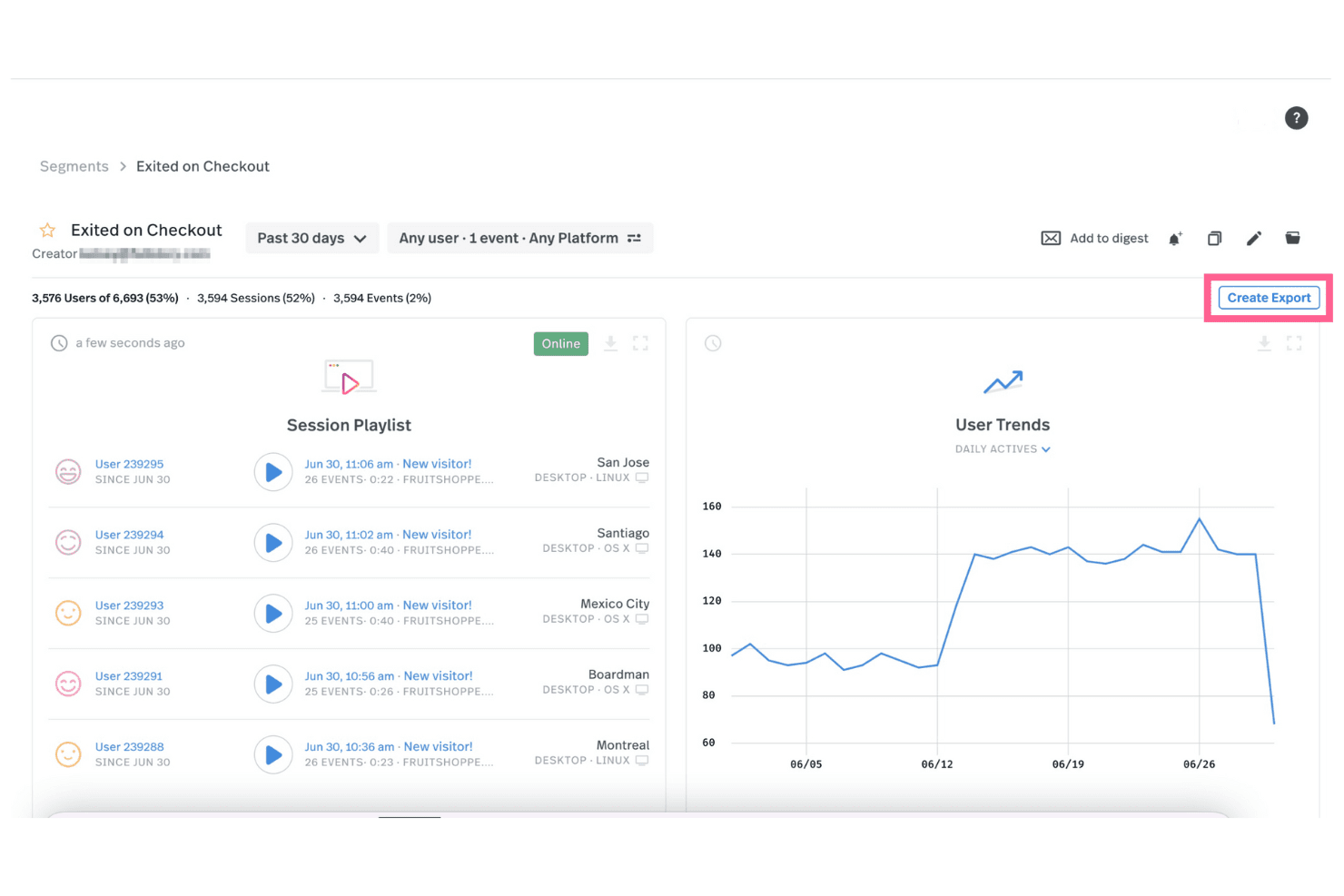
Fullstory consente di visualizzare le riproduzioni delle sessioni per vari eventi ed esportare questi dati negli altri sistemi. Fullstory è una piattaforma di dati comportamentali digitali progettata per aiutare le squadre a comprendere come gli utenti interagiscono con il loro sito web o la loro app. Integrando i dati comportamentali nell'infrastruttura di analisi di un'organizzazione, Fullstory fornisce ai responsabili tecnologici informazioni comportamentali di qualità su larga scala. Questo approccio favorisce decisioni più incentrate sul cliente.
La sua funzione di riproduzione delle sessioni consente di visualizzare una registrazione perfetta al pixel di ciò che gli utenti fanno sul sito, sia che stiano scorrendo, facendo clic o riscontrando problemi. È possibile filtrare queste riproduzioni per concentrarsi su utenti o comportamenti specifici, rendendo più semplice identificare i problemi e comprendere esattamente come gli utenti interagiscono con i contenuti. Un'altra caratteristica fondamentale sono le mappe di calore, che mostrano visivamente dove gli utenti concentrano la loro attenzione sul sito. Questo tipo di informazioni aiuta le aziende a entrare in maggiore sintonia con i propri clienti e migliora la capacità di creare esperienze che favoriscono tassi di conversione più elevati nel percorso di conversione e di individuare potenziali frodi o comportamenti dannosi.
Il monitoraggio personalizzato degli eventi di Fullstory consente inoltre di controllare azioni specifiche, come i clic sui pulsanti o l'invio di moduli, senza dover configurare il monitoraggio manuale tramite la squadra di sviluppo. È anche possibile monitorare retroattivamente gli eventi delle sessioni passate, risparmiando tempo ed eliminando la necessità di prevedere in anticipo il comportamento degli utenti.
Le integrazioni includono Google Analytics, Segment, Optimizely, Slack e Jira.
Learn more about Fullstory: Beste voor het bijhouden van SaaS-gedrag en trechteranalyse
- Gratis proefperiode van 14 dagen
- Vanaf $299/maand
Visit WebsiteCustomer Rating:4.5/5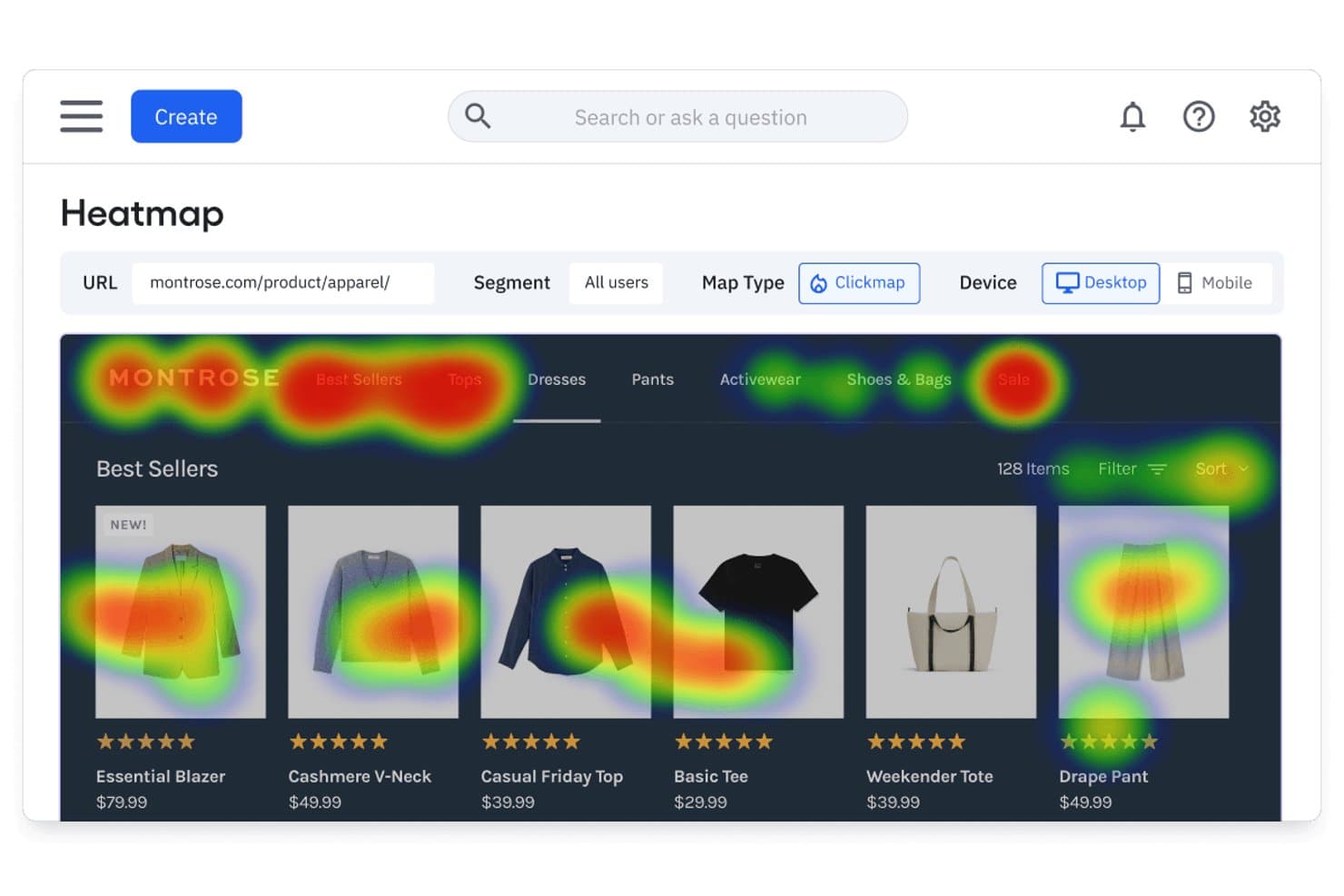 Learn more about Amplitude:
 Ideale per l'analisi retroattiva degli eventi senza configurazione dei tag
- Piano gratuito disponibile
- Prezzi disponibili su richiesta
Visit WebsiteCustomer Rating:4.3/5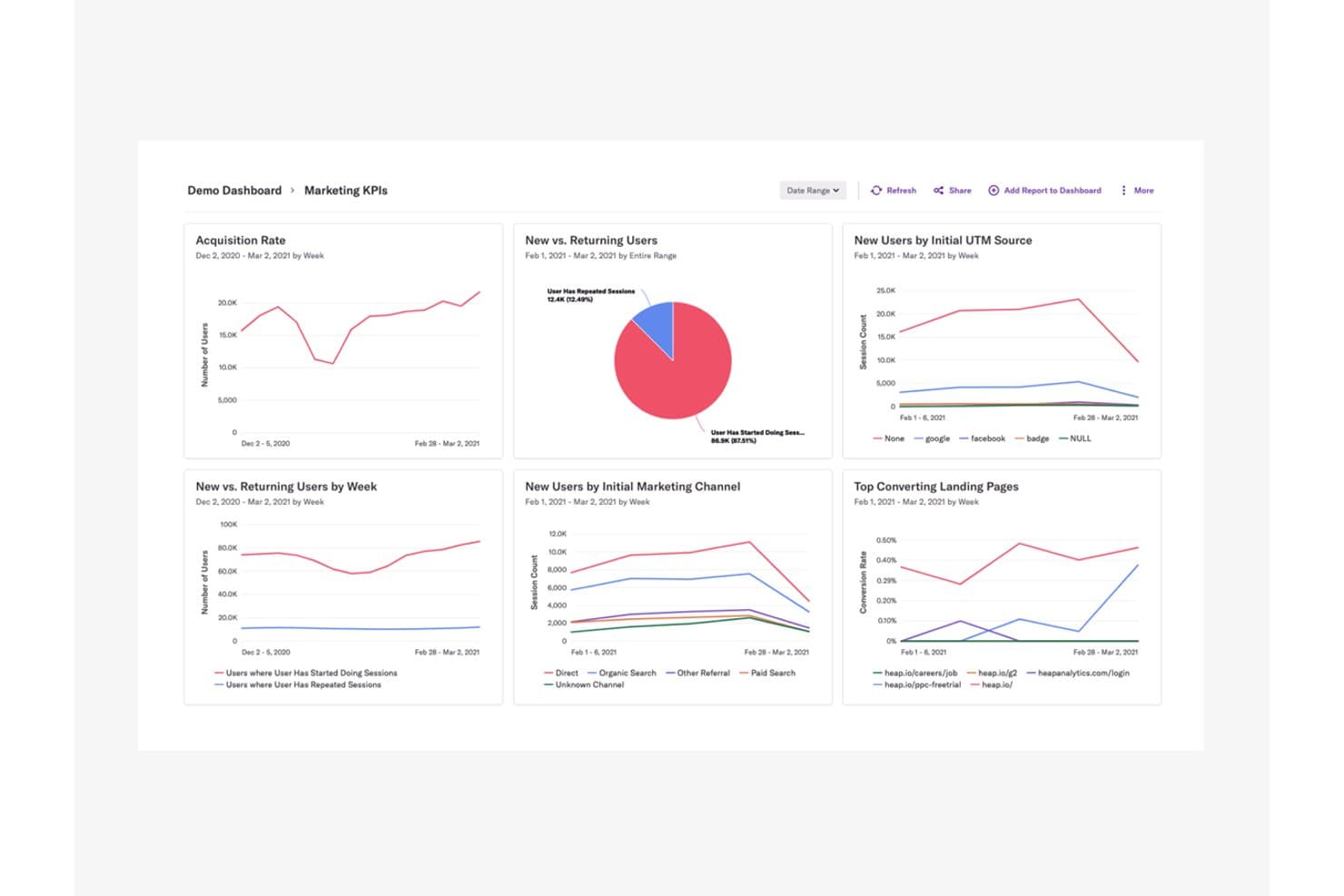
Heap centralizza i KPI di marketing per rivelare le tendenze di acquisizione e comportamento degli utenti. Heap (di Contentsquare) è una piattaforma di analisi dei prodotti e monitoraggio degli utenti che acquisisce automaticamente clic, visualizzazioni di pagina, compilazioni di moduli e percorsi degli utenti su web e dispositivi mobili, senza richiedere la configurazione anticipata degli eventi.
Per chi è più adatto Heap?
Heap è particolarmente adatto ai team di prodotto e crescita che devono analizzare il comportamento degli utenti senza dover attendere l'intervento degli sviluppatori per configurare gli eventi.
Perché ho scelto Heap
Ho scelto Heap come una delle soluzioni migliori perché il suo approccio di acquisizione automatica consente di registrare ogni clic, compilazione di modulo e visualizzazione di pagina fin dal primo giorno, senza configurazioni preliminari. Ciò che apprezzo maggiormente è la possibilità di definire gli eventi retroattivamente: quindi, se una perdita di utenti emerge in un funnel a settimane dal lancio, posso comunque tornare indietro e analizzare le interazioni esatte che l'hanno provocata. A questo si aggiunge la possibilità di passare direttamente da una fase del funnel alla riproduzione della sessione relativa a quel momento: si ottiene così un livello di contesto difficile da replicare altrove.
Funzionalità principali di Heap
- Matrice del coinvolgimento: Visualizza i livelli di coinvolgimento degli utenti all'interno del prodotto per aiutarti a individuare quali funzionalità favoriscono la fidelizzazione e quali rimangono inutilizzate.
- Assistente IA Sense: Genera riepiloghi, risponde alle domande successive e mette in evidenza informazioni utili dai dati analitici attraverso un'interfaccia conversazionale.
- Analisi basata sugli account: Raggruppa i dati comportamentali per azienda o account, consentendo di analizzare i modelli di utilizzo a livello organizzativo, non solo a livello del singolo utente.
- Heap Activate: Invia i dati comportamentali da Heap direttamente agli strumenti di coinvolgimento dei clienti, consentendo di creare guide mirate all'interno dell'app e campagne email basate sulle azioni effettive degli utenti.
Integrazioni di Heap
Heap offre Heap Connect per la sincronizzazione con i data warehouse e Heap Activate per gli strumenti di coinvolgimento dei clienti. Sono disponibili API per integrazioni personalizzate.
Pros and Cons
Pros:
- L'analisi retroattiva degli eventi non richiede la configurazione dei tag
- Le perdite nel funnel si collegano direttamente alle riproduzioni delle sessioni
- L'acquisizione automatica riduce il lavoro degli sviluppatori per la configurazione degli eventi
Cons:
- La riproduzione delle sessioni e le mappe di calore non sono incluse universalmente
- Nessuna funzionalità nativa per flag delle funzionalità o sperimentazione
Learn more about Heap (by Contentsquare): 10Ideale per il monitoraggio degli utenti open source e nativo per il data warehouse
PostHog
- Piano gratuito + demo gratuita disponibile
- A partire da $34/mese
Visit WebsiteCustomer Rating:4.5/5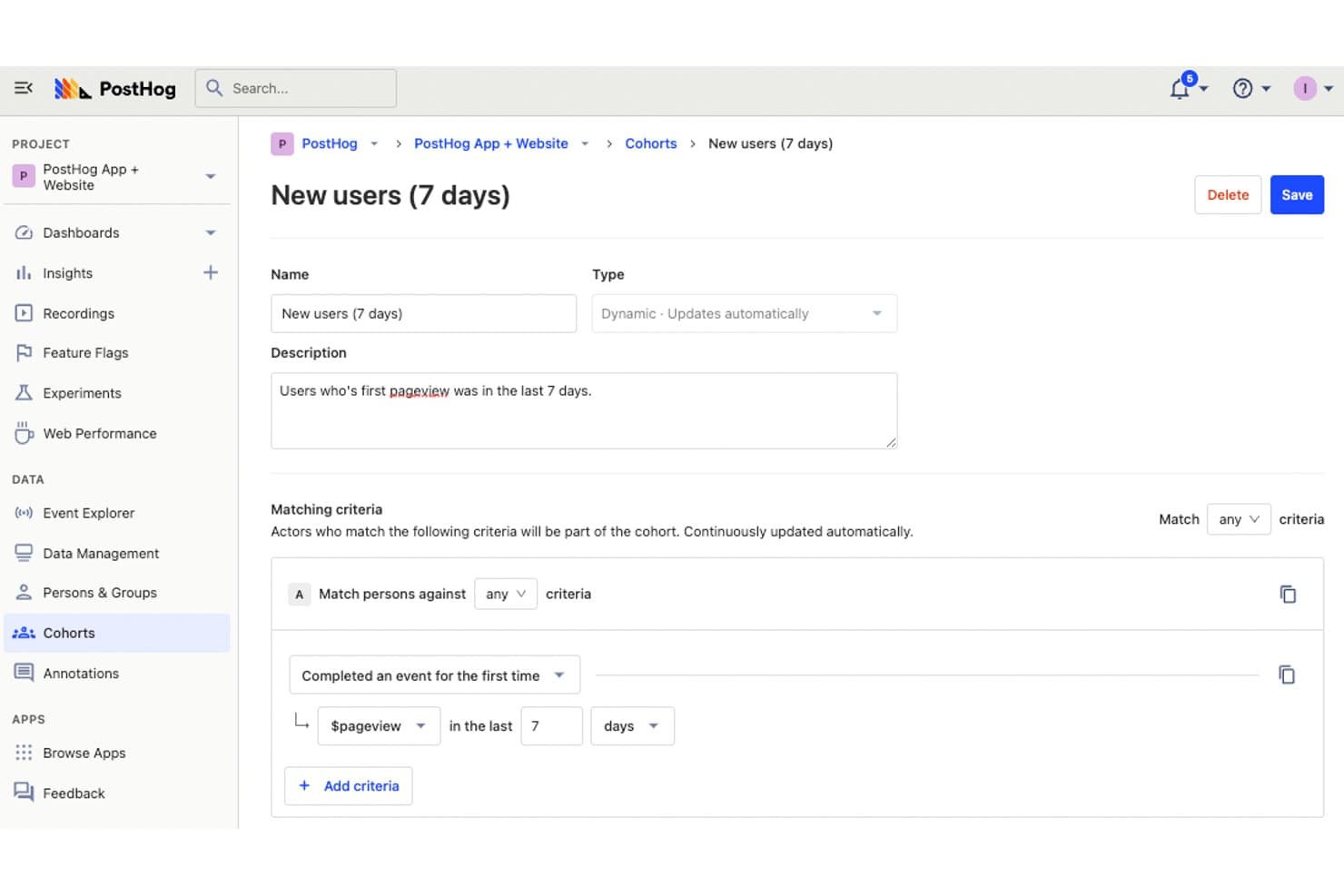
PostHog consente agli utenti di definire coorti dinamiche per monitorare i nuovi utenti. PostHog è una piattaforma open source per il monitoraggio degli utenti che combina analisi del prodotto, riproduzione delle sessioni, mappe di calore e monitoraggio dei funnel con flag delle funzionalità, sperimentazione e un livello dati nativo per il data warehouse integrati.
Per chi è più adatto PostHog?
PostHog è particolarmente adatto ai team di prodotto e di ingegneria che desiderano il pieno controllo dei propri dati senza dover assemblare strumenti separati per analisi, riproduzione delle sessioni e sperimentazione.
Perché ho scelto PostHog
PostHog si è guadagnato un posto nella mia lista ristretta perché è l'unico strumento di monitoraggio degli utenti che abbia visto combinare la riproduzione delle sessioni, le mappe di calore e l'analisi dei funnel con un data warehouse integrato e una base di codice completamente open source. Mi piace molto il fatto che l'acquisizione automatica registri clic, clic compulsivi e profondità di scorrimento senza alcuna codifica manuale e che io possa passare direttamente da un punto di abbandono del funnel alle registrazioni delle sessioni che lo spiegano. I riepiloghi delle riproduzioni basati sull'intelligenza artificiale e l'accesso MCP mi consentono di raggruppare le sessioni per errore o schema comportamentale in pochi secondi.
Funzionalità principali di PostHog
- Analisi delle correlazioni: evidenzia automaticamente quali proprietà o comportamenti degli utenti sono statisticamente associati a tassi di conversione più alti o più bassi all'interno dei funnel.
- Integrazione dei flag delle funzionalità nelle riproduzioni: i flag attivi durante una sessione appaiono direttamente nella sequenza temporale della riproduzione, così puoi filtrare le registrazioni per gruppo di test A/B o distribuzione della funzionalità.
- Trasformazione degli eventi CDP: arricchisce, filtra, rinomina e rimuove le informazioni personali identificabili dagli eventi non appena arrivano, quindi trasmette i dati elaborati a oltre 50 destinazioni in tempo reale.
- Accesso SQL tramite HogQL: consente di interrogare direttamente i dati degli eventi con un dialetto SQL basato su PostHog, offrendo ai team di analisi e ingegneria piena flessibilità oltre i tipi di report predefiniti.
Integrazioni di PostHog
PostHog supporta oltre 50 destinazioni CDP, tra cui Slack, Braze, Customer.io, Salesforce, HubSpot, Vitally, Gainsight, PagerDuty e webhook. Si connette inoltre a Snowflake e BigQuery come origini del data warehouse e supporta destinazioni personalizzate.
Pros and Cons
Pros:
- L'acquisizione automatica riduce la codifica manuale degli eventi
- I funnel si collegano direttamente alle riproduzioni delle sessioni
- L'architettura nativa per il data warehouse supporta l'analisi SQL
Cons:
- I flussi di lavoro orientati agli sviluppatori possono mettere in difficoltà i professionisti del marketing non tecnici
- Le esportazioni delle riproduzioni restano limitate a JSON
Learn more about PostHog:
Altri software per il monitoraggio degli utenti
Ecco alcune opzioni aggiuntive di software per il monitoraggio degli utenti che non sono state incluse nella mia selezione, ma che vale comunque la pena prendere in considerazione:
- 11ContentsquareIdeale per il comportamento e l'analisi dei percorsi collegati ai ricavi
- 12LogRocketIdeale per la riproduzione delle sessioni collegata al contesto degli errori
- 13SemrushIdeale per i dati sul pubblico della concorrenza e le mappe di calore
- 14UXCamIdeale per il monitoraggio del comportamento delle app mobili con l'IA
- 15UserpilotIdeale per il monitoraggio del comportamento SaaS e l'analisi dei percorsi di conversione
- 16Lucky OrangeIdeale per il comportamento del sito web in tempo reale e gli approfondimenti basati sull'intelligenza artificiale
- 17Microsoft ClarityIdeale per la raccolta gratuita e illimitata di dati comportamentali
Come valuto i software per il monitoraggio degli utenti
Divido la mia valutazione in tre parti, dando il maggior peso alle funzionalità fondamentali: cerco strumenti che catturino le interazioni granulari degli utenti e riproducano le sessioni in modo affidabile. Dopodiché, valuto le funzionalità distintive, come la strumentazione con acquisizione automatica. Infine, considero fattori che vanno oltre le funzionalità, come la scalabilità dei prezzi e il livello di conformità.
Funzionalità fondamentali (requisiti essenziali per questo elenco)
Quando seleziono gli strumenti da inserire nel mio elenco, assegno a ciascuno un punteggio su una scala da 0 (non offre la funzionalità) a 5 (eccelle in quest'area) per ognuna delle funzionalità fondamentali elencate di seguito. Converto quindi il totale in una percentuale per contribuire a valutare l'idoneità complessiva di ciascuno strumento, dando un peso aggiuntivo alle funzionalità che ho ritenuto essenziali.
- Acquisizione del comportamento (essenziale): verifico se lo strumento registra clic, scorrimenti, tocchi e percorsi di navigazione sia negli ambienti web sia nelle app, con un livello di dettaglio sufficiente a ricostruire le reali intenzioni degli utenti.
- Registrazione o riproduzione delle sessioni: la qualità della riproduzione è importante, quindi valuto i filtri, i periodi di conservazione e la possibilità di collegare le sessioni a errori o eventi specifici che aiutino a individuare il punto in cui gli utenti si bloccano.
- Visualizzazione delle mappe di calore: cerco mappe di calore relative a clic, scorrimenti e movimenti che possano essere filtrate per segmento o dispositivo, così da confrontare il modo in cui i visitatori da dispositivi mobili interagiscono con gli utenti desktop sulla stessa pagina.
- Monitoraggio degli eventi e dei percorsi di conversione: mi concentro sui creatori di percorsi di conversione a più passaggi. Valuto se sia possibile definire sequenze di conversione personalizzate e individuare esattamente quale passaggio fa perdere più utenti durante i flussi di pagamento o di inserimento iniziale.
- Segmentazione dei dati degli utenti: la possibilità di combinare attributi come il tipo di dispositivo, la fonte di provenienza e la coorte di utenti in un unico insieme di filtri mi indica se uno strumento supporta il tipo di analisi comparativa di cui i PM hanno effettivamente bisogno.
- Esportazione o integrazione dei dati: verifico la presenza di connessioni native a strumenti come Mixpanel, Amplitude, Segment e ai più comuni magazzini di dati, oltre a controllare se l'esportazione supporta un flusso di dati automatizzato o in tempo reale, anziché il solo recupero manuale di file CSV.
Una volta ottenuto un elenco di strumenti che soddisfano i criteri, considero ciò che distingue ciascuna piattaforma.
Fattori distintivi (ciò che differenzia i fornitori)
Ecco come confronto e metto a paragone i diversi fornitori:
Funzionalità distintive
La strumentazione con acquisizione automatica è il primo elemento che valuto, perché elimina la necessità di applicare manualmente etichette a ogni pulsante, collegamento o campo del modulo. Strumenti come Heap e PostHog adottano approcci diversi in questo ambito e osservo quanto efficacemente ciascuno riesca a far emergere retroattivamente eventi che non avevi previsto. Verifico anche la presenza della sintesi delle sessioni tramite IA, che segnala clic ripetuti causati dalla frustrazione e flussi senza uscita, così da non dover esaminare centinaia di riproduzioni per trovare i punti di attrito. Anche l'associazione tra gestione degli indicatori delle funzionalità e sperimentazione è importante: quando uno strumento consente di distribuire una modifica a un segmento e misurarne l'impatto sul comportamento all'interno della stessa piattaforma, si evita di passare continuamente dallo strumento di analisi al proprio insieme di strumenti di test.
Oltre le funzionalità
Valuto quanto tempo di lavoro tecnico richieda inizialmente ciascuno strumento. Alcune piattaforme, come Heap, acquisiscono automaticamente gli eventi fin da subito, mentre altre necessitano di uno schema di eventi personalizzato prima di mostrare qualsiasi dato. Questa differenza è importante quando il team non dispone di un supporto dedicato per l'ingegneria dei dati. Anche la scalabilità dei prezzi è altrettanto importante: i modelli basati sull'utilizzo e legati al numero mensile di utenti monitorati o al volume degli eventi possono far aumentare rapidamente i costi con la crescita del prodotto. Verifico inoltre il livello di conformità di ciascun fornitore, esaminando le funzionalità integrate di oscuramento dei dati personali identificabili, la gestione del consenso e le opzioni di residenza dei dati, che influiscono sulla possibilità di distribuire la riproduzione delle sessioni nei mercati regolamentati.
Come scegliere il software per il monitoraggio degli utenti
È facile perdersi in lunghi elenchi di funzionalità e strutture di prezzo complesse. Per aiutarti a rimanere concentrato mentre affronti il tuo processo personalizzato di selezione del software, ecco una lista di fattori da tenere a mente:
| Fattore | Cosa considerare |
|---|---|
| FattoreScalabilità | Cosa considerareLo strumento cresce insieme al tuo team? Verifica che supporti un numero crescente di utenti e dati senza compromettere le prestazioni. |
| FattoreIntegrazioni | Cosa considerareAssicurati che si connetta agli strumenti che già utilizzi. Cerca integrazioni native con il tuo CRM, le piattaforme di analisi e gli altri software essenziali. |
| FattorePersonalizzazione | Cosa considerarePuoi adattare il software ai tuoi flussi di lavoro? Valuta se puoi personalizzare dashboard, report e impostazioni degli utenti in base alle tue esigenze. |
| FattoreSemplicità d'uso | Cosa considerareL'interfaccia è intuitiva? Verifica che i membri del team possano imparare rapidamente a utilizzare e navigare nella piattaforma senza una formazione approfondita. |
| FattoreImplementazione e avvio | Cosa considerareQuanto tempo occorre per iniziare? Valuta le risorse disponibili, come tutorial e assistenza, nonché il tempo di configurazione richiesto. |
| FattoreCosto | Cosa considerareRientra nel tuo budget? Confronta i piani tariffari, verifica la presenza di costi nascosti e valuta se lo strumento offre un buon ritorno sull'investimento. |
| FattoreMisure di sicurezza | Cosa considerareProtegge i tuoi dati? Verifica che sia conforme agli standard del settore, che offra la crittografia dei dati e che disponga di un'informativa sulla privacy chiara. |
| FattoreDisponibilità dell'assistenza | Cosa considerarePuoi ricevere aiuto quando ne hai bisogno? Cerca assistenza 24 ore su 24, 7 giorni su 7, diversi metodi di contatto e un team di supporto reattivo che possa aiutare il tuo team. |
Che cos'è il software per il monitoraggio degli utenti?
Il software di monitoraggio degli utenti è uno strumento che tiene traccia e analizza ciò che le persone fanno sui siti web, nelle app o su altre piattaforme digitali. Gli esperti di marketing, i product manager e i designer UX lo utilizzano per vedere come i visitatori si muovono sul sito, dove fanno clic o dove si bloccano. Queste informazioni aiutano a individuare ciò che deve essere migliorato, testare nuove idee e prendere decisioni più efficaci per mantenere il coinvolgimento degli utenti.
Funzionalità
Quando selezioni un software di monitoraggio degli utenti, presta attenzione alle seguenti funzionalità chiave:
- Mappe di calore: Visualizza dove gli utenti fanno clic, scorrono e concentrano l'attenzione, aiutandoti a comprendere il comportamento degli utenti sul sito.
- Riproduzioni delle sessioni: Riproduci le interazioni degli utenti per individuare i problemi di usabilità e migliorare l'esperienza utente.
- Imbuti di conversione: Monitora i percorsi degli utenti per vedere dove abbandonano il processo di conversione.
- Raccolta del feedback degli utenti: Raccogli input diretti dagli utenti tramite sondaggi e questionari per prendere decisioni informate.
- Analisi in tempo reale: Accedi ai dati in tempo reale per monitorare l'attività degli utenti e reagire rapidamente ai cambiamenti.
- Dashboard personalizzabili: Adatta le dashboard per visualizzare le metriche più importanti per il tuo team.
- Segmentazione avanzata: Filtra e segmenta gli utenti in base al comportamento o agli attributi per un'analisi mirata.
- Monitoraggio della velocità delle pagine: Misura la rapidità di caricamento del sito per ottimizzare le prestazioni e migliorare la soddisfazione degli utenti.
- Monitoraggio delle transazioni: Simula le interazioni degli utenti per testare e garantire il corretto funzionamento del sito web.
- Analisi delle cause principali: Individua e diagnostica i problemi che influiscono sulle prestazioni del sito per implementare soluzioni efficaci.
Vantaggi
L'implementazione di un software di monitoraggio degli utenti offre diversi vantaggi al tuo team e alla tua azienda. Ecco alcuni dei benefici che puoi aspettarti:
- Esperienza utente migliorata: Analizzando le mappe di calore e le riproduzioni delle sessioni, puoi individuare e risolvere i problemi di usabilità, offrendo un'esperienza utente più fluida.
- Tassi di conversione più elevati: Gli imbuti di conversione ti aiutano a capire dove gli utenti abbandonano il percorso, permettendoti di ottimizzarlo e aumentare le conversioni.
- Decisioni basate sui dati: L'analisi in tempo reale e la raccolta del feedback degli utenti consentono al tuo team di prendere decisioni informate basate sul comportamento effettivo degli utenti.
- Risoluzione più rapida dei problemi: L'analisi delle cause principali ti aiuta a individuare e affrontare rapidamente i problemi di prestazioni, riducendo al minimo i tempi di inattività e le interruzioni.
- Maggiore coinvolgimento: Con la segmentazione avanzata, puoi adattare i contenuti e le interazioni a gruppi specifici di utenti, migliorando il coinvolgimento e la soddisfazione.
- Ottimizzazione delle prestazioni: Il monitoraggio della velocità delle pagine fornisce informazioni sui tempi di caricamento, aiutandoti a ottimizzare le prestazioni del sito per una maggiore soddisfazione degli utenti.
Costi e prezzi
La scelta di un software di monitoraggio degli utenti richiede la comprensione dei vari modelli e piani tariffari disponibili. I costi variano in base alle funzionalità, alle dimensioni del team, ai componenti aggiuntivi e ad altri fattori. I team che desiderano ridurre al minimo i costi iniziali possono confrontare i software gratuiti di monitoraggio degli utenti prima di sottoscrivere un piano a pagamento.
La tabella seguente riassume i piani più comuni, i relativi prezzi medi e le funzionalità normalmente incluse nelle soluzioni software di monitoraggio degli utenti:
Tabella comparativa dei piani per il software di monitoraggio degli utenti
| Tipo di piano | Prezzo medio | Funzionalità comuni |
|---|---|---|
| Tipo di pianoPiano gratuito | Prezzo medio$0 | Funzionalità comuniMappe di calore di base, riproduzioni delle sessioni limitate e raccolta del feedback degli utenti. |
| Tipo di pianoPiano personale | Prezzo medio$5-$25/user/month | Funzionalità comuniMappe di calore avanzate, riproduzioni delle sessioni, imbuti di conversione e analisi di base. |
| Tipo di pianoPiano aziendale | Prezzo medio$50-$150/user/month | Funzionalità comuniAnalisi in tempo reale, segmentazione avanzata, dashboard personalizzabili e avvisi. |
| Tipo di pianoPiano per grandi aziende | Prezzo medio$200-$500/user/month | Funzionalità comuniPersonalizzazione completa, assistenza prioritaria, account manager dedicato e accesso completo all'API. |
Domande frequenti sul software di monitoraggio degli utenti
Ecco alcune risposte alle domande comuni sul software di monitoraggio degli utenti:
Il software di monitoraggio degli utenti può influire sulle prestazioni del sito web?
Sì, il software di monitoraggio degli utenti può influire sulle prestazioni del sito web se non viene implementato correttamente. È essenziale scegliere strumenti leggeri che non rallentino i tempi di caricamento. Valuta l’utilizzo di script di monitoraggio asincroni e controlla regolarmente le metriche delle prestazioni per assicurarti che il sito rimanga veloce e reattivo per gli utenti.
I dati degli utenti raccolti dal software di monitoraggio sono sicuri?
Sì, i software affidabili per il monitoraggio degli utenti danno priorità alla sicurezza dei dati. Spesso utilizzano la crittografia e rispettano normative sulla protezione dei dati come il GDPR. Verifica sempre l’informativa sulla privacy e le misure di sicurezza del software per assicurarti che i dati degli utenti siano gestiti dal fornitore in modo responsabile e sicuro.
Come puoi assicurarti che i dati di monitoraggio degli utenti rimangano utilizzabili?
Stabilisci obiettivi chiari su ciò che devi apprendere prima di raccogliere dati. Esamina frequentemente i risultati per individuare le tendenze e rimuovere le informazioni obsolete o irrilevanti. Condividi gli insight con il tuo team in un formato utilizzabile per orientare il processo decisionale pratico.
Quali errori comuni dovrebbero evitare i team quando utilizzano un software di monitoraggio degli utenti?
Evita di raccogliere dati senza obiettivi o contesto definiti. A volte i team dimenticano di verificare che i tag e le configurazioni di monitoraggio funzionino come previsto. Un altro errore frequente consiste nel trascurare la revisione e la pulizia dei dati ridondanti o inesatti, che può causare confusione in seguito.