

As a product manager, you face the challenge of understanding your users without breaking the bank. You need insights into user behavior to improve your product, but expensive tools aren't always an option. This is where free user tracking software comes in handy.
I've reviewed and tested various options to help you find the best free solutions. With my experience in the product management industry, I aim to provide you with an unbiased, well-researched review of top picks that offer free plans or trials.
In this article, you'll discover software that can help your team gain valuable insights into user behavior, enabling you to make informed decisions without significant financial investment. Let's dive into the options that could be the perfect fit for your needs.
Why Trust Our Software Recommendations
6,700+
Reviews
20
Industry experts
16+
Evaluation factors
14
Years
Our team has been testing and reviewing software since 2012. As product managers ourselves, we know how difficult—and important—it is to choose the right software.
For this guide, we evaluated tools using hands-on testing and independent research, scoring tools using our selection criteria.
Our reviews reflect our human editorial judgment, not a sales pitch.
Expert reviewers:
- Andrew LumbySenior TPM
- Cristiano ValimSenior UI/UX Lead


Comparison Table: Free User Tracking Software
This comparison table summarizes pricing details for my top free user tracking software selections.
| Tool | Best For | Trial Info | Price | ||
|---|---|---|---|---|---|
| 1 | Best for rage click and drop-off detection | Free plan available | From $55/month | Website | |
| 2 | Best for heatmaps with funnels and drop-off analysis | 14-day free trial + free plan available | From $32/month | Website | |
| 3 | Best for heatmaps with unlimited free captures | Free plan available | From $39/month (billed annually) | Website | |
| 4 | Best for 12-month free session replay retention | Free plan available | Pricing upon request | Website | |
| 5 | Best for analytics-linked session replay at scale | Free plan available | Pricing upon request | Website | |
| 6 | Best for session replay with AI-flagged friction | Free plan available | From $39/month | Website | |
| 7 | Best for open-source product analytics | Free plan available | Pricing upon request | Website | |
| 8 | Best for funnel drop-off and rage click analysis | Free plan available | From $140/month | Website | |
| 9 | Best for self-hosted, consent-free tracking | 21-day free trial | From $26/month (billed annually) | Website | |
| 10 | Best for debug-focused session replay | 14-day free trial + free plan available | From $176/month (billed annually) | Website |


Best Free User Tracking Software Reviews
Below are my detailed summaries of the best free user tracking software that made it onto my shortlist. My reviews offer a detailed look at the key features, pros & cons, integrations, and ideal use cases of each tool to help you find the best one for you. While some of these tools offer a completely free version, others offer a free trial period. I’ve added a note about what’s free in each of my reviews.
 Best for rage click and drop-off detection
- Free plan available
- From $55/month
Visit WebsiteCustomer Rating:4.6/5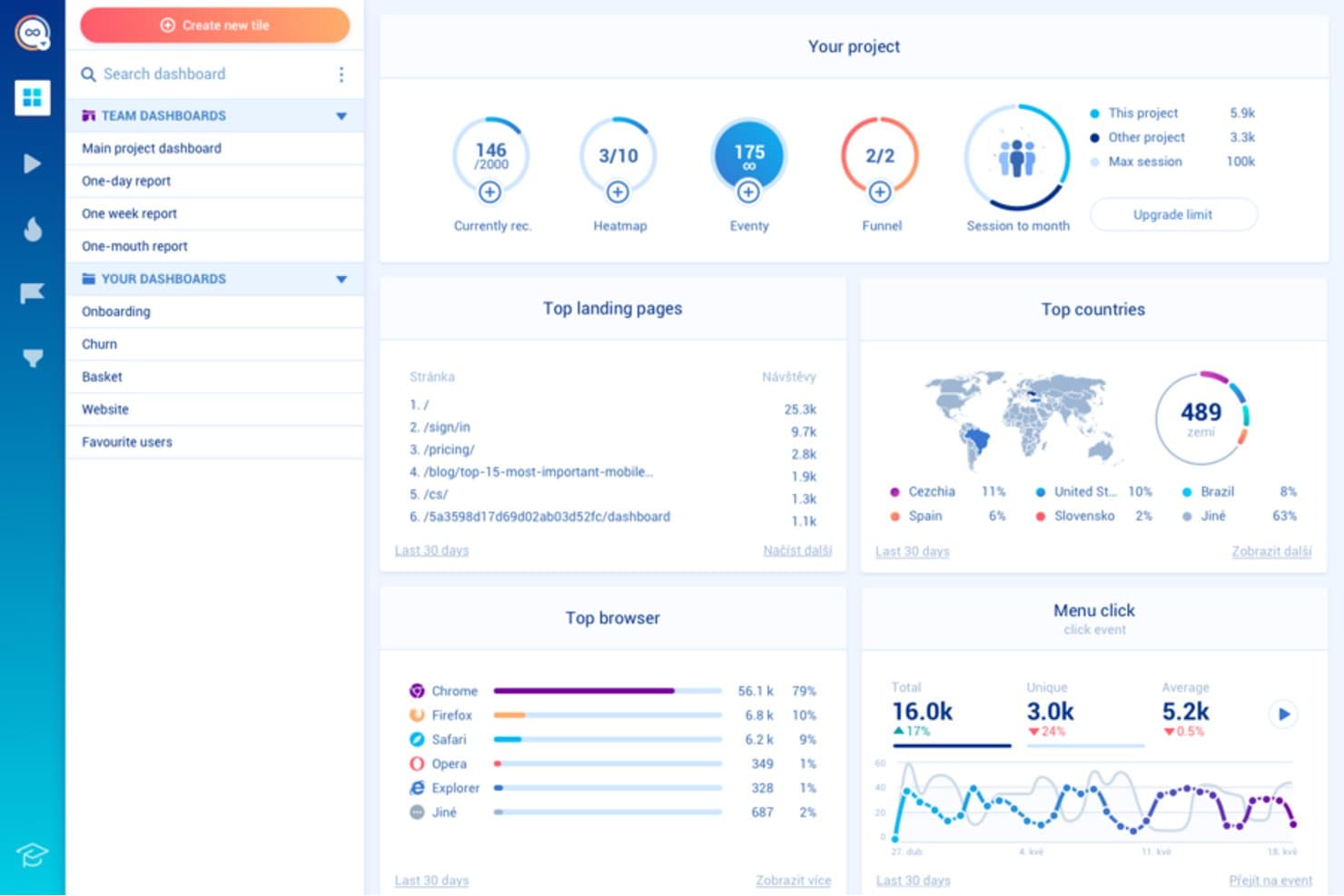
Smartlook tracks landing pages, browsers, and countries in one dashboard. Smartlook is a user tracking and behavior analytics platform with session recordings, event tracking, heatmaps, funnels, and user journey analysis for websites and mobile apps.
Who Is Smartlook Best For?
Smartlook suits product and UX teams that need to identify rage clicks and drop-offs across websites and mobile apps.
Why I Picked Smartlook
I picked Smartlook because it pinpoints where users struggle before abandoning a flow. Session recordings expose rage clicks, while heatmaps show repeated clicks on noninteractive elements. Funnel analysis connects those behaviors to drop-offs, helping my team identify whether a broken interaction or confusing step blocks conversion.
Smartlook Key Features
- Mobile app tracking: Monitor user behavior across iOS and Android apps.
- Event tracking: Capture clicks, taps, form submissions, and custom actions.
- User journey analysis: Review the paths users take through your product.
- Data integrations: Connect Smartlook with tools in your product analytics stack.
Smartlook Integrations
Native integrations are not clearly documented. Smartlook supports connections with tools in your product analytics stack through its data integrations.
What's Free?
Smartlook offers a free plan without a time-limited subscription, capped at 3,000 sessions per month, two funnel reports, and 10 events. It includes session recordings, website and mobile heatmaps, behavior flows, customizable dashboards, Google Analytics, and Slack integrations; Smartlook plans to shut down the platform on September 30, 2027.
Pros and Cons
Pros:
- Supports journey analysis beyond individual sessions
- Connects funnel drop-offs to user behavior
- Detects rage clicks across web and mobile
Cons:
- Free usage limits funnel and event analysis
- Platform shutdown is planned for 2027
Learn more about Smartlook: Best for heatmaps with funnels and drop-off analysis
- 14-day free trial + free plan available
- From $32/month
Visit WebsiteCustomer Rating:4.7/5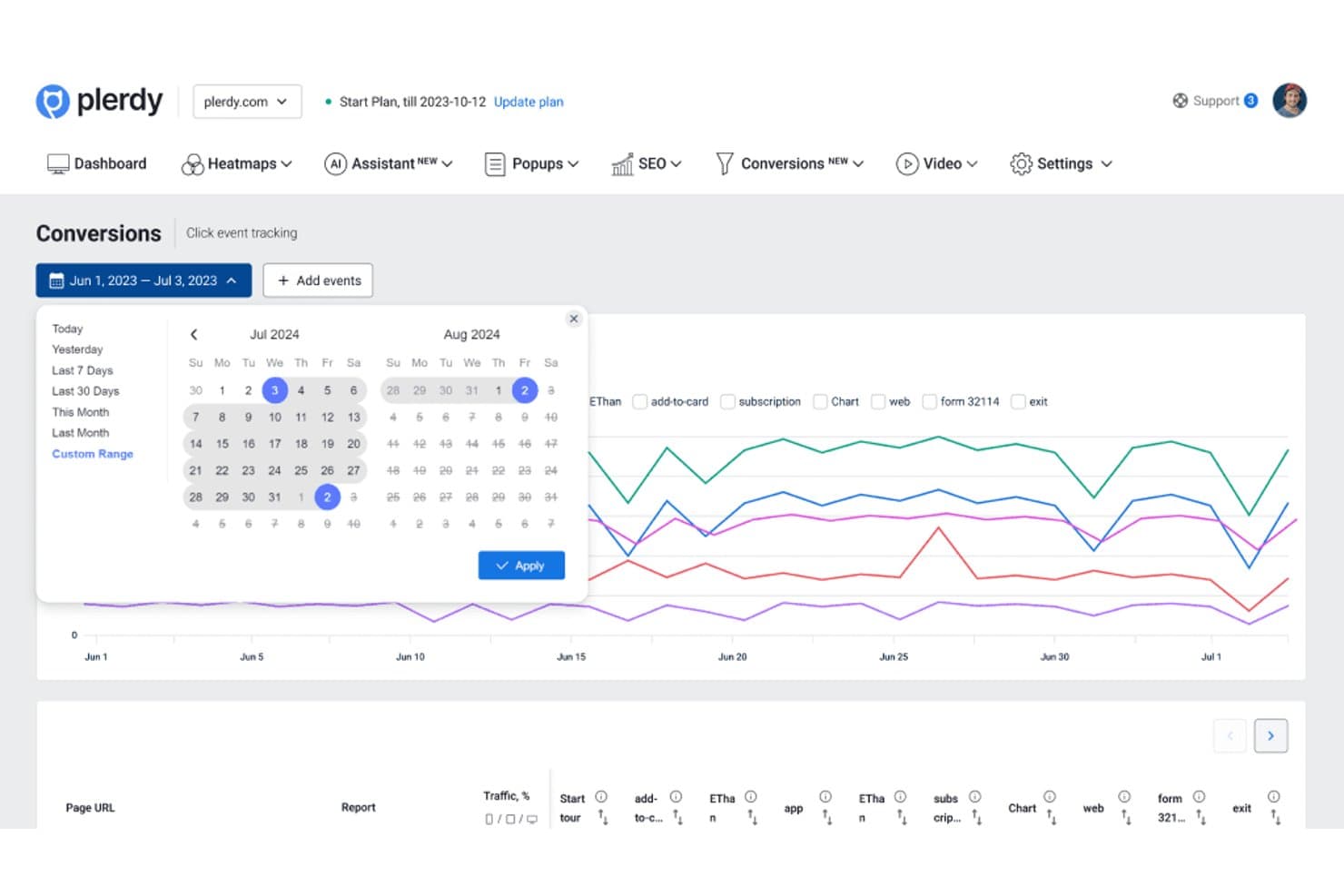
Plerdy lets users analyze conversion events across custom date ranges. Plerdy is a user tracking and website analytics platform that combines heatmaps, session recordings, event tracking, conversion analytics, and form performance reports in one interface.
Who Is Plerdy Best For?
Plerdy suits growth, ecommerce, and product teams that need to connect heatmap behavior with funnel conversion and drop-off analysis.
Why I Picked Plerdy
I picked Plerdy because it connects visual behavior data with conversion analysis. Its heatmaps show where users click, scroll, and lose interest, while funnel reports reveal which steps drive drop-offs. I use these views together to diagnose checkout friction or prioritize product experiments.
Plerdy Key Features
- Session recordings : Replay individual visits to inspect real navigation paths.
- Event tracking : Monitor custom interactions across pages and interface elements.
- Form analytics : Review field-level engagement and abandonment in website forms.
- User feedback surveys : Collect direct responses from visitors through on-site prompts.
Plerdy Integrations
Plerdy integrates with Google Analytics 4 and supports installation through Shopify and WordPress. It also supports Zapier through an API key for sending form data.
What's Free?
Plerdy offers a free-forever plan, not just a time-limited trial. It includes up to 100 heatmaps per day, 500 video sessions, 5,000 SEO audits, and 100 pop-up displays, so higher-volume teams will need a paid plan.
Pros and Cons
Pros:
- Tracks form abandonment at field level
- Includes session recordings for journey analysis
- Connects heatmaps to funnel drop-offs
Cons:
- Pop-up displays may distract from core analytics
- Free limits restrict higher-volume analysis
Learn more about Plerdy: Best for heatmaps with unlimited free captures
- Free plan available
- From $39/month (billed annually)
Visit WebsiteCustomer Rating:4.5/5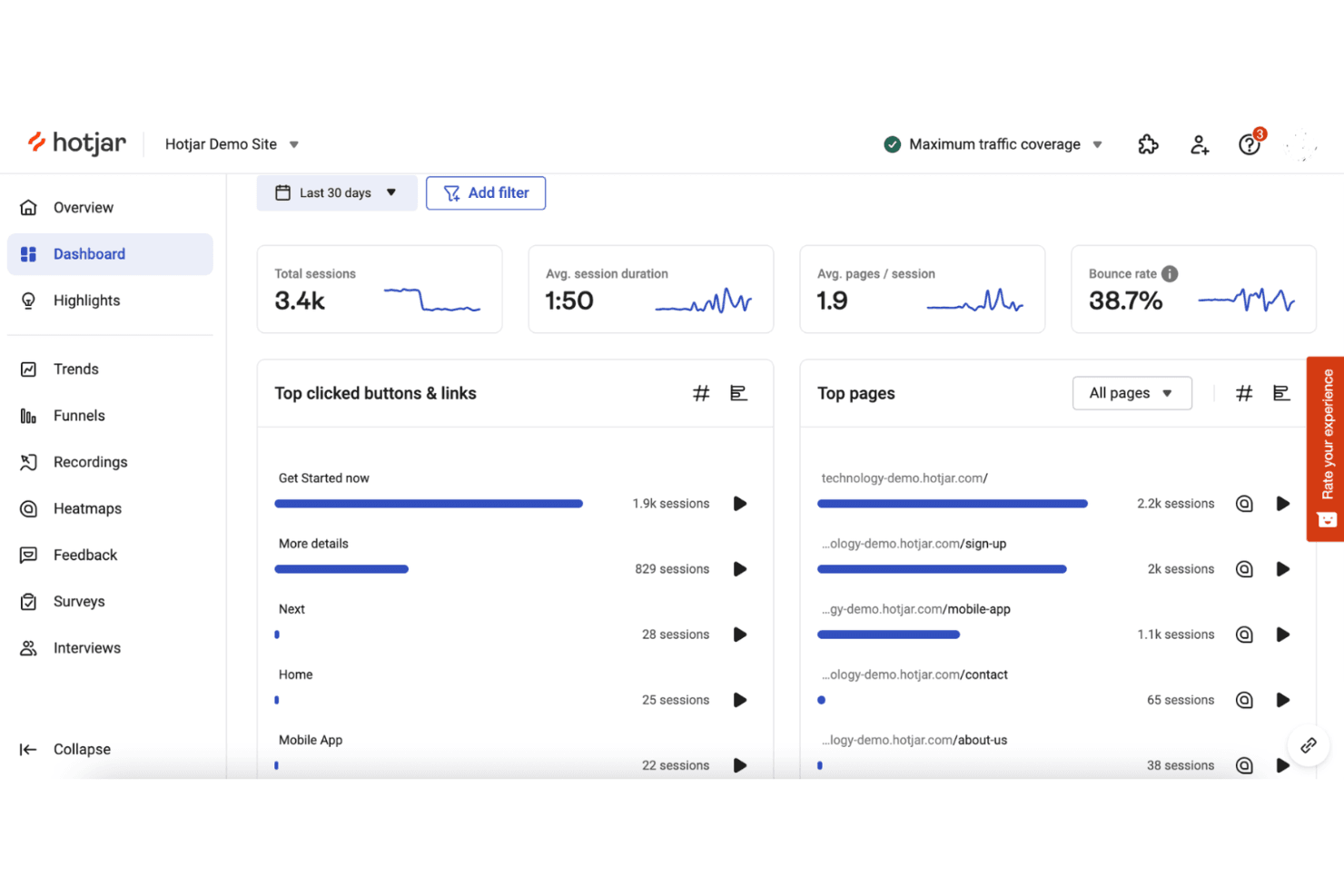
Hotjar tracks user behavior with heatmaps and session recordings. Hotjar (by Contentsquare) is user tracking software for heatmaps, session recordings, feedback polls, surveys, and user behavior analytics across websites and digital products.
Who Is Hotjar (by Contentsquare) Best For?
Hotjar suits product and UX teams that need heatmaps with unlimited free captures to understand user behavior without a large analytics budget.
Why I Picked Hotjar (by Contentsquare)
I picked Hotjar (by Contentsquare) because it’s best for heatmaps with unlimited free captures. I use click, move, and scroll heatmaps to see where users engage or abandon key pages. Session recordings then help connect those patterns to specific navigation and usability issues.
Hotjar (by Contentsquare) Key Features
- Surveys: Create on-site surveys to collect targeted user responses.
- Feedback widgets: Add widgets for users to share feedback on specific pages.
- Funnel analysis: Review user progression across defined conversion steps.
- User attributes: Filter behavioral data by custom user properties.
Hotjar (by Contentsquare) Integrations
Hotjar has documented integrations with Linear, Asana, and Unbounce, plus Zapier. Its API supports custom connections for sharing Hotjar data with other tools.
What's Free?
Hotjar (by Contentsquare) offers a free plan with unlimited heatmap captures, plus a 15-day free trial for paid features. The free plan’s user, session, and feature limits vary by usage level.
Pros and Cons
Pros:
- Surveys connect feedback with observed behavior
- Click, move, and scroll behavior views
- Unlimited free heatmap captures
Cons:
- Advanced analysis requires paid access
- Free limits affect users and sessions
Learn more about Hotjar (by Contentsquare): Best for 12-month free session replay retention
- Free plan available
- Pricing upon request
Visit WebsiteCustomer Rating:4.5/5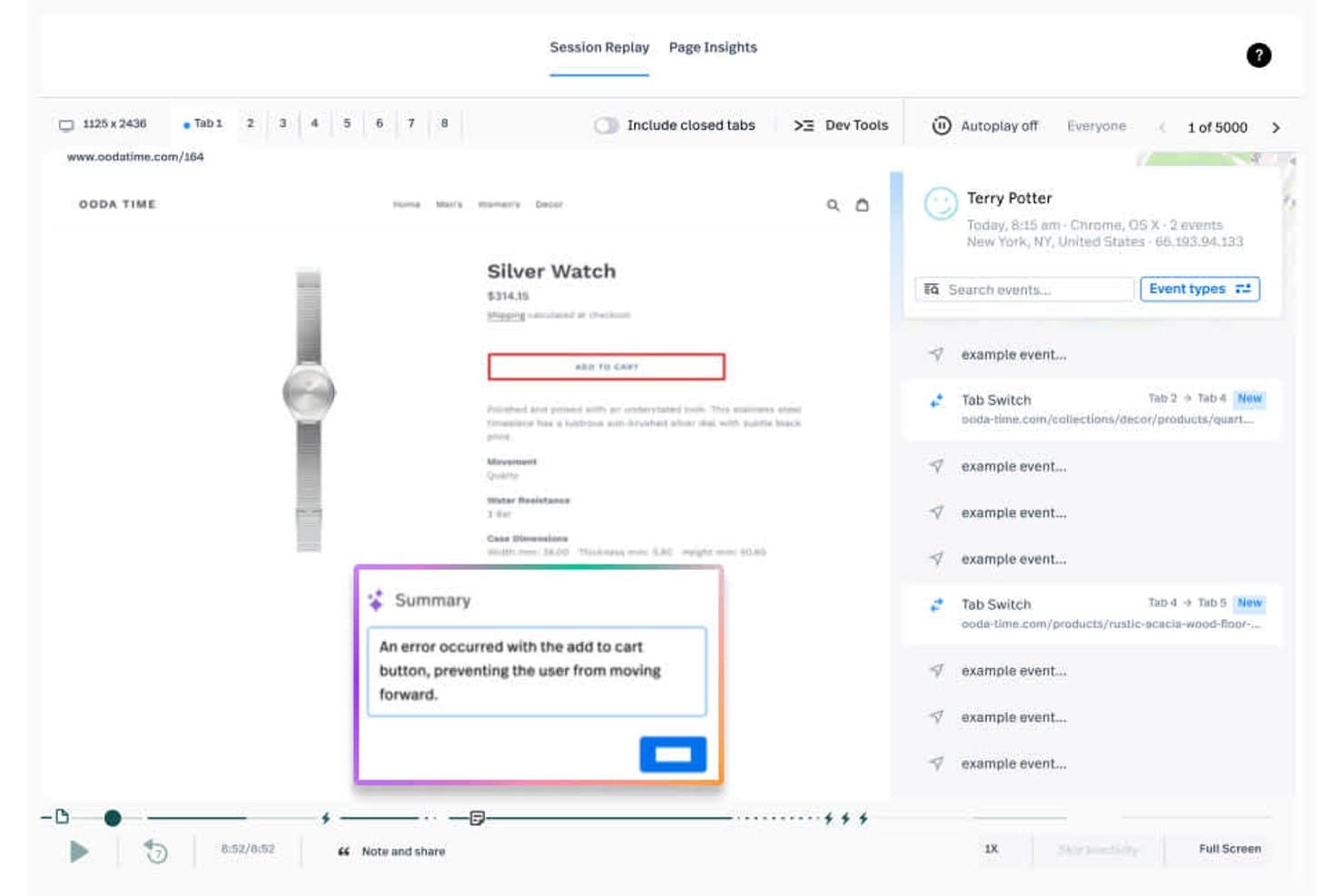
Fullstory lets users replay sessions and surface cart errors instantly. Fullstory is a user tracking and product analytics platform that combines session replay, event tracking, heatmaps, funnels, and friction signals to analyze digital experiences.
Who Is Fullstory Best For?
Fullstory suits product and UX teams at growing digital businesses that need long-term session replay to investigate friction and validate product decisions.
Why I Picked Fullstory
I picked Fullstory because it pairs 12-month free session replay retention with event tracking and friction signals. I can review older user sessions, connect them to conversion events, and investigate recurring rage clicks or dead clicks. That makes it easier to compare product changes with historical user behavior.
Fullstory Key Features
- Heatmaps: Visualize clicks, scroll depth, and interaction patterns across pages.
- Funnel analysis: Build conversion funnels to identify where users drop off.
- Dashboards: Organize product metrics and experience insights in shared views.
- Integrations: Connect Fullstory with other tools in your product analytics stack.
Fullstory Integrations
Fullstory documents integrations with Google Analytics, Google Tag Manager, Adobe Analytics, Bugsnag, and Google BigQuery. Its Developer API supports custom integrations.
What's Free?
FullstoryFree is a free-forever plan with up to 30,000 sessions per month, 12 months of data retention, and support for up to 10 users. It includes session replay, basic analytics, and debugging, but advanced features and paid-plan support aren’t included; new sessions pause if you exceed the monthly limit.
Pros and Cons
Pros:
- Flags rage clicks and dead clicks
- Connects replays with conversion events
- Retains free session replays for 12 months
Cons:
- Advanced analysis requires a paid plan
- New sessions pause after monthly limits
Learn more about Fullstory: Best for analytics-linked session replay at scale
- Free plan available
- Pricing upon request
Visit WebsiteCustomer Rating:4.5/5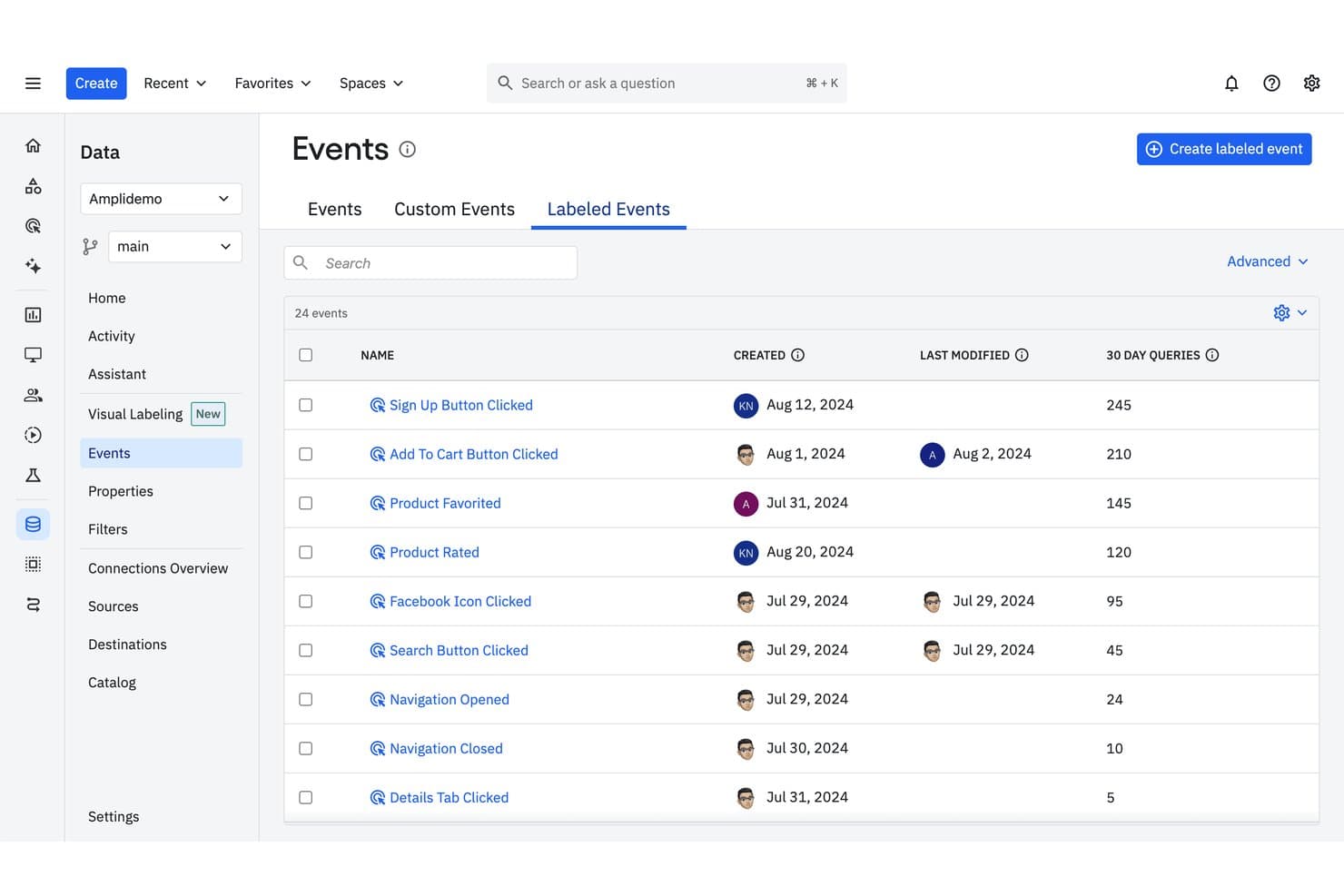
Amplitude tracks labeled events with query frequency and modification history. Amplitude is user tracking software that combines product analytics, event tracking, funnels, retention reports, cohorts, and session replay in one platform.
Who Is Amplitude Best For?
Product teams at growing companies that need analytics-linked session replay at scale to connect user behavior with product decisions.
Why I Picked Amplitude
I picked Amplitude because it’s best for analytics-linked session replay at scale. I use event streams, funnels, and retention reports to identify where users struggle, then review related session replays for the underlying behavior. Cohorts help compare those patterns across user segments before prioritizing product changes.
Amplitude Key Features
- User profiles: View individual users’ properties and activity history.
- Journeys: Trace the paths users take through your product.
- Dashboards: Assemble charts and metrics in shareable workspaces.
- Data governance: Manage event definitions, properties, and tracking plans.
Amplitude Integrations
Documented integrations include Segment, Iterable, Chameleon, and Snowflake. Amplitude also provides APIs for custom event ingestion and user-property updates.
What's Free?
Amplitude offers a free-forever plan with no credit card required. It includes 2 million events per month, unlimited seats, and 10,000 session replays monthly, but replay data is retained for one month and some features, including experiments, Guides, and Surveys, are limited.
Pros and Cons
Pros:
- Cohorts reveal behavior across user segments
- Free plan supports substantial event volumes
- Connects session replays to product analytics
Cons:
- Advanced experimentation features require paid access
- Free replay history expires after one month
Learn more about Amplitude: Best for session replay with AI-flagged friction
- Free plan available
- From $39/month
Visit WebsiteCustomer Rating:4.1/5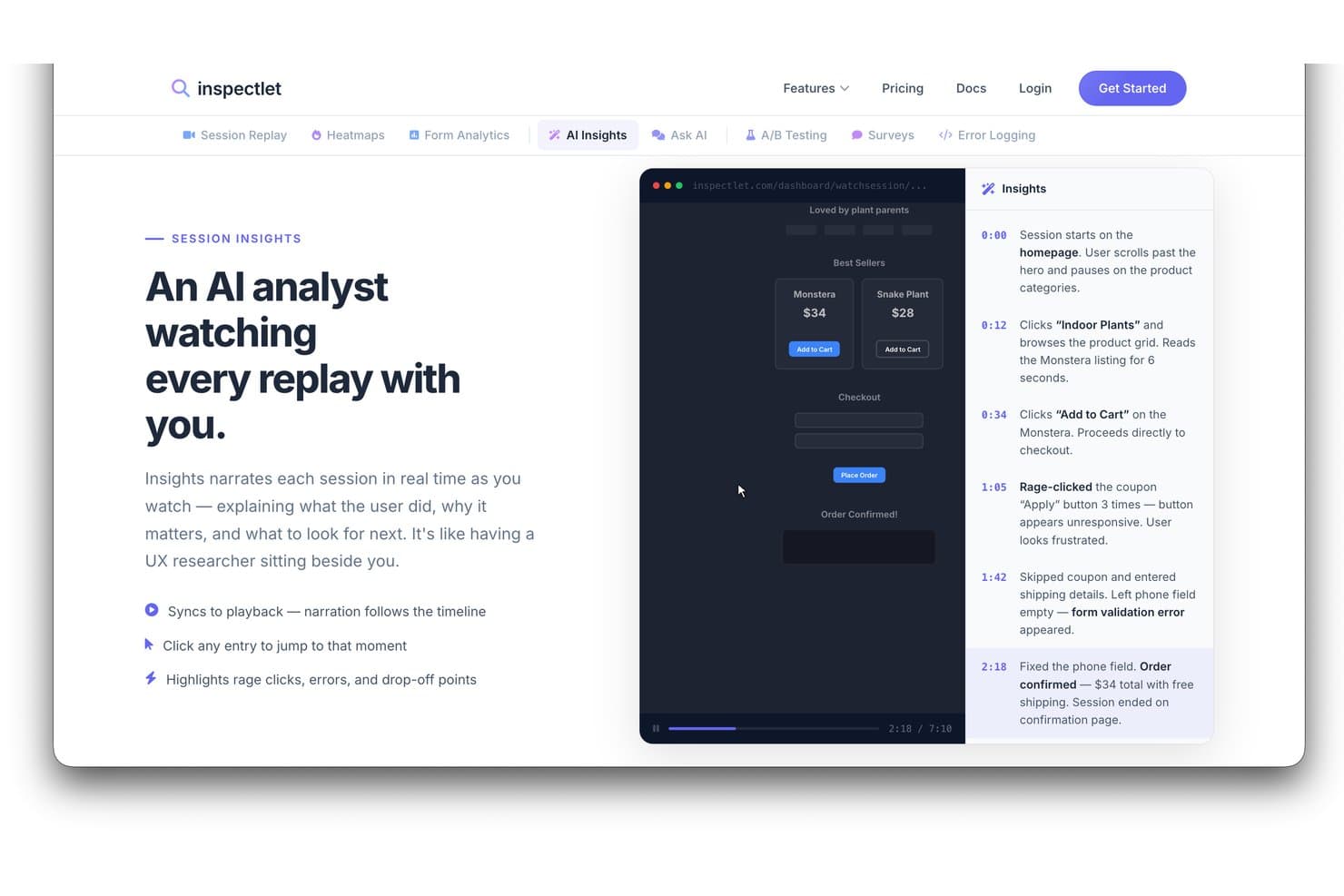
Inspectlet's AI Insights narrates session replays to highlight user behavior. Inspectlet is user tracking and behavior analytics software that combines session recordings, heatmaps, event tracking, funnels, and form analytics for product and website analysis.
Who Is Inspectlet Best For?
Inspectlet suits product teams and growth marketers who need session replay to spot user friction and improve website experiences.
Why I Picked Inspectlet
I picked Inspectlet for Best Free User Tracking Software Reviewed because it pairs session replay with AI-flagged friction. I use recordings and heatmaps to verify where visitors struggle, then review funnel and form analytics to connect those issues with drop-offs. This helps product teams investigate confusing flows, abandoned forms, and failed conversions.
Inspectlet Key Features
- Live visitor monitoring: Watch active visitors navigate your site in real time.
- JavaScript API: Send custom data and control tracking through JavaScript.
- Privacy controls: Mask sensitive fields and limit recorded visitor data.
- VIP tracking: Get notifications when sessions match selected criteria.
Inspectlet Integrations
Inspectlet documents integrations and installation options for HubSpot, Google Tag Manager, WordPress, and Shopify. Its JSON-based REST API supports custom integrations.
What's Free?
Inspectlet offers a free-forever plan with no credit card required or time limit. It includes 2,500 recorded sessions monthly across up to three websites, plus session replay, heatmaps, and A/B testing; data retention is limited to one month, and Inspectlet stops recording new sessions after you reach the monthly limit.
Pros and Cons
Pros:
- Combines recordings, heatmaps, and funnels
- Free plan supports three websites
- AI flags friction within session replays
Cons:
- Recording stops after monthly session limit
- Free data retention lasts one month
Learn more about Inspectlet: Best for open-source product analytics
- Free plan available
- Pricing upon request
Visit WebsiteCustomer Rating:4.5/5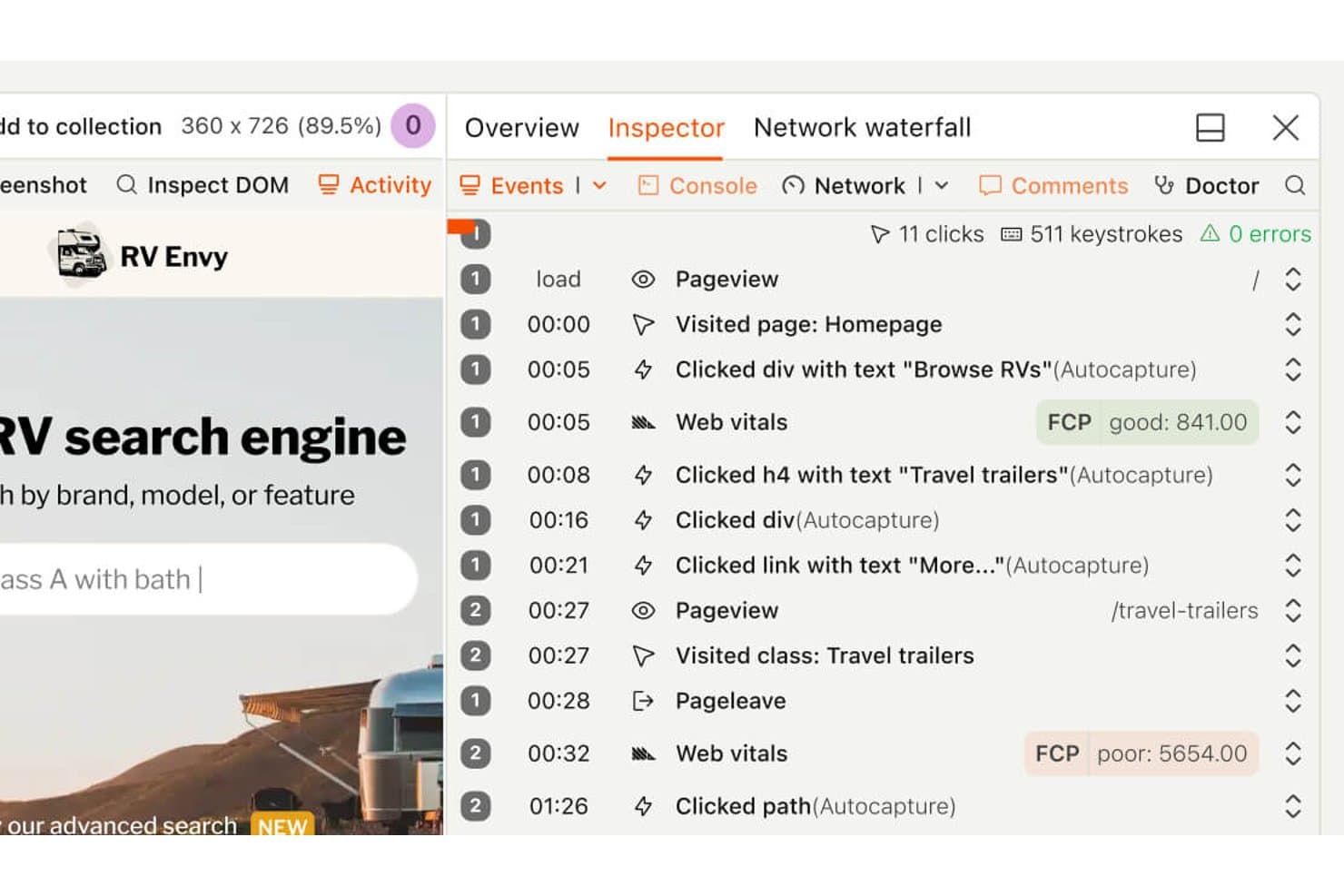
PostHog lets users replay sessions with a detailed event timeline. PostHog is a product analytics and user tracking platform that combines event tracking, funnels, session recordings, feature flags, and experimentation in one developer-focused workspace.
Who Is PostHog Best For?
Product teams and developers seeking open-source analytics with event tracking, session recordings, feature flags, and experimentation in one workspace.
Why I Picked PostHog
I picked PostHog because it’s my choice for best for open-source product analytics. I use event tracking and funnels to connect user behavior with product outcomes, then review session recordings to understand friction behind the numbers. Feature flags and experimentation help me validate changes before wider rollout.
PostHog Key Features
- User cohorts: Group users using shared properties or behavioral criteria.
- Retention reports: Compare returning users across selected time periods.
- SQL editor: Query product data with customizable SQL statements.
- In-app surveys: Create and target surveys within your product.
PostHog Integrations
PostHog supports 50+ documented CDP destinations, including HubSpot, Slack, Microsoft Teams, Braze, Customer.io, Snowflake, and BigQuery. Its API and webhooks support custom integrations.
What's Free?
PostHog offers a free-forever plan with no credit card, including 1 million product analytics events and 5,000 session recordings monthly. The free plan includes unlimited team members but limits you to one project, one-year data retention, and dropped usage above monthly allowances unless you switch to pay-as-you-go.
Pros and Cons
Pros:
- SQL access supports tailored product analysis
- Combines tracking, recordings, and experimentation
- Open-source foundation supports data control
Cons:
- Broader workspace increases navigation overhead
- Instrumentation demands developer involvement
Learn more about PostHog: Best for funnel drop-off and rage click analysis
- Free plan available
- From $140/month
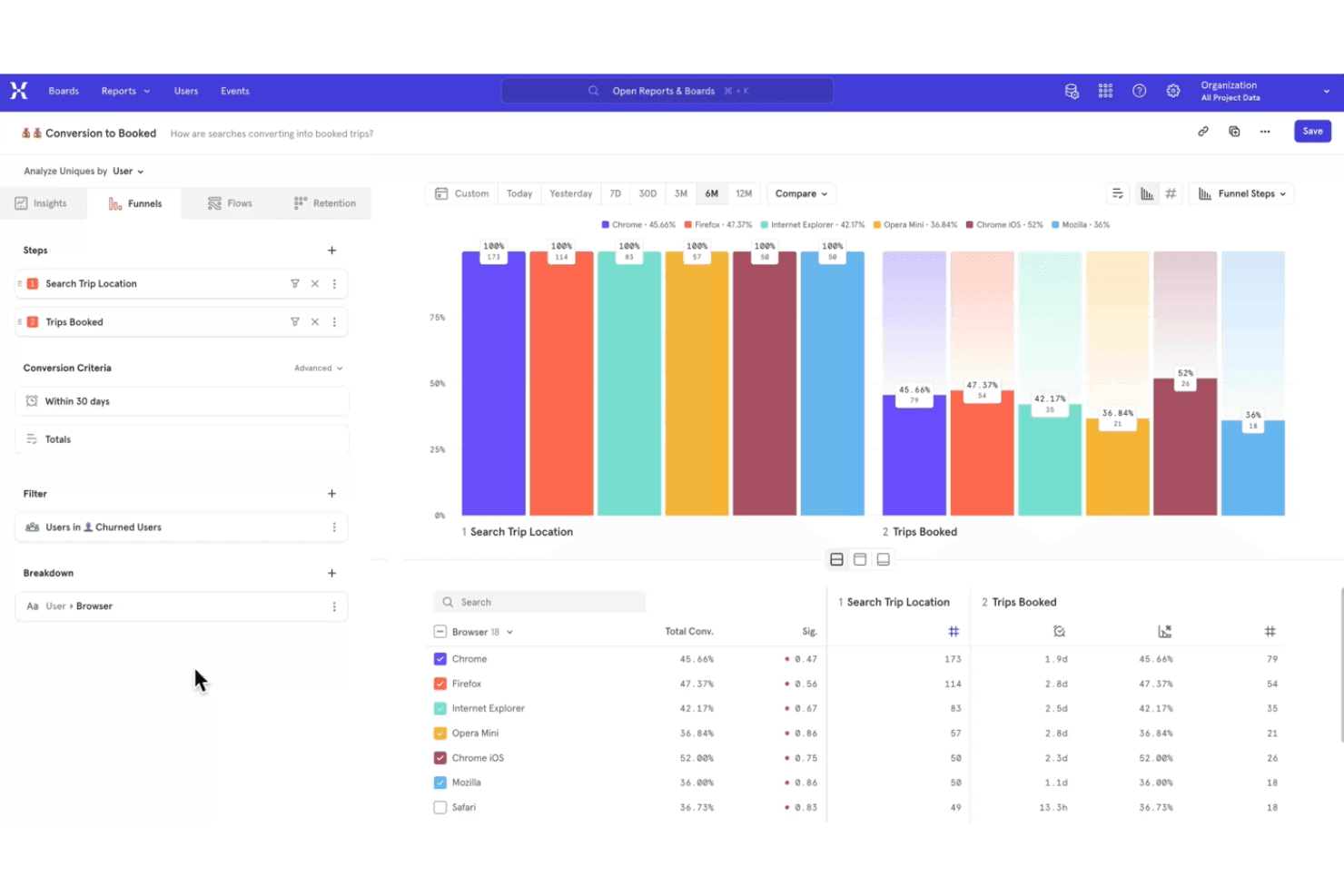
Mixpanel tracks user interactions to optimize digital product experiences. Mixpanel is a product analytics and user tracking platform that captures event data, maps user journeys, and provides reports for cohorts, retention, and product usage.
Who Is Mixpanel Best For?
Mixpanel suits product teams at digital businesses that need event-based insights into user behavior, retention, and feature adoption.
Why I Picked Mixpanel
I picked Mixpanel because it’s best for funnel drop-off and rage click analysis. Its event-based funnels show where users abandon signup or checkout, while Session Replay reveals the screens behind repeated clicks. The free plan gives product teams a practical way to investigate friction before prioritizing fixes.
Mixpanel Key Features
- Retention reports : Compare returning users across selected time periods.
- Cohort analysis : Build cohorts from shared properties or user actions.
- Impact reports : Measure how events influence conversion or retention.
- Data warehouse connectors : Export Mixpanel data to supported warehouse systems.
Mixpanel Integrations
Mixpanel integrates with BigQuery, Snowflake, Amazon Redshift, Segment, and partner tools such as ConfigCat and Marketo. It also provides APIs for custom event collection and integrations.
What's Free?
Mixpanel has a free-forever plan with unlimited seats and no credit card required. It includes up to 1 million events and 10,000 session replays per month, with 30-day replay retention and limits on saved reports, alerts, experiments, and feature flags.
Pros and Cons
Pros:
- Free plan supports meaningful event volumes
- Session Replay reveals rage clicks
- Funnel reports pinpoint signup abandonment
Cons:
- Replay retention limits historical analysis
- Event setup requires disciplined instrumentation
Learn more about Mixpanel: Best for self-hosted, consent-free tracking
- 21-day free trial
- From $26/month (billed annually)
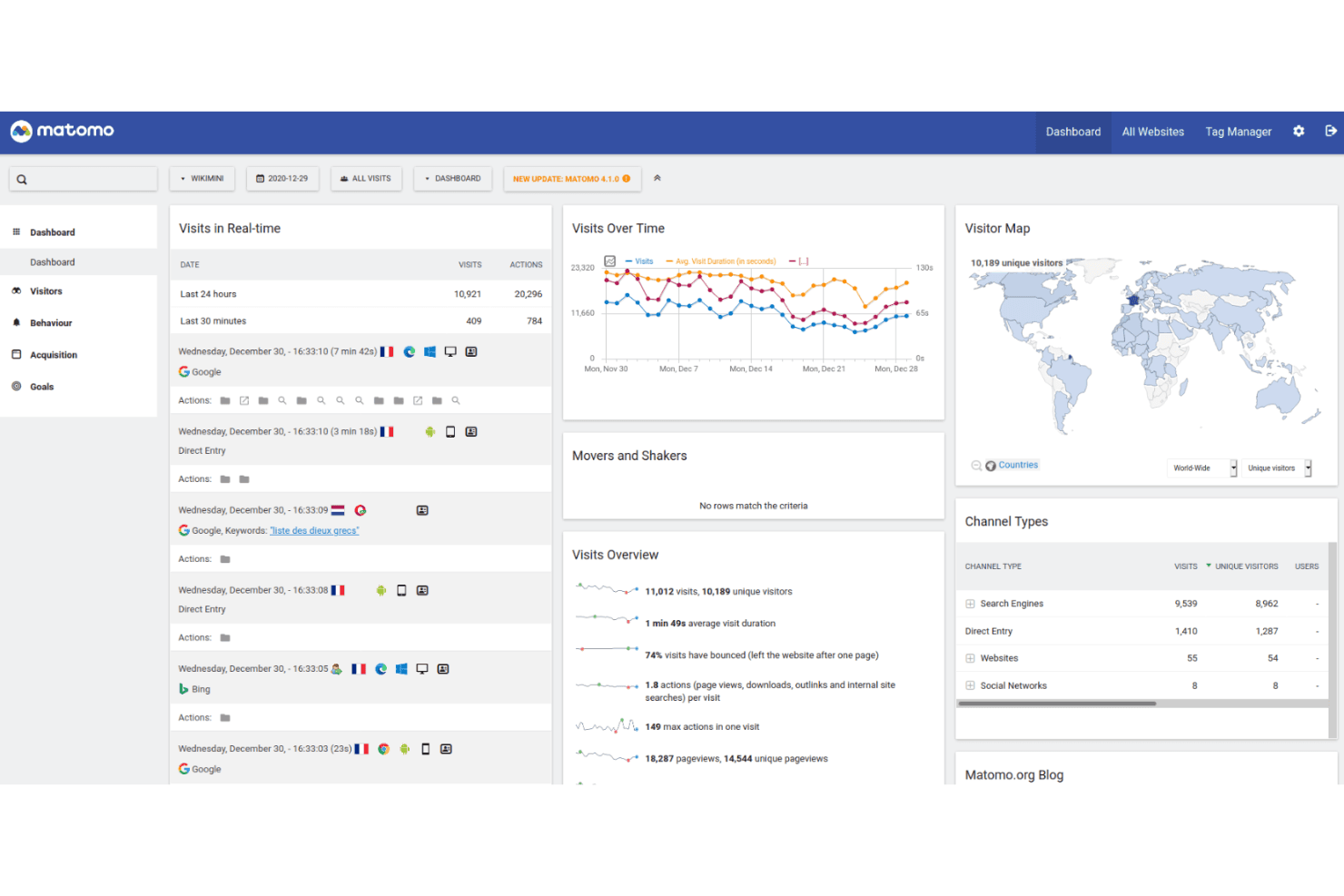
Matomo tracks user activity with full data control and privacy-focused hosting. Matomo is a user tracking and web analytics platform with event tracking, session recordings, heatmaps, campaign attribution, and customizable reports for websites and products.
Who Is Matomo Best For?
Product teams and privacy-conscious organizations needing self-hosted, consent-free tracking will find Matomo a practical fit.
Why I Picked Matomo
I picked Matomo because it supports self-hosted, consent-free tracking without sending product data to a third-party analytics vendor. I use event tracking, session recordings, and heatmaps to connect user behavior with product decisions. Its customizable reports also help teams analyze customer journeys under their own data governance rules.
Matomo Key Features
- Campaign attribution: Tracks visits and conversions across marketing campaign sources.
- Goal tracking: Measures visitor actions against defined conversion goals.
- Tag Manager: Adds and manages tracking tags without editing site code.
- Ecommerce analytics: Records product views, orders, revenue, and cart activity.
Matomo Integrations
Matomo integrates with 100+ technologies, including WordPress, WooCommerce, Shopify, Drupal, Magento 2, and Jira Cloud. Its Analytics and Tracking APIs support custom integrations, while the Matomo Marketplace adds plugin-based connections.
What's Free?
Matomo On-Premise’s Community edition is free forever, with unlimited users and hits, but you handle hosting and maintenance while premium plugins and support require payment. Matomo Cloud offers a 21-day free trial with full core features and no credit card, after which pricing depends on monthly traffic.
Pros and Cons
Pros:
- Custom reports support product decision-making
- Consent-free tracking supports privacy-led measurement
- Self-hosted deployment keeps data in-house
Cons:
- Advanced reporting can require analytics expertise
- Hosting and maintenance remain your responsibility
Learn more about Matomo: Best for debug-focused session replay
- 14-day free trial + free plan available
- From $176/month (billed annually)
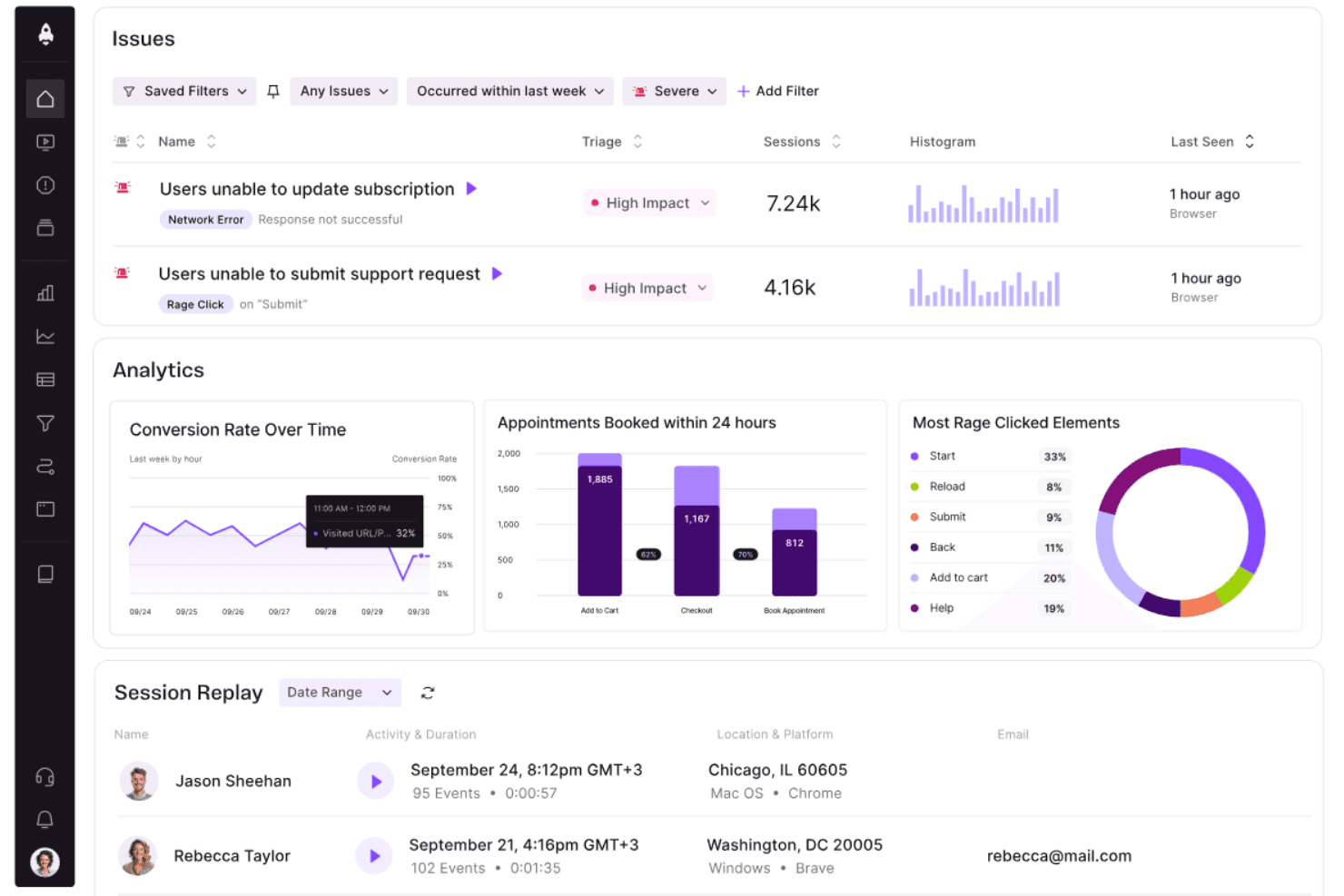
LogRocket surfaces user issues, analytics, and session replays in one dashboard. LogRocket is a user tracking and product analytics platform that combines session replay, event analytics, error tracking, and frontend performance monitoring in one workspace.
Who Is LogRocket Best For?
Product and engineering teams that need to connect frontend errors with user sessions will find LogRocket a practical fit.
Why I Picked LogRocket
I picked LogRocket because its debug-focused session replay connects frontend errors with the user sessions behind them. I use session recordings, event analytics, and error tracking to trace issues such as failed checkout flows or broken navigation. Its frontend performance monitoring adds context when slow experiences affect product behavior.
LogRocket Key Features
- Console logs: Captures browser console output alongside each user session.
- Network monitoring: Records requests, responses, errors, and timing details.
- Rage click detection: Identifies repeated clicks on the same interface element.
- Redux inspection: Displays Redux actions and state changes during sessions.
LogRocket Integrations
LogRocket offers integrations with Zendesk, Intercom, BugHerd, Jira, and Linear for connecting session replays with support and issue workflows. It also supports webhooks and a Web API for custom integrations.
What's Free?
LogRocket offers a 14-day free trial rather than a free-forever plan, with no credit card required. The trial includes access to all features, but you’ll need a paid plan after it ends, with pricing based on captured sessions.
Pros and Cons
Pros:
- Captures console, network, and Redux activity
- Connects frontend errors to user sessions
- Debug-focused session replay
Cons:
- Session capture can become costly at scale
- No free-forever plan
Learn more about LogRocket:
Other Free User Tracking Software
Here are some additional user tracking software options that also offer free plans or trials. While these tools didn’t make it onto my shortlist, they’re still worth checking out:
- 11OpenReplayBest for self-hosted replay with full data ownership
- 12Crazy EggBest for no-code click and scroll analysis
- 13Google AnalyticsBest for web traffic and funnel drop-off analysis
- 14Heap (by Contentsquare)Best for no-code retroactive behavior tracking
- 15MouseflowBest for friction scoring on a free plan
- 16UserpilotBest for behavior tracking tied to in-app fixes
- 17Microsoft ClarityBest for no-code funnels and frustration signals
How I Evaluate Free User Tracking Software
First, I define what counts as free. For user tracking software, I require a free-forever plan, not a trial, with usable features despite user, data, or feature limits. Then I split evaluation into three parts: core functionality, weighted most, like replaying sessions and tracking actions; standout features, like autocapture instrumentation; and beyond features, like a clear upgrade path.
Core Functionality (Table Stakes For This List)
In addition to my free plan requirements, I use a scoring system to select tools for my list. I score each one on a scale from 0 (does not offer the functionality) to 5 (excels in this area) for each core functionality listed below, based on what's available on the free plan. I then convert the total into a percentage to help assess each tool's overall fit, with extra weight on any functionalities I've deemed essential.
- User Behavior Tracking (Essential): I look for clicks, scrolls, navigation paths, and time-on-page data that reveal where users engage or drop off.
- Session Recording (Essential): I assess whether replays help investigate issues, compare journeys, and understand friction across real user sessions.
- Visual Behavior Reports: I check for usable click, scroll, or movement maps that clarify interaction patterns on key pages.
- Multi-Page Tracking: I assess whether tracking follows journeys across landing pages, account areas, checkout steps, or multiple app screens.
- Data Access And Reporting: I look for filters, dashboards, and exports that let product teams review findings or share usable reports.
Once I have a list of tools that meet the criteria, I consider what sets each platform apart.
Differentiating Factors (What Sets Vendors Apart)
Here's how I compare and contrast different vendors:
Standout Features
Autocapture instrumentation is a big one—I check whether a tool logs clicks, taps, and page views automatically so product managers aren't waiting on engineering to tag every new element. No-code funnel builders matter just as much because they let you reshape conversion steps on the fly when priorities shift mid-sprint. I also evaluate mobile SDK parity, since tools like PostHog and Mixpanel offer native iOS and Android tracking on free tiers, which is essential if your product isn't web-only.
Beyond Features
I check how long each free plan retains raw event data, since a 30-day window can make it impossible to compare retention cohorts across quarters. Implementation effort matters too—tools with autocapture, like PostHog or Hotjar, let me start gathering insights without waiting on engineering to instrument every button. I also evaluate seat limits, because a free tier that caps collaborators at two or three forces an upgrade before the product squad can even share findings.
How to Choose Free User Tracking Software
Complex feature lists and pricing structures can make it hard to figure out what you’re really getting from a free user tracking software. To help you stay focused as you work through your software selection process, here are some factors to keep in mind:
| Factor | What to Consider |
|---|---|
| FactorFree Offer Scope | What to ConsiderCheck what's included in the free plan. Ensure it covers essential features like user tracking and data analysis without hidden costs. |
| FactorScalability | What to ConsiderConsider if the tool can grow with your team. Look for options that allow easy upgrades as your needs expand. |
| FactorIntegrations | What to ConsiderEnsure the software integrates with tools you already use, like CRM or marketing platforms, to streamline workflows. |
| FactorEase of Use | What to ConsiderOpt for software that requires minimal training and offers clear data visualization. A user-friendly interface is a must. |
| FactorData Privacy | What to ConsiderMake sure the tool complies with data protection regulations like GDPR, especially if you handle sensitive information. |
| FactorCustomization | What to ConsiderLook for software that allows you to tailor reports and dashboards to fit your specific needs and preferences. |
| FactorSupport | What to ConsiderEvaluate the level of customer support available, such as live chat or forums, to assist you when needed. |
| FactorPerformance | What to ConsiderCheck if the tool provides real-time data updates and fast processing to keep your team informed without delays. |
What Is Free User Tracking Software?
User tracking software is a tool that monitors and analyzes user interactions on websites or apps, often available as free plans or trials. These tools are typically used by product managers, marketers, and UX designers to gain insights into user behavior and improve user experience. Features like session recordings, heatmaps, and real-time analytics help with understanding user engagement, identifying pain points, and enhancing product usability.
Features of Free User Tracking Software
Let’s go over the features commonly found in user tracking software, and which ones are usually included in free vs. paid plans.
Typically Free User Tracking Software Features
- Session recordings: Capture and replay user interactions to understand behavior and identify issues.
- Heatmaps: Visualize where users click and scroll, helping you see which areas of your site are most engaging.
- Real-time analytics: Provide instant insights into current user activity, allowing for quick responses to trends.
- Basic event tracking: Monitor specific user actions like clicks or form submissions to analyze interaction patterns.
- Visitor segmentation: Group users based on behavior or demographics to tailor experiences and content.
- Privacy compliance: Ensure data collection meets regulations like GDPR, safeguarding user privacy.
- Customizable dashboards: Allow you to tailor your view of data to focus on the metrics most important to your team.
Typically Paid User Tracking Software Features
- Advanced segmentation: Create detailed user groups based on complex criteria for more targeted analysis.
- A/B testing: Test different versions of your site or app to determine which performs better with users.
- Funnel analysis: Track user journeys through your site to identify drop-off points and optimize conversion paths.
- Automated reporting: Generate detailed reports automatically to save time and ensure consistent data analysis.
- Cross-device tracking: Monitor user interactions across multiple devices to get a full view of their journey.
- Advanced data export: Export data in various formats for deeper analysis or integration with other tools.
- Custom event creation: Define specific events to track tailored actions unique to your business needs.
Benefits of Free User Tracking Software
Implementing free user tracking software provides several benefits for your team and your business. Here are a few you can look forward to:
- Cost-effective insights: Gain valuable insights into user behavior without financial investment, allowing you to allocate resources elsewhere.
- Improved user experience: Use features like session recordings and heatmaps to identify and fix usability issues, enhancing user satisfaction.
- Quick decision-making: Real-time analytics provide immediate data, enabling your team to make informed decisions swiftly.
- Enhanced targeting: Visitor segmentation helps tailor content and experiences to specific user groups, increasing engagement.
- Data privacy assurance: Compliance with privacy regulations like GDPR ensures user data is collected responsibly, building trust with your audience.
- Customization flexibility: Customizable dashboards let you focus on the metrics that matter most, optimizing your analysis process.
- Trial without commitment: Free versions allow you to test the software's capabilities and see its benefits firsthand before deciding on a paid plan.
Costs and Pricing of Free User Tracking Software
I realize you came to this article looking for the best free user tracking software options available. However, since free plans only offer limited features, there's a good chance you'll need to scale your plan up in the future, which is why I’ve included the chart below.
The table below summarizes common plans, their average prices, and typical features included in user tracking software solutions:
Plan Comparison Table for User Tracking Software
| Plan Type | Average Price | Common Features |
|---|---|---|
| Plan TypeFree Plan | Average Price$0 | Common FeaturesBasic analytics, session recordings, heatmaps, and visitor segmentation. |
| Plan TypePersonal Plan | Average Price$5-$25/user/month | Common FeaturesAdvanced analytics, custom event tracking, real-time data, and basic reporting. |
| Plan TypeBusiness Plan | Average Price$50-$100/user/month | Common FeaturesFunnel analysis, A/B testing, automated reports, and cross-device tracking. |
| Plan TypeEnterprise Plan | Average Price$150+/user/month | Common FeaturesCustom integrations, dedicated support, advanced data export, and full customization. |
Free User Tracking Software FAQs
Here are some answers to common questions about free user tracking software:
How does free user tracking software protect user privacy?
Free user tracking software often includes privacy compliance features to ensure data is collected and stored responsibly. Look for tools that comply with regulations like GDPR and offer options for anonymizing user data. It’s crucial to choose software that provides clear privacy policies and user consent options.
Can I integrate free user tracking software with other tools?
Many free user tracking software solutions offer integrations with popular tools like CRM systems and marketing platforms. However, the range of integrations might be limited compared to paid versions. Check if the software supports the essential integrations your team needs to streamline workflows.
What limitations should I expect with a free plan?
Free plans typically come with limitations such as reduced data retention, fewer features, or restricted user seats. While these plans are great for basic tracking needs, teams with growing requirements might eventually need to upgrade to access more advanced features and higher data capacities.
How accurate is the data from free user tracking software?
Free user tracking software generally provides accurate data for basic metrics like page views and user sessions. However, the level of precision and depth might not match that of paid plans, especially for advanced analytics. For critical business decisions, consider whether the free version meets your accuracy needs.
Can I customize reports in free user tracking software?
Customization options for reports in free user tracking software are often limited. While you can usually access basic data and create standard reports, advanced customization features might require a paid plan. Evaluate if the available customization meets your team’s reporting requirements.
Is support available for free user tracking software?
Support options for free user tracking software can vary. Some providers offer community forums or knowledge bases, while others may provide limited email support. If your team anticipates needing more hands-on assistance, consider the level of support available with the free plan.