

10 migliori piattaforme gratuite di adozione digitale recensite nel 2026

Elenco delle migliori piattaforme gratuite di adozione digitale


Le migliori piattaforme gratuite di adozione digitale aiutano a integrare gli utenti, favorire l'adozione dei prodotti e migliorare il coinvolgimento, senza gravare sul budget. Senza lo strumento giusto, l'integrazione può risultare frammentata, i dipendenti potrebbero avere difficoltà ad adottare le funzionalità principali e il coinvolgimento diminuisce, lasciandoti con software sottoutilizzati e team frustrati.
La piattaforma giusta offre indicazioni integrate nell'app, procedure guidate e analisi per garantire un'adozione fluida su larga scala. Dopo aver testato e valutato personalmente diverse soluzioni gratuite, ho individuato le piattaforme più efficaci che bilanciano costi, usabilità e impatto, così puoi offrire una migliore integrazione e adozione senza spendere troppo.
Perché Fidarsi delle Nostre Recensioni Software
Testiamo e recensiamo software per il product management dal 2020. Come product manager sappiamo quanto sia fondamentale e difficile fare la scelta giusta in termini di software. Investiamo in una ricerca approfondita per aiutare il nostro pubblico a prendere decisioni migliori sugli acquisti di software. Abbiamo testato oltre 2.000 strumenti per diversi casi d’uso e scritto più di 1.000 recensioni approfondite.Scopri come assicuriamo la trasparenza & la nostra metodologia di recensione software.
Riepilogo delle migliori piattaforme gratuite di adozione digitale
Sebbene tutte le piattaforme di adozione digitale presenti nel mio elenco offrano opzioni gratuite, dispongono anche di piani a pagamento qualora desiderassi effettuare un upgrade. Ecco i costi di base di ciascuno degli strumenti inclusi nel mio elenco:
| Tool | Best For | Trial Info | Price | ||
|---|---|---|---|---|---|
| 1 | Ideale per checklist di onboarding | Prova gratuita di 14 giorni + piano gratuito + demo gratuita disponibile | Da $174/mese (fatturazione annuale) | Website | |
| 2 | Ideale per funnel di conversione | Prova gratuita di 30 giorni + piano gratuito disponibile | A partire da $55/mese | Website | |
| 3 | Ideale per utenti illimitati | Prova gratuita di 14 giorni + demo gratuita disponibile | Da $299/mese (fatturato annualmente) | Website | |
| 4 | Ideale per l'adozione digitale aziendale e la guida in-app | Demo gratuita disponibile | Prezzo su richiesta | Website | |
| 5 | Migliore piattaforma no-code per guide interattive | Non disponibile | Prezzo su richiesta | Website | |
| 6 | Ideale per combinare heatmap e sondaggi di feedback | Piano gratuito disponibile | Da $39/mese (fatturazione annuale) | Website | |
| 7 | Ideale per analisi avanzata dei prodotti e coorti | Piano gratuito disponibile | Prezzi su richiesta | Website | |
| 8 | Ideale per la registrazione delle sessioni di tracciamento degli utenti | Piano gratuito disponibile | Da $33/mese (fatturato annualmente) | Website | |
| 9 | Ideale per onboarding in-app multilingue con analisi approfondita | Prova gratuita disponibile | Da $158/mese | Website | |
| 10 | Miglior libreria open-source per tour completamente personalizzati | Piano gratuito disponibile | A partire da $50 | Website |
Recensioni delle migliori piattaforme gratuite di adozione digitale
Di seguito sono riportati i miei riepiloghi dettagliati delle migliori piattaforme gratuite di adozione digitale incluse nel mio elenco. Le mie recensioni offrono una panoramica dettagliata delle funzionalità principali, dei pro & contro, delle integrazioni e dei casi d’uso ideali di ogni strumento, per aiutarti a trovare quello più adatto a te. Sebbene alcuni di questi strumenti offrano una versione completamente gratuita, altri mettono a disposizione un periodo di prova gratuito. In ciascuna recensione ho aggiunto una nota su ciò che è gratuito.

Ideale per checklist di onboarding
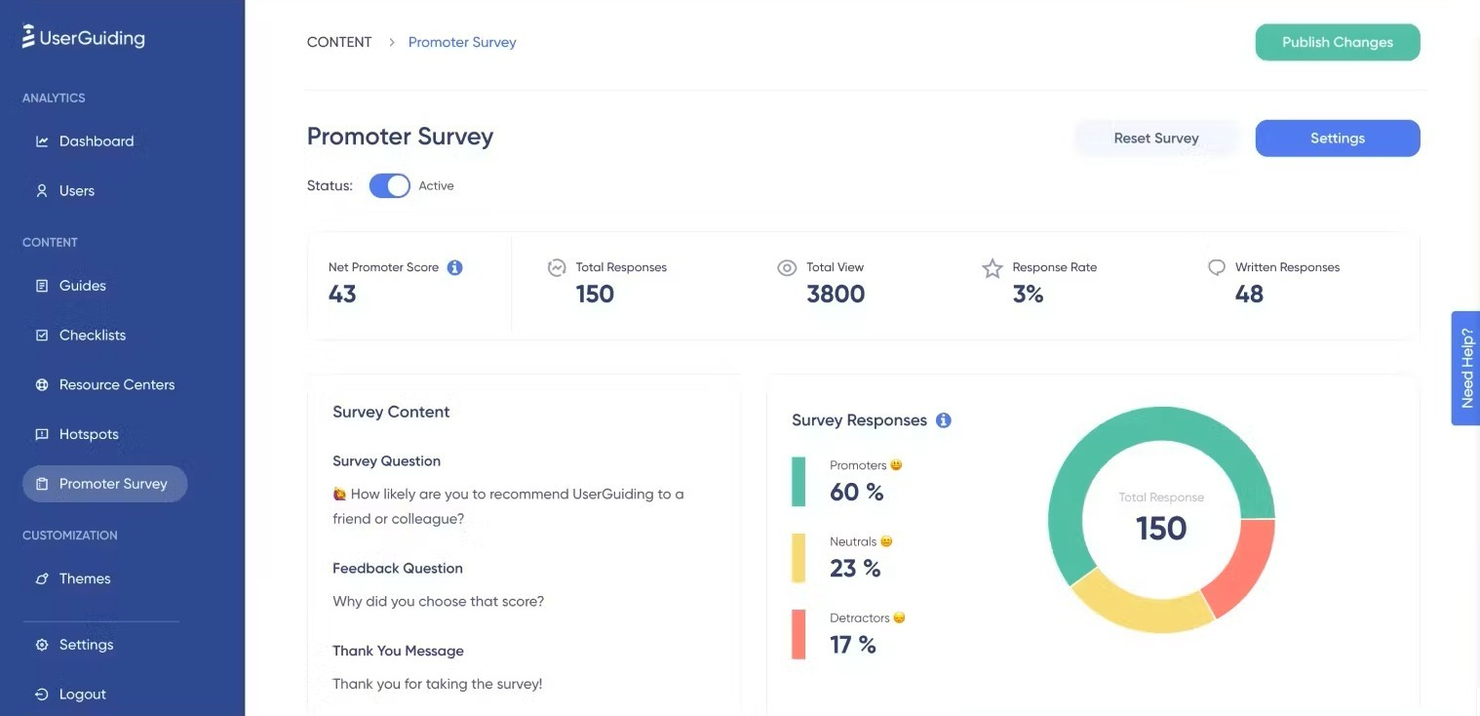
UserGuiding è una piattaforma di adozione digitale che si concentra sulla creazione di guide interattive ed esperienze di onboarding. Si rivolge a product manager e team di customer success aiutandoli a progettare e implementare walkthrough e tutorial facili da usare.
Perché ho scelto UserGuiding: L'offerta gratuita di UserGuiding include checklist per l'onboarding, che aiutano il tuo team a garantire che gli utenti completino le attività essenziali. Puoi creare guide interattive per accompagnare gli utenti nell'utilizzo del tuo prodotto senza necessità di competenze tecniche.
Il piano gratuito offre anche accesso a tooltip, che mettono in evidenza le funzionalità più importanti. Queste funzionalità lo rendono ideale per i team che desiderano migliorare il proprio processo di onboarding.
Funzionalità principali & integrazioni:
Funzionalità includono la segmentazione degli utenti, che consente di personalizzare le esperienze in base a ruoli o comportamenti. È anche possibile utilizzare strumenti di analisi per monitorare i progressi e il coinvolgimento degli utenti. Le opzioni di personalizzazione permettono di adattare l'aspetto delle guide al tuo brand.
Integrazioni disponibili: Slack, Intercom, HubSpot, Mixpanel, Google Analytics, Segment, Zapier, Salesforce, Pendo e Amplitude.
Cosa è gratuito? UserGuiding offre un piano gratuito con checklist di onboarding, tooltip e guide interattive, seppur limitato dal numero di guide e utenti attivi mensili. È inoltre disponibile una prova gratuita se desideri testare funzionalità avanzate prima di effettuare l’upgrade.
Pros and Cons
Pros:
- Checklist di onboarding personalizzabili
- Segmentazione utenti disponibile
- Strumenti di analisi inclusi
Cons:
- Numero limitato di guide
- Limiti di utenti nella prova gratuita

Ideale per funnel di conversione
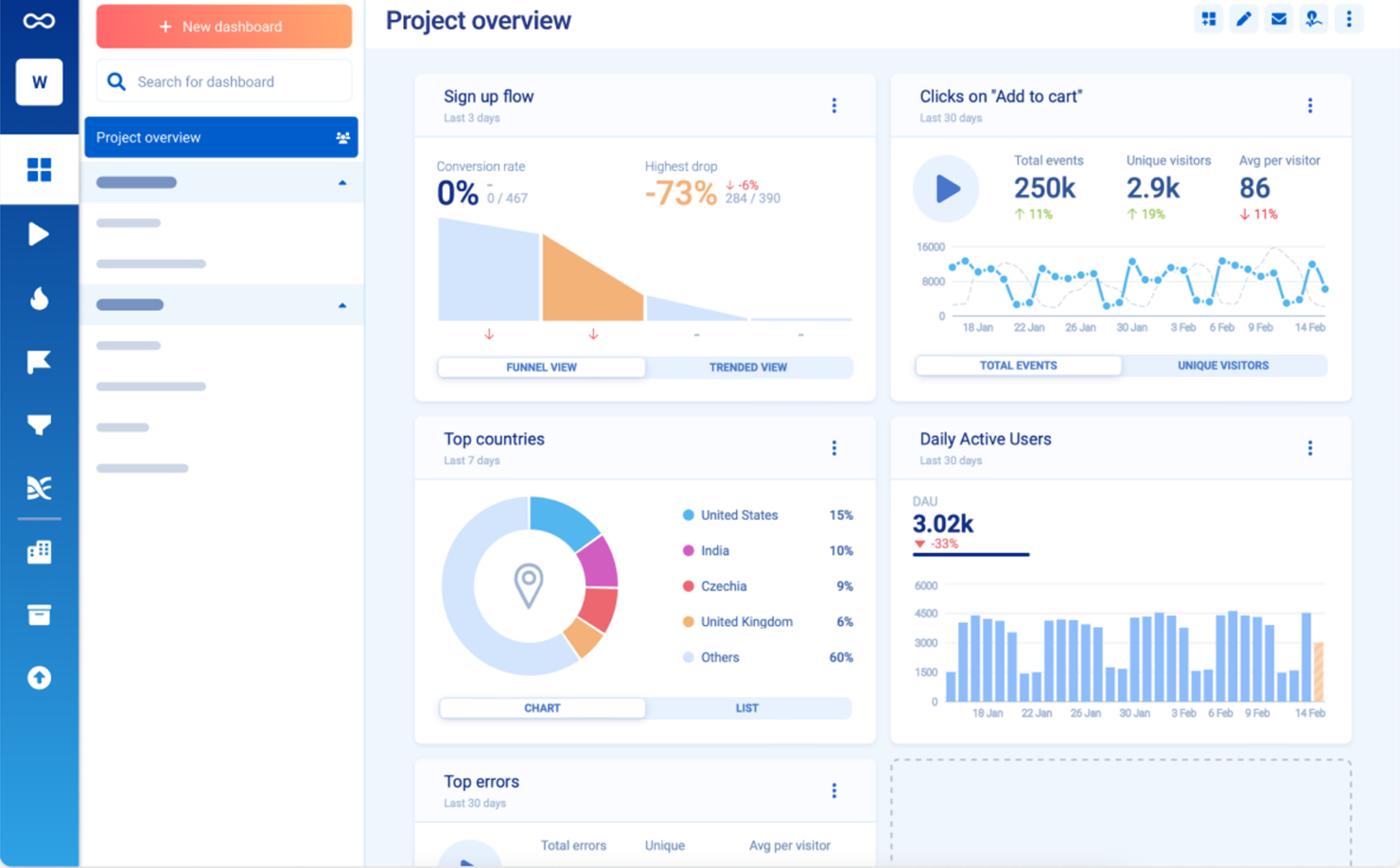
Smartlook è uno strumento di analisi del comportamento utente progettato per comprendere come gli utenti interagiscono con siti web e app mobili. Serve a product manager e team UX fornendo approfondimenti tramite registrazioni delle sessioni e mappe di calore per migliorare l'esperienza utente e i tassi di conversione.
Perché ho scelto Smartlook: Il piano gratuito di Smartlook include l'accesso ai funnel di conversione (percorsi di conversione), aiutandoti a tracciare e analizzare i percorsi utente. Puoi vedere dove gli utenti abbandonano e ottimizzare questi percorsi per un coinvolgimento migliore.
La versione gratuita della piattaforma offre anche registrazioni delle sessioni, consentendoti di rivedere le interazioni degli utenti. Sono incluse anche le mappe di calore, che offrono una visualizzazione approfondita del comportamento degli utenti.
Funzionalità principali & integrazioni:
Funzionalità includono il tracciamento degli eventi, che ti permette di monitorare azioni specifiche degli utenti sul tuo sito o app. Puoi anche utilizzare le tabelle di fidelizzazione per comprendere il tasso di ritorno degli utenti nel tempo. Smartlook offre un'analisi qualitativa, fornendo approfondimenti sui modelli di comportamento degli utenti.
Le integrazioni includono Google Analytics, Slack, Mixpanel, Zapier, Intercom, HubSpot, Shopify, WordPress, Adobe Commerce e PrestaShop.
Cosa è gratuito? Smartlook offre un piano gratuito per sempre con accesso alle funzionalità di analisi di base, ma con limiti sul numero di sessioni registrate e sulla conservazione dei dati.
Pros and Cons
Pros:
- Analisi dei funnel di conversione
- Accesso alle registrazioni delle sessioni
- Mappe di calore per approfondimenti sugli utenti
Cons:
- Restrizioni sulle funzionalità di base
- Limiti sulla conservazione dei dati

Ideale per utenti illimitati
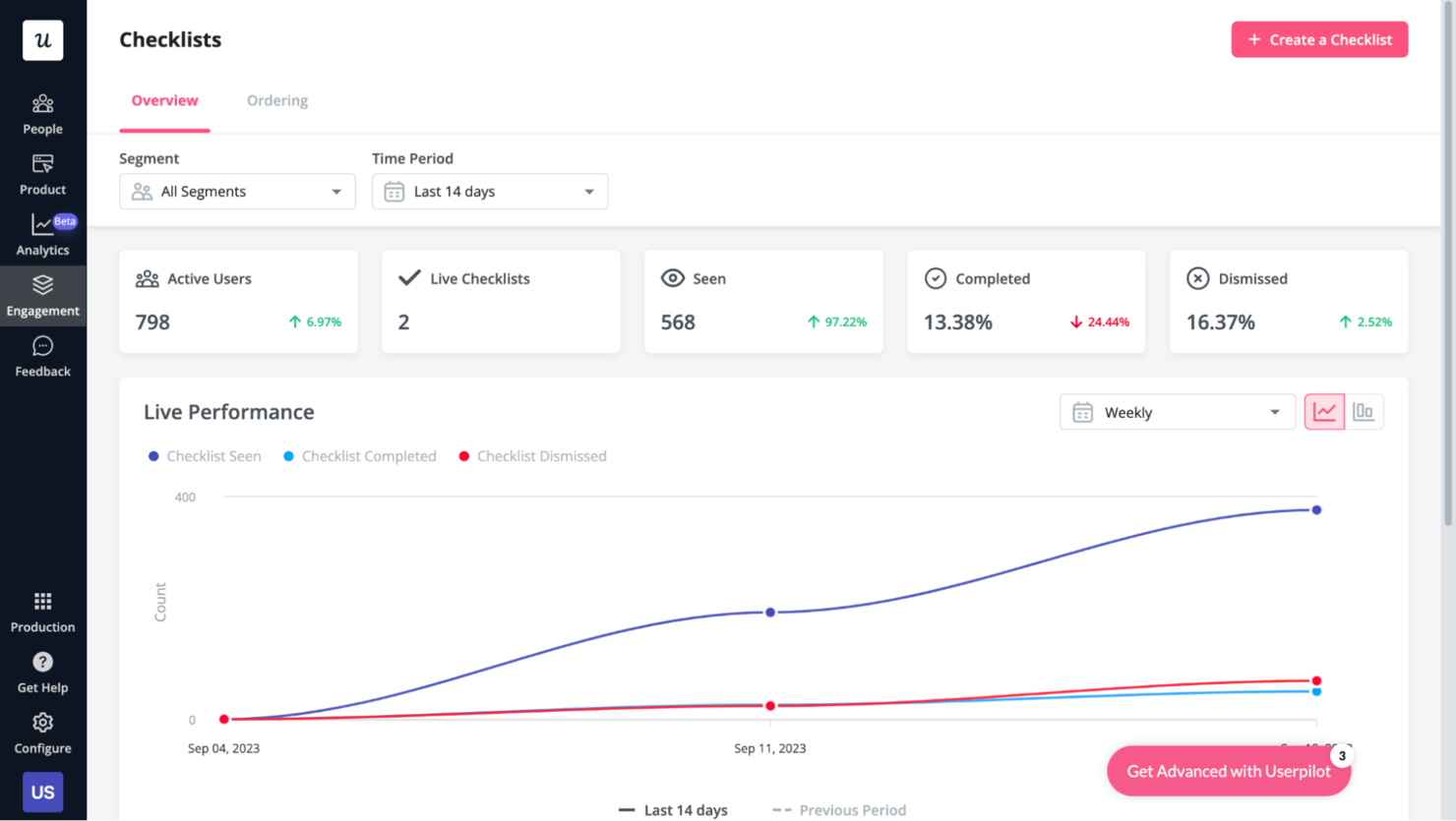
Userpilot è una piattaforma di crescita del prodotto progettata per migliorare il coinvolgimento degli utenti e l'onboarding. Si rivolge principalmente ai product manager e ai team focalizzati sull'esperienza utente e sul successo del cliente. La piattaforma offre strumenti per l'onboarding, sondaggi in-app e raccolta di feedback dagli utenti.
Perché ho scelto Userpilot: L'offerta gratuita di Userpilot include utenti illimitati, che rappresenta un vantaggio unico per i team più numerosi. Puoi accedere a funzionalità come sondaggi in-app e analisi di prodotto di base senza alcun costo.
Questo è l'ideale se desideri raccogliere feedback dagli utenti e analizzare i comportamenti di base degli utenti. Il piano gratuito offre anche il replay delle sessioni per comprendere meglio le interazioni degli utenti.
Funzionalità e integrazioni di rilievo:
Funzionalità includono guide interattive per gli utenti, che possono aiutare il tuo team a creare tutorial passo dopo passo per i nuovi utenti. La piattaforma offre anche pratiche di gamification per aumentare coinvolgimento e fidelizzazione. Inoltre, puoi utilizzare microsondaggi per raccogliere rapidamente feedback su funzionalità o aggiornamenti specifici.
Integrazioni includono strumenti come Slack, Intercom, HubSpot, Salesforce, Mixpanel, Segment, Amplitude, Google Analytics, Zapier e Drift.
Cosa è gratuito? Userpilot offre un piano Starter gratuito, che ti consente di accedere agli strumenti base per l'adozione del prodotto senza limiti di tempo. Questo include funzionalità fondamentali come flussi di onboarding, tag delle funzionalità e analisi di base. È un'opzione solida per piccoli team o startup che vogliono testare strumenti per l'adozione del prodotto. Tieni presente che le funzionalità più avanzate – come la segmentazione basata su eventi o l'A/B testing – sono riservate ai piani a pagamento. Userpilot offre anche una prova gratuita, che ti permette di esplorare le sue funzionalità avanzate senza dover sottoscrivere subito un piano a pagamento. Tuttavia, la prova potrebbe avere limitazioni sulle funzionalità avanzate e sulle possibilità di esportazione dei dati.
Pros and Cons
Pros:
- Guide facili da configurare
- Sondaggi personalizzabili
- Nessuna codifica richiesta per le funzioni di base
Cons:
- Analisi avanzate limitate
- Opzioni di personalizzazione limitate

Whatfix
Ideale per l'adozione digitale aziendale e la guida in-app
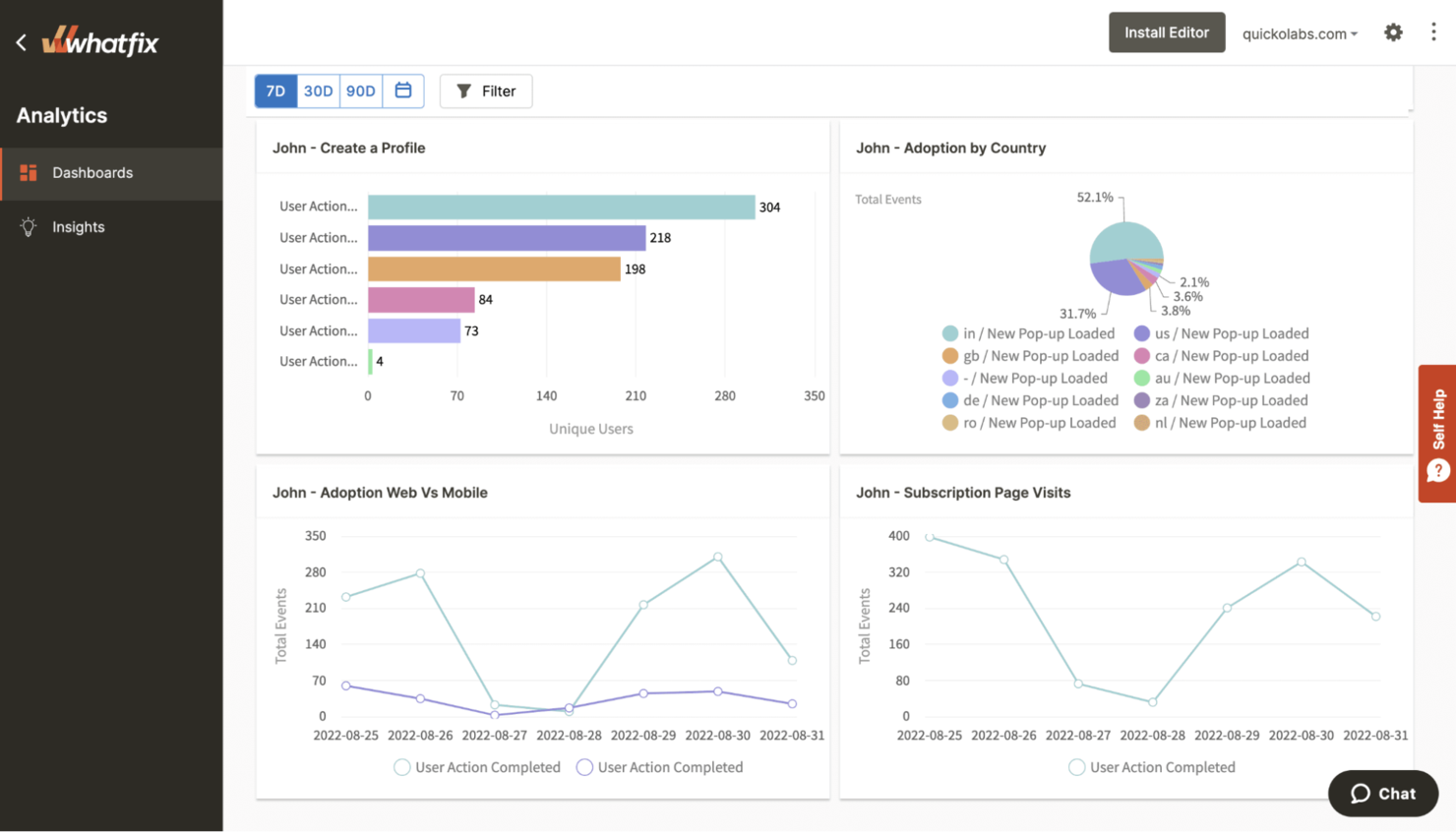
Whatfix è una piattaforma di adozione digitale progettata per migliorare l'esperienza utente fornendo guide e supporto direttamente nell'applicazione. Viene utilizzata da product manager, team di formazione e grandi aziende per creare walkthrough interattivi e tutorial che facilitano l'onboarding e il coinvolgimento degli utenti.
Perché ho scelto Whatfix: Whatfix offre la guida in-app anche nella versione di prova gratuita, permettendoti di creare walkthrough interattivi senza bisogno di programmare. Puoi implementare tooltip per aiutare gli utenti a navigare tra funzioni complesse, una caratteristica particolarmente utile negli ambienti aziendali di grandi dimensioni con più applicazioni.
L'offerta gratuita di Whatfix permette inoltre di creare liste di attività per assicurare che gli utenti completino i passaggi fondamentali. Questo lo rende un'ottima scelta per team e aziende che desiderano migliorare l'onboarding degli utenti e l'adozione interna con il minimo sforzo.
Caratteristiche principali & integrazioni:
Funzionalità includono l'aggregazione dei contenuti, che ti permette di raccogliere risorse e tutorial in un unico posto. Puoi anche utilizzare l'analisi degli utenti per tracciare coinvolgimento e progressi. Il supporto multi-formato garantisce che le tue guide funzionino su diversi dispositivi e piattaforme.
Integrazioni includono Salesforce, ServiceNow, Workday, SharePoint, Microsoft Dynamics, Oracle, SAP, SuccessFactors, Zendesk e Slack.
Cosa è gratis? Whatfix offre una versione gratuita che ti permette di creare flussi senza codice con attività, suggerimenti e notifiche in tempo reale, fornendo ai team un modo per testare la guida in-app e le basi dell'onboarding senza costi iniziali. Per chi desidera esplorare funzionalità più avanzate, è disponibile anche una versione di prova gratuita, anche se con limitazioni su numero di utenti e funzionalità.
Pros and Cons
Pros:
- I walkthrough personalizzati si adattano al ruolo e al comportamento dell'utente
- Solido supporto multilingue per team globali
- Le analisi mettono in evidenza i trend di adozione tra le app
Cons:
- Branding personalizzato e personalizzazioni avanzate sono disponibili solo nei piani a pagamento
- Analisi limitate disponibili nella versione di prova e gratuita

Usetiful
Migliore piattaforma no-code per guide interattive
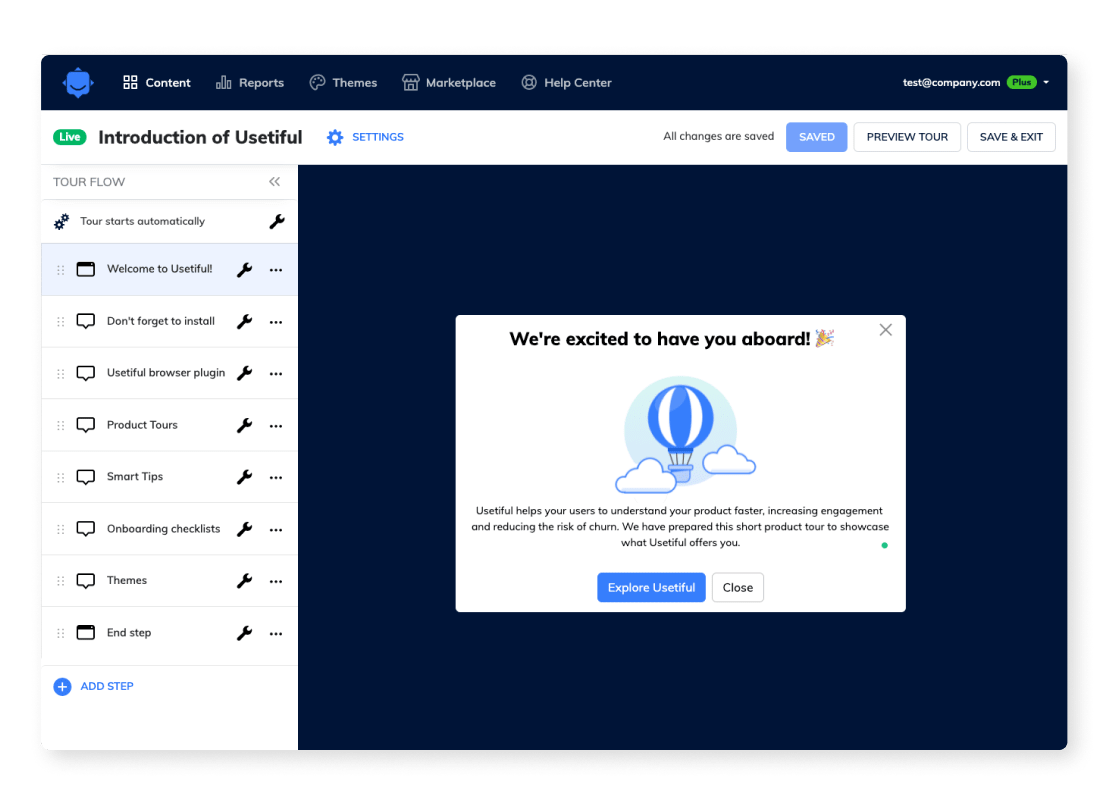
Usetiful è una piattaforma di adozione digitale che aiuta le aziende a creare guide utente interattive ed esperienze di onboarding. È progettata per product manager e team di customer success che desiderano aumentare il coinvolgimento degli utenti e incrementare l’adozione del prodotto.
Perché ho scelto Usetiful: Il piano gratuito di Usetiful include guide utente interattive, che permettono di creare tutorial passo-passo per i tuoi utenti. Puoi anche accedere a checklist di onboarding per assicurarti che gli utenti completino le attività essenziali.
La versione gratuita offre tooltip per evidenziare le funzionalità chiave e assistere gli utenti. Queste funzionalità la rendono una scelta valida per i team focalizzati sul miglioramento dell’onboarding e dell’engagement degli utenti.
Caratteristiche principali & integrazioni:
Caratteristiche includono walkthrough personalizzabili, che permettono di adattare il percorso utente alle esigenze specifiche. Puoi anche utilizzare il monitoraggio dei progressi per verificare i tassi di completamento degli utenti. Sono disponibili strumenti per la raccolta di feedback per ottenere insight direttamente dagli utenti.
Integrazioni disponibili: Google Analytics, HubSpot, Intercom, Pendo, Salesforce, Slack, Mixpanel, Segment, Zapier e WordPress.
Cosa è gratuito? Usetiful offre un piano gratuito per sempre con funzionalità di base, ma presenta limitazioni sul numero di guide e di utenti.
Pros and Cons
Pros:
- Creazione di guide interattive
- Walkthrough personalizzabili
- Strumenti di monitoraggio dei progressi
Cons:
- Numero limitato di guide
- Limite utenti sul piano gratuito

Hotjar
Ideale per combinare heatmap e sondaggi di feedback
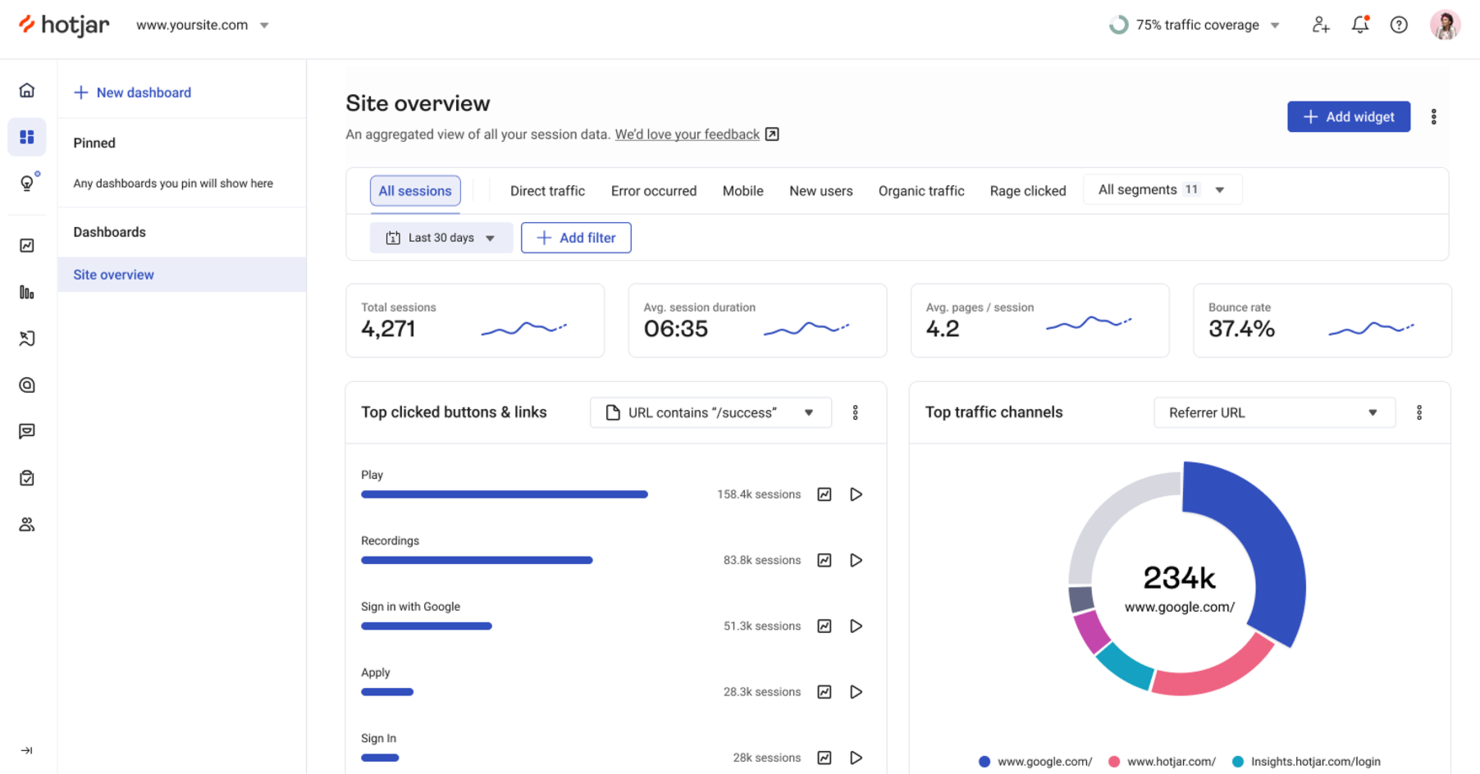
Hotjar è uno strumento di analisi del comportamento progettato per le aziende che desiderano comprendere come gli utenti interagiscono con i loro siti web. Si rivolge a product manager e team UX offrendo approfondimenti tramite heatmap, registrazioni delle sessioni e strumenti di raccolta feedback degli utenti.
Perché ho scelto Hotjar: Il piano gratuito di Hotjar permette di accedere alle heatmap, che visualizzano dove gli utenti cliccano, si muovono e scorrono sulla tua pagina. Puoi anche raccogliere feedback tramite sondaggi e questionari senza alcun costo.
Questo lo rende una scelta eccellente per i team che vogliono ottenere informazioni qualitative. Inoltre, le registrazioni delle sessioni consentono di osservare in tempo reale l'interazione degli utenti, tutto incluso nell'offerta gratuita.
Funzionalità e integrazioni principali:
Funzionalità includono funnel di conversione, che aiutano a individuare dove gli utenti abbandonano il percorso. Puoi anche usare l’analisi dei form per vedere come gli utenti interagiscono con i moduli del sito. I widget di feedback aggiungono un altro livello di approfondimento sull'interazione, consentendo la raccolta diretta di suggerimenti.
Integrazioni includono Google Analytics, HubSpot, Slack, Zapier, Optimizely, Unbounce, Segment, WordPress, Shopify e Squarespace.
Cosa è gratis? Hotjar offre un piano gratuito con funzionalità limitate, permettendoti di iniziare senza carta di credito e aggiornare in seguito se necessario.
Pros and Cons
Pros:
- Impostazione delle heatmap facile
- Creazione di sondaggi semplice
- Registrazioni delle sessioni in tempo reale
Cons:
- Limitato a siti con poco traffico
- Nessuna analisi avanzata nel piano gratuito

Ideale per analisi avanzata dei prodotti e coorti

Amplitude è una piattaforma di analisi dei prodotti progettata per i team che desiderano comprendere il comportamento degli utenti e favorire la crescita. I product manager e gli analisti dei dati la utilizzano per monitorare le interazioni degli utenti e ottimizzare le esperienze di prodotto.
Perché ho scelto Amplitude: Il piano gratuito di Amplitude offre l'accesso agli strumenti di analisi essenziali, rendendolo un ottimo strumento per comprendere il comportamento dell'utente. Puoi monitorare le azioni degli utenti e visualizzare report dettagliati senza alcun costo.
La versione gratuita include la segmentazione degli eventi e la creazione di coorti di utenti, elementi fondamentali per un'analisi dettagliata. Questo lo rende una scelta eccellente per i team che necessitano di analisi approfondite senza un impegno finanziario.
Funzionalità e integrazioni principali:
Funzionalità includono la creazione di coorti comportamentali, che ti consente di raggruppare gli utenti in base alle loro azioni. Puoi anche utilizzare l'analisi dei funnel per vedere dove gli utenti abbandonano il loro percorso. L'analisi della retention ti aiuta a capire con quale frequenza gli utenti ritornano al tuo prodotto nel tempo.
Integrazioni includono Segment, Salesforce, Google Analytics, HubSpot, Mixpanel, Slack, Snowflake, Looker, Tableau e BigQuery.
Cosa è gratuito? Amplitude offre un piano gratuito per sempre che permette l'accesso alle funzionalità principali di analisi, anche se ci sono limiti relativi al volume dei dati e alle funzionalità avanzate.
Pros and Cons
Pros:
- Monitoraggio dettagliato delle azioni degli utenti
- Strumenti di segmentazione degli eventi
- Nessun costo per l'analisi di base
Cons:
- Volume dei dati limitato nel piano gratuito
- Le funzionalità più avanzate sono disponibili solo nei piani a pagamento

Ideale per la registrazione delle sessioni di tracciamento degli utenti
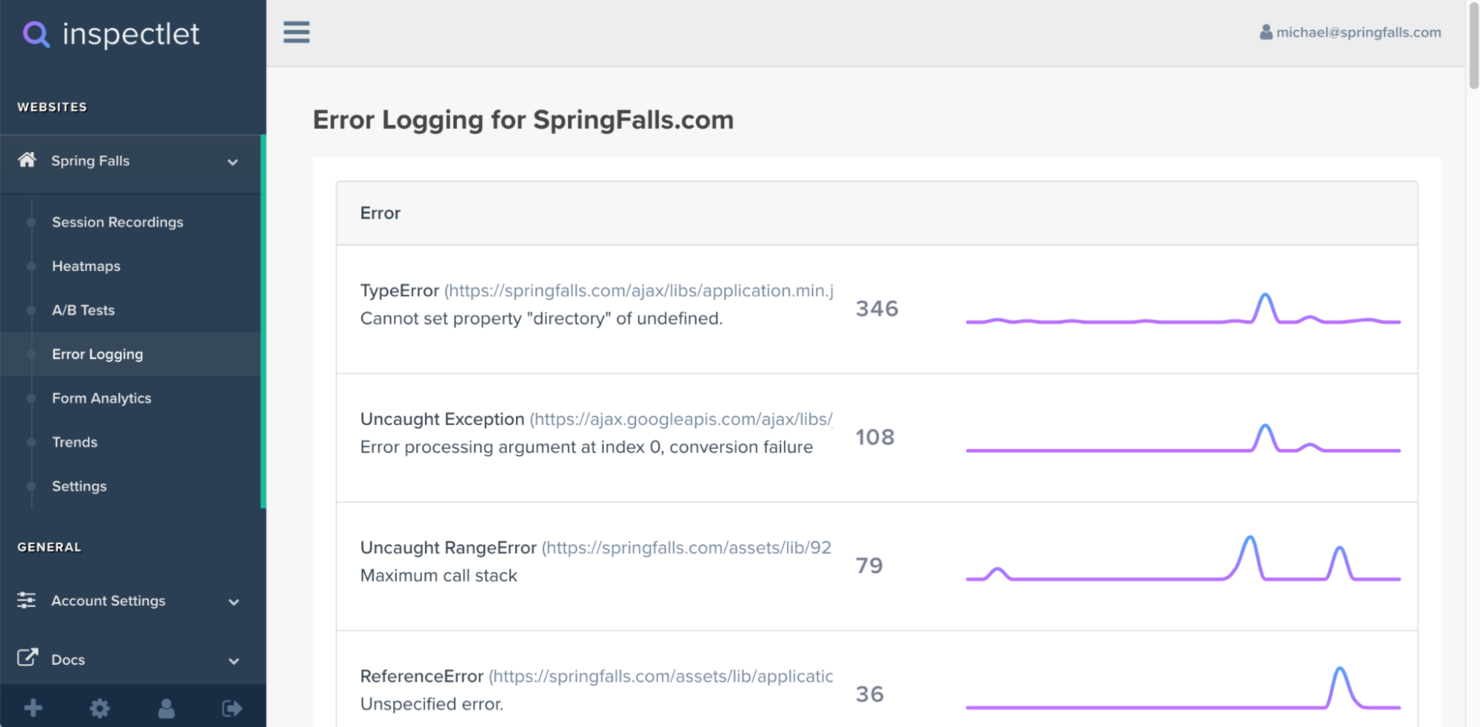
Inspectlet è uno strumento di monitoraggio del comportamento degli utenti che si concentra sulla registrazione delle sessioni e sulle heatmap per aiutare le aziende a comprendere le interazioni degli utenti sui loro siti web. È utilizzato principalmente da product manager e designer UX che vogliono ottimizzare l'esperienza utente e migliorare le prestazioni del sito.
Perché ho scelto Inspectlet: il piano gratuito di Inspectlet offre l’accesso alle registrazioni delle sessioni, permettendo di vedere esattamente come gli utenti navigano all’interno del sito. È possibile tracciare i movimenti del mouse, i clic e il comportamento di scorrimento senza costi.
Questo lo rende uno strumento prezioso per analizzare i percorsi degli utenti e individuare potenziali problemi di esperienza utente. Inoltre, è inclusa la funzionalità delle heatmap, che offre una visione visiva delle interazioni dei visitatori.
Funzionalità principali & integrazioni:
Funzionalità includono analytics sui moduli, che aiutano a comprendere come gli utenti interagiscono con i form all’interno del sito. È anche possibile utilizzare i funnel di conversione per tracciare il percorso degli utenti e identificare i punti di abbandono. Gli analytics in tempo reale forniscono informazioni immediate, permettendo al team di apportare rapidi aggiustamenti.
Integrazioni includono Google Analytics, WordPress, Shopify, Adobe Commerce, Drupal, Joomla, Wix, Weebly, Squarespace e BigCommerce.
Cosa offre il piano gratuito? Inspectlet propone un piano gratuito per sempre che consente l’accesso alle funzionalità basiche di registrazione delle sessioni e heatmap, seppur con limitazioni sul numero di sessioni registrate.
Pros and Cons
Pros:
- Registrazione dettagliata delle sessioni
- Heatmap incluse
- Accesso ai dati in tempo reale
Cons:
- Funzionalità di reportistica limitate
- Memorizzazione delle sessioni limitata

Ideale per onboarding in-app multilingue con analisi approfondita
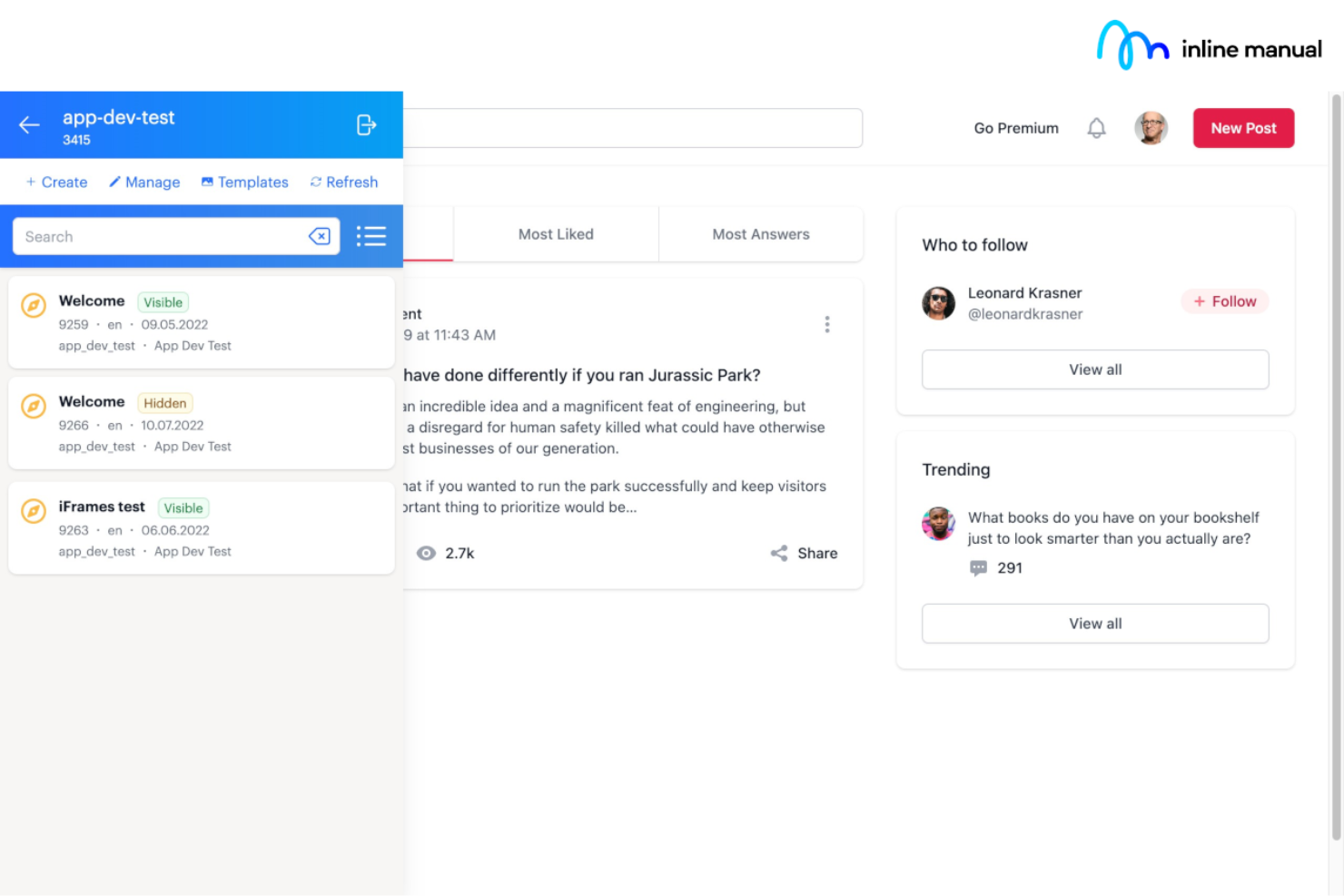
Inline Manual è una piattaforma di digital adoption che offre strumenti per creare walkthrough interattivi e guide utente. È pensata per i product manager e i team di formazione che vogliono migliorare l’onboarding e il coinvolgimento degli utenti.
Perché ho scelto Inline Manual: La prova gratuita di Inline Manual consente di monitorare le interazioni degli utenti per ottimizzare i processi di onboarding. Puoi creare guide interattive senza competenze tecniche.
La versione gratuita offre accesso ai tooltip che guidano gli utenti attraverso compiti complessi. Questo la rende adatta ai team che desiderano migliorare l’esperienza utente con una configurazione minima.
Funzionalità e integrazioni principali:
Funzionalità tra cui l’aiuto contestuale, che fornisce supporto agli utenti in base all’attività svolta. Puoi inoltre utilizzare l’analisi dei dati per monitorare il coinvolgimento degli utenti e l’efficacia delle guide. I temi personalizzabili permettono di adattare le guide al design del tuo marchio.
Integrazioni incluse Salesforce, HubSpot, Zendesk, Intercom, Slack, Google Analytics, Mixpanel, Segment, WordPress e Shopify.
Cosa è gratuito? Inline Manual offre una versione gratuita, sebbene sia limitata nelle funzionalità e nella capacità di utenti. Inoltre, Inline Manual offre una prova gratuita di 14 giorni completamente funzionale, senza carta di credito. Durante questa prova puoi creare walkthrough, tooltip e guide interattive illimitate, testare targeting e segmentazione e utilizzare gli strumenti di authoring esattamente come nella versione a pagamento, così da sperimentare la piattaforma completa prima di abbonarti.
Pros and Cons
Pros:
- Configurazione semplice e senza codice per tooltip, walkthrough e annunci
- Robusta localizzazione e supporto multilingue per team internazionali
- Il controllo di versione assicura aggiornamenti dei contenuti sicuri e ambienti di staging
Cons:
- Opzioni limitate per analisi avanzate e reportistica
- L’integrazione con app a pagina singola può richiedere l’intervento di sviluppatori


Shepherd.js è una libreria open-source che permette agli sviluppatori di creare tour guidati per le applicazioni web. È utilizzata principalmente dai team di sviluppo che desiderano offrire esperienze di onboarding personalizzate e migliorare il coinvolgimento degli utenti attraverso guide interattive.
Perché ho scelto Shepherd.js: Shepherd.js offre la creazione di tour personalizzati come parte della sua offerta gratuita, rendendola ideale per gli sviluppatori che vogliono implementare guide utente su misura. Puoi creare tutorial passo dopo passo che si adattano alle esigenze specifiche della tua applicazione.
La libreria della piattaforma consente un'ampia personalizzazione dell'aspetto e del comportamento dei tour. Questa flessibilità garantisce che tu possa adattare le guide esattamente alle tue necessità, senza costi aggiuntivi.
Funzionalità principali & integrazioni:
Funzionalità includono opzioni di personalizzazione dettagliate, che ti permettono di modificare l'aspetto dei tour per adattarsi al design del tuo sito. Puoi anche controllare la sequenza e la tempistica delle tappe del tour per adattarlo al tuo flusso di navigazione. La libreria supporta la gestione degli eventi, permettendo al tour di reagire dinamicamente alle azioni dell'utente.
Integrazioni includono React, Angular, Ember.js, Vue.js, Backbone.js, Bootstrap, jQuery, Knockout.js, Meteor e Svelte.
Cosa è gratis? Shepherd.js offre un piano gratuito per sempre in quanto libreria open-source, senza alcuna restrizione sull'utilizzo o sulla personalizzazione.
Pros and Cons
Pros:
- Tour completamente personalizzabili
- Open-source e gratuito senza restrizioni di utilizzo
- Gestione dinamica degli eventi
Cons:
- Template predefiniti limitati
- Dipende dalle risorse degli sviluppatori
Altre piattaforme di adozione digitale
Ecco alcune opzioni aggiuntive di piattaforme di adozione digitale che offrono anch’esse piani gratuiti o periodi di prova. Sebbene questi strumenti non siano stati inclusi nel mio elenco, vale comunque la pena consultarli:
- Minerva
Ideale per guide passo dopo passo
- iSpring LMS
Ideale per la creazione di corsi
- Chameleon
Ideale per sondaggi agli utenti


Come valuto le piattaforme di adozione digitale gratuite
Analizzo due livelli: se uno strumento consente davvero di creare un tour di onboarding senza codice e, successivamente, cosa lo distingue dagli altri in termini di targeting, analisi e profondità del piano gratuito.
Funzionalità di base (Requisiti minimi per questa lista)
Quando seleziono gli strumenti per la mia lista, valuto ciascuno su una scala da 0 (non offre la funzionalità) a 5 (eccelle in quest'area) per ogni funzionalità di base elencata di seguito. Successivamente, calcolo il punteggio totale dello strumento in percentuale. Ogni tool deve raggiungere un punteggio totale minimo del 65% per essere considerato per l'inclusione.
- Builder di flussi no-code: Verifico se un product manager può creare e pubblicare un walkthrough in-app da un editor visivo senza dover coinvolgere il team di sviluppo.
- Elementi di guida in-app: Qui conta la varietà di pattern UI: tooltip, modali, hotspot, banner e slideout servono ciascuno a momenti diversi nel percorso utente.
- Workflow di onboarding utente: Cerco strumenti di onboarding strutturati come checklist e flussi di benvenuto che guidano i nuovi utenti passo dopo passo verso i traguardi di attivazione.
- Disponibilità di piano gratuito: Ogni strumento deve offrire un vero livello gratuito, non solo una prova di 14 giorni, con capacità sufficiente per consentire a un team di prodotto di lanciare veri flussi di adozione in produzione.
- Segmentazione e targeting: Mostrare la guida giusta all'utente giusto è ciò che distingue gli strumenti di adozione utili dal rumore, quindi valuto le opzioni di targeting per attributo e comportamento.
- Analytics sull'adozione: Verifico se la piattaforma fornisce report sulle guide completate, sui punti di abbandono e sull'utilizzo delle funzionalità affinché i team di prodotto possano iterare basandosi su dati reali.
Una volta stilata la lista degli strumenti che soddisfano questi criteri, valuto ciò che distingue ciascuna piattaforma.
Fattori di differenziazione (Cosa distingue i fornitori)
Ecco come confronto e metto a confronto i diversi fornitori:
Funzionalità distintive
Le microsurvey in-app sono un grande elemento di differenziazione. Poter attivare un prompt PMF o NPS subito dopo che un utente ha completato una checklist di onboarding dà ai team di prodotto un feedback contestuale senza dover ricorrere a strumenti di survey esterni. Valuto anche se una piattaforma include un widget centro risorse, poiché un hub self-service permanente riduce il volume di richieste di supporto e mantiene gli utenti operativi. Anche la scrittura assistita dall'IA è un aspetto da verificare sempre più spesso. Gli strumenti che generano automaticamente il testo delle guide o suggeriscono la posizione sulla base dei dati di abbandono possono ridurre significativamente il tempo necessario per lanciare un nuovo flusso.
Oltre le funzionalità
Conta quanto velocemente un singolo product manager può passare dall'iscrizione a una guida live, quindi verifico se la configurazione richiede solo uno snippet o una vera integrazione SDK con il supporto degli sviluppatori. Anche le integrazioni con l'intero stack di prodotto sono un fattore chiave. Se i tuoi dati di adozione non possono confluire in Amplitude, Mixpanel o nel tuo data warehouse, perdi la possibilità di collegare i comportamenti di onboarding alle metriche di retention successive. Valuto anche la reale fattibilità di ogni piano gratuito: i limiti di MAU, i requisiti di branding e le funzionalità bloccate determinano se il livello gratuito è utilizzabile in produzione o solo in ambiente di test.
Come scegliere le piattaforme gratuite di adozione digitale
Gli elenchi complessi di funzionalità e le strutture tariffarie possono rendere difficile capire cosa si ottiene realmente da una piattaforma gratuita di adozione digitale. Per aiutarti a rimanere concentrato mentre analizzi il processo di selezione del software, ecco alcuni fattori da tenere presenti:
| Fattore | Cosa considerare |
|---|---|
| Ambito dell'offerta gratuita | Determina cosa è incluso nel piano gratuito, come i limiti di utenti o le funzionalità, per assicurarti che soddisfi le esigenze del tuo team senza costi imprevisti. |
| Scalabilità | Considera se la piattaforma può crescere insieme al tuo team. Cerca opzioni che consentano aggiornamenti semplici man mano che la base utenti e le esigenze relative alle funzionalità aumentano. |
| Integrazioni | Verifica se la piattaforma si integra con gli strumenti che già utilizzi, come software CRM o di analisi, per migliorare il flusso di lavoro esistente senza complicazioni aggiuntive. |
| Facilità d'uso | Valuta l'interfaccia utente e la rapidità con cui il tuo team può imparare a utilizzare lo strumento. Un design semplice e intuitivo può far risparmiare tempo e ridurre i costi di formazione. |
| Personalizzazione | Cerca opzioni di personalizzazione che ti consentano di adattare la piattaforma all'aspetto e allo stile del tuo marchio, garantendo un'esperienza uniforme per i tuoi utenti. |
| Risorse di supporto | Considera la disponibilità di materiali di supporto come tutorial, webinar e assistenza via chat per aiutare il tuo team a sfruttare al massimo le funzionalità della piattaforma. |
| Sicurezza | Assicurati che la piattaforma sia conforme agli standard di sicurezza del settore per proteggere i tuoi dati e mantenere la fiducia degli utenti. |
| Analisi | Cerca strumenti di analisi integrati che forniscano informazioni sul comportamento degli utenti e sui tassi di adozione, aiutandoti a misurare il successo delle tue iniziative di adozione digitale. |
Che cos'è una piattaforma gratuita per l'adozione digitale?
Una piattaforma per l'adozione digitale è uno strumento che aiuta gli utenti a imparare a utilizzare le applicazioni software e a interagire con esse in modo efficace, offrendo piani o prove gratuite per iniziare senza costi. Questi strumenti sono comunemente utilizzati dai responsabili di prodotto, dai team di formazione e dai professionisti del successo del cliente per migliorare l'inserimento e il coinvolgimento degli utenti.
Offrono valore semplificando i processi complessi e aumentando la produttività degli utenti. Guide interattive, analisi degli utenti ed elenchi di controllo per l'inserimento aiutano a comprendere il comportamento degli utenti, a fornire formazione e a garantire il successo dell'adozione del software.
Una piattaforma per l'adozione digitale (DAP) è progettata per aiutare gli utenti finali ad adattarsi più efficacemente alle nuove funzionalità e ai nuovi strumenti. Ecco una panoramica delle funzionalità generalmente incluse nei piani gratuiti rispetto a quelli a pagamento.
Funzionalità delle piattaforme gratuite per l'adozione digitale
- Guide interattive: accompagnano gli utenti passo dopo passo, riducendo la necessità di inviare richieste di assistenza quando esplorano nuove funzionalità.
- Elenchi di controllo per l'inserimento: supportano l'inserimento dei dipendenti assicurando che le attività di configurazione fondamentali vengano completate fin dalle prime fasi.
- Analisi di base degli utenti: monitorano i modelli di coinvolgimento per mostrare come gli utenti finali interagiscono con la tua soluzione per l'adozione digitale.
- Suggerimenti e messaggi nell'app: forniscono consigli contestuali che guidano gli utenti all'interno dell'applicazione, riducendo al minimo la dipendenza dall'assistenza esterna o da una base di conoscenza.
- Modelli personalizzabili: consentono di creare tutorial e percorsi guidati con il marchio che riflettono lo stile della tua organizzazione.
Funzionalità delle piattaforme a pagamento per l'adozione digitale
- Segmentazione avanzata degli utenti: consente di offrire contenuti e guide personalizzati in base a specifici gruppi di utenti.
- Pannelli di analisi in tempo reale: offre informazioni più approfondite sui tassi di adozione e sul coinvolgimento degli utenti.
- Raccomandazioni sui contenuti basate sull'IA: suggeriscono materiali didattici pertinenti in base al comportamento degli utenti.
- Integrazioni di terze parti: collegano la piattaforma ad altri sistemi aziendali per migliorarne le funzionalità.
- Flussi di lavoro di inserimento personalizzati: consentono di progettare processi di inserimento dettagliati e in linea con gli obiettivi aziendali.
Vantaggi di una piattaforma gratuita per l'adozione digitale
Una soluzione gratuita per l'adozione digitale può offrire un valore concreto senza richiedere un investimento immediato. Tra i principali vantaggi troviamo:
- Apprendimento conveniente: fornisce ai team gli strumenti fondamentali per la formazione mantenendo sotto controllo il budget.
- Inserimento dei dipendenti migliorato: guide ed elenchi di controllo autonomi semplificano l'adozione e aiutano i nuovi assunti a diventare produttivi più rapidamente.
- Maggiore coinvolgimento degli utenti: suggerimenti contestuali e analisi mostrano come gli utenti finali interagiscono con la piattaforma, aiutandoti a perfezionare l'esperienza del cliente.
- Riduzione delle richieste di assistenza: una guida proattiva aiuta gli utenti a risolvere i problemi in autonomia, riducendo le richieste al reparto IT o all'assistenza.
- Personalizzazione: i modelli semplificano la creazione di contenuti formativi in linea con il tuo marchio.
- Maggiore produttività dei dipendenti: strumenti semplici e accessibili abbreviano la curva di apprendimento, consentendo ai team di concentrarsi su attività a maggior valore.
- Scalabilità per nuove imprese e piccoli team: i piani gratuiti spesso offrono funzionalità sufficienti per sostenere la crescita iniziale.
- Adozione rapida: grazie a una configurazione minima, il tuo team può iniziare subito a trarre vantaggio dalla piattaforma.
Costi e prezzi di una piattaforma di adozione digitale gratuita
Mi rendo conto che sei arrivato a questo articolo cercando le migliori opzioni di piattaforme di adozione digitale disponibili gratuitamente. Tuttavia, poiché i piani gratuiti offrono solo funzionalità limitate, è molto probabile che in futuro dovrai passare a un piano superiore.
La tabella seguente riassume i piani più comuni, i relativi prezzi medi e le funzionalità tipicamente incluse nelle soluzioni di piattaforme di adozione digitale:
Tabella di confronto dei piani per piattaforme di adozione digitale
| Tipo di piano | Prezzo medio | Funzionalità comuni |
|---|---|---|
| Piano gratuito | $0 | Guide di base, suggerimenti ed elementi analitici limitati. |
| Piano personale | $5-$25/user/month | Guide avanzate, segmentazione degli utenti e integrazioni di base. |
| Piano aziendale | $30-$75/user/month | Flussi di lavoro personalizzabili, analisi avanzate e più integrazioni. |
| Piano per grandi aziende | $80-$150/user/month | Personalizzazione completa, assistenza dedicata e analisi approfondite. |
Domande frequenti sulle piattaforme di adozione digitale gratuite
Ecco alcune risposte alle domande comuni sulle piattaforme di adozione digitale gratuite:
Come funziona una piattaforma di adozione digitale?
Una piattaforma di adozione digitale funziona sovrapponendo indicazioni e assistenza ad altre applicazioni software. Aiuta gli utenti a svolgere attività importanti fornendo istruzioni dettagliate e informazioni contestuali. Questo approccio garantisce che gli utenti possano imparare rapidamente a utilizzare e gestire nuovi strumenti senza assistenza esterna.
Quale delle seguenti è una funzionalità comune di una piattaforma di adozione digitale?
Tra le funzionalità comuni ci sono le procedure guidate interattive, che accompagnano gli utenti nello svolgimento di attività specifiche in tempo reale. Queste attività possono variare dalla creazione di report all’invio di richieste di rimborso spese, garantendo che gli utenti completino le azioni necessarie in modo efficiente e accurato.
Qual è la migliore piattaforma di adozione digitale?
La scelta della migliore piattaforma di adozione digitale dipende dalle esigenze e dal budget del tuo team. Considera fattori come la facilità d’uso, le funzionalità disponibili e le opzioni di assistenza. Valuta le versioni gratuite per verificare se soddisfano i tuoi requisiti di base prima di prendere in considerazione gli aggiornamenti.
Qual è l'impatto dell'adozione digitale?
L’adozione digitale garantisce che gli utenti integrino completamente gli strumenti aziendali nei propri flussi di lavoro, riducendo al minimo la resistenza. In sua assenza, le aziende possono dover affrontare uno scarso utilizzo del software e investimenti sprecati. Un’adozione efficace aumenta la produttività e massimizza il valore degli strumenti digitali.
Posso utilizzare gratuitamente una piattaforma di adozione digitale?
Sì, molte piattaforme di adozione digitale offrono versioni o periodi di prova gratuiti. In genere includono funzionalità di base come guide per gli utenti e analisi, permettendoti di testare le capacità della piattaforma prima di sottoscrivere un piano a pagamento.
Come scelgo la piattaforma di adozione digitale giusta?
Per scegliere la piattaforma giusta, valuta le esigenze specifiche del tuo team, come la complessità del software utilizzato e i requisiti di formazione. Cerca periodi di prova gratuiti per esplorare le funzionalità e assicurarti che la piattaforma sia in linea con i tuoi obiettivi.
Cosa succede ora:
Se stai valutando una piattaforma di adozione digitale gratuita, contatta gratuitamente un consulente SoftwareSelect per ricevere consigli.
Compili un modulo e partecipi a una breve conversazione durante la quale il consulente approfondirà le tue esigenze specifiche. Dopodiché riceverai una selezione ristretta di software da esaminare. Ti assisterà inoltre durante l'intero processo di acquisto, comprese le trattative sul prezzo.