

Un generatore di mockup di prodotto è uno strumento digitale che consente di creare immagini realistiche dei prodotti senza disporre di campioni fisici. Molti strumenti moderni funzionano come generatori di mockup basati sull'intelligenza artificiale, permettendo di creare mockup di alta qualità e immagini di mockup curate con un solo clic. Queste piattaforme simulano ambientazioni di prodotto realistiche, aiutando i team a presentare i progetti in modo più efficace, testare il branding e velocizzare i flussi di lavoro creativi senza ricorrere al lavoro di progettazione manuale. La scelta dello strumento giusto può aiutare il team a visualizzare i concetti, collaborare più rapidamente e realizzare presentazioni curate che favoriscono il processo decisionale. In questo elenco troverai una serie di generatori di mockup adatti a diverse esigenze di progettazione, così potrai scegliere quello più adatto al tuo processo e agli obiettivi aziendali.
Perché fidarsi dei nostri consigli sui software
6,700+
Reviews
20
Industry experts
16+
Evaluation factors
14
Years
Il nostro team testa e recensisce software dal 2012. In quanto product manager noi stessi, sappiamo quanto sia difficile — e importante — scegliere il software giusto.
Per questa guida, abbiamo valutato gli strumenti attraverso test pratici e ricerche indipendenti, assegnando un punteggio agli strumenti in base ai nostri criteri di selezione.
Le nostre recensioni riflettono il nostro giudizio editoriale umano, non un discorso di vendita.
Revisori esperti:
- Andrew LumbySenior TPM
- Cristiano ValimSenior UI/UX Lead


Tabella comparativa dei generatori di mockup di prodotto
Questa tabella comparativa riassume i dettagli dei prezzi delle mie migliori selezioni di generatori di mockup di prodotto:
| Tool | Best For | Trial Info | Price | ||
|---|---|---|---|---|---|
| 1 | Ideale per creare rapidamente modelli grafici tramite trascinamento | Piano gratuito disponibile | A partire da $15/utente/mese | Website | |
| 2 | Ideale per i modelli dimostrativi con cornici di dispositivi per i team di progettazione | Piano gratuito disponibile | Da $16/utente/mese | Website | |
| 3 | Ideale per la coerenza dei mockup basata sul kit del marchio | Piano gratuito disponibile | A partire da 7,99 $/utente/mese (con fatturazione annuale) | Website | |
| 4 | Piano gratuito disponibile | A partire da $3.99/utente/mese (fatturato annualmente) | Website | ||
| 5 | Ideale per la creazione di modelli strutturali | Prova gratuita di 14 giorni | A partire da $16/utente/mese | Website | |
| 6 | Ideale per una personalizzazione avanzata delle scene | Piano gratuito disponibile | A partire da $9/mese (con fatturazione annuale) | Website | |
| 7 | Ideale con strumenti di ottimizzazione UX basati sull'IA | Piano gratuito disponibile | A partire da $14/mese | Website | |
| 8 | Ideale per flussi di lavoro di progettazione collaborativi | Piano gratuito disponibile | A partire da $7/utente/mese (fatturato annualmente) | Website | |
| 9 | Ideale per scene di presentazione generate dall’IA e pronte per la stampa | Piano gratuito disponibile | A partire da $10/mese (con fatturazione annuale) | Website | |
| 10 | Ideale per scene e mockup 3D generati dall'IA per l'e-commerce | Piano gratuito disponibile | A partire da $5.7/mese (con fatturazione annuale) | Website |


Recensioni dei generatori di mockup di prodotto
Di seguito sono riportati i miei riepiloghi dettagliati dei generatori di mockup di prodotto inclusi nella mia selezione. Le mie recensioni offrono una panoramica approfondita delle funzionalità, dei casi d’uso migliori e delle capacità di ciascuno strumento, per aiutarti a trovare quello più adatto alle tue esigenze.
 Ideale per creare rapidamente modelli grafici tramite trascinamento
- Piano gratuito disponibile
- A partire da $15/utente/mese
Visit WebsiteCustomer Rating:4.7/5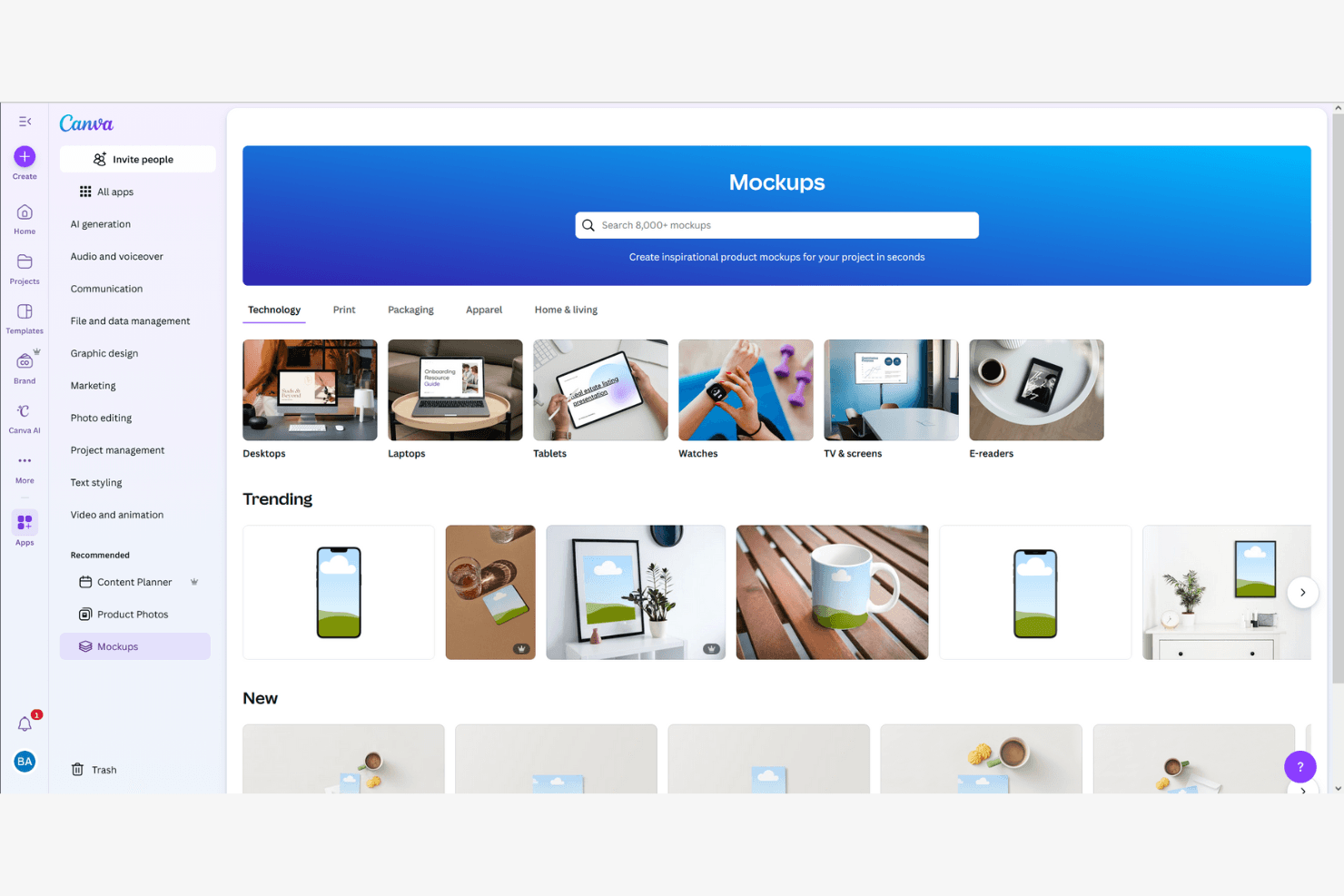
Canva consente agli utenti di creare modelli grafici di prodotti in categorie tecnologiche e legate allo stile di vita. Canva è uno strumento di progettazione basato sul browser che combina un editor con funzionalità di trascinamento, un generatore di modelli grafici con IA e una libreria di oltre 400 scene per modelli grafici e 3,6 milioni di modelli per creare modelli grafici visivi di prodotti, presentazioni per investitori e risorse di marketing.
Per chi è più adatto Canva?
Canva è ideale per responsabili di prodotto, fondatori e responsabili del marketing di prodotto che hanno bisogno di trasformare rapidamente concetti preliminari in elementi visivi rifiniti, senza dover dipendere da un designer.
Perché ho scelto Canva
Ho scelto Canva come uno dei migliori strumenti perché la sua creazione di modelli grafici tramite trascinamento elimina concretamente il collo di bottiglia dell'attesa delle risorse di design. La sua libreria di oltre 400 scene per modelli grafici consente di inserire uno screenshot dell'interfaccia su una cornice di telefono o su una superficie di prodotto in pochi secondi, mentre il Generatore di modelli grafici con IA può creare un modello grafico rifinito di un sito web o di un'app con un solo clic. Mi piace anche il fatto che il Design magico generi layout completi a partire da un prompt testuale, così puoi passare dal concetto a un elemento visivo pronto per gli stakeholder prima della prossima riunione quotidiana.
Funzionalità principali di Canva
- Kit del marchio: conserva colori, caratteri e loghi del tuo marchio in un unico posto, così ogni modello grafico creato dal tuo team rimane coerente con il marchio senza sforzi aggiuntivi.
- Co-modifica in tempo reale: più membri del team possono lavorare contemporaneamente sullo stesso design, con commenti che mantengono il feedback nel giusto contesto.
- Ridimensionamento magico: riformatta istantaneamente un design per adattarlo a diverse dimensioni della tela, così un unico modello grafico può coprire più formati di presentazione.
- Oltre 300 integrazioni con app: collega Canva direttamente dall'editor a strumenti come Slack, Asana, HubSpot e Google Workspace.
Integrazioni di Canva
Le integrazioni includono Slack, Asana, Microsoft Teams e Google Workspace.
Pros and Cons
Pros:
- La creazione di modelli grafici tramite trascinamento non richiede formazione
- Enorme libreria di modelli grafici già pronti
- L'IA genera elementi visivi a partire da semplici prompt
Cons:
- Nessun supporto per prototipi interattivi o flussi utente
- Nessun passaggio di consegne agli sviluppatori o esportazione delle specifiche
Learn more about Canva: Ideale per i modelli dimostrativi con cornici di dispositivi per i team di progettazione
- Piano gratuito disponibile
- Da $16/utente/mese
Visit WebsiteCustomer Rating:4.7/5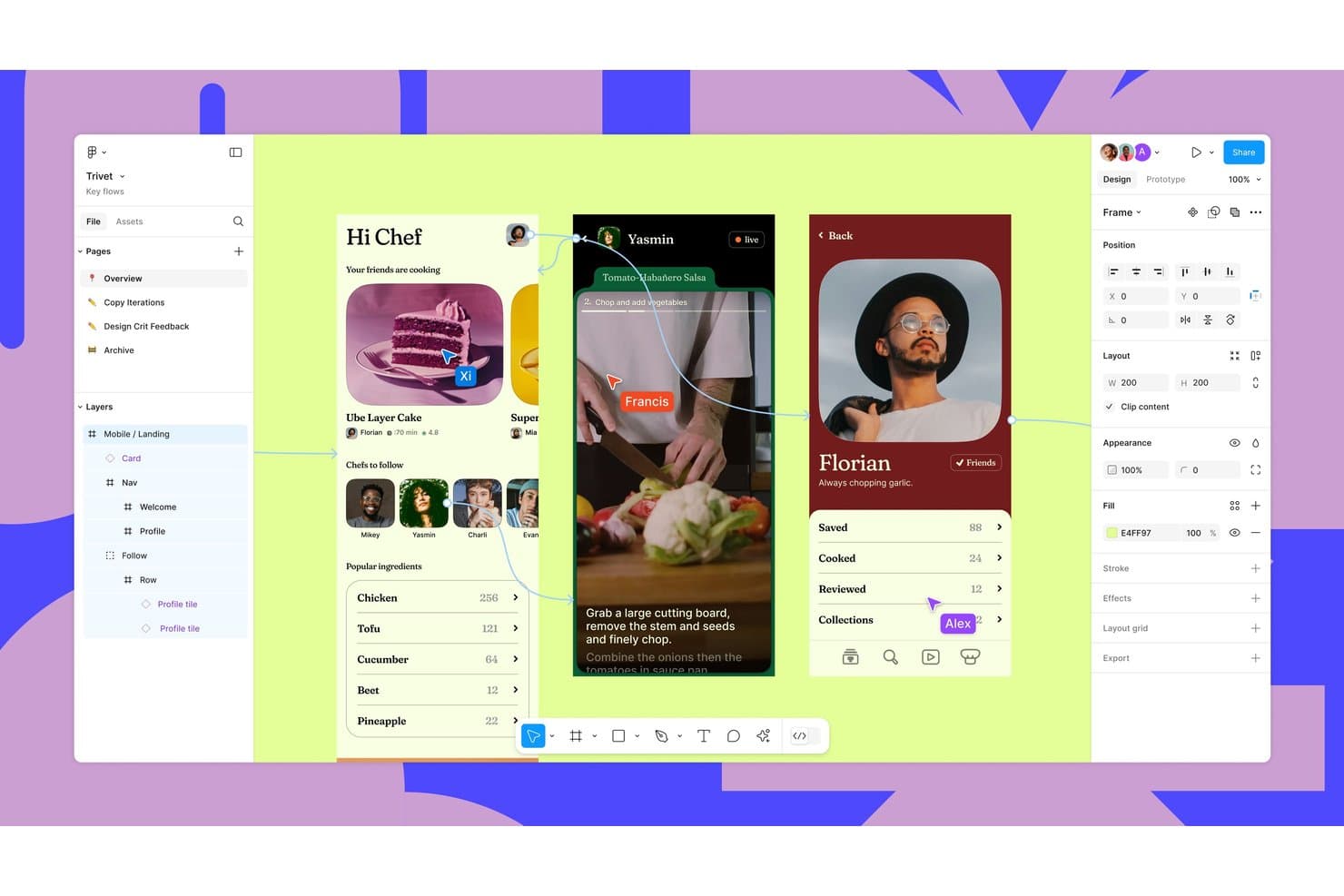
Figma supporta la progettazione collaborativa con cursori di più utenti in tempo reale e la prototipazione. Figma è una piattaforma di progettazione e collaborazione basata sul browser che supporta la creazione di modelli dimostrativi di prodotti attraverso la sua libreria Community, con oltre 4.700 modelli di dispositivi, plugin di terze parti come Artboard Studio e Mockuups Studio e strumenti di modifica delle immagini basati sull'intelligenza artificiale.
Per chi è più adatto Figma?
Figma è particolarmente adatto ai team di prodotto e UX che lavorano già in Figma e devono inserire le schermate delle app in cornici di dispositivi per le presentazioni ai portatori di interesse senza cambiare strumento.
Perché ho scelto Figma
Ho incluso Figma tra le mie scelte principali perché è l'unico strumento di questo elenco in cui il flusso di lavoro per i modelli dimostrativi si svolge nello stesso file dei progetti reali. Quando il team presenta le schermate di un'app ai portatori di interesse, può attingere a oltre 4.700 modelli di cornici per dispositivi della Community e inserire direttamente i progetti in tempo reale nei segnaposto con etichette, senza cambiare strumento. Plugin come Mokker aggiungono il rendering 3D dei dispositivi con illuminazione e ombre, per risultati più curati.
Funzionalità principali di Figma
- Creazione in blocco con Figma Buzz: Carica un file CSV o XLSX per associare le colonne di dati ai livelli del progetto e generare automaticamente una risorsa per ogni riga.
- Strumenti di modifica delle immagini basati sull'intelligenza artificiale: Modifica i progetti usando richieste testuali, rimuovi gli sfondi, espandi le immagini e aumenta la risoluzione direttamente nel file Figma.
- Libreria di modelli della Figma Community: Accedi a oltre 4.700 modelli di dispositivi, oltre a file per imballaggi, abbigliamento e stampa pubblicati dai membri della Community.
- Collaborazione tra più utenti in tempo reale: Modifica i file contemporaneamente con i colleghi, lascia commenti e condividi link con un numero illimitato di utenti gratuiti con accesso in visualizzazione.
Integrazioni di Figma
Figma supporta integrazioni con Cursor, VS Code e link di Google Drive per i dati della creazione in blocco di Buzz.
Pros and Cons
Pros:
- Oltre 4.700 modelli di dispositivi supportano presentazioni rapide delle schermate
- La collaborazione in tempo reale semplifica le revisioni dei modelli dimostrativi con i portatori di interesse
- La modifica a livello di livello supporta variazioni dei modelli dimostrativi con il marchio
Cons:
- Il posizionamento manuale sostituisce la deformazione nativa tramite oggetti avanzati
- La qualità dei plugin varia nei modelli dimostrativi fotorealistici
 Ideale per la coerenza dei mockup basata sul kit del marchio
- Piano gratuito disponibile
- A partire da 7,99 $/utente/mese (con fatturazione annuale)
Visit WebsiteCustomer Rating:4.7/5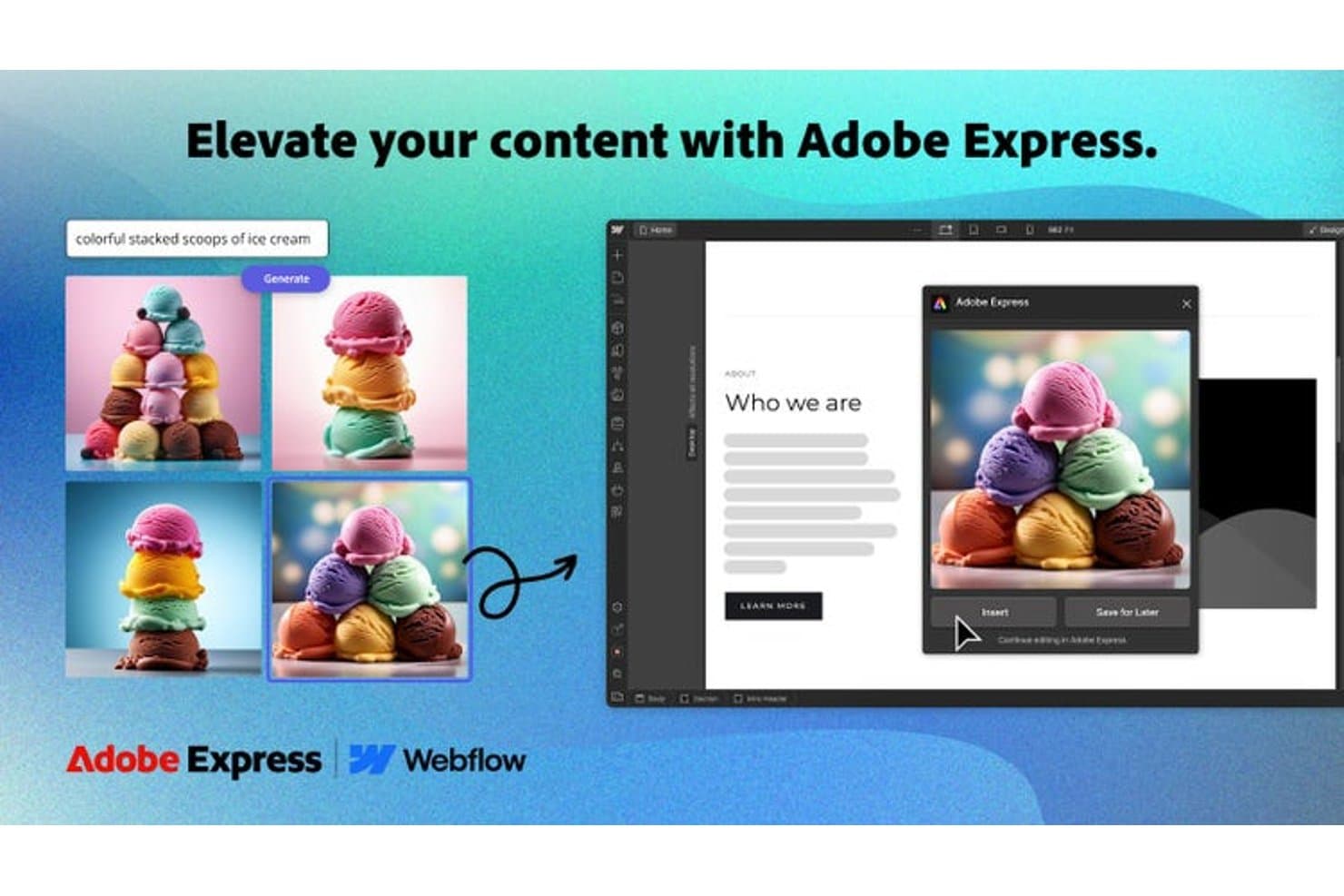
Adobe Express genera immagini con intelligenza artificiale direttamente nei mockup web. Adobe Express è uno strumento per la progettazione e la creazione di mockup che consente di realizzare immagini di prodotto utilizzando modelli con marchio, un kit del marchio integrato e una libreria di risorse personalizzabili per formati cartacei, digitali e social.
Per chi è più adatto Adobe Express?
Adobe Express è ideale per i team di branding e marketing che devono produrre mockup coerenti e in linea con il marchio su larga scala, senza dover fare affidamento su un designer dedicato.
Perché ho scelto Adobe Express
Ho scelto Adobe Express perché la funzione kit del marchio è davvero utile per mantenere coerenti i mockup in ogni risorsa prodotta dal team. Carichi i tuoi loghi, imposti i colori del marchio e definisci la tipografia una sola volta, quindi Adobe Express applica automaticamente quel kit a qualsiasi modello su cui lavori. Mi piace anche il fatto che supporti mockup per formati cartacei, digitali e social da un unico spazio di lavoro, così il lancio di un prodotto non richiede di gestire tre strumenti diversi.
Funzionalità principali di Adobe Express
- Rimozione dello sfondo con un clic: Rimuove istantaneamente lo sfondo dalle immagini dei prodotti, consentendo di inserirle in qualsiasi scena di mockup senza modifiche manuali.
- Effetti di testo basati sull'intelligenza artificiale: Applica trattamenti tipografici stilizzati e modificabili direttamente ai progetti di mockup utilizzando gli strumenti di intelligenza artificiale generativa di Adobe.
- Pianificatore dei contenuti: Consente di pubblicare o programmare direttamente sui canali social le risorse pronte per i mockup dall'interno della piattaforma.
- Strumento di ridimensionamento dei modelli: Ridimensiona automaticamente qualsiasi progetto di mockup per adattarlo a più formati e dimensioni con una sola operazione.
Integrazioni di Adobe Express
Adobe Express offre un ecosistema di componenti aggiuntivi e integrazioni native, tra cui Slack, Microsoft Copilot, ChatGPT, Figma, Bynder, Frontify, Hootsuite, Sprout Social e Google Drive.
Pros and Cons
Pros:
- I kit del marchio preservano la coerenza visiva tra i mockup
- I modelli coprono formati cartacei, digitali e social
- La rimozione dello sfondo semplifica il posizionamento delle immagini dei prodotti
Cons:
- Le scene di mockup dedicate risultano meno realistiche
- I controlli avanzati per la presentazione dei prodotti restano limitati
Learn more about Adobe Express:
- Piano gratuito disponibile
- A partire da $3.99/utente/mese (fatturato annualmente)
Visit WebsiteCustomer Rating:4.4/5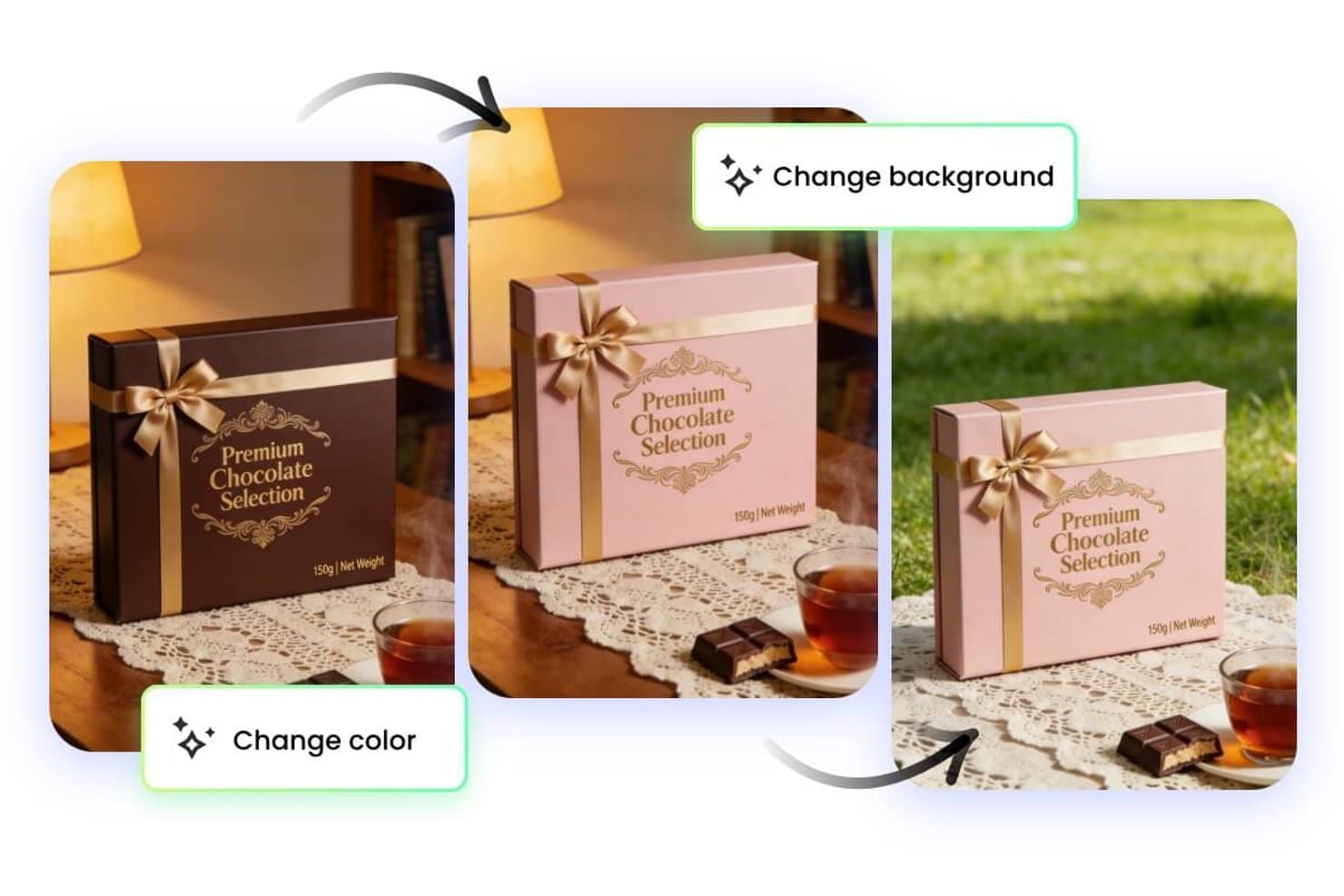
Fotor consente agli utenti di modificare istantaneamente i colori e gli sfondi dei modelli. Fotor è uno strumento per la modifica fotografica e la generazione di modelli visivi basato sull'intelligenza artificiale, che consente di creare scene di prodotto, rimuovere sfondi e generare immagini dello stile di vita utilizzando istruzioni testuali.
Per chi è più adatto Fotor?
Fotor è ideale per creatori indipendenti e piccoli team di commercio elettronico che desiderano generare rapidamente scene di prodotto curate senza una formazione specifica in ambito progettuale.
Perché ho scelto Fotor
Fotor è entrato nella mia selezione ristretta grazie alla capacità del suo motore di trasformazione da testo a immagine di convertire semplici descrizioni in scene di prodotto curate e contestualizzate. Apprezzo in particolare il generatore di sfondi basato sull'intelligenza artificiale, che consente di trasformare uno scatto realizzato in un semplice studio in un'ambientazione legata allo stile di vita (ad esempio, una confezione di prodotto per la cura della pelle su un ripiano in marmo del bagno) senza alcuna composizione manuale. Anche lo strumento di rimozione degli oggetti basato sull'intelligenza artificiale mantiene pulite le immagini dei prodotti prima della generazione delle scene.
Funzionalità principali di Fotor
- Modifica di immagini in serie: Applica modifiche, filtri o regolazioni delle dimensioni a più foto di prodotti contemporaneamente da un unico spazio di lavoro.
- Miglioramento delle immagini con l'intelligenza artificiale: Rende automaticamente più nitide le immagini dei prodotti, riduce il rumore e ne aumenta la risoluzione per soddisfare i requisiti delle piattaforme.
- Rimozione dello sfondo con un clic: Isola istantaneamente i soggetti dei prodotti dalle foto esistenti per prepararli alla generazione di nuove scene.
- Modelli predefiniti per effetti fotografici: Applica stili visivi e trattamenti cromatici curati alle immagini dei prodotti utilizzando una raccolta di modelli pronti all'uso.
Integrazioni di Fotor
Al momento non sono indicate integrazioni native.
Pros and Cons
Pros:
- Le scene generate dalle istruzioni testuali sono adatte per testare rapidamente i concetti
- La rimozione dello sfondo prepara i prodotti per i modelli
- La modifica in serie supporta più varianti di prodotto
Cons:
- Le scene generate possono richiedere una messa a punto delle istruzioni testuali
- Non sono documentate integrazioni native per i flussi di lavoro dei modelli
Learn more about Fotor: Ideale per la creazione di modelli strutturali
- Prova gratuita di 14 giorni
- A partire da $16/utente/mese
Visit WebsiteCustomer Rating:4.3/5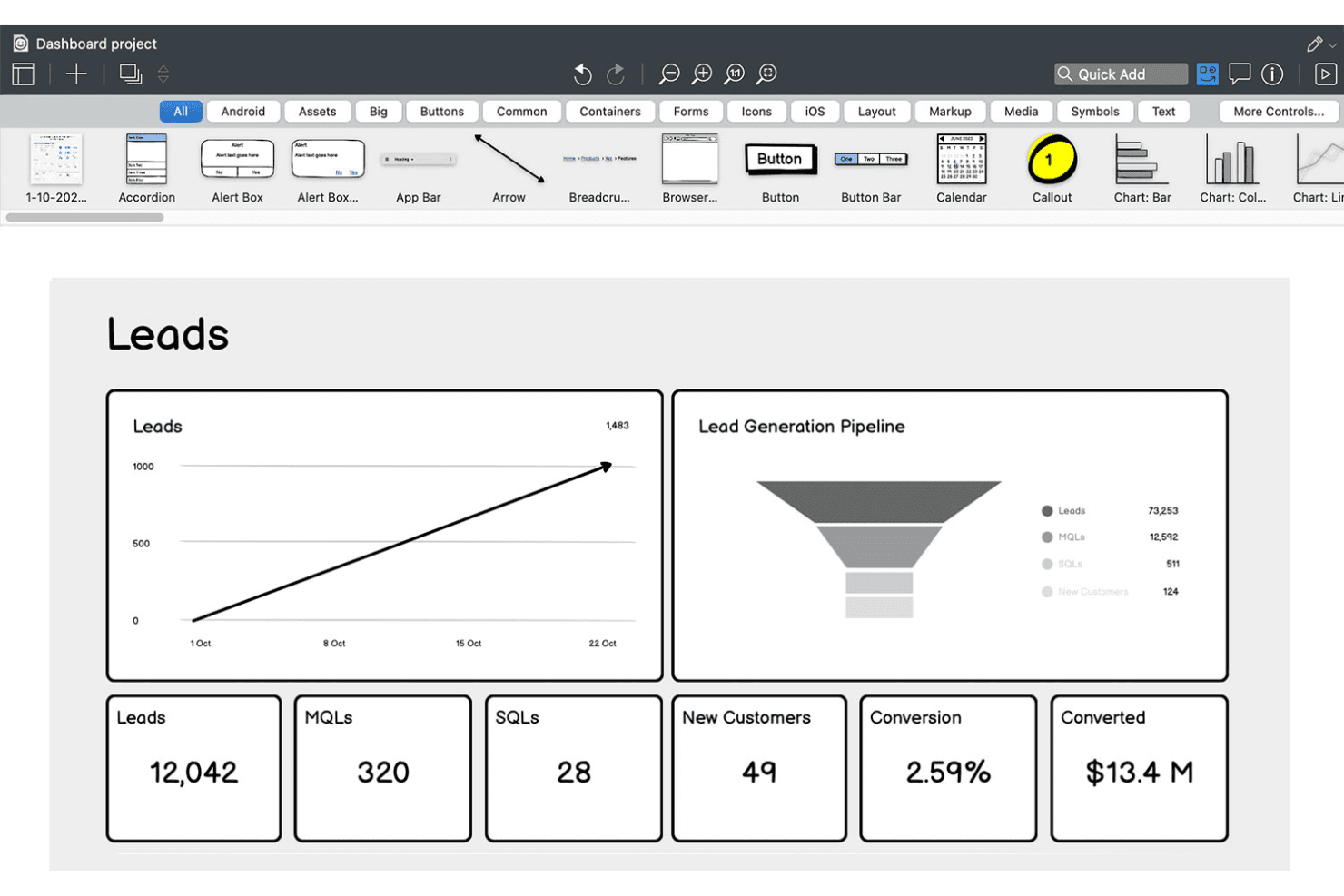
Balsamiq consente agli utenti di creare schemi strutturali di cruscotti delle vendite con grafici e KPI. Balsamiq è uno strumento per la creazione di schemi strutturali e modelli a bassa fedeltà che consente di abbozzare concetti di interfaccia utente tramite un editor con funzionalità di trascinamento, una libreria di componenti disegnati a mano e la generazione di schemi strutturali assistita dall'IA a partire da prompt testuali, screenshot o schizzi approssimativi.
Per chi è più adatto Balsamiq?
Balsamiq è ideale per responsabili di prodotto, fondatori e analisti aziendali che devono comunicare rapidamente concetti di interfaccia utente senza dipendere da un designer.
Perché ho scelto Balsamiq
Balsamiq si è guadagnato un posto nella mia lista ristretta perché la sua creazione di schemi strutturali in stile schizzo e disegnati a mano mantiene le prime conversazioni sul prodotto concentrate sulla struttura e sul flusso, non sulla perfezione dei pixel. Apprezzo molto il fatto che le funzionalità di IA consentano di inserire uno schizzo approssimativo su un tovagliolo o uno screenshot dell'app di un concorrente e ottenere in pochi secondi uno schema strutturale modificabile. La generazione di prototipi con un clic a partire dalle schermate esistenti è qualcosa che trovo davvero utile quando devo accompagnare le parti interessate attraverso un flusso utente senza perdere tempo con transizioni o animazioni.
Funzionalità principali di Balsamiq
- Revisori illimitati: Un numero qualsiasi di parti interessate può visualizzare e commentare gli schemi strutturali senza dover disporre di una licenza per lo strumento di modifica a pagamento.
- Controlli dell'interfaccia ispirati a Tailwind: Una libreria di 138 pulsanti, campi di inserimento, interruttori e menu a discesa in stile Tailwind è disponibile direttamente nel pannello Elementi dell'interfaccia.
- Integrazione con il server MCP: Collega le lavagne Balsamiq a strumenti di programmazione basati sull'IA come Claude, Cursor e GitHub Copilot per generare codice, storie utente e piani di controllo qualità a partire dagli schemi strutturali.
- Incorporamento in Jira e Confluence: Schemi strutturali e prototipi cliccabili vengono incorporati direttamente nelle attività Jira e nelle pagine Confluence per consentire la revisione delle parti interessate nel contesto.
Integrazioni di Balsamiq
Balsamiq offre integrazioni native con Jira, Confluence e Slack, oltre all'integrazione con Trello e all'incorporamento in Notion e Linear. Il suo server MCP collega Claude, Cursor, VS Code/GitHub Copilot e ChatGPT alle lavagne Balsamiq.
Pros and Cons
Pros:
- Schemi strutturali rapidi basati sull'IA a partire da testo o schizzo
- I revisori illimitati possono commentare senza una licenza a pagamento
- Lo stile a bassa fedeltà mantiene l'attenzione sulla struttura
Cons:
- Mancano funzionalità ad alta fedeltà o per sistemi di progettazione
- La prototipazione non offre animazioni o interattività avanzata
Learn more about Balsamiq: Ideale per una personalizzazione avanzata delle scene
- Piano gratuito disponibile
- A partire da $9/mese (con fatturazione annuale)
Visit WebsiteCustomer Rating:3.3/5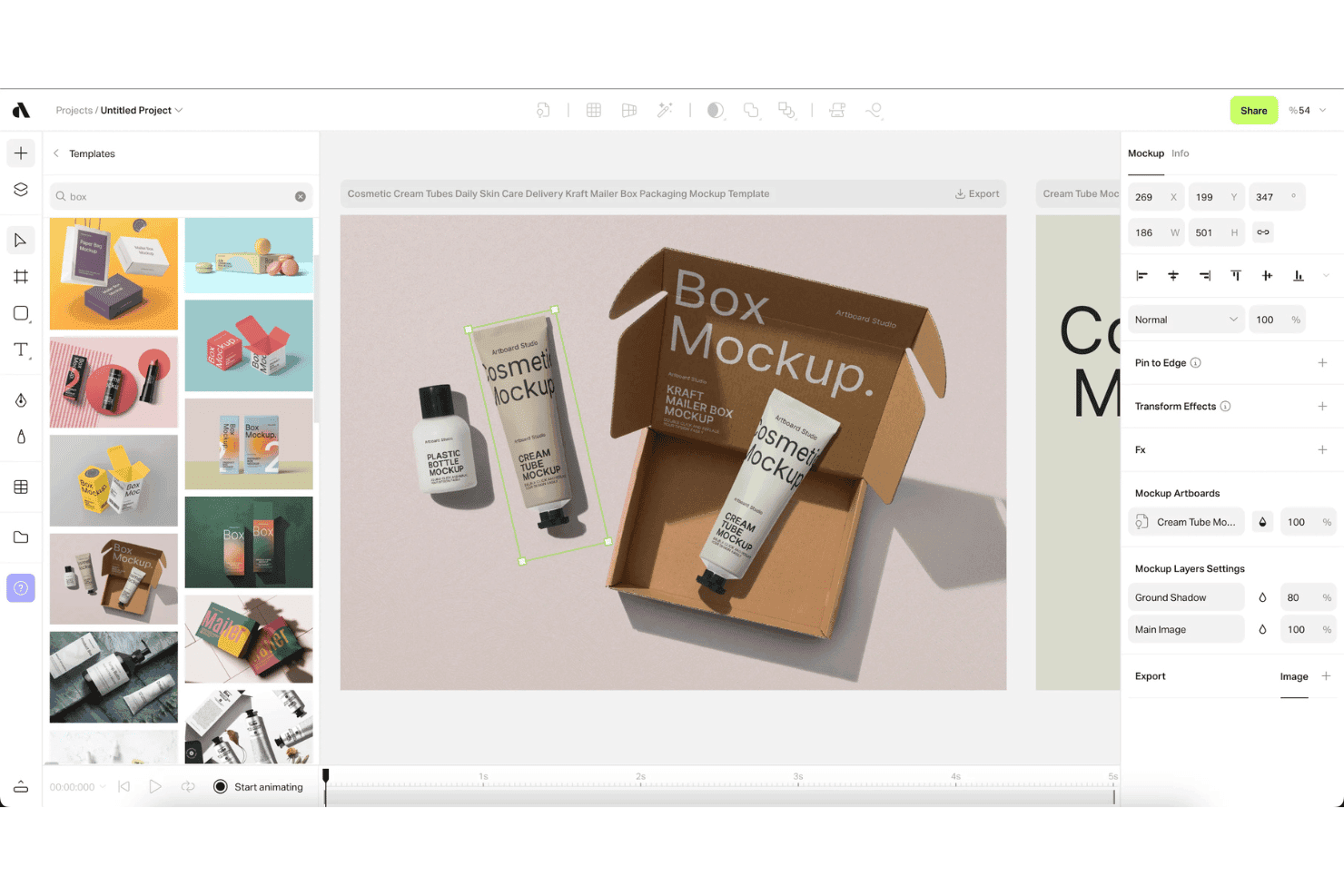
Artboard Studio consente agli utenti di applicare modelli dimostrativi di confezioni utilizzando modelli con trascinamento della selezione. Artboard Studio è un generatore di modelli dimostrativi e uno strumento di progettazione del movimento basato sul browser, che combina una libreria di oltre 5.000 modelli dimostrativi, la generazione di scene basata sull'IA, il supporto per modelli dimostrativi video e strumenti di automazione creativa.
Per chi è più adatto Artboard Studio?
Artboard Studio è particolarmente adatto ai responsabili del marketing di prodotto e ai fondatori che hanno bisogno di immagini curate dei prodotti, materiali per il lancio e immagini per presentazioni commerciali senza affidarsi a un team di progettazione dedicato.
Perché ho scelto Artboard Studio
Artboard Studio è entrato nella mia selezione perché offre un livello eccezionale di personalizzazione delle scene. Parlo di una libreria con oltre 5.000 modelli dimostrativi e livelli di oggetti avanzati che regolano automaticamente prospettiva, illuminazione e ombre, oltre a un generatore di modelli basato sull'IA che crea intere scene a partire da un comando testuale. Ciò che lo distingue davvero è il supporto per i modelli dimostrativi video combinato con uno strumento di progettazione del movimento basato su una sequenza temporale, che mi consente di creare immagini animate dei prodotti e materiali per il lancio, non solo immagini statiche.
Funzionalità principali di Artboard Studio
- Componenti aggiuntivi per Figma e Adobe Express: accedi all'intera libreria di modelli dimostrativi di Artboard Studio direttamente in Figma o Adobe Express senza passare da un'app all'altra.
- Esportazione in blocco: esporta simultaneamente più varianti di modelli dimostrativi nei formati PNG, JPEG, WEBP, MP4, MOV, GIF o WebM.
- Integrazione con Google Sheets e Shopify: sincronizza i dati in tempo reale da Google Sheets o Shopify per compilare e aggiornare automaticamente i contenuti dei modelli dimostrativi su larga scala.
- Cronologia delle versioni dei progetti: salva e consulta le versioni precedenti dei tuoi progetti, con collegamenti di presentazione condivisibili per le revisioni delle parti interessate.
Integrazioni di Artboard Studio
Artboard Studio dispone di quattro integrazioni documentate: Figma, Adobe Express, Google Sheets e Shopify. Non sono documentate integrazioni native con Jira, Confluence, Notion, Slack o Zapier, né un'API pubblica.
Pros and Cons
Pros:
- Generazione di scene e modelli dimostrativi basata sull'IA
- Ampia varietà di modelli dimostrativi per dispositivi e marchi
- Strumento di progettazione del movimento video per materiali animati
Cons:
- Nessuna funzionalità di prototipazione interattiva disponibile
- Nessuna opzione di passaggio alla squadra di sviluppo o di esportazione del codice
Learn more about Artboard Studio: Ideale con strumenti di ottimizzazione UX basati sull'IA
- Piano gratuito disponibile
- A partire da $14/mese
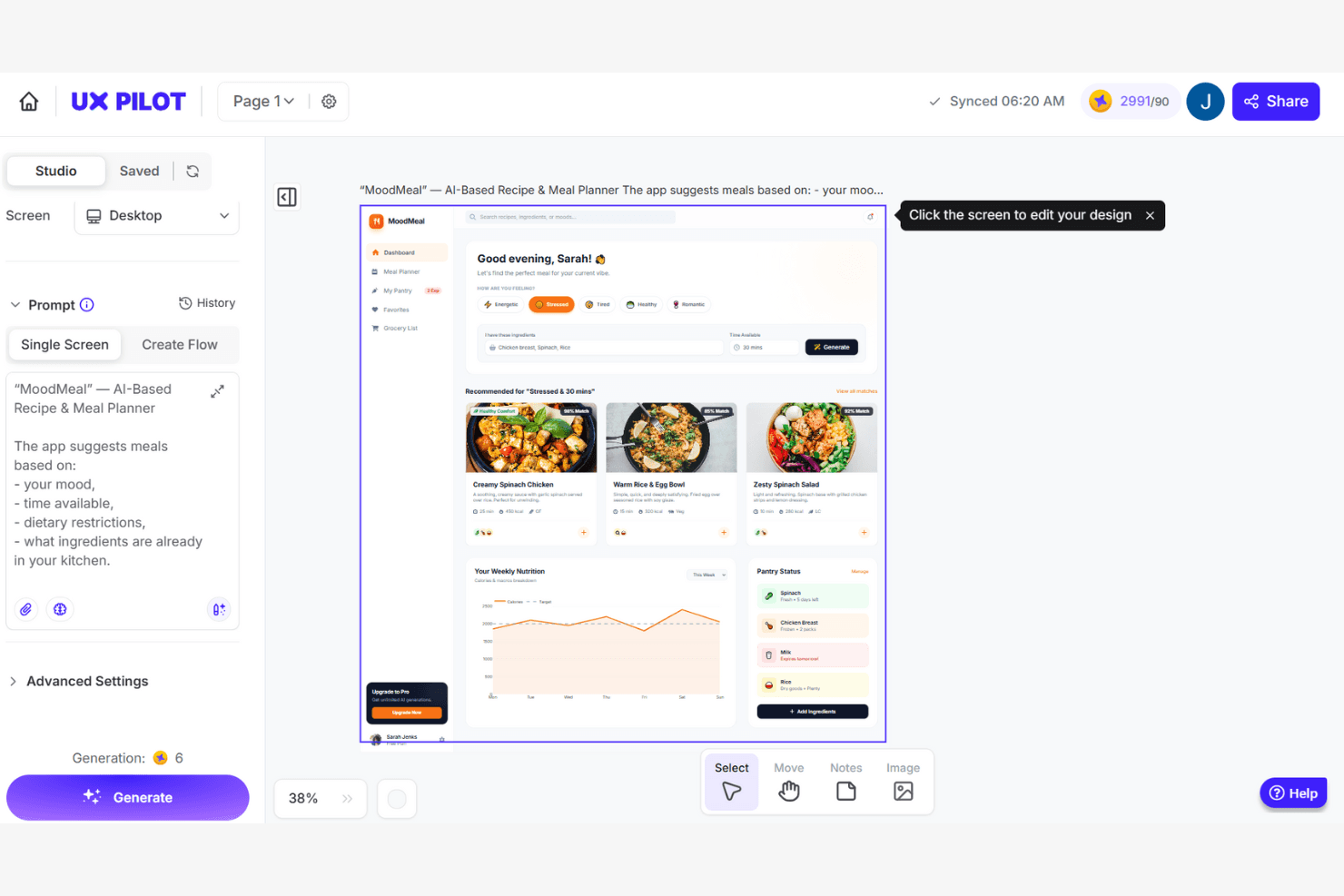
UX Pilot genera design di interfacce utente per app basati sull'IA a partire da un prompt testuale. UX Pilot è una piattaforma per la generazione di mockup e interfacce utente basata sull'IA, che crea wireframe, schermate ad alta fedeltà e flussi di prodotto multi-schermata a partire da prompt testuali, PRD, schizzi o screenshot di riferimento.
Per chi è più adatto UX Pilot?
UX Pilot è particolarmente adatto a product manager e fondatori senza competenze di design che hanno bisogno di trasformare specifiche scritte o idee preliminari in flussi di interfaccia utente raffinati e composti da più schermate, senza una formazione nel design.
Perché ho scelto UX Pilot
Ho incluso UX Pilot tra le mie scelte migliori perché i suoi strumenti di ottimizzazione UX basati sull'IA vanno oltre la generazione e includono la validazione. Le mappe di calore predittive simulano i modelli di tracciamento oculare sulle schermate prima che un singolo utente le visualizzi, facendo emergere precocemente i problemi di gerarchia. La revisione automatizzata del design segnala poi, in un unico passaggio, i problemi relativi a contrasto, spaziatura e conformità alle linee guida delle piattaforme su iOS, Android e web: una combinazione che raramente si trova a questo prezzo.
Funzionalità principali di UX Pilot
- Automazione da PRD a design: Carica un documento con i requisiti del prodotto e UX Pilot genera un flusso completo dell'interfaccia utente, composto da più schermate, direttamente dalle specifiche scritte.
- Generazione automatica di più schermate: Descrivi il concetto di un prodotto in un prompt testuale e ottieni un percorso utente completo, logicamente coerente, sviluppato su più schermate collegate.
- Modalità React Focus: Crea e pubblica prototipi React completamente interattivi con un editor visuale, modifiche tramite chat in linguaggio naturale e correzioni del codice basate sull'IA con un solo clic.
- Sincronizzazione con GitHub: Esporta l'intero codice React e sincronizzalo direttamente con un repository GitHub per un passaggio ordinato al team di sviluppo.
Integrazioni di UX Pilot
UX Pilot offre integrazioni native con Figma e GitHub per esportare design modificabili e trasferire il codice. I clienti Enterprise possono accedere a un'API per integrazioni personalizzate.
Pros and Cons
Pros:
- Le mappe di calore predittive fanno emergere precocemente i problemi di gerarchia
- Da PRD a design: trasforma rapidamente le specifiche in schermate
- Il plugin Figma preserva i livelli e il layout automatico
Cons:
- I crediti vengono detratti per gli output non riusciti o incompleti
- I flussi composti da più schermate possono presentare una coerenza stilistica limitata
Learn more about UX Pilot: Ideale per flussi di lavoro di progettazione collaborativi
- Piano gratuito disponibile
- A partire da $7/utente/mese (fatturato annualmente)
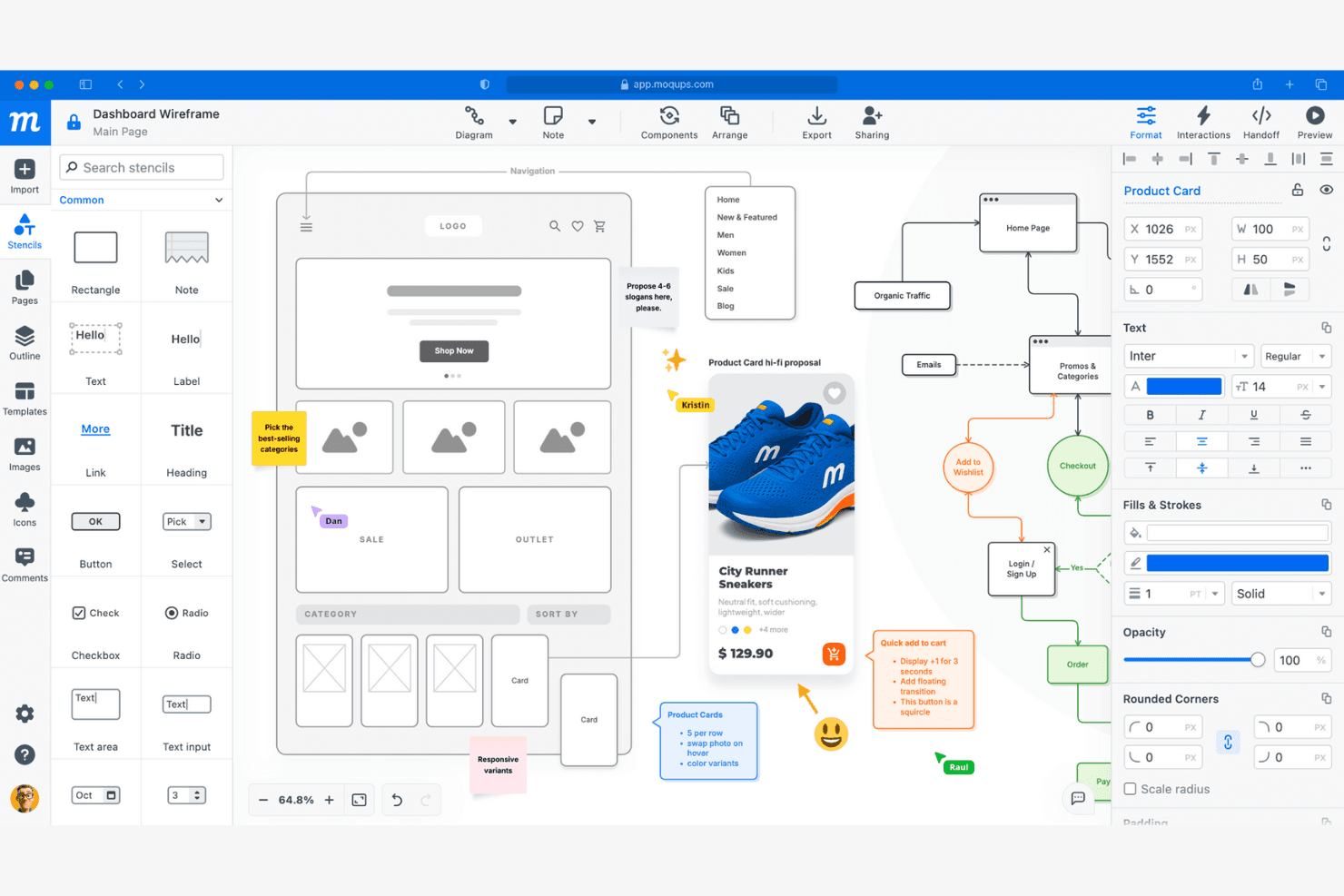
Moqups consente agli utenti di creare schemi preliminari, aggiungere annotazioni e collaborare alla progettazione delle interfacce utente. Moqups è uno strumento per modelli e schemi preliminari basato su browser che combina la progettazione dell’interfaccia utente con il trascinamento, la prototipazione interattiva, la creazione di diagrammi e la collaborazione in tempo reale in un’unica piattaforma cloud.
Per chi è più adatto Moqups?
Moqups è ideale per le squadre di prodotto interfunzionali, in particolare per i responsabili di prodotto e i fondatori, che hanno bisogno di uno strumento basato su browser capace di riunire progettazione, riscontri e iterazione in uno spazio condiviso.
Perché ho scelto Moqups
Moqups si è guadagnato un posto nella mia rosa di strumenti preferiti grazie alla sua capacità di mantenere allineate le squadre interfunzionali senza costringere nessuno ad abbandonare il proprio flusso di lavoro. Mi piace molto il fatto che i responsabili di prodotto possano incorporare schemi preliminari interattivi direttamente nei ticket di Jira e nelle pagine di Confluence, così sviluppatori e parti interessate vedono sempre la progettazione aggiornata accanto ai ticket. La modifica collaborativa in tempo reale, i commenti concatenati fissati e la chat integrata consentono alla mia squadra di dare e ricevere riscontri senza passare continuamente da uno strumento all’altro.
Funzionalità principali di Moqups
- Componenti sincronizzati: Modifica un componente una sola volta e le modifiche vengono applicate automaticamente a ogni pagina del progetto.
- Pannello per il passaggio agli sviluppatori: Genera frammenti di codice CSS e JSX insieme alle specifiche degli oggetti, come coordinate, caratteri e colori, per il passaggio alla squadra tecnica.
- Estensione per browser: Converte pagine web attive o schermate acquisite in impaginazioni Moqups completamente modificabili direttamente da Chrome o Firefox.
- Modalità di anteprima del prototipo interattivo: Attiva tutti i punti interattivi e le interazioni degli oggetti, così le parti interessate possono fare clic sui flussi prima dell’inizio dello sviluppo.
Integrazioni di Moqups
Moqups documenta le integrazioni con Jira Cloud, Confluence Cloud, Google Drive, Slack, Dropbox, Box, Trello, Figma tramite estensione e l’importazione da Balsamiq, oltre alle estensioni per Chrome e Firefox. Le integrazioni con Jira e Confluence richiedono un piano Business o superiore.
Pros and Cons
Pros:
- La modifica collaborativa in tempo reale favorisce il lavoro di squadra
- I componenti sincronizzati si aggiornano in tutte le pagine del progetto
- L’editor con trascinamento consente di creare rapidamente modelli
Cons:
- Non sono disponibili controllo delle versioni né ramificazioni
- I prototipi interattivi non supportano la logica condizionale
Learn more about Moqups: Ideale per scene di presentazione generate dall’IA e pronte per la stampa
- Piano gratuito disponibile
- A partire da $10/mese (con fatturazione annuale)
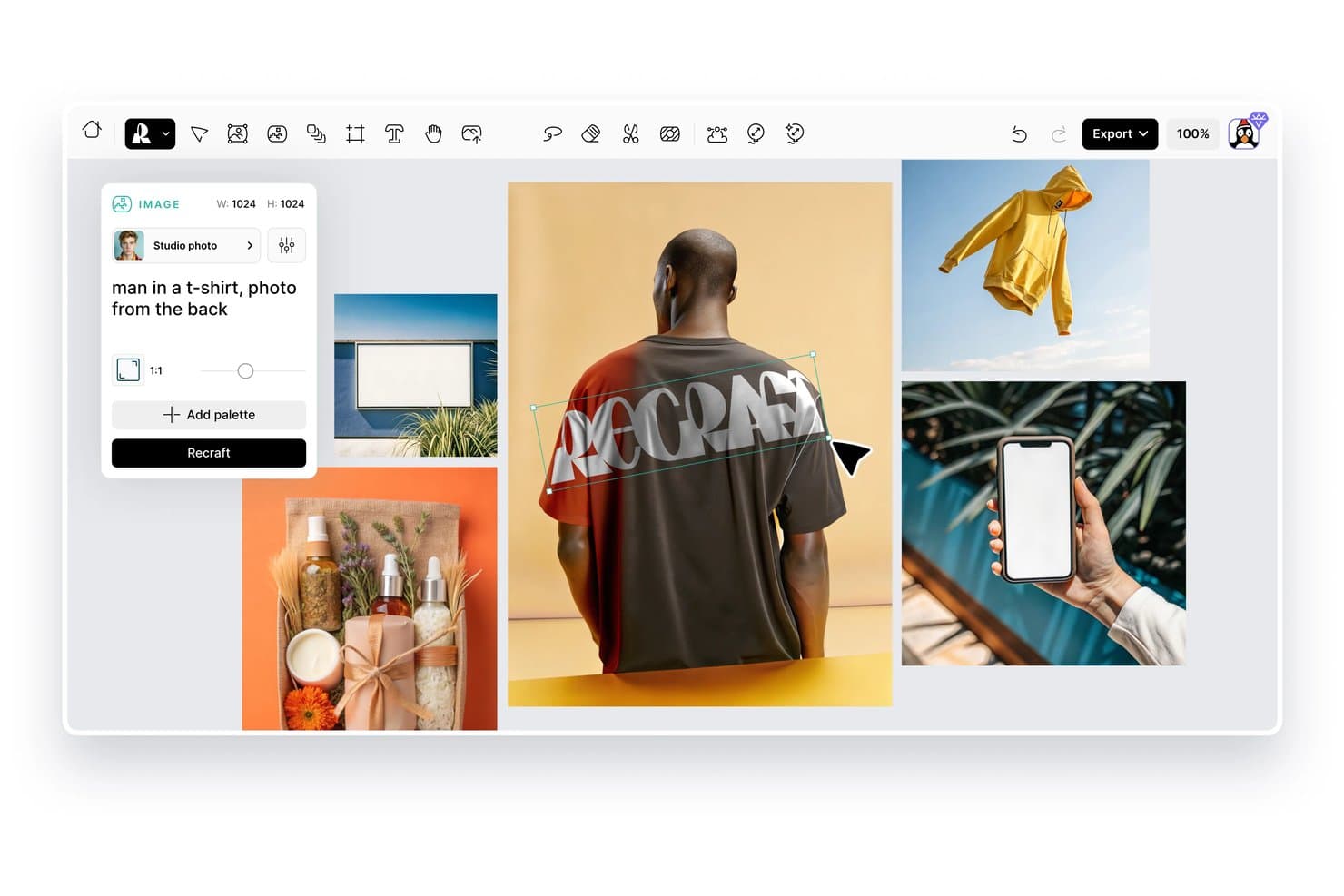
Recraft consente agli utenti di generare immagini di presentazione dei prodotti a partire da istruzioni testuali. Recraft è uno strumento di progettazione basato sull’IA che consente di generare e modificare scene di presentazione di prodotti, illustrazioni vettoriali e contenuti visivi per il marchio utilizzando istruzioni testuali e controlli sulle immagini.
Per chi è più adatto Recraft?
Recraft è particolarmente adatto a designer e team responsabili del marchio che hanno bisogno di scene di presentazione dei prodotti pronte per la stampa, con controlli visivi precisi e immagini generate dall’IA.
Perché ho scelto Recraft
Recraft si è guadagnato un posto nella mia selezione perché genera scene di presentazione dei prodotti pronte per la stampa, con un livello qualitativo davvero difficile da replicare con gli strumenti di progettazione comuni. Apprezzo molto il modo in cui i risultati vettoriali e le funzionalità di blocco dello stile mi consentono di mantenere coerenti gli elementi visivi del marchio in diverse varianti, senza dover intervenire manualmente. La generazione di scene tramite IA gestisce inoltre l’illuminazione realistica e la consistenza delle superfici nell’inserimento dei prodotti, un aspetto importante quando si preparano risorse per il confezionamento o per campagne di stampa.
Funzionalità principali di Recraft
- Generazione da testo a immagine: Crea immagini originali di prodotti e scene di presentazione a partire da istruzioni scritte, senza dover iniziare da zero in uno strumento di progettazione.
- Libreria degli stili: Salva e applica stili visivi personalizzati alle immagini generate per mantenere coerenti le risorse del marchio nei diversi risultati.
- Strumento per la rimozione dello sfondo: Isola automaticamente le immagini dei prodotti dallo sfondo, così puoi inserirle in nuove scene o composizioni.
- Ingrandimento delle immagini: Aumenta la risoluzione delle immagini generate per soddisfare i requisiti di alta qualità per la stampa o la visualizzazione in grande formato.
Integrazioni di Recraft
Recraft offre integrazioni native ufficiali per Figma, Framer, Google Docs, Google Slides, Chrome e OpenClaw. La sua API REST supporta integrazioni personalizzate, mentre i piani aziendali supportano connessioni MCP agli strumenti interni.
Pros and Cons
Pros:
- Le scene pronte per la stampa sono adatte ai flussi di lavoro del confezionamento
- I risultati vettoriali favoriscono la coerenza del marchio
- L’illuminazione realistica migliora l’inserimento dei prodotti
Cons:
- Le generazioni possono non riprodurre con precisione tutti i dettagli del prodotto
- Il controllo delle scene varia a seconda delle istruzioni
Learn more about Recraft: 10Ideale per scene e mockup 3D generati dall'IA per l'e-commerce
Mockey
- Piano gratuito disponibile
- A partire da $5.7/mese (con fatturazione annuale)
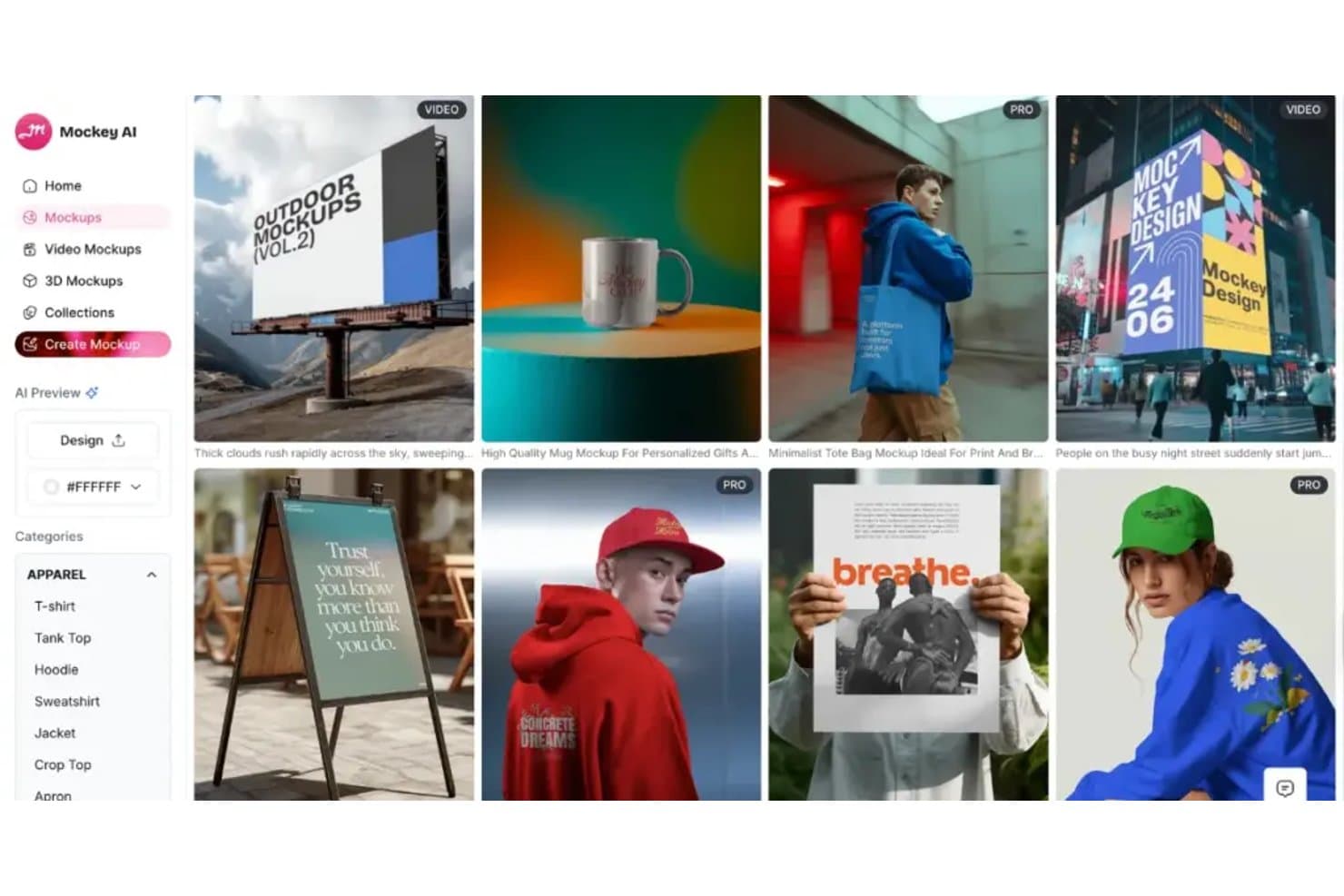
Mockey offre diverse categorie di mockup per abbigliamento, attività all'aperto e prodotti stampati. Mockey è un generatore di mockup basato sull'IA che consente di applicare i design a prodotti, scene e rendering 3D grazie a un'ampia libreria di modelli pronti per l'e-commerce.
Per chi è più indicato Mockey?
Mockey è particolarmente adatto ai venditori e-commerce e ai designer di prodotti che hanno bisogno di mockup di scene e 3D generati rapidamente dall'IA e di alta qualità, senza un flusso di lavoro di progettazione complesso.
Perché ho scelto Mockey
Mockey si è guadagnato un posto nella mia selezione per la sua capacità di gestire efficacemente il posizionamento nelle scene generate dall'IA e i mockup 3D per i prodotti e-commerce. Mi piace il fatto che si possa applicare un design a un prodotto e ottenere istantaneamente una scena di stile di vita costruita attorno ad esso, risparmiando tempo e costi di un servizio fotografico completo. Il rendering dei mockup 3D è particolarmente efficace per articoli come confezioni, abbigliamento e prodotti stampati su richiesta.
Caratteristiche principali di Mockey
- Generazione di mockup in blocco: Carica più design contemporaneamente e genera mockup utilizzando diversi modelli di prodotto in un unico processo.
- Rimozione dello sfondo: Rimuove automaticamente lo sfondo dalle immagini dei prodotti o dei design caricati prima di inserirli in una scena mockup.
- Editor personalizzato dei colori: Regola il colore dei prodotti dei mockup direttamente nell'editor per adattarlo a specifici requisiti del brand o del design.
- Esportazione nei formati per i social media: Scarica i mockup completati in dimensioni preimpostate per piattaforme come Instagram, Facebook e Pinterest.
Integrazioni di Mockey
Mockey offre integrazioni native, tra cui un'app Shopify, un plugin Figma e un negozio Etsy.
Pros and Cons
Pros:
- Le scene generate dall'IA riducono i costi del servizio fotografico
- La generazione in blocco supporta più design di prodotto
- I rendering 3D sono adatti a confezioni e abbigliamento
Cons:
- I risultati delle scene dipendono dalla qualità del design di origine
- L'ampiezza dei modelli può variare a seconda del prodotto
Learn more about Mockey:
Altri generatori di mockup di prodotto
Ecco alcune opzioni aggiuntive di generatori di mockup di prodotto che non sono state incluse nella mia selezione, ma che vale comunque la pena prendere in considerazione:
- 11
- 12
- 13RenderforestIdeale per la creazione completa dell'identità del marchio e di modelli grafici
- 14KittlIdeale per un'ampia varietà di modelli creativi
- 15PlaceitIdeale per la scelta di anteprime di scene di vita quotidiana
- 16Mockuuups StudioIdeale per l’integrazione con app desktop
- 17MediamodifierIdeale per la generazione in blocco di mockup
- 18PixeliedIdeale per chi non è designer e crea simulazioni del marchio
- 19ProVisualIdeale per il rendering 3D di prodotti tramite browser
- 20PackifyIdeale per mockup di packaging dal brief alla fustella
Come valuto un generatore di mockup di prodotto
Divido la mia valutazione in tre parti, dando il maggior peso alle funzionalità fondamentali: applicare i design ai modelli, creare scene realistiche ed esportare immagini utilizzabili. In seguito, cerco la generazione di scene con IA e il rendering di modelli 3D. Infine, considero la collaborazione, le licenze, la configurazione iniziale e il rapporto qualità-prezzo.
Funzionalità fondamentali (requisiti essenziali per questo elenco)
Quando seleziono gli strumenti per il mio elenco, assegno a ciascuno un punteggio su una scala da 0 (non offre la funzionalità) a 5 (eccelle in quest'area) per ogni funzionalità fondamentale elencata di seguito. Converto poi il totale in una percentuale per valutare l'idoneità complessiva di ogni strumento, dando un peso aggiuntivo alle funzionalità che ho considerato essenziali.
- Libreria di modelli (essenziale): valuto l'ampiezza delle categorie, le scene ricercabili e i modelli per confezioni, abbigliamento, dispositivi e superfici con marchio.
- Applicazione del design (essenziale): verifico con quale precisione i team posizionano, ridimensionano, deformano e allineano le grafiche sulle diverse angolazioni e superfici dei prodotti.
- Rendering realistico: cerco illuminazione, texture, ombre e prospettiva convincenti, adatte alle revisioni con gli stakeholder o ai materiali per il lancio.
- Opzioni di esportazione: valuto i formati scaricabili, le opzioni di risoluzione e la compatibilità dei risultati con il web, le presentazioni e la stampa.
- Personalizzazione delle scene: verifico i controlli per sfondi, oggetti di scena, colori e ambientazioni che supportano immagini di prodotto coerenti con il marchio.
- Generazione in serie: cerco la possibilità di esportare ripetutamente prodotti, varianti o scene partendo da un unico design, senza ricreare ogni mockup da zero.
Una volta ottenuto un elenco di strumenti che soddisfano i criteri, considero ciò che distingue ogni piattaforma.
Fattori distintivi (ciò che differenzia i fornitori)
Ecco come confronto e metto in evidenza le differenze tra i vari fornitori:
Funzionalità distintive
Cerco una generazione di scene con IA in grado di creare sfondi personalizzati a partire da prompt testuali, permettendo ai product manager di evitare la ricerca di un modello adatto quando presentano un nuovo concept. Anche l'accesso alle API è importante: i team che gestiscono cataloghi di grandi dimensioni possono generare mockup programmaticamente per decine di codici SKU, invece di ricrearli manualmente uno alla volta. Valuto inoltre la gestione del kit del marchio, perché conservare loghi, colori e caratteri in un unico luogo mantiene coerente ogni mockup mentre i materiali attraversano i cicli di revisione.
Oltre le funzionalità
Verifico se i mockup generati sono autorizzati per l'uso commerciale, inclusi gli annunci a pagamento e i materiali destinati ai clienti: alcune piattaforme limitano la rivendita o richiedono l'attribuzione, un aspetto che coglie di sorpresa le agenzie. Anche la collaborazione è importante: cerco commenti in tempo reale e flussi di lavoro per l'approvazione, così product manager e designer possono allinearsi prima che i materiali entrino in produzione. Valuto inoltre la velocità della configurazione iniziale, poiché molti acquirenti non sono designer e hanno bisogno di un mockup utilizzabile in pochi minuti, non dopo ore trascorse a guardare video tutorial.
Come scegliere un generatore di mockup di prodotto
È facile perdersi in lunghi elenchi di funzionalità e strutture tariffarie complesse. Per aiutarti a rimanere concentrato mentre affronti il tuo processo di selezione del software, unico per le tue esigenze, ecco una lista di fattori da tenere presenti:
| Fattore | Cosa considerare |
|---|---|
| FattoreScalabilità | Cosa considerareLo strumento supporterà la crescita del catalogo prodotti o delle dimensioni del team? Verifica i limiti relativi a progetti, utenti o spazio di archiviazione. |
| FattoreIntegrazioni | Cosa considerareLo strumento si collega alla piattaforma di commercio elettronico, al software di progettazione o al sistema di gestione delle risorse? Verifica la presenza di integrazioni native, non solo dell'accesso tramite API. |
| FattorePersonalizzazione | Cosa considerarePuoi adattare i mockup per rispettare le linee guida del brand o rappresentare tipologie di prodotto uniche? Valuta la flessibilità dei modelli e i controlli di modifica. |
| FattoreFacilità d'uso | Cosa considerareCon quale rapidità i nuovi utenti possono creare mockup senza formazione? Cerca flussi di lavoro intuitivi e un numero minimo di passaggi dal caricamento all'esportazione. |
| FattoreImplementazione e avvio | Cosa considerareQuali risorse sono disponibili per aiutare il team a iniziare? Considera tutorial, guide introduttive e raccolte di modelli. |
| FattoreCosto | Cosa considerareIl prezzo è compatibile con il tuo budget e con le tue esigenze di utilizzo? Fai attenzione ai costi nascosti, ai modelli con pagamento per download o agli aggiornamenti necessari per accedere alle funzionalità principali. |
| FattoreMisure di sicurezza | Cosa considerareIn che modo il fornitore protegge i progetti e i dati caricati? Cerca crittografia, informative sulla privacy e pratiche di conservazione dei dati. |
| FattoreDisponibilità dell'assistenza | Cosa considerareQuali canali di assistenza sono offerti e in quali orari? Valuta se hai bisogno di chat dal vivo, assistenza via email o telefonica per i problemi urgenti. |
Che cos'è un generatore di mockup di prodotto?
Un generatore di mockup di prodotto è uno strumento digitale che consente di applicare i propri design a modelli realistici di prodotti, creando anteprime visive per il marketing, l'e-commerce o le presentazioni ai clienti. Queste piattaforme aiutano a visualizzare rapidamente come appariranno le proprie grafiche, il proprio marchio o il packaging su articoli come abbigliamento, confezioni o dispositivi tecnologici, senza dover realizzare campioni fisici o possedere competenze avanzate di progettazione.
Caratteristiche del generatore di mockup di prodotto
Quando si seleziona un generatore di mockup di prodotto, è bene prestare attenzione alle seguenti caratteristiche principali:
- Libreria di modelli: Un'ampia selezione di modelli di prodotto predefiniti, suddivisi in categorie come abbigliamento, packaging, dispositivi tecnologici e materiali stampati, per trovare rapidamente un mockup adatto alle proprie esigenze.
- Caricamento del design: La possibilità di caricare le proprie grafiche, i loghi o i file del marchio e applicarli direttamente ai modelli di mockup per visualizzarli all'istante.
- Personalizzazione della scena: Strumenti per modificare sfondi, oggetti di scena, illuminazione e posizione del prodotto, consentendo di creare elementi visivi unici e coerenti con il marchio.
- Esportazione ad alta risoluzione: Opzioni per scaricare i mockup completati in formati ad alta risoluzione, adatti alla stampa, al web o alle presentazioni.
- Editor con trascinamento: Un'interfaccia intuitiva che consente di posizionare, ridimensionare e ruotare i propri design sul prodotto tramite semplici comandi di trascinamento.
- Supporto di più formati: La possibilità di esportare i mockup in diversi tipi di file, come PNG, JPG o persino formati video, per adattarsi a vari casi d'uso.
- Elaborazione in batch: Funzionalità che consentono di applicare contemporaneamente un singolo design a più mockup o prodotti, risparmiando tempo nelle attività ripetitive.
- Strumenti per il marchio: Opzioni integrate per aggiungere filigrane, colori del marchio o testo personalizzato ai mockup, così da ottenere un aspetto coerente.
- Filtri e ricerca dei modelli: Opzioni avanzate di ricerca e filtraggio per individuare rapidamente il modello giusto in base al tipo di prodotto, allo stile o alla scena.
- Cronologia delle versioni: La possibilità di tenere traccia delle modifiche e ripristinare versioni precedenti dei propri mockup, favorendo la collaborazione e la progettazione iterativa.
Vantaggi del generatore di mockup di prodotto
L'implementazione di un generatore di mockup di prodotto offre diversi vantaggi al team e all'azienda. Ecco alcuni dei risultati che si possono ottenere:
- Convalida più rapida del design: Visualizzare rapidamente l'aspetto delle proprie grafiche o del proprio marchio su prodotti reali senza dover attendere campioni fisici.
- Risparmio sui costi: Eliminare la necessità di prototipi costosi o servizi fotografici generando mockup digitali di alta qualità.
- Presentazioni ai clienti migliorate: Presentare ai clienti o agli stakeholder elementi visivi curati e realistici, facilitando la comunicazione dei concetti di design e l'ottenimento delle approvazioni.
- Maggiore flessibilità creativa: Sperimentare con diversi tipi di prodotto, colori e scene utilizzando un'ampia libreria di modelli e strumenti di personalizzazione.
- Rappresentazione coerente del marchio: Applicare gli elementi e le linee guida del marchio a tutti i mockup, garantendo un aspetto uniforme nei materiali di marketing e di e-commerce.
- Flusso di lavoro semplificato: Utilizzare l'elaborazione in batch e la modifica tramite trascinamento per ridurre le attività ripetitive e accelerare la creazione di più mockup.
- Collaborazione migliorata: Condividere mockup modificabili o cronologie delle versioni con i membri del team, favorendo i feedback e i processi di progettazione iterativa.
Costi e prezzi del generatore di mockup di prodotto
La scelta di un generatore di mockup di prodotto richiede la comprensione dei vari modelli e piani tariffari disponibili. I costi variano in base alle funzionalità, alle dimensioni del team, agli elementi aggiuntivi e ad altri fattori. La tabella seguente riassume i piani più comuni, i relativi prezzi medi e le funzionalità tipicamente incluse nelle soluzioni di generazione di mockup di prodotto:
Tabella comparativa dei piani per il generatore di mockup di prodotto
| Tipo di piano | Prezzo medio | Funzionalità comuni |
|---|---|---|
| Tipo di pianoPiano gratuito | Prezzo medio$0 | Funzionalità comuniAccesso a una libreria limitata di modelli, caricamenti di design di base, download con filigrana e opzioni di esportazione limitate. |
| Tipo di pianoPiano personale | Prezzo medio$5-$20/utente/mese | Funzionalità comuniAccesso completo ai modelli, download ad alta risoluzione, personalizzazione di base della scena e licenza per uso personale. |
| Tipo di pianoPiano aziendale | Prezzo medio$20-$50/utente/mese | Funzionalità comuniStrumenti di collaborazione per i team, elaborazione in batch, personalizzazione avanzata, supporto prioritario e diritti di utilizzo commerciale. |
| Tipo di pianoPiano per grandi aziende | Prezzo medio$50-$100+/utente/mese | Funzionalità comuniIntegrazioni personalizzate, gestione dedicata dell'account, sicurezza avanzata, assistenza all'avvio e supporto garantito da SLA. |
Domande frequenti sul generatore di anteprime di prodotto
Ecco alcune risposte alle domande comuni sul generatore di anteprime di prodotto:
Posso utilizzare i generatori di anteprime di prodotto per progetti commerciali?
Sì, la maggior parte dei generatori di anteprime di prodotto a pagamento consente l’uso commerciale, ma dovresti sempre verificare i termini di licenza per ogni modello e ogni esportazione. Alcuni piani gratuiti possono limitare l’utilizzo o richiedere l’attribuzione, quindi controlla i dettagli prima di utilizzare le anteprime nel marketing o nell’e-commerce.
Sono necessarie competenze di grafica per utilizzare un generatore di anteprime di prodotto?
No, la maggior parte dei generatori di anteprime di prodotto è progettata per chi non è un designer e offre interfacce intuitive basate sul trascinamento. Puoi caricare la tua grafica, posizionarla sui modelli e personalizzare le scene senza conoscenze avanzate di progettazione o software specifici.
In quali formati di file posso esportare le mie anteprime?
La maggior parte dei generatori di anteprime di prodotto supporta l’esportazione nei formati più comuni, come PNG e JPG, mentre alcuni offrono anche l’esportazione in PDF o video. Verifica che lo strumento fornisca i tipi di file necessari per l’uso previsto, ad esempio per la stampa, il web o le presentazioni.
Ci sono limiti al numero di anteprime che posso creare o scaricare?
Sì, molte piattaforme stabiliscono limiti in base al piano di abbonamento. I piani gratuiti spesso limitano il numero di download o aggiungono filigrane, mentre i piani a pagamento generalmente offrono un utilizzo maggiore o illimitato. Esamina i dettagli del piano per assicurarti che corrispondano alle esigenze del tuo flusso di lavoro.
Posso personalizzare lo sfondo o la scena nelle mie anteprime?
Sì, la maggior parte dei moderni generatori di anteprime di prodotto consente di regolare sfondi, elementi di scena e illuminazione per creare scene uniche. Tuttavia, il livello di personalizzazione varia, quindi prova l’editor per verificare se soddisfa le tue esigenze creative.