

Test de Notion : avantages, inconvénients, fonctionnalités et tarifs
L’interface flexible de Notion permet à votre équipe de personnaliser les flux de travail de manière plus efficace que tout autre outil de gestion de projet, renforçant ainsi la collaboration et l’organisation.

Nous évaluons les outils de manière indépendante, et les commissions aident à financer nos tests. Consultez notre politique de transparence, notre méthodologie ou suggérez un outil.
Notion is a product management tool that combines docs, wikis, databases, and project tracking in a single flexible workspace. It's a strong fit for product teams that want to manage roadmaps, product specs, and meeting notes without switching between separate tools. If you're weighing it against Confluence, Notion gives you more flexibility in how you structure and connect your content—without the administrative overhead that comes with a more rigid, enterprise-oriented setup.
Notion Evaluation Summary
4.6/5
- From $10/user/month (billed annually)
- Free plan available
Pourquoi faire confiance à nos recommandations de logiciels
6,700+
Reviews
20
Industry experts
16+
Evaluation factors
14
Years
Notre équipe teste et évalue des logiciels depuis 2012. En tant que chefs de produit nous-mêmes, nous savons à quel point il est difficile — et important — de choisir le bon logiciel.
Pour ce guide, nous avons évalué les outils grâce à des tests pratiques et une recherche indépendante, en notant les outils selon nos critères de sélection.
Nos avis reflètent notre jugement éditorial humain, et non un argumentaire de vente.
Réviseurs experts:
- Andrew LumbySenior TPM
- Cristiano ValimSenior UI/UX Lead


Notion Overview
In my opinion, Notion is a standout tool for those seeking flexibility in a project and product management platform. Its customization and integration options set it apart, making it ideal for startups and tech teams that value adaptability. While its interface is user friendly, the onboarding could be smoother for those new to tools such as this. Compared to other product management tools, Notion excels in offering a tailored experience, but it is slightly lacking in customer support responsiveness. If you're choosing a product management tool for a dynamic and creative team, Notion's features might align with your needs.
Pros
- You can customize your workspace to fit your team's needs.
- The interface is clean and intuitive, making it straightforward to navigate.
- It offers a flexible structure for organizing projects and documents.
Cons
- Your team might find the learning curve steep.
- It lacks advanced task management features compared to competitors.
- Some features aren't available if you are working offline.
Is Notion Right For Your Needs?
Who Would be a Good Fit for Notion?
Notion is perfect for creative teams and startups that need flexibility in managing projects and tasks. If your team members value customization and want to structure work in a distinctive manner, Notion's adaptable interface and flexible organization make it ideal. The ability to organize documents and projects in a way that fits your team's workflow can significantly boost productivity. Tech companies and remote teams will appreciate its collaboration tools that allow everyone to work in an integrated way from different locations.
- Creative AgenciesNotion lets you customize workflows and manage creative projects smoothly.
- Tech StartupsYour team can adapt Notion's features to suit evolving project structures.
- Remote TeamsIt supports collaboration with flexible document and task management along with its mobile apps for Androids and iPhones.
- Project ManagersYou can organize projects and tasks in a way that aligns with your goals.
- FreelancersNotion's interface is perfect for managing multiple clients and projects.
- Education DepartmentsIt offers tools for organizing curriculums and collaborative workspaces for staff.
Who Would be a Bad Fit for Notion?
Notion might not suit large enterprises needing advanced task management and workflow automation. If your team manages complex project timelines with strong task dependencies, you might find Notion lacking. Industries with strict compliance requirements may struggle without dedicated features for security and audit trails. Teams that need offline functionality or have limited internet access might find they aren't able to fully utilize Notion's capabilities.
- Large EnterprisesYou may need more advanced task management features than Notion offers.
- Manufacturing TeamsNotion lacks the detailed workflow automation critical for your operations.
- Finance DepartmentsThe tool doesn't provide the compliance and auditing tools you require.
- Healthcare ProvidersThe security features may not meet your strict data protection needs.
- Construction FirmsYour team needs better project timeline tools.
- Government AgenciesNotion's lack of dedicated compliance features could be a limitation for your work.
Comment nous testons et notons les outils
Nous avons passé des années à construire, affiner et améliorer notre système de test et de notation de logiciels. Notre grille est conçue pour saisir les nuances de la sélection de logiciels et déterminer ce qui rend un outil efficace, en se concentrant sur les aspects essentiels du processus de décision. Ci-dessous, vous pouvez voir exactement comment fonctionne notre système de test et de notation à travers sept critères. Cela nous permet de fournir une évaluation objective des logiciels basée sur la fonctionnalité de base, les fonctionnalités remarquables, la facilité d’utilisation, l’intégration, l’accompagnement client, les avis clients et le rapport qualité-prix.
Fonctionnalité de base (25 % de la note finale)
Le point de départ de notre évaluation est toujours la fonctionnalité essentielle de l’outil. Dispose-t-il des fonctions et caractéristiques de base attendues ? Certaines fonctions essentielles sont-elles réservées aux offres plus chères ? Globalement, nous nous attendons à ce qu’un outil tienne la comparaison face aux capacités de base de ses concurrents.
Fonctionnalités remarquables (25 % de la note finale)
Ensuite, nous évaluons les fonctionnalités exceptionnelles et peu communes qui vont au-delà de la fonctionnalité de base habituellement proposée dans les outils du même type. Une note élevée reflète la présence de fonctionnalités uniques ou spécialisées qui rendent le produit plus rapide, plus efficace ou qui offrent une valeur ajoutée à l’utilisateur. Nous évaluons également la facilité d’intégration avec d’autres outils courants de la pile technologique afin d’étendre la fonctionnalité et l’utilité du logiciel. Les outils qui proposent de nombreuses intégrations natives, des connexions à des services tiers et un accès API pour créer des intégrations personnalisées obtiennent les meilleures notes.
Facilité d’utilisation (10 % de la note finale)
Nous considérons la rapidité et la simplicité d’exécution des tâches définies par la fonctionnalité de base avec l’outil. Un logiciel bien noté est bien conçu, intuitif, propose des applications mobiles, offre des modèles et simplifie les tâches complexes.
Intégration et prise en main (10 % de la note finale)
Nous savons à quel point il est essentiel qu’une équipe adopte rapidement une nouvelle plateforme, c’est pourquoi nous évaluons la facilité avec laquelle un outil s’apprend et s’utilise sans formation approfondie. Nous vérifions à quelle vitesse un membre d’équipe peut être opérationnel et commencer à utiliser l’outil sans expérience préalable. Les solutions les mieux notées ne requièrent que peu ou pas d’assistance.
Support client (10 % de la note finale)
Nous examinons la rapidité et la simplicité d’accès à une aide en cas de besoin, que ce soit par téléphone, chat en direct ou base de connaissances. Les outils et entreprises offrant un support en temps réel sont les mieux notés, tandis que les chatbots reçoivent les moins bonnes notes.
Avis clients (10 % de la note finale)
Au-delà de nos propres tests et évaluations, nous prenons en compte le score de recommandation nette (NPS) des clients actuels et passés. Nous évaluons leur propension, s’ils en avaient le choix, à reprendre cet outil pour la fonctionnalité essentielle. Un logiciel bien noté reflète un NPS élevé de la part de ses clients.
Rapport qualité-prix (10 % de la note finale)
Enfin, en considérant l’ensemble des autres critères, nous examinons le prix moyen des plans d’entrée de gamme par rapport aux fonctionnalités de base, et nous prenons en compte la valeur des autres critères. Les logiciels offrant davantage pour moins cher seront mieux notés.
Core Features
Task Management: You can create, assign, and track tasks efficiently. This keeps your team organized and on top of deadlines.
Document Collaboration: Share and edit documents in real-time with your team. It strengthens collaboration and keeps everyone aligned.
Custom Templates: Use pre-made templates or create your own for recurring tasks. It saves time and ensures consistency in your work.
Kanban Boards: Visualize tasks and projects with Kanban boards. This helps your team see progress and prioritize work efficiently.
Notes and Wikis: Use the AI note-taking feature and note-taking app to quickly create meeting notes. Use wikis to build team spaces and knowledge bases to readily access notifications and resources to stay informed.
Calendar View: Sync task lists and deadlines in a calendar format. It helps you plan and manage your team's schedule effectively.

Ease of Use
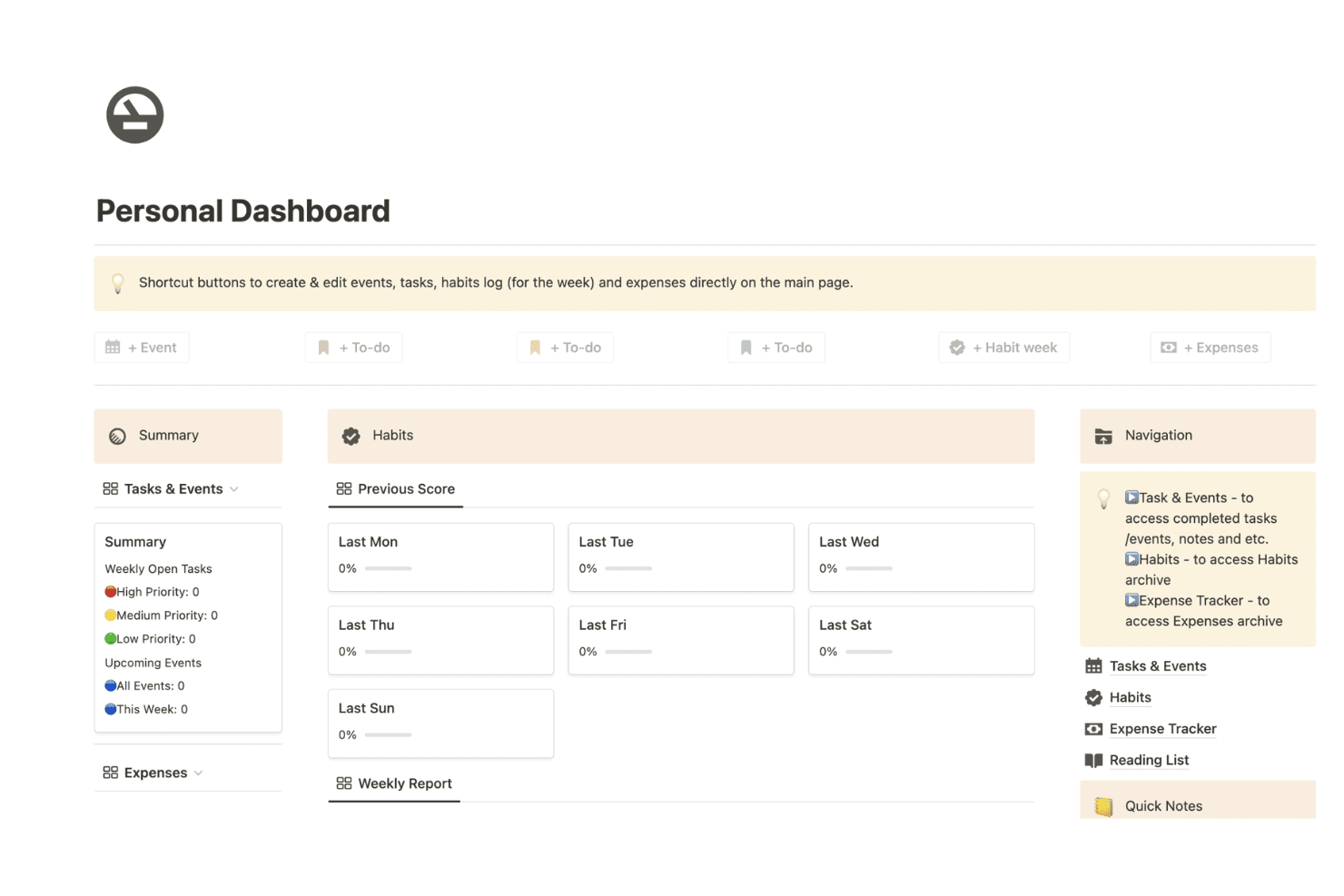
Notion is user friendly with its clean interface and intuitive navigation, making it simple for your team to get started. The drag-and-drop functionality lets you organize tasks and projects quickly. While there's a steep learning curve initially, the customization options soon become straightforward. Users appreciate the flexibility in designing their workspace to fit specific needs. Compared to other tools, Notion stands out for its functionality in creating a productive workspace.
Integrations
Notion integrations include Google Drive, Slack, Trello, GitHub, Asana, Typeform, Figma, and Miro.
Notion also offers an API for custom integrations and connects with third-party integration tools such as Zapier.

Notion Specs
- API: Yes
- Calendar Management: Yes
- Data Export: Yes
- Data Import: Yes
- External Integrations: Yes
- Inventory Tracking: No
- Multi-User: Yes
- Notifications: Yes
- Project Management: Yes
- Scheduling: No
- Supplier Management: No
- Task Scheduling/Tracking: Yes


