

10 mejores programas de hitos para el seguimiento de proyectos en 2026

10 La mejor selección de software de hitos


Con tantos programas de software de hitos diferentes disponibles, es difícil determinar cuál es el adecuado para ti. Sabes que quieres asegurarte de que el desarrollo del producto siga su curso, esté alineado con los objetivos estratégicos y alcance con éxito los hitos clave a lo largo de su ciclo de vida, pero necesitas averiguar qué herramienta es la mejor opción. ¡Yo te ayudo! He investigado cuáles son los mejores programas de software de hitos disponibles y he utilizado mi experiencia personal como gerente de producto en equipos grandes para reunir mis principales recomendaciones en este artículo.
¿Qué es el software de hitos?
El software de hitos es un tipo de herramienta que ayuda a los gerentes de producto y a los equipos a planificar, supervisar y alcanzar hitos importantes en el desarrollo y lanzamiento de un producto. Estos hitos son puntos cruciales en el ciclo de vida del producto, ya que marcan logros clave, fechas límite o la finalización de tareas esenciales.
El software de hitos facilita la creación de hojas de ruta, la definición clara de los entregables, la gestión de tareas, la programación de proyectos, la configuración de automatizaciones de flujos de trabajo y el seguimiento del progreso mediante paneles interactivos. Los equipos de desarrollo de productos utilizan estas herramientas para mantenerse alineados y avanzar de acuerdo con lo previsto en sus cargas de trabajo, tanto si trabajan con una metodología de flujo de trabajo ágil como en cascada.
Por Qué Confiar en Nuestras Reseñas de Software
Llevamos revisando y probando software de gestión de productos desde 2020. Como product managers, sabemos lo crucial y complicado que es tomar la decisión correcta al seleccionar software. Invertimos en investigación profunda para ayudar a nuestra audiencia a tomar mejores decisiones de compra de software. Hemos probado más de 2,000 herramientas para distintos casos de uso y escrito más de 1,000 reseñas exhaustivas. Conozca cómo mantenemos la transparencia & nuestra metodología de reseñas de software.
Resumen de los 10 mejores programas de software de hitos
| Tool | Best For | Trial Info | Price | ||
|---|---|---|---|---|---|
| 1 | Ideal para crear flujos de trabajo personalizados | Prueba gratuita de 30 días + demo gratuita disponible | Desde $24/usuario/mes (facturado anualmente) | Website | |
| 2 | Mejor para la gestión de proyectos ágiles | Plan gratuito + prueba gratuita de 30 días disponible | Desde $35/mes (hasta 30 usuarios) | Website | |
| 3 | Ideal para gestionar proyectos complejos e interconectados | Plan gratuito + demo gratuita disponible | Desde $10.99/usuario/mes (facturado anualmente) | Website | |
| 4 | Ideal para gestionar procesos de servicios y cumplimiento | Prueba gratuita de 14 días | Desde $10/usuario/mes | Website | |
| 5 | Mejor para el seguimiento de tiempo y cálculo de costos de proyectos | Demo gratuita disponible | Desde $10.50/usuario/mes (facturación anual) | Website | |
| 6 | Ideal con gestión de recursos incluida | Prueba gratuita de 30 días | Precio disponible a solicitud | Website | |
| 7 | Mejor software de hitos para gestionar varios equipos | Prueba gratuita de 30 días | Desde $8/usuario/mes | Website | |
| 8 | Mejor para la gestión de productos de desarrollo de software | Plan gratuito + prueba gratuita de 14 días disponible | Desde $7.91/usuario/mes (facturado anualmente) | Website | |
| 9 | Ideal para la planificación visual de proyectos personalizable | Plan gratuito disponible | Desde $9/usuario/mes (facturado anualmente) | Website | |
| 10 | Ideal para la gestión financiera y la elaboración de informes | Demo gratuita disponible | Desde $20/usuario/mes | Website |

Reseñas de los 10 mejores programas de software de hitos
En esta sección, he escrito reseñas detalladas de los 10 mejores programas de software de hitos que incluí en mi lista. He descrito el mejor caso de uso de cada herramienta, sus funciones destacadas, integraciones, información sobre precios y ventajas y desventajas. También he añadido una captura de pantalla de la interfaz de usuario para que puedas hacerte una idea de la experiencia.

Kintone
Ideal para crear flujos de trabajo personalizados
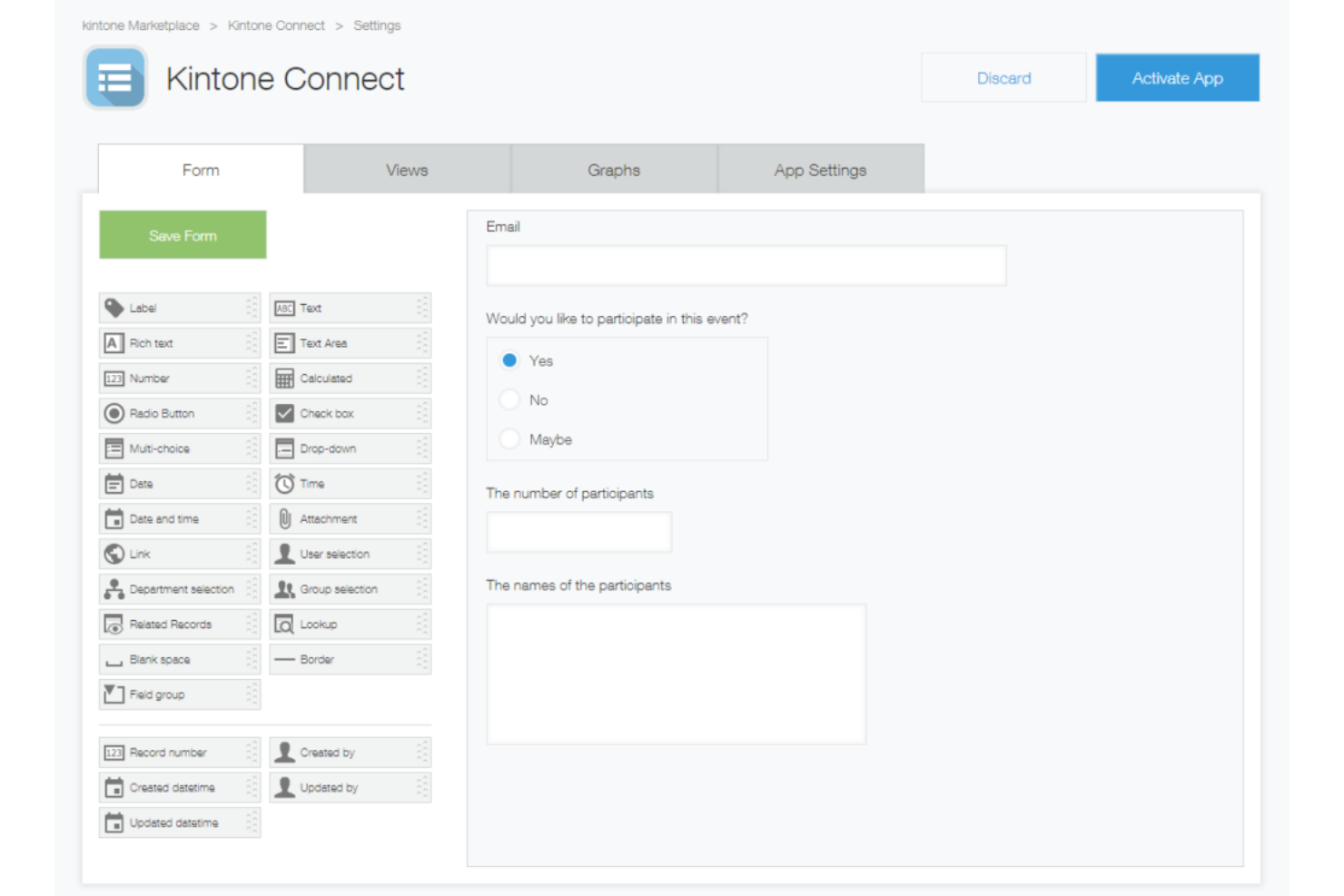
Kintone es una plataforma de trabajo sin código que te permite crear aplicaciones personalizadas de base de datos, gestionar flujos de trabajo de proyectos con transferencias de tareas y aprobaciones automáticas, y hacer seguimiento de los datos del equipo y el progreso de las tareas desde un panel centralizado.
¿Para quién es mejor Kintone?
Kintone es adecuado para equipos pequeños y medianos que necesitan crear y gestionar aplicaciones personalizadas de seguimiento de proyectos sin depender de un desarrollador.
Por qué elegí Kintone
He incluido Kintone en mis principales recomendaciones porque su constructor de flujos de trabajo con función de arrastrar y soltar te permite diseñar cadenas de aprobación, transferencia de tareas y notificaciones automáticas que se adaptan exactamente a la forma en que trabaja tu equipo. Me gusta especialmente que puedes crear flujos de aprobación de varios pasos con ramificaciones condicionales, de modo que una aprobación de hito se dirija automáticamente a la persona correcta según el estado o el rol. También puedes configurar recordatorios automáticos vinculados a registros específicos, lo que mantiene las etapas del proyecto avanzando sin necesidad de seguimiento manual.
Características clave de Kintone
- Constructor de aplicaciones personalizadas: Agrega campos para arrastrar y soltar como selectores de fecha, menús desplegables y campos numéricos para construir una aplicación de seguimiento de proyectos desde cero.
- Espacios de proyecto: Crea espacios compartidos donde los equipos pueden publicar actualizaciones en hilos, adjuntar archivos y enlazar directamente a aplicaciones relevantes.
- Vistas gráficas: Muestra los datos de los registros como gráficos de barras, gráficos circulares o tablas cruzadas dentro de cualquier aplicación.
- Permisos granulares: Controla quién puede ver, editar o agregar registros en el nivel de aplicación, espacio o registro individual.
Pros and Cons
Pros:
- Altamente personalizable y flexible
- Controles de permisos granulares
- Adecuado para varias funciones empresariales
Cons:
- La configuración puede requerir algo de conocimientos técnicos
- La interfaz puede ser compleja para principiantes
Backlog
Mejor para la gestión de proyectos ágiles
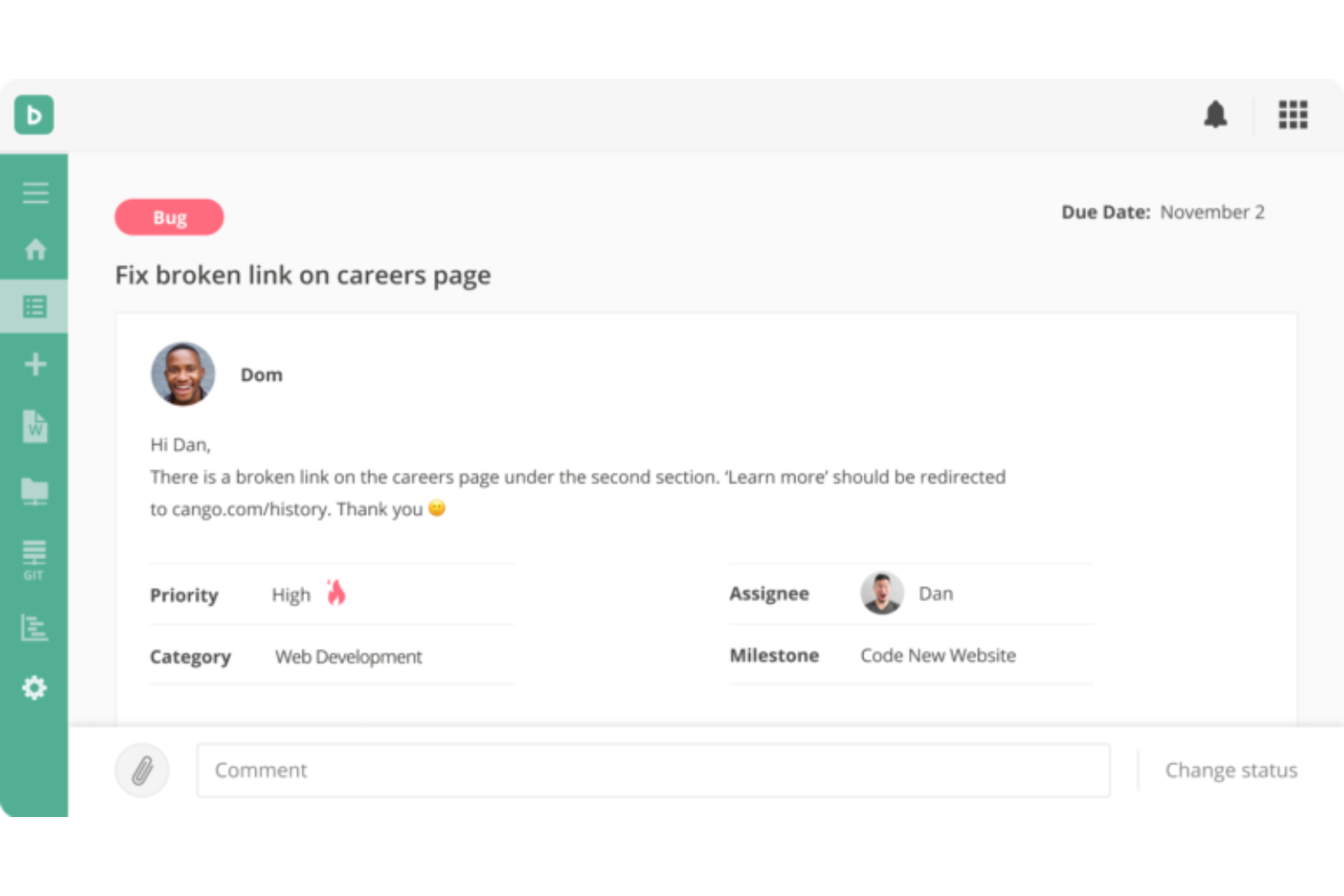
Backlog es una plataforma de gestión de proyectos y seguimiento de incidencias que combina el seguimiento de hitos, diagramas de Gantt, tableros Kanban, gráficos de burndown y control de versiones integrado para equipos de desarrollo y multidisciplinares.
¿Para quién es mejor Backlog?
Backlog es una excelente opción para equipos de desarrollo de software y TI que necesitan gestionar hitos de proyectos junto con repositorios de código y seguimiento de incidencias en un solo lugar.
Por qué elegí Backlog
Incluí Backlog entre mis principales opciones porque gestiona el seguimiento de hitos ágiles de una manera estrechamente conectada con el trabajo real de desarrollo. Me gusta que los gráficos de burndown estén justo al lado de las tareas del sprint, así que cuando mi equipo está a mitad de un sprint, puedo ver en tiempo real si estamos cumpliendo con los plazos o necesitamos reordenar prioridades. Los hitos y versiones están integrados directamente en la jerarquía de tareas, lo que significa que puedo vincular incidencias, subtareas y commits de código a un objetivo de lanzamiento específico sin usar una herramienta aparte.
Características clave de Backlog
- Diagramas de Gantt: Visualiza toda la línea de tiempo de tu proyecto y ajusta las dependencias de tareas cuando las fechas de los hitos cambian.
- Tableros Kanban: Supervisa el estado de las tareas a través de columnas para que tu equipo vea de un vistazo qué está en progreso, bloqueado o finalizado.
- Campos personalizados: Añade campos a incidencias y tareas para capturar los datos específicos que tu equipo necesita para seguir el progreso de los hitos.
- Integración con Git y SVN: Administra repositorios de código directamente dentro de Backlog y vincula los commits a tareas e incidencias específicas.
Pros and Cons
Pros:
- Funciones específicas para desarrollo de software
- Plan gratuito para hasta 10 usuarios y 1 proyecto
- Aplicaciones móviles para Android e iOS
Cons:
- Proyectos limitados en los planes de nivel inferior
- Puede no ser adecuado para metodologías no ágiles
Asana
Ideal para gestionar proyectos complejos e interconectados
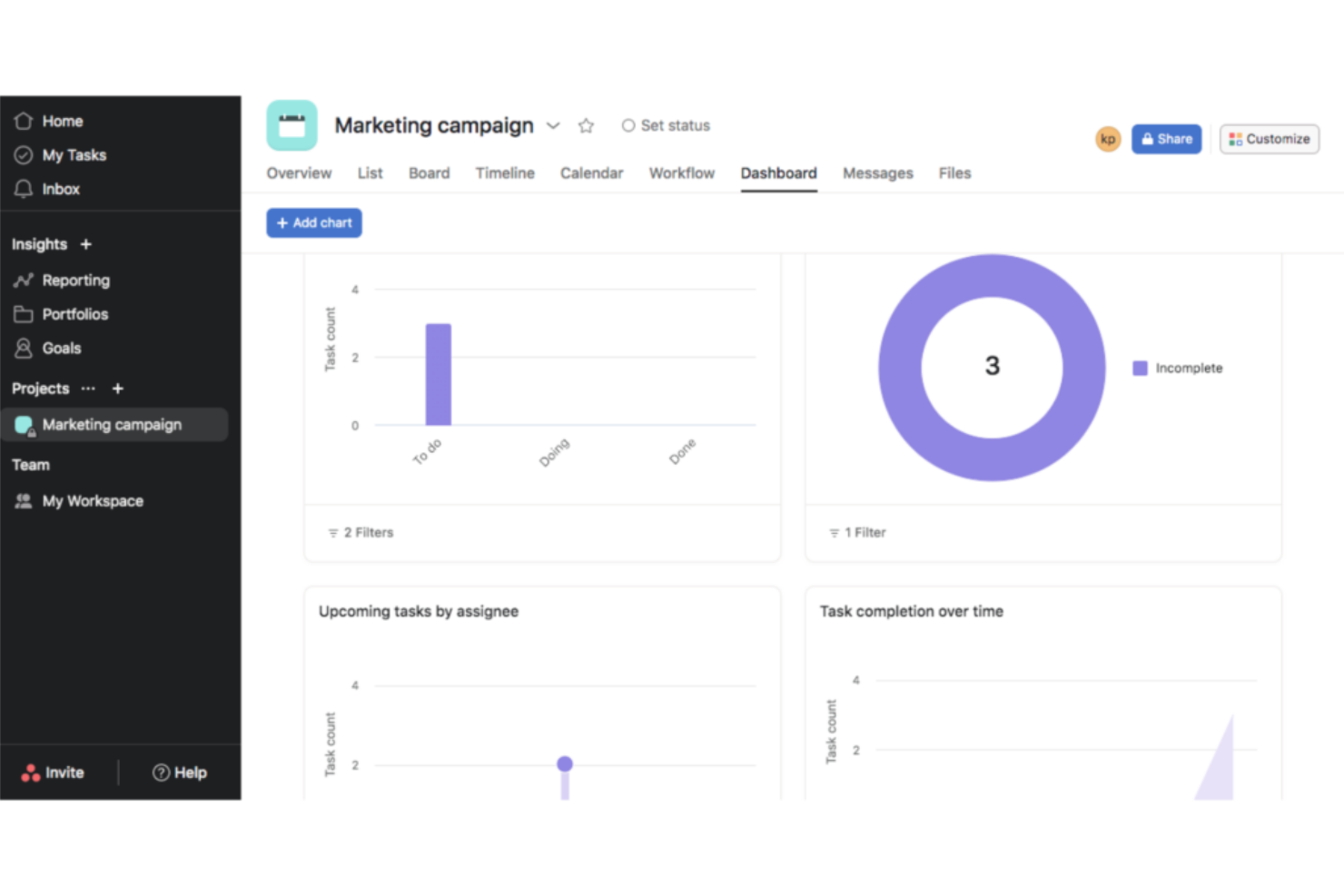
Asana es una plataforma de gestión de proyectos que permite a los equipos planificar el trabajo, establecer hitos, rastrear dependencias y monitorear el progreso en varios proyectos utilizando vistas de cronograma, tablero y lista.
¿Para quién es mejor Asana?
Asana es ideal para equipos medianos o grandes que gestionan múltiples proyectos a la vez y necesitan seguimiento estructurado de hitos entre departamentos.
Por qué elegí Asana
Asana merece su lugar en mi lista de favoritos debido a lo bien que maneja el seguimiento de hitos entre proyectos interconectados. Me encanta que se puedan vincular los hitos a dependencias de tareas específicas, de modo que cuando una tarea precedente se retrasa, puedes ver de inmediato el impacto en la línea de tiempo. La vista de Portafolios es lo que realmente diferencia a Asana para trabajos complejos: la uso para monitorear el estado de los hitos en múltiples proyectos a la vez sin tener que saltar entre diferentes tableros.
Características clave de Asana
- Vista de cronograma: Una vista tipo diagrama de Gantt que muestra tareas, hitos y sus relaciones de programación a lo largo de todo el proyecto.
- Objetivos: Una función que permite vincular los hitos del proyecto directamente con los objetivos de la empresa y realizar el seguimiento del avance en un solo lugar.
- Reglas: Disparadores automáticos que ejecutan acciones (como reasignar tareas o enviar notificaciones) cuando se marca un hito como completado.
- Vista de carga de trabajo: Una visualización del trabajo asignado a cada miembro del equipo, lo que permite equilibrar la capacidad en torno a las fechas clave de los hitos.
Pros and Cons
Pros:
- Constructor de flujos de trabajo automatizados sencillo
- Sistema de gestión de tareas con función de arrastrar y soltar
- Plan gratuito con proyectos ilimitados
Cons:
- No tiene seguimiento de tiempo incorporado
- El plan gratuito incluye funciones limitadas

beSlick
Ideal para gestionar procesos de servicios y cumplimiento
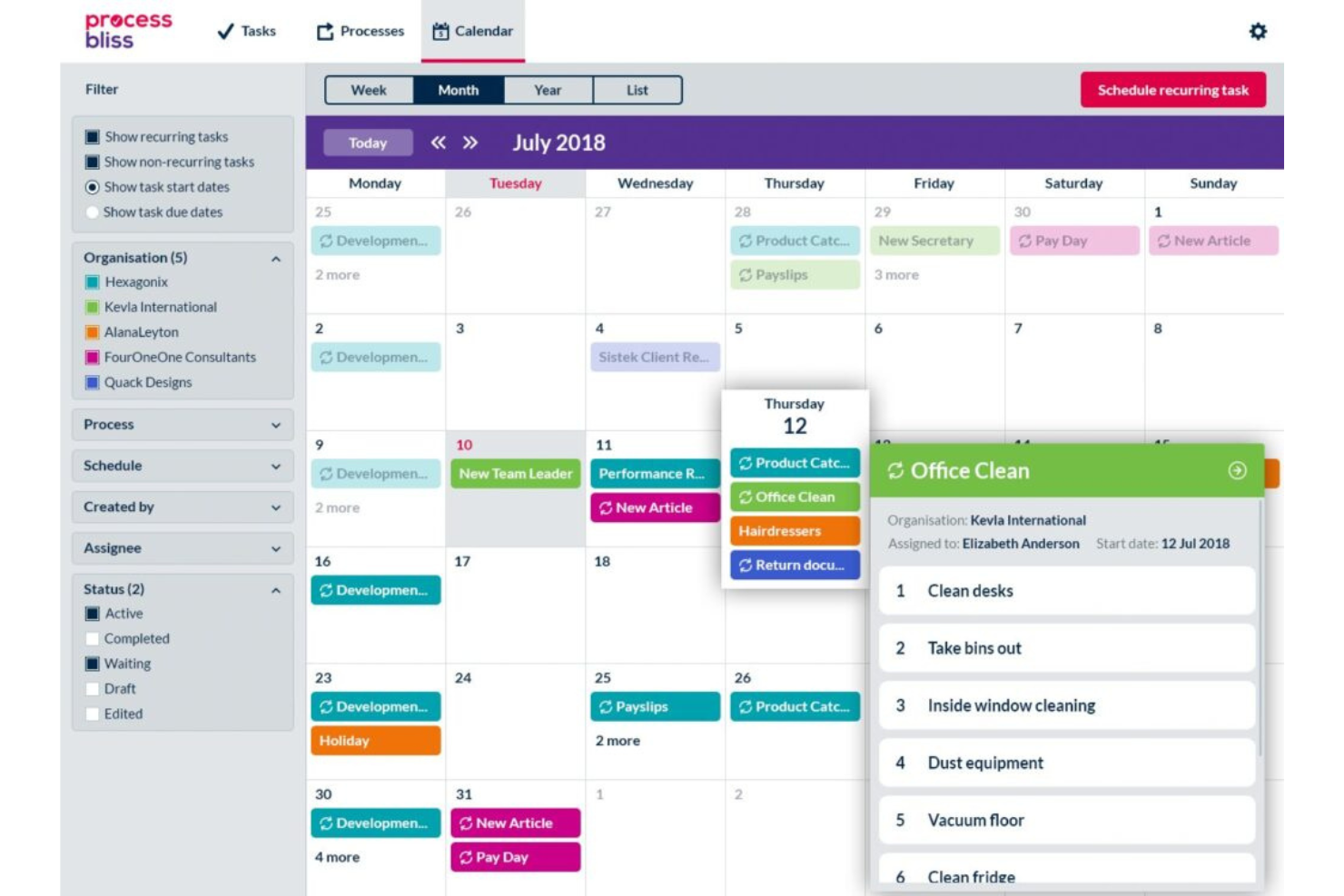
beSlick es una plataforma de gestión de procesos y tareas que permite a los equipos crear plantillas de flujo de trabajo, ejecutarlas como listas de tareas y hacer un seguimiento del progreso con un registro de auditoría con marca de tiempo para el cumplimiento.
¿Para quién es mejor beSlick?
beSlick es adecuado para pequeñas y medianas empresas de servicios que necesitan flujos de trabajo repetibles y orientados a procesos, con responsabilidad incorporada y seguimiento de cumplimiento.
Por qué elegí beSlick
Elegí beSlick porque vincula la ejecución de procesos directamente con el seguimiento de cumplimiento. Cuando mi equipo ejecuta un flujo de trabajo de servicio, cada paso puede marcarse como incumplido, lo que contribuye a una puntuación general de desempeño para esa tarea. Eso significa que no tengo que perseguir documentación después de una auditoría—la evidencia se genera a medida que el trabajo avanza. Cada cambio en plantillas o tareas, acción y envío se registra en una bitácora de auditoría con marca de tiempo, y puedo exportar esos datos como un archivo CSV que muestra la actividad como prueba de cumplimiento.
Funciones clave de beSlick
- Biblioteca de plantillas de flujo de trabajo: Almacena y gestiona plantillas de procesos reutilizables que generan automáticamente listas de tareas cuando se activan.
- Seguimiento de hitos: Marca hitos clave dentro de un flujo de trabajo para monitorear el progreso en las etapas críticas de un proceso.
- Asignación de tareas basada en roles: Asigna pasos dentro de un flujo de trabajo a roles o miembros de equipo específicos, para que la persona correcta sea responsable de cada tarea.
- Formularios integrados: Añade campos de formulario directamente en los pasos del flujo de trabajo para capturar datos, aprobaciones o firmas a medida que avanza el trabajo.
Pros and Cons
Pros:
- Tareas, plantillas y formularios ilimitados en todos los planes
- Implementación personalizada en todos los planes
- Aplicación móvil disponible
Cons:
- Todos los planes permiten 15 usuarios, tarifa por cada usuario adicional
- Sin integraciones nativas, solo mediante Zapier

Mejor para el seguimiento de tiempo y cálculo de costos de proyectos
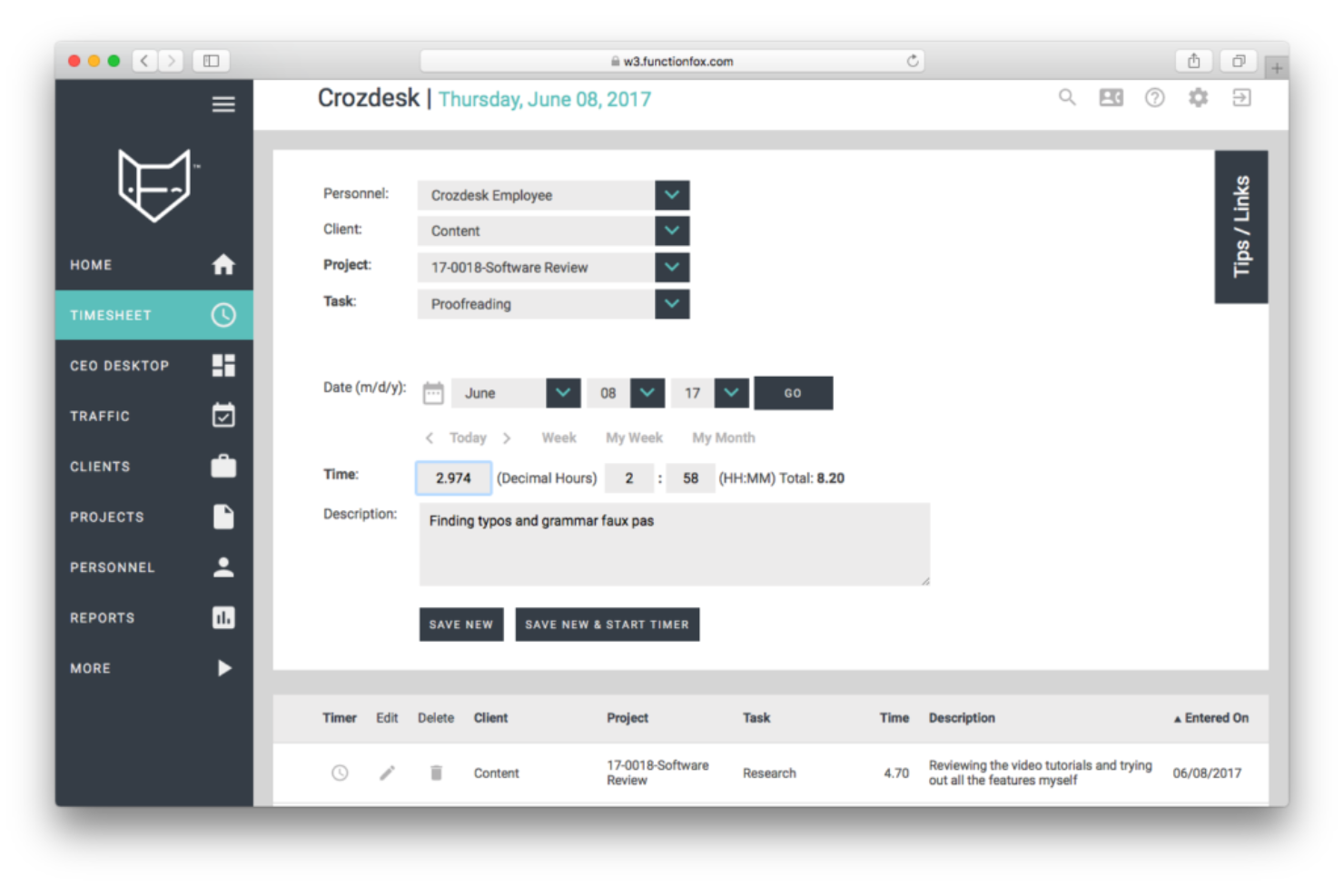
FunctionFox es una plataforma de gestión de proyectos y seguimiento de tiempo diseñada específicamente para agencias creativas, con herramientas para la programación de hitos, diagramas de Gantt, cálculo de costos de proyectos y control de presupuestos.
¿Para quién es mejor FunctionFox?
FunctionFox es una excelente opción para agencias creativas pequeñas y medianas, estudios de diseño y equipos de marketing que necesitan gestionar proyectos junto con el seguimiento del tiempo y presupuesto.
Por qué elegí FunctionFox
He incluido FunctionFox entre mis mejores opciones porque vincula el seguimiento de tiempo directamente con los hitos del proyecto, de modo que no solo puedo ver en qué punto se encuentra un proyecto en la línea de tiempo, sino también cuántas horas y dólares se han invertido en cada fase. Me gusta que las hojas de tiempo incorporadas registren el tiempo facturable y no facturable en proyectos específicos, y las herramientas de cálculo de costos me permiten comparar los presupuestos estimados con los gastos reales a medida que se alcanzan los hitos.
Características clave de FunctionFox
- Programación con diagrama de Gantt: Visualiza la línea de tiempo completa de tu proyecto como un diagrama de Gantt interactivo con hitos, acciones y reuniones representados visualmente.
- Herramienta de horarios de turnos: Mueve todos los hitos, acciones y reuniones hacia adelante o atrás un número determinado de días en un solo paso.
- Filtrado de hitos: Filtra la línea de tiempo de programación de tu proyecto o diagrama de Gantt para mostrar solo los hitos.
- Informes de proyectos: Genera informes de los proyectos activos para revisar el estado, el progreso de tareas y el cumplimiento de plazos.
Pros and Cons
Pros:
- Plan gratuito para hasta 3 usuarios y 2 proyectos
- Usuarios ilimitados en todos los planes de pago
- Facturación y presupuestos incluidos en los planes de pago
Cons:
- Los informes son limitados en el plan clásico
- Las funciones de gestión de proyectos son limitadas en el plan clásico

Moovila
Ideal con gestión de recursos incluida

Moovila es una plataforma de gestión de proyectos y portafolios basada en la programación impulsada por IA, el seguimiento de hitos, la gestión de dependencias, la planificación de recursos y el monitoreo en tiempo real de riesgos en los planes de trabajo activos.
¿Para quién es mejor Moovila?
Moovila es adecuado para oficinas de gestión de proyectos y equipos de servicios profesionales de tamaño medio a empresarial que gestionan varios proyectos simultáneos con plazos estrictos.
Por qué elegí Moovila
Moovila se gana su lugar en mi lista porque es una de las pocas herramientas de hitos que integra la gestión de recursos directamente en el motor de programación, en lugar de agregarla como un complemento secundario. Me gusta mucho cómo el asistente de asignación de recursos toma en cuenta la capacidad del equipo al establecer las fechas de los hitos, para que no te comprometas con una fecha límite que tu equipo físicamente no puede cumplir. La previsión de recursos en pipeline también me permite ver cómo los próximos hitos del proyecto se alinean con la disponibilidad antes de que comience el trabajo.
Características clave de Moovila
- Puntuación de riesgo RPAX: Un motor de IA que evalúa continuamente la salud del proyecto y señala riesgos de programación antes de que provoquen retrasos en los hitos.
- Programación por fecha ancla: Establece una fecha final fija y deja que Moovila programe automáticamente todas las tareas e hitos hacia atrás desde ese punto.
- Dependencias entre proyectos: Vincula hitos y tareas entre proyectos separados para que un retraso en un plan active actualizaciones automáticas en los relacionados.
- Reajuste automático: Cuando una tarea se retrasa, Moovila recalcula en tiempo real las fechas de los hitos posteriores y envía alertas automáticas.
Pros and Cons
Pros:
- Funciones robustas de gestión de tareas
- Interfaz de usuario intuitiva
- Herramientas eficaces de identificación de riesgos
Cons:
- Personalización limitada
- Sin período de prueba gratuito

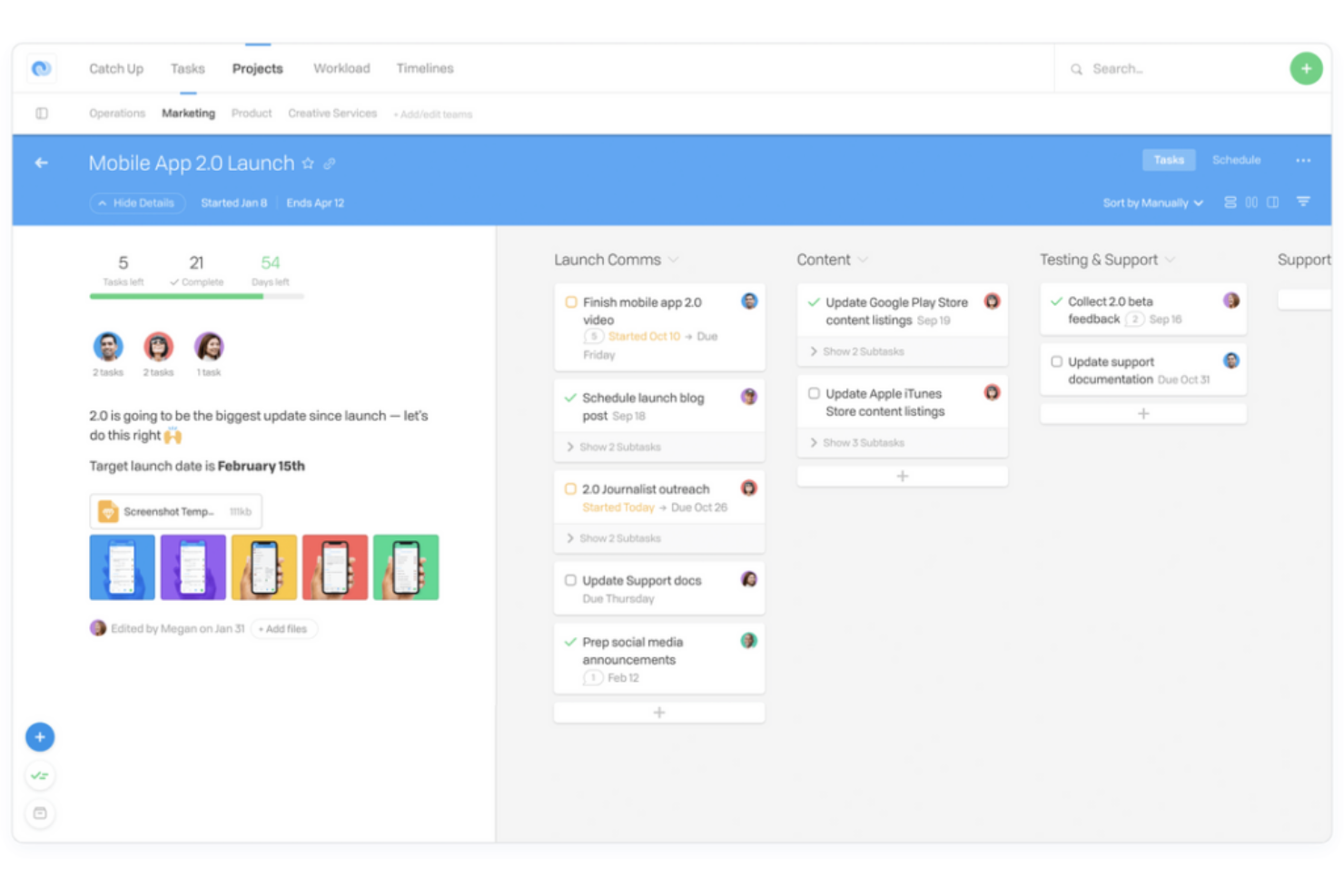
Flow es una herramienta de gestión de proyectos y tareas que combina el seguimiento de tareas, la planificación de hitos, las líneas de tiempo y la colaboración en equipo a través de múltiples proyectos y grupos de trabajo.
¿Para quién es Flow más adecuado?
Flow es ideal para equipos pequeños o medianos que necesitan un solo espacio de trabajo para coordinar tareas y proyectos entre varios departamentos o grupos de trabajo.
Por qué elegí Flow
Flow se gana un lugar en mi lista porque me permite establecer hitos directamente en las líneas de tiempo del proyecto y realizar su seguimiento entre varios equipos en un único espacio de trabajo. Me gusta que cada equipo pueda tener su propio espacio dedicado mientras los hitos siguen siendo visibles a nivel del proyecto, de modo que nada queda aislado. La vista de línea de tiempo facilita detectar cuándo un equipo está retrasado con un entregable clave antes de que afecte el cronograma general.
Características clave de Flow
- Dependencias de tareas: Vincula tareas para que el trabajo dependiente quede bloqueado hasta que se completen las tareas previas.
- Vista Mis Tareas: Una bandeja personal de tareas que muestra el trabajo asignado a cada miembro en todos los proyectos activos en un solo lugar.
- Flujos de trabajo: Espacios de proyecto dedicados donde los equipos pueden organizar tareas, compartir archivos y realizar el seguimiento del progreso de forma independiente.
- Fechas de entrega y prioridades: Asigna fechas de entrega y niveles de prioridad a las tareas individuales para mantener los cronogramas de proyectos en orden.
Pros and Cons
Pros:
- Tareas ilimitadas en todos los planes
- Mucho contenido de autoayuda en el centro de ayuda
- Cifrado completo incluido en todos los planes
Cons:
- Mínimo de 2 usuarios, no es ideal para individuos
- Los pagos solo se pueden realizar en USD

Jira
Mejor para la gestión de productos de desarrollo de software
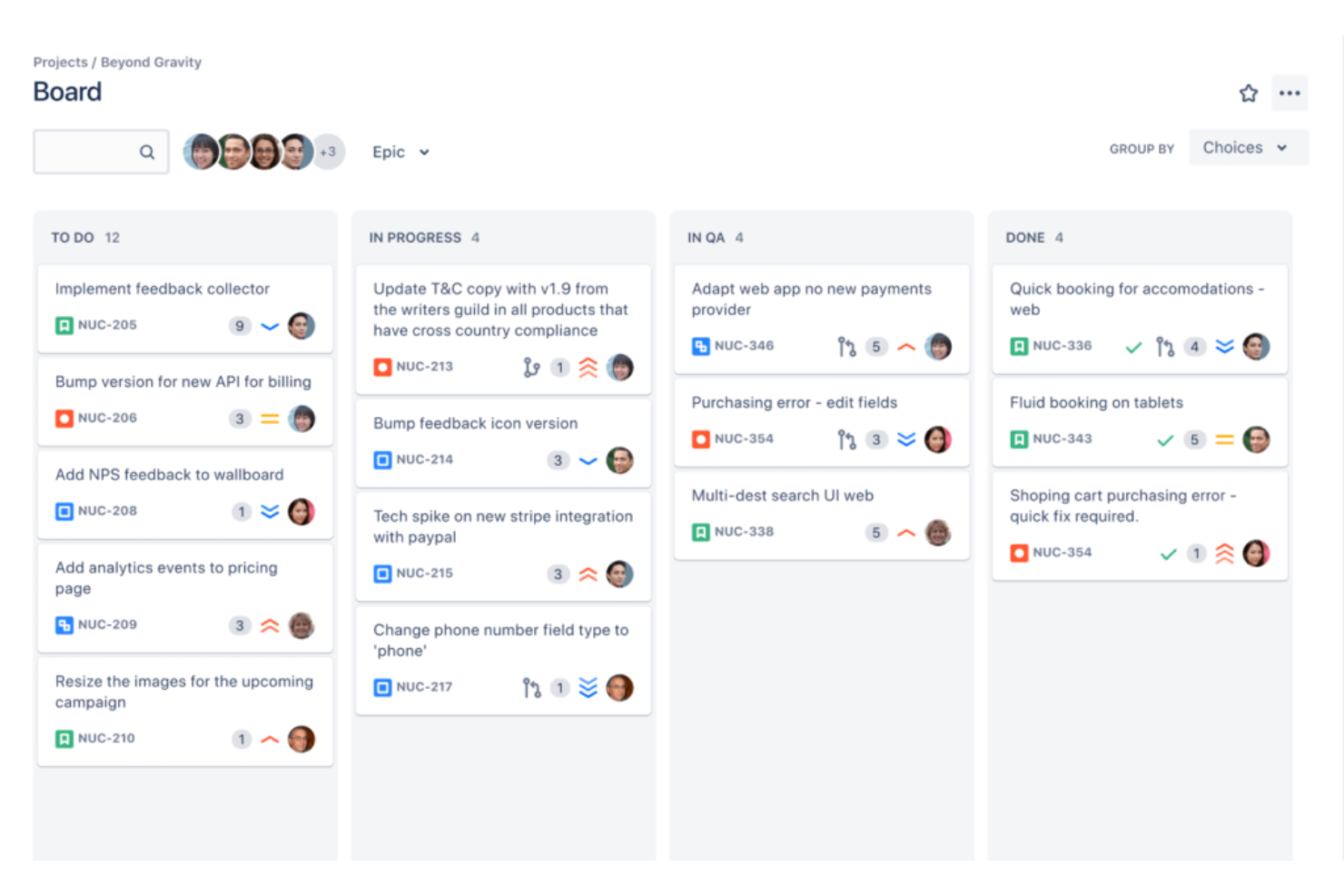
Jira es una plataforma ágil de gestión de proyectos y seguimiento de incidencias que ofrece planificación de sprints, gestión de la cartera de pendientes, vistas de línea de tiempo y seguimiento de dependencias para flujos de trabajo de desarrollo orientados a hitos.
¿Para quién es mejor Jira?
Jira es ideal para equipos de desarrollo de software y organizaciones dirigidas por ingenieros que gestionan el trabajo en sprints y necesitan un seguimiento estructurado de hitos vinculado a los lanzamientos.
Por qué elegí Jira
Elegí Jira como uno de los mejores porque su función de Versiones y Lanzamientos permite a los equipos de software definir objetivos de hitos directamente dentro de la cartera de pendientes y luego rastrear qué incidencias están bloqueando una fecha de lanzamiento. Me gusta cómo la vista de línea de tiempo muestra el progreso de los sprints frente a esos hitos de lanzamiento, así puedo ver las cadenas de dependencias de un vistazo. La hoja de ruta de Jira también me permite fijar fechas de versión como puntos clave, lo que mantiene la planificación de hitos ligada directamente a la ejecución del sprint.
Características clave de Jira
- Épicas: Agrupa incidencias relacionadas bajo una sola épica para organizar el trabajo en torno a entregables mayores que se alinean con los objetivos de hitos.
- Gráficos de avance (burndown): Visualiza el trabajo restante dentro de un sprint o versión respecto a la fecha límite del hito para detectar riesgos de alcance anticipadamente.
- Reglas de automatización: Establece disparadores que actualizan automáticamente el estado de las incidencias o envían notificaciones cuando se cumplen condiciones relacionadas con hitos.
- Tableros interproyecto: Reúne incidencias de varios proyectos en una sola vista de tablero para seguir el progreso de los hitos a través de los equipos.
Pros and Cons
Pros:
- Gran banco de plantillas disponible
- Plan gratuito para hasta 10 usuarios
- Automatizaciones disponibles en todos los planes
Cons:
- Complejo para principiantes o usuarios no técnicos
- Sin edición masiva ni scripting

Ideal para la planificación visual de proyectos personalizable
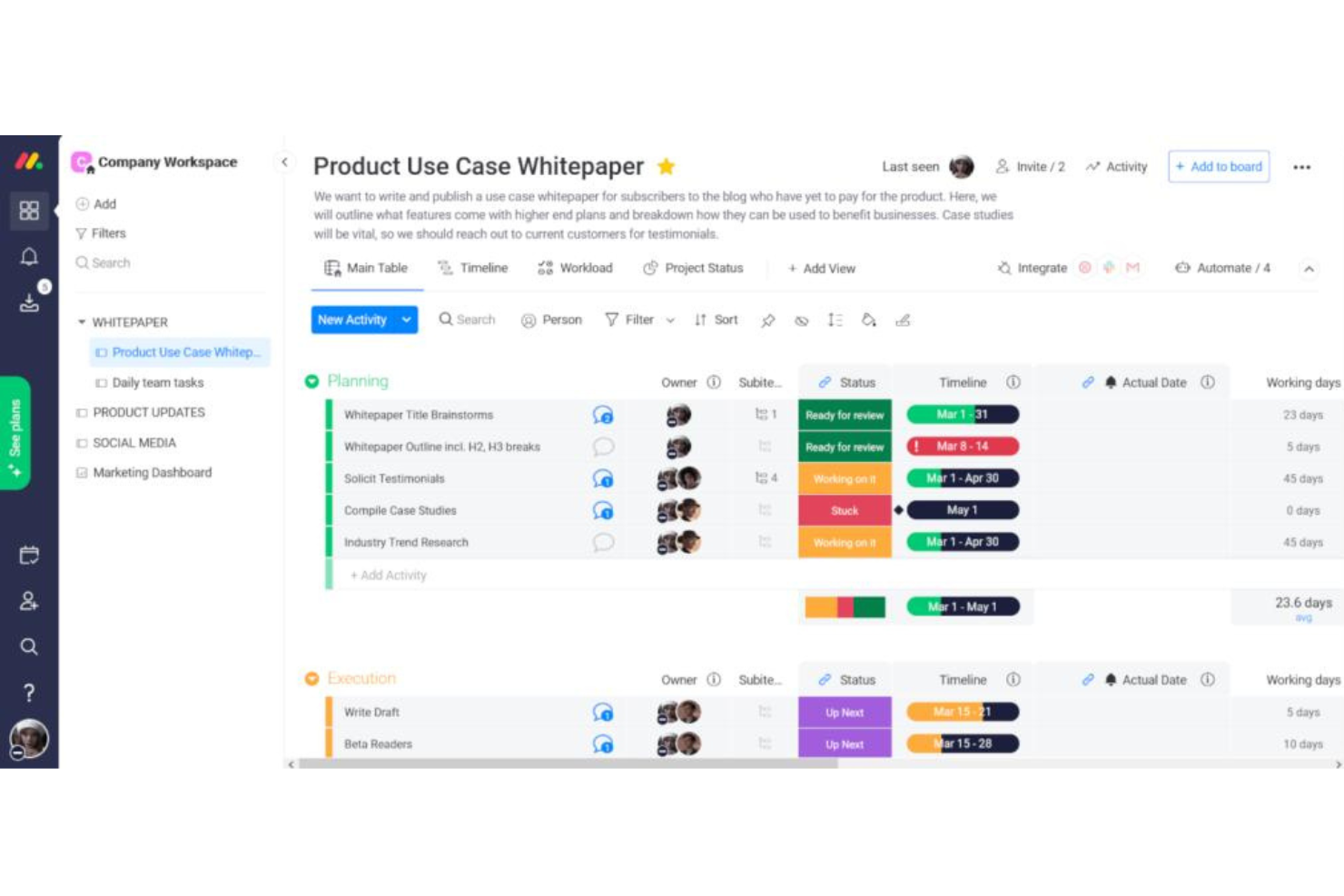
monday.com es una plataforma visual de gestión de proyectos con seguimiento de hitos, diagramas de Gantt, vistas de cronograma, gestión de dependencias y planificación asistida por IA para proyectos y portafolios.
¿Para quién es mejor monday.com?
monday.com es ideal para equipos multifuncionales y empresas medianas que gestionan varios proyectos simultáneamente y necesitan herramientas flexibles de planificación visual.
Por qué elegí monday.com
Incluyo monday.com en mi lista porque el nivel de personalización visual que ofrece para la planificación de hitos es realmente impresionante. Puedo establecer cualquier tarea como un hito directamente en la vista de cronograma, donde aparece como un marcador de diamante distintivo, y luego codificarlo por colores según el estado o el responsable. También me gusta cómo los diagramas de Gantt me permiten arrastrar y reordenar hitos, establecer dependencias de tareas y ver rutas críticas, para ver exactamente qué está bloqueando una fecha clave antes de que se convierta en un problema.
Características clave de monday.com
- Vista de carga de trabajo: Visualiza la carga de tareas entre los miembros del equipo en relación con las fechas límite de los hitos próximos.
- Panel de portafolio: Monitorea el estado de los hitos en varios proyectos desde una única vista general en tiempo real.
- Automatizaciones: Crea reglas que activen notificaciones o actualizaciones de estado cuando se acerque la fecha límite de un hito.
- Asistente de proyectos con IA: Genera un plan de proyecto completo, con sugerencias de hitos y cronogramas, a partir de un mensaje de texto.
Pros and Cons
Pros:
- Plan gratuito con hasta 3 tableros
- Aplicaciones móviles disponibles para iOS y Android
- Interfaz fácil de usar e intuitiva
Cons:
- Almacenamiento limitado en los planes básico y gratuito
- Las integraciones no están incluidas en el plan básico ni en el gratuito
New Product Updates from monday AI Workspace
monday AI Workspace Adds Human Approval Routing
monday AI Workspace adds a human-in-the-loop approval block to AI Workflows, sending approval requests and routing workflow paths based on responses. For more information, visit monday AI Workspace's official site.

BigTime
Ideal para la gestión financiera y la elaboración de informes

BigTime es una plataforma de automatización de servicios profesionales (PSA) impulsada por IA que abarca la planificación de proyectos, el seguimiento de hitos y tareas, la gestión de recursos, el seguimiento de tiempo y gastos, y la elaboración de informes financieros en un solo sistema.
¿Para quién es mejor BigTime?
BigTime es ideal para firmas de servicios profesionales—como consultorías, contabilidad, arquitectura y equipos de ingeniería—que necesitan gestionar la entrega de proyectos junto con la facturación y el seguimiento financiero.
Por qué elegí BigTime
Elegí BigTime como uno de los mejores por la forma en que conecta de manera precisa el seguimiento de hitos de proyecto con el rendimiento financiero. Me encanta poder monitorear el presupuesto frente a los valores reales en cada nivel del proyecto en tiempo real; así que, si un hito se retrasa, el impacto financiero es visible de inmediato y no se descubre al final del mes. La generación de informes sobre la rentabilidad de proyectos me permite profundizar en los márgenes por cliente, equipo o periodo de tiempo, lo que otorga un contexto empresarial real a las revisiones de hitos, en lugar de ser simplemente una actualización de estado de tareas. Otra función que utilizo mucho es la planificación de escenarios; puedo simular cómo un retraso en un hito o un cambio de alcance afecta la salud financiera general de todo el portafolio antes de decidir el siguiente paso.
Funciones clave de BigTime
- Asignación de recursos: Asigna miembros del equipo a fases o hitos específicos del proyecto y haz un seguimiento de la capacidad en todo tu portafolio en tiempo real.
- Facturación basada en hitos: Vincula la generación de facturas directamente a los hitos de proyecto completados, para que la facturación se alinee con el avance real de la entrega.
- Plantillas de proyectos: Crea estructuras de proyectos reutilizables con hitos, tareas y cronogramas predefinidos para estandarizar la configuración de nuevos proyectos.
- Seguimiento de tiempo y gastos: Registra horas y gastos asociados a tareas o hitos específicos para mantener los datos a nivel proyecto precisos y listos para auditorías.
Pros and Cons
Pros:
- Adaptado a las necesidades de negocios de servicios profesionales
- Implementación personalizada con todos los planes
- Gran cantidad de contenido en la base de conocimientos
Cons:
- La interfaz de usuario puede parecer compleja para los nuevos usuarios
- Opciones de personalización limitadas
Otros programas de software de hitos destacados
A continuación se incluye una lista de programas de software de hitos adicionales que preseleccioné, pero que no llegaron a estar entre los 10 primeros. Sin duda, merece la pena echarles un vistazo.
- Wrike
Mejor con herramientas de colaboración de equipo integradas
- Zoho Projects
El mejor software de hitos para equipos remotos
- PathPro
Mejor para desarrollo impulsado por la comunidad


Cómo evalúo el software de hitos
Cuando las dependencias de las entregas cambian o las fechas de lanzamiento se retrasan, evalúo las herramientas de gestión de hitos en dos niveles: las capacidades básicas requeridas para entrar en la lista y los diferenciadores que distinguen a las mejores.
Funcionalidad principal (condiciones indispensables para esta lista)
Cuando selecciono herramientas para mi lista, califico cada una en una escala de 0 (no ofrece la funcionalidad) a 5 (destaca en esta área) por cada funcionalidad principal listada a continuación. Luego, calculo la puntuación total de la herramienta como un porcentaje. Cada herramienta debe alcanzar una puntuación mínima total del 65% para ser considerada para su inclusión.
- Creación y seguimiento de hitos: Verifico si puedes definir verdaderos objetos de hitos con fechas objetivo, responsables y actualizaciones de estado, no solo tareas etiquetadas como hitos.
- Visualización de la hoja de ruta: Cada herramienta debe ofrecer vistas de línea de tiempo, Gantt o carril que sitúen los hitos en contexto junto a iniciativas y lanzamientos de producto más amplios.
- Gestión de dependencias: Busco la capacidad de vincular hitos a tareas bloqueantes o entregables entre equipos, para que una integración de API retrasada evidencie su impacto en una fecha de lanzamiento.
- Reportes de progreso y estado: Aquí son importantes los tableros y reportes que muestran el estado de los hitos de un vistazo, especialmente vistas consolidadas que un director de portafolio de productos pueda compartir en una revisión directiva.
- Alertas de plazos y riesgos: Las notificaciones automáticas para hitos cercanos, en riesgo o vencidos ayudan a los equipos de producto a detectar retrasos antes de que afecten toda la hoja de ruta.
- Integraciones con herramientas de producto: La herramienta debe sincronizarse con rastreadores de incidencias y plataformas de desarrollo como Jira, Azure DevOps o GitHub, de modo que el estado de los hitos refleje el progreso real de ejecución.
Una vez que tengo una lista de herramientas que cumplen con estos criterios, considero qué diferencia a cada plataforma.
Factores diferenciadores (qué distingue a los proveedores)
Así es como comparo y contrasto distintos proveedores:
Funciones destacadas
La planificación de escenarios es un gran diferenciador. Busco herramientas que permitan modelar cambios en la línea de tiempo de "qué pasaría si" antes de comprometerse, para que puedas ver cómo afecta a todos los hitos posteriores retrasar un lanzamiento beta. También es importante el alineamiento estratégico de objetivos. Vincular los hitos directamente a OKR o resultados de negocio permite a los líderes de producto justificar prioridades durante revisiones de portafolio. Además, evalúo si una herramienta ofrece vistas listas para presentaciones o informes exportables que los interesados puedan entender sin requerir una cuenta de producto.
Más allá de las funciones
La profundidad de la integración es una de las primeras cosas que evalúo. Una herramienta de hitos que no se sincroniza con tu rastreador de incidencias crea una carga manual de reportes que elimina su propósito. La colaboración y el acceso de los interesados también tienen mucho peso en mis comparaciones. Verifico si una herramienta ofrece asientos gratuitos de visualización o enlaces compartibles para que ejecutivos y socios puedan seguir el progreso sin una licencia de pago. Para equipos que gestionan múltiples líneas de productos, analizo qué tan bien escalan los hitos en portafolios con vistas jerárquicas desde el nivel de equipo hasta el nivel organizacional.
Preguntas más frecuentes sobre el software de hitos (preguntas frecuentes)
¿Aún tienes preguntas sobre el software de gestión de hitos y tareas? No busques más, ¡tenemos las respuestas!
¿Cuáles son las ventajas de utilizar un software de hitos?
El software de hitos ofrece varias ventajas:
- Mayor visibilidad: Ayuda a visualizar los plazos del proyecto y a realizar un seguimiento del progreso de cada tarea.
- Mayor eficiencia: Estas herramientas agilizan los procesos de gestión de proyectos, aumentando así la eficiencia y la productividad.
- Mejor colaboración: Los miembros del equipo pueden colaborar eficazmente en tiempo real, mejorando la comunicación y reduciendo al mínimo la posibilidad de errores.
- Informes detallados: Gracias a los informes completos, los responsables pueden analizar el rendimiento, identificar cuellos de botella y tomar decisiones basadas en datos.
¿Existen opciones gratuitas de software de hitos?
Sí, algunas herramientas ofrecen versiones gratuitas con funciones limitadas. Trello, MeisterTask y Todoist tienen planes gratuitos adecuados para particulares o equipos pequeños. Sin embargo, estas versiones gratuitas presentan limitaciones en cuanto a las funciones y al número de proyectos o usuarios.
El software de hitos mantiene a los equipos centrados en sus tareas
En conclusión, seleccionar el software de hitos adecuado puede mejorar significativamente la gestión de productos, agilizar tus procesos y aumentar la productividad. El software que elijas debe adaptarse al flujo de trabajo de tu equipo, satisfacer tu caso de uso específico y ofrecer un precio que se ajuste a tu presupuesto.
Puntos clave para seleccionar el mejor software de hitos:
- Funcionalidad principal: El software de hitos adecuado ofrecerá funciones adaptadas a las necesidades de tu proyecto. Desde la planificación visual de proyectos hasta completas capacidades de desarrollo de software, la herramienta elegida debe ayudarte a gestionar y realizar un seguimiento eficaz de los hitos.
- Funciones clave: Busca funciones únicas que hagan destacar a una herramienta. Puede tratarse de una interfaz fácil de usar, integraciones potentes o funciones sólidas de generación de informes. Estas funciones pueden mejorar significativamente la productividad y la eficiencia de tu equipo.
- Precio y facilidad de uso: Ten en cuenta el modelo de precios y la facilidad de uso de la herramienta. Aunque el presupuesto es un factor fundamental, la facilidad de uso influye en la rapidez con la que tu equipo puede adaptarse al software. Por tanto, equilibrar un precio asequible con un diseño fácil de usar es esencial para implementar correctamente un software de hitos.
¿Quieres estar al día de los últimos contenidos de The CPO Club? Suscríbete a nuestra lista de correo del boletín para recibir actualizaciones.