

Las 10 mejores herramientas de software de diseño con IA para 2026

Selección de los mejores programas de diseño con IA


Con tantas herramientas de IA que aparecen cada día, es difícil determinar cuál es la adecuada para ti. Sabes que quieres aprovechar el poder de la inteligencia artificial para automatizar tareas que consumen mucho tiempo, comprender las preferencias de los usuarios, hacer sugerencias basadas en esas preferencias e incluso ofrecer elementos de diseño predictivos, pero necesitas descubrir qué herramienta es la mejor. ¡Yo te ayudo! En esta publicación te ayudaré a tomar una decisión sencilla, compartiendo mis experiencias personales al explorar docenas de herramientas de IA diferentes y verlas en acción con productos diversos, junto con mis selecciones de los mejores programas de diseño con IA.
¿Qué son los programas de diseño con IA?
Los programas de diseño con IA son herramientas tecnológicas avanzadas que incorporan la inteligencia artificial y los algoritmos de aprendizaje automático en los procesos de diseño visual. Permiten a los diseñadores crear elementos visuales más precisos y personalizados con mayor rapidez y eficiencia. Entre sus funciones principales suelen incluirse la automatización del diseño, las recomendaciones inteligentes, las experiencias de usuario personalizadas, los ajustes configurables para los controles de IA y la integración con otras herramientas de diseño.
Además, la herramienta también puede ofrecer recursos para entrenar la IA y funciones de análisis de datos que ayuden a orientar diseños futuros.
Por Qué Confiar en Nuestras Reseñas de Software
Llevamos revisando y probando software de gestión de productos desde 2020. Como product managers, sabemos lo crucial y complicado que es tomar la decisión correcta al seleccionar software. Invertimos en investigación profunda para ayudar a nuestra audiencia a tomar mejores decisiones de compra de software. Hemos probado más de 2,000 herramientas para distintos casos de uso y escrito más de 1,000 reseñas exhaustivas. Conozca cómo mantenemos la transparencia & nuestra metodología de reseñas de software.
Tabla comparativa de programas de diseño con IA
Esta tabla comparativa resume los detalles de precios de mis principales selecciones de programas de diseño con IA:
| Tool | Best For | Trial Info | Price | ||
|---|---|---|---|---|---|
| 1 | Ideal para diseño web con IA | Plan gratuito disponible | Desde $17/mes | Website | |
| 2 | Ideal para la colaboración en tiempo real | Plan gratuito disponible | Desde $12/mes (facturado anualmente) | Website | |
| 3 | Ideal para transformar bocetos dibujados a mano en wireframes | Plan gratuito disponible | Desde $12/usuario/mes (facturado anualmente) | Website | |
| 4 | Ideal para generar arte con efectos de glitch | Prueba gratuita de 7 días | Desde $2.49/usuario/mes | Website | |
| 5 | La mejor herramienta con una función de relleno generativo | Prueba gratuita de 7 días disponible | Desde $9.99/mes | Website | |
| 6 | Ideal para la generación de arte con IA | Prueba gratuita de 7 días + demo gratis disponible | Desde $59/asiento/mes (facturado anualmente) | Website | |
| 7 | La mejor herramienta de diseño con IA con kit de marca incluido | Plan gratuito disponible (solo para el creador de logotipos) | Desde $8/mes (facturado anualmente) | Website | |
| 8 | Ideal para generar presentaciones inspiradas por IA | Plan gratuito disponible | Desde $10/mes | Website | |
| 9 | Ideal para crear publicaciones atractivas en redes sociales | Prueba gratuita de 30 días | Desde $29/mes | Website | |
| 10 | Ideal para generar recomendaciones de paletas de colores | Plan gratuito disponible | Precio a consultar | Website |
Reseñas de los mejores programas de diseño con IA
Aquí tienes mi análisis detallado de cada herramienta. Te explicaré sus ventajas y desventajas, características y funcionalidades para destacar qué hace que cada herramienta sea excelente.

Wix
Ideal para diseño web con IA

Wix es un creador de sitios web basado en la nube, diseñado para particulares y empresas que desean crear su propio sitio web con facilidad. Ofrece una variedad de plantillas y herramientas de diseño adaptadas a diferentes industrias, lo que permite a los usuarios personalizar su presencia en línea sin necesidad de conocimientos técnicos avanzados.
Por qué elegí Wix: El creador de sitios web con IA de Wix destaca por su capacidad para generar un sitio web completo basado en tus respuestas. Al contestar unas pocas preguntas, recibes un sitio con diseño, estructura y contenido que reflejan la identidad única de tu negocio. Esta función ahorra tiempo y garantiza que tu sitio web esté alineado con la visión de tu marca.
Además, Wix ofrece soluciones empresariales integradas que se incorporan fácilmente a tu sitio. Ya sea que necesites herramientas de programación de citas, una tienda en línea o funciones para la gestión de eventos, la IA de Wix incluye estos elementos automáticamente.
Características y conexiones destacadas de Wix
Las características incluyen texto generado por IA, que te ayuda a crear contenido atractivo a través de sugerencias adaptadas al contexto de tu sitio. El generador de imágenes por IA te permite crear imágenes de alta calidad que encajan con el estilo de tu marca. Adicionalmente, el asistente de temas te ofrece recomendaciones de diseño para asegurar que la apariencia de tu sitio sea coherente y profesional.
Las integraciones incluyen Google Analytics, Google Ads, Facebook Catalog, Mailchimp, HubSpot, Omnisend, Meta Pixel, Salesforce, Pipedrive, Stripe, PayPal y QuickBooks.
Pros and Cons
Pros:
- Ofrece más de 900 plantillas personalizables
- Editor intuitivo con función de arrastrar y soltar
- Amplia selección de aplicaciones y widgets
Cons:
- Límites de almacenamiento en los planes más bajos
- No puedes cambiar de plantilla sin crear un sitio nuevo
Canva
Ideal para la colaboración en tiempo real

Canva es una plataforma de diseño que permite a las personas crear y compartir contenido visual en un solo lugar. Está pensada para cualquier persona que necesite diseñar gráficos, presentaciones o documentos sin depender de habilidades técnicas avanzadas. La herramienta hace que sea fácil diseñar, editar y publicar desde cualquier dispositivo.
Por qué elegí Canva: Canva te ofrece un espacio compartido donde tú y tu equipo pueden trabajar en el mismo diseño al mismo tiempo. Puedes dejar comentarios, asignar tareas y hacer seguimiento de los cambios directamente en el editor. Además, permite compartir enlaces a los diseños para recibir retroalimentación rápida.
Características y integraciones destacadas de Canva
Las características incluyen una biblioteca de plantillas que abarca desde presentaciones hasta publicaciones para redes sociales. Puedes usar kits de marca para mantener tus colores, fuentes y logotipos consistentes en todos los diseños. También cuenta con un programador de contenido que te ayuda a planificar y publicar diseños directamente en tus canales sociales.
Las integraciones incluyen Google Drive, Dropbox, Instagram, Facebook, LinkedIn, Slack, Microsoft Teams, YouTube y HubSpot.
Pros and Cons
Pros:
- Fácil de gestionar los recursos de marca
- La colaboración se siente natural y sencilla
- Plantillas para casi cualquier caso de uso
Cons:
- Control limitado sobre ediciones avanzadas de diseño
- Las opciones de exportación pueden resultar restrictivas

Uizard
Ideal para transformar bocetos dibujados a mano en wireframes

Uizard se esfuerza por revolucionar el diseño para personas sin experiencia en diseño. La plataforma ofrece útiles herramientas sin código para generar diseños UI/UX, prototipos y wireframes. Como resultado, Uizard puede ayudarte en todo el proceso del ciclo de vida de desarrollo de producto.
Por qué elegí Uizard: Me entusiasma la función de conversión de dibujo a wireframe que ofrece Uizard. Para los gestores de producto que buscan iniciar rápidamente un sprint de desarrollo, Uizard es el aliado perfecto. Puedes avanzar rápidamente de una idea a un prototipo y de ahí a un prototipo funcional.
Además, puedes transformar fácilmente wireframes de baja fidelidad en maquetas de alta fidelidad. El editor de arrastrar y soltar de Uizard hace que el diseño UI sea muy sencillo. Uizard también estrenó recientemente una nueva función llamada “Autodesigner'' que genera diseños de múltiples pantallas a partir de indicaciones de texto.
Características destacadas y conexiones de Uizard
Características incluyen la capacidad de transformar capturas de pantalla en maquetas. Simplemente sube una captura de pantalla de cualquier sitio web o aplicación, y la IA de Uizard genera una maqueta editable. Como resultado, puedes avanzar rápidamente y obtener inspiración de otros diseños UI/UX.
Detalles de integración actualmente no están disponibles.
Pros and Cons
Pros:
- Enlace fácil entre pantallas de la interfaz
- Excelentes funciones de colaboración
- Prototipado rápido
Cons:
- Fallos ocasionales al editar texto
- Errores al hacer clic y arrastrar elementos individuales

Pixlr
Ideal para generar arte con efectos de glitch

Pixlr es una plataforma de diseño en línea que ayuda a las personas a crear, editar y mejorar imágenes directamente en su navegador. Es utilizada por individuos y equipos que buscan formas rápidas de crear elementos visuales sin descargar programas pesados. La herramienta respalda el trabajo creativo combinando herramientas de edición, plantillas y funciones impulsadas por IA.
Por qué elegí Pixlr: Pixlr te permite generar imágenes originales con efectos únicos inspirados en el glitch, que aportan un aspecto moderno a tu trabajo. Puedes utilizar indicaciones de texto para crear estilos artísticos personalizados que resultan audaces y experimentales. El editor te ofrece capas, filtros y modos de fusión para refinar los resultados.
Características destacadas e integraciones de Pixlr
Características incluyen la eliminación de fondo que funciona automáticamente en segundos. Puedes aplicar filtros preestablecidos que cambian el ambiente de tu diseño con un solo clic. También dispone de un creador de collages que te ayuda a combinar varias imágenes en un solo diseño.
Integraciones incluyen Google Drive, Dropbox, Google Photos y Facebook.
Pros and Cons
Pros:
- Amplia gama de herramientas de edición
- Flujo de trabajo de diseño rápido en el navegador
- Sistema de edición flexible basado en capas
Cons:
- Los archivos grandes pueden cargarse lentamente
- Bugs ocasionales en las funciones de IA

La mejor herramienta con una función de relleno generativo

Adobe Firefly ofrece herramientas intuitivas de generación de imágenes con IA para potenciar tu creatividad natural. La plataforma proporciona herramientas útiles y valiosas como texto a imagen, relleno generativo, efectos de texto, recoloreado y más.
Por qué elegí Adobe Firefly: Me impresiona especialmente la función de relleno generativo de Firefly. El relleno generativo te permite manipular secciones específicas de una fotografía. Por ejemplo, puedes eliminar personas de fondo en tu retrato con la Torre Eiffel.
Adobe Firefly, impulsado por la IA de Adobe Sensei, “imagina” de forma inteligente cómo se vería la escena prevista y la rellena con contenido relevante. Además, Firefly te permite controlar el índice de “preservación de contenido”, lo que significa que puedes ajustar cuánto del contenido original debe conservarse.
Funciones y Conexiones Destacadas de Adobe Firefly
Funciones incluye la funcionalidad generativa de recolorear. Puedes definir nuevos esquemas de color para tus vectores. Además, puedes describir tu esquema de color a través de texto.
Conexiones incluirán productos de Adobe como Creative Cloud, Experience Cloud, Illustrator, Photoshop, Stock y otros. Actualmente, Adobe Firefly no soporta integraciones.
Pros and Cons
Pros:
- Resultados de alta calidad
- Generación consciente del contexto
- Interfaz sencilla
Cons:
- Sin funciones de video con IA
- Marcas de agua de Adobe

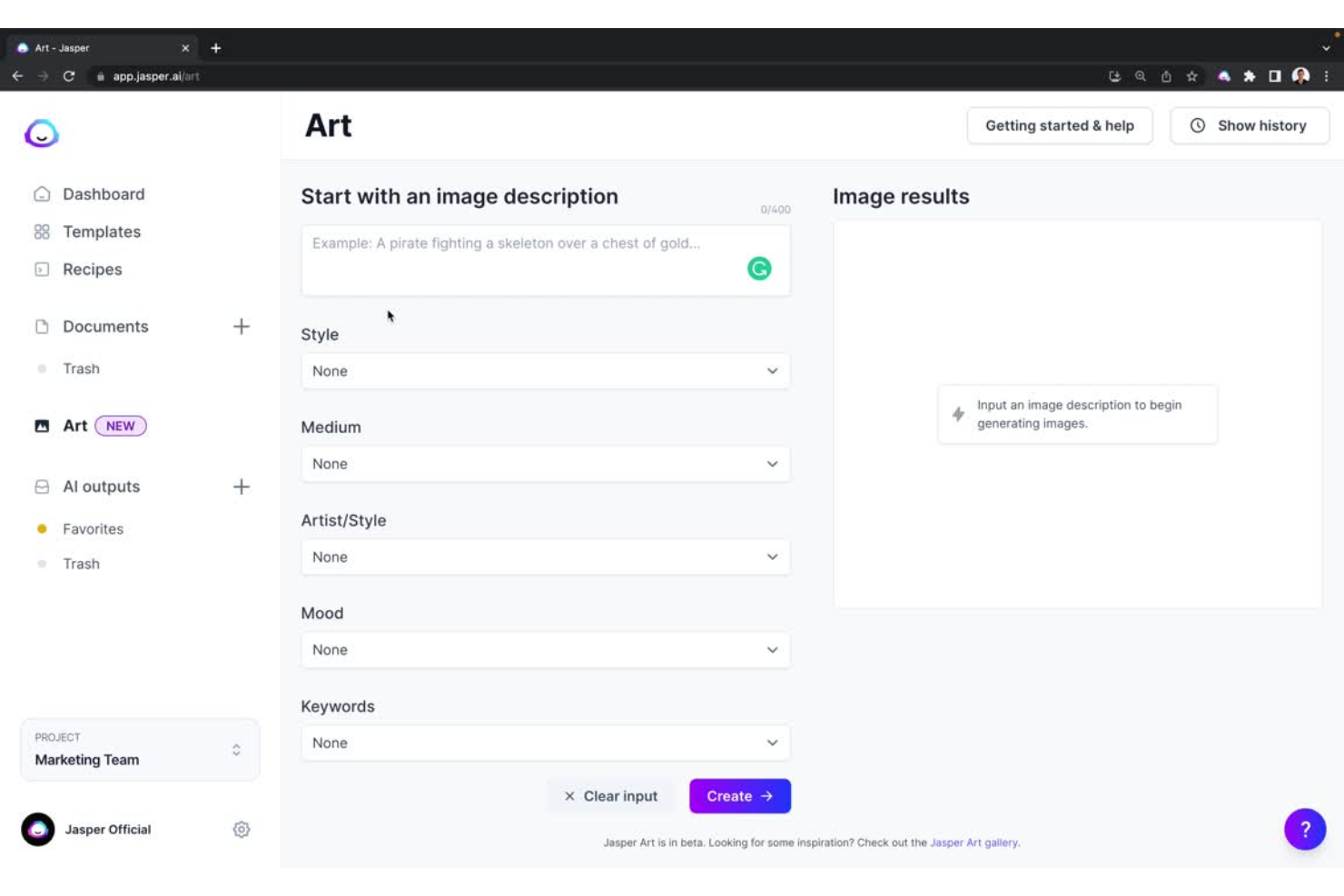
Jasper es una poderosa plataforma de marketing impulsada por IA, que incluye funciones de redacción y generación de imágenes. Comienza con un prompt, y Jasper AI transforma tus ideas de diseño en imágenes sorprendentes.
Por qué elegí Jasper: Me encantan las funciones de arte con IA que ofrece Jasper. Jasper procesa atributos como estilo, medio y artista para generar imágenes que se ajustan a tus expectativas. Por ejemplo, puedes seleccionar un estilo de renderizado 3D, un medio de pintura al óleo moderno y la apariencia de un artista de Pixar para crear un cartel de película.
Jasper te permite generar imágenes a partir de plantillas o en un modo libre. Este último implica definir tus propios prompts para que la IA genere imágenes.
Características e integraciones destacadas de Jasper
Las características incluyen la “voz de marca” de Jasper. Puedes entrenar Jasper AI para que genere arte con IA que resuene con tu marca y tus guías de estilo.
Las integraciones están disponibles a través de su API. También puedes acceder a miles de aplicaciones adicionales conectando Jasper con Zapier.
Pros and Cons
Pros:
- Interfaz intuitiva
- Extensión de Chrome útil
- Comunidad útil de Facebook
Cons:
- Curva de aprendizaje algo pronunciada para principiantes
- Sin funciones nativas de SEO


Al igual que otras herramientas en esta lista, Looka se esfuerza por hacer que el diseño sea accesible para todos. Las soluciones de diseño gráfico impulsadas por IA de Looka te ayudan a generar diseños valiosos para tu marca. Looka ofrece un potente creador de logotipos y un kit de marca que facilita tus cargas de trabajo de diseño.
Por qué elegí Looka: Me interesan especialmente las funciones del kit de marca que ofrece Looka. El kit de marca es una recopilación de más de 300 plantillas personalizadas. Looka genera estas plantillas específicamente para tu marca. Como resultado, estas plantillas tendrán tu logotipo, tipografías y colores de marca.
Desde el panel de Looka, puedes crear fácilmente diversos materiales de marketing como membretes, banners para blogs, presentaciones y folletos. Además, también puedes definir directrices corporativas para tu marca generando directrices de marca personalizadas y firmas de correo electrónico.
Características y integraciones destacadas de Looka
Características incluyen la herramienta creadora de logotipos. La herramienta solo requiere el nombre de tu marca y el sector. Posteriormente, la IA de Looka genera varios logotipos originales y llamativos. Puedes perfeccionar aún más los diseños personalizando los colores y las fuentes.
Integraciones Actualmente no hay detalles disponibles.
Pros and Cons
Pros:
- Opciones de branding completas
- Interfaz fácil de usar
- Exporta a PNG, SVG y otros formatos
Cons:
- Política de reembolso estricta
- Opciones de personalización limitadas


Tome aprovecha la IA para convertir tus ideas en narrativas visualmente impresionantes. Tome es una plataforma de productividad para contar historias que transforma tus indicaciones en presentaciones asombrosas. Sin embargo, Tome es mucho más que un simple creador de presentaciones. La herramienta también ofrece inserciones interactivas para recorridos de prototipos de productos.
Por qué elegí Tome: Recuerdo haber repasado presentaciones de PowerPoint durante mi etapa como gerente de producto. La diapositiva en blanco con el cursor parpadeando me generaba ansiedad. Con Tome, puedes generar rápidamente presentaciones inspiradas por IA. Los borradores generados por IA sirven como un buen punto de partida para comenzar.
Tome ofrece una visualización inmersiva que ajusta el contenido dinámicamente para varias pantallas. Además, la plataforma proporciona varias plantillas útiles para distintos usos. Particularmente me gusta el tema “Forest Theme.”
Características destacadas e integraciones de Tome
Características incluyen la opción de superposición AV. Tome te permite narrar y añadir superposiciones AV inmersivas a tus presentaciones. Como resultado, puedes dar un toque más personalizado.
Integraciones incluyen Figma, Framer, Miro, Spline, Twitter y YouTube.
Pros and Cons
Pros:
- Gran colección de plantillas
- Perfecto para narrativas profesionales
- Genera información contextual y relevante
Cons:
- Fallos ocasionales en la plataforma
- No es completamente flexible

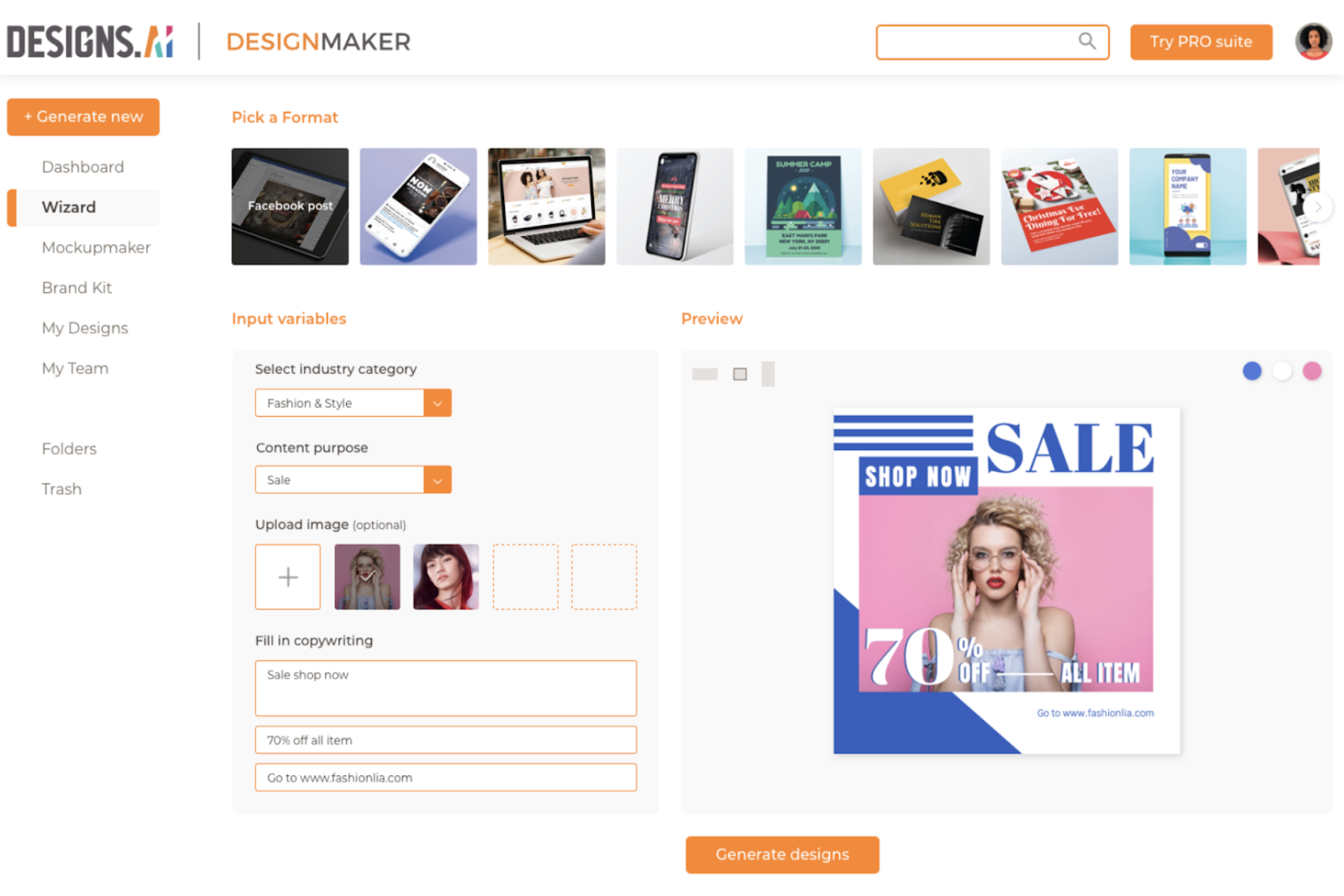
Designs.ai es una plataforma en la nube que aprovecha la IA para facilitar el proceso de diseño. El equipo detrás de Designs.ai tiene la misión de hacer que el proceso de diseño sea más accesible para todos. Designs.ai ayuda a crear gráficos impresionantes, maquetas inteligentes y logotipos personalizados, todo en cuestión de minutos.
Por qué elegí Designs.ai: Con la llegada de TikTok e Instagram Reels, la capacidad de atención de las personas está en su punto más bajo. Por lo tanto, es fundamental adaptar tus publicaciones en redes sociales para impresionar rápidamente a los compradores en redes sociales. Designs.ai cuenta con una fantástica herramienta llamada “Designmaker” que te ayuda a crear publicaciones en redes sociales atractivas y estéticas.
Con Designs.ai, puedes crear toda una campaña de marketing con solo unos clics. Primero, necesitas ingresar información básica sobre tu marca. Designs.ai luego genera miles de variaciones y te ofrece recomendaciones de diseño. Posteriormente, puedes aprovechar el editor inteligente para cambiar paletas de colores y tipografías para un acabado completo.
Características y compatibilidades destacadas de Designs.ai
Características incluyen la herramienta de integración de kit de marca, que te permite aplicar el estilo único de tu marca en folletos, anuncios, volantes y otros materiales de marketing.
Integración: actualmente no hay detalles disponibles.
Pros and Cons
Pros:
- Excelente función de combinación de colores
- Creador de maquetas intuitivo
- Ofrece recursos de stock de 123RF (plataforma libre de derechos)
Cons:
- No cuenta con aplicación móvil
- El soporte al cliente podría mejorar


Khroma utiliza IA para generar combinaciones de paletas de colores. La plataforma también te permite guardar combinaciones de colores. Además, Khroma muestra información sobre los colores seleccionados, como el nombre, los valores RGB y el código hex.
Por qué elegí Khroma: Siempre he tenido dificultades para seleccionar colores. O me paso de creativo y elijo colores muy extravagantes, o selecciono colores apagados y sosos. Khroma te ayuda a encontrar el punto justo con los colores. El entrenamiento del modelo de IA de Khroma comienza eligiendo 50 colores. El algoritmo de IA luego genera varias combinaciones de paletas de colores.
Khroma cuenta con una interfaz de usuario con desplazamiento infinito, similar a la de Pinterest. La IA de Khroma está aprendiendo constantemente. Por lo tanto, la plataforma 'sabe' qué combinaciones son populares. Como resultado, la herramienta utiliza esta información para sugerir combinaciones.
Funciones e integraciones destacadas de Khroma
Las funciones incluyen la enorme biblioteca de colores entre los que elegir. Hay muchísimos colores para hacer tu selección de los 50 principales. Mis favoritos personales son “violeta claro apagado” y “magenta tono medio apagado.”
Detalles de integración actualmente no disponibles.
Pros and Cons
Pros:
- Genera combinaciones infinitas
- Interfaz intuitiva
- Plantillas de diseño con gradientes e imágenes
Cons:
- Sin integraciones con herramientas de diseño
- Fallas ocasionales en la plataforma
Otras opciones de programas de diseño con IA
Estas son otras herramientas que no llegaron a mi lista de las mejores, pero que aún vale la pena considerar:
- LetsEnhance.io
La mejor herramienta con funciones de escalado de imágenes impulsadas por IA
- Magic Studio
Ideal para generar sesiones de fotos de productos
- Flair
Ideal para sesiones fotográficas de productos CPG
- Artiphoria.ai
Ideal para crear imágenes ultrarrealistas
- Durable
Ideal para crear sitios web inspirados en IA desde cero


Cómo evalúo el software de diseño con IA
Cada herramienta en esta lista debe hacer más que poner una etiqueta de IA sobre una biblioteca de plantillas: busco herramientas que permitan a un PM pasar de un breve resumen de producto a un prototipo compartible sin tener que esperar recursos de diseño. Divido mi evaluación en dos capas: la funcionalidad principal que debe tener una herramienta para calificar y los factores diferenciadores que separan las buenas opciones de las excelentes.
Funcionalidad principal (imprescindibles para esta lista)
Cuando selecciono herramientas para mi lista, clasifico cada una en una escala de 0 (no ofrece la funcionalidad) a 5 (destaca en esta área) para cada funcionalidad principal que aparece abajo. Luego, calculo la puntuación total de la herramienta en porcentaje. Cada herramienta debe alcanzar una puntuación total mínima del 65% para ser considerada en la selección.
- Generación de diseños con IA: Evalúo si la herramienta puede producir wireframes, maquetas o diseños de interfaz completos y utilizables mediante IA—no solo cambiar colores en una plantilla estática.
- Capacidades de prototipado: Una buena herramienta te permite construir prototipos interactivos y clicables que puedes mostrar a los interesados o usar en una sesión de usabilidad.
- Flujo de trabajo de prompt a diseño: Busco herramientas que acepten lenguaje natural—como una historia de usuario o un resumen de producto—y lo conviertan en una salida visual relevante.
- Iteración y variación de diseño: Aquí importa la rapidez en la regeneración impulsada por IA. Verifico si puedes ajustar el prompt o un elemento y obtener nuevas variantes sin empezar de cero.
- Colaboración y entrega: Compartir un enlace de prototipo con tu líder de ingeniería o dejar comentarios para tu diseñador debe ser sencillo, no una solución improvisada.
- Soporte de componentes y sistemas de diseño: Las herramientas que reconocen o aplican componentes reutilizables y estilos de marca realmente ahorran tiempo cuando trabajas en varias pantallas o productos.
Una vez tengo una lista de herramientas que cumplen los criterios, considero qué distingue a cada plataforma.
Factores diferenciadores (lo que distingue a los proveedores)
Así es como comparo y distingo distintos proveedores:
Características destacadas
La ingesta de PRD y documentación es un gran diferenciador: las herramientas que extraen un ticket de Jira o una página de Notion y generan un diseño de pantalla correspondiente evitan que los PM tengan que traducir manualmente los requisitos a briefs visuales. También evalúo la exportación de código generado, lo que acelera la entrega al ofrecer a los ingenieros código front-end utilizable en lugar de una maqueta estática. Las pruebas de usuario asistidas por IA también merecen atención. Las herramientas que simulan el comportamiento de usuarios o detectan problemas de usabilidad en un prototipo permiten validar ideas antes de invertir en una investigación completa.
Más allá de las características
El ecosistema de integraciones es muy importante aquí. Verifico si una herramienta se conecta a Figma, Jira, Linear o Notion, porque la utilidad de la herramienta de IA de un PM depende de que encaje en los flujos de trabajo existentes. La seguridad de datos y la protección de la propiedad intelectual también pesan mucho. Analizo si los proveedores entrenan sus modelos con los datos de los usuarios y si ofrecen cumplimiento SOC 2 o SSO. La curva de aprendizaje es otro factor que considero, ya que muchos PM no son diseñadores formados. Las herramientas con bibliotecas de prompts y plantillas guiadas suelen impulsar una adopción más rápida en los equipos de producto.
Usabilidad
He dado prioridad a las herramientas de diseño con IA que cuentan con una interfaz de usuario intuitiva y sencilla. También he indicado si determinadas herramientas ofrecen una interfaz de arrastrar y soltar para facilitar el diseño.
Integraciones de software
La mayoría de las herramientas de esta lista no cuentan con integraciones nativas. En el caso de las que sí ofrecen integraciones, he mencionado las distintas posibilidades. Lo ideal sería que estas herramientas se conectaran con tu herramienta de diseño y facilitaran el trabajo con sus resultados.
Precios
Al igual que otros productos SaaS, las herramientas de diseño con IA siguen un modelo de precios recurrentes mensual o anual. He mencionado el precio de cada herramienta, así como la disponibilidad de una prueba gratuita. También indico si existe una versión gratuita del programa y cualquier otra información relevante.
Preguntas frecuentes sobre software de diseño con IA
Encuentra respuestas a preguntas frecuentes que otras personas hacen sobre este tema.
¿Qué estilo de obra de arte puede generar la IA?
Las herramientas de IA pueden generar muchísimos tipos diferentes de obras de arte. Estas herramientas suelen generar obras de arte basándose en las indicaciones que introduces y entrenan sus modelos con enormes cantidades de datos visuales disponibles. Por lo tanto, la IA puede generar prácticamente cualquier estilo que puedas imaginar. Algunos estilos artísticos populares son el abstracto, el realista, el manga, el surrealismo y el cubismo.
¿Cuál es la mejor herramienta de diseño con IA gratuita?
Aunque existen herramientas de IA completamente gratuitas como TinyWow, las mejores herramientas de IA suelen ofrecer una prueba gratuita o créditos para que puedas probarlas. Herramientas como Midjourney y Leonardo.ai son excelentes herramientas de diseño inspiradas en la IA que te permiten generar un número fijo de imágenes como parte de sus planes gratuitos.
¿ChatGPT genera imágenes?
Actualmente, ChatGPT no puede dibujar ni generar imágenes. Sin embargo, OpenAI (la empresa responsable de ChatGPT) lanzó DALL-E2, una herramienta que genera imágenes a partir de texto.
¿Qué sigue?
Elegir el software de diseño con IA adecuado puede contribuir en gran medida a optimizar tus flujos de trabajo de diseño y creatividad. Si buscas herramientas para poner en marcha tu proceso creativo u organizar tu inspiración visual, consulta el mejor software para crear paneles de inspiración para complementar tu conjunto de herramientas de diseño con IA.
No olvides suscribirte a nuestro boletín para recibir más soluciones y estrategias de los principales estrategas de gestión de productos.