

10 mejores aplicaciones de software de diseño web offline analizadas en 2026

Mejor Lista Corta de Software de Diseño Web Offline


Navegar por el mundo del diseño web puede ser un reto, especialmente cuando el acceso a Internet no es fiable. El software de diseño web offline ofrece una solución, permitiendo que tu equipo trabaje sin interrupciones. Estas herramientas son de gran ayuda para gestionar proyectos de forma segura y eficiente.
En mi experiencia, elegir el software adecuado puede aliviar problemas habituales como la dependencia de Internet y las preocupaciones de seguridad. He probado y revisado algunas soluciones de diseño web offline para ofrecerte una visión imparcial de las mejores opciones disponibles.
En este artículo encontrarás un análisis bien investigado sobre los mejores creadores de sitios web offline. Cubriré las características clave, ventajas y desventajas, ayudándote a tomar una decisión informada para tu equipo. Vamos a sumergirnos en la búsqueda de la opción perfecta para tus necesidades.
Por Qué Confiar en Nuestras Reseñas de Software
Llevamos revisando y probando software de gestión de productos desde 2020. Como product managers, sabemos lo crucial y complicado que es tomar la decisión correcta al seleccionar software. Invertimos en investigación profunda para ayudar a nuestra audiencia a tomar mejores decisiones de compra de software. Hemos probado más de 2,000 herramientas para distintos casos de uso y escrito más de 1,000 reseñas exhaustivas. Conozca cómo mantenemos la transparencia & nuestra metodología de reseñas de software.
Resumen del Mejor Software de Diseño Web Offline
u003cspan style=u0022font-weight: 400u0022u003eEsta tabla comparativa resume los detalles de precios de mis principales selecciones de software de diseño web offline para ayudarte a encontrar el más adecuado para tu presupuesto y necesidades empresariales.u003c/spanu003e
| Tool | Best For | Trial Info | Price | ||
|---|---|---|---|---|---|
| 1 | Mejor para flexibilidad de codificación | Prueba gratuita de 7 días | Desde $20.99/mes | Website | |
| 2 | Ideal para la visualización de datos | Plan gratuito + demostración sin costo disponible | Precios a consultar | Website | |
| 3 | Ideal para animaciones HTML5 | Demo gratuita disponible | Gratis para usar | Website | |
| 4 | Ideal para la creación gratuita de sitios web asistida por IA | Prueba gratuita disponible | Desde $149 | Website | |
| 5 | La mejor interfaz pensada para principiantes | Descarga gratuita disponible | Desde $49 (compra única) | Website | |
| 6 | Ideal para el diseño por arrastrar y soltar | Plan gratuito + prueba gratis de 7 días disponible | Desde $6.75/mes | Website | |
| 7 | Ideal para desarrolladores profesionales | Prueba gratuita disponible | Desde $12/usuario/mes | Website | |
| 8 | Ideal para proyectos de código abierto | Plan gratuito + prueba gratuita de 14 días disponible | Desde $15/mes (facturado anualmente) | Website | |
| 9 | Ideal para diseño responsivo | Prueba gratuita de 30 días disponible | Desde $59.95 | Website | |
| 10 | Mejor opción para páginas responsivas offline | Editor HTML gratuito disponible | Desde $99/mes | Website |
Reseña del Mejor Software de Diseño Web Offline
u003cspan style=u0022font-weight: 400u0022u003eA continuación tienes mis resúmenes detallados del mejor software de diseño web offline que ha entrado en mi lista corta. Mis reseñas ofrecen un análisis detallado de las características clave, ventajas y desventajas, integraciones y casos de uso ideales de cada herramienta para ayudarte a encontrar la más adecuada para ti.u003c/spanu003e

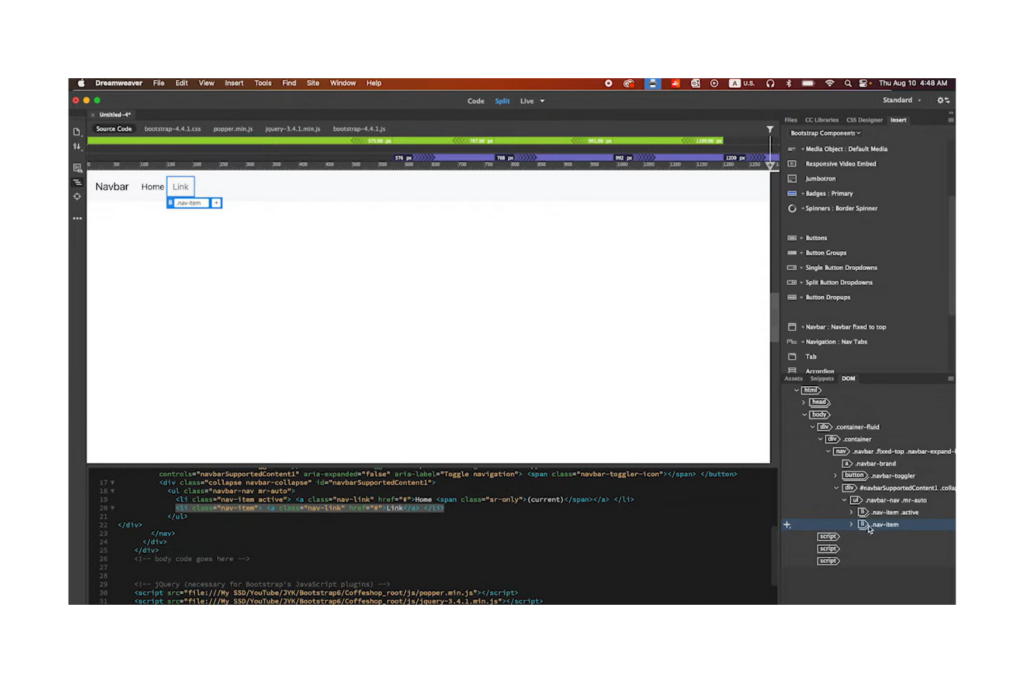
Adobe Dreamweaver es una herramienta profesional para el desarrollo de sitios web, utilizada por desarrolladores y diseñadores para crear sitios web responsivos. Ofrece una plataforma versátil para programar, diseñar y gestionar sitios web de manera eficiente.
Por qué elegí Adobe Dreamweaver: Ofrece una flexibilidad inigualable para la codificación, permitiéndote trabajar con HTML, CSS y JavaScript. Puedes alternar entre la vista de diseño visual y la de código, facilitando el seguimiento de los cambios y el mantenimiento de la coherencia del diseño. La función de vista previa en vivo de Dreamweaver te permite ver cómo se ve tu sitio en diferentes dispositivos en tiempo real. También es compatible con varios lenguajes de programación, cubriendo una amplia variedad de necesidades de desarrollo.
Características e integraciones destacadas:
Las características incluyen un espacio de trabajo personalizable que te permite adaptar tu entorno según tu flujo de trabajo. Tu equipo puede beneficiarse de su sistema de cuadrícula fluida, que simplifica el diseño responsivo. Las sugerencias de código integradas y el resaltado de sintaxis del software mejoran la precisión y eficiencia al programar.
Integraciones incluyen Creative Cloud, Photoshop, Animate y más.
Pros and Cons
Pros:
- Compatible con múltiples lenguajes de codificación
- Vista previa en tiempo real para dispositivos
- Resaltado de sintaxis
Cons:
- Ocasionalmente presenta retrasos en el rendimiento
- No hay licencia perpetua disponible

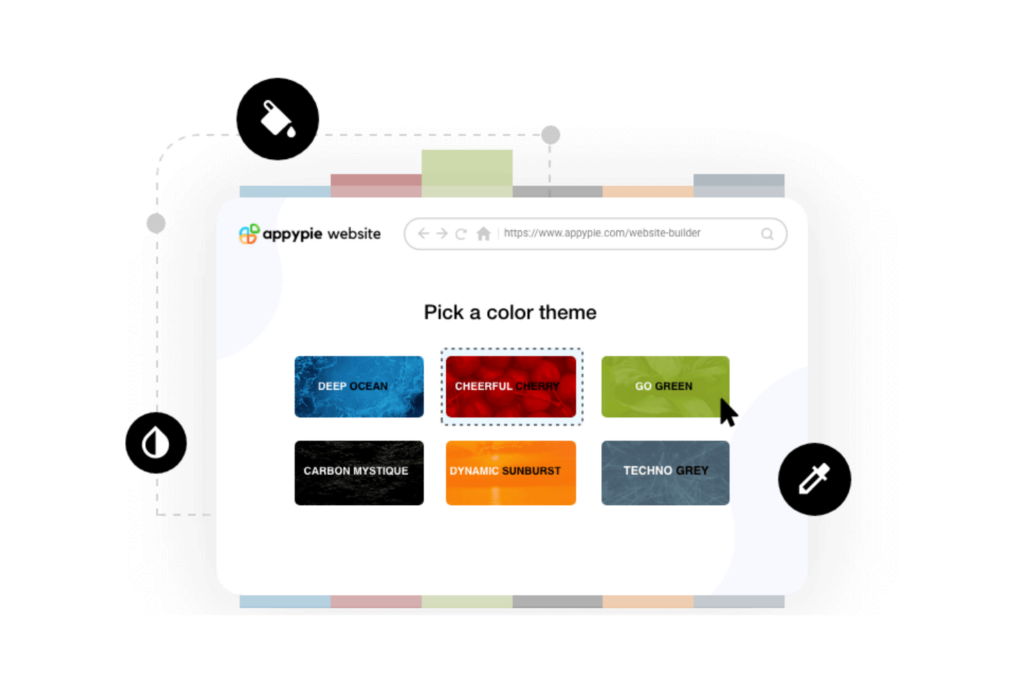
Adobe Customer Journey Analytics es una plataforma de análisis de datos diseñada para empresas que buscan visualizar y analizar las interacciones con los clientes a través de múltiples puntos de contacto. Está dirigida a analistas de datos y especialistas en marketing que desean optimizar las experiencias de los clientes mediante la obtención de conocimientos detallados.
Por qué elegí Adobe Customer Journey Analytics: Esta herramienta ofrece funciones como paneles personalizables que permiten a tu equipo explorar los datos de forma visual e intuitiva. Su análisis entre canales te ayuda a comprender las interacciones del cliente en una vista unificada. La interfaz de arrastrar y soltar facilita la creación de informes sin necesidad de conocimientos técnicos. La capacidad de la plataforma para manejar grandes conjuntos de datos permite a tu equipo analizar recorridos complejos del cliente.
Funciones destacadas e integraciones:
Funciones incluyen segmentación avanzada, lo que permite a tu equipo categorizar y analizar los datos de clientes de manera eficiente. La transmisión de datos en tiempo real garantiza que siempre cuentes con la información más actualizada a tu alcance. La plataforma también ofrece modelado predictivo para anticipar tendencias y comportamientos.
Integraciones incluyen Salesforce, Microsoft Dynamics, Marketo, Google Analytics y más.
Pros and Cons
Pros:
- Capacidades excepcionales de visualización de datos
- Análisis entre canales
- Gestiona grandes conjuntos de datos
Cons:
- Configuración compleja de esquemas de datos
- Retos de escalabilidad con grandes volúmenes de datos

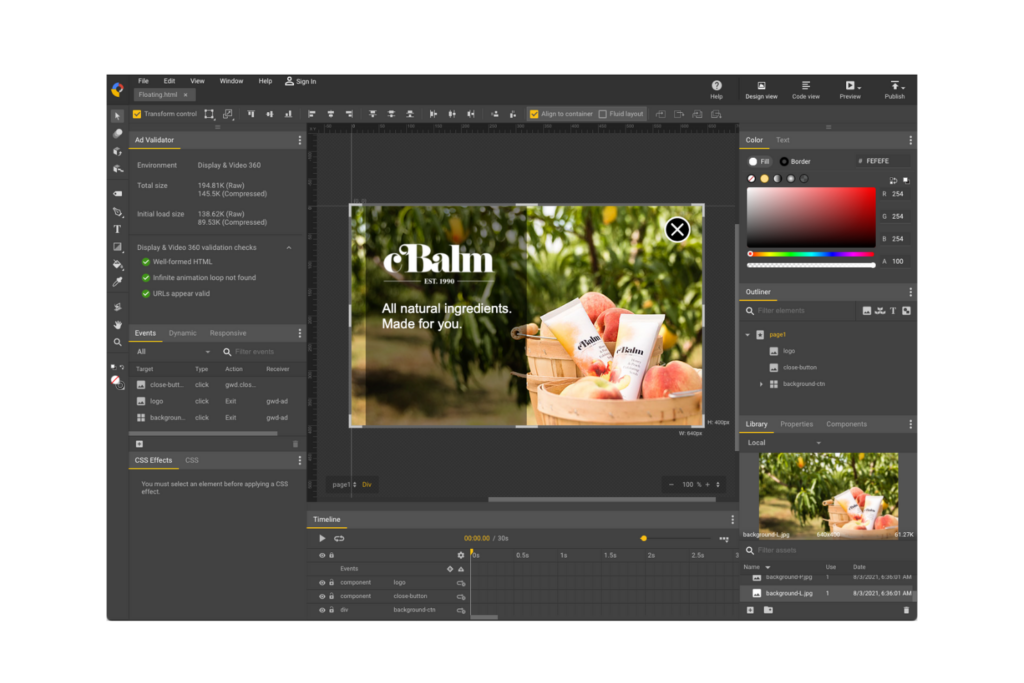
Google Web Designer es una herramienta gratuita para crear diseños interactivos basados en HTML5 y gráficos en movimiento. Está orientada a profesionales de marketing y desarrolladores que desean crear contenido web atractivo que funcione en diversos dispositivos.
Por qué elegí Google Web Designer: Destaca en la creación de animaciones HTML5, lo que lo convierte en una opción ideal para contenido interactivo. La herramienta ofrece una variedad de opciones de diseño y codificación, brindando flexibilidad tanto a principiantes como a desarrolladores experimentados. Su integración con los servicios de Google refuerza su funcionalidad para campañas de marketing.
Funciones destacadas e integraciones:
Las funciones incluyen una línea de tiempo de animación fácil de usar que simplifica la creación de gráficos en movimiento. Tu equipo puede aprovechar sus herramientas de autoría 3D para crear contenido visual atractivo. El software también admite diferentes modos de diseño, lo que permite alternar fácilmente entre las vistas de diseño y de código.
Las integraciones incluyen Google Drive, Google Ads, AdMob, YouTube, Google Analytics, Google Fonts y más.
Pros and Cons
Pros:
- Admite animaciones complejas
- Herramientas de autoría 3D disponibles
- Compatibilidad multiplataforma
Cons:
- Funcionalidad limitada sin conexión
- No tiene FTP incorporado

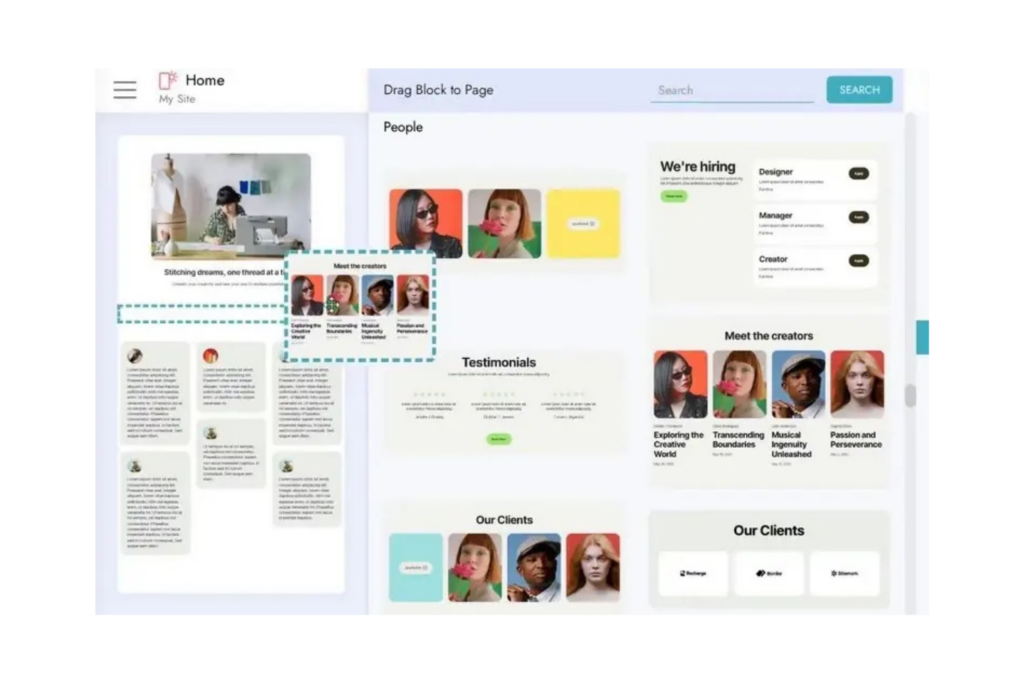
Mobirise es una herramienta de diseño web offline dirigida a pequeñas empresas y diseñadores independientes que desean crear sitios web sin programar de manera compleja. Ofrece una plataforma fácil de usar para crear sitios web adaptados a móviles sin conexión, lo que facilita el trabajo cuando el acceso a internet es limitado.
Por qué elegí Mobirise: Ofrece una versión gratuita para la creación de sitios web, lo cual es ideal si tienes un presupuesto limitado. La interfaz de arrastrar y soltar simplifica el proceso de diseño web, haciéndolo accesible para quienes tienen pocos conocimientos técnicos. Su funcionamiento sin conexión garantiza un trabajo ininterrumpido, sin importar dónde te encuentres.
Funciones y integraciones destacadas:
Funciones incluye más de 1.500 bloques de sitios web que puedes personalizar para que se adapten a tu marca. Tu equipo puede beneficiarse de su enfoque mobile-first, asegurando que tus sitios luzcan profesionales en cualquier dispositivo móvil. Mobirise también te permite publicar tu sitio en una unidad local, FTP o el host que prefieras.
Integraciones incluye PayPal, Google Analytics, Instagram, YouTube, Vimeo y más.
Pros and Cons
Pros:
- Constructor offline fácil de usar
- Enfoque de diseño mobile-first
- Versión gratuita estable para sitios básicos
Cons:
- Los bloques avanzados requieren licencias de pago
- Requiere servicios de alojamiento web externos

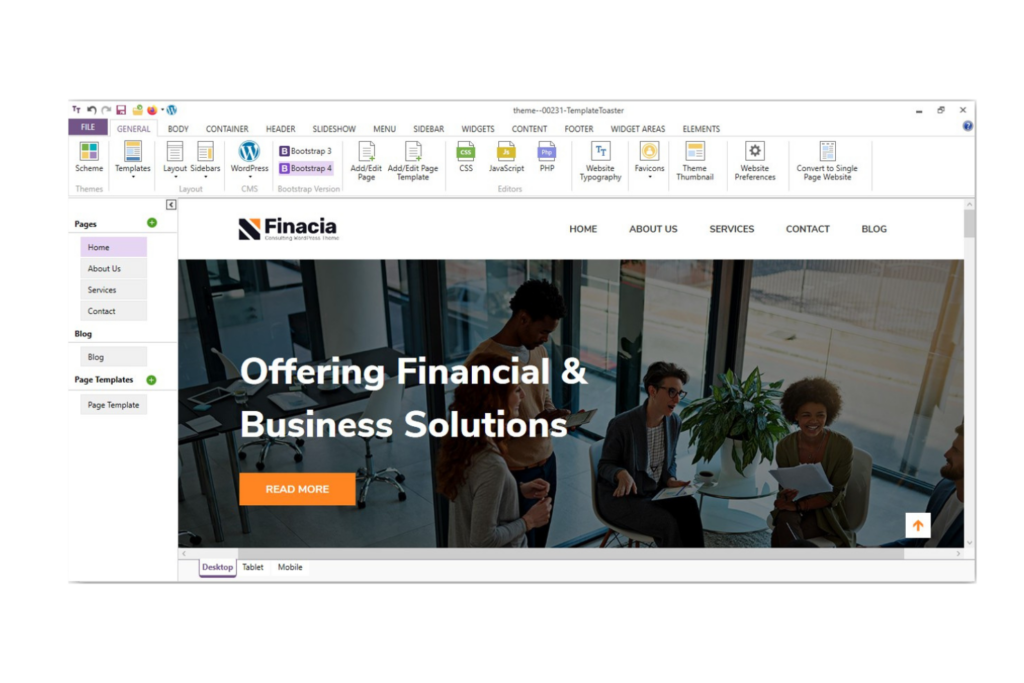
TemplateToaster es un software de diseño web offline que atiende tanto a principiantes como a profesionales. Simplifica el proceso de creación de sitios web al ofrecer una interfaz fácil de usar que no requiere amplios conocimientos de codificación.
Por qué elegí TemplateToaster: Destaca por su interfaz amigable para principiantes que permite diseñar sitios web con facilidad. El software proporciona una variedad de plantillas y opciones de diseño, haciéndolo accesible para quienes se inician en el diseño web. Incluye una función de arrastrar y soltar que simplifica la creación de la estructura del sitio. También puedes personalizar temas para adaptarlos a las necesidades específicas del proyecto sin requerir conocimientos complejos de programación.
Características destacadas e integraciones:
Características incluyen una amplia biblioteca de plantillas prediseñadas que puedes personalizar para ajustarlas a tu marca. Tu equipo puede utilizar la funcionalidad de arrastrar y soltar para ubicar elementos en la página. Además, admite diseño responsivo, asegurando que tu sitio luzca profesional en todos los dispositivos.
Integraciones incluyen WordPress, Joomla, Drupal, Adobe Commerce, Blogger, WooCommerce, VirtueMart, OpenCart, Prestashop y más.
Pros and Cons
Pros:
- Soporta múltiples plataformas CMS
- Amigable para principiantes, no requiere programación
- Ofrece diseños responsivos
Cons:
- No tiene versión nativa para Mac
- Curva de aprendizaje para funciones avanzadas

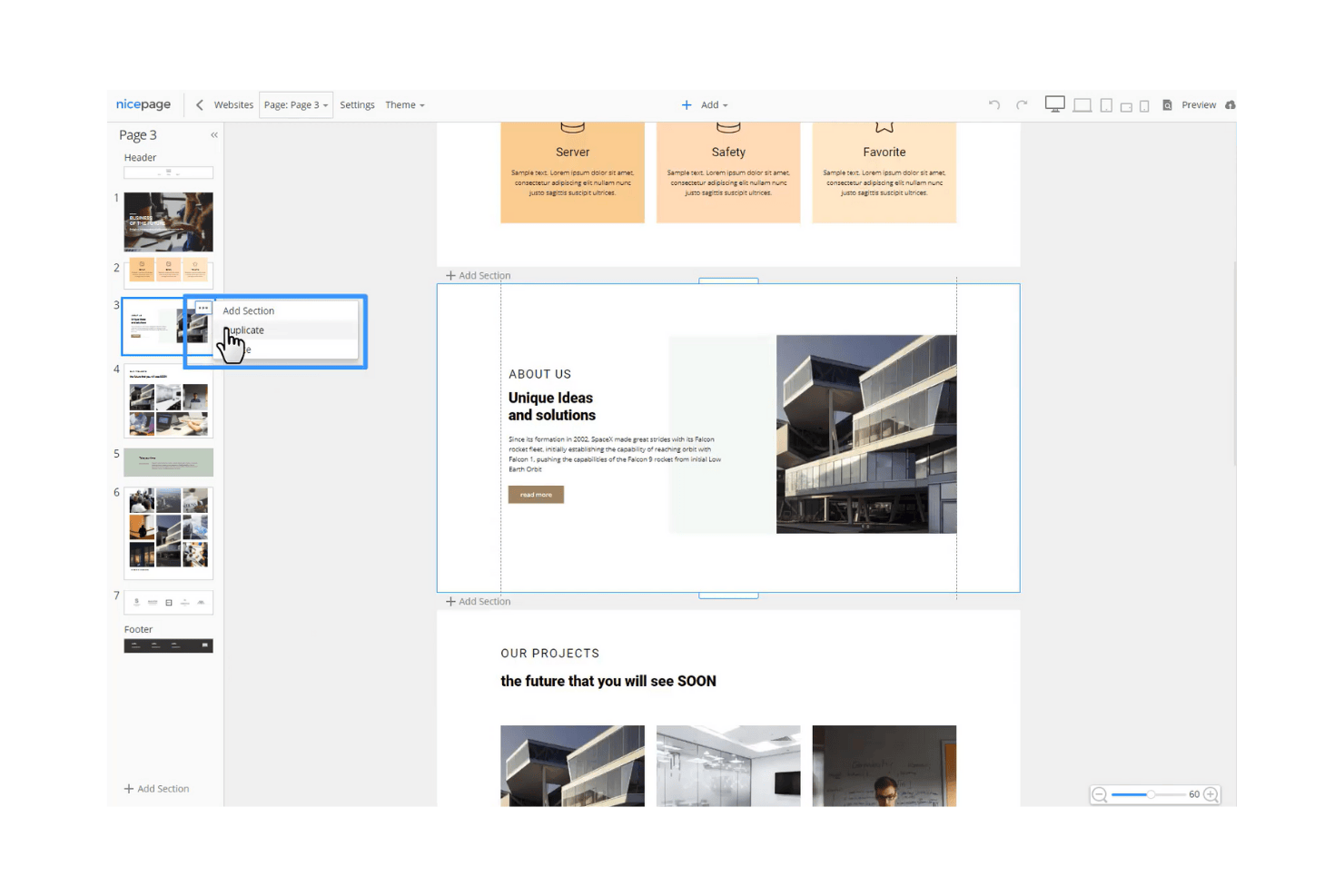
Nicepage es una herramienta de diseño web offline dirigida a diseñadores y desarrolladores que necesitan flexibilidad para crear sitios web responsivos. Ofrece una interfaz intuitiva para diseñar páginas web sin depender del acceso a internet, lo que la hace ideal para equipos que trabajan en entornos variados.
Por qué elegí Nicepage: Ofrece funciones de diseño únicas que simplifican el proceso de creación web. Puedes colocar elementos en cualquier lugar de la página, brindándole a tu equipo libertad creativa. Su capacidad offline garantiza que tu trabajo no se vea interrumpido por problemas de conectividad.
Características destacadas e integraciones:
Las características incluyen una interfaz intuitiva de arrastrar y soltar, una amplia gama de plantillas personalizables y la capacidad de diseñar sitios web responsivos rápidamente. Tu equipo también puede beneficiarse de su avanzado sistema de cuadrícula, que permite un posicionamiento preciso de los elementos. Otro punto a destacar es su compatibilidad con HTML y CSS personalizados, ofreciendo mayor flexibilidad en el diseño.
Las integraciones incluyen WordPress, Joomla, Google Analytics, Google Tag Manager, WooCommerce y más.
Pros and Cons
Pros:
- Gran variedad de plantillas
- Admite HTML y CSS personalizados
- Funciones de diseño responsivo
Cons:
- Integraciones limitadas
- No hay aplicación móvil para el usuario final disponible

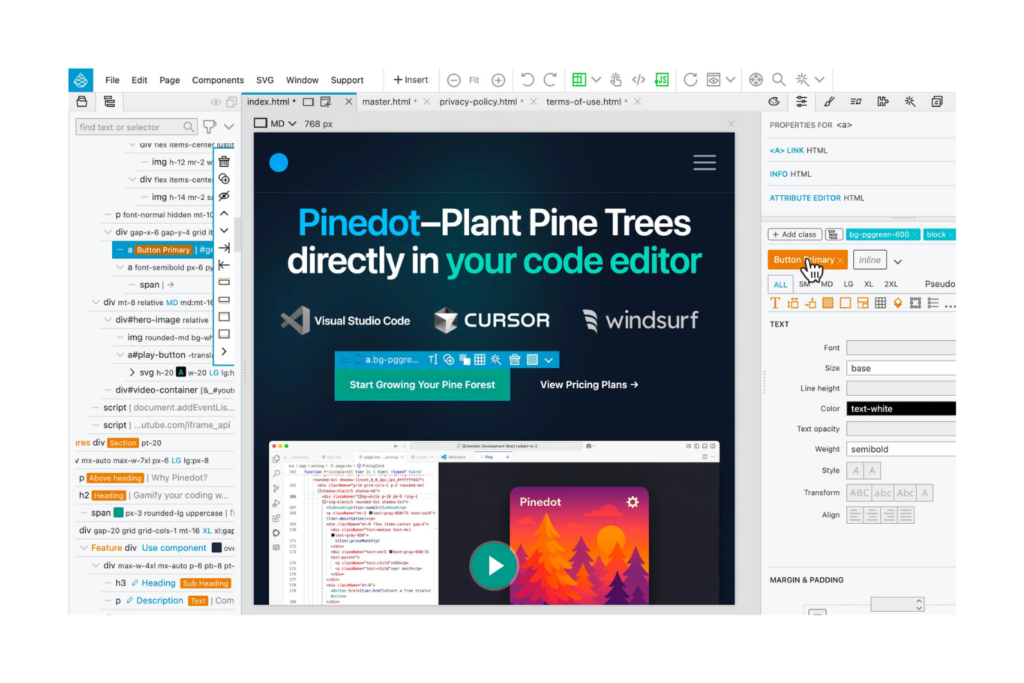
Pinegrow es un software de diseño web que funciona sin conexión, diseñado especialmente para desarrolladores y diseñadores profesionales que requieren herramientas avanzadas para crear sitios web responsivos. Ofrece una plataforma para crear sitios web de manera eficiente, con énfasis en la flexibilidad del código y precisión en el diseño.
Por qué elegí Pinegrow: Está dirigido específicamente a desarrolladores profesionales gracias a sus capacidades avanzadas para programar. Puedes utilizar su edición en tiempo real de múltiples páginas para ver al instante los cambios en todo tu sitio. Pinegrow es compatible con los frameworks Bootstrap y Foundation, lo que aumenta la flexibilidad de diseño. Su funcionalidad de arrastrar y soltar, combinada con la edición de código en vivo, ofrece un conjunto de herramientas potente para trabajos de diseño detallados.
Características destacadas e integraciones:
Las funcionalidades incluyen un editor de cuadrícula CSS que simplifica el proceso de maquetación y agiliza el desarrollo de diseños. Tu equipo puede usar el constructor de temas de WordPress para convertir diseños en temas de WordPress. Pinegrow también ofrece una biblioteca de componentes listos para usar que te ayudan a crear páginas más rápido.
Las integraciones incluyen WordPress, Bootstrap, Foundation, Tailwind CSS, Google Fonts, Font Awesome, Materialize, WooCommerce, Visual Studio Code, y más.
Pros and Cons
Pros:
- Soporte avanzado para programación
- Función de edición multipágina
- Actualizaciones de diseño en tiempo real
Cons:
- La interfaz puede resultar saturada
- No incluye gestión de medios integrada

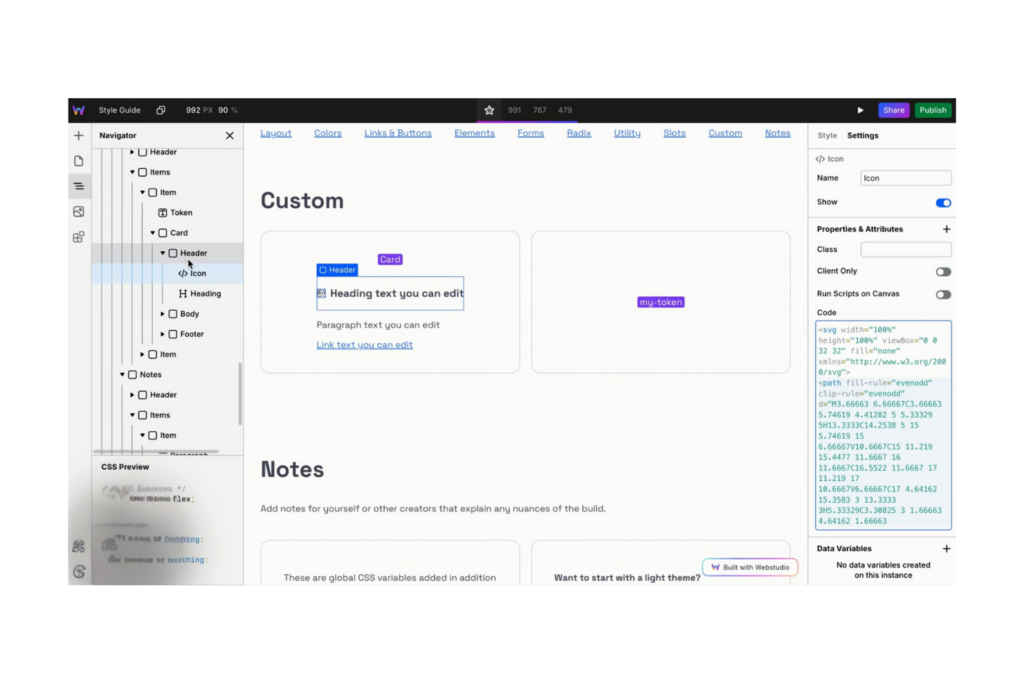
Webstudio es un creador de sitios web de código abierto diseñado para diseñadores que desean desarrollar sitios web rápidos y fáciles de mantener utilizando los estándares web modernos. Permite a los usuarios controlar las propiedades de CSS de forma visual, admite diversas experiencias web y enfatiza el uso de estilos reutilizables para un diseño coherente.
Por qué elegí Webstudio: Destaca en el apoyo a proyectos de código abierto gracias a sus capacidades flexibles y transparentes de diseño. Puedes gestionar propiedades de CSS sin necesidad de programar, lo que lo hace accesible tanto para principiantes como para desarrolladores experimentados. El énfasis de la plataforma en estilos reutilizables garantiza diseños consistentes en todos los proyectos. Su integración con herramientas de contenido populares permite una creación y gestión dinámica de contenidos.
Funciones destacadas e integraciones:
Las funciones incluyen una herramienta visual de gestión de CSS que simplifica el proceso de diseño. Tu equipo puede aprovechar su compatibilidad con experiencias de marketing, CMS y comercio electrónico. La plataforma también proporciona alojamiento en la nube con Cloudflare, asegurando un rendimiento rápido y seguridad.
Las integraciones incluyen Zapier, Contentful, Netlify, Vercel y más.
Pros and Cons
Pros:
- Soporta proyectos de código abierto
- Herramienta visual de gestión de CSS
- Ofrece alojamiento en la nube
Cons:
- Menos plantillas preconstruidas
- Requiere alojamiento propio para control total

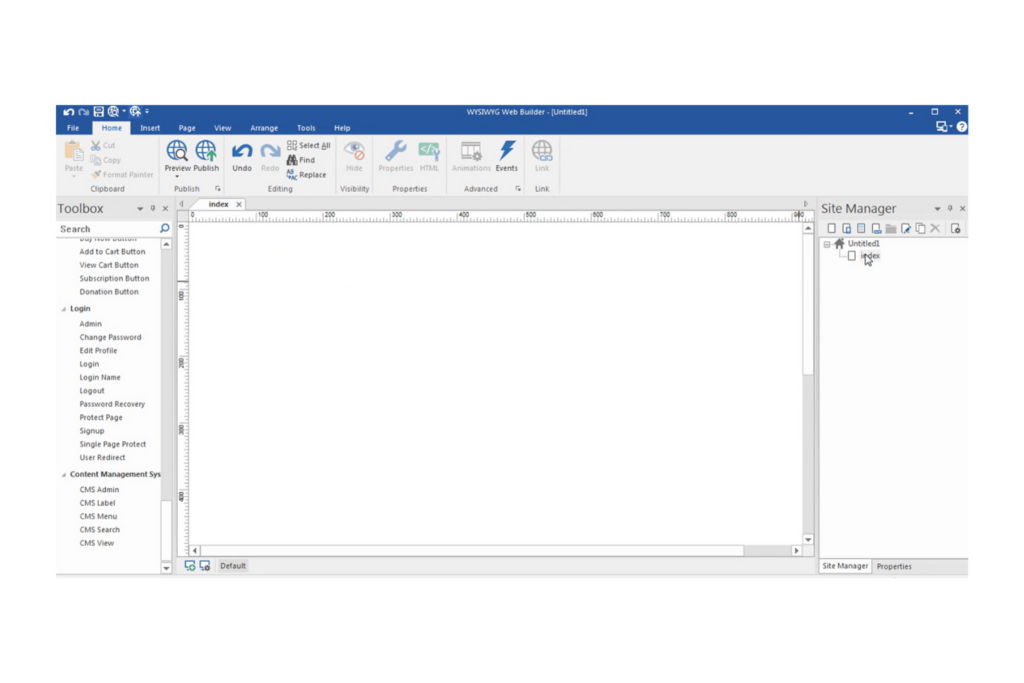
WYSIWYG Web Builder es una aplicación de escritorio diseñada para usuarios que desean crear sitios web responsivos sin necesidad de programar. Es ideal para propietarios de pequeñas empresas, freelancers y aficionados que buscan construir y mantener sus sitios web fácilmente.
Por qué elegí WYSIWYG Web Builder: Ofrece un enfoque sencillo para el diseño responsivo, permitiendo crear sitios web que se ven geniales en cualquier dispositivo. La funcionalidad de arrastrar y soltar del software facilita posicionar los elementos donde quieras. Incluye diversas herramientas integradas para crear formularios, barras de navegación y galerías de imágenes. También puedes personalizar tu sitio con amplias opciones de diseño y plantillas.
Funciones destacadas e integraciones:
Funciones incluye un generador de formularios que te permite crear formularios personalizados fácilmente. Tu equipo puede utilizar su editor de imágenes incorporado para ajustar imágenes directamente dentro de la aplicación. El software también proporciona una variedad de herramientas de navegación para mejorar la usabilidad del sitio.
Las integraciones incluyen PayPal, Stripe, Google Maps, YouTube, Vimeo, Google Fonts, Google Analytics, Ecwid, Snipcart, Paddle y más.
Pros and Cons
Pros:
- Admite puntos de ruptura personalizados
- Generador de formularios integrado
- Fácil de usar y rápido
Cons:
- Funcionalidades avanzadas de codificación limitadas
- Sin control de versiones incorporado

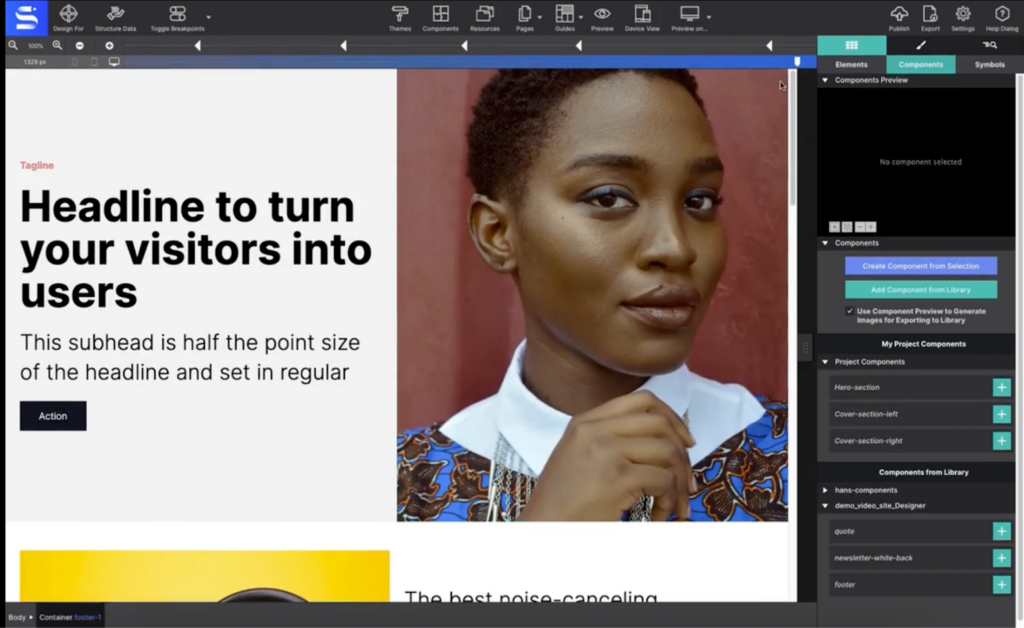
Si deseas crear sitios web responsivos sin depender de una conexión a internet, CoffeeCup ofrece un entorno de diseño dedicado completamente offline. Su interfaz de arrastrar y soltar es ideal para diseñadores y pequeñas empresas que necesitan crear páginas adaptadas a dispositivos móviles de forma rápida.
Por qué elegí CoffeeCup: Lo que me atrajo de CoffeeCup es su enfoque en el diseño responsivo offline mediante arrastrar y soltar. El software te permite construir y previsualizar páginas totalmente adaptables sin necesidad de conexión a internet, lo cual es imprescindible para quienes quieren trabajar localmente. Sus herramientas de diseño visual y puntos de quiebre personalizables facilitan la creación de sitios optimizados para móviles desde cero. Este enfoque es especialmente útil para diseñadores y pequeñas empresas que desean tener control total sobre cada aspecto de la apariencia y la estructura de su sitio.
Funciones y integraciones destacadas:
Funciones incluyen un editor de código HTML y CSS, componentes reutilizables, una vista previa incorporada y la posibilidad de exportar a una unidad local.
Integraciones incluyen HubSpot, Jira, easybill, sevdesk y más.
Pros and Cons
Pros:
- Diseños responsivos para todos los dispositivos
- Función de vista previa local
- Modelo de compra única
Cons:
- Integraciones nativas limitadas
- Menos actualizaciones disponibles
Otros Software de Diseño Web Offline
u003cspan style=u0022font-weight: 400u0022u003eAquí tienes algunas opciones adicionales de software de diseño web offline que no entraron en mi lista corta pero que aún vale la pena revisar:u003c/spanu003e
- openElement
Ideal para crear sitios con WYSIWYG
- RapidWeaver Elements
La mejor opción para la creación visual de sitios web
- Blocs
El mejor para Mac


Cómo Evalúo el Software de Diseño Web Offline
Evalúo el software de diseño web offline en dos capas: los criterios básicos que una herramienta debe cumplir para calificar, y los diferenciadores que muestran qué tan bien se desempeña en un entorno controlado o durante un vuelo transcontinental.
Funcionalidad Principal (Condiciones Indispensables para esta Lista)
Cuando selecciono herramientas para mi lista, califico cada una en una escala de 0 (no ofrece la funcionalidad) a 5 (destaca en esta área) para cada funcionalidad principal listada a continuación. Luego, calculo la puntuación total de la herramienta como un porcentaje. Cada herramienta necesita alcanzar una puntuación mínima total de 65% para ser considerada para su inclusión.
- Capacidad de Diseño Offline: Verifico si la herramienta permite crear, editar y guardar proyectos web completos en un portátil sin conexión a internet—como diseñar en un avión o en una instalación restringida.
- Editor Visual de Diseño Web: Aquí es importante una interfaz de arrastrar y soltar o basada en lienzo. Busco herramientas donde los gestores de producto puedan estructurar páginas visualmente en lugar de programar manualmente cada elemento.
- Exportación de Código HTML/CSS: Evalúo la calidad del código exportado, comprobando si los archivos generados son lo suficientemente limpios como para que los desarrolladores los usen sin tener que reescribir todo.
- Soporte para Diseño Responsivo: Las herramientas deben permitir diseñar para diferentes puntos de quiebre. Busco vistas previas para escritorio, tablet y móvil, para que puedas validar los diseños antes de entregarlos a ingeniería.
- Gestión de Archivos Locales: Considero qué tan bien la herramienta maneja el guardado, organización y acceso a los archivos del proyecto en el almacenamiento local—especialmente para equipos que necesitan total propiedad de los datos antes del lanzamiento.
- Biblioteca de Componentes y Plantillas: Los bloques prediseñados y componentes reutilizables aceleran la creación de páginas. Evalúo si la biblioteca es lo suficientemente amplia como para crear una página de producto sin empezar desde cero.
Una vez que tengo una lista de herramientas que cumplen con estos criterios, considero qué distingue a cada plataforma.
Factores Diferenciadores (Qué Distingue a los Proveedores)
Así es como comparo y contrasto a los diferentes proveedores:
Funcionalidades Destacadas
El prototipado interactivo es clave: busco herramientas que permitan construir flujos clicables y microinteracciones, de modo que los gestores de producto puedan validar la experiencia de usuario antes de involucrar a ingeniería. También son importantes las herramientas para el traspaso a desarrolladores. Los modos de inspección y la generación de fragmentos CSS reducen los intercambios entre diseño y desarrollo. Además, evalúo la gestión de sistemas de diseño, ya que las bibliotecas de componentes compartidas mantienen la coherencia en las páginas web a través de diferentes lanzamientos de producto.
Más Allá de las Funcionalidades
La estructura de licenciamiento es muy importante para las herramientas offline. Verifico si el proveedor ofrece una licencia perpetua o exige una suscripción, ya que los equipos que desean plena propiedad local suelen preferir un pago único. La propiedad y seguridad de los datos están estrechamente relacionadas: evalúo si la herramienta almacena los archivos completamente en el dispositivo sin forzar la sincronización en la nube, lo cual es clave para los equipos de producto que trabajan en diseños previos al lanzamiento en entornos restringidos. También considero la integración con herramientas como Jira o Linear, ya que los gestores de producto necesitan que el trabajo de diseño se vincule con sus flujos de trabajo en las hojas de ruta.
Cómo Elegir Software de Diseño Web Offline
Es fácil perderse entre largas listas de características y estructuras de precios complejas. Para ayudarte a mantener el foco al avanzar en tu proceso único de selección de software, aquí tienes una lista de factores a tener en cuenta:
| Factor | Qué tener en cuenta |
|---|---|
| Escalabilidad | ¿Puede el software crecer con tus necesidades? Considera si puede manejar proyectos más grandes o más usuarios a medida que tu negocio crece. Busca herramientas que ofrezcan planes o módulos flexibles. |
| Integraciones | ¿Funciona con tus herramientas actuales? Verifica si se integra con el CMS, plataformas de analítica o comercio electrónico que ya usas para evitar interrupciones en tu flujo de trabajo. |
| Personalización | ¿Cuánto puedes adaptarlo a tus necesidades? Asegúrate de que la herramienta permita suficiente personalización en diseño y funcionalidad para ajustarse a tus requisitos específicos sin necesidad de programación compleja. |
| Facilidad de uso | ¿Es amigable para tu equipo? Evalúa la interfaz y considera si requiere una capacitación extensa. Una curva de aprendizaje pronunciada podría retrasar los tiempos de tus proyectos. |
| Implementación y puesta en marcha | ¿Qué soporte hay disponible para la configuración? Evalúa los recursos y la orientación ofrecidos para comenzar, como tutoriales, foros de soporte o asistencia dedicada durante el proceso de incorporación. |
| Costo | ¿Está dentro de tu presupuesto? Compara los modelos de precios y verifica si hay costes ocultos. Considera el costo total de propiedad, incluyendo actualizaciones y funciones adicionales. |
| Medidas de seguridad | ¿Protege tus datos? Busca funciones como encriptación y actualizaciones periódicas. Ten en cuenta el cumplimiento de los estándares de la industria si manejas información sensible. |
| Disponibilidad de soporte | ¿Qué tan accesible es la ayuda cuando la necesitas? Considera la disponibilidad de canales de atención al cliente, como chat, correo electrónico o teléfono, especialmente durante tu horario laboral. |
¿Qué es un software de diseño web offline?
El software de diseño web offline es una herramienta que permite a los usuarios diseñar y desarrollar sitios web sin necesidad de una conexión a internet. Normalmente, estos programas son utilizados por diseñadores web, desarrolladores y propietarios de pequeñas empresas que trabajan en entornos con acceso limitado a internet. Las interfaces de arrastrar y soltar, plantillas personalizables y capacidades de edición sin conexión ayudan a los usuarios a crear y gestionar sitios web de manera eficiente. En general, estas herramientas brindan flexibilidad y control sobre el proceso de diseño web sin depender de una conectividad constante.
Características
Al seleccionar un software de diseño web offline, presta atención a las siguientes características clave:
- Interfaz de arrastrar y soltar: Permite ubicar fácilmente los elementos en la página sin programar, haciendo el diseño accesible para usuarios sin conocimientos técnicos.
- Edición sin conexión: Te permite trabajar en proyectos sin una conexión a internet, asegurando un progreso ininterrumpido.
- Plantillas personalizables: Ofrecen diseños prediseñados que pueden adaptarse a tu marca, acelerando el proceso de creación.
- Herramientas de diseño responsivo: Garantizan que tu sitio web se vea bien en todos los dispositivos, mejorando la experiencia del usuario en distintas plataformas.
- Funciones SEO: Ayudan a optimizar tu sitio para motores de búsqueda, aumentando la visibilidad y atrayendo tráfico.
- Editor de imágenes integrado: Permite modificar imágenes directamente en el programa, ahorrando tiempo y recursos.
- Soporte multiplataforma: Te permite publicar tu sitio en diversas plataformas, ampliando el alcance a distintos públicos.
- Capacidades de edición de código: Ofrecen la flexibilidad de ajustar HTML, CSS y JavaScript para personalizaciones avanzadas.
- Animaciones y efectos: Añade dinamismo a tu sitio con efectos visuales y transiciones, aumentando la interacción del usuario.
- Medidas de seguridad: Protege tus datos con encriptación y actualizaciones periódicas, asegurando el cumplimiento de estándares de la industria.
Beneficios
Implementar un software de diseño web offline ofrece varios beneficios para tu equipo y tu negocio. Aquí te mostramos algunos de los más destacados:
- Trabajo ininterrumpido: La edición sin conexión permite que tu equipo siga trabajando aunque no tenga acceso a internet, asegurando la productividad incluso en ubicaciones remotas.
- Mayor control: Las plantillas personalizables y la edición de código proporcionan la flexibilidad necesaria para adaptar los diseños a tus especificaciones exactas.
- Mayor seguridad: Trabajar sin conexión reduce las vulnerabilidades de datos, protegiendo información sensible de amenazas en línea.
- Mejor colaboración: El soporte multiplataforma permite que los miembros del equipo compartan y editen proyectos desde diferentes dispositivos, fomentando el trabajo en equipo.
- Eficiencia en tiempos: Las interfaces de arrastrar y soltar y los editores de imágenes integrados aceleran el proceso de diseño, permitiendo finalizar proyectos más rápidamente.
- Ahorro de costes: Al reducir la necesidad de conectividad constante, las herramientas offline pueden disminuir los costes operativos asociados al uso de internet.
- Mejor experiencia del usuario: Las herramientas de diseño responsivo aseguran que tu web sea accesible y funcional en todos los dispositivos, logrando usuarios satisfechos.
Costos y precios
Seleccionar un software de diseño web offline requiere comprender los diversos modelos de precios y planes disponibles. Los costos varían según las funciones, el tamaño del equipo, complementos y más. La siguiente tabla resume los planes comunes, sus precios promedio y las características típicas incluidas en las soluciones de software de diseño web offline:
Tabla comparativa de planes para software de diseño web offline
| Tipo de plan | Precio promedio | Características comunes |
|---|---|---|
| Plan gratuito | $0 | Herramientas básicas de diseño, plantillas limitadas y soporte de la comunidad. |
| Plan personal | $5-$25/usuario/mes | Plantillas personalizables, herramientas de diseño responsivo y funciones básicas de SEO. |
| Plan de negocios | $30-$80/usuario/mes | Opciones de diseño avanzadas, capacidades de comercio electrónico y atención al cliente prioritaria. |
| Plan empresarial | $80-$150/usuario/mes | Personalización completa, gerente de cuenta dedicado, funciones avanzadas de seguridad e integración con sistemas empresariales. |
Preguntas frecuentes sobre el software de diseño web offline
u003cspan style=u0022font-weight: 400u0022u003eAquí tienes respuestas a preguntas comunes sobre el software de diseño web offline:u003c/spanu003e
¿El software de diseño web offline funciona en cualquier sistema operativo?
u003cspan style=u0022font-weight: 400u0022u003eSí, la mayoría del software de diseño web offline está diseñado para funcionar en múltiples sistemas operativos, como Windows, Mac y Linux. Antes de comprar, revisa los requisitos del sistema del software para garantizar la compatibilidad con tu dispositivo. Algunas herramientas pueden ofrecer características específicas que funcionan mejor en un sistema operativo que en otro, por lo que es aconsejable considerar la infraestructura existente de tu equipo antes de elegir.u003c/spanu003e
¿El software de diseño web offline es adecuado para principiantes?
u003cspan style=u0022font-weight: 400u0022u003eSí, muchas herramientas de diseño web offline son aptas para principiantes y cuentan con interfaces de arrastrar y soltar y plantillas personalizables. Estas herramientas suelen incluir tutoriales y recursos de soporte para ayudarte a comenzar. Si eres nuevo en el diseño web, busca software con una interfaz fácil de usar y abundante material educativo para guiarte en el proceso.u003c/spanu003e
¿Puedo usar el software de diseño web offline para crear sitios de comercio electrónico?
u003cspan style=u0022font-weight: 400u0022u003eSí, varias herramientas de diseño web offline ofrecen capacidades de comercio electrónico, lo que te permite crear y gestionar tiendas en línea. Estas funciones pueden incluir catálogos de productos, funciones de carrito de compras y opciones para procesar pagos. Asegúrate de que el software que elijas pueda integrarse con tu plataforma de comercio electrónico preferida y de que incluya las características necesarias para cubrir las necesidades de tu negocio.u003c/spanu003e
¿Qué sigue?
Si estás investigando software de diseño web offline, conéctate con un asesor de SoftwareSelect para obtener recomendaciones gratuitas.
Simplemente rellenas un formulario y tienes una breve charla en la que profundizan en tus necesidades específicas. Luego recibirás una lista corta de software para revisar. Incluso te apoyarán durante todo el proceso de compra, incluidas las negociaciones de precios.