

10 mejores alternativas a Ignition analizadas en 2026

10 Lista de las mejores alternativas a Ignition


Gestionar los esfuerzos de marketing de productos puede ser complicado, especialmente si tus herramientas actuales no satisfacen tus necesidades. Es posible que Ignition ya no sea la opción perfecta para tu equipo. Quizá carezca de funciones específicas o no se adapte bien al crecimiento de tu empresa.
Según mi experiencia, encontrar el software adecuado puede marcar una gran diferencia en la eficiencia con la que tú y tu equipo trabajáis. Por eso, he probado y analizado de forma independiente varias alternativas a Ignition.
En este artículo, compartiré mis principales alternativas a Ignition, centrándome en sus características únicas y en cómo abordan los problemas habituales. Encontrarás un análisis imparcial y bien documentado que te ayudará a tomar la mejor decisión para tu empresa.
¿Qué es Ignition?
Ignition es un software de marketing de productos diseñado para ayudar a los equipos a gestionar y ejecutar sus estrategias de lanzamiento al mercado. Lo utilizan habitualmente los responsables de producto, los equipos de marketing y los estrategas empresariales que necesitan coordinar los lanzamientos de productos y los planes de marketing. Funciones como las herramientas de colaboración, el seguimiento de análisis y la gestión de campañas ayudan a organizar los esfuerzos del equipo y a mantenerse al día de las tendencias del mercado. En general, Ignition aporta valor al mejorar la capacidad de tu equipo para planificar y ejecutar lanzamientos de productos exitosos.
Por Qué Confiar en Nuestras Reseñas de Software
Llevamos revisando y probando software de gestión de productos desde 2020. Como product managers, sabemos lo crucial y complicado que es tomar la decisión correcta al seleccionar software. Invertimos en investigación profunda para ayudar a nuestra audiencia a tomar mejores decisiones de compra de software. Hemos probado más de 2,000 herramientas para distintos casos de uso y escrito más de 1,000 reseñas exhaustivas. Conozca cómo mantenemos la transparencia & nuestra metodología de reseñas de software.
Resumen de las mejores alternativas a Ignition
Esta tabla comparativa resume los detalles de precios de mis principales alternativas a Ignition para ayudarte a encontrar la mejor opción según tu presupuesto y las necesidades de tu empresa
| Tool | Best For | Trial Info | Price | ||
|---|---|---|---|---|---|
| 1 | Ideal para colaboración interactiva en propuestas | Prueba gratuita de 14 días | Desde $13/usuario/mes (facturación anual) | Website | |
| 2 | Ideal para propuestas personalizables | Prueba gratuita de 14 días | Desde $19/usuario/mes (facturado anualmente) | Website | |
| 3 | Ideal para gestionar RFPs con IA | Demo gratuita disponible | Precios a consultar | Website | |
| 4 | Ideal para portales de clientes personalizables | Prueba gratuita de 14 días | Desde $39/mes | Website | |
| 5 | Ideal para herramientas financieras detalladas | Prueba gratuita de 30 días | Desde $30/mes | Website | |
| 6 | Ideal para la gestión en la industria creativa | Prueba gratuita de 7 días disponible | Desde $19/usuario/mes (facturado anualmente) | Website | |
| 7 | Mejor para facturación gratuita | Uso gratuito | Uso gratuito | Website | |
| 8 | Ideal para creación rápida de documentos | Prueba gratis de 14 días | Desde $19/usuario/mes (facturado anualmente) | Website | |
| 9 | Mejor opción para automatización sin código | Plan gratuito disponible | Desde $19.99/mes (facturado anualmente) | Website | |
| 10 | Ideal para agencias que ofrecen servicios paquetizados | Prueba gratuita de 14 días | Desde $59/mes para dos usuarios | Website |
Probamos y analizamos software de gestión de productos desde 2020. Como responsables de producto, sabemos lo decisivo y difícil que es tomar la decisión correcta al seleccionar un software. Invertimos en una investigación exhaustiva para ayudar a nuestra audiencia a tomar mejores decisiones de compra de software.
Hemos probado más de 2.000 herramientas para distintos casos de uso de gestión de productos y hemos escrito más de 1.000 análisis exhaustivos de software. Descubre cómo mantenemos la transparencia y consulta nuestra metodología de análisis de software.
Análisis de las mejores alternativas a Ignition
A continuación encontrarás mis resúmenes detallados de las mejores alternativas a Ignition que llegaron a mi lista final. Mis análisis ofrecen una visión detallada de las características principales, ventajas y desventajas, integraciones y casos de uso ideales de cada herramienta para ayudarte a encontrar la mejor opción para ti y tu equipo.

Ideal para colaboración interactiva en propuestas
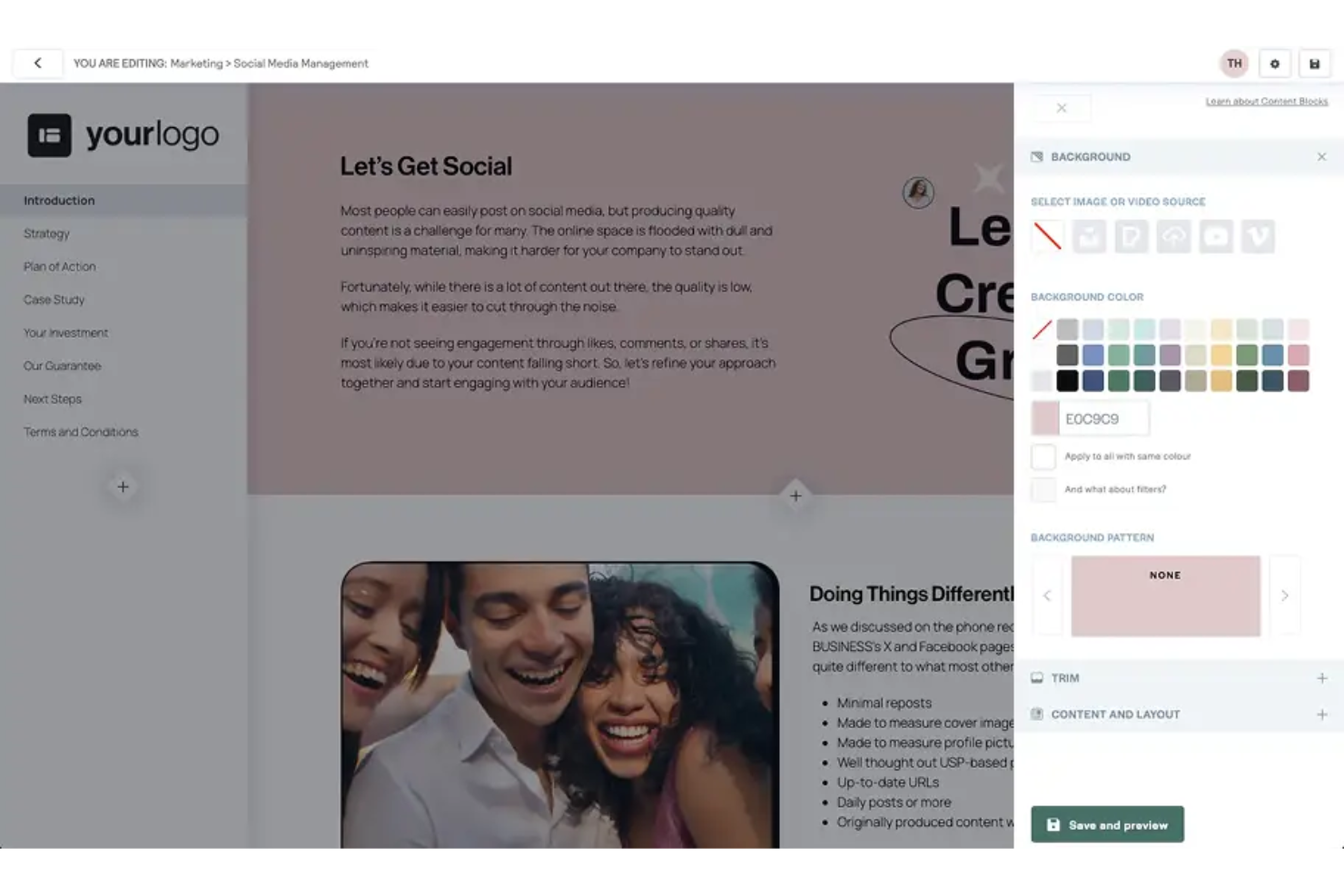
Better Proposals es un software de propuestas dirigido a empresas que buscan crear y enviar propuestas profesionales rápidamente. Es utilizado principalmente por equipos de ventas y autónomos que necesitan un software colaborativo para negociar términos con clientes y cerrar acuerdos de manera eficiente.
Por qué es una buena alternativa a Ignition: Better Proposals permite la colaboración en tiempo real, lo cual puede ser una ventaja significativa sobre Ignition. Con funciones como chat en vivo y análisis de propuestas, puedes interactuar directamente con los clientes dentro de la propuesta. También cuentas con plantillas personalizables que te ayudan a mantener la coherencia en tus documentos. Estas características facilitan que tu equipo trabaje en conjunto y responda rápidamente a las necesidades de los clientes.
Características destacadas e integraciones:
Características incluyen una función de firma digital que agiliza el proceso de aprobación, integraciones de pago que permiten a los clientes pagar directamente desde la propuesta y un panel de análisis detallado que proporciona información sobre las interacciones de los clientes. También puedes beneficiarte de su función de seguimiento de propuestas, que te notifica cuando se abre una propuesta.
Integraciones incluyen Stripe, PayPal, Salesforce, HubSpot, Xero, QuickBooks, Zapier, FreshBooks, Trello y Slack.
Pros and Cons
Pros:
- Plantillas personalizables
- Análisis de propuestas
- Capacidad de firma digital
Cons:
- Opciones de informes básicas
- Personalización de plantillas limitada

Ideal para propuestas personalizables

Proposify es un software de propuestas diseñado para que los equipos de ventas y marketing creen, rastreen y gestionen propuestas de manera eficiente. Ofrece herramientas para la automatización de documentos y firmas electrónicas, facilitando el cierre de acuerdos de forma más rápida.
Por qué es una buena alternativa a Ignition: Proposify te permite personalizar las propuestas, ofreciendo una flexibilidad que Ignition podría no proporcionar. Con funciones como cotizaciones interactivas y una biblioteca de contenido centralizada, ayuda a reducir cuellos de botella en tu flujo de trabajo. También puedes mejorar la precisión extrayendo datos directamente de tu CRM. Estas capacidades lo hacen ideal para equipos que buscan soluciones de propuestas a medida.
Funciones e integraciones destacadas:
Funciones incluyen una biblioteca de contenido centralizada para acceder fácilmente a materiales de propuestas, plantillas personalizables para diferentes sectores y una función de cotización interactiva que aumenta la participación del cliente. También puedes beneficiarte de la capacidad de firma electrónica de Proposify, que acelera el proceso de firma, y de sus herramientas de análisis que ofrecen información sobre el rendimiento de las propuestas.
Integraciones incluyen Salesforce, HubSpot, QuickBooks, Stripe, Pipedrive, Zoho CRM, Slack, Trello, Asana y Zapier.
Pros and Cons
Pros:
- Plantillas personalizables
- Biblioteca de contenido centralizada
- Cotizaciones interactivas
Cons:
- Acceso limitado sin conexión
- Funciones básicas de reportes

Ideal para gestionar RFPs con IA
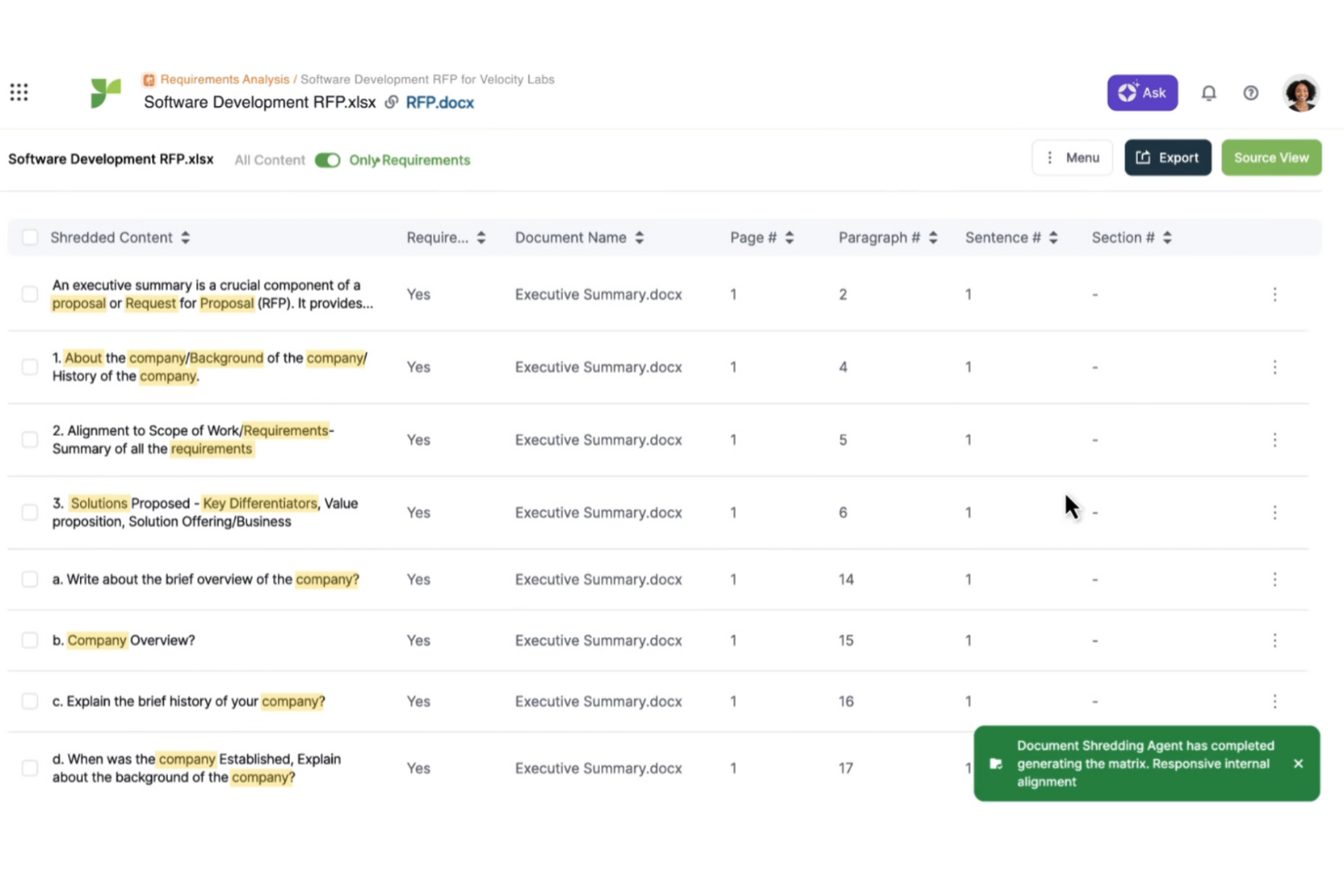
Responsive (anteriormente Rfp.io) es un software de gestión de propuestas diseñado para organizar el proceso de respuesta a RFPs, RFIs y cuestionarios de seguridad. Se utiliza principalmente por equipos de ventas y de elaboración de propuestas que necesitan una forma eficiente de gestionar documentación compleja.
Por qué es una buena alternativa a Ignition: Responsive ofrece funciones impulsadas por IA que mejoran la gestión de RFPs. Puedes automatizar respuestas a preguntas comunes, ahorrando tiempo y reduciendo errores. Las herramientas de colaboración del software también permiten que tu equipo trabaje en conjunto en los documentos. Estas características lo convierten en una excelente opción para equipos que buscan mejorar sus flujos de trabajo de propuestas y la precisión en las respuestas.
Funciones destacadas e integraciones:
Funciones incluyen una biblioteca de contenido centralizada para almacenar y reutilizar el contenido de propuestas, análisis avanzados para rastrear las tasas de éxito de las propuestas y flujos de trabajo automatizados para agilizar los procesos de aprobación de documentos. También puedes usar sus plantillas personalizables para mantener la coherencia en tus propuestas.
Integraciones incluyen Salesforce, Microsoft Dynamics 365, Slack, Microsoft Teams, SharePoint, Box, Dropbox, Google Drive, OneDrive y Okta.
Pros and Cons
Pros:
- Automatización de respuestas con IA
- Biblioteca de contenido centralizada
- Análisis avanzados
Cons:
- Pequeña curva de aprendizaje
- Funciones básicas de informes

Assembly
Ideal para portales de clientes personalizables
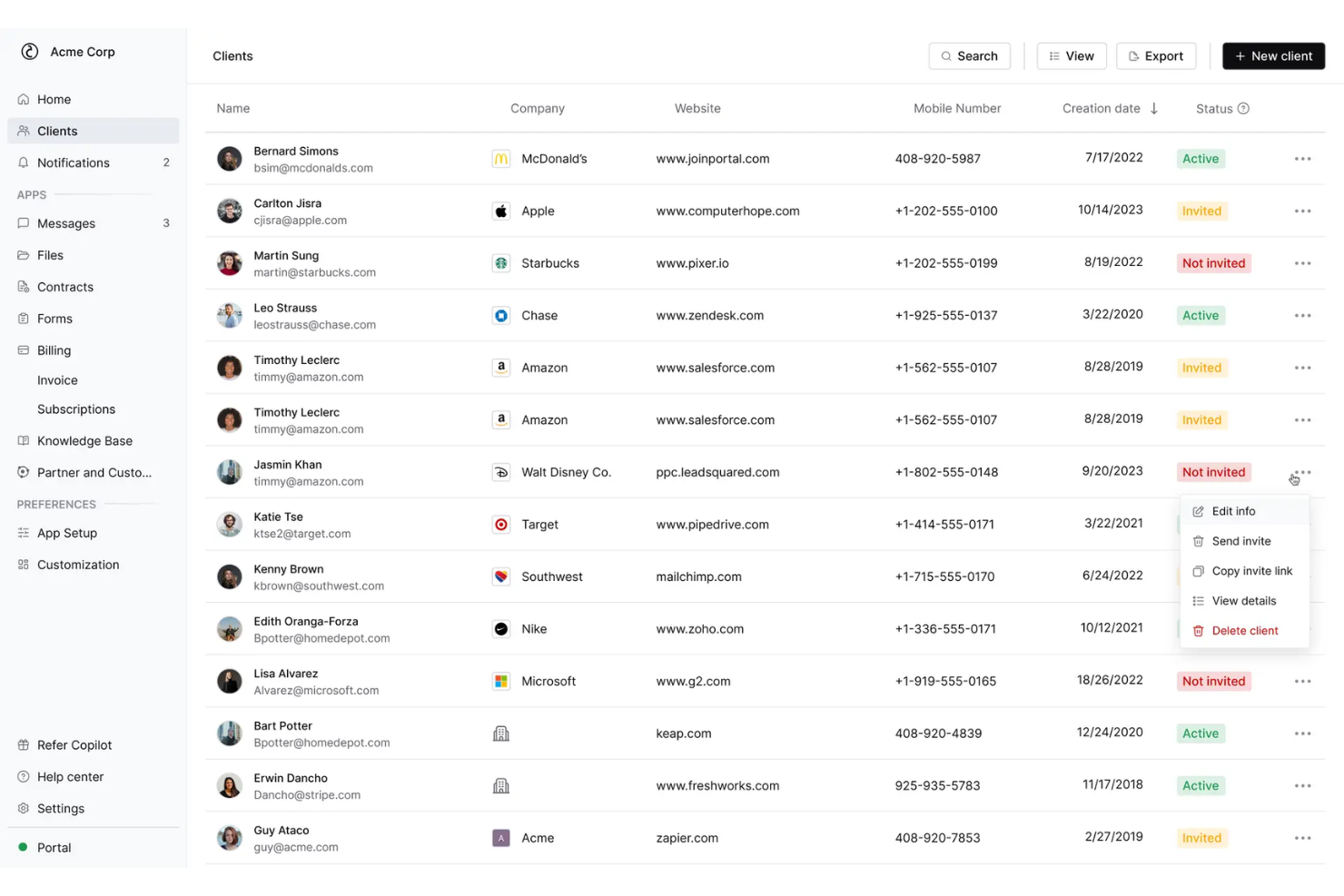
Copilot es un software de gestión de clientes diseñado para empresas que buscan mejorar sus interacciones con los clientes mediante portales personalizados. Lo utilizan equipos que necesitan optimizar la comunicación y la gestión de proyectos con sus clientes.
Por qué es una buena alternativa a Ignition: Copilot ofrece portales de clientes personalizables, brindando una experiencia personalizada que puede faltar en Ignition. Puedes adaptar la interfaz para que coincida con tu marca, garantizando coherencia en todas las interacciones con los clientes. El software también incluye funciones como mensajería segura y compartición de archivos, que ayudan a mantener líneas de comunicación claras. Estas capacidades lo convierten en una opción sólida para negocios enfocados en mejorar las relaciones con sus clientes.
Características e integraciones destacadas:
Características incluyen herramientas de gestión de tareas que te permiten organizar los proyectos de los clientes de manera eficiente, un sistema de facturación que simplifica la emisión de facturas y los pagos, y una función de seguimiento del tiempo para asegurar una facturación precisa. También puedes aprovechar la analítica del software para obtener información sobre la participación del cliente y el rendimiento de los proyectos.
Integraciones incluyen Stripe, QuickBooks, Google Drive, Dropbox, Slack, Zoom, PayPal, HubSpot, Asana y Trello.
Pros and Cons
Pros:
- Portales de clientes personalizables
- Función de mensajería segura
- Opciones de interfaz personalizadas
Cons:
- Características avanzadas limitadas
- Escalabilidad limitada para grandes empresas

Ideal para herramientas financieras detalladas
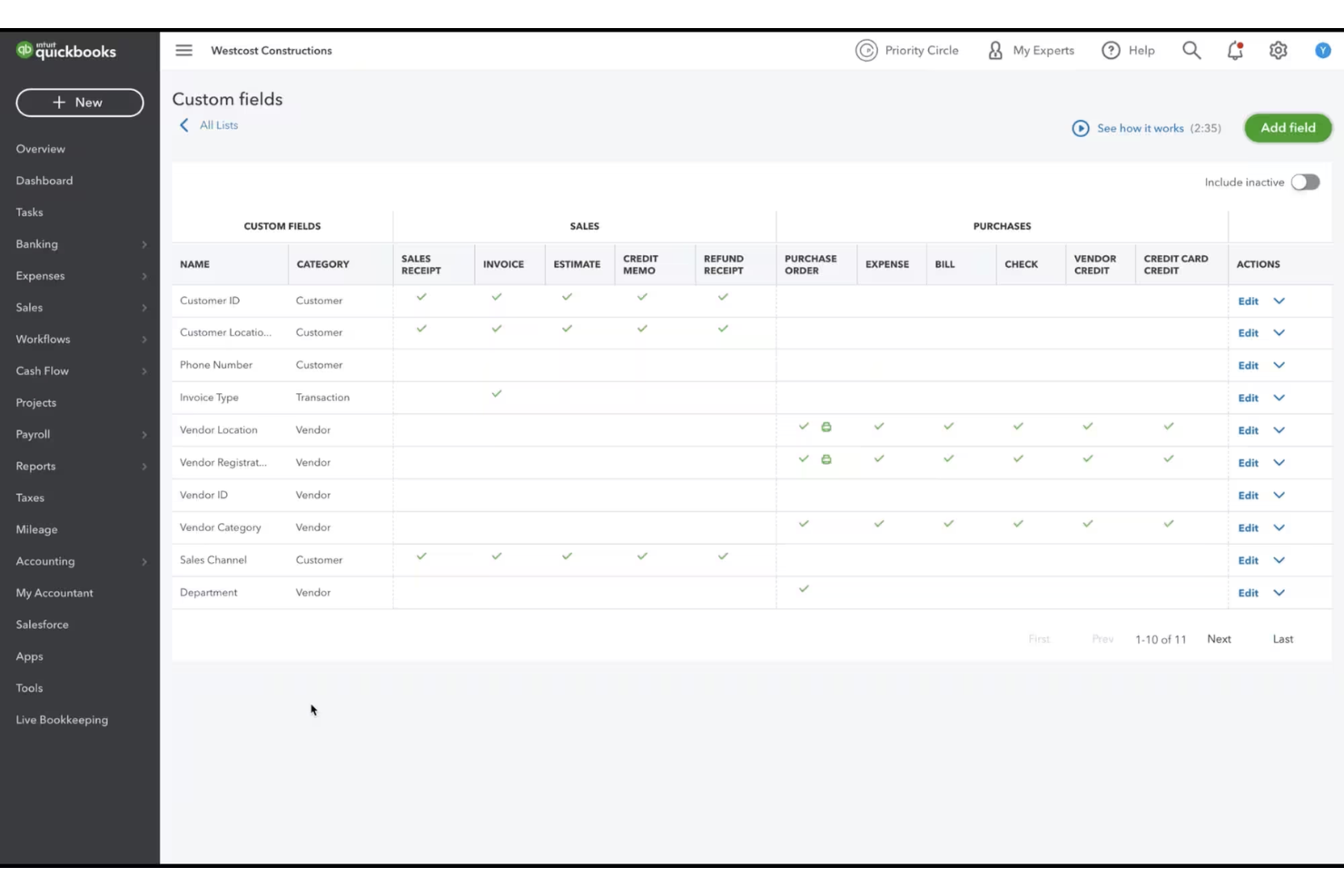
QuickBooks es un software de contabilidad diseñado para que las pequeñas y medianas empresas gestionen sus operaciones financieras. Es utilizado por propietarios de negocios y contadores que necesitan manejar la facturación, la nómina y el seguimiento de gastos de manera eficiente.
Por qué es una buena alternativa a Ignition: QuickBooks ofrece herramientas financieras completas que Ignition no proporciona, lo que lo hace ideal para empresas enfocadas en la contabilidad. Puedes gestionar la nómina y realizar el seguimiento de gastos fácilmente, asegurando registros financieros precisos. Su sistema de facturación te ayuda a cobrar más rápido automatizando los procesos de cobro. Estas características lo convierten en una opción sólida para empresas que necesitan una gestión financiera detallada.
Funciones destacadas e integraciones:
Funciones incluyen el seguimiento de inventario para gestionar los niveles de stock, herramientas de cálculo de impuestos que simplifican la presentación de impuestos y gestión de flujo de caja para mantener tus finanzas en orden. También puedes usar su función de gestión de proyectos para supervisar el trabajo de tu equipo y asignar recursos de manera eficiente.
Integraciones incluyen PayPal, Shopify, Square, TSheets, HubSpot, Expensify, BILL, Salesforce, Amazon y Stripe.
Pros and Cons
Pros:
- Facturación automatizada
- Seguimiento detallado de gastos
- Gestión de inventario
Cons:
- Curva de aprendizaje ligera
- Opciones de personalización limitadas

Bonsai
Ideal para la gestión en la industria creativa
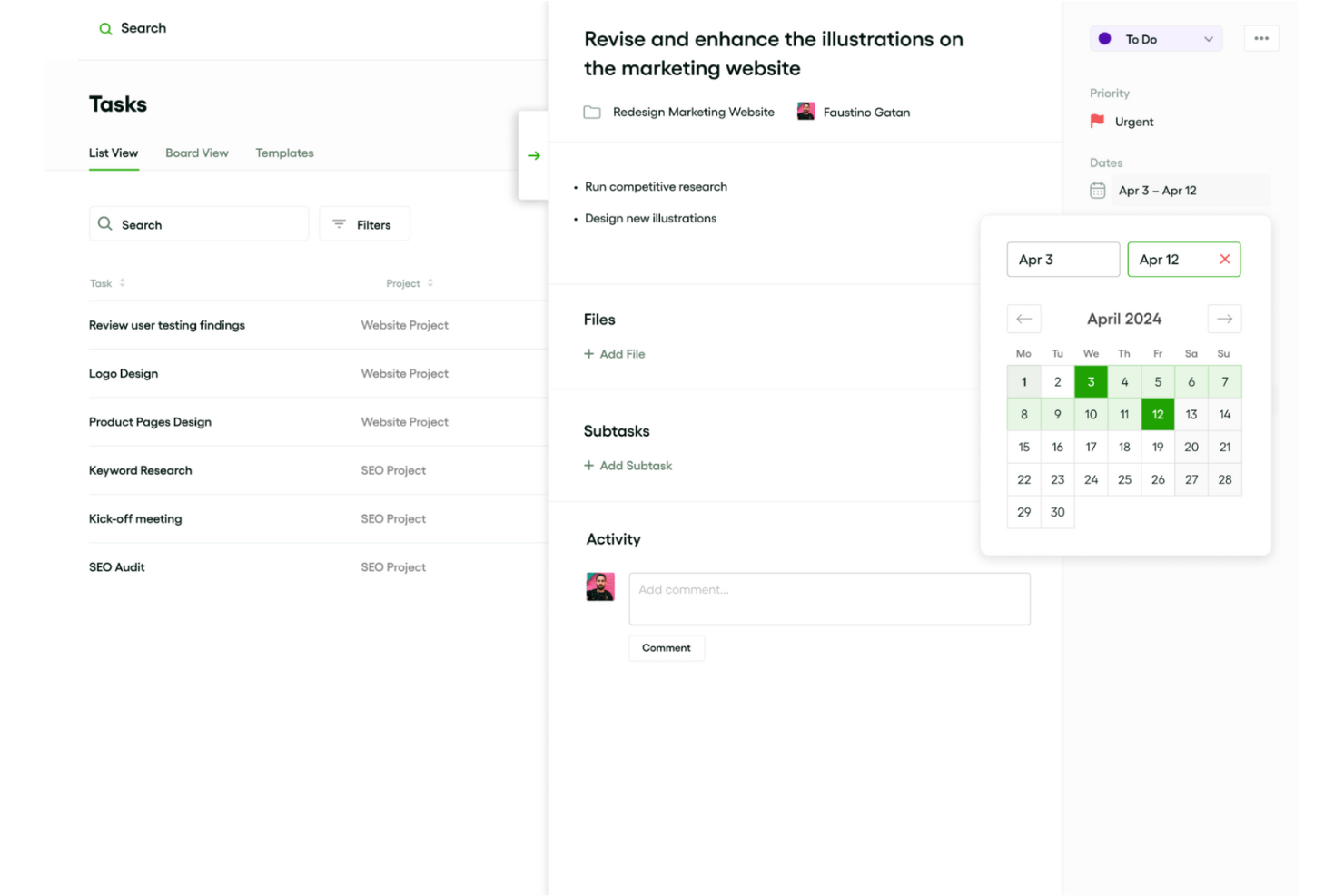
Bonsai es un software de gestión de productos diseñado para freelancers y pequeñas empresas en la industria creativa, ayudándoles a gestionar contratos, propuestas y facturas de manera eficiente. Está orientado a creativos como diseñadores, escritores y fotógrafos que necesitan una forma sencilla de manejar tareas empresariales.
Por qué es una buena alternativa a Ignition: Bonsai ofrece funciones como gestión de tareas, seguimiento de tiempo y control de gastos, que ayudan a los creativos a gestionar fácilmente sus proyectos y finanzas. A diferencia de Ignition, Bonsai está diseñado específicamente para freelancers, lo que lo hace más adecuado a las necesidades de individuos y equipos pequeños. Su interfaz intuitiva y sus plantillas simplifican las tareas administrativas, permitiéndote concentrarte en tu trabajo creativo. Estas características se ajustan a las necesidades de los profesionales creativos que buscan una solución específica para su industria.
Características e integraciones destacadas:
Características incluyen plantillas personalizables para contratos y propuestas, recordatorios de facturación automáticos y seguimiento de tiempo integrado para mantener tus proyectos en plazo. Puedes gestionar todo tu negocio freelance desde una sola plataforma, reduciendo la necesidad de múltiples herramientas. El software también ofrece funciones de colaboración en proyectos para mantener la sincronización entre tú y tus clientes.
Integraciones incluyen QuickBooks, Zapier, Google Calendar, Slack, Trello, Asana, Dropbox, Stripe, PayPal y Google Drive.
Pros and Cons
Pros:
- Especializado para freelancers
- Gestión de contratos sencilla
- Facturación automática
Cons:
- Escalabilidad limitada para equipos grandes
- Funciones de reportes básicas

Mejor para facturación gratuita
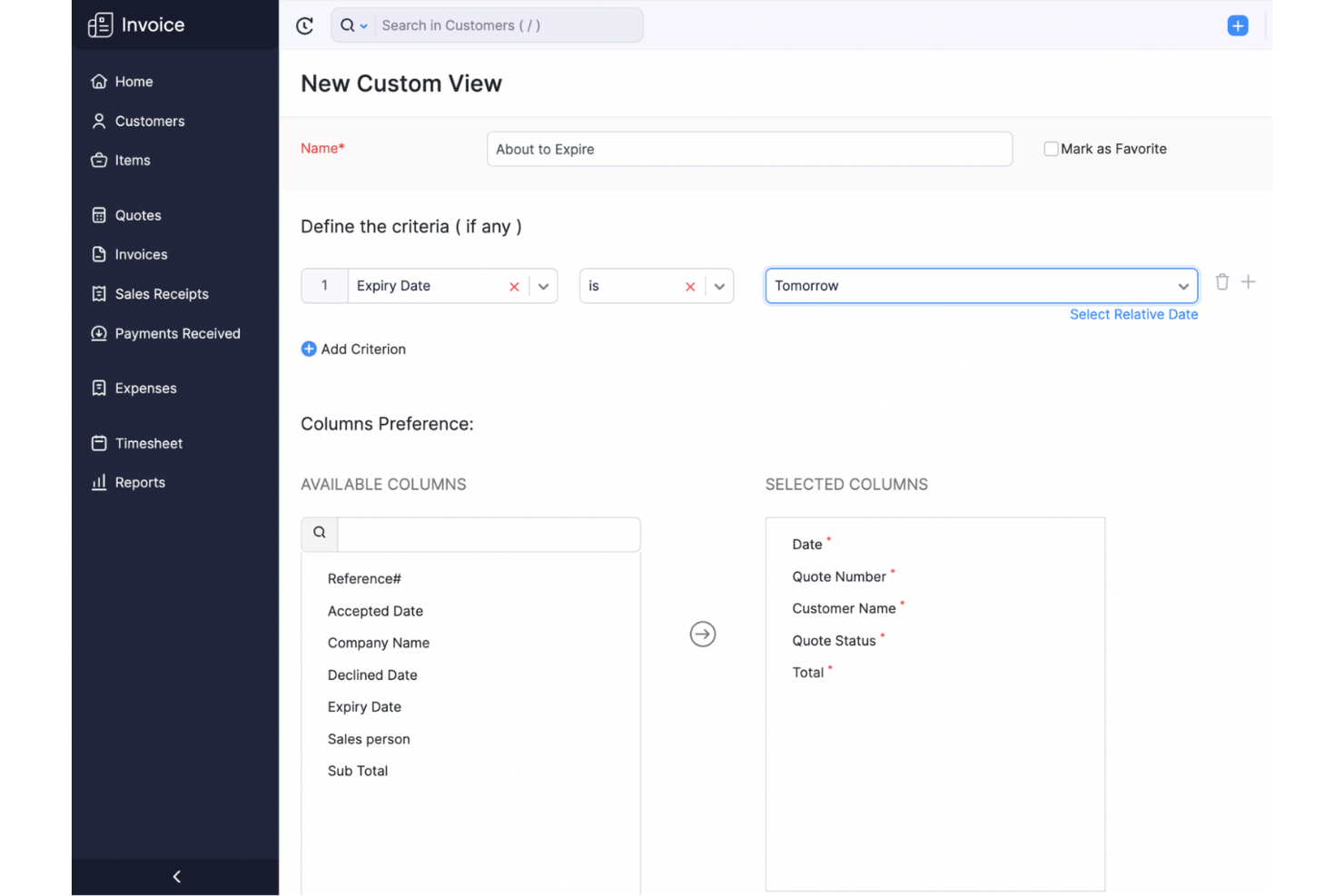
Zoho Invoice es un software de facturación diseñado para pequeñas empresas y trabajadores independientes que necesitan gestionar sus procesos de cobro de manera efectiva. Ayuda a crear facturas, rastrear gastos y gestionar los pagos de los clientes.
Por qué es una buena alternativa a Ignition: Zoho Invoice ofrece servicios de facturación gratuitos que Ignition no proporciona, lo que lo hace ideal para negocios con presupuestos ajustados. Puedes personalizar las facturas para adaptarlas a tu marca, asegurando una apariencia profesional. El software también ofrece seguimiento de gastos, lo que te ayuda a mantener el control de las finanzas de tu empresa. Estas características lo convierten en una opción atractiva para quienes necesitan soluciones de facturación eficientes sin coste.
Funciones destacadas e integraciones:
Funciones incluyen recordatorios de pago automatizados que te ayudan a reducir los pagos atrasados, soporte multi-moneda para empresas que operan internacionalmente y herramientas de informes detallados que te brindan una visión de la salud financiera de tu negocio. También puedes usar su función de seguimiento de tiempo para asegurar una facturación precisa a tus clientes.
Integraciones incluyen PayPal, Stripe, Square, G Suite, Dropbox, Slack, Zoho CRM, Zoho Projects, Zoho Books y Zapier.
Pros and Cons
Pros:
- Plantillas de facturas personalizables
- Soporte para múltiples monedas
- Recordatorios de pago automatizados
Cons:
- Funciones avanzadas limitadas
- Gestión básica de inventario

PandaDoc
Ideal para creación rápida de documentos
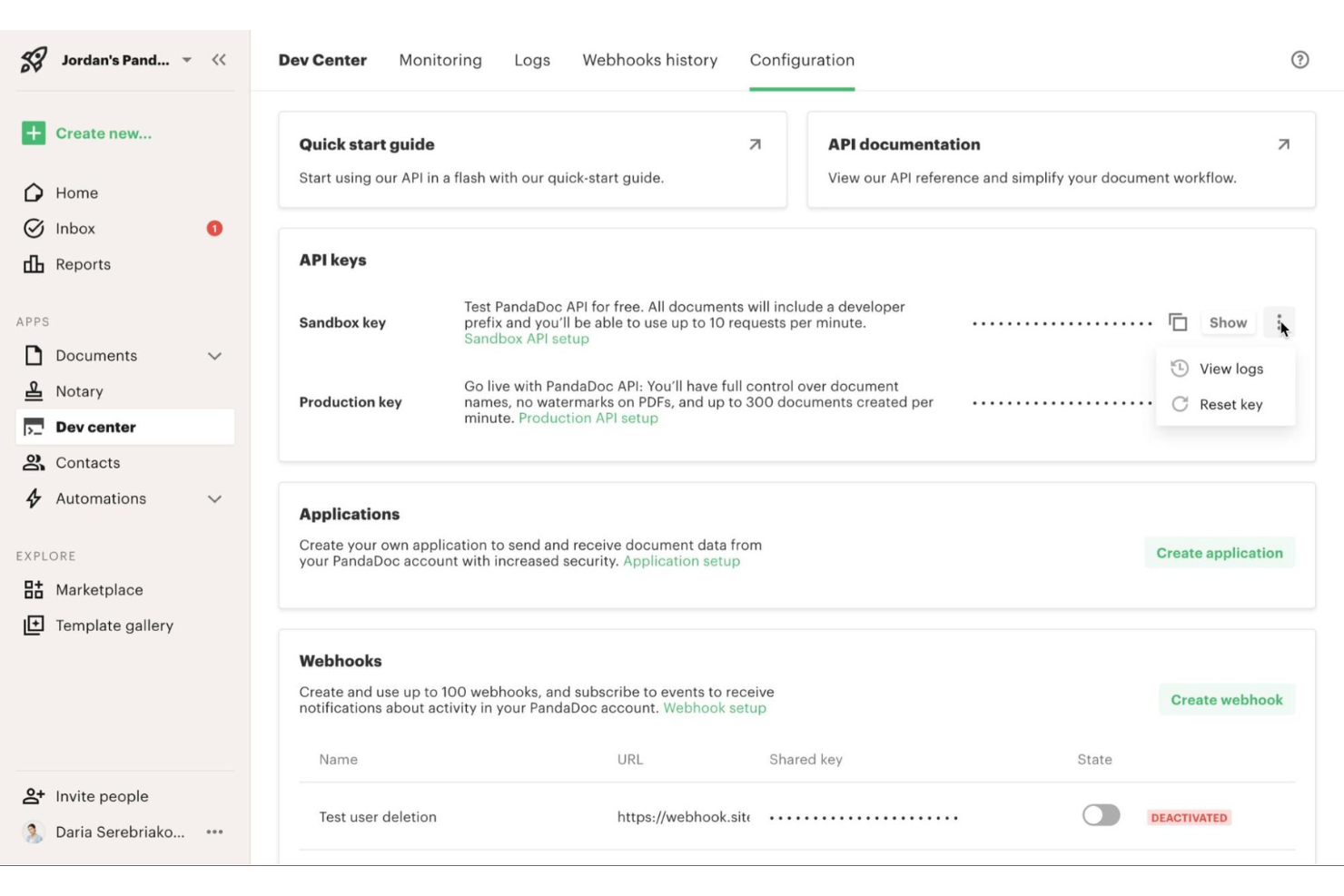
PandaDoc es un software de automatización de documentos diseñado para equipos de ventas y empresas que necesitan crear, enviar y hacer seguimiento de documentos de manera eficiente. Está dirigido a profesionales que buscan optimizar su flujo de trabajo documental, incluyendo propuestas, presupuestos y contratos.
Por qué es una buena alternativa a Ignition: PandaDoc ofrece una creación de documentos rápida mediante su biblioteca de plantillas fácil de usar, lo que puede ser más eficiente que las soluciones de Ignition. El editor de arrastrar y soltar permite personalizar documentos rápidamente. Las notificaciones en tiempo real te ayudan a mantenerte al tanto del estado de los documentos, asegurando seguimientos puntuales con los clientes. Estas características lo convierten en una excelente opción para equipos que priorizan la velocidad y eficiencia en el procesamiento de documentos.
Características y principales integraciones:
Funciones incluyen un editor de documentos con función de arrastrar y soltar que simplifica la personalización, una firma electrónica integrada para aprobaciones rápidas y herramientas de analítica que brindan información sobre el rendimiento de los documentos. También puedes usar su biblioteca de contenido para almacenar y reutilizar elementos de documentos usados con frecuencia, ahorrando tiempo en futuros proyectos.
Integraciones incluyen Salesforce, HubSpot, Zoho CRM, Pipedrive, QuickBooks, Xero, Microsoft Dynamics 365, Slack, Zapier y Stripe.
Pros and Cons
Pros:
- Creación rápida de documentos
- Plantillas fáciles de usar
- Notificaciones en tiempo real
Cons:
- Funciones básicas de informes
- Puede ser complejo para nuevos usuarios


Zapier es una herramienta de automatización diseñada para conectar diferentes aplicaciones y automatizar flujos de trabajo sin necesidad de escribir código. Es utilizada por empresas e individuos que desean ahorrar tiempo automatizando tareas repetitivas a través de diversas aplicaciones.
Por qué es una buena alternativa a Ignition: Zapier ofrece automatización sin código, lo que permite configurar flujos de trabajo automatizados entre aplicaciones, algo que Ignition podría no ofrecer. Puedes automatizar tareas repetitivas, liberando tiempo de tu equipo para proyectos más críticos. Su interfaz fácil de usar la hace accesible incluso si no tienes experiencia técnica. Estas características la convierten en una excelente opción para empresas que buscan mejorar la productividad sin necesidad de integraciones complejas.
Características destacadas e integraciones:
Características incluyen una intuitiva interfaz de arrastrar y soltar para crear flujos de trabajo automatizados, amplia compatibilidad de aplicaciones para conectar diversas herramientas, y disparadores personalizables que inician acciones en función de eventos específicos. También puedes beneficiarte de sus flujos de trabajo de varios pasos, que permiten secuencias de automatización complejas.
Integraciones incluyen Google Sheets, Slack, Mailchimp, Trello, Asana, Salesforce, Shopify, HubSpot, QuickBooks y Dropbox.
Pros and Cons
Pros:
- No requiere conocimientos técnicos
- Amplia compatibilidad con aplicaciones
- Disparadores de automatización personalizables
Cons:
- Funciones avanzadas limitadas
- Las tareas complejas pueden requerir soluciones alternativas


Service Provider Pro es un software de gestión de clientes y facturación diseñado para agencias digitales que ofrecen servicios paquetizados. Está pensado para propietarios de agencias y equipos que buscan optimizar la administración de clientes, proyectos y pagos.
Por qué es una buena alternativa a Ignition: Service Provider Pro ofrece características como portales para clientes y facturación automatizada, brindando una experiencia personalizada que Ignition podría no ofrecer. Puedes gestionar varios clientes fácilmente utilizando sus herramientas de gestión de proyectos. Las capacidades de CRM integradas te ayudan a llevar un registro de las interacciones con clientes y el estado de los proyectos. Estas funciones son ideales para agencias que desean simplificar sus operaciones y mejorar la relación con los clientes.
Funciones destacadas e integraciones:
Funciones incluyen portales de clientes con marca blanca que te permiten personalizar la experiencia del cliente, facturación automática para ahorrar tiempo en tareas administrativas y un panel centralizado para gestionar todos tus proyectos. Además, puedes utilizar sus herramientas de gestión de tareas para asignar y dar seguimiento al trabajo de manera eficiente, ayudando a que tu equipo se mantenga organizado.
Integraciones incluyen Stripe, PayPal, Zapier, Slack, QuickBooks, Google Drive, Dropbox, Trello, Asana y Xero.
Pros and Cons
Pros:
- Portales de clientes con marca blanca
- Facturación automatizada
- Capacidades de CRM integradas
Cons:
- Opciones de personalización limitadas
- Escalabilidad limitada para grandes empresas
Otras alternativas a Ignition
Estas son algunas alternativas adicionales a Ignition que no llegaron a mi lista final, pero que aún merece la pena conocer:
- Bidsketch
Ideal para el análisis de propuestas
- Moxie
Ideal para la gestión de autónomos
- GoProposal
Ideal para propuestas de precios


Cómo evalúo las alternativas a Ignition
Divido mi evaluación en dos capas: las capacidades básicas—como la publicación de notas de lanzamiento y la coordinación de lanzamientos de productos—y los diferenciadores que hacen que una herramienta se destaque sobre otra.
Funcionalidad principal (Requisitos indispensables para esta lista)
Cuando selecciono herramientas para mi lista, califico cada una en una escala del 0 (no ofrece la funcionalidad) al 5 (sobresale en esta área) para cada funcionalidad principal listada a continuación. Luego, calculo el puntaje total de la herramienta en porcentaje. Cada herramienta debe lograr una puntuación total mínima del 65% para ser considerada para su inclusión.
- Comunicaciones de lanzamientos: Analizo cómo cada herramienta gestiona la creación y distribución de notas de lanzamiento, registros de cambios y anuncios de lanzamiento a través de canales como correo electrónico, widgets en la aplicación y la web.
- Gestión de hojas de ruta: La herramienta debe ofrecer vistas visuales de la hoja de ruta que los gestores de producto puedan compartir con la dirección o partes interesadas externas para alinear qué se lanzará y cuándo.
- Coordinación de salida al mercado (Go-To-Market): Evalúo si la plataforma soporta flujos de trabajo estructurados para lanzamientos con asignación de tareas, cronogramas y gestión de recursos entre producto, marketing y ventas.
- Captura de retroalimentación del cliente: Cada herramienta debe recopilar retroalimentación de múltiples fuentes y permitir que los equipos etiqueten, categoricen y vinculen los insights a elementos del roadmap para priorizar.
- Ecosistema de integraciones: Verifico la existencia de conexiones nativas con herramientas como Jira, Slack, Salesforce y HubSpot, además de acceso API o webhook para flujos de trabajo personalizados.
- Colaboración de partes interesadas: Los espacios de trabajo compartidos con permisos por roles son importantes aquí, especialmente cuando los PMM y líderes de ventas necesitan acceso sin poder editar las prioridades del roadmap.
Una vez que tengo una lista de herramientas que cumplen con este criterio, considero qué diferencia a cada plataforma.
Factores diferenciadores (Qué distingue a los proveedores)
Así es como comparo y contrasto diferentes proveedores:
Funciones destacadas
La generación de contenidos impulsada por IA es un gran diferenciador. Las herramientas que redactan automáticamente notas de lanzamiento o resúmenes de lanzamientos a partir de datos de producto ahorran horas de escritura repetitiva a los PMM en cada ciclo de lanzamiento. También busco paneles analíticos de lanzamientos que vinculen la adopción de funciones y las métricas de interacción directamente con lanzamientos específicos, para que los equipos puedan medir el impacto. Un centro dedicado para habilitación de ventas también es importante, especialmente para equipos que necesitan enviar hojas de batalla y análisis competitivo a los representantes justo cuando se lanza un producto.
Más allá de las funciones
La estructura de precios es importante al cambiar desde Ignition. Evalúo si las herramientas cobran por usuario, por espacio de trabajo o por nivel de funcionalidad, ya que un equipo PMM de cinco personas tiene inquietudes de costos muy diferentes a una organización empresarial de producto. El tamaño del equipo y el ajuste al negocio también influyen. Algunas plataformas funcionan bien para responsables de producto en solitario pero fracasan cuando se necesita coordinación GTM para múltiples productos o marcas. El tiempo hasta obtener valor es otro factor que considero. Las plantillas de lanzamiento preconstruidas y el soporte para migraciones pueden marcar la diferencia entre lanzar por primera vez en días o en semanas.
¿Por qué buscar una alternativa a Ignition?
Aunque Ignition es una solución de software sólida para gestionar propuestas y relaciones con clientes, hay varias razones por las que los profesionales buscan alternativas. Es posible que estés considerando cambiar porque:
- Necesitas un mayor control sobre tu modelo de precios
- Buscas herramientas con un mejor soporte para API e integraciones
- Tu proceso de incorporación se está volviendo más complejo a medida que crece tu equipo
- Quieres funciones más avanzadas de análisis y generación de informes
- Operas en varios idiomas o regiones
- Eres una pequeña empresa o un profesional independiente que busca una opción más económica
Una nota sobre las integraciones: Muchos equipos utilizan Ignition junto con Excel, sistemas de contabilidad o CRM para respaldar el proceso de ventas, pero las integraciones pueden ser limitadas según tu infraestructura tecnológica. Si esto te preocupa, varias de las alternativas mencionadas anteriormente ofrecen opciones más flexibles y modernas para ampliar tus operaciones y mejorar la experiencia del usuario.
Características principales de Ignition
Esto es lo que ofrece Ignition, para que puedas comparar sus capacidades con las de otras herramientas:
- Gestión de tareas – Asigna y realiza un seguimiento de las tareas mediante etiquetas y comentarios organizados por hilos para colaborar.
- Visualización de proyectos – Organiza el trabajo con tableros Kanban, vistas de cronograma, listas y paneles.
- Seguimiento de OKR – Alinea a los equipos con objetivos y resultados clave, respaldados por métricas de rendimiento.
- Documentación de lanzamientos – Redacta y organiza documentos de estrategia, con recursos integrados y control de versiones.
- Gestión de recursos digitales y documentos – Almacena archivos, gestiona aprobaciones y añade etiquetas para recuperarlos fácilmente.
- Automatización basada en inteligencia artificial – Genera análisis, textos de marketing y planes de proyectos mediante inteligencia artificial.
- Plantillas y lógica de flujos de trabajo – Utiliza plantillas prediseñadas y flujos de trabajo condicionales para aumentar la eficiencia.
- Inteligencia competitiva – Automatiza los análisis de victorias y derrotas, las fichas competitivas y las encuestas de opinión de los clientes.
- Planificación de productos y funcionalidades – Gestiona hojas de ruta, recopila ideas y publica notas de lanzamiento.
¿Qué sigue?
No olvides suscribirte a nuestro boletín para recibir más recursos y guías sobre gestión de productos, además de los pódcast, entrevistas y otros análisis más recientes de líderes y expertos del sector.