

Como responsable de producto, conozco la satisfacción de lanzar una experiencia de producto fluida y la frustración de apresurarse a corregir las carencias que los usuarios descubren inesperadamente.
En los días difíciles, es posible que:
- Te cueste hacer un seguimiento de los comentarios dispersos de los clientes, lo que dificulta comprender lo que los usuarios realmente necesitan.
- Te enfrentes a equipos desalineados, donde la colaboración interfuncional se parece más a un tira y afloja que a un esfuerzo unificado.
- Malogres un tiempo valioso intentando medir el éxito de las funciones con datos poco claros y herramientas que no se conectan entre sí.
Al reflexionar sobre estos desafíos, me he dado cuenta de que a menudo se deben a no contar con las herramientas adecuadas para agilizar los flujos de trabajo, centralizar la información y fomentar la alineación. Por eso he preparado esta recopilación de los mejores programas de gestión de la experiencia del producto. Estas soluciones están diseñadas para ayudar a los equipos de producto a planificar, analizar y mejorar la forma en que los clientes experimentan sus productos.
En este artículo encontrarás una descripción general de las principales herramientas, un resumen de cómo funcionan y detalles sobre aquello que cada una hace mejor, para que puedas elegir el programa adecuado con confianza.
Por qué confiar en nuestras recomendaciones de software
6,700+
Reviews
20
Industry experts
16+
Evaluation factors
14
Years
Nuestro equipo lleva probando y evaluando software desde 2012. Como gestores de producto, sabemos lo difícil —y lo importante— que es elegir el software adecuado.
Para esta guía, evaluamos las herramientas mediante pruebas prácticas e investigación independiente, puntuando las herramientas según nuestros criterios de selección.
Nuestras reseñas reflejan nuestro criterio editorial humano, no un discurso de ventas.
Revisores expertos:
 Hannah ClarkSenior TPM
- Cristiano ValimSenior UI/UX Lead

Tabla comparativa de programas de gestión de la experiencia del producto
Esta tabla comparativa resume los detalles de precios de mi selección de los mejores programas de gestión de la experiencia del producto:
| Tool | Best For | Trial Info | Price | ||
|---|---|---|---|---|---|
| 1 | Ideal para taxonomías adaptables de comentarios | Demostración gratuita disponible | Precio bajo solicitud | Website | |
| 2 | La mejor opción para la categorización de texto avanzada basada en IA | Demo gratuita disponible | Precios bajo petición | Website | |
| 3 | Ideal para paneles de análisis de comentarios sobre productos | Demostración gratuita disponible | Precios disponibles previa solicitud | Website | |
| 4 | Ideal para experiencias de usuario personalizadas | Prueba gratuita de 14 días | Desde $174/mes (facturado anualmente) | Website | |
| 5 | La mejor herramienta de encuestas con integración de CRM integrada | Prueba de 10 días | Desde $56/mes | Website | |
| 6 | Ideal para sindicar contenido en redes de minoristas | Demostración gratuita disponible | Precio disponible previa solicitud | Website | |
| 7 | Ideal para la automatización y el análisis de PIM | Demostración gratuita disponible | Precios bajo solicitud | Website | |
| 8 | Ideal para distribuir catálogos a más de 500 minoristas | Prueba gratuita + demostración gratuita disponibles | Desde $45,000/año | Website | |
| 9 | La mejor opción para la distribución de catálogos B2B con DAM integrado | Prueba gratuita y demostración gratuita disponibles | Precios bajo consulta | Website | |
| 10 | La mejor opción para la inteligencia del cliente basada en IA | Demostración gratuita disponible | Precio bajo solicitud | Website |


Análisis de los mejores programas de gestión de la experiencia del producto
Aquí tienes una breve descripción de cada uno de los programas de gestión de la experiencia del producto de mi lista, con información sobre aquello que hace mejor, además de capturas de pantalla para mostrar algunas de sus funciones.
 Ideal para taxonomías adaptables de comentarios
- Demostración gratuita disponible
- Precio bajo solicitud
Visit WebsiteCustomer Rating:4.8/5
Enterpret muestra los factores que impulsan la pérdida de clientes y automatiza las alertas de escalamiento de clientes. Enterpret es una plataforma de inteligencia del cliente que agrega comentarios provenientes de soporte, ventas, encuestas, reseñas y datos de uso del producto, y luego los organiza en una taxonomía adaptable para mostrar información práctica a los equipos de producto.
¿Para quién es más adecuado Enterpret?
Enterpret es adecuado para equipos de producto de empresas SaaS medianas y grandes que necesitan comprender grandes volúmenes de comentarios de clientes procedentes de canales de soporte, ventas y reseñas.
Por qué elegí Enterpret
He incluido Enterpret entre mis principales opciones porque su taxonomía adaptable de comentarios se reajusta automáticamente a medida que evolucionan el lenguaje de tus clientes y tu producto, lo que significa que nunca tienes que recategorizar manualmente los comentarios para mantener actualizada la información. Me gusta especialmente cómo el Gráfico de Contexto del Cliente vincula las señales individuales de los comentarios con resultados empresariales como la pérdida de clientes y la retención, de modo que los equipos de producto pueden ver qué quejas realmente tienen un impacto significativo. La capa de Información basada en IA te permite consultar todo ese conjunto de comentarios en lenguaje natural, lo que reduce el tiempo entre detectar un patrón y actuar en consecuencia.
Características principales de Enterpret
- Integraciones con fuentes de comentarios: Incorpora señales de clientes procedentes de tickets de soporte, llamadas de ventas, encuestas, reseñas de tiendas de aplicaciones, redes sociales y datos de CRM en un único espacio de trabajo.
- Gráfico de Contexto del Cliente: Vincula registros individuales de comentarios con funciones específicas del producto, segmentos de clientes y resultados empresariales como la pérdida de clientes y los ingresos por expansión.
- Integraciones de flujos de trabajo: Crea automáticamente tickets en Jira o Linear y envía alertas de Slack cuando el análisis de comentarios revela un patrón que requiere acción.
- Medición del impacto: Hace un seguimiento de los cambios en el volumen de tickets, el sentimiento y la adopción antes y después de una actualización del producto para demostrar si se ha resuelto un problema.
Integraciones de Enterpret
Enterpret se integra con Salesforce, Slack, Jira, Linear, Claude y ChatGPT mediante su servidor MCP. También ofrece acceso a la API para integraciones personalizadas.
Pros and Cons
Pros:
- Centraliza los comentarios de todos los puntos de contacto del producto
- La taxonomía adaptable sigue los cambios en el lenguaje de los clientes
- Relaciona las quejas con los resultados de retención y pérdida de clientes
Cons:
- No ofrece catálogo de productos ni gestión de atributos
- No ofrece sindicación, recursos digitales ni formato de canales
Learn more about Enterpret: La mejor opción para la categorización de texto avanzada basada en IA
- Demo gratuita disponible
- Precios bajo petición
Visit WebsiteCustomer Rating:4.4/5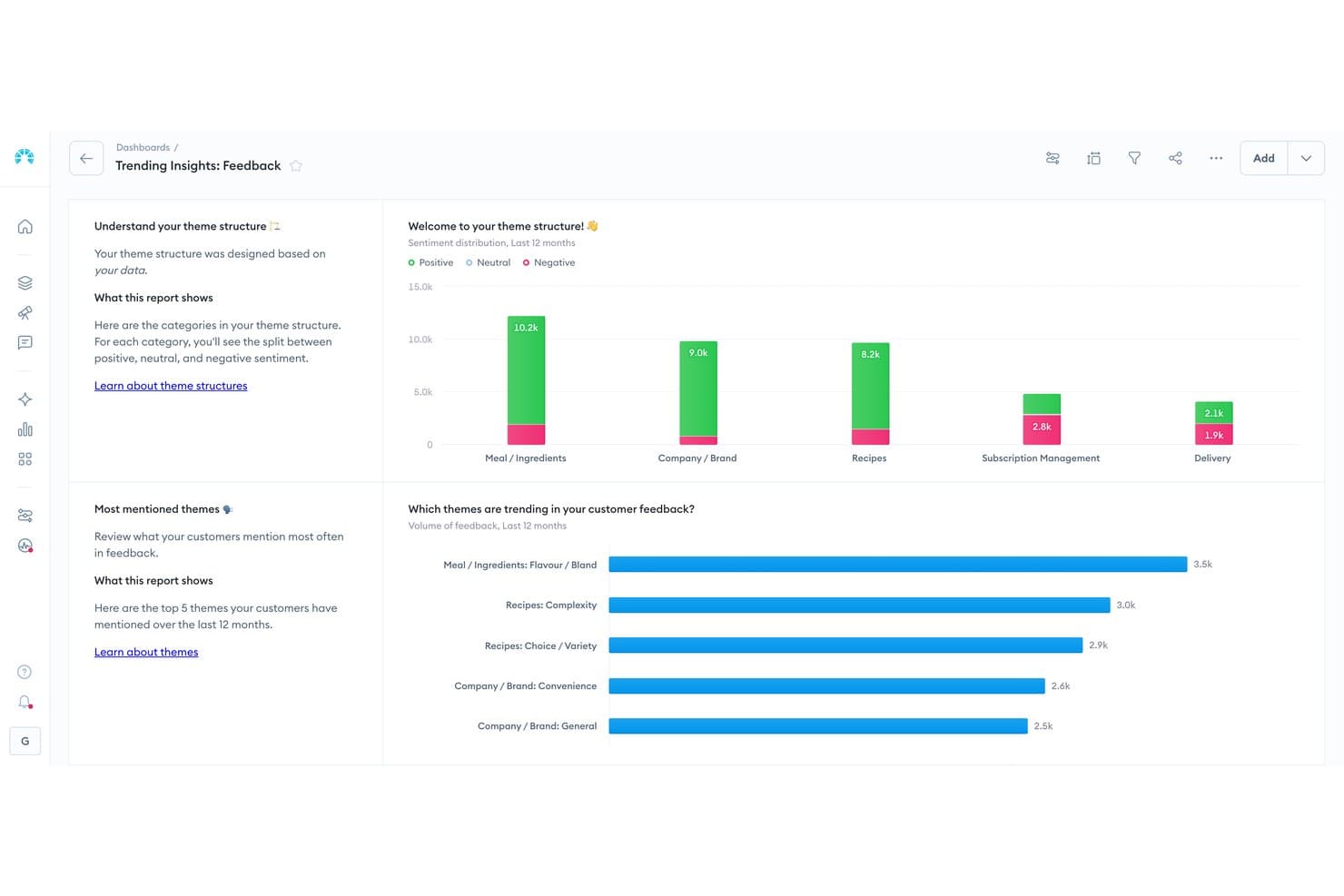
Chattermill visualiza la opinión de los clientes sobre los temas de los productos. Chattermill es una plataforma de análisis de comentarios de clientes nativa de la IA que incorpora datos de encuestas, reseñas, tickets de soporte y redes sociales para mostrar temas, opiniones y causas raíz en toda la experiencia del cliente.
¿Para quién es más adecuado Chattermill?
Chattermill es adecuado para equipos empresariales de experiencia del cliente y de producto que necesitan análisis basado en IA de grandes volúmenes de comentarios de clientes para descubrir patrones de opinión y motivos de devolución a gran escala.
Por qué elegí Chattermill
Elegí Chattermill como una de las mejores opciones porque su motor de IA Lyra hace algo que no he visto igualado en ningún otro lugar: etiqueta automáticamente temas, opiniones y causas raíz en miles de elementos de comentarios no estructurados, desde reseñas hasta tickets de soporte, sin etiquetado manual. Cuando los equipos de producto necesitan saber exactamente por qué los clientes devuelven artículos o abandonan el proceso, Lyra Agent muestra esas respuestas con citas directas de clientes y datos sobre el impacto en el negocio.
Funciones principales de Chattermill
- Lyra Agent: Un analista de IA que responde preguntas sobre NPS, CSAT, abandono y devoluciones de productos, mostrando respuestas con citas directas de clientes y gráficos de datos.
- Detección proactiva de anomalías: Marca automáticamente picos, problemas emergentes y oportunidades en los datos de comentarios, y después envía alertas a Slack, correo electrónico o Jira.
- Análisis de impacto: Relaciona directamente los temas de los comentarios con métricas empresariales como el abandono y los ingresos, para que puedas priorizar los factores que generan resultados medibles.
- Integración con MCP y habilidades: Permite acceder a los datos de Chattermill desde asistentes de IA como Claude y ChatGPT para analizarlos dentro de tus flujos de trabajo existentes.
Integraciones de Chattermill
Chattermill ofrece más de 65 integraciones nativas, incluidas Shopify App Store, Loop Returns, Trustpilot, Bazaarvoice, Salesforce y Zendesk. También admite acceso mediante API, cargas de archivos CSV y fuentes de datos seguras para conexiones personalizadas.
Pros and Cons
Pros:
- La IA categoriza temas, opiniones y causas raíz
- El análisis de devoluciones orienta las decisiones sobre el contenido de los productos
- Gestiona el análisis de grandes volúmenes de comentarios de clientes
Cons:
- No dispone de un repositorio centralizado de datos de productos
- No ofrece sindicación ni formato específico para cada canal
Learn more about Chattermill: Ideal para paneles de análisis de comentarios sobre productos
- Demostración gratuita disponible
- Precios disponibles previa solicitud
Visit WebsiteCustomer Rating:4.7/5
Sogolytics ayuda a los equipos de experiencia del producto a comprender las opiniones de los usuarios mediante diversas métricas mostradas en su panel de control. Sogolytics es una plataforma de experiencia del cliente y de los empleados que recopila comentarios a través de encuestas, correo electrónico, chat y canales sociales, y luego muestra temas, opiniones y tendencias mediante análisis impulsados por IA y paneles de análisis en tiempo real.
¿Para quién es más adecuado Sogolytics?
Sogolytics funciona bien para equipos de producto que necesitan centralizar los comentarios de los clientes de múltiples canales y mostrar tendencias prácticas mediante paneles de análisis en tiempo real.
Por qué elegí Sogolytics
Elegí Sogolytics como una de las mejores opciones por lo bien que centraliza los comentarios de encuestas, chat, redes sociales y reseñas en paneles de análisis que realmente muestran lo importante. Me encanta que su análisis impulsado por IA identifique automáticamente temas, opiniones y factores clave en todos esos datos, para que los equipos de producto no tengan que filtrar manualmente el ruido. Sus paneles en tiempo real facilitan la detección de tendencias en los comentarios de los clientes antes de que se conviertan en problemas mayores para el producto.
Características clave de Sogolytics
- Recopilación de comentarios multicanal: Reúne en un solo lugar las opiniones de los clientes procedentes de encuestas, correo electrónico, chat, redes sociales, comentarios dentro de la aplicación y reseñas.
- Análisis de factores clave: Identifica qué factores de los comentarios influyen más en la opinión de los clientes y en los resultados de la experiencia del producto.
- Enrutamiento automatizado de acciones: Asigna los elementos de comentarios a responsables designados, con plazos y seguimiento de SLA para garantizar su ejecución.
- Predicción de abandono: Utiliza análisis predictivos para señalar a los clientes en riesgo según los patrones de sus comentarios y las señales de interacción.
Integraciones de Sogolytics
Sogolytics ofrece 14 integraciones, incluidas Shopify, Webflow, Salesforce, HubSpot, Snowflake, Zendesk, ServiceNow, Slack y Microsoft Teams.
Pros and Cons
Pros:
- Centraliza los comentarios de todos los puntos de contacto con el cliente
- Muestra temas mediante análisis en tiempo real
- Asigna responsables de los comentarios con seguimiento de SLA
Cons:
- No gestiona catálogos ni atributos de productos
- No puede distribuir listados entre canales de ventas
Learn more about Sogolytics: Ideal para experiencias de usuario personalizadas
- Prueba gratuita de 14 días
- Desde $174/mes (facturado anualmente)
Visit WebsiteCustomer Rating:4.7/5
Los recorridos guiados de UserGuiding pueden ayudar a dar forma a la experiencia del usuario desde el momento en que interactúa por primera vez con tu producto. UserGuiding es una plataforma de adopción digital que ofrece incorporación dentro de la aplicación, recorridos del producto, información sobre herramientas, listas de verificación y asistencia de autoservicio mediante orientación específica y segmentada dentro de aplicaciones web.
¿Para quién es más adecuado UserGuiding?
UserGuiding es una opción excelente para los equipos de producto de empresas SaaS que desean guiar a los usuarios por las funcionalidades mediante experiencias personalizadas y segmentadas dentro de la aplicación, sin necesidad de recursos de ingeniería.
Por qué elegí UserGuiding
Elegí UserGuiding como una de las mejores opciones por la eficacia con la que su motor de segmentación ofrece experiencias dentro de la aplicación realmente personalizadas. Puedes dirigirte a grupos específicos de usuarios con recorridos del producto, listas de verificación de incorporación y modales de anuncios adaptados en función del comportamiento, el rol o la etapa del ciclo de vida. Me gusta especialmente que su Centro de recursos y su Asistente de IA se adapten a quién realiza la consulta y muestren orientación relevante sin necesidad de abrir un ticket de soporte.
Características principales de UserGuiding
- Listas de verificación de incorporación: Listas de tareas paso a paso que guían a los usuarios para completar acciones clave dentro de tu producto.
- Encuestas dentro de la aplicación: Formularios de comentarios sencillos que se activan dentro del producto para recopilar las opiniones de los usuarios en momentos específicos.
- Seguimiento de eventos sin código: Herramienta de análisis basada en apuntar y hacer clic que registra las interacciones de los usuarios sin requerir el apoyo del equipo de ingeniería.
- Modales de anuncios: Mensajes emergentes que puedes implementar dentro del producto para mostrar actualizaciones, nuevas funcionalidades o mensajes dirigidos a segmentos específicos de usuarios.
Integraciones de UserGuiding
UserGuiding ofrece integraciones con HubSpot, Segment, Mixpanel, Google Analytics, Intercom, Amplitude, Salesforce y Webhook.
Pros and Cons
Pros:
- Personaliza las experiencias dentro de la aplicación mediante la segmentación
- Implementa rápidamente orientación de incorporación sin código
- Combina herramientas de comentarios, asistencia y adopción
Cons:
- Carece de una gestión centralizada del contenido del producto
- No puede distribuir contenido en varios canales de ventas
Learn more about UserGuiding: La mejor herramienta de encuestas con integración de CRM integrada
- Prueba de 10 días
- Desde $56/mes
Visit WebsiteCustomer Rating:4.6/5
Survicate ofrece una forma sencilla de analizar las respuestas de las encuestas, incluidas las puntuaciones NPS, las puntuaciones CSAT y las respuestas de texto libre. Survicate es una plataforma de comentarios de clientes y encuestas que recopila respuestas a través de canales web, correo electrónico, móviles y dentro del producto, utilizando IA para analizar el sentimiento, agrupar los comentarios por tema y sincronizar los resultados con herramientas de CRM y marketing.
¿Para quién es más adecuado Survicate?
Survicate es adecuado para los equipos de producto y experiencia del cliente que necesitan recopilar comentarios en múltiples puntos de contacto y enviar los resultados directamente a su CRM o conjunto de herramientas de marketing.
Por qué elegí Survicate
He incluido Survicate entre mis principales opciones porque su integración de CRM integrada permite que los comentarios no queden aislados: las respuestas de las encuestas se sincronizan directamente con Salesforce, HubSpot o Pipedrive, de modo que los equipos de producto pueden actuar sobre las señales de los clientes sin exportaciones manuales. Me gusta especialmente cómo su Centro de investigación con IA etiqueta automáticamente el sentimiento y agrupa los comentarios por tema en encuestas, tickets de soporte y grabaciones de llamadas. Este tipo de análisis entre distintas fuentes ofrece a los responsables de producto una visión más clara de lo que los clientes piensan realmente sobre su experiencia.
Características principales de Survicate
- Distribución de encuestas multicanal: Implementa encuestas en la web, por correo electrónico, en aplicaciones móviles, dentro del producto, mediante códigos QR y en herramientas de chat como Intercom desde una única plataforma.
- Centro de investigación con IA: Recopila automáticamente comentarios de encuestas, tickets de soporte, grabaciones de llamadas y reseñas; después, etiqueta el sentimiento y agrupa las respuestas por tema.
- Activadores de encuestas automatizados: Envía encuestas según eventos específicos del usuario, como una compra, una interacción con el soporte o una cancelación, sin intervención manual.
- Lógica de ramificación personalizada: Crea encuestas con rutas de preguntas condicionales que se adaptan en función de cómo responden los encuestados a las preguntas anteriores.
Integraciones de Survicate
Survicate ofrece más de 50 integraciones, incluidas Productboard, Salesforce, HubSpot, Google Sheets, Segment y Zapier. Los planes Growth y superiores incluyen webhooks y una API de exportación para conexiones personalizadas.
Pros and Cons
Pros:
- Centraliza los comentarios de los clientes para las decisiones de producto
- La IA agrupa el sentimiento de distintas fuentes de comentarios
- Activa encuestas después de eventos clave del producto
Cons:
- No ofrece catálogo de productos ni sindicación de listados
- No ofrece gestión de activos digitales ni gobernanza de minoristas
Learn more about Survicate: Ideal para sindicar contenido en redes de minoristas
- Demostración gratuita disponible
- Precio disponible previa solicitud
Visit WebsiteCustomer Rating:4.4/5
Salsify automatiza la extracción y sindicación de datos de productos mediante flujos de trabajo de IA. Salsify es una plataforma de gestión de la experiencia del producto (PXM) que combina la gestión centralizada de la información de productos, la gestión de activos digitales, el enriquecimiento de contenido impulsado por IA y una red de sindicación para minoristas.
¿Para quién es más adecuado Salsify?
Salsify es una opción muy adecuada para marcas que gestionan grandes catálogos de productos en múltiples canales minoristas y necesitan automatizar la sindicación a gran escala.
Por qué elegí Salsify
Salsify ocupa un lugar en mi lista de favoritos gracias a su red de sindicación, que se conecta con más de 7.500 destinos minoristas y se actualiza automáticamente para adaptarse a los requisitos de contenido más recientes de cada minorista. Me encanta que, cuando un minorista como Walmart cambia sus especificaciones de configuración de artículos, Salsify identifica la carencia y te guía para solucionarla antes de que el contenido se publique. La capa de IA de la plataforma, que incluye el asistente Angie y Intelligence Suite, también gestiona tareas de contenido masivas, como la traducción y la adaptación por nivel de perfil de cliente, directamente dentro del flujo de trabajo.
Funciones clave de Salsify
- Intelligence Suite: Una capa de automatización masiva basada en IA que ejecuta tareas como la traducción de contenido y la adaptación por nivel de perfil de cliente directamente en tus flujos de trabajo existentes.
- Motor de validación de datos: Comprueba el contenido del producto en tiempo real según los requisitos específicos de cada minorista antes de que se publique cualquier elemento.
- Gestión de la experiencia de proveedores (SXM): Un módulo específico para recopilar y gestionar datos de productos directamente de los proveedores dentro de la plataforma.
- Motor de flujos de trabajo: Asigna, supervisa y aplica tareas de contenido entre equipos para mantener coherentes las reglas de gobernanza en todo el catálogo.
Integraciones de Salsify
La red de sindicación de Salsify se conecta con más de 7.500 destinos minoristas, incluido Walmart. También admite un grupo de datos GDSN, API, webhooks e integraciones de mercados con Acquia DAM y Bynder.
Pros and Cons
Pros:
- Sindica contenido en más de 7.500 destinos minoristas
- Identifica los cambios en los requisitos de los minoristas antes de la publicación
- Centraliza los datos y activos de los productos
Cons:
- Puede resultar difícil localizar activos antiguos
- Algunas conexiones con minoristas requieren intervención manual
Learn more about Salsify: Ideal para la automatización y el análisis de PIM
- Demostración gratuita disponible
- Precios bajo solicitud
Visit WebsiteCustomer Rating:4.1/5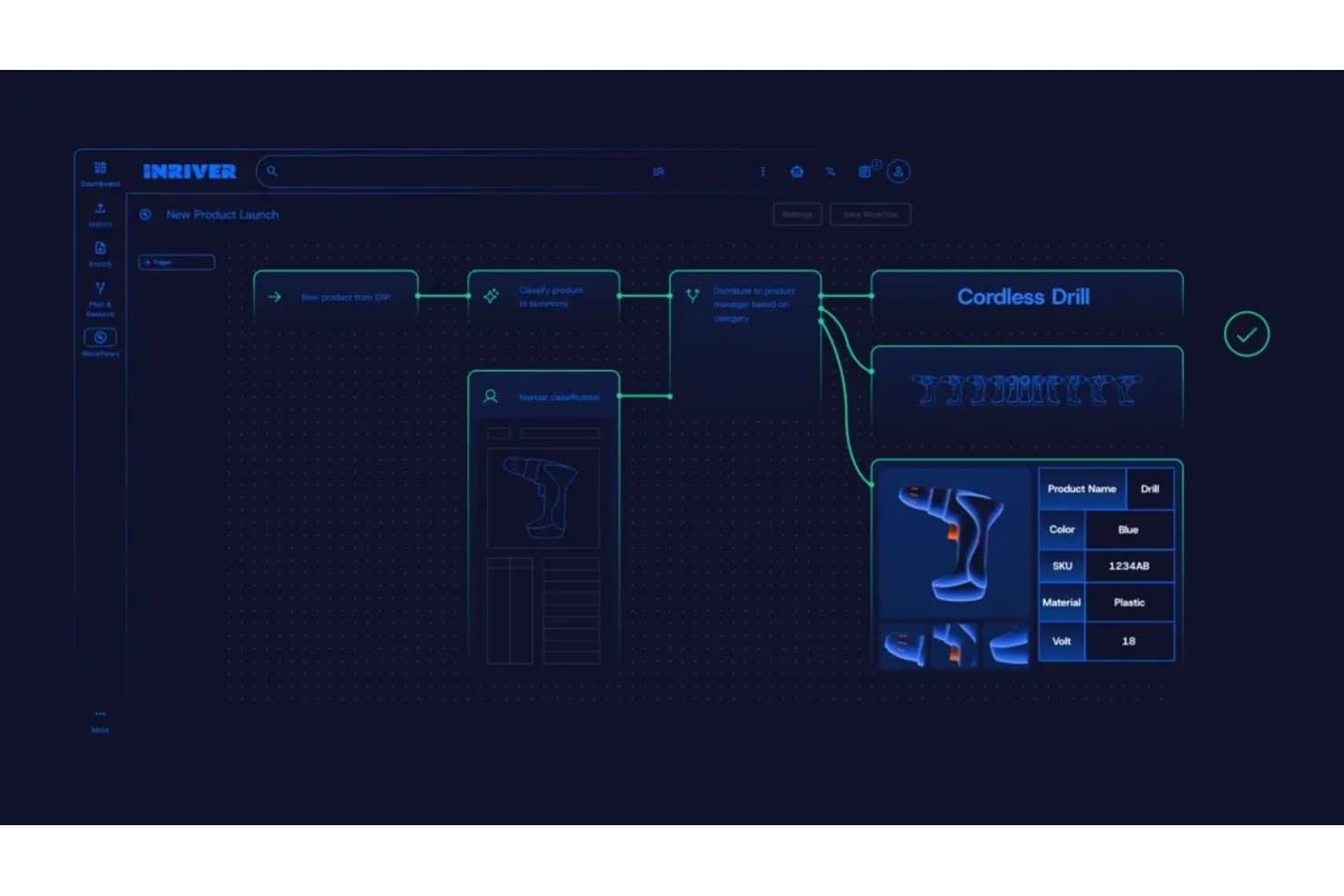
Inriver automatiza los flujos de trabajo de datos de productos desde la importación hasta el enriquecimiento. Inriver es una plataforma PIM impulsada por IA que centraliza la gestión de datos de productos, la sindicación multicanal, el enriquecimiento de contenido y la analítica de estantería digital en catálogos complejos y de gran escala.
¿Para quién es más adecuado Inriver?
Inriver es una opción excelente para equipos empresariales y del mercado intermedio que gestionan catálogos de productos grandes y complejos en varias regiones y canales de venta.
Por qué elegí Inriver
Inriver ocupa un lugar en mi lista de finalistas porque su automatización impulsada por IA cubre todo el ciclo de vida de los datos de productos, desde la incorporación y clasificación de los datos entrantes de los proveedores hasta la generación de listados preparados para cada canal con Inspire AI. Me impresiona especialmente cómo la analítica de estantería digital cierra el ciclo: supervisa los listados activos para detectar supresiones o imprecisiones y luego se conecta directamente con el PIM para que mi equipo corrija los datos de origen en lugar de perseguir los síntomas. Ese ciclo de publicación, supervisión y corrección es algo que rara vez veo integrado de forma tan estrecha en una sola plataforma.
Características principales de Inriver
- Modelo de datos elástico: Admite catálogos de entre 1.000 y 1.000.000 de SKU con una estructura totalmente configurable que se adapta a medida que crece tu negocio.
- Incorporación de contenido: Extrae datos de proveedores y socios al PIM, mientras la IA los asigna a los atributos correctos y señala las carencias antes de que comience el enriquecimiento.
- Tienda de marca: Un portal de autoservicio donde los equipos internos, distribuidores y socios pueden acceder bajo demanda al contenido de productos aprobado y a los recursos de marca.
- Asignación de relaciones entre productos: Permite definir y gestionar relaciones de venta adicional, venta cruzada y paquetes directamente dentro de la plataforma; está disponible en el nivel Profesional y superiores.
Integraciones de Inriver
Las integraciones de Inriver incluyen SAP Commerce Cloud, Adobe Commerce, Salesforce B2C Commerce, Adobe Experience Manager Assets, Bynder, Aprimo, Shopify, Amazon y Microsoft. Su sindicación basada en API y su marco de integración configurable admiten conectores personalizados.
Pros and Cons
Pros:
- El modelado flexible se adapta a catálogos complejos
- La IA enriquece, traduce y valida los listados
- La analítica de estantería vincula los problemas con los datos de origen
Cons:
- La gestión nativa de activos digitales sigue siendo limitada
- Algunos flujos de trabajo dependen de la asistencia de socios
Learn more about Inriver: Ideal para distribuir catálogos a más de 500 minoristas
- Prueba gratuita + demostración gratuita disponibles
- Desde $45,000/año

Akeneo permite a los usuarios cambiar entre vistas de lista de productos agrupadas, planas o consolidadas. Akeneo es una plataforma de gestión de la experiencia del producto que combina un PIM centralizado, un DAM integrado, el enriquecimiento de contenido basado en IA y la distribución multicanal en una única nube de productos.
¿Para quién es mejor Akeneo?
Akeneo es una excelente opción para los equipos de comercialización digital y comercio electrónico que gestionan catálogos grandes y complejos en decenas de canales minoristas y de marketplaces.
Por qué elegí Akeneo
Elegí Akeneo como una de las mejores opciones porque ninguna otra herramienta de esta lista iguala su alcance de distribución: más de 500 destinos minoristas y de marketplaces a través de su módulo Activation, con mapeo automático basado en IA y gestión de errores de distribución. Me encanta que la puntuación de preparación del canal señale los problemas antes de que una ficha se publique, algo importante cuando se envía el mismo catálogo a docenas de destinos simultáneamente. La generación de contenido mediante IA también adapta las descripciones según la voz de la marca, la configuración regional y los requisitos del canal, sin necesidad de reescrituras manuales.
Características principales de Akeneo
- Panel de información sobre la calidad de los datos: Supervisa la integridad del contenido de los productos y las puntuaciones de calidad por canal y configuración regional, con recomendaciones basadas en IA para corregir las carencias antes de la publicación.
- Gestor de datos de proveedores: Automatiza la incorporación de proveedores y recopila los datos de los productos directamente de ellos, reduciendo la introducción manual de datos.
- Sala de exposición digital: Transforma los datos de tu catálogo de productos en materiales de ventas compartibles y asistidos por IA para compradores y distribuidores.
- Motor de reglas: Actualiza automáticamente los atributos de los datos de los productos según las condiciones que definas, reduciendo el trabajo repetitivo de enriquecimiento a gran escala.
Integraciones de Akeneo
Akeneo cuenta con integraciones nativas con Salesforce Commerce Cloud, Adobe Commerce y Shopify, además de más de 250 integraciones con marketplaces a través de Akeneo App Store. Su API REST permite conexiones personalizadas con sistemas ERP, PLM, MDM, CRM, de comercio electrónico y de marketplaces.
Pros and Cons
Pros:
- Distribuye catálogos en más de 500 minoristas
- La IA asigna canales y señala carencias de preparación
- Centraliza catálogos de productos multilingües complejos
Cons:
- La gestión de recursos puede resultar engorrosa
- Los informes parecen limitados para análisis más profundos
Learn more about Akeneo: La mejor opción para la distribución de catálogos B2B con DAM integrado
- Prueba gratuita y demostración gratuita disponibles
- Precios bajo consulta
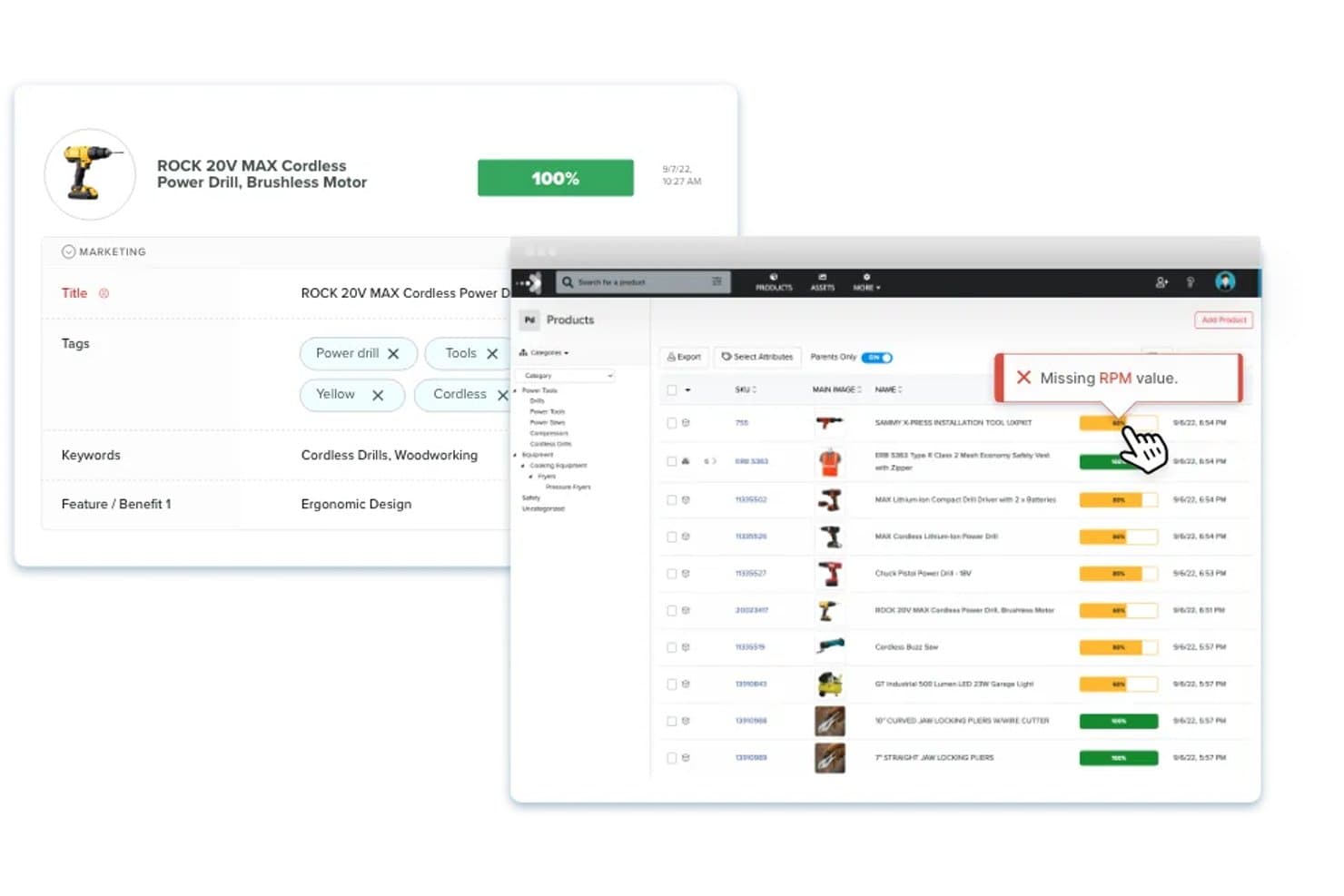
Catsy señala los atributos de producto que faltan para mantener la integridad del contenido. Catsy es una plataforma de PIM y DAM diseñada para fabricantes y distribuidores B2B, que combina la gestión centralizada de datos de productos, el enriquecimiento de contenido impulsado por IA, la distribución multicanal y un creador de catálogos basado en InDesign en un solo sistema.
¿Para quién es más adecuada Catsy?
Catsy es una opción especialmente adecuada para fabricantes y distribuidores B2B que gestionan catálogos de productos complejos en múltiples canales de venta y formatos impresos.
Por qué elegí Catsy
Catsy forma parte de mi lista de favoritas porque es la única plataforma de PIM que he visto que combina la distribución de catálogos B2B con un DAM totalmente integrado y un creador de catálogos basado en InDesign en un solo sistema. Me encanta que su enriquecimiento mediante IA extraiga los atributos directamente de las imágenes de los productos y complete las carencias automáticamente, lo que ahorra mucho tiempo cuando se gestionan miles de SKU industriales. Sus canales ilimitados para marketplaces en todos los niveles de precios significan que distribuir contenido en Amazon, Walmart y Shopify nunca se convierte en un cuello de botella por limitaciones de capacidad.
Características principales de Catsy
- Extracción de atributos mediante IA: La IA de Catsy extrae los atributos de los productos directamente de las imágenes cargadas y completa automáticamente los campos de datos que faltan en todo el catálogo.
- Generación de contenido multilingüe: La IA integrada traduce y genera descripciones de productos, metadatos SEO y listas de características en más de 95 idiomas a partir de una única fuente.
- Activadores de flujos de trabajo automatizados: Los flujos de trabajo de aprobación basados en tareas envían notificaciones a la bandeja de entrada y activan acciones cuando los datos de los productos cumplen las condiciones definidas, lo que mantiene a los equipos coordinados durante el lanzamiento de nuevos productos.
- Historial de auditoría y restauración: Cada cambio de datos se registra con control de versiones, y puedes restaurar cualquier versión anterior del registro de un producto cuando los errores se detectan tarde.
Integraciones de Catsy
Catsy ofrece sincronizaciones de API nativas con Shopify, Amazon y Salesforce. También exporta datos de productos a Walmart, Shopify Plus, BigCommerce, WooCommerce y Shopware, con opciones de importación mediante hojas de cálculo, API e importaciones programadas para fuentes de datos adicionales.
Pros and Cons
Pros:
- La IA extrae atributos de las imágenes de los productos
- Los catálogos impresos permanecen sincronizados con los datos de los productos
- El historial de restauraciones facilita una gestión más segura del catálogo
Cons:
- Los nuevos usuarios informan que la configuración es complicada
- Los análisis de visibilidad digital siguen sin estar documentados
Learn more about Catsy: 10La mejor opción para la inteligencia del cliente basada en IA
Unwrap
- Demostración gratuita disponible
- Precio bajo solicitud
Visit WebsiteCustomer Rating:4.8/5
Unwrap destaca las principales tendencias de los comentarios de los clientes para respaldar las decisiones sobre la experiencia del producto. Unwrap es una plataforma de inteligencia del cliente que utiliza IA para recopilar, categorizar y analizar los comentarios de los clientes provenientes de encuestas, tickets de soporte, llamadas y reseñas, con el fin de detectar tendencias y orientar las decisiones de producto.
¿Para quién es más adecuado Unwrap?
Unwrap es adecuado para equipos de producto y experiencia del cliente que necesitan interpretar grandes volúmenes de comentarios no estructurados de clientes provenientes de encuestas, tickets de soporte y reseñas.
Por qué elegí Unwrap
Elegí Unwrap como una de las mejores opciones porque su etiquetador automático basado en IA analiza grandes volúmenes de comentarios no estructurados de clientes y clasifica al instante las señales de reseñas, tickets de soporte y llamadas en temas de producto prácticos. Me gusta especialmente el asistente en lenguaje sencillo, que permite a los equipos de producto consultar sus datos de comentarios como si le hicieran una pregunta a un colega y detectar tendencias sin realizar análisis manuales. Si a esto le sumas las alertas en tiempo real, puedes detectar problemas de producto emergentes antes de que se agraven.
Características principales de Unwrap
- Respondedor de comentarios: Permite que tu equipo responda directamente a los comentarios de los clientes desde la plataforma sin tener que cambiar entre distintas herramientas.
- Segmentación de usuarios: Filtra y desglosa los comentarios por segmentos específicos de clientes para que puedas comparar las respuestas entre distintos grupos.
- Compatibilidad multilingüe: Procesa y analiza automáticamente los comentarios enviados en varios idiomas sin necesidad de traducción manual.
- Eliminación de PII: Detecta y elimina automáticamente la información de identificación personal de los comentarios recibidos antes de almacenarlos o analizarlos.
Integraciones de Unwrap
Unwrap se conecta con más de 3.000 fuentes de comentarios, incluidas encuestas, tickets de soporte, llamadas y reseñas. Ofrece acceso a la API para integraciones personalizadas.
Pros and Cons
Pros:
- La IA etiqueta los temas de los comentarios de los clientes
- El análisis en lenguaje sencillo respalda las decisiones de producto
- La ocultación de PII protege los comentarios de los clientes
Cons:
- No ofrece una gestión centralizada de los datos de producto
- No ofrece capacidades de sindicación de contenido de producto
Learn more about Unwrap:
Otras soluciones de gestión de la experiencia del producto
Aquí tienes algunos programas más de gestión de la experiencia del cliente que no llegaron a formar parte de la lista principal.
- 11SyndigoIdeal para realizar sindicación a los principales minoristas del mundo
- 12PimberlyIdeal para datos de catálogos B2B y gobernanza de activos
- 13Bluestone PIMIdeal para PIM componible con agentes de IA nativos de MCP
- 14PimcoreIdeal para el modelado de catálogos de núcleo abierto a escala ilimitada
- 15PIMworksIdeal para la sindicación de catálogos omnicanal
- 16PlytixIdeal para centralizar datos de productos multicanal
- 17Pattern PXMIdeal para la sindicación de catálogos nativa de los marketplaces
- 18QuableIdeal para el enriquecimiento combinado de DAM y PIM
- 19Centric PXMIdeal para distribuir catálogos en más de 1.000 canales
Cómo evalúo el software de gestión de la experiencia del producto
Mi evaluación se divide en tres partes. Primero —y lo más importante—, busco herramientas que puedan consolidar los datos de los productos en una única fuente y distribuir las fichas entre minoristas y marketplaces. Después, compruebo si cuentan con funciones diferenciadoras, como tarjetas de puntuación del estante digital. Por último, considero la asistencia para la incorporación y la relación calidad-precio.
Funcionalidad principal (requisitos básicos para esta lista)
Al seleccionar herramientas para mi lista, puntúo cada una en una escala de 0 (no ofrece la funcionalidad) a 5 (sobresale en esta área) para cada funcionalidad principal que se indica a continuación. Después convierto el total en un porcentaje para ayudar a evaluar el grado de adecuación general de cada herramienta, con un peso adicional para las funcionalidades que he considerado esenciales.
- Gestión de datos de productos (esencial): Evalúo hasta qué punto cada herramienta estructura los atributos, gestiona las variantes y escala en catálogos complejos con miles de SKU.
- Distribución multicanal (esencial): Cada herramienta debe enviar el contenido de los productos a marketplaces, portales de minoristas y tiendas online, con asignación específica para cada canal y sincronización continua.
- Gestión de activos digitales: Compruebo si las imágenes, los vídeos y los documentos están vinculados directamente a los registros de productos y si la herramienta admite el control de versiones en todos los canales.
- Enriquecimiento y puntuación del contenido: Las buenas herramientas señalan las descripciones incompletas y puntúan la calidad de las fichas según los requisitos del canal, en lugar de limitarse a comprobaciones genéricas de integridad.
- Validación y gobernanza de datos: Busco reglas configurables, flujos de trabajo de aprobación basados en roles y registros de auditoría que mantengan la precisión de los datos del catálogo a medida que los equipos crecen.
- Formato específico para cada canal: La herramienta debería adaptar automáticamente el contenido de los productos a los requisitos de las plantillas de cada minorista, en lugar de obligar a rehacer el trabajo manualmente para cada canal.
Una vez que tengo una lista de herramientas que cumplen los criterios, considero qué distingue a cada plataforma.
Factores diferenciadores (lo que distingue a los proveedores)
Así es como comparo y contrasto los distintos proveedores:
Funciones destacadas
Las tarjetas de puntuación del estante digital son lo primero que compruebo. Quiero ver cómo una herramienta compara tus fichas con las de la competencia en cuanto al cumplimiento del contenido, las imágenes y la posición en las búsquedas en cada minorista. Las alertas de cumplimiento de los minoristas son igual de importantes: herramientas como Salsify y Syndigo señalan las infracciones de las guías de estilo antes de publicar, lo que evita las dolorosas retiradas posteriores al lanzamiento. También evalúo las capacidades de generación de contenido mediante IA, concretamente si la IA puede redactar y localizar descripciones adaptadas a las normas de cada categoría, en lugar de producir textos genéricos.
Más allá de las funciones
Evalúo con qué rapidez una plataforma pasa los nuevos SKU del borrador a su publicación activa en todos los canales, especialmente durante las campañas estacionales, cuando perder una ventana de lanzamiento supone una pérdida de ingresos real. La escalabilidad es igual de importante: las herramientas deben gestionar catálogos de varias marcas con miles de atributos sin bloquearse al realizar actualizaciones masivas. También compruebo si cuentan con conectores nativos para plataformas de ERP y comercio electrónico como Shopify o SAP, ya que las soluciones personalizadas generan rápidamente una deuda de mantenimiento.
Tendencias en los programas de gestión de la experiencia del producto
Durante mi investigación, recopilé innumerables actualizaciones de productos, comunicados de prensa y registros de lanzamientos de distintos proveedores de programas de gestión de la experiencia del producto. Estas son algunas de las tendencias emergentes que estoy siguiendo:
- Información basada en IA: Los proveedores utilizan la IA para analizar los datos de los usuarios con mayor profundidad. Esto ayuda a los equipos a comprender rápidamente el comportamiento y las preferencias de los clientes. Por ejemplo, algunas herramientas ofrecen ahora análisis predictivos para anticiparse a las necesidades de los usuarios.
- Funciones de personalización: Cada vez se presta más atención a la personalización de las experiencias de los usuarios. Los programas permiten ahora adaptar las interacciones con el producto a cada usuario, lo que hace que la experiencia sea más relevante y atractiva.
- Programas de voz del cliente: Cada vez más herramientas ofrecen funciones para recopilar y analizar directamente los comentarios de los clientes. Esta tendencia es importante para crear productos que conecten con los usuarios, y algunos proveedores ofrecen paneles de comentarios en tiempo real.
- Métricas de sostenibilidad: A medida que las empresas se centran en la sostenibilidad, algunos programas incluyen ahora funciones para realizar un seguimiento del impacto medioambiental. Esto ayuda a los equipos a alinear el desarrollo de productos con los objetivos de sostenibilidad de la empresa.
- Integración de realidad aumentada (AR): La AR se utiliza para mejorar las experiencias de producto, especialmente en el comercio minorista y el comercio electrónico. Algunos proveedores ofrecen herramientas de AR para probar productos virtualmente, lo que proporciona a los usuarios una experiencia más interactiva.
¿Qué es el software de gestión de la experiencia del producto?
El software de gestión de la experiencia del producto es una herramienta que ayuda a las empresas a ofrecer una experiencia coherente y atractiva para sus productos en distintos puntos de contacto digitales. Proporciona herramientas para gestionar la información de los productos y los activos digitales, así como para recopilar, almacenar, gestionar y analizar las interacciones y los comentarios de los clientes sobre los productos en una ubicación centralizada, lo que garantiza que los clientes reciban información precisa y convincente sobre los productos siempre que interactúen con la marca.
Este tipo de software incluye funciones como la gestión centralizada del contenido de los productos, la gestión de activos digitales, la publicación multicanal y el análisis. En conjunto, ayudan a ofrecer una experiencia unificada y positiva en todos los canales, lo que se traduce en una mayor satisfacción y fidelidad de los clientes.
Funciones del software de gestión de la experiencia del producto
Al seleccionar un software de gestión de la experiencia del producto, considera estas funciones clave:
- Capacidades de localización: Adapta el contenido de los productos a los idiomas, las divisas y las particularidades culturales regionales para los mercados globales.
- Herramientas de personalización: Ofrecen experiencias de producto personalizadas en función de las preferencias y los comportamientos de los clientes.
- Contenido de producto centralizado: Garantiza la coherencia y precisión de los datos de los productos en todas las plataformas para lograr el éxito en el escaparate digital.
- Adaptabilidad a varias regiones: Admite promociones, precios y cumplimiento normativo localizados para satisfacer las diversas necesidades de los clientes.
- Recomendaciones dinámicas: Proporciona sugerencias de productos personalizadas para aumentar la interacción e impulsar las conversiones.
- Sistemas de comentarios iterativos: Recopilan y analizan continuamente las aportaciones de los clientes para perfeccionar las experiencias de producto y abordar los puntos problemáticos.
- Herramientas de priorización de la hoja de ruta: Alinean la hoja de ruta y el desarrollo del producto con las necesidades de los clientes mediante la clasificación de las funciones según los comentarios y el impacto.
Ventajas del software de gestión de la experiencia del producto
La implementación de un software de gestión de la experiencia del producto puede aportar varias ventajas a tu equipo y a tu empresa. Estos son algunos ejemplos:
- Mensajes de marca coherentes: La gestión centralizada del contenido garantiza información de producto precisa y unificada en todos los canales.
- Mayor fidelidad de los clientes: La personalización y la localización crean conexiones significativas que fomentan las compras recurrentes.
- Entrada más rápida en el mercado: Las funciones de localización agilizan la adaptación del contenido de los productos a nuevos mercados, acelerando los plazos de expansión.
- Menos errores: Las actualizaciones automatizadas y la sincronización del contenido minimizan el riesgo de imprecisiones o de que los detalles de los productos queden obsoletos.
- Mayores tasas de conversión: Las recomendaciones dinámicas y las experiencias de compra personalizadas aumentan la interacción e impulsan las ventas.