

Projeleri ve belgeleri yönetmek, özellikle mevcut araçlarınız ihtiyaçlarınızı karşılamıyorsa zahmetli olabilir. Confluence popülerdir, ancak her ekip için her zaman doğru tercih değildir. Daha fazla kullanım kolaylığına, daha fazla entegrasyon seçeneğine veya daha uygun bir fiyata ihtiyacınız varsa, özel zorluklarınızla daha iyi örtüşen bir çözüm arıyor olabilirsiniz.
Confluence'a çeşitli alternatifleri (sizin uğraşmanıza gerek kalmaması için) inceleyip test ederek, Confluence'ı piyasadaki diğer yazılım seçeneklerinden ayıran özelliklere ve faktörlere odaklandım. Bu makalede, tarafsız araştırmalara ve gerçek dünya testlerine dayanarak en iyi seçimlerimi paylaşacağım.
Ekibinizin daha verimli çalışmasına yardımcı olmak için iş birliği ve dokümantasyon ihtiyaçlarınıza tam olarak uyabilecek yazılım seçeneklerini ele alıyorum. Hadi başlayalım.
Confluence Nedir?
Confluence, ekiplerin bilgilerini paylaşmasına ve işlerini düzenlemesine yardımcı olan bir iş birliği ve dokümantasyon yazılımıdır. Genellikle herkesin aynı bilgilerden haberdar olmasını sağlaması gereken proje yöneticileri, geliştiriciler ve iş ekipleri tarafından kullanılır. Sayfa oluşturma, ekip iş birliği ve entegrasyon özellikleri sayesinde Confluence, verimli proje yönetimini ve bilgi paylaşımını destekler. Genel olarak ekibinizin etkili bir şekilde birlikte çalışabileceği bir platform sunar.
Why Trust Our Software Recommendations
6,700+
Reviews
20
Industry experts
16+
Evaluation factors
14
Years
Our team has been testing and reviewing software since 2012. As product managers ourselves, we know how difficult—and important—it is to choose the right software.
For this guide, we evaluated tools using hands-on testing and independent research, scoring tools using our selection criteria.
Our reviews reflect our human editorial judgment, not a sales pitch.
Expert reviewers:
- Andrew LumbySenior TPM
- Cristiano ValimSenior UI/UX Lead


Confluence Alternatifleri Karşılaştırma Tablosu
Bu karşılaştırma tablosu, en iyi Confluence alternatifleri seçimlerimin fiyatlandırma ayrıntılarını özetlemektedir:
Score legend (out of 5)
- Excellent4.5–5
- Good4–4.4
- Average3–3.9
- Below average2–2.9
- Poor1–1.9
Sorted by: Default
| Tool | Starting Price | Website | |||||||
|---|---|---|---|---|---|---|---|---|---|
Best for dual document editing modes | 4.2 out of 5 | 3 | 5 | 3 | 4 | 5 | 5 | Pricing upon request 14-day free trial + free demo available | Website |
Best for an all-in-one workspace | 4.0 out of 5 | 4 | 4 | 4 | 5 | 3 | 4 | $10/user/month Free plan + 30-day trial available | Website |
Best for Microsoft 365-native team wikis | 3.5 out of 5 | 4 | 2 | 3 | 3 | 4 | 5 | $7/user/month 1-month free trial available | Website |
Best for migrating self-hosted Confluence wikis | 3.8 out of 5 | 4 | 4 | 3 | 4 | 4 | 4 | €1/user/month Free plan + up to 30-day trial + free demo available | Website |
Best for governed knowledge with verification workflows | 3.5 out of 5 | 3 | 4 | 5 | 2 | 4 | 3 | Pricing upon request Free demo available | Website |
Best for docs connected to live project boards | 3.7 out of 5 | 4 | 4 | 4 | 2 | 4 | 4 | $9/user/month Free plan + 14-day trial available | Book Demo |
Best for docs tied directly to tasks and sprints | 3.5 out of 5 | 4 | 4 | 4 | 3 | 3 | 3 | $12/user/month Free plan + free demo available | Book Demo |
Best for keeping docs current with AI-flagged updates | 3.8 out of 5 | 4 | 5 | 3 | 3 | 4 | 4 | $10/user/month 14-day free trial + free demo available | Website |
Best for self-hosted team knowledge bases | 3.8 out of 5 | 4 | 4 | 3 | 4 | 4 | 4 | $4/user/month Free plan + 30-day trial available | Website |
Best for docs-as-code with Git Sync workflows | 3.5 out of 5 | 3 | 3 | 4 | 3 | 4 | 4 | $77/month Free plan + 14-day trial + demo available | Website |


2020'den beri ürün yönetimi yazılımlarını test ediyor ve inceliyoruz. Biz de ürün yöneticileri olarak, yazılım seçerken doğru kararı vermenin ne kadar kritik ve zor olduğunu biliyoruz. Kitlemizin daha iyi yazılım satın alma kararları vermesine yardımcı olmak için kapsamlı araştırmalara yatırım yapıyoruz.
Farklı ürün yönetimi kullanım alanları için 2.000'den fazla aracı test ettik ve 1.000'den fazla kapsamlı yazılım incelemesi yazdık. Şeffaflığımızı nasıl koruduğumuzu öğrenin ve yazılım inceleme metodolojimize göz atın.
En İyi Confluence Alternatifleri İncelemeleri
Aşağıda, kısa listeme giren en iyi Confluence alternatiflerinin ayrıntılı özetlerini bulabilirsiniz. İncelemelerimde, sizin için en iyi aracı bulmanıza yardımcı olmak amacıyla her aracın temel özelliklerine, artılarına ve eksilerine, entegrasyonlarına ve ideal kullanım alanlarına ayrıntılı bir bakış sunuyorum.
 Best for dual document editing modes
- 14-day free trial + free demo available
- Pricing upon request
Visit WebsiteCustomer Rating:4.7/5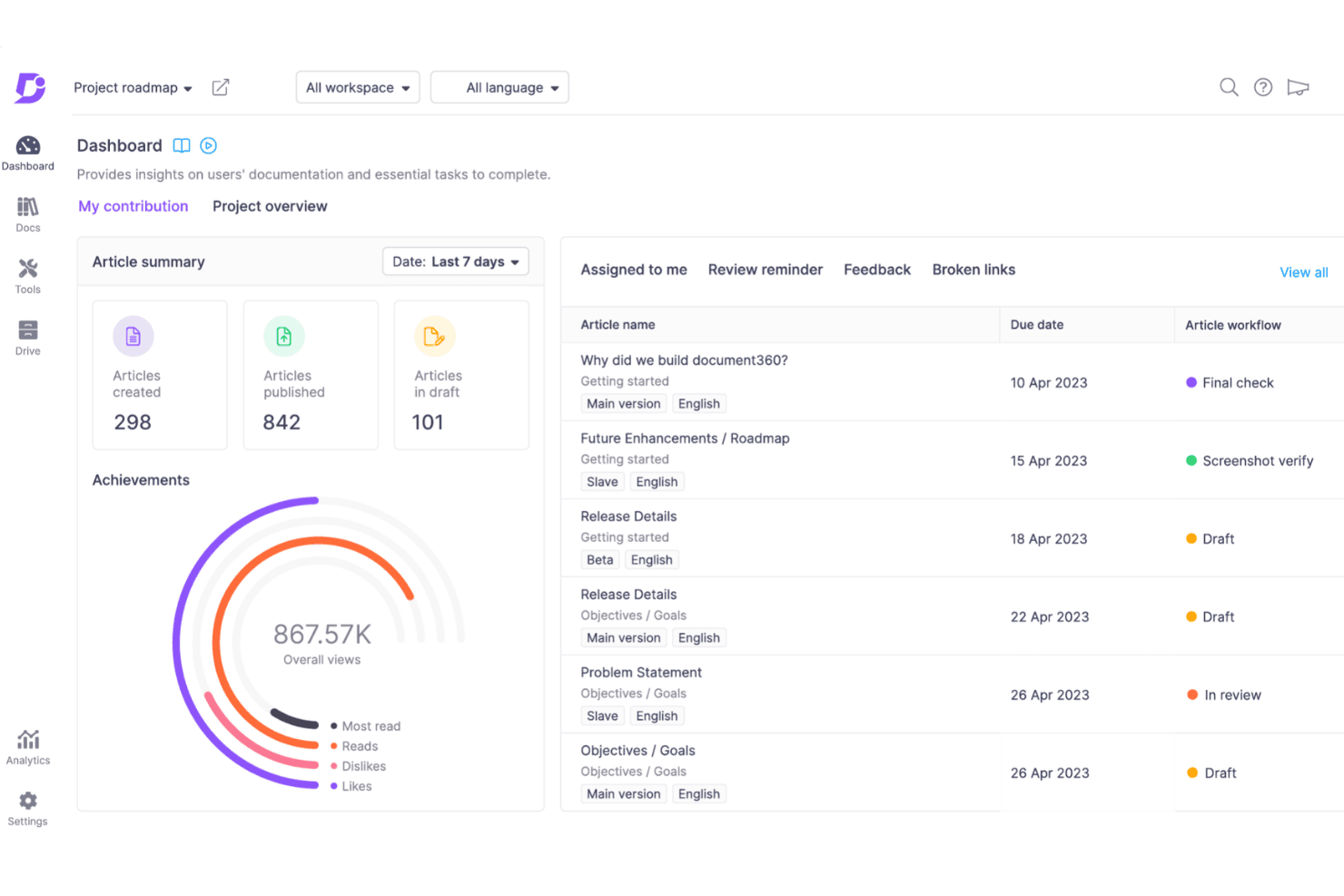
Document360 gives writers a dashboard to track article progress and deadlines. Document360 is a knowledge base platform built for technical writers and IT teams who need structured documentation publishing, fine-grained access control, and AI-powered search—making it a strong Confluence alternative for teams focused on external or internal docs rather than general-purpose wikis.
Who Is Document360 Best For?
Document360 is a strong fit for technical writers and IT teams managing structured documentation for external audiences or private knowledge bases.
Why I Picked Document360
I picked Document360 as one of the best because its dual editing modes genuinely solve a real friction point: technical writers can work in Markdown with a live split-screen preview, while other contributors use the Advanced WYSIWYG editor with slash commands, callouts, and accordion blocks. I love that both editors share the same content, so teams aren't duplicating work or converting formats. The structured review workflow, with approval checkpoints, due dates, and audit trails, makes it a credible Confluence alternative for teams publishing versioned, governance-heavy documentation.
Document360 Key Features
- AI search ("Ask Eddy"): Conversational AI search pulls answers directly from your knowledge base articles and shows clickable citations.
- Fine-grained access control: Set permissions at the workspace, category, or article level for individual users or groups, with inheritance and deny-rule overrides.
- Version comparison tool: Compare any two article versions side by side, with additions, removals, and formatting changes color-coded for quick review.
- Managed Confluence migration: Document360's team runs the migration using custom crawlers, rebuilds links and redirects, and provides 30 days of post-migration support.
Document360 Integrations
Document360 offers 60+ integrations, including Zendesk, Freshdesk, Slack, Microsoft Teams, GitHub, Salesforce, and Crowdin. It also provides REST API v3, webhooks, and Zapier.
Pros and Cons
Pros:
- AI search answers cite source articles
- Approval workflows and version comparisons support governance
- Markdown and WYSIWYG editors share content
Cons:
- No native databases, whiteboards, or PRD templates
- Co-editing is WYSIWYG-only and capped at ten
Learn more about Document360: Best for an all-in-one workspace
- Free plan + 30-day trial available
- From $10/user/month
Visit WebsiteCustomer Rating:4.6/5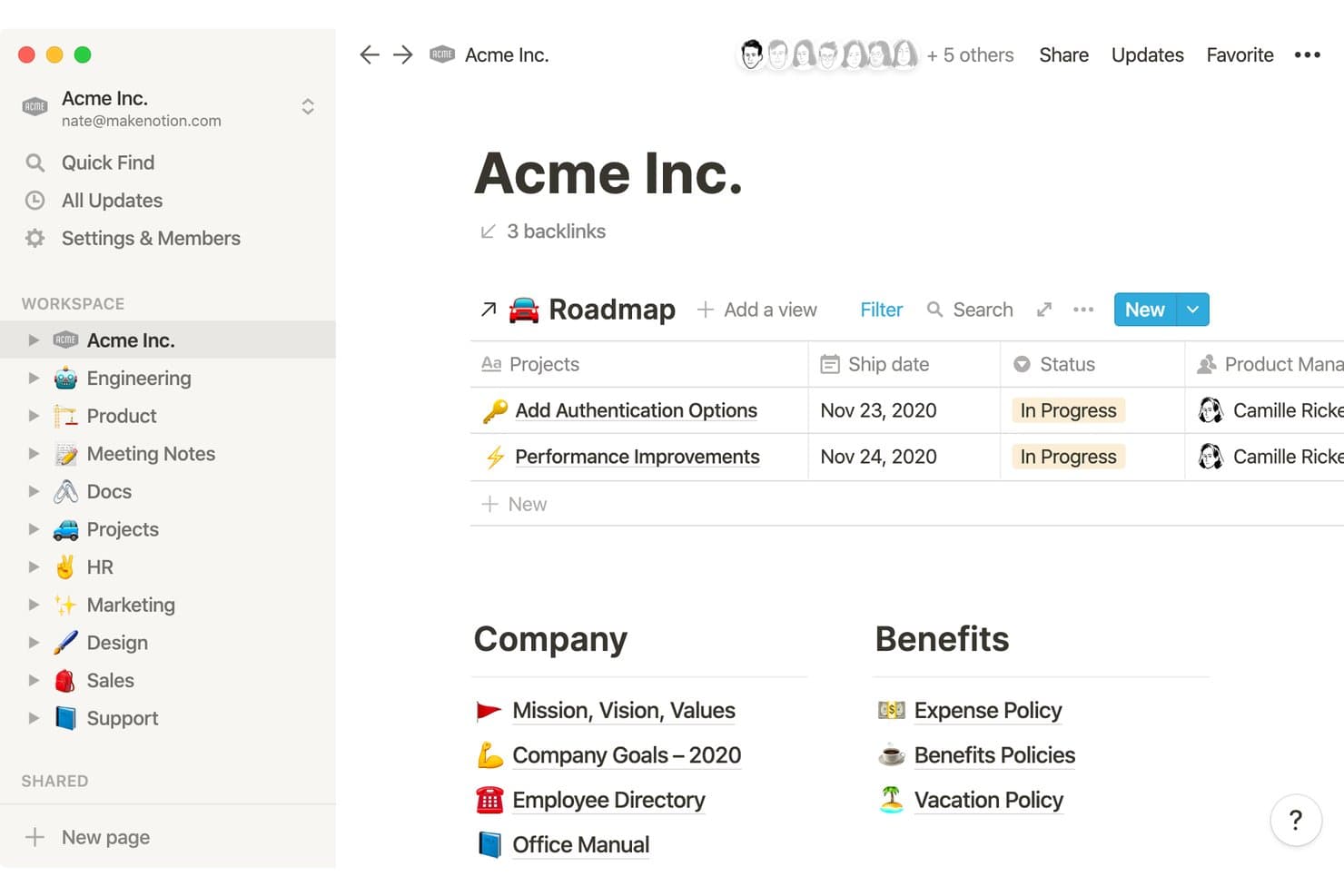
Notion organizes company wikis, roadmaps, and HR docs in one workspace. Notion is a flexible workspace that combines docs, wikis, databases, and AI in one place—making it a natural fit for product teams who want to manage roadmaps, PRDs, and team knowledge without juggling multiple tools.
Who Is Notion Best For?
Notion works especially well for product teams that want their roadmaps, PRDs, and team knowledge all in one place instead of spread across multiple tools.
Why I Picked Notion
I picked Notion as one of the best because it genuinely replaces a whole stack of tools in one workspace. I keep PRDs, roadmaps, and sprint notes all in the same place, linked through databases with board, timeline, and table views. What I appreciate most is that Notion AI Meeting Notes transcribes discussions and tags speakers, so decisions land directly in the same workspace where the work lives.
Notion Key Features
- Confluence importer: A native importer lets you bring in pages from Confluence Cloud, Server, or Data Center using a ZIP upload, API, or URL—supporting up to 50,000 pages per import with hierarchy preserved.
- Synced blocks: Write a block of content once and push it across multiple pages simultaneously, so updates appear everywhere without manual edits.
- Row-level database permissions: Restrict database views so team members only see rows assigned to them via a person or "created by" property—available on Business and above.
- Version history with restore: Review, preview, and restore past page versions, with bookmark and naming options to mark key snapshots—history length varies by plan from 7 days to unlimited.
Notion Integrations
Notion offers native integrations with Jira, Slack, Google Drive, GitHub, GitLab, Figma, Asana, Amplitude, and Zendesk. It also provides a public API, webhooks, SDK, CLI, and MCP server for custom workflows.
Pros and Cons
Pros:
- Page hierarchy supports sprawling knowledge bases
- Synced blocks keep repeated guidance current
- Docs and databases share one workspace
Cons:
- Large databases can feel slow at scale
- Confluence imports omit permissions and history
Learn more about Notion: Best for Microsoft 365-native team wikis
- 1-month free trial available
- From $7/user/month (billed annually)
Visit WebsiteCustomer Rating:4.4/5
SharePoint admin center displays site group details and settings. SharePoint is Microsoft's enterprise collaboration platform that lets teams co-author pages, manage documents, and build internal knowledge bases within the Microsoft 365 ecosystem.
Who Is SharePoint Best For?
SharePoint is a natural fit for enterprise teams already running Microsoft 365 who need a wiki and document hub that works natively with Teams, Word, and the rest of the Microsoft ecosystem.
Why I Picked SharePoint
I picked SharePoint as one of the best because, if your team already lives in Microsoft 365, it's the natural place to build your wiki without adding another tool to the stack. Real-time co-authoring lets multiple people edit the same page simultaneously, with section-level presence so you always see who's working where. Pair that with granular, item-level permissions and Entra B2B guest access, and you get documentation control that most standalone wikis can't replicate.
SharePoint Key Features
- Version history with visual comparison: SharePoint tracks every page edit and lets you view a side-by-side visual diff between versions, then restore any earlier version with a single click.
- Enterprise-scale permissions: You can set access controls down to the individual list, folder, or item level, with Entra B2B guest sharing and Microsoft Purview audit logging built in.
- Hub sites for cross-site content rollup: Hub sites connect related team and communication sites under shared navigation, branding, and unified search so content stays findable across departments.
- Microsoft Lists for structured data: Lists support up to 30 million items with custom metadata columns and filtered views, giving teams a way to track decisions, assets, or requirements alongside their pages.
SharePoint Integrations
SharePoint has native integrations across the Microsoft ecosystem, including Microsoft 365, Teams, OneDrive, Word, Excel, PowerPoint, Planner, Lists, Power Automate, and Copilot. Copilot connectors index Confluence Cloud and Jira Data Center content, while SPFx and Power Automate support custom integrations.
Pros and Cons
Pros:
- Visual version comparisons simplify page rollback
- Granular permissions suit regulated knowledge libraries
- Real-time page co-authoring shows active editors
Cons:
- Nested page hierarchies require manual assembly
- Search complaints complicate cross-site knowledge discovery
Learn more about SharePoint: Best for migrating self-hosted Confluence wikis
- Free plan + up to 30-day trial + free demo available
- From €1/user/month (billed annually)
Visit WebsiteCustomer Rating:4.4/5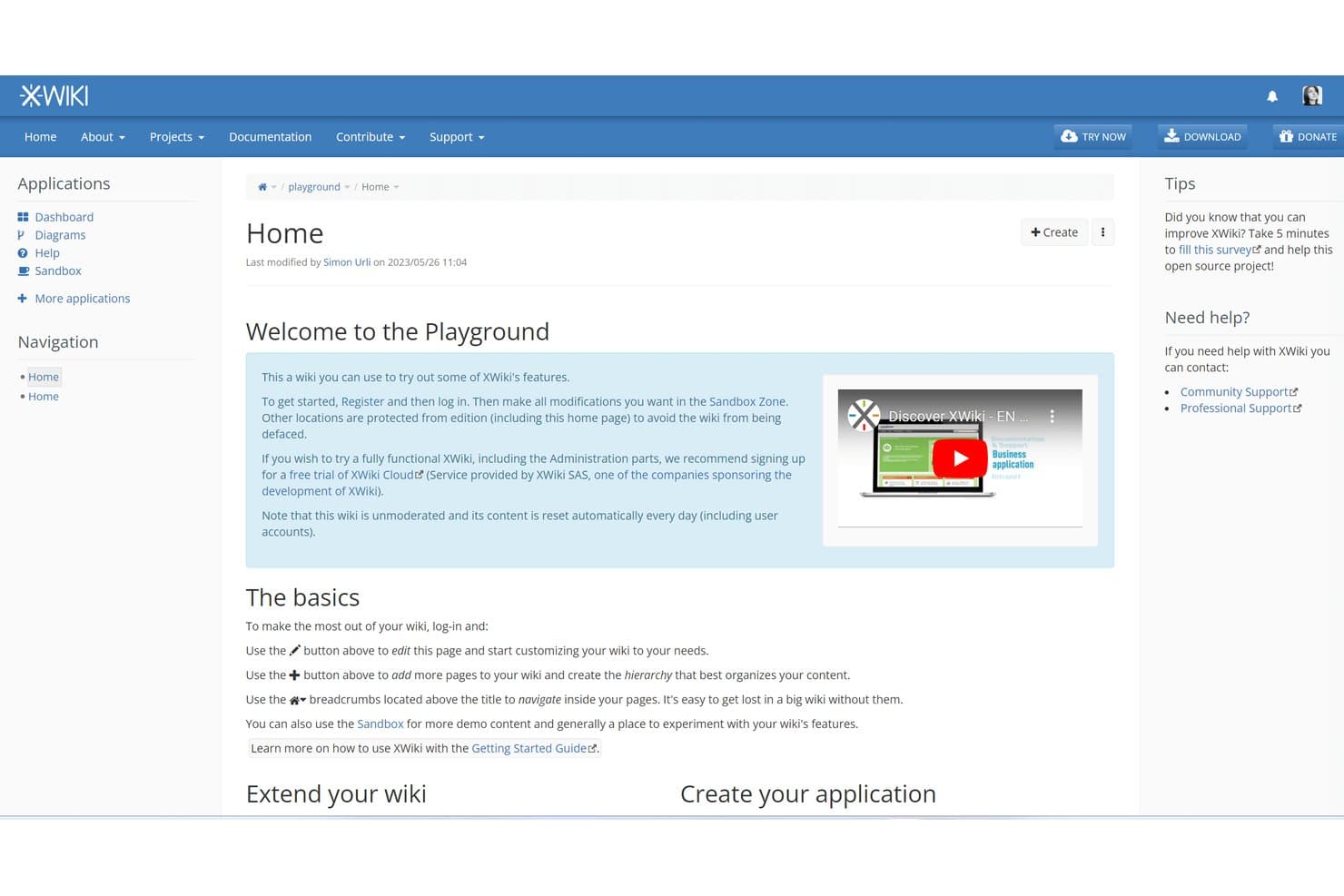
XWiki offers a playground wiki for users to explore features freely. XWiki is an open-source wiki platform that appeals to IT-forward teams who want full control over their knowledge base, with flexible self-hosted or cloud deployment, granular permissions, and a notably complete toolkit for migrating content from Confluence.
Who Is XWiki Best For?
XWiki is a strong fit for IT-driven teams that need self-hosted or EU-hosted wiki infrastructure with serious control over permissions, data residency, and deployment.
Why I Picked XWiki
I've included XWiki in my top picks because its Confluence Migrator Pro is the most complete migration toolkit I've seen in this category. It preserves page history, permissions, attachments, and even blog posts from both Confluence Server and Cloud XML exports, and it generates bridge macros so your existing Confluence macros keep working post-migration. I also appreciate that you can batch-import multiple spaces at once, which makes moving a large self-hosted Confluence instance far less painful than it sounds.
XWiki Key Features
- Realtime WYSIWYG editor: A CKEditor-based editor with presence avatars, autosave, and lets multiple users co-edit pages simultaneously.
- Apache Solr search: Full-text search covers pages, attachments, and even deleted content, with wildcard support and RSS subscriptions for saved searches.
- Granular permission controls: Rights can be set at the page, space, or wiki level, with inheritance, group management, and enterprise SSO options including SAML, OIDC, and SCIM.
- Diagram Pro app: A draw.io-powered diagramming tool lets you create, embed, and export diagrams directly within wiki pages.
XWiki Integrations
XWiki integrates with OpenProject, Microsoft 365 including OneDrive, OnlyOffice, and Collabora. It also provides a REST API for custom integrations.
Pros and Cons
Pros:
- Granular inherited rights suit controlled documentation
- Self-hosting keeps knowledge infrastructure under your control
- Preserves page history and permissions during migration
Cons:
- Macro and permission gaps require migration cleanup
- Older interface can slow everyday documentation
Learn more about XWiki: 5Best for governed knowledge with verification workflows
Guru
- Free demo available
- Pricing upon request
Visit WebsiteCustomer Rating:3.5/5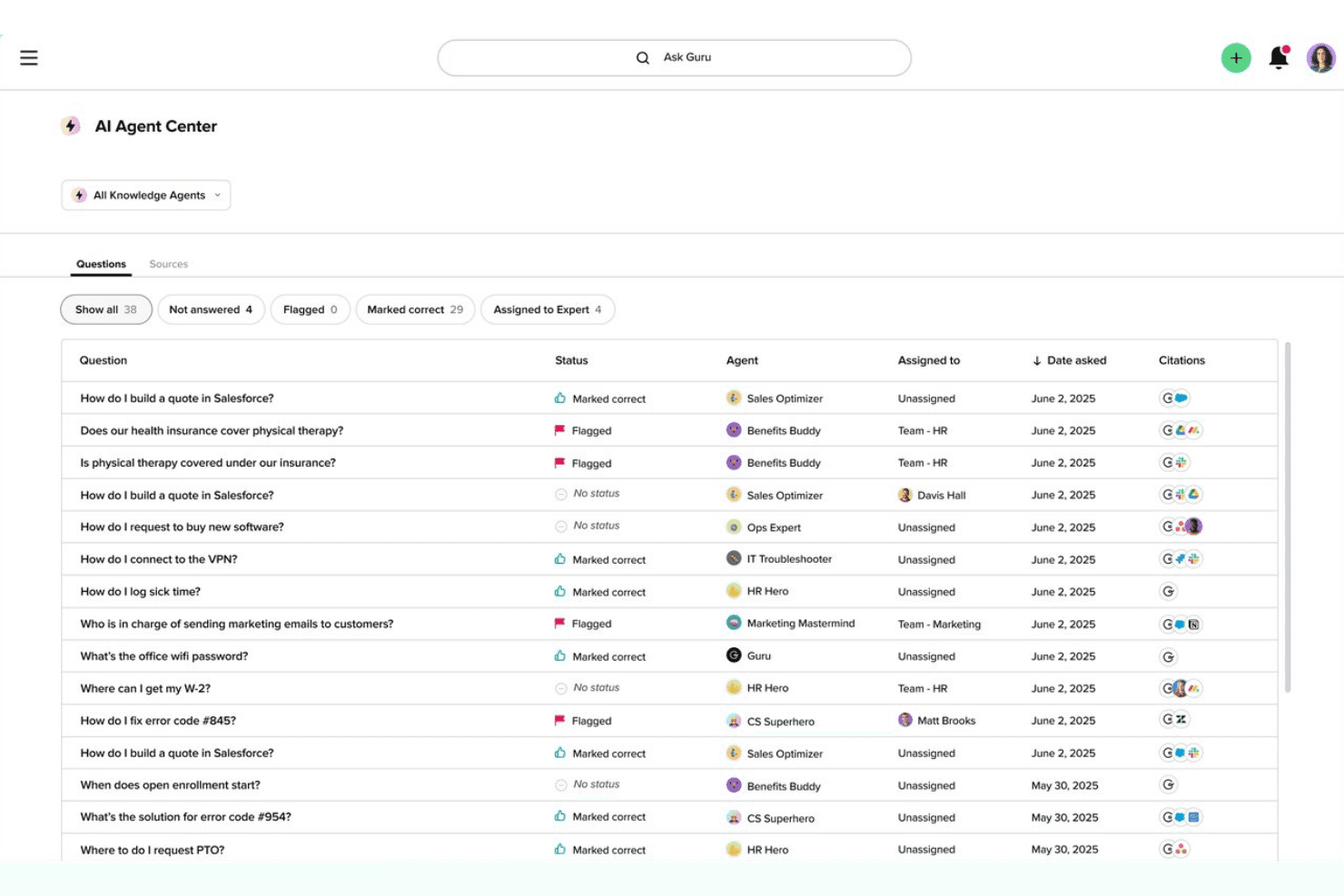
Guru's AI Agent Center offers a question log with statuses, assigned agents, and citation sources across departments. Guru is an AI-powered knowledge platform that helps teams structure, govern, and surface company knowledge directly inside the tools they already use—making it a strong fit for IT administrators and operations teams managing information at scale.
Who Is Guru Best For?
Guru is a strong fit for IT administrators and operations teams that need strict knowledge governance, verification workflows, and enterprise security controls across a large organization.
Why I Picked Guru
I picked Guru as one of the best Confluence alternatives because its verification workflow is unlike anything else on this list. Every Card gets an assigned verifier and a re-verification interval, so outdated knowledge gets flagged automatically rather than silently rotting in a wiki. I also like that Knowledge Agents can verify or unverify content across connected sources like Confluence, Google Drive, and SharePoint, keeping your whole knowledge ecosystem honest without manual audits.
Guru Key Features
- Enterprise Search: Searches across Guru content and connected external sources simultaneously, with fuzzy matching for typos and inexact queries.
- Knowledge Sync: Keeps Confluence as a read-only connected source so your team can search it through Guru without fully migrating content.
- Confluence importer: Built-in migration tool that imports Confluence HTML zip exports directly into Guru Cards and folders.
- AI writing assist: Rewrites, summarizes, adjusts tone, and translates Card content, available on All-in-One and Enterprise plans.
Guru Integrations
Guru offers 100+ integrations, including Confluence, Jira, GitHub, GitLab, Azure DevOps, Slack, Microsoft Teams, Google Drive, SharePoint, and Asana. It also supports a REST API, MCP, Workato, Prismatic, and Zapier.
Pros and Cons
Pros:
- Revision diffs support Card rollback
- Cited AI answers respect source permissions
- Verification assignments flag stale knowledge
Cons:
- Three-level folder limit constrains documentation trees
- Card format fragments long technical documents
Learn more about Guru: Best for docs connected to live project boards
- Free plan + 14-day trial available
- From $9/user/month (billed annually)
Visit WebsiteCustomer Rating:4.6/5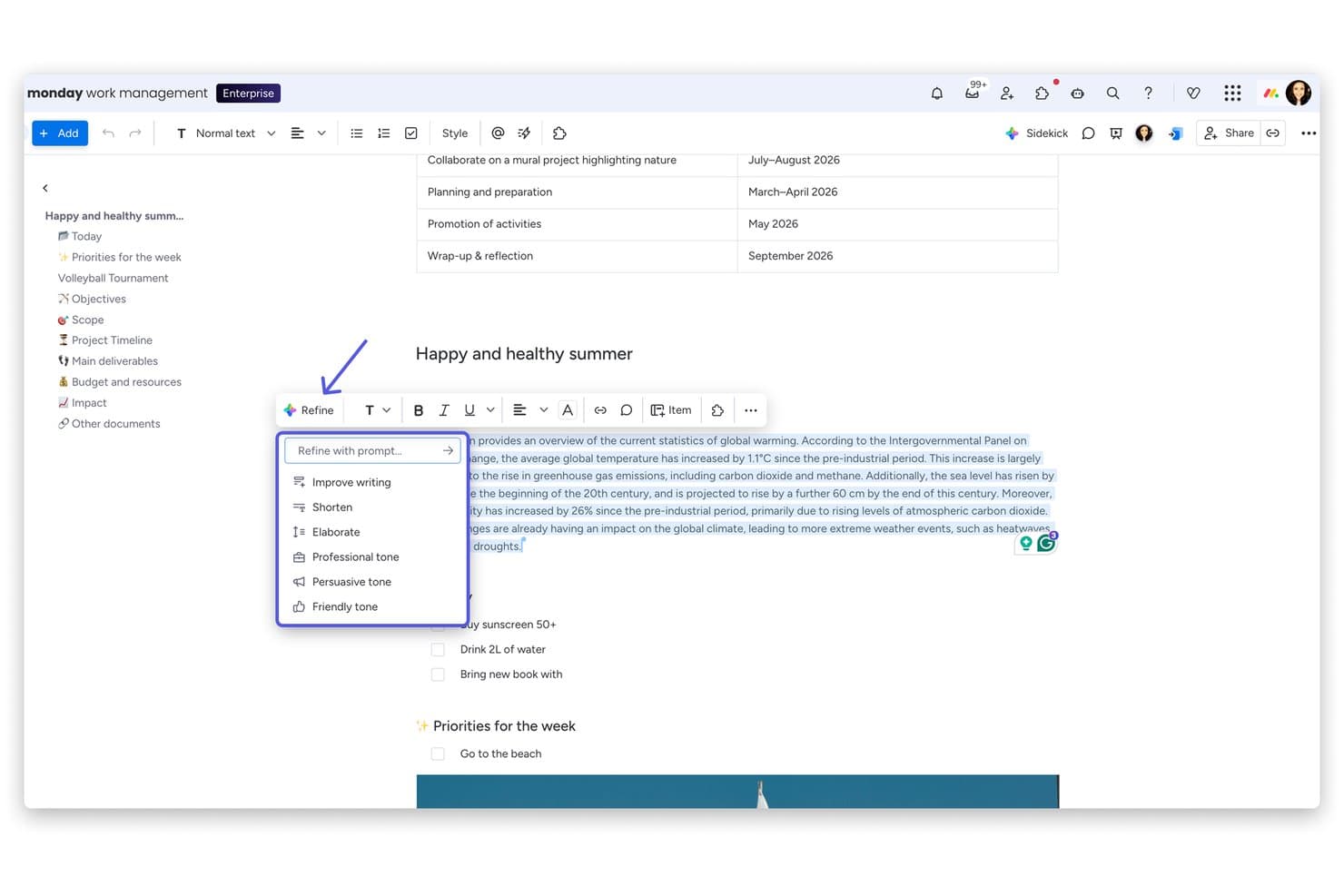
monday AI Workspace offers an AI-powered 'Refine' menu with options like Improve writing, Shorten, Elaborate, and tone adjustments directly within its document editor. monday AI Workspace is a work management platform that connects live project boards with built-in docs, making it a strong fit for product managers and engineering teams who want their specs, PRDs, and meeting notes tied directly to the work being tracked.
Who Is monday AI Workspace Best For?
monday AI Workspace is a strong fit for product managers and engineering team leads who want specs, PRDs, and meeting notes living in the same place as the boards tracking that work.
Why I Picked monday AI Workspace
I picked monday AI Workspace because it's the only tool on my list where your PRD or sprint planning doc lives directly beside the board tracking that work. I love that you can embed a live board widget inside a workdoc, so when sprint priorities shift, the doc reflects it without anyone copying updates manually. You can also turn a line in a doc into a board item and trigger automations from it, which keeps specs and execution genuinely in sync.
monday AI Workspace Key Features
- Real-time co-editing: Multiple teammates can edit a workdoc simultaneously, with live cursors and each collaborator's profile image visible in the doc.
- Version history with diffs: Every saved version logs the editor, date, and time, with color-coded highlights showing additions and deletions so you can track exactly what changed.
- AI-assisted drafting: The built-in AI can generate outlines, write first drafts, rephrase content, and summarize docs directly inside the editor.
- GitHub 2-way sync: On monday dev plans, pull requests, merges, and reviews automatically update linked monday items, keeping engineering docs and delivery in sync.
monday AI Workspace Integrations
monday AI Workspace lists 850+ integrations and apps, including GitHub, Jira, Slack, Microsoft Teams, Google Calendar, and Gmail; GitHub supports two-way sync on monday dev Standard and above. It also offers an open API, SDK, and marketplace integrations for Confluence.
Pros and Cons
Pros:
- Version diffs make changes traceable
- Real-time cursors support shared editing
- Live board embeds keep specs current
Cons:
- Comment resolution deletes discussion
- No nested page trees for deep wikis
Learn more about monday AI Workspace: Best for docs tied directly to tasks and sprints
- Free plan + free demo available
- From $12/user/month (billed annually)
Visit WebsiteCustomer Rating:4.6/5
ClickUp organizes company event tasks by status, stage, and priority. ClickUp is an all-in-one work platform that lets product and engineering teams write specs, manage tasks, and run sprints without switching between separate tools.
Who Is ClickUp Best For?
ClickUp suits product managers and engineering leads who want specs, tasks, and sprints living in the same workspace rather than separate tools.
Why I Picked ClickUp
I picked ClickUp as one of the best because it's the only tool where a product spec and the sprint it belongs to genuinely live in the same place. I love that you can convert any Doc comment directly into a tracked task, so feedback on a PRD doesn't get lost in a separate thread. ClickUp Brain also lets me query across Docs, tasks, and wikis in one search, which keeps discovery fast when a spec spans multiple sprints.
ClickUp Key Features
- Synced blocks: Write a piece of content once and embed it across multiple Docs or task descriptions, with every instance updating automatically when the original changes.
- Confluence importer: Bring in a Confluence HTML space export directly from Workspace Settings, converting each space into a ClickUp Doc with subpages.
- PRD and roadmap templates: A built-in library of product requirements, meeting notes, and roadmap templates gives product teams a structured starting point without building from scratch.
- Real-time whiteboards: Native whiteboards support live cursors, smart connectors, and @mentions, and any shape on the board can be converted into a tracked task.
ClickUp Integrations
ClickUp offers native integrations with Confluence, GitHub, GitLab, Bitbucket, Google Drive, Figma, Slack, Microsoft Teams, and Salesforce. It also provides an API, webhooks, Make, and Zapier for custom connectivity.
Pros and Cons
Pros:
- Synced blocks keep repeated content updated
- Brain searches Docs with source links
- Comments convert directly into tracked tasks
Cons:
- Nested pages offer less structure than Confluence’s spaces
- Confluence imports lose comments and metadata
Learn more about ClickUp: Best for keeping docs current with AI-flagged updates
- 14-day free trial + free demo available
- From $10/user/month (billed annually)
Visit WebsiteCustomer Rating:4.7/5
Slite tracks doc verification status to keep team knowledge current. Slite is an AI-powered knowledge base that helps product and cross-functional teams write, organize, and maintain company documentation without the complexity of heavier tools like Confluence.
Who Is Slite Best For?
Slite is a great fit for product and cross-functional teams that need a lightweight, company-wide knowledge base their whole team will actually use.
Why I Picked Slite
I've included Slite in my top picks because it's one of the few knowledge base tools that actively helps you keep docs accurate over time, not just organized. I love how the Slite Agent flags docs that no longer match what shipped in GitHub or Linear, then suggests specific fixes for a human to approve. The doc verification and ownership features let you assign review cycles so nothing quietly goes stale.
Slite Key Features
- Ask AI search: Answers natural language questions about your docs and connected tools, with citations, directly within Slite or via Slack and Chrome.
- Confluence importer: A self-serve tool that imports a Confluence HTML space export, preserving structure, tables, images, and internal doc links.
- Collections and Smart Tables: Structured, database-style content types that let you link resources and docs together in one place.
- Role-based permissions with guest access: Four distinct roles with cascading channel-level permissions, plus free guest seats for external collaborators.
Slite Integrations
Slite connects with Jira, Linear, GitHub, Slack, Google Drive, Notion, BigQuery, and Attio, with 20+ AI search and agent sources. It also supports embeds, MCP, and a public API for custom integrations.
Pros and Cons
Pros:
- Confluence importer preserves structure and tables
- Search answers cite source documents
- AI flags outdated docs and suggests fixes
Cons:
- Complex documents have limited formatting options
- Imports omit comments and whiteboards
Learn more about Slite: Best for self-hosted team knowledge bases
- Free plan + 30-day trial available
- From $4/user/month (billed annually)
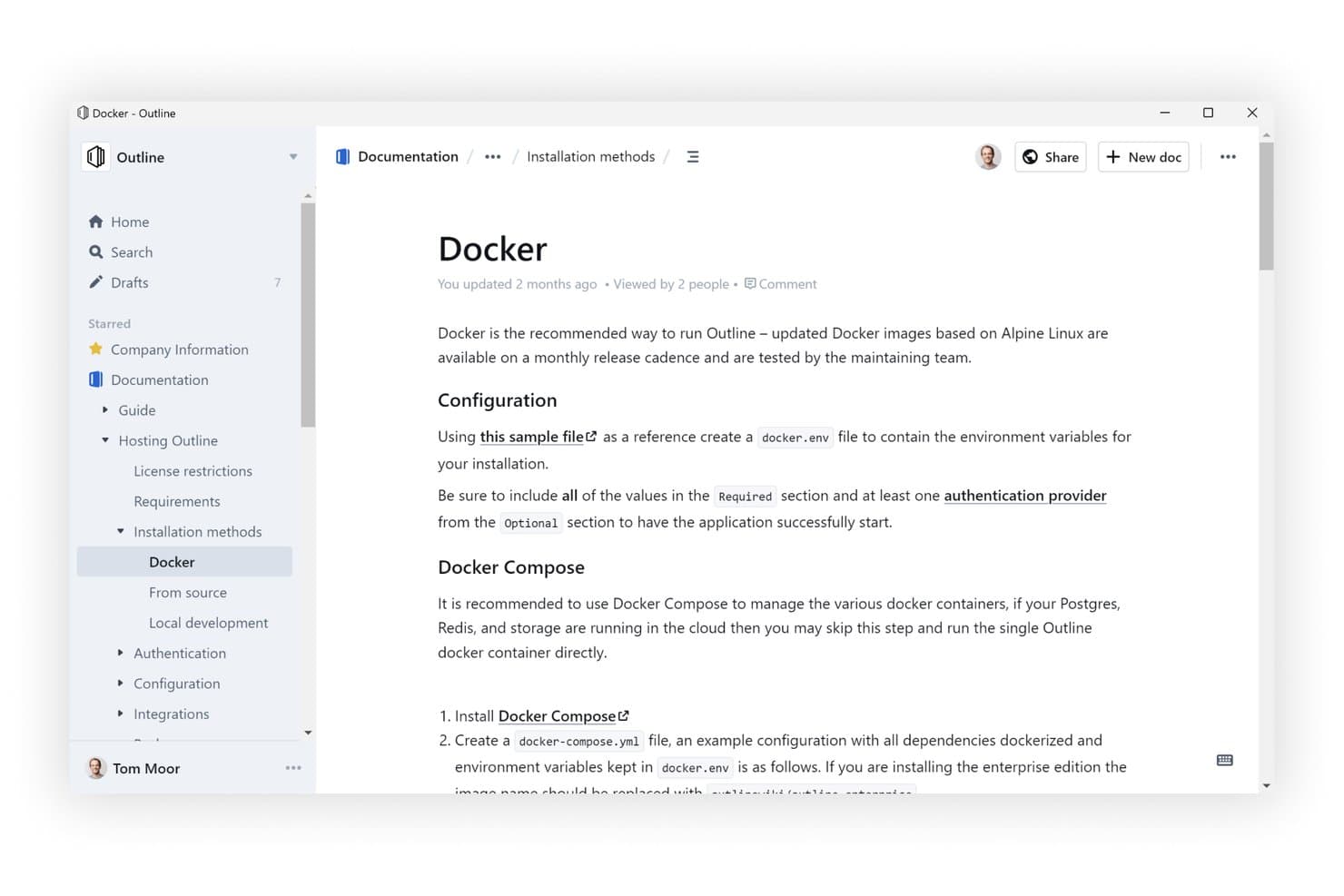
Outline offers a clean, hierarchical knowledge base interface with nested documents. Outline is an open-source knowledge base that lets teams write, organize, and search documentation in a fast, minimal editor—making it a strong fit for IT administrators and technical teams who want full control over where their data lives.
Who Is Outline Best For?
Outline is a strong fit for IT administrators and technical teams that need full control over where their documentation lives, especially when self-hosting is a requirement.
Why I Picked Outline
I picked Outline as one of the best because it's the only tool on my list built from the ground up for self-hosting, giving IT admins complete control over where documentation actually lives. I love that you can run the full stack on your own infrastructure with Docker, then layer on SSO, group permissions, and a security audit log without paying Atlassian's Enterprise gate fee. The built-in MCP server is a genuinely rare feature: it lets AI tools like Claude or Cursor read, create, and edit docs directly inside your hosted instance.
Outline Key Features
- Real-time collaborative editing: Multiple team members can edit the same document simultaneously, with threaded comments and keeping discussions tied to the content.
- Nested collections and page trees: Documents organize into collections with unlimited nesting, drag-and-drop reordering, and automatic backlinks between linked pages.
- Confluence importer: A built-in import tool pulls in a Confluence HTML space export, preserving text formatting, attachments, images, and page hierarchy.
- Granular permission controls: Workspace admins can assign view, edit, or admin access at the collection or document level for individual users or groups, including guest roles for external reviewers.
Outline Integrations
Outline includes 20+ native integrations, including Slack, GitHub, GitLab, Linear, Figma, Google Drive, and Microsoft Entra ID. It also offers an API, webhooks, and Zapier for custom connectivity.
Pros and Cons
Pros:
- AI answers cite permission-checked source documents
- Self-hosting keeps data under team control
- Fast document editing and search
Cons:
- No native mobile apps or offline editing
- Confluence imports omit macros and comments
Learn more about Outline: 10Best for docs-as-code with Git Sync workflows
GitBook
- Free plan + 14-day trial + demo available
- From $77/month (billed annually)

GitBook lets users customize site branding, logos, and themes. GitBook is a documentation platform built for technical teams who need to publish, version, and maintain product and API docs with the precision of a software workflow.
Who Is GitBook Best For?
GitBook is a strong fit for technical writers and engineering teams who manage docs-as-code and need Git-native workflows built into their documentation process.
Why I Picked GitBook
I picked GitBook as one of the best Confluence alternatives because its Git Sync workflow is genuinely built for teams that treat docs like code. When my team pushes changes to a GitHub or GitLab branch, GitBook reflects them automatically, and the branch-style change requests work just like pull requests, with inline diffs, reviewers, and merge rules. That means engineers can review a docs change the same way they review a code change, without switching tools or context.
GitBook Key Features
- Change requests: A branch-style editing workflow where you can assign reviewers, view inline diffs, and set merge rules before any changes go live.
- Interactive API playgrounds: Built directly from OpenAPI specs, letting readers test API endpoints inside the docs without leaving the page.
- AI-powered Ask search: An AI search sidebar that summarizes answers from your docs and cites the source pages, available on Premium and above.
- Confluence import tool: A built-in importer that pulls content from Confluence, with optional AI clean-up to tidy formatting after the transfer.
GitBook Integrations
GitBook offers native integrations with GitHub, GitLab, Slack, Linear, Jira, Intercom, Zendesk, Google Analytics, and Segment. It also provides an API and custom integrations, with two-way Git Sync for GitHub and GitLab.
Pros and Cons
Pros:
- AI answers cite their source pages
- Version history supports rollback and revision checks
- Branch-based reviews surface precise documentation diffs
Cons:
- Page moves between sections require workarounds
- Shallow hierarchy limits sprawling knowledge bases
Learn more about GitBook:
Diğer Confluence Alternatifleri
Kısa listeme girmeyen ancak yine de göz atmaya değer bazı ek Confluence alternatifleri şunlardır:
- 11ArchbeeBest for technical docs with Git-synced workflows
- 12Superhuman DocsBest for docs with built-in databases and Jira sync
- 13TettraBest for Slack-first team Q&A and wikis
- 14BloomfireBest for AI-powered enterprise knowledge search
- 15StonlyBest for AI-driven customer support docs
- 16HelpjuiceBest for AI-driven internal help center search
- 17SlabBest for docs that verify and stay current
- 18BookStackBest for self-hosted docs with zero licensing fees
- 19Wiki.jsBest for open-source wiki solutions
- 20MintlifyBest for Git-native developer docs teams
How I Evaluate Confluence Alternatives
I split my evaluation into three parts. First—and most importantly—I check that a tool lets teams co-edit pages in real time and organize content into nested, searchable hierarchies, since those are the foundations Confluence already covers. Then I look at standout features like AI knowledge assistants and built-in diagramming canvases. Finally, I consider migration support and pricing transparency.
Core Functionality (Table Stakes For This List)
When I'm selecting tools for my list, I score each one on a scale from 0 (does not offer the functionality) to 5 (excels in this area) for each core functionality listed below. I then convert the total into a percentage to help assess each tool's overall fit, with extra weight on any functionalities I’ve deemed essential.
- Collaborative Editing (Essential): I look for real-time co-editing, inline comments, and visible changes as teams refine product specs or meeting notes together.
- Content Organization (Essential): I assess whether nested pages and spaces can organize requirements, decisions, and process docs into a structure teams can maintain.
- Search & Discovery: I check whether searches find relevant details in page content and attachments, with filters that help teams locate current product decisions.
- Permissions & Sharing: I evaluate page- and space-level access controls for sharing sensitive roadmap or launch information with the right stakeholders.
- Tool Integrations: I look for connections to project, communication, and development tools that link documentation to active work.
- Version History: I check whether teams can review who changed a page and restore an earlier version after a spec or process update.
Once I have a list of tools that meet the criteria, I consider what sets each platform apart.
Differentiating Factors (What Sets Vendors Apart)
Here's how I compare and contrast different vendors:
Standout Features
I look for an AI knowledge assistant that can summarize long spec pages or answer questions from existing docs—useful when onboarding a new engineer mid-sprint. Database and table views matter too, since tracking feature status or launch items inside the same doc where requirements live removes context-switching. I also evaluate whiteboard and diagramming canvases for mapping user flows alongside written specs, the way Notion and Confluence each handle visual collaboration differently.
Beyond Features
I evaluate migration support first—whether a vendor offers automated Confluence importers that preserve page hierarchies and inline comments, since rebuilding a 500-page wiki manually kills momentum. Pricing transparency matters just as much; some tools bury costs in storage caps or per-integration fees that inflate the bill once your cross-functional team scales past a pilot group. I also check cross-functional usability, specifically whether non-technical stakeholders like designers or leadership can navigate and edit pages without training, and whether guest access lets external partners review specs without a full seat.
Neden Bir Confluence Alternatifi Aramalısınız?
Confluence iyi bir iş birliği ve dokümantasyon yazılımı seçeneği olsa da bazı kullanıcıların alternatif çözümler aramasının çeşitli nedenleri vardır. Aşağıdaki nedenlerden dolayı bir Confluence alternatifi arıyor olabilirsiniz…
- Küçük ekipler için fazla karmaşık
- Daha iyi çevrim dışı erişime ihtiyacınız var
- Özelleştirme seçenekleri sınırlı
- Daha sezgisel bir gezinme deneyimi istiyorsunuz
- Diğer araçlarla entegrasyon yetersiz
Bunlardan herhangi biri size uyuyorsa doğru yere geldiniz. Listemde, Confluence ile ilgili bu zorluklarla karşılaşan ve alternatif çözümler arayan ekipler için daha uygun olan çeşitli iş birliği ve dokümantasyon yazılımı seçenekleri yer alıyor.
Confluence'ın Temel Özellikleri
Alternatif çözümlerin sunduklarını karşılaştırmanıza yardımcı olmak için Atlassian tarafından sunulan Confluence'ın bazı temel özellikleri şunlardır:
- İş Birliğine Dayalı Düzenleme: Sürüm çakışmaları olmadan sayfaları ekibinizle eş zamanlı olarak düzenleyin; eşzamansız çalışma için idealdir.
- Satır İçi Yorumlar: Tartışmaların bağlamını korumak ve uygulanabilir olmasını sağlamak için geri bildirimleri doğrudan metin ve görsellerin üzerine ekleyin.
- Akıllı Bildirimler: Ekip arkadaşlarınızı etiketleyin, görevler atayın ve güncellemeleri Jira ile diğer araçlara sorunsuz şekilde bağlayın.
- Beyaz Tahtalar: Sonsuz bir tuval üzerinde görsel olarak iş birliği yaparak fikirleri eylem maddelerine veya yapılandırılmış sayfalara dönüştürün.
- Veritabanları: Bilgi takibi ve basit proje iş akışları için eşzamanlanmış görünümlere sahip esnek tablolar kullanın.
- Yapay Zekâ Araçları: Yerleşik yapay zekâ desteğiyle notları özetleyin, belgeleri düzenleyin veya içeriği otomatik olarak yapılandırın.
- İçerik İzinleri: Görünürlüğü yönetmek ve hassas bilgileri korumak için görüntüleme/düzenleme yetkilerini sayfa veya alan bazında belirleyin.
- Şablonlar & Sürümleme: Dokümantasyon süreçlerini kolaylaştırmak için en iyi uygulamalara dayalı şablonları ve tüm değişiklik geçmişini kullanın.
- Ekip Takvimleri: Ekipler arasındaki programları uyumlu hâle getirmek için uygunluk durumunu ve son tarihleri paylaşın.
- Kurumsal Güvenlik: Uyumluluk özellikleri, denetim günlükleri ve yönetici denetimleriyle ölçeklenebilirlik için tasarlanmıştır.