

Bu kadar çok farklı ürün benimseme platformu mevcutken, hangisinin sizin için doğru seçenek olduğunu belirlemek zordur. Kullanıcıların ürüne alıştırılma deneyimlerini iyileştirmek, kullanıcı etkileşimini artırmak, müşteri kayıp oranlarını azaltmak ve kullanıcı davranışları hakkında içgörüler toplamak istediğinizi biliyorsunuz; ancak hangi aracın en uygun olduğunu belirlemeniz gerekiyor. Yardımcı olabilirim! Bu yazıda, yüzlerce ürün lansmanını yönetirken ve büyük ekiplerle çalışırken bu araçları kullanma deneyimlerimden öğrendiklerimi temel alarak en iyi ürün benimseme yazılımları arasından seçtiklerimi sizinle paylaşacağım.
Why Trust Our Software Recommendations
6,700+
Reviews
20
Industry experts
16+
Evaluation factors
14
Years
Our team has been testing and reviewing software since 2012. As product managers ourselves, we know how difficult—and important—it is to choose the right software.
For this guide, we evaluated tools using hands-on testing and independent research, scoring tools using our selection criteria.
Our reviews reflect our human editorial judgment, not a sales pitch.
Expert reviewers:
- Andrew LumbySenior TPM
- Cristiano ValimSenior UI/UX Lead


Ürün Benimseme Yazılımı Karşılaştırma Tablosu
Bu karşılaştırma tablosu, en iyi ürün benimseme yazılımı seçimlerim için fiyatlandırma ayrıntılarını özetlemektedir:
Score legend (out of 5)
- Excellent4.5–5
- Good4–4.4
- Average3–3.9
- Below average2–2.9
- Poor1–1.9
Sorted by: Default
| Tool | Starting Price | Website | |||||||
|---|---|---|---|---|---|---|---|---|---|
Best for onboarding checklists with progress indicators | 4.2 out of 5 | 3 | 4 | 5 | 5 | 5 | 3 | $174/month 14-day free trial | Website |
Best for driving business processes and outcomes | 4.2 out of 5 | 4 | 4 | 5 | 4 | 4 | 4 | Pricing upon request Free demo available | Website |
Best for creating custom onboarding flows | 4.5 out of 5 | 3 | 4 | 5 | 5 | 5 | 5 | $240/month 14-day free trial | Website |
Best for enterprise-scale guided onboarding with AI | 4.7 out of 5 | 5 | 5 | 4 | 4 | 5 | 5 | Pricing upon request Not available | Website |
Best for monetization features like coupon prompts | 4.5 out of 5 | 4 | 5 | 5 | 5 | 3 | 5 | $999/month 3-month free pilot available | Website |
Best for all-in-one adoption with built-in analytics | 5.0 out of 5 | 5 | 5 | 5 | 5 | 5 | 5 | $299/month 14-day free trial | Website |
Best for expediting customer onboarding | 4.8 out of 5 | 5 | 5 | 4 | 5 | 5 | 5 | Pricing upon request Free trial available | Website |
Best for user-segmented onboarding tours | 4.8 out of 5 | 5 | 5 | 5 | 5 | 4 | 5 | Pricing upon request Free trial available | Website |
Best for in-depth product user analytics | 4.8 out of 5 | 5 | 5 | 4 | 5 | 5 | 5 | Pricing upon request Free plan + 30-day free trial + free demo available | Website |
Best inline guidance and design flexibility | 4.7 out of 5 | 4 | 4 | 5 | 5 | 5 | 5 | Pricing upon request 14-day free trial | Website |


En İyi Ürün Benimseme Yazılımı İncelemeleri
Aşağıda, kısa listeme giren en iyi ürün benimseme yazılımlarının ayrıntılı özetlerini bulabilirsiniz. İncelemelerim, sizin için en uygun seçeneği bulmanıza yardımcı olmak amacıyla her aracın temel özelliklerine, artılarına & eksilerine, entegrasyonlarına ve ideal kullanım alanlarına ayrıntılı bir bakış sunuyor.
 Best for onboarding checklists with progress indicators
- 14-day free trial
- From $174/month (billed annually)
Visit WebsiteCustomer Rating:4.7/5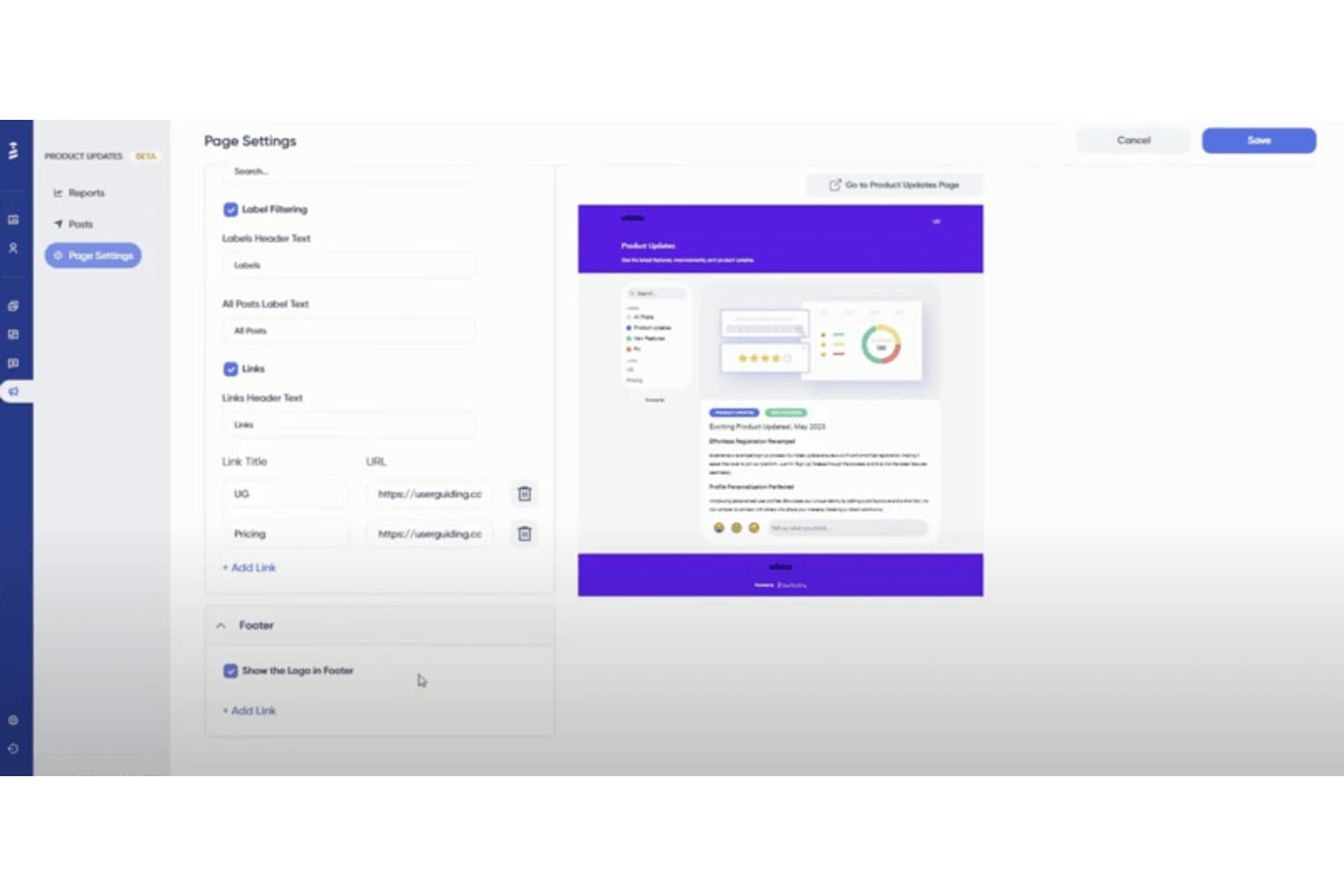
UserGuiding lets users customize a product updates page with labels, links, and footer settings. UserGuiding is a no-code product adoption platform that lets you build in-app guided tours, onboarding checklists, hotspots, tooltips, banners, and resource centers directly on your web application.
Who Is UserGuiding Best For?
UserGuiding is a strong fit for product and customer success teams at startups and SMBs that need to launch in-app onboarding quickly without relying on engineering resources.
Why I Picked UserGuiding
UserGuiding earns its spot on my shortlist because its onboarding checklists are genuinely best-in-class. I love how each checklist auto-tracks task completion, displays a live progress bar, and dismisses itself once a user finishes setup, so new users always know exactly where they stand. Paired with the Resource Center, which bundles guides, checklist tasks, and KB articles into one persistent in-app widget, it's a setup I'd reach for specifically when reducing time-to-value is the priority.
UserGuiding Key Features
- No-code Chrome extension builder: Build and publish in-app tours, hotspots, and banners directly on your live app without writing a single line of code.
- Session replay: Record and replay up to 3,000 user sessions per month to see exactly how users interact with your product.
- In-app NPS and survey tools: Embed Net Promoter Score surveys and custom feedback forms directly inside your product to capture user sentiment in context.
- A/B testing for guides: Test two variations of an onboarding flow on the Growth plan to identify which version drives better engagement.
UserGuiding Integrations
UserGuiding integrations include Google Analytics, Amplitude, Mixpanel, Segment, Salesforce, HubSpot, Intercom, Slack, and Woopra. Its Event API, webhooks, and MCP Server support custom connections and AI-powered access to product data.
Pros and Cons
Pros:
- In-app surveys and NPS included natively
- All guides built with no-code Chrome extension
- Onboarding checklists with real-time progress bars
Cons:
- Guide analytics lack funnels or retention analysis
- No native support for mobile app onboarding
Learn more about UserGuiding: 2Best for driving business processes and outcomes
Apty
- Free demo available
- Pricing upon request
Visit WebsiteCustomer Rating:4.8/5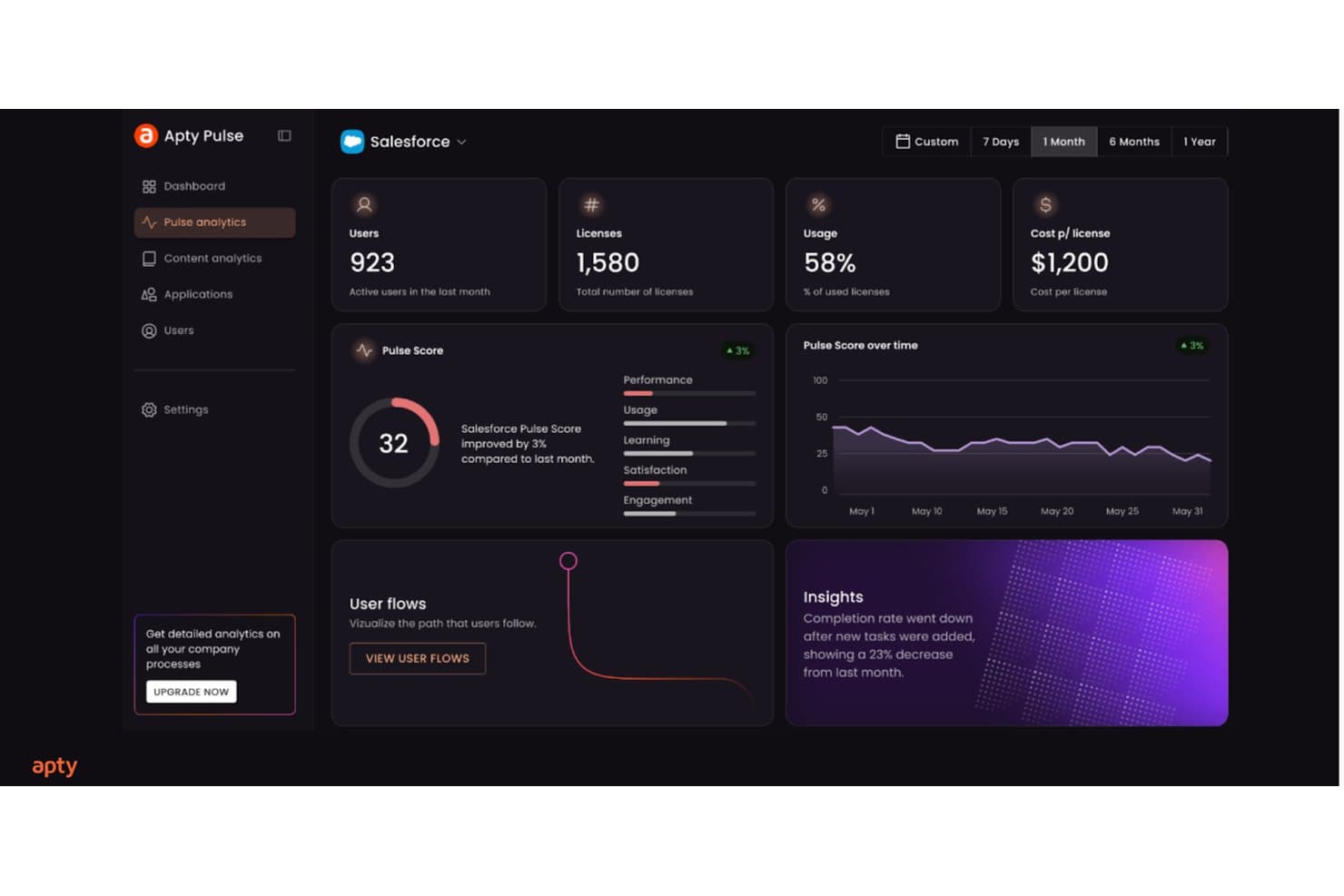
Apty tracks Salesforce adoption metrics like usage, pulse score, and insights. Apty is a digital adoption platform built for enterprise environments that layers in-app walkthroughs, contextual tooltips, onboarding checklists, and cross-application guided workflows on top of existing software like Salesforce, ServiceNow, and Workday.
Who Is Apty Best For?
Apty is a strong fit for enterprise teams managing employee adoption across complex internal software like Salesforce, ServiceNow, or Workday.
Why I Picked Apty
Apty earns its spot on my shortlist because no other tool I've reviewed ties in-app guidance so directly to business process outcomes. I love how Apty OneX lets you build a single guided workflow that spans multiple enterprise apps, so a user moving a request from Salesforce into ServiceNow gets step-by-step guidance the whole way through. Apty PULSE then surfaces AI-driven prescriptive recommendations, pinpointing exactly where users stall and what to fix.
Apty Key Features
- No-code walkthrough builder: A visual editor lets L&D and training teams create and publish step-by-step guided flows without any developer involvement.
- Real-time data validation: Apty catches and corrects data entry errors instantly as users fill out forms, enforcing process accuracy before submission.
- Onboarding checklists: Structured task lists guide new users through required steps in sequence, reducing bottlenecks and keeping onboarding consistent.
- SCORM and LMS export: Guided workflows can be exported as SCORM, PDF, video, or PowerPoint files for use in external learning management systems.
Apty Integrations
Apty supports integrations across 1,000+ enterprise applications, including Salesforce, ServiceNow, Workday, SAP, Jira, NetSuite, Oracle PeopleSoft HCM, Microsoft Dynamics, and Microsoft 365. Enterprise APIs support custom integrations, while SCORM connects Apty content with LMS platforms.
Pros and Cons
Pros:
- Prescriptive analytics identify workflow bottlenecks instantly
- Real-time data validation reduces onboarding mistakes
- Enables cross-application onboarding flows for users
Cons:
- Lacks built-in in-app survey functionality
- No support for native mobile onboarding
Learn more about Apty: Best for creating custom onboarding flows
- 14-day free trial
- From $240/month (billed annually)
Visit WebsiteCustomer Rating:4.8/5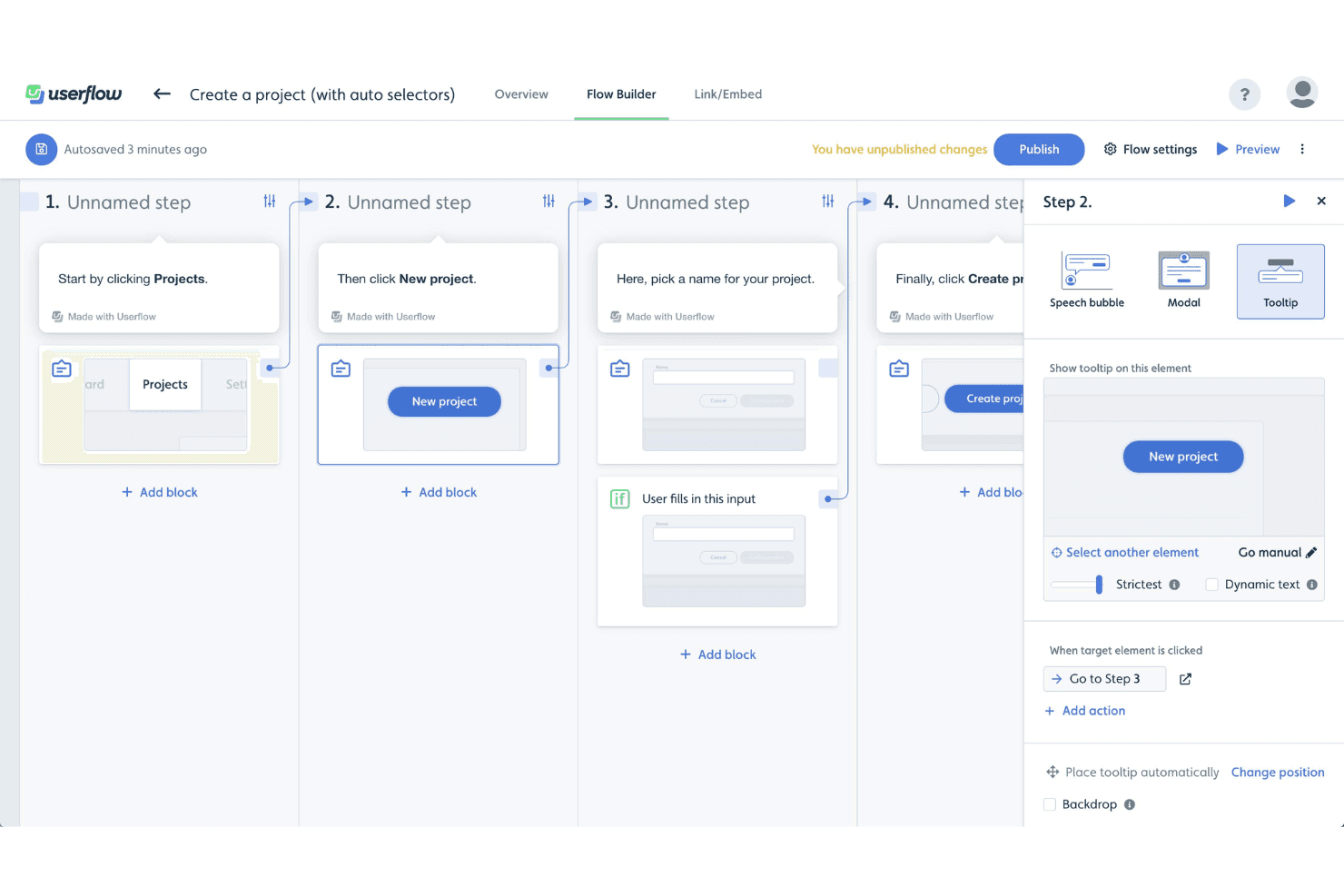
Userflow's Flow Builder lets users create step-by-step product tours using tooltips, modals, and speech bubbles with conditional logic. Userflow is a product adoption platform that lets you build in-app onboarding tours, checklists, tooltips, modals, and resource centers through a no-code visual builder, with an AI layer that generates, monitors, and optimizes flows based on user behavior.
Who Is Userflow Best For?
Userflow is a strong fit for product and customer success teams at SaaS companies who need to build and iterate on custom onboarding flows without relying on engineering resources.
Why I Picked Userflow
Userflow earns its spot on my shortlist because its no-code flow builder is genuinely in a class of its own for building custom onboarding flows. I love how FlowAI Builder lets you generate a complete, branded onboarding flow from a plain-language prompt by analyzing your live product, so you're not starting from scratch. Pair that with branching conditional logic and segmentation by lifecycle stage, and you can build flows that adapt to what a user has or hasn't done yet.
Userflow Key Features
- Adoption Agent: An AI-powered in-app assistant that answers user questions contextually and can complete tasks on behalf of users via Action Flows.
- In-app NPS and surveys: Native NPS, CSAT, and open-ended survey types that can be triggered by behavior or segment and used to activate follow-up flows.
- Two-way CRM sync: Live bidirectional data sync with HubSpot and Salesforce to keep user segments and lifecycle data current across tools.
- Resource center: A persistent in-app help hub where users can search content, access on-demand flows, and get AI-assisted answers without leaving your product.
Userflow Integrations
Userflow offers native integrations with Salesforce, HubSpot, Segment, RudderStack, Amplitude, Mixpanel, Zendesk, Intercom, Freshdesk, and LogRocket. It also supports REST API, webhooks, and Zapier for custom connectivity.
Pros and Cons
Pros:
- Adoption Agent answers user questions in-app
- Branching logic personalizes onboarding by user behavior
- AI can generate branded onboarding flows
Cons:
- Analytics depth limited without outside tools
- No SDK for native mobile onboarding
Learn more about Userflow: Best for enterprise-scale guided onboarding with AI
- Not available
- Pricing upon request
Visit WebsiteCustomer Rating:4.5/5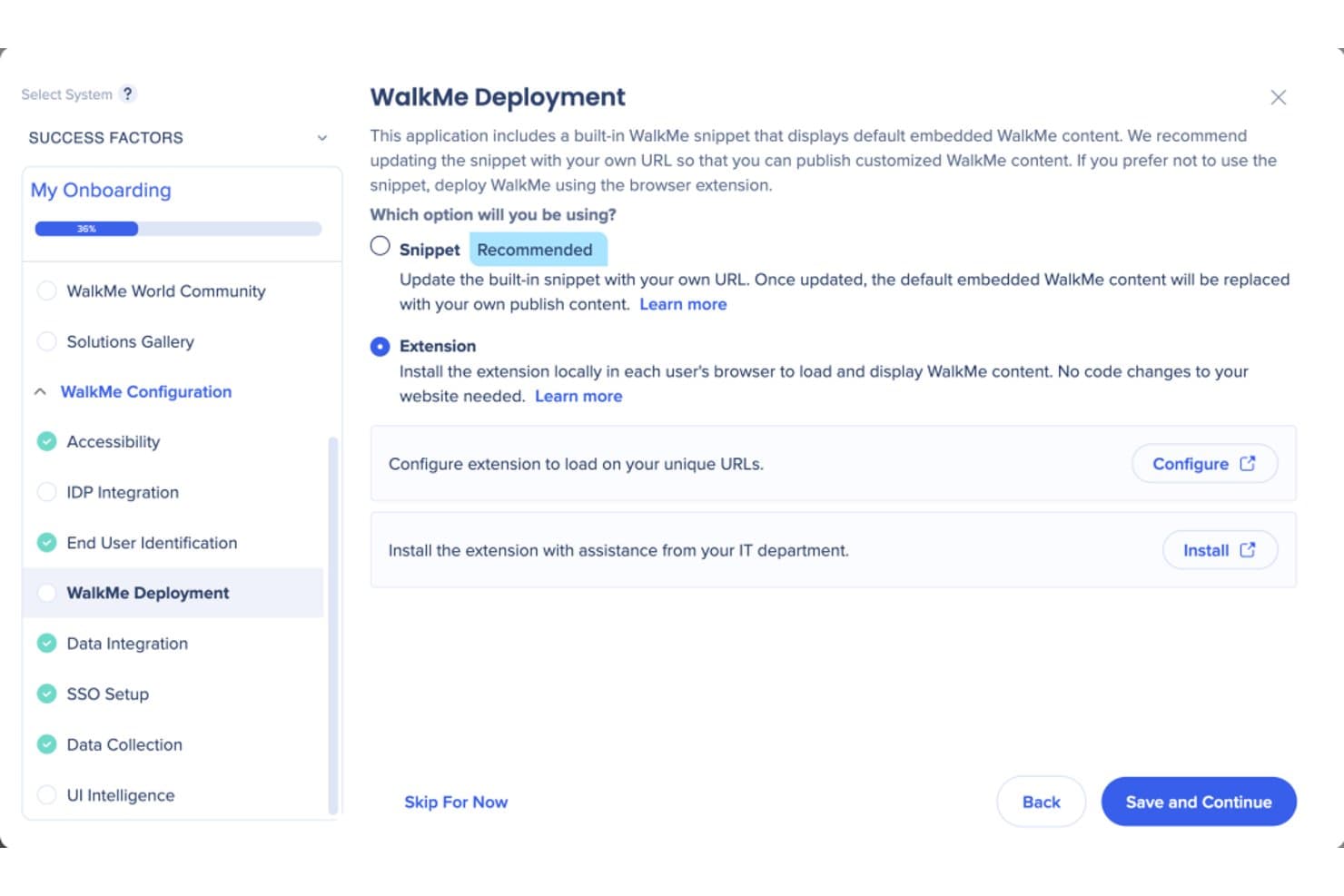
WalkMe lets users choose between snippet or extension deployment methods. WalkMe is a digital adoption platform that layers guided tours, contextual tooltips, in-app messaging, onboarding checklists, and behavioral analytics directly on top of web, desktop, and native mobile applications.
Who Is WalkMe Best For?
WalkMe is a strong fit for large enterprises managing complex, multi-application tech stacks that need guided onboarding at scale.
Why I Picked WalkMe
WalkMe earns its spot on my shortlist because no other tool I've evaluated matches its depth of AI-driven guidance at enterprise scale. I'm particularly impressed by its Proactive AI, which reads full-screen context and surfaces the next best action automatically, without any user prompt. Paired with Smart Walk-Thrus that support branching logic across multi-app workflows, it's built for organizations managing complex, layered tech stacks where simpler tools fall short.
WalkMe Key Features
- Smart Walk-Thrus: Step-by-step interactive walkthroughs that support branching logic, conditional steps, and multi-page flows across web, desktop, and mobile apps.
- Onboarding Tasks checklist: A persistent, cross-session checklist module that guides new users through multi-step onboarding sequences without losing progress.
- In-app surveys: A dedicated survey tool supporting NPS, multiple-choice, rating, and open-ended questions with branching logic and contextual triggers.
- Session Playback: A built-in session replay feature that captures clicks, scrolling, and form inputs to produce visual replays of user behavior within WalkMe Insights.
WalkMe Integrations
WalkMe offers native integrations with Salesforce, Gainsight, Segment.io, HubSpot, and Google Analytics for onboarding data, segmentation, and customer success workflows. It also supports Identity Provider integrations and an API for custom integrations.
Pros and Cons
Pros:
- Session replay built in for behavior analysis
- AI recommends proactive next best actions
- Handles cross-app onboarding at enterprise scale
Cons:
- Steep cost for smaller or leaner teams
- No free trial or self-serve onboarding
Learn more about WalkMe: Best for monetization features like coupon prompts
- 3-month free pilot available
- From $999/month
Visit WebsiteCustomer Rating:4.7/5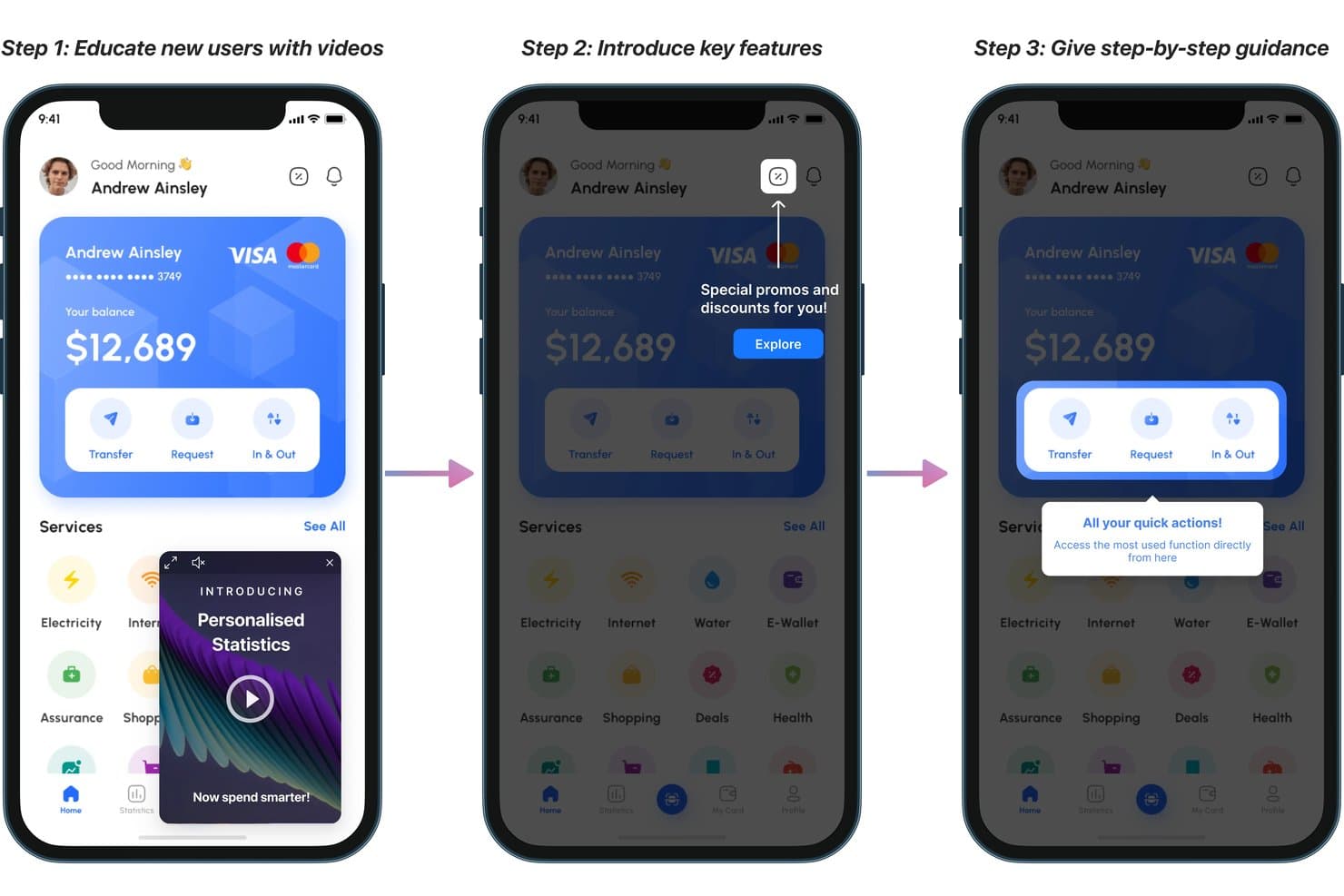
Plotline guides new users through onboarding with videos, tooltips, and highlights. Plotline is a mobile-first product adoption platform that combines in-app guided tours, contextual messaging, no-code flow building, user segmentation, surveys, gamification, and experimentation tools across iOS, Android, React Native, Flutter, and web.
Who Is Plotline Best For?
Plotline is a strong fit for mobile-first product and growth teams at consumer apps who want to drive activation, feature adoption, and in-app monetization without relying on engineering.
Why I Picked Plotline
Plotline earns its spot on my shortlist because of its built-in gamification and monetization features, which go well beyond what most product adoption tools offer. I love that you can deploy scratch cards, spin-the-wheel mechanics, and coupon code prompts directly from the dashboard, with configurable reward probabilities and per-user limits, without writing a line of code. Its AI Decisioning layer runs per-user optimization in real time, automatically selecting the best moment and format to surface a monetization nudge based on each user's behavior.
Plotline Key Features
- AI Decisioning: An AI layer that evaluates each user's real-time behavioral context to automatically select the best message format, channel, and timing—individually, not by segment.
- Multi-step guided tours: Chain tooltips, spotlights, and coachmarks into branching, event-triggered onboarding flows across iOS, Android, React Native, Flutter, and web.
- In-app surveys: 50+ pre-built survey templates, including NPS and CSAT, triggered by specific user events with reported response rates above 30%.
- Feature flags: No-code boolean and multivariate flags with configurable rollout percentages, custom payloads, and scheduling controls.
Plotline Integrations
Plotline offers documented integrations with Amplitude, Mixpanel, Segment, Rudderstack, Braze, MoEngage, Google Analytics, FullStory, UXCam, and Salesforce Marketing Cloud, plus backend API event ingestion for custom connectivity.
Pros and Cons
Pros:
- Per-user AI selects optimal onboarding moments
- Gamification features like scratch cards and spin wheel
- Mobile-first onboarding with native SDKs
Cons:
- Many advanced features require higher-tier plans
- No dedicated resource center or help hub
Learn more about Plotline: Best for all-in-one adoption with built-in analytics
- 14-day free trial
- From $299/month
Visit WebsiteCustomer Rating:4.7/5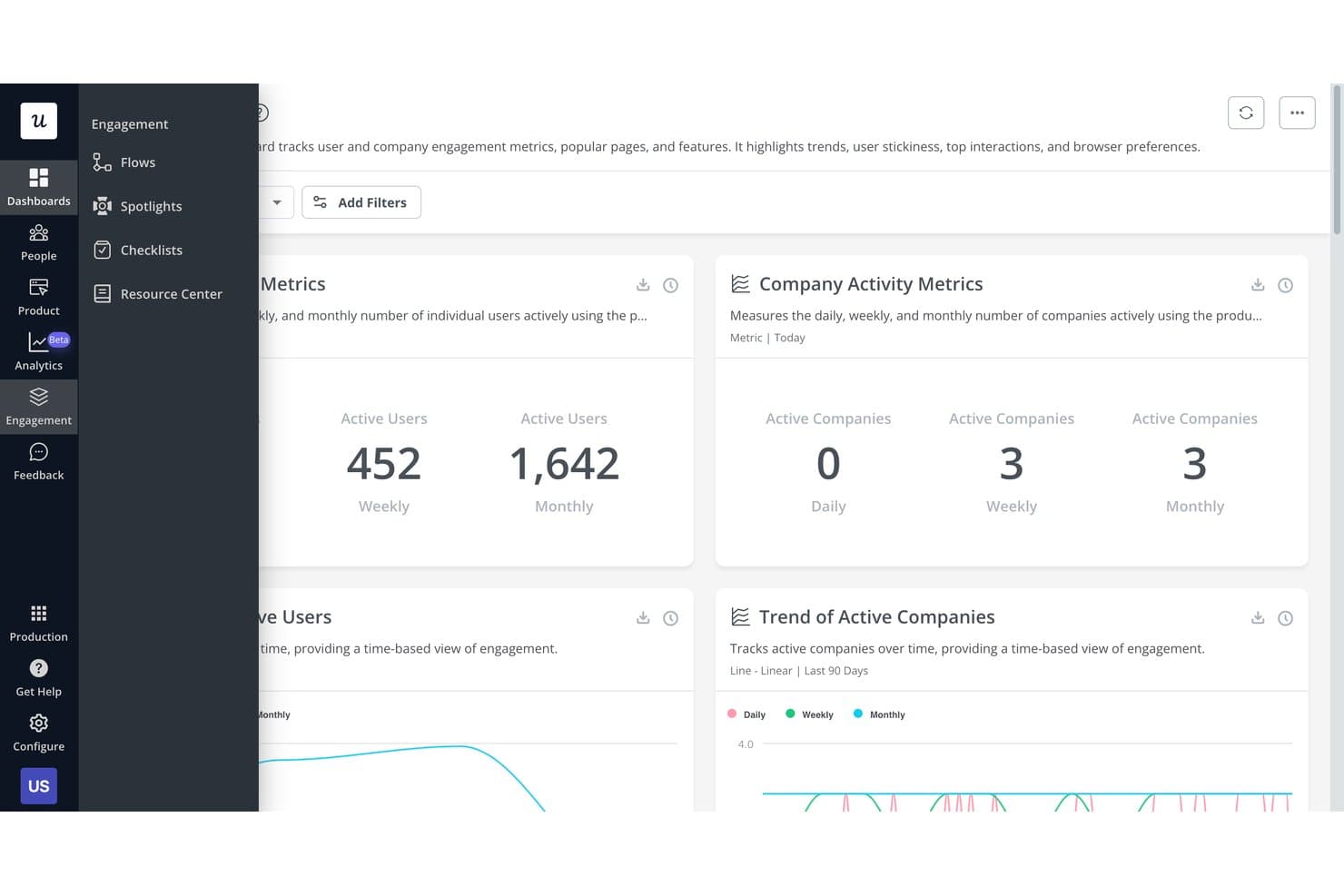
Userpilot tracks user and company engagement metrics on one dashboard. Userpilot is a product adoption platform that combines in-app guided tours, no-code flow building, contextual messaging, user segmentation, onboarding checklists, and a built-in analytics suite that includes funnels, session replay, and AI-powered insights.
Who Is Userpilot Best For?
Userpilot is a strong fit for mid-market SaaS product teams that want onboarding, analytics, and feedback in one platform instead of stitching together multiple tools.
Why I Picked Userpilot
Userpilot earns its spot on my shortlist because it replaces what used to be three or four separate tools with one platform. I particularly like that its built-in analytics suite, including funnels, path analysis, and session replay with frustration signal detection, sits alongside the flow builder, so I can see exactly where users drop off and fix the onboarding experience without switching contexts. The AI Guides Builder also lets me generate a full multi-step tour from a text prompt, which cuts authoring time significantly.
Userpilot Key Features
- Welcome survey builder: Create branching welcome surveys that auto-segment new users by role, use case, or goal on first login and route them to personalized onboarding flows.
- Onboarding checklists: Build task-based checklists available on all plans, where each completed task can trigger a flow, redirect, or custom JavaScript action.
- NPS and CSAT surveys: Deploy 15+ survey templates—including NPS, CSAT, CES, and PMF—with AI-powered sentiment and thematic analysis on Growth+ plans.
- Resource Center: Build a branded, searchable in-app help hub with knowledge base articles, embedded videos, and Zendesk-connected help content to support self-service guidance.
Userpilot Integrations
Userpilot offers native integrations with Segment, HubSpot, Salesforce, Zendesk, Intercom, Slack, Amplitude, Mixpanel, Heap, and Google Analytics. It also supports HTTP API access, webhooks, data warehouse sync, and MCP Server connectivity for custom workflows.
Pros and Cons
Pros:
- Advanced segmentation by behavior and surveys
- Fast no-code builder with AI flow creation
- Built-in analytics, session replay, and surveys
Cons:
- Flows may break after UI changes
- Advanced analytics gated to higher plans
Learn more about Userpilot: Best for expediting customer onboarding
- Free trial available
- Pricing upon request
Visit WebsiteCustomer Rating:4.6/5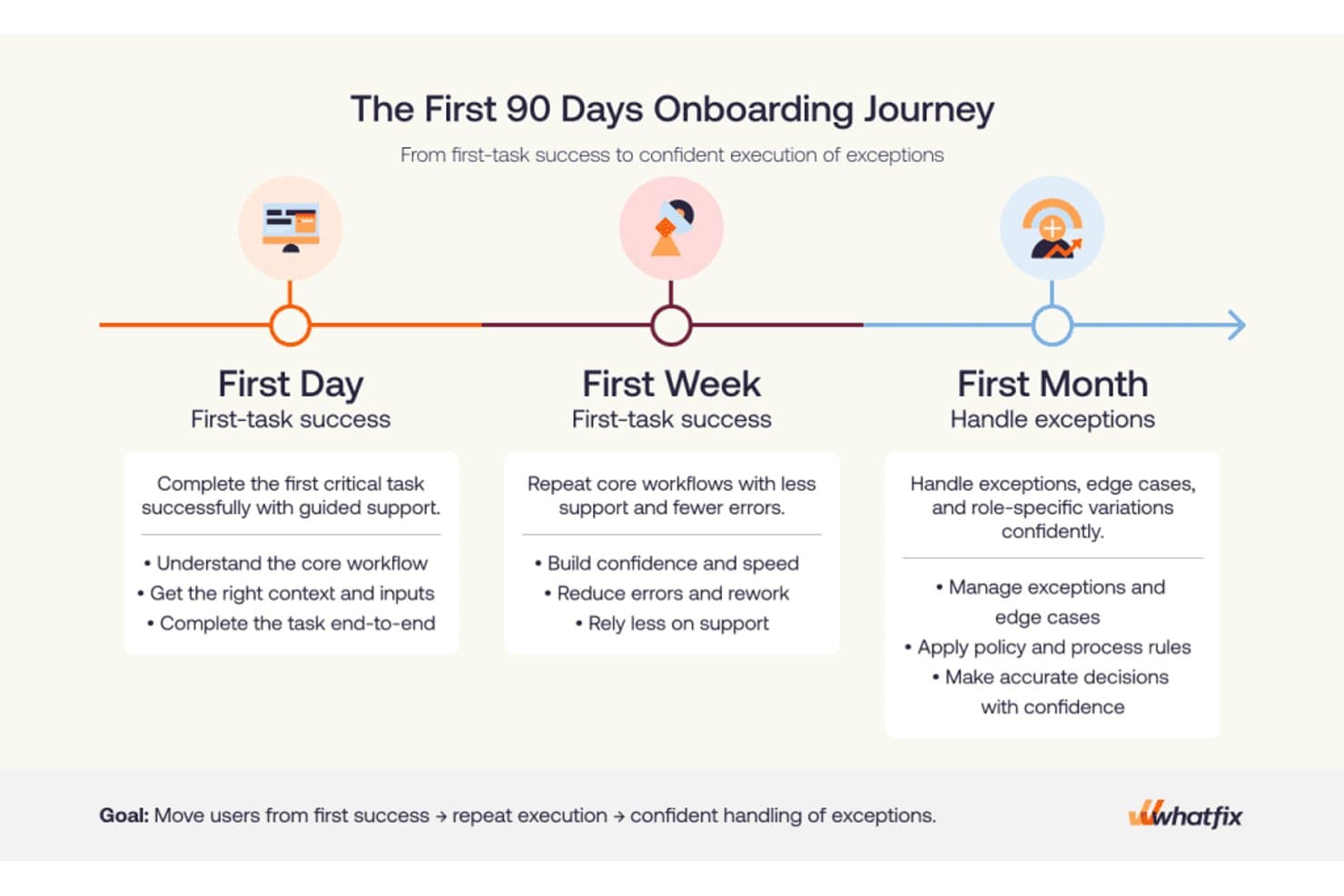
Whatfix structures onboarding into day, week, and month milestones. Whatfix is a digital adoption platform that delivers in-app guided tours, onboarding checklists, contextual tooltips, an AI-powered self-help widget, and behavioral analytics across web, desktop, and mobile applications.
Who Is Whatfix Best For?
Whatfix is a strong fit for enterprise customer success and onboarding teams that need to guide users through complex, multi-step software workflows at scale.
Why I Picked Whatfix
I picked Whatfix as one of the best because its onboarding toolset goes deeper than most: Task Lists deliver role-based checklists that persist inside the app, while Flows support branching paths and linked sub-flows that mirror how real users move through complex software. What really sets it apart is the AI Authoring Agent, which builds fully configured flows from a plain-text prompt, cutting the time it takes to get new onboarding content live from days to minutes.
Whatfix Key Features
- Self Help widget: An AI-powered, in-app resource center that aggregates knowledge base articles, Flows, videos, and external docs into a single searchable assistant.
- Smart Tips: Contextual tooltips and field-level guidance that surface relevant help content directly within the application interface.
- In-app surveys: Built-in NPS, usability, and custom surveys with AI-powered sentiment analysis to collect user feedback without leaving the app.
- Product Analytics AutoCapture: A no-code behavioral tracking layer that automatically logs user interactions, funnels, and journeys without developer instrumentation.
Whatfix Integrations
Whatfix offers native integrations with Salesforce, Workday, SAP SuccessFactors, Oracle, Microsoft Azure Active Directory, ServiceNow, SharePoint, and Google Drive. These connections support role-based onboarding, enterprise identity targeting, and in-app access to documentation.
Pros and Cons
Pros:
- Smart Tips and Beacons drive user action
- Scales onboarding across web, desktop, and mobile
- AI agents rapidly generate onboarding content
Cons:
- No built-in A/B testing for onboarding flows
- CSS or JavaScript needed for advanced customizations
Learn more about Whatfix: Best for user-segmented onboarding tours
- Free trial available
- Pricing upon request
Visit WebsiteCustomer Rating:4.7/5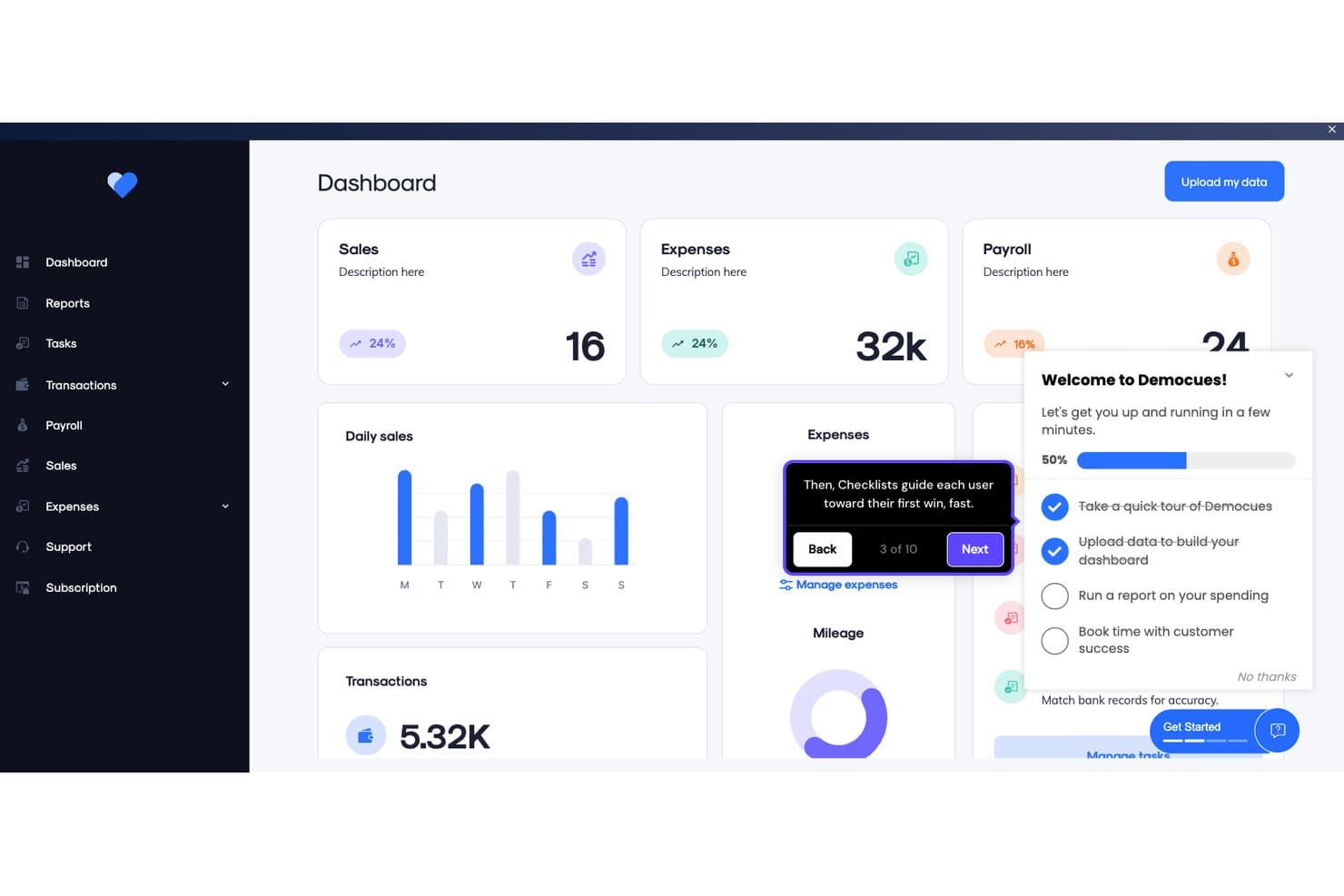
Appcues guides users through onboarding with checklists and tooltips. Appcues is a product adoption platform that lets teams build in-app onboarding flows, checklists, tooltips, banners, and resource centers—with native mobile SDKs, built-in NPS surveys, A/B testing, and behavioral segmentation across web and mobile apps.
Who Is Appcues Best For?
Appcues is a strong fit for product teams that need to deliver personalized onboarding experiences to different user segments without relying on engineering for every update.
Why I Picked Appcues
Appcues earns its spot on my shortlist because of how precisely it targets the right users with the right onboarding experience. I'm particularly drawn to its real-time behavioral segmentation, which lets you build audiences from live event data, CRM attributes, and lifecycle stage simultaneously. In practice, that means a new enterprise user can see a guided Flow tailored to their role while a freemium user on the same page sees a completely different checklist pushing them toward activation.
Appcues Key Features
- Native mobile SDKs: Build and publish in-app onboarding experiences for iOS, Android, React Native, and Flutter without waiting for app store review cycles.
- A/B testing via Audience Randomizer: Split users into variants to test which version of an experience drives better outcomes, with built-in uplift measurement.
- Built-in NPS and surveys: Collect in-app feedback through native NPS, rating-scale, and open-ended survey forms with conditional follow-up logic.
- Cross-channel campaign delivery: Coordinate in-app messages, behavioral emails, and push notifications from a single platform to support full lifecycle campaigns.
Appcues Integrations
Appcues offers native integrations with Salesforce, HubSpot, Segment, RudderStack, Slack, Intercom, Mixpanel, Amplitude, LaunchDarkly, and Fullstory. It also supports webhooks, an API, MCP server connectivity, and Zapier.
Pros and Cons
Pros:
- AI-assisted no-code builder for fast iteration
- Native mobile SDKs for iOS and Android
- Real-time behavioral segmentation for personalized onboarding
Cons:
- Initial setup requires developer involvement
- No native session replay or heatmaps
Learn more about Appcues: Best for in-depth product user analytics
- Free plan + 30-day free trial + free demo available
- Pricing upon request
Visit WebsiteCustomer Rating:4.4/5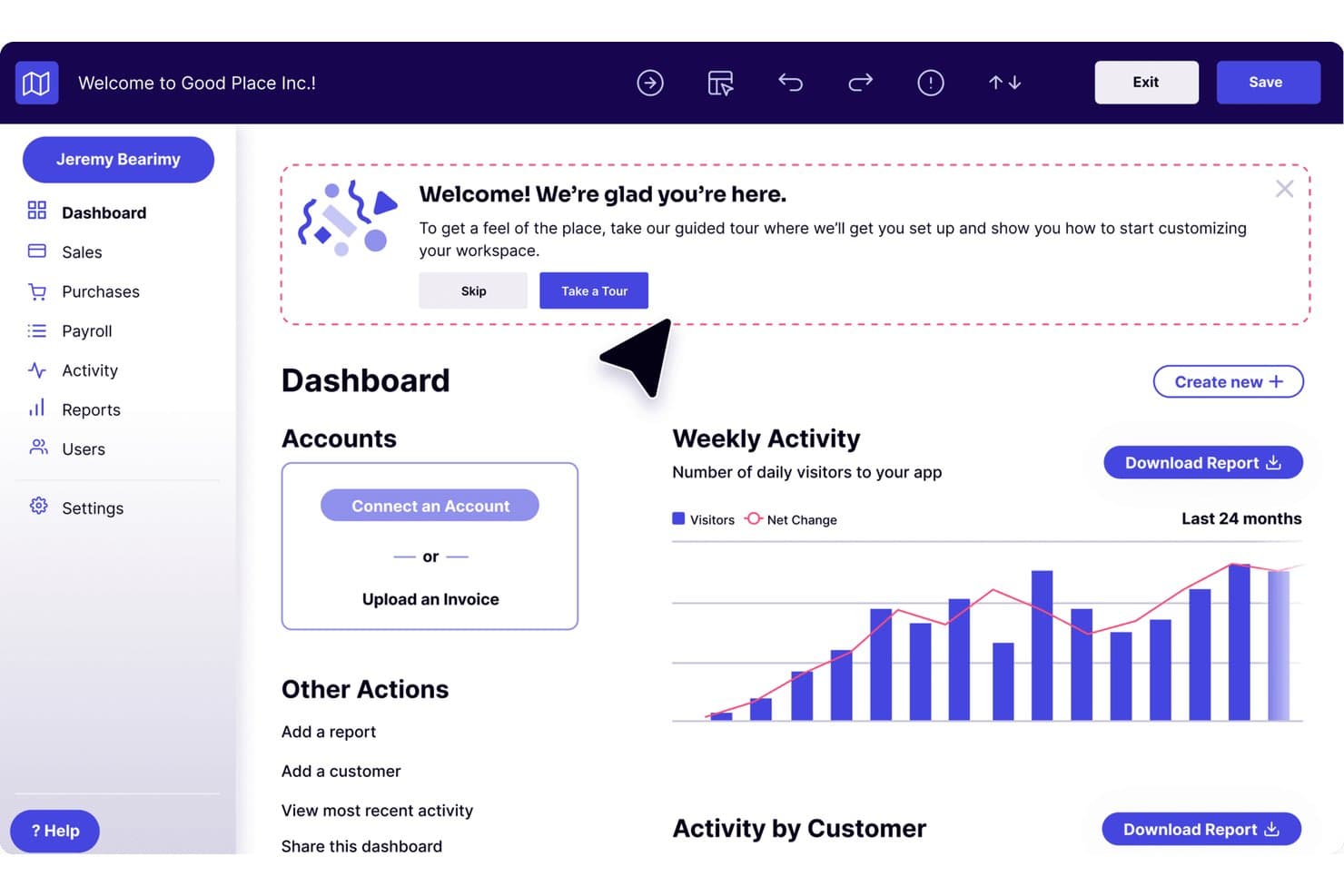
Pendo guides new users through onboarding with an in-app welcome tour prompt. Pendo is a product adoption platform that combines in-app guides, product analytics, session replay, NPS surveys, and a customizable resource center for web and mobile apps.
Who Is Pendo Best For?
Pendo is a strong fit for product teams at mid-market and enterprise SaaS companies that need deep behavioral analytics alongside their in-app guidance—not just one or the other.
Why I Picked Pendo
Pendo earns its spot on my shortlist because its product analytics go deeper than what most adoption tools offer. I'm talking about retroactive auto-tagging that captures every page and feature from day one, plus Data Explorer, Funnels, Paths, and Retention analysis all in one place. What I really like is the Product Engagement Score, which rolls behavioral signals into a single composite metric so you can see exactly where adoption is stalling.
Pendo Key Features
- Guide branching: Conditional logic lets you build multi-path onboarding flows that adapt based on each user's choices and actions.
- Resource center: A customizable in-app menu gives users on-demand access to checklists, help content, announcements, and feedback portals.
- In-app surveys: NPS, CSAT, and PMF surveys trigger contextually based on user behavior, segment, or time-in-app.
- Session replay: Unlimited video playback of user sessions with automatic flagging of rage clicks, U-turns, and dead clicks.
Pendo Integrations
Pendo offers 85+ native integrations, including Salesforce, HubSpot, Gainsight, Planhat, Segment, Zendesk, Slack, Jira, Snowflake, and BigQuery. It also supports Zapier and data sync with Databricks, Redshift, Amazon S3, Google Cloud Storage, and Microsoft Azure.
Pros and Cons
Pros:
- Guide branching for multi-path onboarding flows
- Deep analytics tied to onboarding outcomes
- Retroactive auto-tagging of all features
Cons:
- Ad blockers interfere with tracking accuracy
- Guides can break after UI changes
Learn more about Pendo: Best inline guidance and design flexibility
- 14-day free trial
- Pricing upon request
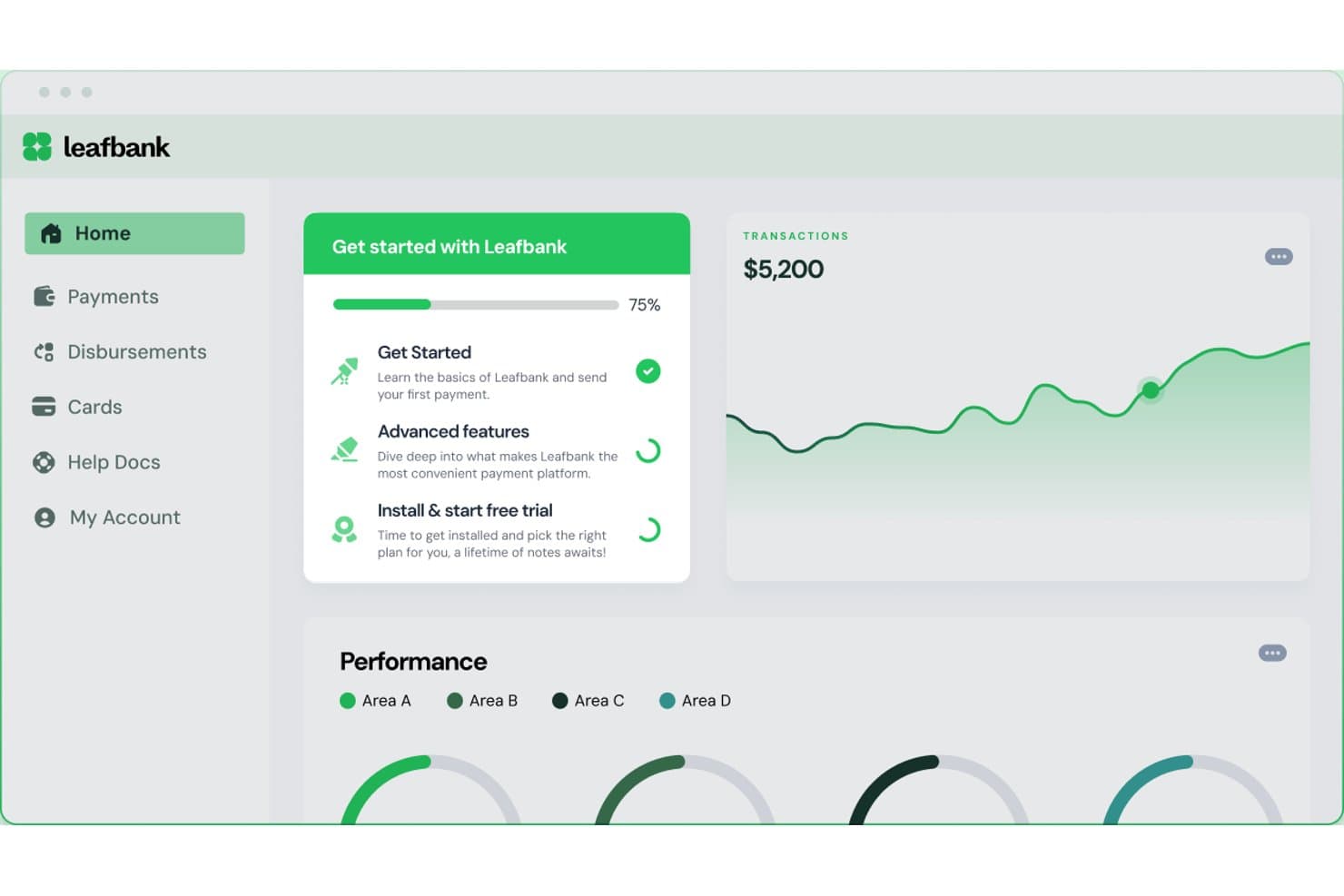
Chameleon guides users through onboarding steps with a progress checklist. Chameleon is a product adoption platform that lets teams build in-app tours, tooltips, modals, checklists, and microsurveys—plus a CMD+K help bar and AI-generated interactive demos—without writing code.
Who Is Chameleon Best For?
Chameleon is a strong fit for product teams at mid-market SaaS companies who need pixel-perfect, on-brand in-app experiences and want full control over design without relying on developers.
Why I Picked Chameleon
Chameleon earns its spot on my shortlist because of how much control it gives you over the look and feel of every in-app experience. I love that its no-code builder lets you apply custom CSS, brand fonts, and reusable themes so tours and tooltips feel native to your product, not bolted on. Its Smart Delay feature holds an experience until a user pauses, which means guidance surfaces at a natural moment rather than interrupting mid-flow.
Chameleon Key Features
- Microsurveys: Collect in-app user feedback using NPS, CSAT, CES, PMF, or open-ended survey formats with conditional branching logic and behavioral triggers.
- A/B testing: Run experiments on in-app experiences with automatic winner detection at 95% statistical confidence, available on Pro plans and above.
- HelpBar: A CMD+K spotlight search widget that lets users find help articles, trigger tours, or navigate features without leaving your product.
- Launchers: A configurable persistent widget you can use as an onboarding checklist, resource center, or help hub with dynamic content triggers.
Chameleon Integrations
Chameleon offers 30+ native integrations, including Amplitude, Mixpanel, Heap, Segment, HubSpot, Salesforce, Zendesk, Intercom, Help Scout, and Zapier. Its JavaScript API supports custom integrations and user data targeting.
Pros and Cons
Pros:
- AI agents identify user friction and personalize flows
- Product tours, tooltips, and checklists supported
- No-code builder with full CSS theming
Cons:
- Experience caps on lower pricing tiers
- No native app support for iOS or Android
Learn more about Chameleon:
Diğer Ürün Benimseme Yazılımları
İşte kısa listeme giremeyen, ancak yine de göz atmaya değer bazı ek ürün benimseme yazılımı seçenekleri:
- 11JIMOBest for AI-generated tours and in-app guidance
- 12Gainsight PXBest for CS-led adoption with account analytics
- 13IntercomBest for in-app live chat and chatbots
- 14Lemon LearningBest for guiding users on legacy enterprise apps
- 15Product FruitsBest for tours paired with in-app feedback
- 16FrigadeBest for AI-guided onboarding without flow authoring
- 17StonlyBest for creating in-app self-serve, interactive guides
- 18UserIQBest for CS-led onboarding with health scoring
- 19HopscotchBest for no-code tour building from day one
How I Evaluate Product Adoption Software
I split my evaluation into two layers: acceptance criteria every tool must clear—like in-app tours and user segmentation—and differentiators that determine the best fit for PLG teams or CS-led orgs.
Core Functionality (Table Stakes For This List)
When I'm selecting tools for my list, I rank each one on a scale from 0 (does not offer the functionality) to 5 (excels in this area) for each core functionality listed below. I then calculate the tool's total score into a percentage, using 65% as a benchmark to help assess its overall fit for the list.
- In-App Guided Tours: I evaluate whether a tool can deliver interactive, multi-step walkthroughs that guide users through real workflows—like setting up a first project or connecting an integration.
- No-Code Flow Builder: Product managers and onboarding specialists need to ship flows without filing engineering tickets, so I look for a visual editor or browser extension that handles the full build-to-publish cycle.
- Contextual In-App Messaging: Beyond basic modals, I check for tooltips, hotspots, banners, and slideouts that can be triggered by specific user actions—like surfacing a tip when someone visits a feature page for the first time.
- User Segmentation & Targeting: The ability to target flows by user attributes, behavioral events, or lifecycle stage matters here—for example, showing different onboarding paths to admins vs. end users.
- Adoption Analytics: I look for dashboards that tie flow engagement to feature usage and activation metrics, so teams can see whether a tour actually moved the needle on adoption.
- Checklists & Resource Centers: Persistent self-serve elements like onboarding checklists and in-app help hubs keep users oriented across sessions, and I evaluate how configurable and targetable these elements are.
Once I have a list of tools that meet the criteria, I consider what sets each platform apart.
Differentiating Factors (What Sets Vendors Apart)
Here's how I compare and contrast different vendors:
Standout Features
A/B testing on flows and messaging is a major differentiator. I look for tools that let you experiment with tooltip placement or checklist order and measure lift on activation rates. In-app surveys like NPS and PMF capture user sentiment right where adoption happens, closing the loop between guidance and feedback. Mobile SDK support also matters—teams with cross-platform products need the same tours and checklists on iOS and Android, not just web.
Beyond Features
Integration depth is one of the first things I evaluate. A tool that syncs with your analytics stack (Amplitude, Mixpanel), CRM, and customer success platform turns adoption data into action across teams. Pricing model matters too—MAU-based pricing can balloon fast for PLG products with high traffic, so I check how costs scale as your user base grows. I also consider deployment speed, since a browser extension or lightweight snippet means your team can launch a first flow in hours instead of waiting on an engineering sprint.
Ürün Benimseme Yazılımı Nasıl Seçilir?
Uzun özellik listeleri ve karmaşık fiyatlandırma yapıları arasında kaybolmak kolaydır. Benzersiz yazılım seçim sürecinizde ilerlerken odağınızı korumanıza yardımcı olmak için göz önünde bulundurmanız gereken faktörleri içeren bir kontrol listesi hazırladım:
| Faktör | Göz Önünde Bulundurulması Gerekenler |
|---|---|
| FaktörÖlçeklenebilirlik | Göz Önünde Bulundurulması GerekenlerYazılım işletmenizle birlikte büyüyebilir mi? Özellikle hızlı bir şekilde genişlemeyi planlıyorsanız, performans sorunları yaşamadan artan kullanıcı sayısını yönetip yönetemediğini değerlendirin. |
| FaktörEntegrasyonlar | Göz Önünde Bulundurulması GerekenlerMevcut sistemlerinizle çalışıyor mu? Sorunsuz veri akışı sağlamak için CRM, analiz ve iletişim platformları gibi araçlarla uyumluluğunu kontrol edin. |
| FaktörÖzelleştirilebilirlik | Göz Önünde Bulundurulması Gerekenlerİhtiyaçlarınıza göre uyarlayabilir misiniz? Kullanıcı arayüzlerini ve iş akışlarını süreçlerinize ve marka kimliğinize uyacak şekilde değiştirme seçenekleri arayın. |
| FaktörKullanım kolaylığı | Göz Önünde Bulundurulması GerekenlerEkibiniz için kullanıcı dostu mu? Basit bir arayüz eğitim süresini kısaltabilir ve benimseme oranlarını artırabilir. Tam uygulamadan önce küçük bir grupla test edin. |
| FaktörUygulama ve işe alıştırma | Göz Önünde Bulundurulması GerekenlerKurulum ne kadar sürüyor? Başarılı bir kullanıma sunma süreci için gereken kaynakları değerlendirin. Ekibinize yardımcı olmak üzere rehberli işe alıştırma sunan araçları arayın. |
| FaktörMaliyet | Göz Önünde Bulundurulması GerekenlerToplam sahip olma maliyeti nedir? Başlangıç ücretlerini, abonelik kademelerini ve gizli maliyetleri karşılaştırın. Gerekli özelliklerden ödün vermeden bütçenize uyduğundan emin olun. |
| FaktörGüvenlik önlemleri | Göz Önünde Bulundurulması GerekenlerVerilerinizi koruyor mu? Hassas bilgileri güvence altına almak için şifreleme standartlarını ve GDPR veya CCPA gibi düzenlemelere uygunluğunu doğrulayın. |
| FaktörDestek seçeneklerinin kullanılabilirliği | Göz Önünde Bulundurulması GerekenlerHangi destek seçenekleri sunuluyor? Gerektiğinde yardım alabilmek için 7/24 destek, özel müşteri yöneticileri ve topluluk forumlarını değerlendirin. |
Ürün Benimseme Yazılımı Nedir?
Ürün benimseme yazılımı, kullanıcıların yeni yazılım ürünlerine etkili bir şekilde dahil olmasına ve bu ürünlerle etkileşim kurmasına yardımcı olmak için tasarlanmış bir araçtır. Ürün yöneticileri, müşteri başarısı ekipleri ve UX tasarımcıları gibi profesyoneller bu araçları genellikle kullanıcı deneyimlerini geliştirmek için kullanır. Kullanıcıya alıştırma, etkileşimli uygulama turları ve uygulama içi mesajlaşma gibi özellikler, kullanıcılara rehberlik etmeye ve geri bildirim toplamaya yardımcı olur. Genel olarak bu araçlar, kullanıcıların yeni yazılımları anlamasını ve kullanmasını kolaylaştırarak memnuniyet ve elde tutma oranlarını artırır.
Özellikler
Ürün benimseme yazılımı seçerken aşağıdaki temel özelliklere dikkat edin:
- Kullanıcıya alıştırma: Yeni kullanıcıları, hızlı ve etkili bir şekilde başlamalarına yardımcı olmak için ilk adımlarda yönlendirir.
- Etkileşimli uygulama turları: Kullanıcıların anlayışını ve etkileşimini geliştirmek için uygulama içinde adım adım talimatlar sunar.
- Uygulama içi mesajlaşma: Güncellemeler, ipuçları veya destek için kullanıcılarla doğrudan iletişim kurulmasını sağlayarak genel kullanıcı deneyimini iyileştirir.
- Kullanıcı segmentasyonu: Belirli kullanıcı gruplarını, benzersiz ihtiyaçlarını ve tercihlerini karşılayacak özel içeriklerle hedeflemeyi sağlar.
- Analiz panoları: Ekiplerin verilere dayalı kararlar almasına yardımcı olmak için kullanıcı davranışı ve etkileşimi hakkında içgörüler sunar.
- Özelleştirilebilir şablonlar: Ekiplerin markaları ve iş akışlarıyla uyumlu kişiselleştirilmiş kullanıcı deneyimleri oluşturmasını sağlar.
- A/B testi: Farklı kullanıcı akışlarını test etmeye ve daha iyi etkileşim ve dönüşüm için bunları optimize etmeye olanak tanır.
- Kendi kendine hizmet desteği: Kullanıcıların sık sorulan sorular veya bilgi tabanları gibi kaynaklar aracılığıyla bağımsız olarak yanıt bulmasını sağlar.
- Çok dilli destek: Farklı dil geçmişlerine sahip kullanıcıların ürüne tercih ettikleri dilde erişebilmesini sağlar.
- Uyumluluk takibi: Yazılım içinde gerekli düzenlemelere ve prosedürlere uyulmasını izlemeye ve sağlamaya yardımcı olur.
Avantajlar
Ürün benimseme yazılımını uygulamak, ekibiniz ve işletmeniz için çeşitli avantajlar sağlar. Yararlanabileceğiniz avantajlardan bazıları şunlardır:
- Gelişmiş kullanıcı etkileşimi: Etkileşimli uygulama turları ve uygulama içi mesajlaşma, kullanıcıların etkileşimde kalmasını ve bilgilendirilmesini sağlayarak genel deneyimlerini geliştirir.
- Daha hızlı kullanıcıya alıştırma: Kullanıcıya alıştırma özellikleri, yeni kullanıcıları verimli bir şekilde yönlendirerek üretken hale gelmeleri için gereken süreyi azaltır.
- Verilere dayalı kararlar: Analiz panoları, kullanıcı davranışı hakkında içgörüler sunarak ürün başarısını artırmak için bilinçli kararlar almanıza yardımcı olur.
- Kişiselleştirilmiş deneyimler: Özelleştirilebilir şablonlar ve kullanıcı segmentasyonu, içeriği belirli kullanıcı ihtiyaçlarına göre uyarlamanıza ve memnuniyeti artırmanıza olanak tanır.
- Kendi kendine yeterlilik: Kendi kendine hizmet desteği, kullanıcıların yanıtları kendi başlarına bulmasını sağlayarak destek ekibinize olan bağımlılığı azaltır.
- Küresel erişim: Çok dilli destek, ürününüzün dünya genelindeki kullanıcılar tarafından erişilebilir olmasını sağlayarak pazar varlığınızı genişletir.
- Düzenlemelere uyum: Uyumluluk takibi, ekibinizin düzenleyici gereklilikleri yakından izlemesine yardımcı olarak uyumsuzlukla ilişkili riskleri azaltır.
Maliyetler ve Fiyatlandırma
Ürün benimseme yazılımını seçmek, mevcut çeşitli fiyatlandırma modellerinin ve planların anlaşılmasını gerektirir. Maliyetler özelliklere, ekip büyüklüğüne, eklentilere ve diğer unsurlara göre değişir. Aşağıdaki tablo, ürün benimseme yazılımı çözümlerinde yaygın planları, bunların ortalama fiyatlarını ve genellikle dahil edilen özellikleri özetlemektedir:
Ürün Benimseme Yazılımı İçin Plan Karşılaştırma Tablosu
| Plan Türü | Ortalama Fiyat | Yaygın Özellikler |
|---|---|---|
| Plan TürüÜcretsiz Plan | Ortalama Fiyat$0 | Yaygın ÖzelliklerTemel kullanıcıya alıştırma, sınırlı analiz ve topluluk desteği. |
| Plan TürüKişisel Plan | Ortalama Fiyat$5-$25/kullanıcı/ay | Yaygın ÖzelliklerKullanıcıya alıştırma, etkileşimli uygulama turları, temel analiz ve e-posta desteği. |
| Plan Türüİşletme Planı | Ortalama Fiyat$30-$75/kullanıcı/ay | Yaygın ÖzelliklerGelişmiş analiz, özelleştirilebilir şablonlar, kullanıcı segmentasyonu ve öncelikli destek. |
| Plan TürüKurumsal Plan | Ortalama Fiyat$100-$250/kullanıcı/ay | Yaygın ÖzelliklerKapsamlı analiz, çok dilli destek, uyumluluk takibi, özel hesap yöneticisi ve özel entegrasyonlar. |
Ürün Benimseme Yazılımı SSS
Ürün benimseme yazılımı hakkında sık sorulan soruların bazı yanıtlarını burada bulabilirsiniz:
Ekibimin ürün benimseme yazılımına ihtiyacı olup olmadığını nasıl anlarım?
Ekibiniz yeni kullanıcıları ürüne alıştırmakta zorlanıyorsa veya kullanıcılar ürününüzle tam olarak etkileşim kurmuyorsa ürün benimseme yazılımı yardımcı olabilir. Bu yazılım, kullanıcı deneyimlerini geliştirmek ve kullanıcıların ürününüzden en iyi şekilde yararlanmasını sağlamak için araçlar ve içgörüler sunar. Kullanıcıyı elde tutma oranını ve memnuniyetini artırmak istiyorsanız bu yazılımı değerlendirebilirsiniz.
Ürün benimseme yazılımı kullanıcı memnuniyetini nasıl artırabilir?
Ürün benimseme yazılımı, kullanıcıların ihtiyaçlarına göre uyarlanmış ürüne alıştırma deneyimleri ve gerçek zamanlı destek sunarak kullanıcı memnuniyetini artırır. Etkileşimli yönlendirmeler ve uygulama içi mesajlaşma gibi özellikler sayesinde kullanıcılar ihtiyaç duydukları anda rehberlik ve yardım alır. Bu kişiselleştirilmiş yaklaşım, kullanıcıların kendilerini değerli hissetmesini sağlar ve ürünü kullanmaya devam etme olasılıklarını artırır.
Benimseme yazılımının işe yarayıp yaramadığını belirlemek için hangi ölçümleri izlemeliyim?
Temel ölçümler arasında benimseme oranı, değere ulaşma süresi, özellik kullanımı, müşteri kayıp oranı ve destek taleplerinin hacmi yer alır. Ayrıca yönlendirilen kullanıcıların, yönlendirilmeyen kullanıcılara kıyasla nasıl performans gösterdiğini de izleyebilirsiniz. Kullanıcı etkileşiminde, elde tutmada ve memnuniyetinde iyileşme belirtileri arayın. Bu göstergeleri düzenli olarak izlemek, yazılımın sonuç sağlayıp sağlamadığını gösterecektir.
Ürün benimseme yazılımını kullanmak için henüz doğru zaman ne zaman olmayabilir?
Ürününüz hâlâ geliştirmenin ilk aşamalarındaysa veya net ürüne alıştırma hedefleri belirlemediyseniz benimseme yazılımını kullanmak için henüz erken olabilir. Kullanıcılarınızın yolculuğunu tam olarak anlamadan bu araç fazla değer katmayabilir. Öncelikle kullanıcı davranışını anlamaya ve temel ürüne alıştırma sürecinizi iyileştirmeye odaklanmanız daha doğru olur. Bunlar sağlandıktan sonra benimseme yazılımı, süreci ölçeklendirmenize ve daha da geliştirmenize yardımcı olabilir.