

Ürün planlama araçları, ekiplerin ürün özelliklerini tanımlamasına, önceliklendirmesine ve planlamasına yardımcı olur; böylece herkes fikir aşamasından kullanıma sunmaya kadar aynı hedef doğrultusunda ilerler. Ücretsiz bir çözüm arıyorsanız, muhtemelen geniş bir yazılım bütçesine sahip olmadan yol haritalarını, zaman çizelgelerini ve ekip girdilerini yönetmenin baskısını hissediyorsunuz.
Bu rehber, günümüzde kullanılabilen en iyi ücretsiz ürün planlama araçlarını inceleyerek kafa karışıklığını ortadan kaldırıyor. Her birini bağımsız olarak test ettim; böylece neyi iyi yaptıklarını ve hangi konularda yetersiz kalabileceklerini anlayabilir, iş akışınıza ve bütçenize uygun bir araç seçebilirsiniz.
İster yalın bir girişimin parçası olun ister büyüyen bir şirkette ürün yönetiyor olun, burada netliğinizi, iş birliğinizi ve teslimat süreçlerinizi geliştirebilecek pratik ve ücretsiz seçenekler bulacaksınız.
Why Trust Our Software Recommendations
6,700+
Reviews
20
Industry experts
16+
Evaluation factors
14
Years
Our team has been testing and reviewing software since 2012. As product managers ourselves, we know how difficult—and important—it is to choose the right software.
For this guide, we evaluated tools using hands-on testing and independent research, scoring tools using our selection criteria.
Our reviews reflect our human editorial judgment, not a sales pitch.
Expert reviewers:
- Andrew LumbySenior TPM
- Cristiano ValimSenior UI/UX Lead


Ücretsiz Ürün Planlama Yazılımları Karşılaştırma Tablosu
Bu karşılaştırma tablosu, en iyi ücretsiz ürün planlama yazılımı seçimlerimin fiyatlandırma ayrıntılarını özetler:
Score legend (out of 5)
- Excellent4.5–5
- Good4–4.4
- Average3–3.9
- Below average2–2.9
- Poor1–1.9
Sorted by: Default
| Tool | Starting Price | Website | |||||||||
|---|---|---|---|---|---|---|---|---|---|---|---|
Best for free multi-view roadmap and sprint planning | Not rated | 2 | 5 | 4 | 4 | 4 | 3 | Not rated | Not rated | $10/user/month Free plan + 30-day trial available | Website |
Best for dev-native sprint and roadmap planning | Not rated | 1 | 5 | 4 | 3 | 4 | 3 | Not rated | Not rated | $8.50/user/month Free plan available | Website |
Best for feedback-linked scoring and roadmaps | Not rated | 4 | 4 | 4 | 3 | 3 | 4 | Not rated | Not rated | $19/user/month Free plan + free demo available | Website |
Best for sprint-based planning with unlimited members | Not rated | 2 | 4 | 4 | 3 | 4 | 3 | Not rated | Not rated | $10/user/month Free plan available | Website |
Best for GitHub-native planning and sprints | Not rated | 2 | 5 | 4 | 4 | 4 | 3 | Not rated | Not rated | $4.99/user/month Free plan + 14-day free trial + free demo available | Website |
Best for database management | Not rated | 2 | 4 | 2 | 4 | 1 | 4 | Not rated | Not rated | $20/user/month Free plan + free demo available | Website |
Best for feedback-to-roadmap with public voting | Not rated | 5 | 3 | 4 | 2 | 2 | 4 | Not rated | Not rated | $29/user/month Free plan + 10-day trial + demo available | Website |
Best for feedback-weighted backlog prioritization | Not rated | 3 | 5 | 5 | 4 | 5 | 5 | Not rated | Not rated | $12/user/month Free plan available; 14-day free trial; free demo available | Website |
Best for Jira-linked idea scoring and prioritization | Not rated | 3 | 5 | 4 | 3 | 2 | 5 | Not rated | Not rated | $10/user/month Free plan available | Website |
Best for docs-based roadmaps with free collaborators | Not rated | 2 | 4 | Not rated | 4 | 4 | Not rated | 4 | 3 | $12/user/month Free plan available | Website |


En İyi Ücretsiz Ürün Planlama Yazılımları İncelemesi
Aşağıda, kısa listeme giren en iyi ücretsiz ürün planlama yazılımlarının ayrıntılı özetlerini bulabilirsiniz. İncelemelerim, sizin için en iyi seçeneği bulmanıza yardımcı olmak amacıyla her aracın temel özelliklerine, artılarına ve eksilerine, entegrasyonlarına ve ideal kullanım alanlarına ayrıntılı bir bakış sunar. Bu araçlardan bazıları tamamen ücretsiz bir sürüm sunarken bazıları ücretsiz deneme süresi sunar. İncelemelerimin her birine nelerin ücretsiz olduğuna dair bir not ekledim
 Best for free multi-view roadmap and sprint planning
- Free plan + 30-day trial available
- From $10/user/month
Visit WebsiteCustomer Rating:4.6/5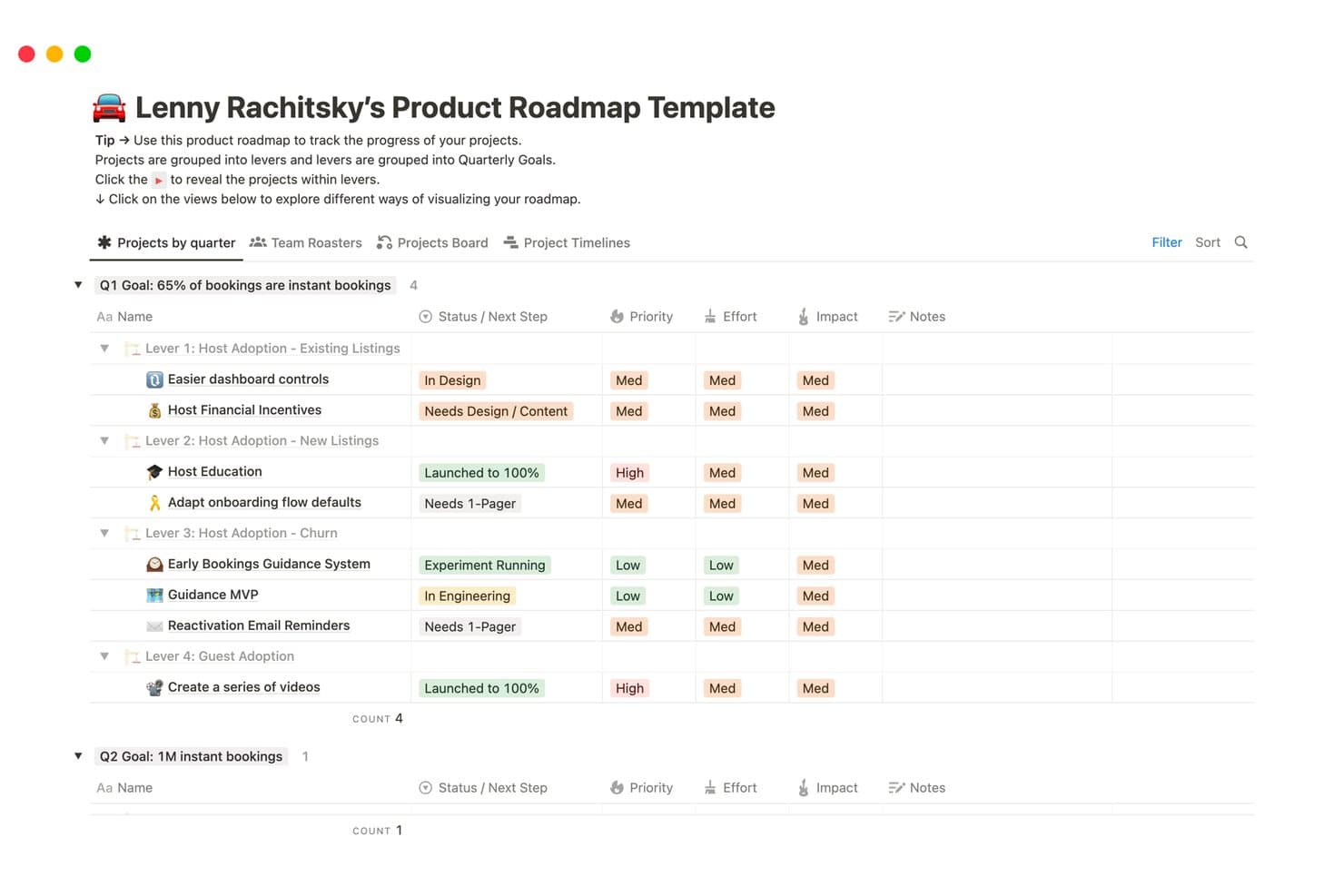
Notion organizes product roadmaps by quarter, lever, and priority. Notion is a flexible product planning workspace that combines configurable databases, roadmaps, sprint boards, timeline views, forms, docs, and public pages in one free-plan environment.
Who Is Notion Best For?
Notion suits product managers and startup founders who need flexible roadmaps, sprint boards, and collaborative planning in one workspace.
Why I Picked Notion
I picked Notion because its free multi-view roadmap and sprint planning supports real product workflows without forcing one planning format. I use timeline, board, calendar, and dependency views to connect quarterly releases with sprint backlogs. Its native sprint database also creates Current sprint, Sprint planning, and Backlog views for delivery work.
Notion Key Features
- Forms: Collect feedback directly into a connected database.
- Database properties: Add statuses, priorities, tags, formulas, and custom fields.
- Public pages: Publish roadmap content on a free notion.site domain.
- Comments and mentions: Discuss plans and notify teammates within pages.
Notion Integrations
Notion documents six native integrations, including Slack, Jira Cloud, GitHub, Figma, Amplitude, and Asana. Jira Cloud and GitHub syncs require Business, while Notion also offers a public API and Zapier.
What's Free?
Notion offers a free-forever plan for individuals and small teams, with databases, roadmaps, sprint boards, forms, and public pages. Advanced integrations, including Jira Cloud and GitHub syncs, require the Business plan.
Pros and Cons
Pros:
- Public pages share roadmaps with stakeholders
- Native sprints connect backlogs with releases
- Multiple roadmap views support varied planning
Cons:
- Team workspaces hit a lifetime block cap
- Manual scoring complicates prioritization decisions
Learn more about Notion: Best for dev-native sprint and roadmap planning
- Free plan available
- From $8.50/user/month (billed annually)
Visit WebsiteCustomer Rating:4.5/5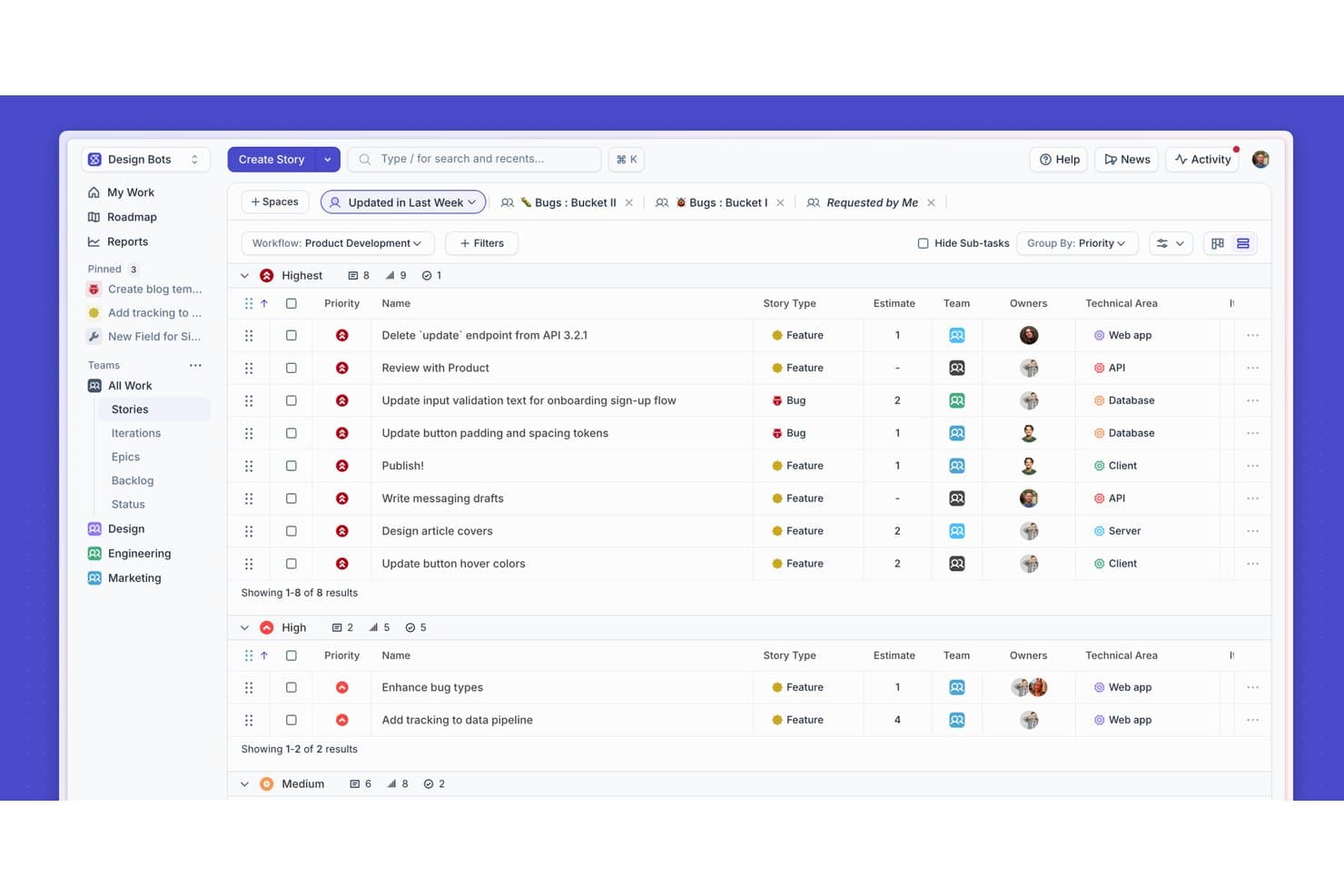
Shortcut organizes stories by priority with filters and grouping. Shortcut is a product planning platform for software teams that combines roadmap views, Epics, backlog prioritization, Iterations, Kanban boards, Docs, and Reports in a free-forever plan.
Who Is Shortcut Best For?
Shortcut suits product and engineering teams that need to connect sprint execution with roadmap planning in one developer-focused workspace.
Why I Picked Shortcut
Shortcut earns its place because it connects dev-native sprint and roadmap planning in one workspace. I use Roadmap Table and Timeline views to sequence Epics, track health, and align release dates. Iterations then connect those roadmap commitments to sprint progress and dependencies.
Shortcut Key Features
- GitHub integration: Link pull requests, commits, and branches to Stories.
- Kanban boards: Organize Stories across customizable workflow states.
- Reports: Monitor project progress with built-in reporting views.
- Docs: Create and link planning documentation to project work.
Shortcut Integrations
Shortcut offers native integrations with GitHub, Slack, Google Calendar, Google Sheets, Productboard, and Miro. It also provides a REST API for custom integrations and supports Zapier.
What's Free?
Shortcut offers a free-forever plan for teams with up to 10 users after its 14-day full-access trial. No credit card is required, but teams exceeding 10 users must upgrade to a paid plan.
Pros and Cons
Pros:
- Offers multiple roadmap and workflow views
- Includes unlimited Stories on the free plan
- Connects roadmap priorities with sprint execution
Cons:
- Free sharing restricts non-admin stakeholders
- Lacks native idea voting and intake
Learn more about Shortcut: Best for feedback-linked scoring and roadmaps
- Free plan + free demo available
- From $19/user/month (billed annually)
Visit WebsiteCustomer Rating:4.5/5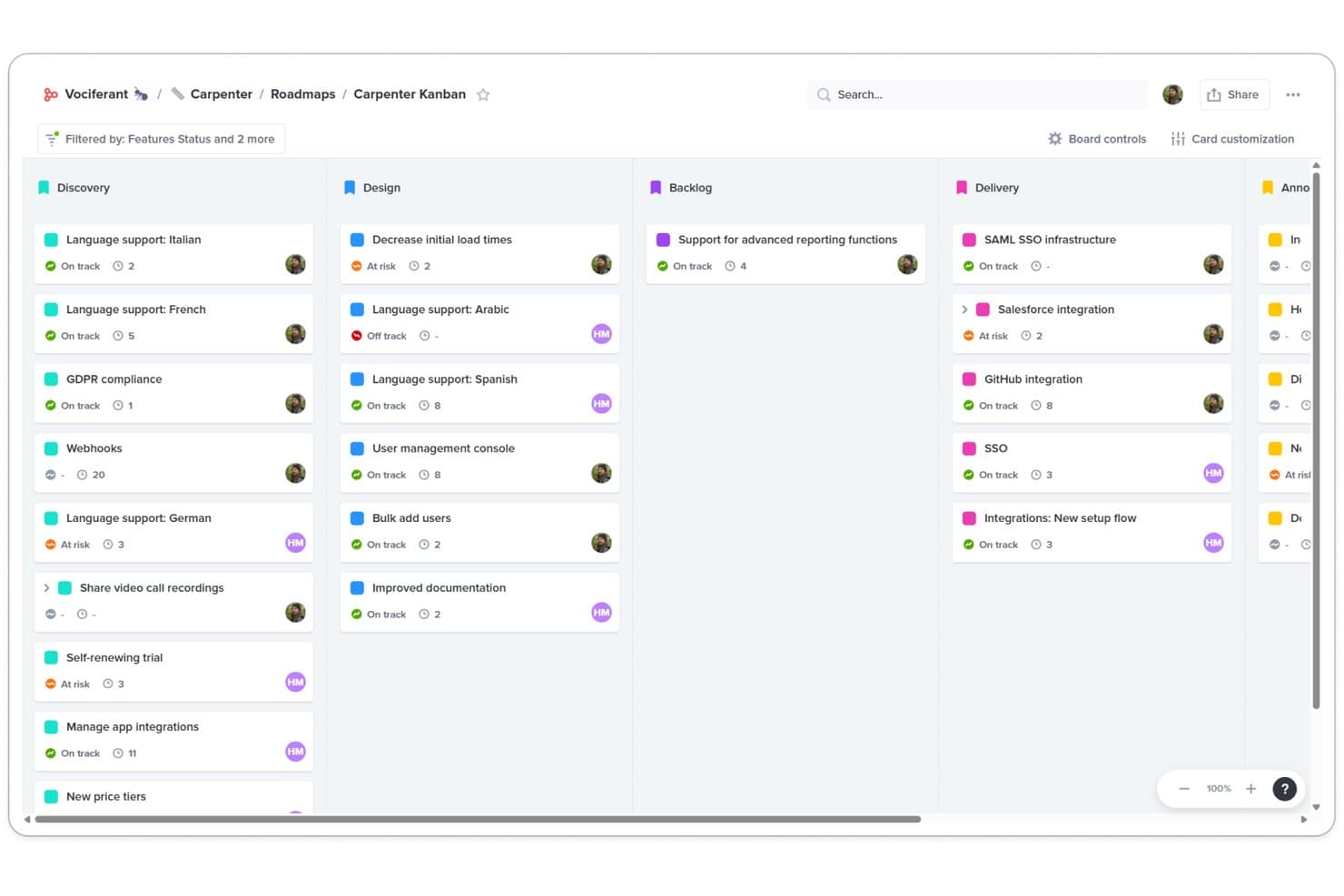
Productboard's Kanban board organizes features by stage across Discovery, Design, Backlog, and Delivery. Productboard is product planning software that combines customer feedback capture, feature hierarchies, formula-based prioritization, and timeline, columns, and grid roadmaps.
Who Is Productboard Best For?
Product managers and product team leads who connect customer feedback with prioritization scores and stakeholder-ready roadmaps.
Why I Picked Productboard
I picked Productboard because it connects customer feedback directly to prioritization and roadmaps. Product Portal votes feed linked features, while Customer Importance Scores and RICE, WSJF, or ICE formulas help compare opportunities. Timeline and columns boards then turn those scores into release plans, though free-plan limits need verification.
Productboard Key Features
- Jira integration: Syncs Productboard features and releases with Jira.
- AI Spark: Summarizes feedback, drafts briefs, and researches competitors.
- Release planning: Groups work into releases, versions, or quarters.
- Grid boards: Organizes features with sortable columns, filters, and groupings.
Productboard Integrations
Productboard offers native integrations with Jira, Azure DevOps, GitHub, Slack, Zendesk, Intercom, and Microsoft Teams. It supports two-way Jira sync, Zapier, and a REST API v2.0 for custom integrations.
What's Free?
Productboard offers a free Starter plan after a 15-day trial with full access and unlimited invited colleagues. Starter has limited functionality, and Productboard doesn’t clearly publish its current maker, contributor, or integration limits.
Pros and Cons
Pros:
- Publishes roadmap views for stakeholder feedback
- Supports RICE, WSJF, and ICE scoring
- Links customer votes to feature priorities
Cons:
- Shared AI credits restrict free experimentation
- Free-plan capabilities remain poorly documented
Learn more about Productboard: Best for sprint-based planning with unlimited members
- Free plan available
- From $10/user/month (billed annually)
Visit WebsiteCustomer Rating:4.6/5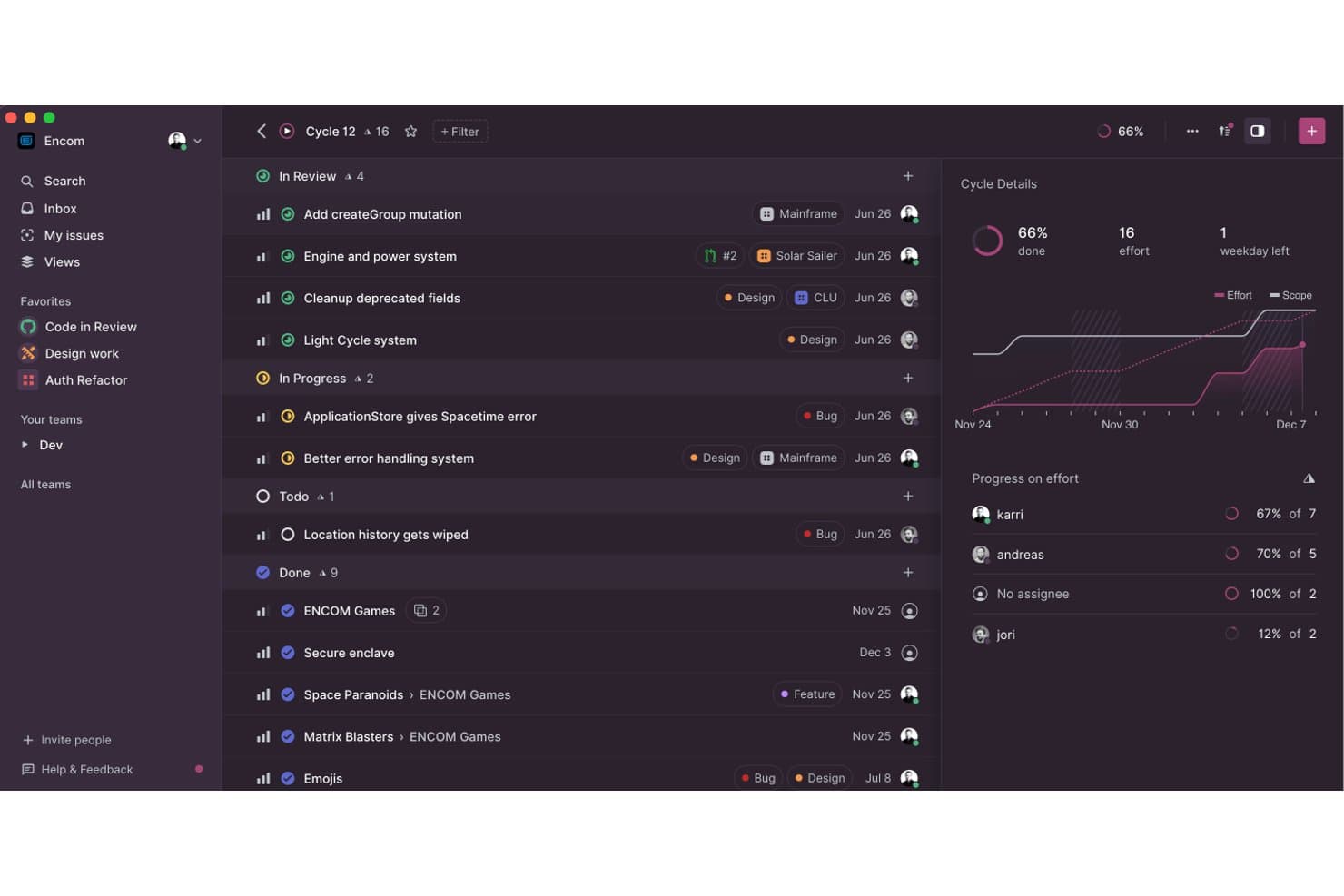
Linear tracks sprint progress and team effort within cycle views. Linear is a product planning platform that combines issue tracking, project roadmaps, sprint cycles, initiative planning, timeline views, and customer request management.
Who Is Linear Best For?
Product managers and startup teams that need sprint-based planning, roadmap tracking, and unlimited members will find Linear a strong fit.
Why I Picked Linear
I picked Linear because its free plan supports sprint-based planning with unlimited members. Cycles organize one- to eight-week delivery periods, while initiatives and timeline views connect projects to goals, milestones, and dependencies. Customer Requests also link feedback directly to backlog issues.
Linear Key Features
- Issue triage: Accept, decline, duplicate, or snooze incoming issues.
- Issue estimates: Use Fibonacci, linear, exponential, or T-shirt size scales.
- Importers: Move work from Jira, GitHub Issues, Asana, or Shortcut.
- Board layouts: Group issues by status, project, priority, cycle, or label.
Linear Integrations
Linear’s integration directory includes GitHub, Slack, Figma, Notion, Google Sheets, Microsoft Teams, Sentry, and Datadog. The Free plan includes integrations plus API and webhook access for custom connections.
What's Free?
Linear offers a free-forever plan with unlimited members, two teams, and up to 250 issues. It includes integrations, API and webhook access, but unlimited issues, private teams, and advanced integrations require a paid plan.
Pros and Cons
Pros:
- Initiatives connect projects to strategic goals
- Cycles organize focused sprint delivery periods
- Unlimited members support broad product teams
Cons:
- No native voting portal for feedback
- 250-issue limit constrains growing backlogs
Learn more about Linear: Best for GitHub-native planning and sprints
- Free plan + 14-day free trial + free demo available
- From $4.99/user/month (billed annually)
Visit WebsiteCustomer Rating:4.3/5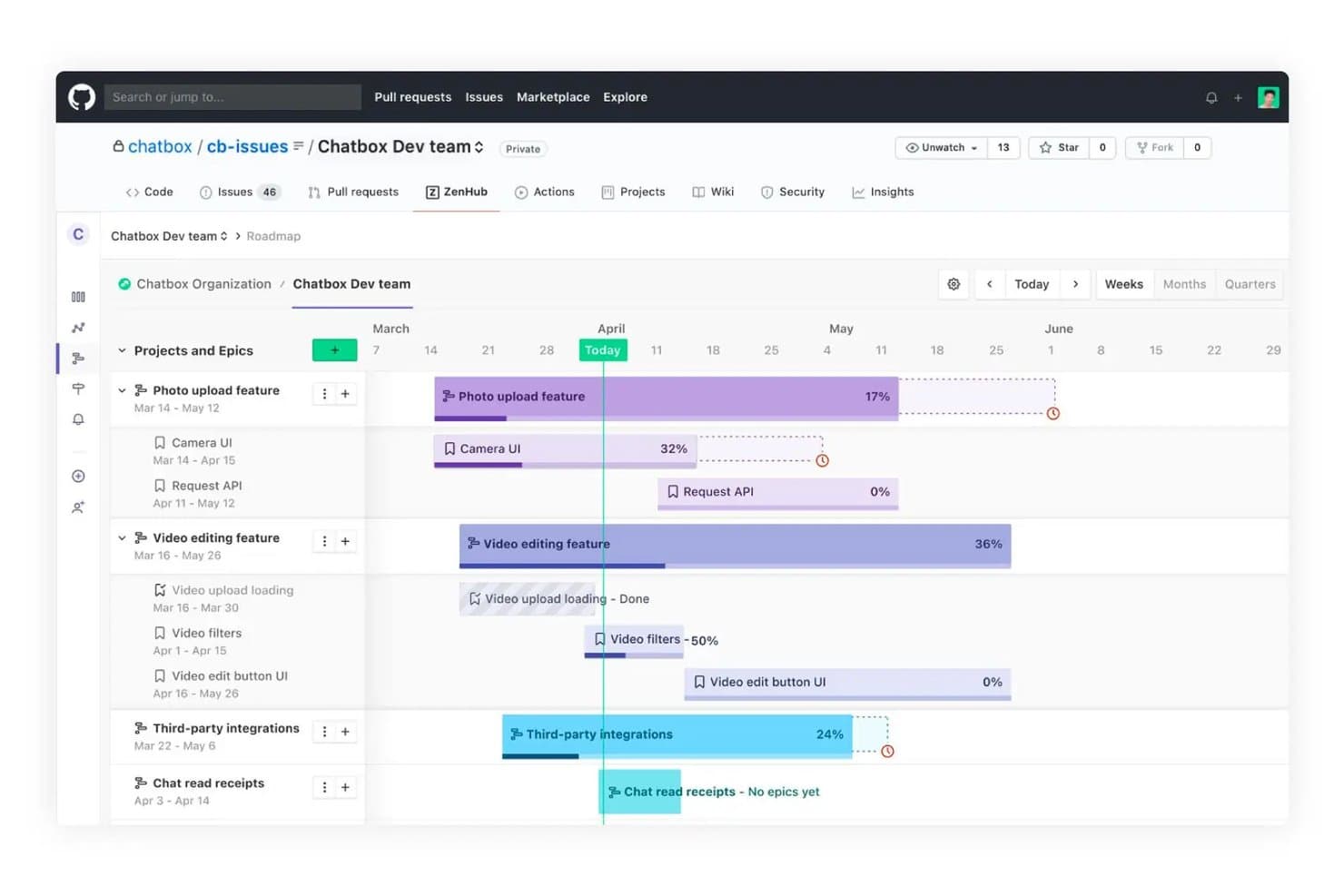
Zenhub lets users visualize project timelines and epic progress on a roadmap. Zenhub is a product planning platform that combines GitHub issues and pull requests with roadmaps, backlogs, sprint planning, hierarchy-based work tracking, reports, and multiple planning views.
Who Is Zenhub Best For?
Zenhub suits product managers and engineering-led teams that plan roadmaps, backlogs, and sprints alongside GitHub issues and pull requests.
Why I Picked Zenhub
I rate Zenhub highly for GitHub-native planning and sprints because it syncs issues and pull requests in both directions. Its roadmap connects epics, dependencies, key dates, and velocity-based delivery forecasts. Recurring sprints pull from prioritized backlogs, while unfinished work rolls into the next sprint automatically.
Zenhub Key Features
- Work hierarchy: Organize initiatives, projects, epics, issues, and sub-tasks.
- Planning poker: Collect anonymous story-point estimates from teammates.
- Kanban work tracker: Manage issues with pipelines and work-in-progress limits.
- Slack issue creation: Create Zenhub issues directly from Slack.
Zenhub Integrations
Zenhub has native integrations with GitHub and Slack, plus Enterprise integrations with Figma, Loom, and Miro. Its API and MCP Server support custom connections with Claude, Cursor, Gemini CLI, and Windsurf.
What's Free?
Zenhub offers a free-forever plan for up to 50 users, one team workspace, two connected repositories, and 250 issues. You’ll need a GitHub account, and Zenhub’s paid Teams plan also includes a 14-day free trial with full feature access.
Pros and Cons
Pros:
- Recurring sprints roll unfinished work forward
- Velocity forecasts flag roadmap deadline risks
- GitHub-native issue and pull request sync
Cons:
- No built-in feedback voting or scoring
- Free plan limits issues and workspaces
Learn more about Zenhub: Best for database management
- Free plan + free demo available
- From $20/user/month (billed annually)
Visit WebsiteCustomer Rating:4.6/5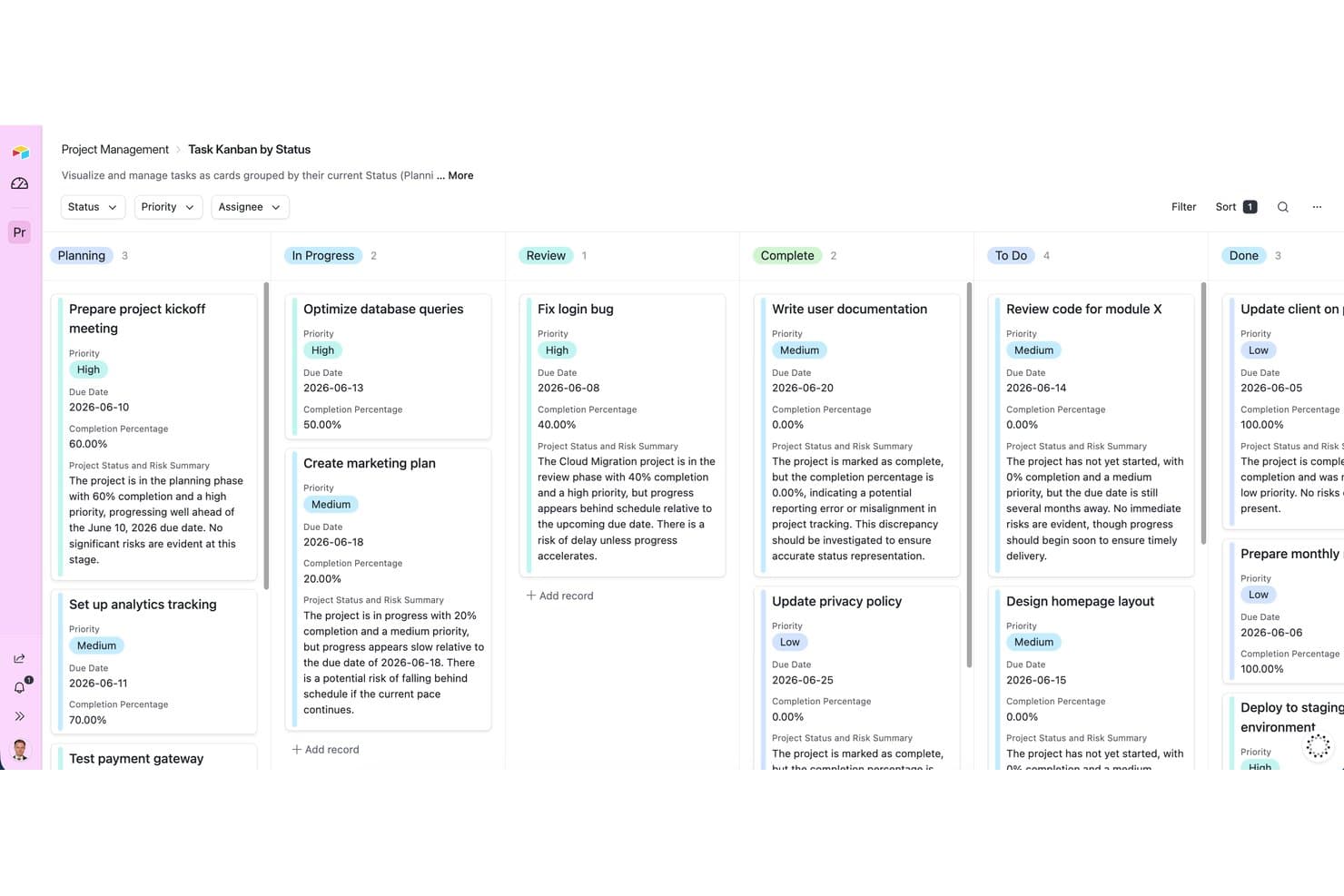
Airtable organizes tasks by status using a Kanban board view. Airtable is a free product planning platform that combines relational databases with roadmap templates, backlog views, prioritization matrices, forms, and collaboration tools, while reserving timeline and Gantt views for paid plans.
Who Is Airtable Best For?
Airtable suits product managers and small product teams that need flexible, database-driven backlog planning and cross-functional collaboration.
Why I Picked Airtable
I picked Airtable because its database management model gives product teams a flexible home for backlogs and planning data. I use linked records, kanban views, and prioritization matrix templates to connect feature requests with owners, scores, and product goals. Its free plan works well for structured backlog planning, although timeline and Gantt views require a paid plan.
Airtable Key Features
- Feedback forms: Collect submissions that automatically create records.
- Interface Designer: Build custom stakeholder pages with no code.
- Record comments: Add threaded discussions, @mentions, and notifications.
- AI credits: Analyze feedback themes and draft release notes.
Airtable Integrations
Airtable offers integrations with Jira, GitHub, Slack, Google Calendar, Google Drive, Salesforce, Zendesk, Miro, Figma, and Azure DevOps. The Free plan includes an API for custom integrations, while Jira sync and extensions require paid plans.
What's Free?
Airtable has a free-forever plan with no time limit, and all users can access it at no cost. The plan is intended for individuals and very small teams, with limits on records, attachments, automations, and API usage; timeline and Gantt views, Jira sync, and extensions require a paid plan.
Pros and Cons
Pros:
- Forms capture feature requests automatically
- Templates support prioritization and feedback analysis
- Relational records organize complex product backlogs
Cons:
- One-thousand-record limit constrains growing backlogs
- Free plan lacks roadmap timeline visualization
Learn more about Airtable: Best for feedback-to-roadmap with public voting
- Free plan + 10-day trial + demo available
- From $29/user/month (billed annually)
Visit WebsiteCustomer Rating:4.7/5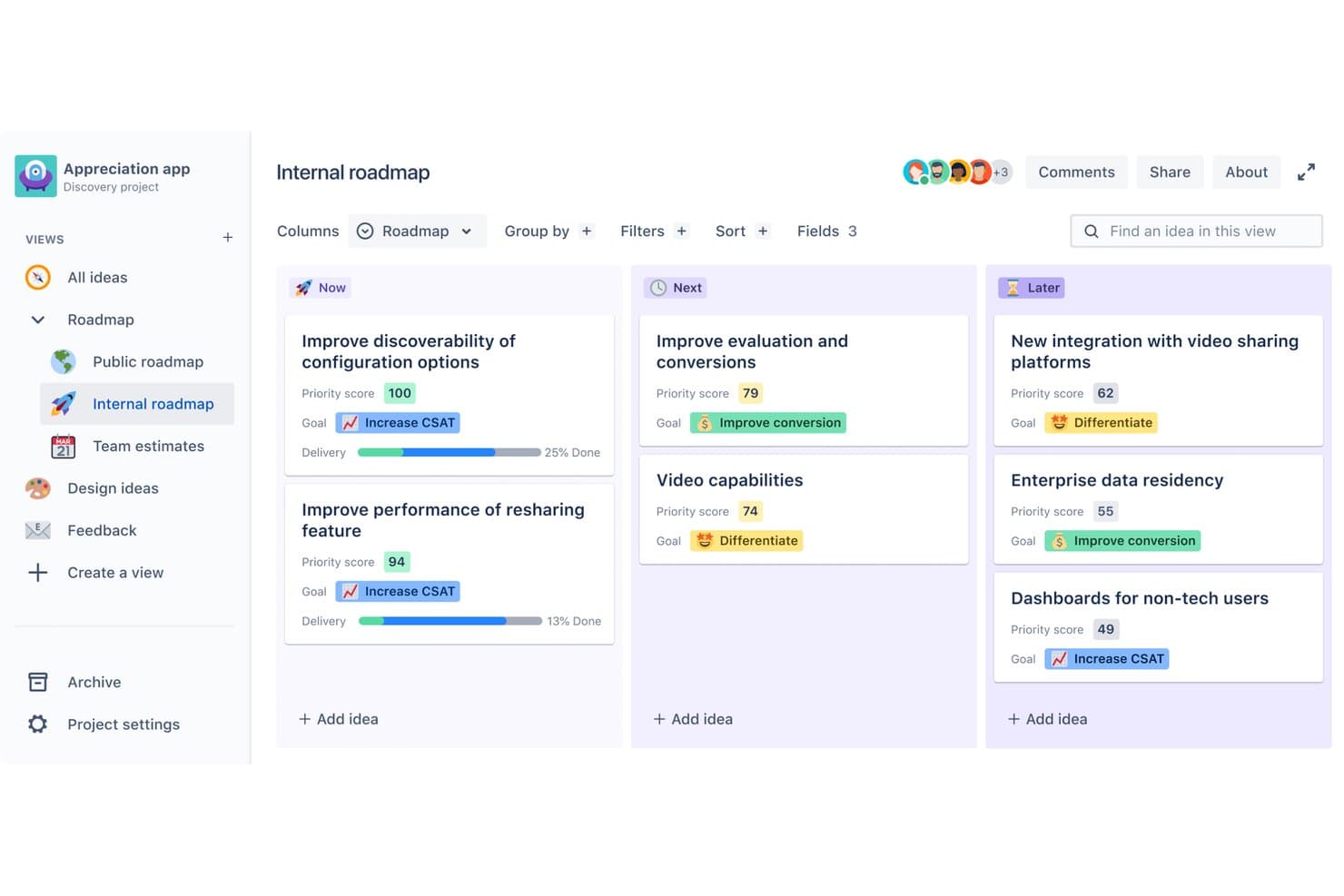
Featurebase organizes product ideas into Now, Next, and Later roadmap columns. Featurebase is product planning software that combines feedback collection, public request voting, request prioritization, customizable roadmaps, and product updates in one platform.
Who Is Featurebase Best For?
Featurebase suits product managers and lean SaaS teams that turn customer feedback and public voting into prioritized roadmaps.
Why I Picked Featurebase
I picked Featurebase because it connects public voting directly to product planning. I can collect requests through a feedback portal, let customers upvote them, then rank opportunities with value-versus-effort scoring or Impact scores. Its customizable roadmaps turn validated demand into customer-facing plans, while status updates notify voters when work ships.
Featurebase Key Features
- Custom request fields: Add categories, labels, statuses, and saved filtered views.
- Roadmap privacy controls: Share roadmaps publicly, privately, or with selected customer segments.
- Embedded roadmaps: Publish roadmaps in websites or apps using embeds and custom branding.
- CSV export: Export request details, ETAs, labels, statuses, and linked issue IDs.
Featurebase Integrations
Featurebase has documented integrations with Jira, Linear, GitHub, ClickUp, Azure DevOps, Slack, Discord, Zendesk, Intercom, and HubSpot. Salesforce, Segment, API, MCP, webhooks, and Zapier extend connectivity, though integrations and API access require Growth or higher.
What's Free?
Featurebase offers a free-forever plan with no credit card required, including feedback collection, updates, unlimited conversations, and unlimited end users. It’s limited to one seat, and advanced features such as integrations, API access, webhooks, and AI support require a paid plan.
Pros and Cons
Pros:
- Customer updates follow shipped requests
- Value-effort scoring supports prioritization decisions
- Public voting connects feedback to roadmaps
Cons:
- No milestones, dependencies, or sprint planning
- Free plan limits collaboration to one seat
Learn more about Featurebase: Best for feedback-weighted backlog prioritization
- Free plan available; 14-day free trial; free demo available
- From $12/user/month (billed annually)
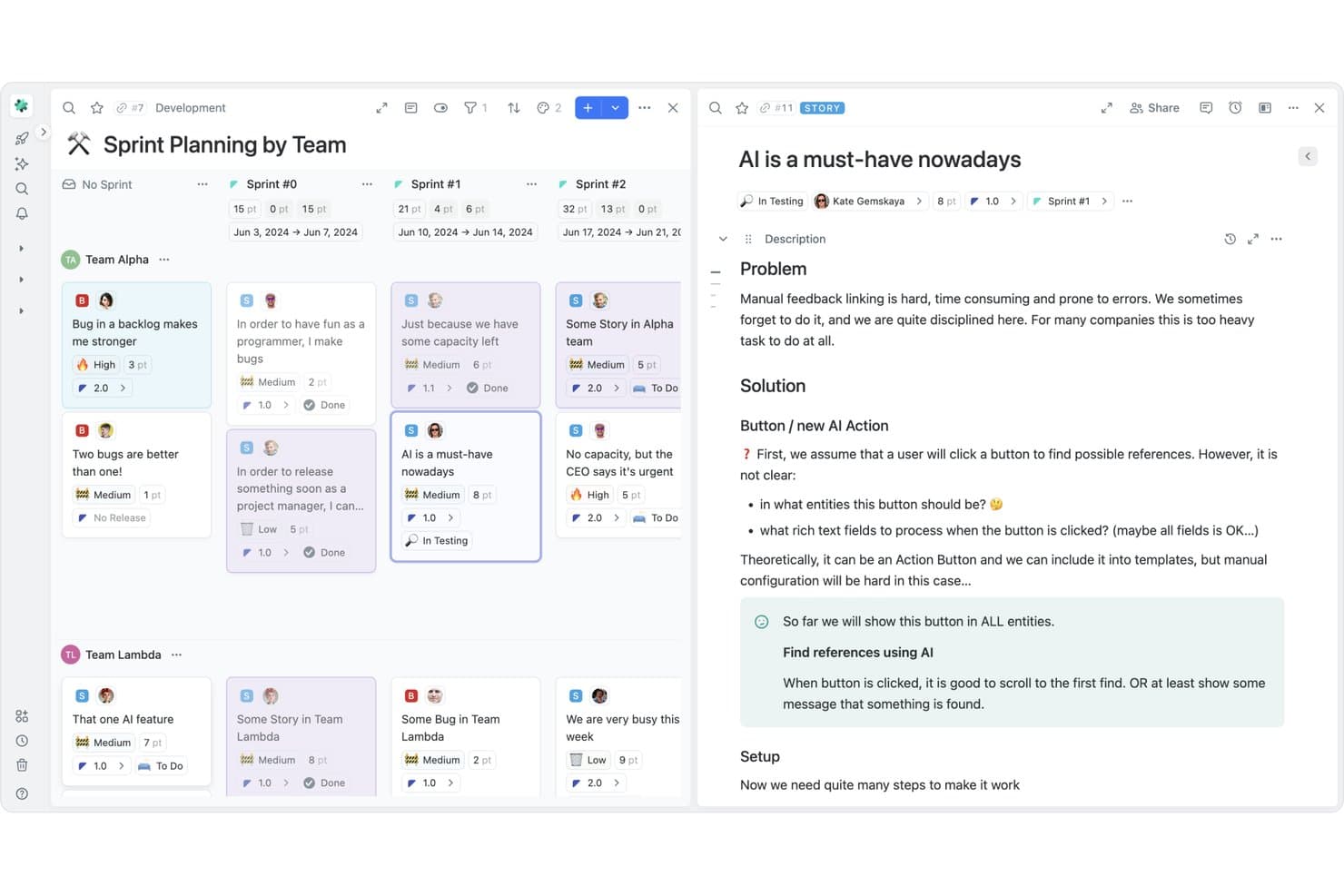
Fibery organizes sprint planning with team-based story boards and AI features. Fibery is a no-code product planning platform with a free plan, customizable roadmaps, backlog databases, prioritization frameworks, feedback capture, release timelines, and cross-functional docs.
Who Is Fibery Best For?
Product managers and lean product teams that prioritize backlogs using customer feedback, scoring frameworks, and connected roadmaps.
Why I Picked Fibery
I picked Fibery because its feedback inbox links customer requests to backlog items, then scores them by factors such as customer segment or recurring revenue. Custom RICE, WSJF, and formula scoring keep priorities tied to evidence as new feedback arrives. That makes Fibery Best for feedback-weighted backlog prioritization in a free product planning tool.
Fibery Key Features
- Collaborative documents: Add comments, mentions, inline discussions, and tasks within shared documents.
- Dependency tracking: Link blockers and automatically shift dependent dates when timelines change.
- Development integrations: Connect GitHub, GitLab, Jira, Slack, and other work tools.
- Multiple view formats: Switch between Board, Table, Calendar, Gantt, Dashboard, and Whiteboard views.
Fibery Integrations
Fibery offers documented integrations with GitHub, GitLab, Jira, Slack, Trello, Airtable, ClickUp, Linear, HubSpot, and Zapier. Its API supports CRUD operations, schema changes, webhooks, and GraphQL for custom connections.
What's Free?
Fibery offers a free-forever plan for up to 10 users and 10 guests, plus a 14-day Pro trial for new workspaces. The free plan includes 10 databases, 1 GB of storage, 14 days of version history, 250 monthly automation runs, and no external actions.
Pros and Cons
Pros:
- Connected roadmaps bridge strategy and delivery
- Custom scoring supports nuanced product decisions
- Feedback-linked prioritization keeps backlogs evidence-based
Cons:
- Customer voting requires a custom workaround
- Initial workspace setup demands substantial planning
Learn more about Fibery: Best for Jira-linked idea scoring and prioritization
- Free plan available
- From $10/user/month
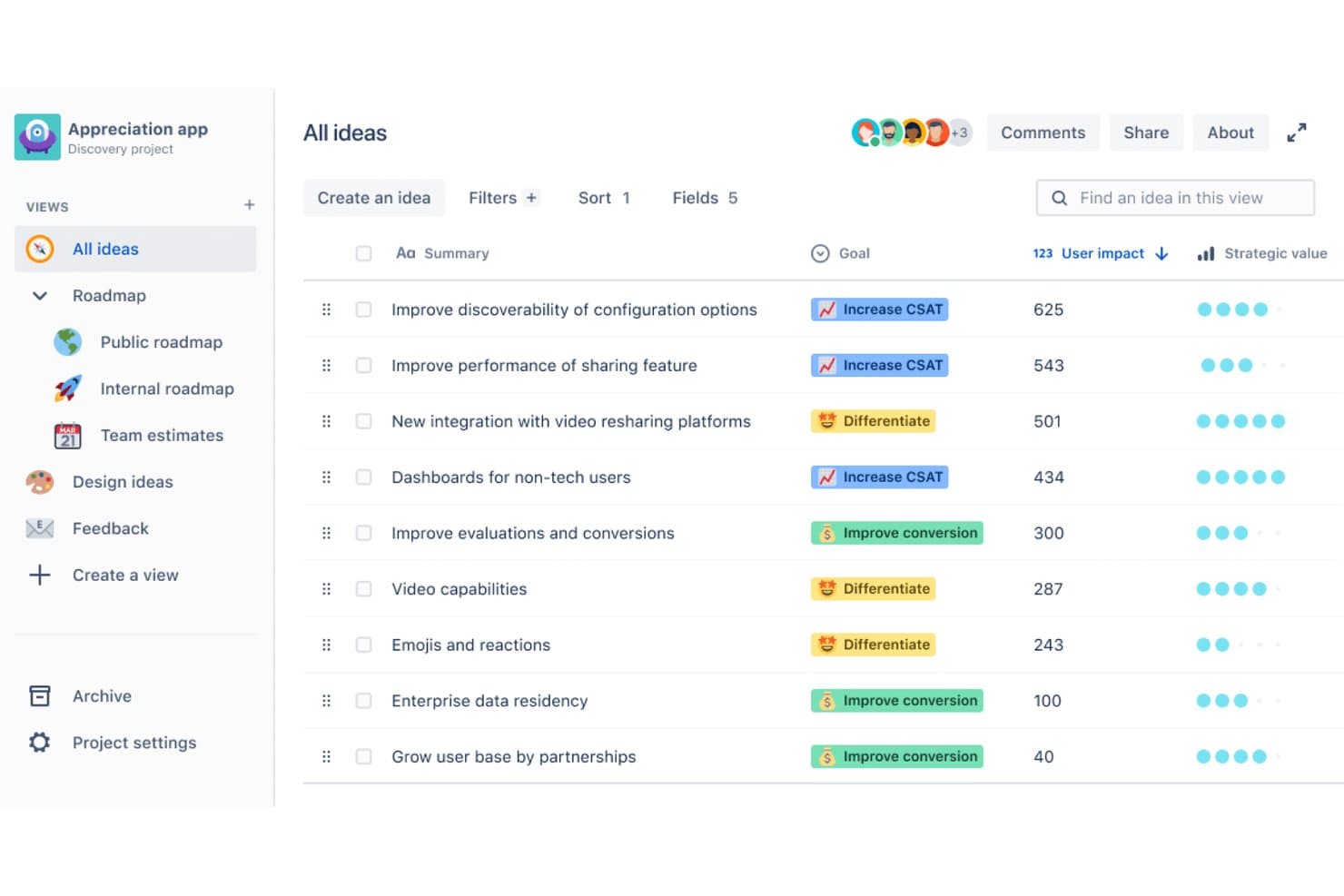
Jira Product Discovery ranks ideas by user impact and strategic value. Jira Product Discovery is a free product planning platform for capturing ideas, scoring priorities with custom formulas, building list, matrix, board, and timeline roadmaps, and linking plans to Jira delivery work.
Who Is Jira Product Discovery Best For?
Product managers and product team leads who need to score ideas and connect product priorities directly to Jira delivery work.
Why I Picked Jira Product Discovery
I picked Jira Product Discovery for Jira-linked idea scoring and prioritization. I use RICE or custom formulas to rank opportunities, then compare impact and effort in a matrix view. Linking selected ideas to Jira epics lets my team carry product priorities into delivery while keeping the free plan focused on core planning work.
Jira Product Discovery Key Features
- Customer insights: Attach research notes, support tickets, analytics, and sales opportunities to ideas.
- Slack and Teams capture: Create ideas or add insights directly from team messages.
- Custom idea types: Organize opportunities, problems, and feature requests with tailored workflows.
- Data import: Import records from Google Sheets, Productboard, Aha!, or Jira.
Jira Product Discovery Integrations
Jira Product Discovery has native integrations with Jira, Jira Service Management, Confluence, Slack, Microsoft Teams, Salesforce, and Usersnap. It also supports Atlassian Marketplace apps and imports from Google Sheets, Productboard, and Aha!.
What's Free?
Jira Product Discovery offers a free-forever plan for up to three creators, with 2GB of storage and Community Support. Contributors can join for free, but teams exceeding three creators need a 14-day trial of a paid plan or an upgrade.
Pros and Cons
Pros:
- Four roadmap views support different planning needs
- Matrix views clarify impact-versus-effort tradeoffs
- Custom RICE scoring supports evidence-based prioritization
Cons:
- Public customer voting requires separate tooling
- Timeline planning remains limited to months and quarters
Learn more about Jira Product Discovery: Best for docs-based roadmaps with free collaborators
- Free plan available
- From $12/user/month (billed annually)

Superhuman Docs lets users submit and track project requests with priorities and deadlines. Superhuman Docs is a free product planning workspace that combines collaborative documents, customizable tables, roadmap timelines, backlog views, forms, formulas, and automations.
Who Is Superhuman Docs Best For?
Startup founders and product team leads who need flexible, docs-based roadmaps with free collaborators.
Why I Picked Superhuman Docs
I picked Superhuman Docs because its docs-based roadmaps with free collaborators fit product teams that plan in context. I use connected tables to link feature backlogs with timeline, calendar, and card views, while milestones and dependencies clarify release plans. Free editors, commenters, and viewers let engineering, design, and business partners contribute directly.
Superhuman Docs Key Features
- Forms: Capture product ideas and requests directly into tables.
- Formula columns: Create custom scoring models for backlog prioritization.
- Automations: Trigger actions from time-based or event-based rules.
- Data exports: Download tables as CSV or documents as PDF.
Superhuman Docs Integrations
Superhuman Docs offers 800+ integrations through Packs, including OpenAI, Google Sheets, Slack, Jira, GitHub, and Linear; availability varies by plan. An API supports custom integrations.
What's Free?
Superhuman Docs offers a free-forever plan with collaborative docs, tables, views, forms, formulas, and automations. Editors and viewers are free, but shared docs are limited to 50 objects and 1,000 rows, while Docs AI and some integrations have limited access.
Pros and Cons
Pros:
- Forms capture ideas into planning tables
- Free collaborators support cross-functional planning
- Connected views unify roadmaps and backlogs
Cons:
- Prioritization frameworks require custom formulas
- Shared documents impose object and row limits
Learn more about Superhuman Docs:
Diğer Ücretsiz Ürün Planlama Yazılımları
Ücretsiz planlar veya deneme sürümleri sunan bazı ek ürün planlama yazılımı seçenekleri şunlardır. Bu araçlar kısa listeme girmemiş olsa da göz atmaya değer:
- 11MiroBest for visual brainstorming and whiteboarding
- 12ClickUpBest for all-in-one workspace
- 13TaskadeBest for AI-assisted team planning on a free tier
- 14NiftyBest for agile sprint planning on a free plan
- 15PortfoleonBest for portfolio-level visual roadmaps
- 16Zoho SprintsBest for free agile backlog and sprint tracking
- 17CannyBest for feature voting and backlog scoring
- 18LoopedInBest for feedback-to-roadmap prioritization
- 19PathProBest for public roadmap sharing with voters
How I Evaluate Free Product Planning Software
First, I define what counts as free. Product planning software must offer a free-forever plan, not a trial; I note user and feature limits. From there, I split my evaluation into three parts: core functionality, which carries the most weight, like mapping roadmaps and ranking backlogs; standout features, like feedback upvoting; and free-plan scalability.
Core Functionality (Table Stakes For This List)
In addition to my free plan requirements, I use a scoring system to select tools for my list. I score each one on a scale from 0 (does not offer the functionality) to 5 (excels in this area) for each core functionality listed below, based on what's available on the free plan. I then convert the total into a percentage to help assess each tool's overall fit, with extra weight on any functionalities I've deemed essential.
- Roadmap Visualization (Essential): I look for editable timelines that show planned initiatives clearly enough to discuss sequencing and direction with design, engineering, and stakeholders.
- Backlog Prioritization (Essential): I assess how easily teams can capture, group, and rank feature requests or ideas before deciding what belongs in a roadmap.
- Release Planning: I check whether teams can place work into releases, milestones, or sprints and see how items are sequenced over time.
- Collaboration and Sharing: I look for ways teammates to share plans, comment on decisions, and coordinate updates across product, design, and engineering.
- Idea and Feedback Capture: I assess how teams can collect, categorize, or rank customer requests and connect useful input to planning decisions.
- Multiple Planning Views: I check for practical options such as list, board, or timeline views that let teams examine the same work in different ways.
Once I have a list of tools that meet the criteria, I consider what sets each platform apart.
Differentiating Factors (What Sets Vendors Apart)
Here's how I compare and contrast different vendors:
Standout Features
I check whether a tool offers upvoting feedback boards, since they let customers and internal stakeholders vote on ideas and surface real demand. That signal feeds directly into backlog decisions. I also evaluate drag-and-drop prioritization—tools like Airfocus and Productboard let you reorder items visually by effort and impact, which saves time over manual scoring. Public roadmap portals matter too. When a lean team can share a living roadmap with customers or executives without extra design work, alignment happens faster.
Beyond Features
I evaluate how well a free plan scales with a growing team—whether limits on collaborators, boards, or backlog items leave enough room before you're forced to upgrade mid-sprint. Data portability matters just as much. If a tool won't let you export roadmaps or feedback to CSV, you risk getting locked in before you've even committed. I also check onboarding friction, since founders and agile leads regularly need executives to open a roadmap link and understand it without a walkthrough.
Ücretsiz Ürün Planlama Yazılımı Nasıl Seçilir?
Karmaşık özellik listeleri ve fiyatlandırma yapıları, ücretsiz bir ürün planlama yazılımından gerçekte ne elde ettiğinizi anlamanızı zorlaştırabilir. Yazılım seçimi sürecinde ilerlerken odağınızı korumanıza yardımcı olmak için göz önünde bulundurmanız gereken bazı faktörleri aşağıda bulabilirsiniz:
| Faktör | Dikkat Edilmesi Gerekenler |
| Ücretsiz Teklifin Kapsamı | Ücretsiz planda nelerin bulunduğunu değerlendirin. Ekibinizin üretkenliğini etkileyebilecek kullanıcı, özellik veya depolama sınırlamalarını kontrol edin. |
| Ölçeklenebilirlik | Aracın ekibinizle birlikte büyüyüp büyüyemeyeceğini belirleyin. Gelecekteki ihtiyaçlarınıza uygun ücretli planlar sunup sunmadığını veya ileride araç değiştirmeniz gerekip gerekmeyeceğini değerlendirin. |
| Entegrasyonlar | Ekibinizin hâlihazırda kullandığı araçlarla entegrasyonları arayın. İş akışlarını kolaylaştırmak için Slack, Google Drive veya Jira gibi platformlara bağlandığından emin olun. |
| Kullanım Kolaylığı | Ekibiniz için öğrenme eğrisini değerlendirin. Gezinmesi kolay bir araç zamandan tasarruf sağlar ve ekibinizin kapsamlı bir eğitim almadan hızlıca başlamasına yardımcı olur. |
| Özelleştirme | Yazılımı belirli iş akışlarınıza uyacak şekilde düzenleyip düzenleyemeyeceğinizi kontrol edin. Özelleştirilebilir panolar ve ayarlar, ekip verimliliğini ve memnuniyetini artırabilir. |
| İş Birliği | Aracın, ekibinizin bağlantıda kalmasını ve projelerin sorunsuz ilerlemesini sağlamak için gerçek zamanlı düzenleme veya yorum dizileri gibi iş birliği özelliklerini desteklediğinden emin olun. |
| Güvenlik | Özellikle hassas veriler işleniyorsa yazılımın güvenlik önlemlerini doğrulayın. Şifreleme ve veri koruma düzenlemelerine uygunluk özelliklerini arayın. |
Ücretsiz Ürün Planlama Yazılımı Nedir?
Ürün planlama yazılımı, ekiplerin ürün geliştirme görevlerini ve zaman çizelgelerini düzenlemesine, önceliklendirmesine ve takip etmesine yardımcı olan bir araçtır. Ücretsiz seçenekler genellikle sınırlı özellikler veya kullanıcı koltukları içerir ve çoğunlukla ücretsiz bir plan ya da deneme süresi şeklinde sunulur. Bu araçlar, iş birliğini ve verimliliği artırmak için ürün yöneticileri, geliştiriciler ve proje ekipleri tarafından yaygın olarak kullanılır. Görev yönetimi, zaman çizelgesi oluşturma ve iş birliği araçları gibi özellikler, ekiplerin düzenli kalmasına, görevleri önceliklendirmesine ve proje hedeflerine verimli bir şekilde ulaşmasına yardımcı olur.
Ücretsiz Ürün Planlama Yazılımının Özellikleri
Ürün planlama yazılımında yaygın olarak bulunan özellikleri ve bunlardan hangilerinin genellikle ücretsiz ve ücretli planlara dâhil edildiğini gözden geçirelim.
Genellikle Ücretsiz Ürün Planlama Yazılımı Özellikleri
- Görev yönetimi: Herkesin programa uygun ilerlemesini sağlamak için ekiplerin görev oluşturmasına, atamasına ve takip etmesine olanak tanır.
- Zaman çizelgesi oluşturma: Ekiplerin son teslim tarihlerini etkili bir şekilde planlamasına ve yönetmesine yardımcı olmak için proje zaman çizelgelerinin görsel bir temsilini sunar.
- İş birliği araçları: Ekip üyelerinin iletişim kurmasını ve güncellemeleri paylaşmasını sağlayarak ekip çalışmasını ve şeffaflığı destekler.
- Kilometre taşı takibi: Ekiplerin önemli proje kilometre taşlarını izlemesine yardımcı olarak proje hedeflerine zamanında ulaşılmasını sağlar.
- Temel entegrasyonlar: Karmaşık kurulumlara ihtiyaç duymadan iş akışını geliştirmek için Slack veya Google Drive gibi popüler araçlara bağlanır.
Genellikle Ücretli Ürün Planlama Yazılımı Özellikleri
- Gelişmiş raporlama: Ekiplerin veriye dayalı kararlar almasına yardımcı olarak proje performansı hakkında ayrıntılı içgörüler sunar.
- Otomasyon özellikleri: Tekrarlayan görevleri kolaylaştırarak zamandan tasarruf sağlar ve manuel çabayı azaltır.
- Özelleştirilebilir panolar: Ekiplerin çalışma alanlarını ilgili bilgi ve ölçümleri gösterecek şekilde düzenlemesine olanak tanır.
- Kaynak yönetimi: Verimliliği artırmak için kaynakların projeler arasında tahsis edilmesine ve optimize edilmesine yardımcı olur.
- Öncelikli destek: Sorunları hızlıca çözmek için daha hızlı yanıt süreleri ve özel destek sunar.
Ücretsiz Ürün Planlama Yazılımının Faydaları
Ücretsiz ürün planlama yazılımını uygulamak, ekibiniz ve işletmeniz için çeşitli faydalar sağlar. Yararlanabileceğiniz birkaç fayda şunlardır:
- Uygun maliyet: Ücretsiz planlar, ekibinizin bütçenizi etkilemeden temel planlama araçlarına erişmesini sağlar.
- Kolay iş birliği: Gerçek zamanlı düzenleme ve yorum dizileri gibi özellikler ekibinizin bağlantıda kalmasını ve projelerin sorunsuz ilerlemesini sağlar.
- Geliştirilmiş organizasyon: Görev yönetimi ve zaman çizelgesi oluşturma, ekibinizin düzenli kalmasına ve görevleri etkili bir şekilde önceliklendirmesine yardımcı olur.
- Artırılmış görünürlük: Kilometre taşı takibi ve görsel yol haritaları, proje ilerlemesi ve sonraki adımlar hakkında net içgörüler sunar.
- Hızlı benimseme: Sezgisel arayüzler ve temel entegrasyonlar, ekiplerin kapsamlı bir eğitim almadan aracı kullanmaya başlamasını kolaylaştırır.
- Esneklik: Freemium planlar, ekibinizin ihtiyaçları büyüdükçe ücretli seçeneklerle genişletilebilecek temel özellikler sunar.
Ücretsiz Ürün Planlama Yazılımının Maliyetleri ve Fiyatlandırması
Bu makaleye ücretsiz olarak sunulan en iyi ürün planlama yazılımı seçeneklerini arayarak geldiğinizin farkındayım. Ancak ücretsiz planlar yalnızca sınırlı özellikler sunduğundan, gelecekte planınızı yükseltmeniz gerekme ihtimali oldukça yüksektir.
Aşağıdaki tablo, ürün planlama yazılımı çözümlerinde yaygın planları, ortalama fiyatlarını ve genellikle sunulan özellikleri özetlemektedir:
Ürün Planlama Yazılımı için Plan Karşılaştırma Tablosu
| Plan Türü | Ortalama Fiyat | Yaygın Özellikler |
| Ücretsiz Plan | $0 | Görev yönetimi, zaman çizelgesi oluşturma, iş birliği araçları, kilometre taşı takibi ve temel entegrasyonlar. |
| Kişisel Plan | $5-$15/kullanıcı/ ay | Gelişmiş görev yönetimi, özel alanlar, öncelikli destek ve ek depolama alanı. |
| İşletme Planı | $15-$25/kullanıcı/ ay | Otomasyon yetenekleri, gelişmiş raporlama, kaynak yönetimi ve gelişmiş güvenlik özellikleri. |
| Kurumsal Plan | $25-$50/kullanıcı/ ay | Özelleştirilebilir panolar, özel hesap yöneticisi, kurumsal düzeyde güvenlik ve uyumluluk araçları. |