

Bir ürün yöneticisi olarak, bütçeyi aşmadan kullanıcılarınızı anlama zorluğuyla karşı karşıyasınız. Ürününüzü geliştirmek için kullanıcı davranışları hakkında içgörülere ihtiyacınız var, ancak pahalı araçlar her zaman bir seçenek olmayabilir. Ücretsiz kullanıcı takip yazılımları tam da bu noktada işe yarar.
En iyi ücretsiz çözümleri bulmanıza yardımcı olmak için çeşitli seçenekleri inceledim ve test ettim. Ürün yönetimi sektöründeki deneyimimle, ücretsiz planlar veya deneme sürümleri sunan en iyi seçenekler hakkında tarafsız ve kapsamlı bir değerlendirme sunmayı amaçlıyorum.
Bu makalede, ekibinizin kullanıcı davranışları hakkında değerli içgörüler elde etmesine yardımcı olabilecek yazılımları keşfedeceksiniz. Böylece önemli bir finansal yatırım yapmadan bilinçli kararlar alabilirsiniz. İhtiyaçlarınıza mükemmel şekilde uyabilecek seçeneklere birlikte göz atalım.
Why Trust Our Software Recommendations
6,700+
Reviews
20
Industry experts
16+
Evaluation factors
14
Years
Our team has been testing and reviewing software since 2012. As product managers ourselves, we know how difficult—and important—it is to choose the right software.
For this guide, we evaluated tools using hands-on testing and independent research, scoring tools using our selection criteria.
Our reviews reflect our human editorial judgment, not a sales pitch.
Expert reviewers:
- Andrew LumbySenior TPM
- Cristiano ValimSenior UI/UX Lead


Karşılaştırma Tablosu: Ücretsiz Kullanıcı Takip Yazılımları
Bu karşılaştırma tablosu, en iyi ücretsiz kullanıcı takip yazılımı seçimlerimin fiyatlandırma ayrıntılarını özetlemektedir.
Score legend (out of 5)
- Excellent4.5–5
- Good4–4.4
- Average3–3.9
- Below average2–2.9
- Poor1–1.9
Sorted by: Default
| Tool | Starting Price | Website | ||||||
|---|---|---|---|---|---|---|---|---|
Best for rage click and drop-off detection | 3.4 out of 5 | 4 | 3 | 4 | 2 | 4 | Pricing upon request Free plan available | Website |
Best for heatmaps with funnels and drop-off analysis | 3.2 out of 5 | 4 | 4 | 4 | 1 | 3 | $32/month 14-day free trial + free plan available | Website |
Best for heatmaps with unlimited free captures | 3.6 out of 5 | 5 | 5 | 3 | 2 | 3 | $49/month Free plan + 15-day free trial + free demo available | Website |
Best for 12-month free session replay retention | 3.6 out of 5 | 5 | 3 | 4 | 4 | 2 | Pricing upon request Free plan available | Website |
Best for analytics-linked session replay at scale | Not rated | 4 | Not rated | 4 | 2 | 5 | Pricing upon request Free plan + free demo available | Website |
Best for session replay with AI-flagged friction | 4.0 out of 5 | 5 | 5 | 4 | 2 | 4 | $39/month Free plan available | Website |
Best for open-source product analytics | 3.6 out of 5 | 4 | 2 | 4 | 4 | 4 | Pricing upon request Free plan available | Website |
Best for funnel drop-off and rage click analysis | 4.2 out of 5 | 5 | 4 | 4 | 3 | 5 | $140/month Free plan available | Website |
Best for self-hosted, consent-free tracking | Not rated | 5 | 2 | Not rated | 5 | 4 | €275/month Free plan + free trial available | Website |
Best for debug-focused session replay | 4.6 out of 5 | 5 | 4 | 5 | 4 | 5 | $176/month 14-day free trial + free plan available | Website |


En İyi Ücretsiz Kullanıcı Takip Yazılımları İncelemeleri
Aşağıda, kısa listeme giren en iyi ücretsiz kullanıcı takip yazılımlarının ayrıntılı özetlerini bulabilirsiniz. İncelemelerimde, sizin için en iyi seçeneği bulmanıza yardımcı olmak amacıyla her aracın temel özelliklerine, artılarına ve eksilerine, entegrasyonlarına ve ideal kullanım alanlarına ayrıntılı bir bakış sunuyorum. Bu araçların bazıları tamamen ücretsiz bir sürüm sunarken, diğerleri ücretsiz deneme süresi sunuyor. İncelemelerimin her birinde hangi özelliklerin ücretsiz olduğunu belirten bir not ekledim.
 Best for rage click and drop-off detection
- Free plan available
- Pricing upon request
Visit WebsiteCustomer Rating:4.6/5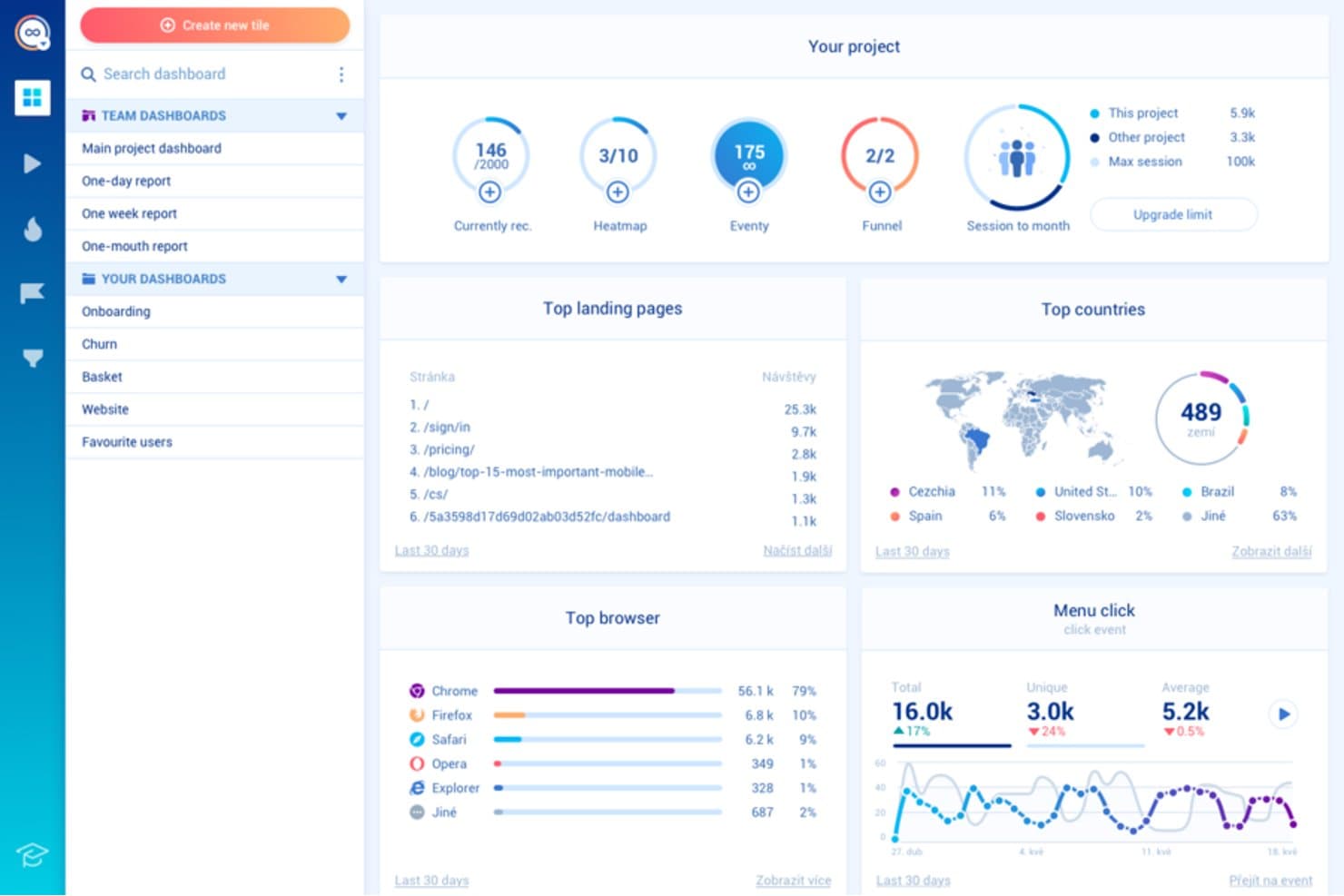
Smartlook tracks landing pages, browsers, and countries in one dashboard. Smartlook is a user tracking and behavior analytics platform with session recordings, event tracking, heatmaps, funnels, and user journey analysis for websites and mobile apps.
Who Is Smartlook Best For?
Smartlook suits product and UX teams that need to identify rage clicks and drop-offs across websites and mobile apps.
Why I Picked Smartlook
I picked Smartlook because it pinpoints where users struggle before abandoning a flow. Session recordings expose rage clicks, while heatmaps show repeated clicks on noninteractive elements. Funnel analysis connects those behaviors to drop-offs, helping my team identify whether a broken interaction or confusing step blocks conversion.
Smartlook Key Features
- Mobile app tracking: Monitor user behavior across iOS and Android apps.
- Event tracking: Capture clicks, taps, form submissions, and custom actions.
- User journey analysis: Review the paths users take through your product.
- Data integrations: Connect Smartlook with tools in your product analytics stack.
Smartlook Integrations
Native integrations are not clearly documented. Smartlook supports connections with tools in your product analytics stack through its data integrations.
What's Free?
Smartlook offers a free plan without a time-limited subscription, capped at 3,000 sessions per month, two funnel reports, and 10 events. It includes session recordings, website and mobile heatmaps, behavior flows, customizable dashboards, Google Analytics, and Slack integrations; Smartlook plans to shut down the platform on September 30, 2027.
Pros and Cons
Pros:
- Supports journey analysis beyond individual sessions
- Connects funnel drop-offs to user behavior
- Detects rage clicks across web and mobile
Cons:
- Free usage limits funnel and event analysis
- Platform shutdown is planned for 2027
Learn more about Smartlook: Best for heatmaps with funnels and drop-off analysis
- 14-day free trial + free plan available
- From $32/month
Visit WebsiteCustomer Rating:4.7/5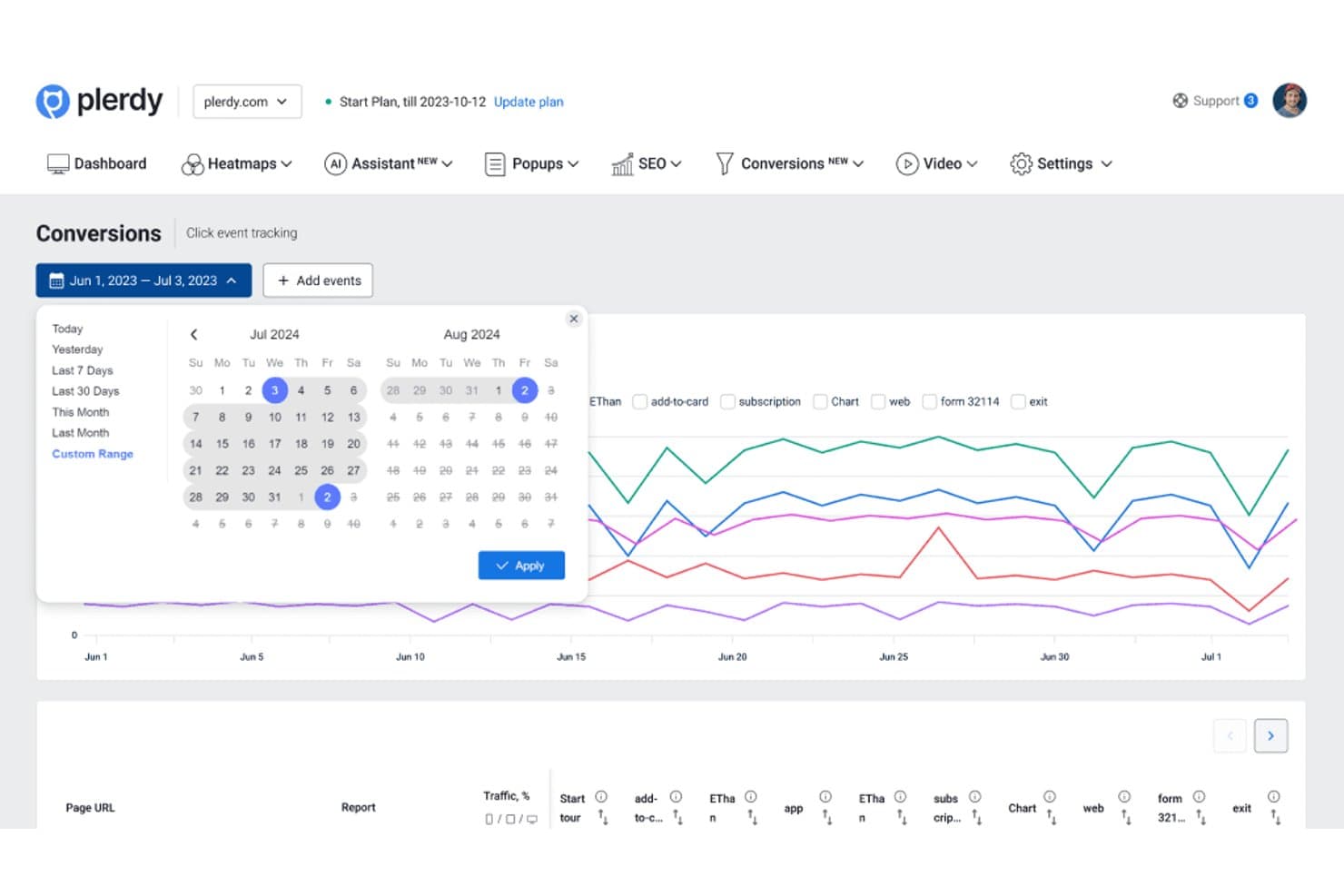
Plerdy lets users analyze conversion events across custom date ranges. Plerdy is a user tracking and website analytics platform that combines heatmaps, session recordings, event tracking, conversion analytics, and form performance reports in one interface.
Who Is Plerdy Best For?
Plerdy suits growth, ecommerce, and product teams that need to connect heatmap behavior with funnel conversion and drop-off analysis.
Why I Picked Plerdy
I picked Plerdy because it connects visual behavior data with conversion analysis. Its heatmaps show where users click, scroll, and lose interest, while funnel reports reveal which steps drive drop-offs. I use these views together to diagnose checkout friction or prioritize product experiments.
Plerdy Key Features
- Session recordings : Replay individual visits to inspect real navigation paths.
- Event tracking : Monitor custom interactions across pages and interface elements.
- Form analytics : Review field-level engagement and abandonment in website forms.
- User feedback surveys : Collect direct responses from visitors through on-site prompts.
Plerdy Integrations
Plerdy integrates with Google Analytics 4 and supports installation through Shopify and WordPress. It also supports Zapier through an API key for sending form data.
What's Free?
Plerdy offers a free-forever plan, not just a time-limited trial. It includes up to 100 heatmaps per day, 500 video sessions, 5,000 SEO audits, and 100 pop-up displays, so higher-volume teams will need a paid plan.
Pros and Cons
Pros:
- Tracks form abandonment at field level
- Includes session recordings for journey analysis
- Connects heatmaps to funnel drop-offs
Cons:
- Pop-up displays may distract from core analytics
- Free limits restrict higher-volume analysis
Learn more about Plerdy: Best for heatmaps with unlimited free captures
- Free plan + 15-day free trial + free demo available
- From $49/month
Visit WebsiteCustomer Rating:4.5/5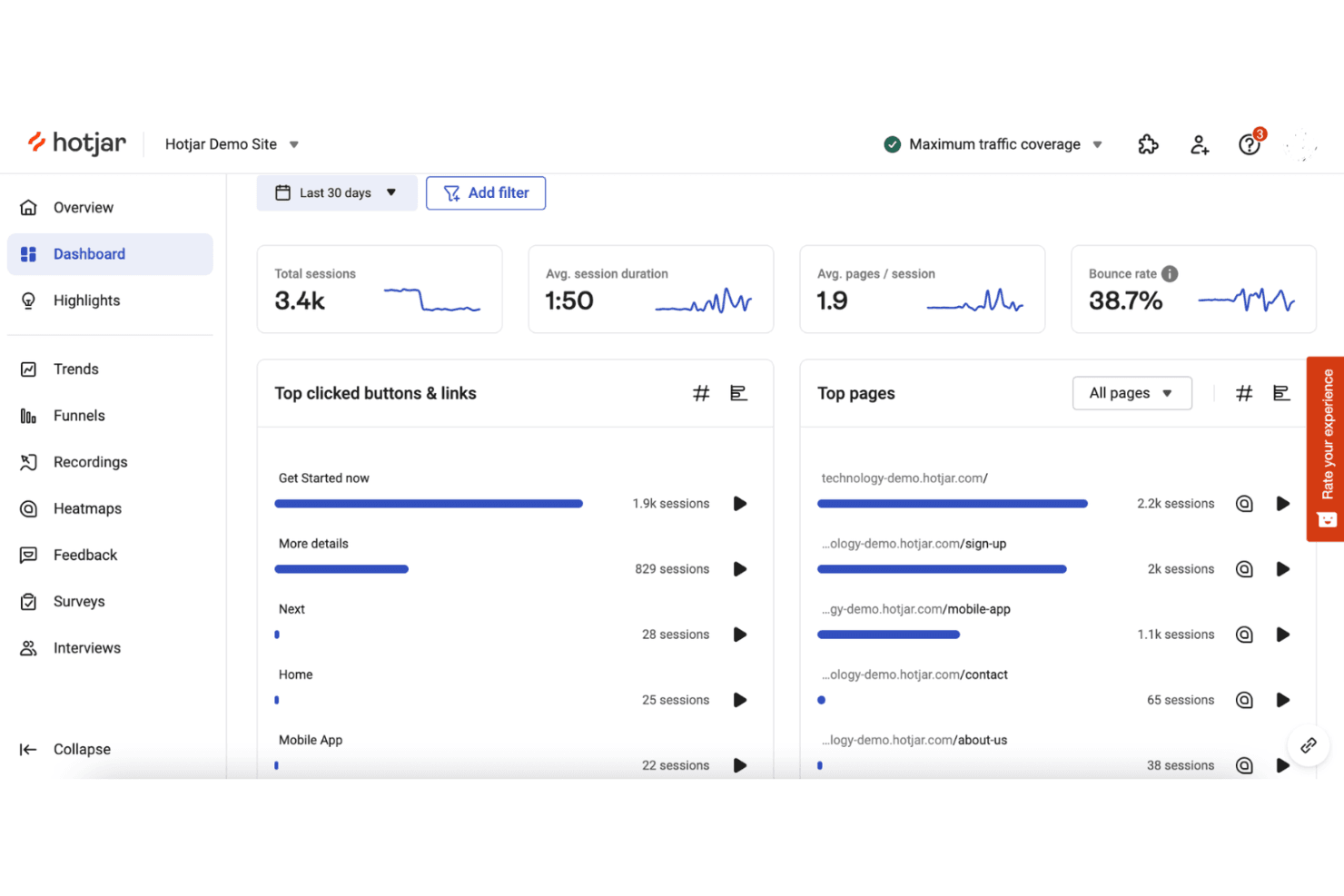
Hotjar tracks user behavior with heatmaps and session recordings. Hotjar (by Contentsquare) is user tracking software for heatmaps, session recordings, feedback polls, surveys, and user behavior analytics across websites and digital products.
Who Is Hotjar (by Contentsquare) Best For?
Hotjar suits product and UX teams that need heatmaps with unlimited free captures to understand user behavior without a large analytics budget.
Why I Picked Hotjar (by Contentsquare)
I picked Hotjar (by Contentsquare) because it’s best for heatmaps with unlimited free captures. I use click, move, and scroll heatmaps to see where users engage or abandon key pages. Session recordings then help connect those patterns to specific navigation and usability issues.
Hotjar (by Contentsquare) Key Features
- Surveys: Create on-site surveys to collect targeted user responses.
- Feedback widgets: Add widgets for users to share feedback on specific pages.
- Funnel analysis: Review user progression across defined conversion steps.
- User attributes: Filter behavioral data by custom user properties.
Hotjar (by Contentsquare) Integrations
Hotjar has documented integrations with Linear, Asana, and Unbounce, plus Zapier. Its API supports custom connections for sharing Hotjar data with other tools.
What's Free?
Hotjar (by Contentsquare) offers a free plan with unlimited heatmap captures, plus a 15-day free trial for paid features. The free plan’s user, session, and feature limits vary by usage level.
Pros and Cons
Pros:
- Surveys connect feedback with observed behavior
- Click, move, and scroll behavior views
- Unlimited free heatmap captures
Cons:
- Advanced analysis requires paid access
- Free limits affect users and sessions
Learn more about Hotjar (by Contentsquare): Best for 12-month free session replay retention
- Free plan available
- Pricing upon request
Visit WebsiteCustomer Rating:4.5/5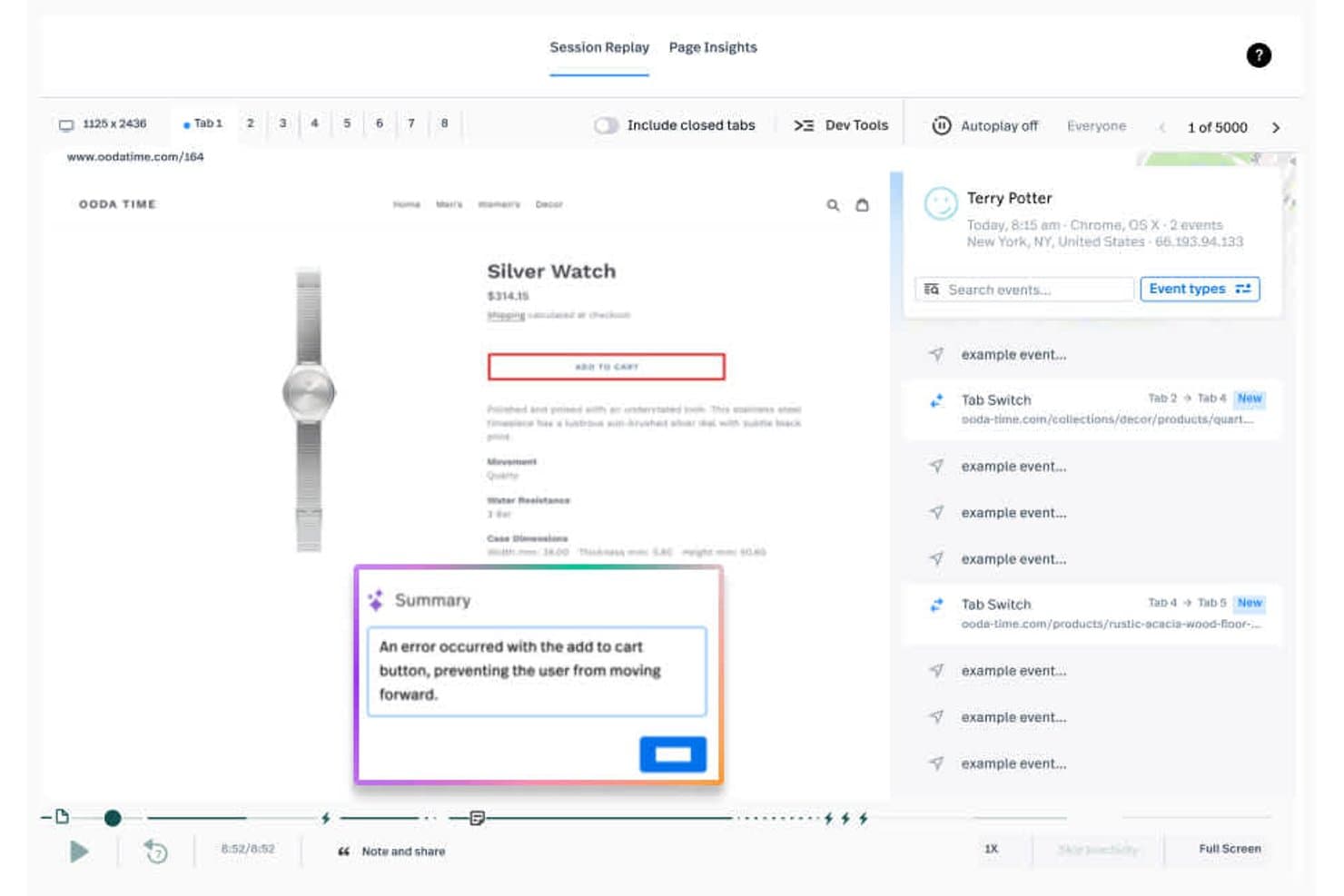
Fullstory lets users replay sessions and surface cart errors instantly. Fullstory is a user tracking and product analytics platform that combines session replay, event tracking, heatmaps, funnels, and friction signals to analyze digital experiences.
Who Is Fullstory Best For?
Fullstory suits product and UX teams at growing digital businesses that need long-term session replay to investigate friction and validate product decisions.
Why I Picked Fullstory
I picked Fullstory because it pairs 12-month free session replay retention with event tracking and friction signals. I can review older user sessions, connect them to conversion events, and investigate recurring rage clicks or dead clicks. That makes it easier to compare product changes with historical user behavior.
Fullstory Key Features
- Heatmaps: Visualize clicks, scroll depth, and interaction patterns across pages.
- Funnel analysis: Build conversion funnels to identify where users drop off.
- Dashboards: Organize product metrics and experience insights in shared views.
- Integrations: Connect Fullstory with other tools in your product analytics stack.
Fullstory Integrations
Fullstory documents integrations with Google Analytics, Google Tag Manager, Adobe Analytics, Bugsnag, and Google BigQuery. Its Developer API supports custom integrations.
What's Free?
FullstoryFree is a free-forever plan with up to 30,000 sessions per month, 12 months of data retention, and support for up to 10 users. It includes session replay, basic analytics, and debugging, but advanced features and paid-plan support aren’t included; new sessions pause if you exceed the monthly limit.
Pros and Cons
Pros:
- Flags rage clicks and dead clicks
- Connects replays with conversion events
- Retains free session replays for 12 months
Cons:
- Advanced analysis requires a paid plan
- New sessions pause after monthly limits
Learn more about Fullstory: Best for analytics-linked session replay at scale
- Free plan + free demo available
- Pricing upon request
Visit WebsiteCustomer Rating:4.5/5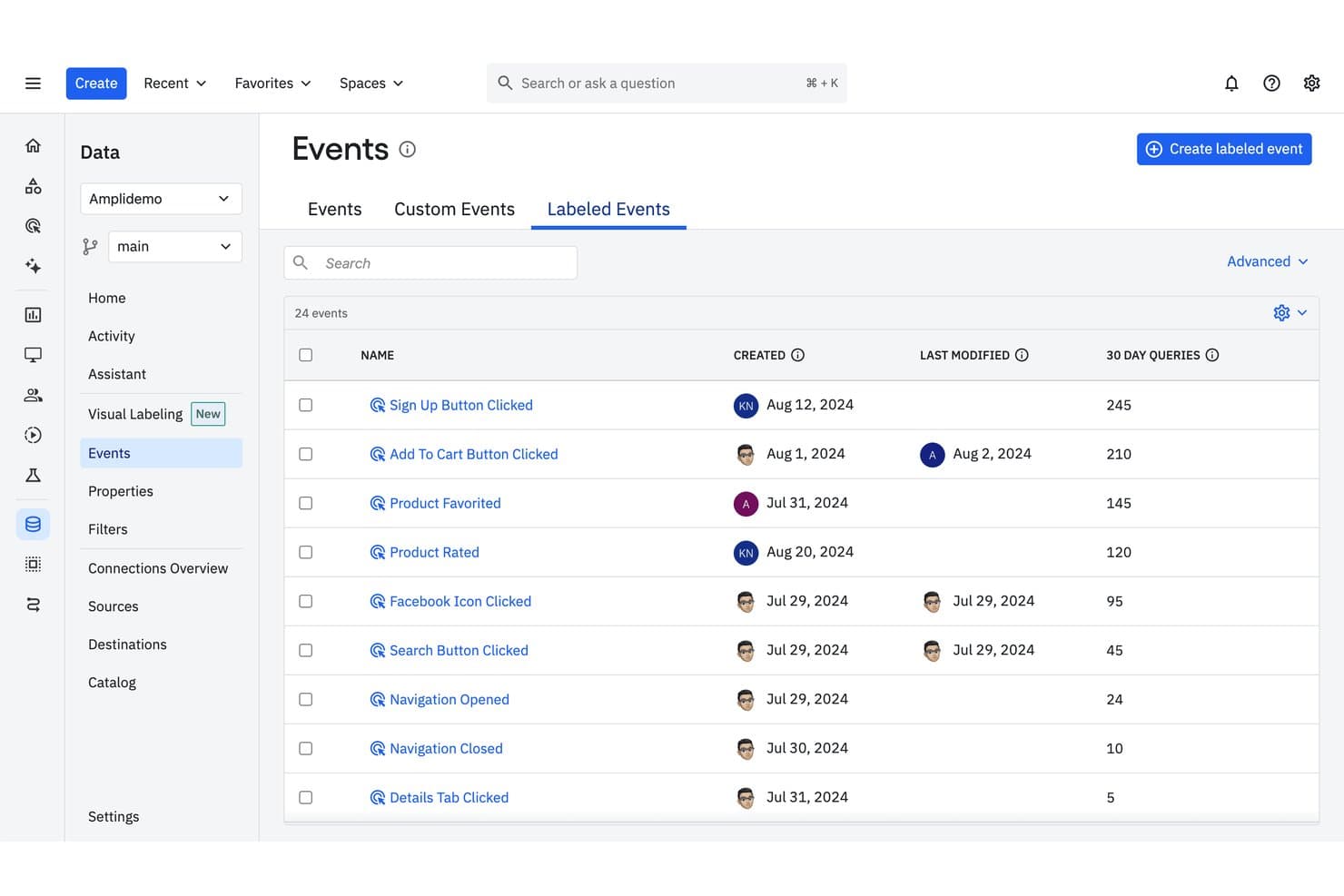
Amplitude tracks labeled events with query frequency and modification history. Amplitude is user tracking software that combines product analytics, event tracking, funnels, retention reports, cohorts, and session replay in one platform.
Who Is Amplitude Best For?
Product teams at growing companies that need analytics-linked session replay at scale to connect user behavior with product decisions.
Why I Picked Amplitude
I picked Amplitude because it’s best for analytics-linked session replay at scale. I use event streams, funnels, and retention reports to identify where users struggle, then review related session replays for the underlying behavior. Cohorts help compare those patterns across user segments before prioritizing product changes.
Amplitude Key Features
- User profiles: View individual users’ properties and activity history.
- Journeys: Trace the paths users take through your product.
- Dashboards: Assemble charts and metrics in shareable workspaces.
- Data governance: Manage event definitions, properties, and tracking plans.
Amplitude Integrations
Documented integrations include Segment, Iterable, Chameleon, and Snowflake. Amplitude also provides APIs for custom event ingestion and user-property updates.
What's Free?
Amplitude offers a free-forever plan with no credit card required. It includes 2 million events per month, unlimited seats, and 10,000 session replays monthly, but replay data is retained for one month and some features, including experiments, Guides, and Surveys, are limited.
Pros and Cons
Pros:
- Cohorts reveal behavior across user segments
- Free plan supports substantial event volumes
- Connects session replays to product analytics
Cons:
- Advanced experimentation features require paid access
- Free replay history expires after one month
Learn more about Amplitude: Best for session replay with AI-flagged friction
- Free plan available
- From $39/month
Visit WebsiteCustomer Rating:4.1/5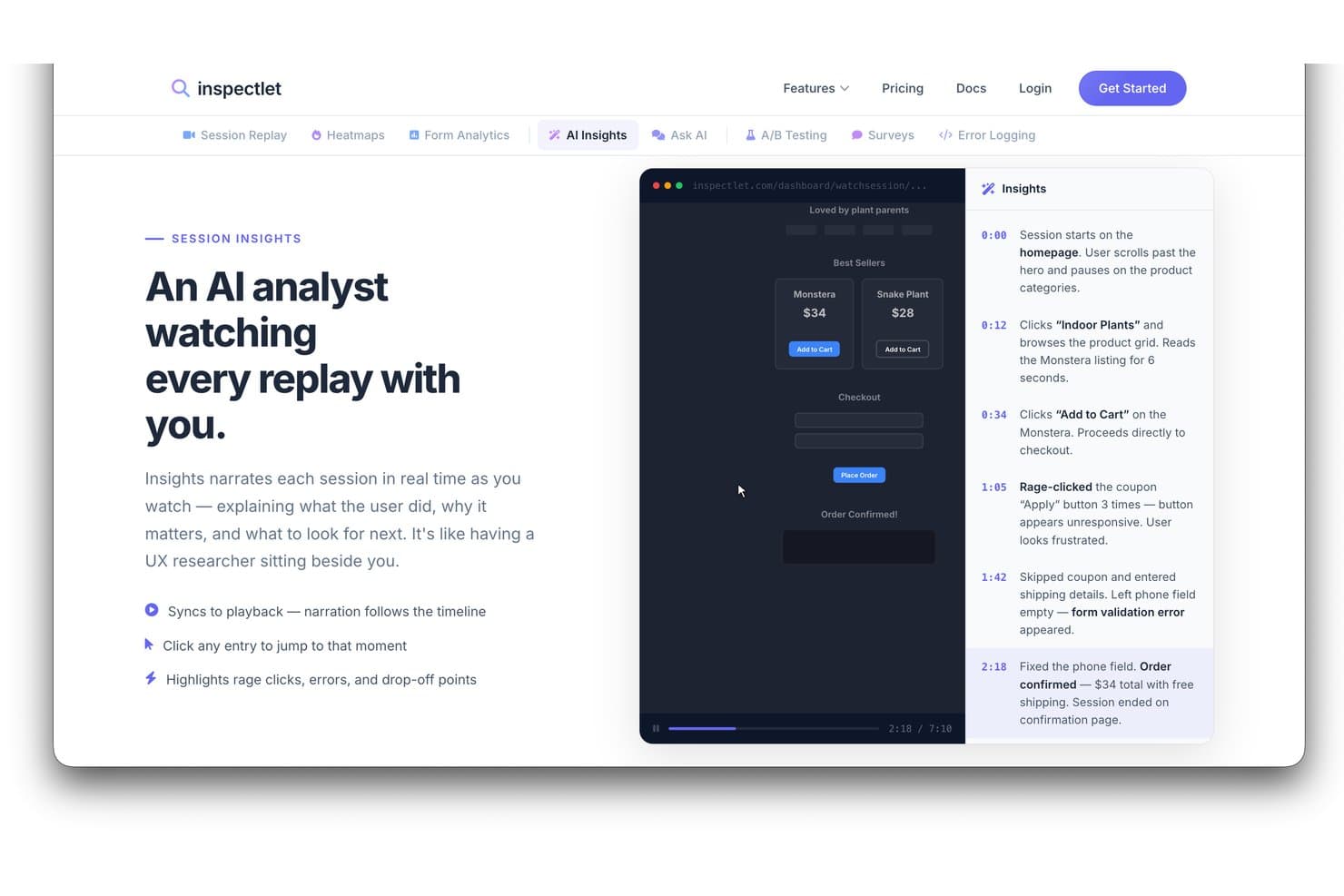
Inspectlet's AI Insights narrates session replays to highlight user behavior. Inspectlet is user tracking and behavior analytics software that combines session recordings, heatmaps, event tracking, funnels, and form analytics for product and website analysis.
Who Is Inspectlet Best For?
Inspectlet suits product teams and growth marketers who need session replay to spot user friction and improve website experiences.
Why I Picked Inspectlet
I picked Inspectlet for Best Free User Tracking Software Reviewed because it pairs session replay with AI-flagged friction. I use recordings and heatmaps to verify where visitors struggle, then review funnel and form analytics to connect those issues with drop-offs. This helps product teams investigate confusing flows, abandoned forms, and failed conversions.
Inspectlet Key Features
- Live visitor monitoring: Watch active visitors navigate your site in real time.
- JavaScript API: Send custom data and control tracking through JavaScript.
- Privacy controls: Mask sensitive fields and limit recorded visitor data.
- VIP tracking: Get notifications when sessions match selected criteria.
Inspectlet Integrations
Inspectlet documents integrations and installation options for HubSpot, Google Tag Manager, WordPress, and Shopify. Its JSON-based REST API supports custom integrations.
What's Free?
Inspectlet offers a free-forever plan with no credit card required or time limit. It includes 2,500 recorded sessions monthly across up to three websites, plus session replay, heatmaps, and A/B testing; data retention is limited to one month, and Inspectlet stops recording new sessions after you reach the monthly limit.
Pros and Cons
Pros:
- Combines recordings, heatmaps, and funnels
- Free plan supports three websites
- AI flags friction within session replays
Cons:
- Recording stops after monthly session limit
- Free data retention lasts one month
Learn more about Inspectlet: Best for open-source product analytics
- Free plan available
- Pricing upon request
Visit WebsiteCustomer Rating:4.5/5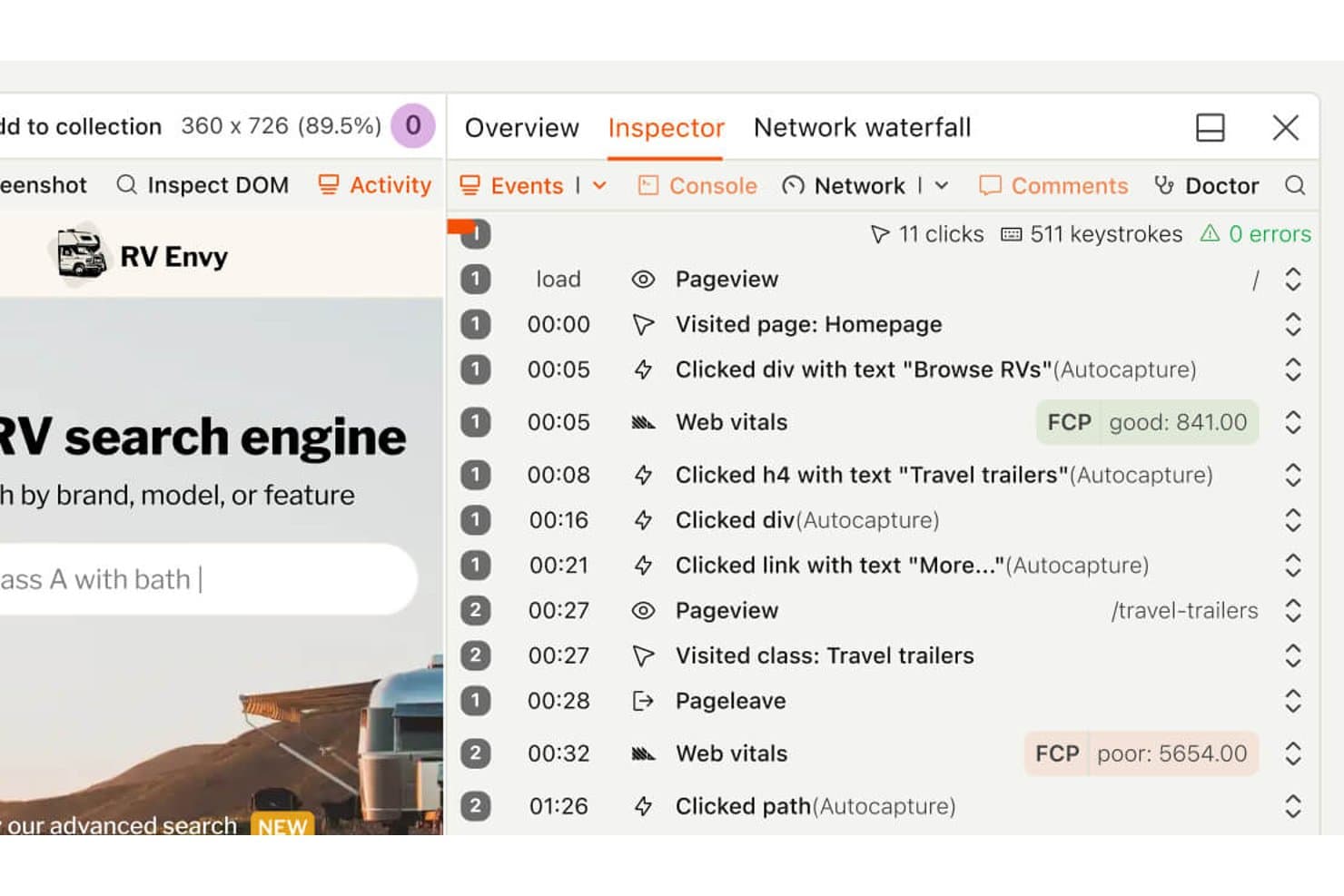
PostHog lets users replay sessions with a detailed event timeline. PostHog is a product analytics and user tracking platform that combines event tracking, funnels, session recordings, feature flags, and experimentation in one developer-focused workspace.
Who Is PostHog Best For?
Product teams and developers seeking open-source analytics with event tracking, session recordings, feature flags, and experimentation in one workspace.
Why I Picked PostHog
I picked PostHog because it’s my choice for best for open-source product analytics. I use event tracking and funnels to connect user behavior with product outcomes, then review session recordings to understand friction behind the numbers. Feature flags and experimentation help me validate changes before wider rollout.
PostHog Key Features
- User cohorts: Group users using shared properties or behavioral criteria.
- Retention reports: Compare returning users across selected time periods.
- SQL editor: Query product data with customizable SQL statements.
- In-app surveys: Create and target surveys within your product.
PostHog Integrations
PostHog supports 50+ documented CDP destinations, including HubSpot, Slack, Microsoft Teams, Braze, Customer.io, Snowflake, and BigQuery. Its API and webhooks support custom integrations.
What's Free?
PostHog offers a free-forever plan with no credit card, including 1 million product analytics events and 5,000 session recordings monthly. The free plan includes unlimited team members but limits you to one project, one-year data retention, and dropped usage above monthly allowances unless you switch to pay-as-you-go.
Pros and Cons
Pros:
- SQL access supports tailored product analysis
- Combines tracking, recordings, and experimentation
- Open-source foundation supports data control
Cons:
- Broader workspace increases navigation overhead
- Instrumentation demands developer involvement
Learn more about PostHog: Best for funnel drop-off and rage click analysis
- Free plan available
- From $140/month
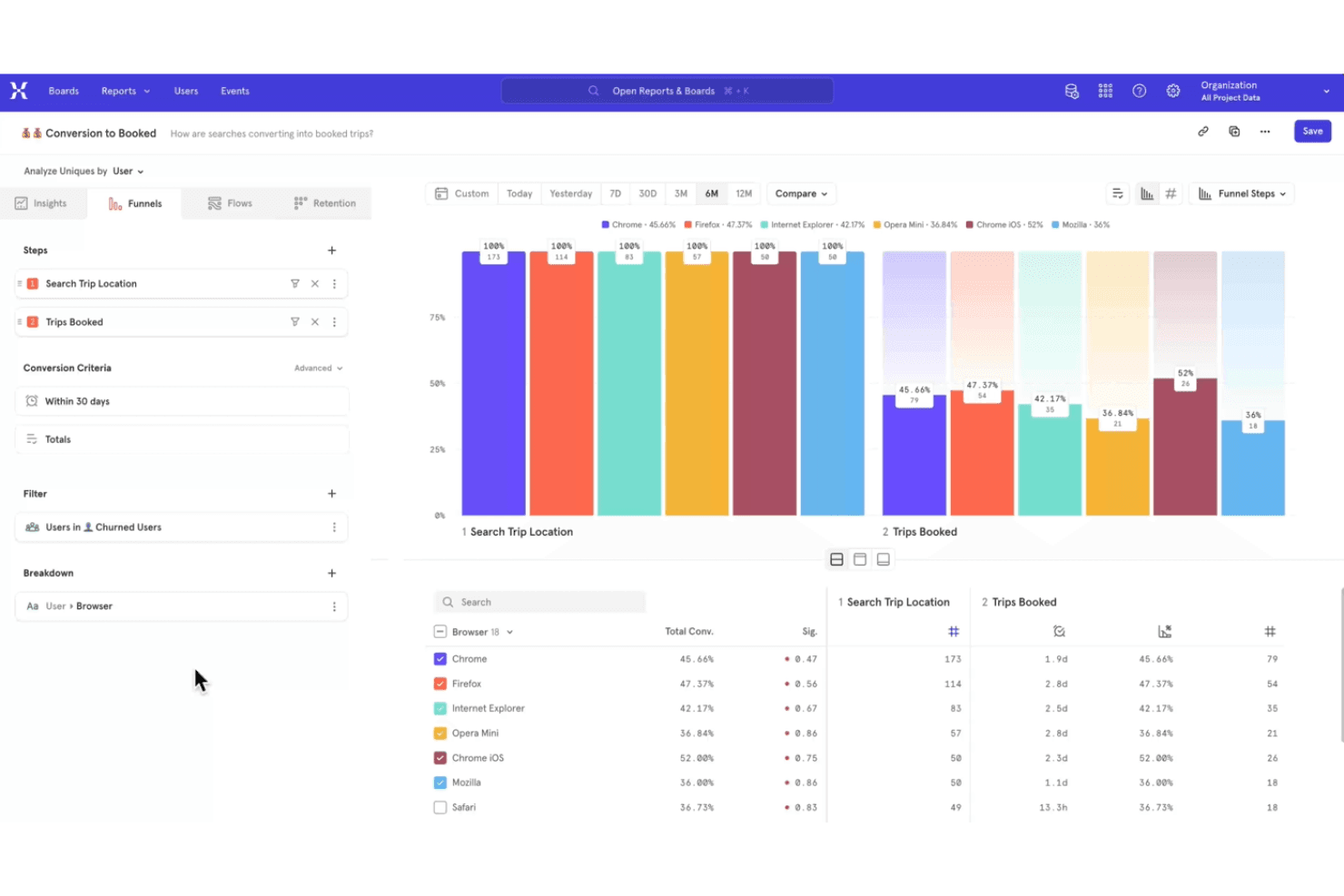
Mixpanel tracks user interactions to optimize digital product experiences. Mixpanel is a product analytics and user tracking platform that captures event data, maps user journeys, and provides reports for cohorts, retention, and product usage.
Who Is Mixpanel Best For?
Mixpanel suits product teams at digital businesses that need event-based insights into user behavior, retention, and feature adoption.
Why I Picked Mixpanel
I picked Mixpanel because it’s best for funnel drop-off and rage click analysis. Its event-based funnels show where users abandon signup or checkout, while Session Replay reveals the screens behind repeated clicks. The free plan gives product teams a practical way to investigate friction before prioritizing fixes.
Mixpanel Key Features
- Retention reports : Compare returning users across selected time periods.
- Cohort analysis : Build cohorts from shared properties or user actions.
- Impact reports : Measure how events influence conversion or retention.
- Data warehouse connectors : Export Mixpanel data to supported warehouse systems.
Mixpanel Integrations
Mixpanel integrates with BigQuery, Snowflake, Amazon Redshift, Segment, and partner tools such as ConfigCat and Marketo. It also provides APIs for custom event collection and integrations.
What's Free?
Mixpanel has a free-forever plan with unlimited seats and no credit card required. It includes up to 1 million events and 10,000 session replays per month, with 30-day replay retention and limits on saved reports, alerts, experiments, and feature flags.
Pros and Cons
Pros:
- Free plan supports meaningful event volumes
- Session Replay reveals rage clicks
- Funnel reports pinpoint signup abandonment
Cons:
- Replay retention limits historical analysis
- Event setup requires disciplined instrumentation
Learn more about Mixpanel: Best for self-hosted, consent-free tracking
- Free plan + free trial available
- From €275/month
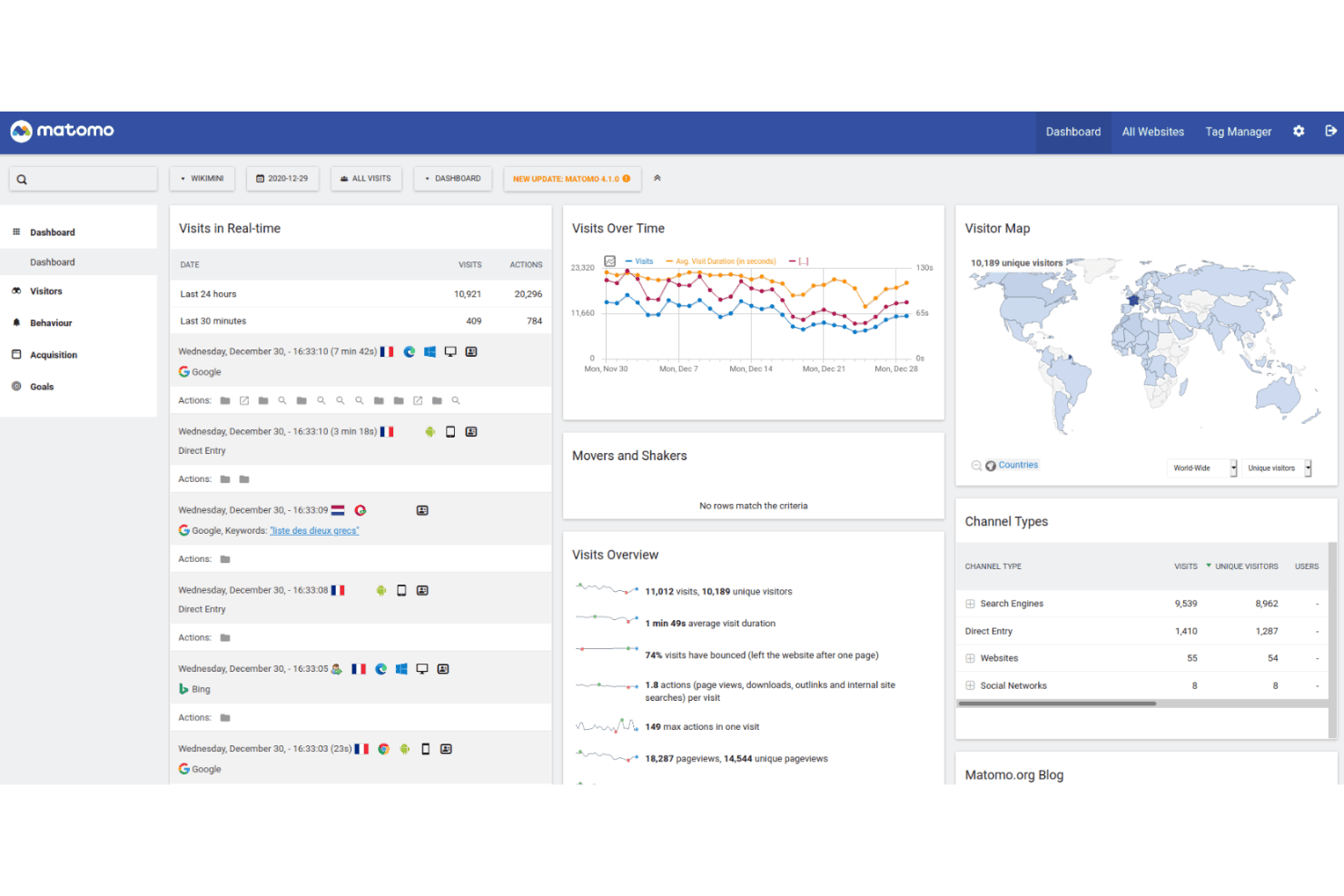
Matomo tracks user activity with full data control and privacy-focused hosting. Matomo is a user tracking and web analytics platform with event tracking, session recordings, heatmaps, campaign attribution, and customizable reports for websites and products.
Who Is Matomo Best For?
Product teams and privacy-conscious organizations needing self-hosted, consent-free tracking will find Matomo a practical fit.
Why I Picked Matomo
I picked Matomo because it supports self-hosted, consent-free tracking without sending product data to a third-party analytics vendor. I use event tracking, session recordings, and heatmaps to connect user behavior with product decisions. Its customizable reports also help teams analyze customer journeys under their own data governance rules.
Matomo Key Features
- Campaign attribution: Tracks visits and conversions across marketing campaign sources.
- Goal tracking: Measures visitor actions against defined conversion goals.
- Tag Manager: Adds and manages tracking tags without editing site code.
- Ecommerce analytics: Records product views, orders, revenue, and cart activity.
Matomo Integrations
Matomo integrates with 100+ technologies, including WordPress, WooCommerce, Shopify, Drupal, Magento 2, and Jira Cloud. Its Analytics and Tracking APIs support custom integrations, while the Matomo Marketplace adds plugin-based connections.
What's Free?
Matomo On-Premise’s Community edition is free forever, with unlimited users and hits, but you handle hosting and maintenance while premium plugins and support require payment. Matomo Cloud offers a 21-day free trial with full core features and no credit card, after which pricing depends on monthly traffic.
Pros and Cons
Pros:
- Custom reports support product decision-making
- Consent-free tracking supports privacy-led measurement
- Self-hosted deployment keeps data in-house
Cons:
- Advanced reporting can require analytics expertise
- Hosting and maintenance remain your responsibility
Learn more about Matomo: Best for debug-focused session replay
- 14-day free trial + free plan available
- From $176/month (billed annually)
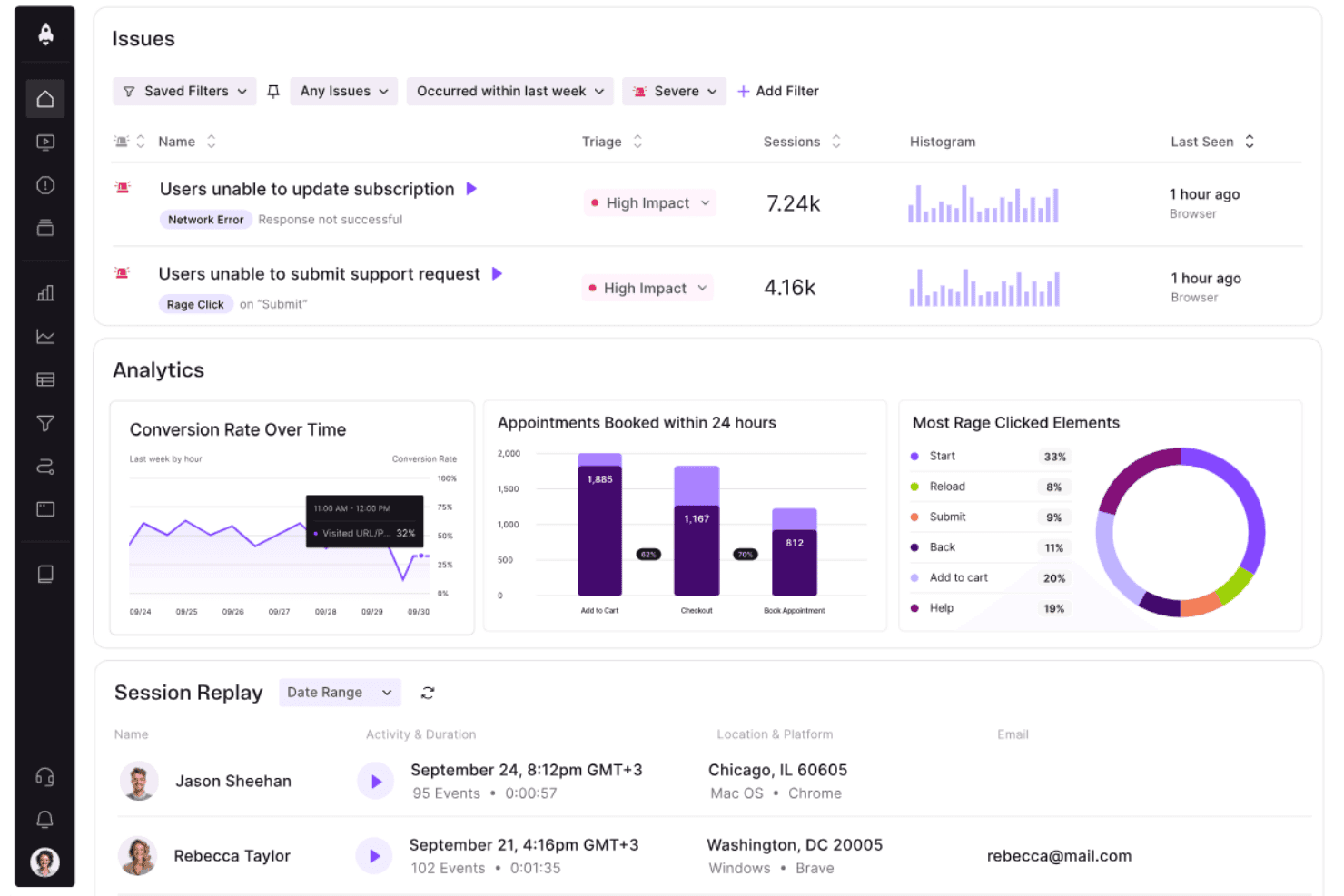
LogRocket surfaces user issues, analytics, and session replays in one dashboard. LogRocket is a user tracking and product analytics platform that combines session replay, event analytics, error tracking, and frontend performance monitoring in one workspace.
Who Is LogRocket Best For?
Product and engineering teams that need to connect frontend errors with user sessions will find LogRocket a practical fit.
Why I Picked LogRocket
I picked LogRocket because its debug-focused session replay connects frontend errors with the user sessions behind them. I use session recordings, event analytics, and error tracking to trace issues such as failed checkout flows or broken navigation. Its frontend performance monitoring adds context when slow experiences affect product behavior.
LogRocket Key Features
- Console logs: Captures browser console output alongside each user session.
- Network monitoring: Records requests, responses, errors, and timing details.
- Rage click detection: Identifies repeated clicks on the same interface element.
- Redux inspection: Displays Redux actions and state changes during sessions.
LogRocket Integrations
LogRocket offers integrations with Zendesk, Intercom, BugHerd, Jira, and Linear for connecting session replays with support and issue workflows. It also supports webhooks and a Web API for custom integrations.
What's Free?
LogRocket offers a 14-day free trial rather than a free-forever plan, with no credit card required. The trial includes access to all features, but you’ll need a paid plan after it ends, with pricing based on captured sessions.
Pros and Cons
Pros:
- Captures console, network, and Redux activity
- Connects frontend errors to user sessions
- Debug-focused session replay
Cons:
- Session capture can become costly at scale
- No free-forever plan
Learn more about LogRocket:
Diğer Ücretsiz Kullanıcı Takip Yazılımları
Ücretsiz planlar veya deneme sürümleri sunan bazı ek kullanıcı takip yazılımı seçeneklerini burada bulabilirsiniz. Bu araçlar kısa listeme girmemiş olsa da göz atmaya değer:
- 11OpenReplayBest for self-hosted replay with full data ownership
- 12Crazy EggBest for no-code click and scroll analysis
- 13Google AnalyticsBest for web traffic and funnel drop-off analysis
- 14Heap (by Contentsquare)Best for no-code retroactive behavior tracking
- 15MouseflowBest for friction scoring on a free plan
- 16UserpilotBest for behavior tracking tied to in-app fixes
- 17Microsoft ClarityBest for no-code funnels and frustration signals
How I Evaluate Free User Tracking Software
First, I define what counts as free. A qualifying plan is free indefinitely, not a trial, though usage and feature caps can limit analysis. From there, I split my evaluation into three parts: core functionality, which carries most weight, like capturing clicks and replaying sessions; standout features, like rage-click detection; and beyond-feature factors, like free-plan scaling as your team grows.
Core Functionality (Table Stakes For This List)
In addition to my free plan requirements, I use a scoring system to select tools for my list. I score each one on a scale from 0 (does not offer the functionality) to 5 (excels in this area) for each core functionality listed below, based on what's available on the free plan. I then convert the total into a percentage to help assess each tool's overall fit, with extra weight on any functionalities I've deemed essential.
- Behavior Tracking (Essential): I look for automatic capture of clicks, scrolls, and navigation so a team can follow a key journey, such as completing sign-up.
- Session Recording: I assess whether free-plan recordings provide enough context to investigate where visitors hesitate, repeat actions, or leave a flow.
- Heatmaps: I check whether teams can view click and scroll patterns across pages to spot overlooked calls to action or content.
- Analytics Dashboard: I consider whether the dashboard summarizes visitor activity and engagement clearly enough to guide a product review.
- Data Export or Sharing: I look for a practical way to share findings or export reports so teammates can discuss evidence together.
Once I have a list of tools that meet the criteria, I consider what sets each platform apart.
Differentiating Factors (What Sets Vendors Apart)
Here's how I compare and contrast different vendors:
Standout Features
Rage click detection is a feature I look for on every free plan because it surfaces frustrated interactions automatically—like a user hammering a broken checkout button—without requiring manual session review. I also evaluate funnel and drop-off analysis, checking whether a tool lets me visualize exactly where users abandon a multi-step flow so I can prioritize the highest-impact fix. Session filtering by behavior ties these together; I check whether I can search recordings by specific actions, errors, or rage clicks to jump straight to the moments that matter.
Beyond Features
I check how long each free plan retains session recordings and analytics data, since a 30-day window can make it impossible to compare user behavior across release cycles. Usage caps matter just as much—I look at whether monthly session or pageview limits reset cleanly or trigger a hard cutoff mid-month when traffic spikes. I also evaluate built-in privacy defaults like IP masking and consent controls, because teams in regulated industries need GDPR and CCPA coverage without upgrading to a paid tier.
Ücretsiz Kullanıcı Takip Yazılımı Nasıl Seçilir?
Karmaşık özellik listeleri ve fiyatlandırma yapıları, ücretsiz bir kullanıcı takip yazılımından gerçekten ne elde ettiğinizi anlamanızı zorlaştırabilir. Yazılım seçim sürecinizde ilerlerken odağınızı korumanıza yardımcı olmak için göz önünde bulundurmanız gereken bazı faktörleri aşağıda bulabilirsiniz:
| Faktör | Dikkat Edilmesi Gerekenler |
|---|---|
| FaktörÜcretsiz Teklifin Kapsamı | Dikkat Edilmesi GerekenlerÜcretsiz plana nelerin dahil olduğunu kontrol edin. Gizli maliyetler olmadan kullanıcı takibi ve veri analizi gibi temel özellikleri kapsadığından emin olun. |
| FaktörÖlçeklenebilirlik | Dikkat Edilmesi GerekenlerAracın ekibinizle birlikte büyüyüp büyüyemeyeceğini değerlendirin. İhtiyaçlarınız arttıkça kolayca yükseltme yapmanıza olanak tanıyan seçenekleri tercih edin. |
| FaktörEntegrasyonlar | Dikkat Edilmesi Gerekenlerİş akışlarını kolaylaştırmak için yazılımın CRM veya pazarlama platformları gibi hâlihazırda kullandığınız araçlarla entegre olduğundan emin olun. |
| FaktörKullanım Kolaylığı | Dikkat Edilmesi GerekenlerMinimum eğitim gerektiren ve anlaşılır veri görselleştirmesi sunan yazılımları tercih edin. Kullanıcı dostu bir arayüz olmazsa olmazdır. |
| FaktörVeri Gizliliği | Dikkat Edilmesi GerekenlerÖzellikle hassas bilgilerle çalışıyorsanız, aracın GDPR gibi veri koruma düzenlemelerine uygun olduğundan emin olun. |
| FaktörÖzelleştirme | Dikkat Edilmesi GerekenlerRaporları ve panoları özel ihtiyaçlarınıza ve tercihlerinize uyacak şekilde düzenlemenize olanak tanıyan yazılımları arayın. |
| FaktörDestek | Dikkat Edilmesi Gerekenlerİhtiyaç duyduğunuzda size yardımcı olmak için canlı sohbet veya forumlar gibi mevcut müşteri desteği düzeyini değerlendirin. |
| FaktörPerformans | Dikkat Edilmesi GerekenlerEkibinizi gecikme olmadan bilgilendirmek için aracın gerçek zamanlı veri güncellemeleri ve hızlı işlem sunup sunmadığını kontrol edin. |
Ücretsiz Kullanıcı Takip Yazılımı Nedir?
Kullanıcı izleme yazılımı, web siteleri veya uygulamalardaki kullanıcı etkileşimlerini izleyen ve analiz eden, genellikle ücretsiz planlar veya denemeler sunan bir araçtır. Bu araçlar çoğunlukla ürün yöneticileri, pazarlamacılar ve UX tasarımcıları tarafından kullanıcı davranışları hakkında içgörüler elde etmek ve kullanıcı deneyimini iyileştirmek için kullanılır. Oturum kayıtları, ısı haritaları ve gerçek zamanlı analizler gibi özellikler; kullanıcı etkileşimini anlamaya, sorunlu noktaları belirlemeye ve ürün kullanılabilirliğini geliştirmeye yardımcı olur.
Ücretsiz Kullanıcı İzleme Yazılımının Özellikleri
Kullanıcı izleme yazılımlarında yaygın olarak bulunan özellikleri ve bunlardan hangilerinin genellikle ücretsiz ve ücretli planlara dahil edildiğini inceleyelim.
Genellikle Ücretsiz Kullanıcı İzleme Yazılımı Özellikleri
- Oturum kayıtları: Davranışları anlamak ve sorunları belirlemek için kullanıcı etkileşimlerini kaydedin ve yeniden oynatın.
- Isı haritaları: Kullanıcıların nerelere tıkladığını ve kaydırdığını görselleştirerek sitenizin hangi alanlarının daha ilgi çekici olduğunu görmenize yardımcı olur.
- Gerçek zamanlı analizler: Mevcut kullanıcı etkinliği hakkında anında içgörüler sunarak trendlere hızlı yanıt vermenizi sağlar.
- Temel etkinlik izleme: Etkileşim kalıplarını analiz etmek için tıklamalar veya form gönderimleri gibi belirli kullanıcı eylemlerini izler.
- Ziyaretçi segmentasyonu: Deneyimleri ve içerikleri uyarlamak için kullanıcıları davranışlarına veya demografik özelliklerine göre gruplandırır.
- Gizlilik uyumluluğu: Veri toplamanın GDPR gibi düzenlemelere uygun olmasını sağlayarak kullanıcı gizliliğini korur.
- Özelleştirilebilir panolar: Ekibiniz için en önemli metriklere odaklanmak üzere veri görünümünüzü ihtiyaçlarınıza göre uyarlamanıza olanak tanır.
Genellikle Ücretli Kullanıcı İzleme Yazılımı Özellikleri
- Gelişmiş segmentasyon: Daha hedefli analiz için karmaşık ölçütlere dayalı ayrıntılı kullanıcı grupları oluşturur.
- A/B testi: Kullanıcılar açısından hangisinin daha iyi performans gösterdiğini belirlemek için sitenizin veya uygulamanızın farklı sürümlerini test eder.
- Dönüşüm hunisi analizi: Kullanıcı yolculuklarını siteniz boyunca izleyerek kullanıcıların ayrıldığı noktaları belirler ve dönüşüm yollarını optimize eder.
- Otomatik raporlama: Zamandan tasarruf etmek ve tutarlı veri analizi sağlamak için ayrıntılı raporları otomatik olarak oluşturur.
- Cihazlar arası izleme: Yolculuklarının bütününü görmek için kullanıcı etkileşimlerini birden fazla cihazda izler.
- Gelişmiş veri dışa aktarma: Daha derin analiz veya diğer araçlarla entegrasyon için verileri çeşitli biçimlerde dışa aktarır.
- Özel etkinlik oluşturma: İşletmenizin ihtiyaçlarına özgü eylemleri izlemek için belirli etkinlikler tanımlamanıza olanak tanır.
Ücretsiz Kullanıcı İzleme Yazılımının Faydaları
Ücretsiz kullanıcı izleme yazılımını uygulamak, ekibiniz ve işletmeniz için çeşitli faydalar sağlar. Yararlanabileceğiniz birkaç fayda şunlardır:
- Uygun maliyetli içgörüler: Finansal yatırım yapmadan kullanıcı davranışları hakkında değerli içgörüler elde ederek kaynakları başka alanlara ayırmanıza olanak tanır.
- Geliştirilmiş kullanıcı deneyimi: Kullanılabilirlik sorunlarını belirlemek ve gidermek, kullanıcı memnuniyetini artırmak için oturum kayıtları ve ısı haritaları gibi özellikleri kullanın.
- Hızlı karar alma: Gerçek zamanlı analizler anında veri sağlayarak ekibinizin hızla bilinçli kararlar almasını mümkün kılar.
- Geliştirilmiş hedefleme: Ziyaretçi segmentasyonu, içerikleri ve deneyimleri belirli kullanıcı gruplarına uyarlamaya yardımcı olarak etkileşimi artırır.
- Veri gizliliği güvencesi: GDPR gibi gizlilik düzenlemelerine uyum, kullanıcı verilerinin sorumlu bir şekilde toplanmasını sağlayarak kitlenizin güvenini oluşturur.
- Özelleştirme esnekliği: Özelleştirilebilir panolar, en önemli metriklere odaklanmanızı sağlayarak analiz sürecinizi optimize eder.
- Taahhütsüz deneme: Ücretsiz sürümler, ücretli bir plana geçmeye karar vermeden önce yazılımın özelliklerini test etmenize ve faydalarını doğrudan görmenize olanak tanır.
Ücretsiz Kullanıcı İzleme Yazılımının Maliyetleri ve Fiyatlandırması
Bu makaleye mevcut en iyi ücretsiz kullanıcı izleme yazılımı seçeneklerini aradığınız için geldiğinizi biliyorum. Ancak ücretsiz planlar yalnızca sınırlı özellikler sunduğundan, gelecekte planınızı yükseltmeniz gerekme ihtimali yüksektir; bu nedenle aşağıdaki tabloyu ekledim.
Aşağıdaki tablo, kullanıcı izleme yazılımı çözümlerinde yaygın planları, bunların ortalama fiyatlarını ve genellikle dahil edilen özellikleri özetlemektedir:
Kullanıcı İzleme Yazılımı İçin Plan Karşılaştırma Tablosu
| Plan Türü | Ortalama Fiyat | Yaygın Özellikler |
|---|---|---|
| Plan TürüÜcretsiz Plan | Ortalama Fiyat$0 | Yaygın ÖzelliklerTemel analizler, oturum kayıtları, ısı haritaları ve ziyaretçi segmentasyonu. |
| Plan TürüKişisel Plan | Ortalama Fiyat$5-$25/kullanıcı/ay | Yaygın ÖzelliklerGelişmiş analizler, özel etkinlik izleme, gerçek zamanlı veriler ve temel raporlama. |
| Plan Türüİşletme Planı | Ortalama Fiyat$50-$100/kullanıcı/ay | Yaygın ÖzelliklerHuni analizi, A/B testi, otomatik raporlar ve cihazlar arası izleme. |
| Plan TürüKurumsal Plan | Ortalama Fiyat$150+/kullanıcı/ay | Yaygın ÖzelliklerÖzel entegrasyonlar, özel destek, gelişmiş veri dışa aktarma ve tam özelleştirme. |
Ücretsiz Kullanıcı İzleme Yazılımı SSS
Ücretsiz kullanıcı izleme yazılımı hakkında sık sorulan bazı soruların yanıtları:
Ücretsiz kullanıcı izleme yazılımı kullanıcı gizliliğini nasıl korur?
Ücretsiz kullanıcı izleme yazılımları, verilerin sorumlu bir şekilde toplanmasını ve saklanmasını sağlamak için genellikle gizlilik uyumluluğu özellikleri içerir. GDPR gibi düzenlemelere uyan ve kullanıcı verilerini anonimleştirme seçenekleri sunan araçları tercih edin. Açık gizlilik politikaları ve kullanıcı onayı seçenekleri sağlayan bir yazılım seçmek çok önemlidir.
Ücretsiz kullanıcı izleme yazılımını diğer araçlarla entegre edebilir miyim?
Birçok ücretsiz kullanıcı izleme yazılımı çözümü, CRM sistemleri ve pazarlama platformları gibi popüler araçlarla entegrasyonlar sunar. Ancak entegrasyonların kapsamı, ücretli sürümlere kıyasla sınırlı olabilir. İş akışlarını kolaylaştırmak için ekibinizin ihtiyaç duyduğu temel entegrasyonların yazılım tarafından desteklenip desteklenmediğini kontrol edin.
Ücretsiz bir planda ne gibi sınırlamalarla karşılaşmayı beklemeliyim?
Ücretsiz planlar genellikle daha kısa veri saklama süresi, daha az özellik veya kısıtlı kullanıcı koltukları gibi sınırlamalarla birlikte gelir. Bu planlar temel izleme ihtiyaçları için harika olsa da artan gereksinimleri olan ekiplerin daha gelişmiş özelliklere ve daha yüksek veri kapasitelerine erişmek için zamanla yükseltme yapması gerekebilir.
Ücretsiz kullanıcı izleme yazılımından elde edilen veriler ne kadar doğrudur?
Ücretsiz kullanıcı izleme yazılımları genellikle sayfa görüntülemeleri ve kullanıcı oturumları gibi temel metrikler için doğru veriler sağlar. Ancak özellikle gelişmiş analizlerde hassasiyet ve ayrıntı düzeyi ücretli planlarla aynı olmayabilir. Kritik iş kararları için ücretsiz sürümün doğruluk ihtiyaçlarınızı karşılayıp karşılamadığını değerlendirin.
Ücretsiz kullanıcı izleme yazılımındaki raporları özelleştirebilir miyim?
Ücretsiz kullanıcı izleme yazılımındaki raporlar için özelleştirme seçenekleri genellikle sınırlıdır. Genellikle temel verilere erişebilir ve standart raporlar oluşturabilirsiniz; ancak gelişmiş özelleştirme özellikleri ücretli bir plan gerektirebilir. Mevcut özelleştirme seçeneklerinin ekibinizin raporlama gereksinimlerini karşılayıp karşılamadığını değerlendirin.
Ücretsiz kullanıcı izleme yazılımı için destek mevcut mu?
Ücretsiz kullanıcı izleme yazılımı için sunulan destek seçenekleri değişiklik gösterebilir. Bazı sağlayıcılar topluluk forumları veya bilgi tabanları sunarken, bazıları sınırlı e-posta desteği sağlayabilir. Ekibinizin daha fazla uygulamalı yardıma ihtiyaç duyacağını öngörüyorsanız ücretsiz planla sunulan destek düzeyini değerlendirin.