

En iyi ücretsiz dijital benimseme platformları, bütçenizi zorlamadan kullanıcıları işe almanıza, ürün benimsenmesini artırmanıza ve etkileşimi geliştirmenize yardımcı olur. Doğru araç olmadan işe alım süreci kopuk ilerleyebilir, çalışanlar temel özellikleri benimsemekte zorlanabilir ve etkileşim düşebilir; bu da yazılımlarınızın yeterince kullanılmamasına ve ekiplerinizin hayal kırıklığı yaşamasına neden olur.
Doğru platform, geniş ölçekte sorunsuz benimsemeyi sağlamak için uygulama içi yönlendirme, etkileşimli tanıtımlar ve analizler sunar. Birden fazla ücretsiz çözümü bizzat test edip inceledikten sonra, maliyet, kullanılabilirlik ve etki arasında denge kuran en etkili platformları belirledim; böylece fazla harcama yapmadan daha iyi bir işe alım ve benimseme süreci sunabilirsiniz.
Why Trust Our Software Recommendations
6,700+
Reviews
20
Industry experts
16+
Evaluation factors
14
Years
Our team has been testing and reviewing software since 2012. As product managers ourselves, we know how difficult—and important—it is to choose the right software.
For this guide, we evaluated tools using hands-on testing and independent research, scoring tools using our selection criteria.
Our reviews reflect our human editorial judgment, not a sales pitch.
Expert reviewers:
- Andrew LumbySenior TPM
- Cristiano ValimSenior UI/UX Lead


Ücretsiz Dijital Benimseme Platformu Karşılaştırma Tablosu
Bu karşılaştırma tablosu, en iyi ücretsiz dijital benimseme platformu seçimlerimin başlangıç maliyetlerini ve mevcut ücretli yükseltme seçeneklerini gösterir.
Score legend (out of 5)
- Excellent4.5–5
- Good4–4.4
- Average3–3.9
- Below average2–2.9
- Poor1–1.9
Sorted by: Default
| Tool | Starting Price | Website | ||||||||||||
|---|---|---|---|---|---|---|---|---|---|---|---|---|---|---|
Best for onboarding checklists | Not rated | 1 | 1 | 1 | 1 | 2 | 2 | Not rated | Not rated | Not rated | Not rated | Not rated | $174/month 14-day free trial | Website |
Best budget-friendly onboarding tours for SMBs | Not rated | 4 | 4 | Not rated | 5 | 4 | 4 | Not rated | Not rated | Not rated | Not rated | Not rated | $96/month Free trial available | Website |
Best for behavior-led analytics on a free tier | Not rated | Not rated | Not rated | 4 | Not rated | Not rated | Not rated | Not rated | Not rated | Not rated | Not rated | 3 | Pricing upon request Free plan available | Website |
Best for advanced product analytics & cohorts | Not rated | 3 | 4 | 1 | 1 | 4 | 2 | Not rated | Not rated | Not rated | Not rated | Not rated | Pricing upon request Free plan + free demo available | Website |
Best for product feedback | Not rated | 4 | 3 | 3 | 4 | 4 | 4 | Not rated | Not rated | Not rated | Not rated | Not rated | Pricing upon request Free plan + 30-day free trial + free demo available | Website |
Best for SDK-based in-app onboarding flows | Not rated | 2 | 4 | 2 | 3 | 3 | 2 | Not rated | Not rated | Not rated | Not rated | Not rated | $30/month Free plan available | Website |
Best lightweight option for quick tutorials | Not rated | Not rated | Not rated | 2 | 1 | Not rated | 1 | Not rated | Not rated | Not rated | Not rated | Not rated | $9.99 Free plan available | Website |
Best for web tour creation with unlimited users | Not rated | 3 | Not rated | 3 | 3 | 2 | 3 | Not rated | Not rated | Not rated | Not rated | Not rated | $19/month Free plan + 15-day free trial available | Website |
Best open-source library for fully custom tours | Not rated | Not rated | Not rated | 1 | 1 | 1 | 3 | Not rated | Not rated | Not rated | Not rated | Not rated | $50/lifetime Free plan available | Website |
Best for self-hosted web app onboarding flows | Not rated | 4 | 5 | 4 | 3 | 3 | 2 | Not rated | Not rated | Not rated | Not rated | Not rated | $59/month Free plan available | Website |


En İyi Ücretsiz Dijital Benimseme Platformu İncelemeleri
Aşağıda, kısa listeme giren en iyi ücretsiz dijital benimseme platformunun ayrıntılı özetlerini bulabilirsiniz. İncelemelerim, size en uygun seçeneği bulmanıza yardımcı olmak için her aracın temel özelliklerine, artılarına ve eksilerine, entegrasyonlarına ve ideal kullanım alanlarına ayrıntılı bir bakış sunar. Bu araçlardan bazıları tamamen ücretsiz bir sürüm sunarken, diğerleri ücretsiz deneme süresi sunar. İncelemelerimin her birine hangi özelliklerin ücretsiz olduğuna dair bir not ekledim.
 Best for onboarding checklists
- 14-day free trial
- From $174/month (billed annually)
Visit WebsiteCustomer Rating:4.7/5
UserGuiding simplifies walkthroughs with prompts, cues, and progress steps. UserGuiding is a no-code digital adoption platform for SaaS products, with tools to create in-app guides, product tours, tooltips, onboarding flows, and surveys.
Who Is UserGuiding Best For?
SaaS product teams that need onboarding checklists to guide new users through setup tasks are a good fit for UserGuiding.
Why I Picked UserGuiding
I picked UserGuiding because its onboarding checklists guide new users through setup tasks, making it a fit for teams evaluating digital adoption platforms. In-app guides and tooltips can explain each step in context, while product tours introduce the broader workflow.
UserGuiding Key Features
- In-app surveys: Create surveys to collect user feedback inside your product.
- Resource center: Add a menu where users can access help content and product resources.
- User segmentation: Target in-app experiences to groups based on user attributes.
- Analytics dashboard: Review engagement data for your in-app content.
UserGuiding Integrations
UserGuiding integrates with Segment, Google Analytics, Mixpanel, and Intercom. Webhooks support connections with third-party apps, and UserGuiding provides a User API.
What's Free?
UserGuiding offers a 14-day free trial, not a free-forever plan. You can try its features without entering a credit card.
Pros and Cons
Pros:
- Tooltips explain workflows in context
- No-code guides reduce engineering requests
- Checklists guide users through setup tasks
Cons:
- Mobile app guidance has limited support
- Complex guides can require code
Learn more about UserGuiding: Best budget-friendly onboarding tours for SMBs
- Free trial available
- From $96/month (billed annually)
Visit WebsiteCustomer Rating:4.7/5
Product Fruits guides new users with welcome tours and onboarding checklists. Product Fruits is a digital adoption platform with in-app onboarding tours, tooltips, checklists, announcements, and feedback widgets.
Who Is Product Fruits Best For?
Product Fruits—Best budget-friendly onboarding tours for SMBs—suits small product teams guiding users through key workflows.
Why I Picked Product Fruits
I picked Product Fruits for its fit as “Best budget-friendly onboarding tours for SMBs.” Its in-app tours can walk a new customer through a core workflow, while checklists surface setup steps and tooltips explain controls in context. I like this combination when a small product team needs to guide first use without interrupting the task.
Product Fruits Key Features
- Elvin AI assistant: Answers in-app questions using your help documents and knowledge base.
- Branching flows: Build paths that respond to user properties, behavior, and actions.
- Knowledge base: Publish a branded help center with public or private articles.
- Integrations: Connect Product Fruits with tools such as HubSpot, Slack, Segment, and Google Analytics.
Product Fruits Integrations
Product Fruits integrates with HubSpot, Slack, Segment, and Google Analytics.
What's Free?
Product Fruits offers a 14-day free trial with full platform access, and you don’t need a credit card to start. It’s a limited-time trial, not a free-forever plan.
Pros and Cons
Pros:
- Knowledge base supports in-app self-service
- Branching adapts guidance to user behavior
- Tours, checklists, and tooltips share one flow
Cons:
- Advanced flows require ongoing content upkeep
- Elvin answers depend on source-document quality
Learn more about Product Fruits: Best for behavior-led analytics on a free tier
- Free plan available
- Pricing upon request
Visit WebsiteCustomer Rating:4.5/5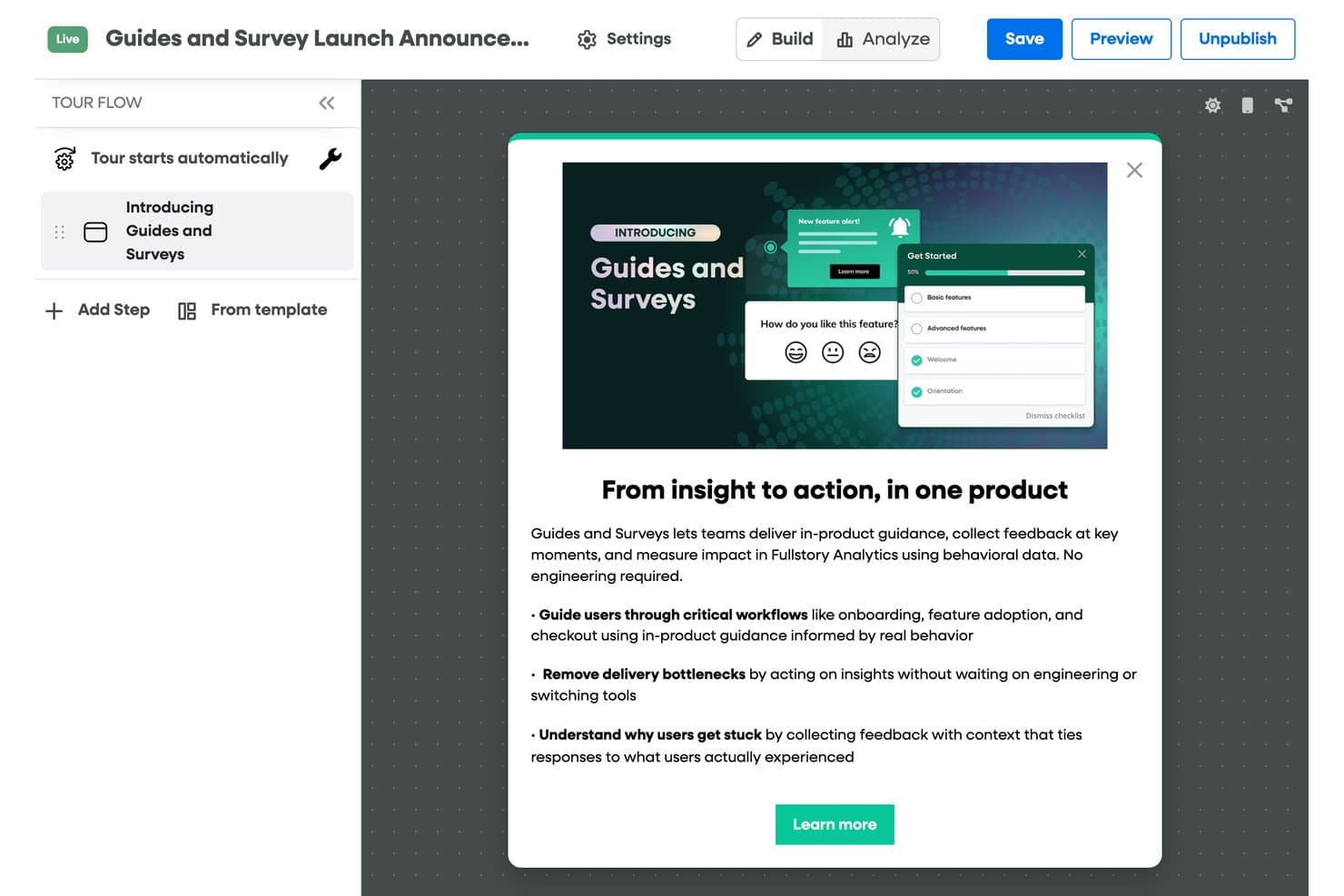
Fullstory lets users build and publish in-product guided tours easily. Fullstory is a product analytics platform with a paid digital adoption add-on for no-code tours, tooltips, checklists, banners, and surveys; its free plan includes session replay and analytics, but no guidance tools.
Who Is Fullstory Best For?
Product teams that need session replay and behavioral analytics to investigate user journeys, understand friction, and troubleshoot issues.
Why I Picked Fullstory
I picked Fullstory as “Best for behavior-led analytics on a free tier” because its free plan includes session replay and basic analytics. With up to 30,000 sessions monthly and 12-month retention, I can trace where users stall or encounter friction. Tours, tooltips, and other adoption guidance require a paid add-on, so the free plan is for diagnosing behavior, not guiding users.
Fullstory Key Features
- Automatic data masking: Personal data is masked and excluded by default.
- Consent-based recording: Configure recording to respect user consent choices.
- Server-side event capture: FullstoryFree includes up to 5,000 server-side events monthly.
- User deletion: Remove user data from Fullstory when needed.
Fullstory Integrations
Fullstory connects with Segment, Google Tag Manager, Adobe Analytics, Slack, Salesforce, Medallia, and Zapier. APIs and webhooks support custom integrations, but Guides and Surveys isn’t included in the free plan.
What’s Free?
Fullstory offers a free plan with session replay and analytics for up to 30,000 sessions monthly. It includes 12-month retention and 5,000 server-side events per month, but Guides and Surveys require a paid add-on.
Pros and Cons
Pros:
- Reviewers praise behavioral insights for UX research
- Replay helps reproduce user-reported bugs
- Session replays reveal onboarding friction
Cons:
- Tours and tips require a paid add-on
- Free tier has no in-app guidance
Learn more about Fullstory: Best for advanced product analytics & cohorts
- Free plan + free demo available
- Pricing upon request
Visit WebsiteCustomer Rating:4.5/5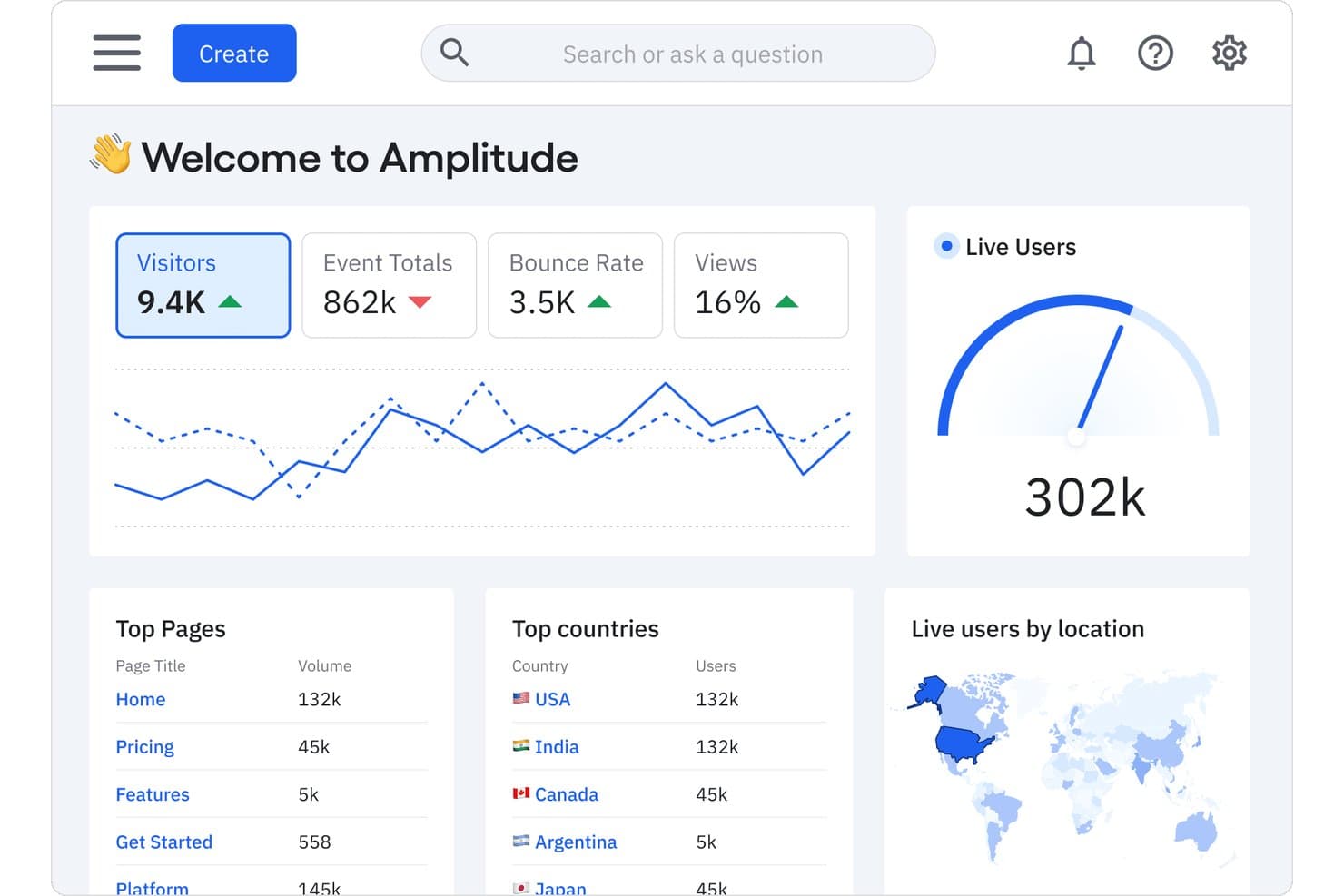
Amplitude tracks visitors, live users, and top pages in one dashboard. For teams comparing free digital adoption platforms, Amplitude is a product analytics platform with event tracking, behavioral analysis, funnels, and cohort tools.
Who Is Amplitude Best For?
Product managers at digital-product teams who need to analyze user behavior, build cohorts, and identify where customers drop off.
Why I Picked Amplitude
I picked Amplitude for advanced product analytics & cohorts because adoption decisions need evidence of what users do after launch. Its event tracking and behavioral analysis let me trace onboarding actions, while funnels reveal where users abandon key flows. I use cohorts to compare activation patterns across user groups and focus follow-up improvements.
Amplitude Key Features
- Session replay: Review recordings of individual user sessions.
- Feature flags: Control feature availability for selected users.
- Experimentation: Run product experiments and compare variants.
- Data integrations: Connect Amplitude with other data tools.
Amplitude Integrations
Amplitude’s integration directory lists 159 results, including Slack, Segment, and Snowflake; Atlassian Smart Links let you preview Amplitude charts in Jira and Confluence. Amplitude also supports HTTP API connections for custom data flows.
What's Free?
Amplitude’s free plan is free forever, not a time-limited trial, and includes unlimited seats and 2 million events per month. Behavioral Cohorts and custom data retention require a paid plan, while the free tier limits Guides & Surveys to one and active experiments to one.
Pros and Cons
Pros:
- Session replays add journey context
- Cohorts compare activation across user groups
- Funnels pinpoint onboarding drop-offs
Cons:
- Guidance tools trail dedicated adoption platforms
- Requires event instrumentation before insights emerge
Learn more about Amplitude: Best for product feedback
- Free plan + 30-day free trial + free demo available
- Pricing upon request
Visit WebsiteCustomer Rating:4.4/5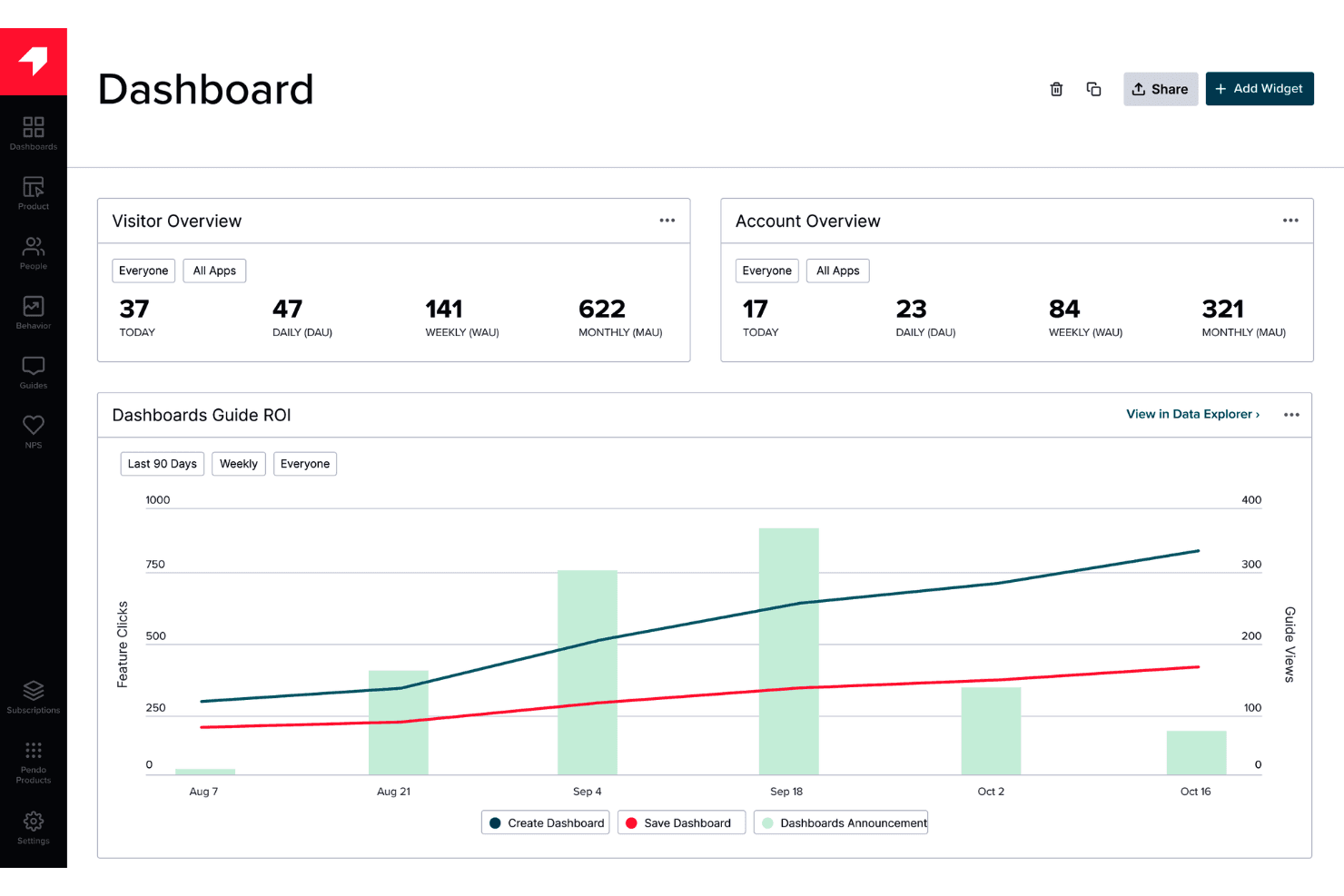
Pendo provides in-app guidance and feedback without requiring engineering work. Pendo is a digital adoption platform that combines product analytics, in-app guides, onboarding tools, and feedback collection for web and mobile applications.
Who Is Pendo Best For?
Product managers who want to gather in-app user feedback to inform decisions about their digital products.
Why I Picked Pendo
I picked Pendo as Best for product feedback because it pairs in-app surveys with product analytics. I use those tools to ask users about a confusing workflow, then compare their responses with feature usage data. That context helps product managers decide which friction points deserve attention.
Pendo Key Features
- In-app guides: Create walkthroughs, tooltips, and banners inside your product.
- Session replay: Review recorded user sessions to see how people interact with your product.
- Product roadmaps: Create visual roadmaps to communicate product direction and plans.
- Integrations: Connect Pendo with tools such as Salesforce, HubSpot, and Slack.
Pendo Integrations
Pendo lists 51 integrations, including HubSpot, Qualtrics, Salesforce, Slack, and Jira. Custom integrations are available through Pendo’s API and webhooks.
What’s Free?
Pendo offers a free-forever plan for up to 500 monthly active users, with unlimited internal users and web and mobile app keys. Third-party integrations aren’t included, and exceeding the user limit prevents you from creating new guides, NPS surveys, or segments.
Pros and Cons
Pros:
- Free plan supports product onboarding
- Supports guides across web and mobile apps
- Connects in-app feedback with product analytics
Cons:
- Feedback focus may be narrower than dedicated adoption tools
- Monthly user caps can block new guides
Learn more about Pendo: Best for SDK-based in-app onboarding flows
- Free plan available
- From $30/month
Visit WebsiteCustomer Rating:4.4/5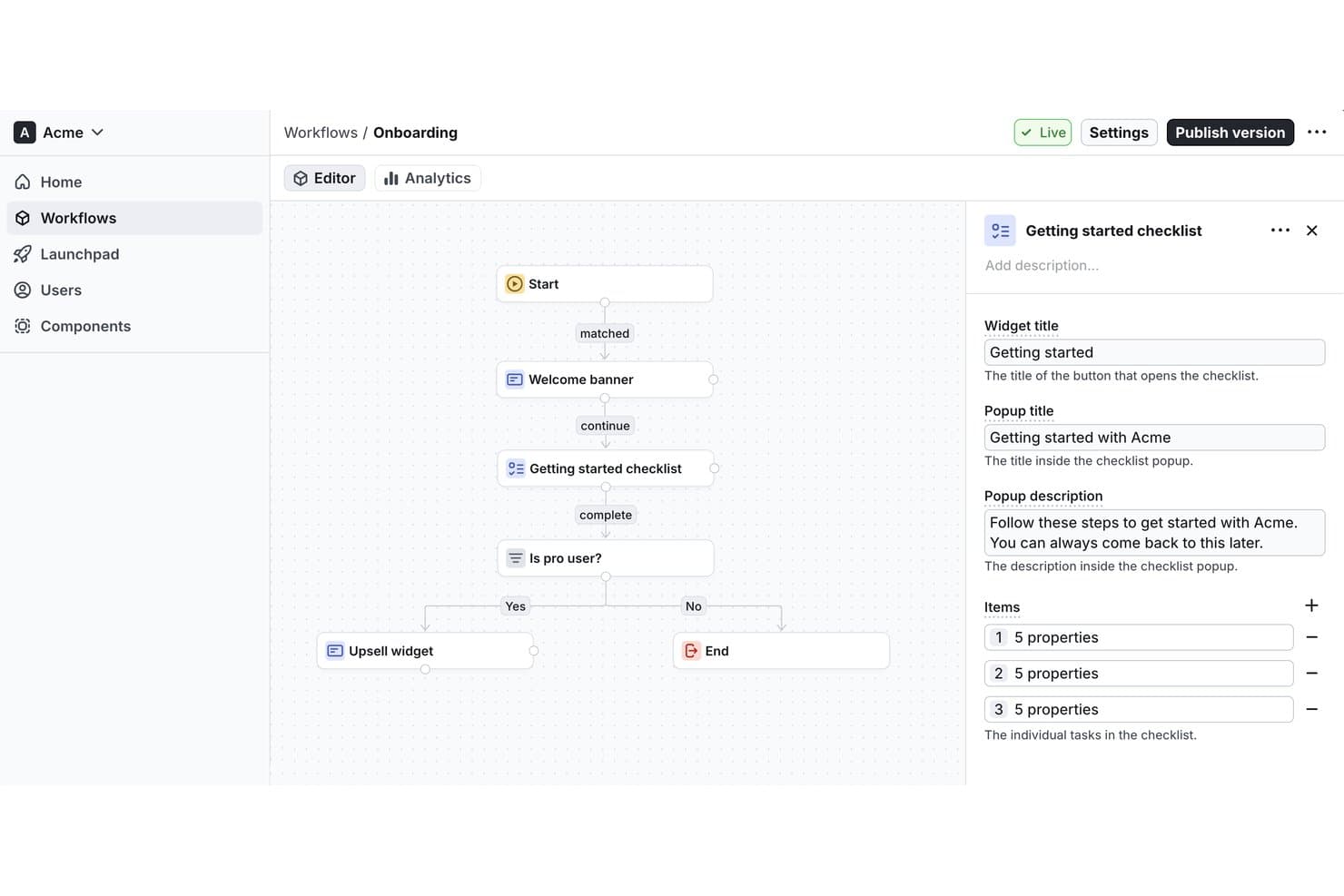
Flows lets users build onboarding workflows with checklists visually. Flows is a digital adoption platform for creating and embedding in-app onboarding experiences and guided user flows within software products.
Who Is Flows Best For?
Flows is best for SDK-based in-app onboarding flows, especially for product teams embedding guided experiences directly into their software.
Why I Picked Flows
I picked Flows because its SDK-based in-app onboarding flows let product teams embed guided experiences directly in their software. I’d use those flows to walk new users through product-specific setup steps inside the app, where the guidance matches the task they’re completing.
Flows Key Features
- User targeting: Segment users by properties or behavior to show relevant experiences.
- Workflow analytics: Track how users interact with workflows and where they drop off.
- Localization: Display experience versions that match each user’s locale.
- No-code editor: Let nontechnical teammates create and manage in-app experiences.
Flows Integrations
Native integrations are not clearly documented. Flows provides React and JavaScript SDKs and a component API for embedding in-app experiences in web applications.
What's Free?
Flows has a free-forever Hobby plan with no credit card required, limited to 100 monthly tracked users who see an experience. It’s intended for personal development, prototyping, and testing; custom components are preview-only, while unlimited workflows are included.
Pros and Cons
Pros:
- Localization supports users across markets
- Behavior targeting keeps guidance context-aware
- SDK-based flows fit product-specific onboarding
Cons:
- Custom components remain preview-only on Hobby
- Free plan limits monthly tracked users
Learn more about Flows: Best lightweight option for quick tutorials
- Free plan available
- From $9.99 (lifetime purchase)
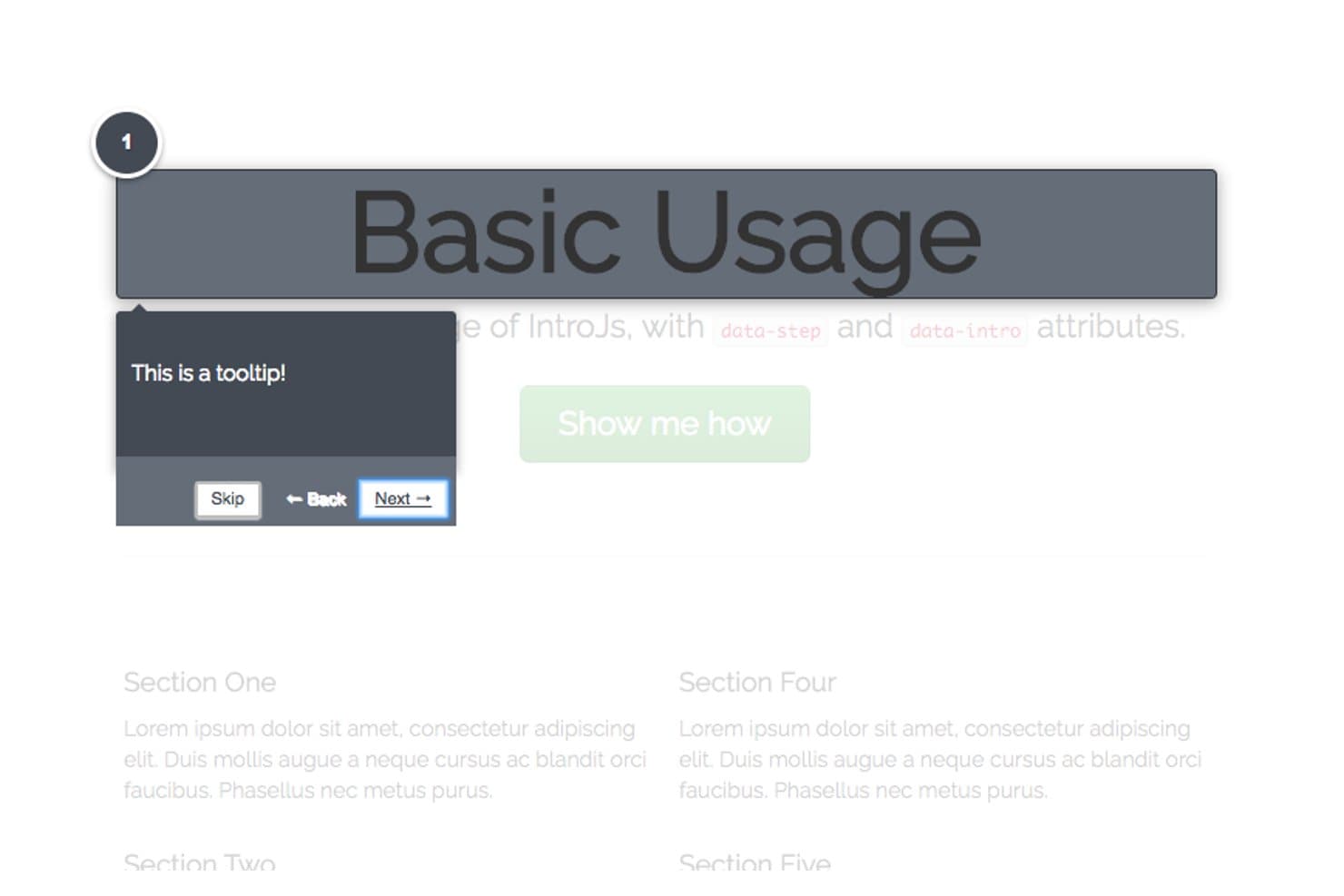
Intro.js guides users step-by-step with dark-themed tooltips. Intro.js is a JavaScript library for digital adoption that adds interactive product tours, step-by-step walkthroughs, and contextual tooltips to web applications.
Who Is Intro.js Best For?
Product teams with developer support who need to guide users through key workflows in a web application will find Intro.js a practical fit.
Why I Picked Intro.js
I picked Intro.js as the Best lightweight option for quick tutorials because its step-by-step tours guide users inside a web app. I like that tour steps can target specific interface elements and show contextual tooltips, such as explaining where to set a report filter while users work through the product.
Intro.js Key Features
- Progress indicator: Show users how far they’ve advanced through an introduction.
- Keyboard navigation: Let users move between steps with keyboard controls.
- “Don’t show again” option: Add a checkbox that saves a user’s preference in a cookie.
- Lifecycle callbacks: Run code when an introduction completes, exits, or changes steps.
Intro.js Integrations
Native integrations are not clearly documented. Intro.js provides a JavaScript API for adding custom tour behavior to web apps.
What's Free?
Intro.js is free under the AGPLv3 for open-source, personal, and noncommercial projects, with no time limit. Commercial applications, themes, or plugins require a paid commercial license.
Pros and Cons
Pros:
- Callbacks support custom tour behavior
- Tooltips target specific workflow controls
- Lightweight tours suit focused tutorials
Cons:
- Native integrations aren't clearly documented
- Requires JavaScript implementation and maintenance
Learn more about Intro.js: Best for web tour creation with unlimited users
- Free plan + 15-day free trial available
- From $19/month
Visit WebsiteCustomer Rating:4.6/5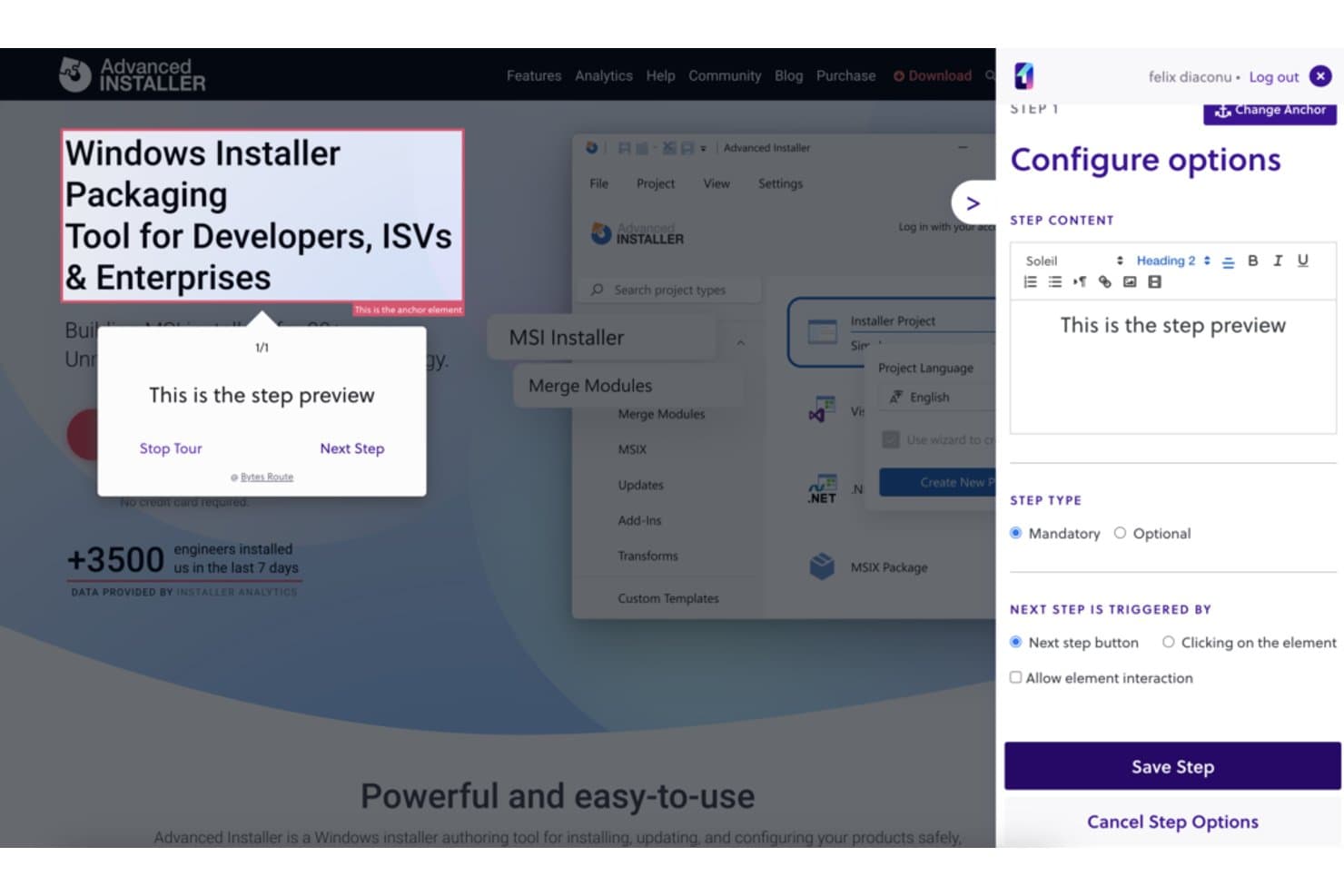
Bytes Route lets users configure guided tour steps with custom content. Bytes Route is a digital adoption platform for creating guided web tours, with tools to design and deliver walkthroughs on websites.
Who Is Bytes Route Best For?
Bytes Route is a good fit for product teams creating website walkthroughs, especially those needing web tour creation with unlimited users.
Why I Picked Bytes Route
I picked Bytes Route because it fits “Best for web tour creation with unlimited users.” Product teams can create guided web tours and deliver walkthroughs on websites, such as showing visitors the steps in a new feature flow. I like its focused fit for website adoption work.
Bytes Route Key Features
- Chrome extension: Create and edit tours through the Bytes Route Chrome extension.
- Tour analytics: Review analytics for published tours.
- Code-free setup: Connect the platform to your web domain without writing code.
- Cookie-free operation: Run Bytes Route without cookies.
Bytes Route Integrations
Native integrations are not clearly documented.
What's Free?
Bytes Route offers a $0 Free plan and a 15-day trial of its paid plans, with no credit card required. The Free plan is limited to one team member and three active tours, with basic analytics and a basic text editor.
Pros and Cons
Pros:
- Walkthroughs support in-app user onboarding
- Built-in statistics show tour performance
- Tours are quick to set up
Cons:
- Occasional lag can skip tour steps
- Guide design options are limited
Learn more about Bytes Route: Best open-source library for fully custom tours
- Free plan available
- From $50/lifetime
Visit WebsiteCustomer Rating:2.6/5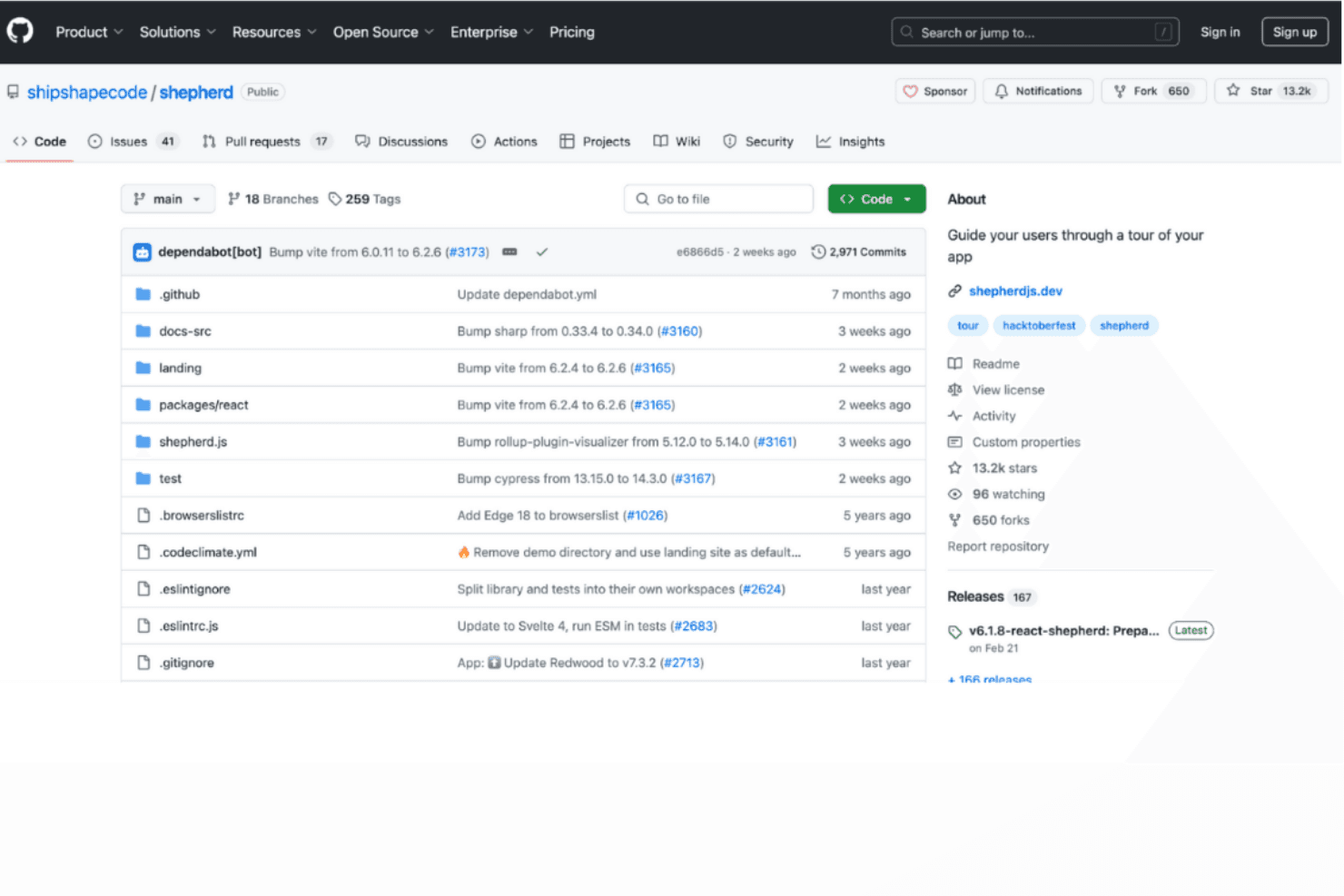
Shepherd.js delivers fully customizable tours for tailored guidance. Shepherd.js is a developer-focused digital adoption tool for creating in-app product tours with configurable steps, tooltips, and overlays in web applications.
Who Is Shepherd.js Best For?
Product and engineering teams building bespoke web onboarding will find Shepherd.js a fit as the Best open-source library for fully custom tours.
Why I Picked Shepherd.js
I picked Shepherd.js as the Best open-source library for fully custom tours because its step API lets me anchor guidance to specific interface elements and tailor tooltip content and buttons. I can add a modal overlay and guide users through a multi-screen setup, such as configuring permissions.
Shepherd.js Key Features
- Keyboard navigation: Configure keyboard controls for moving through tour steps.
- Lifecycle events: Respond to tour and step events with application logic.
- Scroll-to-step behavior: Scroll target elements into view when a step begins.
- CSS theming: Customize tour styling with CSS.
Shepherd.js Integrations
Shepherd.js provides framework wrappers for React, Ember, Angular, and Vue.js, with support for ES modules and plain JavaScript; it doesn’t document native integrations with third-party platforms.
What’s Free?
Shepherd.js is free for open-source, personal, and non-commercial projects under AGPL-3.0, while evaluation and testing are free for up to 30 days. Commercial or closed-source use requires a paid license; under AGPL-3.0, distributing or providing software over a network requires making its complete source code available under a compatible license.
Pros and Cons
Pros:
- Keyboard controls let users navigate tour steps
- Lifecycle events let teams trigger app logic
- Tour steps can target specific interface elements
Cons:
- No documented analytics for measuring tour completion
- Teams must build bespoke tours in code
Learn more about Shepherd.js:
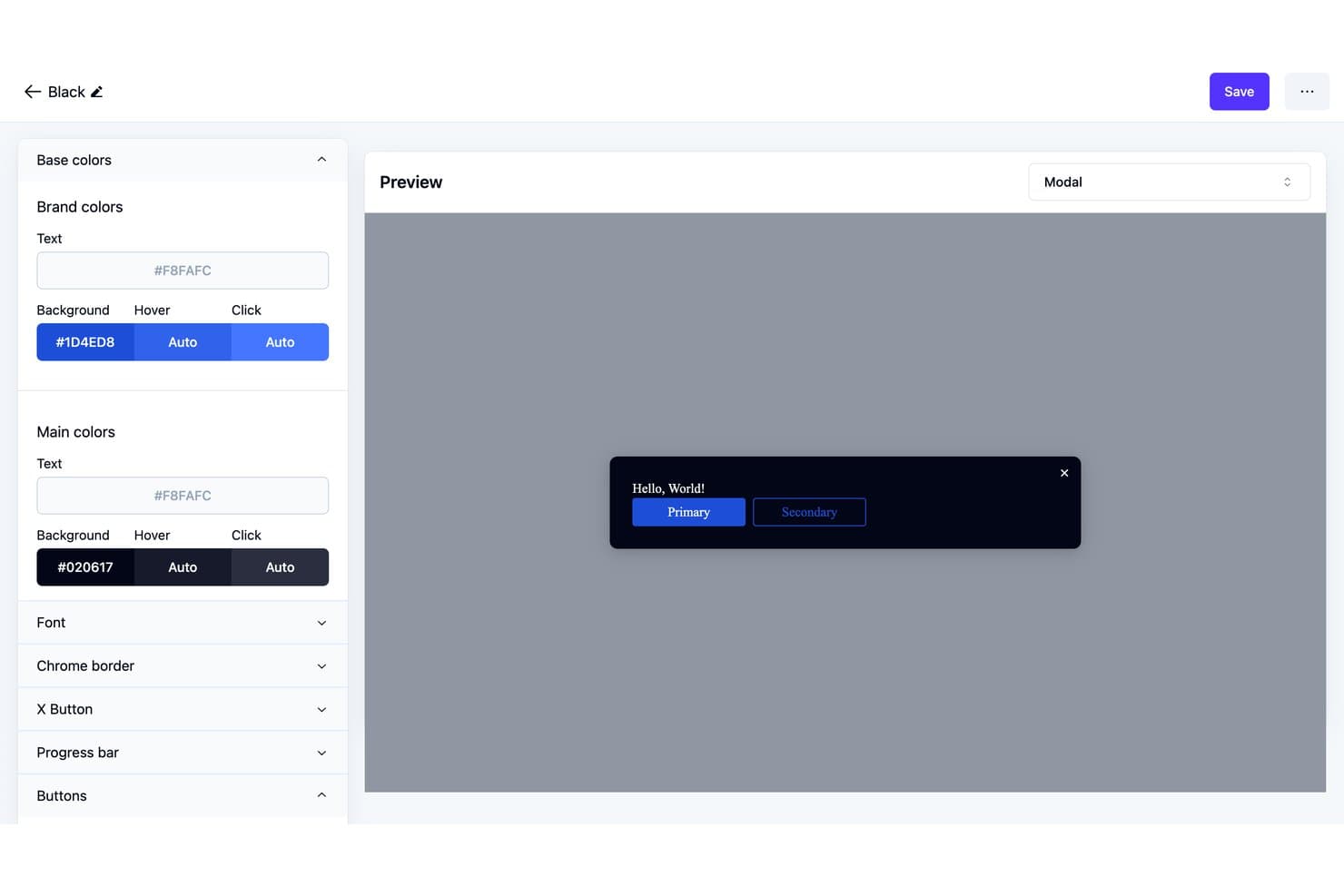
Usertour lets users customize modal theme colors and preview changes live. Usertour is an open-source digital adoption platform with a visual builder for in-app tours, checklists, surveys, banners, and resource centers, plus user targeting and flow analytics.
Who Is Usertour Best For?
Usertour’s fit: Best for self-hosted web app onboarding flows, especially for product teams that need to manage onboarding within their own web applications.
Why I Picked Usertour
I picked Usertour for Best Free Digital Adoption Platform Reviewed because it’s Best for self-hosted web app onboarding flows. Its open-source visual builder lets me create in-app tours and checklists, then target them to specific users. Flow analytics help me spot where people stop during onboarding.
Usertour Key Features
- In-app surveys: Add surveys to your web app to collect user feedback.
- Banners: Display announcements and updates inside your product.
- Resource centers: Give users an in-app place to access helpful resources.
- Open-source codebase: Review and adapt the platform’s source code.
Usertour Integrations
Usertour offers five native analytics integrations: Amplitude, Heap, Mixpanel, PostHog, and Segment. It also supports Zapier and provides a REST API for custom integrations.
What's Free?
Usertour offers a $0/month Hobby plan rather than a time-limited trial, with unlimited end users and up to 5,000 sessions per month. It includes one team member, one environment, and one-year data retention.
Pros and Cons
Pros:
- Community users praised checklist-driven onboarding
- Visual builder covers tours, checklists, and surveys
- Open-source code enables self-hosted control
Cons:
- Self-hosting puts deployment upkeep on your team
- Flow activation and selector bugs needed fixes
Learn more about Usertour:
Diğer Dijital Benimseme Platformları
Ücretsiz planlar veya deneme sürümleri sunan bazı ek dijital benimseme platformu seçenekleri şunlardır. Bu araçlar kısa listeme girmemiş olsa da göz atmaya değer:
- 11TangoBest for click-through SOP guides on free
How I Evaluate Free Digital Adoption Platforms
First, I define what counts as free. A digital adoption platform qualifies with a permanent plan, not a trial, even if user or guide caps limit a new-user workflow. From there, I split my evaluation into three parts: core functionality, which carries the most weight, like building no-code walkthroughs and tracking guide engagement; standout features, like a Chrome extension builder; and what a tool offers beyond its feature set, like a clear upgrade path.
Core Functionality (Table Stakes For This List)
In addition to my free plan requirements, I use a scoring system to select tools for my list. I score each one on a scale from 0 (does not offer the functionality) to 5 (excels in this area) for each core functionality listed below, based on what's available on the free plan. I then convert the total into a percentage to help assess each tool's overall fit, with extra weight on any functionalities I've deemed essential.
- No-Code Walkthrough Builder (Essential): I look for a way to build and revise multi-step guides without developer help, such as a walkthrough for setting up a profile.
- On-Screen Guidance: I assess whether teams can place tooltips, hotspots, or banners where users need help, such as beside an unfamiliar feature.
- Usage Analytics: I check whether the free plan tracks guide views or completions, so teams can see where users drop off in a workflow.
- Web Compatibility: I look for support across common web apps, allowing teams to guide users through workflows beyond a single proprietary system.
- User Segmentation: I assess whether guides can target users by URL or basic status, such as showing a first-use tour to new users.
Once I have a list of tools that meet the criteria, I consider what sets each platform apart.
Differentiating Factors (What Sets Vendors Apart)
Here's how I compare and contrast different vendors:
Standout Features
I look for a Chrome extension builder that lets you attach guides to any web app without deploying code. Tools like Userguiding and Helppier offer this, which means you can prototype a walkthrough in minutes and preview it live. I also check for smart element detection, since a guide that breaks after a minor UI update wastes iteration time. An in-app resource center matters too—it gives users one place to search FAQs, tours, and announcements without leaving the product.
Beyond Features
I check how quickly a product manager can deploy the tool solo—whether that's a single script tag or a browser extension install—since free tiers rarely include vendor onboarding support. I also evaluate upgrade path transparency, because a clear comparison between free and paid plans helps you build an internal business case without surprises. Data privacy matters too: guides overlay on live products, so I look for documented hosting and GDPR practices before connecting any customer-facing app.
Ücretsiz Dijital Benimseme Platformları Nasıl Seçilir?
Karmaşık özellik listeleri ve fiyatlandırma yapıları, ücretsiz bir dijital benimseme platformundan gerçekten ne elde ettiğinizi anlamanızı zorlaştırabilir. Yazılım seçimi süreciniz boyunca odağınızı korumanıza yardımcı olmak için göz önünde bulundurmanız gereken bazı faktörleri aşağıda bulabilirsiniz:
| Faktör | Dikkate Alınması Gerekenler |
|---|---|
| FaktörÜcretsiz Teklifin Kapsamı | Dikkate Alınması GerekenlerBeklenmedik maliyetlerle karşılaşmadan ekibinizin ihtiyaçlarını karşıladığından emin olmak için kullanıcı sınırları veya özellikler gibi ücretsiz plana nelerin dahil olduğunu belirleyin. |
| FaktörÖlçeklenebilirlik | Dikkate Alınması GerekenlerPlatformun ekibinizle birlikte büyüyüp büyüyemeyeceğini değerlendirin. Kullanıcı tabanınız ve özellik ihtiyaçlarınız genişledikçe kolay yükseltmelere olanak tanıyan seçenekleri arayın. |
| FaktörEntegrasyonlar | Dikkate Alınması GerekenlerMevcut iş akışınızı ek bir zahmet olmadan geliştirmek için platformun hâlihazırda kullandığınız CRM veya analiz yazılımı gibi araçlarla entegre olup olmadığını kontrol edin. |
| FaktörKullanım Kolaylığı | Dikkate Alınması GerekenlerKullanıcı arayüzünü ve ekibinizin aracı ne kadar hızlı öğrenebileceğini değerlendirin. Basit ve sezgisel bir tasarım zamandan tasarruf sağlayabilir ve eğitim maliyetlerini azaltabilir. |
| FaktörÖzelleştirme | Dikkate Alınması GerekenlerPlatformu markanızın görünümüne ve tarzına göre uyarlamanıza olanak tanıyan özelleştirme seçeneklerini arayın; böylece kullanıcılarınız için sorunsuz bir deneyim sağlayabilirsiniz. |
| FaktörDestek Kaynakları | Dikkate Alınması GerekenlerEkibinizin platformun yeteneklerinden en iyi şekilde yararlanmasına yardımcı olacak eğitimler, web seminerleri ve sohbet desteği gibi destek materyallerinin bulunup bulunmadığını değerlendirin. |
| FaktörGüvenlik | Dikkate Alınması GerekenlerVerilerinizi korumak ve kullanıcıların güvenini sürdürmek için platformun sektörel güvenlik standartlarına uygun olduğundan emin olun. |
| FaktörAnaliz | Dikkate Alınması GerekenlerDijital benimseme çalışmalarınızın başarısını ölçmenize yardımcı olacak şekilde kullanıcı davranışı ve benimseme oranları hakkında içgörüler sunan yerleşik analiz özelliklerini arayın. |
Ücretsiz Dijital Benimseme Platformu Nedir?
Dijital benimseme platformu, kullanıcıların yazılım uygulamalarını etkili bir şekilde öğrenmesine ve kullanmasına yardımcı olan, başlangıçta ücretsiz olarak kullanılabilmek için ücretsiz planlar veya denemeler sunan bir araçtır. Bu araçlar genellikle ürün yöneticileri, eğitim ekipleri ve müşteri başarısı profesyonelleri tarafından kullanıcıların işe alıştırılmasını ve etkileşimini geliştirmek için kullanılır.
Karmaşık süreçleri basitleştirerek ve kullanıcı verimliliğini artırarak değer sağlarlar. Etkileşimli kılavuzlar, kullanıcı analizleri ve işe alıştırma kontrol listeleri; kullanıcı davranışını anlamaya, eğitim sağlamaya ve yazılımın başarılı bir şekilde benimsenmesini güvence altına almaya yardımcı olur.
Bir dijital benimseme platformu (DAP), son kullanıcıların yeni özelliklere ve araçlara daha etkili bir şekilde uyum sağlamasına yardımcı olmak üzere tasarlanmıştır. Aşağıda, ücretsiz ve ücretli planlarda genellikle bulunan özelliklere göz atabilirsiniz.
Ücretsiz Dijital Benimseme Platformu Özellikleri
- Etkileşimli kılavuzlar: Kullanıcılara adım adım talimatlar sunarak yeni özellikleri keşfederken destek taleplerine duyulan ihtiyacı azaltır.
- İşe alıştırma kontrol listeleri: Kritik kurulum görevlerinin erkenden tamamlanmasını sağlayarak çalışanların işe alıştırılmasını destekler.
- Temel kullanıcı analizleri: Son kullanıcıların dijital benimseme çözümünüzle nasıl etkileşim kurduğunu görmek için etkileşim modellerini izler.
- Araç ipuçları ve uygulama içi mesajlaşma: Kullanıcılara uygulama içinde yol gösteren bağlamsal ipuçları sunarak dış yardıma veya bilgi tabanına olan bağımlılığı en aza indirir.
- Özelleştirilebilir şablonlar: Kuruluşunuzun tarzını yansıtan markalı eğitimler ve uygulamalı anlatımlar oluşturun.
Ücretli Dijital Benimseme Platformu Özellikleri
- Gelişmiş kullanıcı segmentasyonu: Belirli kullanıcı gruplarına göre uyarlanmış kişiselleştirilmiş içerikler ve kılavuzlar sunar.
- Gerçek zamanlı analiz panosu: Benimseme oranları ve kullanıcı etkileşimi hakkında daha derin içgörüler elde edin.
- Yapay zekâ destekli içerik önerileri: Kullanıcı davranışına göre ilgili öğrenme materyallerini önerir.
- Üçüncü taraf entegrasyonları: İşlevselliği geliştirmek için platformu diğer iş sistemlerine bağlar.
- Özel işe alıştırma iş akışları: İş hedefleriyle uyumlu ayrıntılı işe alıştırma süreçleri tasarlayın.
Ücretsiz Dijital Benimseme Platformunun Faydaları
Ücretsiz bir dijital benimseme çözümü, başlangıçta yatırım yapmadan gerçek değer sağlayabilir. Önemli faydalardan bazıları şunlardır:
- Uygun maliyetli öğrenme: Bütçeleri kontrol altında tutarken ekiplere temel eğitim araçlarını sağlayın.
- Geliştirilmiş çalışan işe alıştırma süreci: Kendi kendine kullanılabilen kılavuzlar ve kontrol listeleri benimseme sürecini kolaylaştırır ve yeni işe alınanların daha hızlı üretken hâle gelmesine yardımcı olur.
- Daha iyi kullanıcı etkileşimi: Bağlamsal ipuçları ve analizler, son kullanıcıların platformla nasıl etkileşim kurduğunu göstererek müşteri deneyimini iyileştirmenize yardımcı olur.
- Azalan destek talepleri: Proaktif yönlendirme, kullanıcıların sorunları bağımsız olarak çözmesine yardımcı olur ve BT ya da destek ekiplerine gelen talepleri azaltır.
- Özelleştirme: Şablonlar, markanızla uyumlu eğitim içerikleri oluşturmayı kolaylaştırır.
- Artan çalışan verimliliği: Basit ve erişilebilir araçlar öğrenme süresini kısaltarak ekiplerin daha yüksek değer taşıyan görevlere odaklanmasını sağlar.
- Girişimler ve küçük ekipler için ölçeklenebilirlik: Ücretsiz planlar genellikle erken aşamadaki büyümeyi desteklemek için yeterli işlevsellik sunar.
- Hızlı benimseme: Minimum kurulumla ekibiniz platformdan hemen yararlanmaya başlayabilir.
Ücretsiz Dijital Benimseme Platformunun Maliyetleri ve Fiyatlandırması
Bu makaleye ücretsiz olarak sunulan en iyi dijital benimseme platformu seçeneklerini arayarak geldiğinizi biliyorum. Ancak ücretsiz planlar yalnızca sınırlı özellikler sunduğundan, gelecekte planınızı yükseltmeniz gerekme ihtimali oldukça yüksektir.
Aşağıdaki tablo, dijital benimseme platformu çözümlerinde yaygın olarak sunulan planları, ortalama fiyatlarını ve genellikle dahil edilen özellikleri özetlemektedir:
Dijital Benimseme Platformu İçin Plan Karşılaştırma Tablosu
| Plan Türü | Ortalama Fiyat | Yaygın Özellikler |
|---|---|---|
| Plan TürüÜcretsiz Plan | Ortalama Fiyat$0 | Yaygın ÖzelliklerTemel kılavuzlar, araç ipuçları ve sınırlı analizler. |
| Plan TürüBireysel Plan | Ortalama Fiyat$5-$25/kullanıcı/ay | Yaygın ÖzelliklerGelişmiş kılavuzlar, kullanıcı segmentasyonu ve temel entegrasyonlar. |
| Plan Türüİşletme Planı | Ortalama Fiyat$30-$75/kullanıcı/ay | Yaygın ÖzelliklerÖzelleştirilebilir iş akışları, gelişmiş analizler ve daha fazla entegrasyon. |
| Plan TürüKurumsal Plan | Ortalama Fiyat$80-$150/kullanıcı/ay | Yaygın ÖzelliklerTam özelleştirme, özel destek ve kapsamlı analizler. |
Ücretsiz Dijital Benimseme Platformu Hakkında SSS
Ücretsiz dijital benimseme platformları hakkında sık sorulan bazı soruların yanıtları aşağıda yer almaktadır:
Dijital benimseme platformu nasıl çalışır?
Dijital benimseme platformu, diğer yazılım uygulamalarının üzerine rehberlik ve destek katmanı ekleyerek çalışır. Kullanıcılara adım adım talimatlar ve bağlamsal bilgiler sunarak önemli görevleri tamamlamalarında yardımcı olur. Bu yaklaşım, kullanıcıların dışarıdan yardıma ihtiyaç duymadan yeni araçları hızlı bir şekilde öğrenip kullanabilmesini sağlar.
Aşağıdakilerden hangisi dijital benimseme platformunun yaygın bir özelliğidir?
Yaygın özellikler arasında, kullanıcıları belirli görevler boyunca gerçek zamanlı olarak yönlendiren etkileşimli tanıtımlar bulunur. Bu görevler, rapor oluşturmaktan masraf talepleri göndermeye kadar uzanabilir ve kullanıcıların gerekli işlemleri verimli ve doğru bir şekilde tamamlamasını sağlar.
En iyi dijital benimseme platformu hangisidir?
En iyi dijital benimseme platformu, ekibinizin ihtiyaçlarına ve bütçesine bağlıdır. Kullanım kolaylığı, mevcut özellikler ve destek seçenekleri gibi faktörleri göz önünde bulundurun. Yükseltme yapmayı düşünmeden önce, temel gereksinimlerinizi karşılayıp karşılamadığını görmek için ücretsiz sürümleri değerlendirin.
Dijital benimsemenin etkisi nedir?
Dijital benimseme, kullanıcıların şirket araçlarını iş akışlarına tamamen entegre etmesini sağlayarak direnci en aza indirir. Bu olmadan işletmeler, yazılımların düşük kullanım oranıyla ve boşa giden yatırımlarla karşı karşıya kalabilir. Etkili benimseme, üretkenliği artırır ve dijital araçların değerini en üst düzeye çıkarır.
Bir dijital benimseme platformunu ücretsiz kullanabilir miyim?
Evet, birçok dijital benimseme platformu ücretsiz sürümler veya deneme sürümleri sunar. Bunlar genellikle kullanıcı kılavuzları ve analizler gibi temel özellikleri içerir ve ücretli bir plana geçmeden önce platformun özelliklerini test etmenize olanak tanır.
Doğru dijital benimseme platformunu nasıl seçerim?
Doğru platformu seçmek için kullandığınız yazılımın karmaşıklığı ve eğitim gereksinimleriniz gibi ekibinizin özel ihtiyaçlarını değerlendirin. Özellikleri incelemek ve platformun hedeflerinizle uyumlu olduğundan emin olmak için ücretsiz denemeler sunan platformları tercih edin.