

Bir projenin hareketli parçalarını yönetmek zor olabilir. Ürün yöneticisi olarak her gün teslim tarihleri, ekibin kapasitesi ve dinamikleri ile değişen öncelikleri aynı anda yönetmeniz gerekir. Sprint planlama yazılımı tam da bu noktada devreye girer. Görevleri düzenlemenize ve önceliklendirmenize, ilerlemeyi takip etmenize ve herkesin aynı doğrultuda ilerlemesini sağlamanıza yardımcı olur.
Deneyimlerime göre doğru aracı bulmak büyük fark yaratabilir. Ekibiniz için en uygun seçeneği belirlemenize yardımcı olmak amacıyla çeşitli seçenekleri test edip inceledim. Bu listede her yazılımın güçlü ve zayıf yönleri hakkında tarafsız bilgiler bulacaksınız. İster küçük bir girişimle ister büyük bir kuruluşla çalışıyor olun, ihtiyaçlarınızı karşılayacak bir çözüm burada mevcut. En iyi seçeneklere göz atalım ve hangisinin iş akışınıza en uygun olduğunu görelim.
Why Trust Our Software Recommendations
6,700+
Reviews
20
Industry experts
16+
Evaluation factors
14
Years
Our team has been testing and reviewing software since 2012. As product managers ourselves, we know how difficult—and important—it is to choose the right software.
For this guide, we evaluated tools using hands-on testing and independent research, scoring tools using our selection criteria.
Our reviews reflect our human editorial judgment, not a sales pitch.
Expert reviewers:
- Andrew LumbySenior TPM
- Cristiano ValimSenior UI/UX Lead


Sprint Planlama Yazılımları Karşılaştırma Tablosu
Bu karşılaştırma tablosu, en iyi sprint planlama yazılımı seçeneklerim için fiyatlandırma ayrıntılarını özetlemektedir:
Score legend (out of 5)
- Excellent4.5–5
- Good4–4.4
- Average3–3.9
- Below average2–2.9
- Poor1–1.9
Sorted by: Default
| Tool | Starting Price | Website | |||||||||||
|---|---|---|---|---|---|---|---|---|---|---|---|---|---|
Best for automated sprint cycle scheduling | Not rated | 3 | 4 | 3 | 2 | 5 | 3 | Not rated | Not rated | Not rated | Not rated | $10/user/month Free plan available | Website |
Best for backlog-to-sprint velocity tracking | Not rated | 3 | 5 | 3 | 3 | 4 | 5 | Not rated | Not rated | Not rated | Not rated | $8.48/user/month Free plan + 7-day free trial available | Website |
Best for linking sprint work to strategic goals | Not rated | 3 | 4 | 4 | 3 | 4 | 4 | Not rated | Not rated | Not rated | Not rated | $59/user/month 30-day free trial + free demo available | Website |
Best for GitHub integration | Not rated | 5 | 4 | 3 | 3 | 5 | 4 | Not rated | Not rated | Not rated | Not rated | $4.99/user/month Free plan + 14-day free trial + free demo available | Website |
Best for multi-team burndown tracking | Not rated | 3 | 5 | 4 | 3 | 3 | 4 | Not rated | Not rated | Not rated | Not rated | $12/month 14-day free trial | Website |
Best for SAFe sprint planning at scale | Not rated | 3 | 5 | Not rated | Not rated | Not rated | Not rated | 4 | 4 | 4 | 3 | Pricing upon request Not available | Website |
Best for all-in-one project management | Not rated | 2 | 4 | 4 | 3 | 5 | 3 | Not rated | Not rated | Not rated | Not rated | $7/user/month Free plan available | Website |
Best for enterprise-wide dependency tracking | Not rated | 3 | 4 | Not rated | Not rated | Not rated | Not rated | 4 | 4 | 4 | 3 | Pricing upon request Free trial available | Website |
Best for Zoho ecosystem sprint teams | Not rated | 5 | 4 | 2 | 3 | 4 | 4 | Not rated | Not rated | Not rated | Not rated | $3/user/month Free plan and 15-day free trial available | Website |
Best for dev-to-sprint traceability in Azure | Not rated | 3 | 4 | Not rated | Not rated | Not rated | Not rated | 4 | 4 | 4 | 2 | $6/user/month Free plan available | Website |


En İyi Sprint Planlama Yazılımı İncelemeleri
Kısa listeme giren en iyi sprint planlama yazılımlarına ilişkin ayrıntılı özetlerimi aşağıda bulabilirsiniz. İncelemelerim, sizin için en iyi seçeneği bulmanıza yardımcı olmak amacıyla her aracın temel özelliklerine, artılarına ve eksilerine, entegrasyonlarına ve ideal kullanım alanlarına ayrıntılı bir bakış sunar.
 Best for automated sprint cycle scheduling
- Free plan available
- From $10/user/month (billed annually)
Visit WebsiteCustomer Rating:4.6/5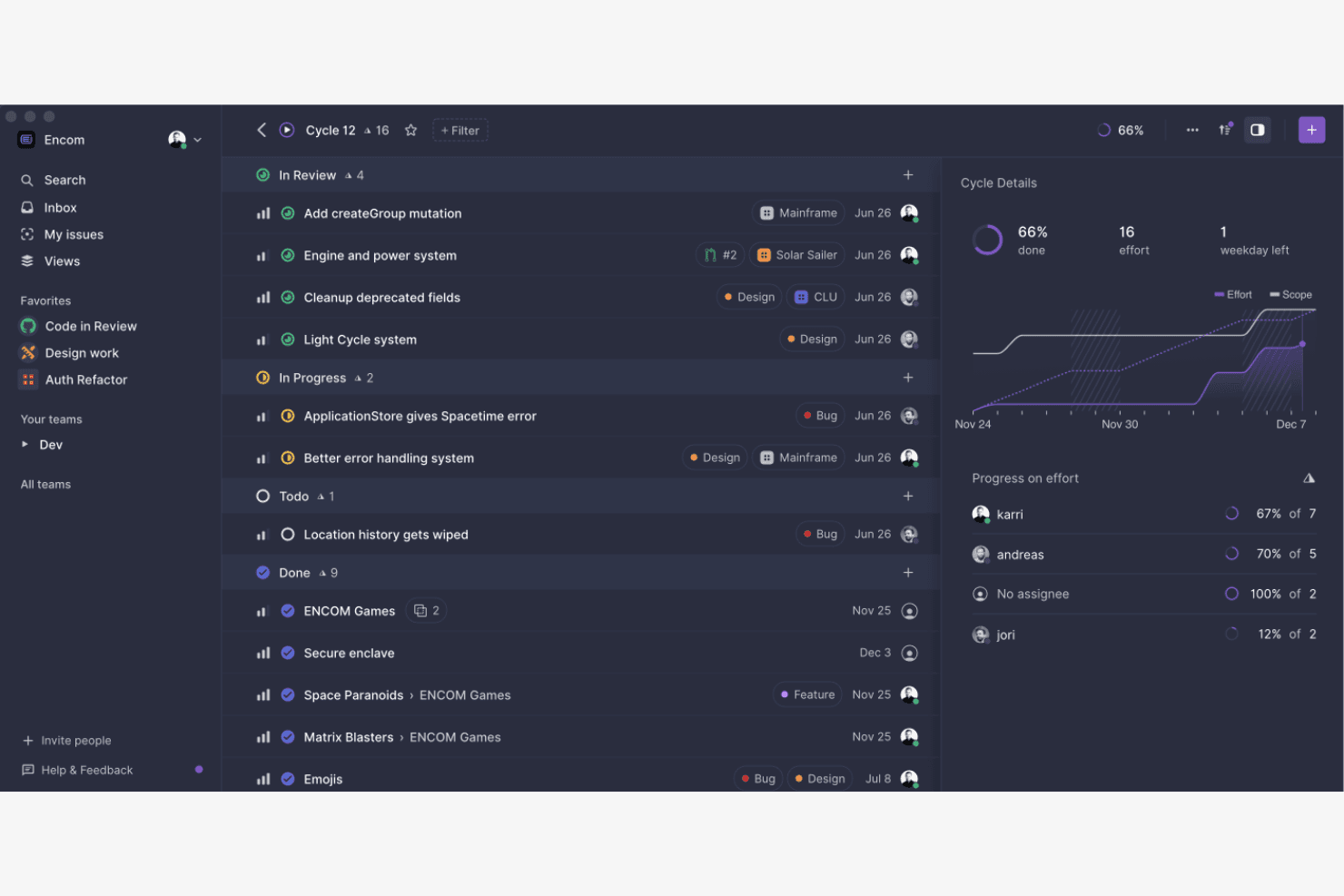
Linear sharpens workflow efficiency for rapid development cycles. Linear is a project management tool built for software teams that combines issue tracking, sprint planning, roadmap visualization, and cycle automation in one workspace.
Who Is Linear Best For?
Linear is a strong fit for software teams that want sprint cycles to run on autopilot without constant manual setup.
Why I Picked Linear
Linear earns its spot on my shortlist because of how well it handles automated cycle scheduling. I love that you can configure cycles to roll over automatically, so incomplete issues carry forward without anyone having to manually reset the board each sprint. Linear's cycle view also lets you see scope, progress, and velocity in one place, which makes mid-sprint adjustments far less painful than in tools that bury that data across multiple screens.
Linear Key Features
- Git integration: Linear connects directly to GitHub, GitLab, and other version control platforms so pull requests and branches link automatically to their related issues.
- Priority triage inbox: A dedicated inbox surfaces new and updated issues that need attention, letting teams quickly sort and assign work without digging through project boards.
- Custom workflow states: Teams can define their own issue statuses to match how work actually moves through their process, from backlog to deployment.
- Roadmap timeline view: A visual timeline displays planned work across multiple cycles and teams, making it easier to spot scheduling conflicts and communicate delivery plans to stakeholders.
Linear Integrations
Linear integrates directly with GitHub and GitLab, linking pull requests and branches to related issues. It also supports connections with other version control platforms.
Pros and Cons
Pros:
- Custom issue states reflect delivery stages
- Cycle views show scope, progress, and velocity
- Cycles roll forward without manual resets
Cons:
- Opinionated cycles can constrain complex workflows
- Limited sprint reporting and analytics
Learn more about Linear: 2Best for backlog-to-sprint velocity tracking
Jira
- Free plan + 7-day free trial available
- From $8.48/user/month
Visit WebsiteCustomer Rating:4.4/5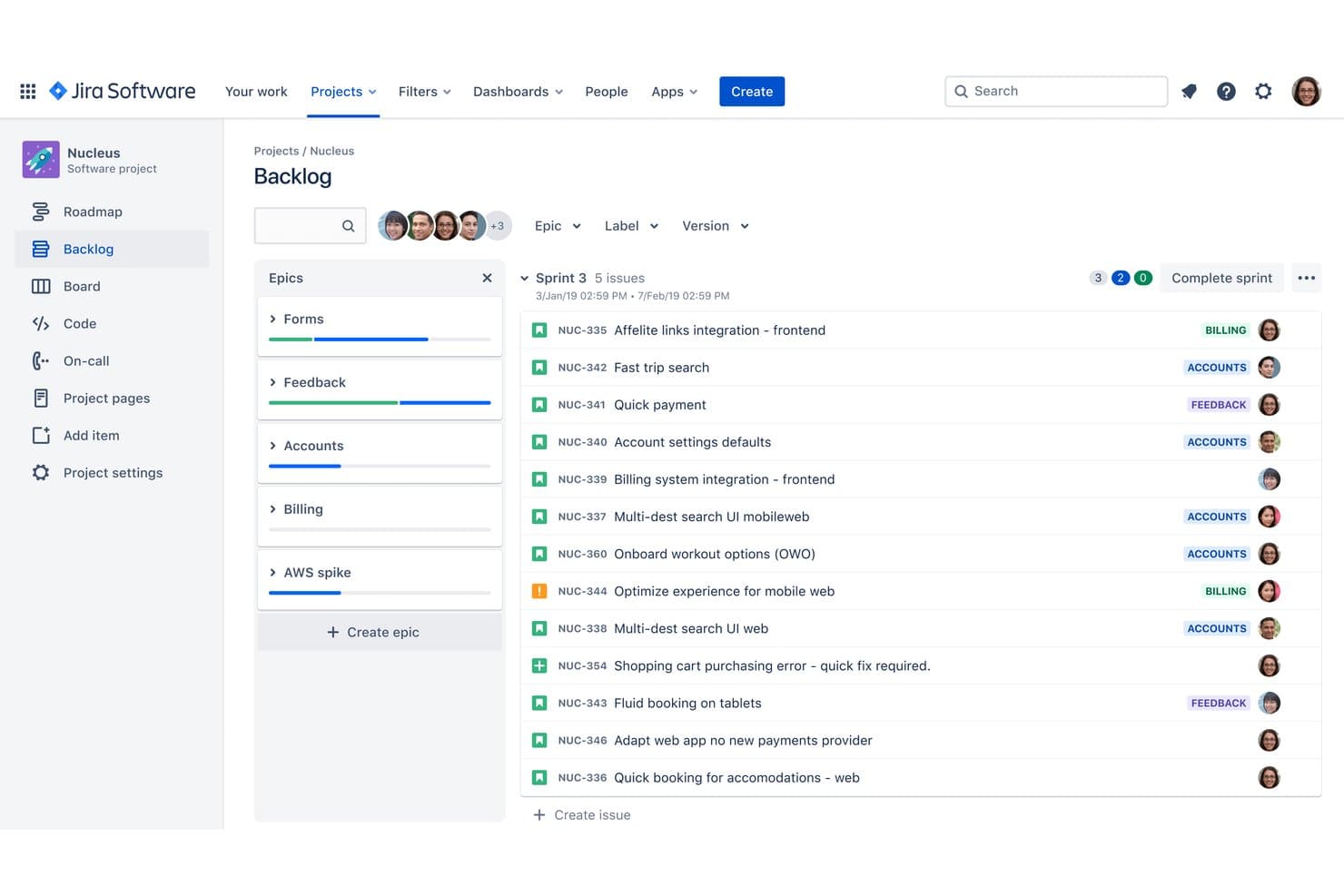
Jira organizes sprint tasks and epics in a visual backlog view. Jira is an agile project management platform that combines sprint planning, backlog management, issue tracking, and velocity reporting in one place.
Who Is Jira Best For?
Jira is a strong fit for software development teams that need to connect backlog grooming directly to sprint execution and track velocity over time.
Why I Picked Jira
Jira earns its spot on my shortlist because no other sprint planning tool connects backlog management to velocity tracking as tightly. I love how the velocity chart automatically pulls data from completed sprints, so I can set realistic sprint commitments based on actual throughput rather than gut feel. The sprint backlog view also lets me drag issues directly from the product backlog into a sprint, with story point totals updating in real time as I build out the scope.
Jira Key Features
- Scrum board: A visual board that organizes sprint issues into configurable columns, letting your team track work status from "To Do" through "Done" in a single view.
- Dependency management: Links between issues surface blockers and relationships across teams, so you can spot risks before they stall a sprint.
- Customizable workflows: Issue workflows can be tailored to match your team's exact process, with custom statuses and transition rules.
- Reporting suite: Built-in reports like burndown charts, cumulative flow diagrams, and sprint reports give teams a clear view of progress within an active sprint.
Jira Integrations
Jira offers 3,000+ Marketplace integrations, including Slack, Microsoft Teams, GitHub, Bitbucket, Confluence, Trello, and Figma. Its REST APIs support custom integrations for sprint planning and delivery workflows.
Pros and Cons
Pros:
- Story-point totals update as scope changes
- Completed-sprint velocity informs future commitments
- Backlog issues move directly into sprints
Cons:
- Issue configuration can slow sprint setup
- Velocity forecasts depend on consistent estimates
 3Best for linking sprint work to strategic goals
Aha!
- 30-day free trial + free demo available
- From $59/user/month (billed annually)
Visit WebsiteCustomer Rating:4.4/5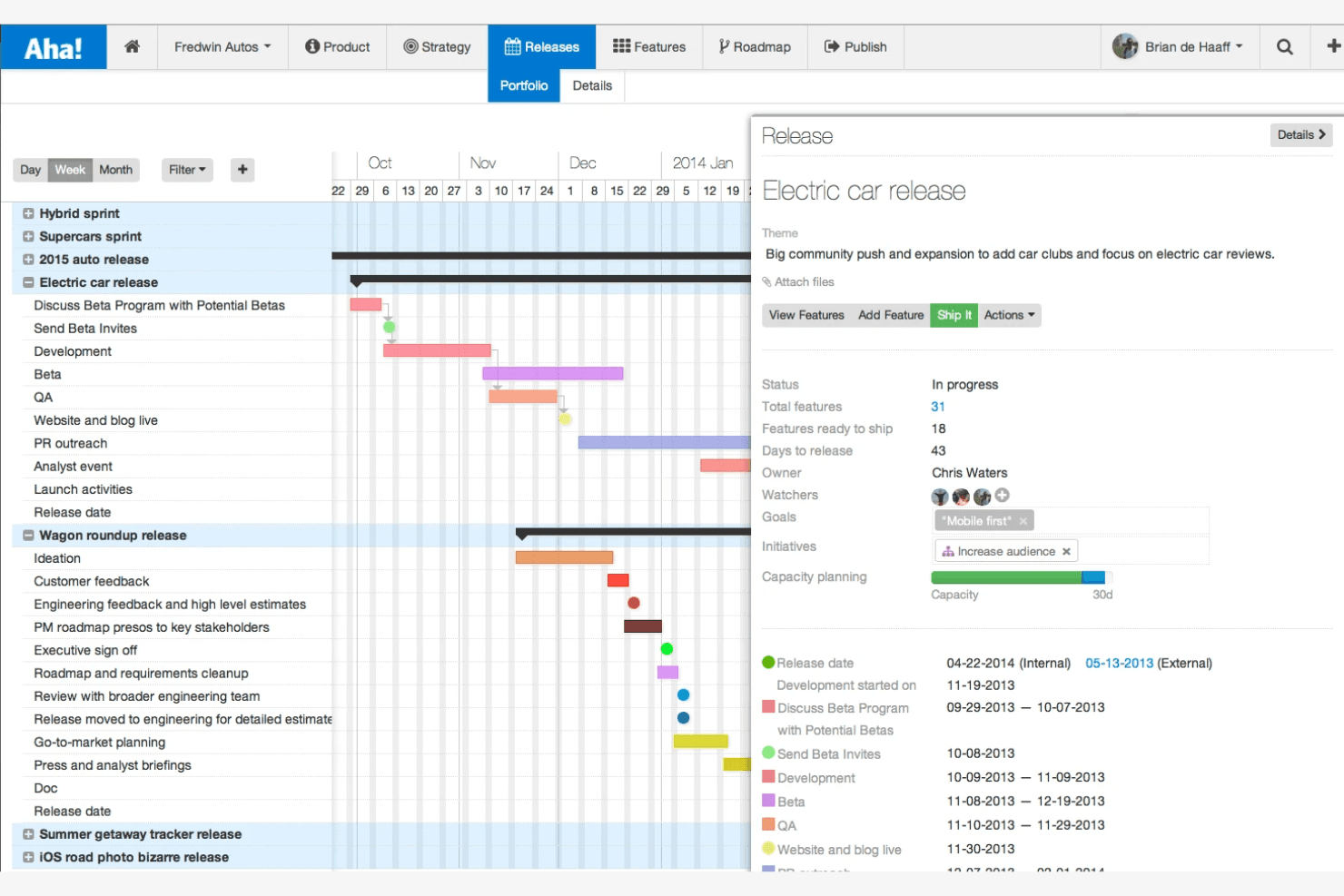
Aha! shapes product strategy through goals, roadmaps, and feedback. Aha! is a product development platform that combines roadmapping, backlog management, sprint planning, and capacity tracking in one connected workspace.
Who Is Aha! Best For?
Aha! is a strong fit for product teams that need sprint-level work to stay visibly connected to broader strategy and business objectives.
Why I Picked Aha!
Aha! earns its spot on my shortlist because it's built around the idea that sprint work shouldn't exist in isolation from your product strategy. I love how its features map individual backlog items directly to goals and initiatives, so you can see at a glance whether your team's sprint output is actually moving the needle on what matters. The capacity planning tools let you balance sprint load against strategic priorities before work begins, not after.
Aha! Key Features
- Idea management portal: A dedicated space where internal teams and customers can submit, vote on, and comment on product ideas that feed directly into your backlog.
- Custom workflow automation: Configurable rules that automatically move records through defined stages based on status changes or field updates.
- Dependency tracking: A visual map of relationships between features, epics, and releases so teams can spot blockers before a sprint begins.
- Real-time progress reports: Auto-generated reports that surface sprint velocity, feature completion rates, and release status without manual data entry.
Aha! Integrations
Aha! offers more than 65 integrations, including Jira, Azure DevOps, Trello, Slack, and GitHub, plus an API for custom connections.
Pros and Cons
Pros:
- Prioritized backlogs feed directly into sprint planning
- Capacity planning shows availability before sprint commitments
- Sprint items stay tied to product goals
Cons:
- Large portfolios take time to navigate
- Initial setup requires substantial workflow configuration
Learn more about Aha!: Best for GitHub integration
- Free plan + 14-day free trial + free demo available
- From $4.99/user/month (billed annually)
Visit WebsiteCustomer Rating:4.3/5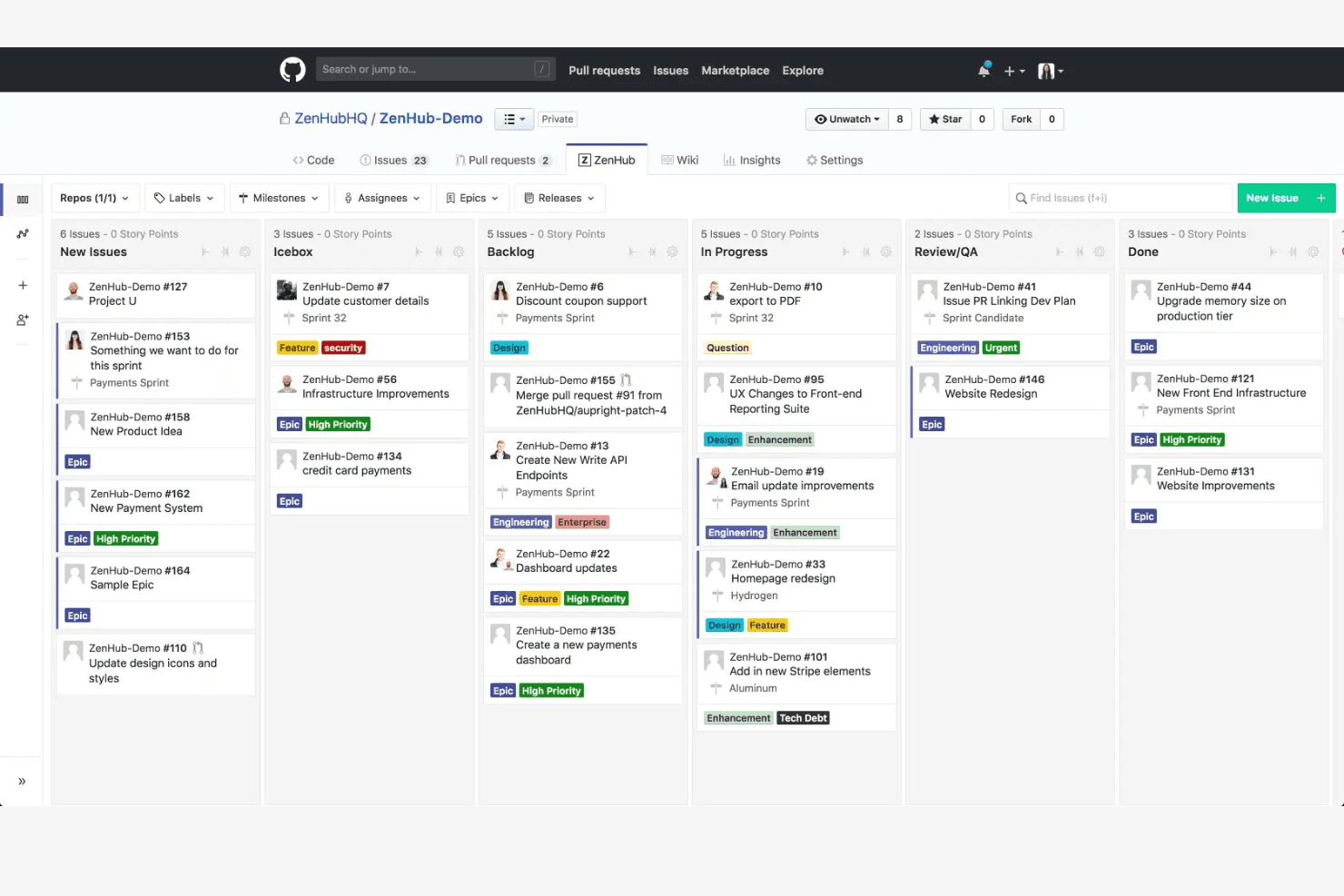
Zenhub augments GitHub by adding built-in agile planning features. ZenHub is a sprint planning and project management tool built directly into GitHub, offering sprint boards, backlog prioritization, velocity tracking, and dependency mapping for engineering teams.
Who Is ZenHub Best For?
ZenHub is a strong fit for engineering teams that live in GitHub and want sprint planning built into their existing workflow.
Why I Picked ZenHub
ZenHub earns its spot on my shortlist because it builds sprint planning directly into GitHub, so engineers never have to leave the environment where their actual work lives. I love how GitHub Issues become sprint board items automatically, with velocity tracking and dependency mapping layered on top without any manual syncing. Backlog prioritization happens right alongside the code, which means sprint planning stays grounded in what's actually being built.
ZenHub Key Features
- Multi-repo boards: View and manage GitHub Issues from multiple repositories on a single sprint board without switching contexts.
- Epics: Group related GitHub Issues into larger bodies of work to track progress on features or initiatives across sprints.
- Burndown charts: Monitor sprint progress against planned work in real time to spot scope creep or pacing issues early.
- Release reports: Track which Issues are included in an upcoming release and see how much work remains before the release is ready to ship.
ZenHub Integrations
ZenHub’s core native integration is GitHub, linking repositories, Issues, pull requests, and commits to sprint planning. It also offers a native Slack integration for creating, commenting on, and collaborating on Issues.
Pros and Cons
Pros:
- Dependency maps clarify work sequencing
- Epics connect multi-sprint initiatives to delivery
- Sprint burndowns expose scope drift early
Cons:
- Non-engineering stakeholders get fewer tailored workflows
- Large, complex workspaces can load slowly
Learn more about Zenhub: Best for multi-team burndown tracking
- 14-day free trial
- From $12/month
Visit WebsiteCustomer Rating:4.3/5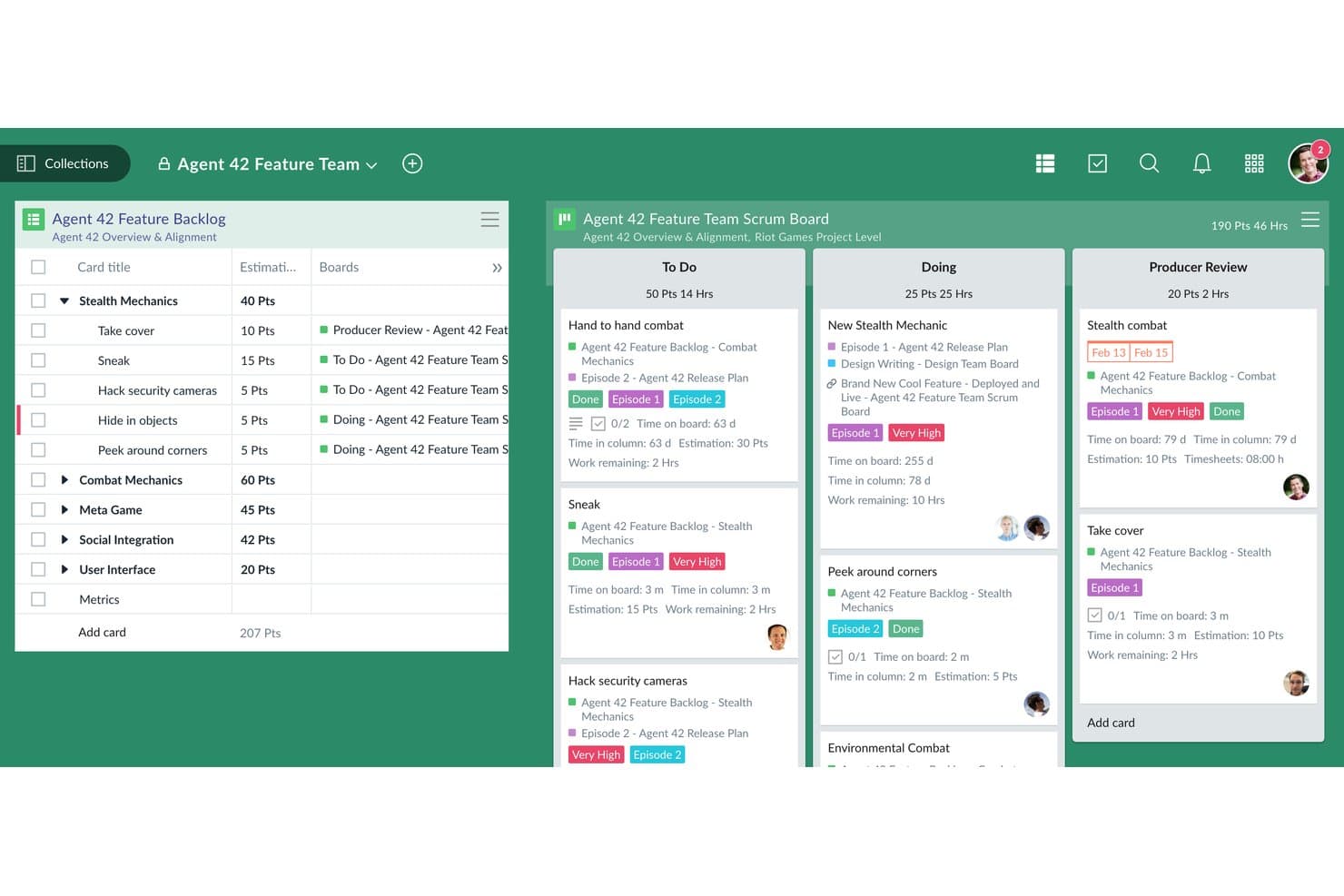
Favro links backlog items to sprint board columns for full visibility. Favro is a sprint planning and project management platform that combines kanban boards, backlogs, sprint scheduling, and cross-team burndown tracking across multiple teams and workflows.
Who Is Favro Best For?
Favro is a strong fit for scaling product organizations that run multiple concurrent sprints across several teams and need unified burndown visibility in one place.
Why I Picked Favro
I've included Favro in my top picks because it tracks burndown across multiple teams simultaneously, which is rare at this price point. When several squads are running parallel sprints, Favro's cross-collection burndown charts give you a single view of progress without stitching together separate reports. I also like that its backlog and board views stay linked, so sprint scope changes update burndown data in real time.
Favro Key Features
- Card dependencies: Link cards across boards to map blocking relationships and sequence sprint work in the correct order.
- Velocity tracking: View historical sprint velocity data to help teams set realistic capacity targets for upcoming sprints.
- Customizable workflows: Configure column states and card statuses to match your team's specific definition of done.
- Built-in automation rules: Set trigger-based automations to move cards, assign members, or update fields when sprint conditions are met.
Favro Integrations
Favro documents integrations with Jira, Slack, GitHub, GitLab, Miro, Google Calendar, Microsoft Outlook Calendar, Google Drive, Microsoft OneDrive, and Unito. It also supports outgoing webhooks and Zapier.
Pros and Cons
Pros:
- Historical velocity helps set sprint capacity
- Linked backlogs reflect scope changes in charts
- Cross-team burndowns consolidate sprint progress
Cons:
- Complex sprint edits feel cumbersome on mobile
- Initial setup can overwhelm new users
Learn more about Favro:
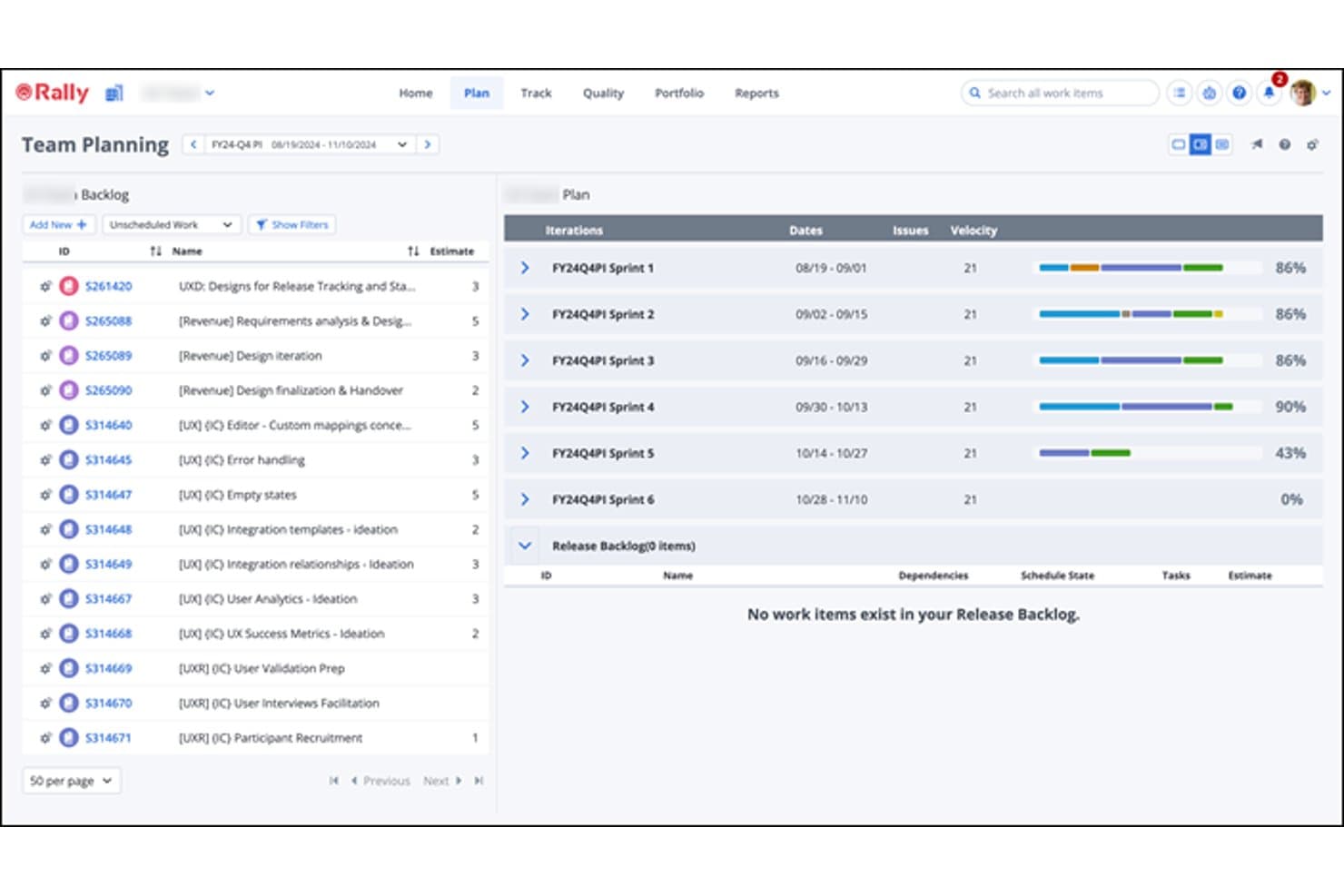
Rally Software visualizes sprint velocity and iteration dates for planning. Rally is an enterprise agile management platform by Broadcom that supports backlog management, iteration planning, capacity forecasting, cross-team dependency tracking, and SAFe-aligned sprint planning across large, multi-team organizations.
Who Is Rally Best For?
Rally fits large enterprises running SAFe or other scaled agile frameworks, where cross-team dependency tracking and portfolio-to-delivery alignment are non-negotiable.
Why I Picked Rally Software
I picked Rally as one of the best because it's purpose-built for organizations running SAFe at scale, where dependency tracking across teams isn't optional. I rely on its predecessor-successor dependency mapping to surface blocked stories and sequencing issues across projects before they derail a sprint. The Capacity Forecasting Tool runs Monte Carlo simulations against up to 52 weeks of historical throughput, giving my team confidence-level estimates rather than gut-feel commitments.
Rally Software Key Features
- Iteration Planning Board: A drag-and-drop board that displays ranked backlog items alongside iteration columns, letting teams schedule user stories, defects, and test sets into sprints.
- Predecessor-successor dependency tracking: Maps dependencies between user stories and portfolio items across projects, surfacing blocked status and sequencing issues on summary pages and boards.
- Iteration Burndown chart: Visualizes remaining task hours and completed story points against an ideal burndown line so teams can assess delivery against the iteration end date.
- @mention notifications: Lets team members tag colleagues in Description, Notes, and Discussion fields, triggering instant email alerts to keep distributed teams aligned between planning sessions.
Rally Software Integrations
Rally offers documented integrations with Jira, Git, Bitbucket, GitHub, GitHub Enterprise, TFS/VSTS, CI/CD pipelines, Clarity, ServiceNow, and Micro Focus ALM/Quality Center. Its REST WSAPI 2.0, JSON, and language toolkits support custom integrations.
Pros and Cons
Pros:
- Dependency tracking helps coordinate cross-team work
- Burndown charts clarify iteration delivery progress
- Backlog ranking keeps sprint priorities visible
Cons:
- Initial sprint setup takes extra configuration
- Navigation feels cluttered to newcomers
Learn more about Rally Software: Best for all-in-one project management
- Free plan available
- From $7/user/month (billed annually)
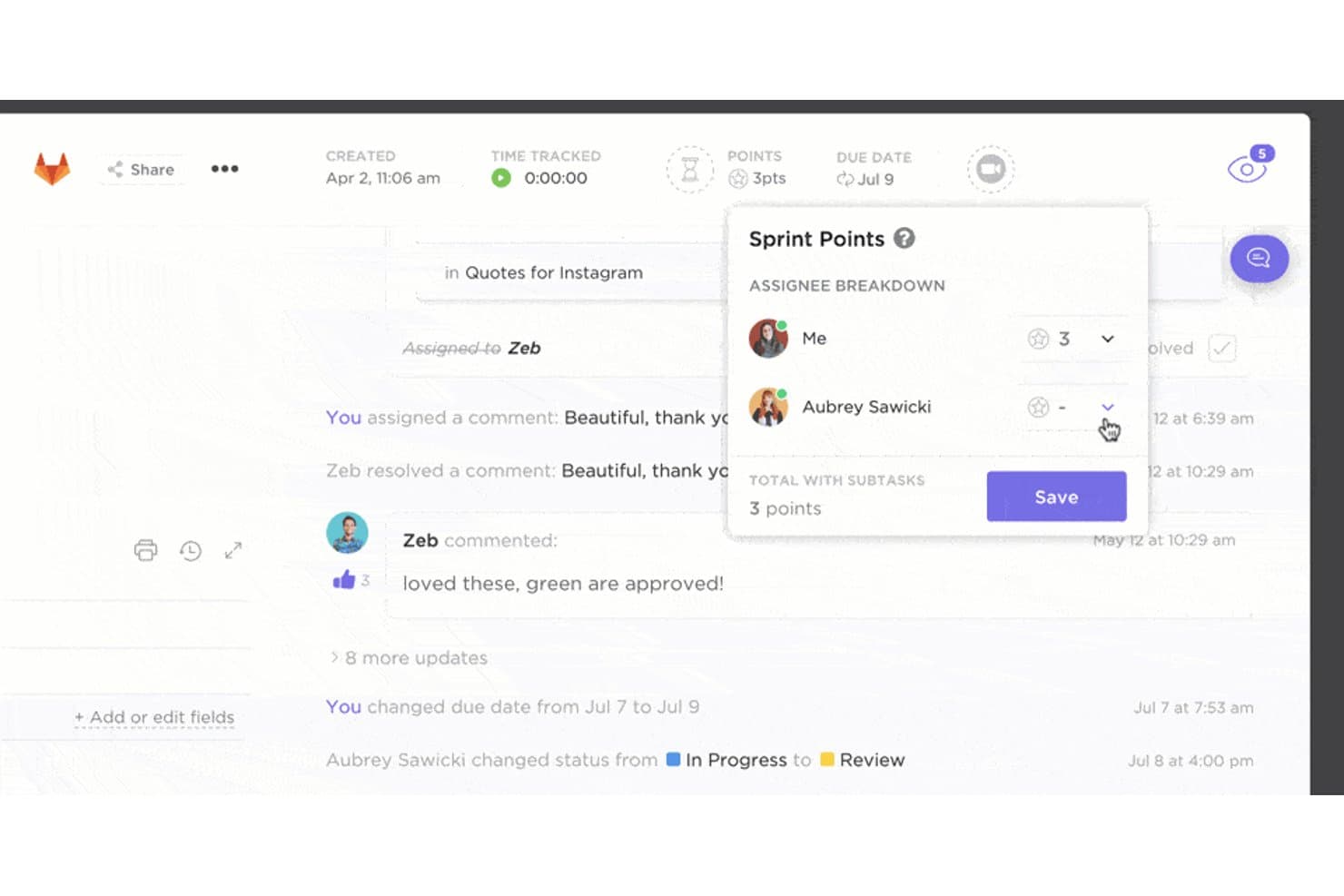
ClickUp lets users assign sprint points per assignee on a task. ClickUp is an all-in-one project management platform that combines sprint planning, backlog management, task tracking, time estimation, and workflow automation in a single workspace.
Who Is ClickUp Best For?
ClickUp works well for cross-functional teams that want to manage sprints, tasks, and roadmaps without juggling multiple tools.
Why I Picked ClickUp
I picked ClickUp as one of the best because it genuinely replaces a stack of tools, letting my team run sprint ceremonies, manage the backlog, and track velocity all in one place. I especially like its Sprint Widgets, which surface burndown charts and sprint progress without any setup overhead. ClickUp's Goals feature also lets me tie sprint work directly to quarterly targets, so nothing gets shipped in a vacuum.
ClickUp Key Features
- Custom sprint statuses: Define your own sprint workflow stages to match how your team actually moves work from planning to done.
- Dependency tracking: Link tasks together so blocked work is visible before it stalls a sprint.
- Time estimates and tracking: Add estimates at the task level and log actual time spent to compare planned vs. real effort across a sprint.
- Workload view: See each team member's assigned capacity in one view to catch overallocation before the sprint starts.
ClickUp Integrations
ClickUp offers native integrations with Slack, GitHub, GitLab, Microsoft Teams, Google Calendar, Zoom, and Sentry for sprint communication, planning, delivery, and bug tracking. It also provides a public API, webhooks, and Zapier.
Pros and Cons
Pros:
- Custom statuses fit team-specific sprint workflows
- Goals connect sprint work to quarterly targets
- Sprint widgets surface burndown and progress
Cons:
- Large workspaces can clutter sprint views
- Agile metrics have less specialized depth
Learn more about ClickUp : Best for enterprise-wide dependency tracking
- Free trial available
- Pricing upon request
Visit WebsiteCustomer Rating:3.9/5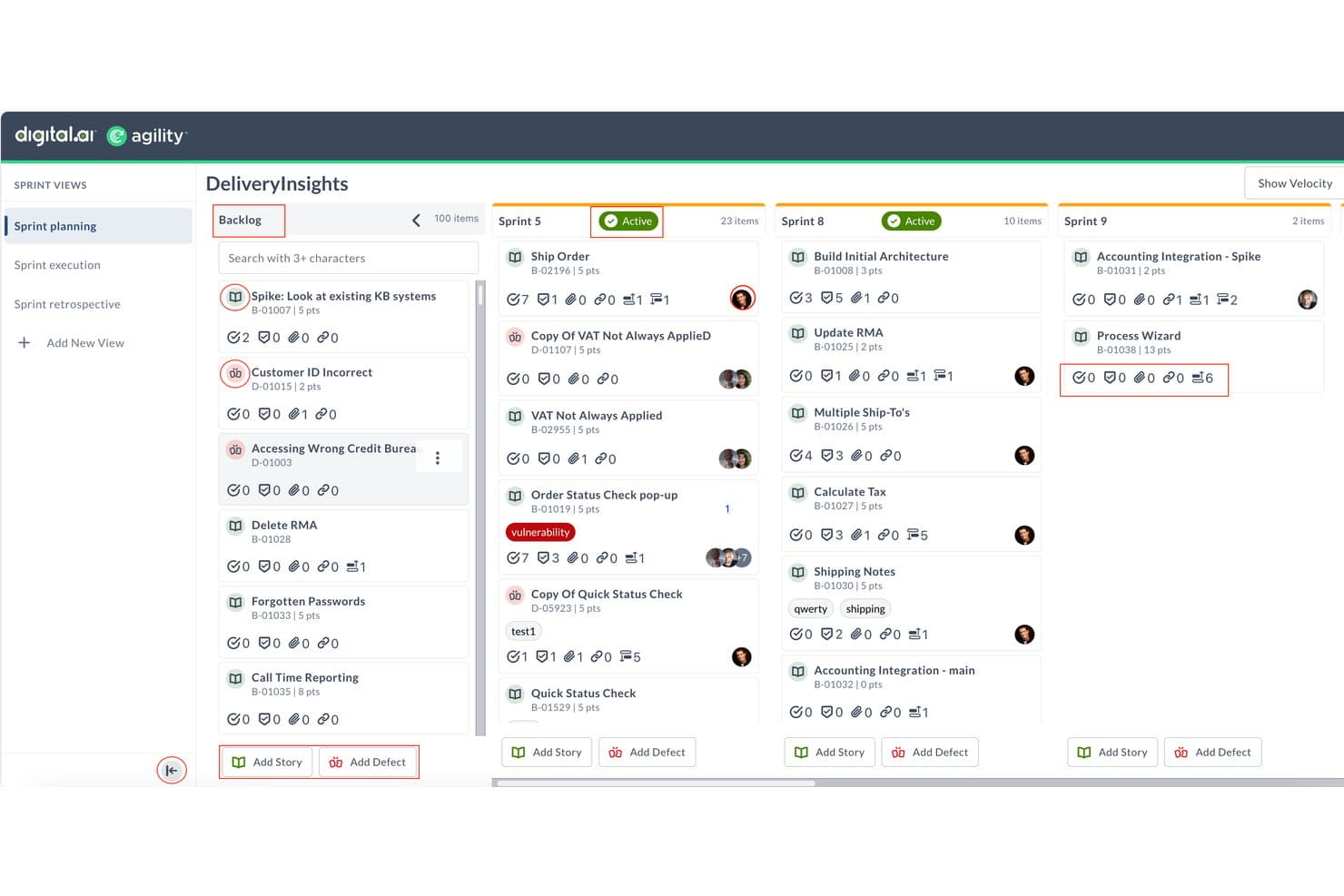
Digital.ai Agility organizes backlog items across sprints for planning. Digital.ai Agility is an enterprise agile planning platform that supports portfolio-to-team sprint planning, backlog management, capacity forecasting, dependency tracking, and SAFe-aligned delivery across large engineering organizations.
Who Is Digital.ai Agility Best For?
Digital.ai Agility is a strong fit for large engineering organizations running SAFe or multi-team agile programs that need dependency tracking across portfolios and teams.
Why I Picked Digital.ai Agility
Digital.ai Agility earns its spot on my shortlist because dependency tracking at scale is where most sprint planning tools fall short, and this one handles it better than anything else I've seen. I particularly like the upstream and downstream dependency visualization across teams and portfolios, which means when I'm planning a sprint and a story depends on work owned by another team, I can see that relationship directly rather than chasing it down in a separate system. The Rooms 2 Sprint Planning board also surfaces blocked-item warnings inline during planning, so dependency risks surface before the sprint starts.
Digital.ai Agility Key Features
- Rooms 2 sprint planning board: A drag-and-drop planning workspace where teams move unscheduled backlog items into sprint columns while viewing target capacity, historical velocity, and blocked-item warnings in real time.
- Velocity reports: Filterable reports that break completed work down by team, sprint range, type, priority, or status, measured in story points or hours, to help teams establish reliable baselines.
- Team forecasting: A capacity planning view that compares planned workload against a configured team target, flags overload with a visual indicator, and projects delivery dates based on historical velocity.
- SAFe framework support: Out-of-the-box configuration for Essential SAFe, Large Solution SAFe, Portfolio SAFe, and Full SAFe, alongside Scrum, Kanban, LeSS, and hybrid methodologies.
Digital.ai Agility Integrations
Digital.ai Agility offers documented integrations with Jira, Azure DevOps (TFS), ServiceNow, GitLab, and GitHub Issues. It also provides a REST API for custom integrations and supports source-control connections through CommitStream.
Pros and Cons
Pros:
- Sprint reports consolidate delivery progress
- Velocity trends guide capacity commitments
- Cross-team dependencies surface blocked work
Cons:
- Navigation can feel busy during planning
- Analytics can be difficult to interpret
Learn more about Digital.ai Agility: Best for Zoho ecosystem sprint teams
- Free plan and 15-day free trial available
- From $3/user/month
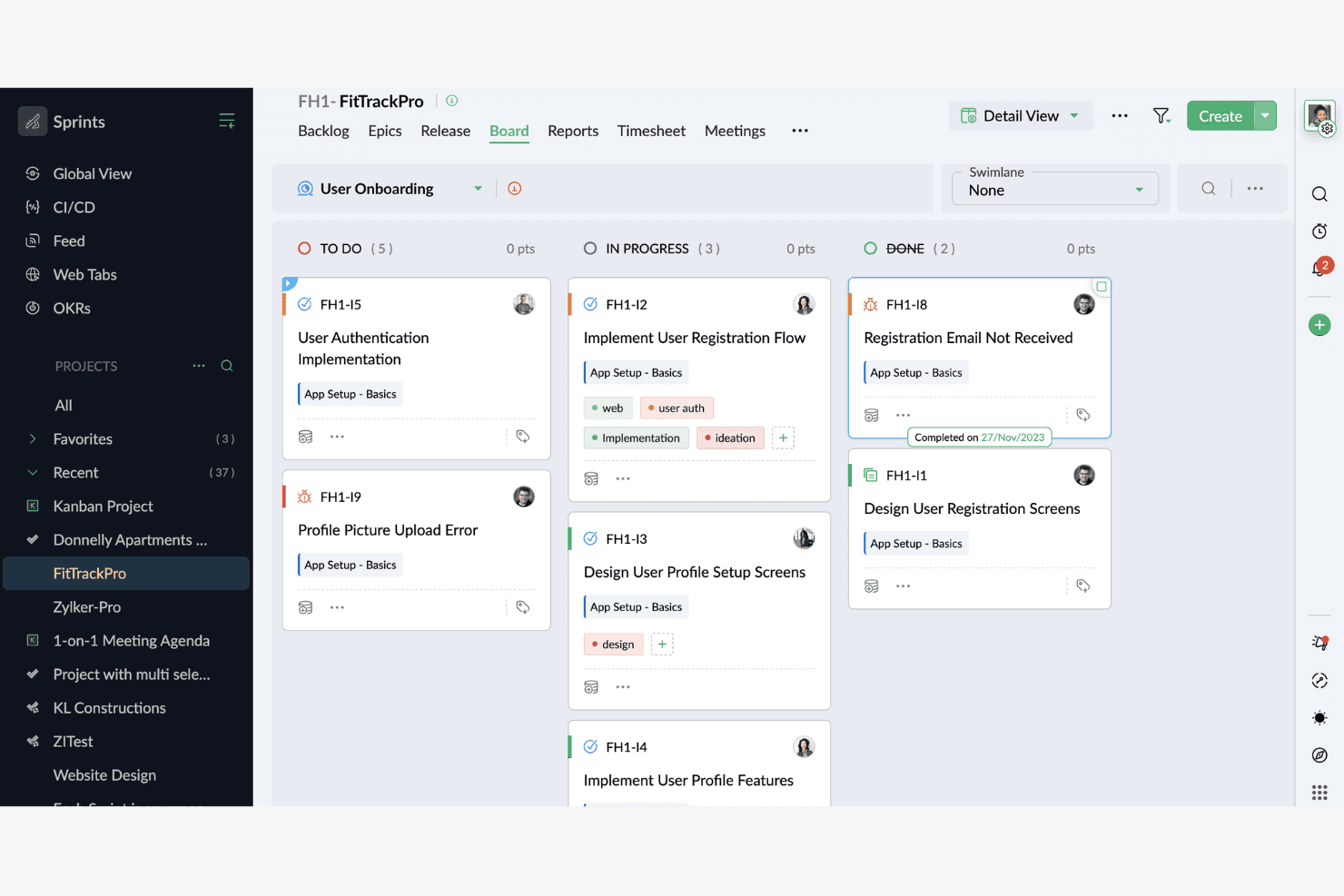
Zoho Sprints guides teams through clear sprint cycles and tracking. Zoho Sprints is an agile project management tool built for scrum teams that covers sprint planning, backlog management, velocity tracking, and team collaboration across the full sprint lifecycle.
Who Is Zoho Sprints Best For?
Zoho Sprints is a natural fit for scrum teams already working within the Zoho ecosystem who want sprint planning that connects directly to their existing CRM, helpdesk, or analytics tools.
Why I Picked Zoho Sprints
Zoho Sprints earns its spot on my shortlist because of how naturally it fits into a Zoho-first tech stack. If your team already runs on Zoho CRM or Zoho Desk, sprint velocity and backlog data flow into the same environment as your customer and support context. I particularly like the cross-project velocity tracking, which lets you compare sprint performance across multiple teams without leaving the platform.
Zoho Sprints Key Features
- Backlog management: A drag-and-drop backlog lets you create, rank, and move user stories into sprints without switching views.
- Sprint board: A visual scrum board displays work items by status, assignee, and priority across active sprints in real time.
- Time logging: Built-in timers and manual time entry let team members log hours directly against individual sprint items.
- Release management: A dedicated releases module lets you group completed sprint work into versioned releases and track their progress to deployment.
Zoho Sprints Integrations
Zoho Sprints lists 25 integrations, including native Zoho apps such as Zoho Projects, Zoho Desk, Zoho Cliq, Zoho Analytics, and Zoho Flow, plus GitHub, GitLab, Bitbucket, Jenkins, Azure DevOps, Jira, and Microsoft Teams. It also offers a REST API with OAuth 2.0 and Zapier.
Pros and Cons
Pros:
- Cross-project velocity comparisons support team reviews
- Burndown charts clarify sprint progress
- Backlog and sprint work stay centralized
Cons:
- Scrum terminology can confuse nontechnical teammates
- Advanced reporting options remain limited
Learn more about Zoho Sprints: Best for dev-to-sprint traceability in Azure
- Free plan available
- From $6/user/month
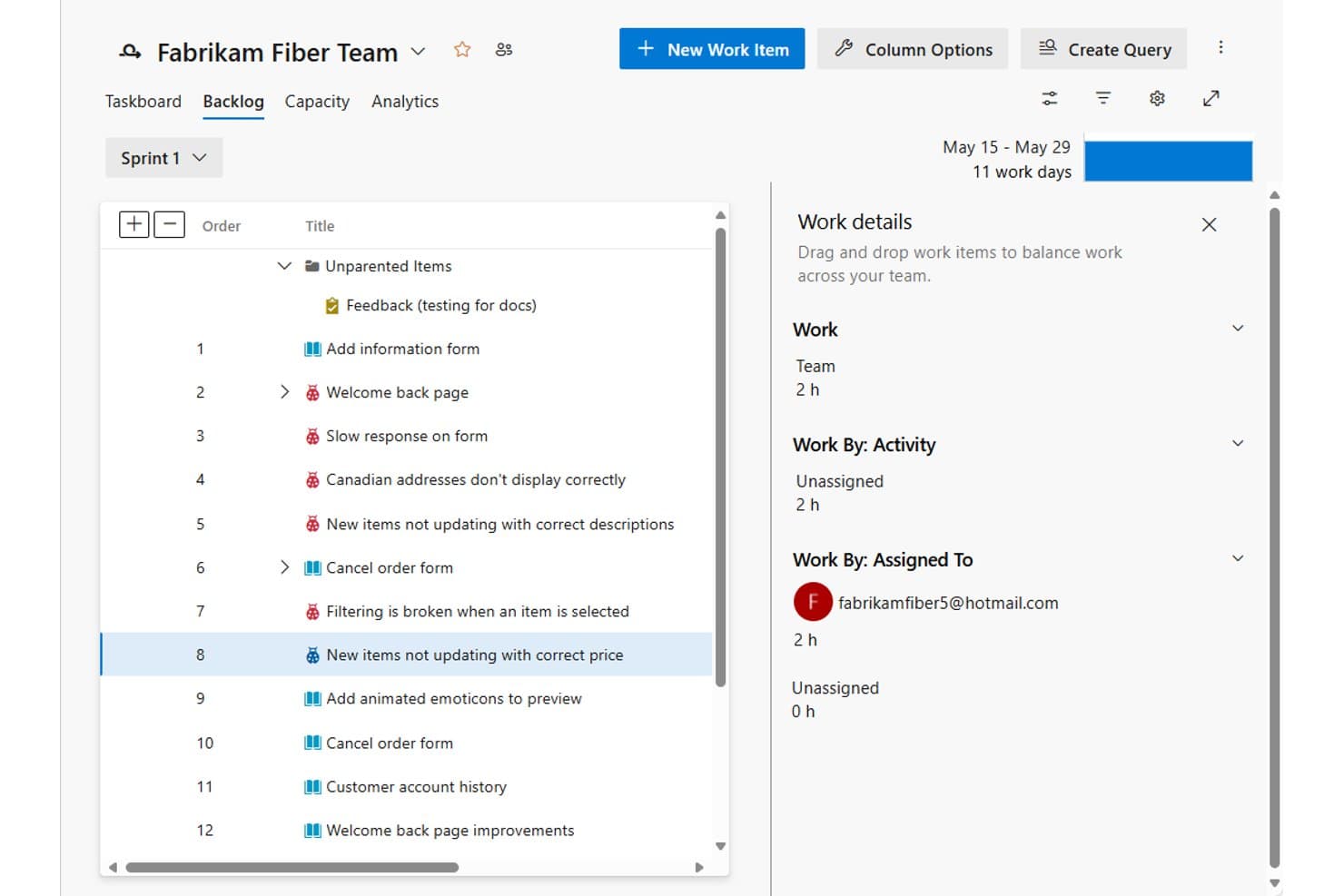
Azure Boards lets users prioritize and assign backlog items across sprints. Azure Boards is Microsoft's agile work-tracking tool within the Azure DevOps suite, offering sprint backlogs, Kanban boards, capacity planning, velocity charts, burndown tracking, and cross-team Delivery Plans.
Who Is Azure Boards Best For?
Azure Boards is a strong fit for software development teams already working within the Microsoft and Azure ecosystem who need tight traceability between sprint work and code delivery.
Why I Picked Azure Boards
Azure Boards earns its spot on my shortlist because of how tightly it connects sprint work to code delivery within the Azure DevOps ecosystem. I love that you can link a work item directly to a GitHub commit, pull request, or branch, so when a developer merges code, the story it resolves is automatically traceable from sprint backlog to build. The Delivery Plans view adds another layer I find genuinely useful: you can visualize cross-team sprint schedules, spot Predecessor/Successor conflicts with red dependency indicators, and share the plan via URL.
Azure Boards Key Features
- Sprint burndown charts: Track work-item counts or numeric effort fields like Story Points and Remaining Work against an ideal trend line, with scope-change indicators and historical sprint data.
- Velocity chart: Automatically sums completed and in-progress effort by process type (Story Points, Effort, or Size) to give teams a consistent measure of sprint output over time.
- Capacity planning tool: Set per-member capacity in hours or days, log activities and planned time off, and compare remaining work against individual and team capacity for each sprint.
- Work-item automation rules: Configure rules that automatically activate a parent item when a child becomes active, or resolve a parent when all child items reach a designated completion state.
Azure Boards Integrations
Azure Boards offers native integrations with Microsoft Teams, Slack, and GitHub, plus 1,000+ marketplace extensions. A REST API and client libraries support custom integrations.
Pros and Cons
Pros:
- Work items connect planning to code delivery
- Burndown charts flag scope changes
- Velocity forecasts help ground sprint commitments
Cons:
- Large backlogs can clutter work views
- No native planning-poker voting
Learn more about Azure Boards:
Diğer Sprint Planlama Yazılımları
Kısa listeme giremeyen ancak yine de göz atmaya değer bazı ek sprint planlama yazılımı seçenekleri şunlardır:
- 11IBM TargetprocessBest for multi-team visual sprint planning
- 12ScrumwiseBest for dedicated Scrum team management
- 13WrikeBest for cross-methodology work management teams
- 14monday AI WorkspaceBest for live docs tied to sprint boards
- 15YodizBest for multi-project backlog sprint planning
- 16MiroBest for remote sprint ceremony facilitation
- 17GitLabBest for DevSecOps-native sprint planning
- 18ShortcutBest for clean UI sprint team adoption
- 19TaigaBest for self-hosted Scrum and Kanban sprints
- 20YouTrackBest for JetBrains dev-team sprint tracking
Related Reviews
How I Evaluate Sprint Planning Software
I split my evaluation into three parts, giving the most weight to core functionality: prioritize backlog items, set sprint scope, and track burndown against commitments. Next, I consider standout features such as native planning poker. Finally, I look beyond features at onboarding, support, and pricing value.
Core Functionality (Table Stakes For This List)
When I'm selecting tools for my list, I score each one on a scale from 0 (does not offer the functionality) to 5 (excels in this area) for each core functionality listed below. I then convert the total into a percentage to help assess each tool's overall fit, with extra weight on any functionalities I’ve deemed essential.
- Backlog Management (Essential): I look for sortable, filterable items with priorities and labels, so teams can refine a crowded backlog before selecting sprint work.
- Sprint Scheduling (Essential): I check that teams can set sprint dates, assign stories, and see committed scope when urgent requests compete with planned work.
- Estimation Tools: I assess support for story points or planning poker, especially when engineers need to compare estimates before agreeing on a story’s size.
- Capacity & Velocity Planning: Historical velocity and capacity inputs help me judge whether teams can plan around leave, support work, or uneven sprint lengths.
- Sprint Progress Tracking: I look for task boards or burndown views that show remaining work against the sprint plan, making stalled stories visible before review.
- Collaborative Planning: For distributed planning, I check whether teammates can review backlog items, adjust scope, and estimate together in a shared live session or asynchronously.
Once I have a list of tools that meet the criteria, I consider what sets each platform apart.
Differentiating Factors (What Sets Vendors Apart)
Here's how I compare and contrast different vendors:
Standout Features
I look for native planning poker that lets distributed teammates vote on estimates in real time—tools like Jira and Linear handle this differently, and the gap matters when your team spans multiple time zones. AI-assisted sprint forecasting is another separator; I check whether a tool uses historical velocity to flag overload risk before you over-commit a sprint. I also evaluate cross-team dependency mapping, especially for organizations running several squads whose work intersects mid-sprint.
Beyond Features
I check whether a tool connects to GitHub, GitLab, or Bitbucket so sprint status reflects actual commits and pull requests—not just board updates. Scaling matters too; a tool that handles one squad but buckles under SAFe or Scrum of Scrums won't serve a growing org. I also evaluate async facilitation support, like recorded estimation votes and comment threads, since distributed teams rarely share a single timezone for every ceremony.
Sprint Planlama Yazılımı Nasıl Seçilir?
Uzun özellik listeleri ve karmaşık fiyatlandırma yapılarına kendinizi kaptırmanız kolaydır. Kendinize özgü yazılım seçme sürecinizi yürütürken odağınızı korumanıza yardımcı olmak için aklınızda bulundurmanız gereken faktörleri içeren bir kontrol listesi hazırladım:
| Etken | Dikkate Alınması Gerekenler |
|---|---|
| EtkenÖlçeklenebilirlik | Dikkate Alınması GerekenlerYazılım ekibinizle birlikte büyüyecek mi? Gelecekte beklediğiniz ekip büyüklüğünü ve proje karmaşıklığını destekleyip desteklemediğini değerlendirin. |
| EtkenEntegrasyonlar | Dikkate Alınması GerekenlerMevcut araçlarınıza bağlanabiliyor mu? İş akışında kesintileri önlemek için GitHub, Slack veya Jira gibi önemli sistemlerle uyumluluğunu kontrol edin. |
| EtkenÖzelleştirilebilirlik | Dikkate Alınması Gerekenlerİş akışınıza uyacak şekilde uyarlayabiliyor musunuz? Panoları, raporları ve iş akışlarını ekibinizin özel ihtiyaçlarına göre özelleştirme seçeneklerini arayın. |
| EtkenKullanım kolaylığı | Dikkate Alınması GerekenlerTüm ekip üyeleri için kullanıcı dostu mu? Öğrenme eğrisini ve arayüzün hızlı benimsenebilecek kadar sezgisel olup olmadığını değerlendirin. |
| EtkenUygulama ve işe alışma | Dikkate Alınması GerekenlerNe kadar hızlı kullanmaya başlayabilirsiniz? Sorunsuz bir geçiş sağlamak için eğitimler, şablonlar ve destek gibi işe alışma kaynaklarının bulunabilirliğini değerlendirin. |
| EtkenMaliyet | Dikkate Alınması GerekenlerBütçenize uygun mu? Fiyatlandırma planlarını karşılaştırın, toplam sahip olma maliyetini değerlendirin ve gizli ücretlere ya da uzun vadeli taahhütlere dikkat edin. |
| EtkenGüvenlik önlemleri | Dikkate Alınması GerekenlerVerileriniz ve projeleriniz güvende mi? Yazılımın sektör standartlarına uyduğundan ve şifreleme ile erişim denetimleri gibi özellikler sunduğundan emin olun. |
| EtkenDestek bulunabilirliği | Dikkate Alınması GerekenlerGerektiğinde yardım alabilecek misiniz? Sorunlar ortaya çıktığında zamanında yardım alabilmek için destek saatlerini, yanıt sürelerini ve mevcut iletişim kanallarını kontrol edin. |
Sprint Planlama Yazılımı Nedir?
Sprint planlama yazılımı, ekiplerin çevik geliştirme döngülerindeki çalışmalarını düzenlemesine ve yönetmesine yardımcı olan bir araçtır. Genellikle proje yöneticileri, geliştiriciler, paydaşlar ve ürün sahipleri tarafından sprintleri planlamak, ilerlemeyi takip etmek ve etkili bir şekilde iş birliği yapmak için kullanılır. Görev önceliklendirme, sprint iş listesi yönetimi ve gerçek zamanlı iş birliği gibi özellikler, ekiplerin uyum içinde çalışmasına ve hedeflerine verimli bir şekilde ulaşmasına yardımcı olur. Genel olarak bu araçlar, çevik projeleri yönetmek için yapılandırılmış bir yaklaşım sunarak üretkenliği artırır.
Özellikler
Sprint planlama yazılımı seçerken aşağıdaki temel özelliklere dikkat edin:
- Görev önceliklendirme: Ekiplerin yüksek öncelikli görevlere odaklanmasına yardımcı olarak, kulvarları kullanıp kaynakların verimli bir şekilde tahsis edilmesini ve sprintlerin daha hızlı tamamlanmasını sağlar.
- Sprint iş listesi yönetimi: Gelecekteki sprintler için görevleri düzenler ve sürdürür; sorunsuz planlama ile iş yükü takibini mümkün kılar.
- Gerçek zamanlı iş birliği: Ekip üyelerinin aynı anda birlikte çalışmasını sağlayarak iletişimi geliştirir, darboğazları azaltır ve genel üretkenliği artırır.
- Özelleştirilebilir panolar: Kullanıcıların önemli ölçümleri izlemek, proje ilerlemesini takip etmek ve uygulanabilir içgörüleri bir bakışta elde etmek için görünümlerini kendilerine göre uyarlamasına olanak tanır.
- Otomasyon özellikleri: Tekrarlayan görevleri azaltarak zaman kazandırır ve çevik ekiplerin iş akışlarını kolaylaştırır.
- Raporlama araçları: Ekip performansı ve proje durumu hakkında içgörüler sunarak veriye dayalı karar almayı ve strateji düzenlemelerini destekler.
- Entegrasyon uyumluluğu: GitHub, Slack veya Jira gibi araçlarla sorunsuz bağlantı kurulmasını sağlayarak platformlar arasındaki iş akışı sürekliliğini korur.
- Zaman takibi: Görevlerde harcanan saatleri izleyerek proje tahminlerini, kaynak yönetimini ve sprint verimliliğini geliştirir.
- Güvenlik önlemleri: Hassas verileri şifreleme, erişim denetimleri ve sektör standartlarına uyumlulukla korur.
Faydalar
Sprint planlama yazılımını uygulamak ekibiniz ve işletmeniz için çeşitli faydalar sağlar. Yararlanabileceğiniz birkaç fayda şunlardır:
- Geliştirilmiş organizasyon: Görev önceliklendirme ve iş listesi yönetimi gibi özelliklerle ekibinizin görevleri belirli zaman dilimleri içinde tutmasına ve projeleri düzenli yürütmesine yardımcı olur.
- Geliştirilmiş iş birliği: Gerçek zamanlı iş birliği araçlarıyla ekip etkileşimini teşvik ederek iletişimi daha etkili hâle getirir.
- Artan verimlilik: Otomasyon özellikleri tekrarlayan görevleri üstlenerek zaman kazandırır ve ekibinizin daha önemli işlere odaklanmasını sağlar.
- Daha iyi karar alma: Raporlama araçları proje ilerlemesi ve ekip performansı hakkında değerli içgörüler sunarak stratejik planlamaya yardımcı olur.
- Kaynak optimizasyonu: Zaman takibi, görevlerde zamanın nasıl harcandığını izleyerek kaynakları etkili bir şekilde yönetmenize yardımcı olur.
- İş akışı sürekliliği: Entegrasyon uyumluluğu, yazılımınızın mevcut araçlara bağlanmasını sağlayarak sorunsuz bir iş akışını korur.
- Veri güvenliği: Güvenlik önlemleri hassas bilgileri koruyarak içinizin rahat olmasını sağlar ve sektör standartlarına uyumluluğu güvence altına alır.
Maliyetler & Fiyatlandırma
Sprint planlama yazılımı seçimi, mevcut çeşitli fiyatlandırma modellerinin ve planların anlaşılmasını gerektirir. Maliyetler özelliklere, ekip büyüklüğüne, eklentilere ve daha fazlasına bağlı olarak değişir. Aşağıdaki tablo, sprint planlama yazılımı çözümlerinde yaygın planları, ortalama fiyatlarını ve genellikle sunulan özellikleri özetlemektedir.
Sprint Planlama Yazılımı Planları Karşılaştırma Tablosu
| Plan Türü | Ortalama Fiyat | Yaygın Özellikler |
|---|---|---|
| Plan TürüÜcretsiz Plan | Ortalama Fiyat$0 | Yaygın ÖzelliklerTemel görev yönetimi, sınırlı panolar ve topluluk desteği. |
| Plan TürüKişisel Plan | Ortalama Fiyat$5-$15/kullanıcı/ay | Yaygın ÖzelliklerGörev önceliklendirme, temel raporlama ve birkaç araçla entegrasyon. |
| Plan Türüİşletme Planı | Ortalama Fiyat$20-$40/kullanıcı/ay | Yaygın ÖzelliklerGelişmiş raporlama, otomasyon özellikleri ve gelişmiş iş birliği araçları. |
| Plan TürüKurumsal Plan | Ortalama Fiyat$50-$100/kullanıcı/ay | Yaygın ÖzelliklerÖzelleştirilebilir panolar, kapsamlı güvenlik önlemleri ve özel destek. |
Sprint Planlama Yazılımı Hakkında SSS
Sprint planlama yazılımı hakkında sık sorulan bazı soruların yanıtları:
Sprint planlama yazılımının temel amacı nedir?
Sprint planlama yazılımının temel amacı, ekiplerin çevik geliştirme döngüleri içindeki çalışmalarını düzenlemelerine ve yönetmelerine yardımcı olmaktır. Sprint hedeflerini planlamak, görevleri dağıtmak ve ilerlemeyi takip etmek için günlük toplantılar düzenlemenizi sağlar. Yazılım, bu işlevleri merkezi bir yerde toplayarak ekibinizin uyumlu ve üretken kalmasına yardımcı olur. İş akışlarını görselleştirmek ve iş birliğini geliştirmek için araçlar sunduğundan, özellikle Scrum veya Kanban metodolojilerini uygulayan ekipler için kullanışlıdır.
Sprint planlama yazılımı diğer araçlarla entegre olabilir mi?
Evet, çoğu sprint planlama yazılımı GitHub, Slack ve Jira gibi diğer araçlarla entegre olabilir. Bu entegrasyonlar, verilerin sistemler arasında akışını sağlayarak iş akışının sürekliliğini korumaya yardımcı olur. Bir yazılım seçmeden önce ekibinizin hâlihazırda kullandığı araçlarla uyumluluğunu kontrol edin. Bu, daha sorunsuz bir geçiş sağlar ve yazılımın faydasını en üst düzeye çıkarır.
Sprint planlama yazılımıyla veri güvenliğini nasıl sağlayabilirim?
Sprint planlama yazılımında veri güvenliğini sağlamak için şifreleme, erişim denetimleri ve sektör standartlarına uyumluluk gibi özellikleri arayın. Yazılımın güvenlik politikalarını ve verilerinizi nasıl koruduğunu anlamak önemlidir. Ayrıca ekibinizin bilgilerinin güvende olduğundan emin olmak için tedarikçilere veri koruma önlemlerini ve sahip oldukları sertifikaları sorabilirsiniz.
Sprint planlama yazılımını kullanmak için eğitim gerekli mi?
Eğitim gerekip gerekmediği, yazılımın karmaşıklığına ve ekibinizin benzer araçlara aşinalığına bağlıdır. Birçok tedarikçi, başlamanıza yardımcı olmak için eğitimler, web seminerleri ve destek sunar. Ekip üyelerinizin yazılımı etkili bir şekilde kullanabilmesini sağlamak için bu kaynaklardan yararlanmanız faydalı olur. Mümkünse, karar vermeden önce uygulamalı deneyim kazanmak için bir deneme sürümüyle veya demoyla başlayın.