

Güçlü bir Whatfix alternatifi, ekibinize işinize ve kullanıcı davranışı ihtiyaçlarınıza uygun esnek kullanıcı işe alım akışları, uygulama içi yönlendirme, analizler ve ürün benimseme özellikleri sunar. Whatfix için en iyi alternatifleri arıyorsanız muhtemelen özelleştirme veya kullanım kolaylığından ödün vermeden ürün benimsemesini artırmak, son kullanıcıları desteklemek ve etkileşimi ölçmek için benzer ya da daha iyi yollar sunan araçlar arıyorsunuz. Bu liste, 2026 yılı için en iyi Whatfix alternatiflerini karşılaştırmanıza yardımcı olacak; böylece müşteri kullanıcı işe alımı, çalışan kullanıcı işe alımı ve ürün odaklı büyüme hedeflerinizle örtüşen bir dijital benimseme platformunu (DAP) güvenle seçebileceksiniz.
Whatfix Nedir?
Whatfix, ürün ekiplerinin uygulama içi deneyimler, kullanıcı işe alım akışları ve etkileşimli tanıtımlar oluşturmak için kullandığı yapay zekâ destekli bir ürün benimseme aracıdır. Ekipler Whatfix'i bağlama duyarlı yönlendirme sunmak, eğitimi otomatikleştirmek ve ERP veya LMS gibi web uygulamalarındaki kullanıcı davranışlarını takip etmek için kullanır. Kullanıcı dostu özellikleri, yeni kullanıcıların işe alınmasını, kodsuz bir düzenleyici aracılığıyla özelliklerin kullanıma sunulmasını ve yazılımı daha anlaşılır hâle getirerek kullanıcı kayıplarının azaltılmasını destekler. Dijital dönüşümü desteklemek için kendi kendine yardım bileşeni, akıllı ipuçları ve uygulamalı öğrenme için eğitim modülleri kullanır. KOBİ'lerin ve işletmelerin aylık aktif kullanıcıları (MAU'lar), toplam kullanıcı sayısını takip etmelerine ve müşteri geri bildirimleri toplamalarına yardımcı olur; ancak nihai maliyetiniz, belirli fiyatlandırma modeline bağlıdır.
Whatfix Alternatifleri Karşılaştırma Tablosu
Bu karşılaştırma tablosu, en iyi Whatfix alternatiflerimin fiyatlandırma ayrıntılarını öne çıkarır.
Score legend (out of 5)
- Excellent4.5–5
- Good4–4.4
- Average3–3.9
- Below average2–2.9
- Poor1–1.9
Sorted by: Default
| Tool | Starting Price | Website | |||||||
|---|---|---|---|---|---|---|---|---|---|
Best for auto-capturing internal process guides | 2.5 out of 5 | 4 | 2 | 3 | 1 | 2 | 3 | $15/user/month Free plan available | Website |
Best for in-app bug and idea capture | 3.7 out of 5 | 4 | 4 | 4 | 5 | 3 | 2 | $96/month Free trial available | Website |
Best for behavior-triggered onboarding flows | 3.7 out of 5 | 4 | 4 | 4 | 4 | 4 | 2 | $299/month 14-day free trial | Website |
Best for no-code customer onboarding flows | 3.7 out of 5 | 4 | 4 | 4 | 3 | 4 | 3 | Pricing upon request Free trial available | Website |
Best for if/then in-app guidance automation | 3.8 out of 5 | 4 | 4 | 4 | 4 | 4 | 3 | Pricing upon request Free demo available | Website |
Best for cross-platform enterprise DAP rollouts | 4.3 out of 5 | 3 | 4 | 5 | 4 | 5 | 5 | Pricing upon request Not available | Website |
Best for pairing usage analytics with in-app guides | 3.8 out of 5 | 4 | 4 | 4 | 3 | 4 | 4 | Pricing upon request Free plan + 30-day free trial + free demo available | Website |
Best for desktop and legacy app guidance | 4.0 out of 5 | 4 | 3 | 4 | 4 | 4 | 5 | Pricing upon request Free demo available | Website |
Best for audio-visual guided walkthroughs | 4.0 out of 5 | 3 | 4 | 4 | 4 | 4 | 5 | Pricing upon request Free demo available | Website |
Best for linking product usage to CS health scores | 3.7 out of 5 | 3 | 4 | 4 | 4 | 3 | 4 | Pricing upon request Free trial available | Website |


Why Trust Our Software Recommendations
6,700+
Reviews
20
Industry experts
16+
Evaluation factors
14
Years
Our team has been testing and reviewing software since 2012. As product managers ourselves, we know how difficult—and important—it is to choose the right software.
For this guide, we evaluated tools using hands-on testing and independent research, scoring tools using our selection criteria.
Our reviews reflect our human editorial judgment, not a sales pitch.
Expert reviewers:
- Andrew LumbySenior TPM
- Cristiano ValimSenior UI/UX Lead


En İyi Whatfix Alternatifleri İncelemeleri
Aşağıda, kısa listemde yer alan en iyi Whatfix alternatiflerinin ayrıntılı özetlerini bulabilirsiniz. İncelemelerim, size en uygun seçeneği bulmanıza yardımcı olmak için her platformun özelliklerini, en iyi kullanım alanlarını ve entegrasyonlarını ayrıntılı şekilde ele alır.
 Best for auto-capturing internal process guides
- Free plan available
- From $15/user/month (billed annually)
Visit WebsiteCustomer Rating:4.8/5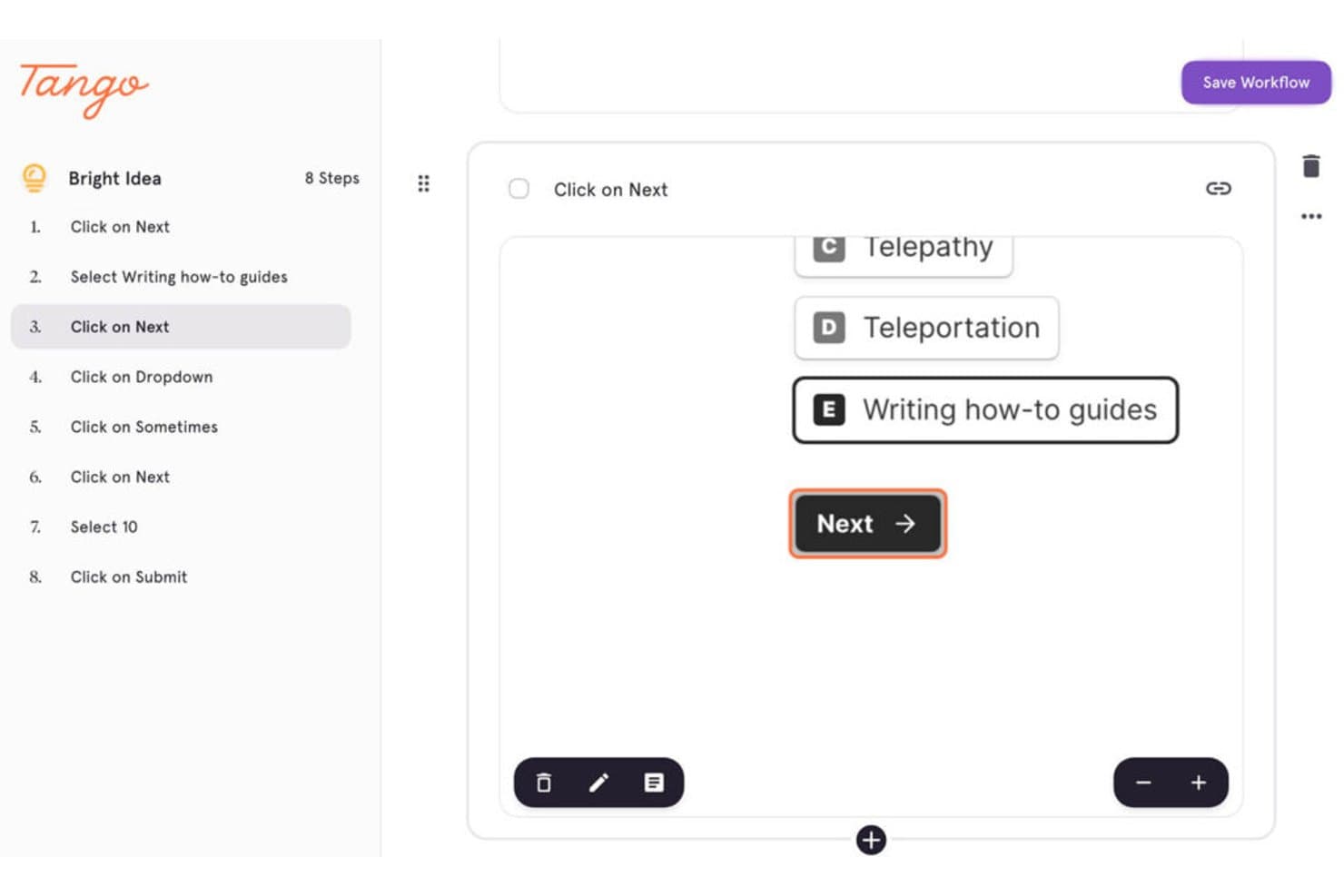
Tango captures step-by-step workflows with annotated UI interactions. Tango is a digital adoption platform for product operations, IT, and enablement teams that makes complex software easier to use, reducing training gaps and improving workflow consistency.
Who Is Tango Best For?
Tango suits product operations, IT, and enablement teams that need to turn software workflows into process guides.
Why Tango Is a Good Best Whatfix Alternatives Picked
I picked Tango because it auto-captures internal process guides while I complete workflows in a browser or desktop app. Its step-by-step screenshots, written instructions, and annotations help my team document tasks like onboarding users or updating product records. I can then refine each guide before sharing it as a repeatable reference.
Tango Key Features
- AI-powered search: Find relevant process guides using natural-language queries.
- Usage analytics: Review guide views and engagement data.
- Advanced permissions: Control who can access and manage guides.
- PII detection and redaction: Identify and remove sensitive personal information.
Tango Integrations
Tango doesn’t clearly document native integrations; its browser extension works across web-based apps, including HubSpot and Salesforce, without requiring APIs or custom integration setup.
Pros and Cons
Pros:
- Redacts sensitive information from captures
- Creates guides quickly for onboarding
- Auto-captures screenshots and workflow steps
Cons:
- Captured steps sometimes require manual cleanup
- Advanced screenshot editing remains limited
Learn more about Tango: Best for in-app bug and idea capture
- Free trial available
- From $96/month (billed annually)
Visit WebsiteCustomer Rating:4.7/5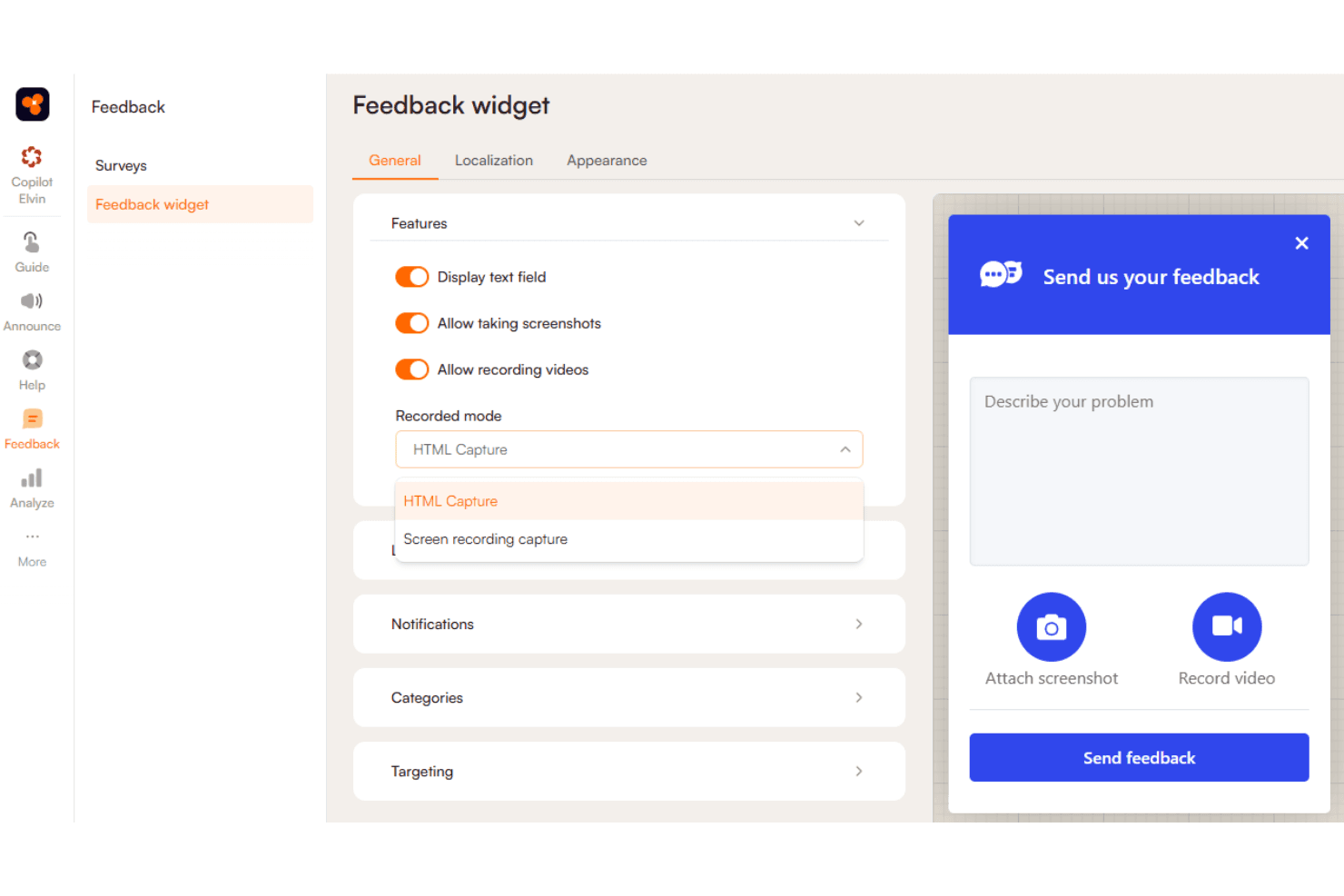
Product Fruits collects in-app feedback with customizable feedback widgets. Product Fruits is a digital adoption platform for product and customer success teams that guides users through web applications, improves onboarding, and reveals where customers encounter friction.
Who Is Product Fruits Best For?
Product and customer success teams that need in-app feedback channels for capturing user-reported bugs and product ideas.
Why Product Fruits Is a Good Best Whatfix Alternatives Picked
I picked Product Fruits because its in-app feedback widget lets users report bugs and submit product ideas without leaving your application. I like how teams can collect feedback in context, then organize submissions to identify recurring issues and prioritize product improvements. This gives product teams direct insight into friction during onboarding and daily workflows.
Product Fruits Key Features
- Product tours: Create step-by-step walkthroughs for new features and workflows.
- Onboarding checklists: Build task lists that guide users through key setup steps.
- Tooltips: Add contextual prompts to explain interface elements within your application.
- Knowledge base: Embed searchable help content where users need assistance.
Product Fruits Integrations
Product Fruits offers native integrations with Segment, HubSpot, Mixpanel, Google Analytics, ActiveCampaign, Customer.io, Heap, SessionStack, Smartlook, and Typeform, plus Slack notifications for feedback. It connects with Zapier and provides a JavaScript API for custom integrations.
Pros and Cons
Pros:
- Tours, checklists, and tooltips guide onboarding
- Feedback stays tied to user context
- In-app widget captures bugs and ideas
Cons:
- Analytics need deeper adoption detail
- Advanced segmentation requires extra configuration
Learn more about Product Fruits: Best for behavior-triggered onboarding flows
- 14-day free trial
- From $299/month
Visit WebsiteCustomer Rating:4.7/5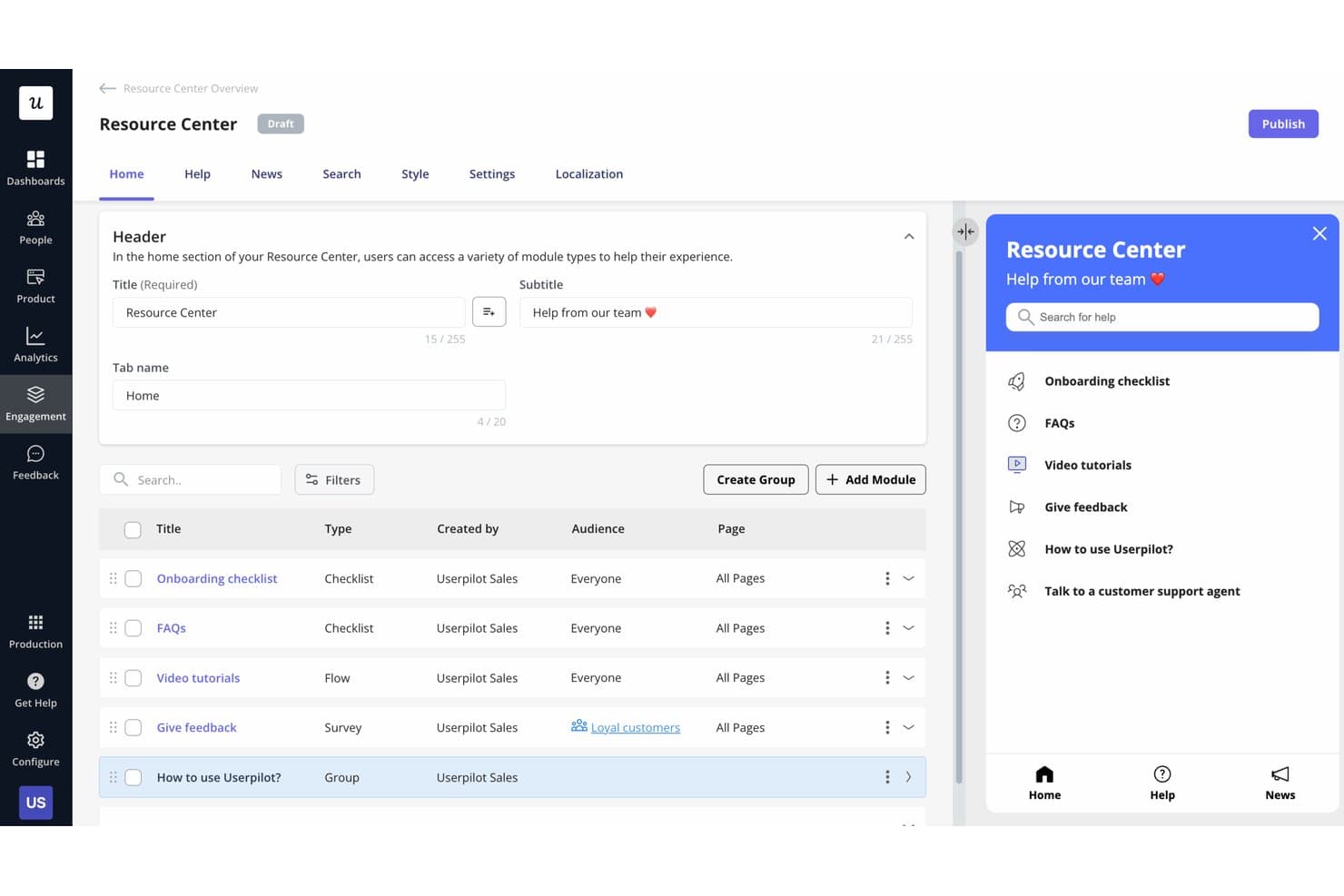
Userpilot lets users build a self-serve Resource Center for in-app help. Userpilot is a product adoption platform for SaaS product teams that helps personalize in-app experiences, guide users through key workflows, and improve activation, feature adoption, and retention.
Who Is Userpilot Best For?
Userpilot fits SaaS product and customer success teams that need to trigger in-app onboarding based on user behavior.
Why Userpilot Is a Good Best Whatfix Alternatives Picked
I picked Userpilot as a Best Whatfix Alternatives Picked option because it’s best for behavior-triggered onboarding flows. I use event-based triggers and user segmentation to show contextual tooltips when customers reach specific product milestones. Checklists and in-app walkthroughs then guide users through workflows such as connecting a data source or inviting teammates.
Userpilot Key Features
- Feature tagging: Tag interface elements without coding.
- Product analytics: Track feature engagement and user activity.
- NPS surveys: Collect and analyze in-app customer feedback.
- Resource center: Add searchable help content inside your product.
Userpilot Integrations
Userpilot offers 11 native integrations, including HubSpot, Salesforce, Amplitude, Mixpanel, Heap, Segment, Google Tag Manager, Google Analytics, Intercom, Zendesk, and Slack. It also supports HTTP API integrations and webhooks for custom connections, and connects with Zapier.
Pros and Cons
Pros:
- Surveys connect feedback with usage data
- Checklists guide multi-step product adoption
- Behavior-based triggers support contextual onboarding
Cons:
- Builder navigation can feel unintuitive
- Advanced styling often requires custom CSS
Learn more about Userpilot: Best for no-code customer onboarding flows
- Free trial available
- Pricing upon request
Visit WebsiteCustomer Rating:4.7/5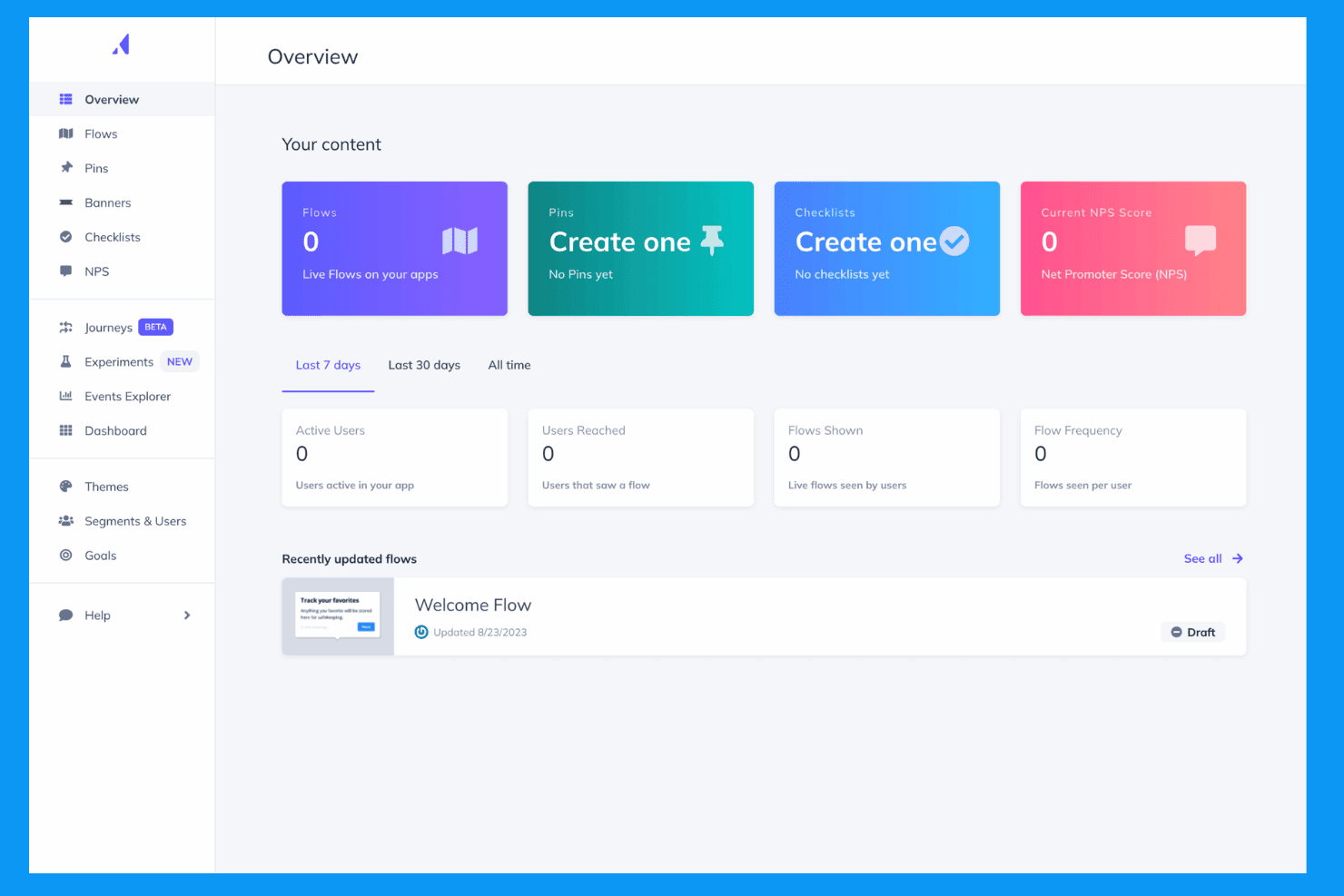
Appcues creates personalized in-app onboarding and engagement experiences. Appcues is a digital adoption platform for product and customer success teams that helps SaaS businesses guide users through products, improve feature adoption, and reduce onboarding friction.
Who Is Appcues Best For?
Appcues suits product and customer success teams at SaaS companies that need no-code onboarding flows to guide users through key product experiences.
Why Appcues Is a Good Best Whatfix Alternatives Picked
I picked Appcues because I can build no-code customer onboarding flows around specific product milestones. I use tooltips, modals, and checklists to guide new users through setup, then target messages by user segment or behavior. That helps product teams promote feature adoption without waiting for engineering support.
Appcues Key Features
- NPS surveys: Create in-app NPS surveys to collect customer feedback.
- Resource centers: Add an in-app hub for help content, links, and announcements.
- A/B testing: Compare experience variants to measure engagement.
- Integrations: Connect Appcues with CRM, analytics, and customer data tools.
Appcues Integrations
Appcues offers integrations with Salesforce, HubSpot, Segment, Mixpanel, Google Analytics, Heap, Intercom, Slack, Zendesk Support, and FullStory. It connects with Zapier and provides an API for custom integrations.
Pros and Cons
Pros:
- Analytics connect guidance with feature adoption
- Flows can launch without production deployments
- Targeted segmentation supports behavior-based onboarding
Cons:
- Skipped tour steps cannot be restarted
- Basic exports limit deeper analysis
Learn more about Appcues: Best for if/then in-app guidance automation
- Free demo available
- Pricing upon request
Visit WebsiteCustomer Rating:4.6/5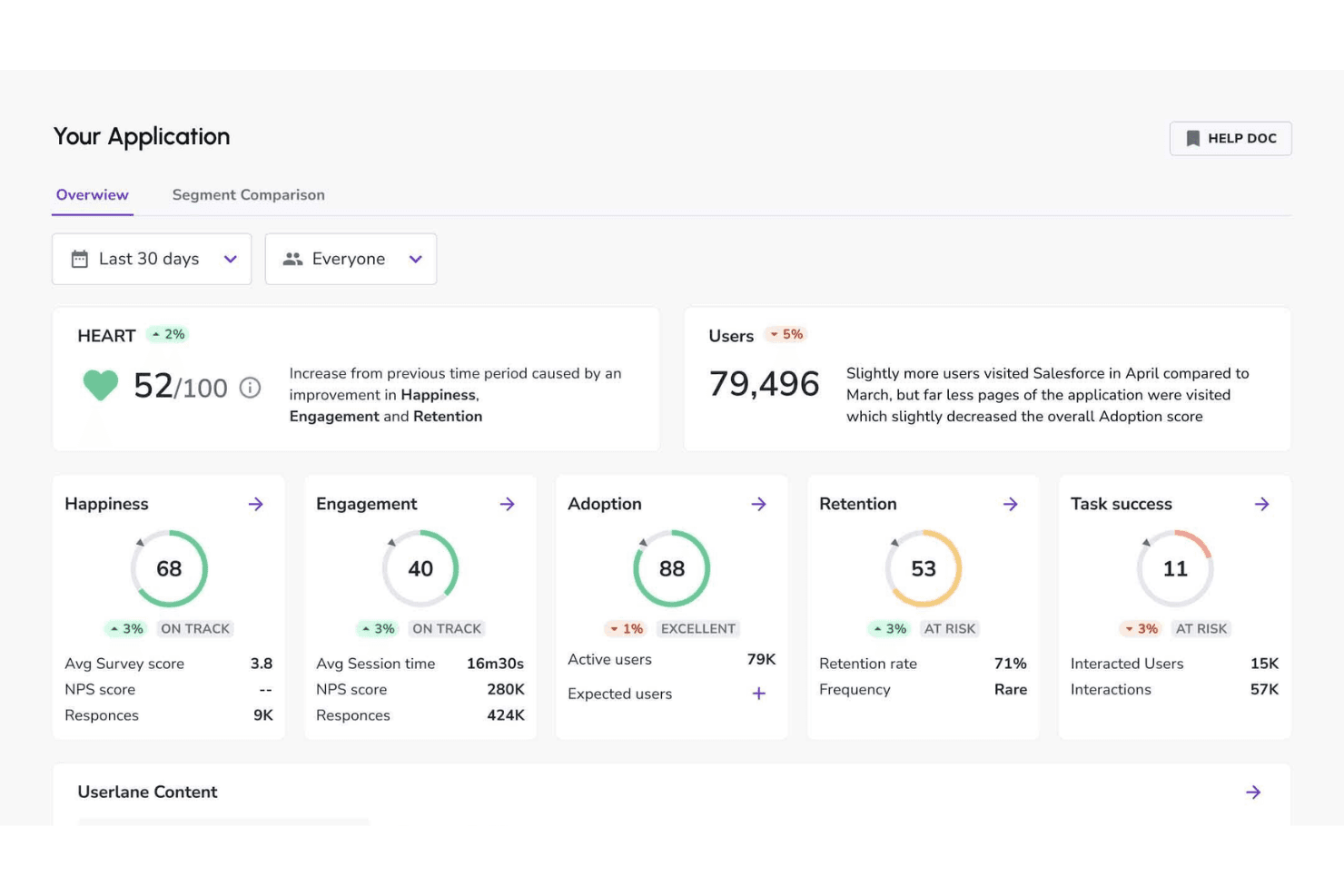
Userlane tracks user health to power real-time in-app support. Userlane is a digital adoption platform that helps enterprise teams guide employees through complex software, improve onboarding, and increase adoption across business applications.
Who Is Userlane Best For?
Userlane suits enterprise IT, HR, and operations teams that need contextual, conditional guidance across complex software workflows.
Why Userlane Is a Good Best Whatfix Alternatives Picked
I picked Userlane because it’s best for if/then in-app guidance automation. I use its no-code editor to build conditional walkthroughs that change based on a user’s role, location, or completed action. That lets my team guide employees through branching workflows, such as showing different steps for managers and individual contributors.
Userlane Key Features
- Analytics dashboard: Track user engagement, completion rates, and guidance usage.
- Resource center: Organize help content, guides, and support resources in one menu.
- In-app announcements: Publish targeted messages directly inside business applications.
- Application integrations: Connect Userlane with enterprise software and existing support tools.
Userlane Integrations
Userlane offers documented integrations with SharePoint, Confluence, KnowledgeOwl, and Zendesk for searching external knowledge content through Userlane Assistant. It also provides APIs for custom integrations, user attribute imports, and analytics exports; integrations aren’t available for self-hosted deployments.
Pros and Cons
Pros:
- Analytics reveal completion and engagement patterns
- Guides can be created within minutes
- Branching walkthroughs adapt to user actions
Cons:
- Enterprise deployment may need technical support
- Advanced workflows require careful configuration
Learn more about Userlane: Best for cross-platform enterprise DAP rollouts
- Not available
- Pricing upon request
Visit WebsiteCustomer Rating:4.5/5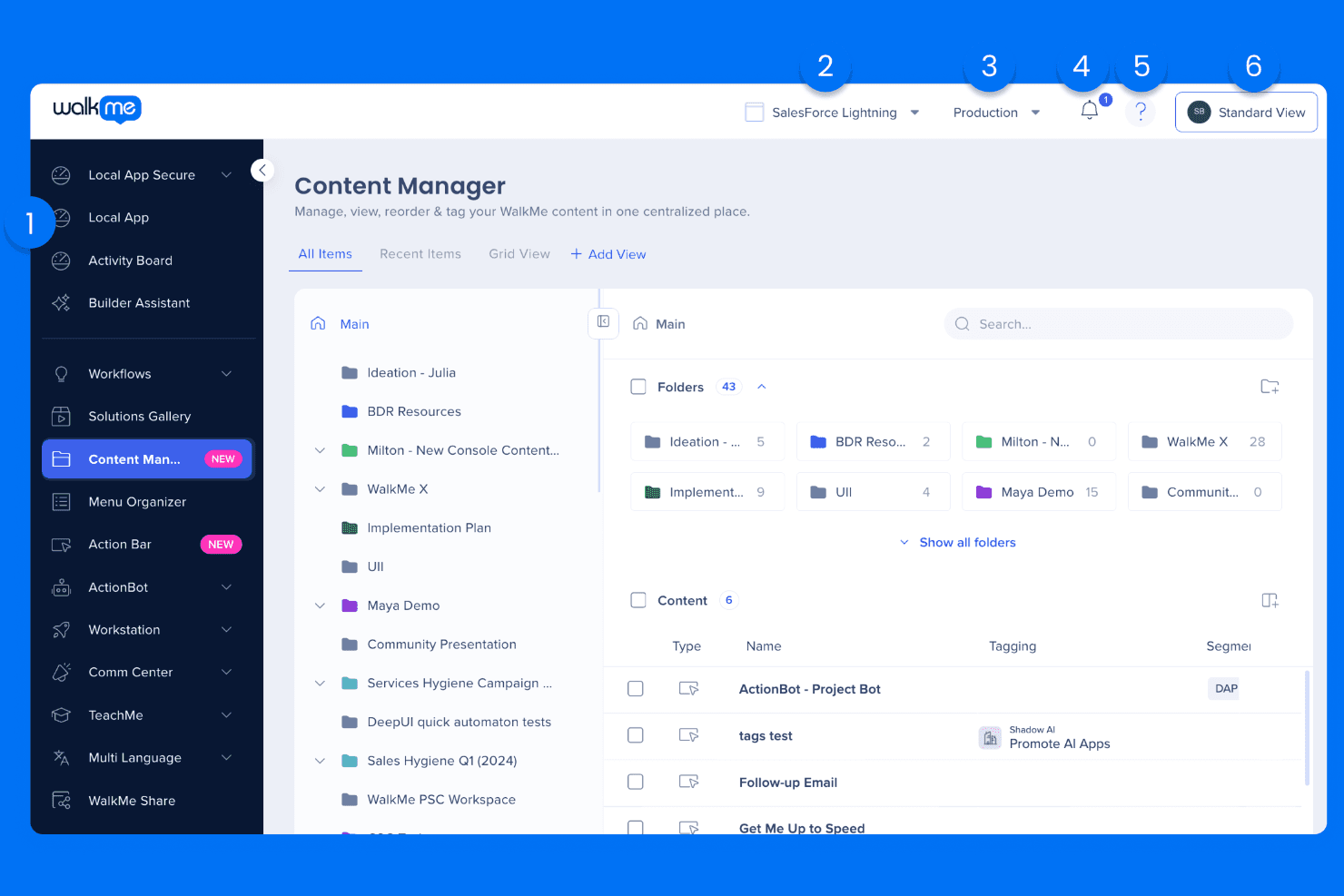
WalkMe supports product adoption with AI-driven guidance. WalkMe is a digital adoption platform for enterprise product, IT, and operations teams that guides employees through complex software, improves onboarding, and supports adoption across fragmented workflows.
Who Is WalkMe Best For?
WalkMe suits enterprise IT, product, and operations teams rolling out adoption programs across multiple business applications and workflows.
Why WalkMe Is a Good Best Whatfix Alternatives Picked
I picked WalkMe because its cross-platform enterprise DAP supports guided workflows across multiple business applications. I use Walk-Thrus and SmartTips to help employees complete tasks spanning systems, while analytics reveal where adoption breaks down. This fits rollouts such as onboarding teams across CRM, HR, and finance platforms.
WalkMe Key Features
- ActionBot: Provides conversational, in-app answers and task assistance.
- Surveys: Creates in-app surveys to collect user feedback.
- Launchers: Adds clickable elements that start guidance or actions.
- Segmentation: Targets content based on user attributes and behavior.
WalkMe Integrations
WalkMe supports integrations with Salesforce, Jira, ServiceNow, Slack, Confluence, Google Workspace, Outlook, and SAP across its desktop and mobile menu. It also provides APIs for incoming data, enterprise search, and custom connections.
Pros and Cons
Pros:
- ActionBot reduces repetitive support requests
- Analytics expose workflow drop-off points
- Cross-application guidance supports fragmented workflows
Cons:
- Some users report slow interface performance
- Technical setup requires dedicated administration
Learn more about WalkMe: Best for pairing usage analytics with in-app guides
- Free plan + 30-day free trial + free demo available
- Pricing upon request
Visit WebsiteCustomer Rating:4.4/5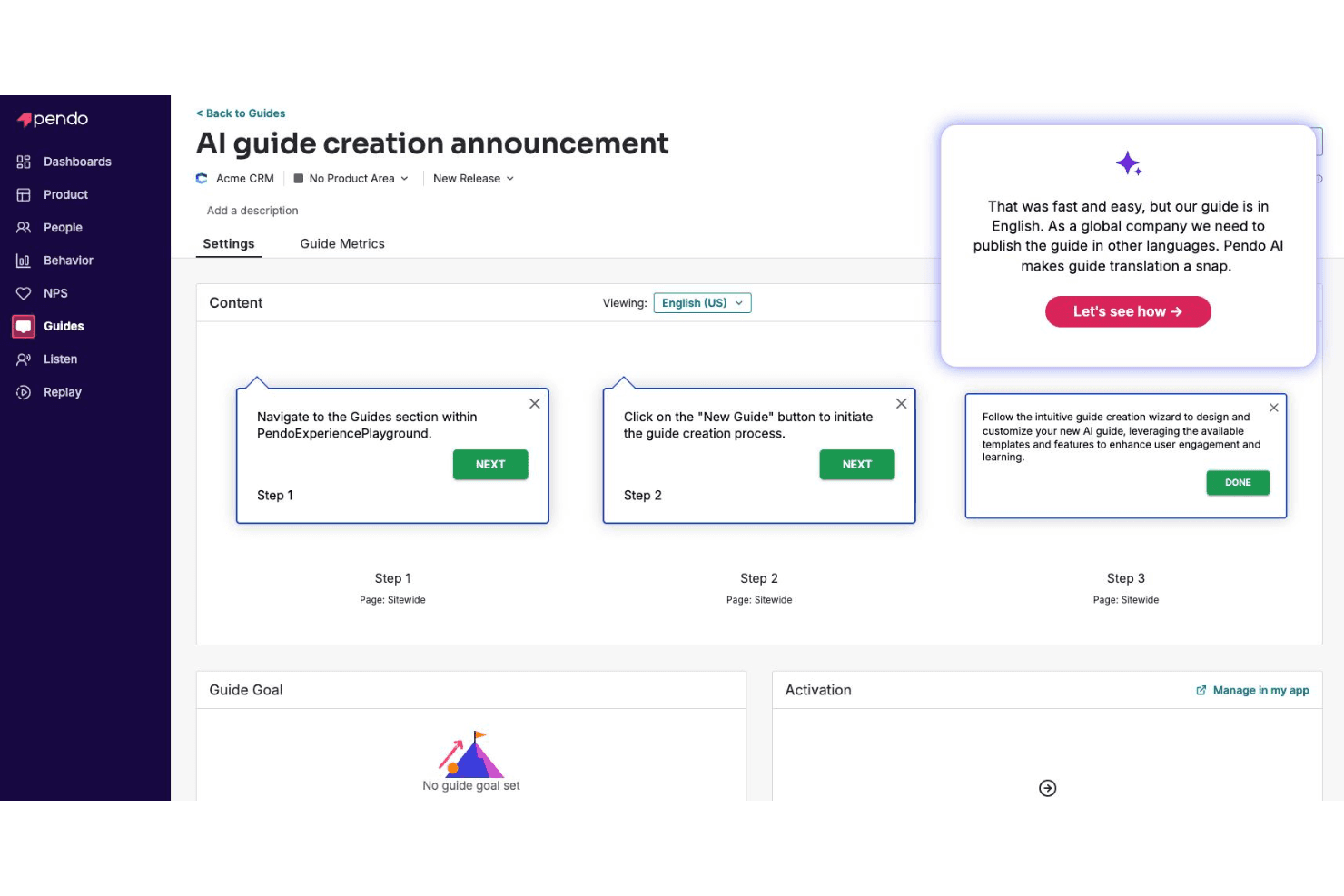
Pendo AI creates in-app guides using product insights. Pendo is a digital adoption platform for product and customer success teams that combines product analytics, user feedback, and in-app guidance to improve adoption and help users reach value faster.
Who Is Pendo Best For?
Pendo suits product and customer success teams that want to connect usage insights with targeted in-app guidance.
Why Pendo Is a Good Best Whatfix Alternatives Picked
I picked Pendo because it is best for pairing usage analytics with in-app guides. Its funnels, paths, and feature adoption reports show where users stall, while behavior-targeted tooltips and walkthroughs address those moments inside the product. I also use in-app feedback to test whether guidance improves adoption.
Pendo Key Features
- Resource center: Add an in-app hub for guides, documentation, and support resources.
- NPS surveys: Collect in-app Net Promoter Score responses from users.
- Session replay: Review recorded user sessions to inspect product interactions.
- Product feedback: Capture ideas, requests, and user comments in one workspace.
Pendo Integrations
Pendo offers native integrations with Salesforce, HubSpot, Intercom, Marketo, Okta, Slack, Confluence, Algolia, Drift, and Help Scout, plus a partner-built Jira integration and Zapier. It supports custom connections through APIs, webhooks, and MCP, while Salesforce and some data sync capabilities require paid add-ons.
Pros and Cons
Pros:
- Combines feedback with session replay
- Strong funnels, paths, and adoption reports
- Connects usage data to targeted guides
Cons:
- Guide management can become administratively heavy
- Advanced analytics require careful configuration
Learn more about Pendo: Best for desktop and legacy app guidance
- Free demo available
- Pricing upon request
Visit WebsiteCustomer Rating:4.7/5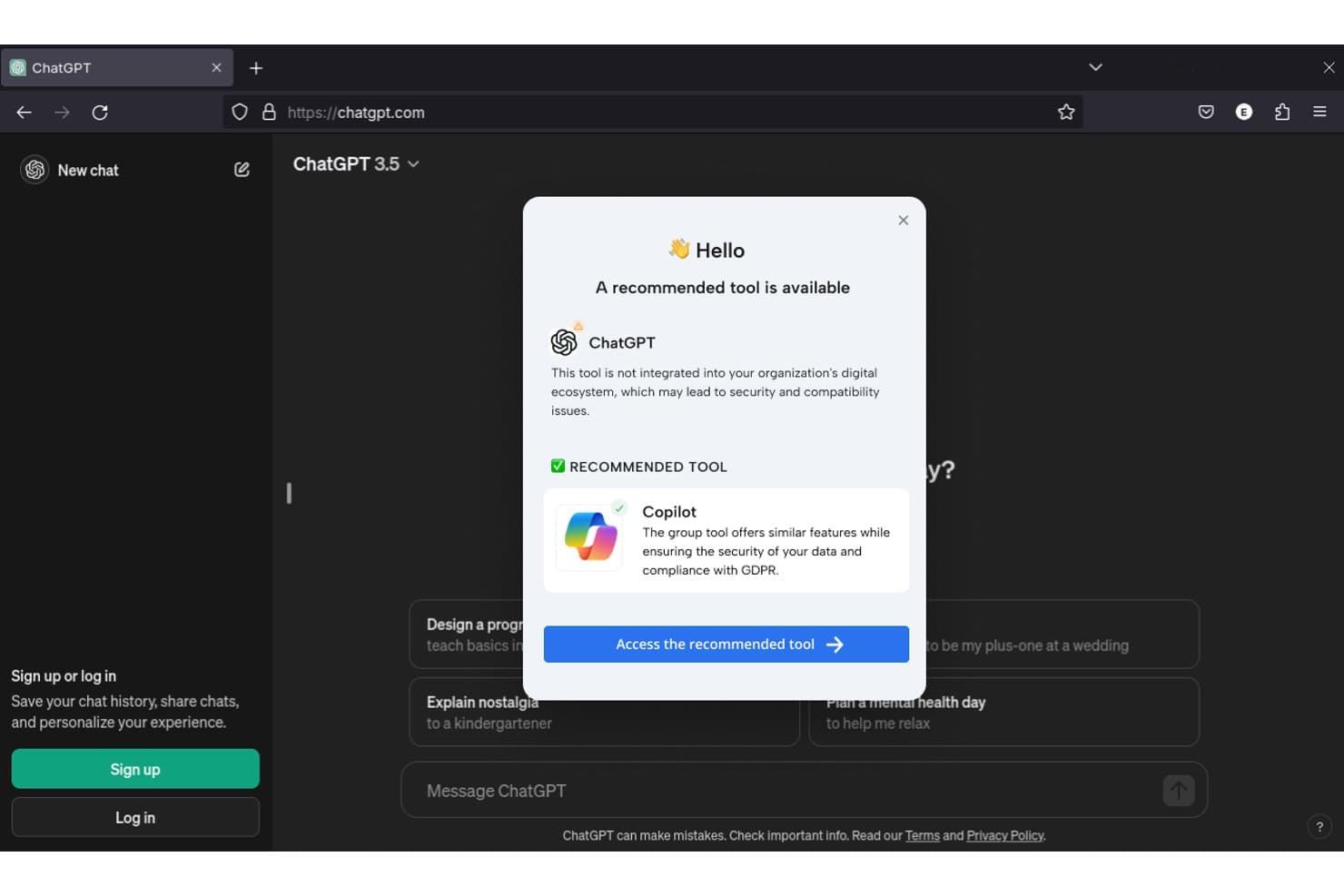
Lemon Learning alerts users when unauthorized AI tools are detected. Lemon Learning is a digital adoption platform for organizations with complex software environments, helping teams onboard users, support process changes, and improve adoption across business applications.
Who Is Lemon Learning Best For?
Lemon Learning suits organizations that need to guide employees through desktop software, legacy applications, and changing digital workflows.
Why Lemon Learning Is a Good Best Whatfix Alternatives Picked
I picked Lemon Learning because it guides users directly through desktop and legacy applications. I like its contextual, step-by-step walkthroughs for tasks such as processing records in older enterprise software. My team can support process changes in the flow of work without replacing systems employees still depend on.
Lemon Learning Key Features
- Adoption analytics: Track guidance usage and completion data.
- No-code authoring: Create and update content without coding.
- AI translation: Translate guidance into more than 100 languages.
- Software governance: Manage software adoption across your application portfolio.
Lemon Learning Integrations
Lemon Learning supports guidance across 300+ applications, including Salesforce, SAP, and Workday, without requiring API integrations or engineering tickets. Native integrations and Zapier support aren’t clearly documented.
Pros and Cons
Pros:
- No-code authoring reduces engineering dependence
- Supports multilingual guidance across global teams
- Guides desktop and legacy workflows in-app
Cons:
- Advanced analytics details remain limited publicly
- Guide creation can take substantial time
Learn more about Lemon Learning: Best for audio-visual guided walkthroughs
- Free demo available
- Pricing upon request
Visit WebsiteCustomer Rating:4.3/5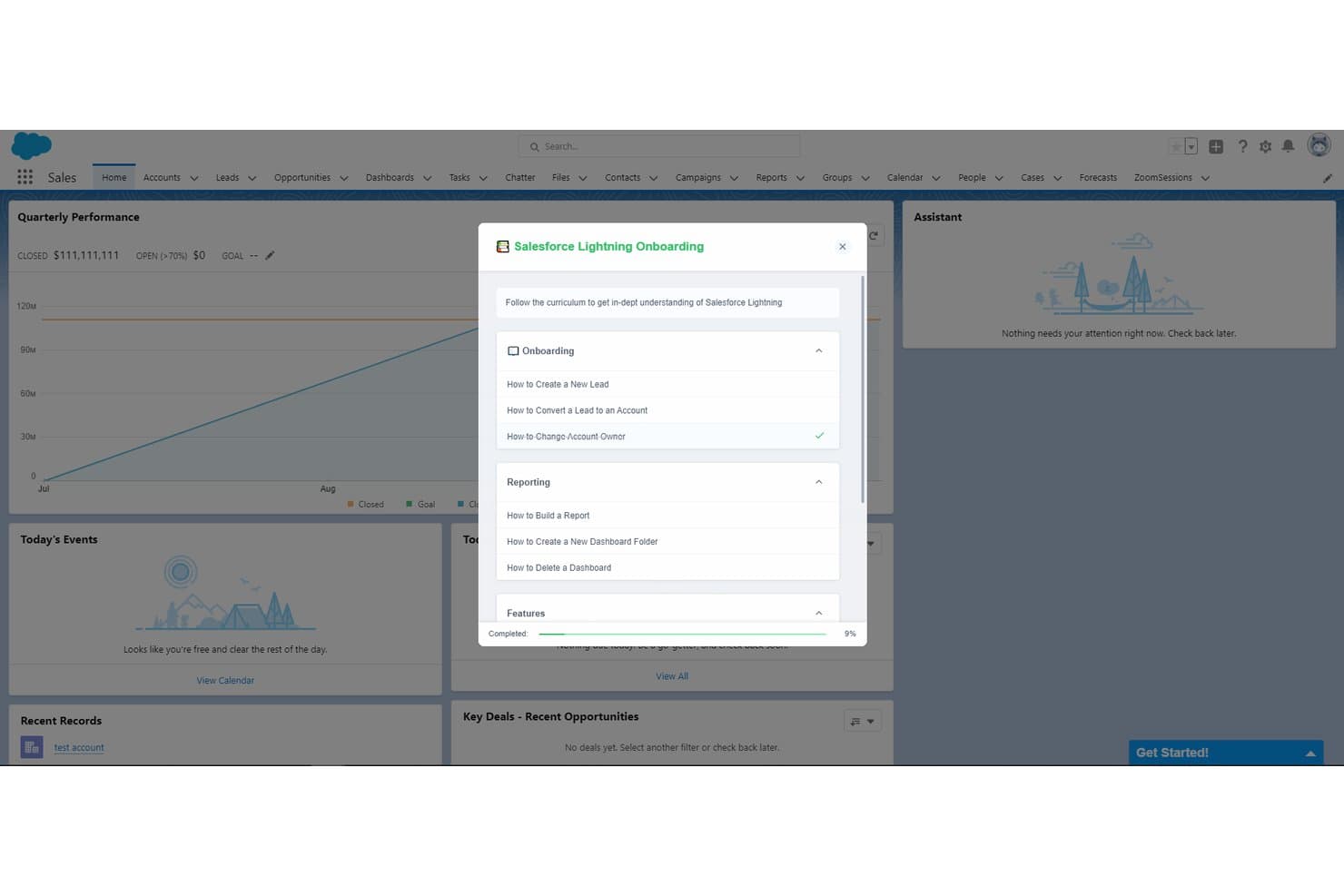
Toonimo guides users through Salesforce Lightning with structured onboarding checklists. Toonimo is a digital adoption platform for product, operations, and training teams that helps users navigate unfamiliar software, reduce support requests, and improve adoption through interactive in-app guidance.
Who Is Toonimo Best For?
Toonimo suits product, operations, and training teams that guide users through unfamiliar software with narrated, visual in-app instruction.
Why Toonimo Is a Good Best Whatfix Alternatives Picked
I picked Toonimo because its audio-visual guided walkthroughs combine voiceovers, animated characters, and on-screen prompts. My team uses it to guide new users through software workflows, such as completing a setup process or learning an unfamiliar dashboard. This approach helps product teams replace static help content with narrated, step-by-step guidance.
Toonimo Key Features
- No-code editor: Build and update walkthroughs without developer support.
- Audience targeting: Display guidance based on user attributes, pages, or actions.
- Engagement analytics: Track views, completion rates, and interaction data.
- Localization support: Create guidance for different languages and audiences.
Toonimo Integrations
Toonimo supports integrations with 20+ enterprise platforms, including Salesforce, SAP, Oracle Cloud, Microsoft Dynamics 365, ServiceNow, Workday, UKG, NetSuite, SharePoint, and Moodle. Enterprise Plus also includes custom integrations via API.
Pros and Cons
Pros:
- Customer success teams help launch walkthroughs
- Builds walkthroughs without code access
- Audio narration improves onboarding engagement
Cons:
- No automatic recording of user flows
- Analytics require drilling into individual engagements
Learn more about Toonimo: Best for linking product usage to CS health scores
- Free trial available
- Pricing upon request
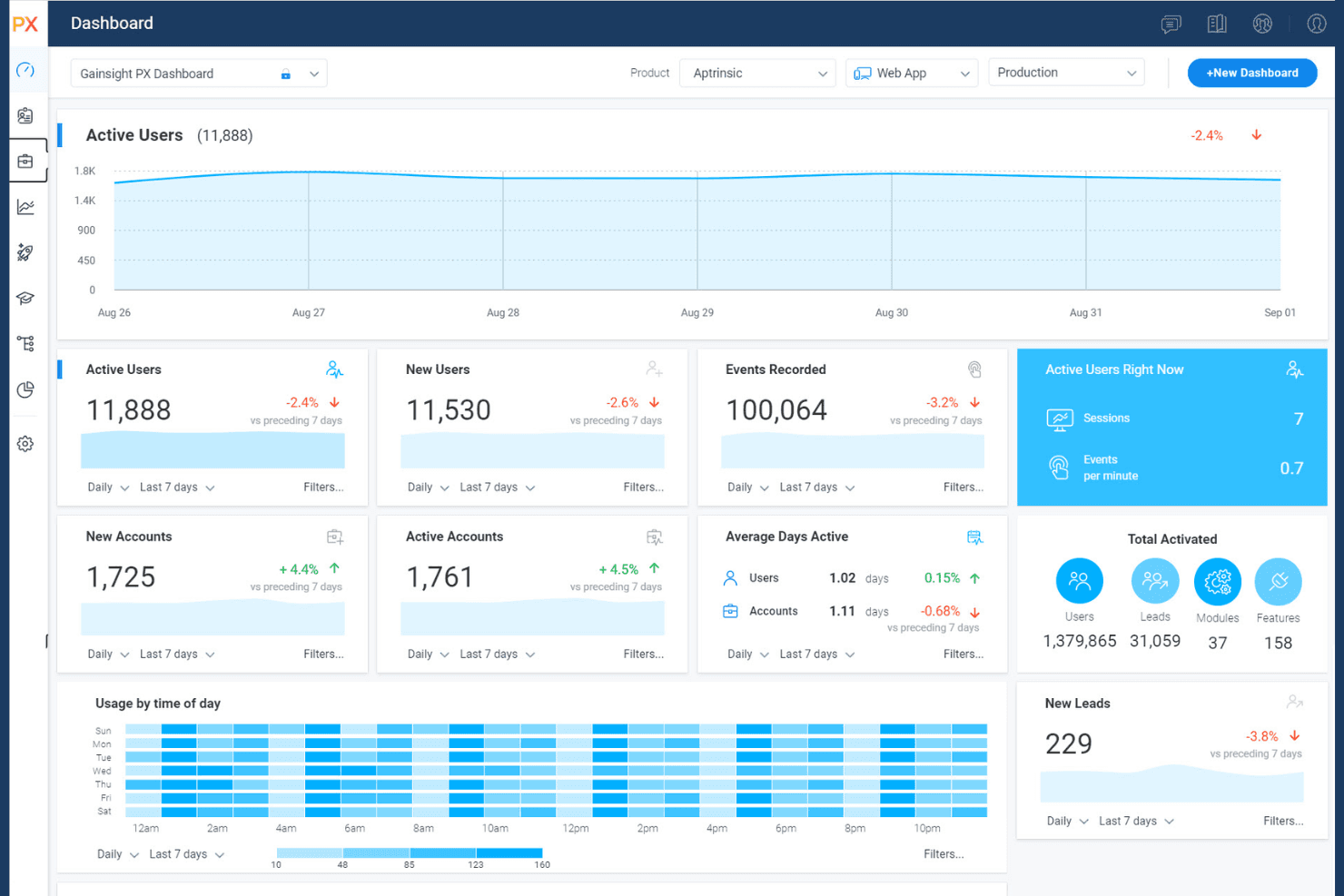
Gainsight PX manages engagement, feedback, and product analytics. Gainsight PX is a product experience platform for product and customer success teams that helps identify friction, understand user behavior, and improve adoption across digital products.
Who Is Gainsight PX Best For?
Gainsight PX fits product-led companies where product managers and customer success teams connect in-app behavior with account health and adoption.
Why Gainsight PX Is a Good Best Whatfix Alternatives Picked
I picked Gainsight PX because I can connect in-product behavior with customer success health scores. Its product analytics reveal where users encounter friction, while adoption data helps my team spot accounts that need targeted support. This makes it useful when a digital adoption program must inform both product decisions and customer success action.
Gainsight PX Key Features
- In-app engagements: Create contextual guides, tooltips, and banners.
- Audience segmentation: Build audiences from user attributes and behaviors.
- In-app surveys: Launch NPS and custom surveys within your product.
- Knowledge Center Bot: Surface help content through an in-app resource center.
Gainsight PX Integrations
Gainsight PX provides built-in integrations with Salesforce, Gainsight CS, Slack, Zendesk, and FullStory, supporting customer health, product usage, feedback, and engagement workflows. It also offers REST API access and webhooks for custom integrations.
Pros and Cons
Pros:
- Segments audiences by user behavior
- Contextual in-app guides and surveys
- Links product usage to account health
Cons:
- Individual activation insights can be limited
- Setup requires careful event instrumentation
Learn more about Gainsight PX:
Diğer Whatfix Alternatifleri
Kısa listemde yer almayan ancak yine de göz atmaya değer bazı ek Whatfix alternatifleri şunlardır:
- 11Amplitude Guides and SurveysBest for analytics-native in-app guide targeting
- 12ChameleonBest for AI-guided tour authoring
- 13UserGuidingBest for no-code web app onboarding tours
- 14NewiredBest for EU-hosted enterprise app guidance
- 15AptyBest for data-validation-led employee app guidance
- 16StonlyBest for branching, choice-driven user guides
- 17UserflowBest for AI-generated onboarding flows
- 18JIMOBest for AI-guided B2B SaaS customer onboarding
- 19Oracle Guided LearningBest for guiding users through Oracle app workflows
- 20Nexthink GuidesBest for IT-led employee app guidance
How I Evaluate Whatfix Alternatives
I split my evaluation into three parts. First—and this carries the most weight—I check whether a tool can build in-app walkthroughs and offer a no-code editor for non-technical teams. Then I look for standout features like AI content generation or session replay. Finally, I consider pricing transparency and support quality.
Core Functionality (Table Stakes For This List)
When I'm selecting tools for my list, I score each one on a scale from 0 (does not offer the functionality) to 5 (excels in this area) for each core functionality listed below. I then convert the total into a percentage to help assess each tool's overall fit, with extra weight on any functionalities I’ve deemed essential.
- In-App Guidance (Essential): I look for multi-step tours with triggers and varied formats, such as tooltips and modals, to guide new users through a key setup flow.
- No-Code Editor (Essential): I check whether non-technical teams can build, edit, and publish a walkthrough without developer help, including changes to steps and triggers.
- User Segmentation: I evaluate whether teams can target guidance by role, lifecycle stage, or behavior, such as showing a feature tip to users who haven’t tried it.
- Guidance Analytics: I look for completion, interaction, and drop-off reporting that helps teams spot where users abandon a tour or overlook a feature.
- Cross-App Support: I assess whether teams can manage guidance across multiple applications, including distinct web or desktop workflows, from a shared setup.
- Self-Service Widget: I check for an in-app resource center with searchable help and relevant guidance, so users can find answers while completing a task.
Once I have a list of tools that meet the criteria, I consider what sets each platform apart.
Differentiating Factors (What Sets Vendors Apart)
Here's how I compare and contrast different vendors:
Standout Features
I check whether a platform offers AI content generation, since auto-drafting tooltip copy or step-by-step guides saves hours when you're maintaining onboarding flows across dozens of features. Session replay and heatmaps matter just as much—tools like Pendo and Hotjar tie recordings directly to guide interactions, so I can see exactly where users hesitate mid-tour. I also evaluate mobile SDK support, which is essential if your product serves iOS or Android users alongside a web app.
Beyond Features
I check how quickly a platform goes live—some tools need only a JavaScript snippet, while others require a full SDK rollout that can delay onboarding improvements by weeks. Pricing models matter too, since MAU-based tiers can surprise you as adoption grows across multiple products. I also look for native integrations with tools like Amplitude or Segment, because piping guidance data into your existing analytics stack saves your team from building custom workarounds.
Neden Bir Whatfix Alternatifi Aramalısınız?
Whatfix iyi bir ürün benimseme platformu seçeneği olsa da bazı kullanıcıların alternatif çözümler aramasının çeşitli nedenleri vardır. Şu nedenlerle bir Whatfix alternatifi arıyor olabilirsiniz…
- Daha gelişmiş kişiselleştirme seçeneklerine ihtiyacınız vardır
- Ekibiniz yerleşik sesli yönlendirme özelliklerine ihtiyaç duyar
- Daha şeffaf veya esnek bir fiyatlandırma istersiniz
- Daha kapsamlı analizlere veya uyumluluk takibine ihtiyacınız vardır
- Kuruluşunuz birden fazla dilde faaliyet gösterir
- Önceden hazırlanmış daha fazla kullanıcı işe alım şablonu sunan bir aracı tercih edersiniz
Bunlardan herhangi biri size uyuyorsa doğru yere geldiniz. Listemde, Whatfix ile ilgili bu zorluklarla karşılaşan ve alternatif çözümler arayan ekipler için daha uygun olan çeşitli ürün benimseme platformu seçenekleri bulunuyor.
Whatfix'in Temel Özellikleri
Alternatif çözümlerin neler sunduğunu karşılaştırmanıza yardımcı olmak için Whatfix'in temel özelliklerinden bazıları şunlardır:
- Uygulama içi yönlendirmeler: Kullanıcıları yeni araçlar, iş akışları veya süreçler boyunca doğrudan uygulamanızın içinde yönlendiren etkileşimli kılavuzlar.
- Kullanıcı segmentasyonu: Davranış, rol veya bölgeye göre farklı kullanıcı gruplarına kişiselleştirilmiş başlangıç ve destek içerikleri sunmanızı sağlar.
- Gömülü bilgi bankası: Kullanıcıların platformdan ayrılmadan yanıt alabilmesi için yardım içeriklerini, sık sorulan soruları ve eğitim materyallerini ürününüzle bütünleştirir.
- Gerçek zamanlı analiz: Kullanıcıların kılavuzlar, araç ipuçları ve diğer öğelerle nasıl etkileşim kurduğunu izleyerek benimseme eksiklerini belirlemenize ve başarıyı ölçmenize yardımcı olur.
- Araç ipuçları ve etkin nokta göstergeleri: Farkındalığı, benimsemeyi veya doğru kullanımı artırmak için önemli kullanıcı arayüzü öğelerine dinamik ipuçları veya açıklamalar ekler.
- Başlangıç kontrol listeleri: Kullanıcılara ilerlemeyi göstermeleri, başlangıç adımlarını tamamlamaları ve kullanıcıyı elde tutmayı desteklemeleri için görev listeleri sunar.
- Kodsuz içerik oluşturma: Teknik olmayan çalışanların, mühendislik desteği olmadan tüm başlangıç akışlarını ve kılavuzlarını oluşturmasına, güncellemesine veya yönetmesine olanak tanır.
- Olay tabanlı tetikleyiciler: Kullanıcı eylemlerine veya önemli iş akışı aşamalarına göre, ihtiyaç duyulan anda ilgili içerikleri veya istemleri gösterir.
- Çoklu dil desteği: Ekiplerin, uygulama içi dil seçenekleriyle küresel ekipler veya farklı kullanıcı tabanları için başlangıç içeriklerini yerelleştirmesine olanak tanır.
- Kullanıcı geri bildirimi toplama: Deneyiminizi geliştirmek ve iyileştirmeleri yönlendirmek için başlangıç sırasında veya sonrasında kullanıcılardan görüş ve puanlar toplar.