



Jira vs. Productboard: Detailed Comparison and Expert Reviews for 2026


Choosing between Jira and Productboard means weighing two very different approaches to product management tools: Jira gives you granular control over tasks and workflows, while Productboard helps you prioritize features and connect customer feedback to your roadmap. If you’re struggling to decide which platform will actually help your team deliver better products—not just manage tickets—this comparison is for you. Both product management tools promise to boost alignment and productivity, but they solve different problems and fit different team styles. In this article, you’ll get a side-by-side look at how Jira and Productboard stack up on features, usability, and real-world product management needs, so you can make a confident, informed choice.
Choosing between Jira and Productboard means weighing two very different approaches to product management tools: Jira gives you granular control over tasks and workflows, while Productboard helps you prioritize features and connect customer feedback to your roadmap. If you’re struggling to decide which platform will actually help your team deliver better products—not just manage tickets—this comparison is for you. Both product management tools promise to boost alignment and productivity, but they solve different problems and fit different team styles. In this article, you’ll get a side-by-side look at how Jira and Productboard stack up on features, usability, and real-world product management needs, so you can make a confident, informed choice.
Jira vs. Productboard: An Overview
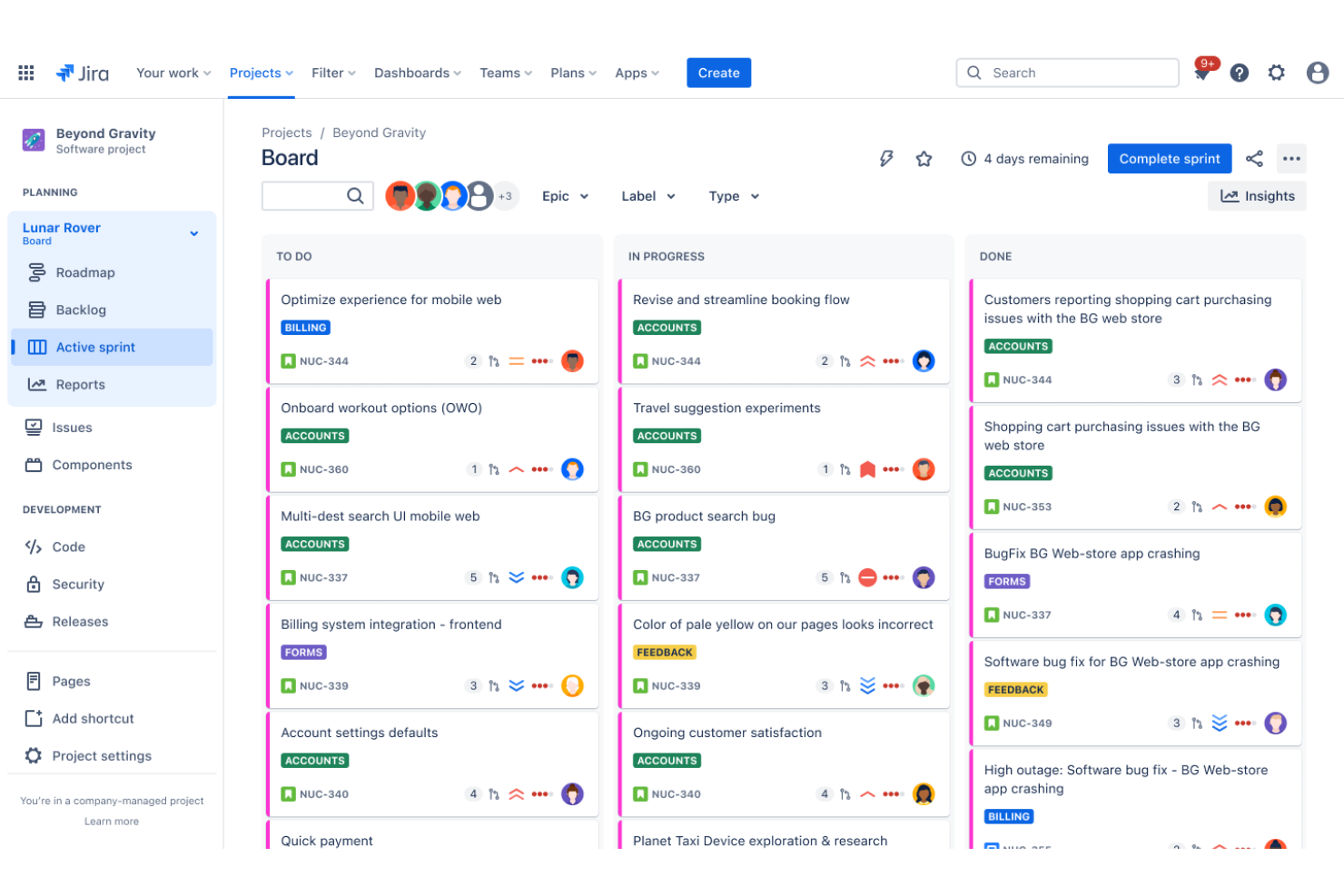
Jira


Productboard


Why Trust Our Software Reviews
We’ve been testing and reviewing product management software since 2020. As product managers ourselves, we know how critical and difficult it is to make the right decision when selecting software.
We invest in deep research to help our audience make better software purchasing decisions. We’ve tested more than 2,000 tools for different product management use cases and written over 1,000 comprehensive software reviews. Learn how we stay transparent & our software review methodology.
Jira vs. Productboard Pricing Comparison
| Jira | Productboard | |
|---|---|---|
| Free Trial | 7-day free trial | 14-day free trial + free plan + free demo available |
| Pricing | From $8.15/user/month (billed annually) | From $19/maker/month (billed annually) |
Jira vs. Productboard Pricing & Hidden Costs
Jira uses a tiered subscription model based on user count and feature access, with extra charges for add-ons, advanced reporting, and integrations. Productboard also offers tiered plans, but pricing is tied to the number of makers (core users) and includes separate fees for contributors or viewers. Both tools may introduce hidden costs if your team needs premium features, advanced permissions, or integrations with other platforms.
To choose the right pricing model, map out your team’s roles and how each person will use the tool—don’t just count total users. Consider which features are essential for your workflow and whether you’ll need integrations or advanced support. Review each vendor’s pricing documentation and test their free trials to see how quickly costs could scale as your team or needs grow. This approach helps you avoid surprises and ensures you’re paying for the features and access your team will actually use.
Jira vs. Productboard Feature Comparison
Jira’s customizable workflows and detailed issue tracking help users manage complex projects and keep daily tasks organized, especially for teams handling software development or cross-functional work. In contrast, Productboard’s feature prioritization boards and customer feedback collection make it easier for users to align daily decisions with product strategy and user needs.
| Jira | Productboard | |
|---|---|---|
| API | ||
| Collaboration Support | ||
| Dashboards | ||
| Data Export | ||
| Data Import | ||
| External Integrations | ||
| Gantt Charts | ||
| Multi-User | ||
| Notifications | ||
| Prioritization | ||
| Task Scheduling/Tracking |
Jira vs. Productboard Integrations
| Integration | Jira | Productboard |
|---|---|---|
| Slack | ✅ | ✅ |
| GitHub | ✅ | ✅ |
| Microsoft Teams | ✅ | ✅ |
| Salesforce | ✅ | ✅ |
| Zendesk | ✅ | ✅ |
| Figma | ❌ | ✅ |
| Intercom | ❌ | ✅ |
| Confluence | ✅ | ❌ |
| Trello | ✅ | ❌ |
| Google Analytics | ✅ | ❌ |
| API | ✅ | ✅ |
| Zapier | ✅ | ✅ |
Jira’s integration with Confluence lets users link project documentation directly to tasks, making it easier to keep requirements and updates in sync. Productboard’s Intercom integration helps users pull customer feedback straight into their product planning, so feature decisions reflect real user input.
Jira vs. Productboard Security, Compliance & Reliability
| Factor | Jira | Productboard |
|---|---|---|
| Data Encryption | Encrypts data in transit and at rest using industry-standard protocols. | Uses TLS encryption for data in transit and AES-256 for data at rest. |
| Regulatory Compliance | Offers SOC 2, ISO 27001, and GDPR compliance certifications. | Supports GDPR compliance and maintains SOC 2 Type II certification. |
| Access Controls | Provides granular role-based permissions and SSO integration. | Offers role-based access, SSO, and SCIM provisioning. |
| Uptime & Reliability | Guarantees 99.9% uptime SLA for cloud customers. | Publishes uptime status and targets 99.9% uptime for cloud services. |
| Data Residency | Allows customers to choose data residency in select regions. | Offers limited data residency options in the EU and US. |
Jira offers more mature compliance certifications and flexible data residency, making it a stronger choice for teams with strict regulatory needs. Productboard’s security features are solid for most organizations, but Jira’s depth in compliance and access controls stands out for larger or highly regulated teams.
Jira vs. Productboard Ease of Use
| Factor | Jira | Productboard |
|---|---|---|
| User Interface | Offers a dense, customizable interface that can feel overwhelming to new users. | Features a clean, intuitive layout focused on product planning workflows. |
| Onboarding | Requires more setup and training, especially for non-technical teams. | Provides guided onboarding and templates to help teams get started quickly. |
| Customization | Highly customizable with complex configuration options for workflows and fields. | Allows basic customization, prioritizing simplicity over deep configuration. |
| Support Resources | Extensive documentation and community forums, but support can be slow for lower-tier plans. | Offers responsive in-app support and a searchable help center. |
| Task Navigation | Advanced filtering and search, but navigation can be confusing for new users. | Simple navigation with clear menus and quick access to key features. |
Productboard is easier to pick up and use, especially for teams new to product management tools, while Jira’s complexity can slow down onboarding but pays off for teams needing deep customization. Productboard’s straightforward interface and helpful onboarding make it user-friendly, while Jira’s strength lies in its flexibility for teams willing to invest time in setup and learning.
Jira vs Productboard: Pros & Cons
Jira
- It offers powerful Agile project management features for your team.
- You can customize workflows to match your project's unique needs.
- It enhances collaboration with real-time updates and tracking.
- You might find the interface overwhelming if you're new to it.
- It can be too complex for smaller teams or simpler projects.
- You may experience a steep learning curve during onboarding.
Productboard
- The feedback portal gathers insights directly from users, streamlining your feedback process.
- The prioritization matrix helps your team focus on high-impact tasks with effective resource allocation.
- Productboard's interface is intuitive, making it easy for your team to adopt quickly.
- New users might face a learning curve with the platform's wide array of features.
- Customization is limited for niche use-cases, which might not suit all teams.
- Collaboration features are basic compared to some competitors, which could limit team interaction.
Best Use Cases for Jira and Productboard
Jira
- Software Development Teams Jira excels in Agile project management, making it perfect for tracking bugs and managing sprints.
- IT Departments You can manage incident tickets and service requests efficiently with Jira's customizable workflows.
- Tech Startups Jira supports rapid iteration and collaboration, essential for fast-paced startup environments.
- Project Managers You can oversee complex projects with Jira's detailed reporting and task management features.
- Agile Coaches Jira provides tools for sprint planning and tracking, crucial for guiding Agile teams.
- Cross-functional Teams Jira's integrations and real-time updates enhance collaboration across different departments.
Productboard
- Tech Startups Productboard helps tech startups prioritize features and align with customer needs using its feedback portal.
- SaaS Companies SaaS companies benefit from Productboard’s prioritization matrix to allocate resources to high-impact tasks.
- Agile Teams Agile teams find Productboard’s intuitive interface easy to adopt for seamless integration into workflows.
- Product Managers Product managers can use Productboard to align their efforts with customer insights for strategic planning.
- Innovation Departments Innovation departments leverage Productboard’s feedback loop to refine ideas based on user feedback.
- Mid-Sized Enterprises Mid-sized enterprises use Productboard to streamline their product management with clear roadmaps and priorities.
Who Should Use Jira, and Who Should Use Productboard?
Jira is best for technical teams—especially software development, IT, and engineering—who need detailed workflow customization, advanced issue tracking, and tight integration with development tools. Productboard is a better fit for product managers and cross-functional teams focused on feature prioritization, customer feedback, and building a clear product roadmap. If your team values deep configuration and handles complex projects, Jira is the stronger choice; if you want a tool that’s easy to adopt and keeps everyone aligned on product strategy, Productboard stands out. Budget-conscious startups may also find Productboard’s pricing structure more predictable for smaller teams.
Differences Between Jira and Productboard
| Jira | Productboard | |
|---|---|---|
| Automation Capabilities | Offers advanced automation for workflows, notifications, and issue transitions. | Provides basic automation, mainly for feedback collection and feature updates. |
| Core Focus | Prioritizes task and workflow management for technical teams. | Prioritizes feature planning and customer feedback for product teams. |
| Integration Ecosystem | Integrates with a wide range of development and collaboration tools, including Confluence and Trello. | Focuses on integrations with customer feedback and product planning tools, like Intercom and Figma. |
| Pricing Model | Charges by user count and feature tier, with add-on costs for integrations. | Charges by maker (core user) and offers separate pricing for contributors and viewers. |
| User Interface | Dense, highly customizable interface with a steeper learning curve. | Clean, intuitive interface designed for quick adoption. |
| Read Jira ReviewOpens new window | Read Productboard ReviewOpens new window |
Similarities Between Jira and Productboard
| API Access | Both provide robust APIs, enabling teams to build custom integrations and automate data flows as needed. |
|---|---|
| Cloud-Based Access | Both offer fully cloud-based platforms, allowing teams to collaborate and access projects from anywhere. |
| Roadmapping Focus | Both support visual product roadmaps, letting teams plan, communicate, and update product direction. |
| Role-Based Permissions | Each tool provides granular role-based access controls to manage who can view, edit, or administer projects. |
| Third-Party Integrations | Each platform connects with popular tools like Slack, GitHub, Salesforce, and Zapier to extend workflows. |
| Read Jira ReviewOpens new window Read Productboard ReviewOpens new window | |