

Bitrix24-recension: Fördelar, nackdelar, funktioner och priser förklarade för 2026
Bitrix24 utmärker sig som en allt-i-ett-plattform för produktutveckling med kraftfulla samarbetsverktyg och CRM-funktioner, men dess komplexitet kan avskräcka team som söker en enklare lösning.

We review tools independently, and commissions help fund our testing. See our transparency policy, our methodology, or suggest a tool.
Bitrix24 is a product development software for teams that need to manage projects, tasks, internal communication, and CRM in a single workspace. I'd consider it if your team works across product, sales, and operations functions and needs everything connected—rather than stitching together separate tools. That's where it has a clear edge over something like Jira, which is built primarily for engineering and dev workflows. Bitrix24 gives cross-functional product teams a wider operational surface without requiring a separate CRM or collaboration platform alongside it.
Bitrix24 Evaluation Summary
4.2/5
- From $49/month (billed annually)
- 15-day free trial + free demo available
Varför du kan lita på våra programvarurekommendationer
6,700+
Reviews
20
Industry experts
16+
Evaluation factors
14
Years
Vårt team har testat och recenserat programvara sedan 2012. Som produktchefer själva vet vi hur svårt — och viktigt — det är att välja rätt programvara.
För den här guiden utvärderade vi verktyg genom praktisk testning och oberoende research, och betygsatte verktygen enligt våra urvalskriterier.
Våra recensioner speglar vårt mänskliga redaktionella omdöme, inte ett säljbudskap.
- Andrew LumbySenior TPM
- Cristiano ValimSenior UI/UX Lead
Bitrix24 Overview
When judging Bitrix24 as a product development software, its all-in-one approach—combining project management, CRM, and communication—offers strong value for teams wanting a unified workspace. Its pricing is competitive, especially for small business and midsize teams, and the breadth of integrations supports diverse workflows. However, the user interface can feel crowded, and onboarding may require extra time compared to simpler project management tools. Bitrix24 excels for teams that need customizable automation and built-in collaboration, but may overwhelm those seeking a lightweight, narrowly focused solution. For example, cross-functional SaaS teams benefit from its centralized task, chat, and document management.
Pros
- Offers built-in task management with drag-and-drop Kanban, Gantt, and Scrum.
- Includes document management and version control for team members.
- Provides workflow automation and recurring task templates with notifications.
Cons
- Interface can feel cluttered and overwhelming for new users.
- Advanced reporting features are limited compared to competing providers.
- Customer support response times are inconsistent.
Is Bitrix24 Right For Your Needs?
Who Would be a Good Fit for Bitrix24?
Bitrix24 is best suited for organizations that need a centralized platform to manage projects, communication, and documentation in one place. Its built-in CRM, task automation, and collaboration tools make it a strong choice for teams that juggle multiple workflows and require transparency across departments. Companies with cross-functional teams, especially those in service, tech, or creative industries, can benefit from its customizable workspaces and integrated chat, while small business owners and midsize organizations appreciate its competitive pricing and scalable features. The mobile app ensures team members stay connected on the go.
- Marketing AgenciesBitrix24's client management and project tracking features support campaign planning, email marketing, and social media delivery.
- SaaS StartupsScrum, Kanban, and Gantt tools help manage agile product development cycles.
- Remote TeamsIntegrated chat, video calls, and document sharing enable real-time collaboration.
- HR DepartmentsAutomated workflows and employee directories streamline onboarding and HR processes.
- Consulting FirmsCRM and project management features help track client deliverables and communications.
- Educational InstitutionsTask assignment, document storage, and group chat support academic project coordination.
Who Would be a Bad Fit for Bitrix24?
Bitrix24 may not suit organizations that need highly specialized tools, minimal interfaces, or advanced analytics. Teams with strict regulatory requirements or those that rely on deep integrations with niche software may find Bitrix24's feature set limiting. Large enterprises with complex reporting needs or companies that prioritize simplicity over breadth of features might struggle with its interface and customization options.
- Enterprise IT DepartmentsLimited advanced reporting and analytics restrict large-scale IT project oversight.
- Regulated HealthcareLacks industry-specific compliance features for sensitive patient data management.
- Manufacturing OperationsDoes not offer specialized inventory or production tracking modules.
- FreelancersFeature set is excessive for solo users needing basic task tracking.
- Legal PracticesMissing advanced document management and case tracking tailored for legal workflows.
- Nonprofit Micro-TeamsInterface complexity outweighs benefits for very small, non-technical teams.
How We Test & Score Tools
We’ve spent years building, refining, and improving our software testing and scoring system. The rubric is designed to capture the nuances of software selection and what makes a tool effective, focusing on critical aspects of the decision-making process.
Below, you can see exactly how our testing and scoring works across seven criteria. It allows us to provide an unbiased evaluation of the software based on core functionality, standout features, ease of use, onboarding, customer support, integrations, customer reviews, and value for money.
Core Functionality (25% of final scoring)
The starting point of our evaluation is always the core functionality of the tool. Does it have the basic features and functions that a user would expect to see? Are any of those core features locked to higher-tiered pricing plans? At its core, we expect a tool to stand up against the baseline capabilities of its competitors.
Standout Features (25% of final scoring)
Next, we evaluate uncommon standout features that go above and beyond the core functionality typically found in tools of its kind. A high score reflects specialized or unique features that make the product faster, more efficient, or offer additional value to the user.
We also evaluate how easy it is to integrate with other tools typically found in the tech stack to expand the functionality and utility of the software. Tools offering plentiful native integrations, 3rd party connections, and API access to build custom integrations score best.
Ease of Use (10% of final scoring)
We consider how quick and easy it is to execute the tasks defined in the core functionality using the tool. High scoring software is well designed, intuitive to use, offers mobile apps, provides templates, and makes relatively complex tasks seem simple.
Onboarding (10% of final scoring)
We know how important rapid team adoption is for a new platform, so we evaluate how easy it is to learn and use a tool with minimal training. We evaluate how quickly a team member can get set up and start using the tool with no experience. High scoring solutions indicate little or no support is required.
Customer Support (10% of final scoring)
We review how quick and easy it is to get unstuck and find help by phone, live chat, or knowledge base. Tools and companies that provide real-time support score best, while chatbots score worst.
Customer Reviews (10% of final scoring)
Beyond our own testing and evaluation, we consider the net promoter score from current and past customers. We review their likelihood, given the option, to choose the tool again for the core functionality. A high scoring software reflects a high net promoter score from current or past customers.
Value for Money (10% of final scoring)
Lastly, in consideration of all the other criteria, we review the average price of entry level plans against the core features and consider the value of the other evaluation criteria. Software that delivers more, for less, will score higher.
Core Features
Task Management
Use Kanban boards, Gantt charts, and Scrum tools to organize and track tasks for any project.
Project Collaboration
Chat, video calls, comments, and file sharing are built in for real-time team communication.
Document Management
Store, edit, and manage documents with version control and secure cloud access.
Workflow Automation
Automate recurring tasks, approvals, and business processes with customizable rules and triggers
Time Tracking
Track time spent on tasks and projects, with built-in reporting for workload management.
AI Assistant (CoPilot)
Generate task descriptions, summaries, and ideas using AI to speed up planning and documentation.
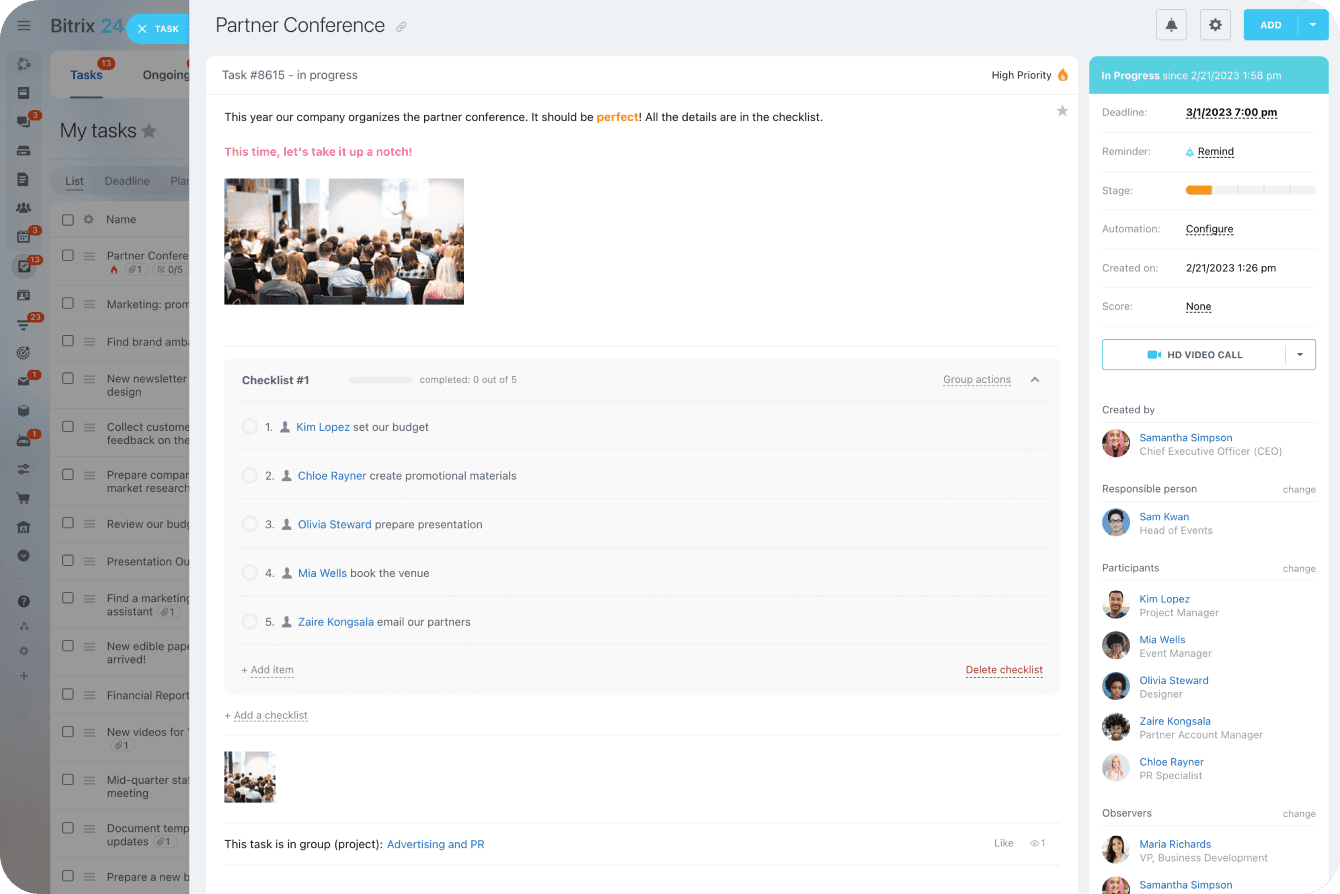
Ease of Use
Bitrix24's interface offers extensive functionality, but many users find it cluttered and initially overwhelming. Navigating between modules like tasks, CRM, and chat can feel complex, especially for new users or small teams. However, once configured, its customizable dashboards and quick-access menus help streamline daily workflows. Users who invest time in setup and training often appreciate the platform's depth, but those seeking simplicity may find the learning curve steeper than with more focused tools.
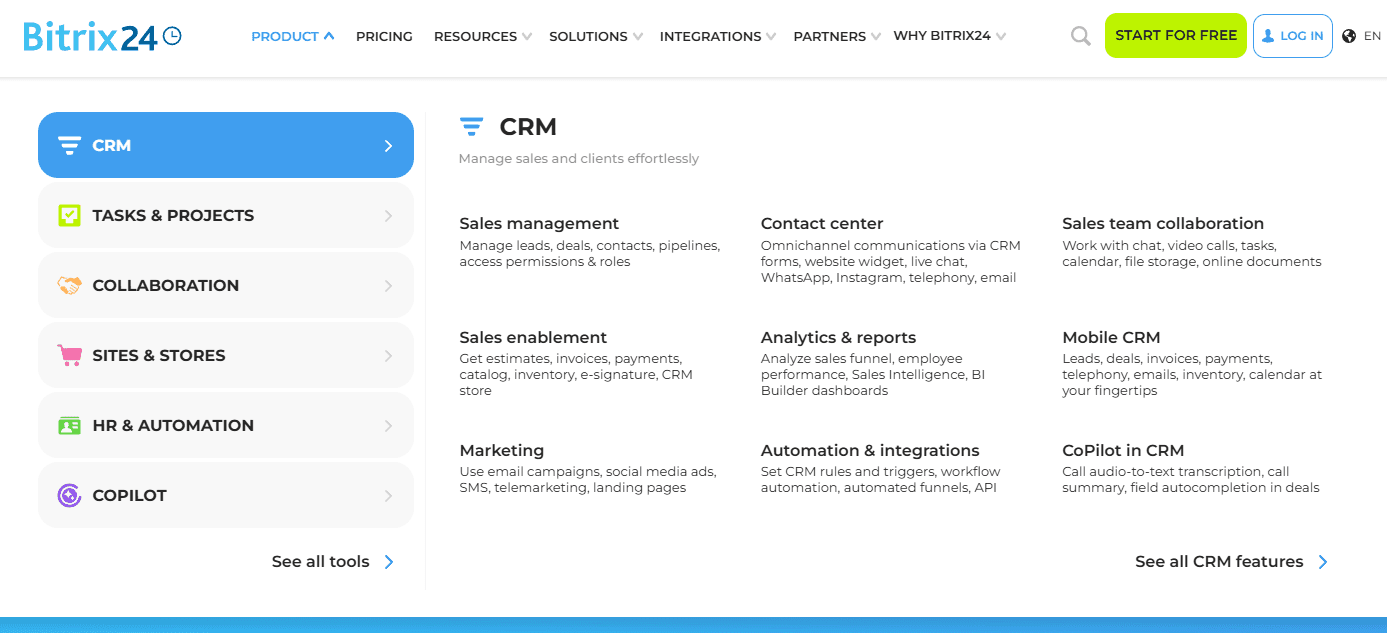
Integrations
Bitrix24 integrates with Google Workspace, WhatsApp, Office 365, Dropbox, Box, and Mailchimp, among others.
Bitrix24 also offers an open API and connects with third-party integration tools through its marketplace.

Bitrix24 Specs
- 2-Factor Authentication: Yes
- API: Yes
- Calendar Management: Yes
- Call Tracking: Yes
- Campaign Management: No
- Click-to-Dial: Yes
- Contact Management: Yes
- Contact Sharing: Yes
- Custom Data Forms: No
- Customer Management: Yes
- Dashboard: Yes
- Data Export: Yes
- Data Import: Yes
- Data Visualization: Yes
- Email Integration: Yes
- External Integrations: Yes
- File Sharing: Yes
- File Transfer: Yes
- Google Apps Integration: Yes
- Lead Management: Yes
- Lead Scoring: Yes
- Marketing Automation: Yes
- Mobile App: No
- Multi-User: Yes
- Notifications: Yes
- Pipeline Management: Yes
- Sales Automation: Yes
- Scheduling: Yes
- Social-Media Integration: Yes
- Task Scheduling/Tracking: Yes
- Third-Party Plugins/Add-Ons: Yes


