

Existem tantas plataformas diferentes de gestão de partes interessadas no mercado que pode ser difícil selecionar a melhor para si. Quer melhorar as relações com as partes interessadas, reforçar a comunicação, obter um melhor alinhamento com as expectativas das partes interessadas e mitigar os riscos associados ao envolvimento das partes interessadas, mas precisa da ferramenta certa para a sua equipa. Eu posso ajudar! Nesta publicação, recorro à minha experiência pessoal na gestão de produtos diversificados e na utilização de muitas plataformas diferentes com equipas grandes e várias partes interessadas, enquanto partilho as minhas escolhas do melhor software de gestão de partes interessadas.
Why Trust Our Software Recommendations
6,700+
Reviews
20
Industry experts
16+
Evaluation factors
14
Years
Our team has been testing and reviewing software since 2012. As product managers ourselves, we know how difficult—and important—it is to choose the right software.
For this guide, we evaluated tools using hands-on testing and independent research, scoring tools using our selection criteria.
Our reviews reflect our human editorial judgment, not a sales pitch.
Expert reviewers:
- Andrew LumbySenior TPM
- Cristiano ValimSenior UI/UX Lead


Tabela comparativa de software de gestão de partes interessadas
A tabela abaixo compara os detalhes de preços das minhas principais escolhas de software de gestão de partes interessadas.
| Tool | Best For | Trial Info | Price | ||
|---|---|---|---|---|---|
| 1 | Best for approval workflows involving stakeholders | Free plan available | From $169/month (billed annually) | Website | |
| 2 | Best for infrastructure and government engagement teams | Free demo available | Pricing upon request | Website | |
| 3 | Best for property and GIS-linked stakeholder tracking | Free trial available and free demo available | Pricing upon request | Website | |
| 4 | Best for community and public engagement tracking | Free demo available | Pricing upon request | Website | |
| 5 | Best for engagement and consultation teams | No Free Trial | From $995/user/month | Website | |
| 6 | Best for building stakeholder plans around projects | 30-day free trial + demo available | From $9/user/month (billed annually) | Website | |
| 7 | Best for field-based community engagement teams | Free demo available | Pricing upon request | Website | |
| 8 | Best for sales team stakeholder mapping in Salesforce | Free demo available | Pricing upon request | Website | |
| 9 | Best for sales account stakeholder mapping | Free demo available | Pricing upon request | Website | |
| 10 | Best for large-scale public engagement audit trails | Not available | From £9,495/year (billed annually) | Website |





Avaliações do melhor software de gestão de partes interessadas
Eis uma breve descrição de cada sistema de gestão de partes interessadas, para apresentar o melhor caso de utilização de cada ferramenta, algumas funcionalidades dignas de nota e capturas de ecrã que oferecem uma visão geral da interface do utilizador.
 Best for approval workflows involving stakeholders
- Free plan available
- From $169/month (billed annually)
Visit WebsiteCustomer Rating:4.7/5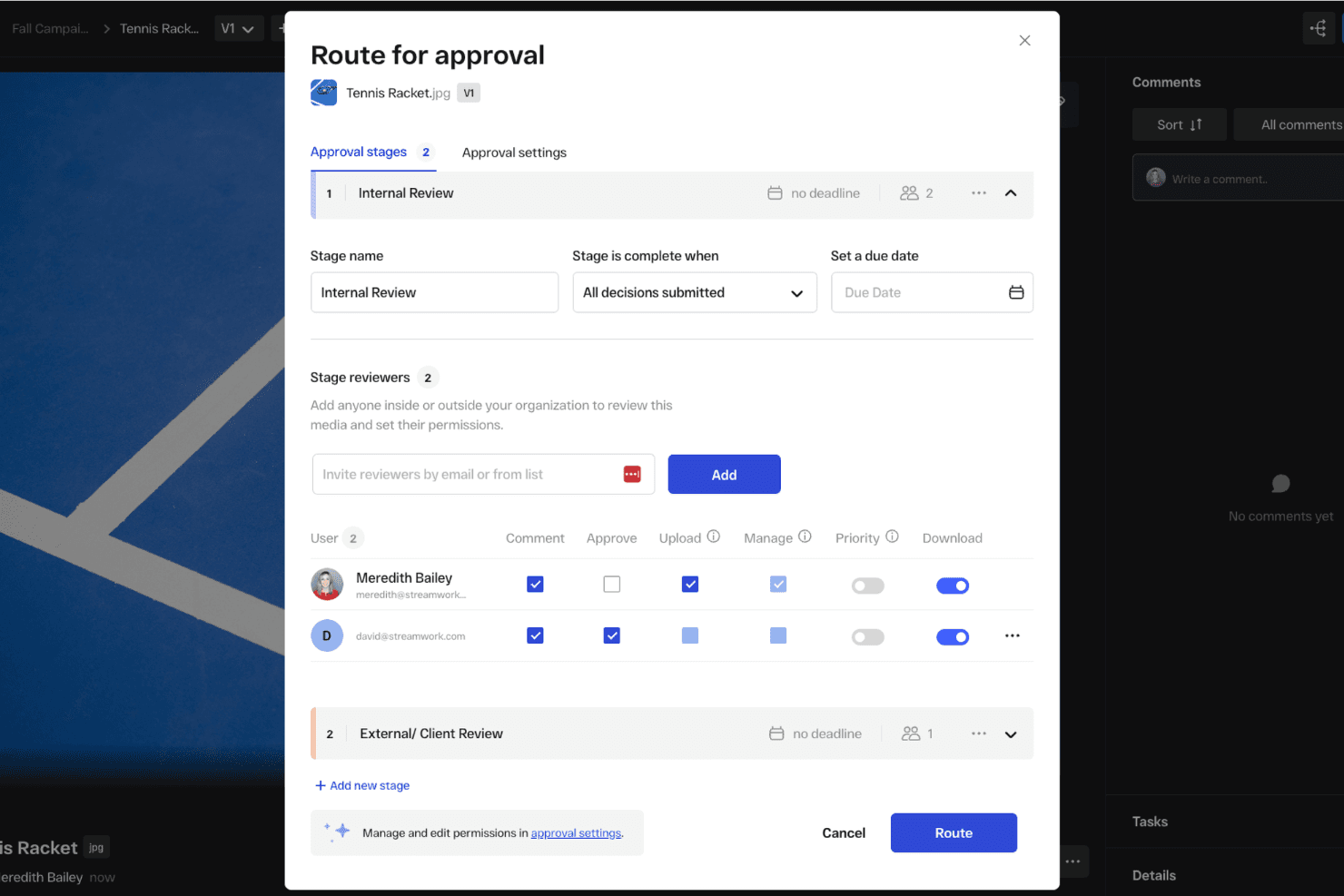
You can set up automated approval workflows to get feedback from external stakeholders. StreamWork is an AI-enabled online proofing and creative approval platform that handles multi-stage approval routing, version tracking, time-stamped feedback, and external reviewer access.
Who Is StreamWork Best For?
StreamWork suits marketing teams and creative agencies that need to manage multi-stage content approvals with external stakeholders like clients, executives, or legal reviewers.
Why I Picked StreamWork
I picked StreamWork as one of the best because it handles the part of stakeholder management that tends to break down most: getting sign-off from people outside your team. I love that external reviewers, whether that's a client, legal, or a senior executive, can approve directly through a single link with no account required. Multi-stage routing lets you sequence approvals through legal, then brand, then leadership, and every decision gets a timestamped audit trail.
StreamWork Key Features
- Multi-stage approval routing: Build sequential approval workflows that move through distinct groups—like legal, brand, and leadership—one stage at a time.
- Time-stamped, pinned comments: Reviewers can leave feedback anchored to a specific location on a file or exact frame in a video, keeping context intact.
- Automated reminders and deadlines: StreamWork sends nudges to approvers automatically, so you're not manually following up to keep reviews on schedule.
- One-click audit trail: Every version, comment, and approval decision is logged and accessible in a single click for governance and accountability purposes.
StreamWork Integrations
StreamWork lists seven integrations, including Adobe Creative Cloud, Slack, monday.com, Asana, Dropbox, Figma, and Box. It also offers an API and webhooks for custom integrations.
Pros and Cons
Pros:
- Multi-stage routing records approval decisions
- Pinned comments preserve review context
- External stakeholders approve without accounts
Cons:
- Creative reviews replace relationship tracking
- No stakeholder mapping or contact database
Learn more about StreamWork: Best for infrastructure and government engagement teams
- Free demo available
- Pricing upon request
Visit WebsiteCustomer Rating:5/5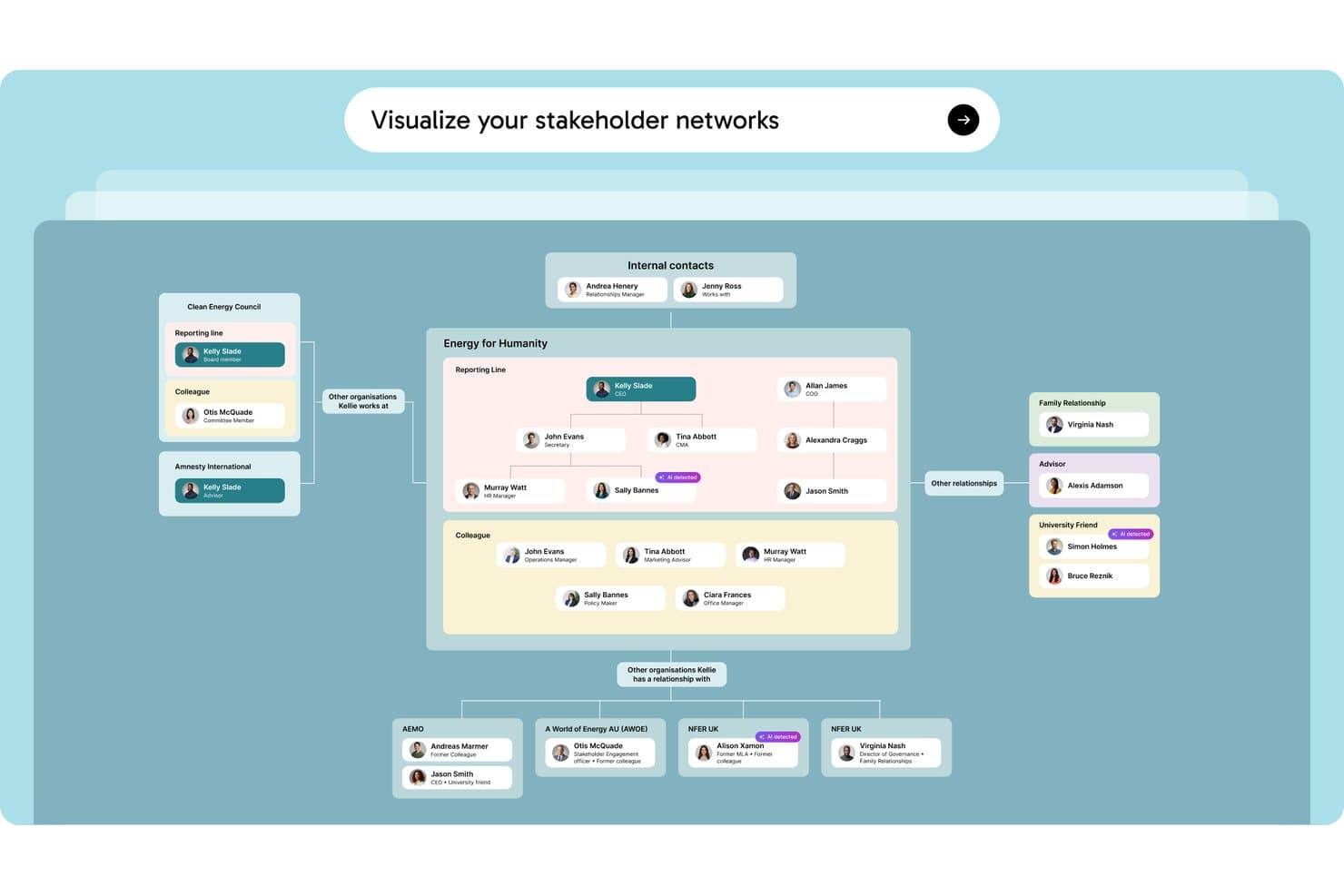
Simply Stakeholders maps relationships between stakeholders, internal contacts, and external organizations in a visual network. Simply Stakeholders is a stakeholder relationship management platform designed for complex, long-term engagement programs, offering multi-dimensional stakeholder mapping, interaction tracking, sentiment analysis, and AI-generated reporting.
Who Is Simply Stakeholders Best For?
Simply Stakeholders is a strong fit for community engagement officers, communications teams, and program managers working in infrastructure, energy, and government sectors.
Why I Picked Simply Stakeholders
I've included Simply Stakeholders in my top picks because it's purpose-built for the long-term, relationship-heavy engagement programs common in infrastructure and government work. I particularly like its multi-dimensional stakeholder mapping, which lets you score each stakeholder across influence, interest, impact, criticality, and position simultaneously. Its AI-driven sentiment analysis also updates based on logged interactions, so your team can spot shifting opposition before it becomes a problem on a major project.
Simply Stakeholders Key Features
- Outlook and Gmail plugins: Save emails, meetings, and contact details directly into the platform from your inbox without switching tools.
- Grievance management module: Log, track, and resolve community grievances in a dedicated add-on module built for public-facing engagement programs.
- Role-based access controls: Restrict access to confidential contacts and interactions so only the right team members can view or engage sensitive stakeholder records.
- Mobile app: Access stakeholder records, log interactions, and manage tasks on the go via Android and iOS apps.
Simply Stakeholders Integrations
Simply Stakeholders offers Outlook and Gmail plugins, plus an API for custom integrations. It also supports Zapier.
Pros and Cons
Pros:
- Role controls protect confidential stakeholder records
- AI summarizes interactions and tracks sentiment
- Maps stakeholders across five dimensions
Cons:
- Limited fit for product management teams
- Large contact imports require upfront setup
Learn more about Simply Stakeholders: Best for property and GIS-linked stakeholder tracking
- Free trial available and free demo available
- Pricing upon request
Visit WebsiteCustomer Rating:4.8/5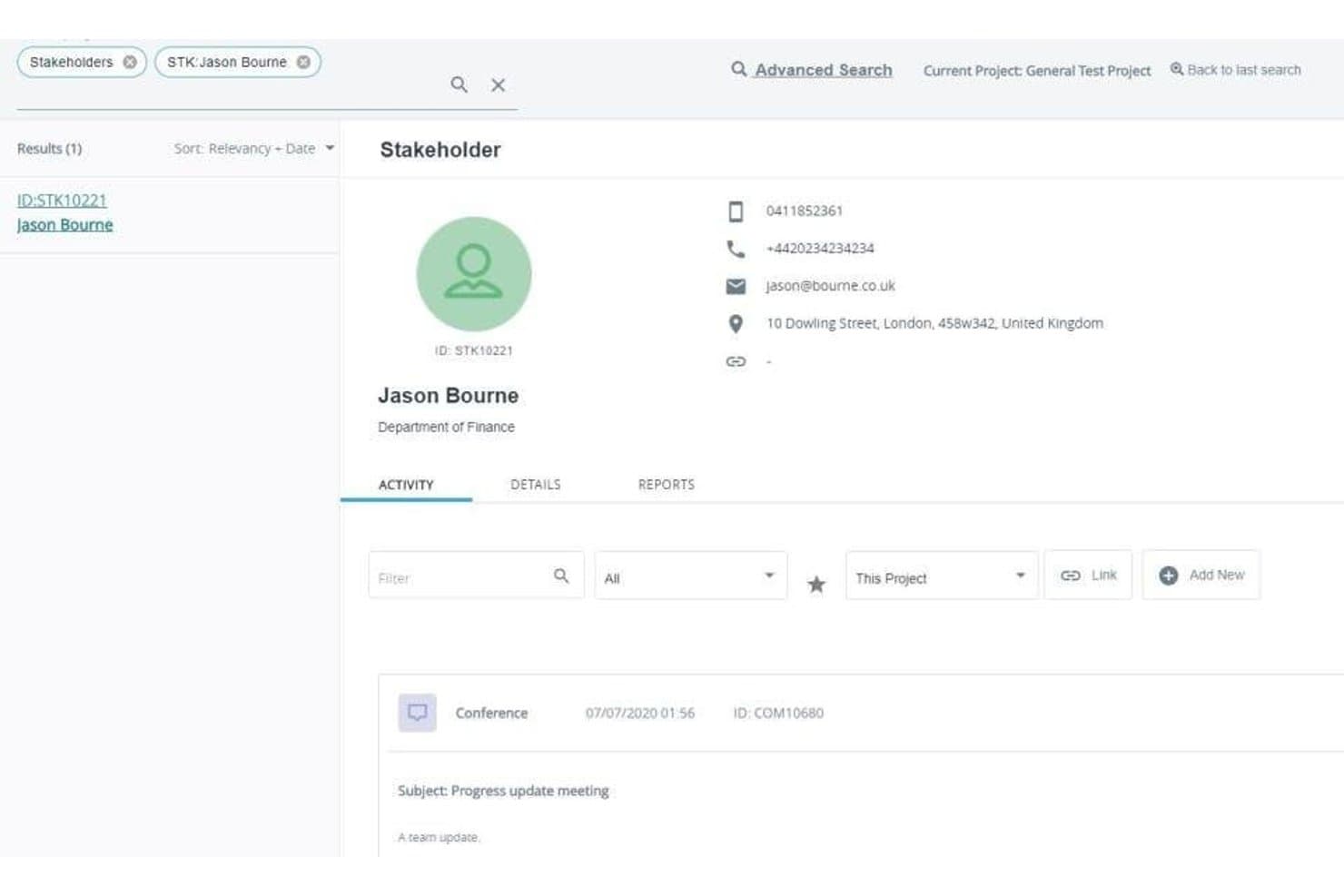
Darzin's stakeholder profiles log contact details and a full activity history of every interaction. Darzin is a stakeholder management platform purpose-built for public consultation and engagement teams, combining stakeholder mapping, multi-channel interaction tracking, AI sentiment analysis, issue management, and cross-project reporting.
Who Is Darzin Best For?
Darzin is a strong fit for public consultation and community engagement teams in government who need to manage stakeholder relationships across complex, multi-project environments.
Why I Picked Darzin Software
I picked Darzin as one of the best because it's genuinely built like a CRM, but wired specifically for stakeholder relationships rather than sales pipelines. I love that it maps stakeholders by influence, interest, and impact, while also linking affected properties to a GIS map so you can see exactly who raised which issues and where. AI sentiment analysis runs across text-heavy feedback, surfacing common themes and points of disagreement without manual review.
Darzin Software Key Features
- Outlook and Gmail plugins: Email plugins automatically log emails to the correct stakeholder record and create a new contact if one doesn't exist.
- Cross-project reporting: You can run automated reports across multiple projects or your entire organization from a single view.
- Survey creation and publishing: You can build and publish surveys directly in the platform, with responses matched to stakeholder records automatically.
- Mobile field apps: iOS and Android apps let you capture notes and interactions while working on-site or in the field.
Darzin Software Integrations
Darzin connects with Outlook and Gmail through plugins. Native integrations and API availability aren’t clearly documented.
Pros and Cons
Pros:
- Centralized interaction history spans engagement channels
- AI sentiment analysis surfaces feedback themes
- GIS links issues to affected properties
Cons:
- Limited public review evidence
- No roadmap or backlog workflows
Learn more about Darzin Software: Best for community and public engagement tracking
- Free demo available
- Pricing upon request
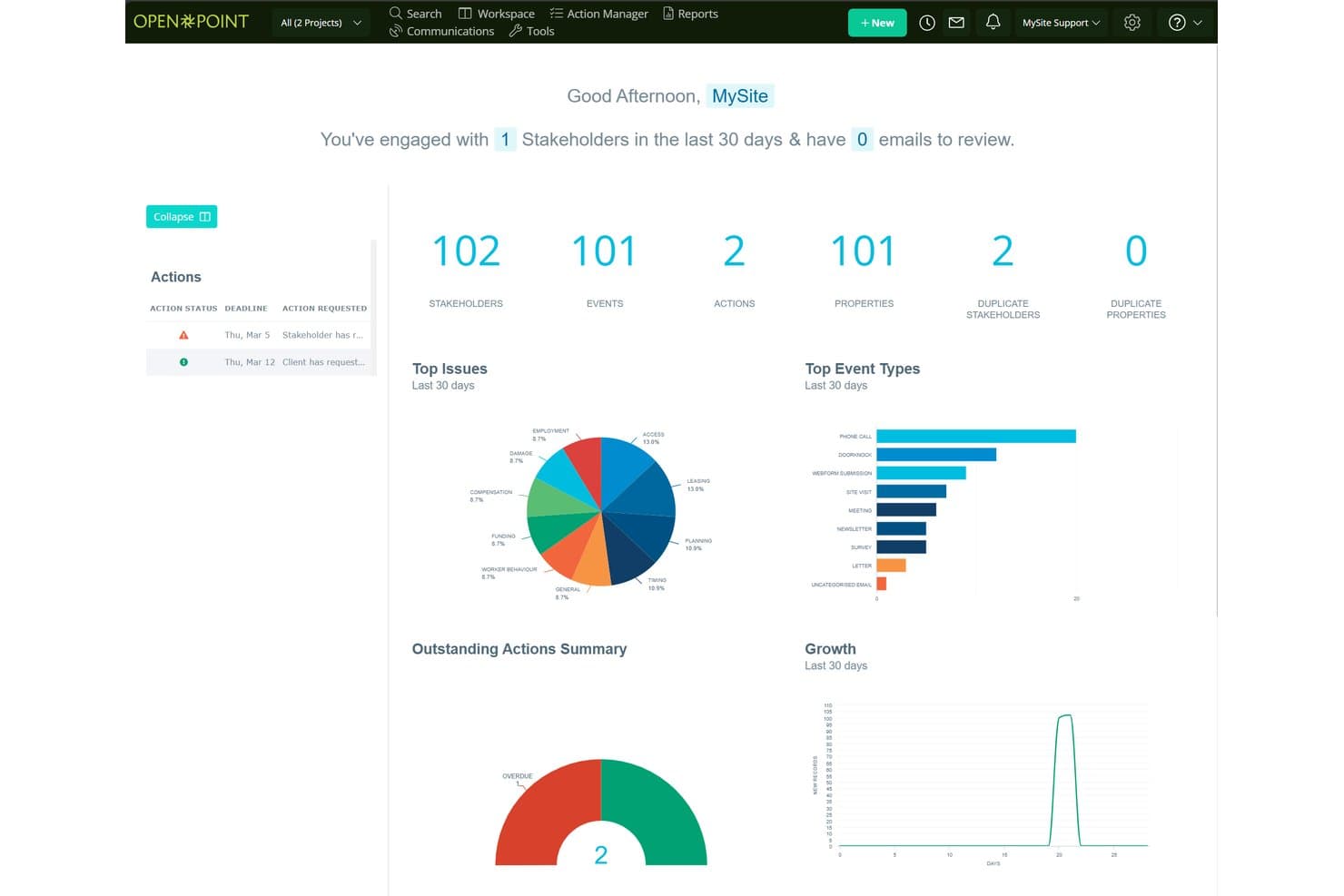
Social Pinpoint centralizes stakeholder data, events, and actions in one dashboard. Social Pinpoint is a stakeholder engagement platform that combines a stakeholder relationship management system, community engagement tools, interaction tracking, and AI-driven sentiment analysis and reporting.
Who Is Social Pinpoint Best For?
Social Pinpoint suits teams in government, infrastructure, and utilities that need to manage public consultation and community engagement across large-scale projects.
Why I Picked Social Pinpoint
I picked Social Pinpoint as one of the best because no other tool on this list combines a full community engagement toolkit with a stakeholder relationship management system in one platform. I love that it captures every interaction across email, SMS, calls, and webforms, then links them directly to stakeholder records and projects. Its AI-driven sentiment tagging flags negative responses in real time, so I can spot rising community opposition before it escalates.
Social Pinpoint Key Features
- Outlook add-in: Saves emails from Outlook directly into stakeholder records, keeping your interaction history complete without manual entry.
- GIS-based map layers: Visualizes stakeholder concentrations as icons, heatmaps, or clusters on a custom base map to identify geographic hot spots for specific issues.
- 40+ community engagement tools: Includes social maps, quick polls, participatory budgeting, idea walls, forums, and Q&A tools for structured public consultation.
- Cross-project reporting: Compares engagement activity, sentiment, and themes across multiple projects, programs, regions, and time periods in one dashboard.
Social Pinpoint Integrations
Documented integrations include Microsoft Outlook, Social Point, and its stakeholder management module. Social Pinpoint also offers an open REST API for CRM, GIS, and document management connections, plus SAML SSO with Microsoft Entra ID and Okta.
Pros and Cons
Pros:
- Supports audits with detailed interaction histories
- Maps geographic engagement hotspots and sentiment
- Links community feedback to stakeholder records
Cons:
- Targets consultation teams over product managers
- Lacks influence-interest stakeholder mapping
Learn more about Social Pinpoint:
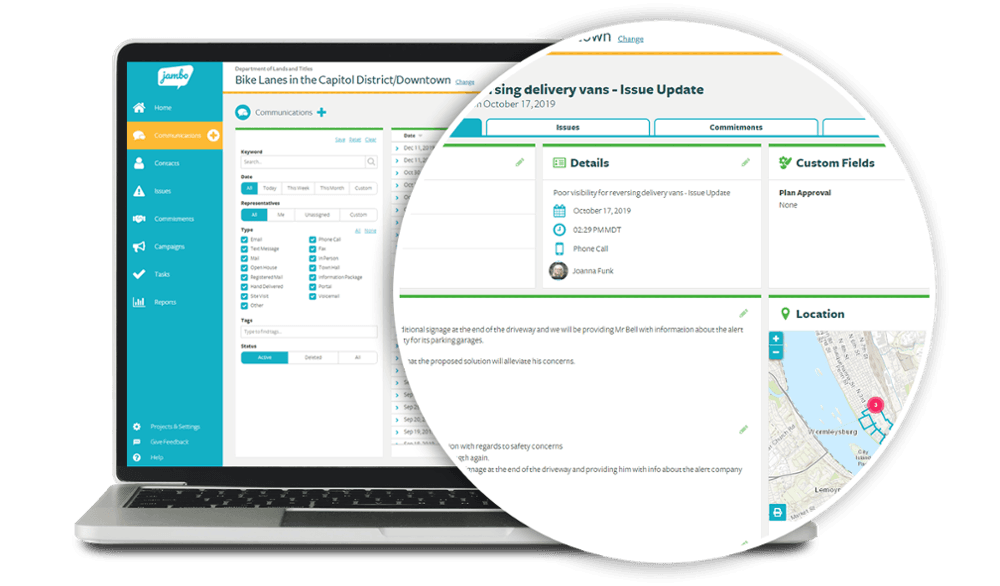
Jambo allows stakeholders to dig down into the detail. Jambo is a stakeholder relationship management (SRM) platform built for engagement and consultation teams, offering interaction tracking, issue and grievance logging, sentiment analysis, geospatial mapping, and compliance reporting.
Who Is Jambo Best For?
Jambo is a strong fit for government, energy, and infrastructure teams that manage community and regulatory engagement across multiple projects.
Why I Picked Jambo
I picked Jambo as one of the best because it's purpose-built for engagement and consultation teams in a way that generic CRMs simply aren't. I love how it ties interaction logging directly to issues and grievances, so when a community concern escalates, your full communication history is already attached. Its AI Sentiment scoring also updates automatically from interaction records, giving you a real-time read on stakeholder mood across a project without manual tagging.
Jambo Key Features
- Outlook add-in: A free Microsoft Outlook add-in logs emails and meetings directly into Jambo and creates contact records automatically.
- Visual risk matrix: Issues and grievances are ranked by impact and urgency on a visual matrix, giving your team a clear view of escalating concerns.
- Global View dashboard: Combines data across all your projects into a single view, with the ability to split by project, sub-project, or program.
- Geospatial mapping: A built-in Esri map viewer displays engagement locations and hotspots, with an optional add-on for ArcGIS Pro integration and project boundary layers.
Jambo Integrations
Jambo has documented integrations with Microsoft Outlook and Esri ArcGIS Pro. Enterprise and higher plans include a public API and Zapier.
Pros and Cons
Pros:
- Supports compliance-focused reporting workflows
- Links grievances with engagement records
- Centralizes stakeholder communication histories
Cons:
- Campaign coordination tools remain unreleased
- No influence-interest stakeholder mapping
Learn more about Jambo: Best for building stakeholder plans around projects
- 30-day free trial + demo available
- From $9/user/month (billed annually)
Visit WebsiteCustomer Rating:4.4/5
Smartsheet offers a useful stakeholder communication plan template. Smartsheet is a spreadsheet-based work management platform that supports stakeholder tracking through customizable registers, engagement plan templates, Gantt and calendar views, automated reminders, and reporting dashboards.
Who Is Smartsheet Best For?
Smartsheet is a strong fit for project-driven teams that want to manage stakeholder registers, engagement plans, and communication logs in the same place they run their projects.
Why I Picked Smartsheet
I picked Smartsheet as one of the best because it's the only tool on this list that lets you manage stakeholder plans directly inside your project work. I love that free engagement plan templates come with built-in Gantt and calendar views, so you can plot outreach tasks on the same timeline as your deliverables. Unlimited free Contributors and Guests mean external stakeholders can be part of the plan without adding to your seat count.
Smartsheet Key Features
- Stakeholder register builder: Create custom stakeholder logs with dropdown columns, conditional formatting, and row-level comments, attachments, and activity history.
- Automated reminders and alerts: Set up rule-based automations to trigger outreach reminders, approval requests, and status alerts across your team.
- Reporting dashboards: Build unlimited reports and dashboards across all plans to visualize stakeholder activity and share progress with leadership.
- Dynamic View: Control exactly which rows and columns external stakeholders can see or edit, giving you scoped, secure access without extra licensing costs.
Smartsheet Integrations
Smartsheet offers nearly 100 integrations, including Microsoft 365, Google Workspace, Slack, Power BI, Tableau, HubSpot, Microsoft Dynamics 365, and Jira through a connector add-on.
Pros and Cons
Pros:
- External participants can contribute without full access
- Flexible registers support custom engagement workflows
- Stakeholder plans share project timelines
Cons:
- Users report dated, changing interface experiences
- Stakeholder mapping requires manual setup
Learn more about Smartsheet:- Best for field-based community engagement teams
- Free demo available
- Pricing upon request
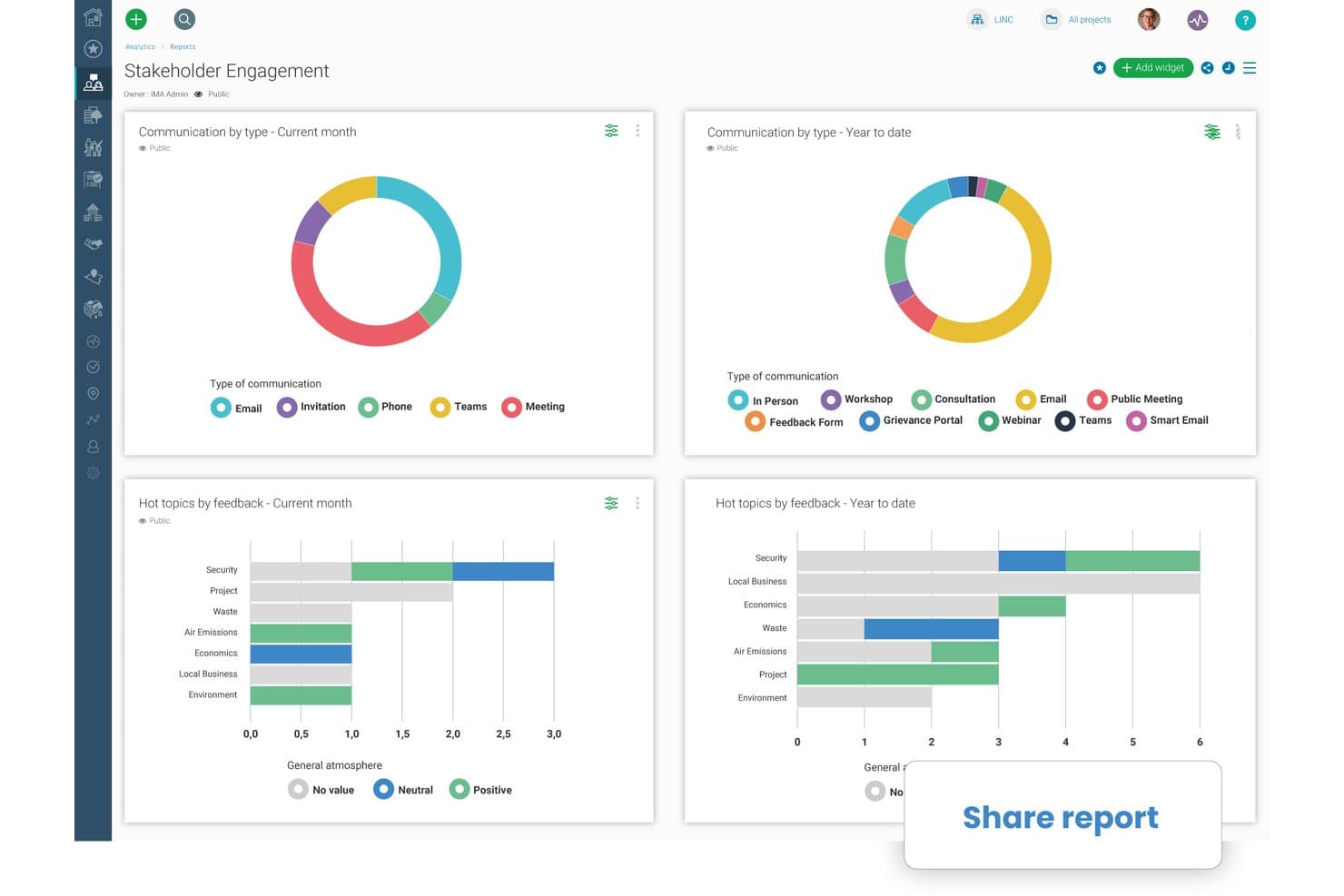
Borealis lets users share stakeholder engagement reports instantly. Borealis is a stakeholder engagement platform built for field-based and community relations teams, combining GIS mapping, interaction tracking, engagement planning, grievance management, and AI-powered reporting in one place.
Who Is Borealis Best For?
Borealis is a strong fit for community relations and public engagement teams working in regulated, land-based industries like energy, mining, and utilities.
Why I Picked Borealis
Borealis earns its spot on my shortlist because it's purpose-built for community relations teams doing real field work, not just desk-based stakeholder tracking. I love that its built-in GIS and ArcGIS mapping links stakeholders directly to physical assets and locations, which matters when your team is managing land-based projects across multiple sites. The offline mobile app means field staff can log interactions and grievances on-site without waiting for connectivity.
Borealis Key Features
- AI-powered report drafting: Borealis automatically generates draft reports from your logged project data, pulling in relevant interactions, issues, and stakeholder details.
- "Ask AI" query tool: You can ask direct questions about your project data in plain language, and the AI returns answers with cited sources from within Borealis.
- Grievance and contribution portals: Built-in online portals let community members submit complaints, donation requests, or concerns directly into the platform for your team to manage.
- Power BI API connection: Borealis connects to Power BI via API, letting you pull engagement and reporting data into your existing analytics environment.
Borealis Integrations
Borealis offers built-in integrations with Outlook, Gmail, Mailchimp, ArcGIS, and the U.S. Government Officials Database. Its API connects with Power BI, CRM, project management tools, and other corporate systems.
Pros and Cons
Pros:
- AI drafts reports from logged engagement data
- Offline mobile logging supports field visits
- GIS maps stakeholders to physical assets
Cons:
- Online engagement options remain relatively limited
- Configuration can complicate initial onboarding
Learn more about Borealis: - Best for sales team stakeholder mapping in Salesforce
- Free demo available
- Pricing upon request
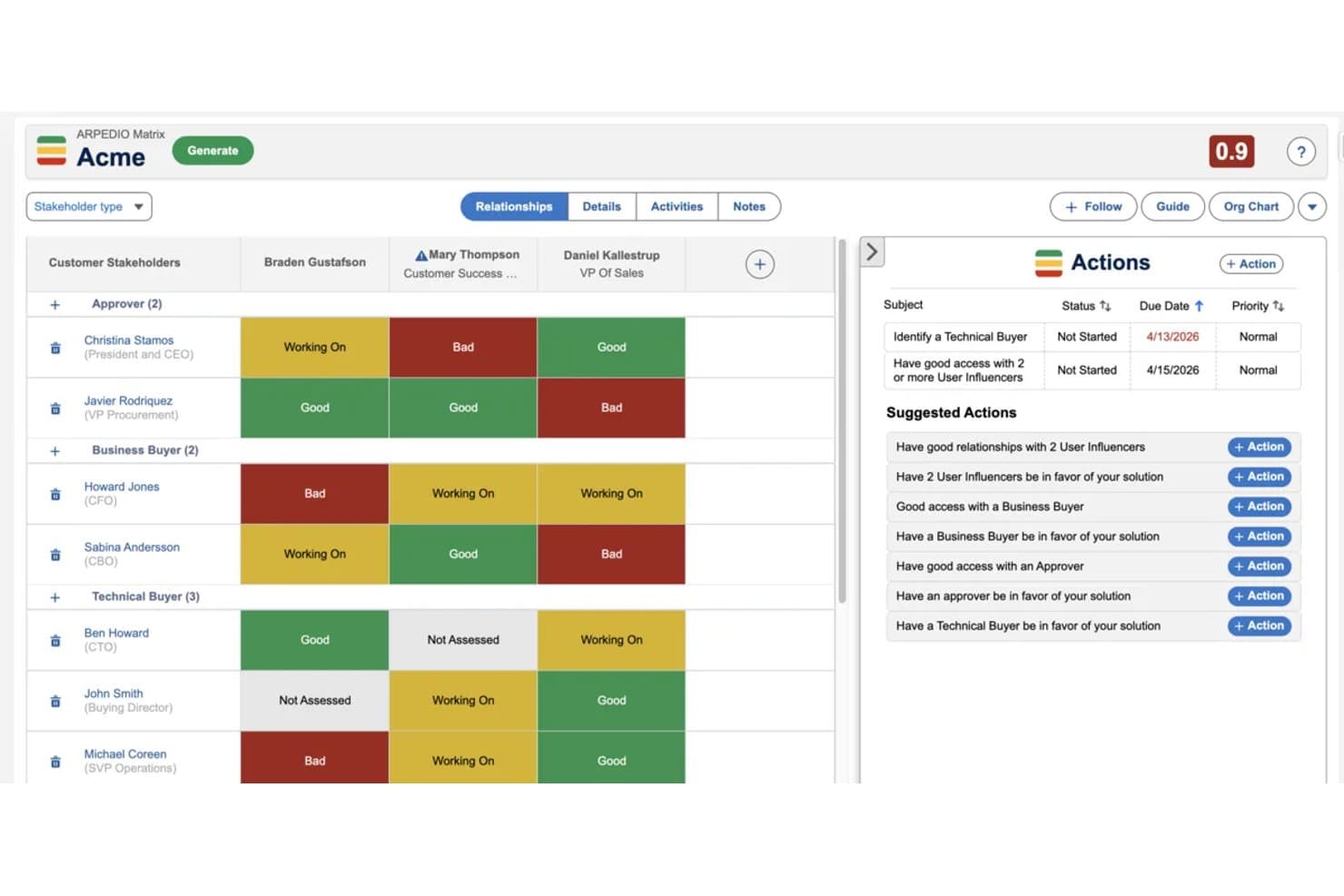
Arpedio maps stakeholder relationships and tracks engagement status visually. Arpedio is a Salesforce-native account-based selling platform that combines AI-powered stakeholder mapping, relationship scoring, interaction tracking, and account planning tools for enterprise sales teams.
Who Is Arpedio Best For?
Arpedio is built for enterprise sales teams—strategic account managers, key account managers, and RevOps leaders—who run complex B2B deals entirely inside Salesforce.
Why I Picked Arpedio
Arpedio earns its spot on my shortlist because it's the only stakeholder mapping tool I've found that's built entirely inside Salesforce rather than bolted onto it. For sales teams running complex B2B deals, that means AI-generated org charts built from existing contact and activity data, with no manual diagramming required. I also like the relationship matrix, which scores each stakeholder on access, influence, and support level, so reps can immediately see who's a champion and who's a blocker.
Arpedio Key Features
- Sentiment agent: Tracks whether individual stakeholder relationships are warming, cooling, or stalled based on activity data, and surfaces coaching prompts for reps.
- Account plan records: Structured Salesforce records that include an executive summary, SWOT analysis, success criteria, and milestones tied to specific stakeholders.
- Activity history continuity: Logs emails, calls, meetings, and notes to contact records so the full relationship history carries over when reps change.
- White-space analysis matrix: Maps your Salesforce product catalogue against account dimensions like regions and business units to surface revenue gaps.
Arpedio Integrations
Arpedio runs natively in Salesforce Lightning and integrates with Einstein Activity Capture, Salesforce Inbox, and Outreach for activity data. It also supports custom activity connectors, but no native Jira, Slack, Asana, or product-tool integrations are documented.
Pros and Cons
Pros:
- Sentiment signals flag cooling relationships early
- Relationship history survives account team changes
- AI-built org charts reduce manual mapping
Cons:
- No classic influence-interest grid
- Sales focus excludes project stakeholder workflows
Learn more about Arpedio:  Best for sales account stakeholder mapping
- Free demo available
- Pricing upon request
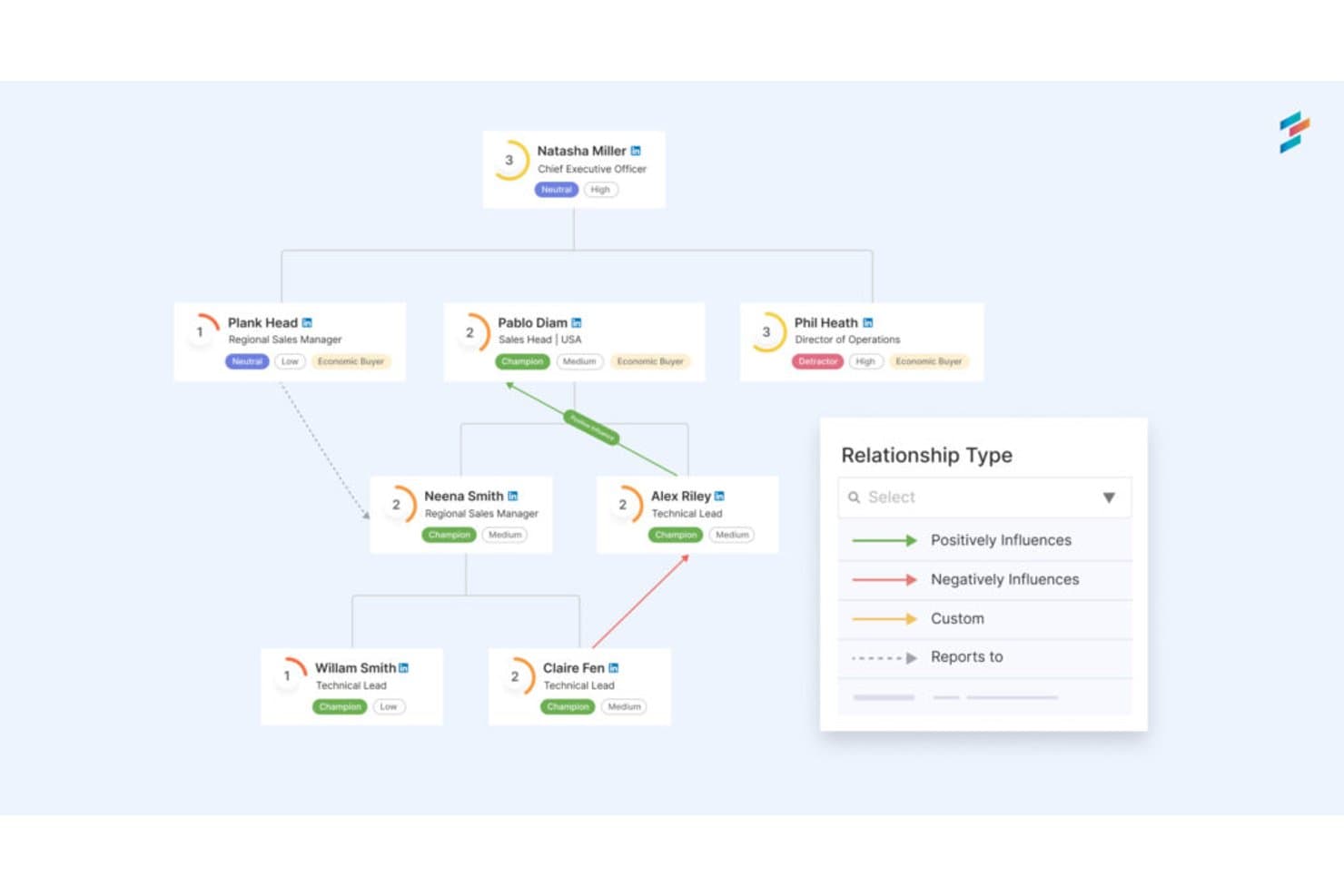
DemandFarm maps stakeholder relationships and influence across org charts. DemandFarm is a B2B key account management platform that combines relationship mapping, AI-driven sentiment analysis, interaction tracking, and deal risk assessment for sales teams managing complex customer accounts.
Who Is DemandFarm Best For?
DemandFarm is a strong fit for B2B sales teams managing strategic accounts with complex, multi-contact buying committees.
Why I Picked DemandFarm
DemandFarm earns its spot on my shortlist because of how well it handles B2B account relationship mapping. I love that its Relationship Maps auto-generate from CRM contacts and let you layer on power and affinity scores for each person in a buying committee. The Kampanion AI goes further, flagging silent influencers and cold decision makers before they become deal risks. That level of contact-level intelligence is rare in a sales account tool.
DemandFarm Key Features
- Automated risk surveillance: Monitors account health and flags relationship cracks, slow-moving objectives, and at-risk contacts before they threaten deals.
- Engagement analytics: Tracks how frequently and meaningfully your team engages each contact, so you can prioritize outreach where it matters most.
- White Space Planner: Identifies untapped revenue opportunities within existing accounts by mapping where growth potential remains uncovered.
- CRM-mirrored permissions: Syncs access controls directly with your CRM so users only see the account data they're already authorized to view.
DemandFarm Integrations
DemandFarm integrations include Salesforce, HubSpot, Microsoft Dynamics, Microsoft Teams, Outlook, Gmail Calendar, Slack, and Gong. No public API documentation is listed for custom integrations.
Pros and Cons
Pros:
- Mirrors CRM permissions across account teams
- Flags silent influencers before deals stall
- Maps buying committees with power scores
Cons:
- Offers no roadmap or consultation planning
- Focuses on sales accounts, not general stakeholders
Learn more about DemandFarm: Best for large-scale public engagement audit trails
- Not available
- From £9,495/year (billed annually)

Tractivity's dashboard gives a real-time overview of stakeholder data. Tractivity is a stakeholder engagement platform built for public-sector and regulated industries, offering contact management, multi-channel outreach, issue logging, sentiment tracking, and configurable reporting across large-scale engagement programmes.
Who Is Tractivity Best For?
Tractivity is a strong fit for public engagement and communications teams in regulated industries like energy, water, and infrastructure.
Why I Picked Tractivity
Tractivity earns its spot on my shortlist because it's built from the ground up for public and regulatory engagement, not adapted from a generic CRM. I'm particularly impressed by its issue logging at scale: EDF used it to log around 30,000 issues across Hinkley Point C and Sizewell C, which tells you a lot about what it can handle. Commitment tracking is another standout, letting teams log every promise made during a consultation with an owner, deadline, and live status tied directly to each stakeholder record.
Tractivity Key Features
- Outlook add-in and email capture: Log emails directly to stakeholder records from Outlook, with AI scanning shared mailboxes to pick up new contacts automatically.
- Unlimited surveys and newsletters: Run branded surveys, email campaigns, and newsletters with no send or volume caps included in the base subscription.
- Event management: Plan and manage workshops, seminars, and Q&A sessions, including attendee registration and outcome tracking, all linked to stakeholder records.
- 150+ configurable reports: Export stakeholder engagement data as PDFs, Excel files, or CSVs, with scheduled email delivery and real-time KPI dashboards.
Tractivity Integrations
Tractivity offers integrations with Microsoft Outlook, Microsoft Teams, Power BI, Dotdigital, Mapolitical, Google Maps, Google Places, and Royal Mail address validation. It also provides a public API, bulk import, and Zapier connectivity.
Pros and Cons
Pros:
- Produces audit-ready reports for leadership
- Tracks issues, commitments, and sentiment together
- Built for regulated public engagement programmes
Cons:
- Suits public engagement more than product teams
- Offers limited structured risk scoring
Learn more about Tractivity:
Outro software de gestão de partes interessadas
Eis algumas opções adicionais de software de gestão de partes interessadas que não entraram na minha lista restrita, mas que ainda vale a pena conhecer:
- 11PublicInputBest for multi-channel civic engagement tracking
- 12ClickUpBest for all-in-one PM and stakeholder tracking
- 13monday AI WorkspaceBest for managing stakeholders within project boards
- 14KintoneBest for no-code custom workflow apps
- 15StakeTrackerBest for a secure, online stakeholder management system
- 16Engagement HubBest for public consultation engagement teams
- 17SMARTBest for intelligent stakeholder engagement
How I Evaluate Stakeholder Management Software
I split my evaluation into three parts, with core functionality carrying the most weight: I look for tools that map key people, log conversations, and plan follow-ups. Next, I consider differentiators such as calendar sync and roadmap-linked stakeholder views. Finally, I weigh onboarding, support, and pricing as teams grow.
Core Functionality (Table Stakes For This List)
When I'm selecting tools for my list, I score each one on a scale from 0 (does not offer the functionality) to 5 (excels in this area) for each core functionality listed below. I then convert the total into a percentage to help assess each tool’s overall fit, with extra weight on any functionalities I’ve deemed essential.
- Stakeholder Mapping (Essential): I look for ways to classify stakeholders by influence and interest, such as placing decision-makers and affected users on a shared map.
- Interaction Tracking (Essential): I check whether teams can keep contact details and searchable conversation notes together, so anyone can pick up an ongoing stakeholder discussion.
- Engagement Planning: I assess whether teams can schedule consultations, assign outreach, and tie follow-ups to stakeholder records or groups.
- Risk & Sentiment: I look for structured ways to flag opposition or shifting sentiment, such as noting concerns after a review meeting.
- Reporting & Analytics: I consider whether reports show engagement coverage and activity, helping teams explain who they’ve consulted and what they heard.
- Collaboration & Access: I check how teams share stakeholder records and coordinate outreach, including whether permissions suit different roles.
Once I have a list of tools that meet the criteria, I consider what sets each platform apart.
Differentiating Factors (What Sets Vendors Apart)
Here's how I compare and contrast different vendors:
Standout Features
Meeting and calendar integration is where I see the biggest time savings. I check whether a tool auto-logs stakeholder touchpoints from calendar events and prompts follow-ups, since manual tracking falls apart after a few busy weeks. AI-generated summaries matter too—tools that draft sentiment snapshots from meeting notes cut hours of post-meeting write-ups. I also evaluate custom stakeholder portals, where executive or external stakeholders can self-serve status updates without needing a full login, which keeps visibility high and inbox noise low.
Beyond Features
I check how well a tool fits cross-functional teams—executives and sales reps won't adopt a platform built only for PMs. Onboarding ease for non-technical stakeholders directly affects data completeness. I also evaluate integration depth with existing product tooling like Jira, Salesforce, or Slack, since duplicate data entry kills adoption fast. Finally, role-based permissions and audit trails matter whenever you're sharing sensitive roadmap data with external partners.
Como escolher software de gestão de partes interessadas
É fácil ficar perdido em listas extensas de funcionalidades e estruturas de preços complexas. Para o ajudar a manter o foco enquanto percorre o seu processo específico de seleção de software, eis uma lista de verificação dos fatores a ter em conta:
| Fator | O que considerar |
|---|---|
| FatorEscalabilidade | O que considerarO software pode crescer com a sua equipa? Tenha em conta os limites de utilizadores e os preços à medida que a sua equipa cresce. |
| FatorIntegrações | O que considerarIntegra-se com as suas ferramentas atuais, como CRM ou plataformas de gestão de projetos? |
| FatorPersonalização | O que considerarPode adaptar o software para se adequar aos seus fluxos de trabalho específicos? Procure painéis e campos flexíveis. |
| FatorFacilidade de utilização | O que considerarA interface é intuitiva para a sua equipa? Teste-a com uma demonstração para avaliar a curva de aprendizagem. |
| FatorImplementação e integração inicial | O que considerarCom que rapidez pode a sua equipa começar a trabalhar? Procure recursos de formação e opções de assistência. |
| FatorCusto | O que considerarOs preços estão alinhados com o seu orçamento? Tenha em conta taxas ocultas ou complementos necessários. |
| FatorMedidas de segurança | O que considerarA ferramenta cumpre as suas normas de segurança de dados? Verifique a existência de encriptação e permissões de utilizador. |
| FatorDisponibilidade da assistência | O que considerarQue canais de assistência estão disponíveis? Certifique-se de que a assistência corresponde às necessidades e aos fusos horários da sua equipa. |
Tendências no software de gestão de partes interessadas
Temos assistido a inovações e mudanças significativas que estão a transformar a forma como as organizações comunicam, colaboram e interagem com as suas partes interessadas, resultando em muitas tendências em mudança no software de gestão de partes interessadas. Identifiquei várias tendências que refletem tanto as prioridades e exigências em mudança do setor como a direção em que a tecnologia de gestão de partes interessadas está a evoluir.
Informações e análises baseadas em dados
- Análises com recurso a IA: A utilização de inteligência artificial para analisar o feedback das partes interessadas e os níveis de interação tornou-se mais frequente. Esta tecnologia proporciona informações mais aprofundadas sobre os sentimentos das partes interessadas, permitindo às organizações adaptar as suas estratégias de forma mais eficaz.
- Análise preditiva: As ferramentas estão a incorporar cada vez mais funcionalidades de análise preditiva que preveem comportamentos e preferências futuras das partes interessadas com base em dados históricos. Esta funcionalidade permite uma gestão proativa, em vez de reativa, das partes interessadas.
Funcionalidades inovadoras e invulgares
- Cadeia de blocos para transparência: Algumas ferramentas estão a experimentar a tecnologia de cadeia de blocos para melhorar a transparência e a segurança nas comunicações com as partes interessadas. Esta abordagem inovadora é particularmente apelativa para organizações que dão prioridade à integridade e à transparência dos dados.
- Interação através de realidade virtual (VR): Embora ainda esteja numa fase inicial, a utilização de VR para a interação com as partes interessadas representa uma abordagem de vanguarda às estratégias de comunicação imersiva, oferecendo às partes interessadas uma forma única de vivenciar e interagir com os resultados dos projetos.
Personalização e segmentação
- Personalização orientada por IA: Existe uma tendência crescente para utilizar a IA na adaptação das comunicações e das estratégias de interação às preferências e aos comportamentos individuais das partes interessadas. Este nível de personalização aumenta a eficácia dos esforços de interação, garantindo que as partes interessadas recebem informações relevantes e atempadas.
As tendências no software de gestão de partes interessadas evidenciam uma mudança para ferramentas mais integradas, inteligentes e imersivas. À medida que estas tendências continuam a evoluir, oferecem uma visão do futuro da gestão de partes interessadas, em que a tecnologia desempenhará um papel fundamental na construção e manutenção de relações sólidas com as partes interessadas.
O que é o software de gestão de partes interessadas?
O software de gestão de partes interessadas é uma ferramenta que ajuda as organizações a acompanhar e gerir as interações com as partes interessadas. Os gestores de projetos, os líderes de equipa e os responsáveis pela comunicação utilizam geralmente estas ferramentas para melhorar a comunicação e a interação com as partes interessadas. As funcionalidades de acompanhamento de tarefas, elaboração de relatórios e comunicação ajudam a organizar as interações com as partes interessadas e a garantir o alinhamento do projeto. De um modo geral, estas ferramentas permitem gerir melhor as relações com as partes interessadas e os resultados dos projetos.
Funcionalidades
Ao selecionar um software de gestão de partes interessadas, procure as seguintes funcionalidades essenciais:
- Gestão de contactos: Centraliza as informações das partes interessadas, facilitando o acesso e a atualização dos dados para uma comunicação eficaz.
- Acompanhamento de tarefas: Ajuda a atribuir e monitorizar tarefas, garantindo o cumprimento dos prazos e mantendo os projetos no caminho certo.
- Relatórios: Fornece informações sobre a interação das partes interessadas e o progresso dos projetos, contribuindo para uma tomada de decisões informada.
- Ferramentas de comunicação: Facilitam a comunicação direta com as partes interessadas, melhorando a interação e a transparência.
- Painéis personalizáveis: Permitem adaptar a interface ao seu fluxo de trabalho, melhorando a facilidade de utilização e a eficiência.
- Diagramas de Gantt: Permitem visualizar os calendários e os marcos dos projetos, ajudando as equipas a planear e executar os projetos de forma eficiente.
- Lembretes automáticos: Mantêm a sua equipa dentro do prazo, enviando alertas sobre tarefas e prazos próximos.
- Capacidades de integração: Ligam-se a outras ferramentas da sua infraestrutura tecnológica, garantindo um fluxo de dados e uma colaboração contínuos.
- Medidas de segurança: Protegem os dados das partes interessadas através de encriptação e controlos de acesso, mantendo a privacidade e a conformidade.
- Análises: Oferecem informações detalhadas sobre as interações com as partes interessadas e as métricas dos projetos, apoiando o planeamento estratégico.
Benefícios
A implementação de um software de gestão de partes interessadas proporciona vários benefícios à sua equipa e à sua empresa. Eis alguns dos benefícios que pode esperar:
- Comunicação melhorada: Facilita a interação direta com as partes interessadas, garantindo que todos se mantêm informados e envolvidos.
- Organização melhorada: Centraliza os dados das partes interessadas e os detalhes do projeto, facilitando a gestão de informações e tarefas.
- Maior eficiência: Automatiza os lembretes e o acompanhamento de tarefas, ajudando a sua equipa a cumprir os prazos sem supervisão manual.
- Melhor tomada de decisões: Fornece relatórios e análises detalhados, permitindo-lhe obter informações para tomar decisões estratégicas fundamentadas.
- Maior transparência: Proporciona visibilidade sobre o progresso do projeto e o envolvimento das partes interessadas, mantendo todos alinhados.
- Fluxos de trabalho personalizáveis: Permite adaptar os processos às suas necessidades específicas, melhorando a produtividade geral.
- Segurança dos dados: Protege informações sensíveis das partes interessadas com encriptação robusta e controlos de acesso, garantindo a conformidade e a privacidade.
Custos e preços
A seleção de software de gestão das partes interessadas requer uma compreensão dos vários modelos de preços e planos disponíveis. Os custos variam consoante as funcionalidades, a dimensão da equipa, os complementos, entre outros fatores. A tabela abaixo resume os planos comuns, os respetivos preços médios e as funcionalidades normalmente incluídas nas soluções de software de gestão das partes interessadas:
Tabela de comparação de planos para software de gestão das partes interessadas
| Tipo de plano | Preço médio | Funcionalidades comuns |
|---|---|---|
| Tipo de planoPlano gratuito | Preço médio$0 | Funcionalidades comunsGestão básica de contactos, acompanhamento limitado de tarefas e relatórios simples. |
| Tipo de planoPlano pessoal | Preço médio$5-$25/utilizador/mês | Funcionalidades comunsAcompanhamento de tarefas, integrações básicas e opções limitadas de personalização. |
| Tipo de planoPlano empresarial | Preço médio$25-$50/utilizador/mês | Funcionalidades comunsRelatórios avançados, funcionalidades de segurança melhoradas e mais integrações. |
| Tipo de planoPlano empresarial de grande dimensão | Preço médio$50-$100/utilizador/mês | Funcionalidades comunsPersonalização completa, suporte prioritário e análises e relatórios abrangentes. |
Perguntas frequentes sobre software de gestão das partes interessadas
Eis algumas respostas a perguntas comuns sobre software de gestão das partes interessadas:
Como posso saber se a minha equipa precisa de software de gestão das partes interessadas?
Se a sua equipa tiver dificuldades em acompanhar as interações e o feedback das partes interessadas, poderá precisar de software de gestão das partes interessadas. Avalie os seus processos atuais: estão a falhar prazos ou a esquecer comunicações importantes? Nesse caso, estas ferramentas podem ajudar a organizar e automatizar estas tarefas, permitindo que a sua equipa se concentre em decisões estratégicas.
É necessária formação para utilizar software de gestão das partes interessadas?
A formação é frequentemente recomendada, embora muitas ferramentas tenham sido concebidas para serem intuitivas. Procure software que disponibilize tutoriais, seminários online ou guias interativos para ajudar a sua equipa a começar. Por exemplo, uma visita guiada rápida ao produto pode familiarizar a sua equipa com a interface, garantindo que consegue utilizar a ferramenta de forma eficaz desde o início.
Que desafios comuns de implementação deve antecipar?
A implementação de um novo sistema envolve frequentemente a migração de dados, a formação dos utilizadores e o alinhamento dos fluxos de trabalho. Muitas equipas subestimam estas etapas, o que pode causar atrasos ou frustração. Se a sua equipa não adotar a ferramenta ou se os dados não forem limpos antes da migração, é provável que enfrente problemas logo no início.