

Com tantas soluções diferentes de crescimento orientado pelo produto disponíveis, perceber qual é a mais adequada para si pode ser difícil. Sabe que quer aumentar a adoção pelos utilizadores, a aquisição orgânica de clientes através do passa-palavra, a satisfação dos clientes e a eficiência e escalabilidade do seu modelo de aquisição de clientes, mas precisa de perceber qual é a melhor ferramenta para o efeito. Eu ajudo! Nesta publicação, vou ajudá-lo a tornar a sua escolha mais fácil, partilhando as minhas experiências pessoais na utilização de dezenas de ferramentas com grandes equipas e produtos diversificados, bem como as minhas escolhas do melhor software de crescimento orientado pelo produto.
Why Trust Our Software Recommendations
6,700+
Reviews
20
Industry experts
16+
Evaluation factors
14
Years
Our team has been testing and reviewing software since 2012. As product managers ourselves, we know how difficult—and important—it is to choose the right software.
For this guide, we evaluated tools using hands-on testing and independent research, scoring tools using our selection criteria.
Our reviews reflect our human editorial judgment, not a sales pitch.
Expert reviewers:
- Andrew LumbySenior TPM
- Cristiano ValimSenior UI/UX Lead


Tabela comparativa de software de crescimento orientado pelo produto
Compare abaixo os detalhes de preços das minhas principais escolhas de software de crescimento orientado pelo produto.
| Tool | Best For | Trial Info | Price | ||
|---|---|---|---|---|---|
| 1 | Best for tailored user onboarding workflows | 14-day free trial | From $174/month (billed annually) | Website | |
| 2 | Best for no-code in-app onboarding and funnel analysis | 14-day free trial | From $240/month (billed annually) | Website | |
| 3 | Best for enterprise in-app guidance and adoption | Free trial available | Pricing upon request | Website | |
| 4 | Best for session replay tied to in-app guidance | Free plan available | Pricing upon request | Website | |
| 5 | Best for retroactive user journey analysis | Free plan available | Pricing upon request | Website | |
| 6 | Best for AI-guided product adoption insights | 14-day free trial | From $299/month | Website | |
| 7 | Best for no-code onboarding with day-one results | Free trial available | Pricing upon request | Website | |
| 8 | Best for unified analytics and in-app guidance | Free plan + free demo available | Pricing upon request | Website | |
| 9 | Best for cross-app onboarding with AI-guided flows | Free plan + 30-day free trial + free demo available | Pricing upon request | Website | |
| 10 | Best for open-source product analytics depth | Free plan available | Pricing upon request | Website |


Avaliações do melhor software de crescimento orientado pelo produto
Apresento abaixo os meus resumos detalhados do melhor software de crescimento orientado pelo produto que integrou a minha lista. As minhas avaliações oferecem uma análise detalhada das principais funcionalidades, vantagens e desvantagens, integrações e casos de utilização ideais de cada ferramenta, para ajudá-lo a encontrar a melhor opção para si.
 Best for tailored user onboarding workflows
- 14-day free trial
- From $174/month (billed annually)
Visit WebsiteCustomer Rating:4.7/5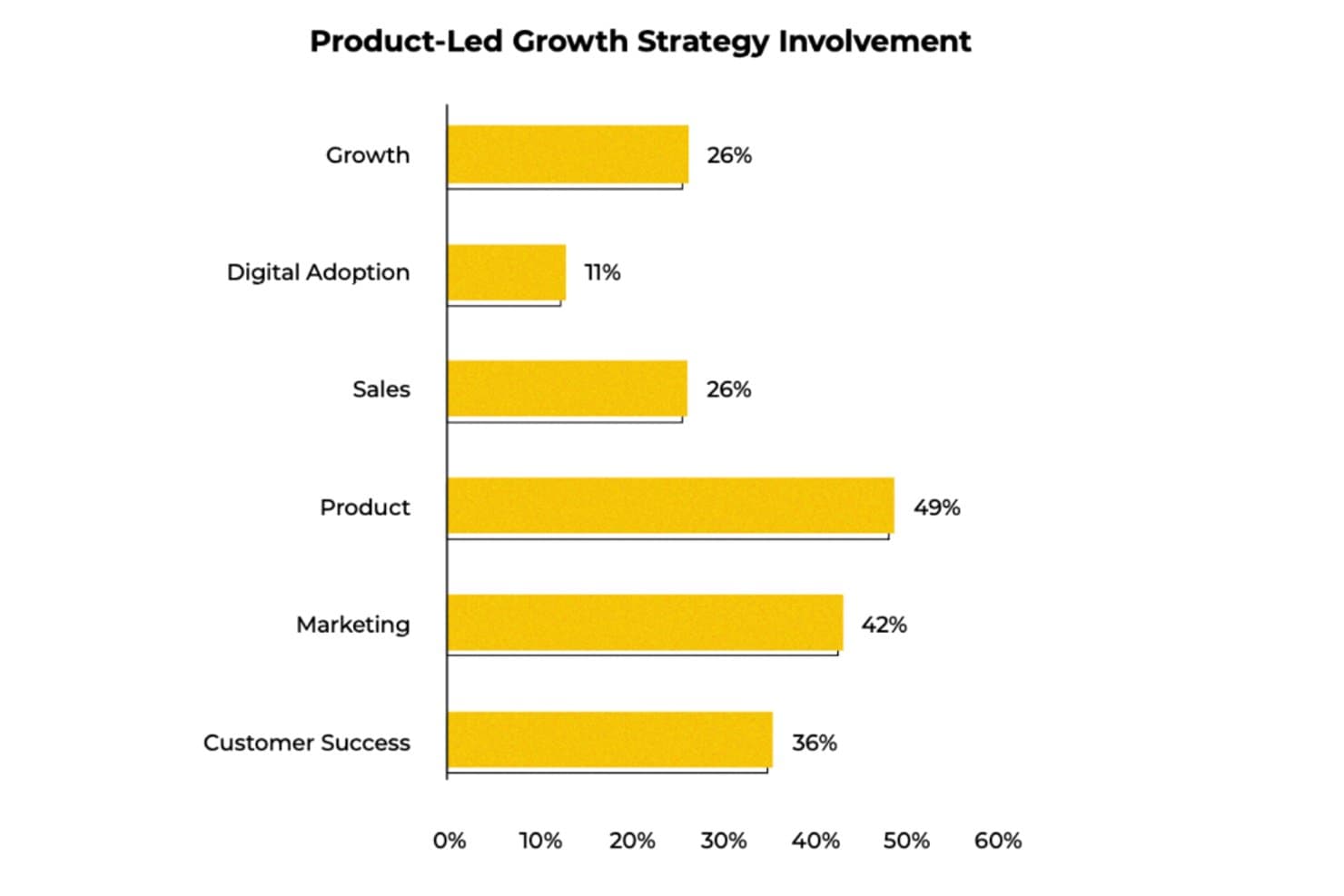
UserGuiding shows which teams are most involved in PLG strategies. UserGuiding is a no-code user onboarding and product adoption platform that combines in-app guides, checklists, tooltips, surveys, resource centers, and event tracking to help teams engage and activate users directly within their product.
Who Is UserGuiding Best For?
UserGuiding is a strong fit for product managers at small to mid-sized SaaS companies who want to build and launch in-app onboarding flows without relying on engineering resources.
Why I Picked UserGuiding
I picked UserGuiding as one of the best because its no-code builder lets you ship tailored onboarding flows, checklists, and tooltips without touching engineering resources. I especially like the layered segmentation, where you can target users by event data, plan type, and company attributes simultaneously, so a "Pro plan user who hasn't used the export feature" gets a different experience than a new trial user.
UserGuiding Key Features
- No-code event tracking: Point-and-click event capture lets you track feature usage without writing a single line of code or waiting on engineering.
- In-app NPS surveys: Native NPS surveys collect user sentiment directly in the product, with results that can trigger automated follow-up actions in Intercom.
- Session replay: Built-in session replay records user interactions so you can watch how people move through your product and spot friction points.
- MCP Server: Connects your product data to AI clients like Claude or Cursor, letting you query engagement metrics and segment behavior in plain language.
UserGuiding Integrations
UserGuiding offers native integrations with HubSpot, Salesforce, Intercom, Slack, Segment, Mixpanel, Amplitude, Google Analytics, and Woopra. It also supports webhooks, an API, and an MCP Server for custom connectivity and AI-assisted product data queries.
Pros and Cons
Pros:
- Native NPS connects feedback to adoption work
- Segments users by behavior and company attributes
- Tailored onboarding flows launch without engineering
Cons:
- Provides no dedicated product-qualified lead scoring
- Lacks cohort, path, and retention analysis
Learn more about UserGuiding: Best for no-code in-app onboarding and funnel analysis
- 14-day free trial
- From $240/month (billed annually)
Visit WebsiteCustomer Rating:4.8/5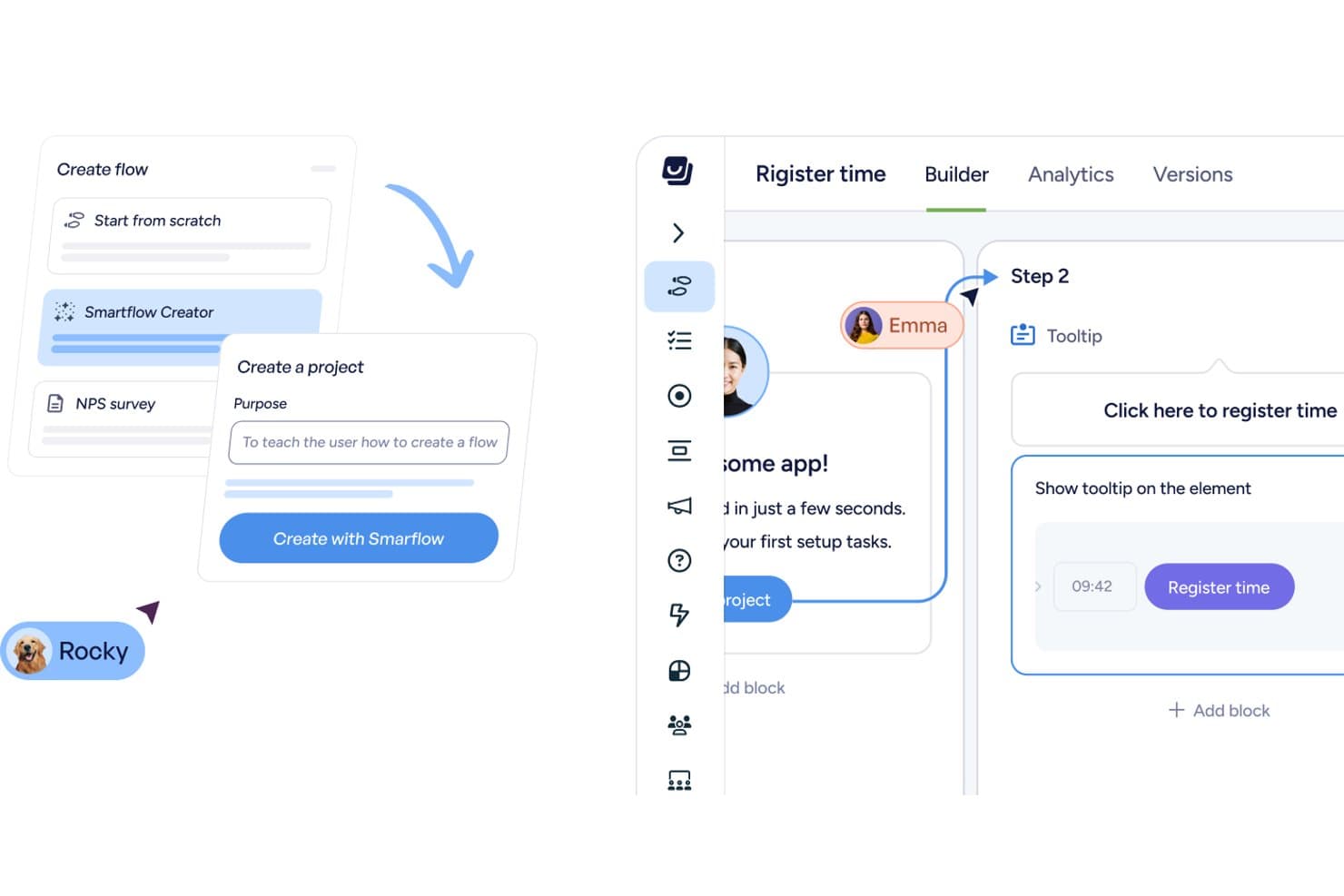
Userflow lets users build onboarding flows with AI-assisted tooltips and steps. Userflow is a no-code PLG platform that combines in-app onboarding flows, product tours, checklists, surveys, and usage analytics—including funnel analysis and event tracking—in a single tool built for web apps.
Who Is Userflow Best For?
Userflow suits product managers and growth teams at B2B SaaS companies who want to build and optimize in-app onboarding without writing code.
Why I Picked Userflow
I picked Userflow as one of the best because its no-code Adoption Studio lets you build flows, checklists, and tooltips without writing a single line of code, then immediately see where users drop off using built-in funnel analysis. I especially like the FlowAI Builder, which drafts flow steps from a prompt so you can go from spotting a funnel gap to launching a targeted onboarding fix in minutes. The "Insight → Action → Impact" workflow is what sets it apart: you identify a drop-off in the funnel, then target the exact user segment with a corrective flow, all inside one tool.
Userflow Key Features
- FlowAI builder: Drafts the steps and structure of an in-app flow from a prompt, so you can launch guidance without writing a single line of code.
- Adoption Agent: An AI assistant trained on your app, docs, and flow library that answers user questions, launches matching flows, or completes tasks directly inside your product.
- HubSpot and Salesforce CRM sync: Two-way CRM integration is included on all plans, so user behavior data moves between Userflow and your revenue tools automatically.
- Userflow MCP: Connects Userflow to AI tools like Claude and ChatGPT, letting you query flow performance and draft segments or dashboards through a conversational interface.
Userflow Integrations
Userflow offers six native integrations with HubSpot, Salesforce, Slack, Mixpanel, Heap, and Amplitude. It also supports REST API, webhooks, and Userflow MCP connections to Claude, ChatGPT, and Gemini.
Pros and Cons
Pros:
- Reviewers praise fast, helpful support
- FlowAI drafts onboarding steps quickly
- Funnel drop-offs trigger targeted onboarding
Cons:
- Flows require upkeep after interface changes
- Analytics lack retention and cohort views
Learn more about Userflow: Best for enterprise in-app guidance and adoption
- Free trial available
- Pricing upon request
Visit WebsiteCustomer Rating:4.6/5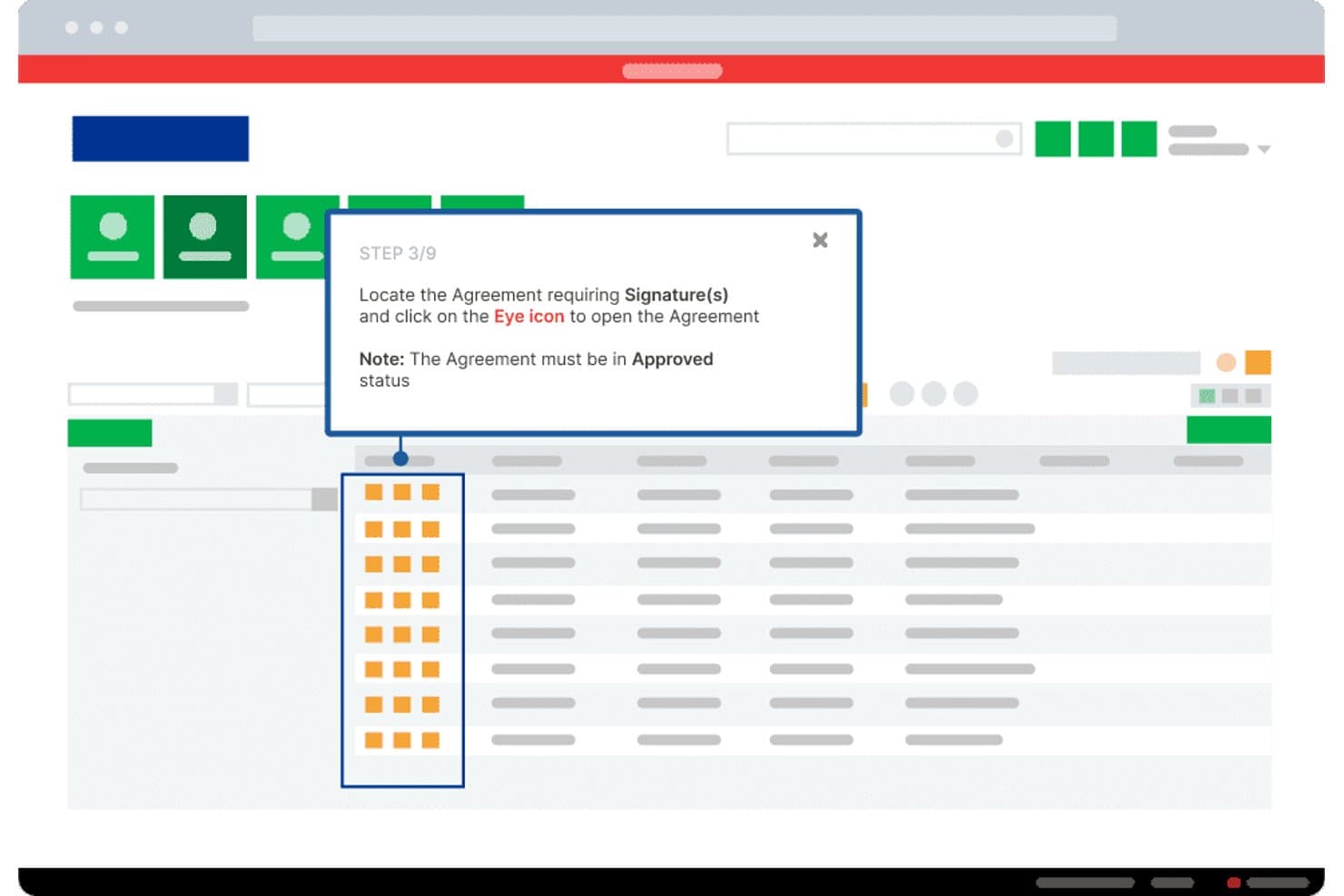
Whatfix guides users through agreement signing with step-by-step tooltips. Whatfix is an enterprise digital adoption platform (DAP) that combines no-code in-app guidance tools—including walkthroughs, tooltips, and checklists—with product analytics featuring AutoCapture event tracking, funnel reporting, and AI-driven usage insights.
Who Is Whatfix Best For?
Whatfix fits enterprise teams that need to drive software adoption across large, complex deployments—especially where internal tooling spans multiple platforms.
Why I Picked Whatfix
Whatfix earns its spot on my shortlist because its no-code in-app guidance suite is genuinely best-in-class for enterprise teams trying to drive adoption at scale. I love how AutoCapture lets you track feature usage and drop-off points without touching a single line of code, then respond with targeted Flows or Smart Tips built in the same platform. The AI Insights Agent takes it further, letting you ask plain-language questions about user behavior and surfacing trends before they become problems.
Whatfix Key Features
- Real-time cohorts: Automatically segments users by live behavioral signals, so you can target in-app content to specific groups without manual list-building.
- Session Replay: Records user sessions with built-in PII masking, letting you watch exactly where users struggle inside your product.
- NPS and usability surveys: Built-in survey tools collect user feedback directly in the product, with AI-powered analysis of open-ended responses.
- Multi-platform deployment: Runs across web, desktop, mobile, and VDI environments, covering your full software stack from a single platform.
Whatfix Integrations
Whatfix offers documented integrations with Amplitude, Mixpanel, Segment, Google Analytics, Salesforce, Heap, FullStory, Power BI, Google Sheets, and Microsoft Excel. Standard supports two integrations, while Premium supports more and Enterprise supports unlimited integrations.
Pros and Cons
Pros:
- Supports complex multi-application deployments
- AutoCapture connects adoption data to guidance
- No-code onboarding changes require no engineering
Cons:
- Enterprise setup can require ongoing maintenance
- No native PQL scoring for growth teams
Learn more about Whatfix: Best for session replay tied to in-app guidance
- Free plan available
- Pricing upon request
Visit WebsiteCustomer Rating:4.5/5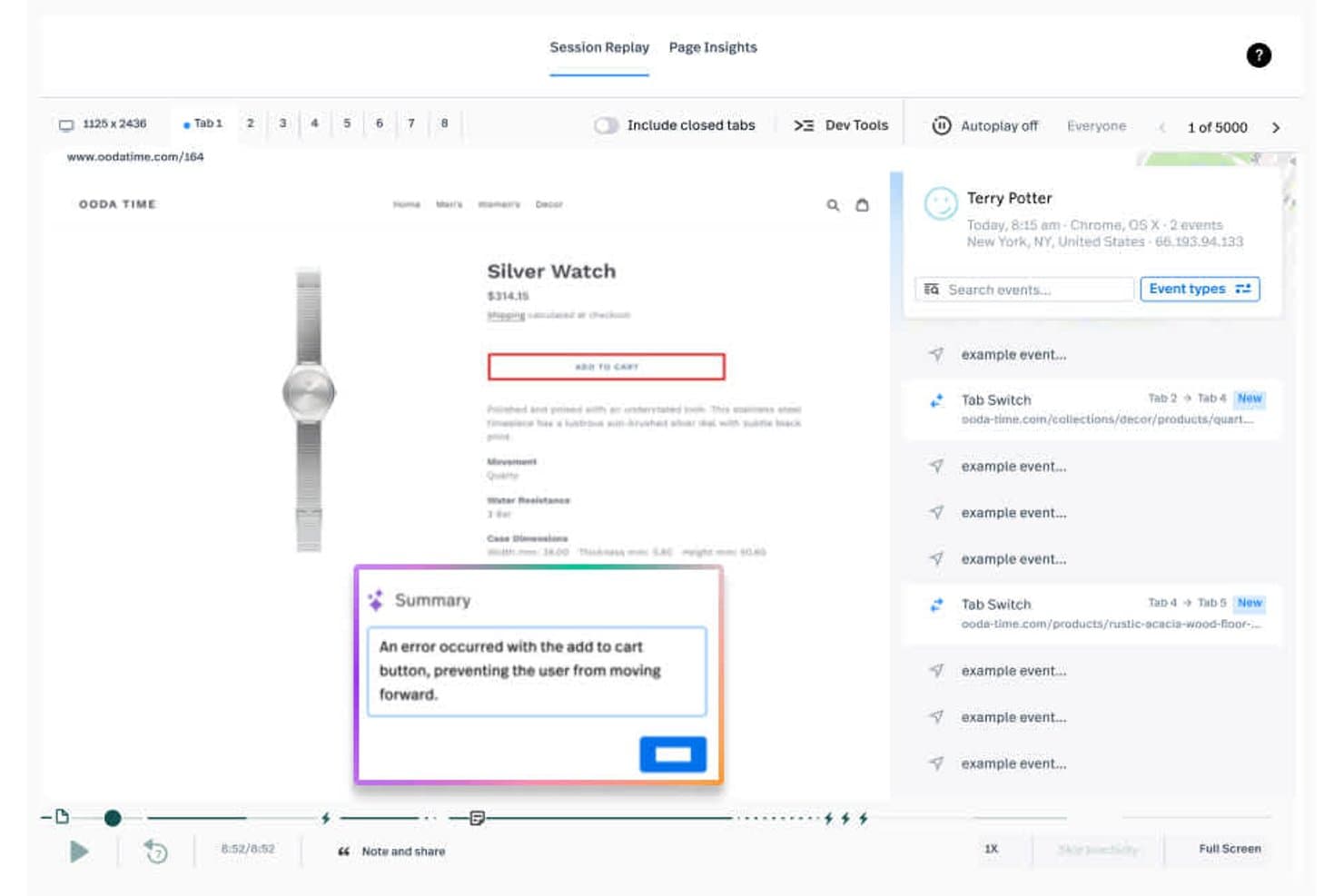
Fullstory surfaces session errors like broken add-to-cart flows instantly. Fullstory is a digital experience analytics platform that combines autocapture session replay, heatmaps, behavioral analytics, funnel and retention reporting, and no-code in-app guides and surveys.
Who Is Fullstory Best For?
Fullstory is a strong fit for product and growth teams who want to watch real user sessions and immediately act on what they see by launching targeted in-app guides—without switching tools.
Why I Picked Fullstory
I picked Fullstory as one of the best because it's the only tool on my list where session replay and in-app guidance share the same data layer. When a user rage-clicks or drops off a funnel, I can launch a targeted tooltip or checklist using the exact same behavioral segment, no rebuilding required. Survey responses even link back to the session replay, so I can see precisely what a user experienced before submitting NPS feedback.
Fullstory Key Features
- Fullcapture™ autocapture: Records every user interaction on web and mobile apps automatically, with no manual event tagging required.
- StoryAI summaries: AI-generated summaries that explain why users behave the way they do, available across all plans.
- Anywhere: Activation: Streams real-time behavioral signals—like rage clicks and drop-offs—to CRM, support, and marketing tools instantly.
- Funnel and retention analysis: Customizable funnel reporting with drop-off diagnostics and retention analysis, available on Advanced and Enterprise plans.
Fullstory Integrations
Fullstory offers integrations with Salesforce, Intercom, Zendesk, Braze, Adobe Experience Platform, Segment, Tealium, and RudderStack. It also supports custom integrations through its open API, warehouse sync with Snowflake, BigQuery, and Amazon Redshift, and Zapier.
Pros and Cons
Pros:
- Autocapture reveals friction without event tagging
- Links survey responses to session context
- Connects session replay with in-app guidance
Cons:
- Guides currently support web experiences בלבד
- Advanced insights require higher-tier access
Learn more about Fullstory: Best for retroactive user journey analysis
- Free plan available
- Pricing upon request
Visit WebsiteCustomer Rating:4.3/5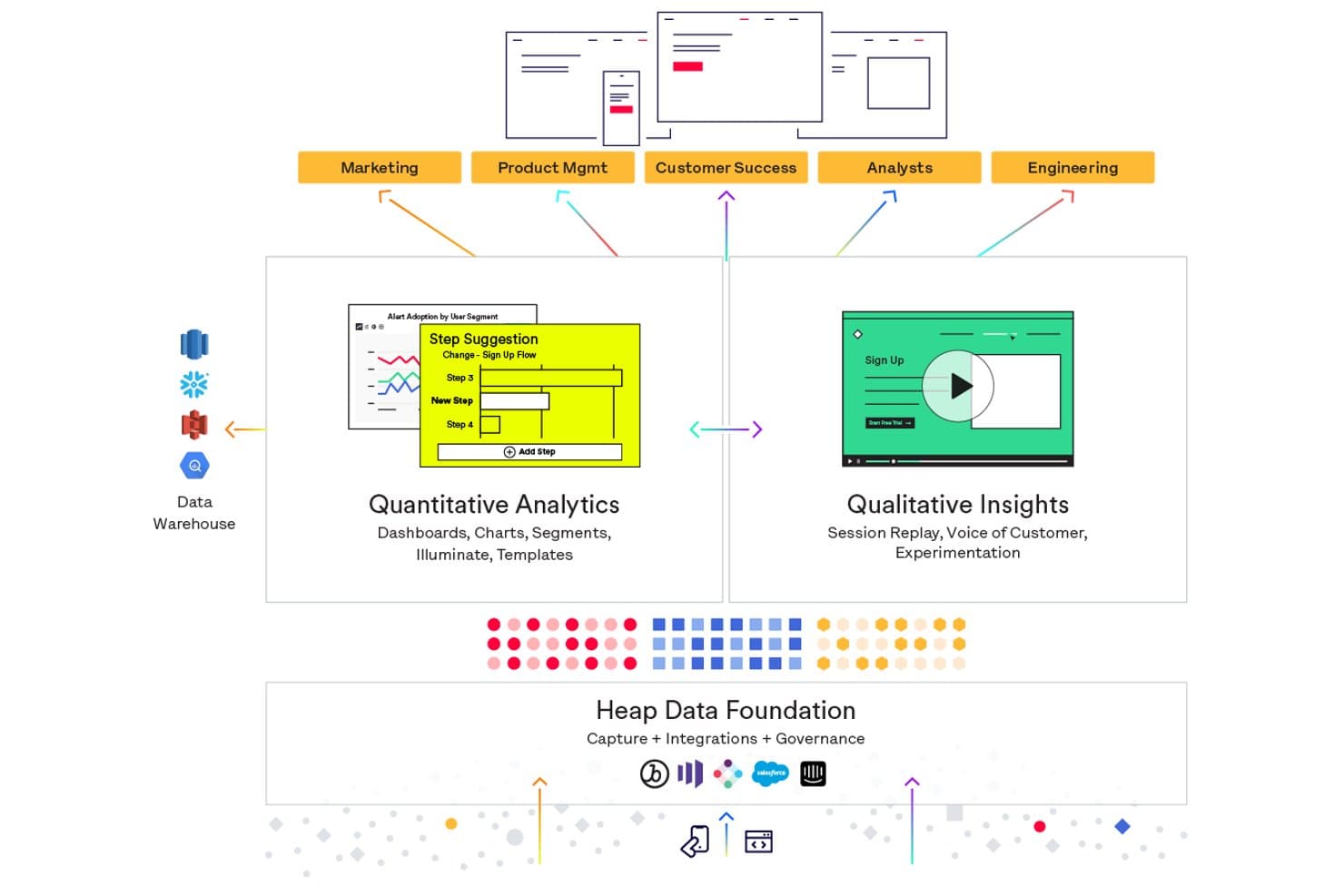
Heap unifies quantitative analytics and qualitative insights on one platform. Heap (by Contentsquare) is a product analytics platform that autocaptures every user interaction across web and mobile, letting you build funnels, journey maps, retention reports, and engagement analyses without pre-tagging events in advance.
Who Is Heap (by Contentsquare) Best For?
Heap is a strong fit for product teams that need to analyze user behavior retroactively without relying on engineers to pre-tag every event.
Why I Picked Heap (by Contentsquare)
Heap earns its spot on my shortlist because its autocapture engine records every user interaction automatically, so I can build funnels and journey maps around events that were never tagged in advance. That retroactive analysis capability means if a feature ships and adoption stalls three weeks later, I can reconstruct the full user path without waiting on engineering to instrument anything. Heap's Engagement Matrix layers on top of that by surfacing which features users actually adopt versus ignore.
Heap (by Contentsquare) Key Features
- Autocapture: Heap automatically records every user interaction on web and mobile without requiring pre-instrumented events.
- Heap Illuminate: An AI-driven layer that surfaces behavioral patterns and insights you didn't know to look for.
- Account-based analytics: Tracks product usage and adoption trends at the account level, not just the individual user level.
- Heap Activate: Pushes Heap behavioral data to third-party engagement tools to trigger email and in-app messaging campaigns.
Heap (by Contentsquare) Integrations
Heap lists integrations with Split, Statsig, Segment, Census, Userlist, Product Fruits, Userflow, Candu, CommandBar, and Intercom. Heap also offers APIs and Heap Connect for warehouse synchronization.
Pros and Cons
Pros:
- Reveals feature adoption and retention patterns
- Autocapture reduces engineering instrumentation work
- Retroactively analyzes untagged user journeys
Cons:
- Autocaptured data can overwhelm analysis
- No native in-app onboarding builder
Learn more about Heap (by Contentsquare): Best for AI-guided product adoption insights
- 14-day free trial
- From $299/month
Visit WebsiteCustomer Rating:4.7/5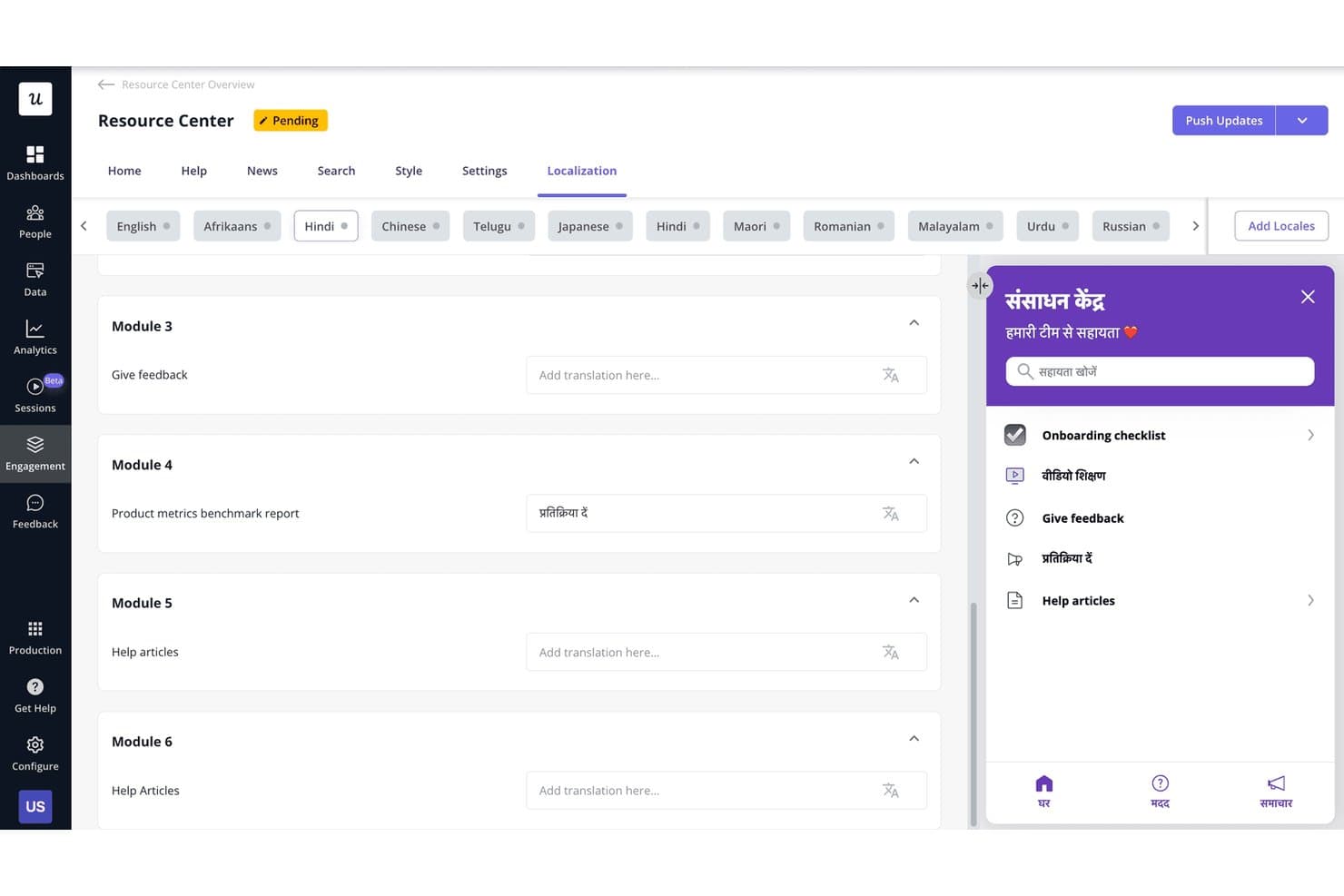
Userpilot lets users localize Resource Center content into multiple languages. Userpilot is a product-led growth platform that brings together product analytics, no-code in-app engagement, user segmentation, session replay, and feedback tools in one place.
Who Is Userpilot Best For?
Userpilot is a strong fit for product managers and product marketing managers at B2B SaaS companies who need analytics, in-app engagement, and user feedback in one place.
Why I Picked Userpilot
I picked Userpilot as one of the best because its AI Agent Lia genuinely changes how product teams interpret adoption data. Instead of manually digging through funnels and cohort reports, I can ask Lia a direct question about feature adoption and get a predictive answer in seconds. The retroactive event autocapture is also a standout for PLG workflows, since it means you're never locked out of historical analysis just because you defined a new event late.
Userpilot Key Features
- No-code in-app engagement builder: Create multi-step flows, tooltips, checklists, and banners without writing a single line of code.
- NPS and in-app surveys: Collect user feedback directly inside your product using NPS, CSAT, and custom survey formats.
- Session replay with frustration signals: Watch recorded user sessions that automatically flag rage clicks and errors tied to funnel drop-offs.
- User segmentation: Build segments from behavior, user attributes, and company data to target in-app content in real time.
Userpilot Integrations
Userpilot offers six documented native integrations, including Segment, Mixpanel, Amplitude, Heap, Intercom, and Slack. Enterprise adds HubSpot and Salesforce integrations, while Growth and above include an HTTP API and webhooks for custom connectivity.
Pros and Cons
Pros:
- No-code flows launch without engineering support
- Retroactive capture preserves missed event history
- AI answers clarify adoption trends quickly
Cons:
- Reviewers report occasional freezes and glitches
- Advanced analytics require higher-tier access
Learn more about Userpilot: Best for no-code onboarding with day-one results
- Free trial available
- Pricing upon request
Visit WebsiteCustomer Rating:4.7/5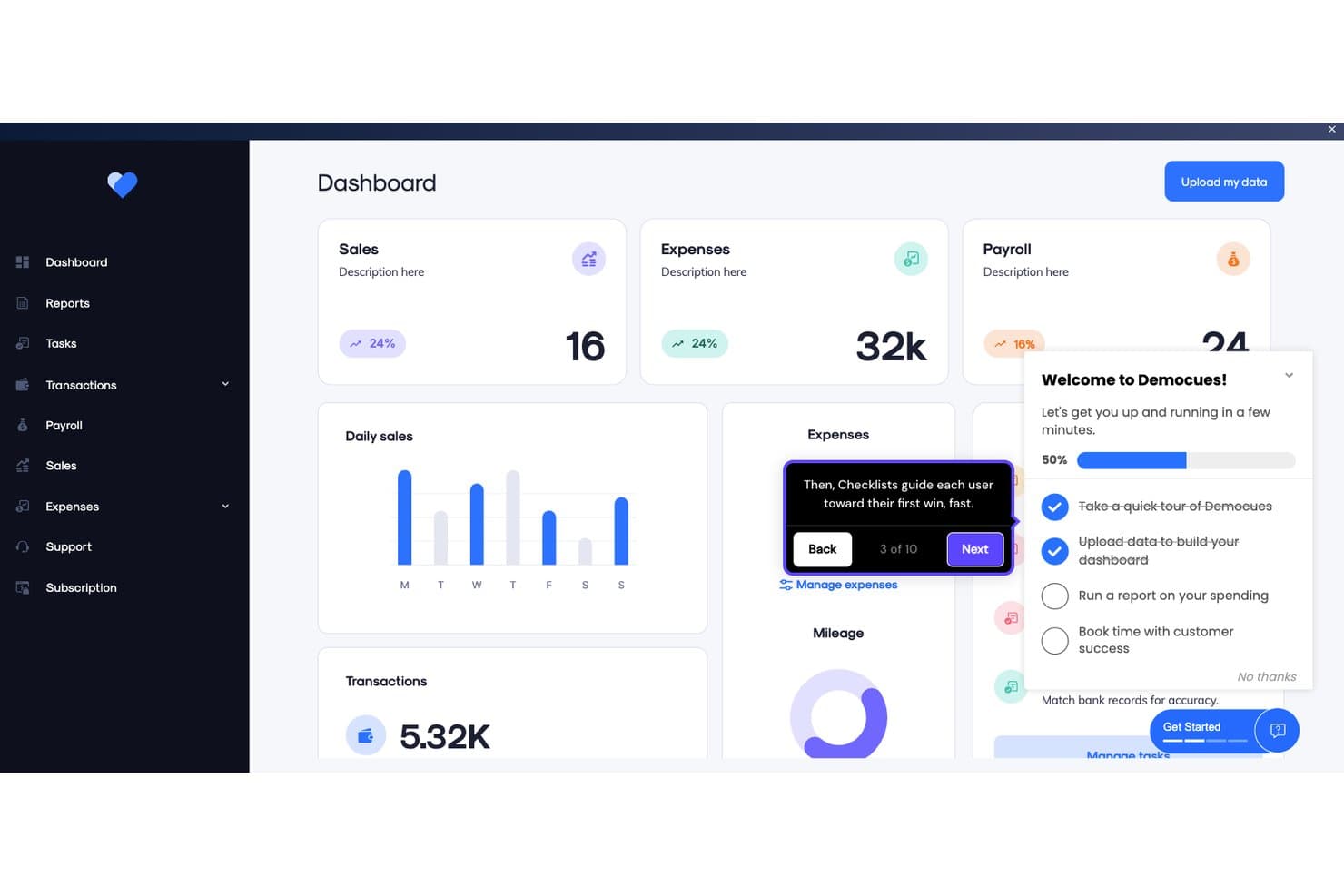
Appcues guides users through onboarding with checklists and tooltips. Appcues is a no-code product-led growth platform that combines in-app engagement tools—flows, checklists, tooltips, banners, and surveys—with product analytics and AI-assisted experience building.
Who Is Appcues Best For?
Appcues is a strong fit for product managers and product marketing managers at SaaS companies who need to launch onboarding flows and in-app experiences without pulling in engineering.
Why I Picked Appcues
I picked Appcues as one of the best because its no-code builder genuinely delivers day-one results: most teams ship their first onboarding flow within 24 hours of installation, with no engineering involvement. I love how brand assets load once and carry across every flow, checklist, and tooltip automatically. The AI drafts experiences based on your product data and flags broken links in live flows, so your onboarding stays accurate without constant manual audits.
Appcues Key Features
- Behavior-based segmentation: Target users by specific in-app actions and attributes, enriched with data from your CRM, CDP, or data warehouse.
- Email and push targeting: Trigger email and push campaigns alongside in-app experiences from one platform, using the same segmentation rules.
- Uplift analysis: Measure whether a specific experience changed user behavior for the people who saw it, compared to those who didn't.
- MCP server integration: Query live Appcues product data directly from AI tools like Claude, ChatGPT, and Cursor using natural language.
Appcues Integrations
Appcues offers native two-way integrations with Salesforce, HubSpot, Segment, Mixpanel, Heap, Intercom, and Slack for connecting product engagement with growth and revenue workflows. It also provides API and webhooks, plus Zapier.
Pros and Cons
Pros:
- Targets activation milestones with contextual experiences
- Measures uplift beyond feature adoption
- Launches onboarding without engineering
Cons:
- Session replay requires another product
- No built-in PQL scoring
Learn more about Appcues: Best for unified analytics and in-app guidance
- Free plan + free demo available
- Pricing upon request
Visit WebsiteCustomer Rating:4.5/5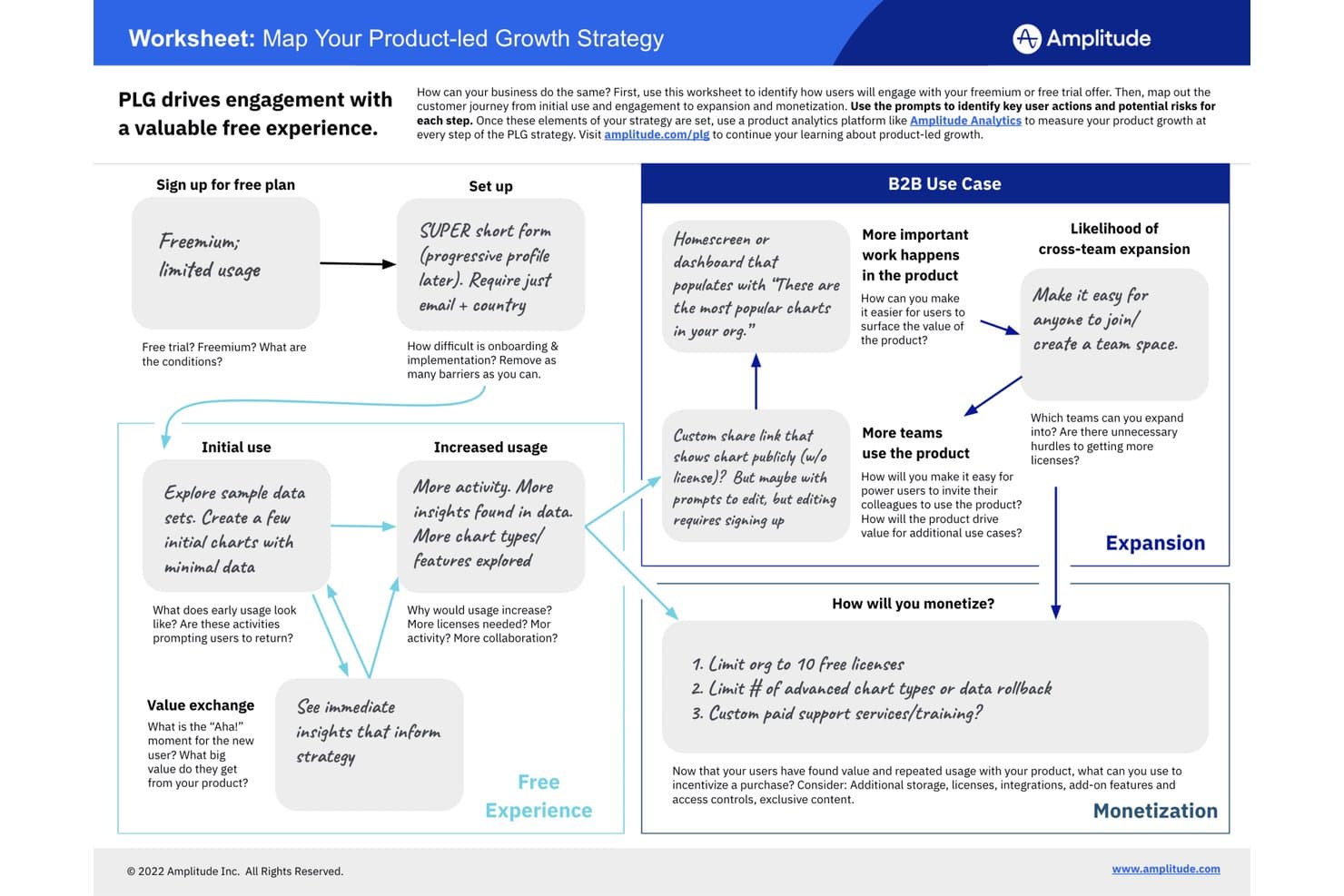
Amplitude maps PLG strategy from free sign-up to monetization. Amplitude is a product-led growth platform that combines behavioral analytics, in-app guides and surveys, session replay, heatmaps, and experimentation in a single unified toolset.
Who Is Amplitude Best For?
Amplitude is a strong fit for product teams that want a single platform to analyze user behavior, run in-app guides, and test product changes without juggling separate tools.
Why I Picked Amplitude
Amplitude earns its spot on my shortlist because it's the only tool here that lets you analyze user behavior and act on it—through in-app guides and surveys—without ever leaving the platform. I love that the same behavioral cohorts powering your funnel and retention reports can instantly trigger a targeted onboarding checklist or NPS survey for that exact user segment. In practice, that means my team can run a no-code guide, A/B test it through Amplitude Experimentation, and measure adoption lift all in one place.
Amplitude Key Features
- Behavioral cohorts: Build dynamic user segments from real-time event data and share them across analytics, guides, surveys, and experiments without any duplication.
- Session replay: Watch recorded user sessions to see exactly where users hesitate or drop off, with up to 50K replays per month on Enterprise.
- Feature experimentation: A/B test product changes and in-app guides directly within Amplitude and measure adoption impact against your existing retention and funnel data.
- Web analytics: Deploy web tracking with a single line of code to get automated insights on visitor behavior alongside your in-product event data.
Amplitude Integrations
Amplitude offers native cohort sync with HubSpot and Salesforce Marketing Cloud. These integrations connect behavioral segments with downstream marketing workflows for targeted product-led growth campaigns.
Pros and Cons
Pros:
- Session replays expose onboarding friction
- Funnels connect adoption to retention outcomes
- Shared cohorts trigger targeted in-app guidance
Cons:
- Guide allowances constrain multi-flow onboarding programs
- No native PQL scoring model
Learn more about Amplitude: Best for cross-app onboarding with AI-guided flows
- Free plan + 30-day free trial + free demo available
- Pricing upon request
Visit WebsiteCustomer Rating:4.4/5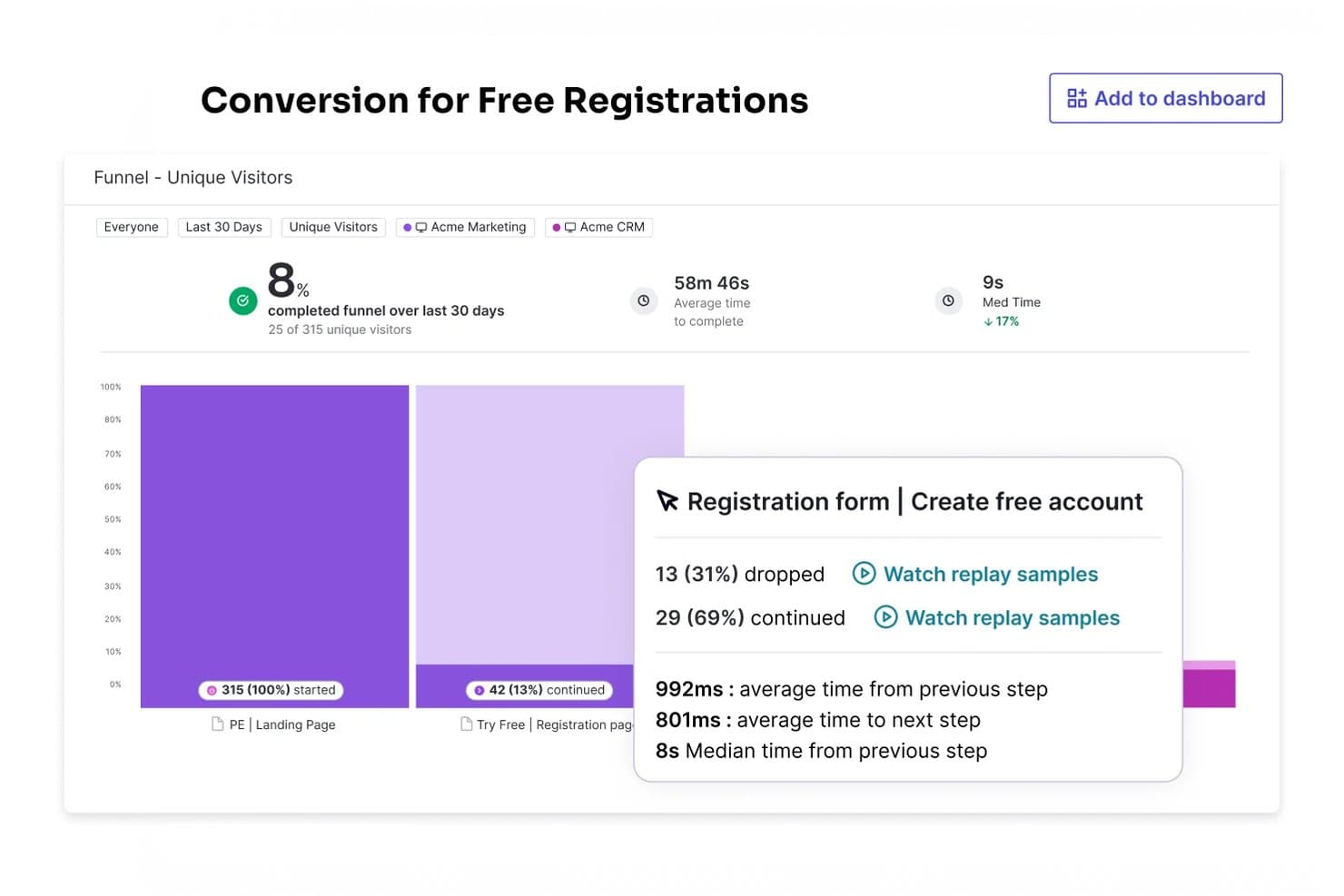
Pendo tracks funnel conversion rates to identify drop-off points. Pendo is a product-led growth platform that combines product analytics, no-code in-app guides, session replay, user segmentation, feedback collection, and AI-driven engagement tools across web and mobile apps.
Who Is Pendo Best For?
Pendo is a strong fit for product managers and customer success teams at mid-market to enterprise companies managing onboarding and retention across multiple web and mobile apps.
Why I Picked Pendo
Pendo earns its spot as one of the best on my shortlist because it handles onboarding across multiple apps without requiring a separate SDK for each one. I love that Guide Branching lets you build conditional flows that adapt in real time based on what a user actually does, so a trial user who skips a setup step sees a different path than one who completes it. Leo AI can also draft those guides from a plain-language prompt, which means my team can test and iterate on onboarding flows without waiting on engineering.
Pendo Key Features
- Product Engagement Score (PES): A single metric that combines adoption, stickiness, and growth to give you a snapshot of overall product health.
- Session replay: Records and plays back real user sessions so you can see exactly where users hesitate or drop off.
- Predict AI: An add-on that uses usage data to flag accounts at risk of churning or ready for an upsell conversation.
- Native NPS and CSAT surveys: Built-in feedback surveys that tie sentiment data directly to behavioral analytics in the same platform.
Pendo Integrations
Pendo lists 85+ integrations, including Salesforce, HubSpot, Gainsight, Intercom, Jira, Snowflake, BigQuery, Slack, and Zapier. It also offers an API and MCP server for custom connectivity and AI-assisted product data queries.
Pros and Cons
Pros:
- Retroactive analytics reveal adoption trends quickly
- Branching guides adapt to user behavior
- Cross-app onboarding supports complex product journeys
Cons:
- Predictive signals lack dedicated PQL scoring
- Manual tagging can delay implementation
Learn more about Pendo: 10Best for open-source product analytics depth
PostHog
- Free plan available
- Pricing upon request
Visit WebsiteCustomer Rating:4.5/5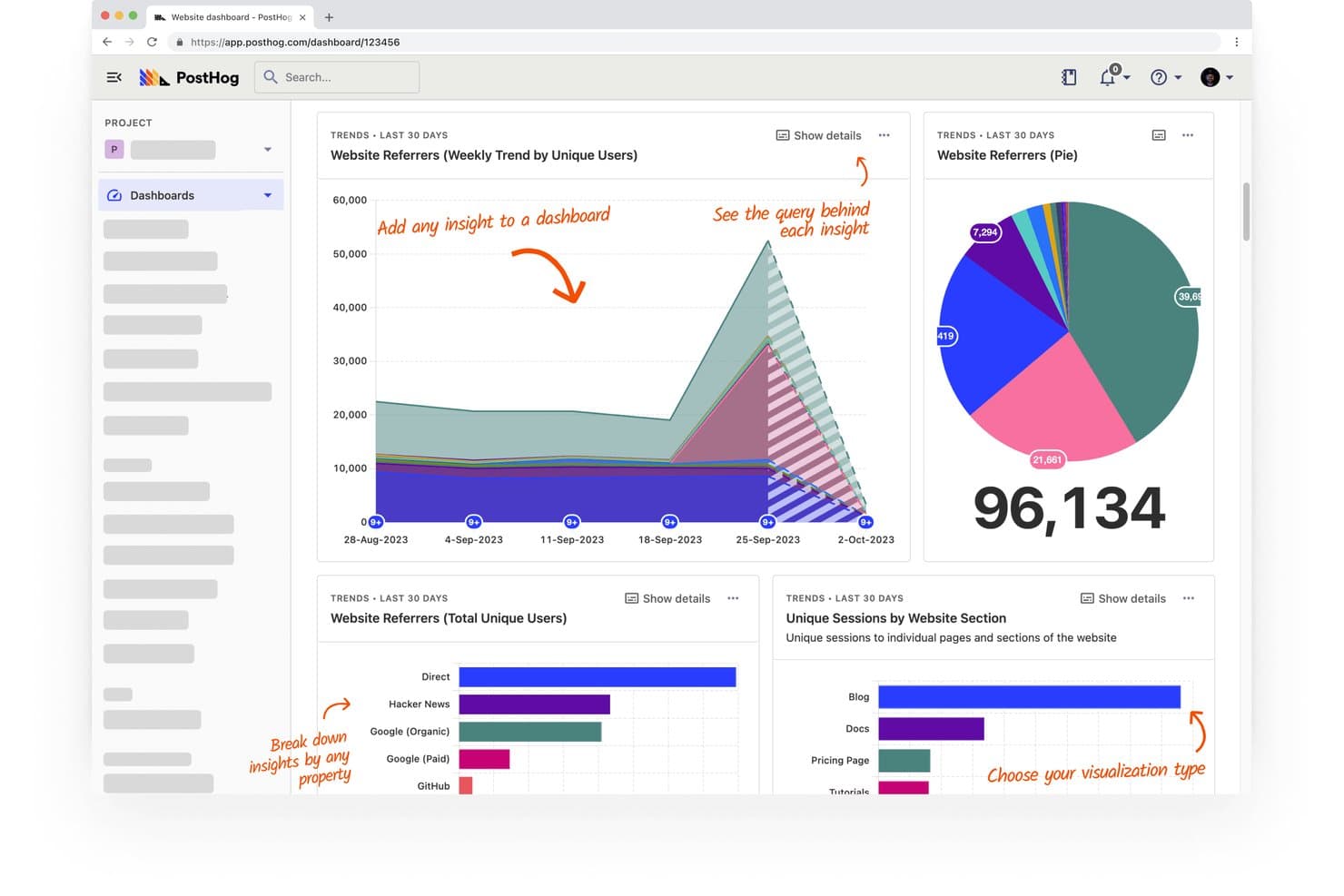
PostHog tracks website referrers and sessions across visual dashboards. PostHog is an open-source product-led growth platform that combines product analytics, session replay, feature flags, A/B testing, surveys, and a built-in CDP under one account.
Who Is PostHog Best For?
PostHog is a strong fit for technical product teams—especially those with developer resources—who want deep analytics, session replay, and experimentation in one open-source platform.
Why I Picked PostHog
PostHog earns its spot on my shortlist because of how deep the analytics go out of the box. I'm talking HogQL queries, path analysis, lifecycle reports, and stickiness metrics all in one place, which means my team can diagnose exactly where users drop off and why. I particularly like how session replays tie directly to funnel drop-off points, so instead of guessing, you're watching real users hit real friction.
PostHog Key Features
- Feature flags: Control which users see new features or changes, letting you roll out product updates to specific segments without a full release.
- A/B testing: Run built-in experiments that measure how product changes affect activation, retention, and conversion outcomes.
- NPS and feedback surveys: Collect in-product user feedback through built-in survey templates, including NPS, directly tied to behavioral data.
- CDP with 50+ destinations: Pipe behavioral data to tools like Salesforce, HubSpot, and Customer.io using real-time transformations and webhook delivery.
PostHog Integrations
PostHog’s CDP connects to 50+ destinations, including Salesforce, HubSpot, Braze, Customer.io, Vitally, Gainsight, Slack, and PagerDuty. It also connects to Snowflake and BigQuery, with real-time transformations and webhook delivery through Hog functions.
Pros and Cons
Pros:
- Cohorts power targeted experimentation and surveys
- Session replays connect friction to behavior
- Deep funnels expose activation drop-offs
Cons:
- PQL scoring requires manual signal building
- Product tours remain immature for onboarding
Learn more about PostHog:
Outro software de crescimento orientado pelo produto
Eis algumas opções adicionais de software de crescimento orientado pelo produto que não integraram a minha lista, mas que vale a pena consultar:
- 11MixpanelBest for behavioral analytics without SQL
- 12Gainsight PXBest for tying product usage to CS health scores
- 13ChartMogulBest for linking PLG funnel stages to revenue
- 14ChameleonBest for CRM-synced in-app user targeting
How I Evaluate Product Led Growth Software
I split my evaluation into three parts. Core functionality carries the most weight—I look for tools that build in-app onboarding flows and track feature-level usage. Then I consider standout features like no-code flow builders, plus factors beyond features like implementation complexity and vendor support.
Core Functionality (Table Stakes For This List)
When I'm selecting tools for my list, I score each one on a scale from 0 (does not offer the functionality) to 5 (excels in this area) for each core functionality listed below. I then convert the total into a percentage to help assess each tool's overall fit, with extra weight on any functionalities I've deemed essential.
- In-App Engagement (Essential): I evaluate whether teams can build walkthroughs, tooltips, checklists, and announcements that trigger based on user actions rather than static schedules.
- Product Usage Analytics (Essential): I look for feature-level tracking with funnel, retention, and cohort analysis—not just login counts or page views.
- User Segmentation: Segments should update dynamically based on behavior and attributes, so teams can target onboarding flows to trial users who haven't hit a key activation milestone.
- PQL Identification: I check whether the tool can flag accounts that cross usage thresholds—like repeated use of a premium feature—without requiring manual data pulls.
- Experimentation & Rollout Controls: Tools like Amplitude and Pendo approach this differently, so I evaluate whether teams can run A/B tests or phased rollouts targeted to specific user cohorts.
- Product & Revenue Integrations: I look for two-way syncs with CRM and billing platforms so usage signals flow directly into sales and success workflows.
Once I have a list of tools that meet the criteria, I consider what sets each platform apart.
Differentiating Factors (What Sets Vendors Apart)
Here's how I compare and contrast different vendors:
Standout Features
Session replays and heatmaps show exactly where users stall mid-flow, which helps me pinpoint friction that funnel charts alone miss. I also look for AI-generated insights that flag at-risk accounts or adoption anomalies without manual query work. No-code flow builders matter too—I check whether PMs can ship onboarding changes without filing engineering tickets. Pendo and Amplitude both offer visual editors, but the depth of targeting logic varies.
Beyond Features
I evaluate implementation complexity first—some platforms need weeks of SDK instrumentation before you see any data, while others let you tag events visually on day one. That gap matters when your engineering team is already stretched across product work. I also check how each vendor handles data governance, including residency options, export rights, and compliance certifications like SOC 2 or GDPR, since behavioral data often feeds directly into CRM and billing workflows. Finally, I look at how pricing scales with monthly tracked users or events, because a tool that fits at 5,000 users can become a budget problem at 50,000.
Como escolher software de crescimento orientado pelo produto
É fácil perder-se em listas extensas de funcionalidades e estruturas de preços complexas. Para o ajudar a manter-se focado enquanto analisa o seu processo único de seleção de software, eis uma lista de verificação dos fatores a ter em conta:
| Fator | O que considerar |
|---|---|
| FatorEscalabilidade | O que considerarO software acompanhará as necessidades da sua equipa à medida que estas crescem? Considere se consegue lidar com um aumento do número de utilizadores e dos dados à medida que o seu produto cresce. Procure planos flexíveis que acomodem o crescimento sem grandes aumentos de preço. |
| FatorIntegrações | O que considerarEstabelece ligação com as suas ferramentas atuais? Verifique a compatibilidade com os seus sistemas atuais, como CRM, plataformas de análise e de comunicação. Evite ferramentas que exijam demasiadas soluções alternativas ou custos adicionais. |
| FatorPersonalização | O que considerarPode adaptá-lo aos seus fluxos de trabalho? Avalie se o software permite ajustar definições, percursos dos utilizadores e relatórios para corresponder aos seus requisitos específicos. Evite sistemas rígidos que limitem a adaptabilidade. |
| FatorFacilidade de utilização | O que considerarÉ fácil de utilizar pela sua equipa? Avalie a interface do utilizador e a navegação. Uma ferramenta complexa pode tornar mais lenta a adoção e reduzir a eficiência. Procure um design intuitivo e instruções claras. |
| FatorImplementação e integração inicial | O que considerarQuanto tempo será necessário para começar a utilizá-lo? Considere o tempo e os recursos necessários para a configuração e a formação. Ferramentas com um apoio abrangente à integração inicial, como tutoriais e modelos, podem acelerar o processo. |
| FatorCusto | O que considerarEstá dentro do seu orçamento? Compare os planos de preços e as funcionalidades incluídas. Esteja atento a custos ocultos, como taxas adicionais por utilizador ou encargos pelo suporte premium. |
| FatorMedidas de segurança | O que considerarCumpre os seus requisitos de segurança? Verifique a encriptação de dados, a conformidade com normas como o RGPD e as atualizações de segurança regulares. A proteção dos dados dos utilizadores deve ser uma prioridade máxima. |
| FatorDisponibilidade do suporte | O que considerarQue opções de suporte estão disponíveis? Procure suporte 24 horas por dia, 7 dias por semana, chat em direto e uma base de conhecimento abrangente. Considere o nível de suporte de que a sua equipa necessitará e a rapidez com que os problemas podem ser resolvidos. |
O que é o software de crescimento orientado pelo produto?
O software de crescimento orientado pelo produto é uma ferramenta que ajuda a utilizar o seu produto como principal forma de atrair, converter e reter clientes. Os gestores de produto, as equipas de crescimento e os profissionais de marketing utilizam estas ferramentas para orientar os utilizadores, acompanhar o comportamento e aumentar o envolvimento — fazendo com que o próprio produto realize a maior parte do trabalho de venda e venda adicional. Isto ajuda as equipas a identificar o que mantém os utilizadores satisfeitos e faz com que o crescimento aconteça naturalmente.
Funcionalidades
Ao selecionar um software de crescimento orientado pelo produto, tenha em atenção as seguintes funcionalidades principais:
- Integração de utilizadores: Orienta os novos utilizadores ao longo do produto, melhorando a sua experiência inicial e aumentando as taxas de retenção.
- Mensagens na aplicação: Permite comunicar com os utilizadores diretamente na aplicação, disponibilizando apoio e atualizações atempados.
- Análise de utilizadores: Acompanha o comportamento e as interações dos utilizadores, fornecendo informações que podem orientar decisões e melhorias relativas ao produto.
- Recolha de feedback: Recolhe o feedback dos utilizadores através de inquéritos e sondagens, ajudando-o a compreender as necessidades e a satisfação dos utilizadores.
- Opções de personalização: Permite adaptar a experiência do utilizador de modo a estar alinhada com a sua marca e satisfazer necessidades específicas dos utilizadores.
- Capacidades de integração: Liga-se a ferramentas e plataformas existentes para criar um ecossistema tecnológico coeso.
- Medidas de segurança: Protege os dados dos utilizadores através de encriptação e do cumprimento das normas de proteção de dados.
- Escalabilidade: Suporta bases de utilizadores e volumes de dados crescentes à medida que a sua empresa se expande, sem problemas de desempenho.
- Visitas guiadas interativas ao produto: Fornece orientação passo a passo para ajudar os utilizadores a compreender e utilizar eficazmente as novas funcionalidades.
- Informações em tempo real: Disponibiliza dados e análises instantâneos, permitindo tomar decisões e efetuar ajustes rapidamente.
Benefícios
A implementação de um software de crescimento orientado pelo produto proporciona vários benefícios para a sua equipa e para a sua empresa. Eis alguns que pode esperar:
- Maior envolvimento dos utilizadores: As ferramentas de mensagens na aplicação e de integração de utilizadores mantêm os utilizadores ativos e envolvidos com o seu produto.
- Decisões baseadas em dados: A análise de utilizadores e as informações em tempo real ajudam a sua equipa a tomar decisões informadas com base no comportamento real dos utilizadores.
- Maior satisfação dos utilizadores: A recolha de feedback permite-lhe compreender e responder às necessidades dos utilizadores, conduzindo a clientes mais satisfeitos.
- Maiores taxas de retenção: Uma integração eficaz e as visitas guiadas interativas ao produto garantem que os utilizadores percebem rapidamente o valor do seu produto.
- Utilização eficiente dos recursos: As capacidades de integração ligam as suas ferramentas existentes, reduzindo a necessidade de introdução manual de dados e poupando tempo.
- Crescimento escalável: As funcionalidades de escalabilidade garantem que o seu software pode crescer com a sua empresa sem prejudicar o desempenho.
- Flexibilidade de personalização: As opções de personalização permitem-lhe adaptar as experiências dos utilizadores, alinhando-as com a identidade da marca e com necessidades específicas dos utilizadores.
Custos & preços
A seleção de um software de crescimento orientado pelo produto exige uma compreensão dos vários modelos e planos de preços disponíveis. Os custos variam consoante as funcionalidades, o tamanho da equipa, os complementos, entre outros fatores. A tabela abaixo resume os planos comuns, os respetivos preços médios e as funcionalidades normalmente incluídas nas soluções de software de crescimento orientado pelo produto:
Tabela de comparação de planos de software de crescimento orientado pelo produto
| Tipo de plano | Preço médio | Funcionalidades comuns |
|---|---|---|
| Tipo de planoPlano gratuito | Preço médio$0 | Funcionalidades comunsIntegração básica de utilizadores, análise limitada e personalização mínima. |
| Tipo de planoPlano pessoal | Preço médio$10-$30/utilizador/mês | Funcionalidades comunsFerramentas de integração melhoradas, mensagens básicas na aplicação e análise padrão. |
| Tipo de planoPlano empresarial | Preço médio$50-$100/utilizador/mês | Funcionalidades comunsAnálise avançada de utilizadores, fluxos de integração personalizáveis e integração com ferramentas de terceiros. |
| Tipo de planoPlano para empresas | Preço médio$150-$300/utilizador/mês | Funcionalidades comunsOpções de personalização completas, apoio prioritário e informações abrangentes sobre dados e funcionalidades de segurança. |
Perguntas frequentes sobre software de crescimento orientado pelo produto
Eis algumas respostas a perguntas comuns sobre software de crescimento orientado pelo produto:
Preciso de conhecimentos técnicos para utilizar software de crescimento orientado pelo produto?
Não, geralmente não precisa de conhecimentos técnicos avançados para utilizar software de crescimento orientado pelo produto. Muitas plataformas oferecem interfaces fáceis de utilizar com funcionalidades de arrastar e largar, permitindo-lhe criar fluxos de integração e analisar dados sem programação. No entanto, algumas tarefas de personalização e integração podem exigir conhecimentos técnicos básicos ou o apoio da sua equipa de TI.
Como meço o sucesso da utilização de software de crescimento orientado pelo produto?
Meça o sucesso do software de crescimento orientado pelo produto acompanhando indicadores-chave de desempenho (KPIs), como as taxas de interação dos utilizadores, as taxas de conclusão da integração e a retenção de clientes. Utilize as ferramentas de análise incluídas no software para monitorizar estas métricas ao longo do tempo. Reveja e ajuste regularmente as suas estratégias com base nos conhecimentos obtidos, de modo a melhorar continuamente o impacto do seu produto.
Que métricas devo acompanhar ao utilizar software de crescimento orientado pelo produto?
Deve acompanhar as taxas de interação, ativação, retenção e conversão. Estas métricas ajudam a compreender como os utilizadores interagem com o seu produto e em que ponto abandonam o percurso. A revisão regular destes números dá à sua equipa informações sobre a eficácia da sua estratégia de crescimento.
Que papel desempenha o sucesso do cliente numa abordagem de crescimento orientado pelo produto?
As equipas de sucesso do cliente ajudam os utilizadores a manterem-se envolvidos e a alcançarem os seus objetivos no seu produto. Analisam os padrões de utilização para identificar utilizadores que possam precisar de ajuda ou incentivo adicionais. Esta abordagem proativa cria confiança e mantém os utilizadores ativos ao longo do tempo.
Como influencia o feedback dos utilizadores as estratégias de crescimento orientado pelo produto?
O feedback dos utilizadores dá à sua equipa orientações sobre o que deve ser melhorado ou simplificado. Ao agir com base neste feedback, torna o produto mais fácil de utilizar e mais alinhado com as necessidades dos utilizadores. Este ciclo contínuo ajuda a impulsionar a adoção orgânica e o crescimento a longo prazo.