
Monday.com vs. Wrike: Comparison and Expert Reviews for 2026

Senior TPM with 10+ years shipping products and taming chaotic roadmaps.

We review tools independently, and commissions help fund our testing. See our transparency policy, our methodology, or suggest a tool.

Choosing between monday.com and Wrike often comes down to whether your team values visual, customizable boards (monday.com) or advanced workflow automation and reporting (Wrike)—and that decision can feel surprisingly high-stakes when you’re searching for product management tools that actually fit the way your team works. Both platforms promise to help you organize projects, align stakeholders, and keep priorities clear, but they take very different approaches to collaboration, task tracking, and integration. In this article, you’ll get a side-by-side look at how monday.com and Wrike stack up in real product management scenarios, so you can confidently choose the tool that matches your team’s style, scale, and goals.

Choosing between monday.com and Wrike often comes down to whether your team values visual, customizable boards (monday.com) or advanced workflow automation and reporting (Wrike)—and that decision can feel surprisingly high-stakes when you’re searching for product management tools that actually fit the way your team works. Both platforms promise to help you organize projects, align stakeholders, and keep priorities clear, but they take very different approaches to collaboration, task tracking, and integration. In this article, you’ll get a side-by-side look at how monday.com and Wrike stack up in real product management scenarios, so you can confidently choose the tool that matches your team’s style, scale, and goals.

monday AI Workspace
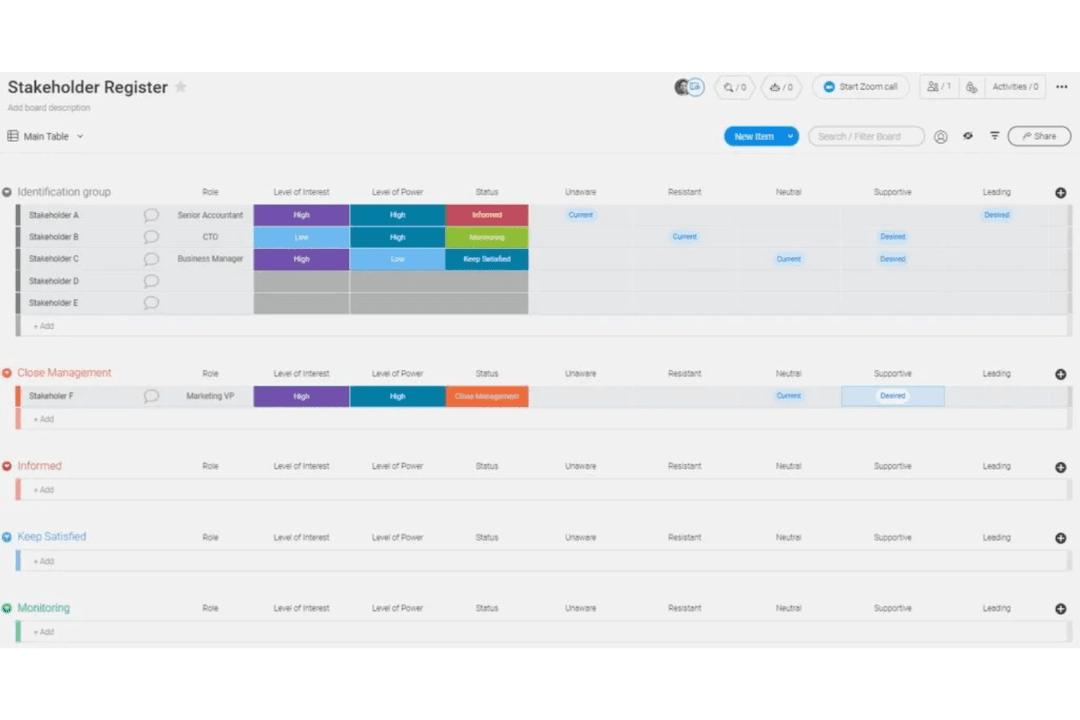
monday.com centralizes roadmaps, tasks, and team collaboration.
Customer rating

4.6/5

Pricing
  • Free plan + 14-day trial available
  • From $9/user/month (billed annually)

Wrike

Wrike's calendar view lets you see your tasks in the right context to keep things moving forward.
Customer rating

4.3/5

Pricing
  • Free plan + 14-day trial + demo available
  • From $10/user/month (billed annually)

Why Trust Our Software Recommendations

6,700+

Reviews

20

Industry experts

16+

Evaluation factors

14

Years

Our team has been testing and reviewing software since 2012. As product managers ourselves, we know how difficult—and important—it is to choose the right software.

For this guide, we evaluated tools using hands-on testing and independent research, scoring tools using our selection criteria.

Our reviews reflect our human editorial judgment, not a sales pitch.

Expert reviewers:

monday AI WorkspaceWrike
Free TrialFree plan + 14-day trial availableFree plan + 14-day trial + demo available
PricingFrom $9/user/month (billed annually)From $10/user/month (billed annually)

Monday.com vs. Wrike Pricing & Hidden Costs

Monday.com uses a tiered subscription model based on user count and feature access, with separate plans for different team sizes and needs. Wrike also offers tiered pricing, but its structure is more modular, allowing you to add paid add-ons for advanced features like analytics, integrations, or security. Both tools may introduce extra costs for premium integrations, increased storage, or advanced support, so the final price can be higher than the base subscription.

To select the right vendor, map out your team’s must-have features and estimate how your needs might grow over time. Look closely at which features are included in each plan and which require add-ons or upgrades. Consider how often you’ll need premium integrations or advanced reporting, and factor in the potential for user growth or changing workflows. This approach helps you avoid surprises and ensures you’re comparing the true long-term costs of each product management tool.

Monday.com’s customizable boards and visual dashboards help users quickly organize tasks, track progress, and adapt workflows to fit daily priorities. In contrast, Wrike’s advanced task dependencies and built-in time tracking give users more control over complex project timelines and resource allocation throughout their workday.

monday AI WorkspaceWrike
APIYesYes
Batch Permissions & AccessYesYes
BudgetingNoYes
Calendar ManagementYesYes
Collaboration SupportYesYes
Contact ManagementNoYes
Contact SharingNoNo
Customer ManagementNoNo
DashboardYesYes
DashboardsYesYes
Data ExportYesYes
Data ImportYesYes
Data VisualizationYesYes
Dependency TrackingYesYes
Document SharingYesYes
Expense TrackingNoYes
External IntegrationsYesYes
File SharingYesYes
Gantt ChartsYesYes
Kanban BoardsYesYes
Multi-UserYesYes
NotificationsYesYes
Project ManagementYesYes
Resource ManagementYesYes
SchedulingYesYes
Task Scheduling/TrackingYesYes
Third-Party Plugins/Add-OnsYesYes
Time ManagementYesYes
Travel ManagementNoNo
Workflow ManagementYesYes

IntegrationSlackmonday.com✅Wrike✅
IntegrationMicrosoft Teamsmonday.com✅Wrike✅
IntegrationGoogle Drivemonday.com✅Wrike✅
IntegrationSalesforcemonday.com✅Wrike✅
IntegrationJiramonday.com✅Wrike✅
IntegrationHubSpotmonday.com✅Wrike❌
IntegrationAdobe Creative Cloudmonday.com❌Wrike✅
IntegrationQuickBooksmonday.com✅Wrike❌
IntegrationAPImonday.com✅Wrike✅
IntegrationZapiermonday.com✅Wrike✅

Connecting monday.com with Slack lets users receive instant task updates and notifications right where they chat, keeping everyone in sync without switching tools. Wrike’s Adobe Creative Cloud integration, on the other hand, allows creative teams to review and update design files directly within their project workspace, streamlining feedback and version control.

FactorData Encryptionmonday.comUses AES-256 encryption for data at rest and TLS for data in transit.WrikeUses AES-256 encryption for data at rest and TLS for data in transit.
FactorRegulatory Compliancemonday.comOffers SOC 2 Type II, ISO 27001, GDPR, and HIPAA compliance options.WrikeOffers SOC 2 Type II, ISO 27001, GDPR, and HIPAA compliance options.
FactorUptime Guaranteemonday.comPublicly commits to 99.9% uptime with real-time status monitoring.WrikeProvides 99.9% uptime SLA and a dedicated status page.
FactorAccess Controlsmonday.comSupports SSO, 2FA, and granular permissions for user and admin roles.WrikeSupports SSO, 2FA, and advanced role-based access controls.
FactorData Residencymonday.comAllows data storage in multiple global regions for compliance needs.WrikeOffers data residency options in the US and EU for enterprise plans.

Both monday.com and Wrike deliver strong security and compliance, but Wrike’s advanced access controls and enterprise data residency options give it a slight edge for organizations with strict regulatory needs. Monday.com stands out for its transparent uptime reporting and flexible compliance certifications, while Wrike is often favored by teams that require detailed permission settings and regional data storage.

FactorUser Interfacemonday.comFeatures a colorful, drag-and-drop interface with customizable boards and views.WrikeUses a more traditional, list-based layout with advanced filtering and Gantt charts.
FactorOnboardingmonday.comOffers interactive tutorials, templates, and a guided setup for new users.WrikeProvides onboarding checklists, in-app tips, and a knowledge base for self-service.
FactorWorkflow Setupmonday.comLets users build workflows visually with automations and templates.WrikeSupports detailed workflow customization with dependencies and approval flows.
FactorSupport Accessmonday.comIncludes live chat, email, and a searchable help center for quick answers.WrikeOffers email, phone, and live chat support, plus a robust help portal.
FactorMobile Experiencemonday.comDelivers a mobile app with most desktop features and real-time notifications.WrikeMobile app supports task management, file sharing, and project updates on the go.

Monday.com is generally easier for new users to pick up, while Wrike appeals to those who want more control over complex workflows. Monday.com’s visual interface and quick-start templates make it approachable for teams of any size, but Wrike’s detailed customization and advanced project views are a better fit for users who need granular control and don’t mind a steeper learning curve.

monday AI Workspace

Pros
  • Visual boards simplify tracking product development stages
  • Built-in AI features assist with risk identification and automation
  • Fast onboarding with templates for product roadmaps and sprints
Cons
  • Complex workflows can require frequent manual board updates
  • Automation options require higher-tier plans
  • Limited advanced reporting for product analytics

Wrike

Pros
  • Gantt charts: Wrike's interactive Gantt charts provide a visual timeline of tasks and dependencies to track progress.
  • Custom workflows: Users can build custom workflows and approval processes to standardize work and ensure consistency.
  • Time tracking: The software’s built-in time tracking capabilities allow teams to log hours worked on tasks and monitor productivity.
Cons
  • Learning curve: Wrike's extensive features and customization options can take time to fully learn and configure.
  • Notifications: The high volume of notifications and updates can be overwhelming and difficult to manage.
  • Mobile app: The mobile app has limited functionality compared to the web version and can be slow or buggy.

monday AI Workspace

monday.com centralizes roadmaps, tasks, and team collaboration.
  1. Creative AgenciesVisual boards and timeline views help manage campaigns and client deliverables.
  2. Mid-Sized Tech StartupsCustomizable workflows and integrations support rapid product iteration.
  3. Marketing DepartmentsCampaign planning templates and collaboration tools fit marketing workflows.
  4. Operations TeamsAutomations and dashboards help track recurring processes and tasks.
  5. Product ManagersRoadmap templates and sprint boards support agile product development.
  6. Remote TeamsCentralized communication and file sharing streamline distributed collaboration.

Wrike

Wrike's calendar view lets you see your tasks in the right context to keep things moving forward.
  1. Marketing AgenciesWrike’s proofing, approval, and campaign tracking features support creative workflows.
  2. IT Project TeamsAdvanced task dependencies and workflow automation help manage technical projects.
  3. Product DevelopmentCustom dashboards and reporting provide visibility into product roadmaps and releases.
  4. Professional ServicesTime tracking and resource management support client billing and project delivery.
  5. Enterprise OperationsGranular permissions and audit trails meet compliance and security needs.
  6. Remote TeamsReal-time collaboration and document sharing enable distributed workforces.

Who Should Use monday.com, and Who Should Use Wrike?

Monday.com is a great fit for teams that want a visually intuitive, flexible platform—especially in creative, marketing, or fast-moving product environments where quick setup and easy collaboration matter most. Wrike is better suited for project managers and teams in IT, professional services, or enterprise settings that need advanced workflow customization, granular permissions, and detailed reporting. If your team values simplicity and rapid onboarding, monday.com is the way to go; if you need to manage complex projects with strict controls and layered approvals, Wrike is the stronger choice.

Customizationmonday AI Workspace

Highly customizable boards, columns, and dashboards.

Wrike

Deep customization of workflows, task dependencies, and permissions.

Integration Optionsmonday AI Workspace

Broad marketplace with many native integrations and open API.

Wrike

Focus on enterprise integrations and add-ons for advanced needs.

Pricingmonday AI Workspace

Tiered plans by user count and feature set.

Wrike

Modular pricing with core plans and paid add-ons for extra features.

User Interfacemonday AI Workspace

Visual, board-based layouts with color-coded elements.

Wrike

List, table, and Gantt chart views with a more traditional feel.

Workflow Automationmonday AI Workspace

Drag-and-drop automation builder with prebuilt recipes.

Wrike

Advanced automation with conditional logic and approval flows.

Collaborative Tools

Each platform includes real-time commenting, mentions, and document sharing to keep teams connected.

Mobile Accessibility

Each has a mobile app that supports task updates, notifications, and collaboration on the go.

Reporting & Analytics

Both provide customizable dashboards and reporting tools for tracking project progress and team performance.

Security Measures

Both meet high security standards with SSO, 2FA, data encryption, and compliance certifications like SOC 2 and GDPR.

Task Management

Both offer task assignment, due dates, status tracking, and file attachments, supporting daily project work.