
Jira vs. Confluence: Comparison & Expert Reviews For 2026

Senior TPM with 10+ years shipping products and taming chaotic roadmaps.

We review tools independently, and commissions help fund our testing. See our transparency policy, our methodology, or suggest a tool.

Jira offers a complete solution for managing complex projects and workflows, making it a go-to choice for teams seeking efficiency. Confluence excels in knowledge sharing and collaboration, providing a centralized space for documentation and team communication. While both tools support product management, Jira focuses on task tracking, whereas Confluence emphasizes content collaboration.

In this article, you'll discover a detailed comparison of these tools, exploring their features, pros and cons, pricing, and more, helping you choose the right product management tool for your team's needs.

Jira
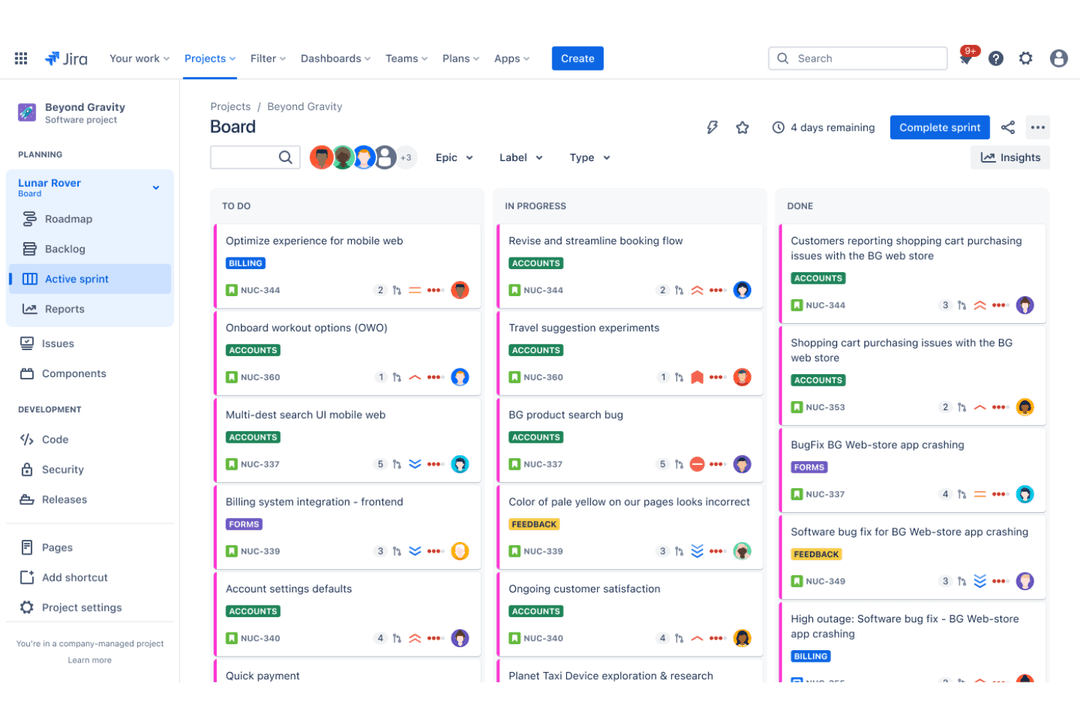
Jira helps teams plan, track, and manage product tasks in real time.
Customer rating

4.4/5

Pricing
  • Free plan + 7-day free trial available
  • From $8.48/user/month

Confluence

Confluence centralizes product docs and team collaboration.
Customer rating

4.3/5

Pricing
  • Free plan + 7-day trial available
  • From $5.78/user/month (billed annually)

Why Trust Our Software Recommendations

6,700+

Reviews

20

Industry experts

16+

Evaluation factors

14

Years

Our team has been testing and reviewing software since 2012. As product managers ourselves, we know how difficult—and important—it is to choose the right software.

For this guide, we evaluated tools using hands-on testing and independent research, scoring tools using our selection criteria.

Our reviews reflect our human editorial judgment, not a sales pitch.

Expert reviewers:

JiraConfluence
Free TrialFree plan + 7-day free trial availableFree plan + 7-day trial available
PricingFrom $8.48/user/monthFrom $5.78/user/month (billed annually)

Jira vs. Confluence Pricing & Hidden Costs

Jira pricing follows a tiered structure based on the number of users and offers additional costs for premium features like advanced security and support. Confluence pricing is also tiered, with potential extra charges for increased storage and additional integrations. To select the tool with the right pricing, assess your team's size, anticipated growth, and the specific features you'll need, comparing these against each vendor's pricing tiers and potential hidden costs. This approach ensures you pick a tool that not only fits your current budget but also scales with your team's future needs.

Jira’s drag-and-drop roadmaps enable you to visualize project timelines, which is great for planning product launches and aligning cross-functional teams. Confluence’s collaborative pages make it ideal for creating a shared knowledge base, helping teams document processes and streamline communication. While Jira excels in task tracking, Confluence shines in fostering team collaboration and knowledge sharing.

JiraConfluence
APIYesYes
Calendar ManagementYesYes
Data ExportYesYes
Data ImportYesNo
External IntegrationsYesYes
Gantt ChartsYesNo
Multi-UserYesYes
NotificationsYesYes
Project ManagementYesYes
Task Scheduling/TrackingYesYes

IntegrationGitHubJira✅Confluence✅
IntegrationSlackJira✅Confluence✅
IntegrationMicrosoft TeamsJira✅Confluence✅
IntegrationSalesforceJira✅Confluence✅
IntegrationTrelloJira✅Confluence✅
IntegrationGoogle WorkspaceJira✅Confluence✅
IntegrationFigmaJira✅Confluence❌
IntegrationAsanaJira✅Confluence❌
IntegrationAPIJira✅Confluence✅
IntegrationZapierJira✅Confluence✅

Jira software integrates directly with GitHub, letting you track code changes directly from your project board, making it invaluable for managing development tasks and ensuring smooth handoffs between team members, such as coding and project management.

Confluence's integration with Slack is great for keeping your team updated with instant notifications, ensuring everyone stays on the same page with project documentation and updates. While Jira enhances development workflows, Confluence boosts team communication and collaboration.

FactorData EncryptionJiraJira encrypts data both in transit and at rest using AES-256 standards, ensuring sensitive information remains protected.ConfluenceConfluence also uses AES-256 encryption for data at rest and TLS for data in transit.
FactorAccess ControlJiraJira offers customizable user permissions and roles, allowing you to control who accesses specific projects and data.ConfluenceConfluence provides granular permissions, letting you manage access to spaces, pages, and content.
FactorRegulatory ComplianceJiraJira supports compliance with standards like GDPR and SOC 2, providing documentation and tools to assist in audits.ConfluenceConfluence aligns with GDPR and SOC 2 requirements, offering compliance certifications and audit support.
FactorReliabilityJiraJira maintains a 99.9% uptime SLA with Premium plans, backed by heavy-duty infrastructure and monitoring.ConfluenceConfluence guarantees 99.9% uptime with continuous monitoring and redundancy measures on the Enterprise plan.

Jira and Confluence both offer strong security and compliance features, but Jira provides more extensive customization in access control. To evaluate these tools, prioritize your team's specific compliance needs, such as GDPR or SOC 2, and review each tool's documentation and support offerings to ensure they meet your security standards.

FactorUser InterfaceJiraJira’s interface is feature-rich but can be overwhelming, especially for new users navigating complex workflows.ConfluenceConfluence offers a clean and intuitive interface, making it easy to create and organize content quickly.
FactorOnboarding ExperienceJiraJira provides detailed tutorials and guides, but the learning curve can be steep due to its complexity.ConfluenceConfluence offers a straightforward onboarding process with interactive tutorials that simplify getting started.
FactorSetupJiraJira’s setup is customizable, allowing for tailored workflows but requiring more time to configure initially.ConfluenceConfluence is quick to set up with default configurations that suit most teams right out of the box.
FactorSupportJiraJira offers extensive support resources, including a community forum and detailed documentation.ConfluenceConfluence provides robust support with a dedicated help center and active community engagement.

Jira is powerful but can be challenging to master due to its complexity and steep learning curve, making it less intuitive for beginners. Confluence, on the other hand, is more user-friendly with a simpler setup and interface, which makes it easier to start using effectively right away.

Jira

Pros
  • It offers powerful Agile project management features for your team.
  • You can customize workflows to match your project's unique needs.
  • It enhances collaboration with real-time updates and tracking.
Cons
  • You might find the interface overwhelming if you're new to it.
  • It can be too complex for smaller teams or simpler projects.
  • You may experience a steep learning curve during onboarding.

Confluence

Pros
  • AI-powered search quickly surfaces relevant project information
  • Real-time collaborative editing for distributed teams
  • Rich templates for product requirements and documentation
Cons
  • Navigation can become complex in large workspaces
  • Limited workflow automation for product development processes
  • No built-in task or issue tracking features

Jira

Jira helps teams plan, track, and manage product tasks in real time.
  1. Software Development TeamsJira excels in Agile project management, making it perfect for tracking bugs and managing sprints.
  2. IT DepartmentsYou can manage incident tickets and service requests efficiently with Jira's customizable workflows.
  3. Tech StartupsJira supports rapid iteration and collaboration, essential for fast-paced startup environments.
  4. Project ManagersYou can oversee complex projects with Jira's detailed reporting and task management features.
  5. Agile CoachesJira provides tools for sprint planning and tracking, crucial for guiding Agile teams.
  6. Cross-functional TeamsJira's integrations and real-time updates enhance collaboration across different departments.

Confluence

Confluence centralizes product docs and team collaboration.
  1. Mid-Sized EnterprisesGrowing companies benefit from scalable knowledge bases and permissions control.
  2. Product Management TeamsRequirements, roadmaps, and feedback can be documented and shared in one place.
  3. Higher EducationFaculty and staff can organize curriculum, research, and committee notes.
  4. HR DepartmentsPolicy management and onboarding guides are easy to maintain and update.
  5. Consulting FirmsCentralized client documentation and project wikis streamline knowledge transfer.
  6. Software Development TeamsConfluence supports detailed documentation, version history, and integration with code repositories.

Who Should Use Jira, and Who Should Use Confluence?

In my opinion, Jira is most suitable for development teams and project managers who need detailed task tracking and workflow customization, especially in tech-heavy industries. Confluence, on the other hand, is ideal for teams focused on documentation and collaboration, like HR or marketing, where sharing knowledge and content is key.

From my perspective, if your team thrives on structured project management, go with Jira. If collaboration and easy access to information are your priorities, Confluence is the better choice.

AutomationJira

Workflow automation for user stories, epics, and DevOps tasks.

Confluence

Basic automation for page updates, team calendars, and notifications.

Core FunctionalityJira

Issue tracking and Agile project management for software development teams.

Confluence

Wiki and collaboration tool for docs, meeting notes, and knowledge sharing.

IntegrationsJira

Connects with GitHub, CI/CD, and Jira Service Management.

Confluence

Works with Slack, content management tools, and marketing team workflows.

Pricing ModelJira

Tiered pricing based on users and premium features like automation.

Confluence

Confluence also follows a tiered model but focuses on storage and integration options.

User InterfaceJira

Feature-rich interface for dashboards, scrum, kanban boards, and Jira issues.

Confluence

Simple layout for project planning, Confluence pages, and content management.

App Ecosystem

Both Jira and Confluence are part of Atlassian products, supporting unified work management.

Collaboration

Both platforms support team collaboration, with Jira focusing on project tasks and Confluence on document sharing.

Customization

Both allow plugins, macros, and integrations for project management software and docs..

Security

They both offer strong security measures to protect your team's data. AES-256 encryption, access control, and compliance certifications.

Support

Jira and Confluence provide extensive support resources, including docs, forums, and community support for stakeholders and teams.