

Enquanto gestor de produto, está constantemente a tentar compreender como os utilizadores se comportam, onde o seu produto fica aquém e o que irá realmente impulsionar o crescimento. As ferramentas de análise da Web são essenciais para isso. No entanto, o Heap pode nem sempre ser a opção certa. Talvez lhe faltem funcionalidades importantes ou simplesmente não funcione da forma de que a sua equipa precisa.
Na minha experiência, sair da escolha predefinida conduz frequentemente a ferramentas mais alinhadas com os seus objetivos reais. Foi por isso que testei e analisei várias alternativas ao Heap para o ajudar a encontrar uma opção mais adequada.
Neste artigo, vou apresentar-lhe as melhores alternativas ao Heap, explicando aquilo que cada uma faz bem e onde se destaca. No final, terá uma ideia clara de qual é a ferramenta que faz mais sentido para a sua equipa e o seu produto.
O que é o Heap?
O Heap é uma ferramenta de análise da Web que capta automaticamente as interações dos utilizadores no seu site ou aplicação. É habitualmente utilizada por gestores de produto, profissionais de marketing e analistas de dados, fornecendo-lhes informações valiosas sobre o comportamento e o envolvimento dos utilizadores.
As funcionalidades de recolha automática de dados, análise em tempo real e segmentação de utilizadores ajudam-no a compreender como os utilizadores interagem com o seu produto, facilitando a otimização da experiência do utilizador e o crescimento. O Heap fornece informações acionáveis para capacitar a sua equipa a tomar decisões baseadas em dados.
Tabela de comparação das alternativas ao Heap
Esta tabela de comparação resume as informações de preços das minhas principais alternativas ao Heap.
| Tool | Best For | Trial Info | Price | ||
|---|---|---|---|---|---|
| 1 | Best for revenue-impact friction analysis | Free demo available | Pricing upon request | Website | |
| 2 | Best for funnel analysis | Free plan available | From $120/month (billed annually) | Website | |
| 3 | Best for behavioral user journey playback | Free plan available | Pricing upon request | Website | |
| 4 | Best for AI-powered insights | Free plan + free demo available | Pricing upon request | Website | |
| 5 | Best for mobile app behavioral analytics | Free demo + 14-day free trial available | Pricing upon request | Website | |
| 6 | Best for compliance-ready digital experience capture | Free demo available | Pricing upon request | Website | |
| 7 | Best for no-code solutions | Free plan + 30-day free trial + free demo available | Pricing upon request | Website | |
| 8 | Best for customer success analytics | Free demo available | Pricing upon request | Website | |
| 9 | Best for product engineers | Free plan available | Pricing upon request | Website | |
| 10 | Best for user experience analytics | Free plan + free demo + 15-day free trial available | From $39/month (billed annually) | Website |


Why Trust Our Software Recommendations
6,700+
Reviews
20
Industry experts
16+
Evaluation factors
14
Years
Our team has been testing and reviewing software since 2012. As product managers ourselves, we know how difficult—and important—it is to choose the right software.
For this guide, we evaluated tools using hands-on testing and independent research, scoring tools using our selection criteria.
Our reviews reflect our human editorial judgment, not a sales pitch.
Expert reviewers:
- Andrew LumbySenior TPM
- Cristiano ValimSenior UI/UX Lead


Análises das melhores alternativas ao Heap
Apresentamos abaixo os meus resumos detalhados das melhores alternativas ao Heap que foram incluídas na minha lista. As minhas análises oferecem uma visão detalhada das principais funcionalidades, vantagens e desvantagens, integrações e casos de utilização ideais de cada ferramenta, para o ajudar a encontrar a melhor opção para si.
 Best for revenue-impact friction analysis
- Free demo available
- Pricing upon request
Visit WebsiteCustomer Rating:4.7/5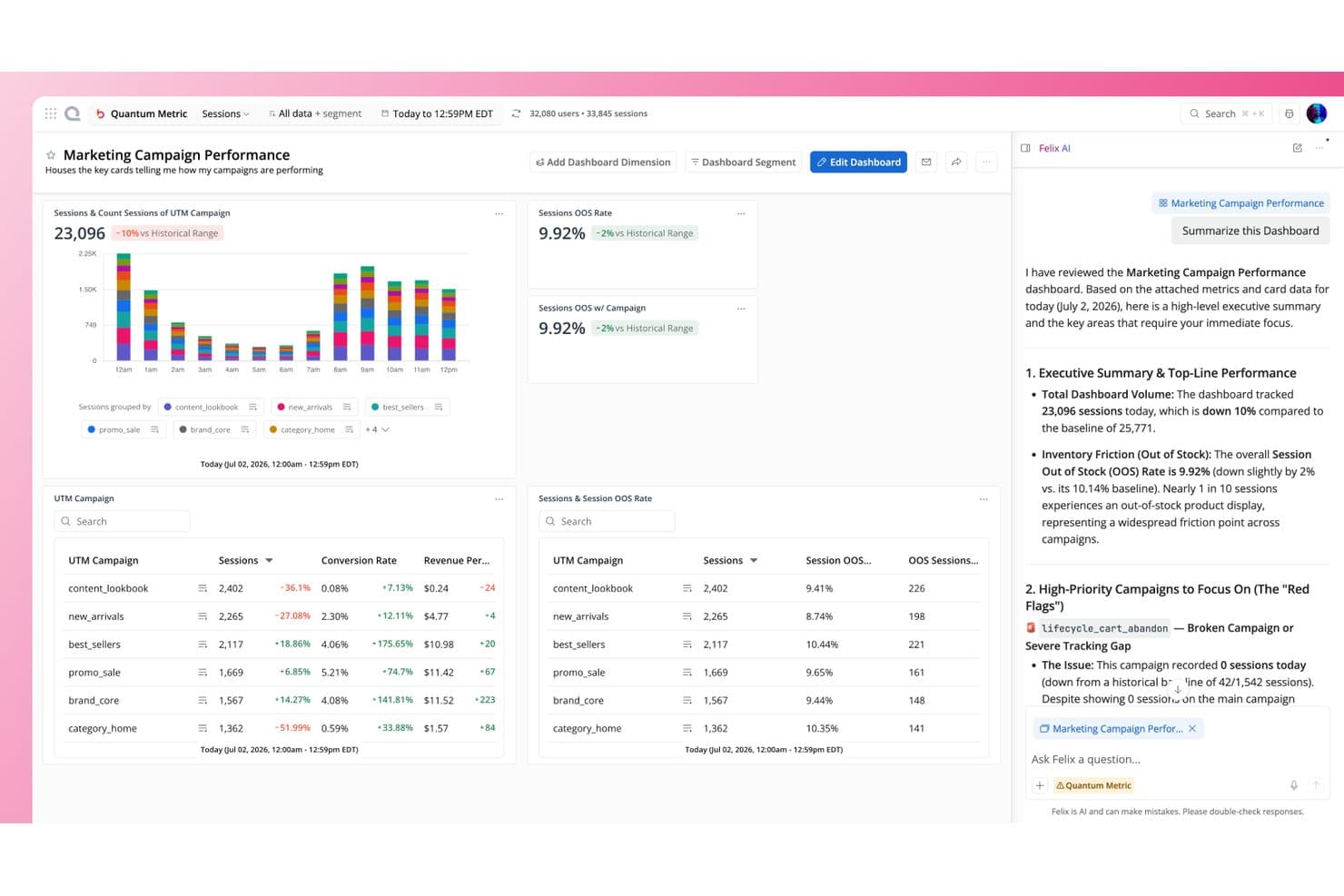
Quantum Metric's Felix AI summarizes campaign dashboard insights instantly. Quantum Metric is a product analytics and digital experience platform for product, UX, and ecommerce teams that need to uncover customer friction, understand user behavior, and improve digital journeys.
Who Is Quantum Metric Best For?
Product, UX, and ecommerce teams that need to connect digital friction with conversion and revenue outcomes.
Why Quantum Metric Is a Good Best Heap Alternatives
I picked Quantum Metric because its revenue-impact friction analysis connects customer struggles with conversion and revenue outcomes. I use session replay and journey analysis to see where users abandon checkout, encounter errors, or hesitate. That context helps my team prioritize product fixes by their measurable business impact.
Quantum Metric Key Features
- Real-time analytics: Monitor digital activity and performance as it happens.
- Technical issue detection: Identify broken links, incorrect promo codes, and other errors.
- Custom dashboards: Create shared views for product, marketing, technology, and analytics teams.
- Engagement analytics: Analyze user engagement and retention across digital experiences.
Quantum Metric Integrations
Quantum Metric offers integrations with Optimizely, Qualtrics, Slack, and more, connecting behavioral data, session replays, feedback, and performance insights. It also provides a RESTful API for custom integrations.
Pros and Cons
Pros:
- Reveals abandonment causes through session replay
- Pinpoints errors during live customer journeys
- Connects friction to revenue outcomes
Cons:
- Interface can feel clunky for newcomers
- Some users struggle locating session replays
Learn more about Quantum Metric: Best for funnel analysis
- Free plan available
- From $120/month (billed annually)
Visit WebsiteCustomer Rating:4.5/5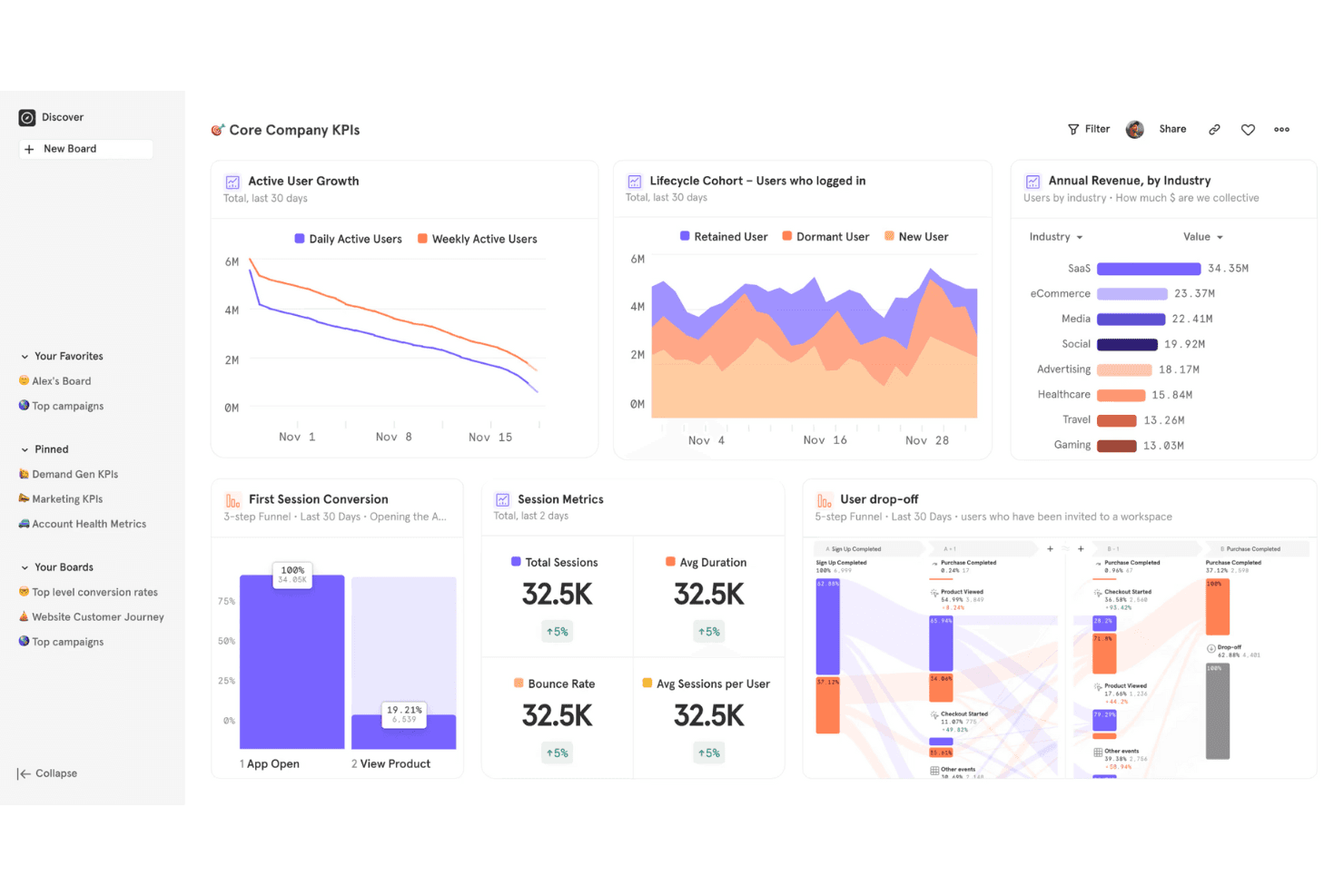
Mixpanel monitors funnels and user actions to improve product conversion paths. Mixpanel is a product analytics platform for product teams that need event-based insights into user behavior, retention, and conversion to guide prioritization and improve digital products.
Who Is Mixpanel Best For?
Product managers at SaaS and digital businesses who need to diagnose drop-off across signup, activation, and purchase journeys.
Why Mixpanel Is a Good Best Heap Alternatives
I picked Mixpanel because it’s built for funnel analysis across signup, activation, and purchase journeys. I use event-based funnels to identify where users drop off, then compare conversion rates across cohorts, devices, or acquisition sources. Its retention reports help connect funnel behavior with longer-term product outcomes.
Mixpanel Key Features
- Custom dashboards: Combine reports into shared product analytics views.
- User profiles: Inspect individual users’ activity and properties.
- Group analytics: Analyze behavior across accounts, teams, or organizations.
- Data integrations: Connect Mixpanel with warehouses and business tools.
Mixpanel Integrations
Mixpanel offers native warehouse connectors for Snowflake, Google BigQuery, Amazon Redshift, and Databricks, plus integrations with tools such as Customer.io and Zapier. It also provides APIs and data pipelines for custom integrations and exports to destinations such as Amazon S3 and Azure Blob Storage.
Pros and Cons
Pros:
- Retention reports link behavior to outcomes
- Group analytics connects users with accounts
- Funnel reports compare conversion across cohorts
Cons:
- Some analyses require manual report configuration
- Event tracking requires deliberate instrumentation planning
 Best for behavioral user journey playback
- Free plan available
- Pricing upon request
Visit WebsiteCustomer Rating:4.5/5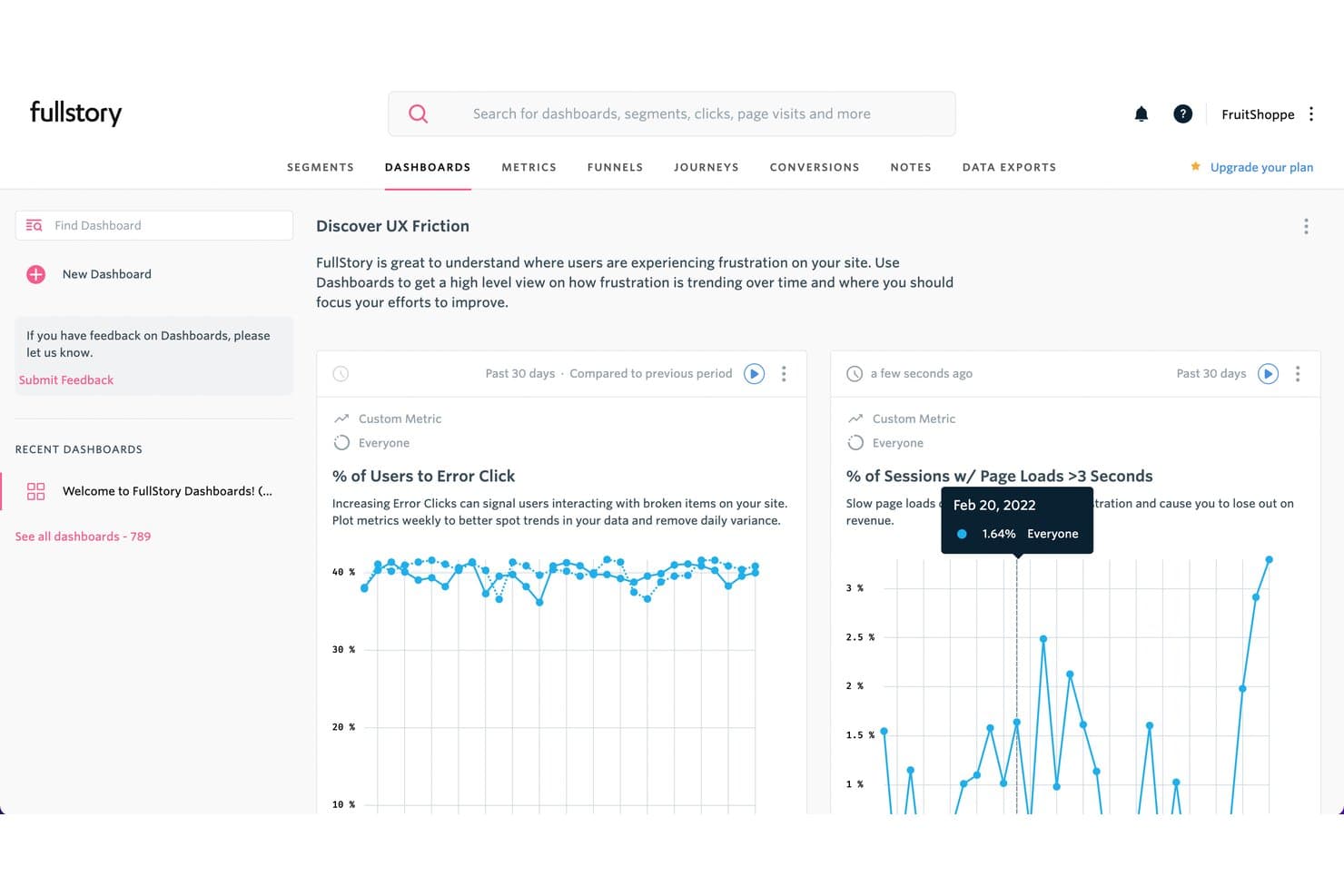
Fullstory tracks UX friction with error clicks and page load dashboards. Fullstory is a product analytics platform for product and UX teams that helps identify user friction, understand feature adoption, and improve digital experiences across web and mobile products.
Who Is Fullstory Best For?
Product and UX teams that need to replay behavioral user journeys and identify friction across web and mobile experiences.
Why Fullstory Is a Good Best Heap Alternatives
I picked Fullstory because it pairs behavioral user journey playback with session replay and frustration signals. I use these views to trace where users abandon onboarding, encounter rage clicks, or struggle with a feature. Its event-based funnels help connect those playback findings to drop-off patterns and product decisions.
Fullstory Key Features
- Heatmaps: Generate click, scroll, and movement heatmaps for pages and screens.
- Event autocapture: Capture interactions without manually tagging every element.
- Privacy controls: Mask text, inputs, and page elements before capture.
- Data integrations: Connect Fullstory with tools such as Jira, Slack, and Segment.
Fullstory Integrations
Fullstory offers integrations with Jira, Slack, and Segment, helping product teams connect behavioral insights with issue tracking, team communication, and data workflows.
Pros and Cons
Pros:
- Links frustration signals to funnel drop-offs
- Captures interactions without extensive event planning
- Replays complete user journeys across devices
Cons:
- Privacy masking requires careful implementation
- Replay volume can increase analysis noise
Learn more about Fullstory: Best for AI-powered insights
- Free plan + free demo available
- Pricing upon request
Visit WebsiteCustomer Rating:4.5/5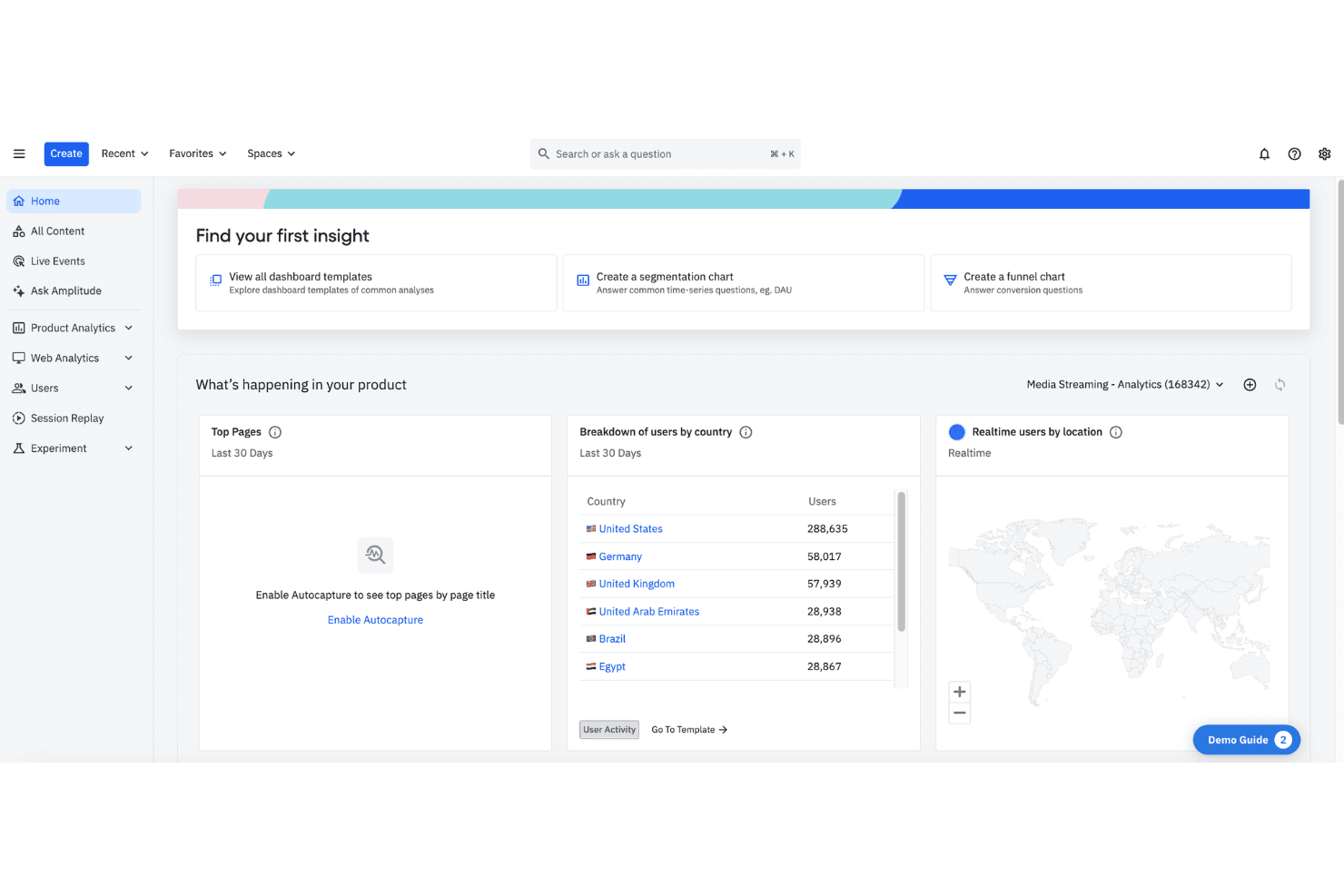
Amplitude uses AI data to predict user behavior and reveal growth patterns. Amplitude is a product analytics platform for product teams that helps businesses understand customer behavior, measure adoption and retention, and prioritize improvements across digital experiences.
Who Is Amplitude Best For?
Product teams that need AI-assisted behavioral analysis to uncover user trends, measure adoption, and guide product decisions.
Why Amplitude Is a Good Best Heap Alternatives
I picked Amplitude because its AI-powered insights help me investigate product behavior without digging through every report manually. I use AI-assisted analysis to spot retention changes, identify adoption patterns, and summarize what’s happening across user segments. When activation drops, I can turn behavioral data into a focused product question and guide the next decision.
Amplitude Key Features
- Funnel analysis: Compare conversion rates across defined product steps.
- Cohort creation: Group users by shared behaviors or attributes.
- Session replay: Review recordings of individual user sessions.
- Event tracking: Capture interactions across web and mobile products.
Amplitude Integrations
Amplitude lists multiple integrations, including Segment, Braze, Salesforce, HubSpot, Snowflake, BigQuery, Google Analytics 4, Slack, LaunchDarkly, and Amazon S3. It also connects with Zapier and provides APIs, webhooks, and an Integration Portal for custom connections.
Pros and Cons
Pros:
- Session replay connects trends with user behavior
- Funnel and cohort analysis support product decisions
- AI surfaces retention and adoption changes
Cons:
- Advanced analysis takes practice to interpret confidently
- Reports can require substantial event planning
Learn more about Amplitude: Best for mobile app behavioral analytics
- Free demo + 14-day free trial available
- Pricing upon request
Visit WebsiteCustomer Rating:4.6/5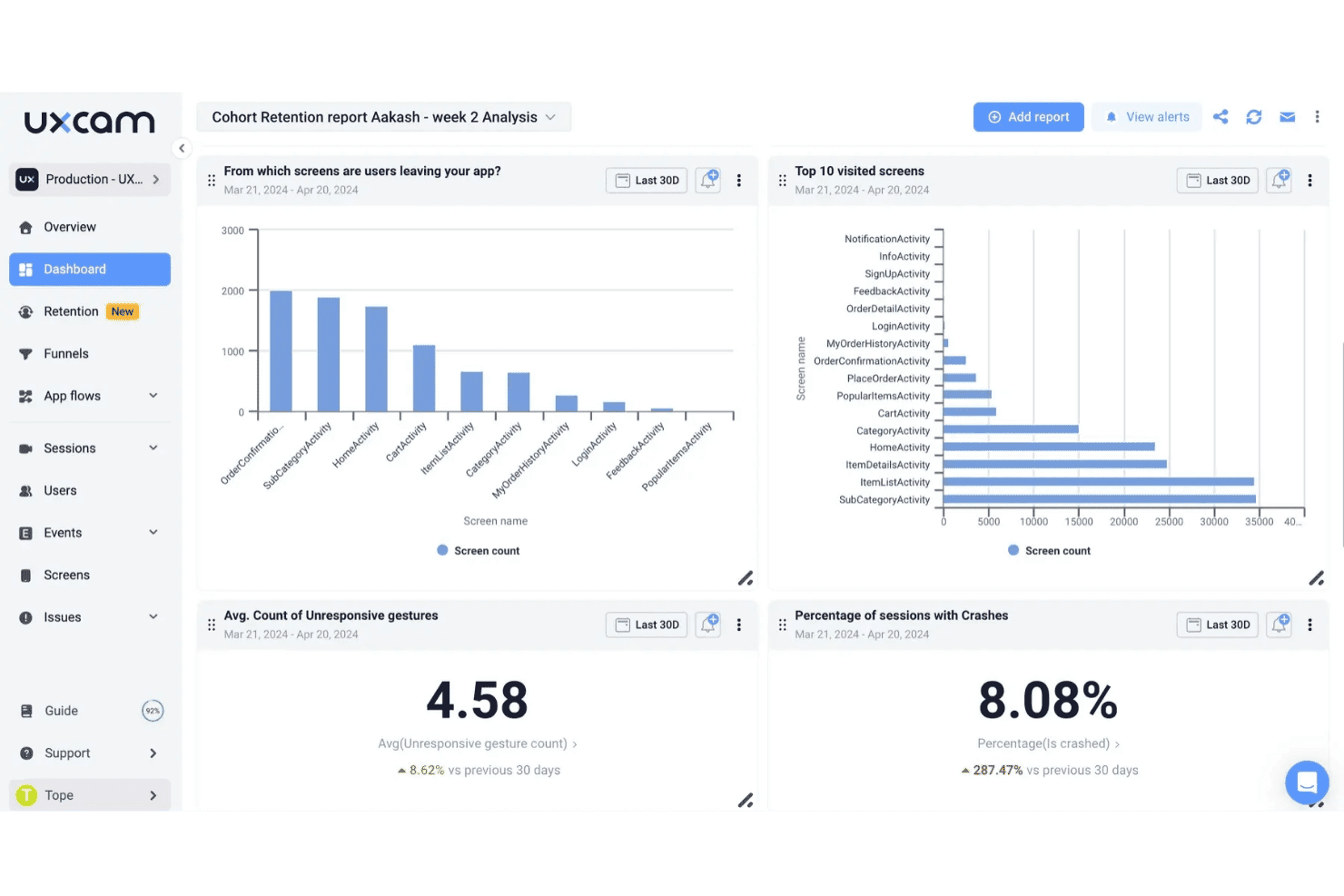
UXCam tracks screen exits, visits, crashes, and gestures in one dashboard. UXCam is a product analytics platform for mobile product teams that captures user journeys and interaction patterns, helping them diagnose friction, validate app decisions, and improve retention.
Who Is UXCam Best For?
UXCam suits mobile product managers and UX teams that need behavioral data to uncover app friction and guide product improvements.
Why UXCam Is a Good Best Heap Alternatives
I picked UXCam because it gives my team mobile app behavioral analytics through session replays and touch heatmaps. We use rage-tap detection and screen-level insights to find where users abandon onboarding or struggle with checkout. I value the context behind funnel drops, not just the event counts.
UXCam Key Features
- Event analytics: Track custom in-app events and compare user actions.
- Funnel analysis: Build funnels to identify conversion and drop-off points.
- Retention analysis: Measure how user groups return to your app over time.
- User segmentation: Create segments using behavior, device, and user properties.
UXCam Integrations
UXCam supports integrations with Amplitude, Segment, Mixpanel, Firebase Crashlytics, Firebase Google Analytics, Salesforce, Intercom, and Survicate. It also provides a Data Access API for exporting raw and aggregated data to custom reports, data warehouses, and other analytics tools.
Pros and Cons
Pros:
- Heatmaps and rage taps expose mobile friction
- Connects funnel drop-offs directly to session replays
- Automatically captures taps, swipes, and screen transitions
Cons:
- Dashboard filtering can feel cluttered and difficult
- Some users report occasional video access issues
Learn more about UXCam: Best for compliance-ready digital experience capture
- Free demo available
- Pricing upon request
Visit WebsiteCustomer Rating:4.7/5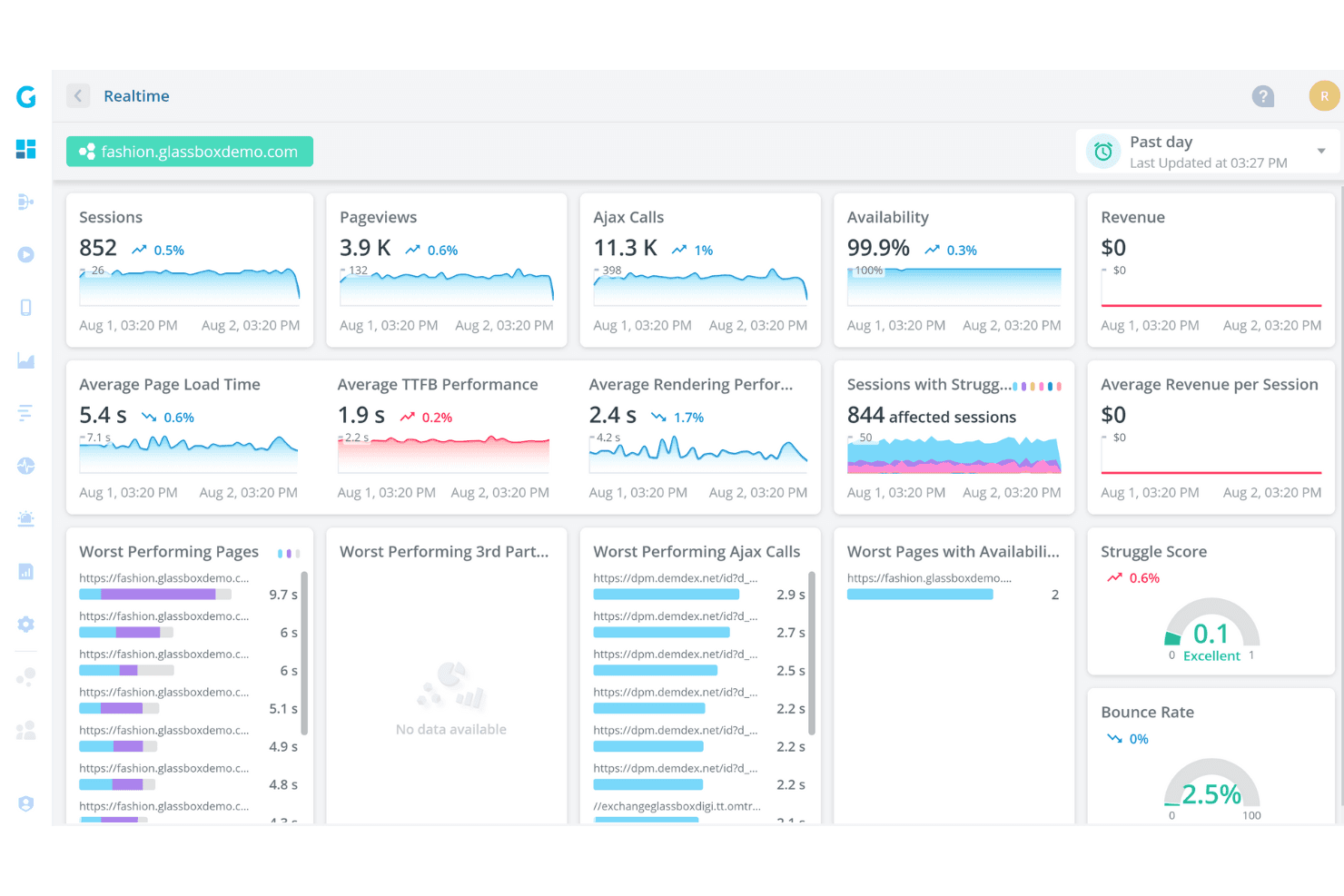
Glassbox captures user journeys with compliance-ready session replay technology. Glassbox is a digital experience analytics platform for product, UX, and customer support teams that captures user interactions to reveal friction, diagnose drop-offs, and improve web and mobile experiences.
Who Is Glassbox Best For?
Glassbox suits product, UX, and compliance teams in regulated industries that need secure, audit-ready records of digital customer interactions.
Why Glassbox Is a Good Best Heap Alternatives
I picked Glassbox because I value its compliance-ready digital experience capture. My team uses interaction records to investigate friction, trace drop-offs, and review customer journeys across web and mobile experiences. Its secure, audit-ready records also help product and compliance teams examine what happened during sensitive customer interactions.
Glassbox Key Features
- Session replay: Replays anonymized customer sessions with interaction detail.
- Heatmaps: Visualizes clicks, taps, scrolling, and page engagement.
- Journey analysis: Maps paths across screens, pages, and conversion steps.
- Error detection: Identifies technical errors affecting digital experiences.
Glassbox Integrations
Glassbox documents native integrations with Adobe Analytics, Google Analytics, Google Tag Manager, Adobe Launch, Tealium, Qualtrics, Jira, Slack, Firebase, and Optimizely. It also provides an open API for custom integrations and connecting other third-party solutions.
Pros and Cons
Pros:
- Connects technical errors with user friction
- Supports audit-ready customer journey investigations
- Captures detailed web and mobile interactions
Cons:
- Analysis may require specialized digital analytics expertise
- Pricing transparency is limited for evaluation
Learn more about Glassbox: Best for no-code solutions
- Free plan + 30-day free trial + free demo available
- Pricing upon request
Visit WebsiteCustomer Rating:4.4/5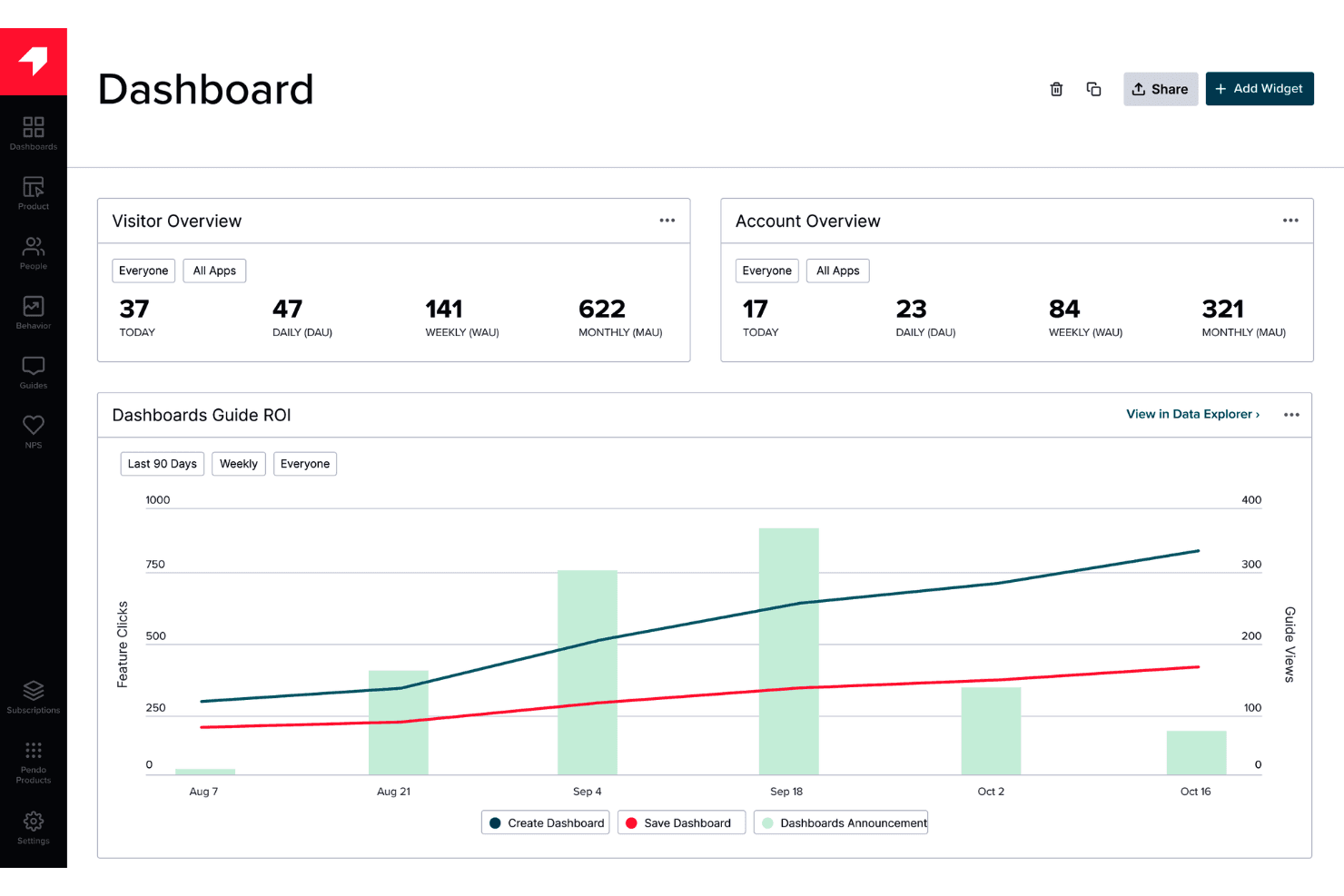
Pendo provides in-app guidance and feedback without requiring engineering work. Pendo is a product analytics and digital adoption platform for product teams that need to understand user behavior, improve feature adoption, and connect customer feedback with product decisions.
Who Is Pendo Best For?
Product managers and customer success teams at SaaS companies can use Pendo to guide users, collect feedback, and analyze adoption without writing code.
Why Pendo Is a Good Best Heap Alternatives
I picked Pendo because its no-code product analytics lets my team build funnels, paths, and retention reports without engineering support. I also use in-app Guides to connect behavioral findings with targeted onboarding, such as prompting users who abandon a key setup step.
Pendo Key Features
- NPS surveys: Create in-app surveys to measure customer sentiment and loyalty.
- In-app polls: Ask targeted questions and collect responses within your product.
- Resource Center: Provide users with centralized guides, help content, and support resources.
- Product roadmap: Share planned features and collect feedback on roadmap items.
Pendo Integrations
Pendo supports documented integrations with Salesforce, HubSpot, Slack, Jira, Zendesk, Confluence, Amazon S3, Google Cloud Storage, and Algolia. It also supports custom integrations through APIs and webhooks, plus Zapier.
Pros and Cons
Pros:
- Feedback tools inform roadmap decisions
- Guides connect behavioral insights to onboarding
- No-code tracking supports self-serve analysis
Cons:
- Some reports need manual configuration
- Data filtering options can feel limited
Learn more about Pendo: Best for customer success analytics
- Free demo available
- Pricing upon request
Visit WebsiteCustomer Rating:4.4/5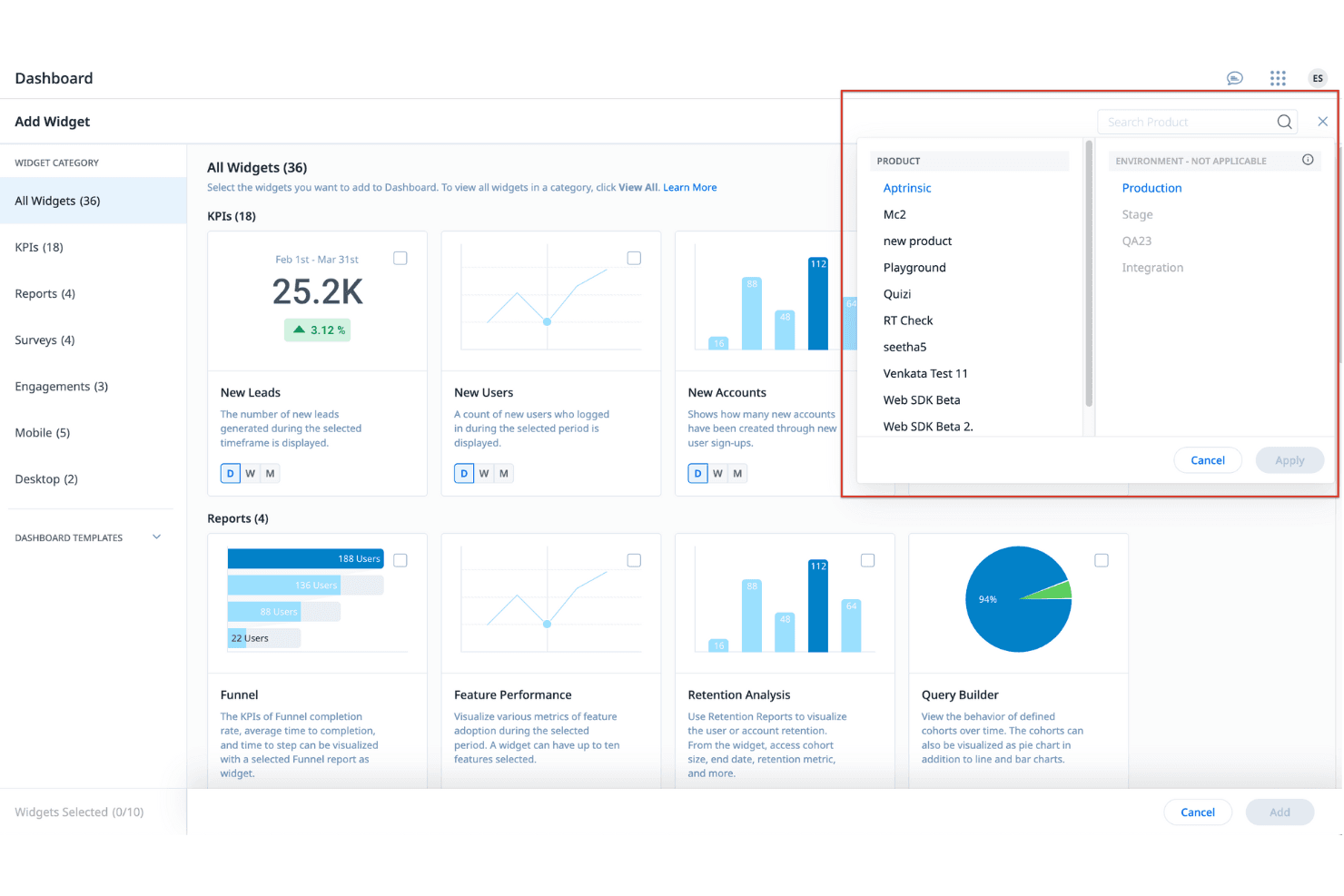
Gainsight tracks customer health and retention across the full lifecycle. Gainsight is a customer success platform for product, customer success, and revenue teams that connects product usage, customer health, and engagement data to improve adoption, retention, and expansion decisions.
Who Is Gainsight Best For?
Gainsight suits customer success teams at growing SaaS companies that need customer health insights to guide retention and expansion decisions.
Why Gainsight Is a Good Best Heap Alternatives
I picked Gainsight because its customer success analytics connect product usage data with health scores and engagement signals. I use these insights to spot declining adoption, identify at-risk accounts, and guide product improvements. Its lifecycle management tools also help my team turn usage patterns into targeted onboarding and expansion actions.
Gainsight Key Features
- Success plans: Create milestones, tasks, and outcomes for individual accounts.
- Playbooks: Standardize repeatable customer success workflows.
- Surveys: Send NPS and feedback surveys to collect customer responses.
- Reporting dashboards: Build reports for teams, segments, and business metrics.
Gainsight Integrations
Gainsight offers marketplace integrations with Salesforce, Zendesk, Jira, Slack, Intercom, ServiceNow, Segment, Mixpanel, Google Analytics, and Zapier. It also provides REST APIs for custom integrations.
Pros and Cons
Pros:
- Provides account-level success plans and reporting
- Supports repeatable playbooks for lifecycle management
- Connects product usage with customer health scores
Cons:
- Health score setup requires substantial administrative work
- Focuses more on customer success than product discovery
Learn more about Gainsight:
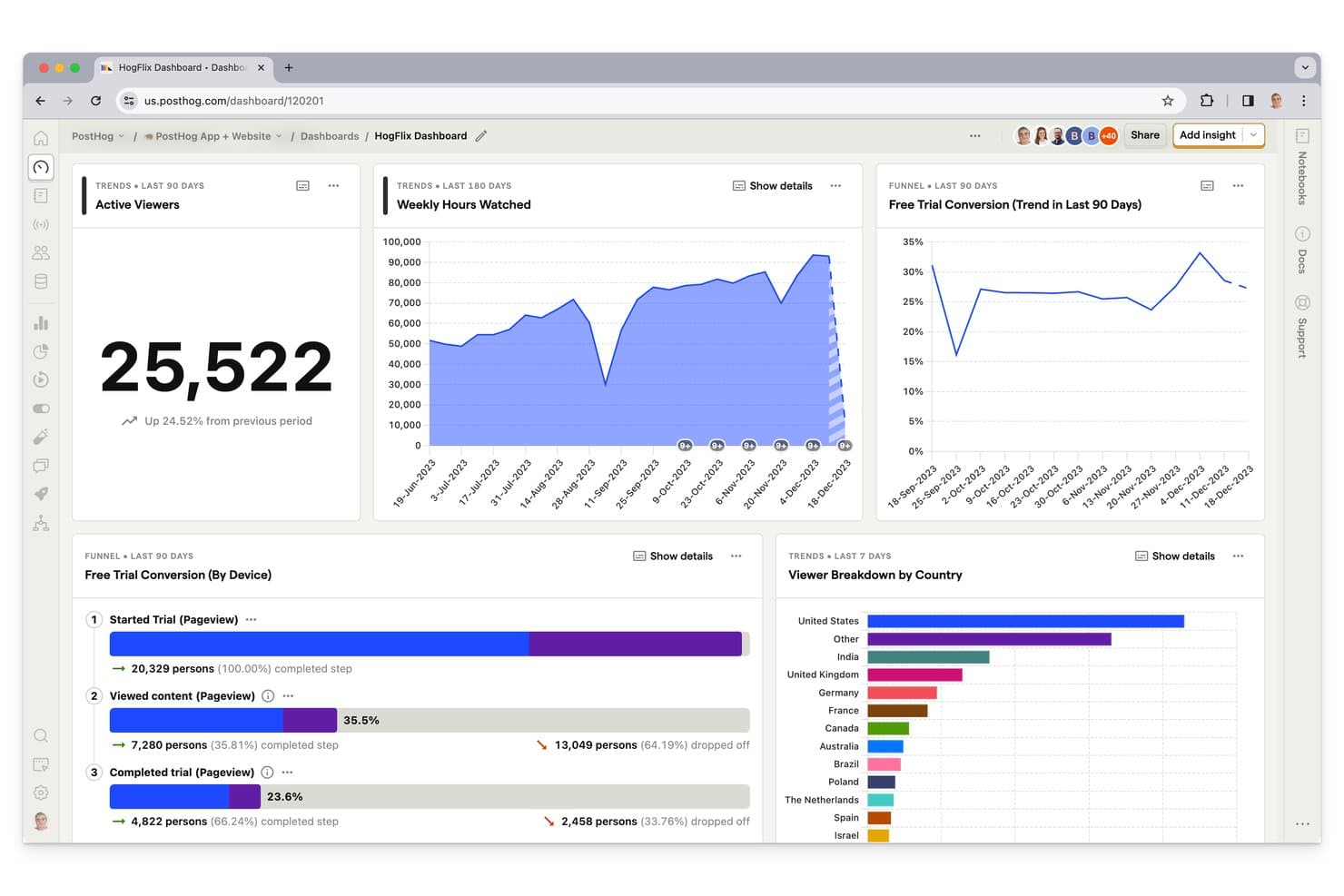
PostHog's dashboards display viewer trends, funnels, and breakdowns in one view. PostHog is a product analytics platform for product engineers who need to understand user behavior, measure adoption, and connect insights with experimentation and feature delivery in one workspace.
Who Is PostHog Best For?
Product engineers who need product analytics, experimentation, and feature delivery insights in one workspace.
Why PostHog Is a Good Best Heap Alternatives
I picked PostHog because it gives product engineers product analytics alongside session recordings, funnels, and feature flags. My team uses event data to spot drop-offs, replay affected user sessions, then test changes with experiments. That workflow connects behavioral evidence directly to product delivery.
PostHog Key Features
- Cohorts: Define user groups using behavioral or property-based criteria.
- Retention reports: Measure whether users return after completing an event.
- Path analysis: Map common sequences of events through your product.
- Data warehouse: Query product data with SQL and connect external sources.
PostHog Integrations
PostHog supports multiple managed data sources, including GitHub, Google Analytics, HubSpot, Intercom, Jira, Mixpanel, Salesforce, Segment, Slack, Snowflake, Stripe, and Zendesk.
Pros and Cons
Pros:
- Session replays add behavioral context
- Product analytics connects with feature flags
- Self-hosting supports greater data control
Cons:
- Large datasets may require careful setup
- Event querying can feel technically demanding
Learn more about PostHog: Best for user experience analytics
- Free plan + free demo + 15-day free trial available
- From $39/month (billed annually)
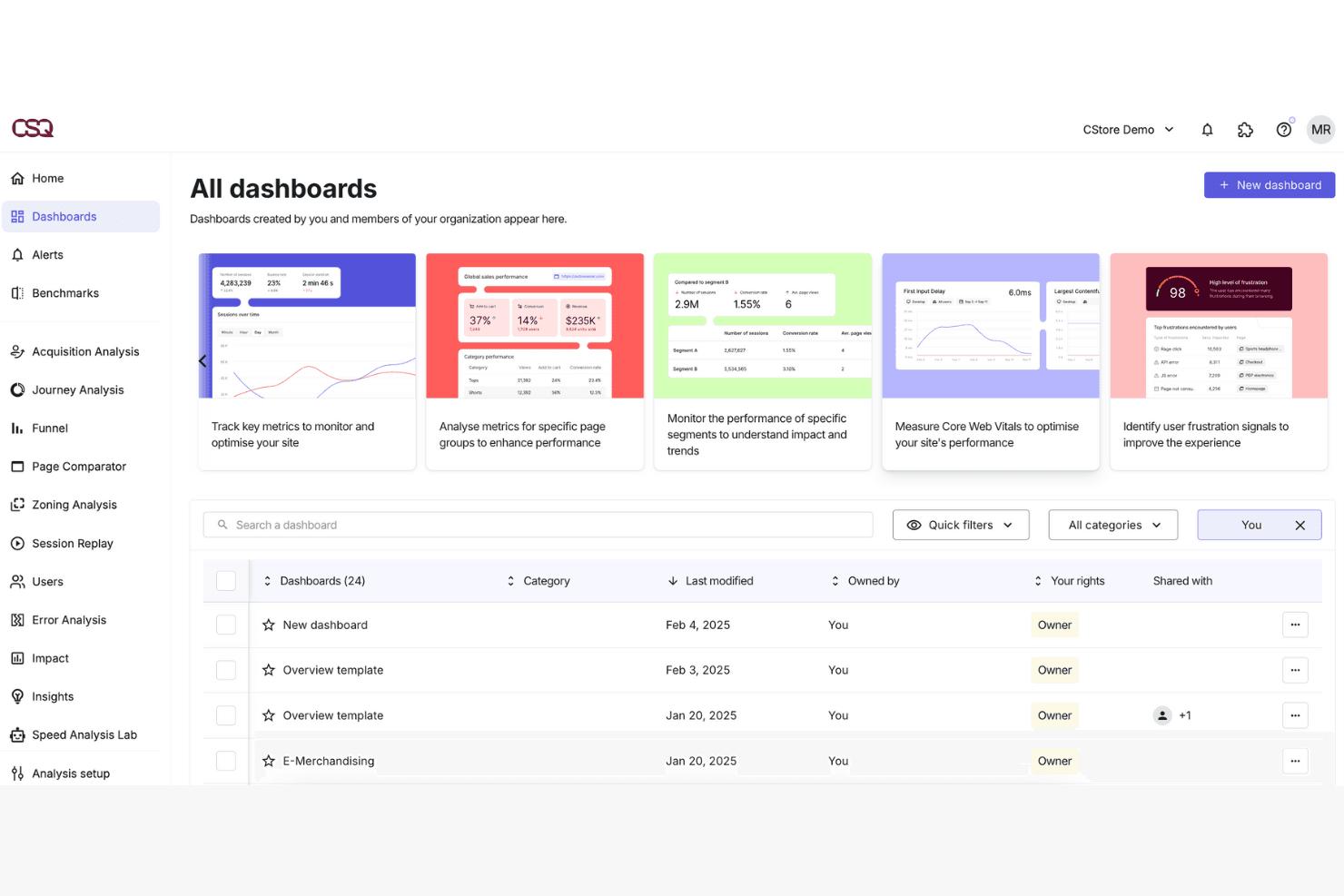
Contentsquare analyzes digital experiences to improve usability and engagement. Contentsquare is a digital experience analytics platform for product, UX, and growth teams that helps identify friction, understand user journeys, and prioritize product improvements with behavioral data.
Who Is Contentsquare Best For?
Contentsquare suits product, UX, and growth teams at digital businesses that need to uncover friction across web and app journeys.
Why Contentsquare Is a Good Best Heap Alternatives
I picked Contentsquare because I can connect product analytics with user experience analytics. I use session replay, heatmaps, and journey analysis to see where users abandon onboarding or struggle at checkout. Its frustration and error analysis helps my team link behavioral signals to specific interface problems.
Contentsquare Key Features
- Event tracking: Capture clicks, page views, and custom events.
- Funnel analysis: Compare conversion rates across defined steps.
- Retention analysis: Measure repeat usage across selected cohorts.
- Dashboards and alerts: Monitor key metrics and receive anomaly notifications.
Contentsquare Integrations
Contentsquare offers 100+ integrations, including Google Analytics, Adobe Analytics, Optimizely, Qualtrics, Salesforce, Slack, Jira, Shopify, AWS, and Microsoft Azure, with open APIs for custom connections.
Pros and Cons
Pros:
- Maps journeys across web and app experiences
- Connects frustration signals to interface problems
- Combines behavioral analytics with session replay
Cons:
- Replay analysis requires carefully defined event taxonomy
- Large datasets can make dashboards load slowly
Learn more about Contentsquare:
Outras alternativas ao Heap
Eis algumas alternativas adicionais ao Heap que não foram incluídas na minha lista, mas que vale a pena conhecer:
- 11LogRocketBest for developer-focused user session debugging
- 12UserpilotBest for In-App Product Experiences
- 13WoopraBest for cross-channel journey attribution
- 14KissmetricsBest for revenue-focused funnel and cohort analysis
- 15Google AnalyticsBest for data-driven understanding
- 16StatsigBest for analytics tied to experimentation
- 17KubitBest for warehouse-native behavioral analytics
- 18Microsoft ClarityBest for free session replay at any scale
How I Evaluate Heap Alternatives
I split my evaluation into three parts. First—and this carries the most weight—I check whether a tool can automatically capture user interactions without manual tagging and visualize multi-step funnels with drop-off data. Second, I look for standout capabilities like warehouse-native architecture or no-code event taxonomy management. Third, I consider what's beyond features: onboarding support, pricing predictability, and compliance posture.
Core Functionality (Table Stakes For This List)
When I'm selecting tools for my list, I score each one on a scale from 0 (does not offer the functionality) to 5 (excels in this area) for each core functionality listed below. I then convert the total into a percentage to help assess each tool's overall fit, with extra weight on any functionalities I’ve deemed essential.
- Behavioral Event Tracking (Essential): I look for automatic capture of clicks, pageviews, and taps, so teams can investigate interactions they didn’t plan to tag in advance.
- Funnel & Journey Analysis (Essential): I check whether teams can build multi-step funnels, compare drop-offs, and explore paths such as onboarding or checkout.
- User Segmentation: I assess how easily teams can combine behavior and user attributes to compare groups, such as new users who completed setup.
- Retention & Cohort Reporting: I look for cohort views that show whether users return over time, including after adopting a feature or completing onboarding.
- Cross-Platform Data Collection: I check whether web and mobile behavior can be analyzed together, and whether teams can follow journeys across platforms.
- Session Replay & Paths: I evaluate whether teams can inspect individual sessions or aggregate paths to connect observed drop-offs with user experience friction.
Once I have a list of tools that meet the criteria, I consider what sets each platform apart.
Differentiating Factors (What Sets Vendors Apart)
Here's how I compare and contrast different vendors:
Standout Features
I look for warehouse-native architecture because it lets your team query product data alongside revenue or support data in your own environment. Tools like Amplitude and Mixpanel offer this, and it removes vendor lock-in concerns. Built-in experimentation matters too—when A/B test results live next to funnel data, you skip the reconciliation step between platforms. I also evaluate no-code event taxonomy management, since autocaptured data gets messy fast and product managers need to rename or merge events without filing engineering tickets.
Beyond Features
Pricing model matters because event-based or MTU-based billing can spike unexpectedly when a product launch drives traffic. I check whether vendors publish clear volume tiers or require a sales call to quote. Data governance is equally important—I evaluate whether raw event data stays in your own warehouse or sits in a vendor-controlled environment, since that affects your ability to join product data with revenue or support tables. I also look at integration depth with tools like Salesforce and Slack, because insights that stay locked in a dashboard rarely reach the customer-success or design teammates who need them.
Porquê procurar uma alternativa ao Heap?
Embora o Heap seja uma boa opção de software de análise da Web, existem vários motivos pelos quais alguns utilizadores procuram soluções alternativas. Pode estar à procura de uma alternativa ao Heap porque…
- Precisa de mais opções de personalização
- A sua equipa necessita de funcionalidades avançadas de elaboração de relatórios
- Pretende um melhor apoio ao cliente
- Procura planos de preços mais flexíveis
- A sua empresa opera fora das regiões suportadas pelo Heap
- Precisa de controlos reforçados de privacidade dos dados
Se alguma destas situações lhe é familiar, veio ao lugar certo. A minha lista inclui várias opções de software de análise da Web mais adequadas a equipas que enfrentam estes desafios com o Heap e procuram soluções alternativas.
Principais funcionalidades do Heap
Eis algumas das principais funcionalidades do Heap para o ajudar a comparar aquilo que as plataformas alternativas oferecem:
- Captura automática: Recolhe automaticamente dados sobre as interações dos utilizadores sem configuração manual, poupando tempo e esforço à sua equipa.
- Rotulagem visual: Permite aos membros da equipa aceder e organizar facilmente os dados, melhorando a colaboração.
- Governação de dados: Garante a integridade dos dados e adapta-se às alterações, mantendo os seus dados exatos e fiáveis.
- Reprodução de sessões: Permite visualizar reproduções das interações dos utilizadores, revelando mais informações sobre o comportamento dos utilizadores.
- Análise do esforço: Quantifica as dificuldades sentidas pelos utilizadores para identificar áreas problemáticas, ajudando a sua equipa a melhorar a experiência do utilizador.
- Otimização do funil: Analisa os percursos dos utilizadores para otimizar os caminhos de conversão, aumentando a eficiência da sua equipa.
- Acompanhamento da adoção do produto: Monitoriza a forma como os utilizadores interagem com novas funcionalidades, apoiando o desenvolvimento do produto.
- Análise do comportamento dos utilizadores: Ajuda a sua equipa a compreender os padrões dos utilizadores, conduzindo a decisões baseadas em dados.
- Informações em tempo real: Fornece acesso imediato aos dados, permitindo à sua equipa agir rapidamente perante as tendências.
- Suporte multiplataforma: Funciona em diferentes dispositivos e plataformas, garantindo uma cobertura abrangente dos dados.