

Os criadores de aplicações de IA permitem-lhe criar aplicações baseadas em inteligência artificial, muitas vezes sem qualquer programação. Se está à procura dos melhores criadores de aplicações de IA, provavelmente quer lançar algo rapidamente — quer seja um chatbot inteligente, uma ferramenta preditiva ou uma automatização de fluxos de trabalho. A plataforma certa permite-lhe concentrar-se na sua ideia, e não em obstáculos técnicos ou ciclos de desenvolvimento demorados. Neste guia, encontrará opções avaliadas que o ajudam a comparar funcionalidades, flexibilidade e a forma como cada uma se adequa ao seu projeto específico. Perceba claramente qual o criador de aplicações de IA que corresponde às suas necessidades, para poder criar e aperfeiçoar com confiança.
Why Trust Our Software Recommendations
6,700+
Reviews
20
Industry experts
16+
Evaluation factors
14
Years
Our team has been testing and reviewing software since 2012. As product managers ourselves, we know how difficult—and important—it is to choose the right software.
For this guide, we evaluated tools using hands-on testing and independent research, scoring tools using our selection criteria.
Our reviews reflect our human editorial judgment, not a sales pitch.
Expert reviewers:
- Andrew LumbySenior TPM
- Cristiano ValimSenior UI/UX Lead


Tabela de comparação de criadores de aplicações de IA
Esta tabela de comparação resume os detalhes de preços das minhas principais escolhas de criadores de aplicações de IA:
| Tool | Best For | Trial Info | Price | ||
|---|---|---|---|---|---|
| 1 | Best for spreadsheet-based app creation | Free plan available | From $19/month (billed annually) | Website | |
| 2 | Best for enterprise-grade AI integration | Free plan available | From $16/month (billed annually) | Website | |
| 3 | Best for open-source extensibility in app creation | 14-day free trial | From $23/user/month (billed annually) | Website | |
| 4 | Best for visual app prototyping with AI | Free plan + free demo | From $21/month (billed annually) | Website | |
| 5 | Best for cross-platform mobile UI design | Free plan available | From $39/month | Website | |
| 6 | Best for creating AI web apps from Airtable | Free plan + free demo available | From $19/month (billed annually) | Website | |
| 7 | Best for connecting AI to business data sources | Free plan available | From $10/builder/month (billed annually) | Website | |
| 8 | Best for building complex workflows visually | Free plan + free trial available | From $29/month (billed annually) | Website | |
| 9 | Best for collaborative AI-powered coding online | Free plan available | From $18/month (billed annually) | Website | |
| 10 | Best for integrating Microsoft ecosystem data | Free plan available | From $20/user/month (billed annually) | Website |


Avaliações dos melhores criadores de aplicações de IA
Apresentamos abaixo os meus resumos detalhados dos melhores criadores de aplicações de IA que entraram na minha seleção. As minhas avaliações oferecem uma análise detalhada das funcionalidades, capacidades e integrações de cada plataforma, para o ajudar a encontrar a melhor opção para si.
 Best for spreadsheet-based app creation
- Free plan available
- From $19/month (billed annually)
Visit WebsiteCustomer Rating:4.7/5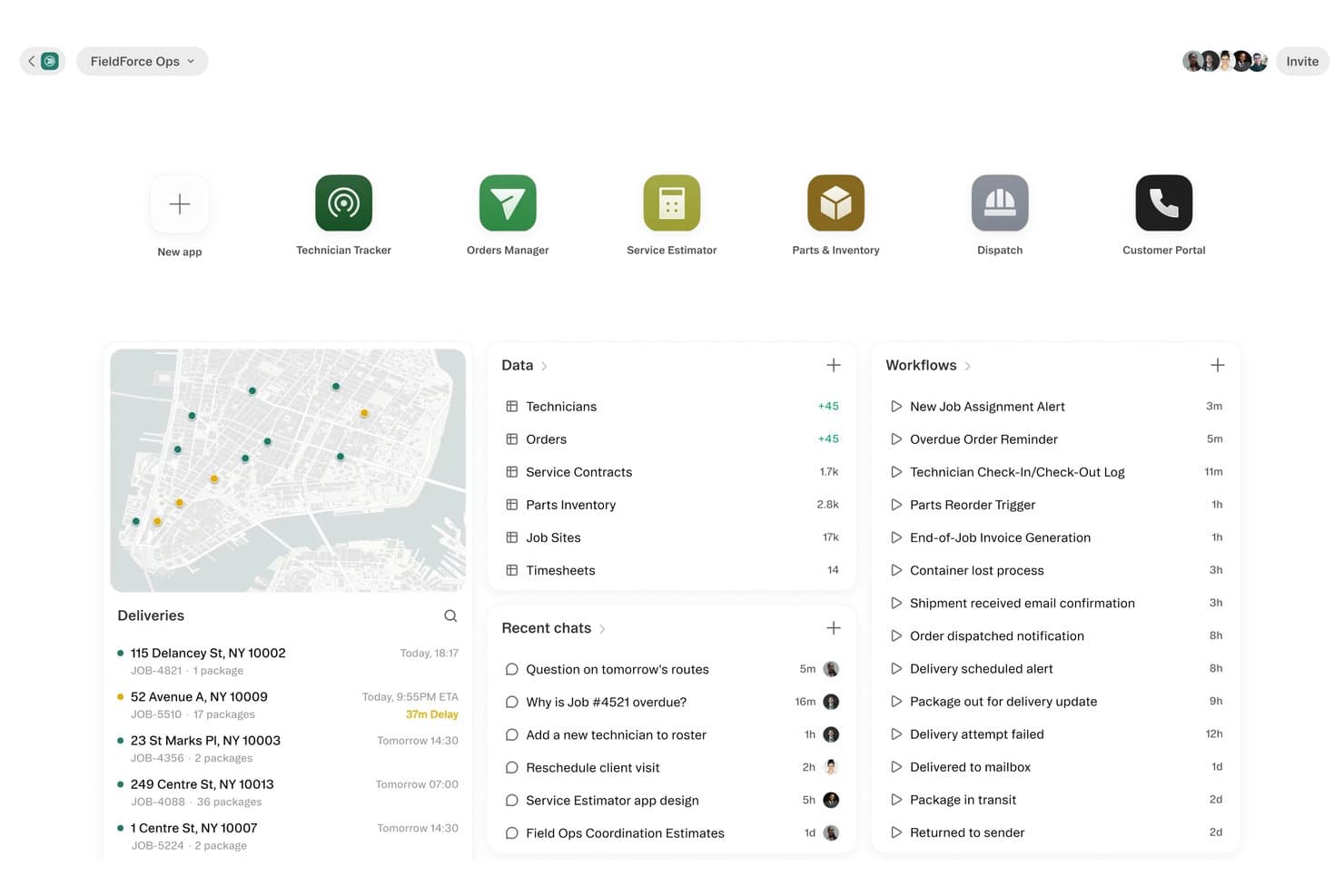
Glide centralizes field ops with delivery tracking, workflows, and data. Glide is a no-code AI app builder that lets you turn spreadsheets and databases into web and mobile apps using a drag-and-drop interface, AI components, and automated workflows.
Who Is Glide Best For?
Glide is a great fit for operations teams and non-technical product managers who need to turn existing spreadsheet data into functional internal tools without writing code.
Why I Picked Glide
Glide earns its spot on my shortlist because it turns existing Google Sheets or Excel data into a working app without rebuilding anything from scratch. I particularly like its computed columns feature, which lets you apply AI transformations directly on spreadsheet data, like auto-classifying support tickets or extracting key fields from text. Its row-level permissions also map naturally to org structures, so you can scope what each role sees based on data already in your sheet.
Glide Key Features
- Drag-and-drop app builder: A visual editor that lets you design app screens by dragging UI components onto a canvas without writing code.
- Workflow automation: Built-in automation tools that trigger actions—like sending notifications or updating records—based on user interactions or data changes.
- Native mobile and web publishing: Publish your app as a progressive web app or native mobile app from the same project, without separate builds.
- Third-party integrations: Connect Glide to external tools like Slack, Stripe, and Zapier to extend app functionality beyond your core data source.
Glide Integrations
Glide integrations include Slack, Stripe, and Zapier, helping product teams connect app data with collaboration, payments, and automation workflows.
Pros and Cons
Pros:
- Scopes records with row-level permissions
- Applies AI transformations through computed columns
- Converts spreadsheet data into working apps
Cons:
- Advanced app layouts offer less flexibility
- Row limits can constrain growing datasets
Learn more about Glide: Best for enterprise-grade AI integration
- Free plan available
- From $16/month (billed annually)
Visit WebsiteCustomer Rating:5/5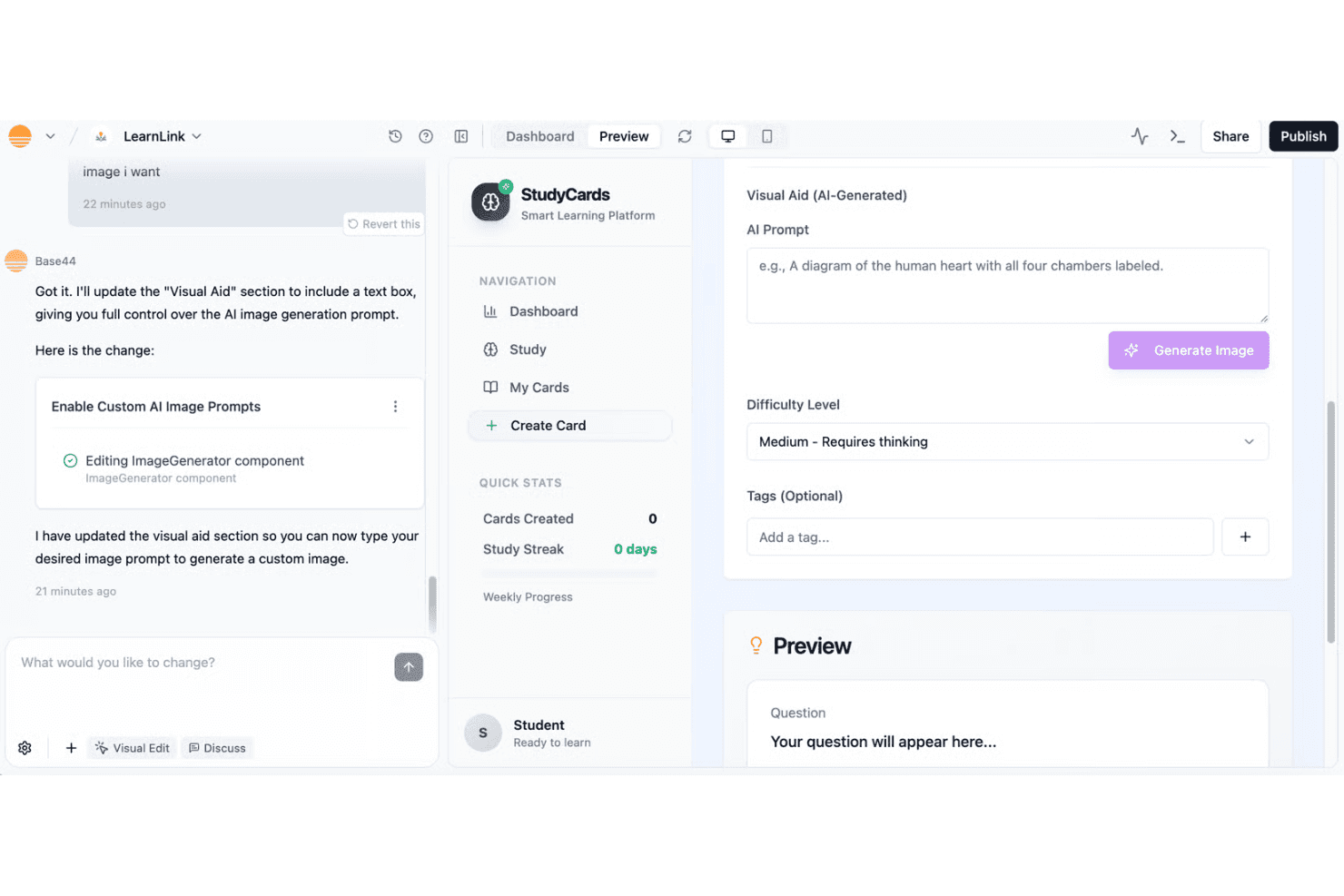
Base44 enables users to build a smart flashcard learning app with AI-generated visual aids and custom image prompts through a conversational builder interface. Base44 is a full-stack AI app builder that generates functional applications from plain-English prompts, with built-in database management, authentication, hosting, and connectors to external tools and APIs.
Who Is Base44 Best For?
Base44 is a strong fit for product teams at growing startups and enterprises who need to ship internal tools or MVPs without relying on engineering resources.
Why I Picked Base44
Base44 earns its spot as one of the best on my shortlist because of how seriously it handles enterprise security requirements. I'm particularly impressed by its built-in pre-publish security scanning and row-level data isolation, which I don't often see in AI app builders at this level. SCIM provisioning and SSO enforcement across both the platform and individual apps mean IT governance stays intact even as non-technical teams build freely.
Base44 Key Features
- Conversational AI app generation: Build full-stack applications from natural language prompts without writing code.
- Two-way GitHub sync: Export the complete app source code to a personal repository at any time.
- Multi-app workspace management: Manage multiple apps, workflows, and collaborators in a unified dashboard.
- Flexible AI engine selection: Choose between Claude Sonnet and Gemini models for code and logic generation.
Base44 Integrations
Base44 offers native integrations with Google Workspace, Salesforce, Slack, GitHub, Snowflake, BigQuery, Databricks, and HubSpot. It connects with Zapier and provides an API for custom integrations.
Pros and Cons
Pros:
- Mobile app deployment is natively supported
- Full conversational AI iteration workflow
- Exports production-ready code to GitHub
Cons:
- Limited user control over generated UI
- Occasional bugs affect prompt reliability
Learn more about Base44: Best for open-source extensibility in app creation
- 14-day free trial
- From $23/user/month (billed annually)
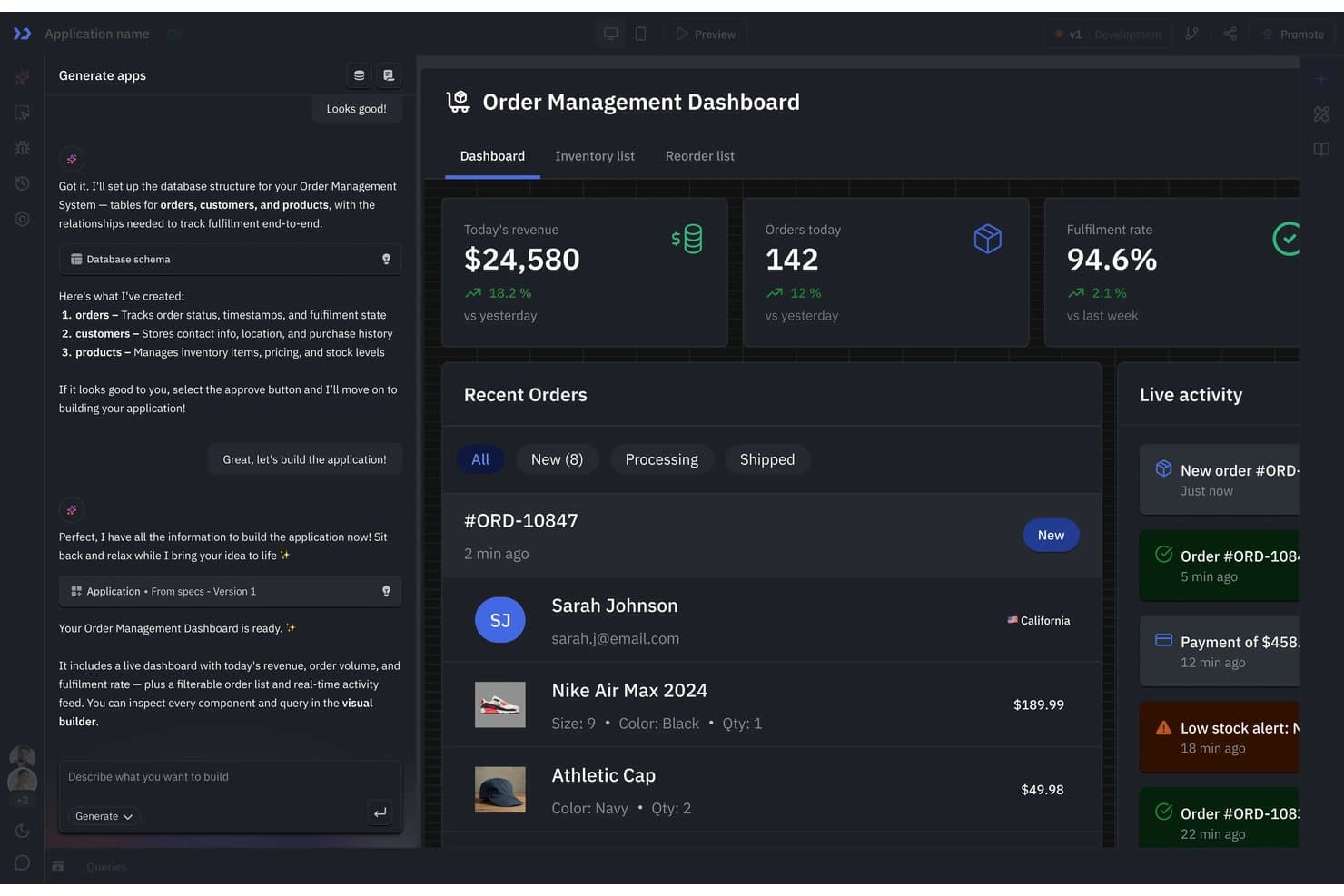
ToolJet's AI builder generates a full order management app from chat. ToolJet is an open-source AI app builder that lets you create internal tools and business applications using a visual drag-and-drop editor, custom components, and connections to databases, APIs, and third-party services.
Who Is ToolJet Best For?
ToolJet is a strong fit for engineering-led teams that want full control over their internal tools through self-hosting and open-source customization.
Why I Picked ToolJet
ToolJet earns its spot on my shortlist because its open-source foundation gives product teams genuine control over how internal apps are built and extended. I love that you can write custom components in React and plug them directly into the drag-and-drop editor, which means you're never blocked by what's available out of the box. Self-hosting also lets teams keep sensitive product data entirely within their own infrastructure, which matters when you're building tools around unreleased roadmap data or customer research.
ToolJet Key Features
- Multi-source data querying: Connect to and query multiple data sources simultaneously, including REST APIs, GraphQL endpoints, and databases, within a single app.
- Role-based access control: Assign granular permissions to users and groups to control who can view, edit, or manage specific apps and data.
- AI Copilot for query writing: Use the built-in AI assistant to generate and debug database queries and JavaScript transformations directly in the editor.
- Multiplayer app editing: Collaborate with teammates in real time on the same app builder canvas, with live cursor visibility and change tracking.
ToolJet Integrations
ToolJet offers 80+ integrations, including PostgreSQL, MySQL, MongoDB, Snowflake, REST, GraphQL, SOAP, Anthropic, and Gemini. It supports custom integrations through APIs and marketplace plugins.
Pros and Cons
Pros:
- Queries multiple sources within one app
- Self-hosting keeps sensitive product data in-house
- React components extend beyond built-in widgets
Cons:
- Self-hosting adds deployment and maintenance work
- Custom components require React development skills
Learn more about Tooljet: Best for visual app prototyping with AI
- Free plan + free demo
- From $21/month (billed annually)
Visit WebsiteCustomer Rating:4.5/5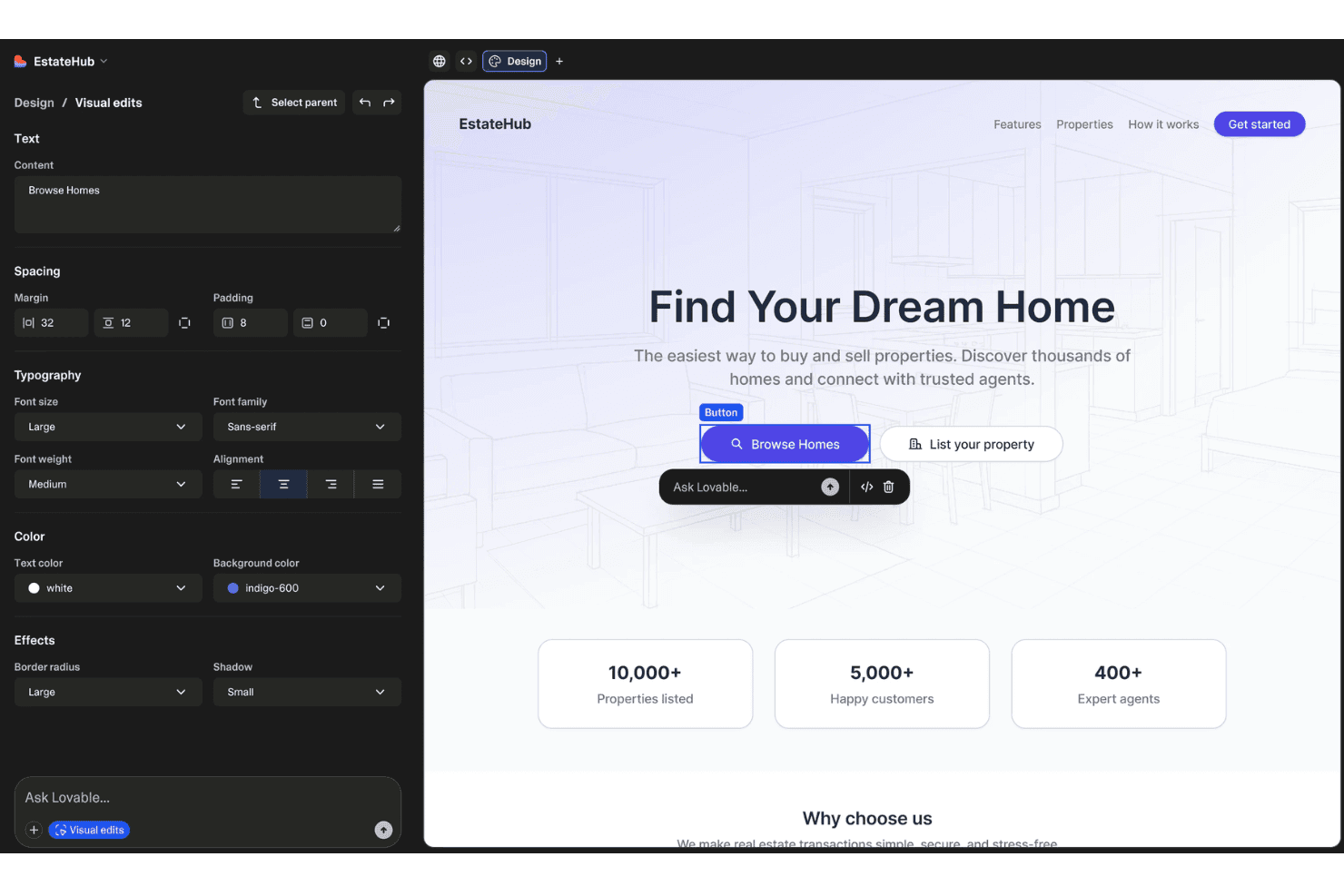
Lovable offers a visual editor with design controls for typography, spacing, color, and effects alongside a live real estate website preview. Lovable is a full-stack AI app builder that generates functional web applications from natural language prompts, handling frontend code, database setup via Supabase, authentication, and one-click deployment.
Who Is Lovable Best For?
Lovable suits early-stage founders and non-technical product managers who need to turn an idea into a testable, working web app without involving engineering.
Why I Picked Lovable
I picked Lovable as one of the best because its visual preview and iterative prompt loop make prototyping feel genuinely fast. You can tweak text and colours directly in the preview toolbar, then use Plan Mode to map out a feature change before Lovable writes a single line of code. Version history with one-click revert from the chat means I can experiment aggressively without breaking a working build.
Lovable Key Features
- Supabase integration: Connects directly to Supabase for database, authentication, storage, and real-time updates.
- Full code export: Lets you download the source code or push projects to GitHub or GitLab for further development.
- Third-party API connectivity: Supports building app features that incorporate APIs like Stripe, Clerk, and OpenAI via prompts.
- Cloud credits system: Uses a unified credit model to manage app builds, hosting, and AI-driven app features across workspaces.
Lovable Integrations
Lovable offers native integrations with Supabase, GitHub, GitLab, Stripe, Clerk, and OpenAI. An API is available for custom integrations.
Pros and Cons
Pros:
- Supabase-backed database with full schema control
- Prompt-driven builds from text or screenshots
- Own and edit real, production-grade app code
Cons:
- Pricing model based on per-credit usage
- No drag-and-drop canvas-style editor
Learn more about Lovable:
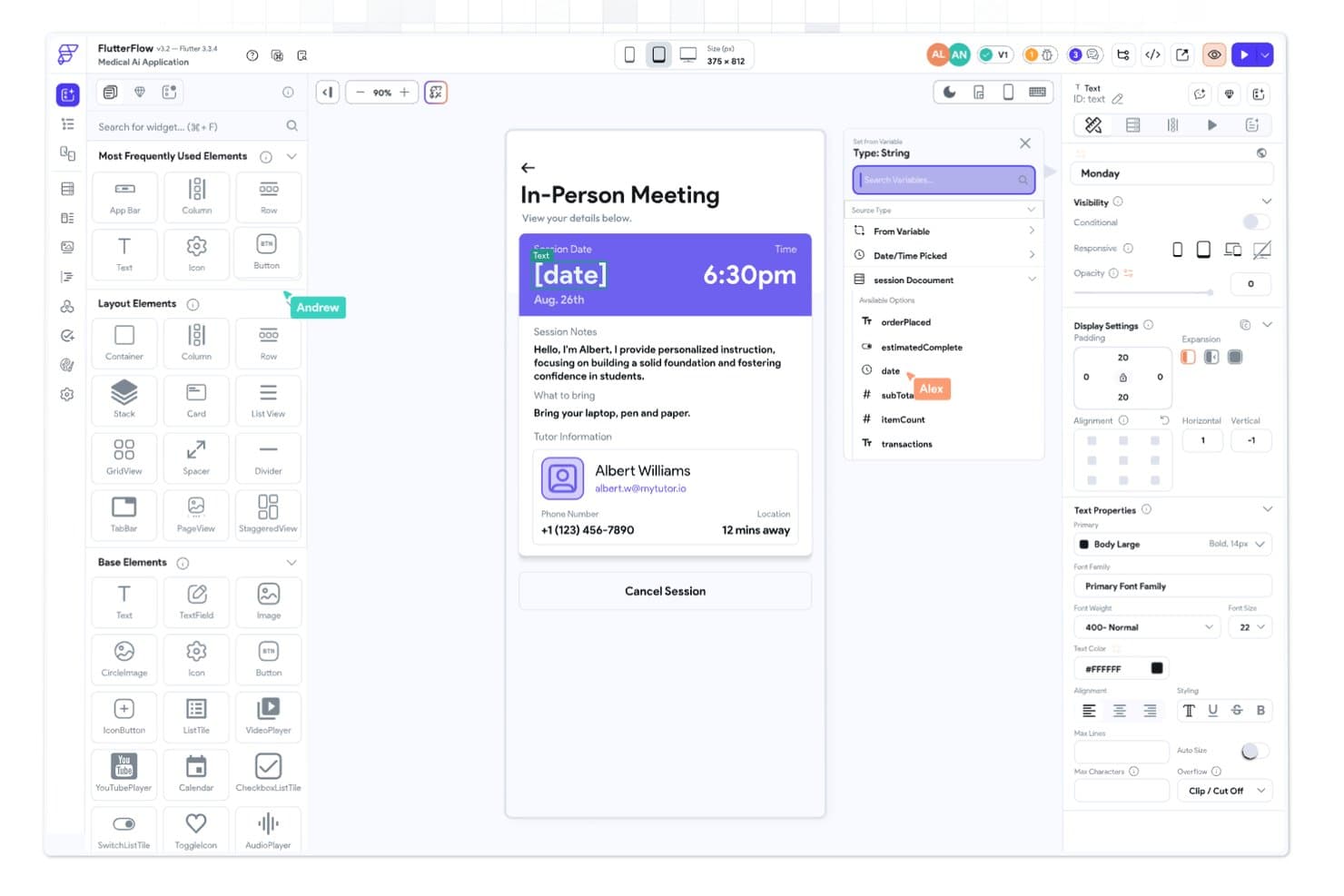
FlutterFlow offers a visual drag-and-drop app builder with variable binding, widget panels, and real-time UI previews for building mobile applications. FlutterFlow is a visual, low-code app builder that uses AI-assisted generation and a drag-and-drop editor to create native cross-platform apps for iOS, Android, and web from a single codebase.
Who Is FlutterFlow Best For?
FlutterFlow suits technical product managers and prototyping teams who need to ship native mobile apps across iOS, Android, and web without a full engineering build.
Why I Picked FlutterFlow
FlutterFlow earns its spot on my shortlist because no other AI app builder comes close to its native cross-platform UI design capabilities. I particularly like the Figma frame import and the granular widget property controls, which let me translate a design into a deployable iOS and Android app without rebuilding layouts for each platform. The Visual Action Flow Editor then handles the logic layer visually, so I'm not switching between a designer and a code editor mid-build.
FlutterFlow Key Features
- AI Gen assistant: Use artificial intelligence to generate UI components, styles, and database schemas from prompts.
- Action Flow Editor: Visually define app logic and interactions using a flow-based logic builder with no manual coding required.
- Native API integration: Connect to Firebase, Supabase, or any RESTful backend for live data and external service connectivity.
- Real-time collaboration: Invite team members and work together with branching, comments, and assignable tasks within projects.
FlutterFlow Integrations
FlutterFlow offers native integrations with Firebase, Supabase, Swagger/OpenAPI, and GitHub, and supports connections to any RESTful API. An API and CLI are also available for custom integrations.
Pros and Cons
Pros:
- Code export directly from the visual builder
- AI generates live app logic and components
- True native iOS and Android app outputs
Cons:
- AI lacks full app conversational context
- Advanced logic requires Dart scripting skills
Learn more about FlutterFlow : Best for creating AI web apps from Airtable
- Free plan + free demo available
- From $19/month (billed annually)
Visit WebsiteCustomer Rating:4.7/5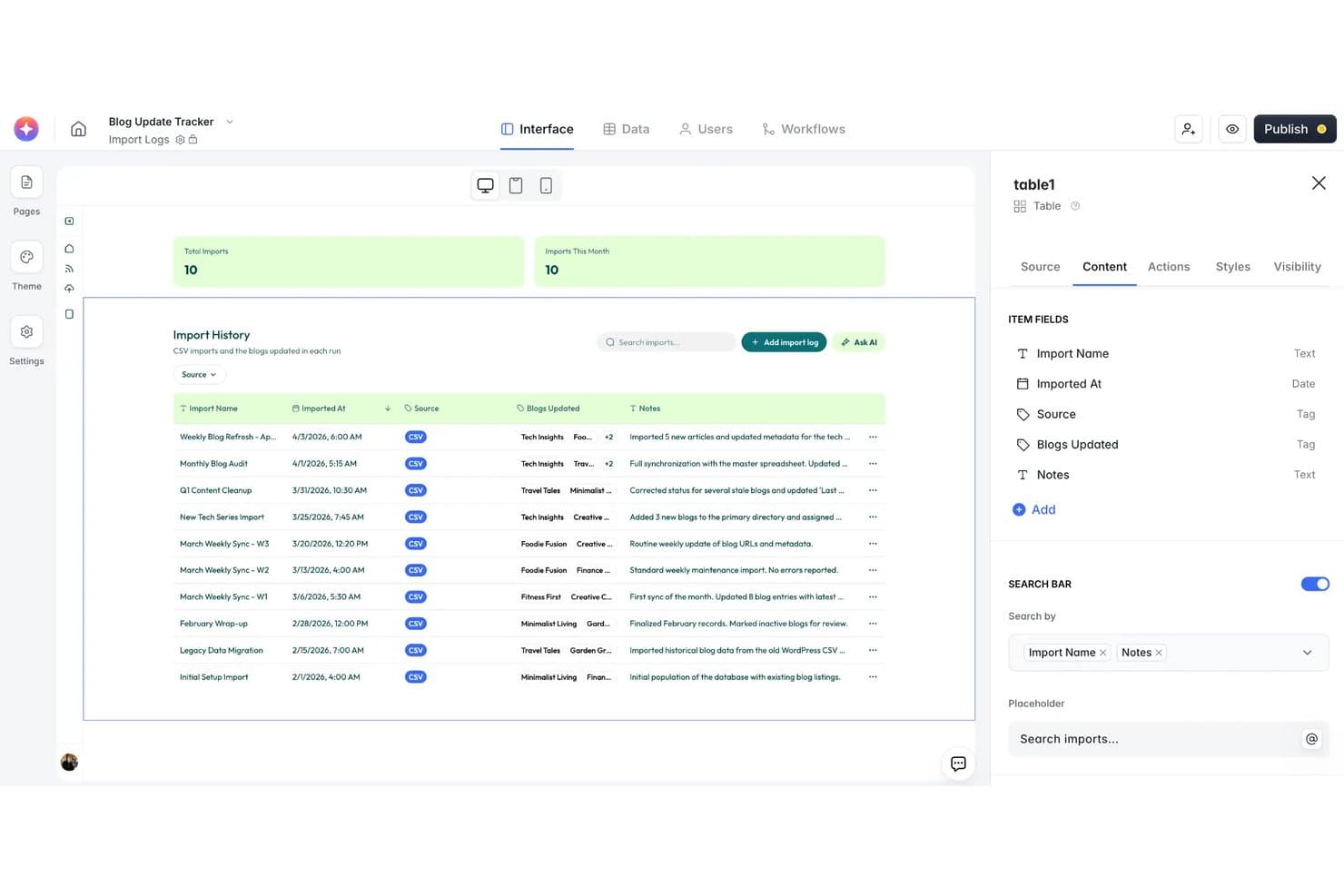
Softr offers a visual no-code interface builder with an Import History table, search bar, and AI-assisted log management for blog update tracking. Softr is a no-code AI app builder that lets you generate web apps, internal tools, client portals, and databases from natural language prompts, with built-in workflow automation and connections to external data sources.
Who Is Softr Best For?
Softr is a strong fit for non-technical product and operations teams at small to mid-size companies who already manage data in Airtable, Google Sheets, or HubSpot.
Why I Picked Softr
I picked Softr as one of the best because its AI Co-Builder handles the full setup: it asks clarifying questions, builds a relational database, populates sample data, and wires up permissions before assembling the interface. What impresses me most is how tightly this connects to live Airtable data, so I can turn an existing base into a functional client portal without rebuilding anything from scratch. The Database AI Agents then let me query and manipulate that data through natural language directly inside the app.
Softr Key Features
- Visual app editor: Build, preview, and iterate on apps using a drag-and-drop, component-based interface.
- Workflow automation: Automate tasks and processes triggered by user actions or data changes using Softr Workflows.
- Role-based access controls: Set custom permissions and user groups to manage who can view or edit specific data and app sections.
- Template library: Start projects faster with 90+ pre-built app templates covering portals, CRMs, marketplaces, and more.
Softr Integrations
Softr offers native integrations with Airtable, Google Sheets, Notion, HubSpot, Monday, BigQuery, Supabase, MariaDB, Xano, and SmartSuite. It connects with Zapier and provides an API for custom integrations.
Pros and Cons
Pros:
- Directly connects to multiple live databases
- AI Co-Builder creates multi-page layouts instantly
- Generates full web apps from text prompts
Cons:
- Lacks source code export options
- No exportable app code for developers
Learn more about Softr: Best for connecting AI to business data sources
- Free plan available
- From $10/builder/month (billed annually)
Visit WebsiteCustomer Rating:4.6/5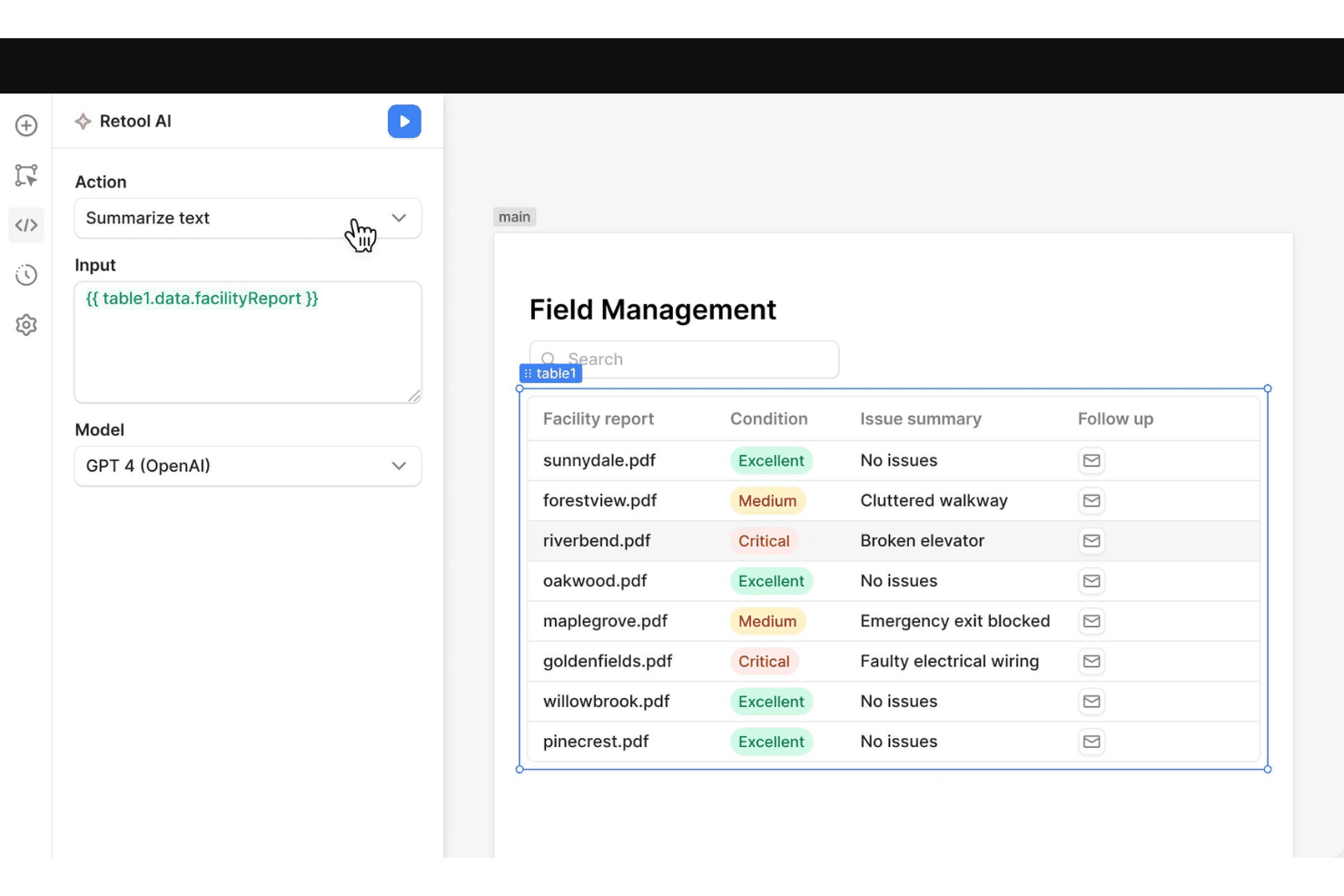
Retool offers a built-in AI action panel that lets users summarize facility report data from a table using GPT-4, with results displayed in a field management dashboard. Retool is an AI-native app builder that combines natural language app generation, a drag-and-drop visual editor, and an extensive library of database and API connectors to help teams build and deploy internal tools on a governed enterprise platform.
Who Is Retool Best For?
Retool is a strong fit for technical product teams and product managers at mid-size to enterprise companies who need to ship internal tools on top of existing business data infrastructure.
Why I Picked Retool
I picked Retool as one of the best because its one-click RAG capability, backed by a managed vector store, lets me ground AI responses in real business data like product catalogues, support docs, or internal policies. I can ingest from websites, documents, and databases, then surface that knowledge through AI-powered search inside any built app. Connecting external AI coding agents via MCP means I can generate and deploy apps from my terminal, straight into a governed environment.
Retool Key Features
- AI-native app builder: Describe your app in natural language or upload files to generate fully functional apps.
- Drag-and-drop visual editor: Build and modify interfaces using a component-based WYSIWYG editor with 100+ pre-built elements.
- Database and API connectors: Connect to SQL, NoSQL, REST, GraphQL, and a wide array of out-of-the-box integrations.
- Role-based access controls (RBAC): Set granular permissions for users and teams using built-in security and governance tools.
Retool Integrations
Retool offers over 30 native integrations, including Salesforce, PostgreSQL, MongoDB, Snowflake, BigQuery, Amazon S3, Microsoft SQL Server, Google Sheets, Slack, Jira, and HubSpot, and provides an API for custom integrations.
Pros and Cons
Pros:
- Advanced data source and backend connectivity
- Centralized enterprise governance and permissions controls
- Includes native managed vector database
Cons:
- Cannot export standalone mobile apps
- Limited support for external-facing apps
Learn more about Retool: Best for building complex workflows visually
- Free plan + free trial available
- From $29/month (billed annually)
Visit WebsiteCustomer Rating:4.4/5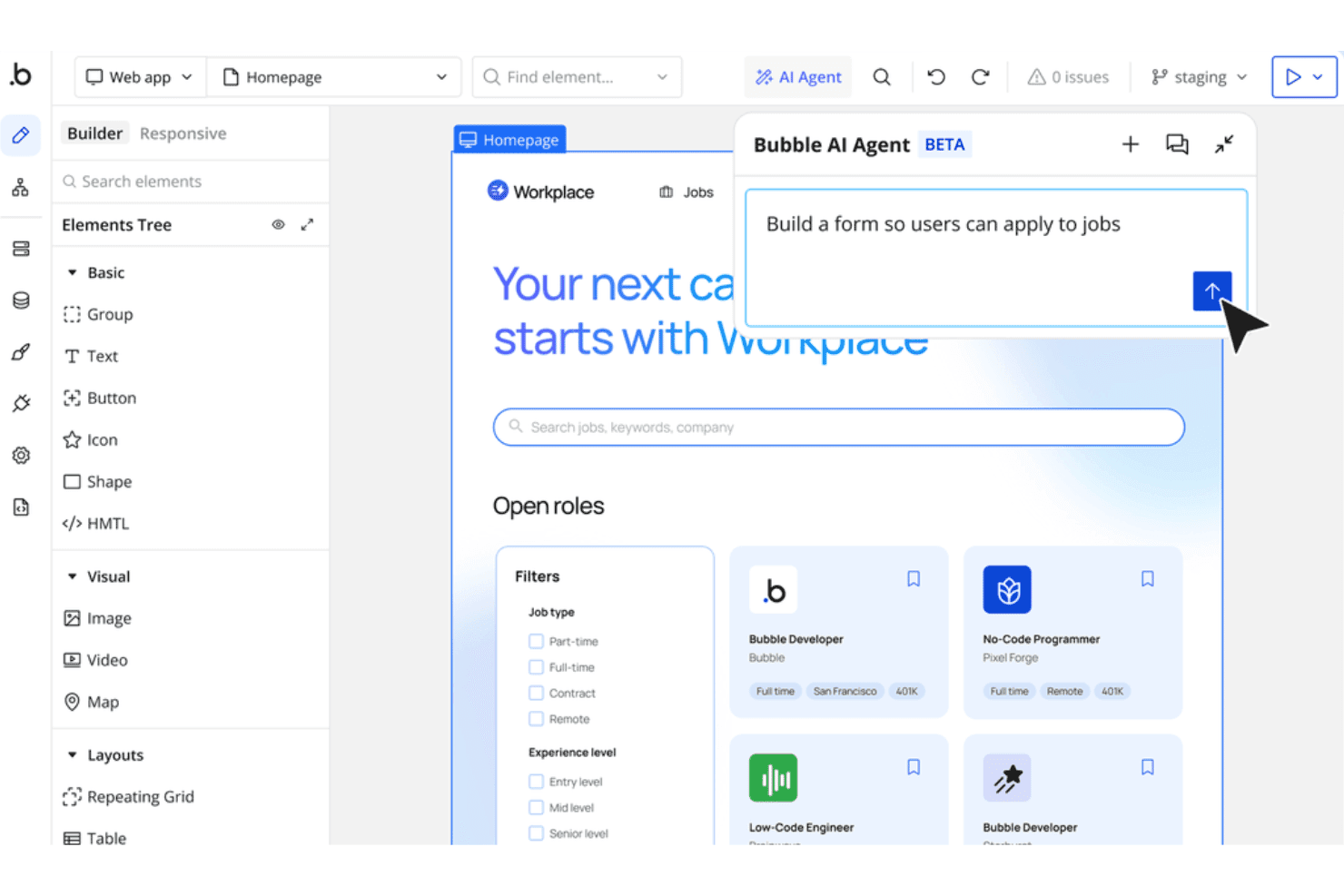
Bubble's AI Agent lets users build app features like job application forms using simple natural language prompts. Bubble is a no-code AI app builder that lets you generate full-stack web and mobile applications from text prompts, then visually edit them using a drag-and-drop editor with a built-in database, workflow engine, and API connector.
Who Is Bubble Best For?
Bubble is a strong fit for technical founders and small product teams who want to build and ship SaaS products or marketplaces without dedicated engineering resources.
Why I Picked Bubble
I've included Bubble in my top picks because its visual workflow engine is genuinely unlike anything else in the AI app builder space. Where most tools generate a static UI and leave the logic to you, Bubble lets me build multi-step conditional workflows visually, connecting database operations, API calls, and UI triggers in a single canvas. I can describe an app with AI, then immediately drill into the workflow layer to add branching logic, scheduled backend jobs, and custom data operations.
Bubble Key Features
- AI app generator: Describe your idea in natural language and let Bubble build a working multi-page app draft with logic and UI.
- Native mobile editor: Build and preview mobile apps that can be published on iOS and Android, in addition to web applications.
- Plugin marketplace: Extend app functionality with over 3,000 available plugins covering payments, AI models, analytics, and more.
- Built-in version control: Manage multiple app versions and branches with features like history, rollbacks, and permission controls.
Bubble Integrations
Bubble offers native integrations with Stripe, Google, and Mailchimp, a native SQL connector for Postgres and MySQL, and supports over 3,000 plugins through its marketplace. An API is available for custom integrations.
Pros and Cons
Pros:
- Extensible with thousands of marketplace plugins
- AI generates working database and UI structure
- Visual editor supports complex, multi-step logic
Cons:
- Steep curve before building production apps
- Apps cannot be exported off the platform
Learn more about Bubble: Best for collaborative AI-powered coding online
- Free plan available
- From $18/month (billed annually)
Visit WebsiteCustomer Rating:4.4/5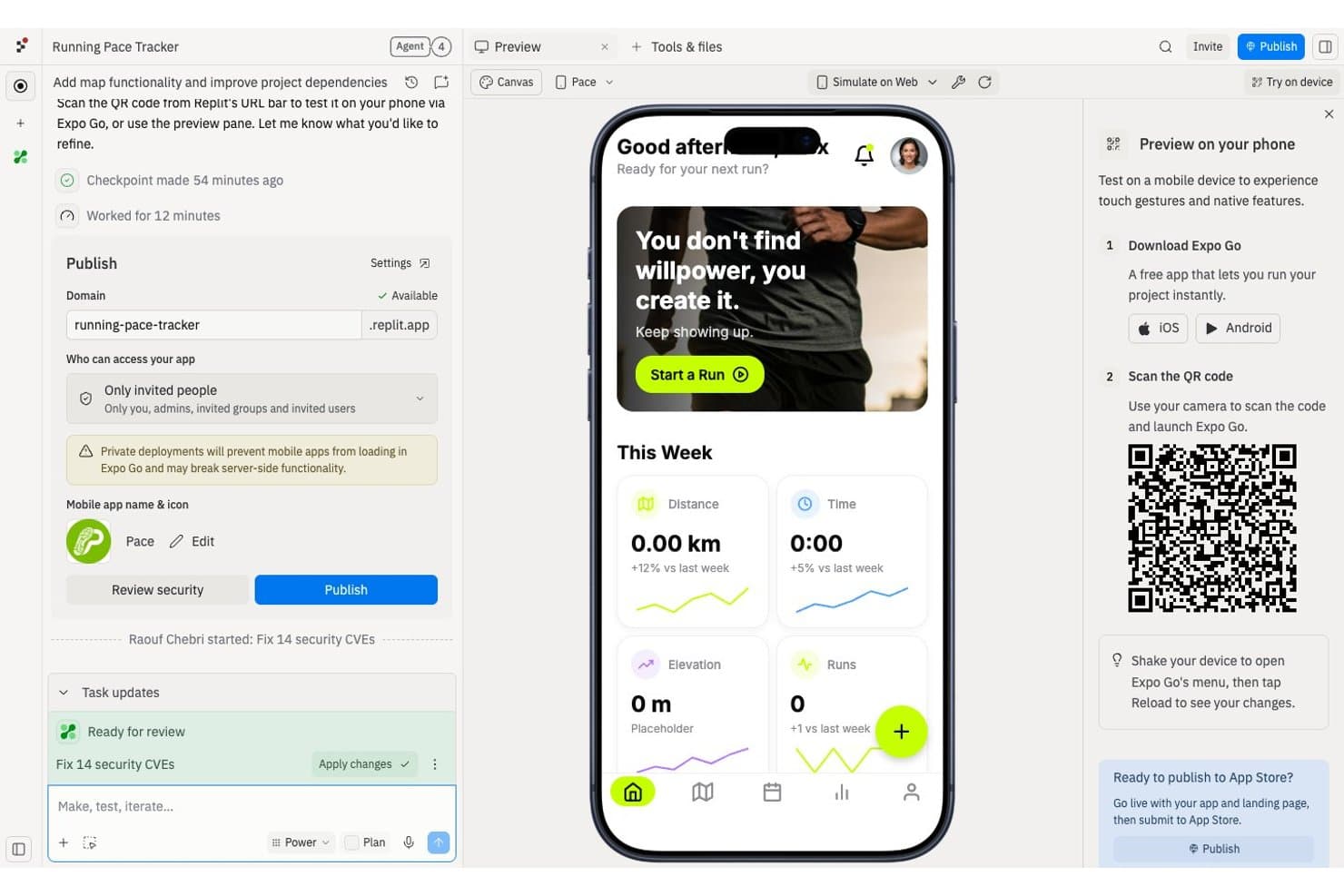
Replit offers an AI-powered mobile app builder that lets users create, preview, and publish native running tracker apps directly from the browser. Replit is a browser-based AI app builder that lets you generate, code, and deploy full-stack web and mobile apps from natural language prompts, with a built-in IDE, database, and real-time collaboration tools.
Who Is Replit Best For?
Replit suits product managers, early-stage startup teams, and technically curious builders who want to prototype and ship apps without a dedicated engineering team.
Why I Picked Replit
Replit earns its spot on my shortlist because of how it weaves real-time collaboration directly into the AI build loop. When my team submits tasks to Agent 4, it sequences and executes them together, so multiple contributors can shape the same project without conflicting. The Parallel Agents feature lets us run up to 10 simultaneous agents (on Pro), and the checkpoint system means I can roll back to any earlier state if the agent breaks something while fixing something else.
Replit Key Features
- Natural language app generation: Turn plain-English prompts into working web or mobile apps using Replit Agent.
- Infinite Canvas design workspace: Explore, tweak, and apply visual changes to your app in a drag-to-edit environment.
- Built-in database integration: Access and manage a Neon PostgreSQL database directly within your Replit project.
- One-click deployment and publishing: Publish fully functional projects with hosting, private links, and custom domains straight from the platform.
Replit Integrations
Replit offers 100+ native integrations, including OpenAI, Stripe, GitHub, Google Workspace, Anthropic, and Databricks. An API is available for custom integrations.
Pros and Cons
Pros:
- Checkpoint system allows instant rollbacks
- Full-stack AI generation, including production deployment
- Real-time code collaboration for distributed teams
Cons:
- Performance can stall on complex, multi-agent projects
- Requires an active network connection constantly
Learn more about Replit: Best for integrating Microsoft ecosystem data
- Free plan available
- From $20/user/month (billed annually)
Visit WebsiteCustomer Rating:4.3/5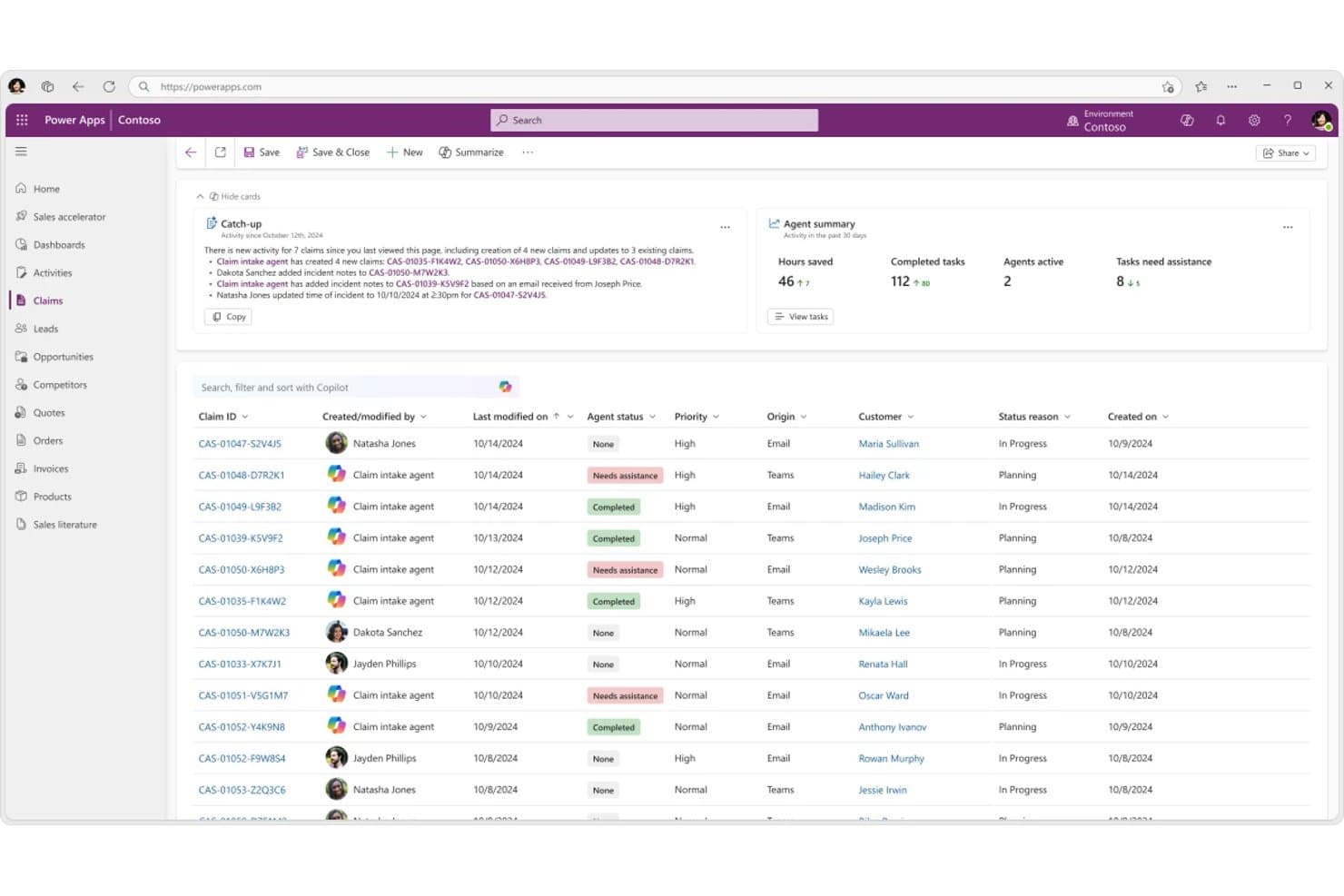
Microsoft Power Apps lets users manage AI agent activity across claims with smart summaries. Microsoft Power Apps is a no-code/low-code app builder that lets you create custom business applications using drag-and-drop tools, AI-assisted development, and prebuilt connectors to data sources across the Microsoft ecosystem and beyond.
Who Is Microsoft Power Apps Best For?
Microsoft Power Apps is a strong fit for organizations already running on Microsoft 365 or Azure that want to build custom internal tools without spinning up a dedicated development team.
Why I Picked Microsoft Power Apps
I picked Microsoft Power Apps because it connects directly to the data your organization already has in SharePoint, Dataverse, and Azure SQL without any manual export or sync work. I love how you can use Copilot to generate app screens from a plain-language prompt, then wire those screens to live Microsoft 365 data in minutes. That tight loop between AI-assisted building and native data access is what makes it genuinely useful for product teams operating inside the Microsoft ecosystem.
Microsoft Power Apps Key Features
- Prebuilt connector library: Access 900+ connectors to pull data from external services like Salesforce, SAP, and ServiceNow directly into your apps.
- Responsive canvas apps: Build pixel-level custom layouts that adapt across desktop, tablet, and mobile without writing layout code.
- Role-based access control: Assign granular permissions at the app, screen, or data level to control what each user can see and do.
- Model-driven app templates: Generate data-structured apps automatically from your Dataverse schema, giving you forms, views, and dashboards out of the box.
Microsoft Power Apps Integrations
Microsoft Power Apps offers 900+ connectors, including Salesforce, SAP, ServiceNow, SharePoint, Dataverse, and Azure SQL. It connects directly to Microsoft 365 data and external business systems.
Pros and Cons
Pros:
- Role-based controls support governed internal tools
- Model-driven apps scaffold forms from schemas
- Copilot drafts app screens from prompts
Cons:
- Complex apps complicate maintenance and debugging
- Large datasets can slow app performance
Learn more about Microsoft Power Apps:
Outros criadores de aplicações de IA
Eis algumas opções adicionais de criadores de aplicações de IA que não entraram na minha seleção, mas que ainda vale a pena conhecer:
- 11v0Best for turning prompts into live apps instantly
- 12UI BakeryBest for internal tools with governance built in
- 13KnackBest for no-code database apps with unlimited users
- 14AdaloBest for launching interactive mobile prototypes
- 15ThunkableBest for deploying apps to both iOS and Android
- 16EmergentBest for multi-agent full-stack MVP creation
- 17BoltBest for building with AI-driven workflows
- 18AnythingBest for customizable AI chatbot creation
- 19RapidNativeBest for native mobile deployment speed
- 20MindStudio RemyBest for intuitive drag-and-drop AI design
How I Evaluate AI App Builders
To make this list, a tool’s AI needs to handle app-building work, like generating apps from prompts and revising existing app logic. From there, I evaluate three things. Core functionality carries the most weight, like editing layouts and connecting data sources. Then I look at standout features, like code export, and what a tool offers beyond its feature set, like security for customer data.
Core Functionality (Table Stakes For This List)
When I'm selecting tools for my list, I score each one on a scale from 0 (does not offer the functionality) to 5 (excels in this area) for each core functionality listed below. I then convert the total into a percentage to help assess each tool's overall fit, with extra weight on any functionalities I’ve deemed essential.
- AI App Generation (Essential): I look for prompts that produce connected screens and working logic, such as a booking flow, rather than a standalone mockup.
- Visual or Code Editing (Essential): I assess how easily you can refine generated layouts, components, and code without rebuilding the app from scratch.
- Data and Logic: I check whether teams can connect databases or APIs and define conditions for real workflows, such as routing a request by status.
- AI Refinement: I look for targeted prompts that can debug or extend an existing app while preserving its working screens and logic.
- App Publishing: I consider whether you can deploy a stable, accessible app or share a usable link for feedback and validation.
Once I have a list of tools that meet the criteria, I consider what sets each platform apart.
Differentiating Factors (What Sets Vendors Apart)
Here's how I compare and contrast different vendors:
Standout Features
I look for version history and rollback support because AI-driven edits can break working screens mid-iteration. A reliable checkpoint system lets you revert fast without losing progress. Code export matters just as much—I check whether the exported code is clean enough for engineers to self-host or extend without rewriting. Design-to-app conversion is another factor I evaluate, especially for teams importing Figma files directly into a builder to skip redundant layout work.
Beyond Features
I check whether a platform can scale past prototyping—some tools cap database rows or lack uptime guarantees, which matters once real users hit your app. Data security posture is just as important; I look for SOC 2 compliance and clear data residency policies, especially for customer-facing apps handling sensitive information. I also evaluate how much technical headroom exists before your team needs a professional developer to take over.
Como escolher criadores de aplicações de IA
É fácil ficar perdido em listas extensas de funcionalidades e estruturas de preços complexas. Para o ajudar a manter-se concentrado enquanto analisa o seu processo específico de seleção de software, apresentamos uma lista de verificação dos fatores a ter em conta:
| Fator | O que deve considerar |
|---|---|
| FatorEscalabilidade | O que deve considerarA plataforma conseguirá acompanhar o crescimento desde o MVP até uma utilização generalizada em produção sem grandes migrações? |
| FatorIntegrações | O que deve considerarA ferramenta consegue ligar-se às fontes de dados, serviços SaaS ou fornecedores de autenticação de que necessita? |
| FatorPersonalização | O que deve considerarCom que facilidade pode adaptar as aplicações geradas a fluxos de trabalho específicos sem soluções alternativas ou reescritas extensas? |
| FatorFacilidade de utilização | O que deve considerarO criador é acessível à sua equipa não técnica ou será necessário o apoio de programadores? |
| FatorImplementação e integração inicial | O que deve considerarQue formação interna, configuração ou aprovação das partes interessadas serão necessárias para a adoção pela sua equipa? |
| FatorCusto | O que deve considerarAté que ponto são previsíveis os preços e as taxas de utilização à medida que aperfeiçoa e dimensiona as aplicações ao longo do tempo? |
| FatorMedidas de segurança | O que deve considerarExistem controlos claros para o acesso, o tratamento de dados e as permissões dos utilizadores, de acordo com as suas necessidades? |
| FatorDisponibilidade do apoio | O que deve considerarTerá ajuda para resolver problemas ou aumentar a escala quando a sua equipa precisar e em que condições? |
O que são os criadores de aplicações de IA?
Os criadores de aplicações de IA são plataformas que geram automaticamente aplicações funcionais utilizando inteligência artificial, muitas vezes a partir de simples instruções de texto ou requisitos. Estas ferramentas permitem transformar ideias ou especificações em aplicações funcionais, normalmente através de linguagem natural e de um editor visual. Foram concebidas para que gestores de produto e equipas possam criar, aperfeiçoar e implementar aplicações rapidamente, sem conhecimentos avançados de programação.
Funcionalidades dos criadores de aplicações de IA
Ao selecionar criadores de aplicações de IA, esteja atento às seguintes funcionalidades principais:
- Instruções em linguagem natural: Gere aplicações completas ou componentes essenciais descrevendo os seus requisitos em linguagem simples, sem escrever código.
- Geração de código por IA: Traduza automaticamente as entradas dos utilizadores em código funcional e pronto para produção nos bastidores, tratando tanto da lógica do front-end como do back-end.
- Editor visual: Arraste e largue elementos da interface do utilizador, modifique esquemas e pré-visualize alterações em tempo real sem precisar de conhecimentos técnicos.
- Integração de dados: Ligue-se a bases de dados externas, APIs ou folhas de cálculo para proporcionar funcionalidades dinâmicas às aplicações e permitir fluxos de trabalho empresariais reais.
- Refinamento iterativo por IA: Atualize ou amplie a sua aplicação fornecendo instruções de seguimento, para que possa fazer alterações rapidamente sem começar de novo.
- Implementação integrada: Publique instantaneamente aplicações num URL ativo, com o alojamento assegurado pela plataforma — não é necessária qualquer configuração separada de servidor ou infraestrutura.
- Autenticação de utilizadores: Inclua início de sessão seguro, funções e permissões para controlar o acesso e proteger informações sensíveis nas suas aplicações.
- Modelos personalizáveis: Comece mais rapidamente com esquemas e fluxos de trabalho prontos a utilizar que podem ser adaptados aos seus casos de utilização específicos.
- Exportação e controlo de versões: Transfira o código gerado ou sincronize-o com ferramentas de controlo de versões para permitir o desenvolvimento contínuo e a propriedade total do código.
- Integrações de terceiros: Ligue-se a ferramentas SaaS, plataformas de mensagens e portais de pagamento para expandir as funcionalidades para além da criação básica de aplicações.
Vantagens dos criadores de aplicações com IA
A implementação de criadores de aplicações com IA proporciona várias vantagens à sua equipa e à sua empresa. Eis algumas que pode esperar:
- Prototipagem mais rápida: Transforme rapidamente conceitos ou especificações em aplicações funcionais utilizando instruções em linguagem natural e geração automática de código.
- Redução dos custos de desenvolvimento: Reduza a dependência dos recursos de engenharia, permitindo que utilizadores sem conhecimentos técnicos criem, modifiquem e implementem aplicações sem programação personalizada.
- Refinamento iterativo: Refine a sua aplicação em tempo real com IA conversacional ou editores visuais, apoiando ciclos rápidos de feedback e a validação de MVPs.
- Maior acessibilidade: Permita que gestores de produto e equipas empresariais criem e lancem aplicações sem terem de esperar por apoio técnico dedicado.
- Conectividade direta aos dados: Integre bases de dados externas e APIs, garantindo que as suas aplicações podem interagir com dados empresariais reais e fluxos de trabalho existentes.
- Implementação fácil: Publique instantaneamente aplicações funcionais e seguras em URLs ativos ou domínios personalizados, sem configuração de DevOps.
- Flexibilidade reforçada: Exporte ou amplie o código gerado, para que a sua equipa mantenha a propriedade e possa aumentar a escala ou personalizar a aplicação à medida que as suas necessidades evoluem.
Custos e preços dos criadores de aplicações com IA
A seleção de criadores de aplicações com IA exige uma compreensão dos vários modelos de preços e planos disponíveis. Os custos variam consoante as funcionalidades, o tamanho da equipa, os complementos e outros fatores. A tabela abaixo resume os planos mais comuns, os respetivos preços médios e as funcionalidades normalmente incluídas nas soluções de criação de aplicações com IA:
Tabela de comparação de planos para criadores de aplicações com IA
| Tipo de plano | Preço médio | Funcionalidades comuns |
|---|---|---|
| Tipo de planoPlano gratuito | Preço médio$0 | Funcionalidades comunsGeração básica de aplicações em linguagem natural, modelos limitados, implementação de pré-visualização e apoio da comunidade. |
| Tipo de planoPlano pessoal | Preço médio$10-$30/utilizador/mês | Funcionalidades comunsEditor visual completo, mais modelos, integrações de dados básicas, implementação simples e apoio por e-mail. |
| Tipo de planoPlano empresarial | Preço médio$30-$80/utilizador/mês | Funcionalidades comunsColaboração em equipa, integrações avançadas, domínios personalizados, acesso baseado em funções e apoio prioritário. |
| Tipo de planoPlano empresarial de grande dimensão | Preço médio$80-$200+/utilizador/mês | Funcionalidades comunsOpções de conformidade, SSO, exportação completa do código, integração inicial dedicada, segurança reforçada e integrações empresariais. |
Perguntas frequentes sobre criadores de aplicações com IA
Eis algumas respostas a perguntas comuns sobre criadores de aplicações com IA:
Os utilizadores sem conhecimentos técnicos podem criar aplicações reais com criadores de aplicações com IA?
Sim, a maioria dos criadores de aplicações com IA permite que principiantes sem qualquer experiência de programação transformem uma ideia de aplicação numa realidade. Pode criar aplicações, publicar uma página de destino e lidar com lógica complexa utilizando interfaces visuais e instruções em linguagem natural. Embora estas ferramentas de IA simplifiquem o desenvolvimento de aplicações, os projetos complexos podem ainda beneficiar do apoio ocasional de um programador.
Quão seguros são os criadores de aplicações com IA?
A segurança varia consoante o fornecedor. Procure plataformas que ofereçam encriptação, autenticação de utilizadores, acesso baseado em funções e opções de conformidade como SOC 2 ou RGPD, caso trate dados sensíveis ou regulamentados.
Os criadores de aplicações com IA oferecem integrações com as minhas ferramentas existentes?
Sim, muitas plataformas disponibilizam conectores para ferramentas SaaS populares, APIs, bases de dados e fornecedores de autenticação. É importante verificar se as integrações de que depende são suportadas de origem ou se requerem configuração adicional.
Posso exportar ou ser proprietário do código gerado por um criador de aplicações com IA?
Algumas plataformas permitem exportar, modificar e alojar o código gerado de forma independente, enquanto outras mantêm a sua aplicação bloqueada na plataforma. Se a propriedade do código ou a migração forem importantes, confirme as opções de exportação e sincronização antes de assumir um compromisso.
Como é que os criadores de aplicações com IA tratam a implementação de aplicações?
A maioria das soluções oferece implementação com um clique num URL ativo ou num domínio personalizado, incluindo SSL e alojamento. Normalmente, não precisa de configurar os seus próprios servidores nem de gerir a infraestrutura, a menos que pretenda ter controlo total através da exportação do código.