

As alternativas mais robustas ao LaunchDarkly oferecem uma gestão flexível dos sinalizadores de funcionalidades, experimentação simples e controlos claros — sem sacrificar a fiabilidade ou a velocidade. Se está a avaliar alternativas ao LaunchDarkly, é provável que esteja a lidar com necessidades de escalabilidade, requisitos de governação complexos ou um desejo de obter mais transparência no seu processo de lançamento.
Esta lista ajuda-o a comparar lado a lado as principais alternativas ao LaunchDarkly, para que possa escolher com confiança ferramentas que correspondam ao seu fluxo de trabalho, aos seus requisitos de conformidade e à sua pilha de desenvolvimento. Verá em que áreas cada plataforma se destaca e quais as opções mais adequadas aos seus objetivos.
O que é o LaunchDarkly?
O LaunchDarkly é uma plataforma de gestão de funcionalidades que permite às equipas controlar lançamentos de funcionalidades através de sinalizadores de funcionalidades, possibilitando implementações graduais, experimentação e reversões rápidas. Ajuda a separar a implementação do código do lançamento de funcionalidades, reduzindo os riscos e apoiando a entrega contínua. As equipas utilizam o LaunchDarkly para testar novas funcionalidades, direcioná-las para segmentos de utilizadores e garantir implementações mais seguras sem perturbar a experiência do cliente. Este tipo de ferramenta é essencial para equipas de engenharia, produto e DevOps que gerem alterações frequentes.
Tabela de Comparação das Alternativas ao LaunchDarkly
Esta tabela de comparação resume os detalhes de preços das minhas principais escolhas de alternativas ao LaunchDarkly:
| Tool | Best For | Trial Info | Price | ||
|---|---|---|---|---|---|
| 1 | Best for AI-driven flags and experimentation | 30-day free trial + free demo available | From $495/month | Website | |
| 2 | Best for strategy-based rollout control | 14-day free trial + free demo available | From $75/seat/month | Website | |
| 3 | Best with enterprise-grade governance controls | Free plan available | Pricing upon request | Website | |
| 4 | Best for open-source feature flag hosting | Free plan available | From $45/3 users/month | Website | |
| 5 | Best for flags governed inside CI/CD pipelines | Free demo available | Pricing upon request | Website | |
| 6 | Best for running experiments alongside feature flags | Free demo available | Pricing upon request | Website | |
| 7 | Best for developer-centric workflows | Free plan + free demo available | From $500/month (billed annually) | Website | |
| 8 | Best for simple feature flag management | Free forever plan + free demo available | From $110/month (billed annually) | Website | |
| 9 | Best with self-hosted deployment options | Free plan available | Pricing upon request | Website | |
| 10 | Best for feature flags with product analytics | Free plan available | From $150/month | Website |


Why Trust Our Software Recommendations
6,700+
Reviews
20
Industry experts
16+
Evaluation factors
14
Years
Our team has been testing and reviewing software since 2012. As product managers ourselves, we know how difficult—and important—it is to choose the right software.
For this guide, we evaluated tools using hands-on testing and independent research, scoring tools using our selection criteria.
Our reviews reflect our human editorial judgment, not a sales pitch.
Expert reviewers:
- Andrew LumbySenior TPM
- Cristiano ValimSenior UI/UX Lead


Análises das Melhores Alternativas ao LaunchDarkly
Apresentamos abaixo os meus resumos detalhados das melhores alternativas ao LaunchDarkly que entraram na minha lista restrita. As minhas análises oferecem uma visão detalhada das funcionalidades, dos casos de utilização e das integrações de cada plataforma, para o ajudar a encontrar a melhor opção para si.
 Best for AI-driven flags and experimentation
- 30-day free trial + free demo available
- From $495/month
Visit WebsiteCustomer Rating:4.7/5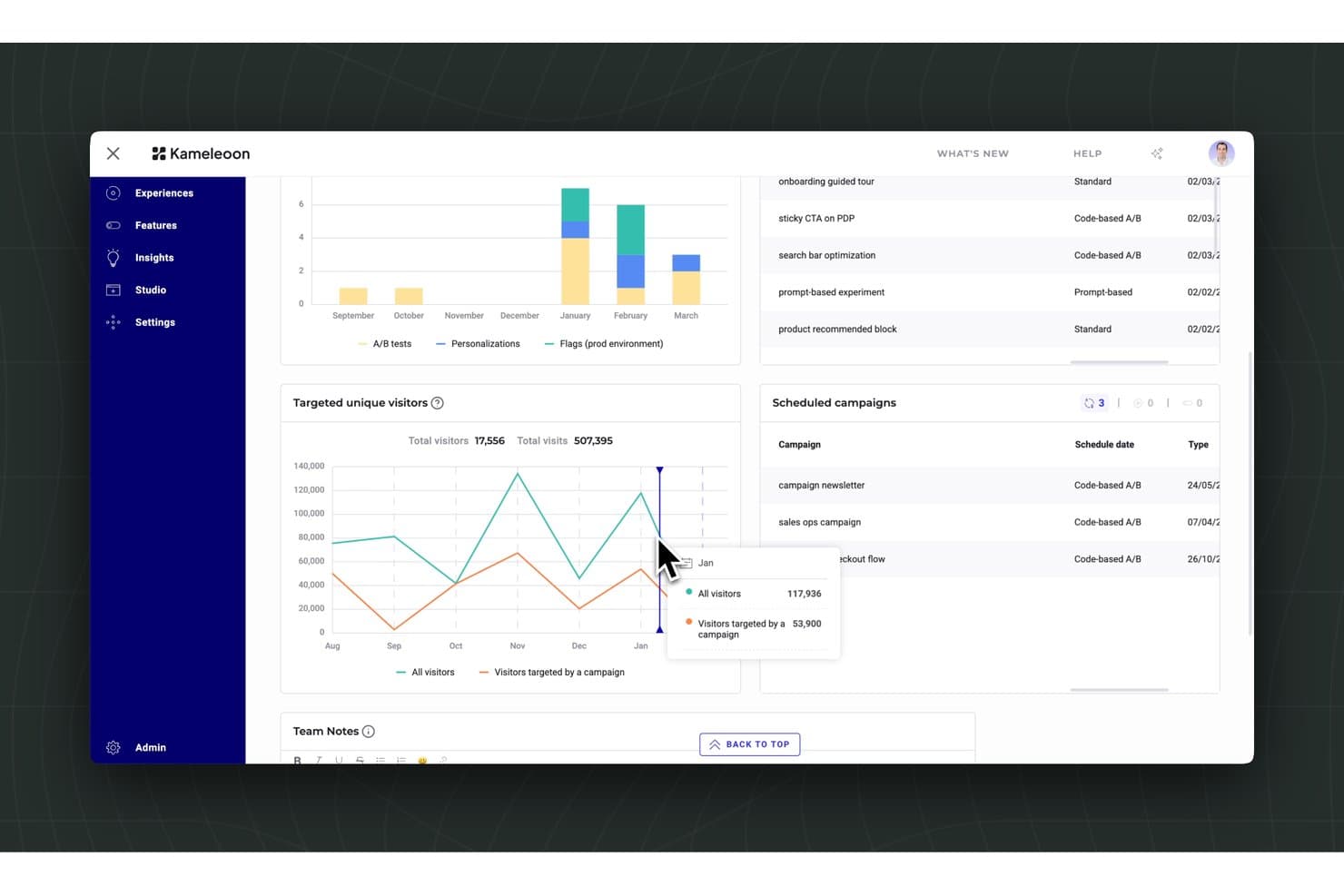
Kameleoon tracks visitor targeting and scheduled A/B campaigns in one dashboard. Kameleoon is a feature management platform for product and engineering teams that need controlled releases, targeted experiences, and clearer product decisions without adding complexity to delivery workflows.
Who Is Kameleoon Best For?
Kameleoon suits product and engineering teams that need AI-assisted feature flags, controlled releases, and built-in experimentation.
Why Kameleoon Is a Good Launchdarkly Alternative
I picked Kameleoon because its AI-driven flags and experimentation connect controlled releases with product decisions. I use feature flags to target specific user segments, then run experiments on new onboarding flows or pricing pages before wider rollout. Its AI capabilities help identify promising audiences and test variations with less guesswork.
Kameleoon Key Features
- Multi-environment management: Separate development, staging, and production configurations.
- Flag scheduling: Set activation and deactivation dates for feature flags.
- Role-based permissions: Control access to projects, environments, and configuration changes.
- Audit logs: Review flag updates, user actions, and configuration history.
Kameleoon Integrations
Kameleoon offers native integrations with Google Analytics, Adobe Analytics, Amplitude, Contentsquare, FullStory, Heap, Hotjar, Mixpanel, Segment, and Snowplow. It also connects with Zapier and provides REST APIs plus a custom analytics bridge for additional integrations.
Pros and Cons
Pros:
- Supports modern single-page applications
- Feature flags connect directly with experimentation
- AI prioritizes audiences and experiment ideas
Cons:
- Reporting may feel complex for new users
- Experiment setup can require technical support
Learn more about Kameleoon: Best for strategy-based rollout control
- 14-day free trial + free demo available
- From $75/seat/month
Visit WebsiteCustomer Rating:4.7/5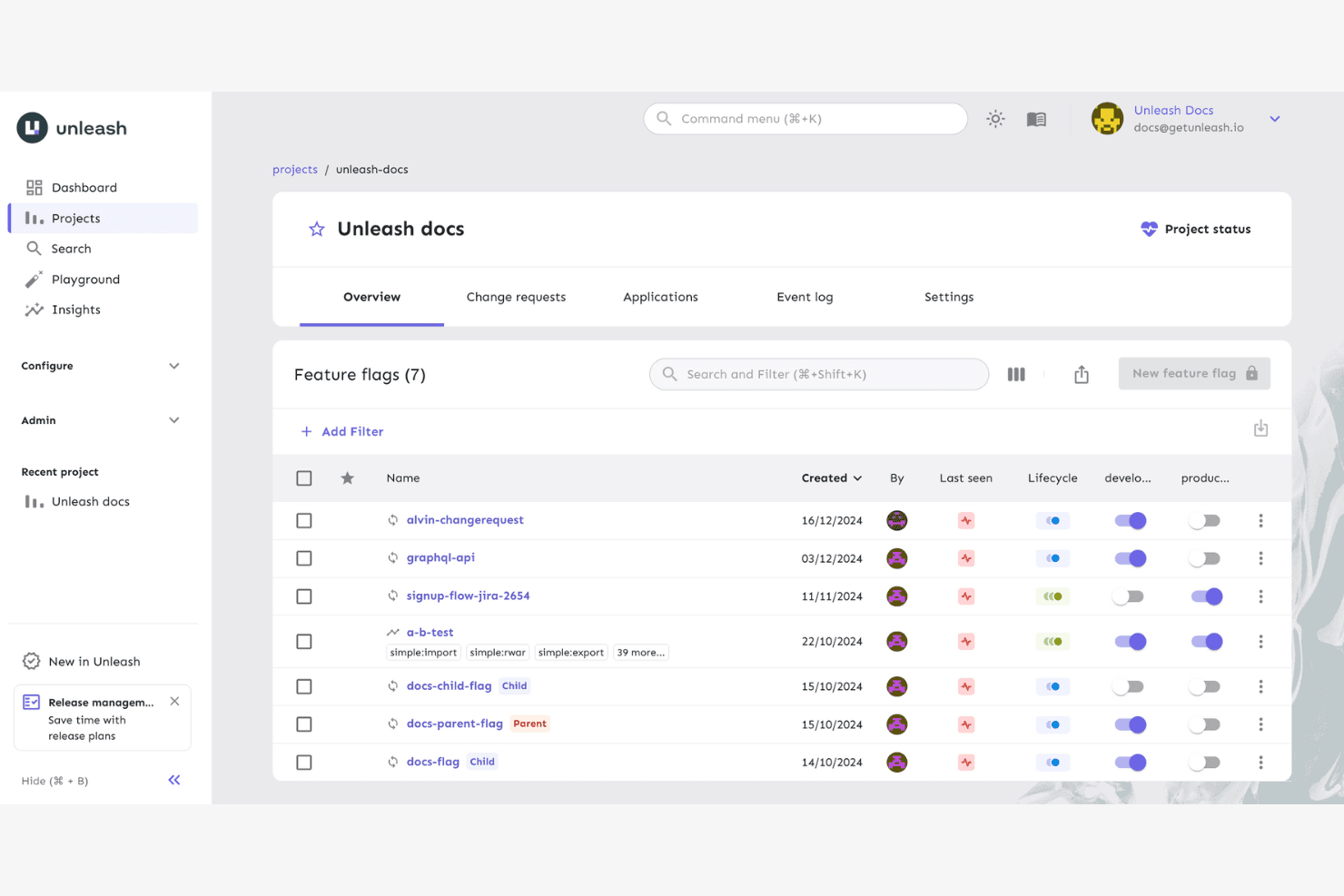
Unleash offers a feature flags dashboard with sortable details and environment toggles for each flag. Unleash is a feature management platform for product and engineering teams that need flexible release controls, safer deployments, and better coordination across development, testing, and production environments.
Who Is Unleash Best For?
Product and engineering teams that need strategy-based feature rollouts across development, testing, and production environments.
Why Unleash Is a Good Launchdarkly Alternative
I picked Unleash because its strategy-based rollout control gives my team precise release options. We use gradual rollouts, user stickiness, and constraints to expose a feature to selected cohorts before expanding access. Environment-specific strategies also let us test changes safely before production release.
Unleash Key Features
- Feature toggles: Create and manage feature flags from a central dashboard.
- SDK integrations: Connect applications through supported client SDKs.
- Audit logs: Review changes made to feature flags and configurations.
- Flag variants: Serve different configuration values from one feature flag.
Unleash Integrations
Unleash offers native integrations with Datadog, Jira Cloud, Microsoft Teams, ServiceNow, and Slack. It also supports webhooks and provides APIs for custom integrations.
Pros and Cons
Pros:
- Environment-specific flags support safer testing
- Self-hosting supports greater deployment control
- Flexible strategies target precise user cohorts
Cons:
- Smaller ecosystem than LaunchDarkly's platform ecosystem
- Self-hosting adds operational maintenance requirements
Learn more about Unleash: Best with enterprise-grade governance controls
- Free plan available
- Pricing upon request
Visit WebsiteCustomer Rating:4.6/5
Harness offers a CI/CD pipelines dashboard with run history, statuses, and an AI assistant. Harness is a feature management platform built for organizations that need tight operational oversight and compliance as they scale deployments. Large enterprises and highly regulated teams will find Harness valuable for minimizing risk across every stage of the release process.
Who Is Harness Best For?
Harness is a strong choice for large enterprises or compliance-driven teams managing complex, multi-environment software releases.
Why Harness Is a Good LaunchDarkly Alternative
I picked Harness because its governance controls go deeper than most feature management platforms I've used. It has built-in role-based access controls, approval workflows, and audit trails, so my team can enforce exactly who is allowed to create, modify, or toggle a flag in production. In practice, that means I can require a second approval before any flag change hits a regulated environment—something I haven't seen implemented this cleanly elsewhere. I also appreciate how Harness ties feature flags directly into its pipeline automation, giving my team a single place to manage both deployment controls and flag governance.
Harness Key Features
- Dynamic configurations: Adjust feature behavior in real time without deploying new code, letting any team iterate on live features instantly.
- Release monitoring: Automatically track performance and error metrics the moment a gradual rollout begins, with instant alerts tied to the specific flag causing an issue.
- Flexible targeting rules: Define exactly who sees a feature using custom segments, percentage rollouts, or specific user attributes.
- Flag lifecycle management: Track flag activity and surface stale or inactive flags for cleanup, with Jira integration to assign and prioritize code removal.
Harness Integrations
Harness offers native integrations with Jira and GitHub. Harness Pipelines is offered for custom integrations.
Pros and Cons
Pros:
- Release pipeline integration with feature flags
- In-depth audit logs for flag changes
- Enterprise RBAC and approval workflow enforcement
Cons:
- UI responsiveness occasionally lags with scale
- Governance features add operational complexity
Learn more about Harness: Best for open-source feature flag hosting
- Free plan available
- From $45/3 users/month
Visit WebsiteCustomer Rating:4.7/5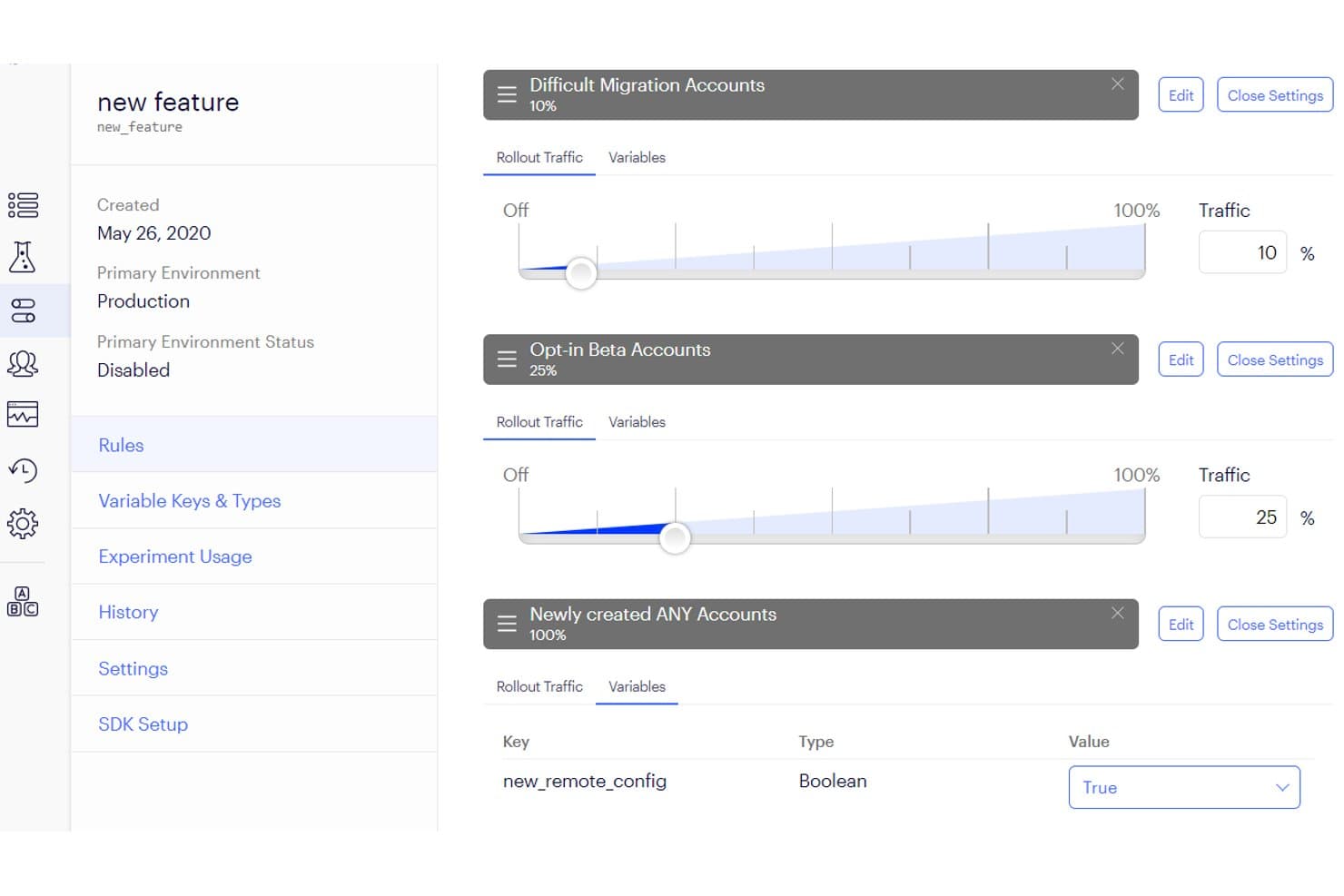
Flagsmith lets users control feature rollout traffic per audience segment. Flagsmith is a feature flag management platform for product and engineering teams seeking a LaunchDarkly alternative to control releases, test changes, and reduce deployment risk through open-source feature flag hosting.
Who Is Flagsmith Best For?
Product and engineering teams that need open-source feature flags for controlled releases, testing, and reduced deployment risk.
Why Flagsmith Is a Good Launchdarkly Alternative
I picked Flagsmith because its open-source feature flag hosting gives my team control over deployment and data. We can self-host Flagsmith, create environment-specific flags, and use SDKs to release features gradually. I also use segments to target beta users without maintaining custom release logic.
Flagsmith Key Features
- Multivariate flags: Assign different values to test multiple variants.
- Remote configuration: Manage application settings without redeploying code.
- Audit logs: Review changes made to flags and configuration.
- Role-based access: Control feature management permissions by team role.
Flagsmith Integrations
Flagsmith offers native integrations with GitHub, GitLab, Jira, Slack, Terraform, Datadog, Segment, Amplitude, Sentry, and Backstage. It also provides a management API and webhooks for custom workflows, analytics pipelines, and CI/CD automation.
Pros and Cons
Pros:
- Remote configuration reduces redeployments for product teams
- Percentage rollouts and segments support gradual releases
- Self-hosting supports data residency and control
Cons:
- Advanced experimentation needs more setup than LaunchDarkly
- Dashboard navigation can feel less polished
Learn more about Flagsmith: Best for flags governed inside CI/CD pipelines
- Free demo available
- Pricing upon request
Visit WebsiteCustomer Rating:4.4/5
CloudBees features environments for managing feature flags across stages. CloudBees offers feature management built specifically for teams invested in automated software delivery. It’s a good choice for engineering organizations that want feature flagging tightly aligned with their CI/CD pipelines and release governance.
Who Is CloudBees Best For?
CloudBees is a strong fit for DevOps teams in enterprises that need integrated feature management within complex CI/CD and release automation workflows.
Why CloudBees Is a Good LaunchDarkly Alternative
I picked CloudBees because its feature management is built directly into a broader CI/CD and software delivery platform, which means flag changes and release pipelines live in the same system. In practice, my team can gate deployments using feature flags without jumping between separate tools. I also appreciate CloudBees' release orchestration, which lets me tie flag rollouts to specific pipeline stages—so a flag only activates once a build passes defined quality gates. For engineering teams running complex, multi-stage delivery workflows, that level of pipeline-native control is something LaunchDarkly doesn't offer out of the box.
CloudBees Key Features
- Git-native release controls: Manage feature flag changes directly within Git workflows, keeping release decisions inside existing developer tooling without extra handoffs.
- Real-time exposure control: Adjust which users see a feature at any moment without triggering a new deployment or restarting services.
- Audit trail and governance tracking: Every flag change is automatically logged, attributed, and auditable to support enterprise compliance and security reviews.
- Unified control plane visibility: See what's live, what's changing, and who owns each release decision across teams and services from a single view.
CloudBees Integrations
CloudBees offers native integrations with Salesforce, AWS, Synaptics, Acquia, VMware, Adobe, and Google Cloud. An API is available for custom integrations.
Pros and Cons
Pros:
- Enterprise-focused compliance and auditing options
- Supports advanced release governance requirements
- Native feature management within CI/CD pipelines
Cons:
- Initial setup takes more time than LaunchDarkly
- UI complexity increases with large configurations
Learn more about CloudBees: Best for running experiments alongside feature flags
- Free demo available
- Pricing upon request
Visit WebsiteCustomer Rating:4.2/5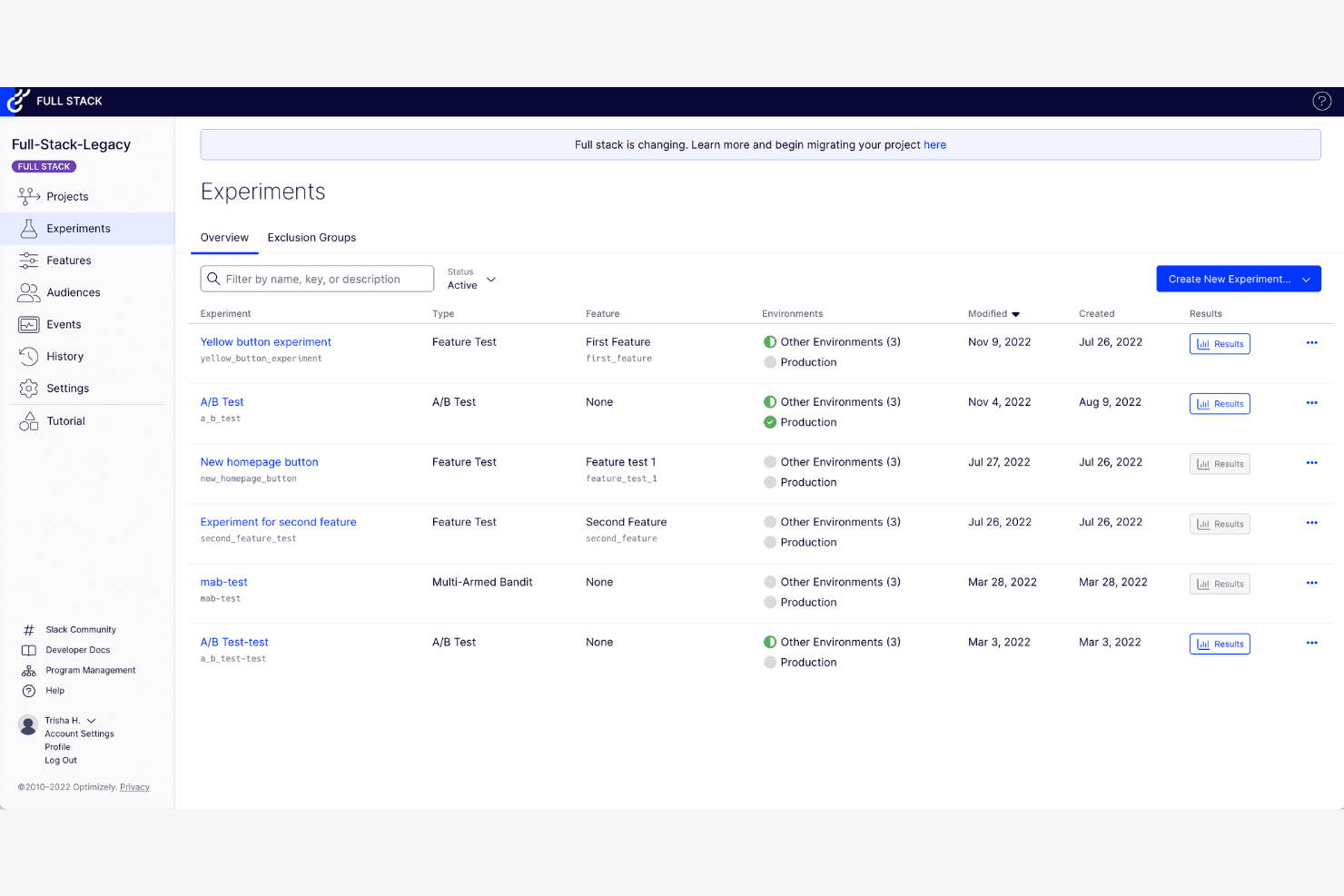
Optimizely features an experiments dashboard for A/B tests and feature experiments. Optimizely is a feature management and product experimentation platform for product, engineering, and growth teams that need safer releases, targeted rollouts, and clearer insight into customer behavior.
Who Is Optimizely Best For?
Product and engineering teams can use Optimizely to test product changes, manage feature flags, and make rollout decisions from experiment results.
Why Optimizely Is a Good Launchdarkly Alternative
I picked Optimizely because I can pair feature flags with controlled experiments in the same workflow. My team can release a new checkout flow to a small audience, compare conversion results, and expand rollout based on evidence. Feature targeting and experiment results help us connect release decisions to customer behavior.
Optimizely Key Features
- Feature variables: Configure feature values without changing code.
- Environment management: Maintain separate development, staging, and production settings.
- Role-based permissions: Control who can edit, approve, and publish changes.
- Audit logs: Review changes to feature configurations and settings.
Optimizely Integrations
Optimizely offers official connectors for Slack, UserTesting, Quantum Metric, and Vercel, with Vercel supporting Optimizely Feature Experimentation flags and experiments in Vercel Functions. Feature Experimentation also provides SDKs, REST APIs, and webhooks for custom integrations and deployment workflows.
Pros and Cons
Pros:
- Multiple experimentation methods support product teams
- Feature variables reduce code changes for tests
- Experiment results guide feature rollout decisions
Cons:
- Reporting may require additional analytics configuration
- Advanced experimentation requires careful implementation
Learn more about Optimizely: Best for developer-centric workflows
- Free plan + free demo available
- From $500/month (billed annually)
Visit WebsiteCustomer Rating:4.5/5
DevCycle lets teams target features with rules, variations, and audience segments. DevCycle is a feature management platform created for engineering teams who want to modernize how they release and manage software. It’s a strong pick for businesses looking for robust control, safety, and auditability in feature rollouts beyond basic flagging.
Who Is DevCycle Best For?
DevCycle is a great match for engineering teams at SaaS companies that need deep workflow automation and granular feature control.
Why DevCycle Is a Good LaunchDarkly Alternative
I picked DevCycle because it's built specifically for developers, and that focus shows in almost every part of the product. I appreciate that DevCycle uses OpenFeature, the CNCF open standard for feature flagging, which means my team isn't locked into proprietary SDKs the way you often are with LaunchDarkly. I also like the EdgeDB feature, which evaluates flags at the edge rather than at runtime—in practice, that means my team gets near-zero latency flag delivery without any extra infrastructure. For teams running continuous delivery pipelines, that combination of standards-based tooling and edge evaluation is genuinely hard to find elsewhere.
DevCycle Key Features
- Feature flag dashboard: View, manage, and audit all active flags across environments from a single interface.
- Code references scanning: Automatically detect where flags are referenced in your codebase to track usage and flag stale code.
- Gradual rollouts: Release features to a percentage of users and increase exposure incrementally based on real-time results.
- Local bucketing SDKs: Evaluate flags directly on the client device without sending user data to external servers.
DevCycle Integrations
DevCycle offers native integrations with Jira, GitHub, Slack, Bitbucket, Terraform, Snowflake, and Rollbar. Webhooks and an API are available for custom integrations.
Pros and Cons
Pros:
- Code references help manage technical debt
- Flag delivery happens at the edge for speed
- Built using the OpenFeature CNCF standard
Cons:
- Unpredictable costs on a larger scale
- Advanced data analysis is limited
Learn more about DevCycle: Best for simple feature flag management
- Free forever plan + free demo available
- From $110/month (billed annually)
Visit WebsiteCustomer Rating:4.6/5
ConfigCat manages feature flags with targeting rules and percentage rollouts. ConfigCat is a straightforward feature flag platform built for developers and product teams who want to deploy and control features without added complexity. I think it's a fit for small businesses and startups seeking quick setup and predictable, code-driven workflows for managing releases.
Who Is ConfigCat Best For?
ConfigCat is a good fit for engineering teams at startups or small companies who need fast, low-overhead feature flagging without enterprise-scale complexity.
Why ConfigCat Is a Good LaunchDarkly Alternative
I picked ConfigCat because it strips feature flagging down to exactly what most dev teams actually need. The setup is genuinely fast—you can have a flag live in your codebase within minutes using one of ConfigCat's 20+ open-source SDKs. I also appreciate the dedicated config page per environment, which makes it easy to manage separate flag states across development, staging, and production without any configuration bleed. For teams that don't need LaunchDarkly's full experimentation suite, ConfigCat keeps the workflow clean and predictable.
ConfigCat Key Features
- Percentage rollouts: Gradually release a feature to a defined percentage of your user base before a full launch.
- Tech debt CLI scanner: Automatically detects stale or zombie flags in your codebase and flags them for removal.
- Remote configuration management: Store and manage string, number, and boolean variables remotely, not just on/off toggles.
- Client-side flag evaluation: Feature flag logic runs on the client, so your users' data never leaves your system.
ConfigCat Integrations
ConfigCat offers native integrations with GitHub, GitLab, Bitbucket, Jira, monday, Twilio, Amplitude, Slack, and Trello. Zapier is supported, and an API is available for custom integrations.
Pros and Cons
Pros:
- Clear environment separation for flag states
- Reliable flag changes without system downtime
- Easy SDK setup for most frameworks
Cons:
- Missing advanced identity provider integrations
- Lacks built-in A/B testing tools
Learn more about ConfigCat: Best with self-hosted deployment options
- Free plan available
- Pricing upon request
Visit WebsiteCustomer Rating:4.5/5
PostHog uses data management tools for organizing events and properties. PostHog stands out for product and engineering teams that want robust analytics, feature flagging, session recording, and experimentation all in one place. If you're seeking deep product insight with full control over your data, PostHog could be a smart choice as a LaunchDarkly alternative.
Who Is PostHog Best For?
Growth-focused engineering teams at tech startups and digital-first companies who want direct control over analytics and feature management.
Why PostHog Is a Good LaunchDarkly Alternative
I picked PostHog largely because of its self-hosted deployment option, which lets my team run the entire platform on our own infrastructure. For teams operating under strict data residency or compliance requirements, that's a meaningful differentiator—most LaunchDarkly alternatives are cloud-only. Beyond that, I appreciate how PostHog bundles feature flags directly with session recording and funnel analysis, so I can watch exactly how users interact with a newly released feature. That kind of end-to-end visibility in a single self-hosted setup is genuinely hard to find elsewhere.
PostHog Key Features
- Feature flags: Roll out or roll back features for specific user segments without deploying new code.
- A/B testing: Run product experiments and measure statistical significance directly within the platform.
- User cohorts: Group users by behavior or properties to target feature releases or analyze adoption patterns.
- Event autocapture: Automatically tracks user interactions without requiring manual instrumentation for every action.
PostHog Integrations
PostHog offers native integrations with Confluence, HubSpot, GitHub, Mailchimp, Notion, Okta, Slack, Snowflake, WooCommerce, Salesforce, and Zendesk. An API is available for custom integrations.
Pros and Cons
Pros:
- Granular access control for feature management
- Offers generous free usage tiers
- Full visibility with bundled analytics and flags
Cons:
- The UI dashboard can feel cluttered
- Requires more setup than cloud tools
Learn more about PostHog:
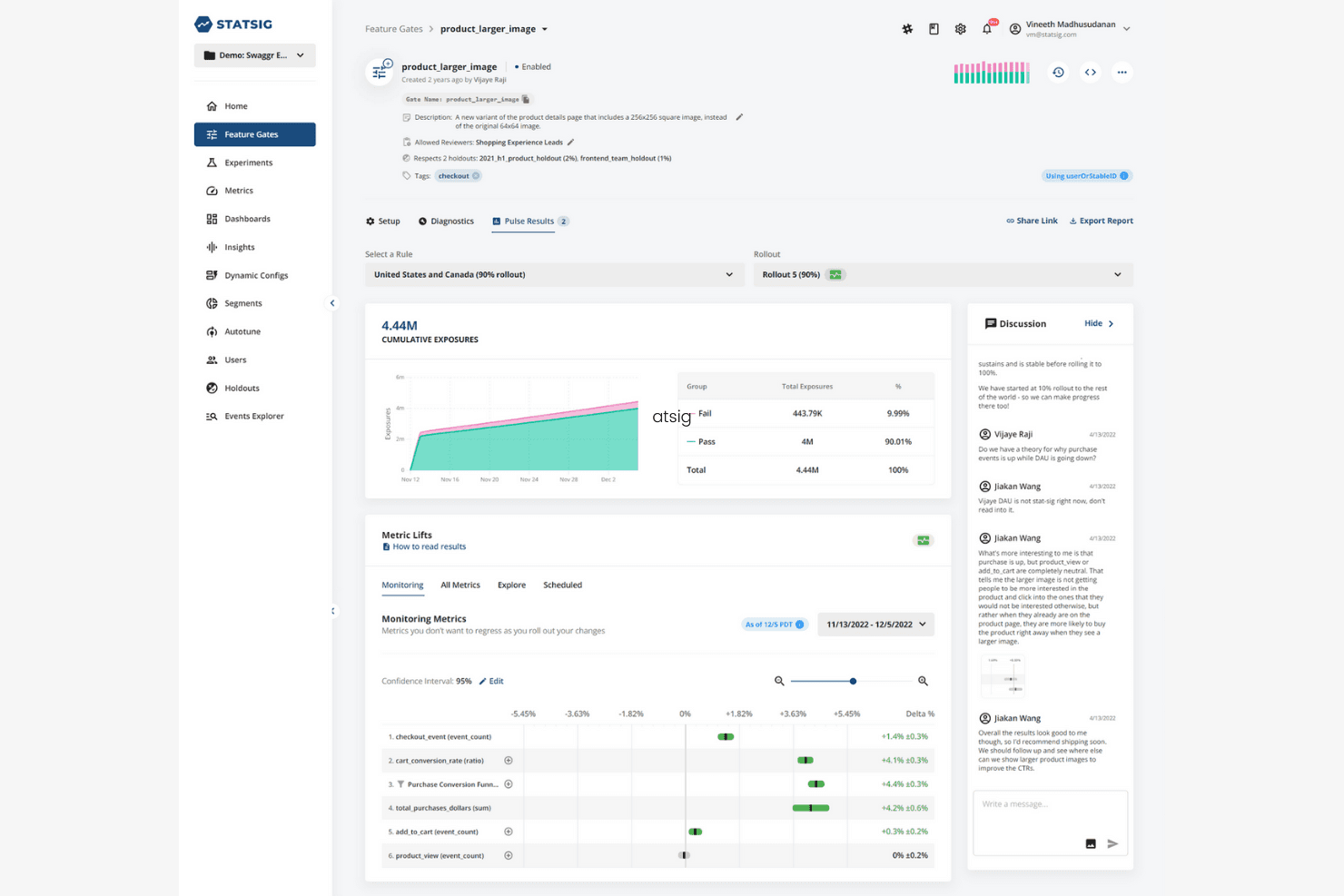
Statsig offers feature rollouts and experiment metrics in one dashboard. Statsig is a feature flag management platform for product and engineering teams that supports safer releases, targeted rollouts, and faster product decisions without requiring separate tools.
Who Is Statsig Best For?
Product managers and engineering teams at growing software companies can connect feature releases with product analytics and make data-informed rollout decisions.
Why Statsig Is a Good Best Launchdarkly Alternatives
I picked Statsig because it connects feature flag management with product analytics. I use targeted rollouts to release features to specific user groups, then review product data before expanding access. This helps my team link release decisions to measurable user behavior.
Statsig Key Features
- Dynamic configs: Adjust application settings without deploying new code.
- SDK integrations: Connect Statsig to web, mobile, and server applications.
- Audit logs: Review changes made to gates, configurations, and settings.
- Role-based access: Assign workspace permissions to control team access.
Statsig Integrations
Statsig supports integrations with Jira, GitHub, Slack, Datadog, Microsoft Teams, PagerDuty, Amplitude, Mixpanel, Segment, and Vercel. It also provides event webhooks for custom connections.
Pros and Cons
Pros:
- Dynamic configs reduce repeated deployment work
- Supports targeted rollouts and experimentation
- Connects feature flags with product analytics
Cons:
- Governance workflows need stronger maturity at scale
- Metric configuration requires careful planning
Learn more about Statsig:
Outras Alternativas ao LaunchDarkly
Eis algumas opções adicionais de alternativas ao LaunchDarkly que não entraram na minha lista restrita, mas que ainda vale a pena conhecer:
- 11GrowthBookBest for open-source A/B testing
- 12Wingify (formerly VWO and AB Tasty)Best for experiments tied to flag rollouts
- 13MixpanelBest for flags built into analytics workflows
- 14AmplitudeBest for product analytics integration
- 15EppoBest for warehouse-native experimentation with flags
- 16FeatBitBest for granular user targeting controls
How I Evaluate LaunchDarkly Alternatives
I split my evaluation into three parts. Core functionality carries the most weight—I look for whether a tool can manage flags at scale and control targeted rollouts to specific segments. Beyond that, I check for standout features like approval workflows, then weigh pricing scalability and migration effort.
Core Functionality (Table Stakes For This List)
When I'm selecting tools for my list, I score each one on a scale from 0 (does not offer the functionality) to 5 (excels in this area) for each core functionality listed below. I then convert the total into a percentage to help assess each tool's overall fit, with extra weight on any functionalities I’ve deemed essential.
- Flag Management (Essential): I look for ways to organize flags, track their lifecycle, and toggle features without redeploying code.
- Targeted Rollouts (Essential): I assess whether teams can release by segment or percentage, adjust exposure, and switch off a risky feature quickly.
- Experimentation & Testing: I check for flag-based A/B or multivariate tests, metric tracking, and results that help teams judge changes in user behavior.
- Environments & Access: I evaluate environment separation and team permissions, such as controlling who can change a flag in production.
- SDKs & Integrations: I look for SDK and API coverage that fits the team’s application stack, plus connections to CI/CD or analytics tools.
- Audit & Lifecycle: I check whether teams can see who changed a flag and when, and identify stale flags for cleanup.
Once I have a list of tools that meet the criteria, I consider what sets each platform apart.
Differentiating Factors (What Sets Vendors Apart)
Here's how I compare and contrast different vendors:
Standout Features
I check whether a tool can detect stale flags and recommend removal, since leftover flags quietly become technical debt that slows future releases. Approval workflows matter just as much—I evaluate whether a platform requires sign-off before a flag change hits production, which is essential when your team ships to regulated markets. I also look at flag dependency mapping, because understanding how flags relate to each other helps prevent conflicts during cleanup as your flag count grows.
Beyond Features
I evaluate how each tool's pricing model scales with experimentation volume, since a jump from pilot to product-led growth can turn per-MTU billing into a surprise line item. Migration effort matters just as much—I check for import tools, SDK compatibility guides, and onboarding support that cut the time teams spend moving flags from LaunchDarkly or a homegrown system. I also look at whether a platform connects to existing analytics stacks like Amplitude or Mixpanel, so experiment results feed directly into the dashboards your team already uses for product decisions.
Porquê procurar uma alternativa ao LaunchDarkly?
Embora o LaunchDarkly seja uma boa escolha entre as alternativas ao LaunchDarkly, existem vários motivos pelos quais alguns utilizadores procuram soluções alternativas. Pode estar à procura de uma alternativa ao LaunchDarkly porque…
- Precisa de ferramentas integradas de testes A/B e experimentação
- A sua equipa pretende opções de código aberto ou alojadas localmente
- Precisa de capacidades mais avançadas de segmentação de públicos
- Precisa de um modelo de preços mais simples para equipas em crescimento
- Os seus requisitos de conformidade exigem implementações no local
- Pretende integrações que o LaunchDarkly não disponibiliza
Se alguma destas situações lhe parece familiar, veio ao sítio certo. A minha lista inclui várias opções de alternativas ao LaunchDarkly mais adequadas para equipas que enfrentam estes desafios com o LaunchDarkly e procuram soluções alternativas.
Principais funcionalidades do LaunchDarkly
Eis o conjunto de funcionalidades principais do LaunchDarkly, para o ajudar a comparar e contrastar o que as soluções alternativas oferecem:
- Sinalizadores de funcionalidades: Gira o lançamento de funcionalidades ativando ou desativando novas capacidades em tempo real, sem voltar a implementar a sua aplicação.
- Regras de direcionamento: Controle quais utilizadores ou segmentos recebem funcionalidades específicas com base em atributos, localização geográfica ou lógica personalizada.
- Experimentação: Execute testes A/B ou multivariados para avaliar o impacto das alterações no comportamento dos utilizadores e nas métricas empresariais.
- Interruptores de emergência: Desative instantaneamente funcionalidades problemáticas em produção para minimizar os riscos e proteger a experiência do utilizador.
- Implementação progressiva: Disponibilize gradualmente novas funcionalidades a grupos de utilizadores selecionados, acompanhando as métricas e aumentando a escala com base no feedback em tempo real.
- Suporte para SDK: Integre o LaunchDarkly em sistemas Web, móveis e de back-end utilizando uma vasta gama de SDK oficiais.
- Ambientes personalizados: Separe os sinalizadores e as configurações por ambiente (produção, pré-produção, testes) para realizar testes seguros e lançamentos controlados.
- Permissões avançadas: Defina permissões e funções granulares para que as equipas possam gerir os sinalizadores em segurança sem pôr em risco a estabilidade da produção.
- Acompanhamento de eventos: Monitorize a utilização, a atividade dos utilizadores e a avaliação dos sinalizadores com dados de eventos para análise e resolução de problemas.
- Registos de auditoria: Mantenha um registo detalhado das alterações efetuadas aos sinalizadores de funcionalidades, às regras e aos ambientes para garantir a conformidade e a transparência.