

Gerir lançamentos de software pode ser um verdadeiro desafio. Tem de conciliar prazos, garantir a qualidade e manter a sua equipa no caminho certo. É aqui que entram as ferramentas de gestão de lançamentos de software — ajudam-no a coordenar tudo de forma simples.
Com base na minha experiência, estas ferramentas são uma verdadeira ajuda, oferecendo-lhe a estrutura e a supervisão de que precisa. Podem ajudá-lo a evitar aquelas surpresas de última hora e a manter os seus projetos em andamento.
Testei e analisei de forma independente várias destas ferramentas para encontrar as melhores para as suas necessidades. Neste artigo, partilho as minhas principais escolhas para que possa tomar uma decisão informada para a sua equipa. Quer seja um gestor de produto experiente ou esteja apenas a começar, encontrará aqui algo para si.
Why Trust Our Software Recommendations
6,700+
Reviews
20
Industry experts
16+
Evaluation factors
14
Years
Our team has been testing and reviewing software since 2012. As product managers ourselves, we know how difficult—and important—it is to choose the right software.
For this guide, we evaluated tools using hands-on testing and independent research, scoring tools using our selection criteria.
Our reviews reflect our human editorial judgment, not a sales pitch.
Expert reviewers:
- Andrew LumbySenior TPM
- Cristiano ValimSenior UI/UX Lead


Tabela comparativa: ferramentas de gestão de lançamentos de software
Esta tabela comparativa resume os detalhes de preços das minhas principais escolhas de ferramentas de gestão de lançamentos de software.
| Tool | Best For | Trial Info | Price | ||
|---|---|---|---|---|---|
| 1 | ITSM tool with release management features | 14-day free trial | From $19/user/month (billed annually) | Website | |
| 2 | Best for all-in-one DevOps CI/CD pipeline releases | Free plan + free trial available | From $29/user/month (billed annually) | Website | |
| 3 | Best for ITSM-led deployment change control | Free plan + 14-day trial available | From $21.50/user/month | Website | |
| 4 | Best for Microsoft-stack CI/CD governance | Free plan available | From $6/user/month | Website | |
| 5 | Best for multi-cloud canary and blue/green deploys | Free plan available | From $0/month | Website | |
| 6 | Best for AI-driven cross-team release orchestration | Free plan available | Pricing upon request | Website | |
| 7 | Best for compliance-driven release governance | Free demo available | Pricing upon request | Website | |
| 8 | Best for multi-tenant deployment pipeline automation | 30-day free trial | From $4,330/year (billed annually) | Website | |
| 9 | Best for AI-assisted release risk scoring | Free trial available | Pricing upon request | Website | |
| 10 | Best for GitOps-driven Kubernetes release promotion | Free plan available | From $495/month | Website |


Análises das melhores ferramentas de gestão de lançamentos de software
Abaixo encontrará os meus resumos detalhados das melhores ferramentas de gestão de lançamentos de software que entraram na minha lista restrita. As minhas análises apresentam uma visão detalhada das principais funcionalidades, vantagens e desvantagens, integrações e casos de utilização ideais de cada ferramenta, para o ajudar a encontrar a melhor opção para si.
 ITSM tool with release management features
- 14-day free trial
- From $19/user/month (billed annually)
Visit WebsiteCustomer Rating:4.6/5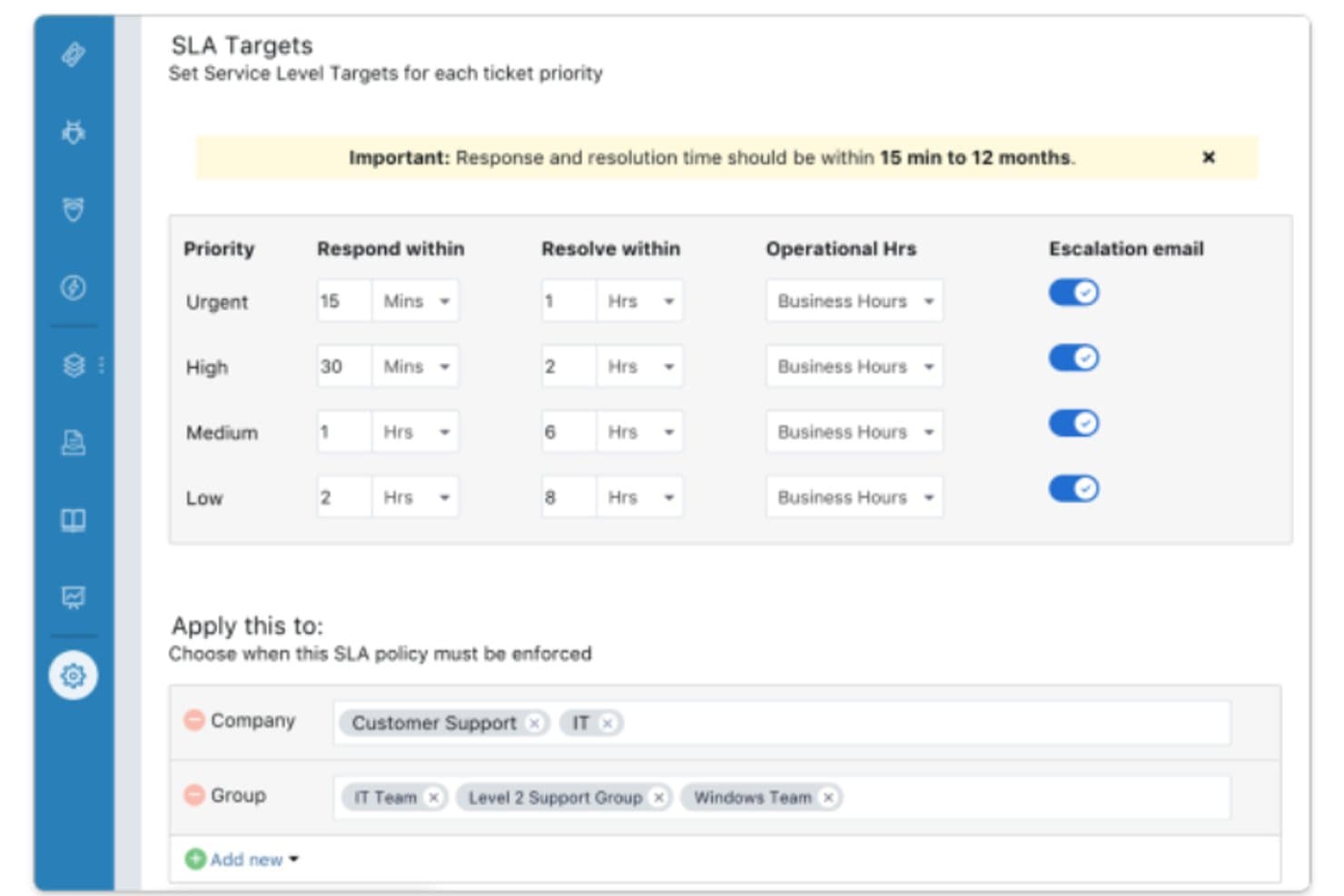
Combining IT service desk with release management features. Freshservice is an ITSM platform that brings change management, CMDB, and ITIL-style release records together in one place, letting you govern releases through CAB approvals, CI linkage, and status tracking.
Who Is Freshservice Best For?
Freshservice suits release managers and IT teams operating in ITIL-governed environments who need release governance tied to change approvals and asset tracking—not deployment automation.
Why I Picked Freshservice
I've included Freshservice in my top picks because it's an ITSM tool with release management features that sits where most pure DevOps tools don't: inside your ITIL governance layer. Release records tie directly to CAB-approved changes, so a release can't progress without a formal approval trail. CMDB linkage lets you attach specific configuration items to each release, giving you a clear picture of which services are in scope before anything ships.
Freshservice Key Features
- Release record templates: Each release record includes dedicated fields for build plans, test plans, notes, and tasks, giving you a structured container for every release cycle.
- CMDB CI attachment: Attach specific configuration items from the CMDB directly to a release so your team can see exactly which services and assets are in scope.
- Saved release views: Filter and sort releases by status, priority, or assignment using pre-built views like unassigned, emergency, and completed releases.
- ChatOps via ServiceBot: A ServiceBot integrated with Microsoft Teams and Slack lets agents manage releases and tickets without leaving their messaging tools.
Freshservice Integrations
Freshservice offers more than 1,200 Marketplace integrations, including ServiceBot connectivity with Slack and Microsoft Teams. A REST API supports custom integrations, including connections to external CI/CD tools.
Pros and Cons
Pros:
- Supports release status views and activity logs
- Links affected assets through CMDB records
- Connects releases to CAB-approved changes
Cons:
- Offers no native code rollback capability
- Doesn’t automate build or deployment pipelines
Learn more about Freshservice: Best for all-in-one DevOps CI/CD pipeline releases
- Free plan + free trial available
- From $29/user/month (billed annually)
Visit WebsiteCustomer Rating:4.5/5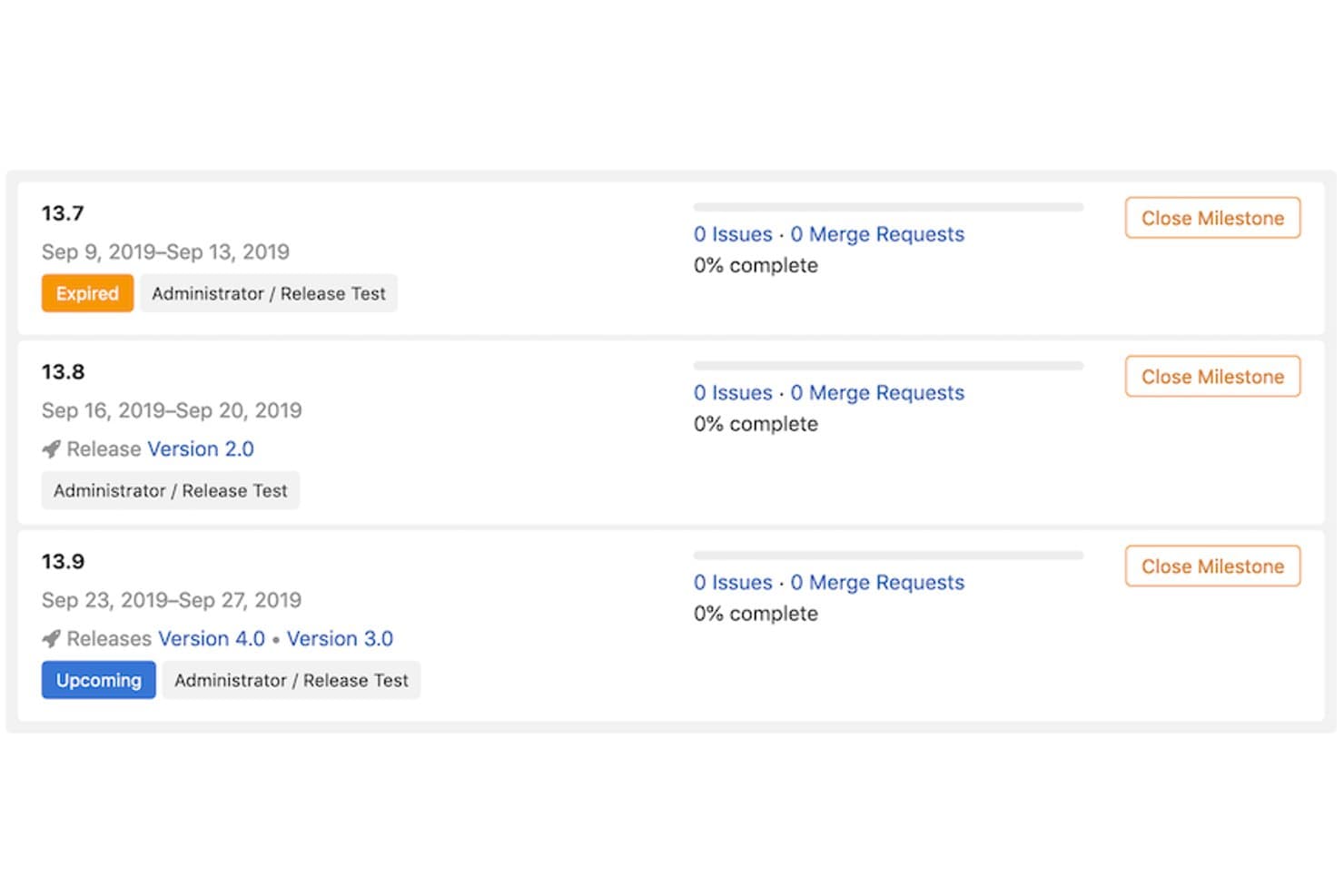
GitLab links milestones to releases for structured version tracking. GitLab is an all-in-one DevOps platform that combines source control, CI/CD pipelines, deployment tracking, environment management, feature flags, and release automation in a single tool.
Who Is GitLab Best For?
GitLab is a strong fit for DevOps engineers and engineering teams who want source control, CI/CD, and deployment management in one place.
Why I Picked GitLab
GitLab earns its spot on my shortlist because it collapses the entire release lifecycle into a single platform, from source control to deployment. I love that CI/CD pipelines are available on every tier, so my team can define multi-stage pipelines with conditional logic, dynamic review app environments, and DAG-based job dependencies without needing a separate tool. On Premium, multi-project pipelines let me trigger deployments across repositories in one coordinated flow, which is exactly what cross-team release orchestration looks like in practice.
GitLab Key Features
- Deployment approvals: Block deployments to protected environments until designated users or groups approve, with full comment history tracked on Premium and above.
- Feature flags: Control feature rollouts by environment, user list, or percentage without a new deployment, using GitLab's built-in flag system compatible with Unleash.
- Deploy freezes: Define cron-based time windows that automatically block deployments during high-risk periods like holidays or peak traffic events.
- One-click rollback: Re-deploy any earlier successful deployment directly from the Environments page without writing new pipeline code.
GitLab Integrations
GitLab has native integrations with Jira and Slack, plus integrations with Microsoft Teams, PagerDuty, and Datadog. REST and GraphQL APIs, webhooks, and the GitLab agent for Kubernetes support custom release workflows.
Pros and Cons
Pros:
- Enables one-click rollback from deployment history
- Supports multi-stage pipelines with deployment approvals
- Unifies source control, pipelines, and deployments
Cons:
- Advanced governance and rollback require higher tiers
- No cross-team release calendar or conflict detection
Learn more about GitLab: Best for ITSM-led deployment change control
- Free plan + 14-day trial available
- From $21.50/user/month
Visit WebsiteCustomer Rating:4/5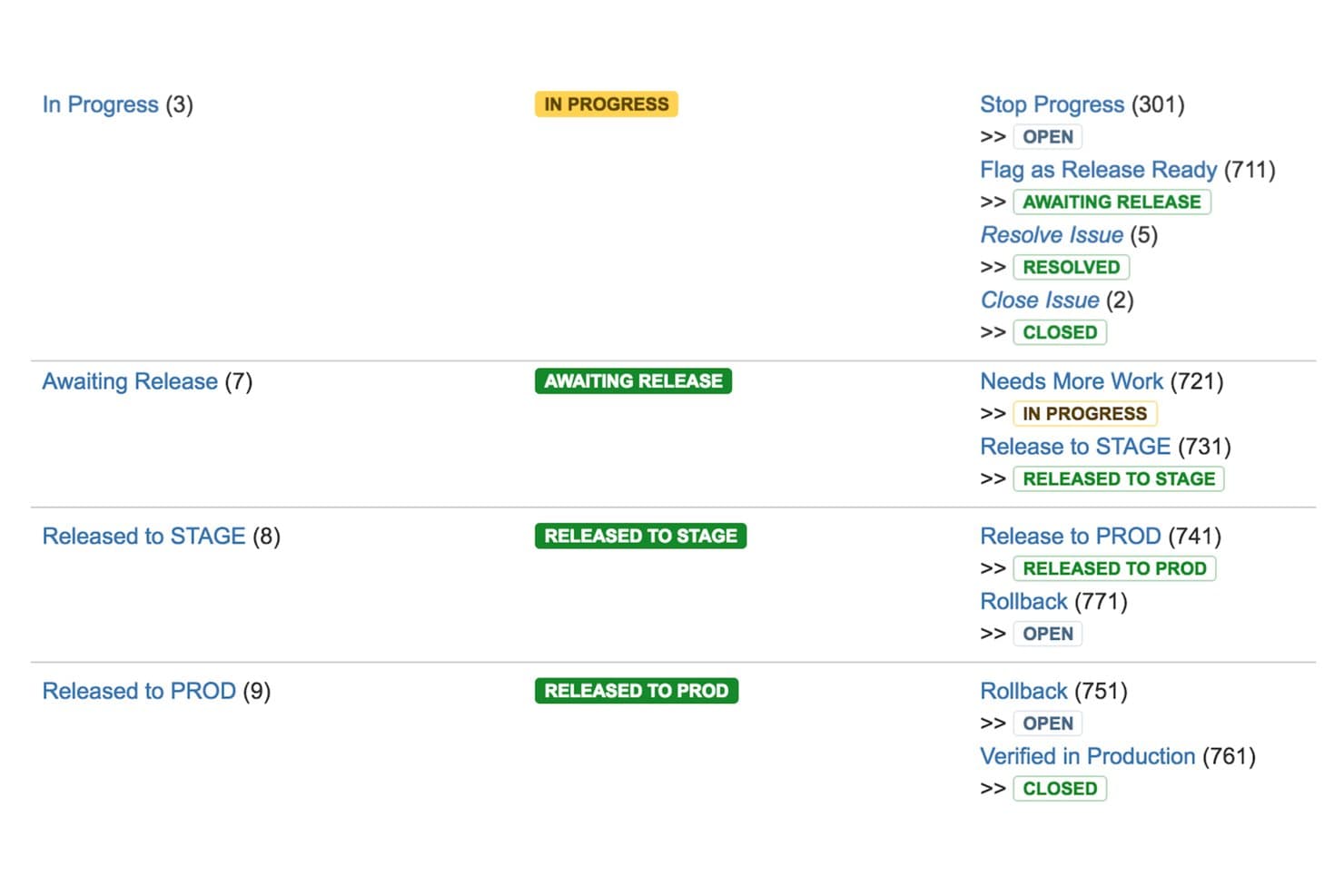
Jira Service Management maps release workflows from In Progress to Production. Jira Service Management is an ITSM platform from Atlassian that combines change management, deployment gating, a CMDB, approval workflows, and a change calendar to govern and track software deployments across CI/CD pipelines.
Who Is Jira Service Management Best For?
Jira Service Management is a strong fit for release managers and engineering team leads in compliance-heavy organizations that need formal ITIL-style change control layered on top of their existing CI/CD pipelines.
Why I Picked Jira Service Management
Jira Service Management earns its spot on my shortlist because it's the only tool here that wraps formal ITIL-style change control directly around your CI/CD pipelines. I particularly like the deployment gating feature: when a pipeline hits a gated environment, JSM automatically creates a change request and holds the deployment until it's approved. The AI Change Risk Assessment scores technical, operational, and security risk, giving approvers real context before they sign off.
Jira Service Management Key Features
- Change calendar: A built-in calendar displays past, ongoing, and upcoming changes, and flags scheduling conflicts and active incidents across teams.
- Assets/CMDB: A structured registry maps applications, services, APIs, and infrastructure with upstream and downstream dependencies, linking changes and incidents to affected assets.
- Automated approval workflows: Role-based approval workflows trigger based on change type, routing requests through the right reviewers or CAB processes automatically.
- Incident-to-deployment linkage: Incident investigations surface recent deployments, commits, and code changes in a single view to support faster root cause analysis.
Jira Service Management Integrations
Jira Service Management offers native integrations with Bitbucket Pipelines, CircleCI, Jenkins, and Octopus Deploy for deployment gating and tracking. It also connects with Jira and Confluence, supports Slack and Microsoft Teams, and provides REST and Jira Deployments APIs for custom integrations.
Pros and Cons
Pros:
- Change calendar flags conflicts and incidents
- AI risk assessment gives approvers useful context
- Formal change approvals around deployments
Cons:
- No native automated rollback capability
- Cannot orchestrate builds or deployments
Learn more about Jira Service Management: Best for Microsoft-stack CI/CD governance
- Free plan available
- From $6/user/month
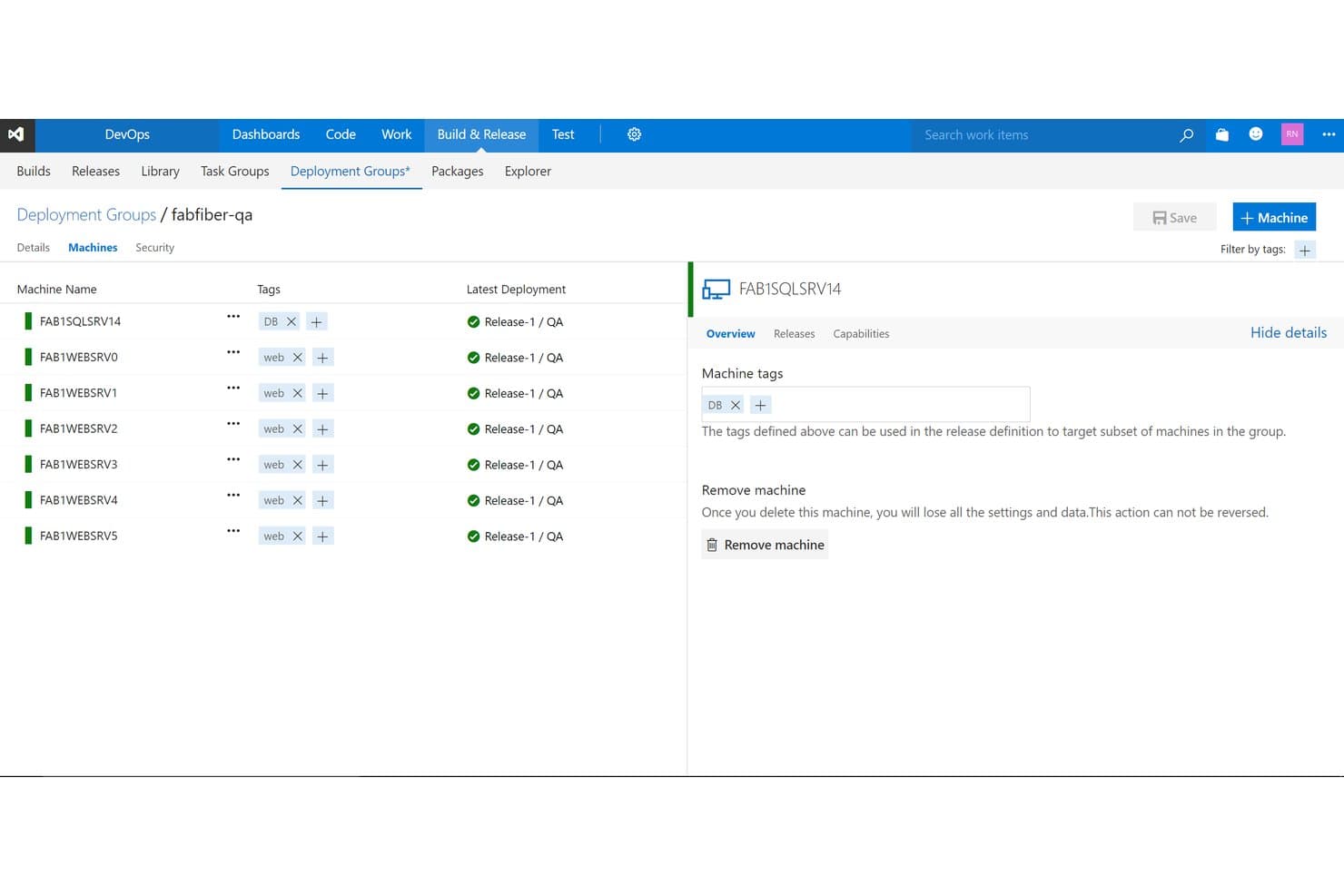
Azure DevOps manages machine deployment groups with tags and release status. Azure DevOps is a Microsoft platform for software release management that covers CI/CD pipeline orchestration, deployment tracking, approval and governance workflows, environment management, and work item tracking across the full delivery lifecycle.
Who Is Azure DevOps Best For?
Azure DevOps is a strong fit for engineering teams already invested in the Microsoft ecosystem who need a single platform to connect CI/CD pipelines with governance, approvals, and work tracking.
Why I Picked Azure DevOps
Azure DevOps earns its spot on my shortlist because of how tightly it connects CI/CD pipelines with governance inside a Microsoft-native environment. I particularly like the environment checks system, which lets you layer manual approvals, branch controls, business-hours windows, and Azure Monitor gates onto any deployment stage. Combined with YAML-based multi-stage pipelines that support rolling and canary strategies, you get real control over how code moves from staging to production in regulated or audit-heavy settings.
Azure DevOps Key Features
- Multi-stage YAML pipelines: Define build, test, and deployment stages in code, with conditional logic, parallelism, and reusable templates across projects.
- Deployment strategies: Choose from runOnce, rolling, and canary deployment job types to control how releases roll out across environments.
- Azure Boards integration: Link work items, commits, and pull requests directly to pipeline runs so you can trace exactly what shipped in each deployment.
- Self-hosted and cloud-hosted agents: Run pipeline jobs on Microsoft-hosted agents or your own infrastructure, supporting hybrid and air-gapped deployment scenarios.
Azure DevOps Integrations
Azure DevOps offers native integrations across the Microsoft ecosystem, plus Marketplace integrations for GitHub, Bitbucket Cloud, Jira, Microsoft Teams, Slack, Kubernetes, and Terraform. REST APIs, service hooks, and custom tasks support tailored release workflows.
Pros and Cons
Pros:
- Deployment history links code with work items
- Canary and rolling deployments reduce rollout risk
- Flexible approval checks support governed releases
Cons:
- No native release calendar detects conflicts
- Automatic rollback requires custom pipeline scripting
Learn more about Azure DevOps: Best for multi-cloud canary and blue/green deploys
- Free plan available
- From $0/month
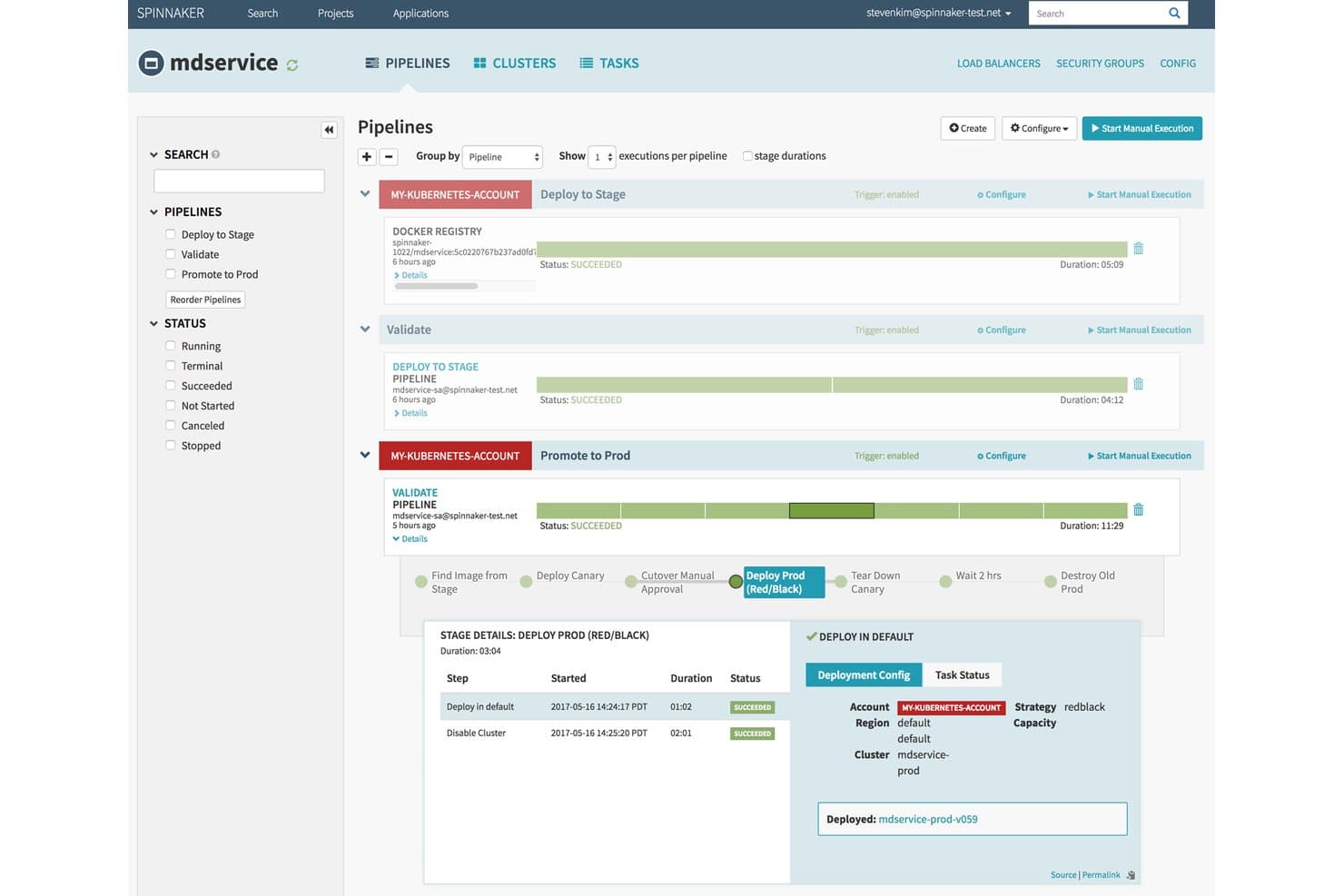
Spinnaker visualizes multi-stage deployment pipelines with real-time execution status. Spinnaker is an open-source continuous delivery platform, originally built by Netflix, that supports multi-cloud pipeline orchestration, automated deployment strategies, canary analysis, and approval gates across cloud environments.
Who Is Spinnaker Best For?
Spinnaker is a strong fit for DevOps engineers at large organizations who need fine-grained control over multi-cloud deployment pipelines and advanced strategies like canary analysis and blue/green releases.
Why I Picked Spinnaker
Spinnaker earns its spot on my shortlist because of how it handles multi-cloud canary and blue/green deployments at a level most tools can't match. I love that automated canary analysis lets you release to a slice of your fleet, then compare metrics from Datadog or Prometheus against your baseline before promoting further. Blue/green is built into the core pipeline model, with health-check-driven traffic switching and immutable images that make rollbacks fast and predictable.
Spinnaker Key Features
- Managed Delivery: Define the desired state for each environment declaratively, and Spinnaker automatically detects new artifact versions and brings live state into alignment.
- Manual Judgment stage: Require a human approval at any point in a pipeline before a release continues to the next stage.
- Restricted Execution Windows: Limit pipeline stages to run only within defined time windows, such as off-peak hours or maintenance slots.
- Multi-cloud deployment targets: Deploy across AWS EC2, Kubernetes, Google Cloud, Azure, Cloud Foundry, and more from a single pipeline configuration.
Spinnaker Integrations
Spinnaker offers documented integrations with Jenkins, Travis CI, Git, Docker, AWS EC2, Kubernetes, Google Compute Engine, Azure, Datadog, and Prometheus. It also connects with New Relic, SignalFx, Slack, OAuth, SAML, LDAP, and GitHub Teams.
Pros and Cons
Pros:
- Pipeline stages support complex release logic
- Blue/green rollbacks reduce recovery time
- Multi-cloud deployment visibility
Cons:
- No shared release calendar or dependencies
- Self-hosted operations demand dedicated expertise
Learn more about Spinnaker: Best for AI-driven cross-team release orchestration
- Free plan available
- Pricing upon request
Visit WebsiteCustomer Rating:4.6/5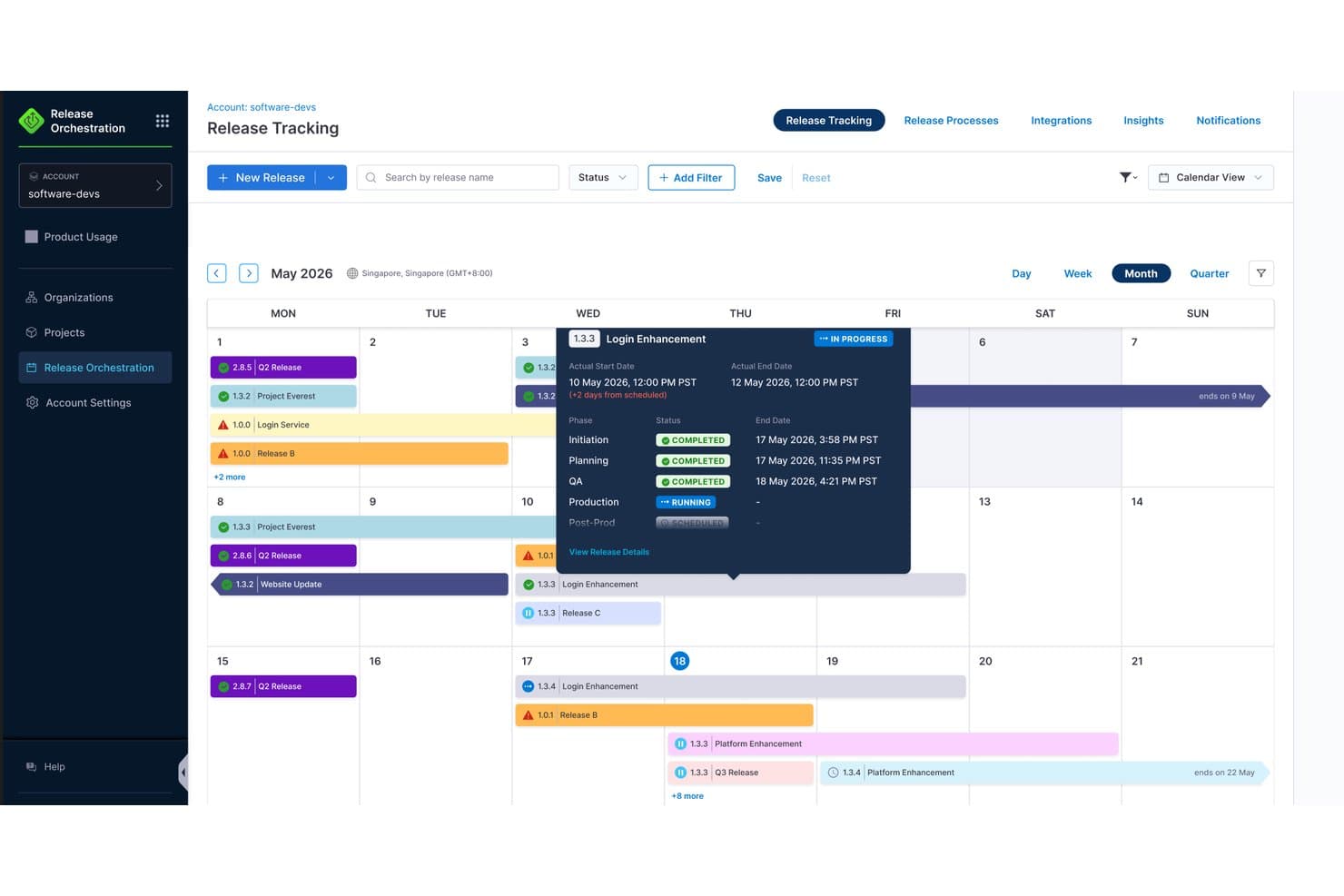
Harness provides a calendar view to track release schedules and phases. Harness is a CI/CD and release orchestration platform that spans pipeline automation, cross-team deployment coordination, feature flag management, and GitOps across cloud, Kubernetes, and hybrid environments.
Who Is Harness Best For?
Harness is a strong fit for engineering and DevOps teams that manage releases across multiple services, squads, or deployment environments and need a single platform to coordinate pipelines, approvals, and rollout visibility at scale.
Why I Picked Harness
I picked Harness as one of the best because its AI-driven release orchestration genuinely sets it apart when releases span multiple teams and services. I love how the "prompt-to-process" setup lets you describe a release in plain language and watch Harness build out the phases, approvals, and pipeline triggers automatically. The AI Verify feature monitors deployment health in real time and can trigger rollback before users notice a problem, which is exactly the kind of safety net I want coordinating cross-team releases at scale.
Harness Key Features
- Cross-team release calendar: A shared calendar lets teams plan, schedule, and deconflict releases across services and squads in one place.
- OPA policy-as-code governance: Open Policy Agent policies enforce pipeline compliance rules automatically, with RBAC and immutable audit logs for SOX, HIPAA, and PCI requirements.
- Test Intelligence: Harness identifies and runs only the tests affected by a code change, cutting test time by up to 80% and automatically quarantining flaky tests.
- Native feature flag management: A built-in feature management module lets teams toggle flags directly inside release pipelines, separating code deployment from feature exposure.
Harness Integrations
Harness offers 100+ integrations, including GitHub, GitLab, Jira, ServiceNow, Slack, Microsoft Teams, PagerDuty, Kubernetes, Terraform, and Datadog. These connections support cross-team release coordination, deployment workflows, approvals, and monitoring.
Pros and Cons
Pros:
- Embeds approvals, audit trails, and policies
- AI verifies deployments and triggers rollback
- Coordinates cross-team releases in one calendar
Cons:
- No predictive risk scoring or roadmap sync
- Release setup can feel configuration-heavy
Learn more about Harness: Best for compliance-driven release governance
- Free demo available
- Pricing upon request
Visit WebsiteCustomer Rating:4.4/5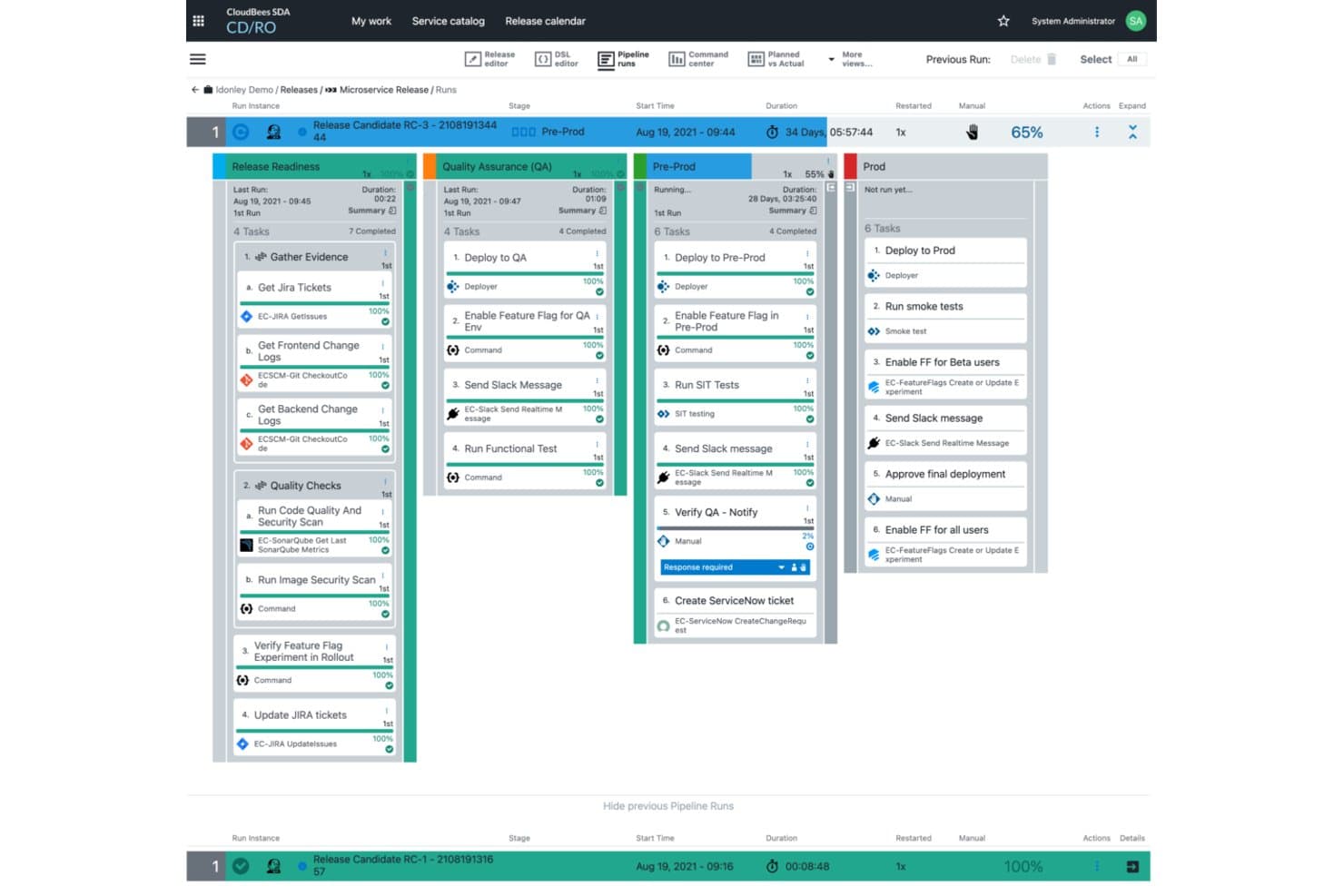
Create and manage release pipelines with CloudBees. CloudBees CD/RO is an enterprise release orchestration platform that combines multi-stage pipeline automation, release manifest tracking, approval workflows, audit reporting, and a shared release calendar across teams and environments.
Who Is CloudBees Best For?
CloudBees is built for large enterprises in regulated industries where every release needs a full audit trail, multi-team approval workflows, and end-to-end traceability.
Why I Picked CloudBees
CloudBees earns its spot on my shortlist because its audit and governance capabilities go deeper than most release tools I've evaluated. Every stage approval, sign-off, and configuration change is logged automatically, and single-click audit reports give you end-to-end traceability without manual evidence collection. I also like that the release manifest tracks every component and version in a release, which makes rollbacks far less chaotic when something goes wrong in a regulated environment.
CloudBees Key Features
- Release calendar: A multi-view calendar that displays planned, active, and completed releases alongside environment reservations and blackout periods across teams.
- DSL editor: Lets you define and edit release pipelines as code, making it easier to version-control and replicate pipeline logic across environments.
- ServiceNow integration: Creates change requests, checks approval status, and logs incidents directly between CloudBees CD/RO and ServiceNow without switching tools.
- Smart Tests: An AI-driven test selection feature that runs only the tests relevant to a given change, reducing feedback wait times for developers.
CloudBees Integrations
CloudBees offers documented integrations with Jenkins, ServiceNow, JFrog Artifactory, Kubernetes, and Argo Rollouts. Its Plugin Developer Kit and Plugin Manager support custom integrations across hybrid and multi-cloud toolchains.
Pros and Cons
Pros:
- Shared calendars prevent environment conflicts
- Release manifests clarify component versions
- Audit trails support regulated releases
Cons:
- Automated rollback triggers lack documentation
- Plugin management requires substantial setup effort
Learn more about CloudBees: Best for multi-tenant deployment pipeline automation
- 30-day free trial
- From $4,330/year (billed annually)
Visit WebsiteCustomer Rating:3.2/5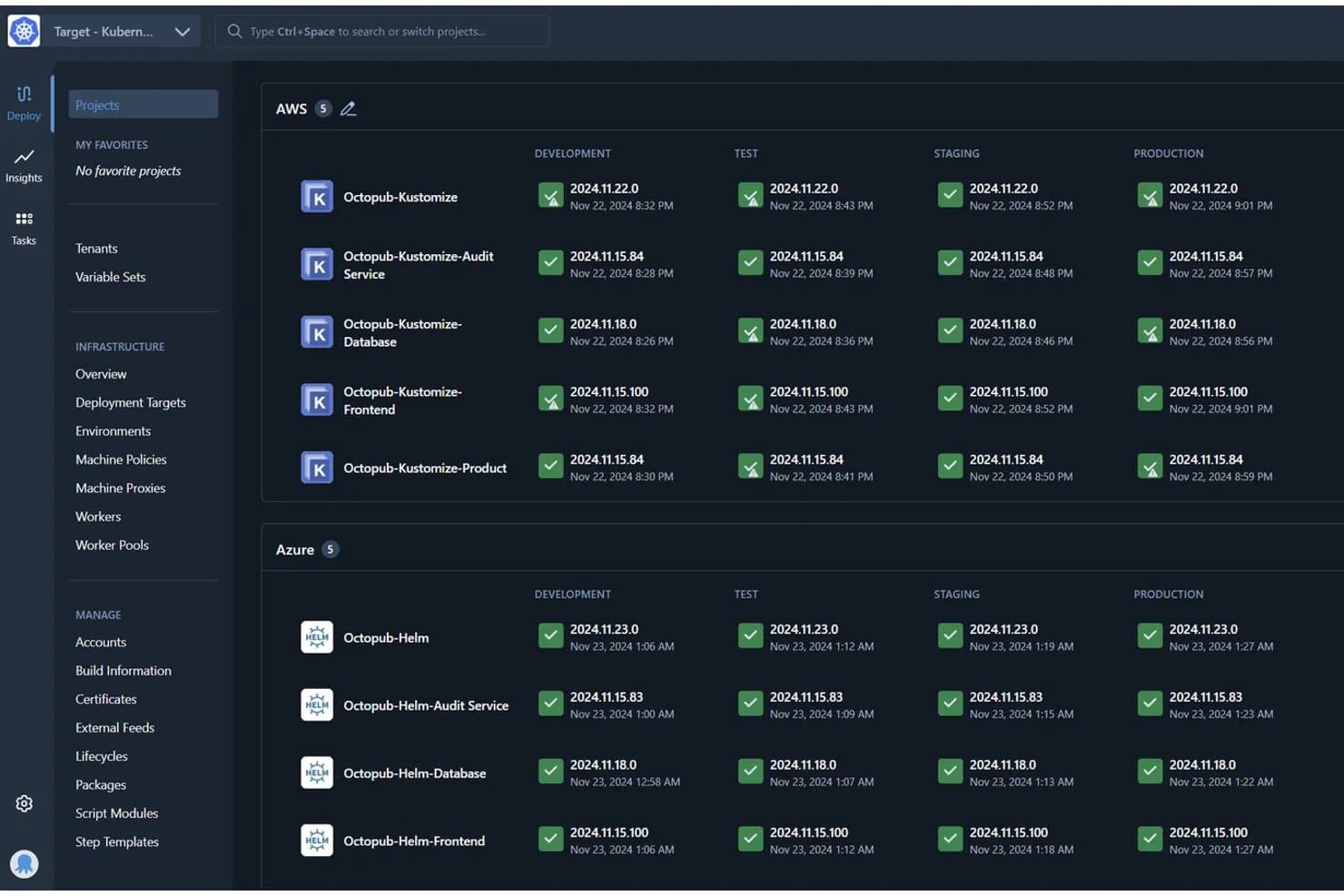
Octopus Deploy tracks deployments across environments in one dashboard. Octopus Deploy is a continuous delivery platform that automates deployment pipelines across multi-environment, multi-tenant, and multi-cloud setups, with support for rolling, blue/green, and canary release strategies.
Who Is Octopus Deploy Best For?
Octopus Deploy is a strong fit for DevOps engineers and release managers at mid-to-large teams running deployments across multiple environments, tenants, or cloud targets.
Why I Picked Octopus Deploy
I've included Octopus Deploy in my top picks because it handles multi-tenant deployment pipeline automation better than anything else I've tested. One deployment process can scale across thousands of tenants, which is a real advantage when you're shipping to separate customer environments with different configs. I also like the guided failure mode, which lets you decide how to handle a failed step mid-deployment rather than triggering a full abort.
Octopus Deploy Key Features
- Runbooks: Automate routine and emergency operations tasks directly within the platform, separate from your deployment process.
- Deployment freezes: Block deployments for specific projects and environments during defined windows to protect production stability.
- Step template library: Access 500+ pre-built step templates to standardize and reuse deployment steps across projects.
- Role-based access control (RBAC): Assign granular permissions across teams, spaces, and environments on every plan, including Free.
Octopus Deploy Integrations
Octopus Deploy offers native integrations with GitHub Actions, Azure DevOps, Jenkins, GitLab CI, TeamCity, Kubernetes, Argo CD, Slack, ServiceNow, and Jira Service Management. ServiceNow and Jira Service Management integrations require Enterprise.
Pros and Cons
Pros:
- Reusable processes support complex releases
- Guided failure handling avoids unnecessary deployment aborts
- Multi-tenant releases scale across customer environments
Cons:
- No shared calendar maps cross-team conflicts
- Rollback usually requires redeploying prior releases
Learn more about Octopus Deploy: Best for AI-assisted release risk scoring
- Free trial available
- Pricing upon request
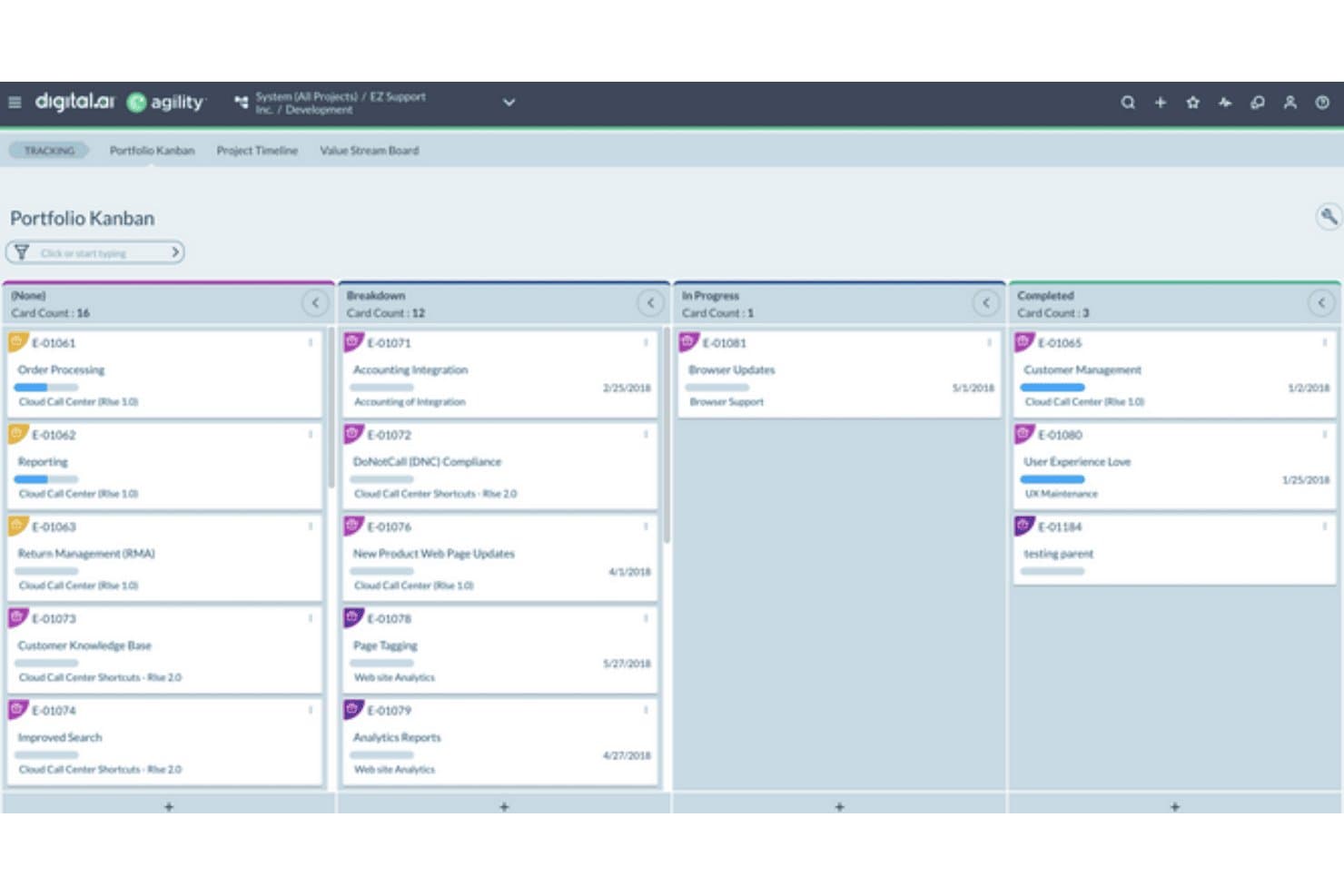
Digital.ai organizes release work across workflow stages on a Portfolio Kanban board. Digital.ai Release is an enterprise release orchestration platform that combines pipeline automation, approval governance, risk scoring, GitOps visibility, and multi-team dependency coordination across cloud-native and traditional deployment environments.
Who Is Digital.ai Best For?
Digital.ai Release is built for large enterprises and regulated industries where release managers and DevOps engineers need governance-grade orchestration across dozens of teams and toolchains.
Why I Picked Digital.ai
I picked Digital.ai Release as one of the best because its AI-assisted risk scoring genuinely changes how release decisions get made. The Intelligent Change Risk prediction automatically routes low-risk changes through a faster path while flagging higher-risk releases for closer review, so teams aren't treating every deployment the same. I also like the AI Reporting Agent, which lets you ask plain-language questions and get charts back that you can pin directly to dashboards.
Digital.ai Key Features
- Policy-as-code gates: Runs approval gates using Open Policy Agent (OPA), with a full audit trail and one-click chain-of-custody reports for every release.
- Release train orchestration: Combines multi-team, multi-toolchain dependencies into a single coordinated release pipeline across cloud-native and traditional environments.
- GitOps and Kubernetes visibility: Provides centralized control over deployments running through Argo CD and FluxCD, with live deployment cards showing real-time status.
- Self-service workflow catalog: Lets teams trigger guided, pre-approved release workflows without waiting on platform engineers, with custom workflow authoring available in Pro and Premium editions.
Digital.ai Integrations
Digital.ai cites 400+ marketplace integrations, including Argo CD, FluxCD, Kubernetes, Terraform, Ansible, ServiceNow, AWS Secrets Manager, Azure Key Vault, and HashiCorp Vault. An open API and plug-in model support custom integrations.
Pros and Cons
Pros:
- Policy-as-code supports audit-ready governance
- Release trains coordinate complex enterprise dependencies
- AI-assisted risk scoring prioritizes release reviews
Cons:
- Analytics dashboards changed in recent releases
- Pipeline visibility can hinder failure diagnosis
Learn more about Digital.ai:
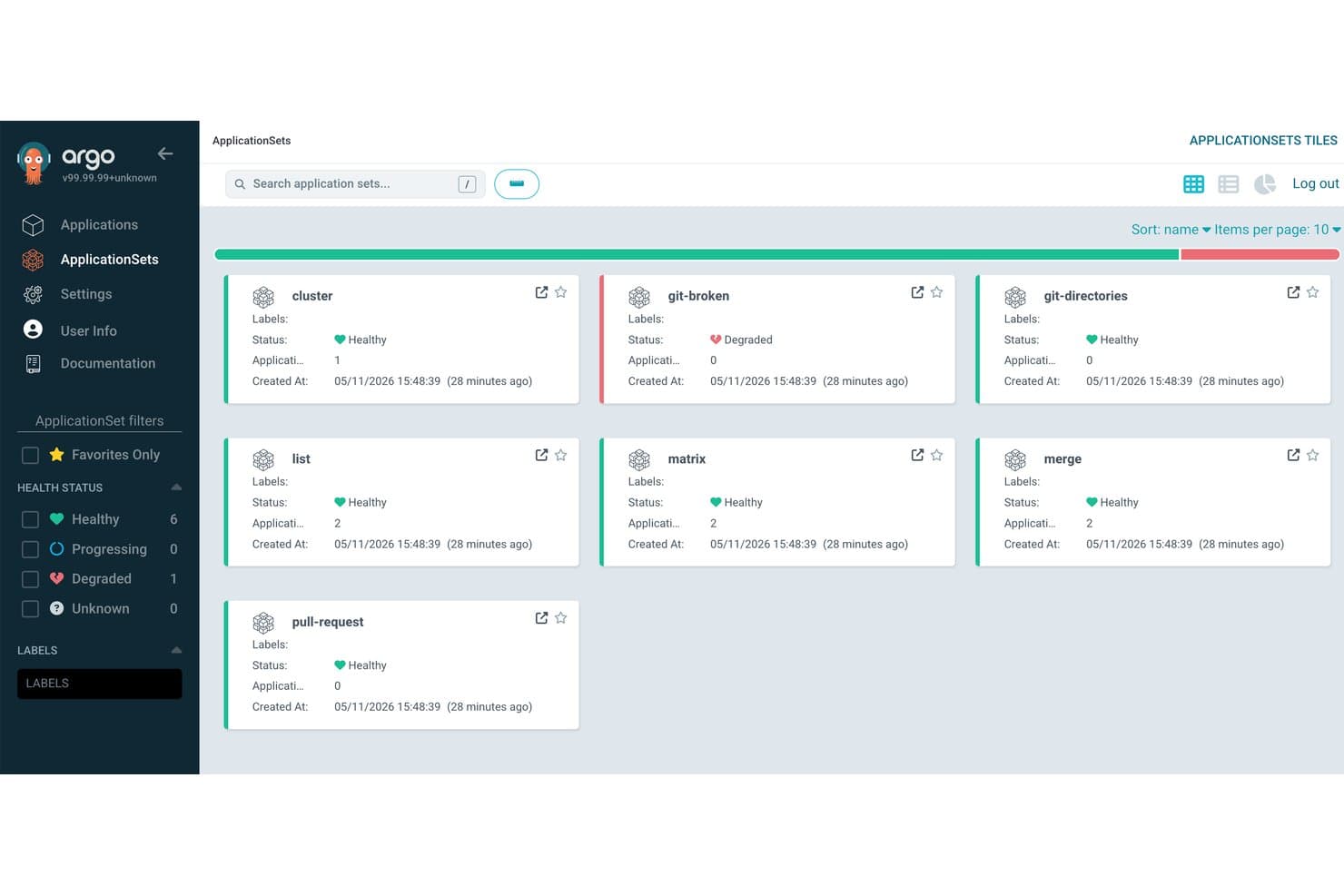
Argo CD organizes application deployments into grouped sets with health status. Argo CD is a Kubernetes-native GitOps delivery tool that automates multi-stage release promotion, deployment tracking, and rollback through the Akuity Platform.
Who Is Argo CD Best For?
Argo CD is a strong fit for DevOps engineers and engineering leads running Kubernetes workloads who want Git-driven release promotion across multiple environments.
Why I Picked Argo CD
I picked Argo CD as one of the best because it's the only tool on this list built specifically around GitOps-driven Kubernetes promotion, where Git is the single source of truth for every release. Kargo's multi-stage promotion pipelines move artifacts from dev through staging to production automatically, with every promotion committed back to Git for a full audit trail. When a verification step fails, automated rollback reverts the entire stage in seconds, covering Kubernetes and non-Kubernetes resources like Terraform alike.
Argo CD Key Features
- Multi-stage promotion pipelines: Kargo moves artifacts through dev, staging, and production environments automatically, based on artifact and commit metadata.
- Insights and DORA metrics dashboards: Built-in dashboards surface deployment frequency, change failure rate, and app sync history across your organization.
- AI On-Call Agent: Automatically opens incidents when an app degrades, investigates the issue, runs runbooks, and sends Slack notifications.
- SOC 2 Type 2 compliance and audit logs: Searchable audit records track every action across the platform, with retention up to two years on Enterprise plans.
Argo CD Integrations
Akuity Platform integrations include GitHub, Jira, Slack, Microsoft Teams, Terraform, Kubernetes, Helm, JFrog, Datadog, and Azure. It also supports API access through system accounts and scoped API keys for custom integrations.
Pros and Cons
Pros:
- Automated rollback restores failed stages quickly
- Multi-stage pipelines coordinate Kubernetes environments
- GitOps promotions create auditable release histories
Cons:
- Formal promotion approvals remain limited
- No release calendar or scheduling controls
Learn more about Argo CD:
Outras ferramentas de gestão de lançamentos de software
Eis algumas opções adicionais de ferramentas de gestão de lançamentos de software que não entraram na minha lista restrita, mas que vale a pena consultar:
- 11Enov8Best for SAFe-aligned enterprise release governance
- 12Planview ReleaseBest for cross-team release dependency mapping
- 13UnleashBest for flag-based rollouts with compliance controls
- 14CircleCIBest for health-check-based auto-rollback on deploys
How I Evaluate Software Release Management Tools
I split my evaluation into three parts. Core functionality—planning releases across environments and orchestrating deployment pipelines—carries the most weight. From there, I look at standout features like CI/CD toolchain integrations, then consider what a tool offers beyond features, including onboarding support and pricing value.
Core Functionality (Table Stakes For This List)
When I'm selecting tools for my list, I score each one on a scale from 0 (does not offer the functionality) to 5 (excels in this area) for each core functionality listed below. I then convert the total into a percentage to help assess each tool's overall fit, with extra weight on any functionalities I've deemed essential.
- Release Planning (Essential): I check whether you can build structured release calendars, coordinate timelines across multiple teams, and sequence releases at the portfolio level.
- Pipeline Orchestration (Essential): Multi-stage deployment automation matters here—I evaluate how well a tool handles environment promotion, parallel workflows, and cross-toolchain triggers.
- Release Visibility & Tracking: Real-time dashboards that show release readiness across teams are what I look for, not static status pages that someone has to update manually.
- Dependency & Risk Management: I look at how a tool surfaces conflicts between releases or components—flagging a shared microservice change that could break another team's deploy, for example.
- Approval & Governance Workflows: Configurable approval gates at each release stage matter, especially for teams operating under audit or compliance requirements that need role-based sign-offs.
- Rollback & Version Control: I evaluate whether the tool ties rollback actions to version control history so you can trace exactly what changed and recover quickly when a release goes sideways.
Once I have a list of tools that meet the criteria, I consider what sets each platform apart.
Differentiating Factors (What Sets Vendors Apart)
Here's how I compare and contrast different vendors:
Standout Features
I evaluate whether a tool supports feature flagging natively or through integrations, since decoupling deployment from release lets you push code to production without exposing it to users—useful when coordinating a launch across marketing, support, and engineering on different timelines. CI/CD toolchain integrations also matter; I check for native connectors to tools like Jenkins, GitHub Actions, and GitLab so teams aren't building custom glue between systems. Beyond the pipeline, I look at ChatOps support—pushing approval requests and release status into Slack or Teams keeps decisions moving without forcing people into another dashboard.
Beyond Features
I evaluate how well each tool scales from a single squad to enterprise-wide, multi-product coordination—some platforms price per pipeline, which gets expensive fast as release cadence grows. Compliance readiness matters too; regulated teams need verifiable audit trails and role-based access, not just configurable settings. I also check onboarding support, since complex orchestration tools with poor documentation can stall a migration for months.
Como escolher uma ferramenta de gestão de lançamentos de software
É fácil ficar perdido em listas extensas de funcionalidades e estruturas de preços complexas. Para o ajudar a manter o foco enquanto percorre o seu processo específico de seleção de software, apresentamos uma lista de verificação com os fatores a ter em conta:
| Fator | O que considerar |
|---|---|
| FatorEscalabilidade | O que considerarA ferramenta acompanhará o crescimento da sua equipa? Considere ferramentas que suportem mais utilizadores e projetos à medida que as suas necessidades aumentam. Evite ferramentas com limites rígidos de utilizadores. |
| FatorIntegrações | O que considerarA ferramenta funciona com os seus sistemas atuais? Verifique a compatibilidade com o seu controlo de versões, CI/CD e outras ferramentas das quais depende. |
| FatorPersonalização | O que considerarPode adaptar a ferramenta aos seus fluxos de trabalho? Procure opções para personalizar painéis, relatórios e notificações de acordo com o seu processo. |
| FatorFacilidade de utilização | O que considerarA ferramenta é intuitiva? Escolha ferramentas com interfaces simples para minimizar o tempo de formação e reduzir os obstáculos à adoção. |
| FatorImplementação e integração inicial | O que considerarCom que rapidez pode começar? Avalie o tempo de configuração, os recursos disponíveis, como tutoriais, e o apoio prestado durante a integração inicial. |
| FatorCusto | O que considerarOs preços cabem no seu orçamento? Compare o custo com o seu orçamento e com as funcionalidades oferecidas. Procure taxas ocultas ou custos de expansão. |
| FatorMedidas de segurança | O que considerarOs seus dados e processos estão seguros? Certifique-se de que a ferramenta cumpre as suas normas de segurança, disponibiliza encriptação e está em conformidade com os regulamentos. |
| FatorDisponibilidade do apoio | O que considerarObterá ajuda quando precisar? Verifique o horário de apoio do fornecedor, os canais disponíveis e os tempos de resposta para garantir uma assistência atempada. |
O que são as ferramentas de gestão de lançamentos de software?
As ferramentas de gestão de versões de software são soluções que ajudam a coordenar, acompanhar e automatizar o processo de lançamento de atualizações e novas versões de software. Os gestores de produto, programadores e equipas de operações de TI utilizam geralmente estas ferramentas para melhorar a eficiência e reduzir os erros durante a implementação. Funcionalidades como o agendamento de versões, o acompanhamento da implementação e a integração com sistemas de controlo de versões ajudam a gerir eficazmente as versões. De um modo geral, estas ferramentas ajudam as equipas a disponibilizar atualizações de software de forma mais fiável e eficiente.
Funcionalidades
Ao selecionar ferramentas de gestão de versões de software, procure as seguintes funcionalidades principais:
- Agendamento de versões: Automatiza o momento dos lançamentos de software para garantir implementações atempadas e coordenadas.
- Acompanhamento da implementação: Monitoriza o progresso das versões, fornecendo informações sobre cada fase do processo de implementação.
- Integração com o controlo de versões: Liga-se a sistemas de controlo de versões para gerir alterações ao código e manter a consistência entre versões.
- Painéis personalizáveis: Disponibiliza vistas e relatórios personalizados para acompanhar métricas e monitorizar o processo de lançamento.
- Controlo de acesso baseado em funções: Restringe o acesso a funcionalidades e dados com base nas funções dos utilizadores, reforçando a segurança e a conformidade.
- Análise e relatórios avançados: Fornece informações detalhadas sobre o desempenho das versões e ajuda a identificar áreas de melhoria.
- Suporte para vários ambientes: Gere implementações em diferentes ambientes, como desenvolvimento, testes e produção.
- Ferramentas interativas de integração: Inclui tutoriais, visitas guiadas ao produto e guias para ajudar os utilizadores a compreender e utilizar rapidamente a ferramenta.
- Medidas de segurança: Garante a proteção dos dados através de encriptação e da conformidade com as normas do setor.
- Disponibilidade de suporte 24 horas por dia, 7 dias por semana: Fornece suporte contínuo através de vários canais para resolver problemas de forma rápida e eficiente.
Benefícios
A implementação de ferramentas de gestão de versões de software proporciona vários benefícios para a sua equipa e para a sua empresa. Eis alguns dos benefícios que pode esperar:
- Maior eficiência na implementação: A automatização do agendamento e do acompanhamento das versões ajuda as equipas a implementar atualizações mais rapidamente e com menos erros.
- Colaboração reforçada: A integração com o controlo de versões e os painéis personalizáveis facilitam uma melhor comunicação entre os membros da equipa.
- Maior visibilidade: A análise e os relatórios avançados oferecem informações sobre o desempenho das versões, ajudando as equipas a tomar decisões fundamentadas.
- Maior segurança: O controlo de acesso baseado em funções e as medidas de segurança garantem a proteção dos dados sensíveis e a manutenção da conformidade.
- Escalabilidade: O suporte para vários ambientes permite às equipas gerir versões em diferentes fases, acompanhando as necessidades crescentes dos projetos.
- Redução do tempo de formação: As ferramentas interativas de integração permitem que os novos utilizadores se familiarizem rapidamente com a ferramenta, minimizando as interrupções durante a implementação.
Custos & preços
A seleção de ferramentas de gestão de versões de software exige uma compreensão dos vários modelos de preços e planos disponíveis. Os custos variam consoante as funcionalidades, o tamanho da equipa, os complementos, entre outros fatores. A tabela abaixo resume os planos comuns, os respetivos preços médios e as funcionalidades normalmente incluídas nas soluções de ferramentas de gestão de versões de software:
Tabela de comparação de planos para ferramentas de gestão de versões de software
| Tipo de plano | Preço médio | Funcionalidades comuns |
|---|---|---|
| Tipo de planoPlano gratuito | Preço médio$0 | Funcionalidades comunsAgendamento básico de versões, acompanhamento limitado da implementação e suporte da comunidade. |
| Tipo de planoPlano pessoal | Preço médio$5-$25/user/month | Funcionalidades comunsAgendamento de versões, acompanhamento da implementação, análise básica e suporte por e-mail. |
| Tipo de planoPlano empresarial | Preço médio$30-$75/user/month | Funcionalidades comunsAnálise avançada, integração com o controlo de versões, painéis personalizáveis e suporte prioritário. |
| Tipo de planoPlano empresarial de grande escala | Preço médio$100+/user/month | Funcionalidades comunsSuporte para vários ambientes, controlo de acesso baseado em funções, gestor de conta dedicado e suporte 24 horas por dia, 7 dias por semana. |
Perguntas frequentes sobre ferramentas de gestão de lançamentos de software
Eis algumas respostas a perguntas comuns sobre ferramentas de gestão de lançamentos de software:
Como é que as ferramentas de gestão de lançamentos de software suportam a reversão durante lançamentos falhados?
A maioria das ferramentas de gestão de lançamentos de software disponibiliza funcionalidades de controlo de versões e instantâneos que permitem reverter para um lançamento estável. Pode etiquetar os lançamentos e automatizar as ações de recuperação quando algo falha. Isto reduz o tempo de inatividade e evita a intervenção manual. Certifique-se de que a sua estratégia de reversão é testada no ambiente de pré-produção antes de entrar em produção.
As ferramentas de gestão de lançamentos de software podem integrar-se com pipelines de CI/CD?
Sim, muitas ferramentas suportam a integração direta com plataformas de CI/CD, como o Jenkins, o GitLab e o GitHub Actions. Isto significa que pode acionar implementações automaticamente após compilações ou testes bem-sucedidos. Também ajuda a acompanhar o histórico de lançamentos e a auditar alterações. Terá de configurar cuidadosamente as credenciais e as permissões para evitar atrasos.
Como é que as ferramentas de gestão de lançamentos de software lidam com implementações em vários ambientes?
Pode definir diferentes fluxos de trabalho de implementação para os ambientes de desenvolvimento, pré-produção e produção. A maioria das ferramentas permite utilizar variáveis e aprovações específicas de cada ambiente. Isto ajuda a sua equipa a aplicar atualizações de forma controlada. Utilize etiquetas ou ramificações de ambiente para evitar confusões entre versões.
As ferramentas de gestão de lançamentos de software são adequadas para equipas pequenas?
Sim, as ferramentas de gestão de lançamentos de software podem beneficiar equipas pequenas. Ajudam a gerir os lançamentos de forma eficiente, mesmo com recursos limitados. Muitas ferramentas oferecem planos escaláveis que se adequam ao orçamento de equipas mais pequenas. Comece com um plano gratuito ou pessoal para experimentar e faça uma atualização à medida que a sua equipa cresce. O essencial é escolher uma ferramenta que corresponda às necessidades específicas da sua equipa sem a sobrecarregar com funcionalidades desnecessárias.
Com que frequência são atualizadas as ferramentas de gestão de lançamentos de software?
As ferramentas de gestão de lançamentos de software são normalmente atualizadas com regularidade. As atualizações podem variar entre pequenas correções de erros e grandes melhorias de funcionalidades. Manter-se a par destas atualizações garante que dispõe das funcionalidades mais recentes e das correções de segurança. Consulte a política de atualizações e as notas de lançamento do fornecedor para compreender com que frequência ocorrem as atualizações e o que incluem. Estas informações ajudam-no a planear qualquer formação ou adaptação necessária para a sua equipa.