

Det kan være en krevende oppgave for enhver produktansvarlig å håndtere brukerinnsikt. Du kan oppleve at du drukner i endeløse notater og tilbakemeldinger, og strever med å få oversikt over det hele. Verktøy for UX-forskningsarkiver hjelper deg med å sentralisere og organisere disse verdifulle dataene, slik at det blir enklere for teamet ditt å samarbeide og ta informerte beslutninger.
Etter å ha testet og vurdert programvare har jeg erfart at disse verktøyene er avgjørende for å omgjøre rådata til handlingsrettet innsikt. Jeg deler mine beste anbefalinger, med fokus på hva som skiller hvert verktøy fra de andre, og hvordan de kan dekke dine unike behov.
Du kan forvente en tydelig og objektiv vurdering som hjelper deg med å velge den riktige løsningen for teamet ditt.
Why Trust Our Software Recommendations
6,700+
Reviews
20
Industry experts
16+
Evaluation factors
14
Years
Our team has been testing and reviewing software since 2012. As product managers ourselves, we know how difficult—and important—it is to choose the right software.
For this guide, we evaluated tools using hands-on testing and independent research, scoring tools using our selection criteria.
Our reviews reflect our human editorial judgment, not a sales pitch.
Expert reviewers:
- Andrew LumbySenior TPM
- Cristiano ValimSenior UI/UX Lead


Sammenligningstabell for verktøy for UX-forskningsarkiver
Denne sammenligningstabellen oppsummerer prisdetaljene for mine beste utvalgte verktøy for UX-forskningsarkiver:
| Tool | Best For | Trial Info | Price | ||
|---|---|---|---|---|---|
| 1 | Best for DIY research ops at enterprise scale | Free plan available; 14-day free trial | From $20/user/month (billed annually) | Website | |
| 2 | Best for AI-surfaced insights from live sessions | Free demo available | Pricing upon request | Website | |
| 3 | Best for multi-source feedback in one repo | Free demo available | Pricing upon request | Website | |
| 4 | Best for mixed-method research synthesis | Free plan available | From $208/user/month | Website | |
| 5 | Best for video clips shared without onboarding | Free demo available | From $395/month | Website | |
| 6 | Best for collaborative research repositories at scale | Free plan + free demo available | Pricing upon request | Website | |
| 7 | Best for qualitative analysis | 15-day free trial | From $15/user/month (billed annually) | Website | |
| 8 | Best for all-in-one research ops and CRM | Free trial + free demo available | From $129/seat/month | Website | |
| 9 | Best for end-to-end AI research synthesis | Free plan available | Pricing upon request | Website | |
| 10 | Best for flat-rate agency research repositories | Free plan available | From $20/month | Website |


Anmeldelser av de beste verktøyene for UX-forskningsarkiver
Nedenfor finner du mine detaljerte sammendrag av de beste verktøyene for UX-forskningsarkiver som kom med på kortlisten min. Anmeldelsene mine gir en detaljert oversikt over de viktigste funksjonene, fordeler & ulemper, integrasjoner og ideelle bruksområder for hvert verktøy, slik at du kan finne det som passer best for deg.
 Best for DIY research ops at enterprise scale
- Free plan available; 14-day free trial
- From $20/user/month (billed annually)
Visit WebsiteCustomer Rating:4.6/5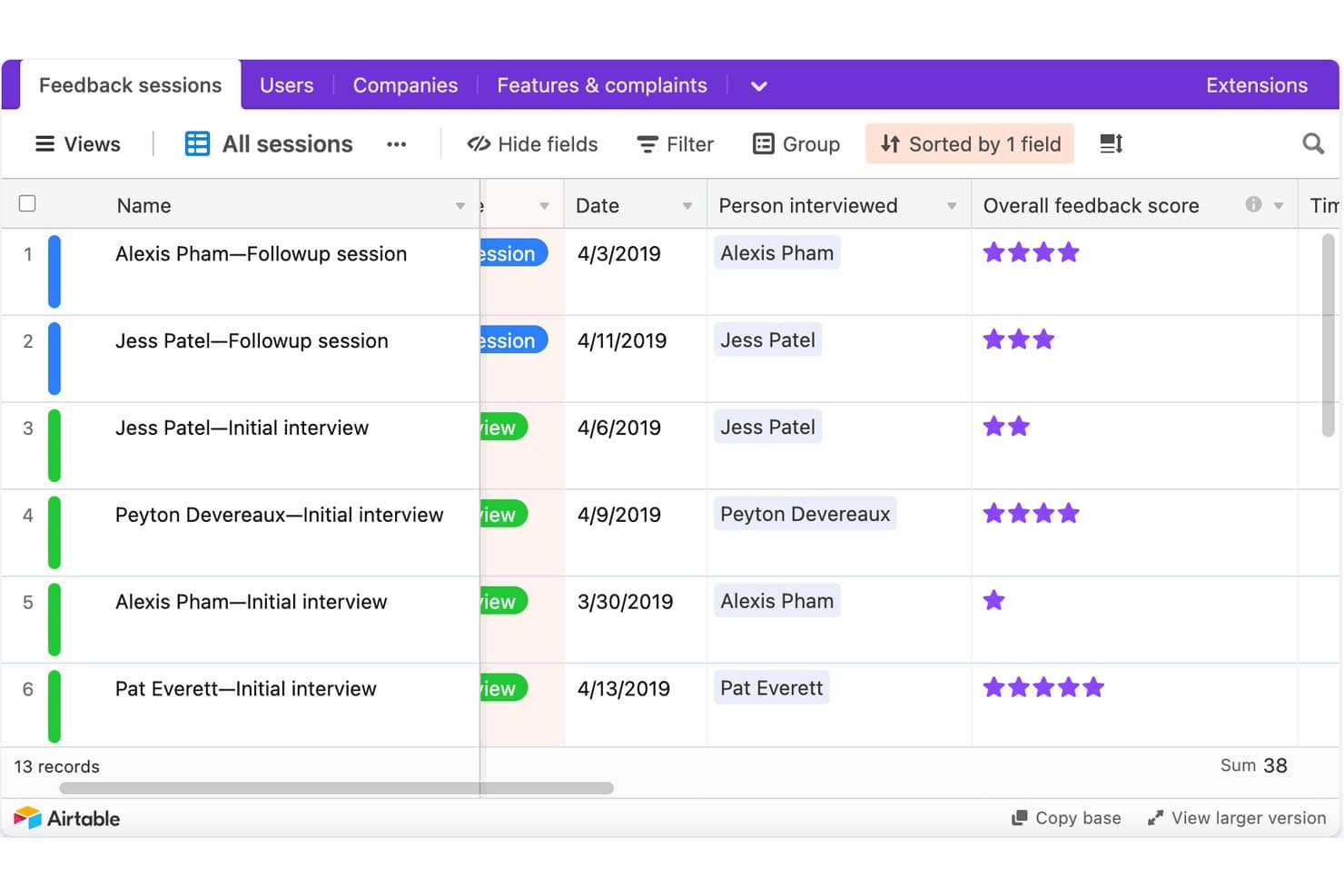
Airtable tracks UX research sessions with scores and dates. Airtable is a no-code relational database platform that research teams configure into a UX research repository, using linked tables, custom tagging fields, AI summarization, and stakeholder-facing interfaces to store and share findings.
Who Is Airtable Best For?
Airtable is a strong fit for design ops leads and product managers at enterprise organizations who have the bandwidth to build and maintain a custom research infrastructure.
Why I Picked Airtable
I've included Airtable in my top picks because it's the only tool on this list that lets enterprise research ops teams build exactly the repository structure they need from scratch. I love how a single Airtable base can house 2,000+ studies across 85+ researchers, linking raw observations to insights to recommendations in a traceable chain. Interface Designer then turns that same database into clean, read-only stakeholder dashboards without giving PMs or engineers edit access to the underlying data.
Airtable Key Features
- AI field summarization: AI fields automatically summarize interview notes and categorize feedback by sentiment directly inside your database records.
- Linked record tables: Connect studies, raw observations, insights, and recommendations in separate tables so every conclusion traces back to source evidence.
- Granular access permissions: Assign Owner, Creator, Editor, Commenter, or Read-only roles at the workspace and base level, with field- and record-level controls on Enterprise.
- Automation triggers: Set up automated Slack, email, or Teams notifications—like weekly study rollups—without writing any code.
Airtable Integrations
Airtable lists native integrations with Miro, Jira, Slack, Salesforce, Typeform, ChatGPT, Claude, Tableau Cloud, Zendesk, and Google Drive. Its API, scripting, custom extensions, and MCP connections support custom research workflows.
Pros and Cons
Pros:
- Creates tailored stakeholder research dashboards
- Scales across thousands of studies
- Links evidence to recommendations
Cons:
- No native transcript synthesis
- Requires ongoing taxonomy maintenance
Learn more about Airtable: Best for AI-surfaced insights from live sessions
- Free demo available
- Pricing upon request
Visit WebsiteCustomer Rating:4.5/5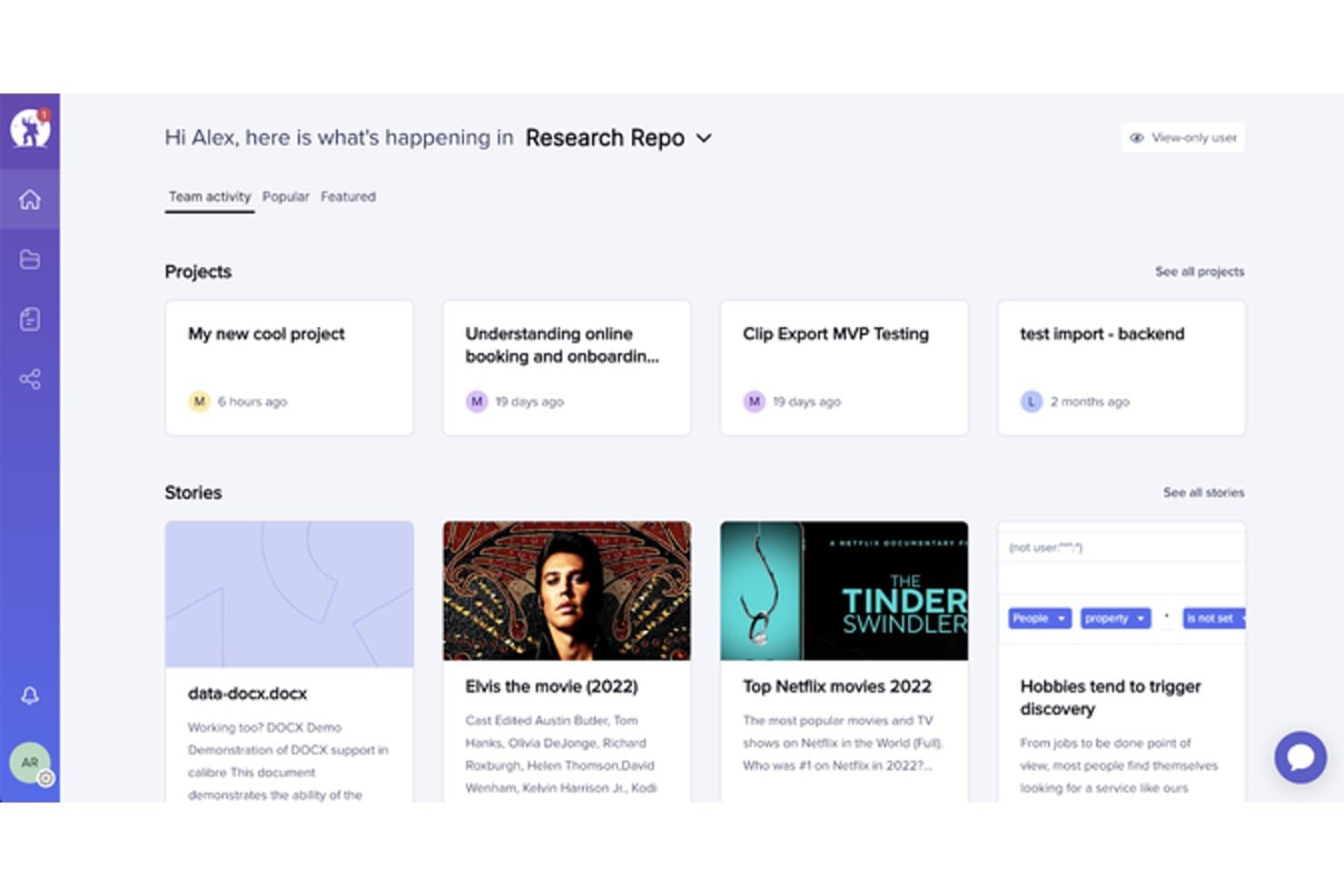
UserTesting organizes research projects and stories in a central repository. UserTesting is a user research platform that combines moderated and unmoderated testing, AI-powered insight synthesis, and a centralized research repository through its Insights Hub.
Who Is UserTesting Best For?
UserTesting fits product managers and designers at mid-size to enterprise companies who need fast video feedback from real users and want AI to do the heavy lifting of surfacing themes.
Why I Picked UserTesting
I picked UserTesting as one of the best because its AI does the synthesis work that usually falls on the researcher. After a live session wraps, Insights Discovery lets me ask questions like "What do we know about checkout friction?" across every past study, pulling answers from video and survey data without manual digging. Instant Insights and Smart tags automatically label moments by sentiment or theme, so key findings surface before I've even opened the transcript.
UserTesting Key Features
- Insights Hub: A centralized repository that organizes session videos, transcripts, surveys, and highlight reels into workspaces and folders across your team.
- Tag Manager: Create project-specific and global tags, bulk-apply them across studies, and control who can create or edit them based on their role.
- Collaborative Insights Reports: Build and co-edit shareable reports that pull in clips, tags, charts, and reels, then present them live using Presenter mode.
- Stakeholder integrations: Embed findings directly into Jira issues, Confluence pages, and Slack channels so non-researchers can act on research without leaving their tools.
UserTesting Integrations
UserTesting offers integrations with Figma, Jira, Jira Product Discovery, Confluence, Slack, Microsoft Teams, FigJam, Miro, and Atlassian Rovo. Its Results API supports custom integrations.
Pros and Cons
Pros:
- Collaborative reports package findings for stakeholders
- Evidence links connect themes to videos
- AI surfaces themes from live sessions
Cons:
- No built-in affinity mapping workspace
- Outside research artifact ingestion remains limited
Learn more about UserTesting: Best for multi-source feedback in one repo
- Free demo available
- Pricing upon request
Visit WebsiteCustomer Rating:4/5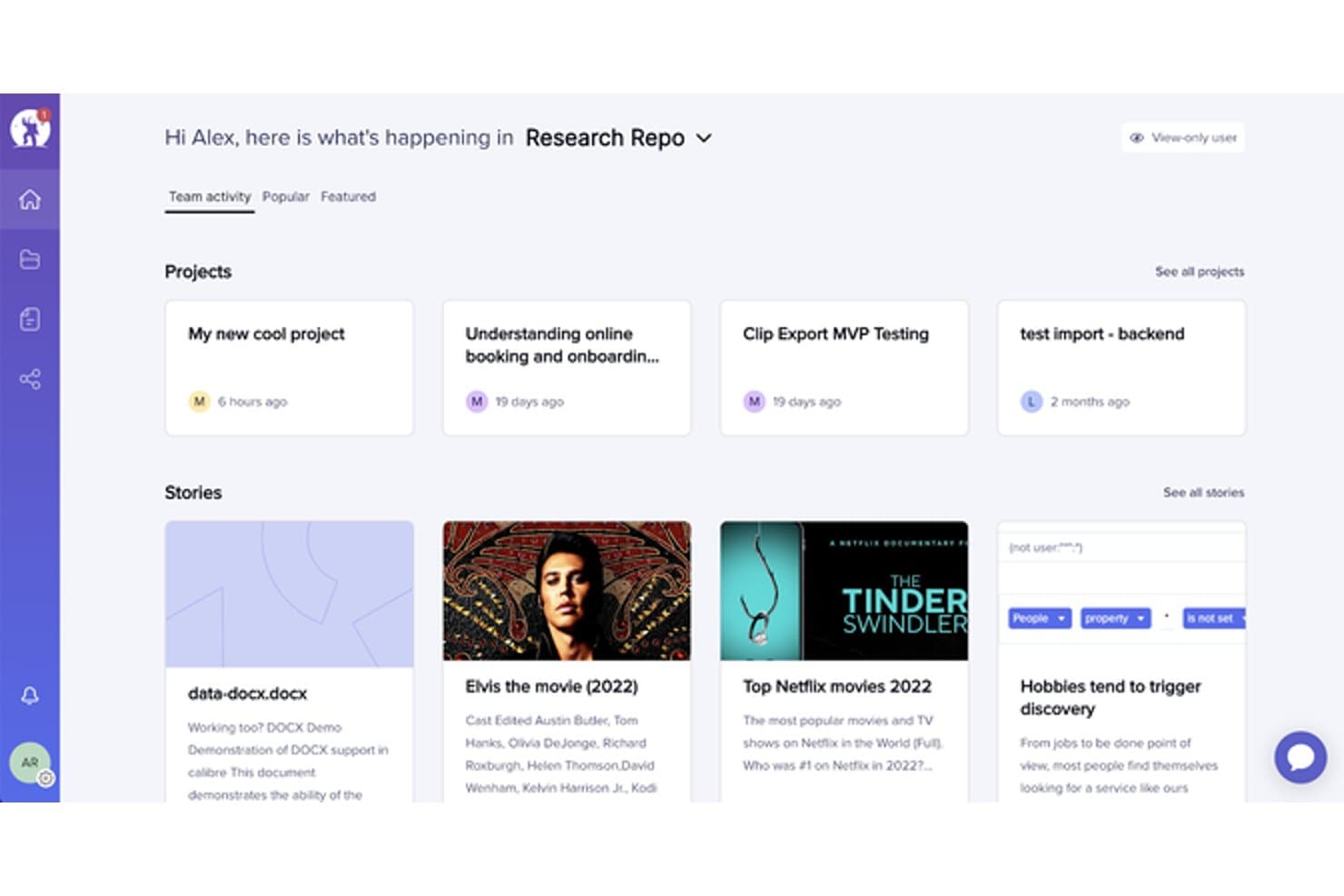
EnjoyHQ centralizes research projects and stories in one dashboard. EnjoyHQ is a UX research repository tool that centralizes qualitative data from multiple sources—interviews, support tickets, surveys, NPS, and app reviews—into one searchable workspace with tagging, transcription, and insight reporting.
Who Is EnjoyHQ Best For?
EnjoyHQ suits UX researchers on teams that pull feedback from many sources—support tickets, NPS, surveys, and app reviews—and need one searchable place to organize it all.
Why I Picked EnjoyHQ
I picked EnjoyHQ as one of the best because it pulls feedback from more places than almost any other research repository I've used—support tickets via Zendesk and Intercom, NPS from tools like Delighted and Wootric, app reviews from the App Store and Google Play, and interview recordings, all landing in one searchable workspace. What I especially like is its dual-taxonomy system, where you can maintain one tag structure for researchers and a separate one for stakeholders. Workspace-wide boolean and fuzzy search across all those sources makes it genuinely fast to surface older findings.
EnjoyHQ Key Features
- Free unlimited transcription: EnjoyHQ transcribes video and audio files at no cost in roughly 35 languages, with speaker timestamps and clip-cutting built in.
- Analysis board: Highlighted snippets from your data land directly on a visual board where you can group them into color-coded themes and filter by tags or customer properties.
- Automation rules: You can set conditions that automatically route incoming feedback into the right project without manual sorting.
- Granular access permissions: Assign users different roles across different workspaces, and control which project sections read-only members can see.
EnjoyHQ Integrations
EnjoyHQ offers native integrations with Jira, Zendesk, Intercom, Qualtrics, Typeform, UserTesting, UserZoom, Zoom, Slack, and Trello. It also provides a public API and supports Zapier.
Pros and Cons
Pros:
- Granular permissions support broad stakeholder access
- Free unlimited transcription supports multilingual studies
- Centralizes feedback across diverse research sources
Cons:
- Product future remains uncertain under UserTesting ownership
- Manual theme synthesis lacks automated clustering
Learn more about EnjoyHQ: Best for mixed-method research synthesis
- Free plan available
- From $208/user/month
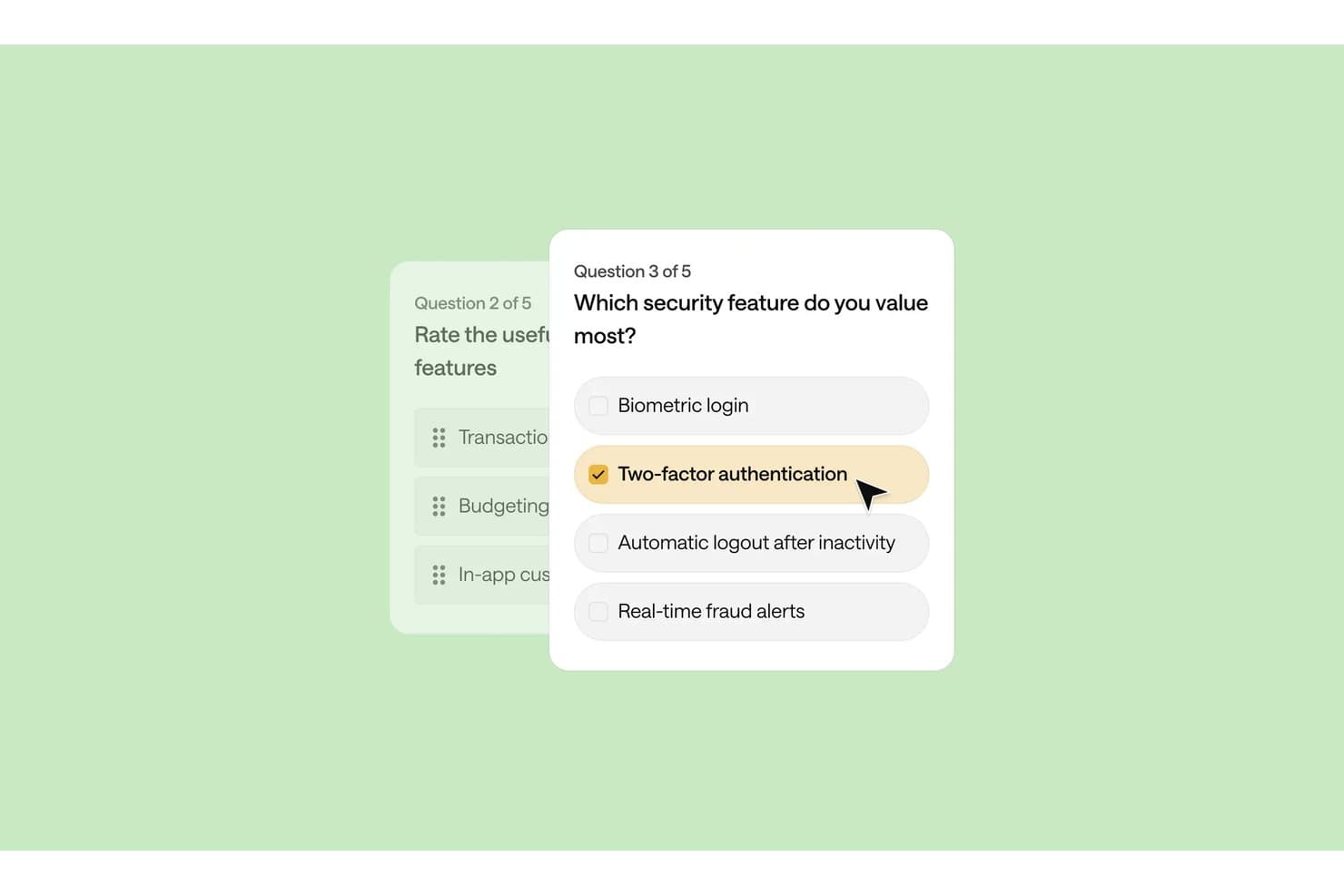
Optimal Workshop lets users build surveys with multiple-choice security questions. Optimal Workshop is a UX research platform that combines card sorting, tree testing, interviews, and qualitative analysis tools with an AI-powered repository for storing, tagging, and synthesizing research data across studies.
Who Is Optimal Workshop Best For?
Optimal Workshop suits UX researchers and research operations leads who need to run card sorting, tree testing, and qualitative interviews inside one platform and synthesize findings across methods.
Why I Picked Optimal Workshop
I picked Optimal Workshop as one of the best because it's one of the few tools that genuinely connects card sorting, tree testing, and qualitative interviews inside a single research repository. What I find especially useful is the Theme Builder, which lets me filter tagged observations across sessions and surface patterns as named themes with linked evidence. The AI Chat feature then takes that synthesized data and outputs it directly to Slack or Notion, so findings move from raw sessions to stakeholder-ready format without leaving the platform.
Optimal Workshop Key Features
- Chord diagram: Visualizes relationships between tags across your qualitative data, showing how observations connect to multiple themes at once.
- MCP integration: Connects AI tools like Claude, ChatGPT, and Gemini directly to your workspace so you can query and filter studies by type, participant segment, or timeframe.
- Highlight reels: Lets you clip and compile video moments from recorded sessions into shareable reels for stakeholders who weren't in the room.
- Participant recruitment panel: Gives you access to a built-in panel of over 10 million verified participants across 150+ countries, with built-in screening, scheduling, and incentive management.
Optimal Workshop Integrations
Optimal Workshop integrates with Slack, Notion, Confluence, Jira, Linear, Miro, Zoom, Google Meet, and Microsoft Teams for sharing findings and capturing interviews. Enterprise customers can connect Optimal’s API to data warehouses, BI tools, and internal dashboards.
Pros and Cons
Pros:
- Unlimited seats widen stakeholder access
- Linked evidence supports defensible research themes
- Strong card sorting and tree testing
Cons:
- Starter permissions limit repository governance
- Cross-study search remains immature
Learn more about Optimal Workshop: Best for video clips shared without onboarding
- Free demo available
- From $395/month
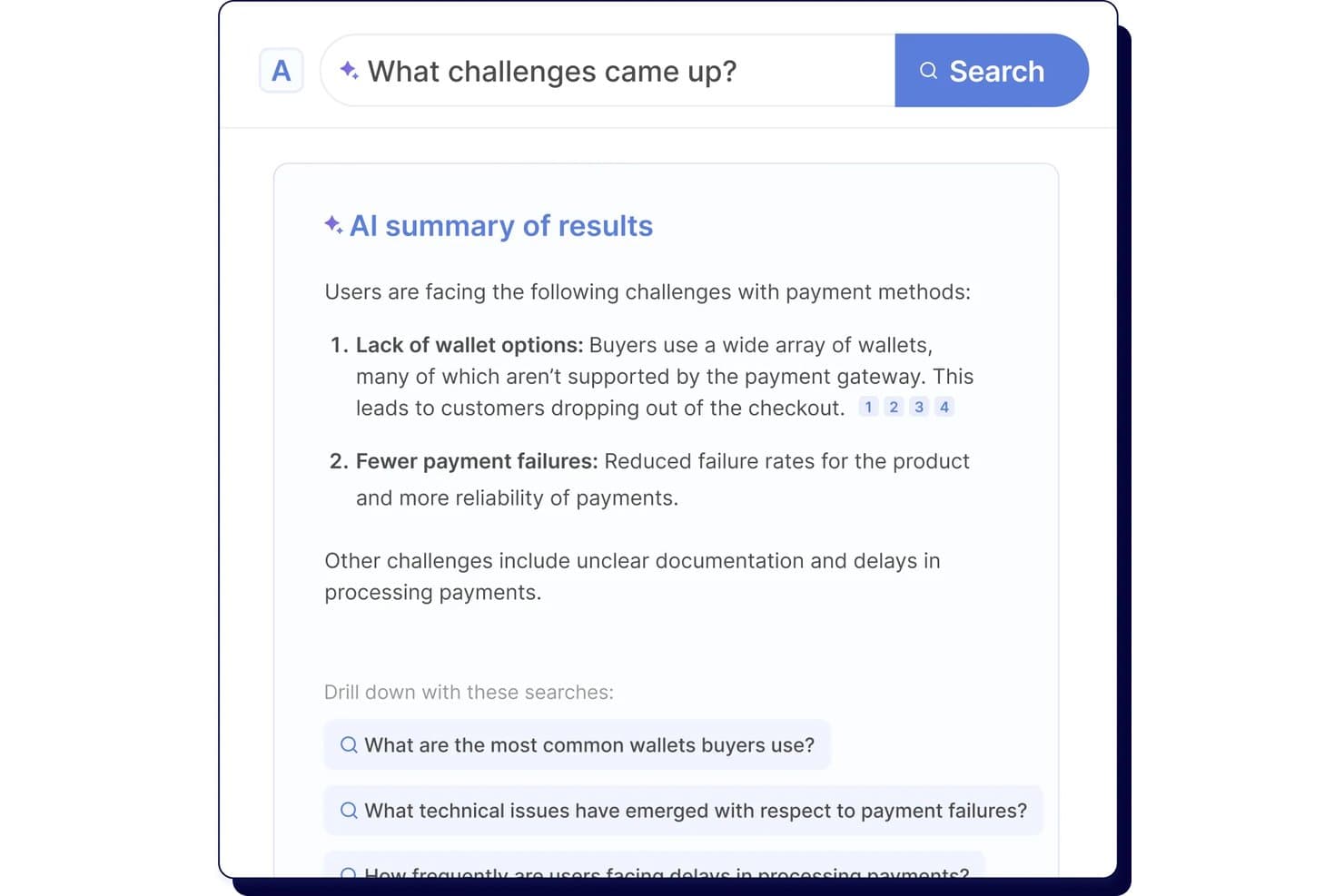
Looppanel's AI search surfaces key user research challenges instantly. Looppanel is a UX research repository platform that centralizes video recordings, transcripts, survey data, and documents, with AI-powered tagging, search, and synthesis tools for turning qualitative research into shareable insights.
Who Is Looppanel Best For?
Looppanel fits UX researchers and product teams who need to share video findings with stakeholders who won't log in to learn a new tool.
Why I Picked Looppanel
I've included Looppanel in my top picks because of how well it handles sharing video findings with people who will never log into a research tool. The Enterprise stakeholder search is built for exactly that: executives and PMs can browse and search across research without any onboarding. I also like that one-click video clips and auto-generated Research Reels let me surface a participant's exact words in seconds, then drop them straight into Slack with full source citations attached.
Looppanel Key Features
- Auto-tagging with theme grouping: AI automatically groups notes into themes across your project, which you can review and edit before finalizing.
- Ask Looppanel AI with citations: ask questions across your workspace and get AI-generated answers that link directly back to the source transcript quotes.
- Global Smart Search: searches notes, transcripts, reports, survey data, and insights across the entire workspace, surfacing relevant data even when it's untagged.
- Survey auto-analysis: automatically analyzes survey responses ranging from 5 to 500+ entries and surfaces key themes without manual sorting.
Looppanel Integrations
Looppanel offers 13 documented integrations, including Zoom, Microsoft Teams, Google Meet, Google Calendar, Slack, Jira, Confluence, HubSpot, Zendesk, and Qualtrics. Enterprise adds API access and custom integrations, while MCP connects Claude Desktop, ChatGPT, and Cursor.
Pros and Cons
Pros:
- Search finds untagged research data
- AI answers retain source citations
- Video clips make stakeholder sharing immediate
Cons:
- Advanced governance requires enterprise access
- Transcripts still contain frequent mistakes
Learn more about Looppanel: Best for collaborative research repositories at scale
- Free plan + free demo available
- Pricing upon request
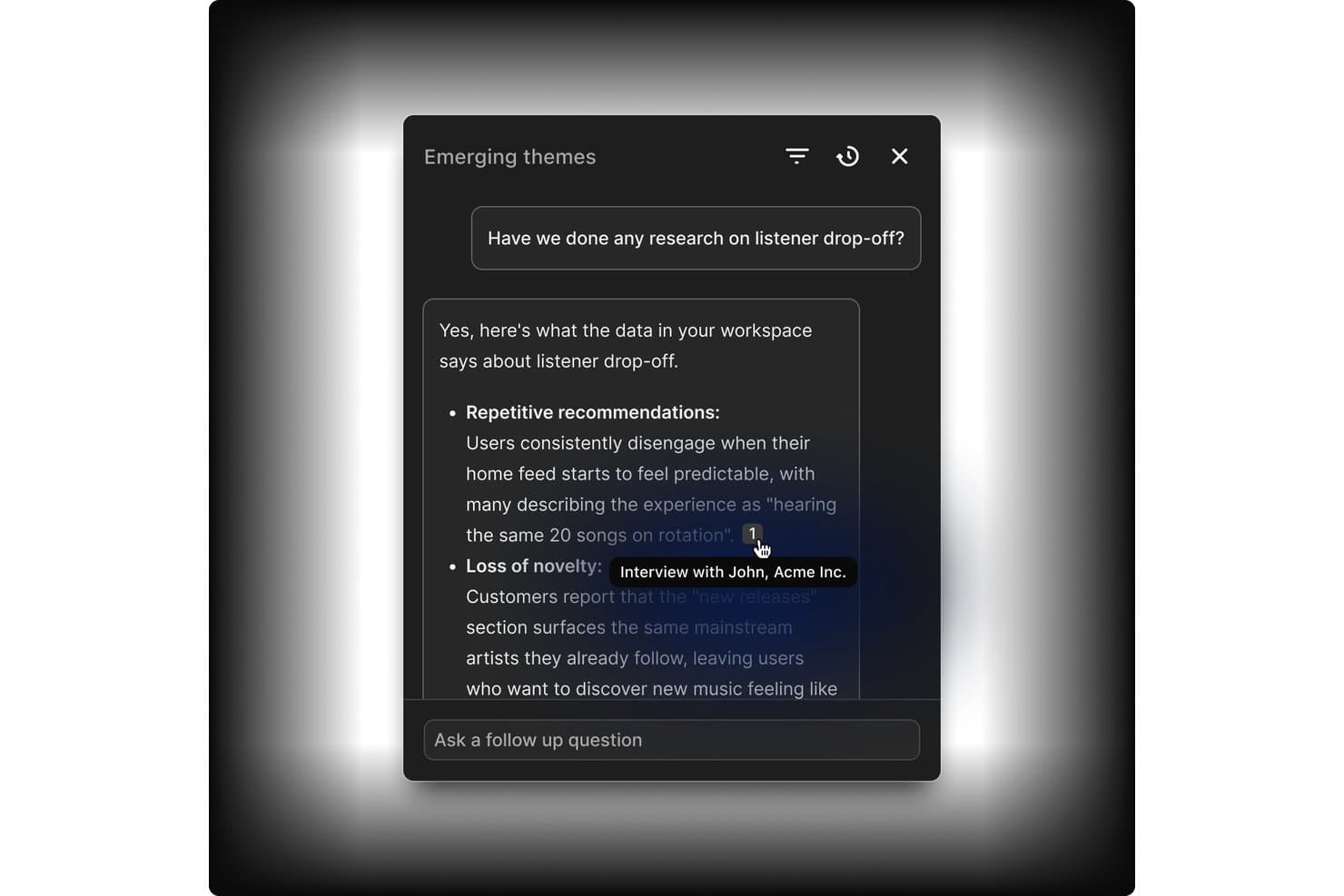
Dovetail links AI answers directly to source interview evidence. Dovetail is a customer intelligence platform that combines centralized research storage, AI-assisted tagging and synthesis, cross-study analysis, and stakeholder sharing into one collaborative research repository.
Who Is Dovetail Best For?
Dovetail fits enterprise research teams and DesignOps leads who need to manage research at scale across multiple studies, contributors, and stakeholders.
Why I Picked Dovetail
Dovetail earns its spot as one of the best on my shortlist because it's built to handle research at a scale that most tools simply aren't designed for. I love how workspace-level tag boards stay live across hundreds of projects simultaneously, so a taxonomy change made in one place reflects everywhere at once. Canvas AI clustering is also genuinely useful: when I'm pulling highlights from a dozen studies, the tool groups them by theme automatically, cutting hours of manual affinity mapping. Add free unlimited Viewer seats on Enterprise, and getting synthesized findings in front of engineering and product stakeholders becomes far less of an operational burden.
Dovetail Key Features
- Evidence-linked docs: Reports and chat answers cite exact video clips, timestamps, and quotes that link back to the original recording.
- Cross-project canvas: Pull highlights and references from multiple projects into a single infinite canvas for cross-study analysis.
- Contacts database: Store up to 50,000 research participants, link them to sessions and docs, and enrich records via Salesforce or HubSpot.
- Insight-to-roadmap linking: Send themes and data points directly to Jira or Linear as interactive embeds that link back to Dovetail.
Dovetail Integrations
Dovetail offers native integrations with Jira, Linear, Slack, Microsoft Teams, Notion, Figma, Productboard, Zoom, Google Meet, and Qualtrics. It also provides an API, CLI, MCP Server, and Zapier for custom connectivity.
Pros and Cons
Pros:
- Granular permissions support research governance
- Cross-study synthesis reveals recurring research themes
- Evidence-linked findings support stakeholder trust
Cons:
- Search reliability varies across larger datasets
- Advanced repository features require Enterprise
Learn more about Dovetail: Best for qualitative analysis
- 15-day free trial
- From $15/user/month (billed annually)
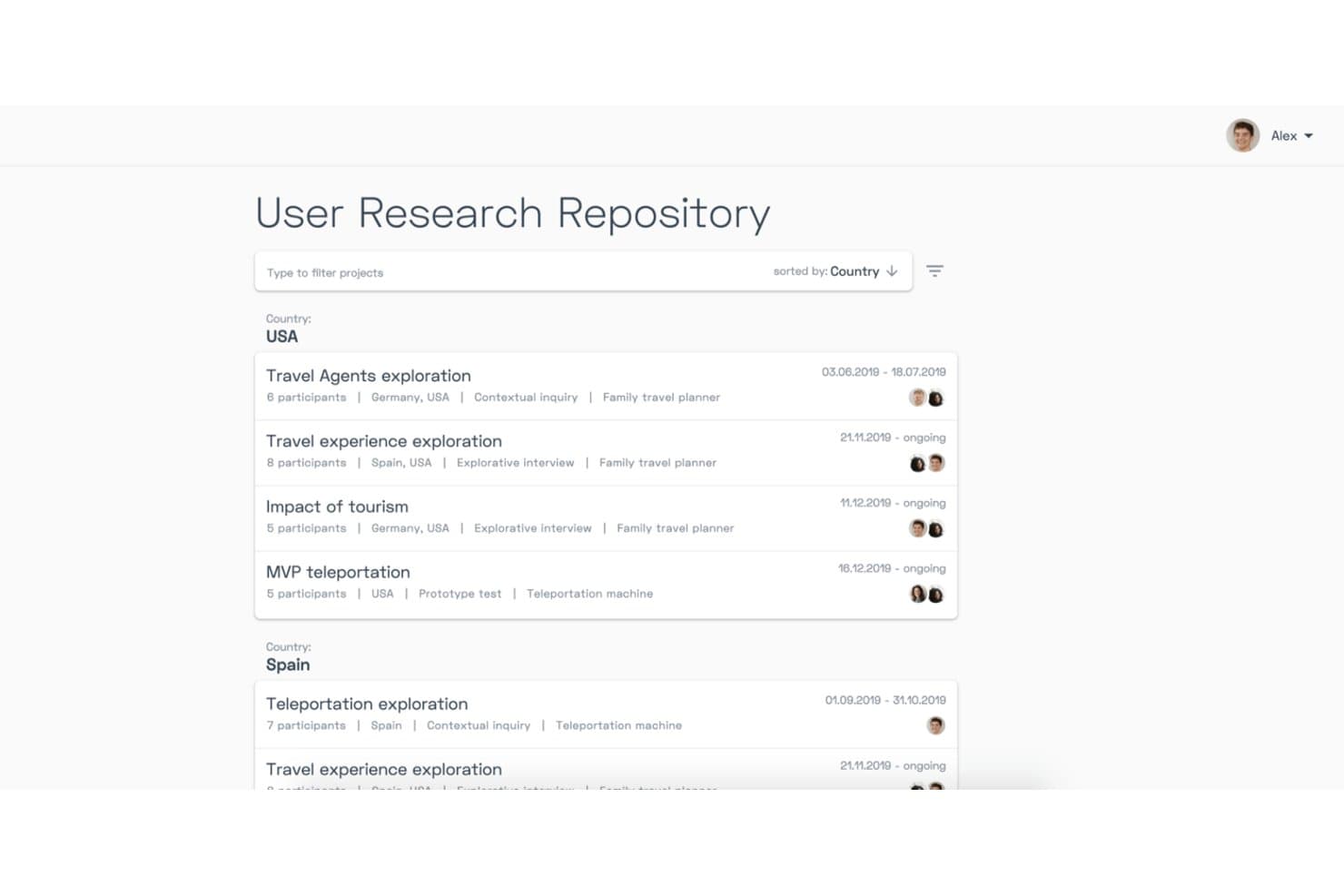
Condens organizes research projects by country with filters and metadata. Condens is a UX research repository and AI analysis platform that centralizes video, audio, notes, and text data, with tools for transcription, tagging, whiteboard synthesis, and AI-assisted qualitative analysis across studies.
Who Is Condens Best For?
Condens is a strong fit for UX researchers and product teams that do heavy qualitative work and need a structured, evidence-linked repository to synthesize findings at scale.
Why I Picked Condens
I picked Condens as one of the best because its qualitative analysis depth is genuinely hard to replicate elsewhere. I love how AI clustering groups transcript highlights into themes automatically, and how Smart Clusters keep updating as new data comes in, so synthesis isn't a one-time manual task. The whiteboard links every insight back to raw evidence, which means when stakeholders question a finding, I can trace it directly to the source clip.
Condens Key Features
- Global tag boards: A shared tag set that spans all projects, keeping your taxonomy consistent and preventing duplicate or conflicting tags across studies.
- Unlimited transcription: Every plan includes unlimited AI transcription in 85+ languages, with speaker recognition and timestamps built in.
- Insights Magazine: A customizable stakeholder hub where you can curate and publish findings for different audiences, with no login required for viewers.
- Cross-project participant profiles: Participant records that persist across studies, tracking demographics, consent, and session history in one place.
Condens Integrations
Condens offers documented integrations with Zoom, Google Drive, Microsoft Cloud, UserTesting, UXTweak, User Interviews, Zendesk, Slack, Microsoft Teams, and Figma. It also supports Notion, Jira, and Confluence embeds, plus an Enterprise API and Zapier.
Pros and Cons
Pros:
- No-login stakeholder findings access
- Unlimited transcription and storage
- Evidence-linked qualitative synthesis
Cons:
- Transcription can misrecognize names
- No built-in study recruitment
Learn more about Condens: Best for all-in-one research ops and CRM
- Free trial + free demo available
- From $129/seat/month
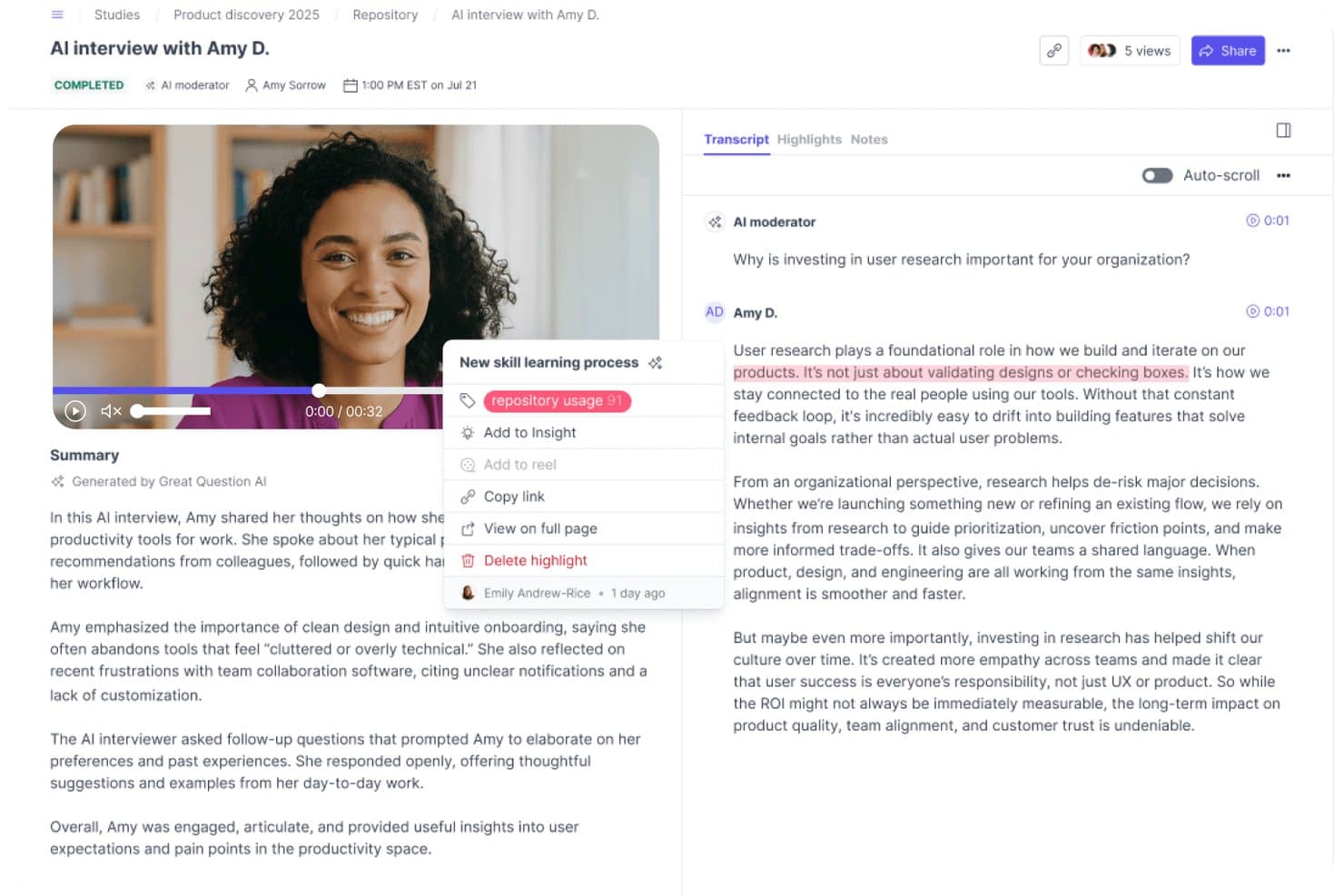
Great Question lets users tag and organize transcript highlights into a repository. Great Question is an all-in-one UX research platform that combines a research repository, participant CRM, recruitment, and study tools—including interviews, surveys, prototype tests, and AI-powered synthesis and search.
Who Is Great Question Best For?
Great Question is a strong fit for UX research teams that want to consolidate recruiting, CRM, study execution, and a searchable insight repository into one platform.
Why I Picked Great Question
I picked Great Question as one of the best because it's the only tool on this list that genuinely handles recruiting, participant CRM, study execution, and a searchable insight repository under one roof. I love how Ask AI lets me search across every study with natural-language questions and get verbatim, timestamped quotes back as evidence. The participant CRM tracks consent, study history, and custom attributes, so I'm never starting from scratch when I need to recruit for a follow-up study.
Great Question Key Features
- AI Synthesis: Automatically generates themed summaries, key insights, and a highlight reel from moderated interview studies with three or more transcripts.
- Global tag manager: Lets you create, color-code, group, and merge tags that apply across every study in your workspace for org-wide pattern tracking.
- Highlights Board: A drag-and-drop workspace where you group and organize video highlights into named, color-coded clusters for manual synthesis.
- Free unlimited Observer seats: Stakeholders can view the repository, attend live sessions, and browse findings without needing a paid seat.
Great Question Integrations
Great Question offers 20+ native integrations, including Zoom, Google Meet, Microsoft Teams, Slack, Figma, Google Workspace, Microsoft Outlook, Salesforce, Qualtrics, and Respondent. It also supports custom connections through its API and MCP server, plus Zapier.
Pros and Cons
Pros:
- Participant CRM connects recruitment with repository
- Free observers broaden stakeholder research access
- AI search returns cited transcript quotes
Cons:
- Repository excludes direct spreadsheet uploads
- AI synthesis only covers moderated interviews
Learn more about Great Question: Best for end-to-end AI research synthesis
- Free plan available
- Pricing upon request
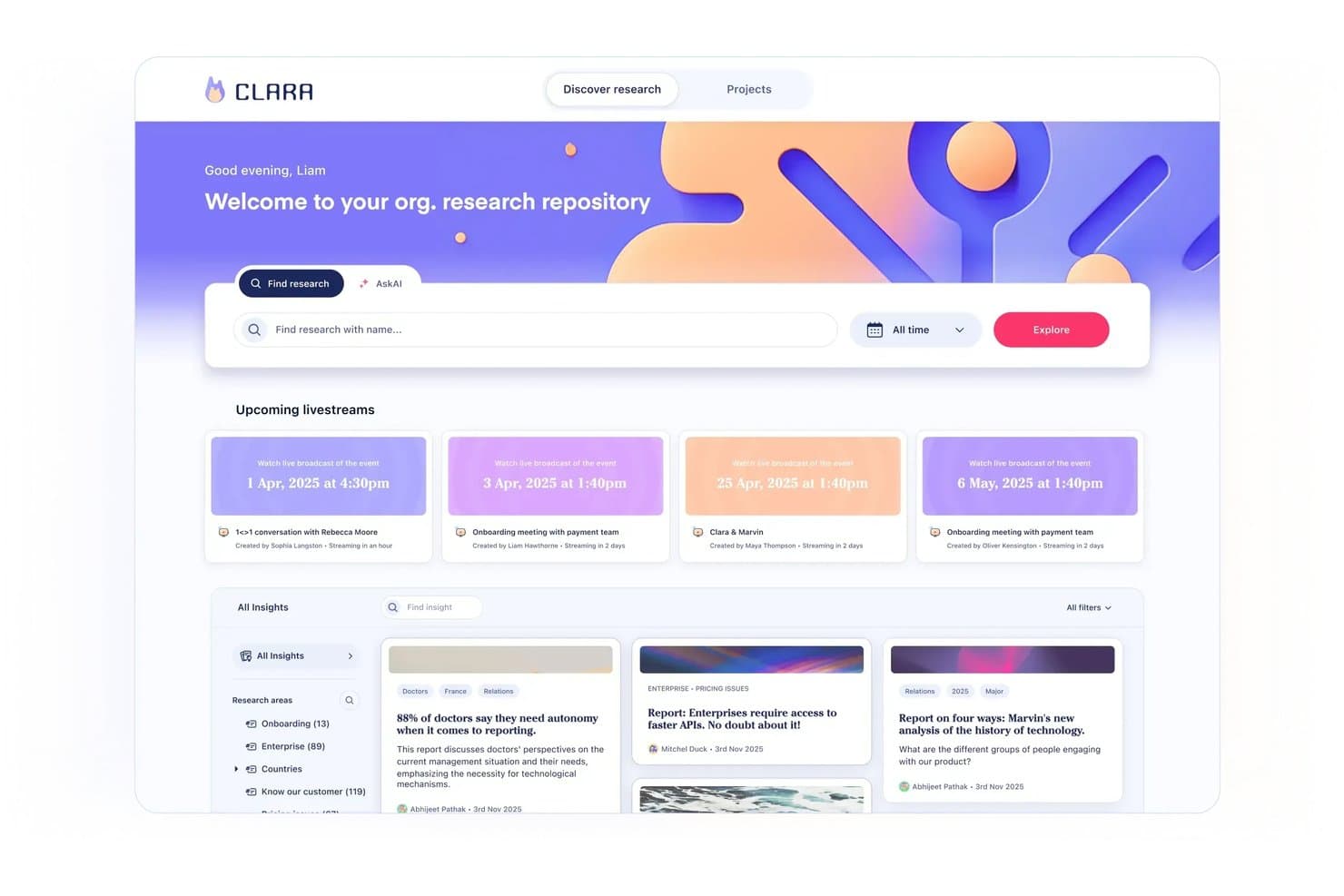
Marvin centralizes research insights and upcoming sessions in one repository. Marvin is an AI-powered UX research repository that centralizes interviews, surveys, support tickets, and other research data, with built-in transcription, tagging, synthesis, and cross-study search.
Who Is Marvin Best For?
Marvin is a strong fit for UX researchers and product managers who need to move from raw interview data to shareable, evidence-backed insights without losing track of what was learned across past studies.
Why I Picked Marvin
Marvin earns its spot on my shortlist because it covers the full arc of AI research synthesis, from live interview transcription to cross-study pattern detection, without requiring manual tagging to make search useful. I especially like Ask AI's explorer agents, which scan your entire repository, surface relevant moments across past studies, and show exactly which files informed the answer. Deep Research templates for thematic analysis, JTBD, and emotion analysis let me move from raw transcripts to structured findings in a single workflow rather than jumping between tools.
Marvin Key Features
- AI Notetaker: Automatically records, transcribes, and summarizes live calls on Zoom, Google Meet, and Microsoft Teams with speaker identification and timestamps.
- Living insight reports: Insights move through private, draft, shared, and published states, combining notes, quotes, clips, and AI analysis in a single report.
- Research newsletter automation: Auto-generates customizable research newsletters and posts insights directly to Slack or Microsoft Teams channels to keep stakeholders informed.
- Granular access permissions: Four distinct user roles—Admin, Full, Collaborator, and Viewer—with pod-level controls, PII visibility settings, and SSO support.
Marvin Integrations
Marvin offers 30+ native integrations, including Zoom, Google Meet, Microsoft Teams, Qualtrics, Dscout, UserTesting, Intercom, Zendesk, Slack, Jira, and Asana. Its Import API and MCP server support custom connections with Claude, ChatGPT, Cursor, and Copilot.
Pros and Cons
Pros:
- Insight reports connect evidence to decisions
- AI notes capture interviews with timestamps
- Repository-wide search surfaces past research
Cons:
- Cross-project synthesis can take considerable time
- AI analysis sometimes misreads research data
Learn more about Marvin:
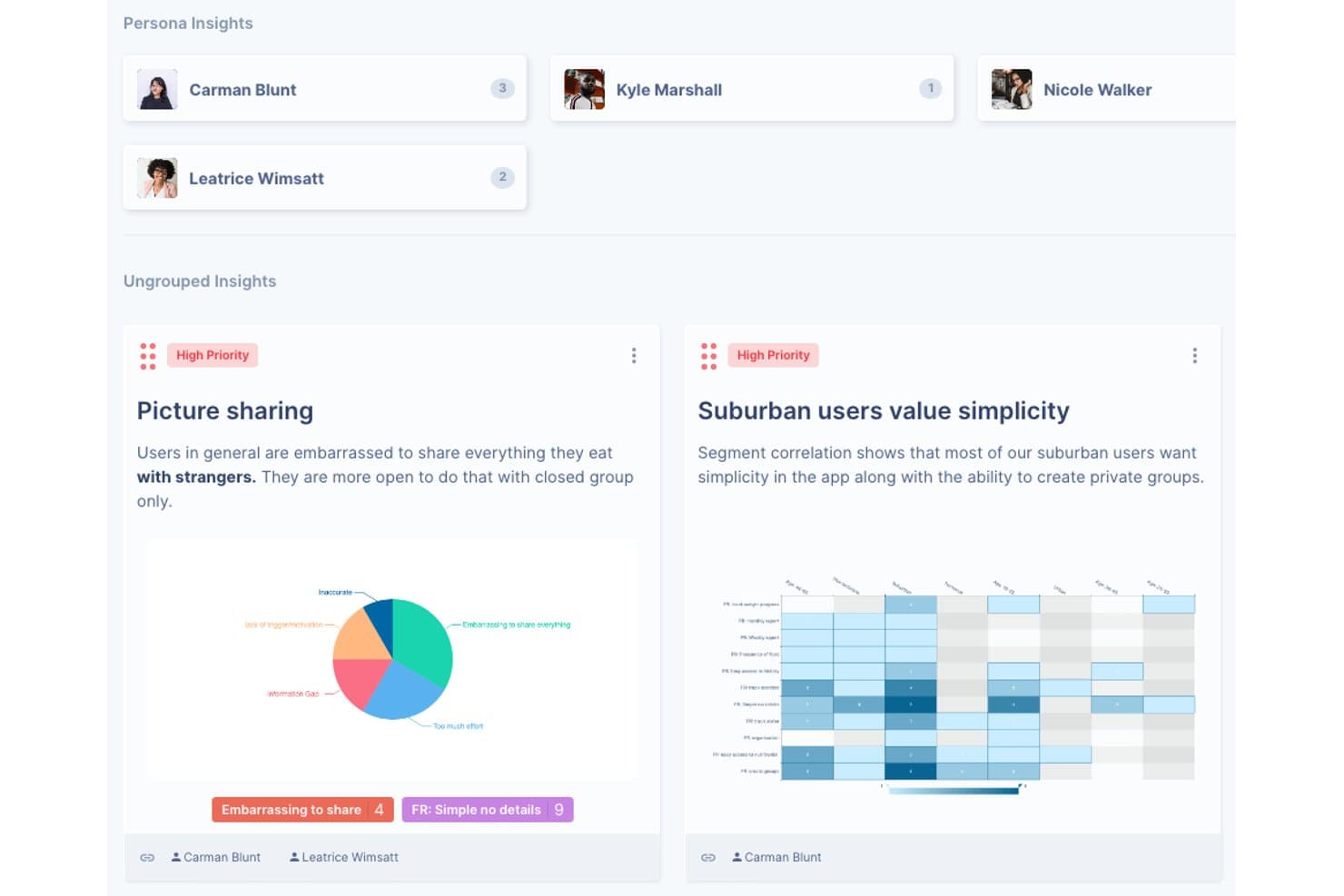
UserBit organizes research insights by persona with priority tags and charts. UserBit is a UX research repository tool built for multi-client workflows, combining interview management, notes, transcription, surveys, tagging, correlation analysis, and a stakeholder-facing Client Portal in one workspace.
Who Is UserBit Best For?
UserBit is a strong fit for UX researchers and design ops leads at agencies managing multiple client workspaces under a single flat-rate subscription.
Why I Picked UserBit
I've included UserBit in my top picks because its flat-rate Unlimited plan lets agencies add every client team member and stakeholder at no extra cost, which is rare in this category. I particularly like how each client gets its own isolated workspace with separate branding, permissions, and a dedicated Client Portal where stakeholders can filter and explore published insights without needing a researcher to walk them through it.
UserBit Key Features
- Correlation heatmaps: Visualize relationships between highlight tags and participant segments to surface patterns across your interview data.
- Global tag boards: Create and manage a shared tag taxonomy across all projects in a workspace, with changes syncing automatically.
- Stakeholder Client Portal: Give non-researcher audiences a branded, login-protected space to browse and filter published insights independently.
- Built-in transcription: Transcribe audio and video in 99 languages with speaker recognition, inline editing, and automatic clip creation from tagged segments.
UserBit Integrations
UserBit doesn't have any native integrations. It supports a beta REST API, Enterprise SSO with Okta, Google, OneLogin, and Azure AD, plus Zapier.
Pros and Cons
Pros:
- Evidence-linked insights strengthen research credibility
- Client Portal simplifies stakeholder insight access
- Isolated workspaces support multi-client research
Cons:
- Analytics interface can feel dated and confusing
- AI tagging and synthesis remain unreliable
Learn more about UserBit:
Andre verktøy for UX-forskningsarkiver
Her er noen flere alternativer for verktøy for UX-forskningsarkiver som ikke kom med på kortlisten min, men som likevel er verdt å se nærmere på:
- 11StravitoBest for sharing insights with non-research teams
- 12AureliusBest for flat-rate, unlimited-user research repos
- 13NotionBest for research insights inside existing workflows
- 14MazeBest for prototype testing with built-in AI synthesis
- 15DscoutBest for field research in regulated industries
- 16UXArmyBest for usability research in APAC markets
How I Evaluate UX Research Repository Tools
I split my evaluation into three parts, in this order. First, I give the most weight to core functionality: store notes and recordings, tag findings, and search across studies for PMs and designers. Next, I look for AI theme clustering, then consider onboarding, support, permissions, and pricing value.
Core Functionality (Table Stakes For This List)
When I'm selecting tools for my list, I score each one on a scale from 0 (does not offer the functionality) to 5 (excels in this area) for each core functionality listed below. I then convert the total into a percentage to help assess each tool's overall fit, with extra weight on any functionalities I’ve deemed essential.
- Centralized Research Storage (Essential): I look for organized storage for notes, recordings, transcripts, and survey data across multiple research projects.
- Tagging & Search (Essential): I assess tags, filters, and keyword search for finding specific feedback or evidence across past studies.
- Insight Synthesis: I look for ways to group highlights into themes, insights, or takeaways separate from raw research data.
- Cross-Study Analysis: I check whether teams can compare findings and identify recurring patterns across interviews, studies, and projects.
- Stakeholder Sharing: I evaluate curated reports, insight views, and shareable evidence that product and engineering partners can access.
- Access Permissions: I assess controls for managing who can view, edit, contribute to, or share research content.
Once I have a list of tools that meet the criteria, I consider what sets each platform apart.
Differentiating Factors (What Sets Vendors Apart)
Here's how I compare and contrast different vendors:
Standout Features
I evaluate how well each tool links synthesized insights directly to roadmap items or Jira tickets, because traceability from evidence to prioritization decisions is where most teams lose momentum. AI theme clustering matters too—I check whether the tool surfaces emergent patterns across studies without requiring manual tagging upfront. Beyond analysis, I look at stakeholder hubs: can a VP self-serve relevant findings without training, or does sharing still mean exporting a slide deck?
Beyond Features
I evaluate how easily non-researchers can adopt each tool. If a PM needs a training session just to browse findings, adoption stalls. Templates and guided workflows matter here. I also check licensing models closely—some platforms charge per seat while others offer free viewer access, which changes the math fast when you need 30 stakeholders reading insights. GDPR and consent management is another factor I look for, since participant data carries real compliance risk.
Slik velger du et verktøy for UX-forskningsarkiver
Det er lett å gå seg vill i lange funksjonslister og kompliserte prismodeller. For å hjelpe deg med å holde fokus mens du arbeider deg gjennom den unike prosessen med å velge programvare, har jeg satt sammen en sjekkliste over faktorer du bør ha i mente:
| Faktor | Hva du bør vurdere |
| Skalerbarhet | Forsikre deg om at verktøyet kan vokse sammen med teamet ditt. Vurder om det støtter økt datamengde og flere brukere uten problemer. |
| Integrasjoner | Kontroller om verktøyet kan integreres med eksisterende programvare som Slack, Jira eller Google Drive for å effektivisere arbeidsflyten. |
| Tilpasningsmuligheter | Se etter muligheter for å tilpasse verktøyet til teamets spesifikke behov, for eksempel tilpassbare dashbord eller arbeidsflyter. |
| Brukervennlighet | Vurder om verktøyet er intuitivt nok til at teamet raskt kan ta det i bruk. En bratt læringskurve kan forsinke forskningsarbeidet. |
| Budsjett | Analyser om prisene er i tråd med budsjettet ditt. Vurder verdien som tilbys på hvert prisnivå, samt eventuelle skjulte kostnader. |
| Sikkerhetstiltak | Forsikre deg om at det finnes solide tiltak for databeskyttelse. Se etter samsvar med bransjestandarder som GDPR. |
| Brukerstøtte | Vurder nivået på den tilgjengelige kundestøtten, inkludert svartider og tilgjengelige ressurser som veiledninger eller et hjelpesenter. |
| Samarbeid | Kontroller om verktøyet støtter samarbeidsfunksjoner som redigering i sanntid eller delte arbeidsområder for å gjøre teamet mer effektivt. |
Trender innen verktøy for UX-forskningsarkiver
I undersøkelsen min hentet jeg inn utallige produktoppdateringer, pressemeldinger og lanseringslogger fra ulike leverandører av verktøy for UX-undersøkelsesarkiver. Her er noen av de fremvoksende trendene jeg følger med på:
- KI-drevne innsikter: Mange verktøy utnytter nå KI for å gi dypere innsikt i brukerdata. Denne trenden hjelper team med raskt å identifisere mønstre og ta informerte beslutninger. Leverandører som Dovetail tar i bruk KI for å bistå med tagging og sammenfatning av tilbakemeldinger fra brukere.
- Forbedret datavisualisering: Verktøy fokuserer på mer avanserte alternativer for datavisualisering, slik at team enkelt og effektivt kan tolke data. Denne trenden gjør det enklere å presentere komplekse data i et mer oversiktlig format, noe som støtter beslutningsprosesser.
- Funksjoner for fjernsamarbeid: Etter hvert som fjernarbeid blir vanligere, forbedrer verktøyene funksjoner som støtter samarbeid i sanntid. Dette inkluderer delte arbeidsområder og redigering i sanntid, noe som blir stadig viktigere for distribuerte team.
- Tilpasning av brukeropplevelsen: Det er en økende trend mot å tilby flere tilpasningsmuligheter for brukerne. Dette gjør det mulig for team å tilpasse verktøyets grensesnitt og funksjonalitet slik at det passer bedre til deres spesifikke arbeidsflyter og behov.
- Fokus på tilgjengelighet: Det blir stadig viktigere å sikre at verktøy er tilgjengelige for alle brukere, inkludert personer med funksjonsnedsettelser. Dette omfatter funksjoner som tastaturnavigasjon og støtte for skjermlesere, slik at inkluderende arbeidsprosesser for undersøkelser blir ivaretatt.
Hva er verktøy for UX-undersøkelsesarkiver?
Verktøy for UX-undersøkelsesarkiver er programvareløsninger som lagrer, organiserer og administrerer data fra brukerundersøkelser. De brukes vanligvis av UX-undersøkere, produktledere og designteam for å forstå brukerinnsikt og forbedre produktutviklingen. Funksjoner som tagging, datavisualisering og samarbeidsmuligheter hjelper med å organisere data, tolke innsikt og legge til rette for teamarbeid. Alt i alt gir disse verktøyene team en sentralisert plattform for effektiv administrasjon og utnyttelse av data fra brukerundersøkelser.
Funksjoner i verktøy for UX-undersøkelsesarkiver
Når du velger verktøy for UX-undersøkelsesarkiver, bør du se etter følgende viktige funksjoner:
- Integrasjonsmuligheter: Koble til andre verktøy, for eksempel plattformer for spørreundersøkelser, designprogramvare eller analysedashbord. Sømløse integrasjoner reduserer manuelt arbeid og sørger for at arbeidsflyten fungerer problemfritt.
- Sentralisert datalagring: Lagre alle undersøkelsesresultatene, dokumentene og multimediefilene dine på ett sikkert sted. Dette sikrer at alle i teamet enkelt får tilgang til det de trenger – uten at noen må lete seg gjennom utallige mapper.
- Avansert søk og filtrering: Finn raskt viktige innsikter eller detaljer om deltakere uten å måtte lete gjennom endeløse mapper. Med filtre kan du snevre inn til bestemte undersøkelser, datoer, tagger eller brukersegmenter, noe som gjør prosessen langt mer håndterlig.
- Tagging og kategorisering: Merk og organiser undersøkelsesdata etter emner, metoder eller prosjektnavn. Denne strukturen sparer tid og hjelper deg med å oppdage mønstre eller mangler mye raskere når du trenger det som mest.
- Samarbeidsverktøy: Samarbeid i sanntid ved å dele notater, legge igjen kommentarer eller tildele oppgaver til kolleger. Du kan samle inn tilbakemeldinger uten å gå deg vill i endeløse e-posttråder.
- Versjonshistorikk og revisjonsspor: Spor endringer og se hvem som redigerte hva, og når. Dette er uvurderlig når du må sikre nøyaktighet eller gå tilbake til tidligere funn uten å begynne helt på nytt.
- Deltakeradministrasjon: Hold all deltakerinformasjon organisert og sikker. Du kan administrere samtykkeskjemaer, følge opp kommunikasjon og forhindre utilsiktede doble invitasjoner på ett sted.
- Verktøy for sammenfatning av innsikt: Grupper relaterte funn og sammenfatt viktig innsikt. Dette hjelper deg med å gjøre rådata om til nyttig kunnskap for prosjektene dine, slik at konklusjonene dine kan tas i bruk med én gang.
- Sikkerhets- og tilgangskontroller: Angi tilgangsnivåer for teammedlemmer og interessenter. Robuste kontroller sørger for at sensitive undersøkelser forblir private, samtidig som samarbeidspartnere bare får se det som er relevant for dem.
Vanlige KI-funksjoner
Moderne verktøy for UX-undersøkelsesarkiver drives i økende grad av KI for å hjelpe team med å arbeide smartere og raskere. Her er noen vanlige KI-drevne funksjoner du finner:
- Automatisk tagging og kategorisering: AI kan skanne forskningsdataene dine, for eksempel intervjutranskripsjoner eller spørreundersøkelsessvar, og foreslå relevante tagger eller kategorier. Dette sparer deg for tid og holder arkivet organisert med minimal manuell innsats.
- Uthenting av innsikt: Avanserte algoritmer kan fremheve tilbakevendende temaer, mønstre og holdninger i forskningen din, slik at du kan avdekke viktige innsikter uten å måtte lese gjennom hvert eneste notat.
- Transkripsjonstjenester: AI-drevet transkripsjon konverterer raskt lyd- og videointervjuer til søkbar, redigerbar tekst. Dette gjør det enklere å analysere samtaler og dele funn med teamet ditt.
- Smart søk: AI forbedrer søkefunksjonaliteten ved å forstå kontekst og hensikt, og gir mer nøyaktige resultater selv når du bruker søk med naturlig språk.
- Fjerning av duplikater blant deltakere: AI kan identifisere og slå sammen dupliserte deltakeroppføringer, slik at du kan opprettholde en ryddig og nøyaktig database.
- Automatiske sammendrag: Generer korte sammendrag av lange forskningsøkter eller rapporter, slik at interessenter raskt kan få oversikt over hovedpunktene uten å måtte gå gjennom alle detaljene.
- Holdningsanalyse: AI kan vurdere den følelsesmessige tonen i tilbakemeldinger fra deltakere, slik at du får en dypere forståelse av brukernes holdninger og reaksjoner.
Lagdelte AI-funksjoner kan effektivisere arbeidsflyten din, redusere manuelle oppgaver og hjelpe deg med å avdekke verdifull innsikt raskere, slik at verktøyene for UX-forskningsarkiv blir enda kraftigere.
Fordeler med verktøy for UX-forskningsarkiv
Implementering av verktøy for UX-forskningsarkiv gir flere fordeler for teamet og virksomheten din. Her er noen av fordelene du kan se frem til:
- Bedre organisering: Funksjoner for tagging og kategorisering hjelper deg med å holde forskningsdataene godt organisert og lett tilgjengelige.
- Bedre samarbeid: Verktøy for samarbeid i sanntid gjør det mulig for teamet ditt å jobbe effektivt sammen, uansett hvor de befinner seg.
- Raskere innsikt: Analyse i sanntid gir umiddelbare tilbakemeldinger, slik at teamet ditt kan ta raske og velinformerte beslutninger.
- Bedre datatolkning: Funksjoner for datavisualisering gjør det enklere å forstå kompleks informasjon og trekke meningsfulle konklusjoner.
- Økt tilgjengelighet: Tilgjengelighetsfunksjoner sikrer at alle i teamet ditt kan bruke verktøyet, inkludert personer med funksjonsnedsettelser.
- Effektiviserte arbeidsflyter: Integrasjonsmuligheter kobler verktøyet til annen programvare, noe som gjør det enklere å dele data og arbeide på tvers av plattformer.
- Sikker datahåndtering: Sikkerhetstiltak beskytter sensitiv informasjon og sikrer samsvar med bransjestandarder som GDPR.
Kostnader og priser for verktøy for UX-forskningsarkiv
Ved valg av verktøy for UX-forskningsarkiv er det nødvendig å forstå de ulike prismodellene og abonnementene som er tilgjengelige. Kostnadene varierer basert på funksjoner, teamstørrelse, tillegg og mer. Tabellen nedenfor oppsummerer vanlige abonnementer, gjennomsnittsprisene deres og typiske funksjoner som er inkludert i løsninger for verktøy for UX-forskningsarkiv:
Sammenligningstabell for abonnementer for verktøy for UX-forskningsarkiv
| Abonnementstype | Gjennomsnittspris | Vanlige funksjoner |
| Gratisabonnement | $0 | Grunnleggende datalagring, begrenset antall brukere og viktige analysefunksjoner. |
| Personlig abonnement | $5-$30/bruker/ måned | Avansert tagging, datavisualisering, samarbeidsverktøy og grunnleggende brukerstøtte. |
| Bedriftsabonnement | $30-$60/ bruker/måned | Komplett analysepakke, rekruttering av deltakere, integrasjoner og prioritert brukerstøtte. |
| Abonnement for store virksomheter | $60-$120/ bruker/måned | Tilpassede kontrollpaneler, forbedret sikkerhet, en dedikert kundeansvarlig og tilpassede integrasjoner. |
Vanlige spørsmål om verktøy for UX-forskningsarkiver
Her finner du svar på vanlige spørsmål om verktøy for UX-forskningsarkiver:
Hvordan skiller et UX-forskningsarkiv seg fra en vanlig database?
Et UX-forskningsarkiv er utformet spesielt for lagring og organisering av brukerdata fra forskning, mens en vanlig database kanskje ikke tilbyr de samme tilpassede funksjonene. Arkiver inneholder funksjoner som merking, kategorisering og samarbeid, som er avgjørende for å sammenstille og dele innsikt effektivt på tvers av team.
Kan et lite designteam ha nytte av et UX-forskningsarkiv?
Absolutt, små team kan ha stor nytte av et UX-forskningsarkiv. Det hjelper dem med å organisere forskningsdata effektivt, unngå dobbeltarbeid og ta informerte beslutninger. Selv med begrensede ressurser kan et godt vedlikeholdt arkiv effektivisere prosesser og forbedre samarbeidet.
Er UX-forskningsarkiver egnet for fjernarbeid?
Ja, UX-forskningsarkiver er ideelle for fjernarbeid fordi de samler data og innsikt i en skybasert plattform. Denne tilgjengeligheten gjør det mulig for teammedlemmer å samarbeide effektivt fra ulike steder, noe som sikrer kontinuitet og sammenheng i forskningsarbeidet.
Hvor sikre er UX-forskningsarkiver?
Sikkerhet er en topprioritet for UX-forskningsarkiver. De fleste plattformer følger bransjestandarder som GDPR for å beskytte sensitive data. De tilbyr funksjoner som tilgangskontroller og kryptering for å sikre at bare autorisert personell får tilgang til informasjonen.
Hvor ofte bør et UX-forskningsarkiv oppdateres?
Det er viktig å oppdatere UX-forskningsarkivet regelmessig. Regelmessige oppdateringer bidrar til å holde dataene relevante og nyttige, slik at teamet alltid har tilgang til den nyeste innsikten. Det er viktig å etablere en rutine for å legge til nye funn og revidere eksisterende data.
Finnes det gratis verktøy for UX-forskningsarkiver?
Ja, enkelte verktøy for UX-forskningsarkiver tilbyr gratisversjoner eller prøveperioder. Disse alternativene kan være en god måte for team å begynne å organisere forskningen på uten kostnader på forhånd. Gratisversjoner kan imidlertid ha begrensninger når det gjelder funksjoner eller lagringskapasitet.