

Med så mange ulike plattformer for produktadopsjon tilgjengelig er det vanskelig å finne ut hvilken som passer best for deg. Du vet at du ønsker å forbedre brukeropplevelsen ved introduksjon, øke brukerengasjementet, redusere frafallsratene og få innsikt i brukeratferd, men må finne ut hvilket verktøy som er best. Jeg hjelper deg! I dette innlegget bruker jeg det jeg har lært gjennom å administrere hundrevis av produktlanseringer og gjennom å ha arbeidet med disse verktøyene sammen med store team, når jeg deler mine utvalgte favoritter blant de beste programvarene for produktadopsjon.
Hvorfor du kan stole på våre programvareanbefalinger
6,700+
Reviews
20
Industry experts
16+
Evaluation factors
14
Years
Teamet vårt har testet og anmeldt programvare siden 2012. Vi er selv produktledere, så vi vet hvor vanskelig og hvor viktig det er å velge riktig programvare.
I denne guiden har vi vurdert verktøyene gjennom praktisk testing og uavhengig research og gitt dem poeng ut fra våre utvelgelseskriterier.
Anmeldelsene våre bygger på vår egen redaksjonelle vurdering. De er ikke et salgsargument.
Ekspertanmeldere:
- Andrew LumbySenior TPM
- Cristiano ValimSenior UI/UX Lead


Sammenligningstabell for programvare for produktadopsjon
Denne sammenligningstabellen oppsummerer prisdetaljene for mine beste utvalgte programvarer for produktadopsjon:
| Tool | Best For | Trial Info | Price | ||
|---|---|---|---|---|---|
| 1 | Best for onboarding checklists with progress indicators | 14-day free trial | From $174/month (billed annually) | Website | |
| 2 | Best for driving business processes and outcomes | Free demo available | Pricing upon request | Website | |
| 3 | Best for creating custom onboarding flows | 14-day free trial | From $240/month (billed annually) | Website | |
| 4 | Best for enterprise-scale guided onboarding with AI | Not available | Pricing upon request | Website | |
| 5 | Best for monetization features like coupon prompts | 3-month free pilot available | From $999/month | Website | |
| 6 | Best for all-in-one adoption with built-in analytics | 14-day free trial | From $299/month | Website | |
| 7 | Best for expediting customer onboarding | Free trial available | Pricing upon request | Website | |
| 8 | Best for user-segmented onboarding tours | Free trial available | Pricing upon request | Website | |
| 9 | Best for in-depth product user analytics | Free plan + 30-day free trial + free demo available | Pricing upon request | Website | |
| 10 | Best inline guidance and design flexibility | 14-day free trial | Pricing upon request | Website |


Anmeldelser av den beste programvaren for produktadopsjon
Nedenfor finner du mine detaljerte sammendrag av de beste programvarene for produktadopsjon som kom med på kortlisten min. Anmeldelsene mine gir en detaljert gjennomgang av de viktigste funksjonene, fordelene og ulempene, integrasjonene og de ideelle bruksområdene for hvert verktøy, slik at du kan finne det som passer best for deg.
 Best for onboarding checklists with progress indicators
- 14-day free trial
- From $174/month (billed annually)
Visit WebsiteCustomer Rating:4.7/5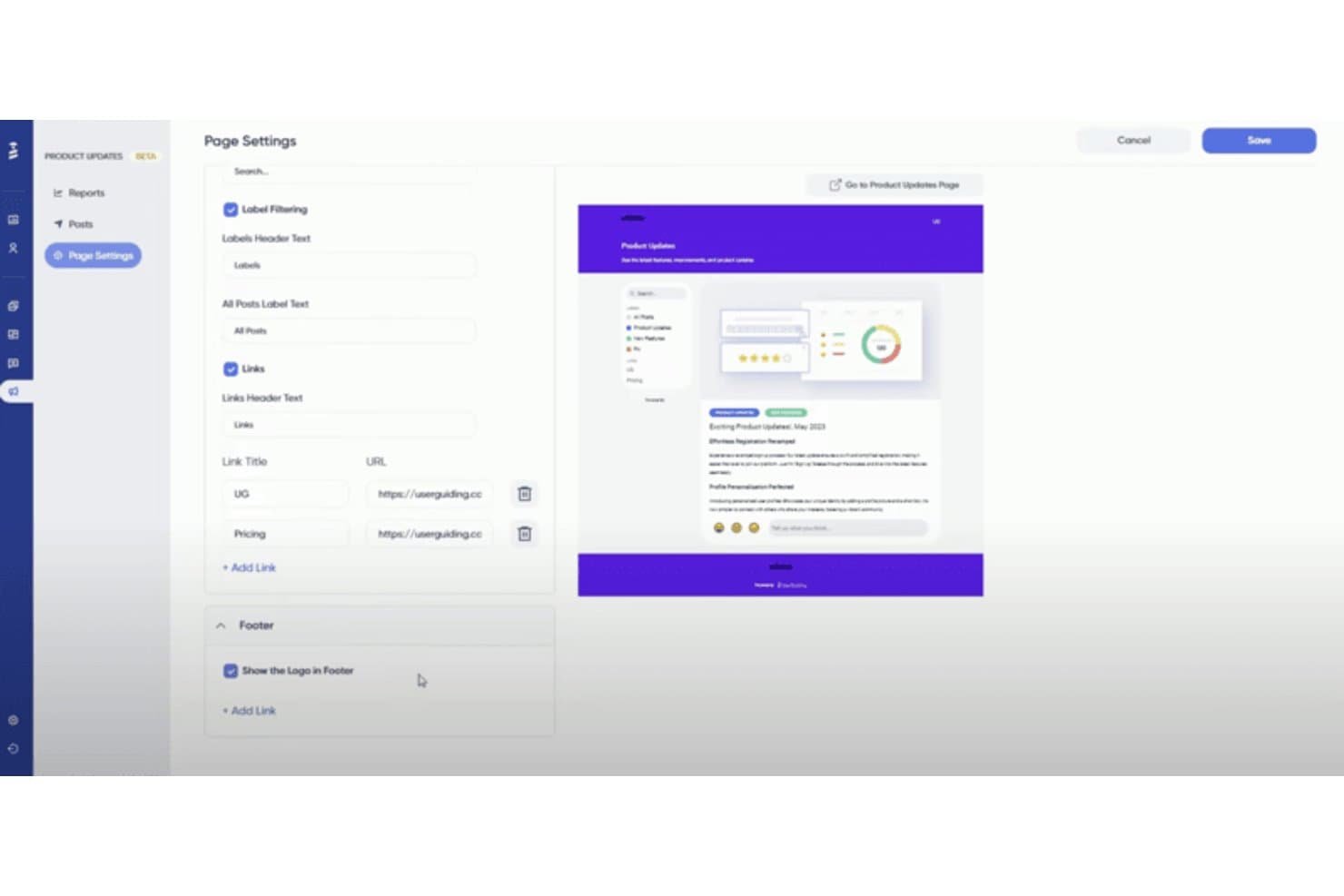
UserGuiding lets users customize a product updates page with labels, links, and footer settings. UserGuiding is a no-code product adoption platform that lets you build in-app guided tours, onboarding checklists, hotspots, tooltips, banners, and resource centers directly on your web application.
Who Is UserGuiding Best For?
UserGuiding is a strong fit for product and customer success teams at startups and SMBs that need to launch in-app onboarding quickly without relying on engineering resources.
Why I Picked UserGuiding
UserGuiding earns its spot on my shortlist because its onboarding checklists are genuinely best-in-class. I love how each checklist auto-tracks task completion, displays a live progress bar, and dismisses itself once a user finishes setup, so new users always know exactly where they stand. Paired with the Resource Center, which bundles guides, checklist tasks, and KB articles into one persistent in-app widget, it's a setup I'd reach for specifically when reducing time-to-value is the priority.
UserGuiding Key Features
- No-code Chrome extension builder: Build and publish in-app tours, hotspots, and banners directly on your live app without writing a single line of code.
- Session replay: Record and replay up to 3,000 user sessions per month to see exactly how users interact with your product.
- In-app NPS and survey tools: Embed Net Promoter Score surveys and custom feedback forms directly inside your product to capture user sentiment in context.
- A/B testing for guides: Test two variations of an onboarding flow on the Growth plan to identify which version drives better engagement.
UserGuiding Integrations
UserGuiding integrations include Google Analytics, Amplitude, Mixpanel, Segment, Salesforce, HubSpot, Intercom, Slack, and Woopra. Its Event API, webhooks, and MCP Server support custom connections and AI-powered access to product data.
Pros and Cons
Pros:
- In-app surveys and NPS included natively
- All guides built with no-code Chrome extension
- Onboarding checklists with real-time progress bars
Cons:
- Guide analytics lack funnels or retention analysis
- No native support for mobile app onboarding
Learn more about UserGuiding: 2Best for driving business processes and outcomes
Apty
- Free demo available
- Pricing upon request
Visit WebsiteCustomer Rating:4.8/5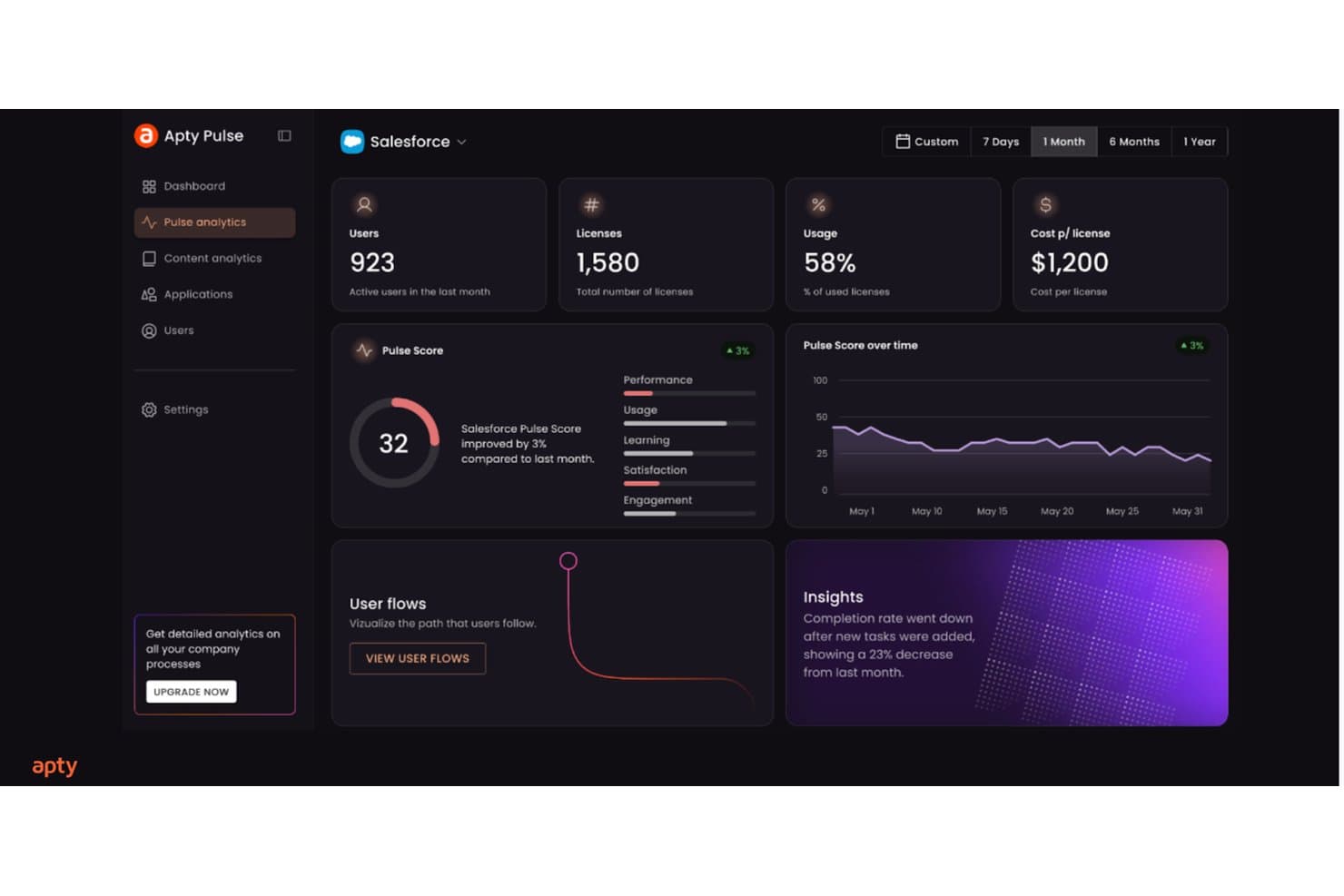
Apty tracks Salesforce adoption metrics like usage, pulse score, and insights. Apty is a digital adoption platform built for enterprise environments that layers in-app walkthroughs, contextual tooltips, onboarding checklists, and cross-application guided workflows on top of existing software like Salesforce, ServiceNow, and Workday.
Who Is Apty Best For?
Apty is a strong fit for enterprise teams managing employee adoption across complex internal software like Salesforce, ServiceNow, or Workday.
Why I Picked Apty
Apty earns its spot on my shortlist because no other tool I've reviewed ties in-app guidance so directly to business process outcomes. I love how Apty OneX lets you build a single guided workflow that spans multiple enterprise apps, so a user moving a request from Salesforce into ServiceNow gets step-by-step guidance the whole way through. Apty PULSE then surfaces AI-driven prescriptive recommendations, pinpointing exactly where users stall and what to fix.
Apty Key Features
- No-code walkthrough builder: A visual editor lets L&D and training teams create and publish step-by-step guided flows without any developer involvement.
- Real-time data validation: Apty catches and corrects data entry errors instantly as users fill out forms, enforcing process accuracy before submission.
- Onboarding checklists: Structured task lists guide new users through required steps in sequence, reducing bottlenecks and keeping onboarding consistent.
- SCORM and LMS export: Guided workflows can be exported as SCORM, PDF, video, or PowerPoint files for use in external learning management systems.
Apty Integrations
Apty supports integrations across 1,000+ enterprise applications, including Salesforce, ServiceNow, Workday, SAP, Jira, NetSuite, Oracle PeopleSoft HCM, Microsoft Dynamics, and Microsoft 365. Enterprise APIs support custom integrations, while SCORM connects Apty content with LMS platforms.
Pros and Cons
Pros:
- Prescriptive analytics identify workflow bottlenecks instantly
- Real-time data validation reduces onboarding mistakes
- Enables cross-application onboarding flows for users
Cons:
- Lacks built-in in-app survey functionality
- No support for native mobile onboarding
Learn more about Apty: Best for creating custom onboarding flows
- 14-day free trial
- From $240/month (billed annually)
Visit WebsiteCustomer Rating:4.8/5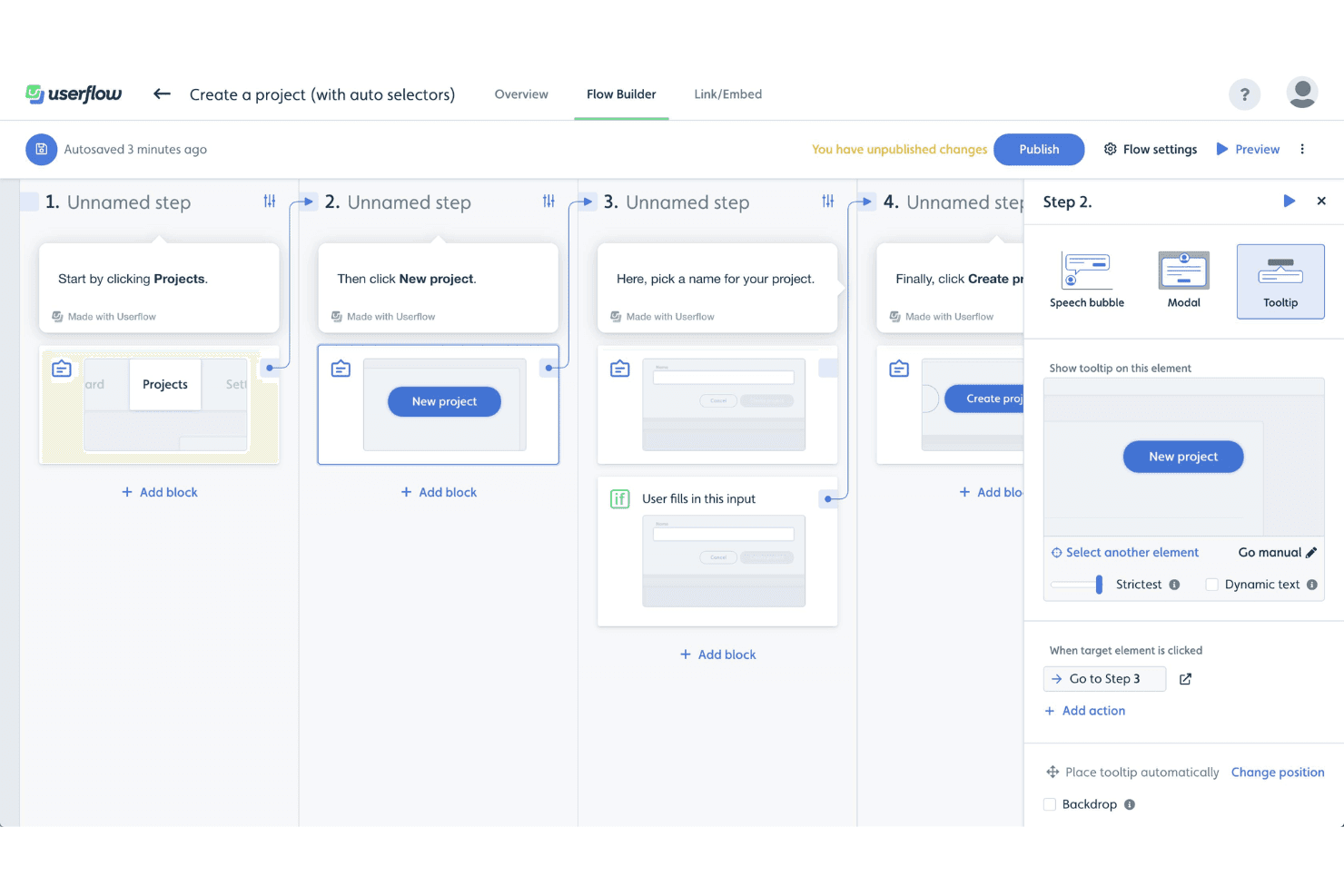
Userflow's Flow Builder lets users create step-by-step product tours using tooltips, modals, and speech bubbles with conditional logic. Userflow is a product adoption platform that lets you build in-app onboarding tours, checklists, tooltips, modals, and resource centers through a no-code visual builder, with an AI layer that generates, monitors, and optimizes flows based on user behavior.
Who Is Userflow Best For?
Userflow is a strong fit for product and customer success teams at SaaS companies who need to build and iterate on custom onboarding flows without relying on engineering resources.
Why I Picked Userflow
Userflow earns its spot on my shortlist because its no-code flow builder is genuinely in a class of its own for building custom onboarding flows. I love how FlowAI Builder lets you generate a complete, branded onboarding flow from a plain-language prompt by analyzing your live product, so you're not starting from scratch. Pair that with branching conditional logic and segmentation by lifecycle stage, and you can build flows that adapt to what a user has or hasn't done yet.
Userflow Key Features
- Adoption Agent: An AI-powered in-app assistant that answers user questions contextually and can complete tasks on behalf of users via Action Flows.
- In-app NPS and surveys: Native NPS, CSAT, and open-ended survey types that can be triggered by behavior or segment and used to activate follow-up flows.
- Two-way CRM sync: Live bidirectional data sync with HubSpot and Salesforce to keep user segments and lifecycle data current across tools.
- Resource center: A persistent in-app help hub where users can search content, access on-demand flows, and get AI-assisted answers without leaving your product.
Userflow Integrations
Userflow offers native integrations with Salesforce, HubSpot, Segment, RudderStack, Amplitude, Mixpanel, Zendesk, Intercom, Freshdesk, and LogRocket. It also supports REST API, webhooks, and Zapier for custom connectivity.
Pros and Cons
Pros:
- Adoption Agent answers user questions in-app
- Branching logic personalizes onboarding by user behavior
- AI can generate branded onboarding flows
Cons:
- Analytics depth limited without outside tools
- No SDK for native mobile onboarding
Learn more about Userflow: Best for enterprise-scale guided onboarding with AI
- Not available
- Pricing upon request
Visit WebsiteCustomer Rating:4.5/5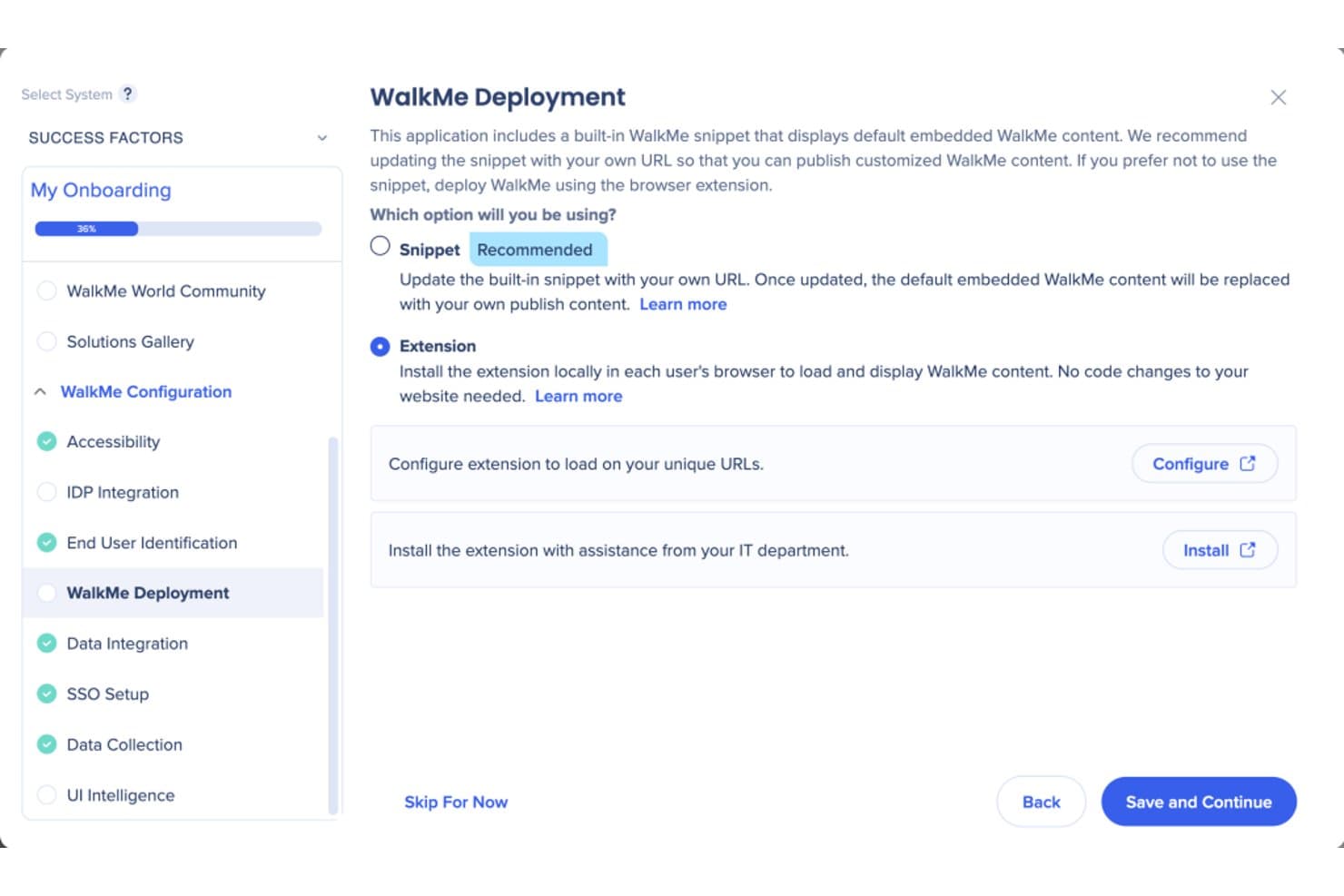
WalkMe lets users choose between snippet or extension deployment methods. WalkMe is a digital adoption platform that layers guided tours, contextual tooltips, in-app messaging, onboarding checklists, and behavioral analytics directly on top of web, desktop, and native mobile applications.
Who Is WalkMe Best For?
WalkMe is a strong fit for large enterprises managing complex, multi-application tech stacks that need guided onboarding at scale.
Why I Picked WalkMe
WalkMe earns its spot on my shortlist because no other tool I've evaluated matches its depth of AI-driven guidance at enterprise scale. I'm particularly impressed by its Proactive AI, which reads full-screen context and surfaces the next best action automatically, without any user prompt. Paired with Smart Walk-Thrus that support branching logic across multi-app workflows, it's built for organizations managing complex, layered tech stacks where simpler tools fall short.
WalkMe Key Features
- Smart Walk-Thrus: Step-by-step interactive walkthroughs that support branching logic, conditional steps, and multi-page flows across web, desktop, and mobile apps.
- Onboarding Tasks checklist: A persistent, cross-session checklist module that guides new users through multi-step onboarding sequences without losing progress.
- In-app surveys: A dedicated survey tool supporting NPS, multiple-choice, rating, and open-ended questions with branching logic and contextual triggers.
- Session Playback: A built-in session replay feature that captures clicks, scrolling, and form inputs to produce visual replays of user behavior within WalkMe Insights.
WalkMe Integrations
WalkMe offers native integrations with Salesforce, Gainsight, Segment.io, HubSpot, and Google Analytics for onboarding data, segmentation, and customer success workflows. It also supports Identity Provider integrations and an API for custom integrations.
Pros and Cons
Pros:
- Session replay built in for behavior analysis
- AI recommends proactive next best actions
- Handles cross-app onboarding at enterprise scale
Cons:
- Steep cost for smaller or leaner teams
- No free trial or self-serve onboarding
Learn more about WalkMe: Best for monetization features like coupon prompts
- 3-month free pilot available
- From $999/month
Visit WebsiteCustomer Rating:4.7/5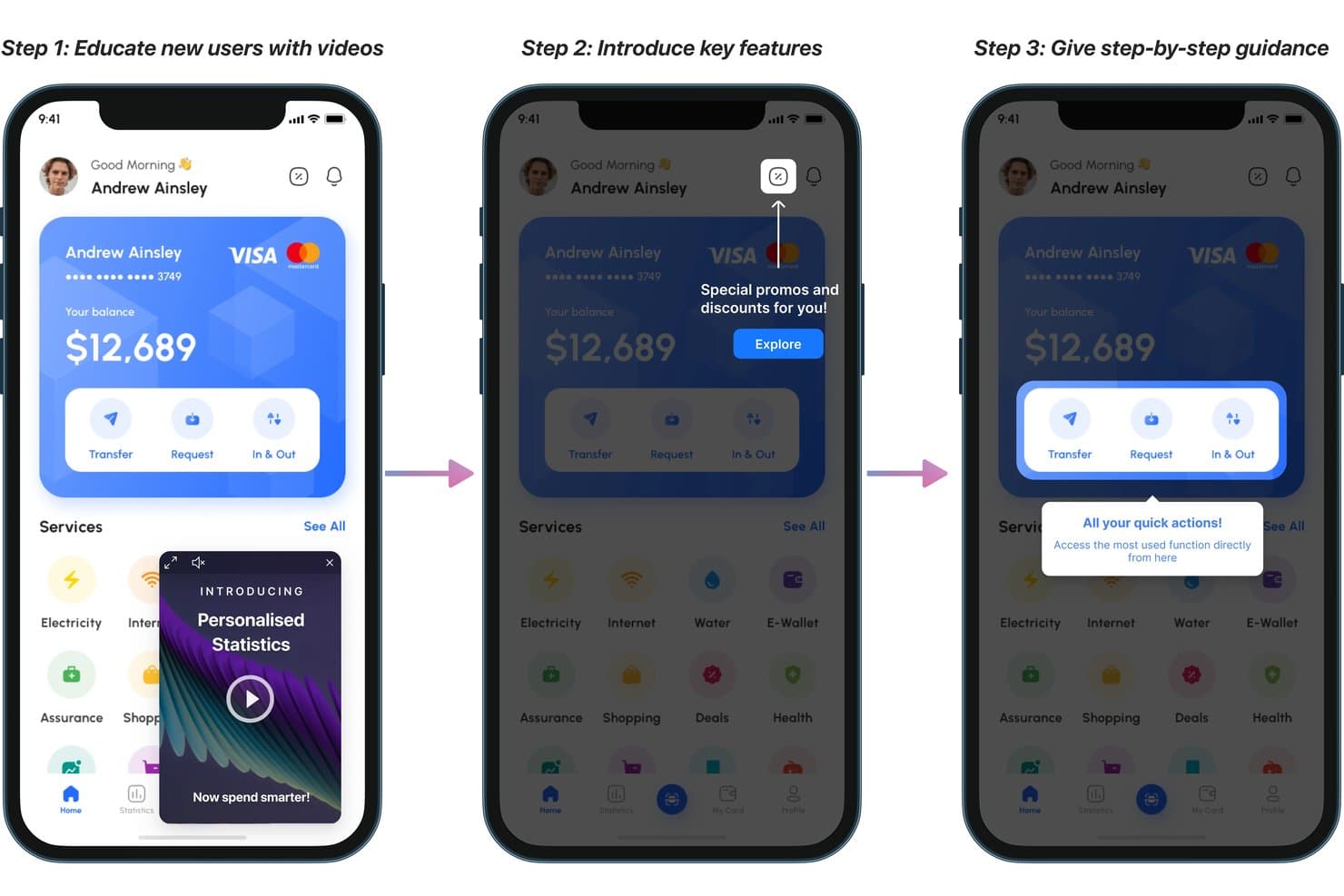
Plotline guides new users through onboarding with videos, tooltips, and highlights. Plotline is a mobile-first product adoption platform that combines in-app guided tours, contextual messaging, no-code flow building, user segmentation, surveys, gamification, and experimentation tools across iOS, Android, React Native, Flutter, and web.
Who Is Plotline Best For?
Plotline is a strong fit for mobile-first product and growth teams at consumer apps who want to drive activation, feature adoption, and in-app monetization without relying on engineering.
Why I Picked Plotline
Plotline earns its spot on my shortlist because of its built-in gamification and monetization features, which go well beyond what most product adoption tools offer. I love that you can deploy scratch cards, spin-the-wheel mechanics, and coupon code prompts directly from the dashboard, with configurable reward probabilities and per-user limits, without writing a line of code. Its AI Decisioning layer runs per-user optimization in real time, automatically selecting the best moment and format to surface a monetization nudge based on each user's behavior.
Plotline Key Features
- AI Decisioning: An AI layer that evaluates each user's real-time behavioral context to automatically select the best message format, channel, and timing—individually, not by segment.
- Multi-step guided tours: Chain tooltips, spotlights, and coachmarks into branching, event-triggered onboarding flows across iOS, Android, React Native, Flutter, and web.
- In-app surveys: 50+ pre-built survey templates, including NPS and CSAT, triggered by specific user events with reported response rates above 30%.
- Feature flags: No-code boolean and multivariate flags with configurable rollout percentages, custom payloads, and scheduling controls.
Plotline Integrations
Plotline offers documented integrations with Amplitude, Mixpanel, Segment, Rudderstack, Braze, MoEngage, Google Analytics, FullStory, UXCam, and Salesforce Marketing Cloud, plus backend API event ingestion for custom connectivity.
Pros and Cons
Pros:
- Per-user AI selects optimal onboarding moments
- Gamification features like scratch cards and spin wheel
- Mobile-first onboarding with native SDKs
Cons:
- Many advanced features require higher-tier plans
- No dedicated resource center or help hub
Learn more about Plotline: Best for all-in-one adoption with built-in analytics
- 14-day free trial
- From $299/month
Visit WebsiteCustomer Rating:4.7/5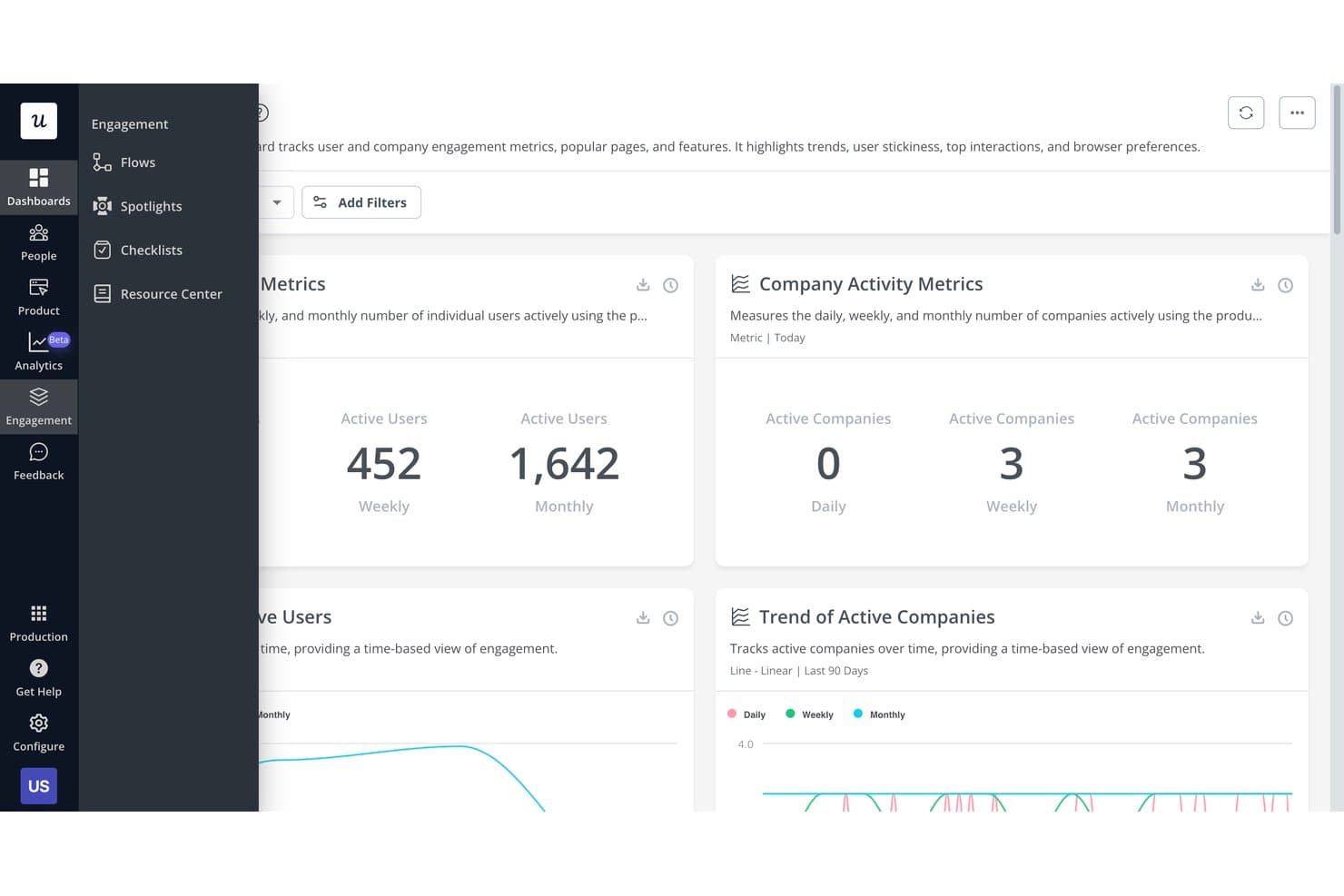
Userpilot tracks user and company engagement metrics on one dashboard. Userpilot is a product adoption platform that combines in-app guided tours, no-code flow building, contextual messaging, user segmentation, onboarding checklists, and a built-in analytics suite that includes funnels, session replay, and AI-powered insights.
Who Is Userpilot Best For?
Userpilot is a strong fit for mid-market SaaS product teams that want onboarding, analytics, and feedback in one platform instead of stitching together multiple tools.
Why I Picked Userpilot
Userpilot earns its spot on my shortlist because it replaces what used to be three or four separate tools with one platform. I particularly like that its built-in analytics suite, including funnels, path analysis, and session replay with frustration signal detection, sits alongside the flow builder, so I can see exactly where users drop off and fix the onboarding experience without switching contexts. The AI Guides Builder also lets me generate a full multi-step tour from a text prompt, which cuts authoring time significantly.
Userpilot Key Features
- Welcome survey builder: Create branching welcome surveys that auto-segment new users by role, use case, or goal on first login and route them to personalized onboarding flows.
- Onboarding checklists: Build task-based checklists available on all plans, where each completed task can trigger a flow, redirect, or custom JavaScript action.
- NPS and CSAT surveys: Deploy 15+ survey templates—including NPS, CSAT, CES, and PMF—with AI-powered sentiment and thematic analysis on Growth+ plans.
- Resource Center: Build a branded, searchable in-app help hub with knowledge base articles, embedded videos, and Zendesk-connected help content to support self-service guidance.
Userpilot Integrations
Userpilot offers native integrations with Segment, HubSpot, Salesforce, Zendesk, Intercom, Slack, Amplitude, Mixpanel, Heap, and Google Analytics. It also supports HTTP API access, webhooks, data warehouse sync, and MCP Server connectivity for custom workflows.
Pros and Cons
Pros:
- Advanced segmentation by behavior and surveys
- Fast no-code builder with AI flow creation
- Built-in analytics, session replay, and surveys
Cons:
- Flows may break after UI changes
- Advanced analytics gated to higher plans
Learn more about Userpilot: Best for expediting customer onboarding
- Free trial available
- Pricing upon request
Visit WebsiteCustomer Rating:4.6/5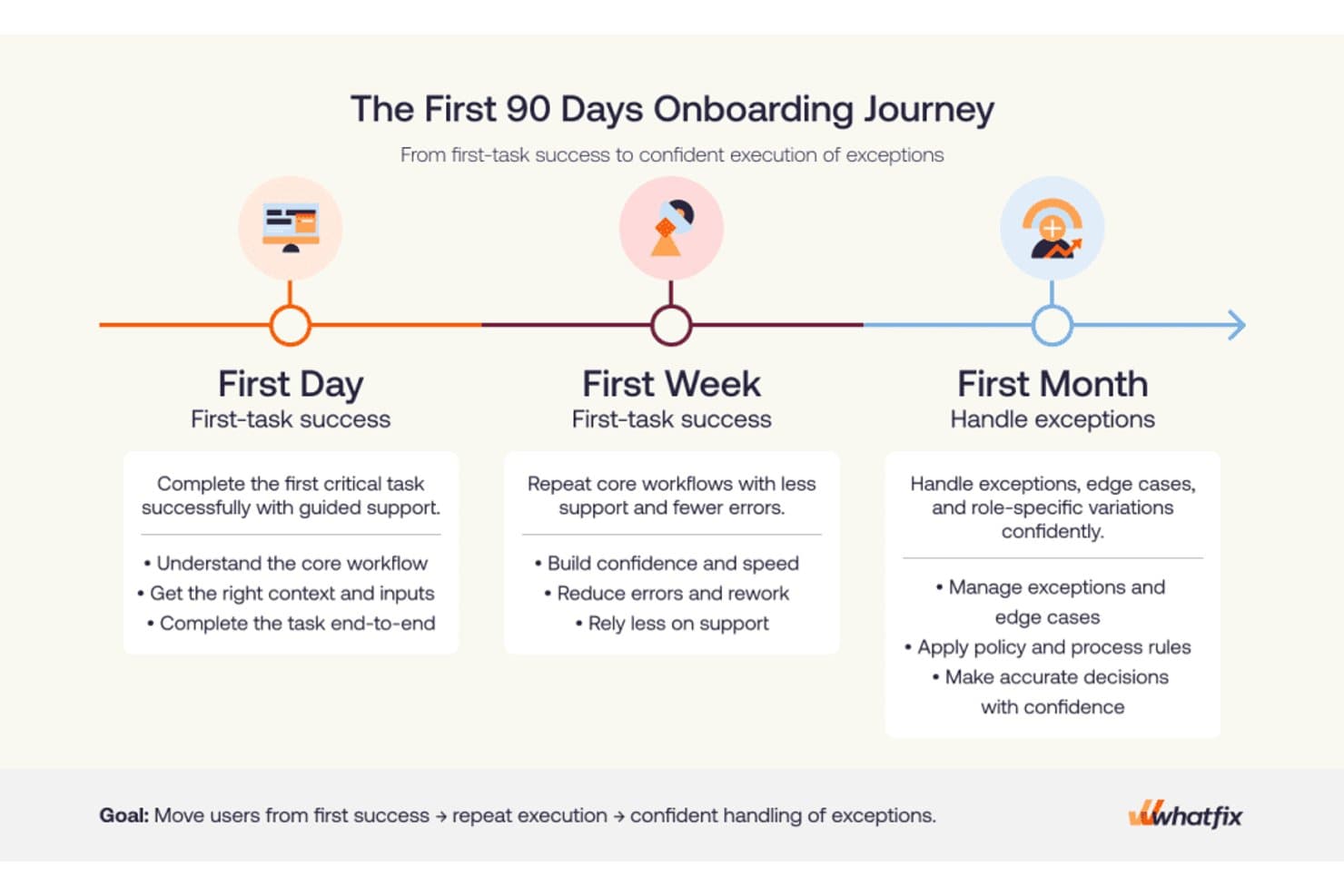
Whatfix structures onboarding into day, week, and month milestones. Whatfix is a digital adoption platform that delivers in-app guided tours, onboarding checklists, contextual tooltips, an AI-powered self-help widget, and behavioral analytics across web, desktop, and mobile applications.
Who Is Whatfix Best For?
Whatfix is a strong fit for enterprise customer success and onboarding teams that need to guide users through complex, multi-step software workflows at scale.
Why I Picked Whatfix
I picked Whatfix as one of the best because its onboarding toolset goes deeper than most: Task Lists deliver role-based checklists that persist inside the app, while Flows support branching paths and linked sub-flows that mirror how real users move through complex software. What really sets it apart is the AI Authoring Agent, which builds fully configured flows from a plain-text prompt, cutting the time it takes to get new onboarding content live from days to minutes.
Whatfix Key Features
- Self Help widget: An AI-powered, in-app resource center that aggregates knowledge base articles, Flows, videos, and external docs into a single searchable assistant.
- Smart Tips: Contextual tooltips and field-level guidance that surface relevant help content directly within the application interface.
- In-app surveys: Built-in NPS, usability, and custom surveys with AI-powered sentiment analysis to collect user feedback without leaving the app.
- Product Analytics AutoCapture: A no-code behavioral tracking layer that automatically logs user interactions, funnels, and journeys without developer instrumentation.
Whatfix Integrations
Whatfix offers native integrations with Salesforce, Workday, SAP SuccessFactors, Oracle, Microsoft Azure Active Directory, ServiceNow, SharePoint, and Google Drive. These connections support role-based onboarding, enterprise identity targeting, and in-app access to documentation.
Pros and Cons
Pros:
- Smart Tips and Beacons drive user action
- Scales onboarding across web, desktop, and mobile
- AI agents rapidly generate onboarding content
Cons:
- No built-in A/B testing for onboarding flows
- CSS or JavaScript needed for advanced customizations
Learn more about Whatfix: Best for user-segmented onboarding tours
- Free trial available
- Pricing upon request
Visit WebsiteCustomer Rating:4.7/5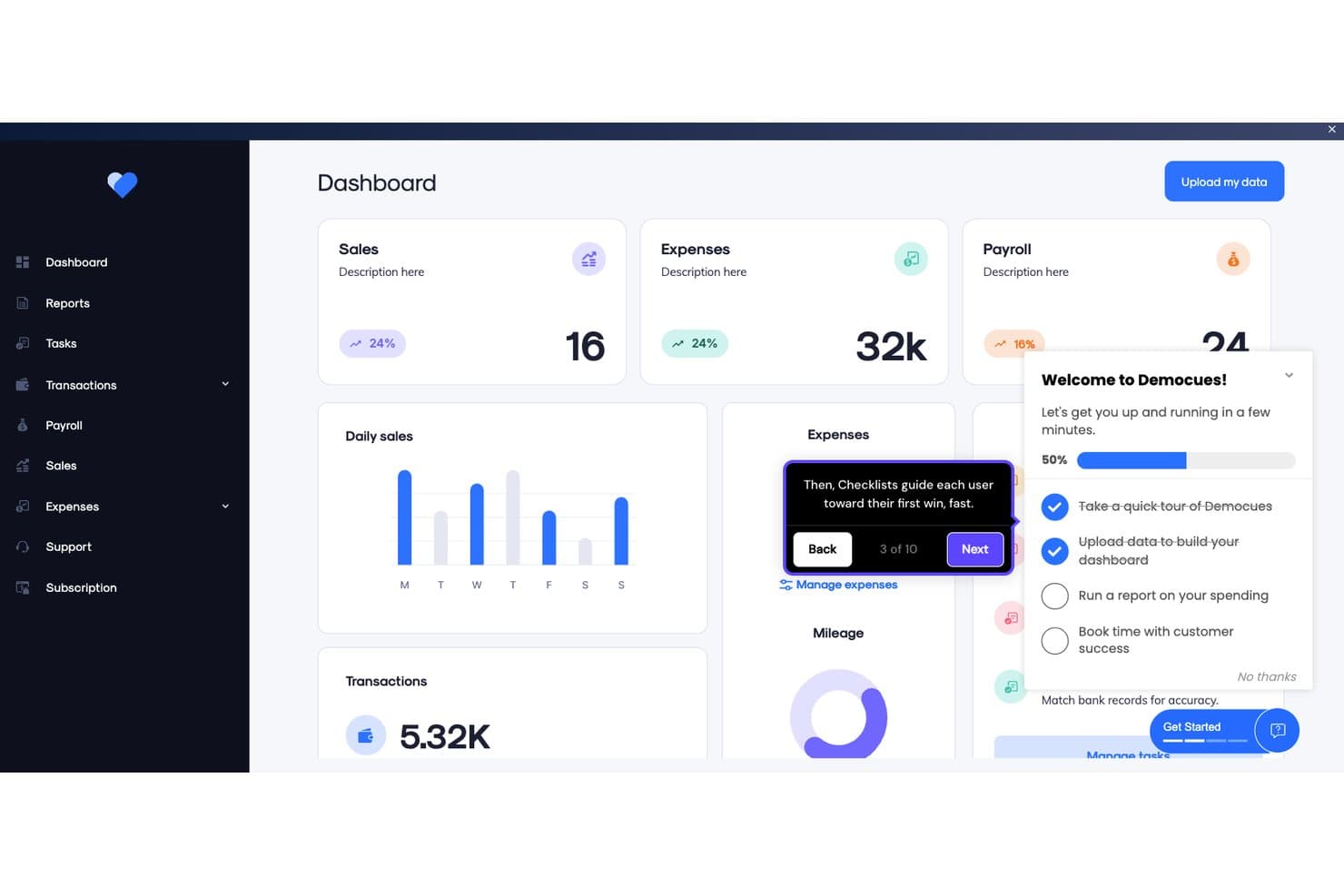
Appcues guides users through onboarding with checklists and tooltips. Appcues is a product adoption platform that lets teams build in-app onboarding flows, checklists, tooltips, banners, and resource centers—with native mobile SDKs, built-in NPS surveys, A/B testing, and behavioral segmentation across web and mobile apps.
Who Is Appcues Best For?
Appcues is a strong fit for product teams that need to deliver personalized onboarding experiences to different user segments without relying on engineering for every update.
Why I Picked Appcues
Appcues earns its spot on my shortlist because of how precisely it targets the right users with the right onboarding experience. I'm particularly drawn to its real-time behavioral segmentation, which lets you build audiences from live event data, CRM attributes, and lifecycle stage simultaneously. In practice, that means a new enterprise user can see a guided Flow tailored to their role while a freemium user on the same page sees a completely different checklist pushing them toward activation.
Appcues Key Features
- Native mobile SDKs: Build and publish in-app onboarding experiences for iOS, Android, React Native, and Flutter without waiting for app store review cycles.
- A/B testing via Audience Randomizer: Split users into variants to test which version of an experience drives better outcomes, with built-in uplift measurement.
- Built-in NPS and surveys: Collect in-app feedback through native NPS, rating-scale, and open-ended survey forms with conditional follow-up logic.
- Cross-channel campaign delivery: Coordinate in-app messages, behavioral emails, and push notifications from a single platform to support full lifecycle campaigns.
Appcues Integrations
Appcues offers native integrations with Salesforce, HubSpot, Segment, RudderStack, Slack, Intercom, Mixpanel, Amplitude, LaunchDarkly, and Fullstory. It also supports webhooks, an API, MCP server connectivity, and Zapier.
Pros and Cons
Pros:
- AI-assisted no-code builder for fast iteration
- Native mobile SDKs for iOS and Android
- Real-time behavioral segmentation for personalized onboarding
Cons:
- Initial setup requires developer involvement
- No native session replay or heatmaps
Learn more about Appcues: Best for in-depth product user analytics
- Free plan + 30-day free trial + free demo available
- Pricing upon request
Visit WebsiteCustomer Rating:4.4/5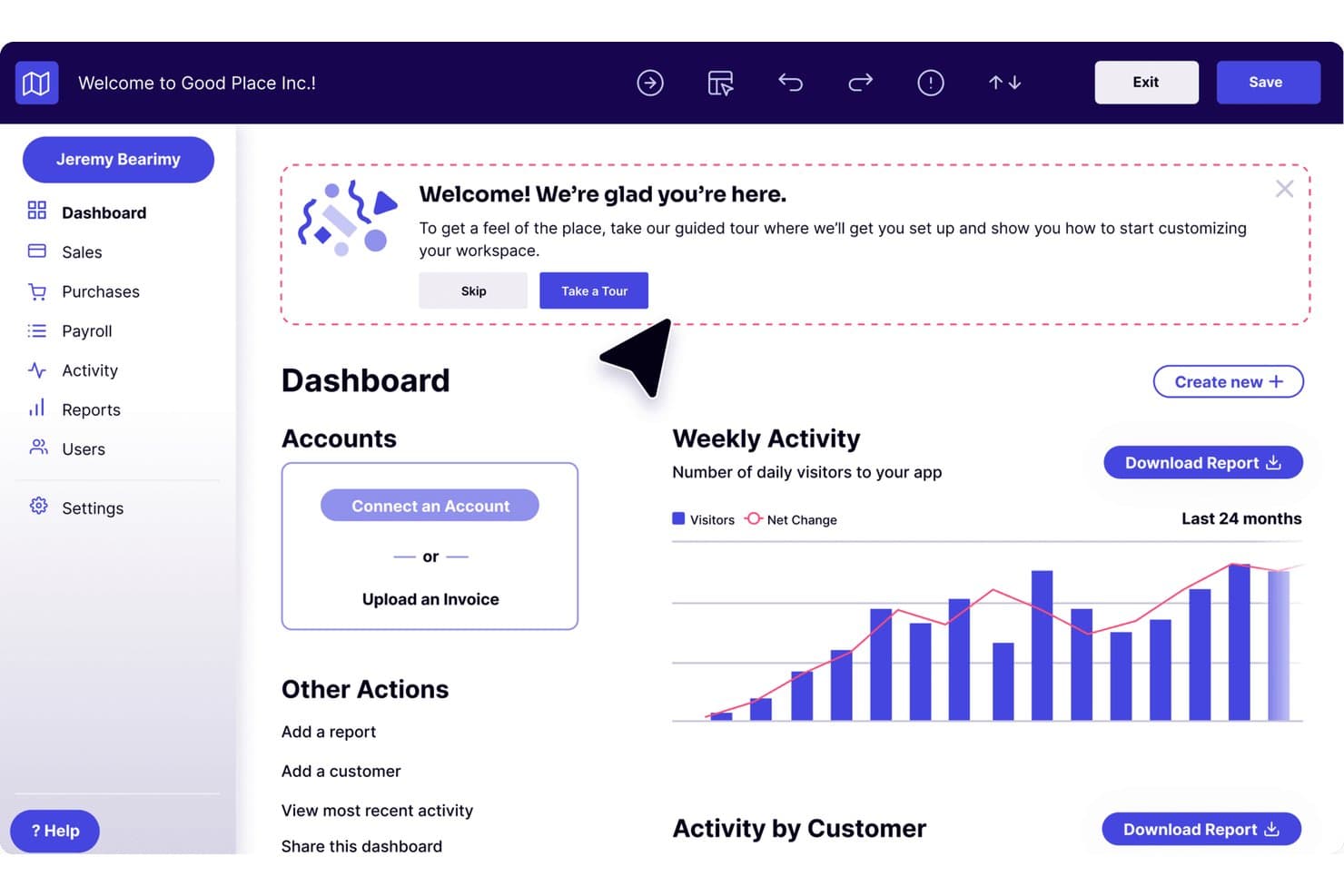
Pendo guides new users through onboarding with an in-app welcome tour prompt. Pendo is a product adoption platform that combines in-app guides, product analytics, session replay, NPS surveys, and a customizable resource center for web and mobile apps.
Who Is Pendo Best For?
Pendo is a strong fit for product teams at mid-market and enterprise SaaS companies that need deep behavioral analytics alongside their in-app guidance—not just one or the other.
Why I Picked Pendo
Pendo earns its spot on my shortlist because its product analytics go deeper than what most adoption tools offer. I'm talking about retroactive auto-tagging that captures every page and feature from day one, plus Data Explorer, Funnels, Paths, and Retention analysis all in one place. What I really like is the Product Engagement Score, which rolls behavioral signals into a single composite metric so you can see exactly where adoption is stalling.
Pendo Key Features
- Guide branching: Conditional logic lets you build multi-path onboarding flows that adapt based on each user's choices and actions.
- Resource center: A customizable in-app menu gives users on-demand access to checklists, help content, announcements, and feedback portals.
- In-app surveys: NPS, CSAT, and PMF surveys trigger contextually based on user behavior, segment, or time-in-app.
- Session replay: Unlimited video playback of user sessions with automatic flagging of rage clicks, U-turns, and dead clicks.
Pendo Integrations
Pendo offers 85+ native integrations, including Salesforce, HubSpot, Gainsight, Planhat, Segment, Zendesk, Slack, Jira, Snowflake, and BigQuery. It also supports Zapier and data sync with Databricks, Redshift, Amazon S3, Google Cloud Storage, and Microsoft Azure.
Pros and Cons
Pros:
- Guide branching for multi-path onboarding flows
- Deep analytics tied to onboarding outcomes
- Retroactive auto-tagging of all features
Cons:
- Ad blockers interfere with tracking accuracy
- Guides can break after UI changes
Learn more about Pendo: Best inline guidance and design flexibility
- 14-day free trial
- Pricing upon request
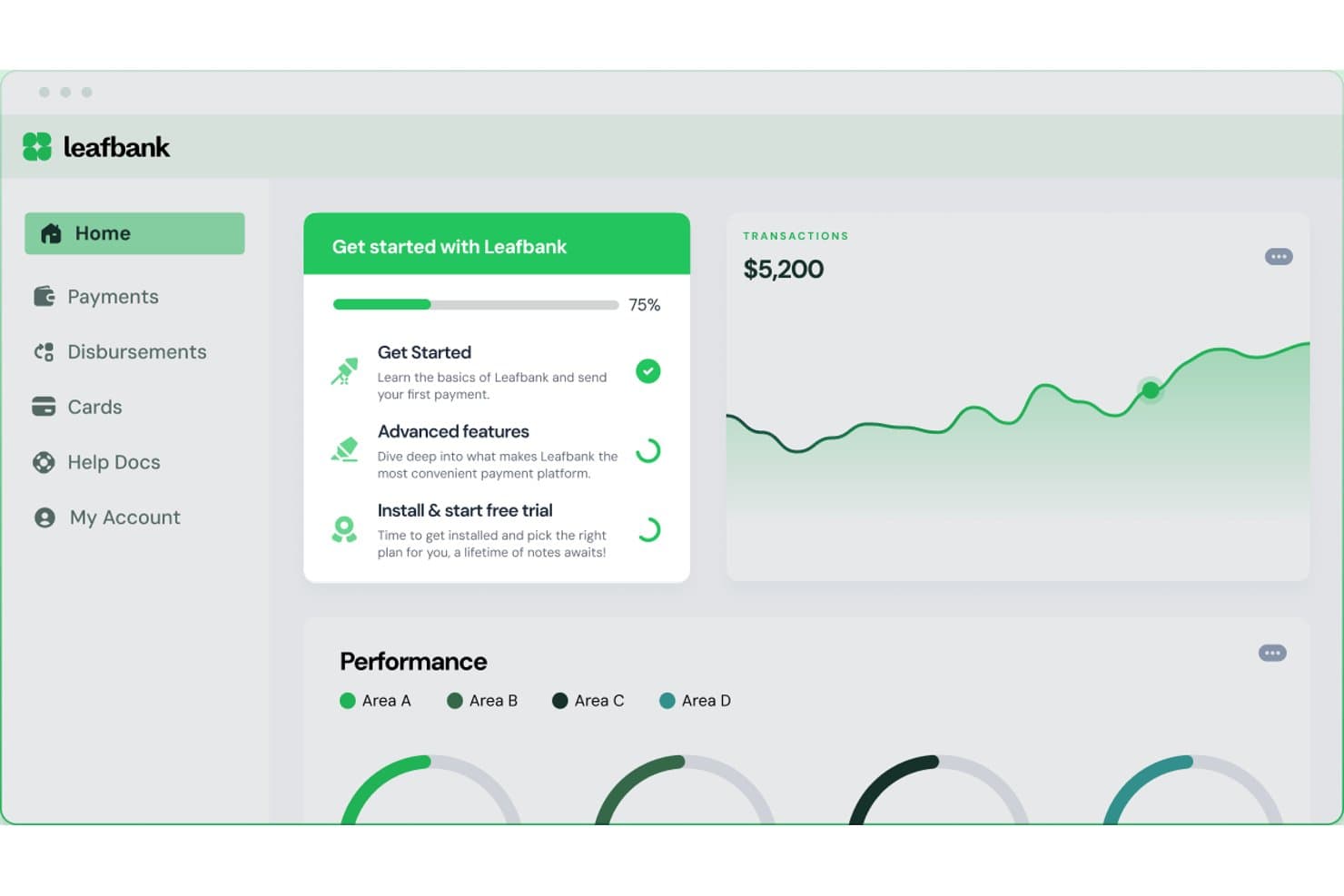
Chameleon guides users through onboarding steps with a progress checklist. Chameleon is a product adoption platform that lets teams build in-app tours, tooltips, modals, checklists, and microsurveys—plus a CMD+K help bar and AI-generated interactive demos—without writing code.
Who Is Chameleon Best For?
Chameleon is a strong fit for product teams at mid-market SaaS companies who need pixel-perfect, on-brand in-app experiences and want full control over design without relying on developers.
Why I Picked Chameleon
Chameleon earns its spot on my shortlist because of how much control it gives you over the look and feel of every in-app experience. I love that its no-code builder lets you apply custom CSS, brand fonts, and reusable themes so tours and tooltips feel native to your product, not bolted on. Its Smart Delay feature holds an experience until a user pauses, which means guidance surfaces at a natural moment rather than interrupting mid-flow.
Chameleon Key Features
- Microsurveys: Collect in-app user feedback using NPS, CSAT, CES, PMF, or open-ended survey formats with conditional branching logic and behavioral triggers.
- A/B testing: Run experiments on in-app experiences with automatic winner detection at 95% statistical confidence, available on Pro plans and above.
- HelpBar: A CMD+K spotlight search widget that lets users find help articles, trigger tours, or navigate features without leaving your product.
- Launchers: A configurable persistent widget you can use as an onboarding checklist, resource center, or help hub with dynamic content triggers.
Chameleon Integrations
Chameleon offers 30+ native integrations, including Amplitude, Mixpanel, Heap, Segment, HubSpot, Salesforce, Zendesk, Intercom, Help Scout, and Zapier. Its JavaScript API supports custom integrations and user data targeting.
Pros and Cons
Pros:
- AI agents identify user friction and personalize flows
- Product tours, tooltips, and checklists supported
- No-code builder with full CSS theming
Cons:
- Experience caps on lower pricing tiers
- No native app support for iOS or Android
Learn more about Chameleon:
Annen programvare for produktadopsjon
Her er noen flere alternativer for programvare for produktadopsjon som ikke kom med på kortlisten min, men som likevel er verdt å ta en titt på:
- 11JIMOBest for AI-generated tours and in-app guidance
- 12Gainsight PXBest for CS-led adoption with account analytics
- 13IntercomBest for in-app live chat and chatbots
- 14Lemon LearningBest for guiding users on legacy enterprise apps
- 15Product FruitsBest for tours paired with in-app feedback
- 16FrigadeBest for AI-guided onboarding without flow authoring
- 17StonlyBest for creating in-app self-serve, interactive guides
- 18UserIQBest for CS-led onboarding with health scoring
- 19HopscotchBest for no-code tour building from day one
How I Evaluate Product Adoption Software
I split my evaluation into two layers: acceptance criteria every tool must clear—like in-app tours and user segmentation—and differentiators that determine the best fit for PLG teams or CS-led orgs.
Core Functionality (Table Stakes For This List)
When I'm selecting tools for my list, I rank each one on a scale from 0 (does not offer the functionality) to 5 (excels in this area) for each core functionality listed below. I then calculate the tool's total score into a percentage, using 65% as a benchmark to help assess its overall fit for the list.
- In-App Guided Tours: I evaluate whether a tool can deliver interactive, multi-step walkthroughs that guide users through real workflows—like setting up a first project or connecting an integration.
- No-Code Flow Builder: Product managers and onboarding specialists need to ship flows without filing engineering tickets, so I look for a visual editor or browser extension that handles the full build-to-publish cycle.
- Contextual In-App Messaging: Beyond basic modals, I check for tooltips, hotspots, banners, and slideouts that can be triggered by specific user actions—like surfacing a tip when someone visits a feature page for the first time.
- User Segmentation & Targeting: The ability to target flows by user attributes, behavioral events, or lifecycle stage matters here—for example, showing different onboarding paths to admins vs. end users.
- Adoption Analytics: I look for dashboards that tie flow engagement to feature usage and activation metrics, so teams can see whether a tour actually moved the needle on adoption.
- Checklists & Resource Centers: Persistent self-serve elements like onboarding checklists and in-app help hubs keep users oriented across sessions, and I evaluate how configurable and targetable these elements are.
Once I have a list of tools that meet the criteria, I consider what sets each platform apart.
Differentiating Factors (What Sets Vendors Apart)
Here's how I compare and contrast different vendors:
Standout Features
A/B testing on flows and messaging is a major differentiator. I look for tools that let you experiment with tooltip placement or checklist order and measure lift on activation rates. In-app surveys like NPS and PMF capture user sentiment right where adoption happens, closing the loop between guidance and feedback. Mobile SDK support also matters—teams with cross-platform products need the same tours and checklists on iOS and Android, not just web.
Beyond Features
Integration depth is one of the first things I evaluate. A tool that syncs with your analytics stack (Amplitude, Mixpanel), CRM, and customer success platform turns adoption data into action across teams. Pricing model matters too—MAU-based pricing can balloon fast for PLG products with high traffic, so I check how costs scale as your user base grows. I also consider deployment speed, since a browser extension or lightweight snippet means your team can launch a first flow in hours instead of waiting on an engineering sprint.
Slik velger du programvare for produktadopsjon
Det er lett å gå seg vill i lange funksjonslister og komplekse prismodeller. For å hjelpe deg med å holde fokus mens du går gjennom den unike prosessen din for valg av programvare, får du her en sjekkliste over faktorer du bør ha i bakhodet:
| Faktor | Hva du bør vurdere |
|---|---|
| FaktorSkalerbarhet | Hva du bør vurdereKan programvaren vokse med virksomheten din? Vurder om den kan håndtere et økende antall brukere uten ytelsesproblemer, særlig hvis du planlegger å utvide raskt. |
| FaktorIntegrasjoner | Hva du bør vurdereFungerer den med de nåværende systemene dine? Kontroller kompatibiliteten med verktøy som CRM-, analyse- og kommunikasjonsplattformer for å sikre god dataflyt. |
| FaktorTilpasningsmuligheter | Hva du bør vurdereKan du tilpasse den til behovene dine? Se etter muligheter for å endre brukergrensesnitt og arbeidsflyter slik at de samsvarer med prosessene og merkevaren din. |
| FaktorBrukervennlighet | Hva du bør vurdereEr den brukervennlig for teamet ditt? Et enkelt grensesnitt kan redusere opplæringstiden og øke adopsjonsratene. Test den med en liten gruppe før full implementering. |
| FaktorImplementering og introduksjon | Hva du bør vurdereHvor lang tid tar oppsettet? Vurder ressursene som kreves for en vellykket lansering. Se etter verktøy som tilbyr veiledet introduksjon for å hjelpe teamet ditt. |
| FaktorKostnad | Hva du bør vurdereHva er de totale eierkostnadene? Sammenlign startgebyrer, abonnementsnivåer og skjulte kostnader. Sørg for at løsningen passer budsjettet ditt uten at det går på bekostning av nødvendige funksjoner. |
| FaktorSikkerhetstiltak | Hva du bør vurdereBeskytter den dataene dine? Kontroller krypteringsstandarder og samsvar med regelverk som GDPR eller CCPA for å beskytte sensitiv informasjon. |
| FaktorTilgjengelig kundestøtte | Hva du bør vurdereHvilke alternativer for kundestøtte er tilgjengelige? Vurder brukerstøtte døgnet rundt, dedikerte kundeansvarlige og forum for brukerfellesskapet, slik at du er sikret hjelp når du trenger det. |
Hva er programvare for produktadopsjon?
Programvare for produktadopsjon er et verktøy som er utviklet for å hjelpe brukere med å ta i bruk og engasjere seg i nye programvareprodukter på en effektiv måte. Fagpersoner som produktledere, kundesuksessteam og UX-designere bruker vanligvis disse verktøyene for å forbedre brukeropplevelsen. Funksjoner som brukerintroduksjon, interaktive veiledninger og meldinger i appen bidrar til å veilede brukere og samle inn tilbakemeldinger. Alt i alt gjør disse verktøyene det enklere for brukere å forstå og bruke ny programvare, noe som forbedrer tilfredsheten og øker andelen brukere som fortsetter å bruke produktet.
Funksjoner
Når du velger programvare for produktadopsjon, bør du se etter følgende viktige funksjoner:
- Brukerintroduksjon: Veileder nye brukere gjennom de første trinnene, slik at de raskt og effektivt kommer i gang.
- Interaktive veiledninger: Gir trinnvise instruksjoner i applikasjonen for å forbedre brukernes forståelse og engasjement.
- Meldinger i appen: Gjør det mulig å kommunisere direkte med brukere om oppdateringer, tips eller støtte, noe som forbedrer den samlede brukeropplevelsen.
- Brukersegmentering: Gjør det mulig å rette målrettet innhold mot bestemte brukergrupper for å dekke deres unike behov og preferanser.
- Analyseoversikter: Gir innsikt i brukeratferd og engasjement, slik at team kan ta datadrevne beslutninger.
- Tilpassbare maler: Gjør det mulig for team å skape personlige brukeropplevelser som samsvarer med merkevaren og arbeidsflytene deres.
- A/B-testing: Gir en mulighet til å teste ulike brukerflyter og optimalisere dem for bedre engasjement og konvertering.
- Selvbetjent brukerstøtte: Gjør det mulig for brukere å finne svar på egen hånd gjennom ressurser som ofte stilte spørsmål eller kunnskapsbaser.
- Flerspråklig støtte: Sikrer at brukere med ulik språklig bakgrunn kan bruke produktet på språket de foretrekker.
- Samsvarssporing: Bidrar til å overvåke og sikre at nødvendige regler og prosedyrer overholdes i programvaren.
Fordeler
Implementering av programvare for produktadopsjon gir flere fordeler for teamet og virksomheten din. Her er noen av fordelene du kan se frem til:
- Økt brukerengasjement: Interaktive veiledninger og meldinger i appen holder brukerne engasjerte og informerte, og forbedrer den samlede opplevelsen.
- Raskere brukerintroduksjon: Funksjoner for brukerintroduksjon veileder nye brukere effektivt og reduserer tiden det tar før de blir produktive.
- Datadrevne beslutninger: Analyseoversikter gir innsikt i brukeratferd, slik at du kan ta velinformerte beslutninger som styrker produktets suksess.
- Personlige opplevelser: Tilpassbare maler og brukersegmentering lar deg tilpasse innholdet til bestemte brukerbehov, noe som forbedrer tilfredsheten.
- Selvstendighet: Selvbetjent brukerstøtte gjør det mulig for brukere å finne svar på egen hånd, noe som reduserer avhengigheten av brukerstøtteteamet ditt.
- Global rekkevidde: Flerspråklig støtte sikrer at produktet er tilgjengelig for brukere over hele verden, og utvider markedsnærværet ditt.
- Overholdelse av regelverk: Samsvarssporing hjelper teamet ditt med å holde oversikt over regulatoriske krav og reduserer risikoen for manglende overholdelse.
Kostnader og priser
Når du velger programvare for produktadopsjon, må du ha en forståelse av de ulike prismodellene og abonnementene som er tilgjengelige. Kostnadene varierer basert på funksjoner, teamstørrelse, tillegg og mer. Tabellen nedenfor oppsummerer vanlige abonnementer, gjennomsnittsprisene deres og typiske funksjoner som er inkludert i løsninger for programvare for produktadopsjon:
Sammenligningstabell for programvare for produktadopsjon
| Abonnementstype | Gjennomsnittspris | Vanlige funksjoner |
|---|---|---|
| AbonnementstypeGratisabonnement | Gjennomsnittspris$0 | Vanlige funksjonerGrunnleggende brukerintroduksjon, begrenset analyse og brukerstøtte fra fellesskapet. |
| AbonnementstypePersonlig abonnement | Gjennomsnittspris$5-$25/bruker/måned | Vanlige funksjonerBrukerintroduksjon, interaktive veiledninger, grunnleggende analyse og støtte via e-post. |
| AbonnementstypeBedriftsabonnement | Gjennomsnittspris$30-$75/bruker/måned | Vanlige funksjonerAvansert analyse, tilpassbare maler, brukersegmentering og prioritert støtte. |
| AbonnementstypeVirksomhetsabonnement | Gjennomsnittspris$100-$250/bruker/måned | Vanlige funksjonerOmfattende analyse, flerspråklig støtte, samsvarssporing, egen kundeansvarlig og tilpassede integrasjoner. |
Vanlige spørsmål om programvare for produktadopsjon
Her er noen svar på vanlige spørsmål om programvare for produktadopsjon:
Hvordan vet jeg om teamet mitt trenger programvare for produktadopsjon?
Hvis teamet ditt har problemer med å lære opp nye brukere, eller hvis brukerne ikke engasjerer seg fullt ut i produktet ditt, kan programvare for produktadopsjon være til hjelp. Den gir verktøy og innsikt som kan forbedre brukeropplevelsene og sikre at de får mest mulig ut av produktet ditt. Vurder det hvis du ønsker å forbedre brukerbevaring og tilfredshet.
Hvordan kan programvare for produktadopsjon forbedre brukertilfredsheten?
Programvare for produktadopsjon forbedrer brukertilfredsheten ved å tilby tilpassede introduksjonsopplevelser og støtte i sanntid. Med funksjoner som interaktive veiledninger og meldinger i appen får brukerne veiledning og hjelp når de trenger det. Denne personlige tilnærmingen får brukerne til å føle seg verdsatt og øker sannsynligheten for at de fortsetter å bruke produktet.
Hvilke måltall bør jeg følge med på for å finne ut om programvaren for produktadopsjon fungerer?
Viktige måltall omfatter adopsjonsrate, tid til verdi, bruk av funksjoner, frafallsrate og antall supporthenvendelser. Du kan også følge med på hvordan veiledede brukere presterer sammenlignet med brukere som ikke får veiledning. Se etter tegn på forbedring i brukerengasjement, brukerbevaring og tilfredshet. Regelmessig overvåking av disse indikatorene viser om programvaren gir resultater.
Når er programvare for produktadopsjon kanskje ikke det riktige valget ennå?
Hvis produktet ditt fortsatt er på et tidlig utviklingsstadium, eller hvis du ikke har definert tydelige mål for introduksjonen, kan det være for tidlig å bruke programvare for produktadopsjon. Uten en solid forståelse av brukernes reise vil verktøyet kanskje ikke tilføre særlig verdi. Det er bedre å først fokusere på å forstå brukeratferd og forbedre den grunnleggende introduksjonsprosessen. Når dette er på plass, kan programvare for produktadopsjon hjelpe deg med å skalere og forbedre den ytterligere.