

AI-verktøy for A/B-testing bruker kunstig intelligens til å automatisere utformingen av eksperimenter, analysere resultater og optimalisere digitale opplevelser raskere enn manuelle metoder. Hvis du leter etter måter å forbedre konverteringsfrekvensen, redusere gjetting og ta smartere beslutninger for nettstedet eller produktet ditt, kan disse verktøyene hjelpe teamet ditt med å gjennomføre flere eksperimenter med mindre innsats. I denne listen finner du pålitelige plattformer for AI-basert A/B-testing som løser vanlige utfordringer som begrensede ressurser, langsom analyse og behovet for handlingsrettet innsikt – slik at du kan velge riktig løsning for virksomhetens mål.
Why Trust Our Software Recommendations
6,700+
Reviews
20
Industry experts
16+
Evaluation factors
14
Years
Our team has been testing and reviewing software since 2012. As product managers ourselves, we know how difficult—and important—it is to choose the right software.
For this guide, we evaluated tools using hands-on testing and independent research, scoring tools using our selection criteria.
Our reviews reflect our human editorial judgment, not a sales pitch.
Expert reviewers:
- Andrew LumbySenior TPM
- Cristiano ValimSenior UI/UX Lead


Sammenligningstabell for AI-verktøy for A/B-testing
Denne sammenligningstabellen oppsummerer prisdetaljer for mine utvalgte AI-verktøy for A/B-testing:
| Tool | Best For | Trial Info | Price | ||
|---|---|---|---|---|---|
| 1 | Best with real-time behavioral targeting | Free demo available | Pricing upon request | Website | |
| 2 | Best for marketing team collaboration | Free demo available | Pricing upon request | Website | |
| 3 | Best with feature flag experimentation | Free plan + 14-day free trial + free demo available | From $10/month (billed annually) | Website | |
| 4 | Best with enterprise experiment governance controls | Free demo available | Pricing upon request | Website | |
| 5 | Best for developer-led experiment workflows | Free plan available | Pricing upon request | Website | |
| 6 | Best for Adobe Experience Cloud experimenters | Free demo available | Pricing upon request | Website | |
| 7 | Best for flag-based feature experiment analysis | Free plan available | From $150/month | Website | |
| 8 | Best for open-source warehouse-native testing | Free plan + free demo available | From $40/user/month | Website | |
| 9 | Best for Bayesian personalization at enterprise scale | Free demo available | Pricing upon request | Website | |
| 10 | Best for warehouse-native experiment governance | Free demo available | Pricing upon request | Website |


Anmeldelser av AI-verktøy for A/B-testing
Nedenfor finner du mine detaljerte oppsummeringer av de beste AI-verktøyene for A/B-testing som kom med på kortlisten. Anmeldelsene mine gir en detaljert gjennomgang av funksjonene, de beste bruksområdene og integrasjonene til hver plattform, slik at du kan finne den som passer best for deg.
 Best with real-time behavioral targeting
- Free demo available
- Pricing upon request
Visit WebsiteCustomer Rating:4.7/5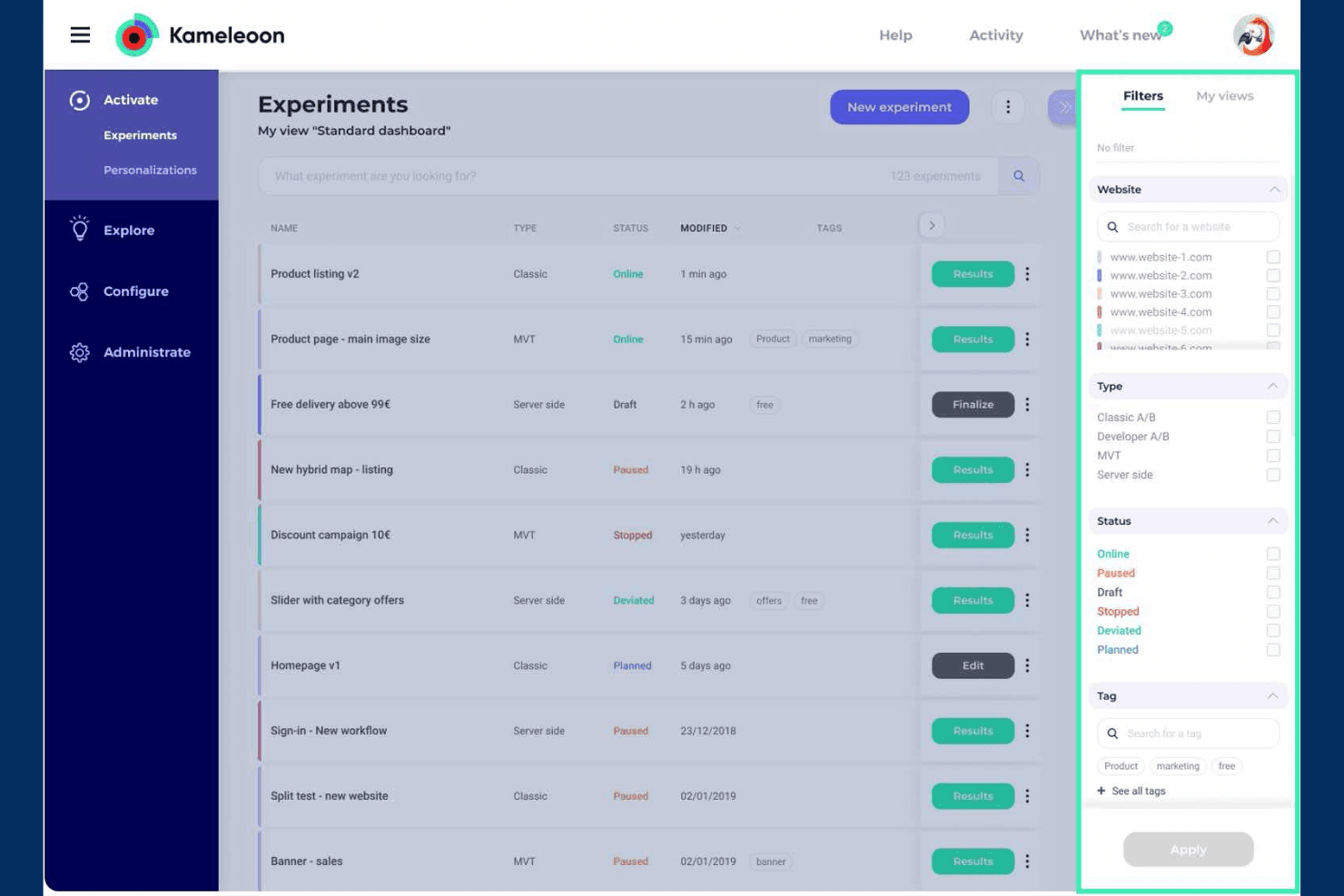
Kameleoon helps teams run A/B tests and personalize digital experiences. Kameleoon is an AI-driven A/B testing and experimentation platform that supports web, mobile, server-side, and feature-flag testing alongside real-time behavioral targeting, personalization, and prompt-based variant creation.
Who Is Kameleoon Best For?
Kameleoon is a strong fit for CRO specialists and product teams at mid-size to enterprise companies who need advanced behavioral targeting alongside a full experimentation stack.
Why I Picked Kameleoon
Kameleoon earns its spot on my shortlist because of how its AI Targeting model handles real-time behavioral data. It scores every visitor against a likelihood-to-convert metric that retrains every 10 minutes, grouping live sessions into dynamic buckets rather than relying on static rules. I also like AI Opportunity Detection, which surfaces high-confidence subsegments when a test result is inconclusive, so you're not walking away empty-handed from a flat experiment.
Kameleoon Key Features
- Prompt-based experiment builder: Describe a change in plain language and Kameleoon's AI builds the variant directly on your live site, across desktop, tablet, and mobile.
- Cross-platform SDK support: Deploy experiments across web, iOS, Android, Flutter, React Native, server-side, and edge environments from a single shared platform.
- Feature flag experimentation: Run progressive rollouts with automatic KPI-based rollback, approval workflows, audit logs, and unlimited environments.
- CUPED variance reduction: Apply CUPED alongside frequentist and Bayesian statistical methods, sequential testing, and SRM detection to get more reliable results faster.
Kameleoon Integrations
Kameleoon lists 100+ integrations, including Google Analytics, Adobe Analytics, Amplitude, Contentsquare, Snowflake, Segment, Datadog, Jira, and Figma. It also offers JavaScript, Data, and Automation APIs for custom integrations, plus Zapier.
Pros and Cons
Pros:
- CUPED improves confidence in experiment results
- PBX generates and builds test variations
- Real-time behavioral targeting adapts to visitor intent
Cons:
- AI targeting requires substantial traffic and history
- Developers remain necessary for advanced implementations
Learn more about Kameleoon: Best for marketing team collaboration
- Free demo available
- Pricing upon request
Visit WebsiteCustomer Rating:4.5/5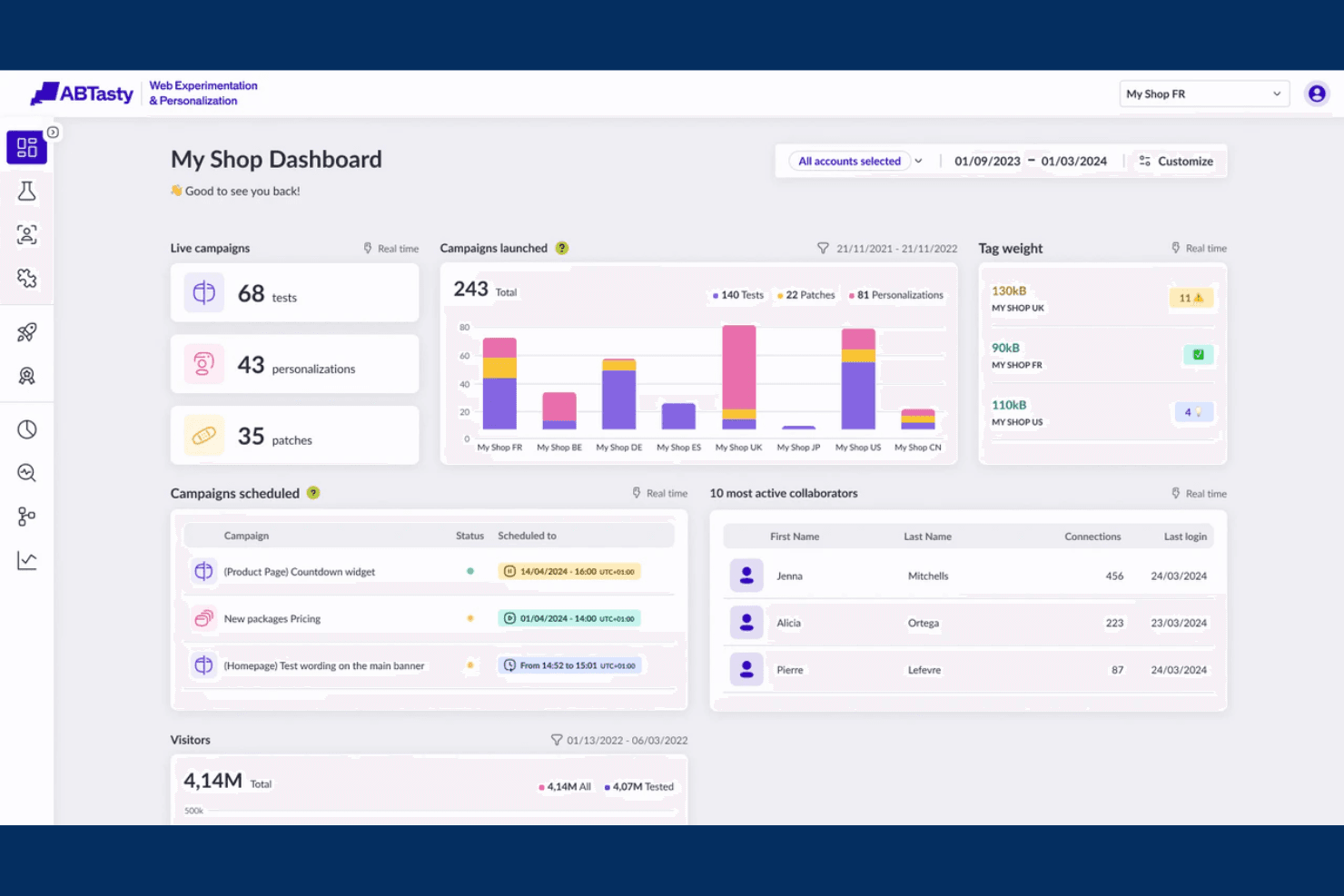
AB Tasty helps teams run A/B tests and personalize digital experiences. AB Tasty is an AI-powered experimentation platform that supports A/B, multivariate, and split URL testing alongside feature flag management, AI-assisted hypothesis and copy generation, and behavioral audience segmentation.
Who Is AB Tasty Best For?
AB Tasty is a strong fit for marketing teams that want to run A/B tests, personalization campaigns, and experiments without relying on engineering for every change.
Why I Picked AB Tasty
I've included AB Tasty in my top picks because it's one of the few experimentation platforms built with marketing team collaboration genuinely in mind. The approval workflow lets teams review and sign off on experiments before they go live, and workspaces keep multiple campaigns organized without overlap. I also like the Evi suite, where marketers can generate hypotheses, write variation copy, and interpret results without pulling in a data analyst for every test.
AB Tasty Key Features
- Evi Ideas: Generates CRO test ideas from screenshots or GIFs, drawing on UX best practices and cognitive bias principles to suggest what to test next.
- EmotionsAI segmentation: Groups visitors into emotional needs profiles based on on-site behavior, letting you target experiments to specific audience segments.
- Multi-armed bandit allocation: Automatically shifts test traffic toward the best-performing variation, making it useful for short tests or pages with six or more variations.
- Feature flag management: Supports progressive rollouts, scheduled releases, and automated kill switches that roll back a feature when key metrics drop.
AB Tasty Integrations
AB Tasty offers native integrations with Adobe Analytics, Amplitude, Google Analytics 4, Contentsquare, FullStory, Heap, Matomo, Salesforce Marketing Cloud, Microsoft Clarity, and Tealium. Its API supports custom integrations, with access depending on the plan.
Pros and Cons
Pros:
- Behavioral segmentation sharpens personalization
- Evi supports hypotheses, copy, and analysis
- Marketing teams can launch visual tests
Cons:
- Client-side delivery can introduce flicker
- Advanced tests require technical expertise
Learn more about AB Tasty: Best with feature flag experimentation
- Free plan + 14-day free trial + free demo available
- From $10/month (billed annually)
Visit WebsiteCustomer Rating:4.5/5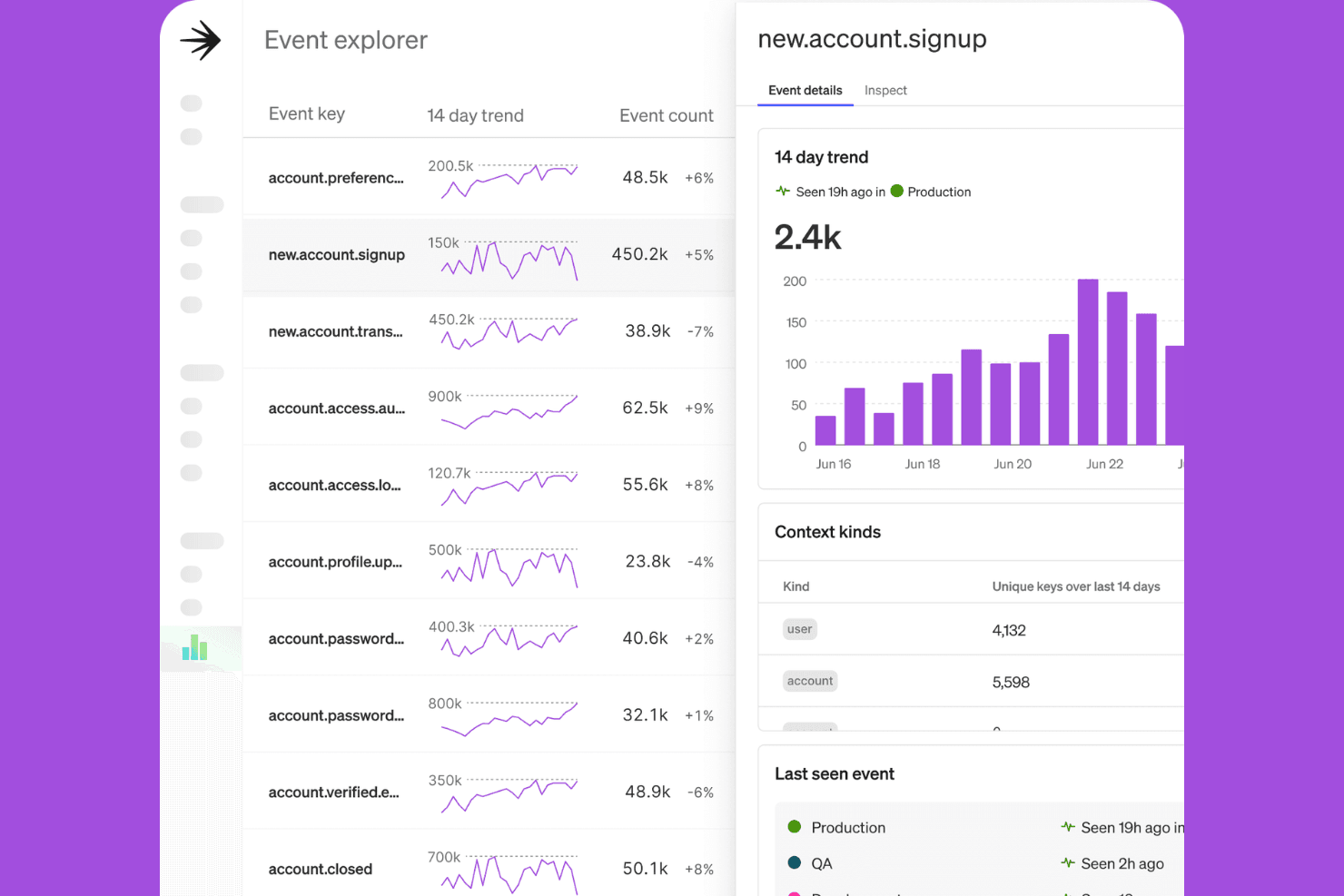
LaunchDarkly helps teams test and manage feature releases with control. LaunchDarkly is a feature flag and experimentation platform that lets engineering teams run A/B/n tests, multi-armed bandits, holdouts, and funnel experiments across web, mobile, backend, and edge environments from a single interface.
Who Is LaunchDarkly Best For?
LaunchDarkly is built for engineering teams that want to run experiments directly within their feature flag workflow, without switching tools.
Why I Picked LaunchDarkly
LaunchDarkly earns its spot on my shortlist because it's the only tool where A/B testing lives natively inside your feature flag workflow. I love that you can run A/B/n tests, multi-armed bandits, and holdout experiments directly on flags, then ship the winning variant with one click and no redeployment. The platform also supports AI config experiments, letting you test prompts and models at runtime and route traffic to the best performer automatically.
LaunchDarkly Key Features
- Warehouse-native experiment analysis: Run experiment analysis directly against Snowflake, Redshift, Databricks, or BigQuery using custom SQL metrics and your own data.
- Mutually exclusive and layered experiments: Run multiple experiments simultaneously without traffic contamination using experiment isolation controls.
- Sequential testing with CUPED variance reduction: Reduce required sample sizes and monitor results continuously without inflating false positive rates.
- Multi-armed bandit traffic allocation: Automatically shift traffic toward winning variants during a live experiment without waiting for a fixed test to conclude.
LaunchDarkly Integrations
LaunchDarkly offers 70+ native integrations, including Snowflake, BigQuery, Redshift, Databricks, Amplitude, Segment, and FullStory. It also supports an MCP server, OpenFeature providers, and an API for custom integrations.
Pros and Cons
Pros:
- AI agents can manage experiment workflows
- Statistical testing includes CUPED and bandits
- Feature flag experiments span every platform
Cons:
- AI doesn’t generate copy or designs
- Engineers must build variations in code
Learn more about LaunchDarkly: Best with enterprise experiment governance controls
- Free demo available
- Pricing upon request
Visit WebsiteCustomer Rating:4.2/5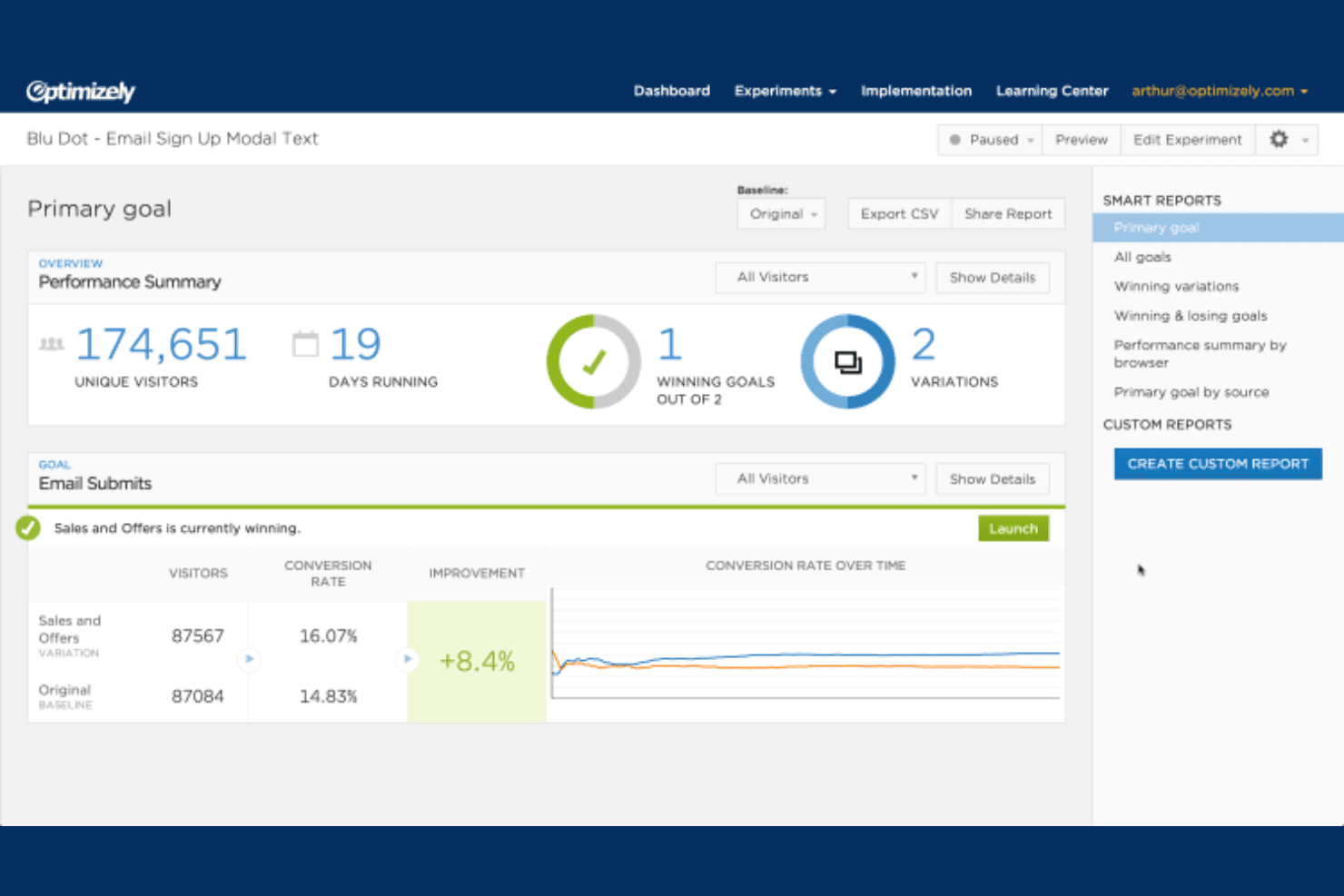
Optimizely helps enterprises run digital experiments and optimize user journeys. Optimizely is an enterprise experimentation platform that supports A/B, multivariate, feature flag, and server-side testing alongside an AI agent layer that covers experiment ideation, variation building, statistical analysis, and automated traffic optimization.
Who Is Optimizely Best For?
Optimizely fits enterprise product and engineering teams that need to run experiments at scale with formal approval workflows, team-based permissions, and compliance requirements baked in.
Why I Picked Optimizely
Optimizely earns its spot on my shortlist because of how seriously it takes experiment governance at scale. I'm particularly impressed by its change approval system, which routes flag changes, traffic allocation updates, and audience edits to designated approvers before anything reaches production. Paired with team-based permissions and Hypothesis and Test Plan fields built directly into A/B rules, it's the kind of structure that enterprise teams running experiments across multiple brands or business units genuinely need.
Optimizely Key Features
- Contextual multi-armed bandit testing: Uses AI to automatically shift traffic toward the best-performing variation based on individual visitor attributes in real time.
- Warehouse-native analytics: Connects directly to Snowflake, BigQuery, Databricks, and Redshift to run experiment analysis on your existing data without writing SQL.
- Opal Idea Builder: Analyzes a page URL, heatmaps, and past test data to generate structured experiment ideas with a hypothesis, problem statement, and supporting sources.
- Cross-platform SDK deployment: Runs experiments across web, mobile, server-side, and edge environments with sub-millisecond local decision evaluation and open-source SDKs.
Optimizely Integrations
Optimizely integrates with Google Analytics 4, Adobe Analytics, Amplitude, Segment, Snowflake, BigQuery, Databricks, Redshift, Salesforce, and Figma. It also supports MCP, webhooks, open-source SDKs, and APIs for custom integrations.
Pros and Cons
Pros:
- Cross-platform testing spans web, mobile, edge
- AI supports ideation through result summaries
- Enterprise-grade approval workflows for experiments
Cons:
- Bayesian and frequentist methods remain beta
- Advanced implementations require technical expertise
Learn more about Optimizely: Best for developer-led experiment workflows
- Free plan available
- Pricing upon request
Visit WebsiteCustomer Rating:4.5/5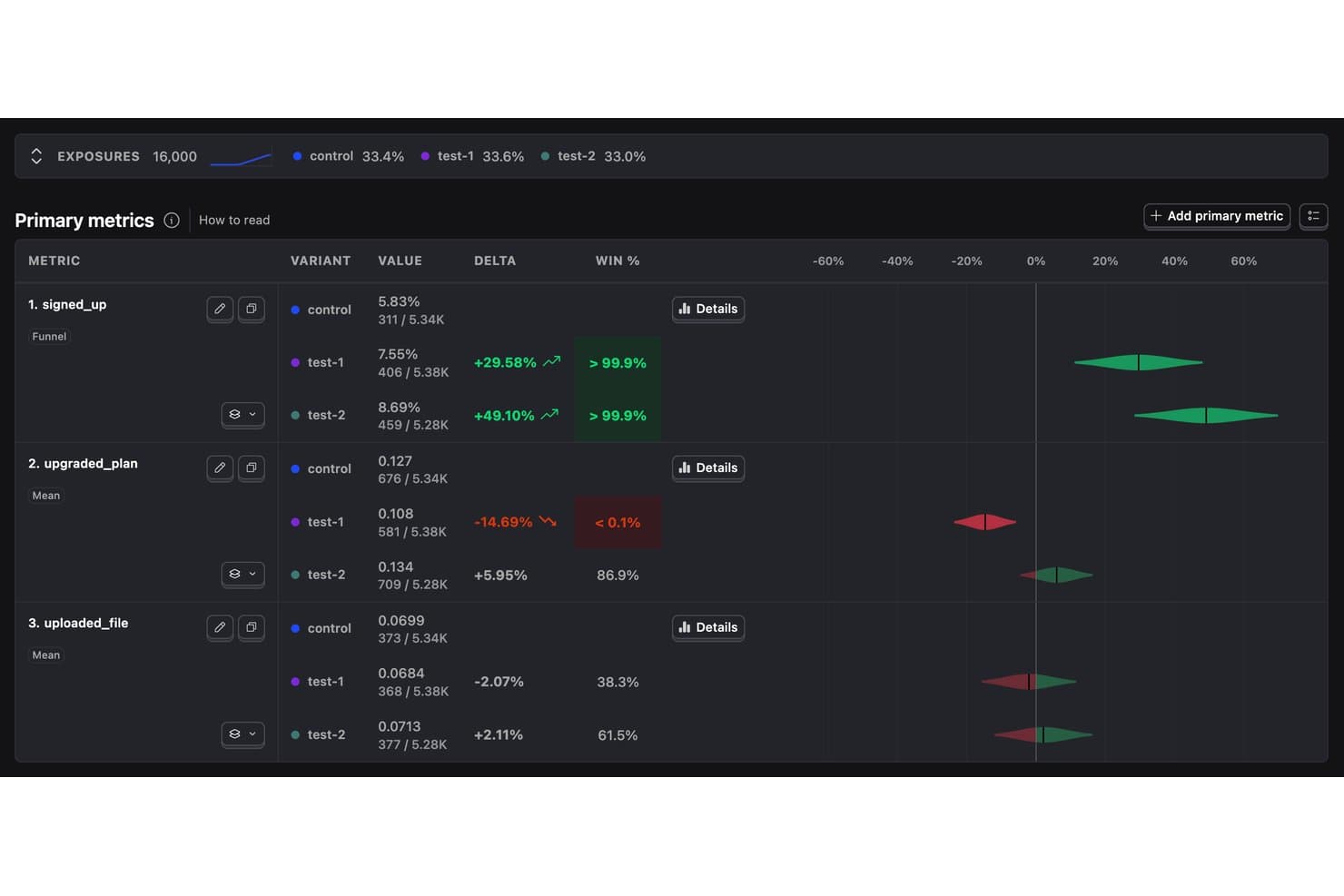
PostHog tracks A/B test variant performance across signup and conversion metrics. PostHog is a product analytics and experimentation platform that combines A/B, multivariate, holdout, and split URL testing with feature flag management, session replay, and an AI layer that generates experiment setup and variant code from plain-English prompts.
Who Is PostHog Best For?
PostHog fits engineering-led product teams that want to run experiments directly from their code editor without switching between tools.
Why I Picked PostHog
I've included PostHog in my top picks because it's built around a developer-led experiment workflow in a way few tools are. Every experiment runs on a feature flag, so shipping a winning variant is just flipping a switch in your codebase. The MCP server integration means you can create, launch, and read results from experiments directly in Cursor or Claude Code, without opening the PostHog UI at all.
PostHog Key Features
- Holdout testing: Reserve a percentage of users from all experiments to measure long-term impact without variant exposure.
- Session replay per variant: Watch recorded user sessions filtered by experiment variant to understand the behavior behind your results.
- Bayesian and frequentist statistics: Choose your preferred statistical engine per experiment, with configurable confidence thresholds and optional CUPED noise reduction.
- Data warehouse metrics: Pull experiment goal metrics directly from connected warehouse tables, such as Stripe or Shopify order data.
PostHog Integrations
PostHog connects to 50+ destinations through its CDP, including Braze, Customer.io, Salesforce, HubSpot, and Slack. It also supports Stripe, Shopify, Snowflake, and BigQuery data sources, plus a REST API and MCP integrations for Cursor and Claude Code.
Pros and Cons
Pros:
- Session replays explain variant performance
- Feature flags simplify winning-variant deployment
- AI generates experiment setup from prompts
Cons:
- Visual editor struggles with single-page apps
- No automated traffic shifting between variants
Learn more about PostHog: Best for Adobe Experience Cloud experimenters
- Free demo available
- Pricing upon request
Adobe Target delivers AI-driven testing and personalization. Adobe Target is an experimentation and personalization platform that supports A/B/n testing, multivariate testing, multi-armed bandit experiments, and feature-flag testing across web, mobile, and server-side environments.
Who Is Adobe Target Best For?
Adobe Target is a strong fit for enterprise teams already running on Adobe Experience Cloud who want to connect experimentation directly to personalization and analytics.
Why I Picked Adobe Target
I picked Adobe Target as one of the best because it's the natural home for experimentation teams already running on Adobe Experience Cloud. If your analytics live in Adobe Analytics, you can report A/B test results directly through Analytics for Target (A4T), which means no data stitching or context switching. I also like that Auto-Target and Automated Personalization let you move from a winning experiment to ML-driven personalization without leaving the platform.
Adobe Target Key Features
- Full-factorial multivariate testing: Tests every possible combination of page elements simultaneously to identify which arrangement drives the best results.
- Auto-Allocate traffic reallocation: Automatically shifts more traffic toward better-performing experiences during a live test, using a multi-armed bandit approach.
- Analytics for Target (A4T): Lets you report A/B test results directly inside Adobe Analytics, using your existing metrics and segments without any data stitching.
- On-device decisioning: Evaluates feature-flag and A/B experiments locally on the device for near-zero latency, using server-side SDKs for Node.js and Java.
Adobe Target Integrations
Adobe Target has native integrations with Adobe Analytics through A4T, Customer Journey Analytics, Real-Time CDP, Audience Manager, Adobe Experience Manager, Adobe Journey Optimizer, and Workfront Fusion. It also supports server-side API integrations and Adobe Experience Platform Web SDK.
Pros and Cons
Pros:
- On-device decisions reduce feature-test latency
- Personalizes winning experiences by visitor attributes
- Supports A/B/n, MVT, and bandit testing
Cons:
- Raw CSV exports require offline analysis
- Generative experiment design remains largely beta
Learn more about Adobe Target : Best for flag-based feature experiment analysis
- Free plan available
- From $150/month
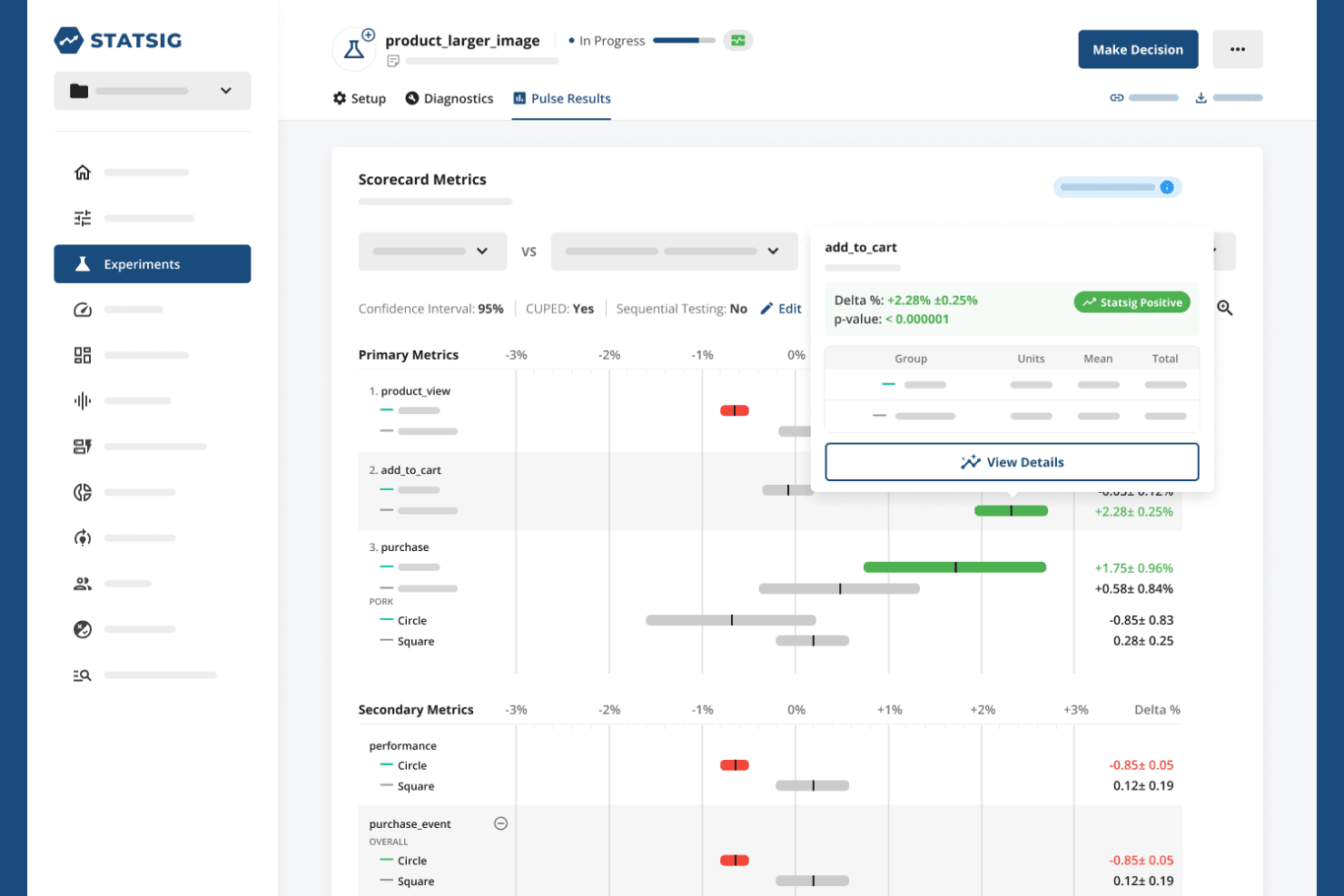
Statsig helps teams run experiments and analyze feature impact. Statsig is an experimentation and feature flag platform that combines A/B/n testing, multivariate tests, statistical analysis, and AI-generated experiment summaries with a flag-based architecture for running and analyzing experiments across web, mobile, and server environments.
Who Is Statsig Best For?
Statsig fits engineering-led product teams that run experiments through feature flags and need rigorous statistical analysis baked into the same workflow.
Why I Picked Statsig
Statsig earns its spot on my shortlist because it's the only platform where feature flags and experiments share a single data model, meaning I can launch a flag rollout and flip it into a measured experiment without rebuilding anything. I particularly like the Layers system, which prevents overlapping experiments from contaminating each other's results—critical when you're running hundreds of tests simultaneously. The AI-generated experiment summaries go beyond just showing lift; they produce a ship recommendation with key metrics highlighted, so my team makes faster decisions on what to roll out next.
Statsig Key Features
- AI-generated experiment summaries: Automatically produces a summary of each completed experiment, including a ship recommendation and key metric highlights, exportable as a PDF.
- Autotune multi-armed bandit: Shifts traffic toward the winning variant automatically over time, optimizing for a single target metric without manual intervention.
- CUPED variance reduction: Applies pre-experiment covariate adjustment to reduce noise and increase the statistical sensitivity of your experiment results.
- 30+ open-source SDKs: Covers client, server, and edge environments—including React, Swift, Android, Python, Go, and Rust—with sub-millisecond flag evaluation after initialization.
Statsig Integrations
Statsig offers documented integrations with Snowflake, Databricks, BigQuery, Redshift, Athena, Microsoft Fabric, Segment, mParticle, RudderStack, and Census. It also provides APIs for custom integrations and warehouse-native deployment.
Pros and Cons
Pros:
- Autotune shifts traffic toward winning variants
- AI summaries recommend shipping decisions
- Feature flags connect rollout and experiments
Cons:
- Engineer-oriented setup slows nontechnical teams
- Hypothesis AI doesn’t create variants
Learn more about Statsig: Best for open-source warehouse-native testing
- Free plan + free demo available
- From $40/user/month
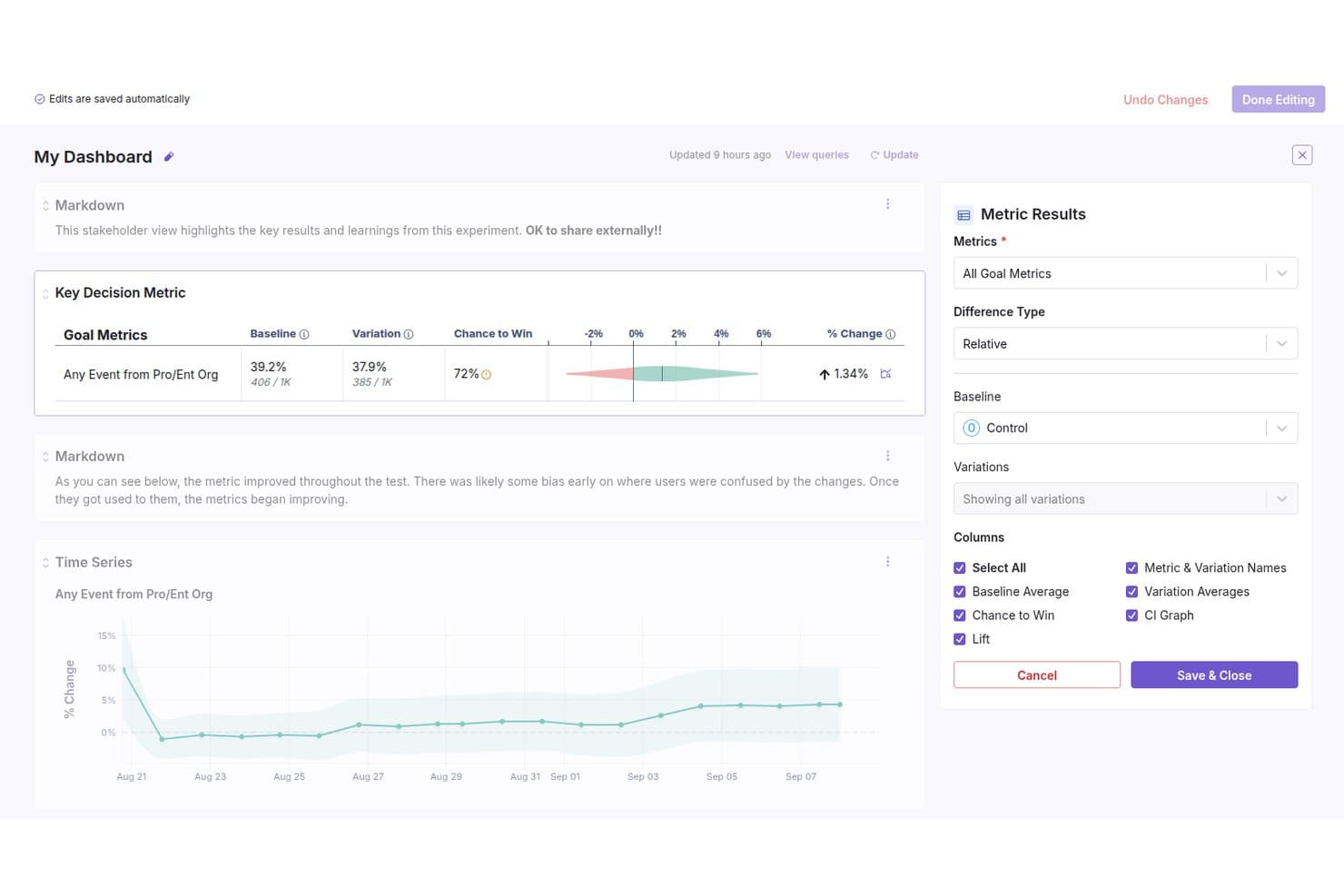
GrowthBook lets users build shareable A/B test dashboards with metric results. GrowthBook is an open-source A/B testing and feature flagging platform that supports experiment creation, AI-assisted variation building, warehouse-native metric analysis, and multi-armed bandit testing across web, mobile, and server environments.
Who Is GrowthBook Best For?
GrowthBook is a strong fit for product managers and developers at technically mature teams who want full control over their experimentation data without leaving their existing data warehouse.
Why I Picked GrowthBook
GrowthBook earns its spot on my shortlist because it's built around your existing data warehouse rather than its own proprietary data layer. I love that experiment metrics are calculated directly from Snowflake, BigQuery, or Redshift using SQL you can actually read and verify. Pair that with Bayesian and frequentist engines, CUPED variance reduction, and sequential testing, and you get a statistics layer that genuinely competes with in-house experimentation infrastructure at a fraction of the build cost.
GrowthBook Key Features
- AI Visual Editor: A Chrome extension that lets you describe changes in plain language and preview AI-generated page variations before launching a test.
- Multi-armed and contextual bandits: Automatically shift traffic toward winning variants using Thompson Sampling, with contextual bandits tailoring variants to individual user attributes.
- 24+ SDKs across web, mobile, server, and edge: Deploy experiments anywhere your product runs, with flags evaluated locally and no network calls required.
- Pre-launch experiment checklist: Run automated and manual checks before any experiment goes live, with API access for teams that want to integrate checks into their own workflows.
GrowthBook Integrations
GrowthBook connects to Snowflake, BigQuery, Databricks, Redshift, ClickHouse, Segment, RudderStack, Slack, GitHub, and Datadog. It also offers a REST API, webhooks, OpenFeature providers, and an MCP server for Claude, Cursor, and VS Code.
Pros and Cons
Pros:
- SDKs support web, mobile, server, and edge
- Bandits shift traffic toward stronger variants
- Warehouse-native metrics keep SQL auditable
Cons:
- Visual editor excludes native mobile apps
- AI variations require provider-key configuration
Learn more about GrowthBook: Best for Bayesian personalization at enterprise scale
- Free demo available
- Pricing upon request
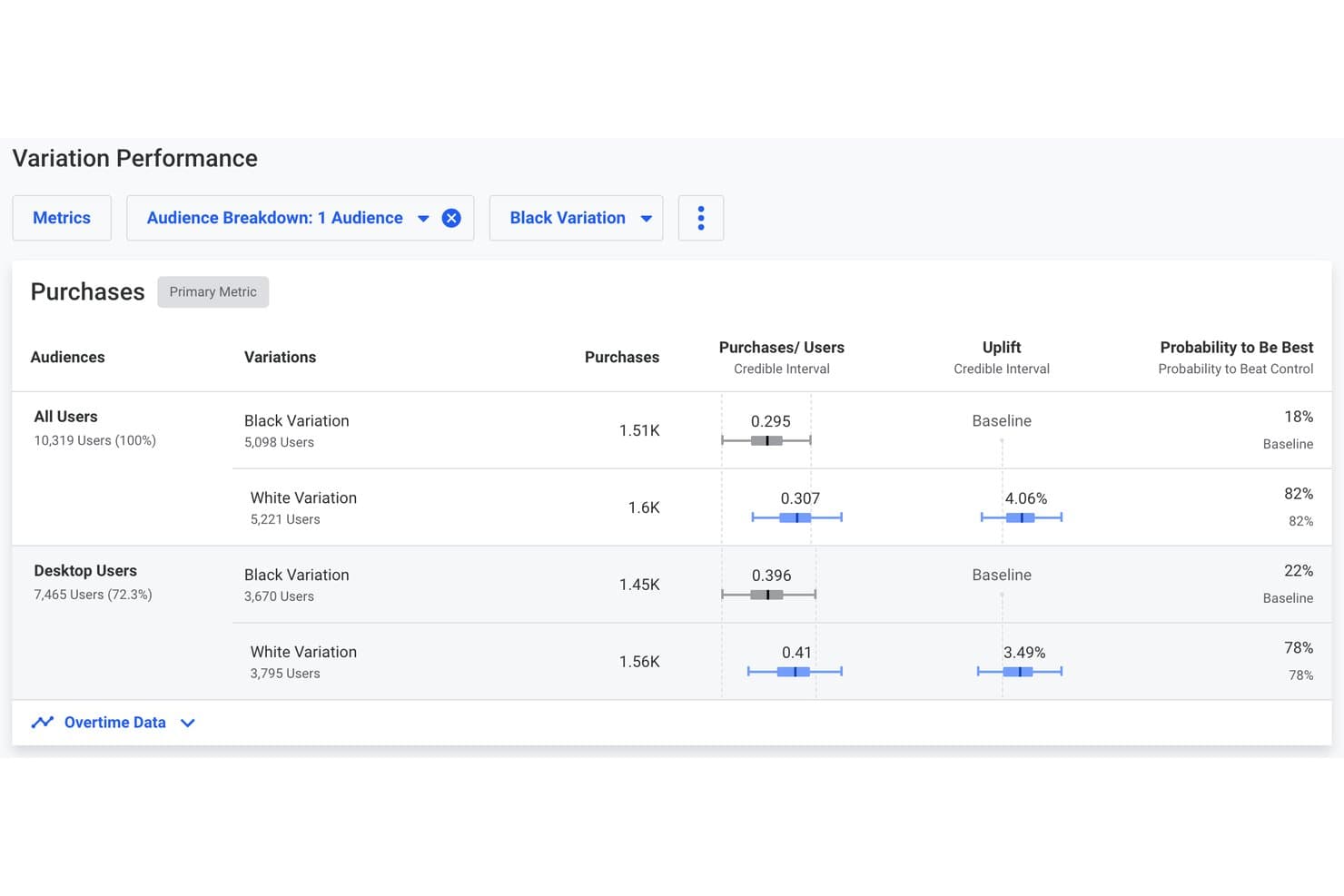
Dynamic Yield compares A/B variation performance with uplift and purchase metrics. Dynamic Yield is an AI-powered personalization and experimentation platform that supports A/B, multivariate, bandit, and server-side testing alongside audience segmentation, AI-assisted variation creation, and cross-channel deployment across web, app, email, and search.
Who Is Dynamic Yield Best For?
Dynamic Yield is a strong fit for enterprise marketing and CRO teams in ecommerce, retail, or financial services who need Bayesian experimentation and deep personalization in a single platform.
Why I Picked Dynamic Yield
Dynamic Yield earns its spot on my shortlist because its Bayesian engine goes beyond a simple winner/loser verdict, reporting Probability to Be Best, credible intervals, and secondary metrics simultaneously, so I can catch side effects before declaring a result. I also rely on its Affinity Allocation, which routes each user to the variation that matches their behavioral profile rather than splitting traffic blindly. The Analyst agent then monitors results nightly and flags anomalies against a 28-day baseline, which keeps experiments honest at enterprise scale.
Dynamic Yield Key Features
- Multi-touch campaign testing: Run experiments across multiple pages or funnel steps, with up to 20 touchpoints per variation tested against a control group.
- Dynamic Traffic Allocation: A multi-armed bandit that automatically shifts traffic toward the best-performing variation as results come in.
- Rollout feature flags: Wrap code in feature flags, release to a percentage of users, maintain a control group, and roll back instantly if needed.
- AI-generated result summaries: The Analyst agent summarizes test outcomes—including uplift, significance, and projected business impact—and produces executive-level testing program reports.
Dynamic Yield Integrations
Dynamic Yield has native integrations with Google Analytics 4, Contentsquare, mParticle, Shopify, and Stability.AI. Experience APIs and mobile SDKs for Kotlin, Swift, and React Native support custom connections.
Pros and Cons
Pros:
- AI agents generate approved campaign variations
- Affinity Allocation personalizes variation exposure
- Bayesian reporting reveals secondary metric side effects
Cons:
- Agent-generated designs currently support limited campaigns
- Advanced customization requires substantial developer involvement
Learn more about Dynamic Yield:
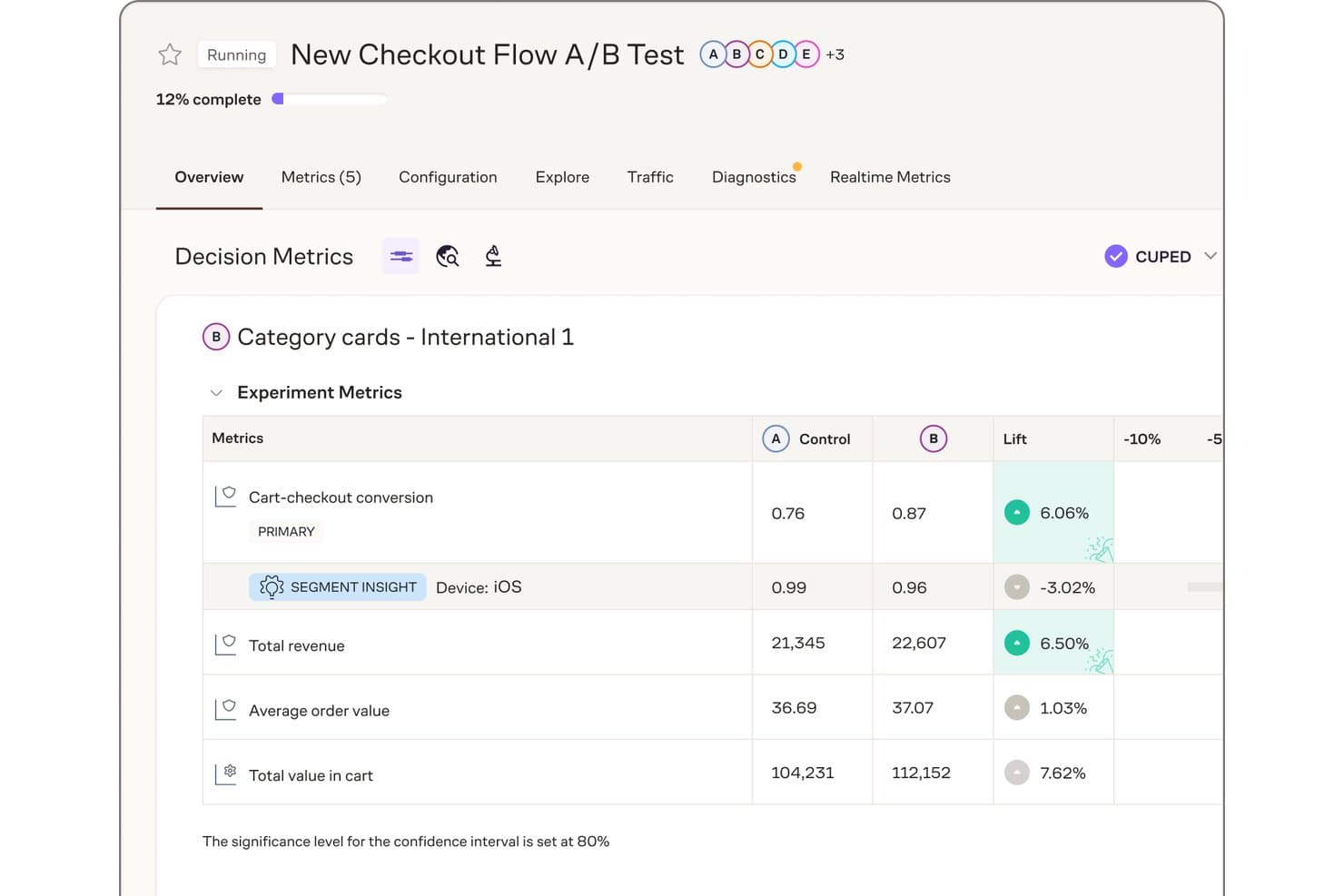
Eppo surfaces segment insights and lift metrics across A/B test variants. Eppo is a warehouse-native A/B testing and experimentation platform that supports feature-flag-driven A/B/n and multivariate testing, contextual bandits for AI-driven personalization, and advanced statistical analysis across web, mobile, and backend environments.
Who Is Eppo Best For?
Eppo is a strong fit for engineering-supported product and data teams running high-volume experiments on top of an existing cloud data warehouse.
Why I Picked Eppo
Eppo earns its spot on my shortlist because it's built from the ground up around warehouse-native experiment governance, which is rare in this category. I love that every metric definition and result is backed by visible SQL, so my team can audit exactly how an experiment was computed without leaving the warehouse. Protocols let us codify statistical guardrails, primary metrics, and decision rules into reusable templates, which cuts the guesswork out of calling a winner.
Eppo Key Features
- Contextual bandits: Automatically shifts traffic between variants in real time, picking per-user actions based on context to personalize experiences without manual intervention.
- Cross-platform SDKs: Deploys experiments across web, mobile, and backend environments using client and server SDKs in over a dozen languages, with local flag evaluation in roughly 1 ms.
- Statistical method selection: Lets you choose between frequentist, sequential, and Bayesian analysis methods, with CUPED++ variance reduction to tighten confidence intervals.
- Lifecycle experiment analysis: Connects to Braze and Iterable so you can analyze CRM and email experiments in Eppo alongside your product experiments.
Eppo Integrations
Eppo offers documented integrations with Snowflake, Databricks, BigQuery, Redshift, Segment, RudderStack, mParticle, Snowplow, Contentful, Braze, and Iterable. Datadog Experiments also connects with Datadog Feature Flags, Product Analytics, Real User Monitoring, Session Replay, and APM.
Pros and Cons
Pros:
- CUPED++ and Bayesian methods sharpen result decisions
- Contextual bandits personalize traffic by user context
- Warehouse-native governance keeps experiment SQL visible
Cons:
- Engineering setup limits self-serve experimentation
- No generative AI for hypotheses or variations
Learn more about Eppo:
Andre AI-verktøy for A/B-testing
Her er noen flere alternativer for AI-verktøy for A/B-testing som ikke kom med på kortlisten min, men som likevel er verdt å se nærmere på:
- 11Wingify (formerly VWO and AB Tasty)Best for full-funnel AI from insight to rollout
- 12Amplitude Feature ExperimentationBest for analytics-native experiment workflows
- 13UnbounceBest for drag-and-drop variant creation
- 14OmniconvertBest for prompt-to-code variant building
- 15Convert ExperiencesBest for privacy-first web experimentation at scale
- 16Split by HarnessBest for engineering-led flag experiment analysis
How I Evaluate AI A/B Testing Tools
To make this list, a tool’s AI needs to handle real experimentation work, like generating hypotheses or copy and recommending winners. From there, I evaluate three things. Core functionality carries most weight, like running A/B tests and reporting significance. Then I look at standout features, like feature flag experimentation, and beyond features, like fit with your team’s tech stack.
Core Functionality (Table Stakes For This List)
When I'm selecting tools for my list, I score each one on a scale from 0 (does not offer the functionality) to 5 (excels in this area) for each core functionality listed below. I then convert the total into a percentage to help assess each tool's overall fit, with extra weight on any functionalities I’ve deemed essential.
- Experiment Creation & Testing (Essential): I look for A/B, multivariate, split URL, and feature-flag tests with practical variation management.
- AI-Assisted Design (Essential): I assess whether AI creates relevant hypotheses, copy, or design variations that need limited editing.
- Analysis & Results: I check for significance, confidence intervals, guardrails, and clear interpretation of experiment outcomes.
- Audience Targeting: I evaluate behavioral, demographic, device, and custom segmentation for focused experiment delivery.
- Cross-Platform Deployment: I look for consistent testing across websites, mobile apps, and server-side environments.
- AI Optimization & Recommendations: I assess recommendations that prioritize winners, adjust traffic, or support automatic implementation.
Once I have a list of tools that meet the criteria, I consider what sets each platform apart.
Differentiating Factors (What Sets Vendors Apart)
Here's how I compare and contrast different vendors:
Standout Features
Feature flag experimentation is a big one for me. I look for tools that tie experiments directly to flags so your team can safely roll out backend changes and measure impact before a full release. Holdout and guardrail monitoring matters just as much—I check whether a platform automatically flags drops in key metrics like retention or revenue during a live test. An AI copywriting assistant can also accelerate test creation, especially when you need multiple headline or CTA variants without pulling in a content team.
Beyond Features
I evaluate how quickly a platform moves from hypothesis to significant result, since a tool that cuts setup and analysis time means more tests per quarter without extra engineering effort. Tech stack fit matters just as much—I check for native integrations with analytics platforms and CDPs, plus API maturity for server-side instrumentation. For teams in regulated industries, I also look at SOC 2 compliance, data residency options, and how AI models handle user data retention.
Slik velger du AI-verktøy for A/B-testing
Det er lett å gå seg vill i lange funksjonslister og kompliserte prisstrukturer. For å hjelpe deg med å holde fokus mens du går gjennom den unike prosessen med å velge programvare, får du her en sjekkliste over faktorer du bør ha i tankene:
| Faktor | Hva bør vurderes |
|---|---|
| FaktorSkalerbarhet | Hva bør vurderesVil verktøyet håndtere det nåværende og forventede volumet av eksperimenter, trafikk og teamstørrelse? |
| FaktorIntegrasjoner | Hva bør vurderesKan det kobles direkte til analyse-, netthandels- eller markedsføringsplattformene dine uten ekstra arbeid? |
| FaktorTilpasningsmuligheter | Hva bør vurderesKan du tilpasse eksperimentparametere, rapportering og arbeidsflyter slik at de samsvarer med virksomhetens prosesser? |
| FaktorBrukervennlighet | Hva bør vurderesVil teamet ditt kunne starte og tolke tester uten omfattende opplæring eller teknisk hjelp? |
| FaktorImplementering og innføring | Hva bør vurderesHvor lang tid vil det ta å komme i gang, og hvilke ressurser eller hvilken støtte tilbys? |
| FaktorKostnad | Hva bør vurderesEr prisnivåene tydelige, og samsvarer de med bruksmønstrene og budsjettbegrensningene dine? |
| FaktorSikkerhetstiltak | Hva bør vurderesOppfyller verktøyet kravene dine til personvern, tilgangskontroll og samsvar? |
| FaktorTilgjengelig kundestøtte | Hva bør vurderesEr det mulig å få rask støtte i tidssonen din og gjennom kanalene du foretrekker? |
Hva er AI-verktøy for A/B-testing?
AI-verktøy for A/B-testing er programvareplattformer som bruker kunstig intelligens til å automatisere, optimalisere og analysere digitale eksperimenter der to eller flere varianter sammenlignes. Disse verktøyene hjelper team med å utforme tester, identifisere statistisk signifikante resultater og avdekke mønstre i brukeratferd raskere enn manuelle metoder. Ved å utnytte AI kan de foreslå nye eksperimenter, tolke komplekse data og redusere tiden og kompetansen som kreves for å gjennomføre effektive optimaliseringskampanjer.
Funksjoner
Når du velger AI-verktøy for A/B-testing, bør du se etter følgende viktige funksjoner:
- AI-drevne eksperimentforslag: Bruker maskinlæring til å analysere brukerdata og anbefale nye testideer, slik at team kan identifisere muligheter med stor effekt som de ellers kunne ha oversett.
- Automatisert statistisk analyse: Beregner statistisk signifikans og konfidensnivåer for testresultater, noe som reduserer behovet for manuelle beregninger og risikoen for feiltolkning av data.
- Visuell eksperimentredigering: Gjør det mulig for brukere å opprette og endre testvarianter ved hjelp av et dra-og-slipp-grensesnitt, slik at testoppsett blir tilgjengelig for teammedlemmer uten teknisk bakgrunn.
- Brukersegmentering: Gjør det mulig å målrette bestemte brukergrupper eller atferder i eksperimenter, slik at du kan teste hypoteser på relevante målgrupper.
- Rapporteringsdashbord i sanntid: Gir oppdaterte målinger og visualiseringer av eksperimentresultater, slik at team kan følge med på resultatene og ta beslutninger i tide.
- Integrerte øktopptak: Tar opp og spiller av brukerøkter for hver testvariant, slik at team får kvalitative innsikter i brukeradferd og friksjonspunkter.
- Varmekart: Visualiserer hvor brukere klikker, ruller og samhandler på testsider, slik at team kan forstå engasjementsmønstre og optimalisere oppsett.
- Støtte for multivariat testing: Lar deg teste flere variabler samtidig, slik at du kan analysere den samlede effekten av flere endringer i ett eksperiment.
- Planlegging av eksperimenter og utrullingskontroller: Tilbyr alternativer for å planlegge tester, kontrollere trafikkfordelingen og sette eksperimenter på pause eller avslutte dem basert på forhåndsdefinerte kriterier.
- Tilpassbar rapportering og eksport: Gjør det mulig for brukere å tilpasse rapporter og eksportere data i ulike formater for videre analyse eller deling med interessenter.
Fordeler
Implementering av AI-verktøy for A/B-testing gir flere fordeler for teamet og virksomheten din. Her er noen av fordelene du kan se frem til:
- Raskere eksperimentsykluser: AI-drevne forslag og automatisert analyse hjelper team med å lansere, overvåke og tolke tester raskere enn ved manuelle metoder.
- Mer presise beslutninger: Automatiserte statistiske beregninger og dashbord i sanntid reduserer menneskelige feil og støtter datadrevne valg.
- Bedre brukerinnsikt: Integrerte øktopptak og varmekart viser hvordan brukere samhandler med testvarianter, og avdekker friksjonspunkter og muligheter.
- Effektiv ressursbruk: Visuelle redigeringsverktøy og automatiserte arbeidsflyter gjør det mulig for teammedlemmer uten teknisk bakgrunn å gjennomføre eksperimenter, slik at utviklere og analytikere får frigjort tid.
- Personlig tilpasset optimalisering: Funksjoner for brukersegmentering muliggjør målrettede eksperimenter, slik at du kan tilpasse opplevelser for bestemte målgrupper og maksimere effekten.
- Skalerbar testing: Støtte for multivariate eksperimenter og eksperimenter med høy trafikk sikrer at plattformen kan vokse i takt med virksomhetens behov.
- Handlingsrettet rapportering: Tilpassbare rapporter og eksportalternativer gjør det enkelt å dele funn med interessenter og informere bredere optimaliseringsstrategier.
Kostnader og priser
Valg av AI-verktøy for A/B-testing krever en forståelse av de ulike prismodellene og abonnementene som er tilgjengelige. Kostnadene varierer basert på funksjoner, teamstørrelse, tillegg og mer. Tabellen nedenfor oppsummerer vanlige abonnementer, gjennomsnittsprisene deres og typiske funksjoner som er inkludert i løsninger for AI-verktøy for A/B-testing:
Sammenligningstabell for abonnementer for AI-verktøy for A/B-testing
| Abonnementstype | Gjennomsnittspris | Vanlige funksjoner |
|---|---|---|
| AbonnementstypeGratisabonnement | Gjennomsnittspris$0 | Vanlige funksjonerGrunnleggende A/B-testing, begrensede eksperimenter, begrenset antall brukerplasser og grunnleggende rapportering. |
| AbonnementstypePersonlig abonnement | Gjennomsnittspris$19-$99/måned | Vanlige funksjonerUbegrensede eksperimenter, visuelt redigeringsverktøy, grunnleggende segmentering, e-poststøtte og standardanalyse. |
| AbonnementstypeForretningsabonnement | Gjennomsnittspris$139-$250/måned | Vanlige funksjonerAvansert segmentering, multivariat testing, integrasjoner, dashbord i sanntid og prioritert brukerstøtte. |
| AbonnementstypeEnterprise-abonnement | Gjennomsnittspris$400+/måned | Vanlige funksjonerTilpassede integrasjoner, dedikert kundeansvarlig, avansert sikkerhet, hjelp med oppstart og SLA-garantier. |
Vanlige spørsmål om AI-verktøy for A/B-testing
Her er noen svar på vanlige spørsmål om AI-verktøy for A/B-testing:
Hvordan forbedrer AI tradisjonell A/B-testing?
AI forbedrer tradisjonell A/B-testing ved å automatisere utformingen av eksperimenter, analysere resultater raskere og foreslå nye testideer basert på brukerdata. Dette reduserer den manuelle innsatsen og hjelper team med å identifisere vinnende varianter og optimaliseringsmuligheter raskere.
Kan AI-verktøy for A/B-testing håndtere multivariate eksperimenter?
Ja, de fleste AI-verktøy for A/B-testing støtter multivariate eksperimenter. Dette lar deg teste flere variabler samtidig og forstå hvordan ulike endringer samspiller, noe som er nyttig for å optimalisere komplekse brukeropplevelser.
Hvilke personvernkrav bør jeg være oppmerksom på?
Du bør sørge for at verktøyet overholder relevante personvernforordninger som GDPR eller CCPA. Se etter funksjoner som anonymisering av data, sikker datalagring og tydelige mekanismer for brukersamtykke for å beskytte brukerinformasjon.
Krever disse verktøyene programmeringskunnskaper for å sette opp eksperimenter?
Nei, mange AI-verktøy for A/B-testing tilbyr visuelle redigeringsverktøy og veiledede arbeidsflyter som lar ikke-tekniske brukere sette opp og starte eksperimenter. Avanserte tilpasninger eller integrasjoner kan imidlertid fortsatt kreve noe programmeringskunnskap.
Hvordan vet jeg om testresultatene mine er statistisk signifikante?
AI-verktøy for A/B-testing inkluderer vanligvis automatisert statistisk analyse som beregner signifikans- og konfidensnivåer for deg. Gå alltid gjennom disse måleverdiene i rapporteringsoversikten i verktøyet før du tar beslutninger basert på testresultatene.