

Det finnes tilsynelatende utallige programvareløsninger for produkttilbakemeldinger, så det er vanskelig å finne ut hvilken som passer best for deg. Du ønsker å samle inn, sentralisere og analysere tilbakemeldinger og gjøre dem om til konkrete oppgaver for utviklingsteam, men må finne ut hvilket verktøy som passer best.
Jeg hjelper deg! I dette innlegget gjør jeg det enkelt ved å bruke erfaringen min med å lede store, komplekse produkter og bruke dusinvis av ulike verktøy for å gi deg denne kortlisten over den beste programvaren for produkttilbakemeldinger.
Why Trust Our Software Recommendations
6,700+
Reviews
20
Industry experts
16+
Evaluation factors
14
Years
Our team has been testing and reviewing software since 2012. As product managers ourselves, we know how difficult—and important—it is to choose the right software.
For this guide, we evaluated tools using hands-on testing and independent research, scoring tools using our selection criteria.
Our reviews reflect our human editorial judgment, not a sales pitch.
Expert reviewers:
- Andrew LumbySenior TPM
- Cristiano ValimSenior UI/UX Lead


Sammenligningstabell: Programvare for produkttilbakemeldinger
Denne sammenligningstabellen oppsummerer prisopplysningene for mine beste utvalgte programvareløsninger for produkttilbakemeldinger.
| Tool | Best For | Trial Info | Price | ||
|---|---|---|---|---|---|
| 1 | Best for customer knowledge graph insights | Free demo available | Pricing upon request | Website | |
| 2 | Best for all-in-one feedback collection | Free plan available | From $29/month (billed annually) | Website | |
| 3 | Best for advanced omnichannel surveys | Free demo available | Pricing upon request | Website | |
| 4 | Best for multilingual feedback analysis | Free demo available | Pricing upon request | Website | |
| 5 | Best for detailed closed loop feedback workflows | 14-day free trial | Pricing upon request | Website | |
| 6 | Best for product roadmapping with feedback | Free demo available | Pricing upon request | Website | |
| 7 | Best for decisions backed by usage data | Free plan + 30-day free trial + free demo available | Pricing upon request | Website | |
| 8 | Best for visual bug reporting in-app | Free 15-day trial | From $45/month | Website | |
| 9 | Best for revenue-weighted feedback prioritization | 14-day free trial + free demo available | From $24/user/month | Website | |
| 10 | Best for roadmap-linked feedback prioritization | 30-day free trial + free demo available | From $39/user/month (billed annually) | Website |


Anmeldelser av den beste programvaren for produkttilbakemeldinger
Her er en kort beskrivelse av hver programvareløsning for produkttilbakemeldinger, med de beste bruksområdene, bemerkelsesverdige funksjoner og skjermbilder som gir et inntrykk av brukergrensesnittet.
 Best for customer knowledge graph insights
- Free demo available
- Pricing upon request
Visit WebsiteCustomer Rating:4.8/5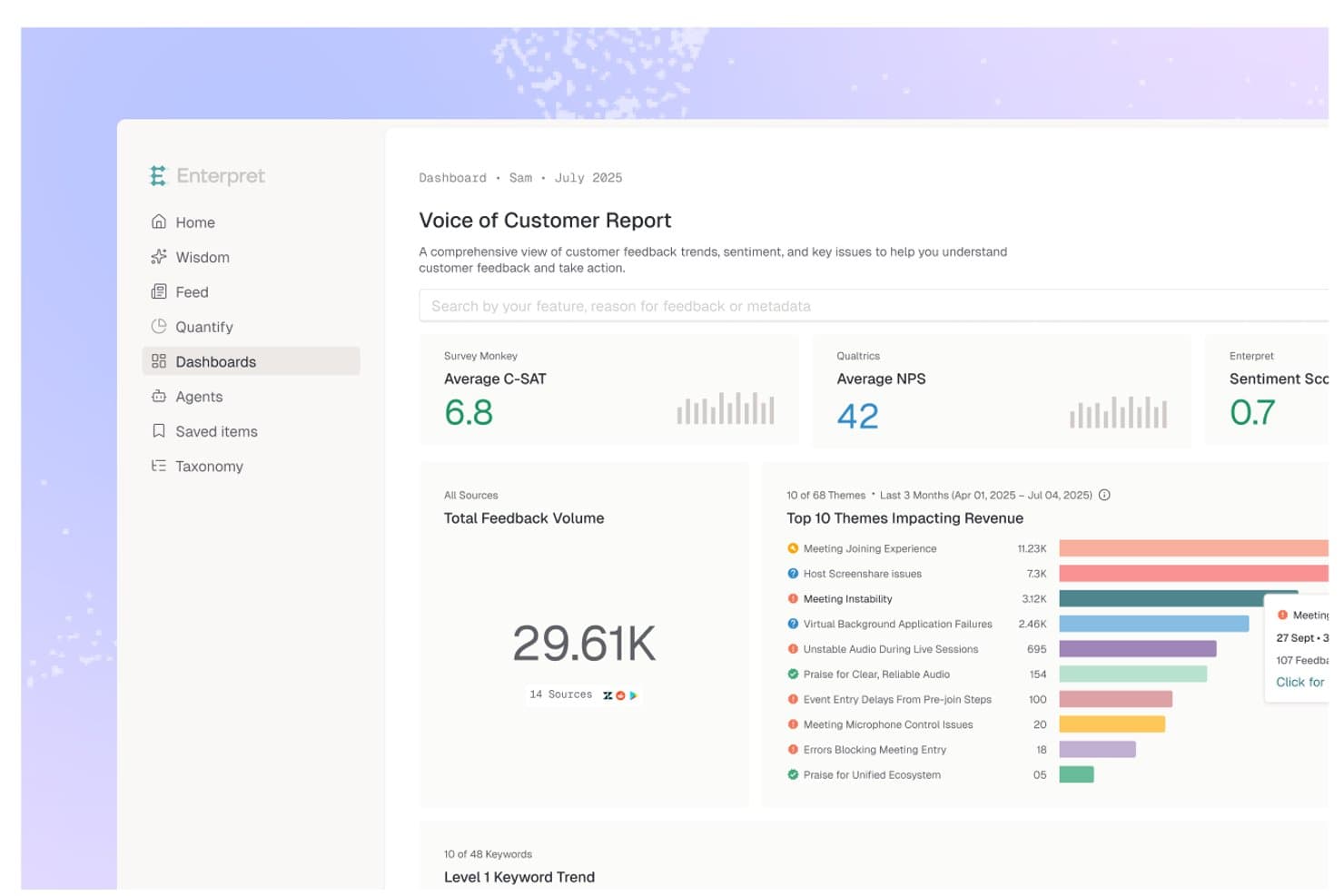
Enterpret centralizes customer feedback into a Voice of Customer dashboard. Enterpret is a customer intelligence platform that aggregates feedback from 50+ sources—support tickets, calls, surveys, reviews, and more—and uses AI-powered categorization, sentiment tracking, and a Customer Context Graph to surface and analyze product insights at scale.
Who Is Enterpret Best For?
Enterpret is a strong fit for product and customer success teams at mid-to-large companies that already collect feedback across many tools and need AI-powered analysis to surface what's actually driving retention and revenue.
Why I Picked Enterpret
I picked Enterpret as one of the best because its Customer Context Graph does something I haven't seen other feedback tools do: it links every piece of feedback to a specific feature, user segment, and business outcome in a single connected structure. That means when I'm looking at a spike in support tickets, I can trace it directly to retention risk or revenue impact rather than just tagging themes. The Adaptive Taxonomy auto-categorizes feedback across 50+ sources and updates itself as product language evolves, which removes a huge amount of manual maintenance.
Enterpret Key Features
- Revenue-weighted prioritization: Ranks feedback by its measured impact on retention, expansion, NPS, and churn using connected CRM and subscription data.
- MCP server integration: Exposes Enterpret's feedback data directly to AI tools like Claude, ChatGPT, and Cursor for use in agent-based workflows.
- Before/after impact tracking: Measures how a product change affected support ticket volume, feature adoption, retention, and revenue after release.
- Sales intelligence: Surfaces deal blockers, product objections, and feature demand signals pulled from sales calls and CRM data.
Enterpret Integrations
Enterpret offers 50+ native integrations, including Zendesk, Intercom, Salesforce, Jira, Linear, Slack, Notion, Qualtrics, Gong, and G2. It also supports custom data connections through webhooks, CSV uploads, email ingestion, Snowflake, Census, and Zapier.
Pros and Cons
Pros:
- Handles massive feedback volumes at scale
- Adaptive taxonomy tracks shifting customer language
- Connects feedback to revenue impact
Cons:
- Taxonomy changes need trial and error
- No native voting or feedback portal
Learn more about Enterpret: Best for all-in-one feedback collection
- Free plan available
- From $29/month (billed annually)
Visit WebsiteCustomer Rating:4.8/5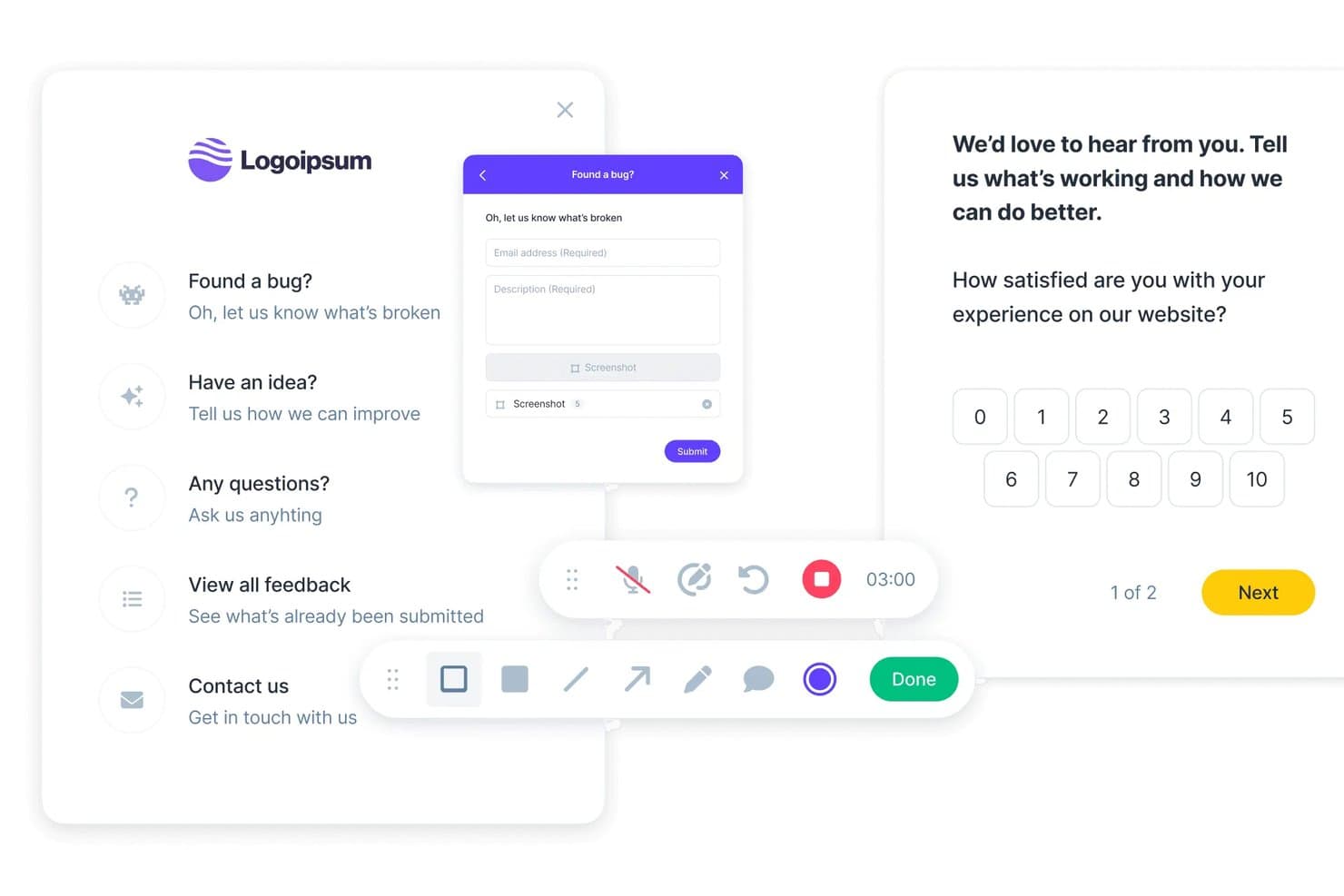
Userback lets users collect bug reports, ideas, and satisfaction scores. Userback is a product feedback platform that combines multi-channel feedback collection—including in-app widgets, visual annotation, session replay, and surveys—with a centralized Kanban repository, AI-driven categorization, and two-way integrations with development tools like Jira, Linear, and ClickUp.
Who Is Userback Best For?
Userback fits product teams that need to capture feedback from multiple channels—widget, surveys, mobile, and email—without managing separate tools for each.
Why I Picked Userback
Userback earns its spot on my shortlist because it handles the full feedback collection stack in one place, from an embeddable in-app widget with visual annotation to native iOS and Android SDKs to NPS, CSAT, and CES surveys that target specific users or behaviors. I also love that every feedback item automatically captures browser data, console logs, and session replays, so my team isn't chasing context after the fact. The AI Feedback & Insights layer then groups incoming items by theme and sentiment automatically, cutting the manual triage work that tends to pile up fast.
Userback Key Features
- Two-way dev tool sync: Resolving a ticket in Jira, Linear, or ClickUp automatically resolves the linked item in Userback, keeping dev and product workflows in lockstep.
- Browser extension: Internal teams can capture and annotate feedback from any web page without embedding any code.
- Feature Portal add-on: A public-facing space where end users can submit, vote on, and track feature requests alongside a visible product roadmap.
- Automatic technical capture: Every feedback submission automatically logs browser data, console logs, and network requests for developer context.
Userback Integrations
Userback offers native integrations with Jira, Linear, ClickUp, GitHub, GitLab, Asana, Azure DevOps, Intercom, Zendesk, Slack, and Microsoft Teams. It also supports REST API, webhooks, and Zapier.
Pros and Cons
Pros:
- Groups themes and sentiment automatically
- Centralizes feedback from diverse channels
- Captures visual and technical context
Cons:
- Advanced capabilities require higher-tier plans
- Prioritization lacks weighted scoring
Learn more about Userback: Best for advanced omnichannel surveys
- Free demo available
- Pricing upon request
Visit WebsiteCustomer Rating:4.7/5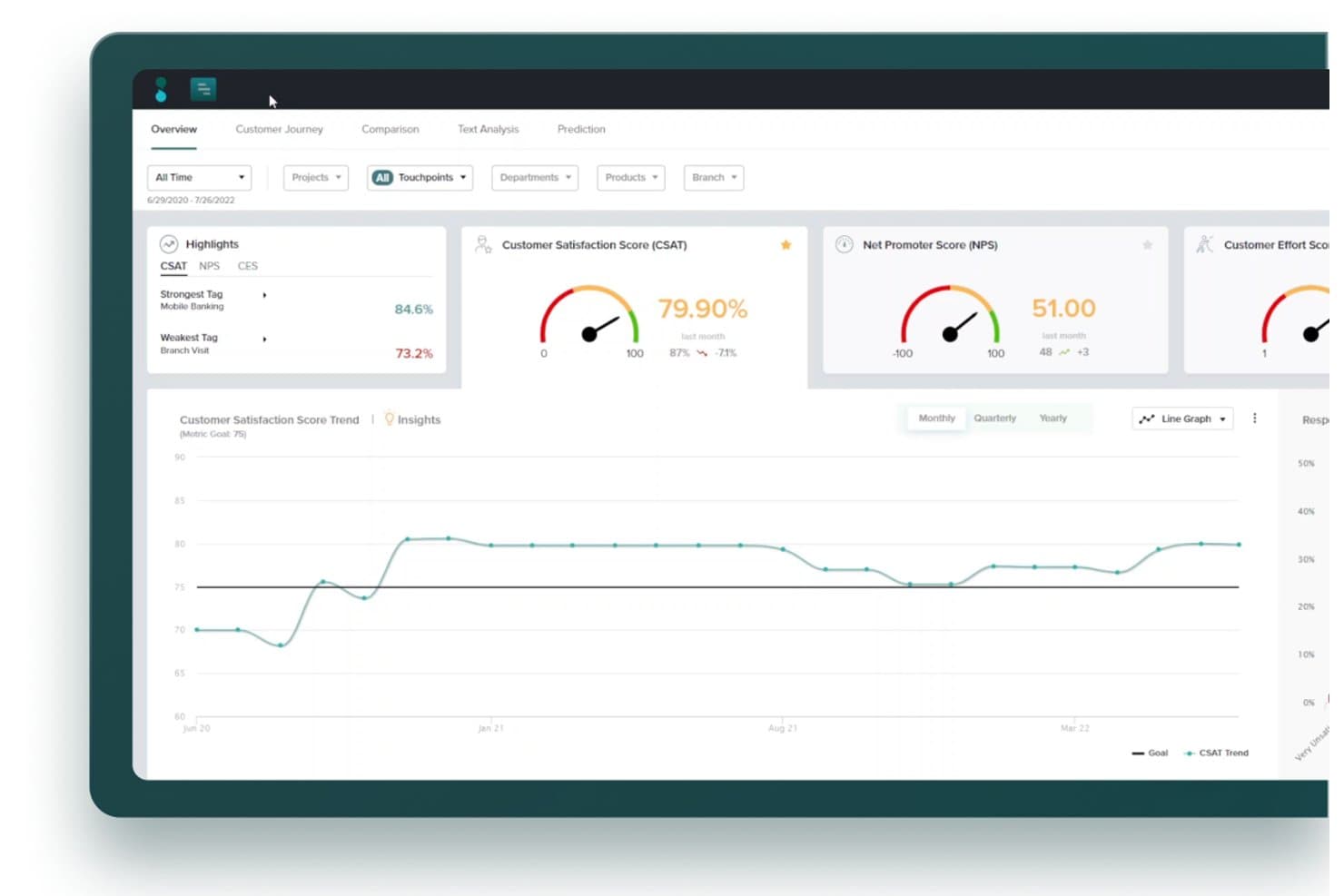
Sogolytics tracks CSAT, NPS, and CES scores in one dashboard. Sogolytics is an experience management platform that collects feedback across surveys, email, chat, social, calls, reviews, and in-app channels, then uses AI to surface themes, sentiment, and key drivers.
Who Is Sogolytics Best For?
Sogolytics is a strong fit for customer experience and market research teams that need to capture and analyze feedback across many channels from a single platform.
Why I Picked Sogolytics
I've included Sogolytics in my top picks because it collects feedback across more channels than almost anything else I've tested: surveys, email, chat, social, calls, reviews, and in-app signals all feed into one platform. I especially like how its AI automatically surfaces themes like "Loyalty risk" or "Billing friction" without manual tagging, and Key Driver Analysis shows exactly which experience factors move metrics like renewal intent.
Sogolytics Key Features
- AI theme and sentiment analysis: Automatically identifies themes, emotions, and sentiment across all incoming feedback without requiring manual tagging.
- Churn prediction and risk flagging: Flags customers showing loyalty risk signals and triggers recovery workflows before they churn.
- Customer journey mapping: Visualizes the full customer experience across touchpoints to reveal where friction occurs.
- Cross-tab and trend reporting: Lets you slice feedback data by segment and track response trends over time in real-time dashboards.
Sogolytics Integrations
Sogolytics lists 14 integrations, including Salesforce, HubSpot, Zendesk, Intercom, Slack, Microsoft Teams, ServiceNow, Snowflake, Miro, Shopify, and Webflow. It offers a smaller integration set for product feedback workflows, with no documented Jira, Linear, Productboard, or Aha! connection.
Pros and Cons
Pros:
- Key driver analysis informs product decisions
- AI surfaces themes, sentiment, and risk
- Captures feedback across multiple channels
Cons:
- No public roadmaps or submitter updates
- No voting or feature-request prioritization
Learn more about Sogolytics: Best for multilingual feedback analysis
- Free demo available
- Pricing upon request
Visit WebsiteCustomer Rating:4.4/5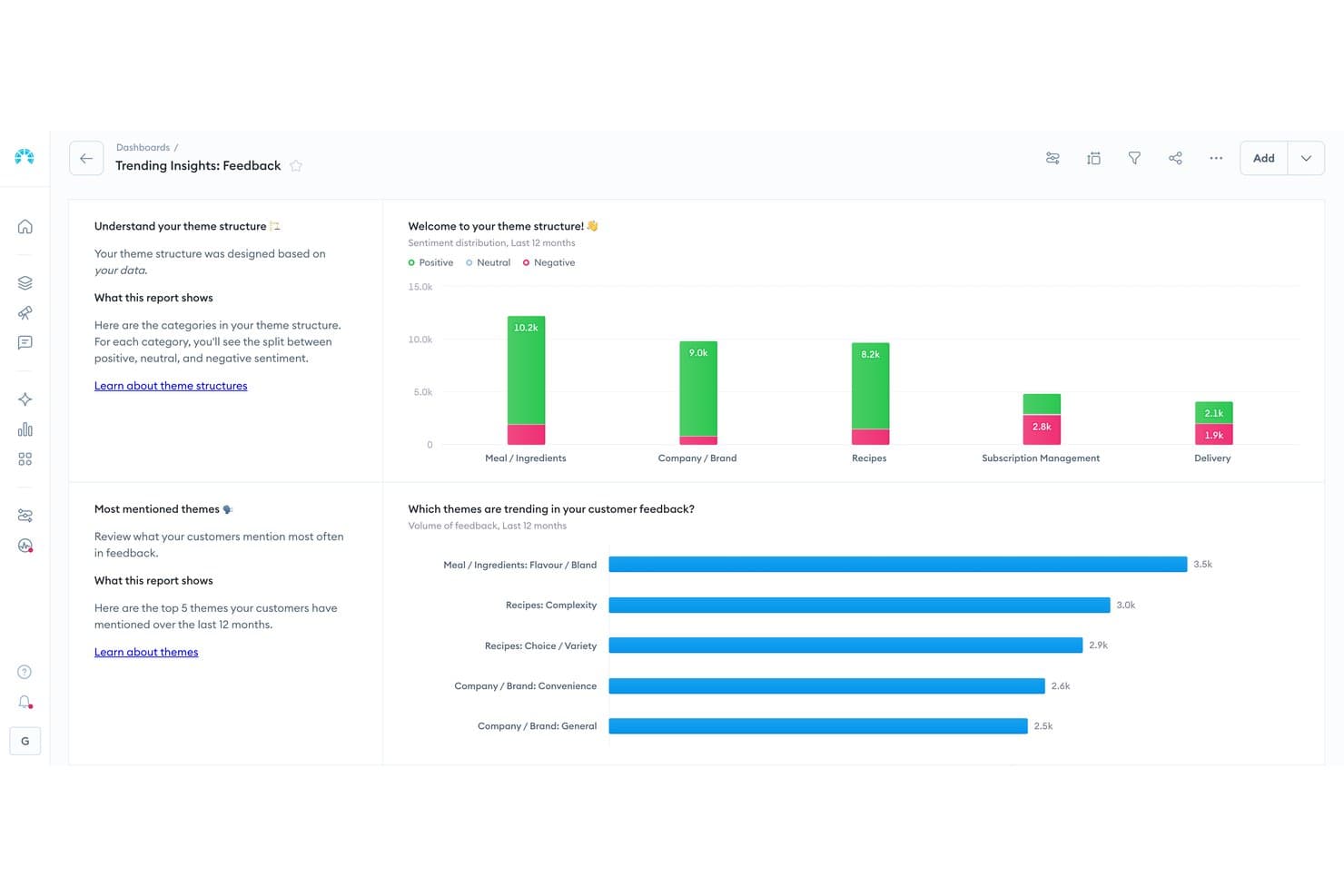
Chattermill visualizes customer feedback sentiment by theme and category. Chattermill is a Voice of Customer (VoC) analytics platform that centralizes feedback from 65+ sources—including support tools, surveys, reviews, and social media—and uses AI to categorize, cluster, and analyze it at scale.
Who Is Chattermill Best For?
Chattermill is a strong fit for enterprise UX research and customer success teams that need to analyze large volumes of feedback across multiple languages and markets.
Why I Picked Chattermill
I've included Chattermill in my top picks because its multilingual analysis capabilities are genuinely hard to match at scale, covering 50+ languages natively so teams operating across global markets can analyze feedback without manually sorting by region first. I particularly like Precision Insights, which uses AI to automatically tag and cluster feedback themes, and Lyra, Chattermill's AI that surfaces root causes and flags anomalies before they become bigger issues.
Chattermill Key Features
- Unified feedback repository: Aggregates feedback from 65+ sources—including support tools, surveys, reviews, and social media—into a single, filterable workspace enriched with CRM data.
- Impact analysis: Links categorized feedback themes directly to business metrics like NPS, CSAT, churn, and revenue to show which issues carry the most weight.
- Anomaly detection and alerts: Monitors feedback in real time and pushes alerts to Slack, email, or Jira when it detects sudden shifts or emerging issues.
- MCP-based AI querying: Lets you query your feedback data through AI assistants like Claude or ChatGPT via Model Context Protocol, with responses backed by real customer quotes.
Chattermill Integrations
Chattermill offers 65+ native integrations, including Zendesk, Intercom, Qualtrics, Jira, Linear, Notion, and Slack. It also supports custom connections through its API, CSV uploads, Snowflake, Databricks, Amazon S3, and Google Cloud Platform.
Pros and Cons
Pros:
- Links feedback themes to business outcomes
- AI clustering reveals themes and root causes
- Multilingual analysis supports global feedback programs
Cons:
- Offers no voting or submitter updates
- Requires separate tools for feedback collection
Learn more about Chattermill: Best for detailed closed loop feedback workflows
- 14-day free trial
- Pricing upon request
Visit WebsiteCustomer Rating:4.7/5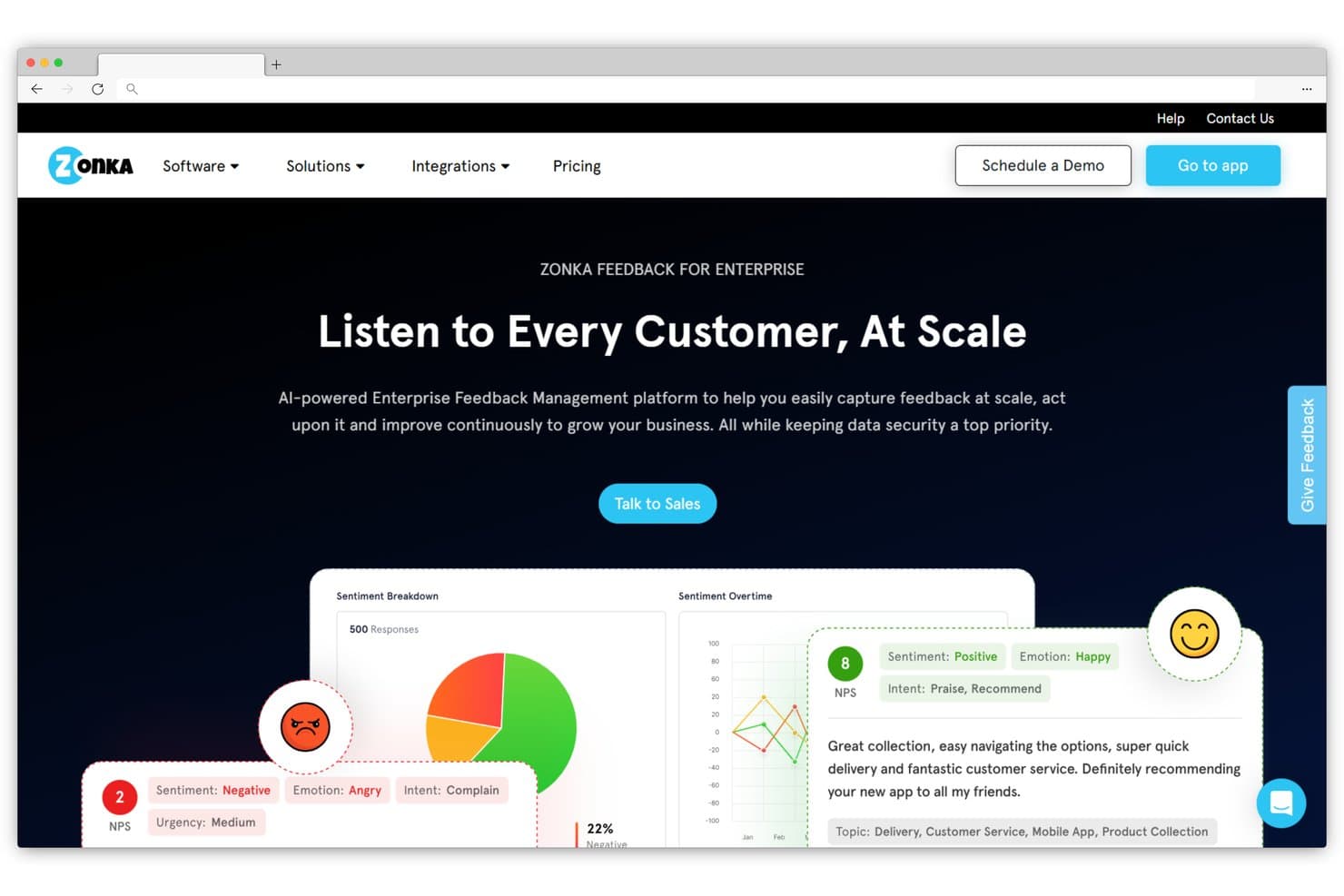
Zonka Feedback analyzes customer sentiment and emotions at scale. Zonka Feedback is a multi-channel feedback and CX platform that collects surveys via email, SMS, WhatsApp, in-app, and offline channels, then centralizes responses in a unified hub with AI-driven thematic, sentiment, and emotion analysis and closed-loop case management tools.
Who Is Zonka Feedback Best For?
Zonka Feedback is a strong fit for customer success teams and CX-focused product managers who need to manage high volumes of multi-channel feedback and close the loop with customers systematically.
Why I Picked Zonka Feedback
I picked Zonka Feedback as one of the best because its closed-loop workflow is genuinely end-to-end: case management, a Collaborative Response Inbox, and AI-driven automation let teams route negative, neutral, and positive feedback into separate workflows and track every response to resolution. I also love that its AI thematic and sentiment analysis removes manual tagging entirely, so your team is working from categorized, actionable data rather than raw survey responses.
Zonka Feedback Key Features
- Multi-channel survey builder: A drag-and-drop builder lets you create and deploy NPS, CSAT, and CES surveys across email, SMS, WhatsApp, in-app, and offline kiosk channels from a single interface.
- AI thematic and sentiment analysis: Automatically tags and categorizes incoming feedback by theme, entity, sentiment, and emotion, so your team works from structured data rather than raw responses.
- Unified Intelligence Hub: Aggregates surveys, support tickets, live chat, and online reviews into one centralized repository with role-based dashboards and contact-level journey tracking.
- CRM and helpdesk integrations: Native connections to Salesforce, HubSpot, Zendesk, Intercom, and Freshdesk let you sync feedback data directly into the tools your customer success and product teams already use.
Zonka Feedback Integrations
Zonka Feedback offers integrations with Jira, Salesforce, HubSpot, Zendesk, Intercom, Freshdesk, Slack, and Microsoft Teams. It also provides an API, webhooks, and Zapier for custom connectivity.
Pros and Cons
Pros:
- Tracks responses through closed-loop case workflows
- AI tags themes, entities, sentiment, and emotions
- Collects feedback across online and offline channels
Cons:
- Advanced AI requires higher-tier access
- Offers no voting or roadmap publishing
Learn more about Zonka Feedback: Best for product roadmapping with feedback
- Free demo available
- Pricing upon request
Visit WebsiteCustomer Rating:4.5/5
Collect and consolidate feedback into a central repository to understand customer challenges and identify patterns. Productboard helps businesses prioritize customer feedback and feature requests by collecting this information and displaying it on a single board. Start-ups, small-to-medium businesses, enterprises, and agencies can use the platform to extract feature requests, prioritize what to build, and engage with customers. You can use it to manage product development, marketing, and launch activities from one place.
Productboard combines user feedback voting with feature prioritization and roadmaps. The roadmap it develops uses customer feedback data to help product managers get teams on board with the roadmap they will be used to implement new features. Your roadmap can provide in-depth strategic criteria to help you make prioritization decisions and visualize how features can support your product and objectives.
Key features include customer management, data export, data import, external integrations, Gantt charts, API, multi-user, notifications, project management, task scheduling/tracking, prioritization, and roadmapping.
Productboard integrates with other applications to consolidate your data, such as Salesforce, Slack, Microsoft Teams, Zapier, Intercom, and Zendesk.
Productboard costs from $25/user/month when paying month-to-month or $20/user/month when billed yearly. The platform also offers a 15-day free trial.
Pros and Cons
Pros:
- Roadmaps keep teams informed and engaged.
- Partial data segmentation based on customer profiles.
- Easy to set up and use.
Cons:
- Not possible to segment data according to most attributes, such as MRR.
- Limited integrations
Learn more about Productboard: Best for decisions backed by usage data
- Free plan + 30-day free trial + free demo available
- Pricing upon request
Visit WebsiteCustomer Rating:4.4/5
Pendo allows users to target specific visitors and make announcements that only they’ll see. Pendo helps businesses collect customer requests from their applications without interrupting their experience. Small and medium businesses, as well as large enterprises, can utilize this cloud-based platform. Internal teams can also implement requests on the customer’s behalf and submit their own feedback. The platform is a comprehensive solution for analytics, customer onboarding, and in-app feedback.
Pendo is an analytics tool you can use to track your customers’ activities and understand how they’re using your product. The information the platform provides can help product managers make crucial product decisions, track how customers are adopting features, and monitor behavior. You can use Pendo to request feature suggestions from your customers and allow them to browse feature ideas, vote, and add their ideas using a feedback form. Your team can analyze these results to determine which features are popular or valued by customers.
Features include sentiment analysis, in-app walkthroughs, targetted messanging, feedback surveys, customer roadmaps, and reporting.
Pendo integrates with various third-party applications, such as Calendly, Hubspot, Salesforce Sales Cloud, Slack, Zapier, and Zendesk.
Pendo offers custom pricing upon request. But they do offer a free plan for one web application, as well as one iOS and one Android mobile app, and up to 500 active users per month.
Pros and Cons
Pros:
- Establish sentiment feedback by asking hyper-specific questions.
- Trigger messages based on specific events and activities.
- Allows users to develop messages without needing any technical knowledge.
Cons:
- The onboarding process can be lengthy.
- Expensive for start-ups.
Learn more about Pendo: Best for visual bug reporting in-app
- Free 15-day trial
- From $45/month
Visit WebsiteCustomer Rating:4.5/5
Monitor feedback for various projects from multiple sources in one dashboard. Usersnap helps small to large businesses collect new ideas and hear what the customers want to develop customer-centric products. Your customers can use screen and video recordings as well as screenshots to submit feedback and suggestions to your teams. Product managers can see all feedback in one location to easily analyze it for feature prioritization.
Usersnap’s bug-tracking features help your customer experience, tech support, and product teams resolve customers’ pain points. It does this by allowing your customers to alert your teams when they find bugs and product issues. The platform helps businesses make it easier to get the insights they require to improve their product.
Key features include brand design consistency, bug history, collaboration, data retention, device responsiveness, feedback aggregation, feedback collection, photo submission, real-time action, real-time analysis, security, sorting, survey deployment, surveys, system monitoring, text/notes, trigger alerts, video interview, and video snippets.
Usersnap integrates with over 5,000 third-party applications to enhance your product feedback processes, such as Zendesk, Slack, Intercom, Zapier, Asana, and Jira.
Usersnap costs from $99/month when paying month-to-month or $69/month when billed annually.
Pros and Cons
Pros:
- Teams can collaborate to respond to customers.
- Dashboards and reports allow users to analyze trends.
- Publish feedback to track suggestions.
Cons:
- Needs more options for feedback widget customization.
- Lacks advanced analysis features
Learn more about Usersnap: Best for revenue-weighted feedback prioritization
- 14-day free trial + free demo available
- From $24/user/month
Visit WebsiteCustomer Rating:4.4/5
Create clear specs for all teams to engage with the product’s development. Craft.io helps small-to-medium-sized businesses and large enterprises discover, collect, and identify ideas and feedback from customers and their teams. Product managers and owners can use Craft’s user story mapping features to brainstorm features to implement within their products. The platform helps centralize all questions regarding your product’s features with a complete backlog.
Craft.io allows teams to document their product strategy and connect it to their tasks when executing them. You can use the platform to create a central repository of product information and connect every planning process. Users can connect everything they create in strategic inputs to stories, epics, and other items in the platform to get a complete picture when optimizing strategies, plans, and prioritizations.
Key features include batch permissions and access, customer management, dashboard, data export, data visualization, external integrations, gantt charts, multi-user, project management, task scheduling/tracking, prioritization, roadmapping, and resource management.
Craft.io integrates with the existing tools you’re already using to simplify your workflows, such as Jira, GitLab, Google Drive Confluence, and Dropbox.
Craft.io starts at $19 per editor per month when billed annually. A 14-day free trial is also available.
Pros and Cons
Pros:
- Keeps all team members on the same page without switching tools.
- Teams can connect feature sets to their strategy.
- Provides a full suite of product management features.
Cons:
- Time-consuming implementation.
- Limited native integrations.
Learn more about Craft.io: Best for roadmap-linked feedback prioritization
- 30-day free trial + free demo available
- From $39/user/month (billed annually)
 Learn more about Aha! Ideas:
Annen programvare for produkttilbakemeldinger
Her er noen flere alternativer for programvare for produkttilbakemeldinger som ikke kom med på kortlisten min, men som likevel er verdt å se nærmere på:
- 11ReleasedBest for product teams using Jira
- 12SurvicateBest for feedback for the entire user journey
- 13CannyBest for prioritizing feature requests
- 14SurveyLegendBest for visually engaging surveys
- 15UnwrapBest for automated feedback categorization
- 16LightsterBest for direct interactions with target audiences
- 17FormsuiteBest for AI-powered survey-based product feedback
- 18UservoiceBest for organizing feedback from multiple sources
- 19UpvotyBest for low-cost revenue-weighted feedback boards
- 20SleekplanBest for AI-driven feedback theme detection
How I Evaluate Product Feedback Software
I split my evaluation into three parts, starting with core functionality—tools must collect feedback across channels and centralize it in one searchable place, since that carries the most weight. Then I look for standout features like revenue-weighted prioritization. Finally, I consider onboarding support and pricing value.
Core Functionality (Table Stakes For This List)
When I'm selecting tools for my list, I score each one on a scale from 0 (does not offer the functionality) to 5 (excels in this area) for each core functionality listed below. I then convert the total into a percentage to help assess each tool's overall fit, with extra weight on any functionalities I've deemed essential.
- Feedback Collection (Essential): I check whether a tool captures input through in-app widgets, public portals, email, and support integrations rather than limiting you to a single form.
- Centralized Feedback Repository (Essential): Every piece of feedback should land in one searchable, filterable view so nothing gets buried across Slack threads, emails, or spreadsheets.
- Feedback Categorization: I look for tagging by theme, customer segment, or product area—and whether the tool offers AI-assisted grouping to reduce manual sorting work.
- Voting and Prioritization: Tools should let customers vote on requests and let your team layer in scoring criteria like revenue impact or strategic alignment to build a defensible backlog.
- Status Updates and Loop Closing: I evaluate how automatically a tool notifies submitters when a request moves from under review to shipped, since manual follow-up rarely scales.
- Workflow Integration: The tool needs to connect feedback to where your team already works—Jira, Linear, or your roadmapping tool—with syncing that flows in both directions.
Once I have a list of tools that meet the criteria, I consider what sets each platform apart.
Differentiating Factors (What Sets Vendors Apart)
Here's how I compare and contrast different vendors:
Standout Features
Revenue-weighted prioritization is the first thing I check. A tool that ties requests to account value lets you defend roadmap decisions with commercial data, not just upvote counts. AI theme clustering matters just as much—when hundreds of requests pile up, I look for how well a tool groups related feedback so your team spots patterns without manually tagging every entry. I also evaluate in-app contextual widgets, since feedback captured at the moment of friction is far more specific and actionable than a survey sent days later.
Beyond Features
Cross-functional adoption is the first thing I check. If your CS and sales teams won't log feedback because the interface is confusing, you'll end up with the same gaps a spreadsheet creates. I also evaluate data portability—open API access and clean export options matter when you need to pipe feedback into a BI tool or switch platforms without losing historical context. Security is equally important since feedback often contains customer PII, so I look for SOC 2 compliance, SSO support, and configurable access controls.
Slik velger du programvare for produkttilbakemeldinger
Det er lett å gå seg vill i lange funksjonslister og komplekse prisstrukturer. For å hjelpe deg med å holde fokus mens du går gjennom den unike prosessen din for valg av programvare, får du her en sjekkliste over faktorer du bør ha i bakhodet:
| Faktor | Hva du bør vurdere |
|---|---|
| FaktorSkalerbarhet | Hva du bør vurdereKan programvaren vokse sammen med teamet ditt? Sjekk om den støtter et økende antall brukere og større datamengder uten redusert ytelse |
| FaktorIntegrasjoner | Hva du bør vurdereFungerer den med de eksisterende verktøyene dine? Sørg for at den kobles til viktige plattformer som CRM-systemer, prosjektstyrings- og kommunikasjonsverktøy for å unngå avbrudd i arbeidsflyten. |
| FaktorTilpasningsmuligheter | Hva du bør vurdereKan du tilpasse verktøyet til behovene dine? Se etter alternativer for å justere arbeidsflyter, felt og oversikter slik at de passer til prosessene dine. |
| FaktorBrukervennlighet | Hva du bør vurdereEr det brukervennlig for teamet ditt? Et enkelt grensesnitt og intuitiv navigasjon kan spare tid og redusere frustrasjon. |
| FaktorImplementering og introduksjon | Hva du bør vurdereHvor lang tid tar det å komme i gang? Ta hensyn til tiden og ressursene som kreves for oppsett og opplæring. Se etter veiledet introduksjon eller støttemateriell. |
| FaktorKostnad | Hva du bør vurderePasser prisen til budsjettet ditt? Sammenlign kostnaden med funksjonene som tilbys, og vær oppmerksom på skjulte gebyrer eller begrensninger knyttet til abonnementnivåer |
| FaktorSikkerhetstiltak | Hva du bør vurdereEr dataene dine beskyttet? Kontroller krypteringsstandarder, hvor dataene lagres, og samsvar med personvernregler som GDPR. |
| FaktorTilgjengelig brukerstøtte | Hva du bør vurdereKan du få hjelp når du trenger det? Sjekk om det finnes brukerstøtte døgnet rundt, samt ressurser som vanlige spørsmål, veiledninger og brukerfora. |
Hva er programvare for produkttilbakemeldinger?
Programvare for produkttilbakemeldinger er en spesiell type verktøy som hjelper produktledere med å samle inn, administrere og analysere tilbakemeldinger fra brukere, kunder og interessenter om et bestemt produkt. Verktøyet gjør dette ved å automatisere prosessen for innsamling av tilbakemeldinger og omdanne dem til data som du og teamene dine kan analysere for å gi en bedre kundeopplevelse.
Disse verktøyene er uvurderlige for å forstå kundenes behov, forbedre produktfunksjoner og ta datadrevne beslutninger som forbedrer den helhetlige produktopplevelsen. Vanlige funksjoner omfatter kategorisering og tagging, analyse av brukernes holdninger, trendrapporter, tilbakemeldingsundersøkelser og samarbeid.
Funksjoner
Når du velger programvare for produkttilbakemeldinger, bør du se etter følgende viktige funksjoner:
- Innsamling av tilbakemeldinger: Samler inn brukernes meninger og forslag gjennom undersøkelser, skjemaer eller portaler, og gir en sentralisert måte å høre fra kundene på.
- Dataanalyse: Behandler og tolker tilbakemeldingsdata for å identifisere trender og innsikter, slik at teamene kan ta velinformerte beslutninger.
- Prioritering av funksjoner: Hjelper med å rangere brukerforespørsler og tilbakemeldinger basert på viktighet og innvirkning, og veileder prioriteringene for produktutviklingen.
- Integrasjonsmuligheter: Kobler seg til andre verktøy som CRM-systemer og programvare for prosjektstyring for å sikre en sømløs informasjonsflyt på tvers av plattformer.
- Tilpassbare dashbord: Lar teamene tilpasse visningen av tilbakemeldingsdata, og gir innsikt som samsvarer med bestemte mål og måleverdier.
- Brukervennlig grensesnitt: Sikrer at verktøyet er enkelt å navigere i, reduserer læringskurven og øker bruken i teamene.
- Rapporteringsverktøy: Genererer visuelle rapporter som oppsummerer innsikten fra tilbakemeldingene, og bidrar til tydelig kommunikasjon med interessentene.
- Sikkerhetstiltak: Beskytter brukerdata med kryptering og samsvar med regelverk som GDPR, og sikrer personvern og tillit.
- Integrasjon med veikart: Samordner tilbakemeldinger med produktveikart, slik at brukernes behov gjenspeiles i fremtidige produktplaner.
- Samarbeidsverktøy: Tilrettelegger for kommunikasjon og samarbeid mellom produktledere, designere og utviklere, og forbedrer tilbakemeldingsprosessen.
Fordeler
Implementering av programvare for produkttilbakemeldinger gir flere fordeler for teamet og virksomheten din. Her er noen av fordelene du kan se frem til:
- Bedre beslutningstaking: Ved å analysere brukerdata kan teamene ta velinformerte beslutninger som samsvarer med kundenes faktiske behov.
- Forbedret produktutvikling: Prioritering av funksjoner basert på tilbakemeldinger sikrer at utviklingsarbeidet fokuserer på det brukerne ønsker seg mest.
- Økt kundetilfredshet: Direkte oppfølging av brukernes tilbakemeldinger bidrar til å bygge tillit og tilfredshet blant kundene.
- Effektivt samarbeid: Funksjoner som legger til rette for teamarbeid, forbedrer kommunikasjonen mellom produktledere, designere og utviklere.
- Tidsbesparelser: Automatisering av innsamling og analyse av tilbakemeldinger reduserer manuelt arbeid, slik at teamene kan fokusere på strategiske oppgaver.
- Bedre samsvar med veikart: Integrasjon av tilbakemeldinger med produktveikart sikrer at utviklingen samsvarer med brukernes forventninger og virksomhetens mål.
- Datadrevet innsikt: Tilgang til detaljerte rapporter og dashbord gir handlingsrettet innsikt og hjelper teamene med å forstå trender og brukeratferd.
Kostnader og priser
Valg av programvare for produkttilbakemeldinger krever en forståelse av de ulike prismodellene og abonnementene som er tilgjengelige. Kostnadene varierer basert på funksjoner, teamstørrelse, tillegg og mer. Tabellen nedenfor oppsummerer vanlige abonnementer, gjennomsnittsprisene deres og typiske funksjoner som er inkludert i løsninger for programvare for produkttilbakemeldinger:
Sammenligningstabell for abonnementer for programvare for produkttilbakemeldinger
| Abonnementstype | Gjennomsnittspris | Vanlige funksjoner |
|---|---|---|
| AbonnementstypeGratis abonnement | Gjennomsnittspris$0 | Vanlige funksjonerGrunnleggende innsamling av tilbakemeldinger, begrenset datalagring og grunnleggende rapportering. |
| AbonnementstypePersonlig abonnement | Gjennomsnittspris$10-$30/bruker/måned | Vanlige funksjonerAvansert innsamling av tilbakemeldinger, verktøy for dataanalyse og tilpassbare dashbord. |
| AbonnementstypeBedriftsabonnement | Gjennomsnittspris$50-$100/bruker/måned | Vanlige funksjonerFunksjoner for teamsamarbeid, integrasjon med andre verktøy og forbedrede sikkerhetstiltak. |
| AbonnementstypeStorbedriftsabonnement | Gjennomsnittspris$150+/bruker/måned | Vanlige funksjonerTilpassbare løsninger, dedikert brukerstøtte og avanserte funksjoner for samsvar og databeskyttelse. |
Vanlige spørsmål om programvare for produkttilbakemeldinger
Her er noen svar på vanlige spørsmål om programvare for produkttilbakemeldinger:
Hvordan vet jeg om teamet mitt trenger programvare for produkttilbakemeldinger?
Hvis teamet ditt har problemer med å organisere og følge opp tilbakemeldinger fra kunder, trenger dere sannsynligvis programvare for produkttilbakemeldinger. Dette verktøyet bidrar til å samle tilbakemeldingene på ett sted, slik at de blir enklere å analysere og prioritere. Vurder den nåværende prosessen deres og om den støtter målene deres. Hvis ikke, kan programvare effektivisere arbeidsflyten og forbedre beslutningstakingen.
Kan programvare for produkttilbakemeldinger integreres med verktøyene jeg allerede bruker?
Ja, de fleste programmer for produkttilbakemeldinger kan integreres med populære verktøy som CRM-systemer, prosjektstyringsprogramvare og kommunikasjonsplattformer. Sjekk integrasjonsalternativene som tilbys av hver programvareleverandør for å sikre kompatibilitet med systemene dere bruker i dag. Dette bidrar til å opprettholde en helhetlig arbeidsflyt på tvers av verktøyene deres.
Hvor sikker er programvare for produkttilbakemeldinger?
Programvare for produkttilbakemeldinger inneholder vanligvis sikkerhetsfunksjoner som datakryptering og overholdelse av regelverk som GDPR. Når du vurderer ulike alternativer, bør du gjennomgå sikkerhetstiltakene deres og kontrollere at de oppfyller organisasjonens standarder. Dette er avgjørende for å beskytte sensitiv kundeinformasjon og opprettholde tilliten.
Trenger jeg opplæring for å bruke programvare for produkttilbakemeldinger?
Det meste av programvaren for produkttilbakemeldinger er utviklet for å være brukervennlig, men det kan være nødvendig med noe opplæring, avhengig av hvor komplekst verktøyet er. Se etter leverandører som tilbyr opplæringsressurser som veiledninger, webinarer og støttedokumentasjon. Disse ressursene kan hjelpe teamet ditt med å komme raskt i gang og få størst mulig utbytte av programvaren.