

Å administrere prosjekter kan være en hodepine, særlig hvis verktøyene dine ikke fungerer som de skal. Du trenger programvare som passer teamets unike behov uten unødvendig styr. Derfor er det nyttig å finne det rette Jira-alternativet.
Som en som har testet og vurdert programvare uavhengig, forstår jeg utfordringene du står overfor. Kanskje Jiras kompleksitet føles overveldende, eller funksjonene samsvarer ikke med teamets arbeidsflyt. Du er ikke alene om å lete etter en løsning som forenkler prosessene og øker produktiviteten.
I denne artikkelen deler jeg mine beste anbefalinger blant Jira-alternativer. Jeg har gjort researchen, slik at du trygt kan velge programvare som passer for teamet ditt. La oss se nærmere på alternativer som kan gjøre prosjektstyringen litt enklere for deg.
Hva er Jira?
Jira er programvare for produktutvikling som brukes til å spore problemer og administrere prosjekter. Det er populært blant programvareutviklere, prosjektledere og IT-fagfolk som trenger å koordinere komplekse oppgaver.
Oppgavehåndtering, rapportering og tilpassbare arbeidsflyter bidrar til å organisere prosjekter, følge fremdriften og forbedre samarbeidet i teamet. Alt i alt tilbyr Jira et strukturert miljø for effektiv håndtering av komplekse prosjekter, enten du leder store eller små team.
Sammenligningstabell for Jira-alternativer
Denne sammenligningstabellen oppsummerer prisdetaljene for mine beste utvalgte Jira-alternativer:
| Tool | Best For | Trial Info | Price | ||
|---|---|---|---|---|---|
| 1 | Best for native software development workflows | Free plan + 14-day free trial + free demo available | From $8.50/user/month (billed annually) | Website | |
| 2 | Best for developer-native roadmap planning | Free plan available | From $10/user/month (billed annually) | Website | |
| 3 | Best for planning linked to code and pipelines | Free plan available; 30-day free trial | From $29/user/month (billed annually) | Website | |
| 4 | Best for AI task automation | Free plan + free demo available | Pricing upon request | Website | |
| 5 | Best for product development | 30-day free trial + free demo available | From $9/user/month | Website | |
| 6 | Best for managing projects across business ops | Free plan available | From $8.95/user/month (billed annually) | Website | |
| 7 | Best for JetBrains dev teams tracking work in one place | Free plan available | From $4.50/user/month (billed annually) | Website | |
| 8 | Best for remote team collaboration | Free plan available | From $7/user/month (billed annually) | Website | |
| 9 | Best for Microsoft-stack engineering teams | Free plan available | From $6/user/month | Website | |
| 10 | Best for open-source Jira migration | Free plan + 14-day free trial + free demo available | From $6/user/month (billed annually) | Website |


Why Trust Our Software Recommendations
6,700+
Reviews
20
Industry experts
16+
Evaluation factors
14
Years
Our team has been testing and reviewing software since 2012. As product managers ourselves, we know how difficult—and important—it is to choose the right software.
For this guide, we evaluated tools using hands-on testing and independent research, scoring tools using our selection criteria.
Our reviews reflect our human editorial judgment, not a sales pitch.
Expert reviewers:
- Andrew LumbySenior TPM
- Cristiano ValimSenior UI/UX Lead


Anmeldelser av de beste Jira-alternativene
Nedenfor finner du mine detaljerte oppsummeringer av de beste Jira-alternativene som kom med på kortlisten. Anmeldelsene mine gir en grundig gjennomgang av de viktigste funksjonene, fordeler og ulemper, integrasjoner og ideelle bruksområder for hvert verktøy, slik at du kan finne det beste alternativet for deg.
 Best for native software development workflows
- Free plan + 14-day free trial + free demo available
- From $8.50/user/month (billed annually)
Visit WebsiteCustomer Rating:4.5/5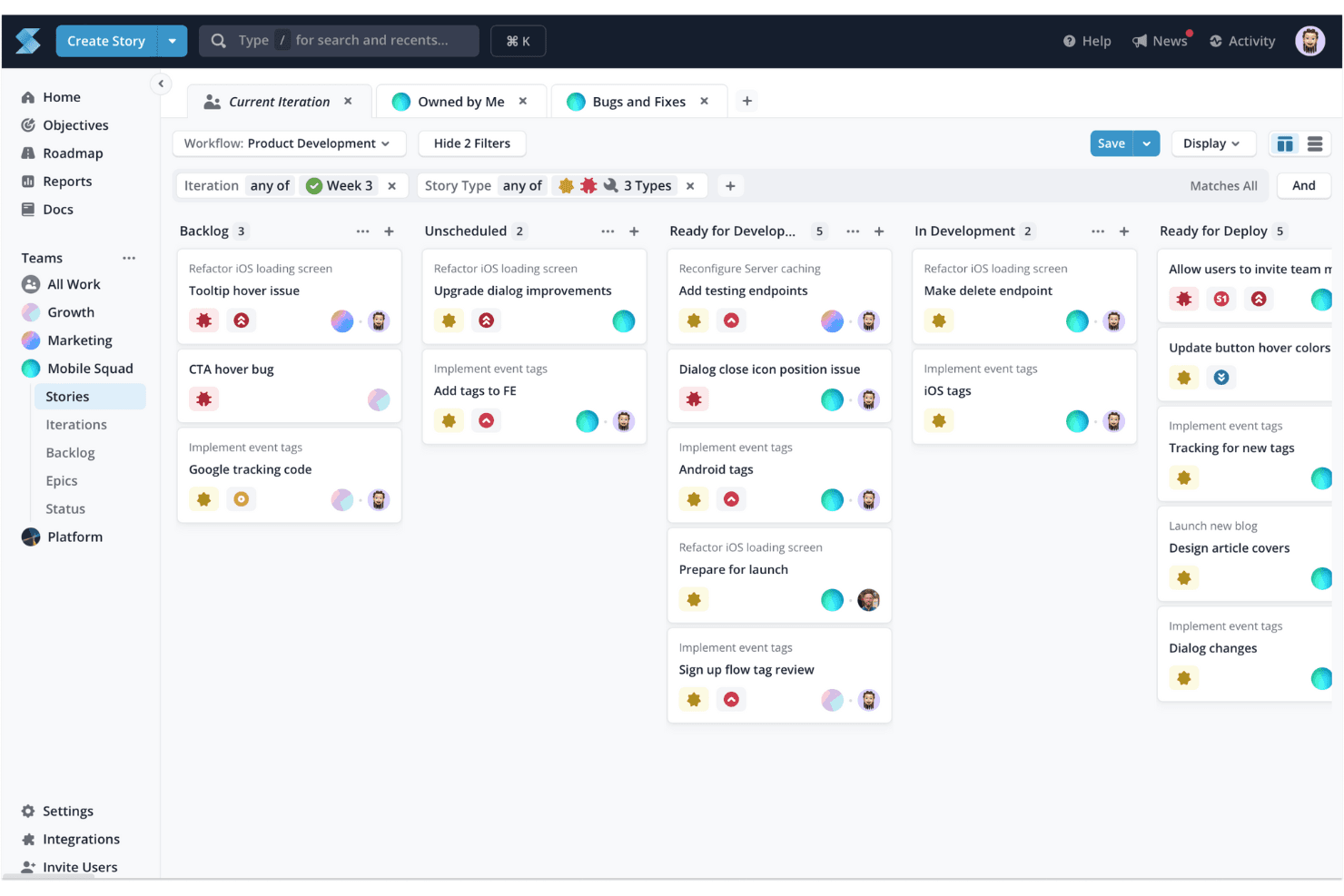
Shortcut organizes sprint stories across workflow stages in one view. Shortcut is a project management platform for software teams that connects product planning, engineering execution, and collaboration, making it a practical Jira alternative for native software development workflows.
Who Is Shortcut Best For?
Software product teams that need connected planning, engineering execution, and collaboration workflows.
Why Shortcut Is a Good Jira Alternative
I picked Shortcut because it connects product planning directly with native software development workflows. My team uses epics to group related stories, iterations to organize delivery cycles, and objectives to link engineering work with product outcomes. This keeps roadmap decisions visible while developers manage execution in the same workspace.
Shortcut Key Features
- Custom fields: Add structured metadata to stories for consistent project tracking.
- Labels: Categorize stories with reusable tags for filtering and reporting.
- Story templates: Create repeatable story formats with predefined details.
- Search and filters: Find stories using keywords, labels, owners, and custom criteria.
Shortcut Integrations
Shortcut offers integrations with GitHub, Slack, GitLab, Bitbucket Cloud, Sentry, Productboard, Airfocus, Figma, and Zendesk, plus Zapier. It also provides a REST API and webhooks for custom integrations and workflow automation.
Pros and Cons
Pros:
- Iterations keep development cycles focused
- Epics connect execution with product outcomes
- Native workflows fit software delivery teams
Cons:
- Reporting depth trails larger Jira alternatives
- Less suitable for nontechnical business teams
Learn more about Shortcut: Best for developer-native roadmap planning
- Free plan available
- From $10/user/month (billed annually)
Visit WebsiteCustomer Rating:4.6/5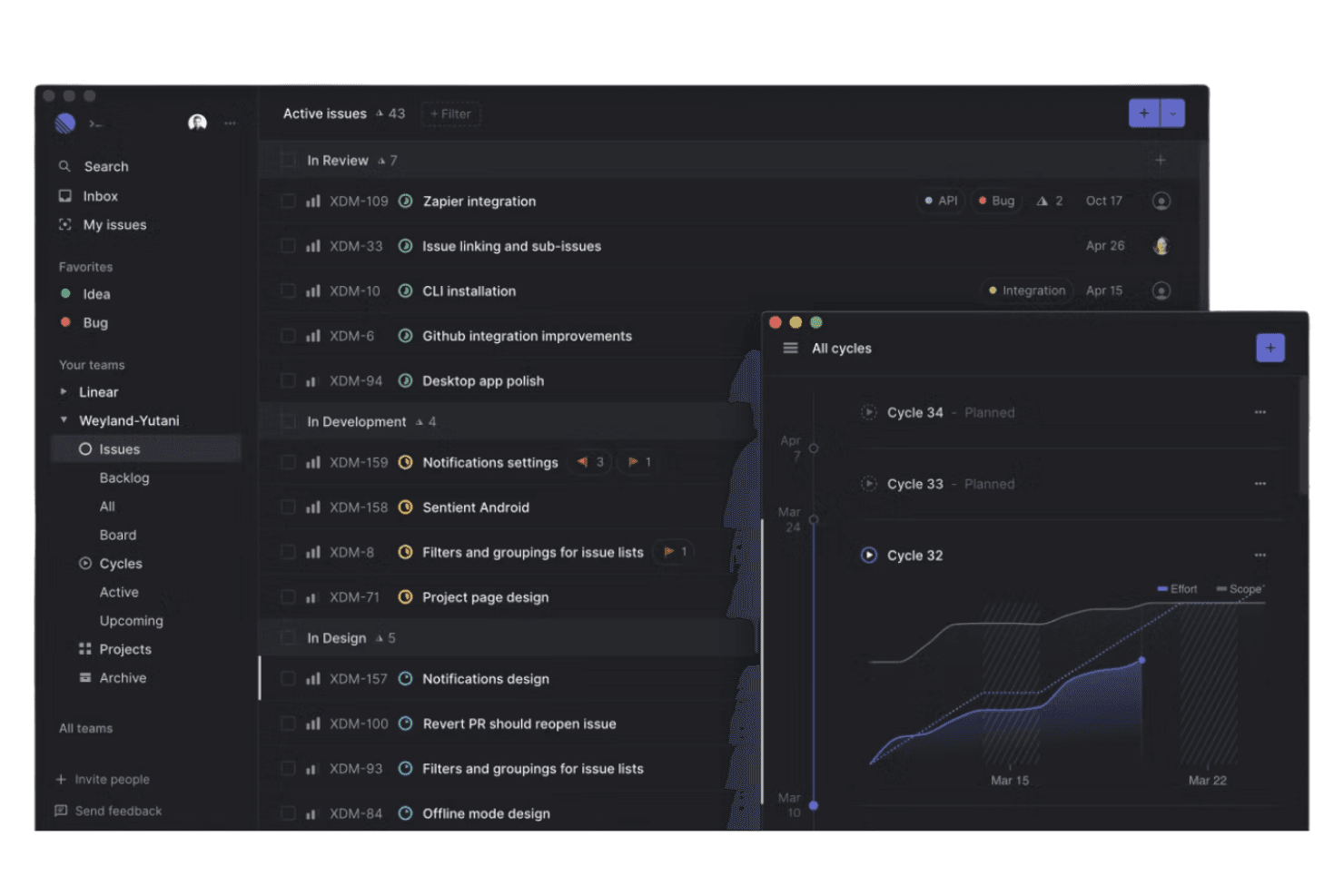
Linear manages tasks and progress to support fast, focused product development. Linear is a project management platform for product and engineering teams that connects issue tracking, planning, and collaboration in one focused workspace.
Who Is Linear Best For?
Product and engineering teams that want developer-native roadmap planning connected to issue tracking and delivery.
Why Linear Is a Good Jira Alternative
I picked Linear because its developer-native roadmap planning connects initiatives, projects, and issues in one hierarchy. I use cycles to turn roadmap priorities into focused delivery work, while project updates keep stakeholders informed about scope, progress, and risks. That structure helps me trace an objective from product strategy through engineering execution.
Linear Key Features
- Triage inbox: Review, assign, merge, or archive incoming issues.
- Custom fields: Add structured fields for estimates, priorities, or categories.
- GitHub integration: Link pull requests and commits to Linear issues.
- Issue dependencies: Mark blocking and blocked-by relationships between issues.
Linear Integrations
Linear offers native integrations with GitHub, GitLab, Slack, Notion, Figma, Zendesk, Microsoft Teams, Sentry, Jira, and Google Sheets, plus Zapier. Linear also provides an API for building custom integrations.
Pros and Cons
Pros:
- Project updates clarify scope and risks
- Cycles connect priorities to delivery work
- Developer-native issue and roadmap hierarchy
Cons:
- Reporting depth trails mature Jira setups
- Opinionated workflows limit process flexibility
Learn more about Linear: Best for planning linked to code and pipelines
- Free plan available; 30-day free trial
- From $29/user/month (billed annually)
Visit WebsiteCustomer Rating:4.5/5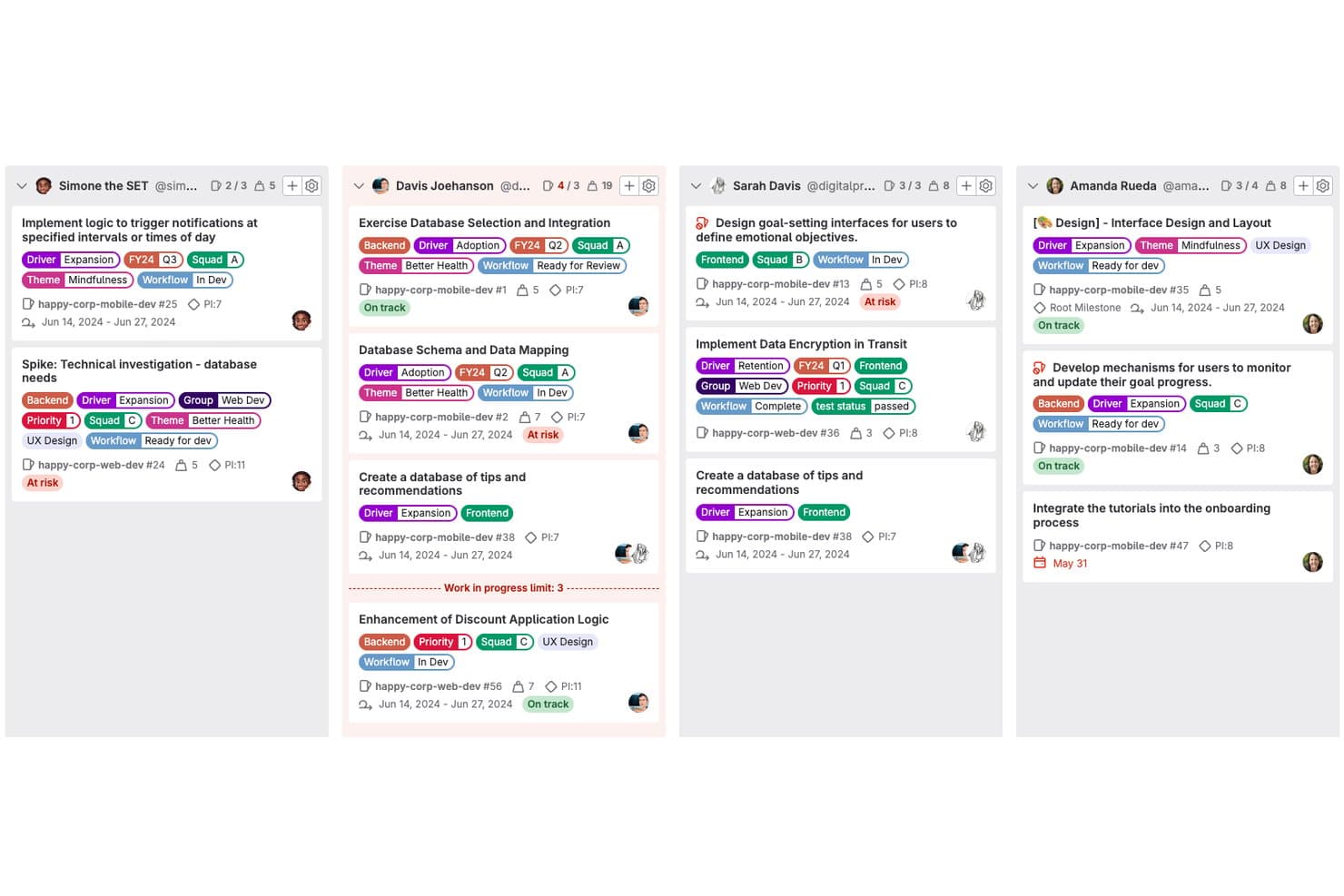
GitLab organizes team tasks by assignee with status tags and priority labels. GitLab is a DevSecOps platform for product and engineering teams that connects planning, source code, collaboration, and delivery, helping reduce handoff gaps across the software development lifecycle.
Who Is GitLab Best For?
GitLab suits product and engineering teams that want to connect product planning with source code, CI/CD pipelines, and software delivery.
Why GitLab Is a Good Jira Alternative
I picked GitLab because it connects product planning directly to code and pipelines. I use issues, epics, and roadmaps to map priorities, then track implementation through merge requests and CI/CD pipeline status. That link helps my team spot delivery risks before releases move forward.
GitLab Key Features
- Milestones: Group work by release, sprint, or delivery target.
- Labels: Categorize work by type, priority, team, or status.
- Time tracking: Record time spent on tasks and compare estimates.
- Issue boards: Organize work into customizable visual columns.
GitLab Integrations
GitLab has documented integrations with Jira, Jenkins, GitLab for Slack, Linear, ClickUp, Confluence, Buildkite, and Datadog. It also supports project webhooks and an API for custom integrations.
Pros and Cons
Pros:
- Epics and roadmaps connect cross-project priorities
- One workspace covers issues, source, and delivery
- Planning links directly to code and pipelines
Cons:
- Broad interface can overwhelm new users
- Product planning trails dedicated roadmap tools
Learn more about GitLab: Best for AI task automation
- Free plan + free demo available
- Pricing upon request
Visit WebsiteCustomer Rating:4.5/5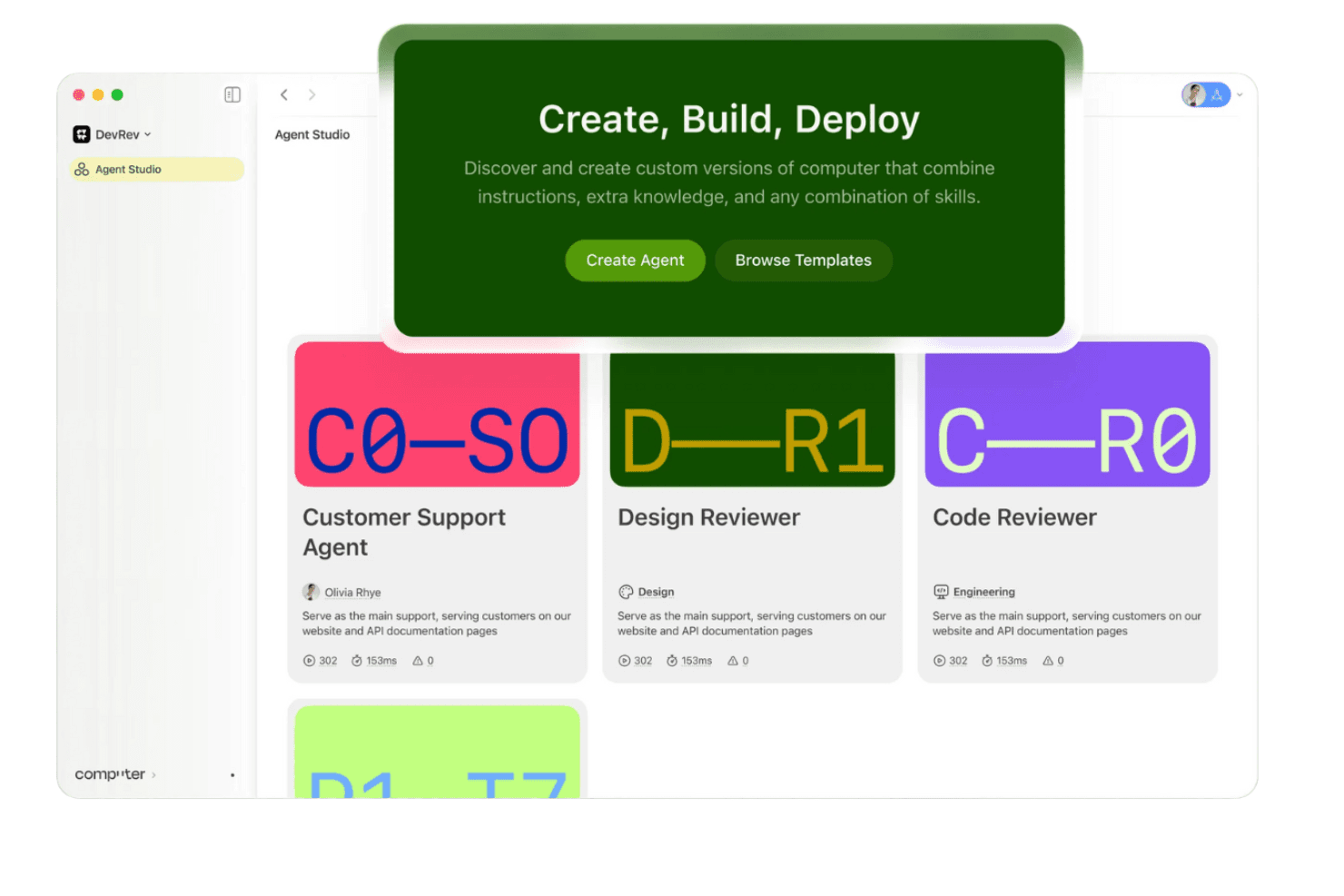
DevRev links product and customer teams to create customer-focused development. DevRev is a product management and customer support platform for software teams that want to connect customer feedback, product planning, engineering work, and service requests in one Jira alternative.
Who Is DevRev Best For?
DevRev suits product and customer support teams that want AI to automate routine tasks across feedback, engineering, and service workflows.
Why DevRev Is a Good Jira Alternative
I picked DevRev because its AI task automation connects customer requests with product and engineering work. My team uses AI to summarize feedback, classify support issues, and turn requests into trackable product tasks. That helps us move from customer signal to prioritized action without manually copying work between systems.
DevRev Key Features
- Product hierarchy: Organize products, features, issues, and tickets in one structure.
- Kanban boards: Track work through customizable visual workflow stages.
- Sprint planning: Assign issues to sprints and monitor delivery progress.
- Knowledge base: Create and publish help articles for customer self-service.
DevRev Integrations
DevRev documents 26 integrations, including Slack, Bitbucket, Calendly, Salesforce, ServiceNow, and HubSpot. It also provides an API for custom integrations.
Pros and Cons
Pros:
- Unifies product, issue, and ticket hierarchies
- Connects support requests to product work
- AI summarizes and classifies incoming customer feedback
Cons:
- Reporting depth trails mature Jira alternatives
- Advanced workflows require significant configuration
Learn more about DevRev: 5Best for product development
Aha!
- 30-day free trial + free demo available
- From $9/user/month
Visit WebsiteCustomer Rating:4.4/5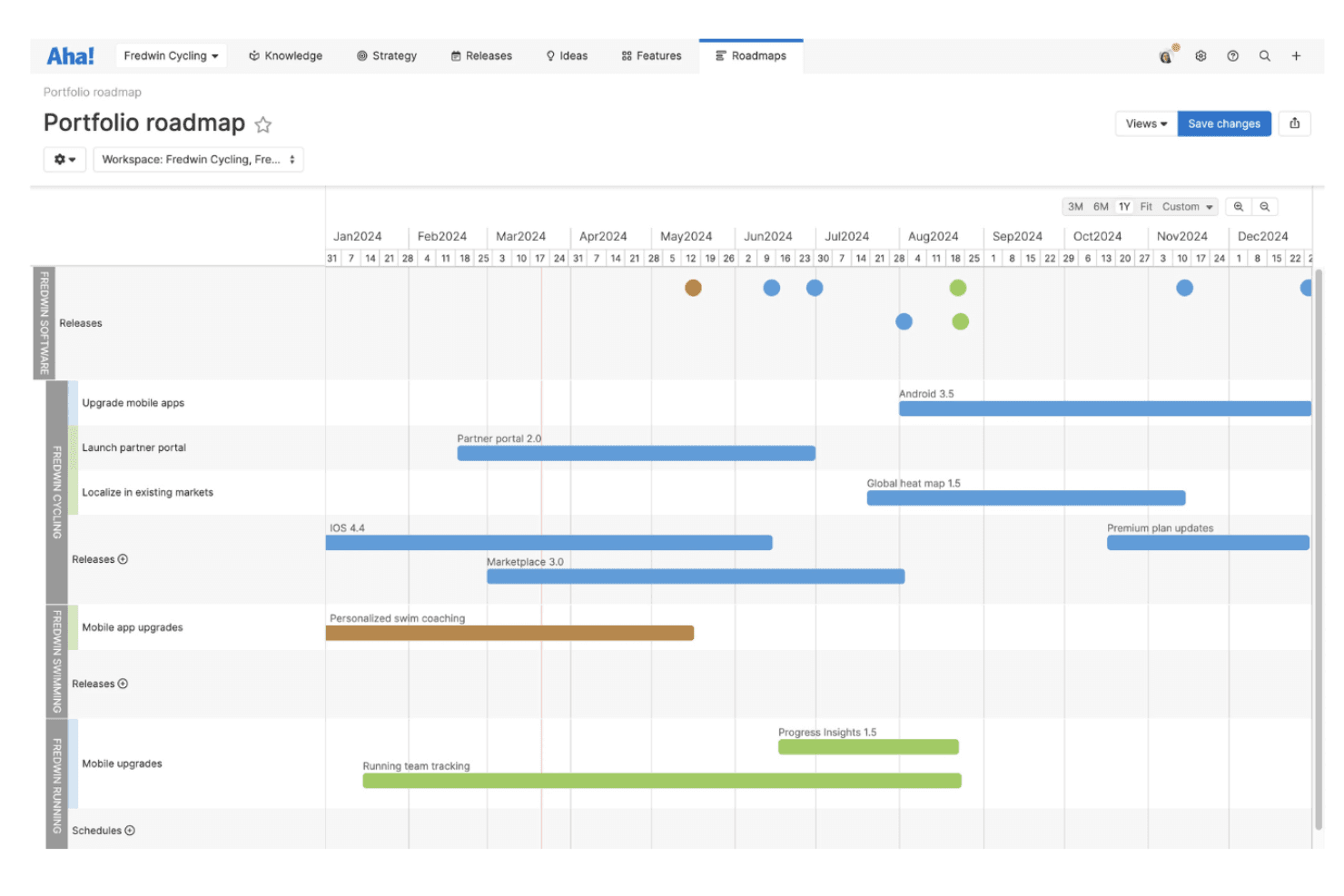
Aha! helps product teams build roadmaps, set goals, and track feature progress. Aha! is product management software for teams that need to connect product strategy with roadmaps, requirements, and delivery planning in one workspace.
Who Is Aha! Best For?
Product managers and cross-functional teams that need to connect product strategy, discovery, roadmaps, and delivery planning.
Why Aha! Is a Good Jira Alternative
I picked Aha! because it’s best for product development, connecting product strategy to roadmaps, requirements, and delivery planning. I use its product vision, roadmap, and release planning tools to turn customer needs into prioritized initiatives. My team can then link requirements to delivery work without losing sight of the outcomes behind each feature.
Aha! Key Features
- Idea portals: Collect and organize feedback from customers and internal teams.
- Whiteboards: Map workflows, concepts, and research findings visually.
- Custom reports: Build tailored views from product data and records.
- Workspace permissions: Control access across teams, products, and workspaces.
Aha! Integrations
Aha! offers more than 30 direct integrations, including Jira, Azure DevOps, GitHub, GitLab, Slack, Google Chat, Google Drive, Microsoft OneDrive, and Trello. It also supports Zapier and provides an API for custom integrations.
Pros and Cons
Pros:
- Roadmaps support detailed dependency planning
- Feedback portals turn requests into priorities
- Connects strategy, discovery, and delivery plans
Cons:
- Agile execution feels lighter than Jira
- Dense configuration slows initial team adoption
Learn more about Aha!: 6Best for managing projects across business ops
Odoo
- Free plan available
- From $8.95/user/month (billed annually)
Visit WebsiteCustomer Rating:4.2/5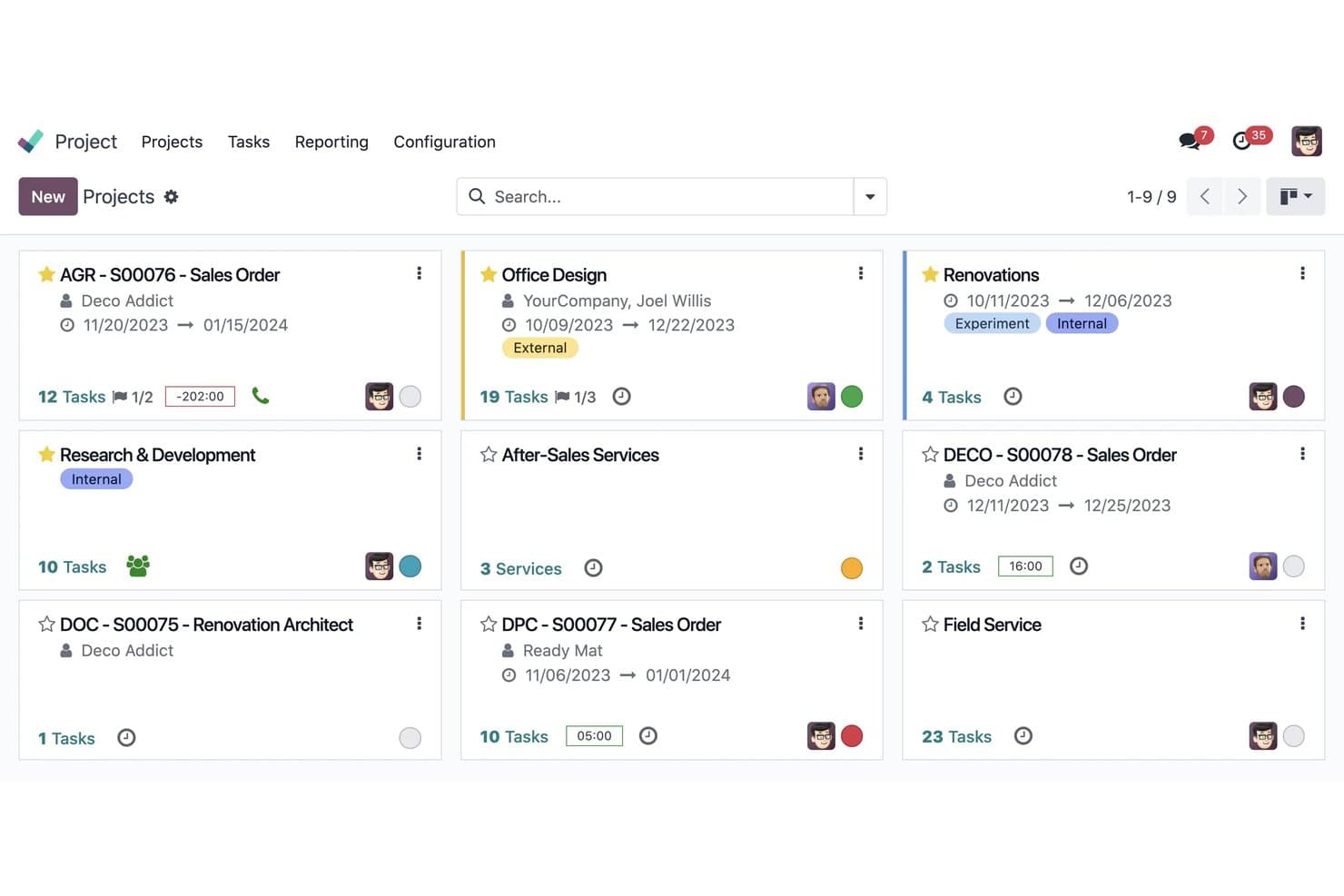
Odoo organizes multiple projects in a visual card-based dashboard. Odoo is an integrated business management suite with project planning, task tracking, and collaboration tools for teams that need to connect delivery work with sales, finance, and operations.
Who Is Odoo Best For?
Odoo suits operations-focused teams that need project work connected to sales, finance, inventory, and other business functions.
Why Odoo Is a Good Jira Alternative
I picked Odoo because my team can connect project tasks with sales orders, timesheets, invoices, and analytic accounting. I use its project milestones and profitability views to track delivery work alongside operational costs. This gives me one workspace for project execution and business decisions.
Odoo Key Features
- Kanban boards: Organize tasks by workflow stage with drag-and-drop updates.
- Gantt charts: Visualize project schedules, durations, and overlapping work.
- Task dependencies: Link tasks to define sequencing and delivery constraints.
- Recurring tasks: Automatically schedule routine work at set intervals.
Odoo Integrations
Odoo offers native integrations with Google Calendar, Outlook Calendar, Gmail, and Outlook. It also connects with Zapier and provides an external API for custom integrations on Custom pricing plans.
Pros and Cons
Pros:
- Recurring tasks support repeatable operational workflows
- Profitability views tie delivery to costs
- Connects project work to business operations
Cons:
- Task views feel less specialized than Jira
- Broader suite complicates focused project administration
Learn more about Odoo: Best for JetBrains dev teams tracking work in one place
- Free plan available
- From $4.50/user/month (billed annually)
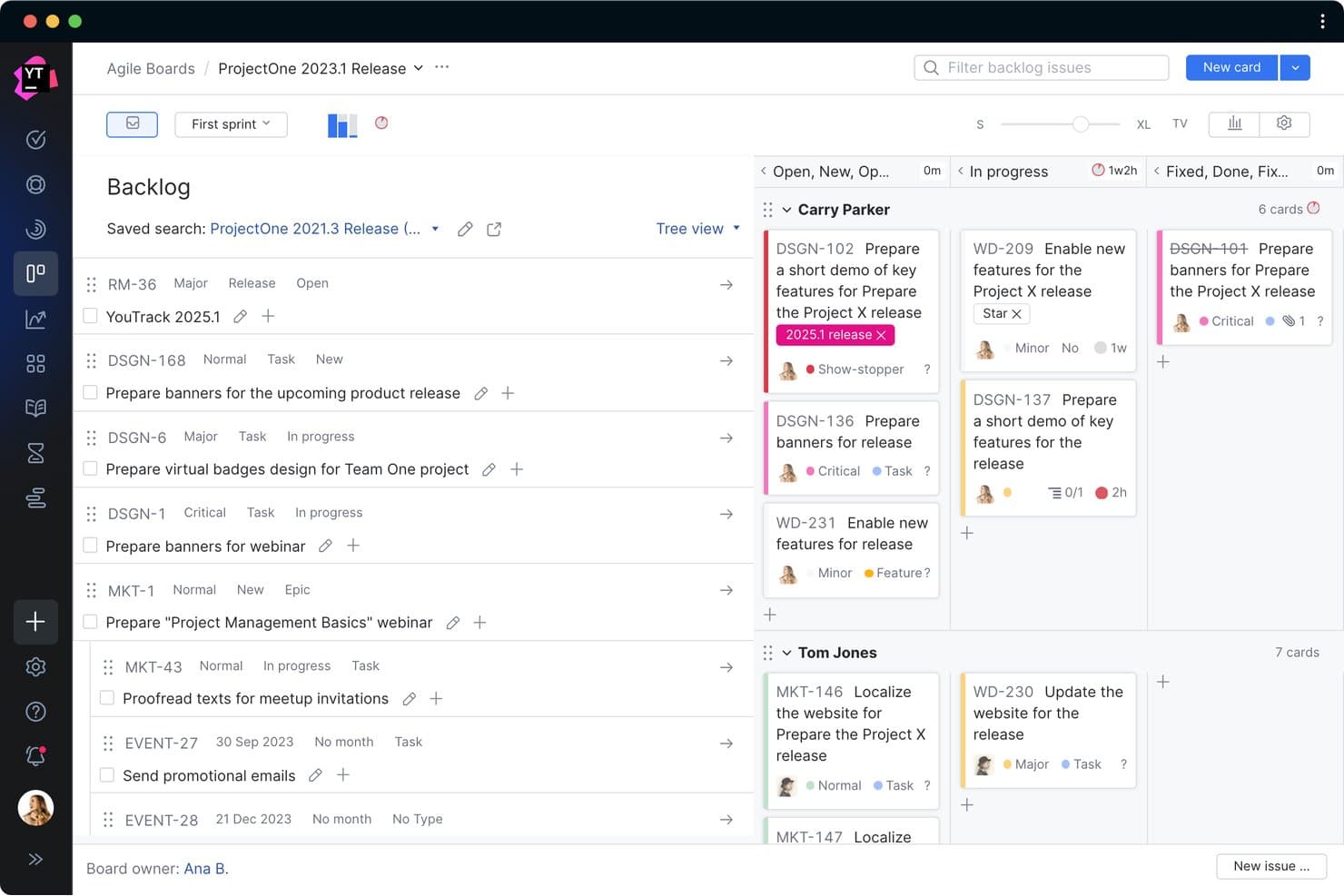
YouTrack organizes sprint tasks across backlog and kanban board views. YouTrack is JetBrains’ project management and issue tracking platform for software teams that need agile planning, customizable workflows, and clearer collaboration across product development.
Who Is YouTrack Best For?
YouTrack suits JetBrains-oriented software teams that need agile planning, issue tracking, and customizable workflows in one workspace.
Why YouTrack Is a Good Jira Alternative
I picked YouTrack because its “Best for JetBrains dev teams tracking work in one place” positioning fits teams already working across JetBrains tools. My team uses agile boards to plan sprints and custom workflows to route bugs, reviews, and releases. Its issue views keep engineering work connected to product priorities without adding another tracking layer.
YouTrack Key Features
- Gantt charts: Map project timelines, milestones, and task dependencies.
- Time tracking: Log work hours against individual issues.
- Knowledge base: Create and organize team documentation in articles.
- Reports: Generate burndown, cumulative flow, and issue distribution reports.
YouTrack Integrations
YouTrack offers native integrations with GitHub, GitLab, Bitbucket, TeamCity, Jenkins, and Zendesk, plus external integrations with Slack and Telegram. YouTrack also provides an open REST API for custom integrations.
Pros and Cons
Pros:
- Issue views connect product and engineering priorities
- Custom workflows automate bug and release routing
- Agile boards support sprint planning and backlogs
Cons:
- Cross-project reporting needs careful configuration
- Interface hides actions behind dense menus
Learn more about YouTrack: Best for remote team collaboration
- Free plan available
- From $7/user/month (billed annually)
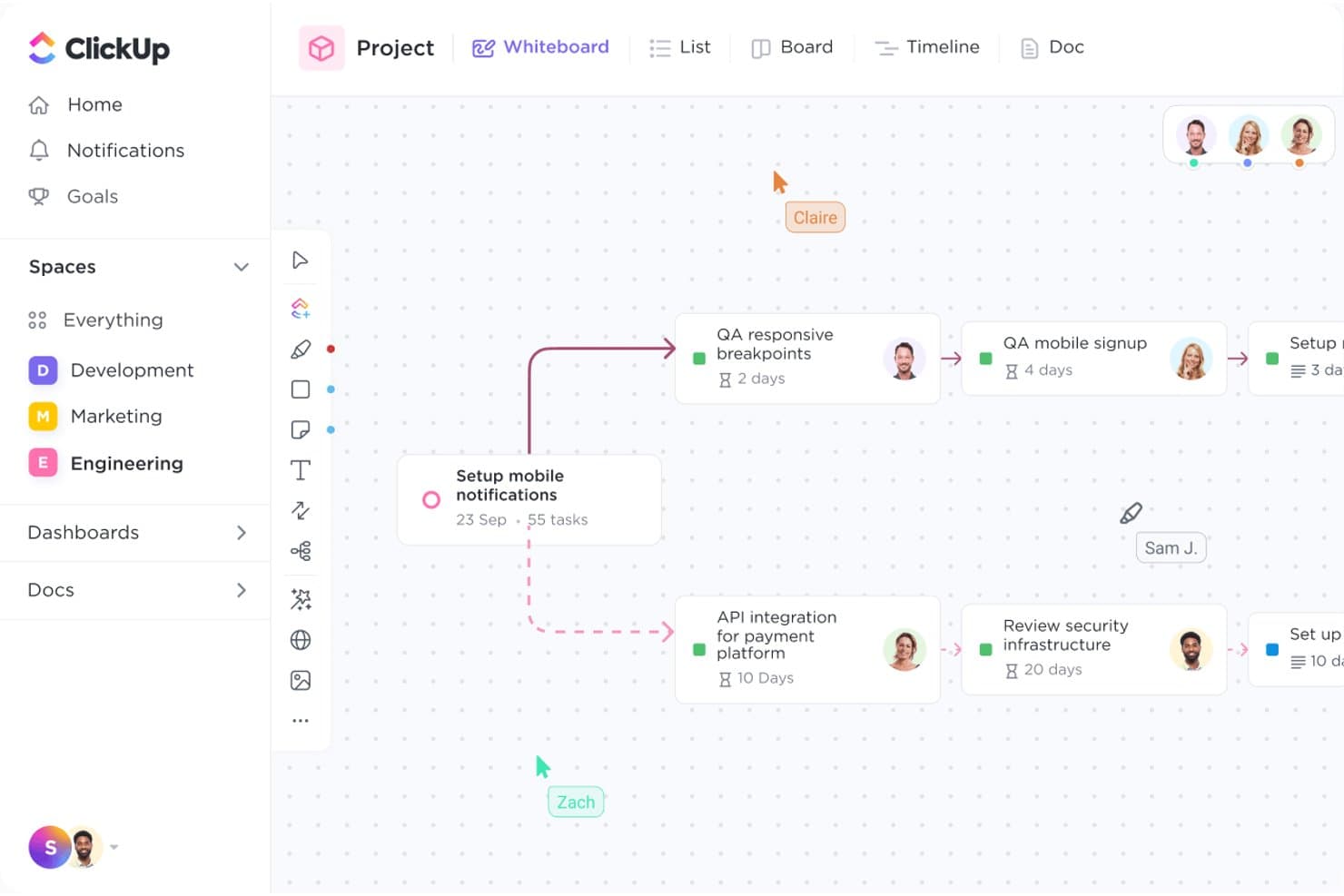
ClickUp's Whiteboard lets teams map tasks and workflows visually. ClickUp is an all-in-one project management platform for product teams that brings tasks, docs, goals, and workflows into one workspace, reducing tool sprawl and keeping priorities, handoffs, and delivery aligned.
Who Is ClickUp Best For?
Distributed product and operations teams can use ClickUp to coordinate tasks, docs, goals, and handoffs across time zones.
Why ClickUp Is a Good Jira Alternative
I picked ClickUp because my distributed team uses shared tasks, Docs, and Goals to keep product decisions connected to delivery. Its customizable workflows clarify ownership across time zones, while task comments and assigned updates keep handoffs visible. That makes ClickUp a strong choice for remote team collaboration.
ClickUp Key Features
- Gantt charts: Map timelines, dependencies, milestones, and task durations.
- Custom fields: Add structured data fields to tasks and projects.
- Time tracking: Record time spent on individual tasks.
- Dashboards: Build widgets for workload, progress, and project metrics.
ClickUp Integrations
ClickUp offers native integrations with Slack, Microsoft Teams, GitHub, GitLab, Bitbucket, Google Drive, Dropbox, Google Calendar, Figma, and Zoom, plus Zapier. It also provides an API for custom integrations.
Pros and Cons
Pros:
- Assigned comments clarify remote-team handoffs
- Custom views support varied delivery workflows
- Tasks, Docs, and Goals share one workspace
Cons:
- Complex spaces can slow daily navigation
- Broad feature set increases workspace setup
Learn more about ClickUp : Best for Microsoft-stack engineering teams
- Free plan available
- From $6/user/month
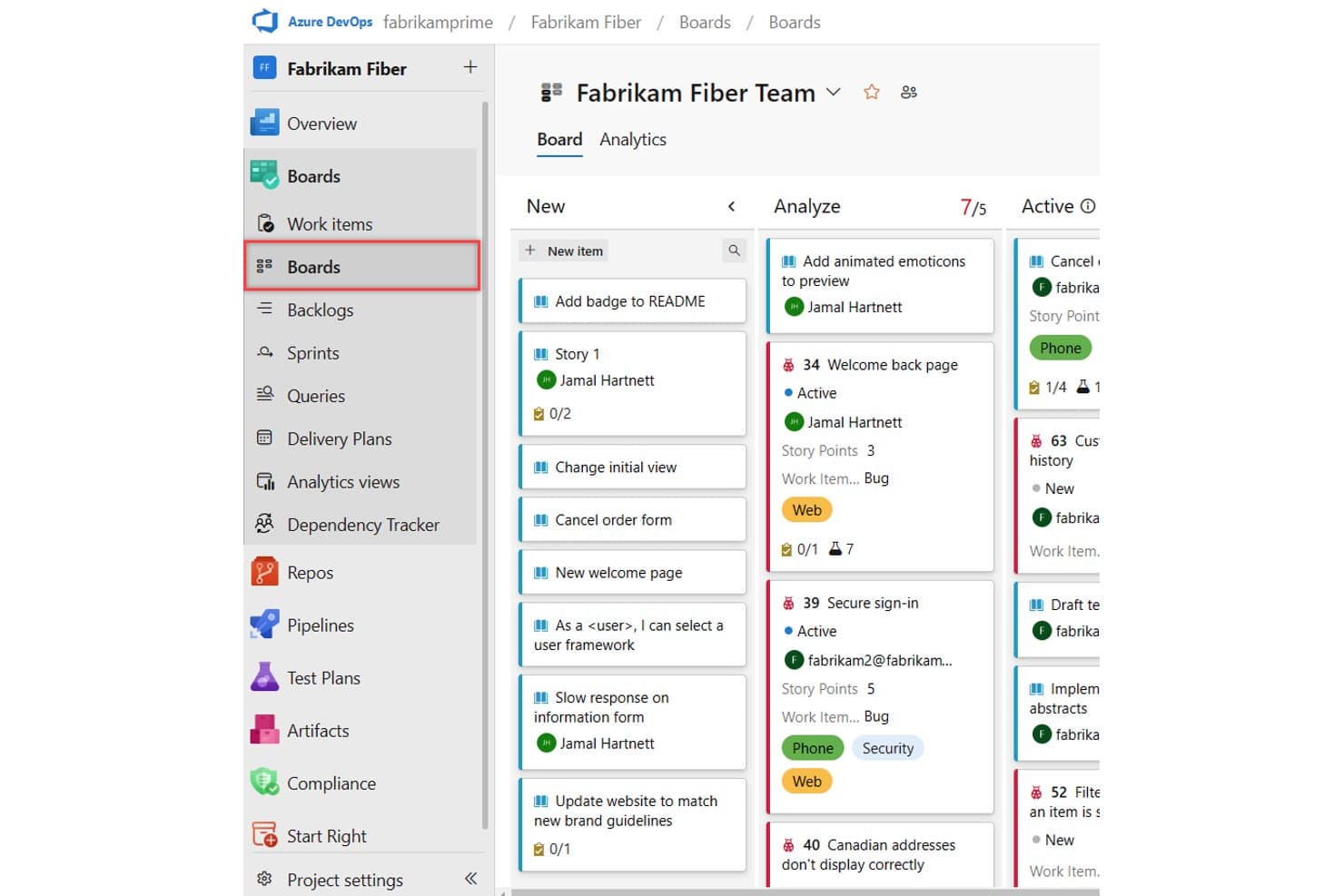
Azure DevOps organizes work items visually across customizable Kanban board columns. Azure DevOps is a software development platform for engineering teams that need project planning, code management, testing, and delivery workflows in one place, especially when replacing Jira within Microsoft-centered environments.
Who Is Azure DevOps Best For?
Azure DevOps suits engineering teams that build, test, and release software within Microsoft-centered development environments.
Why Azure DevOps Is a Good Jira Alternative
I picked Azure DevOps because it supports Microsoft-stack engineering teams from backlog planning through release. My team uses Azure Boards to connect epics, features, user stories, and sprint capacity, then Azure Repos and Pipelines to move approved work into delivery. It earns its place among CPO Best Jira Alternatives Reviewed when product and engineering teams already build in Azure.
Azure DevOps Key Features
- Project dashboards: Configure widgets to monitor team metrics and work status.
- Azure Test Plans: Create test cases, test suites, and exploratory testing sessions.
- Azure Artifacts: Host and manage package feeds for shared dependencies.
- Project wiki: Document requirements, decisions, processes, and technical guidance.
Azure DevOps Integrations
Azure DevOps supports integrations with Slack, Microsoft Teams, ServiceNow, and Jenkins, plus Microsoft ecosystem connections and REST APIs for custom integrations.
Pros and Cons
Pros:
- Integrated test management supports release quality
- Flexible work item hierarchies support product planning
- End-to-end traceability from backlog to deployment
Cons:
- Backlog views feel dense and dated
- Configuration can overwhelm smaller product teams
Learn more about Azure DevOps: 10Best for open-source Jira migration
Plane
- Free plan + 14-day free trial + free demo available
- From $6/user/month (billed annually)
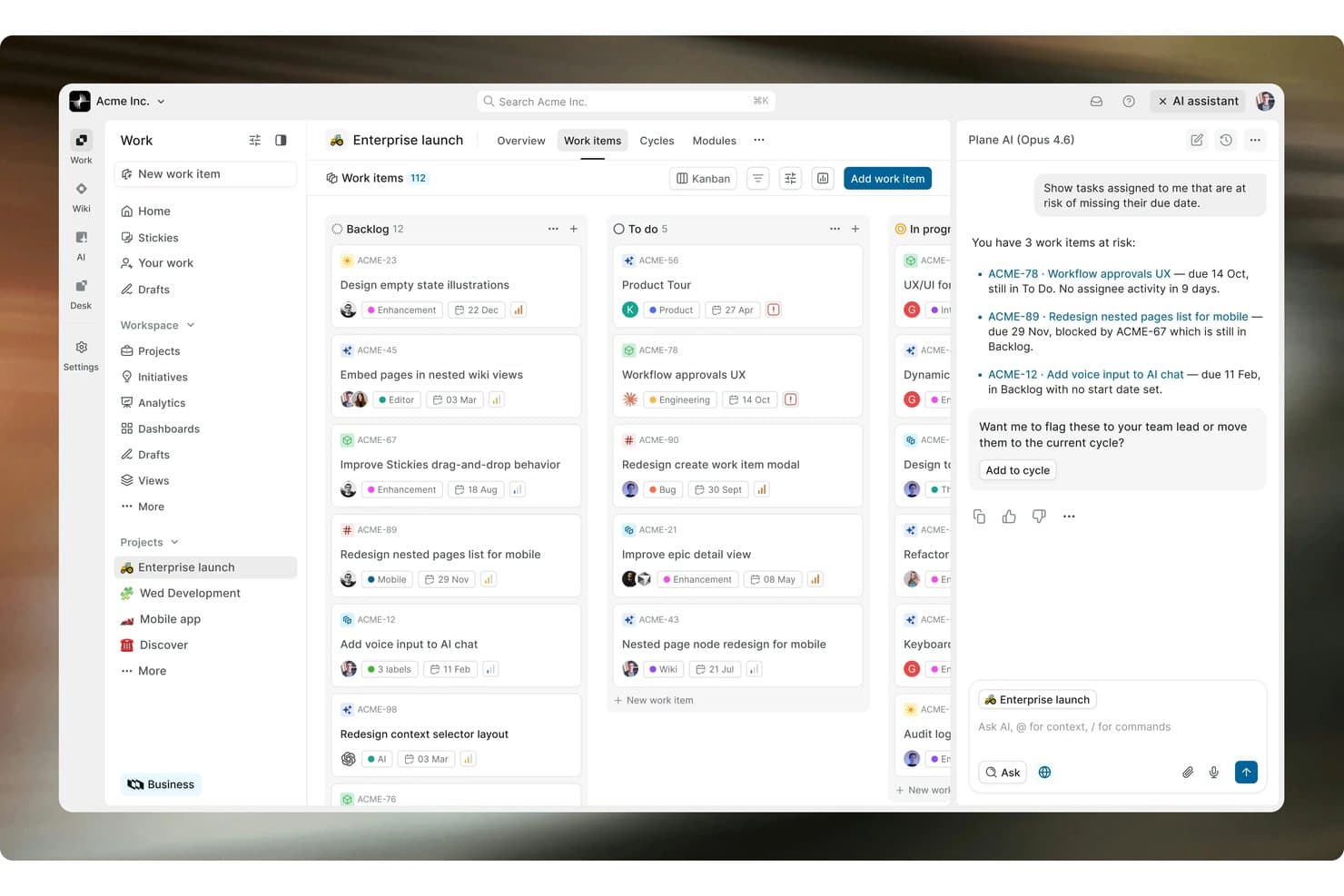
Plane's AI assistant flags at-risk tasks directly within the Kanban board. Plane is a project management platform for product and engineering teams that brings issues, cycles, roadmaps, and project discussions into one workspace with less administrative overhead.
Who Is Plane Best For?
Product and engineering teams moving from Jira will appreciate Plane’s open-source workspace for issues, cycles, roadmaps, and discussions.
Why Plane Is a Good Jira Alternative
I picked Plane because its open-source workspace supports a practical Jira migration without locking your team into a closed system. I use issues, cycles, and roadmaps to connect delivery work with product priorities, while project discussions keep context beside execution. That combination makes Plane a strong choice for teams seeking an open-source Jira migration path.
Plane Key Features
- Custom views: Save filtered layouts for different workflows.
- Modules: Group related work into larger delivery initiatives.
- Project pages: Create documentation with rich text, embeds, and links.
- Work item intake: Collect and review incoming requests before planning.
Plane Integrations
Plane offers marketplace integrations with GitHub, GitLab, Jira, Slack, Sentry, and Raycast, plus migration tools for Asana, ClickUp, Confluence, Linear, and Notion. It also provides a REST API and webhooks for custom integrations and automated workflows.
Pros and Cons
Pros:
- Cycles, modules, and pages connect delivery context
- Jira-style issues ease migration for teams
- Open-source deployment supports data control
Cons:
- Self-hosting requires ongoing infrastructure maintenance
- Smaller plugin ecosystem than Jira
Learn more about Plane:
Andre Jira-alternativer
Her er noen flere Jira-alternativer som ikke kom med på kortlisten min, men som likevel er verdt å ta en titt på:
- 11monday AI WorkspaceBest for cross-functional roadmap visibility
- 12WrikeBest for scaling work beyond dev teams
- 13CeloxisBest for PMO-led portfolio oversight
- 14Teamwork.comBest for client-facing project delivery
- 15OpenProjectBest for EU-hosted open source teams
- 16HiveBest for built-in chat and creative proofing
- 17Zoho SprintsBest for integrated agile time tracking
- 18NotionBest for docs, wikis, and sprints in one place
- 19AsanaBest for no-code cross-team automation
- 20Superhuman DocsBest for AI-driven collaborative document creation
How I Evaluate Jira Alternatives
I split my evaluation into three parts. First, core functionality: can the tool track and manage issues with customizable statuses and support sprint or kanban workflows? That carries the most weight. Second, I look for standout features like native roadmap timelines or built-in prioritization frameworks. Third, I consider migration support and pricing transparency.
Core Functionality (Table Stakes For This List)
When I'm selecting tools for my list, I score each one on a scale from 0 (does not offer the functionality) to 5 (excels in this area) for each core functionality listed below. I then convert the total into a percentage to help assess each tool's overall fit, with extra weight on any functionalities I’ve deemed essential.
- Issue & Task Tracking (Essential): I check whether teams can assign, prioritize, and move epics, bugs, and subtasks through configurable statuses.
- Agile Planning (Essential): I assess backlog grooming, sprint planning, kanban boards, dependencies, and release coordination across teams.
- Workflow Customization: I look for multiple workflows, issue types, fields, approvals, and conditional transitions matching discovery and delivery processes.
- Reporting & Visibility: I review dashboards, burndown charts, velocity views, and cross-project status reporting for product and engineering stakeholders.
- Dev & Collaboration Integrations: I check connections with code repositories, chat tools, documentation, and deployment services for traceable handoffs.
- Workflow Automation: I assess rules that assign owners, update statuses, trigger notifications, and connect handoffs across projects.
Once I have a list of tools that meet the criteria, I consider what sets each platform apart.
Differentiating Factors (What Sets Vendors Apart)
Here's how I compare and contrast different vendors:
Standout Features
I look for native prioritization frameworks like RICE or MoSCoW scoring built into the backlog, so product teams can rank work without maintaining separate spreadsheets. Customer feedback integration also matters—tools like Productboard let you link support requests directly to roadmap items, which closes the loop between what users ask for and what ships. I also evaluate whether timeline views are native or require add-ons, since drag-and-drop Gantt roadmaps save hours of stakeholder communication.
Beyond Features
I evaluate migration support first—tools like Linear and Shortcut offer Jira importers, but I check whether sprints, custom fields, and attachments transfer cleanly or need manual cleanup. Total cost of ownership matters too, especially hidden add-on fees that inflate per-seat pricing as your team scales. I also look at cross-functional adoption: can a non-technical stakeholder view a roadmap without needing a full license or training on engineering workflows?
Hvorfor se etter et Jira-alternativ?
Selv om Jira er et godt valg av programvare for produktutvikling, finnes det flere grunner til at enkelte brukere ser etter alternative løsninger. Det kan hende du ser etter et Jira-alternativ fordi:
- Du synes Jira er for komplekst for behovene dine
- Teamet ditt trenger et mer intuitivt grensesnitt
- Du ønsker bedre integrasjon med eksisterende verktøy
- Du ser etter et mer budsjettvennlig alternativ
- Teamet ditt trenger raskere oppsett og innføring
- Du ser etter bedre kundestøtte
Hvis noe av dette høres kjent ut, har du kommet til rett sted. Listen min inneholder flere alternativer innen programvare for produktutvikling som passer bedre for team som møter disse utfordringene med Jira, og som ser etter alternative løsninger.
Viktige funksjoner i Jira
Her er noen av de viktigste funksjonene i Jira, slik at du kan sammenligne hva alternative løsninger tilbyr:
- Oppgavehåndtering: Hjelper teamet ditt med å organisere og tildele oppgaver effektivt
- Feilsporing: Gjør det mulig å rapportere, spore og løse feil
- Tilpassbare arbeidsflyter: Lar deg tilpasse prosesser etter teamets behov
- Veikartlegging: Tilrettelegger for produktplanlegging og prioritering
- Rapportering og analyse: Gir innsikt i prosjektfremdrift og teamets ytelse
- Samarbeidsverktøy: Muliggjør kommunikasjon og samarbeid på tvers av ulike team
- Tidsregistrering: Overvåker hvor mye tid som brukes på oppgaver og prosjekter
- Integrasjonsmuligheter: Kobler seg til andre verktøy for å utvide funksjonaliteten
- Brukerhistorier: Hjelper deg med å samle inn og administrere brukerkrav
- Endringslogger: Sporer endringer og oppdateringer for bedre versjonskontroll