
Som produktansvarlig står du overfor utfordringen med å forstå brukerne dine uten at det koster for mye. Du trenger innsikt i brukeratferd for å forbedre produktet ditt, men dyre verktøy er ikke alltid et alternativ. Det er her gratis programvare for brukersporing kommer til nytte.
Jeg har gjennomgått og testet ulike alternativer for å hjelpe deg med å finne de beste gratis løsningene. Med min erfaring fra produktledelsesbransjen ønsker jeg å gi deg en objektiv og grundig vurdering av de beste alternativene som tilbyr gratis abonnementer eller prøveperioder.
I denne artikkelen får du vite mer om programvare som kan hjelpe teamet ditt med å få verdifull innsikt i brukeratferd, slik at dere kan ta informerte beslutninger uten betydelige økonomiske investeringer. La oss se nærmere på alternativene som kan passe perfekt til behovene dine.
Hvorfor du kan stole på våre programvareanbefalinger
6,700+
Reviews
20
Industry experts
16+
Evaluation factors
14
Years
Teamet vårt har testet og anmeldt programvare siden 2012. Vi er selv produktledere, så vi vet hvor vanskelig og hvor viktig det er å velge riktig programvare.
I denne guiden har vi vurdert verktøyene gjennom praktisk testing og uavhengig research og gitt dem poeng ut fra våre utvelgelseskriterier.
Anmeldelsene våre bygger på vår egen redaksjonelle vurdering. De er ikke et salgsargument.
Ekspertanmeldere:
- Andrew LumbySenior TPM
- Cristiano ValimSenior UI/UX Lead


Sammenligningstabell: Gratis programvare for brukersporing
Denne sammenligningstabellen oppsummerer prisdetaljene for mine beste utvalgte gratis programvarer for brukersporing.
| Tool | Best For | Trial Info | Price | ||
|---|---|---|---|---|---|
| 1 | Best for rage click and drop-off detection | Free plan available | From $55/month | Website | |
| 2 | Best for heatmaps with funnels and drop-off analysis | 14-day free trial + free plan available | From $32/month | Website | |
| 3 | Best for heatmaps with unlimited free captures | Free plan available | From $39/month (billed annually) | Website | |
| 4 | Best for 12-month free session replay retention | Free plan available | Pricing upon request | Website | |
| 5 | Best for analytics-linked session replay at scale | Free plan available | Pricing upon request | Website | |
| 6 | Best for session replay with AI-flagged friction | Free plan available | From $39/month | Website | |
| 7 | Best for open-source product analytics | Free plan available | Pricing upon request | Website | |
| 8 | Best for funnel drop-off and rage click analysis | Free plan available | From $140/month | Website | |
| 9 | Best for self-hosted, consent-free tracking | 21-day free trial | From $26/month (billed annually) | Website | |
| 10 | Best for debug-focused session replay | 14-day free trial + free plan available | From $176/month (billed annually) | Website |


Anmeldelser av den beste gratis programvaren for brukersporing
Nedenfor finner du mine detaljerte sammendrag av den beste gratis programvaren for brukersporing som kom med på kortlisten min. I anmeldelsene mine får du en grundig gjennomgang av de viktigste funksjonene, fordeler & ulemper, integrasjoner og ideelle bruksområder for hvert verktøy, slik at du kan finne det som passer best for deg. Mens noen av disse verktøyene tilbyr en helt gratis versjon, tilbyr andre en gratis prøveperiode. Jeg har lagt til en merknad om hva som er gratis i hver av anmeldelsene mine.
 Best for rage click and drop-off detection
- Free plan available
- From $55/month
Visit WebsiteCustomer Rating:4.6/5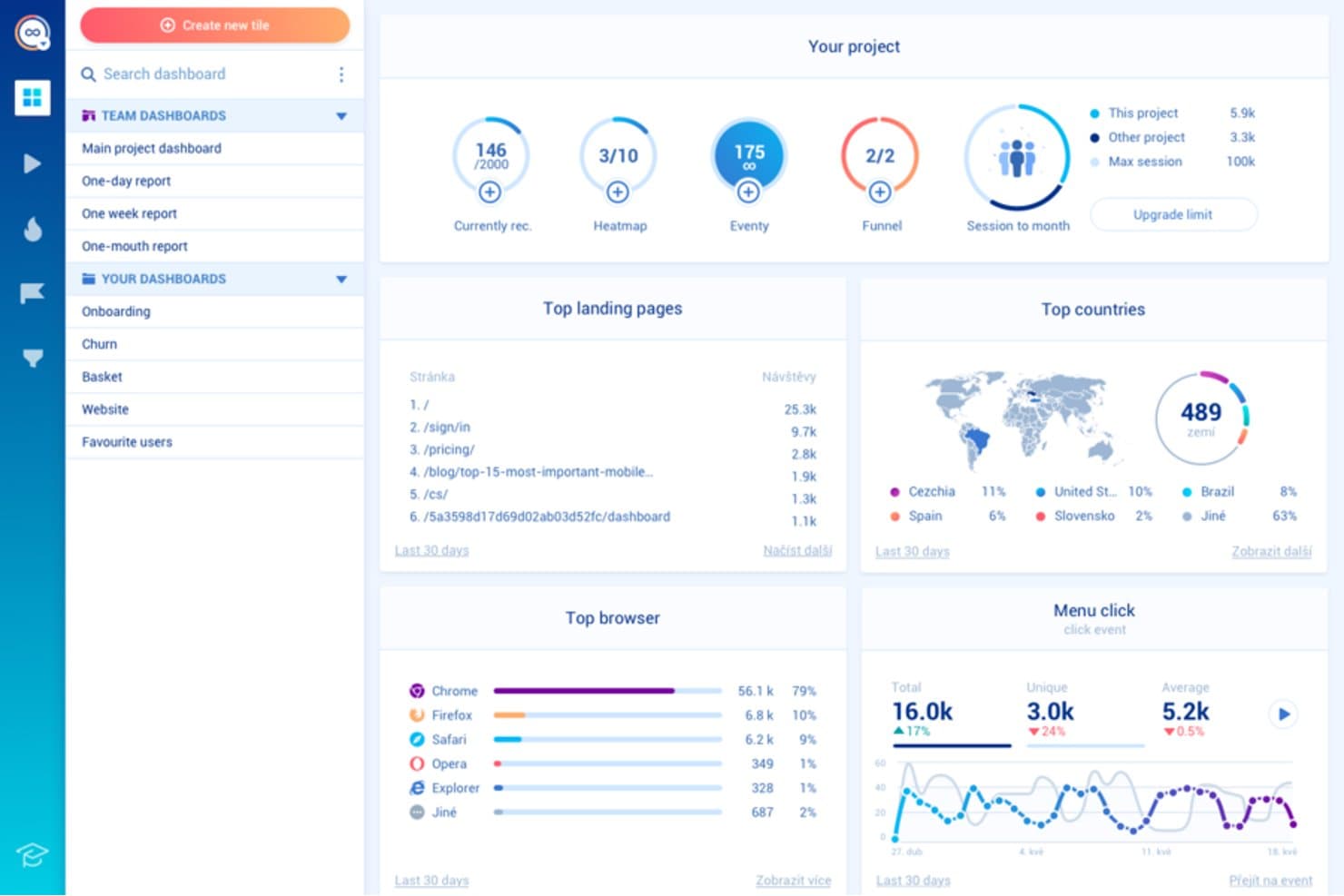
Smartlook tracks landing pages, browsers, and countries in one dashboard. Smartlook is a user tracking and behavior analytics platform with session recordings, event tracking, heatmaps, funnels, and user journey analysis for websites and mobile apps.
Who Is Smartlook Best For?
Smartlook suits product and UX teams that need to identify rage clicks and drop-offs across websites and mobile apps.
Why I Picked Smartlook
I picked Smartlook because it pinpoints where users struggle before abandoning a flow. Session recordings expose rage clicks, while heatmaps show repeated clicks on noninteractive elements. Funnel analysis connects those behaviors to drop-offs, helping my team identify whether a broken interaction or confusing step blocks conversion.
Smartlook Key Features
- Mobile app tracking: Monitor user behavior across iOS and Android apps.
- Event tracking: Capture clicks, taps, form submissions, and custom actions.
- User journey analysis: Review the paths users take through your product.
- Data integrations: Connect Smartlook with tools in your product analytics stack.
Smartlook Integrations
Native integrations are not clearly documented. Smartlook supports connections with tools in your product analytics stack through its data integrations.
What's Free?
Smartlook offers a free plan without a time-limited subscription, capped at 3,000 sessions per month, two funnel reports, and 10 events. It includes session recordings, website and mobile heatmaps, behavior flows, customizable dashboards, Google Analytics, and Slack integrations; Smartlook plans to shut down the platform on September 30, 2027.
Pros and Cons
Pros:
- Supports journey analysis beyond individual sessions
- Connects funnel drop-offs to user behavior
- Detects rage clicks across web and mobile
Cons:
- Free usage limits funnel and event analysis
- Platform shutdown is planned for 2027
Learn more about Smartlook: Best for heatmaps with funnels and drop-off analysis
- 14-day free trial + free plan available
- From $32/month
Visit WebsiteCustomer Rating:4.7/5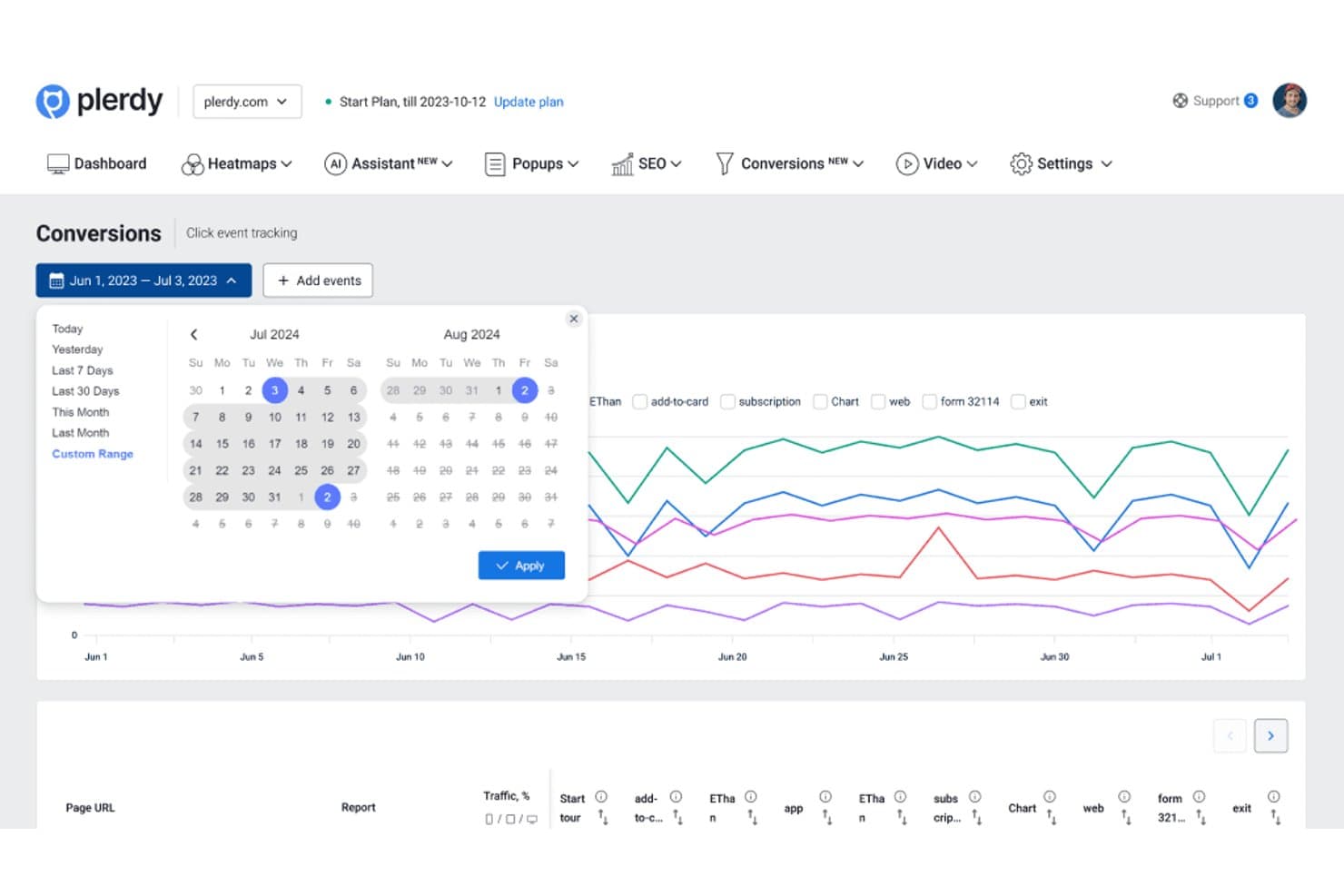
Plerdy lets users analyze conversion events across custom date ranges. Plerdy is a user tracking and website analytics platform that combines heatmaps, session recordings, event tracking, conversion analytics, and form performance reports in one interface.
Who Is Plerdy Best For?
Plerdy suits growth, ecommerce, and product teams that need to connect heatmap behavior with funnel conversion and drop-off analysis.
Why I Picked Plerdy
I picked Plerdy because it connects visual behavior data with conversion analysis. Its heatmaps show where users click, scroll, and lose interest, while funnel reports reveal which steps drive drop-offs. I use these views together to diagnose checkout friction or prioritize product experiments.
Plerdy Key Features
- Session recordings : Replay individual visits to inspect real navigation paths.
- Event tracking : Monitor custom interactions across pages and interface elements.
- Form analytics : Review field-level engagement and abandonment in website forms.
- User feedback surveys : Collect direct responses from visitors through on-site prompts.
Plerdy Integrations
Plerdy integrates with Google Analytics 4 and supports installation through Shopify and WordPress. It also supports Zapier through an API key for sending form data.
What's Free?
Plerdy offers a free-forever plan, not just a time-limited trial. It includes up to 100 heatmaps per day, 500 video sessions, 5,000 SEO audits, and 100 pop-up displays, so higher-volume teams will need a paid plan.
Pros and Cons
Pros:
- Tracks form abandonment at field level
- Includes session recordings for journey analysis
- Connects heatmaps to funnel drop-offs
Cons:
- Pop-up displays may distract from core analytics
- Free limits restrict higher-volume analysis
Learn more about Plerdy: Best for heatmaps with unlimited free captures
- Free plan available
- From $39/month (billed annually)
Visit WebsiteCustomer Rating:4.5/5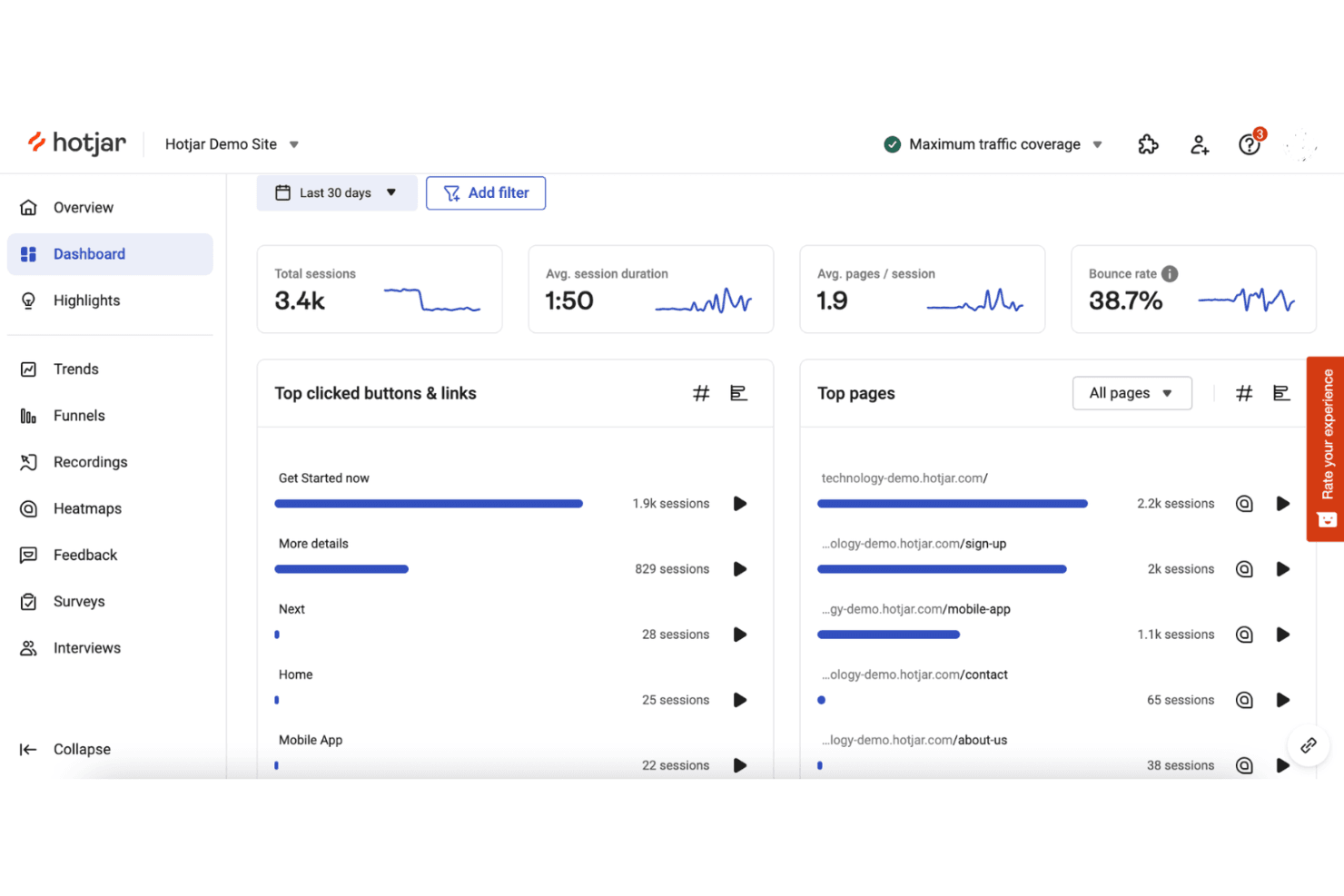
Hotjar tracks user behavior with heatmaps and session recordings. Hotjar (by Contentsquare) is user tracking software for heatmaps, session recordings, feedback polls, surveys, and user behavior analytics across websites and digital products.
Who Is Hotjar (by Contentsquare) Best For?
Hotjar suits product and UX teams that need heatmaps with unlimited free captures to understand user behavior without a large analytics budget.
Why I Picked Hotjar (by Contentsquare)
I picked Hotjar (by Contentsquare) because it’s best for heatmaps with unlimited free captures. I use click, move, and scroll heatmaps to see where users engage or abandon key pages. Session recordings then help connect those patterns to specific navigation and usability issues.
Hotjar (by Contentsquare) Key Features
- Surveys: Create on-site surveys to collect targeted user responses.
- Feedback widgets: Add widgets for users to share feedback on specific pages.
- Funnel analysis: Review user progression across defined conversion steps.
- User attributes: Filter behavioral data by custom user properties.
Hotjar (by Contentsquare) Integrations
Hotjar has documented integrations with Linear, Asana, and Unbounce, plus Zapier. Its API supports custom connections for sharing Hotjar data with other tools.
What's Free?
Hotjar (by Contentsquare) offers a free plan with unlimited heatmap captures, plus a 15-day free trial for paid features. The free plan’s user, session, and feature limits vary by usage level.
Pros and Cons
Pros:
- Surveys connect feedback with observed behavior
- Click, move, and scroll behavior views
- Unlimited free heatmap captures
Cons:
- Advanced analysis requires paid access
- Free limits affect users and sessions
Learn more about Hotjar (by Contentsquare): Best for 12-month free session replay retention
- Free plan available
- Pricing upon request
Visit WebsiteCustomer Rating:4.5/5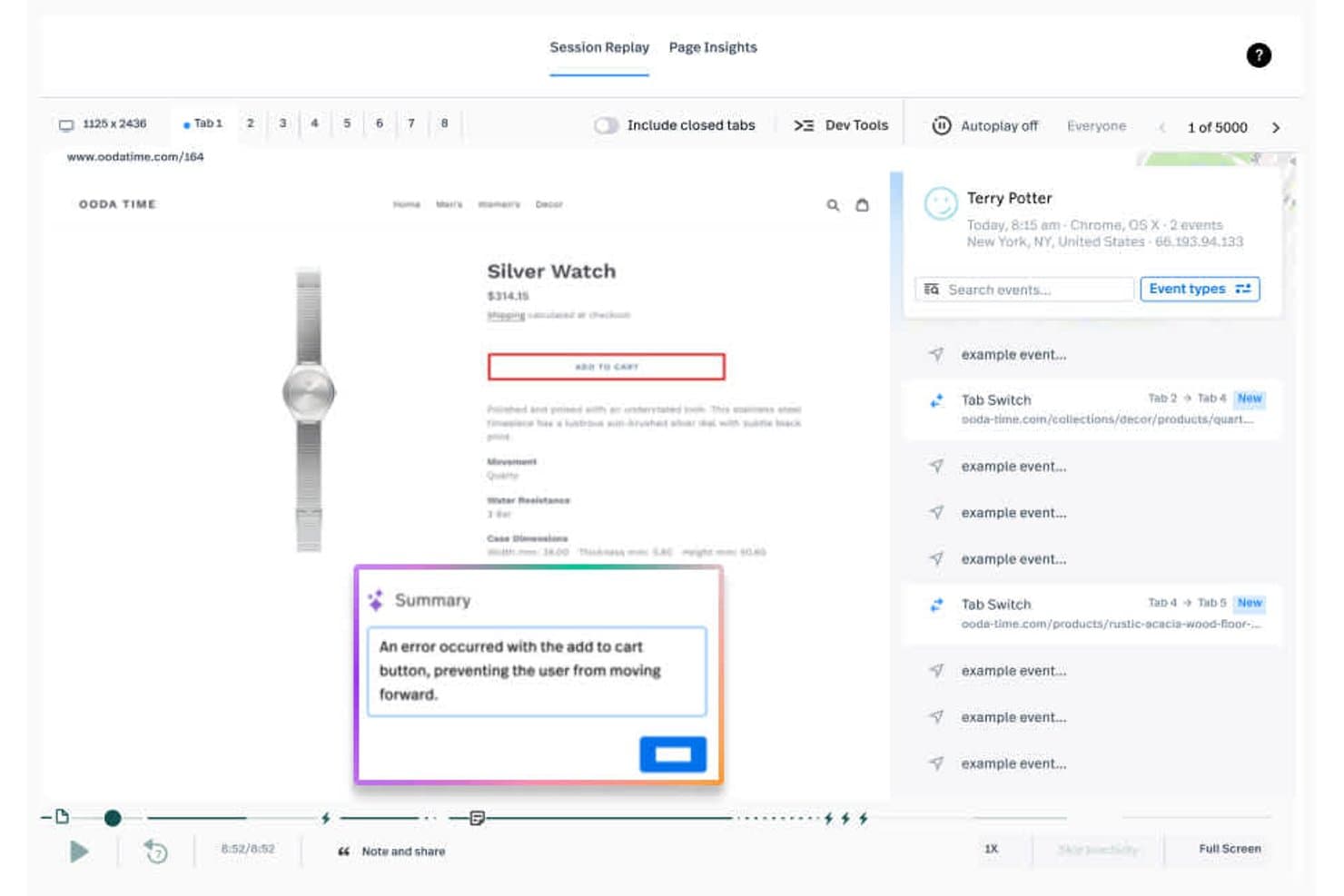
Fullstory lets users replay sessions and surface cart errors instantly. Fullstory is a user tracking and product analytics platform that combines session replay, event tracking, heatmaps, funnels, and friction signals to analyze digital experiences.
Who Is Fullstory Best For?
Fullstory suits product and UX teams at growing digital businesses that need long-term session replay to investigate friction and validate product decisions.
Why I Picked Fullstory
I picked Fullstory because it pairs 12-month free session replay retention with event tracking and friction signals. I can review older user sessions, connect them to conversion events, and investigate recurring rage clicks or dead clicks. That makes it easier to compare product changes with historical user behavior.
Fullstory Key Features
- Heatmaps: Visualize clicks, scroll depth, and interaction patterns across pages.
- Funnel analysis: Build conversion funnels to identify where users drop off.
- Dashboards: Organize product metrics and experience insights in shared views.
- Integrations: Connect Fullstory with other tools in your product analytics stack.
Fullstory Integrations
Fullstory documents integrations with Google Analytics, Google Tag Manager, Adobe Analytics, Bugsnag, and Google BigQuery. Its Developer API supports custom integrations.
What's Free?
FullstoryFree is a free-forever plan with up to 30,000 sessions per month, 12 months of data retention, and support for up to 10 users. It includes session replay, basic analytics, and debugging, but advanced features and paid-plan support aren’t included; new sessions pause if you exceed the monthly limit.
Pros and Cons
Pros:
- Flags rage clicks and dead clicks
- Connects replays with conversion events
- Retains free session replays for 12 months
Cons:
- Advanced analysis requires a paid plan
- New sessions pause after monthly limits
Learn more about Fullstory: Best for analytics-linked session replay at scale
- Free plan available
- Pricing upon request
Visit WebsiteCustomer Rating:4.5/5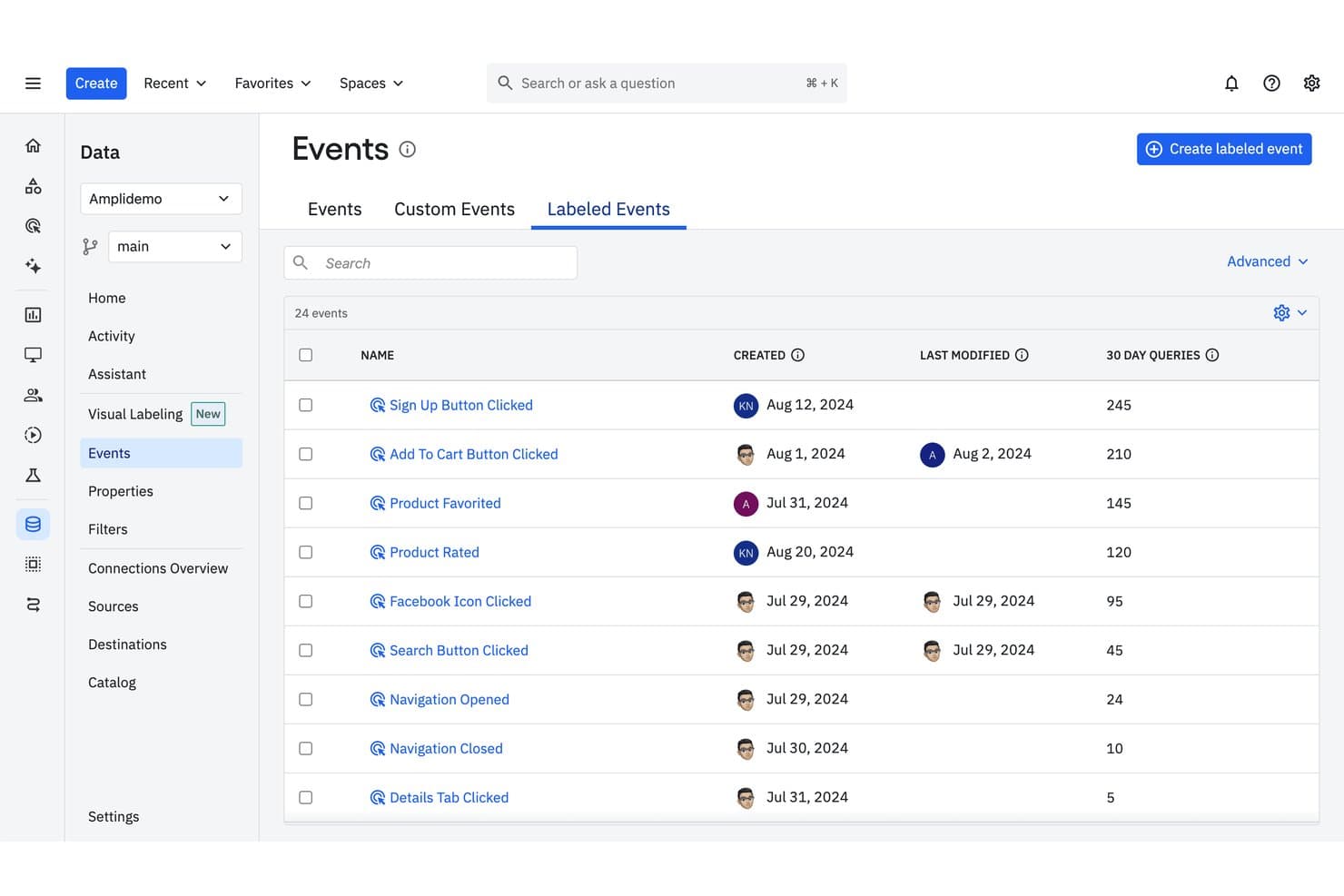
Amplitude tracks labeled events with query frequency and modification history. Amplitude is user tracking software that combines product analytics, event tracking, funnels, retention reports, cohorts, and session replay in one platform.
Who Is Amplitude Best For?
Product teams at growing companies that need analytics-linked session replay at scale to connect user behavior with product decisions.
Why I Picked Amplitude
I picked Amplitude because it’s best for analytics-linked session replay at scale. I use event streams, funnels, and retention reports to identify where users struggle, then review related session replays for the underlying behavior. Cohorts help compare those patterns across user segments before prioritizing product changes.
Amplitude Key Features
- User profiles: View individual users’ properties and activity history.
- Journeys: Trace the paths users take through your product.
- Dashboards: Assemble charts and metrics in shareable workspaces.
- Data governance: Manage event definitions, properties, and tracking plans.
Amplitude Integrations
Documented integrations include Segment, Iterable, Chameleon, and Snowflake. Amplitude also provides APIs for custom event ingestion and user-property updates.
What's Free?
Amplitude offers a free-forever plan with no credit card required. It includes 2 million events per month, unlimited seats, and 10,000 session replays monthly, but replay data is retained for one month and some features, including experiments, Guides, and Surveys, are limited.
Pros and Cons
Pros:
- Cohorts reveal behavior across user segments
- Free plan supports substantial event volumes
- Connects session replays to product analytics
Cons:
- Advanced experimentation features require paid access
- Free replay history expires after one month
Learn more about Amplitude: Best for session replay with AI-flagged friction
- Free plan available
- From $39/month
Visit WebsiteCustomer Rating:4.1/5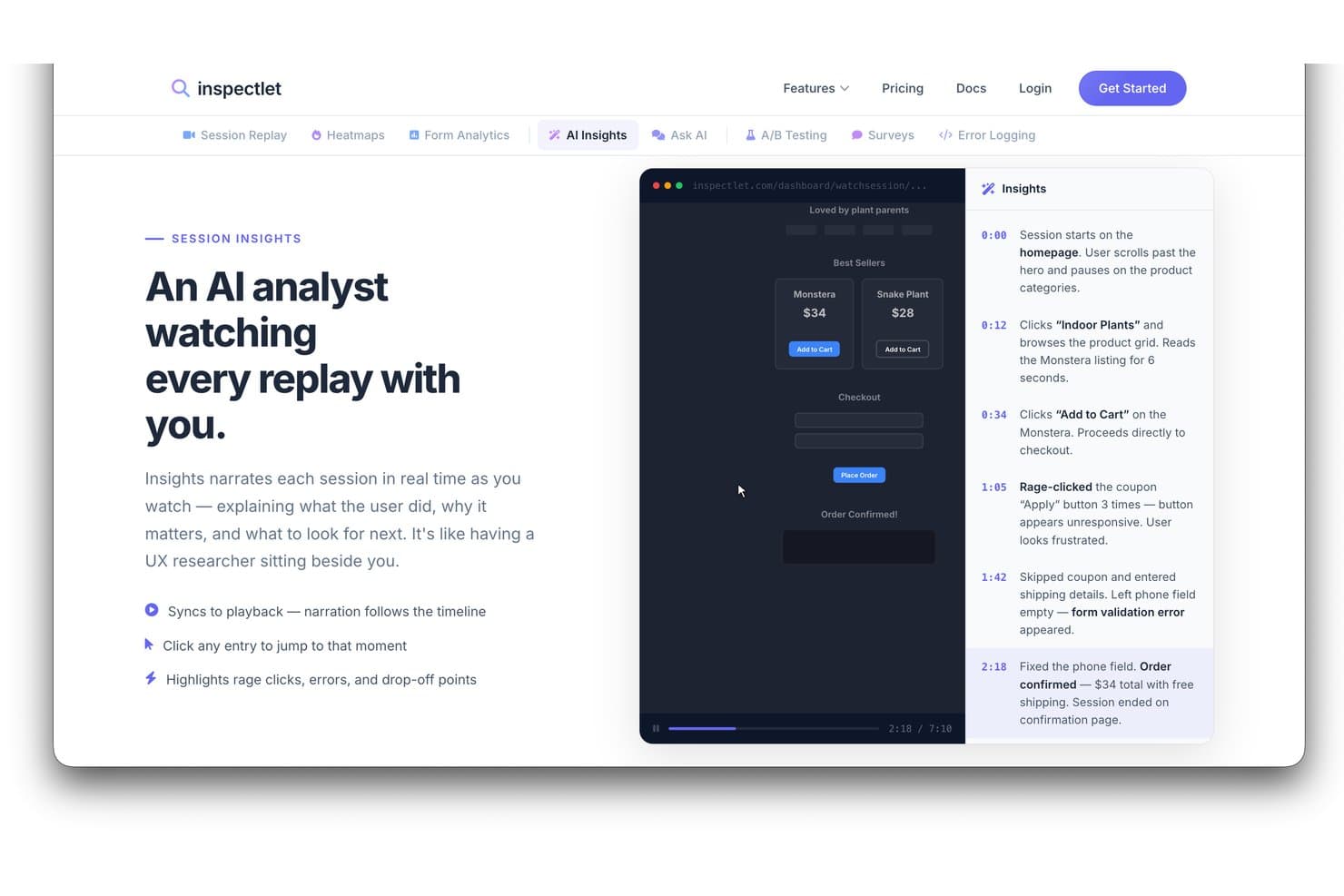
Inspectlet's AI Insights narrates session replays to highlight user behavior. Inspectlet is user tracking and behavior analytics software that combines session recordings, heatmaps, event tracking, funnels, and form analytics for product and website analysis.
Who Is Inspectlet Best For?
Inspectlet suits product teams and growth marketers who need session replay to spot user friction and improve website experiences.
Why I Picked Inspectlet
I picked Inspectlet for Best Free User Tracking Software Reviewed because it pairs session replay with AI-flagged friction. I use recordings and heatmaps to verify where visitors struggle, then review funnel and form analytics to connect those issues with drop-offs. This helps product teams investigate confusing flows, abandoned forms, and failed conversions.
Inspectlet Key Features
- Live visitor monitoring: Watch active visitors navigate your site in real time.
- JavaScript API: Send custom data and control tracking through JavaScript.
- Privacy controls: Mask sensitive fields and limit recorded visitor data.
- VIP tracking: Get notifications when sessions match selected criteria.
Inspectlet Integrations
Inspectlet documents integrations and installation options for HubSpot, Google Tag Manager, WordPress, and Shopify. Its JSON-based REST API supports custom integrations.
What's Free?
Inspectlet offers a free-forever plan with no credit card required or time limit. It includes 2,500 recorded sessions monthly across up to three websites, plus session replay, heatmaps, and A/B testing; data retention is limited to one month, and Inspectlet stops recording new sessions after you reach the monthly limit.
Pros and Cons
Pros:
- Combines recordings, heatmaps, and funnels
- Free plan supports three websites
- AI flags friction within session replays
Cons:
- Recording stops after monthly session limit
- Free data retention lasts one month
Learn more about Inspectlet: Best for open-source product analytics
- Free plan available
- Pricing upon request
Visit WebsiteCustomer Rating:4.5/5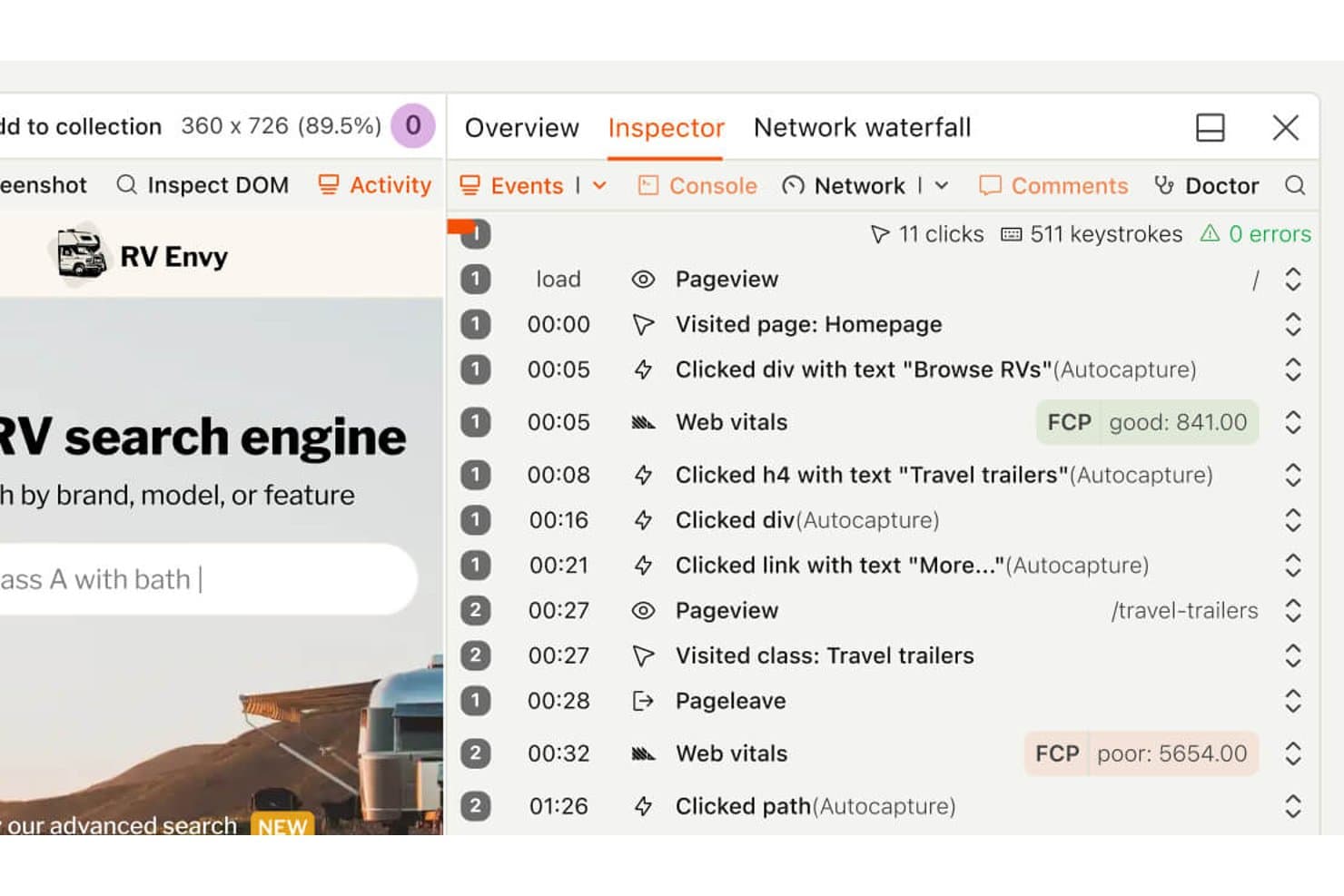
PostHog lets users replay sessions with a detailed event timeline. PostHog is a product analytics and user tracking platform that combines event tracking, funnels, session recordings, feature flags, and experimentation in one developer-focused workspace.
Who Is PostHog Best For?
Product teams and developers seeking open-source analytics with event tracking, session recordings, feature flags, and experimentation in one workspace.
Why I Picked PostHog
I picked PostHog because it’s my choice for best for open-source product analytics. I use event tracking and funnels to connect user behavior with product outcomes, then review session recordings to understand friction behind the numbers. Feature flags and experimentation help me validate changes before wider rollout.
PostHog Key Features
- User cohorts: Group users using shared properties or behavioral criteria.
- Retention reports: Compare returning users across selected time periods.
- SQL editor: Query product data with customizable SQL statements.
- In-app surveys: Create and target surveys within your product.
PostHog Integrations
PostHog supports 50+ documented CDP destinations, including HubSpot, Slack, Microsoft Teams, Braze, Customer.io, Snowflake, and BigQuery. Its API and webhooks support custom integrations.
What's Free?
PostHog offers a free-forever plan with no credit card, including 1 million product analytics events and 5,000 session recordings monthly. The free plan includes unlimited team members but limits you to one project, one-year data retention, and dropped usage above monthly allowances unless you switch to pay-as-you-go.
Pros and Cons
Pros:
- SQL access supports tailored product analysis
- Combines tracking, recordings, and experimentation
- Open-source foundation supports data control
Cons:
- Broader workspace increases navigation overhead
- Instrumentation demands developer involvement
Learn more about PostHog: Best for funnel drop-off and rage click analysis
- Free plan available
- From $140/month
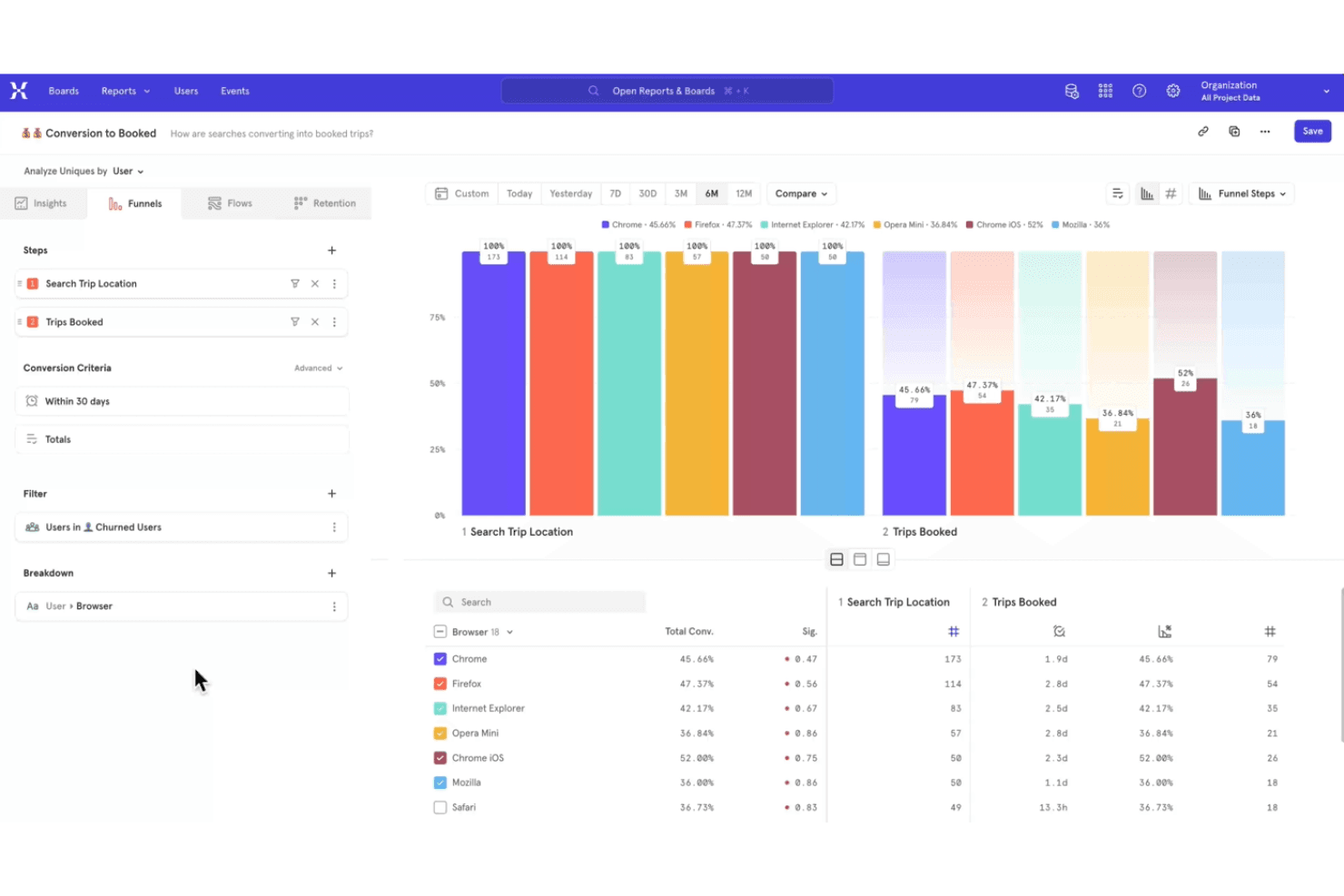
Mixpanel tracks user interactions to optimize digital product experiences. Mixpanel is a product analytics and user tracking platform that captures event data, maps user journeys, and provides reports for cohorts, retention, and product usage.
Who Is Mixpanel Best For?
Mixpanel suits product teams at digital businesses that need event-based insights into user behavior, retention, and feature adoption.
Why I Picked Mixpanel
I picked Mixpanel because it’s best for funnel drop-off and rage click analysis. Its event-based funnels show where users abandon signup or checkout, while Session Replay reveals the screens behind repeated clicks. The free plan gives product teams a practical way to investigate friction before prioritizing fixes.
Mixpanel Key Features
- Retention reports : Compare returning users across selected time periods.
- Cohort analysis : Build cohorts from shared properties or user actions.
- Impact reports : Measure how events influence conversion or retention.
- Data warehouse connectors : Export Mixpanel data to supported warehouse systems.
Mixpanel Integrations
Mixpanel integrates with BigQuery, Snowflake, Amazon Redshift, Segment, and partner tools such as ConfigCat and Marketo. It also provides APIs for custom event collection and integrations.
What's Free?
Mixpanel has a free-forever plan with unlimited seats and no credit card required. It includes up to 1 million events and 10,000 session replays per month, with 30-day replay retention and limits on saved reports, alerts, experiments, and feature flags.
Pros and Cons
Pros:
- Free plan supports meaningful event volumes
- Session Replay reveals rage clicks
- Funnel reports pinpoint signup abandonment
Cons:
- Replay retention limits historical analysis
- Event setup requires disciplined instrumentation
Learn more about Mixpanel: Best for self-hosted, consent-free tracking
- 21-day free trial
- From $26/month (billed annually)
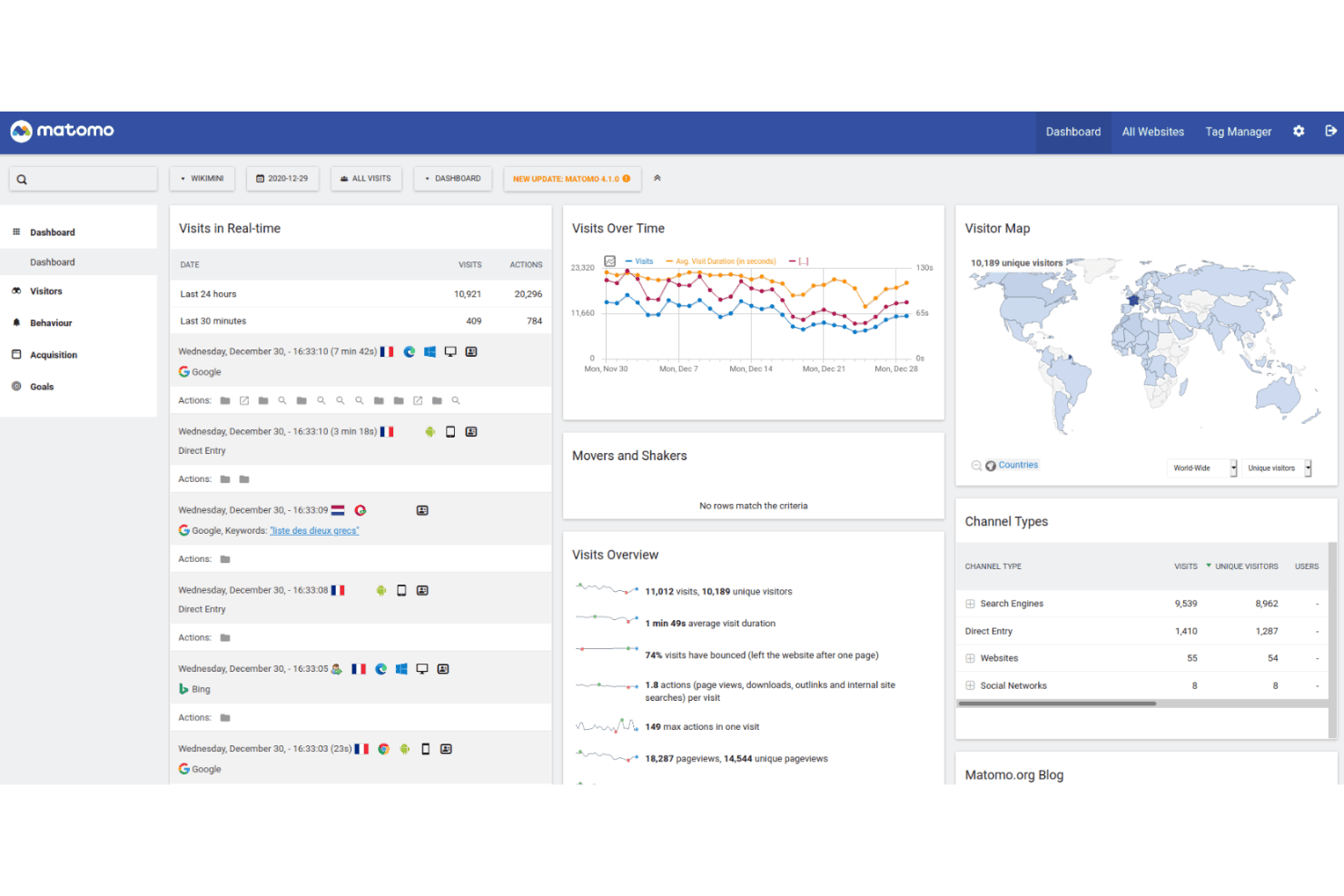
Matomo tracks user activity with full data control and privacy-focused hosting. Matomo is a user tracking and web analytics platform with event tracking, session recordings, heatmaps, campaign attribution, and customizable reports for websites and products.
Who Is Matomo Best For?
Product teams and privacy-conscious organizations needing self-hosted, consent-free tracking will find Matomo a practical fit.
Why I Picked Matomo
I picked Matomo because it supports self-hosted, consent-free tracking without sending product data to a third-party analytics vendor. I use event tracking, session recordings, and heatmaps to connect user behavior with product decisions. Its customizable reports also help teams analyze customer journeys under their own data governance rules.
Matomo Key Features
- Campaign attribution: Tracks visits and conversions across marketing campaign sources.
- Goal tracking: Measures visitor actions against defined conversion goals.
- Tag Manager: Adds and manages tracking tags without editing site code.
- Ecommerce analytics: Records product views, orders, revenue, and cart activity.
Matomo Integrations
Matomo integrates with 100+ technologies, including WordPress, WooCommerce, Shopify, Drupal, Magento 2, and Jira Cloud. Its Analytics and Tracking APIs support custom integrations, while the Matomo Marketplace adds plugin-based connections.
What's Free?
Matomo On-Premise’s Community edition is free forever, with unlimited users and hits, but you handle hosting and maintenance while premium plugins and support require payment. Matomo Cloud offers a 21-day free trial with full core features and no credit card, after which pricing depends on monthly traffic.
Pros and Cons
Pros:
- Custom reports support product decision-making
- Consent-free tracking supports privacy-led measurement
- Self-hosted deployment keeps data in-house
Cons:
- Advanced reporting can require analytics expertise
- Hosting and maintenance remain your responsibility
Learn more about Matomo: Best for debug-focused session replay
- 14-day free trial + free plan available
- From $176/month (billed annually)
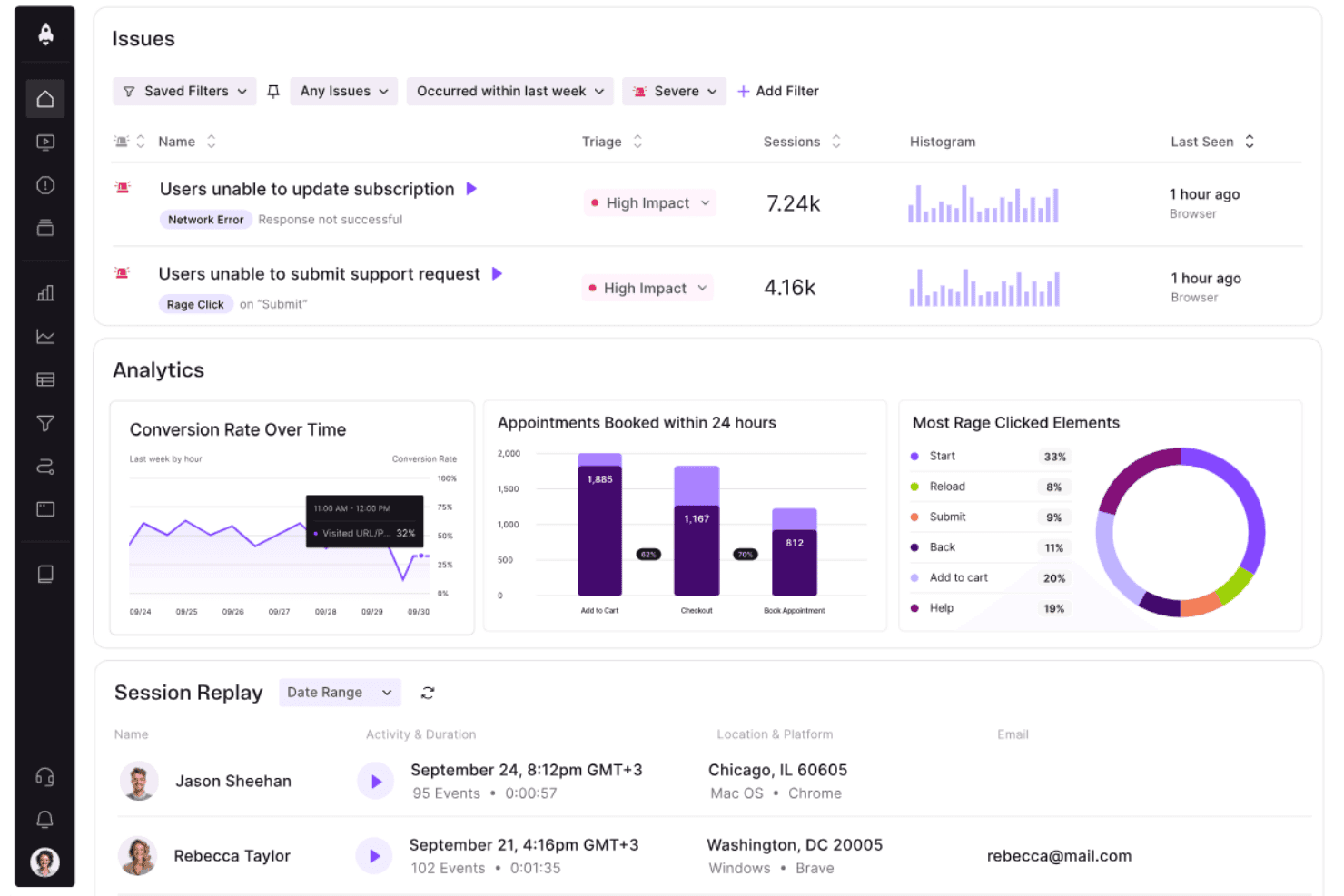
LogRocket surfaces user issues, analytics, and session replays in one dashboard. LogRocket is a user tracking and product analytics platform that combines session replay, event analytics, error tracking, and frontend performance monitoring in one workspace.
Who Is LogRocket Best For?
Product and engineering teams that need to connect frontend errors with user sessions will find LogRocket a practical fit.
Why I Picked LogRocket
I picked LogRocket because its debug-focused session replay connects frontend errors with the user sessions behind them. I use session recordings, event analytics, and error tracking to trace issues such as failed checkout flows or broken navigation. Its frontend performance monitoring adds context when slow experiences affect product behavior.
LogRocket Key Features
- Console logs: Captures browser console output alongside each user session.
- Network monitoring: Records requests, responses, errors, and timing details.
- Rage click detection: Identifies repeated clicks on the same interface element.
- Redux inspection: Displays Redux actions and state changes during sessions.
LogRocket Integrations
LogRocket offers integrations with Zendesk, Intercom, BugHerd, Jira, and Linear for connecting session replays with support and issue workflows. It also supports webhooks and a Web API for custom integrations.
What's Free?
LogRocket offers a 14-day free trial rather than a free-forever plan, with no credit card required. The trial includes access to all features, but you’ll need a paid plan after it ends, with pricing based on captured sessions.
Pros and Cons
Pros:
- Captures console, network, and Redux activity
- Connects frontend errors to user sessions
- Debug-focused session replay
Cons:
- Session capture can become costly at scale
- No free-forever plan
Learn more about LogRocket:
Annen gratis programvare for brukersporing
Her er noen flere alternativer for programvare for brukersporing som også tilbyr gratis abonnementer eller prøveperioder. Selv om disse verktøyene ikke kom med på kortlisten min, er de likevel verdt å se nærmere på:
- 11OpenReplayBest for self-hosted replay with full data ownership
- 12Crazy EggBest for no-code click and scroll analysis
- 13Google AnalyticsBest for web traffic and funnel drop-off analysis
- 14Heap (by Contentsquare)Best for no-code retroactive behavior tracking
- 15MouseflowBest for friction scoring on a free plan
- 16UserpilotBest for behavior tracking tied to in-app fixes
- 17Microsoft ClarityBest for no-code funnels and frustration signals
How I Evaluate Free User Tracking Software
First, I define what counts as free. A qualifying plan is free indefinitely, not a trial, though usage and feature caps can limit analysis. From there, I split my evaluation into three parts: core functionality, which carries most weight, like capturing clicks and replaying sessions; standout features, like rage-click detection; and beyond-feature factors, like free-plan scaling as your team grows.
Core Functionality (Table Stakes For This List)
In addition to my free plan requirements, I use a scoring system to select tools for my list. I score each one on a scale from 0 (does not offer the functionality) to 5 (excels in this area) for each core functionality listed below, based on what's available on the free plan. I then convert the total into a percentage to help assess each tool's overall fit, with extra weight on any functionalities I've deemed essential.
- Behavior Tracking (Essential): I look for automatic capture of clicks, scrolls, and navigation so a team can follow a key journey, such as completing sign-up.
- Session Recording: I assess whether free-plan recordings provide enough context to investigate where visitors hesitate, repeat actions, or leave a flow.
- Heatmaps: I check whether teams can view click and scroll patterns across pages to spot overlooked calls to action or content.
- Analytics Dashboard: I consider whether the dashboard summarizes visitor activity and engagement clearly enough to guide a product review.
- Data Export or Sharing: I look for a practical way to share findings or export reports so teammates can discuss evidence together.
Once I have a list of tools that meet the criteria, I consider what sets each platform apart.
Differentiating Factors (What Sets Vendors Apart)
Here's how I compare and contrast different vendors:
Standout Features
Rage click detection is a feature I look for on every free plan because it surfaces frustrated interactions automatically—like a user hammering a broken checkout button—without requiring manual session review. I also evaluate funnel and drop-off analysis, checking whether a tool lets me visualize exactly where users abandon a multi-step flow so I can prioritize the highest-impact fix. Session filtering by behavior ties these together; I check whether I can search recordings by specific actions, errors, or rage clicks to jump straight to the moments that matter.
Beyond Features
I check how long each free plan retains session recordings and analytics data, since a 30-day window can make it impossible to compare user behavior across release cycles. Usage caps matter just as much—I look at whether monthly session or pageview limits reset cleanly or trigger a hard cutoff mid-month when traffic spikes. I also evaluate built-in privacy defaults like IP masking and consent controls, because teams in regulated industries need GDPR and CCPA coverage without upgrading to a paid tier.
Slik velger du gratis programvare for brukersporing
Komplekse funksjonslister og prisstrukturer kan gjøre det vanskelig å finne ut hva du egentlig får fra gratis programvare for brukersporing. For å hjelpe deg med å holde fokus mens du går gjennom prosessen med å velge programvare, er dette noen faktorer du bør ha i bakhodet:
| Faktor | Hva du bør vurdere |
|---|---|
| FaktorOmfanget av gratistilbudet | Hva du bør vurdereKontroller hva som er inkludert i gratisabonnementet. Sørg for at det dekker viktige funksjoner som brukersporing og dataanalyse uten skjulte kostnader. |
| FaktorSkalerbarhet | Hva du bør vurdereVurder om verktøyet kan vokse sammen med teamet ditt. Se etter alternativer som gjør det enkelt å oppgradere etter hvert som behovene dine øker. |
| FaktorIntegrasjoner | Hva du bør vurdereSørg for at programvaren integreres med verktøyene du allerede bruker, for eksempel CRM- eller markedsføringsplattformer, slik at arbeidsflyten blir mer effektiv. |
| FaktorBrukervennlighet | Hva du bør vurdereVelg programvare som krever minimalt med opplæring og tilbyr tydelig datavisualisering. Et brukervennlig grensesnitt er helt nødvendig. |
| FaktorDatasikkerhet | Hva du bør vurdereSørg for at verktøyet overholder personvernregler som GDPR, særlig hvis du håndterer sensitive opplysninger. |
| FaktorTilpasningsmuligheter | Hva du bør vurdereSe etter programvare som lar deg tilpasse rapporter og dashbord etter dine spesifikke behov og preferanser. |
| FaktorBrukerstøtte | Hva du bør vurdereVurder nivået på kundestøtten som er tilgjengelig, for eksempel direktechat eller fora, slik at du får hjelp ved behov. |
| FaktorYtelse | Hva du bør vurdereKontroller om verktøyet tilbyr dataoppdateringer i sanntid og rask behandling, slik at teamet ditt holdes informert uten forsinkelser. |
Hva er gratis programvare for brukersporing?
Programvare for brukersporing er et verktøy som overvåker og analyserer brukerinteraksjoner på nettsteder eller i apper, og som ofte er tilgjengelig med gratisabonnementer eller prøveperioder. Disse verktøyene brukes vanligvis av produktledere, markedsførere og UX-designere for å få innsikt i brukeratferd og forbedre brukeropplevelsen. Funksjoner som øktopptak, varmekart og sanntidsanalyse bidrar til å forstå brukerengasjement, identifisere problemer og forbedre produktets brukervennlighet.
Funksjoner i gratis programvare for brukersporing
La oss gå gjennom funksjonene som vanligvis finnes i programvare for brukersporing, og se hvilke som vanligvis er inkludert i gratis- og betalingsabonnementer.
Funksjoner som vanligvis er gratis i programvare for brukersporing
- Øktopptak: Ta opp og spill av brukerinteraksjoner for å forstå atferd og identifisere problemer.
- Varmekart: Visualiser hvor brukerne klikker og ruller, slik at du kan se hvilke områder på nettstedet ditt som skaper mest engasjement.
- Sanntidsanalyse: Gir umiddelbar innsikt i aktuell brukeraktivitet, slik at du raskt kan reagere på trender.
- Grunnleggende hendelsessporing: Overvåk spesifikke brukerhandlinger, for eksempel klikk eller innsendinger av skjemaer, for å analysere interaksjonsmønstre.
- Segmentering av besøkende: Gruppér brukere basert på atferd eller demografi for å tilpasse opplevelser og innhold.
- Personvern: Sørg for at datainnsamlingen oppfyller regelverk som GDPR og ivaretar brukernes personvern.
- Tilpassbare kontrollpaneler: Lar deg tilpasse visningen av dataene slik at du kan fokusere på de viktigste måleverdiene for teamet ditt.
Funksjoner som vanligvis er betalingsfunksjoner i programvare for brukersporing
- Avansert segmentering: Opprett detaljerte brukergrupper basert på komplekse kriterier for mer målrettet analyse.
- A/B-testing: Test ulike versjoner av nettstedet eller appen din for å finne ut hvilken som fungerer best for brukerne.
- Traktanalyse: Spor brukernes reise gjennom nettstedet ditt for å identifisere frafallssteder og optimalisere konverteringsløp.
- Automatisert rapportering: Generer detaljerte rapporter automatisk for å spare tid og sikre konsekvent dataanalyse.
- Sporing på tvers av enheter: Overvåk brukerinteraksjoner på flere enheter for å få et helhetlig bilde av brukerreisen.
- Avansert dataeksport: Eksporter data i ulike formater for dypere analyse eller integrasjon med andre verktøy.
- Oppretting av egendefinerte hendelser: Definer spesifikke hendelser for å spore tilpassede handlinger som er unike for virksomhetens behov.
Fordeler med gratis programvare for brukersporing
Implementering av gratis programvare for brukersporing gir flere fordeler for teamet og virksomheten din. Her er noen av fordelene du kan se frem til:
- Kostnadseffektiv innsikt: Få verdifull innsikt i brukeratferd uten økonomiske investeringer, slik at du kan bruke ressurser på andre områder.
- Forbedret brukeropplevelse: Bruk funksjoner som øktopptak og varmekart til å identifisere og løse problemer med brukervennligheten, og dermed øke brukertilfredsheten.
- Rask beslutningstaking: Sanntidsanalyse gir umiddelbare data, slik at teamet ditt raskt kan ta informerte beslutninger.
- Forbedret målretting: Segmentering av besøkende gjør det mulig å tilpasse innhold og opplevelser til bestemte brukergrupper, noe som øker engasjementet.
- Sikring av personvern: Overholdelse av personvernregler som GDPR sikrer at brukerdata samles inn på en ansvarlig måte, noe som bygger tillit hos målgruppen.
- Fleksibel tilpasning: Tilpassbare kontrollpaneler lar deg fokusere på måleverdiene som betyr mest, og optimaliserer analyseprosessen.
- Prøv uten forpliktelser: Gratisversjoner lar deg teste programvarens funksjoner og se fordelene med egne øyne før du bestemmer deg for et betalingsabonnement.
Kostnader og priser for gratis programvare for brukersporing
Jeg forstår at du kom til denne artikkelen på jakt etter de beste tilgjengelige alternativene for gratis programvare for brukersporing. Ettersom gratisabonnementer bare tilbyr begrensede funksjoner, er det imidlertid en god sjanse for at du må oppgradere abonnementet ditt senere. Derfor har jeg tatt med tabellen nedenfor.
Tabellen nedenfor oppsummerer vanlige abonnementer, gjennomsnittsprisene deres og typiske funksjoner som er inkludert i løsninger for brukersporing:
Sammenligningstabell for abonnementer på programvare for brukersporing
| Plantype | Gjennomsnittspris | Vanlige funksjoner |
|---|---|---|
| PlantypeGratisplan | Gjennomsnittspris$0 | Vanlige funksjonerGrunnleggende analyse, øktopptak, varmekart og besøkssegmentering. |
| PlantypePersonlig plan | Gjennomsnittspris$5-$25/bruker/måned | Vanlige funksjonerAvansert analyse, tilpasset hendelsessporing, sanntidsdata og grunnleggende rapportering. |
| PlantypeForretningsplan | Gjennomsnittspris$50-$100/bruker/måned | Vanlige funksjonerTraktanalyse, A/B-testing, automatiserte rapporter og sporing på tvers av enheter. |
| PlantypeVirksomhetsplan | Gjennomsnittspris$150+/bruker/måned | Vanlige funksjonerTilpassede integrasjoner, dedikert brukerstøtte, avansert dataeksport og full tilpasning. |
Vanlige spørsmål om gratis programvare for brukersporing
Her er noen svar på vanlige spørsmål om gratis programvare for brukersporing:
Hvordan beskytter gratis programvare for brukersporing brukernes personvern?
Gratis programvare for brukersporing inneholder ofte funksjoner for overholdelse av personvernregler, slik at data samles inn og lagres på en ansvarlig måte. Se etter verktøy som overholder regelverk som GDPR, og som tilbyr alternativer for anonymisering av brukerdata. Det er avgjørende å velge programvare som har tydelige personvernregler og alternativer for brukersamtykke.
Kan jeg integrere gratis programvare for brukersporing med andre verktøy?
Mange løsninger for gratis programvare for brukersporing tilbyr integrasjoner med populære verktøy som CRM-systemer og markedsføringsplattformer. Utvalget av integrasjoner kan imidlertid være begrenset sammenlignet med betalte versjoner. Sjekk om programvaren støtter de viktigste integrasjonene teamet ditt trenger for å effektivisere arbeidsflytene.
Hvilke begrensninger bør jeg forvente med en gratisplan?
Gratisplaner har vanligvis begrensninger som redusert datalagringstid, færre funksjoner eller begrenset antall brukerplasser. Selv om disse planene passer godt for grunnleggende sporingsbehov, kan team med økende behov etter hvert måtte oppgradere for å få tilgang til mer avanserte funksjoner og større datakapasitet.
Hvor nøyaktige er dataene fra gratis programvare for brukersporing?
Gratis programvare for brukersporing gir vanligvis nøyaktige data for grunnleggende målinger som sidevisninger og brukerøkter. Graden av presisjon og detaljnivå samsvarer imidlertid ikke alltid med betalte planer, spesielt når det gjelder avansert analyse. Ved viktige forretningsbeslutninger bør du vurdere om gratisversjonen oppfyller kravene dine til nøyaktighet.
Kan jeg tilpasse rapporter i gratis programvare for brukersporing?
Tilpasningsmulighetene for rapporter i gratis programvare for brukersporing er ofte begrensede. Selv om du vanligvis kan få tilgang til grunnleggende data og lage standardrapporter, kan avanserte tilpasningsfunksjoner kreve en betalt plan. Vurder om den tilgjengelige tilpasningen oppfyller teamets rapporteringsbehov.
Finnes det brukerstøtte for gratis programvare for brukersporing?
Alternativene for brukerstøtte for gratis programvare for brukersporing kan variere. Noen leverandører tilbyr brukerfora eller kunnskapsbaser, mens andre kan tilby begrenset støtte via e-post. Hvis teamet ditt forventer å trenge mer praktisk hjelp, bør du vurdere hvilket støttenivå som er tilgjengelig med gratisplanen.