

Som produktleder står du overfor utfordringen med å forstå brukeratferd og ta datadrevne beslutninger for å forbedre produktet ditt.
Etter min erfaring bidrar UX-analyseverktøy til å bygge bro mellom brukerinteraksjon og handlingsrettet innsikt. De gir deg dataene du trenger for å ta informerte beslutninger og forbedre brukertilfredsheten.
I denne artikkelen deler jeg mine beste anbefalinger for UX-analyseverktøy. Jeg gir en objektiv vurdering av hvert verktøy, med fokus på hvordan de kan dekke teamets spesifikke behov. La oss se nærmere på detaljene og finne de beste løsningene for å forbedre brukeropplevelsen av produktet ditt.
Hvorfor du kan stole på våre programvareanbefalinger
6,700+
Reviews
20
Industry experts
16+
Evaluation factors
14
Years
Teamet vårt har testet og anmeldt programvare siden 2012. Vi er selv produktledere, så vi vet hvor vanskelig og hvor viktig det er å velge riktig programvare.
I denne guiden har vi vurdert verktøyene gjennom praktisk testing og uavhengig research og gitt dem poeng ut fra våre utvelgelseskriterier.
Anmeldelsene våre bygger på vår egen redaksjonelle vurdering. De er ikke et salgsargument.
Ekspertanmeldere:
- Andrew LumbySenior TPM
- Cristiano ValimSenior UI/UX Lead


Sammenligningstabell: UX-analyseverktøy
Denne sammenligningstabellen oppsummerer prisdetaljene for mine utvalgte UX-analyseverktøy.
| Tool | Best For | Trial Info | Price | ||
|---|---|---|---|---|---|
| 1 | Best for closing analytics and in-app fixes in one loop | 14-day free trial | From $299/month | Website | |
| 2 | Best for user behavior tracking | Free plan available | From $120/month (billed annually) | Website | |
| 3 | Best for AI-driven behavioral analysis | Free plan available | Pricing upon request | Website | |
| 4 | Best for mobile app analytics | Free demo + 14-day free trial available | Pricing upon request | Website | |
| 5 | Best for enterprise friction scoring and VoC | Free demo available | Pricing upon request | Website | |
| 6 | Best for continuous product discovery at scale | Free demo available | Pricing upon request | Website | |
| 7 | Best for session replay | Free plan available | Pricing upon request | Website | |
| 8 | Best for automatic event tracking | Free plan available | Pricing upon request | Website | |
| 9 | Best for digital experience analytics | Free plan + free demo + 15-day free trial available | From $39/month (billed annually) | Website | |
| 10 | Best for cross-functional UX and engineering triage | 14-day free trial + free plan available | From $176/month (billed annually) | Website |


Vurderinger av de beste UX-analyseverktøyene
Nedenfor finner du mine detaljerte oppsummeringer av de beste UX-analyseverktøyene som kom med på kortlisten. I vurderingene ser jeg nærmere på de viktigste funksjonene, fordeler og ulemper, integrasjoner og ideelle bruksområder for hvert verktøy, slik at du kan finne det som passer best for deg.
 Best for closing analytics and in-app fixes in one loop
- 14-day free trial
- From $299/month
Visit WebsiteCustomer Rating:4.7/5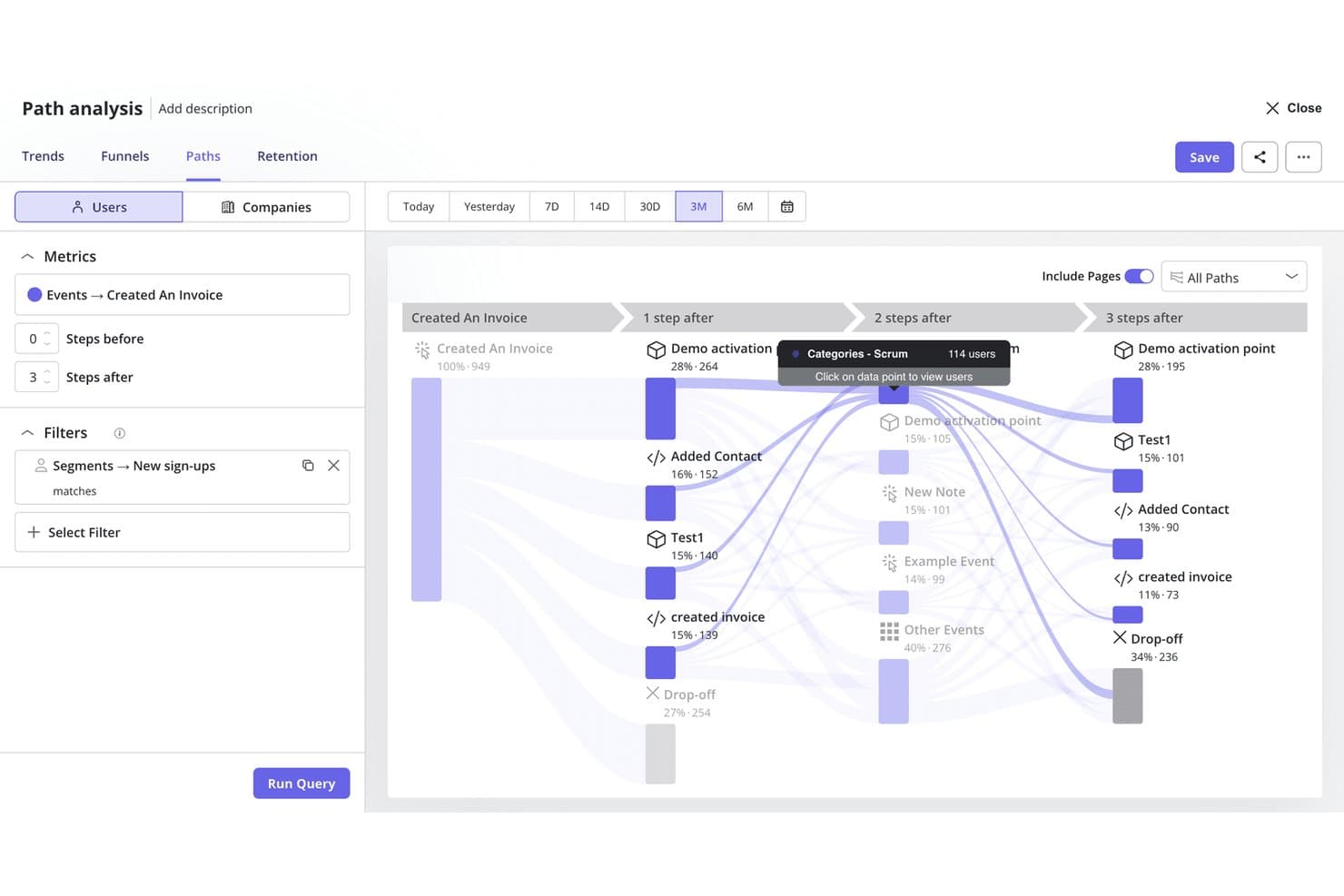
Userpilot's path analysis maps user journeys after key product events. Userpilot is a product analytics and in-app engagement platform that combines session replay, funnel and path analysis, event tracking, frustration signal detection, and native survey tools with built-in in-app flow and guidance building.
Who Is Userpilot Best For?
Userpilot is a strong fit for product teams that want to move from spotting friction to fixing it without bouncing between tools.
Why I Picked Userpilot
Userpilot earns its spot on my shortlist because it's the only tool I've used where spotting a drop-off and deploying a fix happen inside the same platform. I can click from a funnel report directly into the session replays behind that exact drop-off, then launch an in-app flow or tooltip to address the friction without touching another tool. The AI-powered correlation analysis also automatically flags which frustration signals, like rage clicks or u-turns, are driving that drop-off.
Userpilot Key Features
- Retroactive event autocapture: Define new events against historical interaction data already captured, so you can run analysis without re-instrumenting your product.
- AI-powered correlation analysis: Automatically surfaces which user attributes, events, and frustration signals correlate with funnel conversion or drop-off across your reports.
- Native NPS, CSAT, and CES surveys: Trigger behavioral surveys based on specific in-app events, then tie responses directly to retention and engagement data in the same platform.
- MCP Server: Connects your Userpilot product data to external AI tools like Claude, ChatGPT, and Microsoft Copilot so you can query behavioral insights without leaving those environments.
Userpilot Integrations
Userpilot offers native integrations with Segment, Amplitude, Mixpanel, Heap, Google Analytics, Google Tag Manager, Intercom, Slack, HubSpot, and Salesforce. It also supports APIs, webhooks, and Enterprise Data Warehouse Sync.
Pros and Cons
Pros:
- Launch in-app fixes from analytics reports
- Detects frustration signals like rage, dead clicks
- Funnels connect directly to session replays
Cons:
- Most advanced analytics features gated by plan
- No heatmaps for aggregate click visualization
Learn more about Userpilot: Best for user behavior tracking
- Free plan available
- From $120/month (billed annually)
Visit WebsiteCustomer Rating:4.5/5
Mixpanel visualizes conversion rates across browsers with detailed funnel analysis. Mixpanel is an analytics tool tailored for businesses aiming to track user behavior and interactions with their products. Its main users include product managers and data analysts who need to understand user journeys and engagement.
Why I picked Mixpanel: It specializes in user behavior tracking, allowing you to analyze how users interact with your product in real-time. You can create detailed funnels to track conversion paths and identify drop-off points. Mixpanel also offers cohort analysis, helping you segment users based on their actions over time. This combination of features makes it ideal for understanding user engagement deeply.
Standout features & integrations:
Features include A/B testing to optimize user experiences, push notifications that engage users directly, and retention reports that help you understand user loyalty. These features are designed to give you actionable insights into user behavior.
Integrations include Segment, Zapier, Salesforce, HubSpot, Google Ads, Marketo, Amplitude, Optimizely, Slack, and Intercom.
Pros and Cons
Pros:
- Supports A/B testing
- Customizable dashboards
- Detailed cohort analysis
Cons:
- Advanced features require coding skills
- Slight learning curve
 Best for AI-driven behavioral analysis
- Free plan available
- Pricing upon request
Visit WebsiteCustomer Rating:4.5/5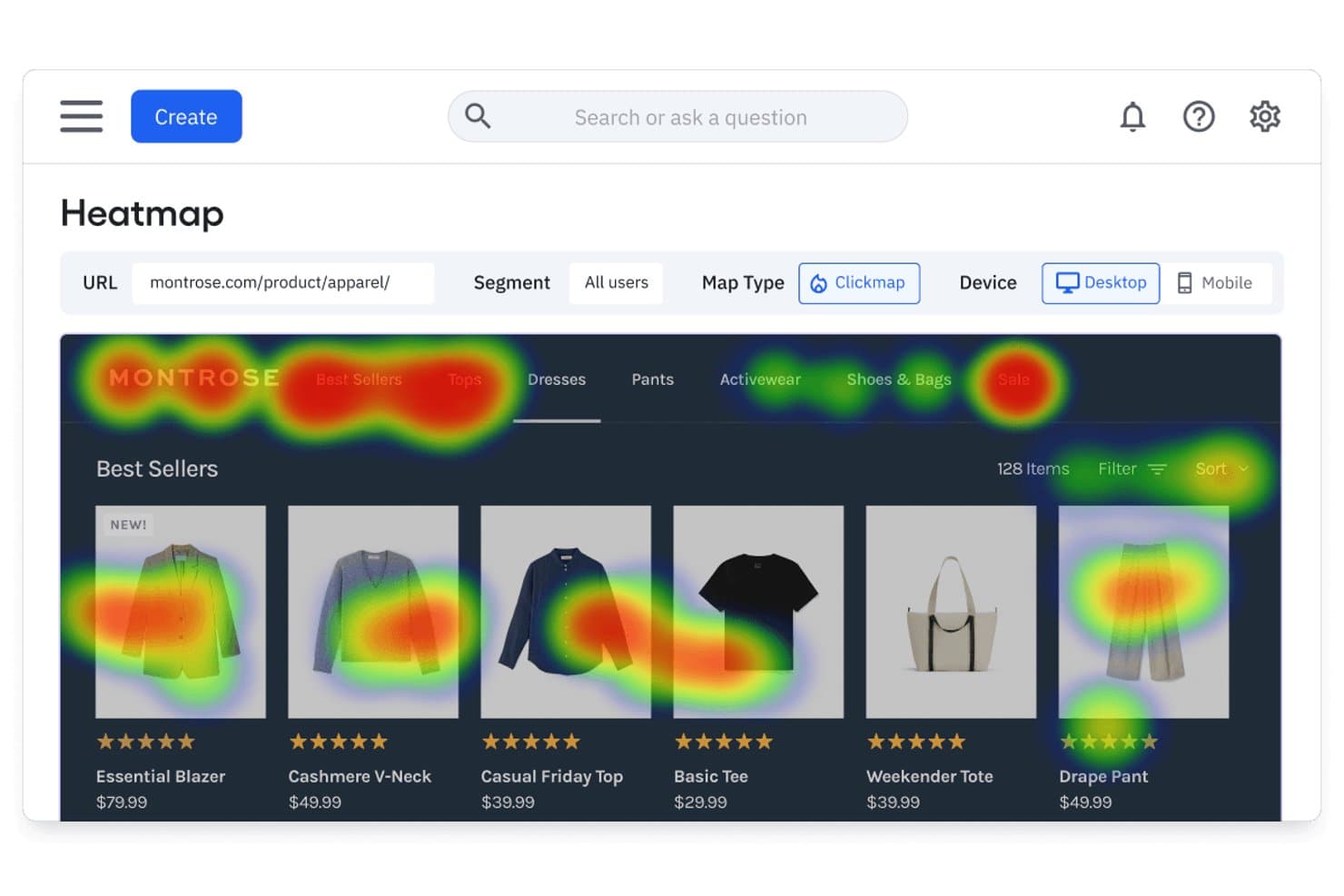
Amplitude's heatmap reveals where users click on product pages. Amplitude is a product analytics platform that combines session replay, heatmaps, funnel analysis, behavioral cohorts, and built-in experimentation with AI-powered agents that surface insights across all of your data.
Who Is Amplitude Best For?
Amplitude is a strong fit for product and growth teams that need behavioral analytics, experimentation, and session replay in a single platform rather than stitched-together point solutions.
Why I Picked Amplitude
Amplitude earns its spot on my shortlist because its AI-driven behavioral analysis goes beyond passive dashboards in ways I haven't seen matched. The Session Replay Agent automatically summarizes sessions and surfaces friction points without manual review, while the Global Agent answers natural language questions like "why are new users dropping before setup?" by synthesizing data across your entire product. I also love that retroactive funnel analysis lets you apply newly defined events to historical data instantly, no re-instrumentation required.
Amplitude Key Features
- Behavioral cohorts: Save groups of users defined by specific in-product actions and reuse them across charts, session replays, experiments, and surveys.
- Web and mobile experimentation: Run A/B tests and feature flag experiments natively, with session replays attached directly to variant results for qualitative validation.
- Guides and surveys: Deploy in-app onboarding guides, NPS prompts, and feedback widgets with session replay linked to moments of feedback collection.
- Visual labeling: Tag UI elements and define named events directly from the Amplitude interface without writing any code.
Amplitude Integrations
Amplitude offers 60+ native integrations, including Twilio Segment, Snowflake, Google BigQuery, Salesforce, HubSpot, Zendesk, Intercom, Braze, and Google Analytics 4. It also provides HTTP, Batch, export, and DSAR APIs for custom data workflows.
Pros and Cons
Pros:
- Retroactive funnel analysis on historical product data
- Behavioral cohorts reusable across analytics and experiments
- AI-powered session replay summarizes friction automatically
Cons:
- No native mobile app heatmaps yet available
- Heatmaps require top-tier plan with add-on
Learn more about Amplitude: Best for mobile app analytics
- Free demo + 14-day free trial available
- Pricing upon request
Visit WebsiteCustomer Rating:4.6/5
UXCam visualizes user journeys with funnel analysis to optimize app onboarding. UXCam is a mobile app analytics tool designed to help businesses understand user behavior on their mobile applications. Its main users are app developers and product managers who need insights into app performance and user interactions.
Why I picked UXCam: It excels in mobile app analytics, offering features like session replay to visualize user actions. You can analyze heatmaps to see where users tap and scroll within your app. UXCam also provides crash analytics, helping you identify and resolve issues quickly. These capabilities make it a comprehensive choice for improving your app's user experience.
Standout features & integrations:
Features include funnel analytics that track user journeys through your app, gesture detection that identifies user actions like swipes and pinches, and screen flow analysis that maps out how users navigate through your app. These features provide deep insights into user behavior.
Integrations include Google Analytics, Segment, Mixpanel, Amplitude, Firebase, Adjust, AppsFlyer, Kochava, Airship, and Braze.
Pros and Cons
Pros:
- Offers screen flow mapping and gesture detection
- Provides funnel analytics
- Detailed session replays
Cons:
- Requires technical setup
- High pricing for small teams
Learn more about UXCam: Best for enterprise friction scoring and VoC
- Free demo available
- Pricing upon request
Visit WebsiteCustomer Rating:4.7/5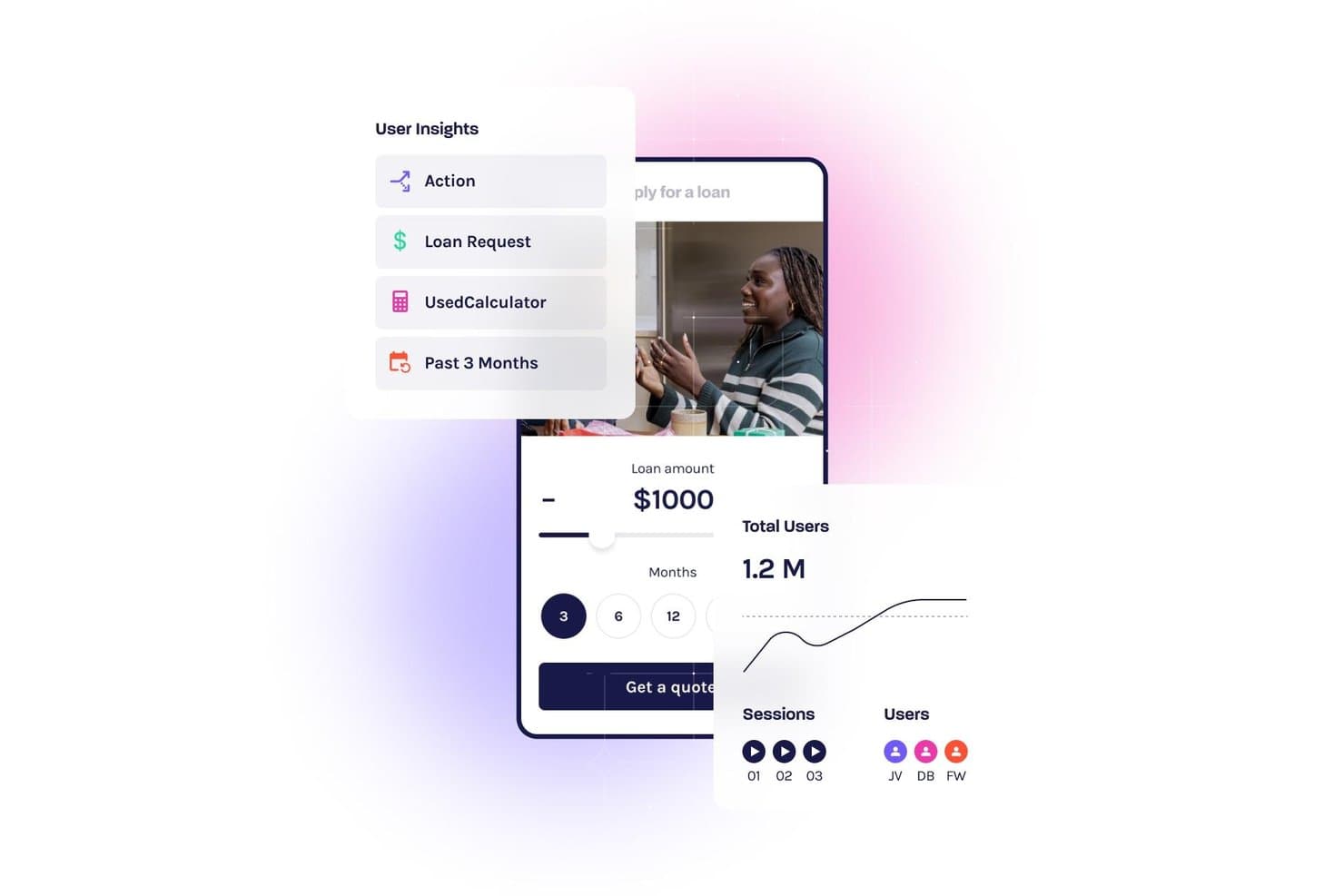
Glassbox tracks user behavior with session replays and analytics dashboards. Glassbox is an enterprise UX analytics platform that combines session replay, tagless autocapture, interaction maps, funnel analysis, friction scoring, and native VoC tools across web and mobile.
Who Is Glassbox Best For?
Glassbox is a strong fit for enterprise product and CX teams in regulated industries—like financial services, healthcare, and retail—who need deep behavioral data without the overhead of manual instrumentation.
Why I Picked Glassbox
Glassbox earns its spot on my shortlist because of its proprietary Struggle Score, which quantifies friction across 30+ behavioral signals—rage clicks, u-turns, error clicks—and ties each directly to revenue impact. I love that this isn't just flagging annoyances; it lets product and CX teams rank UX problems by business cost and act on the highest-priority issues first. The Voice of the Silent feature extends that picture further by using AI to apply VoC sentiment from survey respondents to the 95%+ of users who never fill one out.
Glassbox Key Features
- Tagless autocapture: Glassbox automatically records every click, scroll, form input, and server-side event without any manual tagging or engineering instrumentation.
- Augmented Journey Map: A single cross-channel visualization maps the full customer journey from acquisition to conversion across web and mobile in one view.
- GIA (Glassbox Insights Assistant): A generative AI assistant lets you query session data, generate session summaries, and surface behavioral insights using natural language.
- Mobile app analytics: Dedicated SDKs for iOS, Android, React Native, Flutter, and five other frameworks deliver session replay, interaction maps, and crash analytics for native mobile apps.
Glassbox Integrations
Glassbox offers native integrations with Adobe Analytics, Google Analytics 4, Qualtrics, Medallia, Optimizely, VWO, Jira, and Slack. An open API supports custom integrations.
Pros and Cons
Pros:
- AI surfaces hidden session insights instantly
- Tagless autocapture eliminates manual event tagging
- Quantifies friction using proprietary Struggle Score
Cons:
- Can overwhelm teams with session data volume
- Requires sales demo to access platform
Learn more about Glassbox: Best for continuous product discovery at scale
- Free demo available
- Pricing upon request
Visit WebsiteCustomer Rating:4.7/5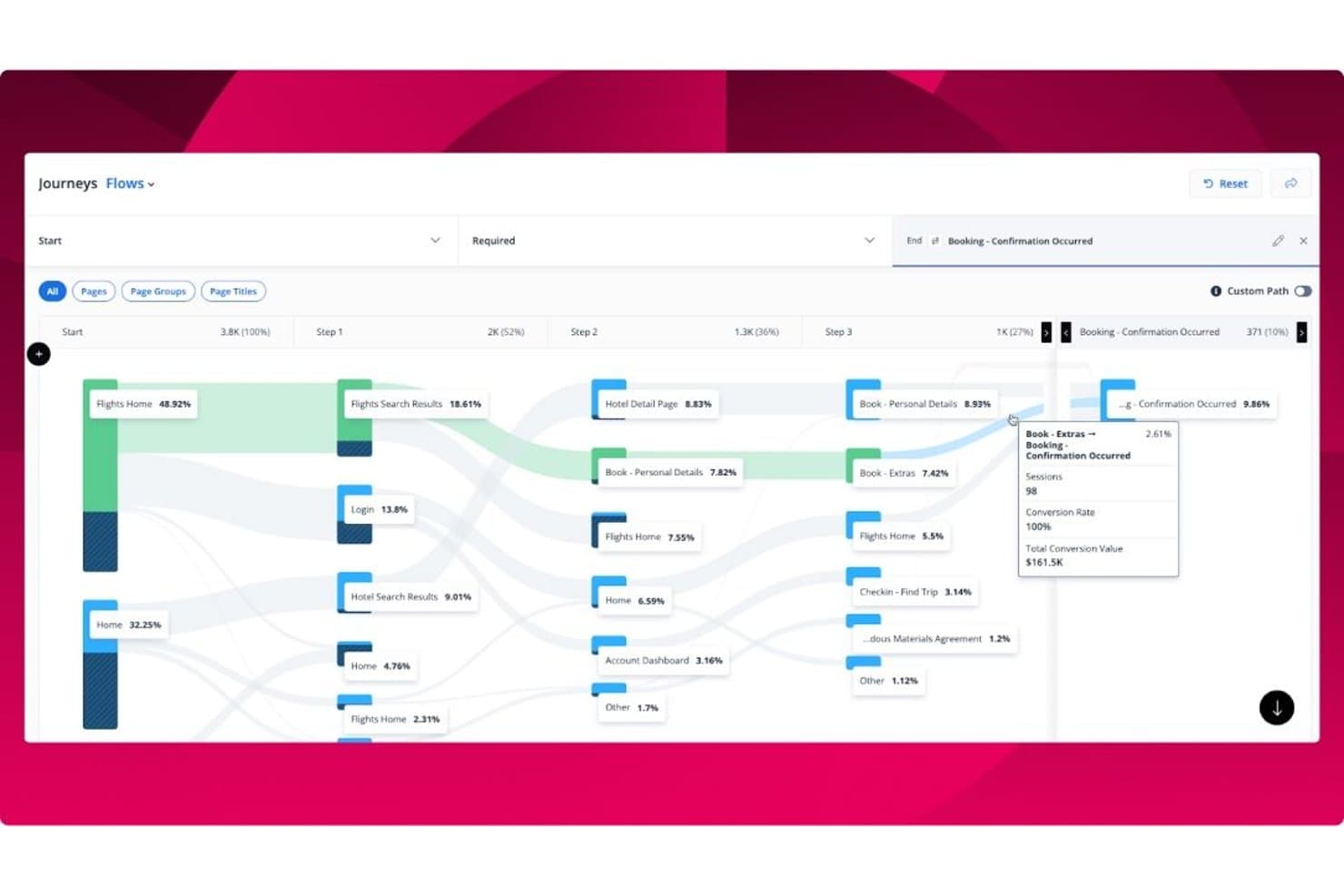
Quantum Metric visualizes user journey flows with conversion rates and session data. Quantum Metric is an enterprise UX analytics platform that combines 100% unsampled session replay, interaction heatmaps, funnel and journey analysis, AI-powered insight surfacing via Felix AI Agentic, and voice of customer integration across web and native mobile apps.
Who Is Quantum Metric Best For?
Quantum Metric is a strong fit for enterprise product and digital teams that need to connect behavioral data to business impact across web and native mobile at high traffic volumes.
Why I Picked Quantum Metric
Quantum Metric earns its spot on my shortlist because no other platform I've evaluated makes continuous product discovery feel as automatic at enterprise scale. Felix AI Agentic runs autonomously in the background, monitoring your KPIs and surfacing revenue-impacting friction before you think to look for it. Pair that with Opportunity Analysis, which quantifies the business impact of specific drop-offs across web and native mobile journeys, and your team spends less time hunting for problems and more time fixing the right ones.
Quantum Metric Key Features
- Felix AI Chat: A natural language interface that lets you ask plain-English questions about your behavioral data and get direct answers without writing queries.
- Server-side data capture: Sends critical events like transactions and sign-ups directly from your servers, appending them to live session replays even when client-side capture fails.
- AutoPII scanning: Continuously scans for unintended personally identifiable information capture and enforces privacy masking by default across all session data.
- Data streaming: Exports your behavioral data to destinations like Snowflake, Azure, and Databricks for integration with your existing BI and data infrastructure.
Quantum Metric Integrations
Quantum Metric integrates with Qualtrics, Optimizely, Split, UserTesting, Snowflake, Azure, Databricks, Looker, Tealium, and Slack, with data streaming to 20+ destinations. APIs, webhooks, and tag manager integrations support custom connectivity.
Pros and Cons
Pros:
- Enables funnel creation directly from session replays
- Offers 100% unsampled session replay data
- Detects revenue-impacting friction with Felix AI
Cons:
- Data sometimes mismatches other analytics tools
- Advanced segmentation can be confusing for teams
Learn more about Quantum Metric:

Fullstory provides clear funnel analysis and conversion insights to optimize user journeys. Fullstory is a digital experience analytics platform that helps businesses understand user interactions through session replay. Its main users are UX designers and product teams who need detailed insights into user behavior on websites and apps.
Why I picked Fullstory: It excels in session replay, allowing you to view complete user sessions to identify pain points. You can use heatmaps to visualize user engagement across your site. Fullstory also offers event funnels that help track user paths and analyze conversions. These tools provide a comprehensive view of user experiences, making it easier to optimize your digital presence.
Standout features & integrations:
Features include conversion analysis that tracks the success of user journeys, error detection that alerts you to issues impacting user experience, and custom event tracking that allows you to monitor specific user actions. These features work together to enhance your understanding of user interactions.
Integrations include Slack, Segment, Google Analytics, Optimizely, Mixpanel, HubSpot, Salesforce, Jira, Trello, and Zendesk.
Pros and Cons
Pros:
- Custom event tracking
- Effective error detection
- High-quality session replays
Cons:
- Advanced features need training
- High resource usage
Learn more about Fullstory: Best for automatic event tracking
- Free plan available
- Pricing upon request
Visit WebsiteCustomer Rating:4.3/5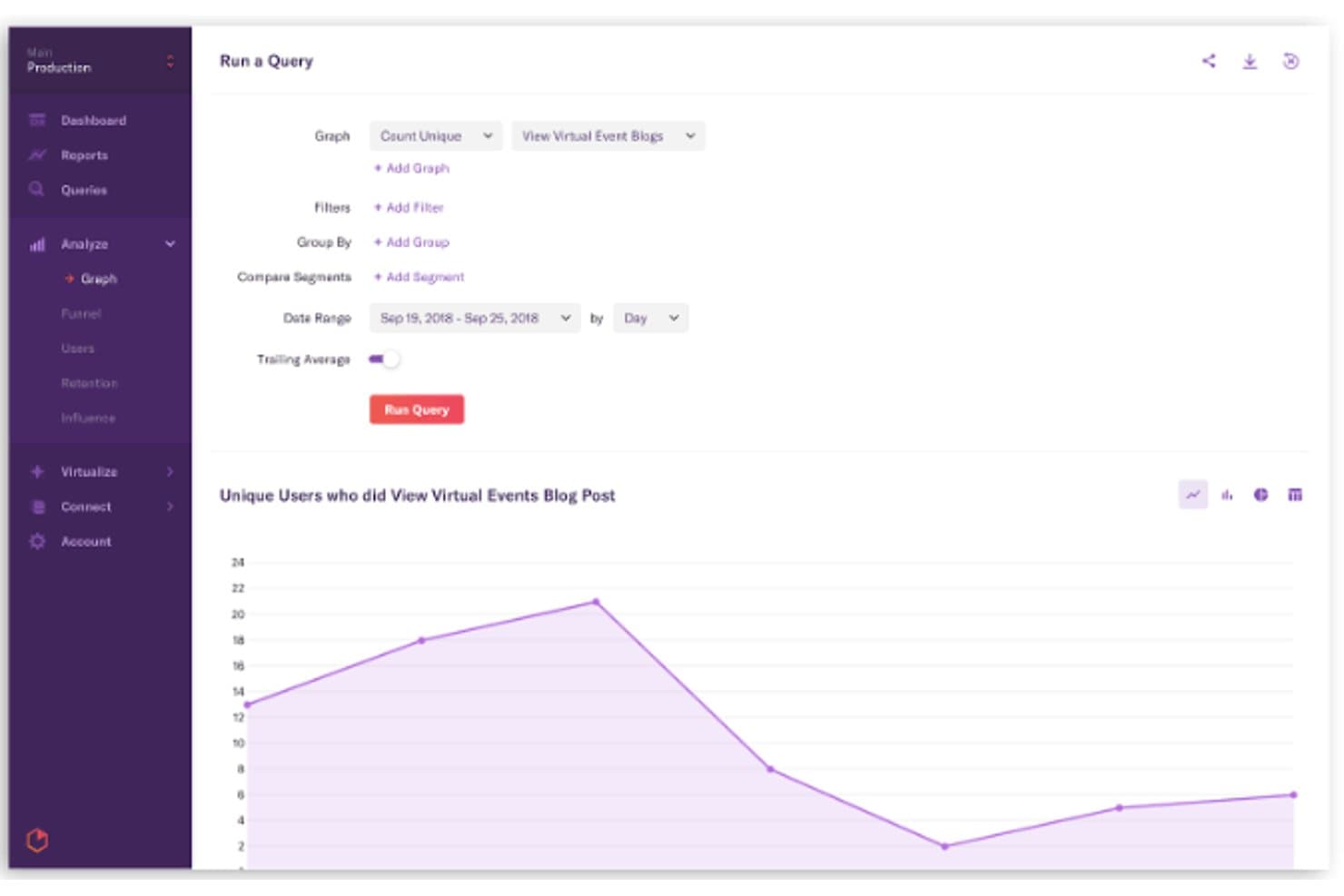
Heap lets users query and visualize user behavior trends over time. Heap is a UX analytics platform that automatically captures every user interaction—clicks, taps, pageviews, and form fills—across web and mobile, and pairs that behavioral data with funnel analysis, journey mapping, session replay, and AI-powered insight surfacing.
Who Is Heap Best For?
Heap works best for product teams that need immediate behavioral insights without waiting on engineering to instrument every event.
Why I Picked Heap
Heap earns its spot on my shortlist because its autocapture approach genuinely changes what's possible in product analytics. From the moment you drop in a single code snippet, Heap records every click, tap, pageview, and form fill automatically, with no manual event tagging required. What I find most valuable is that you can define new events and build funnels retroactively against historical data, so a question you didn't think to ask six months ago can still be answered today.
Heap Key Features
- Sense Chat: A generative AI assistant that lets any team member ask plain-language questions about user behavior and automatically generates charts from the response.
- Heap Illuminate: A data science layer that proactively surfaces top events, high-impact user segments, and friction patterns without any manual configuration.
- Session Replay Summaries: AI-generated summaries of individual session recordings that highlight key moments, reducing the need to watch full replays.
- Heap Connect: A managed ETL solution that syncs behavioral data to Snowflake or BigQuery for enrichment and analysis alongside external data sources.
Heap Integrations
Heap offers 100+ integrations, including Snowflake, BigQuery, Salesforce, HubSpot, Intercom, Segment, RudderStack, Shopify, and WalkMe. Client-side and server-side APIs support custom integrations and data enrichment.
Pros and Cons
Pros:
- Automatic capture of all user interactions
- AI-powered insight surfacing and chat assistant
- Retroactive event definition on historical data
Cons:
- No built-in A/B testing or surveys
- Session replay requires a paid add-on
Learn more about Heap (by Contentsquare): Best for digital experience analytics
- Free plan + free demo + 15-day free trial available
- From $39/month (billed annually)

Contentsquare captures user interactions with detailed session replays and behavior analytics. Contentsquare is a digital experience analytics platform designed to help businesses understand and improve user interactions on their websites and apps. Its primary users are digital marketers and UX designers who need insights into user behavior and engagement.
Why I picked Contentsquare: It specializes in digital experience analytics, offering features like zone-based heatmaps that provide detailed insights into user engagement on different page elements. You can use journey analysis to track user paths and identify drop-off points. Contentsquare also provides session replay, allowing you to visualize user interactions in real-time. These tools help you make data-driven improvements to your digital experiences.
Standout features & integrations:
Features include impact quantification that measures the effect of changes on user behavior, behavioral alerts that notify you of significant user activity changes, and AI-based insights that highlight key user trends. These features work together to enhance your understanding of user interactions.
Integrations include Google Analytics, Adobe Analytics, Salesforce, Tealium, Segment, Optimizely, HubSpot, Shopify, Adobe Commerce, and WordPress.
Pros and Cons
Pros:
- Real-time session replay
- Effective journey analysis
- Detailed zone-based heatmaps
Cons:
- Advanced features need training
- Slight learning curve
Learn more about Contentsquare: Best for cross-functional UX and engineering triage
- 14-day free trial + free plan available
- From $176/month (billed annually)
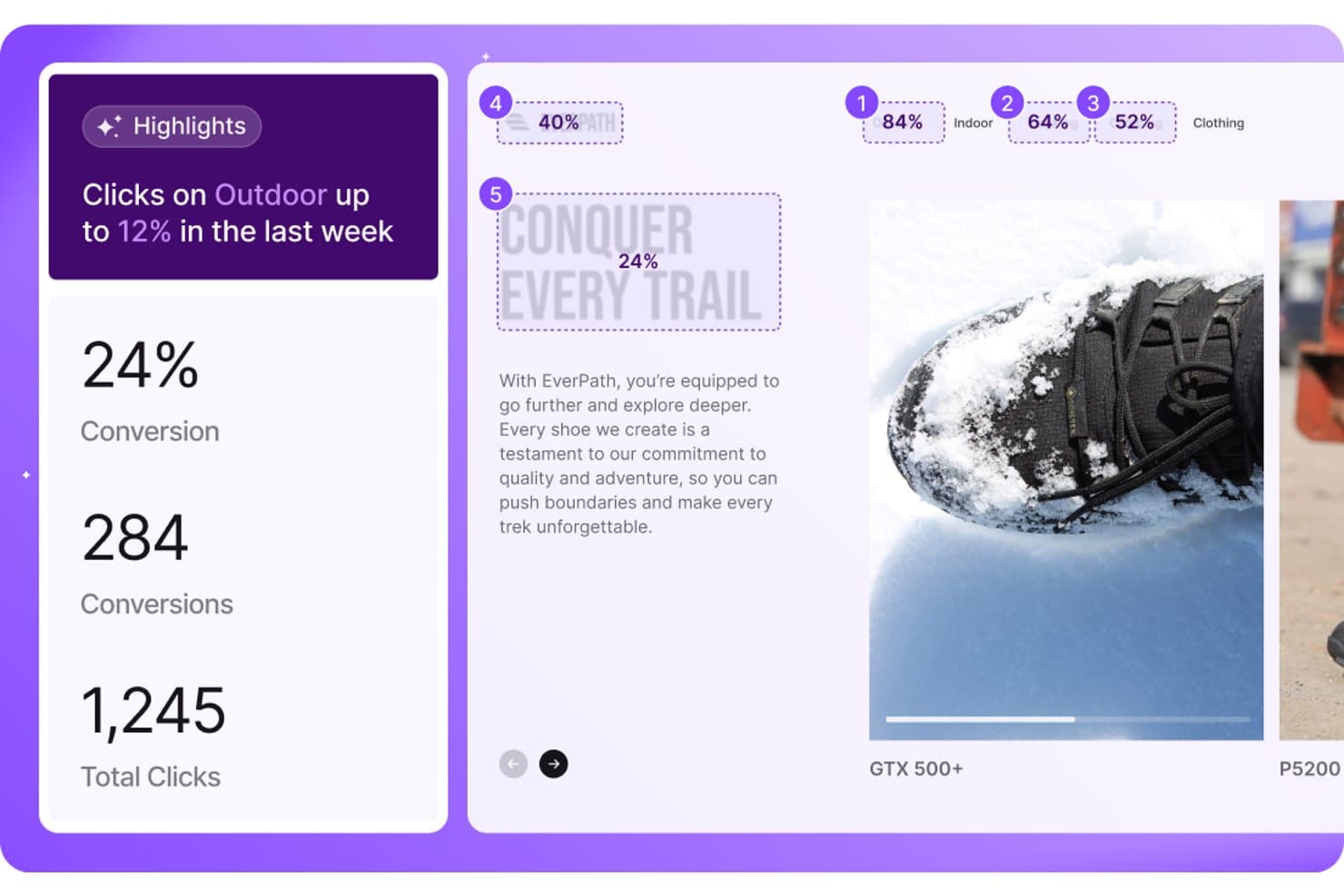
LogRocket surfaces click trends and conversion metrics by content segment. LogRocket is a UX analytics platform that combines session replay, heatmaps, conversion funnels, path analysis, and AI-powered issue detection across web and native mobile apps.
Who Is LogRocket Best For?
LogRocket is a strong fit for product and engineering teams that need a shared tool to diagnose UX problems and reproduce bugs without endless back-and-forth.
Why I Picked LogRocket
LogRocket earns its spot on my shortlist because it's the rare UX analytics tool that product and engineering teams actually share. What makes it click for cross-functional triage is Galileo AI, which auto-detects rage clicks, dead clicks, and error states, scores them by business impact, and pushes reproduction steps directly to Slack or your AI coding environment. Pair that with retroactive Definitions, where you label a UI element today and instantly query all historical sessions for it, and the back-and-forth between product and engineering shrinks fast.
LogRocket Key Features
- Autocapture with retroactive definitions: A single-line script captures every event automatically, and newly created event labels apply instantly to all historical session data.
- Native mobile SDKs: Dedicated SDKs for iOS, Android, React Native, Flutter, Ionic, and Expo deliver pixel-perfect session replay and full UX analytics on mobile.
- Conversion funnels with session drill-down: Multi-step funnel analysis lets you click directly into session replays from any drop-off point for full behavioral context.
- AI feedback analysis: Aggregates user feedback from tools like Zendesk, Qualtrics, and Gong, groups it into themes, and links each theme to correlated session replays.
LogRocket Integrations
LogRocket offers 75+ integrations, including Sentry, Zendesk, Qualtrics, Optimizely, LaunchDarkly, Jira, Snowflake, and BigQuery. It also supports Slack, Microsoft Teams, API access, and MCP connectivity for custom workflows.
Pros and Cons
Pros:
- Galileo AI automates UX issue detection
- Autocapture with retroactive event definitions
- Session replay fidelity is pixel-perfect
Cons:
- Several features unavailable on mobile apps
- Steep pricing for higher session volumes
Learn more about LogRocket:
Andre UX-analyseverktøy
Her er noen flere alternativer for UX-analyseverktøy som ikke kom med på kortlisten, men som likevel er verdt å se nærmere på:
- 11PendoBest for closing the loop from data to in-app action
- 12PostHogBest for open-source product analytics
- 13Crazy EggBest for A/B testing insights
- 14InspectletBest for real-time user monitoring
- 15SmartlookBest for funnel drop-off replay on web and mobile
- 16Lucky OrangeBest for e-commerce UX and frustration signals
- 17MouseflowBest for friction scoring across all sessions
- 18Microsoft ClarityBest for free, no-cap behavioral analytics
How I Evaluate UX Analytics Tools
I evaluate UX analytics tools in two layers: the baseline capabilities—session replay, heatmaps, funnel analysis—a tool must have, and the differentiators that set the best apart.
Core Functionality (Table Stakes For This List)
When I'm selecting tools for my list, I rank each one on a scale from 0 (does not offer the functionality) to 5 (excels in this area) for each core functionality listed below. Then, I calculate the tool's total score into a percentage. Each tool needs to achieve a minimum total score of 65% to be considered for inclusion.
- Session Replay: I look for playback quality, filtering options, and privacy controls—like whether I can quickly find sessions where a user abandoned a checkout flow or hit a JS error.
- Heatmaps & Click Tracking: Good heatmaps should handle dynamic content and SPAs, not just static pages. I check whether tools support scroll, click, and move maps with segmentation.
- Funnel & Journey Analysis: I evaluate how flexible funnel building is—can I define custom multi-step funnels, see where users drop off, and compare conversion across segments?
- Event & Behavior Tracking: Whether a tool offers autocapture or requires manual instrumentation matters. I look at how easily teams can tag buttons, form fields, and in-app actions.
- Segmentation & Cohort Analysis: Filtering sessions or heatmaps by user attributes like plan type, device, or signup date is essential for understanding behavior across different user groups.
- Frustration & Error Signals: Tools that detect rage clicks, dead clicks, and u-turns help surface usability problems faster than combing through raw session recordings manually.
Once I have a list of tools that meet the criteria, I consider what sets each platform apart.
Differentiating Factors (What Sets Vendors Apart)
Here's how I compare and contrast different vendors:
Standout Features
AI-powered insights save hours of manual analysis by flagging behavioral anomalies automatically—like a sudden spike in rage clicks on a newly shipped feature. Retroactive analysis is another differentiator I value. Applying new event definitions to historical data means your team doesn't wait weeks after re-instrumenting to get results. For teams building mobile products, I also check whether a tool offers native SDKs with gesture tracking and app-specific heatmaps.
Beyond Features
Privacy and compliance matter when session recordings capture real user interactions. I check for PII masking, consent management, and certifications like SOC 2 or GDPR readiness—especially for teams handling sensitive user data. Tech stack fit is equally important. A UX analytics tool should connect to where your team already works, whether that's pushing insights into Jira tickets or piping event data through Segment. I also evaluate pricing transparency, since session-based or MTU-based models can balloon quickly as your product scales.
Slik velger du UX-analyseverktøy
Det er lett å gå seg vill i lange funksjonslister og kompliserte prisstrukturer. For å hjelpe deg med å holde fokus mens du går gjennom den unike prosessen med å velge programvare, får du her en sjekkliste over faktorer du bør ha i bakhodet:
| Faktor | Hva du bør vurdere |
| Skalerbarhet | Forsikre deg om at verktøyet kan vokse sammen med virksomheten din. Det bør kunne håndtere økende datamengder etter hvert som brukerbasen utvides, uten at det går ut over ytelsen. |
| Integrasjoner | Kontroller at verktøyet er kompatibelt med eksisterende programvare som teamet bruker, for eksempel CRM-systemer eller markedsføringsplattformer, slik at data flyter sømløst mellom verktøyene. |
| Tilpasningsmuligheter | Se etter verktøy som lar deg tilpasse dashbord og rapporter etter teamets spesifikke behov og arbeidsflyter. |
| Brukervennlighet | Grensesnittet bør være intuitivt og kreve minimalt med opplæring, slik at teamet raskt kan ta i bruk og bruke verktøyet effektivt. |
| Budsjett | Ta hensyn til både kostnader på forhånd og langsiktige prisplaner. Forsikre deg om at verktøyet passer budsjettet ditt og gir god verdi for funksjonene det tilbyr. |
| Sikkerhetstiltak | Vurder tiltak for databeskyttelse, som kryptering og tilgangskontroller, for å sikre at brukerdataene dine er trygge og i samsvar med regelverket. |
| Brukerstøtte | Pålitelig kundestøtte er avgjørende. Se etter tilgjengelighet døgnet rundt og flere kontaktalternativer, slik at teamet kan få hjelp med eventuelle problemer. |
| Analysedybde | Vurder detaljnivået i analysene som tilbys. Verktøyet bør gi dyp innsikt i brukeratferd, slik at du kan ta informerte beslutninger. |
Trender innen UX-analyseverktøy
I arbeidet med undersøkelsen min hentet jeg inn utallige produktoppdateringer, pressemeldinger og lanseringslogger fra ulike leverandører av UX-analyseverktøy. Her er noen av de fremvoksende trendene jeg følger med på:
- KI-drevet innsikt: KI brukes i stadig større grad til å gi dypere innsikt i brukeratferd. Verktøy benytter maskinlæring til å forutsi trender og automatisere dataanalyse, slik at team kan ta raskere beslutninger. Leverandører som Contentsquare integrerer KI for å fremheve brukertrender.
- Analyse på tvers av kanaler: Virksomheter ønsker å følge brukeratferd på tvers av flere kanaler. Verktøyene utvikles for å gi et samlet bilde av brukerinteraksjoner på nettsteder, i apper og på andre digitale kontaktpunkter. Denne trenden hjelper team med å forstå hele kundereisen.
- Personvern først i analysene: Med økende bekymring for personvern fokuserer verktøyene på å tilby analyse uten å gå på bekostning av brukernes personvern. Funksjoner som anonymisert datainnsamling blir stadig vanligere og sikrer samsvar med regelverk som GDPR.
- Samarbeid i sanntid: Ettersom fjernarbeid fortsetter, blir muligheten for at team kan samarbeide om analyser i sanntid stadig mer populær. Verktøy integrerer funksjoner som lar team dele innsikt og samarbeide om dataanalyse umiddelbart.
- Fokus på brukeropplevelsen: Det skjer en endring der man går utover selve dataene og forbedrer brukeropplevelsen i analyseverktøyene. Leverandørene prioriterer intuitive grensesnitt og brukervennlig utforming, slik at det blir enklere for team å ta i bruk analysedata.
Hva er UX-analyseverktøy?
UX-analyseverktøy er en type webanalyseverktøy som er utviklet for å hjelpe team med å forstå hvordan brukere samhandler med digitale produkter. Disse verktøyene brukes vanligvis av UX-designere, produktledere og markedsførere, og kombinerer atferdsdata og kvalitative innsikter for å forbedre kundeopplevelsen.
Funksjoner som varmekart, øktopptak og konverteringssporing gjør det mulig for team å avdekke brukervennlighetsproblemer, overvåke individuell brukeratferd og forbedre digitale opplevelser. Ved å omdanne både kvantitative og kvalitative data til handlingsrettet innsikt støtter disse verktøyene datadrevne designbeslutninger som forbedrer brukertilfredsheten totalt sett.
Funksjoner i UX-analyseverktøy
Når du velger UX-analyseverktøy, bør du se etter viktige funksjoner som støtter både kvantitativ sporing og kvalitativ brukerundersøkelse:
- Varmekart: Visualiser klikk-, rulle- og pekerbevegelser for å identifisere områder med høyt brukerengasjement og friksjonspunkter.
- Øktopptak: Se individuelle brukerøkter for å finne brukervennlighetsproblemer, rasende klikk og frafall.
- Konverteringssporing: Analyser konverteringstrakter og finn ut hvor brukerne avbryter reisen.
- Sanntidsanalyse: Få tilgang til direkte atferdsdata for å reagere raskt på nye mønstre eller problemer.
- Tilpassbare dashbord: Vis beregninger på en måte som samsvarer med teamets mål og arbeidsflyter.
- Atferdsvarsler: Få varsler når uventede mønstre oppstår, for eksempel økninger i avvisningsfrekvens eller navigasjonssløyfer.
- Kohortanalyse: Segmenter brukere etter atferd eller egenskaper for å forstå trender på tvers av ulike målgrupper.
- Personvernorientert datainnsamling: Respekter brukernes personvern samtidig som du samler inn meningsfull innsikt.
- Sporing på tvers av kanaler: Følg hele brukerreisen på tvers av mobilapper, nettsteder og andre digitale kontaktpunkter.
- Integrering av tilbakemeldinger fra brukere: Kombiner direkte innspill med atferdssporing for å få et mer helhetlig bilde av brukeropplevelsen.
Fordeler med UX-analyseverktøy
Implementering av UX-analyseverktøy gir flere fordeler for teamet og virksomheten din. Her er noen av fordelene du kan se frem til:
- Forbedret brukeropplevelse: Ved å analysere varmekart og øktopptak kan du identifisere og løse smertepunkter, noe som fører til smidigere brukerinteraksjoner.
- Datadrevne beslutninger: Sanntidsanalyse og konverteringssporing gir innsikt som hjelper teamet med å ta velinformerte valg.
- Økte konverteringsrater: Når du forstår frafallspunktene gjennom konverteringssporing, kan du optimalisere brukerreisen og øke antallet konverteringer.
- Økt kundetilfredshet: Ved å integrere tilbakemeldinger fra brukere og kohortanalyse kan du tilpasse opplevelsene bedre til brukernes behov.
- Rask problemløsning: Atferdsvarsler sikrer at du raskt håndterer vesentlige endringer i brukeratferd og opprettholder en positiv opplevelse.
- Helhetlig bilde av brukerreiser: Sporing på tvers av kanaler gir deg et omfattende bilde av brukerinteraksjoner og hjelper deg med å utforme helhetlige strategier.
- Overholdelse av regelverk: Personvernorientert datainnsamling sikrer at datapraksisen din er i samsvar med regelverket og beskytter brukerinformasjonen.
Kostnader og priser for UX-analyseverktøy
Ved valg av UX-analyseverktøy er det nødvendig å forstå de ulike prismodellene og tilgjengelige abonnementene. Kostnadene varierer basert på funksjoner, teamstørrelse, tillegg og mer. Tabellen nedenfor oppsummerer vanlige abonnementer, gjennomsnittsprisene deres og typiske funksjoner som er inkludert i løsninger for UX-analyseverktøy:
Sammenligningstabell for abonnementer for UX-analyseverktøy
| Abonnementstype | Gjennomsnittspris | Vanlige funksjoner |
| Gratisabonnement | $0 | Grunnleggende varmekart, begrensede øktavspillinger og standardanalyse. |
| Personlig abonnement | $5-$50/bruker/måned | Varmekart, øktavspillinger, grunnleggende konverteringssporing og begrensede egendefinerte rapporter. |
| Bedriftsabonnement | $50-$150/ bruker/måned | Avansert konverteringssporing, sanntidsanalyse, integrasjon av brukertilbakemeldinger og tilpassbare kontrollpaneler. |
| Virksomhetsabonnement | $150+/bruker/måned | Sporing på tvers av kanaler, atferdsvarsler, KI-drevet innsikt og dedikert brukerstøtte. |
Vanlige spørsmål om UX-analyseverktøy
Her er noen svar på vanlige spørsmål om UX-analyseverktøy:
Trenger UX-designere å kunne dataanalyse?
Ja, UX-designere har nytte av å forstå dataanalyse, siden dette gir grunnlag for designbeslutninger. Kunnskap om hvordan data fra brukerinteraksjoner skal tolkes, hjelper deg med å optimalisere design og forbedre brukeropplevelser. Dataanalyse støtter viktige beslutninger i designprosessen ved å synliggjøre områder som kan forbedres.
Hva er eksterne analyseverktøy?
Eksterne analyseverktøy omfatter populære plattformer som Google Analytics, Hotjar og Mixpanel. Disse verktøyene gir verdifull innsikt i brukeratferd, slik at du kan forstå hvordan brukere samhandler med de digitale produktene dine og identifisere områder som kan optimaliseres.
Hvordan integreres UX-analyseverktøy med eksisterende systemer?
UX-analyseverktøy integreres ofte med CRM-systemer, markedsføringsplattformer og andre forretningsverktøy. Disse integrasjonene muliggjør sømløs dataflyt, slik at du kan samle informasjon på ett sted og få en helhetlig oversikt over brukerinteraksjoner på tvers av ulike kanaler.
Kan UX-analyseverktøy bidra til optimalisering av konverteringsfrekvensen?
Ja, UX-analyseverktøy spiller en viktig rolle i optimalisering av konverteringsfrekvensen ved å spore brukerreiser og identifisere punkter der brukere faller fra. Ved å analysere disse dataene kan du gjøre velinformerte endringer for å forbedre brukerflyten og øke konverteringsfrekvensene på de digitale plattformene dine.