

Recensione di airfocus: Pro, Contro, Caratteristiche e Prezzi
airfocus si distingue per i suoi strumenti di prioritizzazione flessibili e il design modulare, rendendolo ideale per i team che cercano una gestione del prodotto personalizzabile oltre le soluzioni standard di roadmap.

Recensiamo gli strumenti in modo indipendente e le commissioni aiutano a finanziare i nostri test. Consulta la nostra politica sulla trasparenza, la nostra metodologia oppure suggerisci uno strumento.
airfocus is a product management tool built around prioritization and roadmapping for teams that need to align stakeholders on what to build—and why. It's a good fit when your biggest challenge isn't tracking delivery but making defensible prioritization decisions across competing initiatives. I'd consider it a sharper alternative to Productboard if you want more flexible, customizable prioritization frameworks without the rigidity of a more opinionated platform.
airfocus Evaluation Summary
4.4/5
- Pricing upon request
- Free demo available
Perché fidarsi dei nostri consigli sui software
6,700+
Reviews
20
Industry experts
16+
Evaluation factors
14
Years
Il nostro team testa e recensisce software dal 2012. In quanto product manager noi stessi, sappiamo quanto sia difficile — e importante — scegliere il software giusto.
Per questa guida, abbiamo valutato gli strumenti attraverso test pratici e ricerche indipendenti, assegnando un punteggio agli strumenti in base ai nostri criteri di selezione.
Le nostre recensioni riflettono il nostro giudizio editoriale umano, non un discorso di vendita.
Revisori esperti:
- Andrew LumbySenior TPM
- Cristiano ValimSenior UI/UX Lead


airfocus Overview
When judging airfocus against other product management software, its modular prioritization tools and customizable roadmaps set it apart for teams seeking flexibility. The interface is clean, and onboarding is straightforward, making it easy for new users to get started. Pricing is competitive for mid-sized teams, and integrations cover the most common SaaS tools.
While advanced reporting and portfolio management are less developed than some alternatives, airfocus excels for organizations that need to adapt processes quickly or manage multiple products. It’s a strong choice if you’re selecting a tool for cross-functional teams or fast-scaling environments.
Pros
- Centralized feedback and insights connect directly to product decisions
- Roadmap and portfolio views support multi-product organizations
- Modular prioritization frameworks adapt to different team needs
Cons
- Portfolio management is less granular than some alternatives
- Capacity planning tools lack depth for large enterprises
- Advanced reporting features are limited compared to some competitors
Is airfocus Right For Your Needs?
Who Would be a Good Fit for airfocus?
airfocus is a strong choice for organizations that need flexible prioritization, modular roadmapping, and centralized feedback management. Its interface and onboarding process make it accessible for cross-functional teams, while its feedback and insights tools help align stakeholders.
Teams that manage multiple products or require adaptable frameworks will find its customizable features especially useful. These strengths make airfocus well-suited for a range of industries and roles that value adaptability and collaboration.
- Mid-Sized TechCompanies Scalable features support growth without overwhelming smaller teams.
- Marketing DepartmentsVisual roadmaps clarify campaign timelines and cross-team dependencies.
- Healthcare TechnologyCentralized feedback tools help align compliance and user needs.
- AgenciesMulti-client portfolio views help manage several projects at once.
- Product Management TeamsCustomizable prioritization and roadmap tools fit evolving product strategies.
- SaaS Startupsairfocus supports rapid iteration and shifting priorities with modular frameworks.
Who Would be a Bad Fit for airfocus?
airfocus may not be the best option for organizations that require deep analytics, highly specialized workflows, or advanced capacity planning. Large enterprises with complex reporting needs or industries with strict regulatory requirements might find its feature set limiting. Teams that need granular portfolio management or highly tailored integrations may also want to consider alternatives.
- Data Science TeamsLimited analytics and visualization tools for complex data-driven projects.
- Government AgenciesPortfolio management lacks the granularity needed for public sector projects.
- Customer Support TeamsFeature set is not tailored for ticketing or case management.
- Manufacturing OperationsDoes not support detailed supply chain or production workflows.
- Financial ServicesLacks specialized compliance and audit trail features for regulations.
- Large EnterprisesAdvanced reporting and capacity planning tools are less developed.
Come Testiamo e Valutiamo gli Strumenti
Abbiamo passato anni a costruire, perfezionare e migliorare il nostro sistema di test e valutazione del software. Il nostro metodo è stato progettato per cogliere le sfumature della selezione del software e ciò che rende efficace uno strumento, concentrandosi sugli aspetti critici del processo decisionale. Qui sotto puoi vedere esattamente come funzionano i nostri test e la nostra valutazione suddivisa in sette criteri. Questo ci consente di offrire una valutazione imparziale del software sulla base delle funzionalità principali, delle caratteristiche distintive, della facilità d’uso, dell’onboarding, dell’assistenza clienti, delle integrazioni, delle recensioni dei clienti e del rapporto qualità/prezzo.
Funzionalità Principali (25% del punteggio finale)
Il punto di partenza della nostra valutazione sono sempre le funzionalità principali dello strumento. Possiede le funzioni di base che un utente si aspetterebbe di trovare? Alcune di queste sono riservate ai piani tariffari più alti? Ci aspettiamo che uno strumento rispetti almeno le funzionalità di base dei competitors.
Caratteristiche Distintive (25% del punteggio finale)
Successivamente, valutiamo le caratteristiche distintive e non comuni che vanno oltre le funzioni di base normalmente riscontrate in strumenti simili. Un punteggio alto indica funzionalità specializzate o uniche che rendono il prodotto più rapido, efficiente o forniscono un valore aggiunto all’utente. Valutiamo anche la facilità con cui si possono integrare altri strumenti solitamente presenti nella stack tecnologica, ampliando così funzionalità e utilità del software. Gli strumenti che offrono molte integrazioni native, collegamenti di terze parti e accesso API per integrazioni personalizzate ottengono i punteggi migliori.
Facilità d’Uso (10% del punteggio finale)
Consideriamo quanto sia rapido e semplice eseguire le attività definite dalle funzionalità principali tramite lo strumento. Il software con il punteggio più alto è ben progettato, intuitivo da usare, offre app per dispositivi mobili, modelli preimpostati e semplifica anche le attività più complesse.
Onboarding (10% del punteggio finale)
Sappiamo quanto sia importante una rapida adozione da parte del team, quindi valutiamo quanto sia facile imparare ad usare lo strumento con una formazione minima. Valutiamo la velocità con cui un membro del team può configurarsi e iniziare a utilizzare lo strumento senza esperienza. Le soluzioni con punteggio più alto richiedono poco o nessun supporto.
Assistenza Clienti (10% del punteggio finale)
Osserviamo quanto sia facile e veloce ottenere supporto tramite telefono, chat dal vivo o knowledge base. Gli strumenti che offrono supporto in tempo reale ottengono punteggi più alti, mentre i chatbot ricevono i punteggi peggiori.
Recensioni Clienti (10% del punteggio finale)
Oltre ai nostri test e valutazioni, consideriamo il net promoter score di clienti attuali e passati. Valutiamo la probabilità che scelgano nuovamente lo strumento in base alle funzionalità principali. Un software con punteggio elevato riflette un net promoter score alto.
Rapporto Qualità/Prezzo (10% del punteggio finale)
Infine, considerando tutti gli altri criteri, confrontiamo il prezzo medio dei piani base con le funzionalità principali, esaminando il valore degli altri criteri di valutazione. Il software che offre di più, a meno, otterrà un punteggio maggiore.
Core Features
Modular Prioritization Frameworks
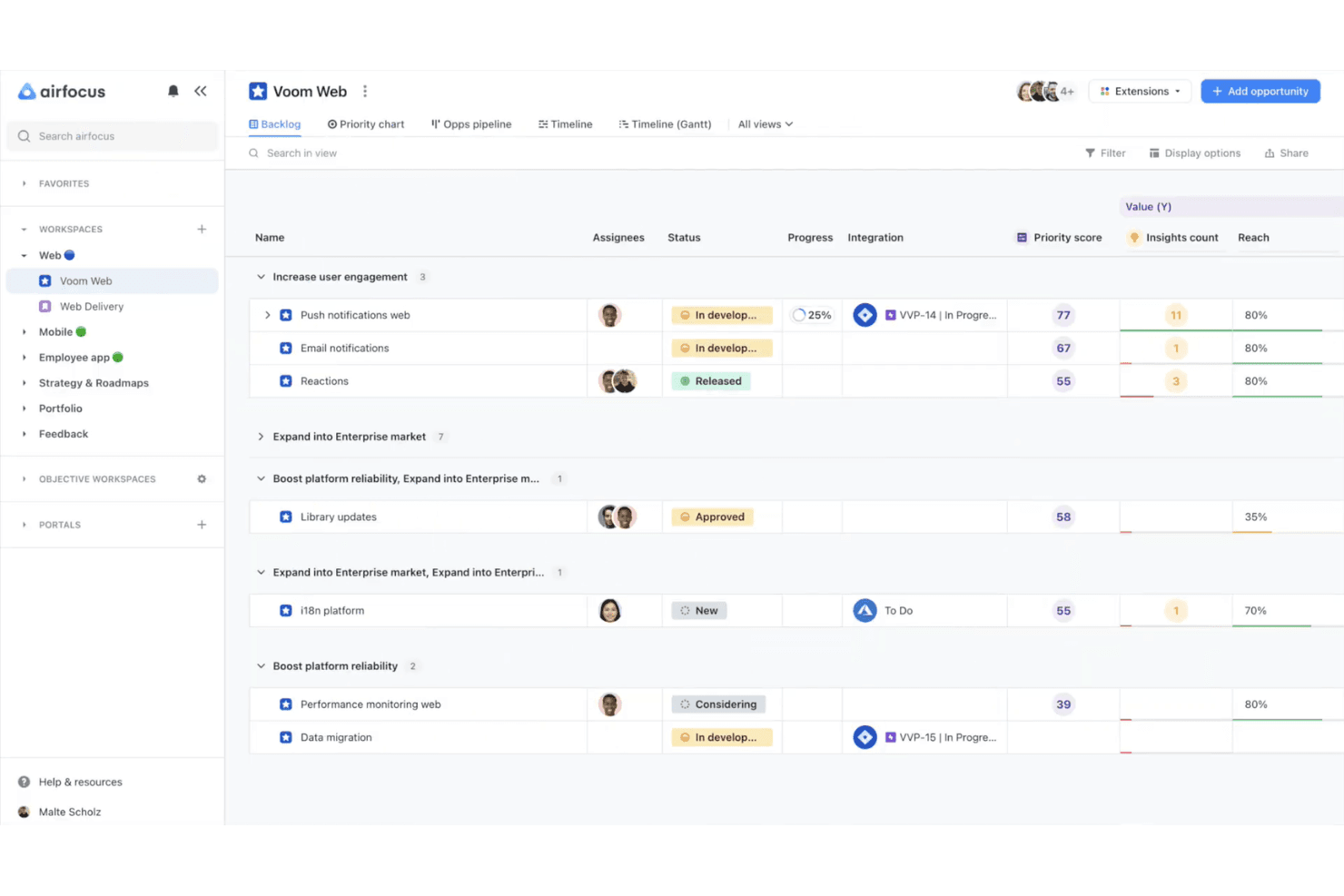
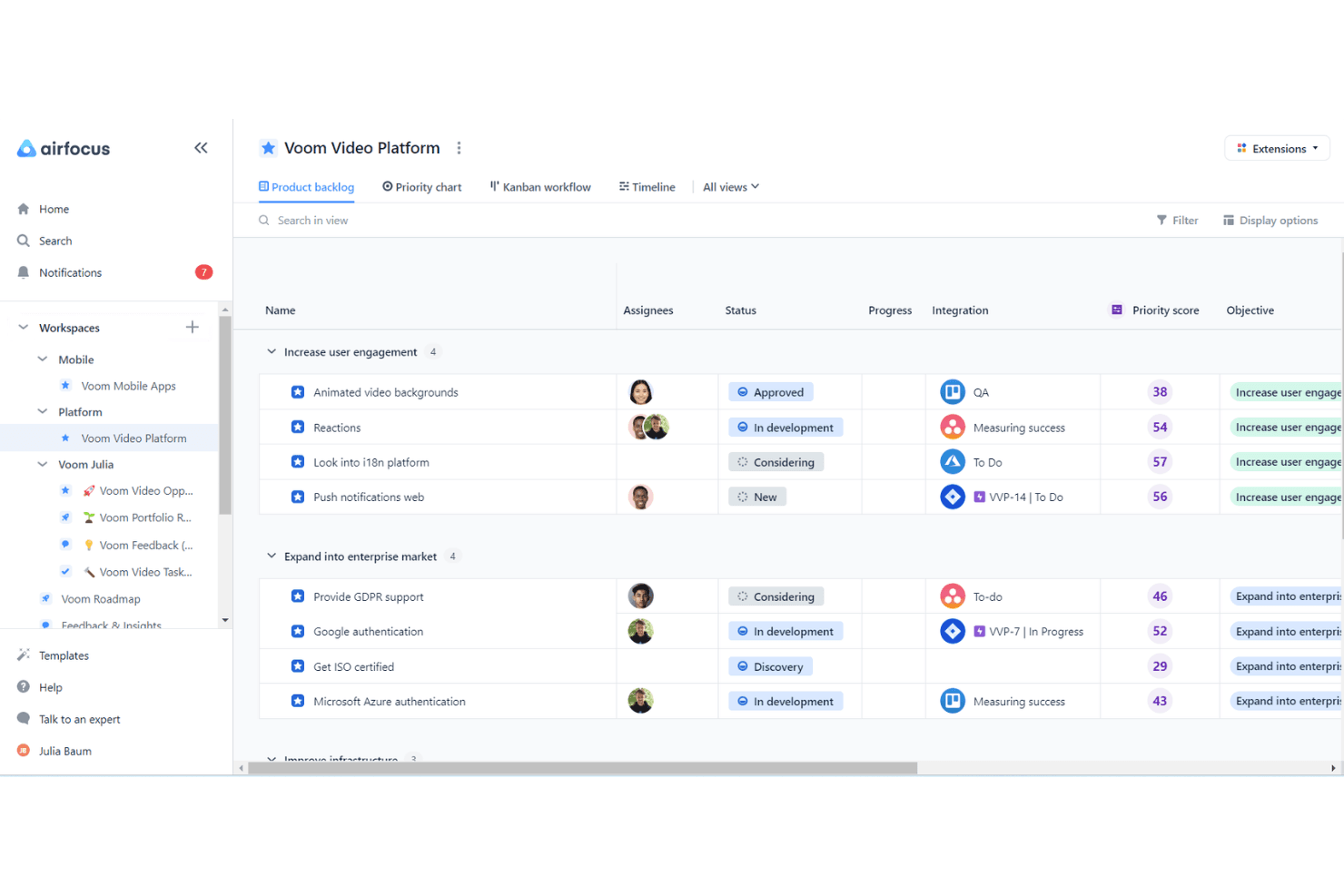
Choose from built-in scoring models or create custom frameworks to rank initiatives. This helps teams align on what to build next based on real criteria.
Roadmapping Tools
Build visual, interactive roadmaps that update in real time as priorities shift. Teams can share these roadmaps with stakeholders for clear alignment.
Centralized Feedback Management
Collect, organize, and link feedback from multiple sources directly to product items. This ensures user insights are always connected to decision-making.
Portfolio Management
View and manage multiple products or projects in one place. This feature supports organizations juggling several product lines or client accounts.
Customizable Workspaces
Set up unique workspaces for different teams, products, or workflows. Each workspace can have its own views, fields, and permissions.
Insights and Reporting
Generate reports and insights from feedback, prioritization, and progress data. While basic, these tools help track trends and inform product strategy.
Ease of Use
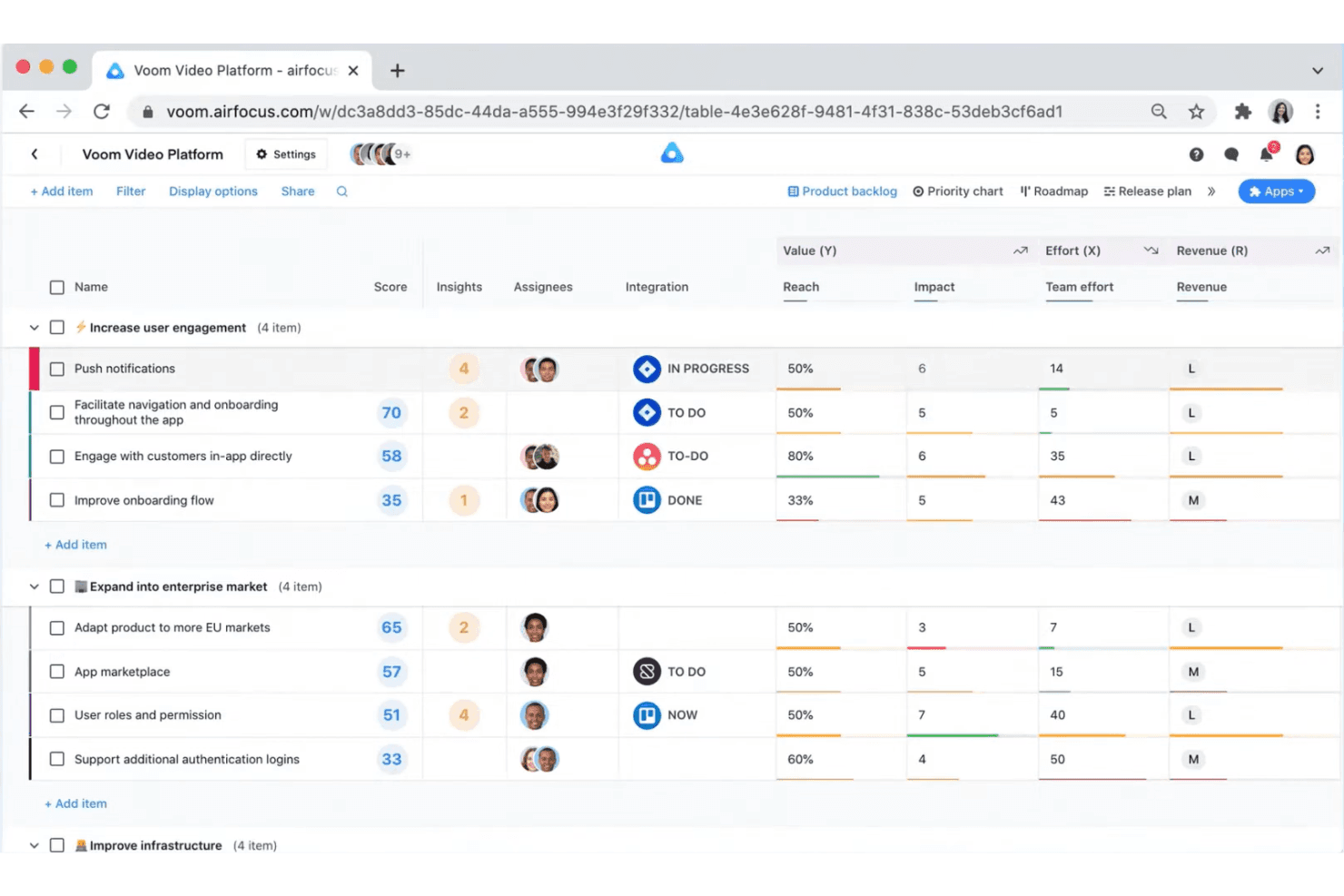
airfocus offers a clean, intuitive interface that helps new users get started quickly, even if they haven’t used product management software before. The drag-and-drop roadmap builder and modular workspace setup simplify complex workflows. Users often mention that onboarding is straightforward, with helpful guides and templates available. While some advanced features require a bit of exploration, most teams find the platform easy to navigate and adapt to their specific processes.
Integrations
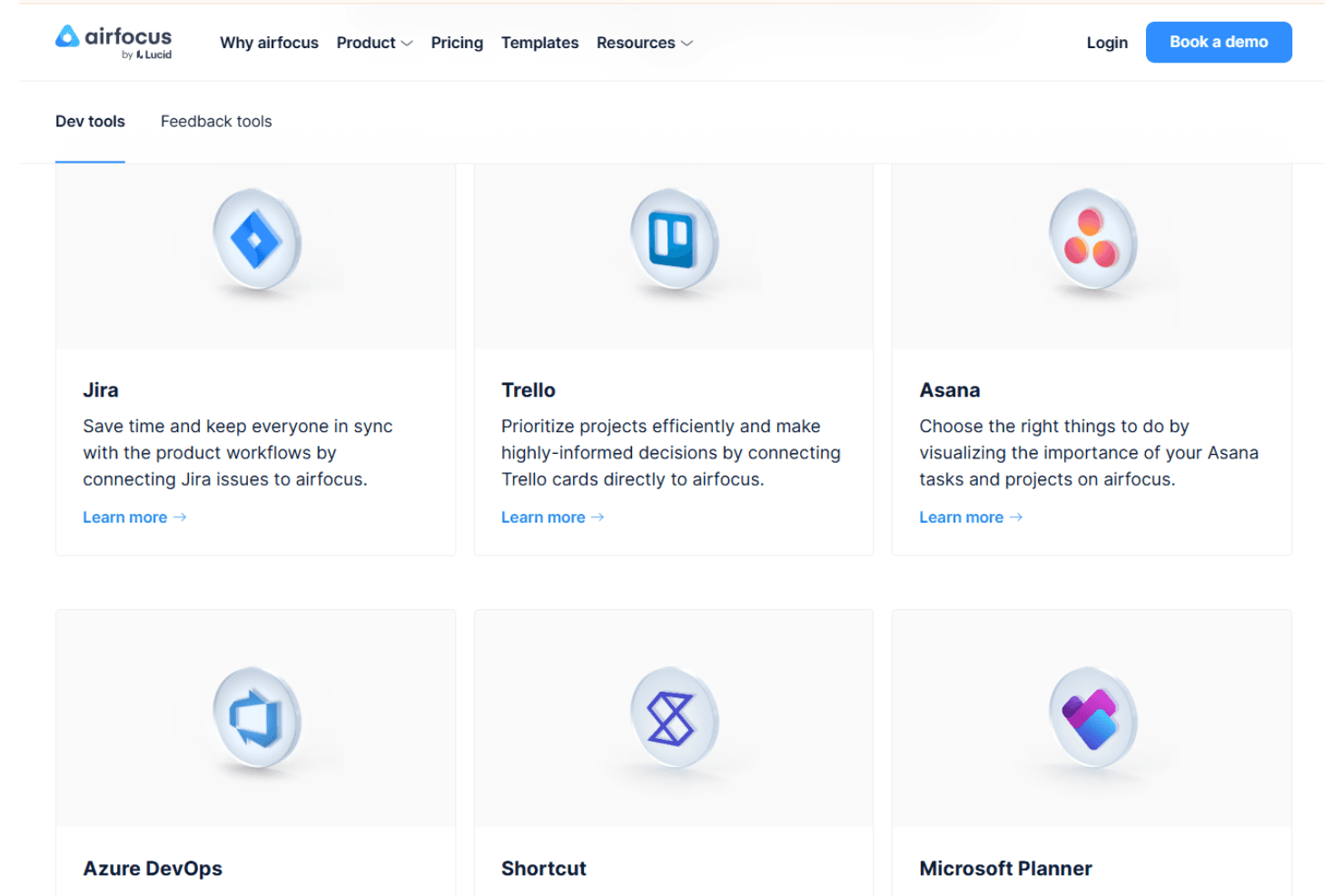
airfocus integrates with Jira, Trello, Asana, Azure DevOps, GitHub, Zapier, Intercom, Slack, Microsoft Teams, and Google Sheets, among others.
airfocus also offers an open API and connects with third-party integration tools for expanded workflow automation.
airfocus Specs
- A/B Testing: No
- API: Yes
- Collaboration Support: No
- Custom Data Forms: No
- Dashboard: Yes
- Dashboards: No
- Data Export: Yes
- Data Import: Yes
- Developer Tools: No
- External Integrations: Yes
- Feedback Management: No
- Gantt Charts: Yes
- Google Apps Integration: No
- Multi-User: Yes
- Notifications: Yes
- Prioritization: Yes
- Product Catalog: No
- Release Management: No
- Reports: No
- Resource Management: No
- Review Monitoring: No
- Roadmapping: Yes
- Scheduling: Yes
- Task Scheduling/Tracking: Yes


