

Con così tante soluzioni diverse per la crescita guidata dal prodotto disponibili, capire quale sia quella giusta per te è difficile. Sai di voler aumentare l'adozione da parte degli utenti, l'acquisizione organica di clienti attraverso il passaparola, la soddisfazione dei clienti e l'efficienza e la scalabilità del modello di acquisizione dei clienti, ma devi capire quale strumento sia più adatto allo scopo. Ci penso io! In questo articolo ti aiuterò a rendere semplice la tua scelta, condividendo la mia esperienza personale nell'utilizzo di decine di strumenti con team numerosi e prodotti diversi, insieme alle mie scelte dei migliori software per la crescita guidata dal prodotto.
Perché fidarsi dei nostri consigli sui software
6,700+
Reviews
20
Industry experts
16+
Evaluation factors
14
Years
Il nostro team testa e recensisce software dal 2012. In quanto product manager noi stessi, sappiamo quanto sia difficile — e importante — scegliere il software giusto.
Per questa guida, abbiamo valutato gli strumenti attraverso test pratici e ricerche indipendenti, assegnando un punteggio agli strumenti in base ai nostri criteri di selezione.
Le nostre recensioni riflettono il nostro giudizio editoriale umano, non un discorso di vendita.
Revisori esperti:
- Andrew LumbySenior TPM
- Cristiano ValimSenior UI/UX Lead


Tabella comparativa dei software per la crescita guidata dal prodotto
Confronta i dettagli sui prezzi delle mie migliori selezioni di software per la crescita guidata dal prodotto nella tabella seguente.
| Tool | Best For | Trial Info | Price | ||
|---|---|---|---|---|---|
| 1 | Ideale per flussi di onboarding degli utenti personalizzati | Prova gratuita di 14 giorni | A partire da $174/mese (con fatturazione annuale) | Website | |
| 2 | Ideale per l'onboarding in-app senza codice e l'analisi dei funnel | Prova gratuita di 14 giorni | A partire da $500/mese | Website | |
| 3 | Ideale per la guida nell'app e l'adozione nelle aziende | Prova gratuita disponibile | Prezzi su richiesta | Website | |
| 4 | Ideale per la riproduzione delle sessioni collegata alla guida in-app | Piano gratuito e demo gratuita disponibili | Prezzi su richiesta | Website | |
| 5 | Najlepsze rozwiązanie do ujednoliconej analityki i przewodników w aplikacji | Dostępny bezpłatny plan | Cennik dostępny na żądanie | Website | |
| 6 | Ideale per ottenere informazioni sull'adozione del prodotto guidate dall'IA | Prova gratuita di 14 giorni + demo gratuita disponibile | A partire da $299/mese | Website | |
| 7 | Ideale per l'avvio degli utenti senza codice con risultati dal primo giorno | Prova gratuita disponibile | Prezzi su richiesta | Website | |
| 8 | Ideale per analisi unificate e guide nell'app | Piano gratuito disponibile | Prezzi su richiesta | Website | |
| 9 | Ideale per l'onboarding tra più app con flussi guidati dall'intelligenza artificiale | Piano gratuito + prova gratuita di 30 giorni + demo gratuita disponibile | Prezzi su richiesta | Website | |
| 10 | Ideale per analisi approfondite del prodotto a codice aperto | Piano gratuito + demo gratuita disponibile | A partire da $0.005/registrazione | Website |


Recensioni dei migliori software per la crescita guidata dal prodotto
Di seguito trovi le mie sintesi dettagliate dei migliori software per la crescita guidata dal prodotto inclusi nella mia selezione ristretta. Le mie recensioni offrono un’analisi dettagliata delle funzionalità principali, dei pro e dei contro, delle integrazioni e dei casi d’uso ideali di ogni strumento, per aiutarti a trovare quello più adatto a te.
 Ideale per flussi di onboarding degli utenti personalizzati
- Prova gratuita di 14 giorni
- A partire da $174/mese (con fatturazione annuale)
Visit WebsiteCustomer Rating:4.7/5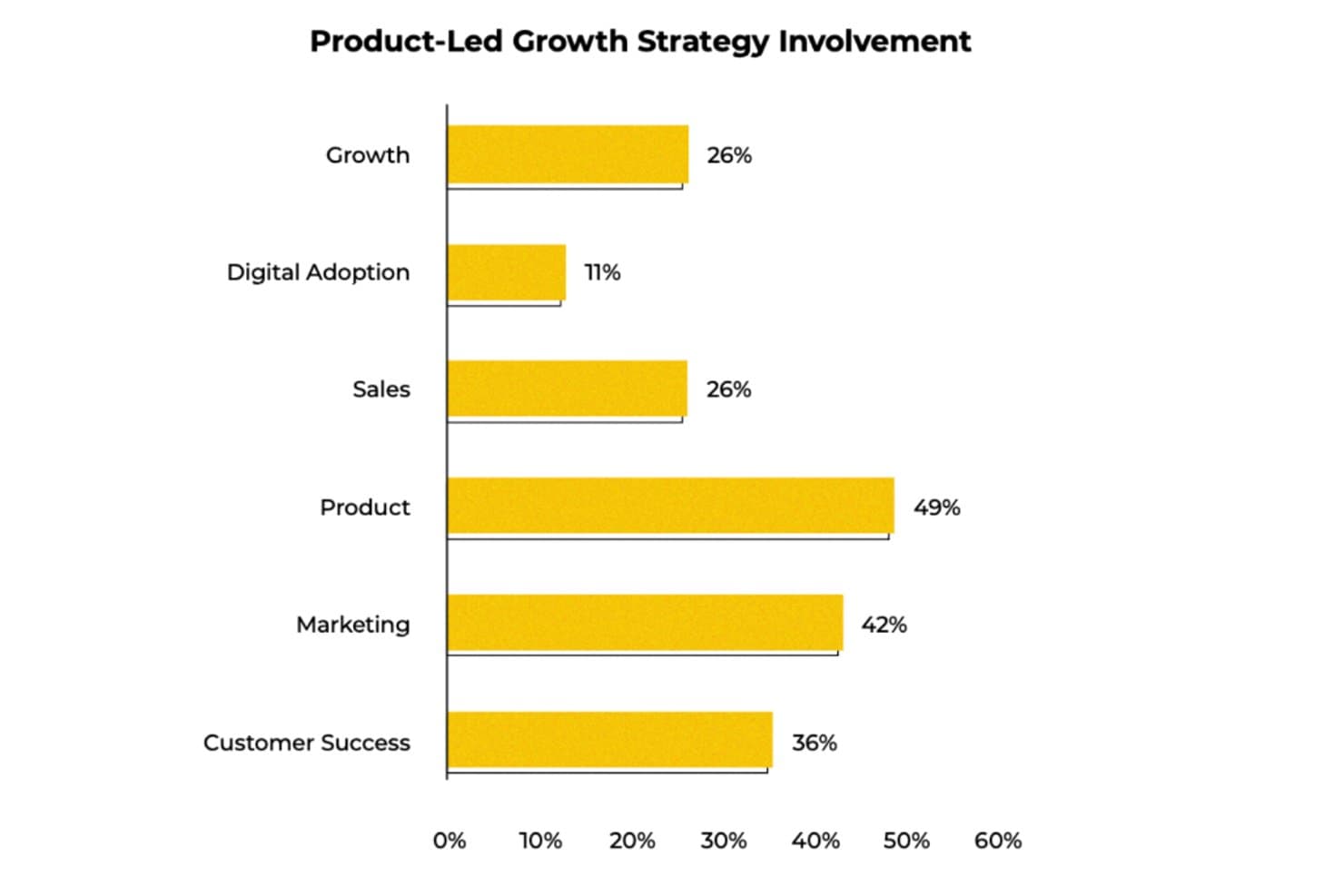
UserGuiding mostra quali team sono maggiormente coinvolti nelle strategie di crescita guidata dal prodotto. UserGuiding è una piattaforma senza codice per l'onboarding degli utenti e l'adozione dei prodotti che combina guide nell'app, checklist, tooltip, sondaggi, centri risorse e monitoraggio degli eventi per aiutare i team a coinvolgere e attivare gli utenti direttamente all'interno del prodotto.
Per chi è più adatto UserGuiding?
UserGuiding è particolarmente adatto ai responsabili di prodotto di aziende SaaS di piccole e medie dimensioni che vogliono creare e lanciare flussi di onboarding nell'app senza dipendere dalle risorse del team di sviluppo.
Perché ho scelto UserGuiding
Ho scelto UserGuiding come una delle soluzioni migliori perché il suo strumento di creazione senza codice consente di lanciare flussi di onboarding, checklist e tooltip personalizzati senza coinvolgere il team di sviluppo. Apprezzo soprattutto la segmentazione multilivello, che permette di targettizzare gli utenti contemporaneamente in base ai dati degli eventi, al tipo di piano e agli attributi aziendali, così un 'utente del piano Pro che non ha utilizzato la funzionalità di esportazione' riceve un'esperienza diversa rispetto a un nuovo utente in prova.
Funzionalità principali di UserGuiding
- Monitoraggio degli eventi senza codice: La registrazione degli eventi tramite puntamento e clic consente di monitorare l'utilizzo delle funzionalità senza scrivere una sola riga di codice né attendere il team di sviluppo.
- Sondaggi NPS nell'app: I sondaggi NPS nativi raccolgono il feedback degli utenti direttamente nel prodotto, con risultati che possono attivare automaticamente azioni successive in Intercom.
- Riproduzione delle sessioni: La riproduzione delle sessioni integrata registra le interazioni degli utenti, permettendo di osservare come si muovono all'interno del prodotto e di individuare i punti di attrito.
- Server MCP: Collega i dati del prodotto ad applicazioni di IA come Claude o Cursor, consentendo di interrogare le metriche di coinvolgimento e segmentare il comportamento usando il linguaggio naturale.
Integrazioni di UserGuiding
UserGuiding offre integrazioni native con HubSpot, Salesforce, Intercom, Slack, Segment, Mixpanel, Amplitude, Google Analytics e Woopra. Supporta inoltre webhook, un'API e un server MCP per la connettività personalizzata e le query sui dati del prodotto assistite dall'IA.
Pros and Cons
Pros:
- I flussi di onboarding personalizzati vengono lanciati senza il coinvolgimento del team di sviluppo
- Segmenta gli utenti in base al comportamento e agli attributi aziendali
- L'NPS nativo collega il feedback alle attività di adozione
Cons:
- Non dispone di analisi di coorte, dei percorsi e della fidelizzazione
- Non offre un punteggio dedicato dei lead qualificati dal prodotto
Learn more about UserGuiding: Ideale per l'onboarding in-app senza codice e l'analisi dei funnel
- Prova gratuita di 14 giorni
- A partire da $500/mese
Visit WebsiteCustomer Rating:4.8/5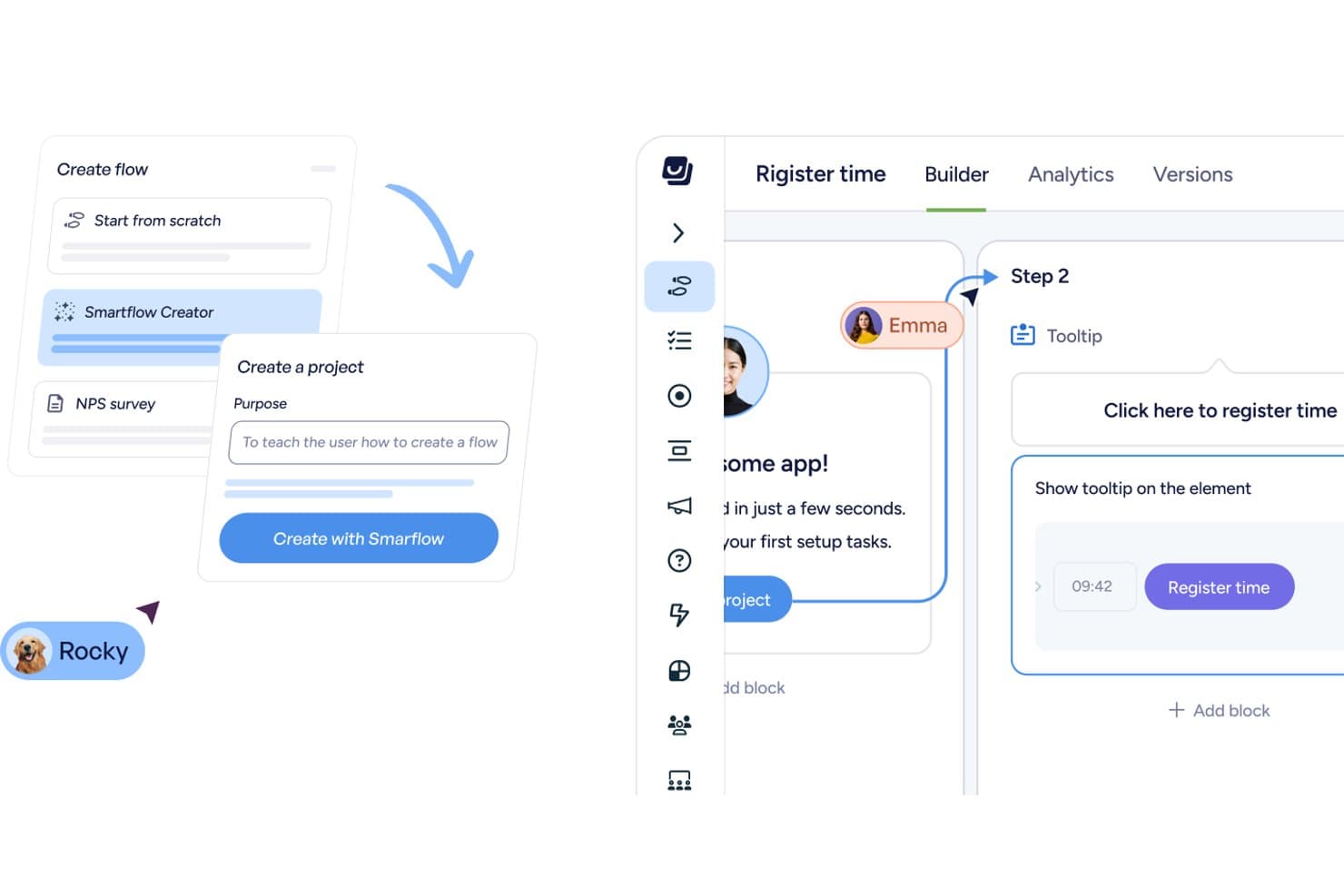
Userflow consente agli utenti di creare flussi di onboarding con descrizioni comandi e fasi assistite dall'AI. Userflow è una piattaforma PLG senza codice che combina flussi di onboarding in-app, tour del prodotto, checklist, sondaggi e analisi dell'utilizzo, inclusi l'analisi dei funnel e il monitoraggio degli eventi, in un unico strumento progettato per le applicazioni web.
Per chi è più adatto Userflow?
Userflow è adatto ai product manager e ai team di crescita delle aziende SaaS B2B che vogliono creare e ottimizzare l'onboarding in-app senza scrivere codice.
Perché ho scelto Userflow
Ho scelto Userflow come una delle soluzioni migliori perché il suo Adoption Studio senza codice consente di creare flussi, checklist e descrizioni comandi senza scrivere una sola riga di codice, mostrando immediatamente dove gli utenti abbandonano il percorso grazie all'analisi dei funnel integrata. Apprezzo soprattutto il generatore FlowAI, che elabora le fasi di un flusso a partire da un prompt, permettendoti di passare dall'individuazione di una lacuna nel funnel al lancio di una correzione mirata dell'onboarding in pochi minuti. Il flusso di lavoro 'Insight → Azione → Impatto' è ciò che lo distingue: individui un abbandono nel funnel, quindi raggiungi esattamente il segmento di utenti interessato con un flusso correttivo, tutto all'interno di un unico strumento.
Funzionalità principali di Userflow
- Generatore FlowAI: elabora le fasi e la struttura di un flusso in-app a partire da un prompt, così puoi fornire indicazioni senza scrivere una sola riga di codice.
- Agente per l'adozione: un assistente AI addestrato sulla tua applicazione, sulla documentazione e sulla libreria dei flussi, che risponde alle domande degli utenti, avvia i flussi corrispondenti o completa direttamente le attività all'interno del tuo prodotto.
- Sincronizzazione CRM con HubSpot e Salesforce: l'integrazione CRM bidirezionale è inclusa in tutti i piani, così i dati sul comportamento degli utenti vengono trasferiti automaticamente tra Userflow e i tuoi strumenti di gestione dei ricavi.
- Userflow MCP: connette Userflow a strumenti AI come Claude e ChatGPT, consentendoti di interrogare le prestazioni dei flussi e creare bozze di segmenti o dashboard tramite un'interfaccia conversazionale.
Integrazioni di Userflow
Userflow offre sei integrazioni native con HubSpot, Salesforce, Slack, Mixpanel, Heap e Amplitude. Supporta inoltre REST API, webhook e connessioni Userflow MCP a Claude, ChatGPT e Gemini.
Pros and Cons
Pros:
- Gli abbandoni nel funnel attivano un onboarding mirato
- FlowAI elabora rapidamente le fasi dell'onboarding
- I recensori apprezzano il supporto rapido e disponibile
Cons:
- Le analisi non includono visualizzazioni della fidelizzazione e delle coorti
- I flussi richiedono manutenzione dopo le modifiche all'interfaccia
Learn more about Userflow: Ideale per la guida nell'app e l'adozione nelle aziende
- Prova gratuita disponibile
- Prezzi su richiesta
Visit WebsiteCustomer Rating:4.6/5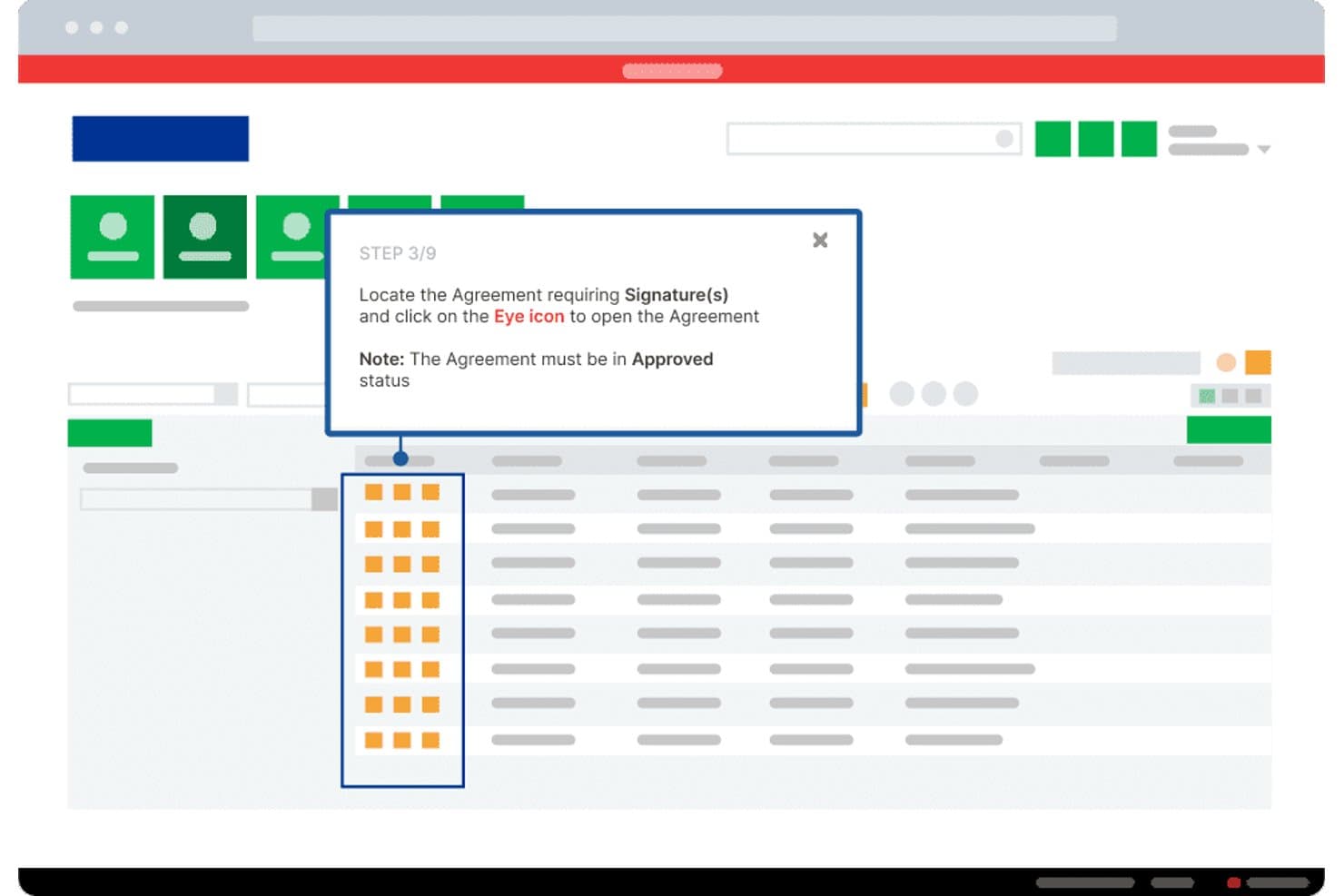
Whatfix guida gli utenti nella firma di un accordo con suggerimenti dettagliati passo dopo passo. Whatfix è una piattaforma aziendale per l'adozione digitale (DAP) che combina strumenti di guida nell'app senza codice, tra cui procedure guidate, suggerimenti e checklist, con analisi del prodotto che includono il monitoraggio degli eventi tramite AutoCapture, report sui percorsi di conversione e informazioni sull'utilizzo basate sull'IA.
Per chi è più indicato Whatfix?
Whatfix è adatto ai team aziendali che devono promuovere l'adozione del software in implementazioni ampie e complesse, soprattutto quando gli strumenti interni si estendono su più piattaforme.
Perché ho scelto Whatfix
Whatfix si è guadagnato un posto nella mia selezione perché la sua suite di guide nell'app senza codice è davvero tra le migliori della categoria per i team aziendali che cercano di promuovere l'adozione su larga scala. Mi piace il fatto che AutoCapture permetta di monitorare l'utilizzo delle funzionalità e i punti di abbandono senza toccare una sola riga di codice, per poi intervenire con Flussi o Suggerimenti intelligenti mirati creati nella stessa piattaforma. L'Agente di analisi basato sull'IA porta tutto a un livello superiore, consentendo di porre domande in linguaggio naturale sul comportamento degli utenti e di individuare le tendenze prima che diventino problemi.
Funzionalità principali di Whatfix
- Segmenti in tempo reale: segmenta automaticamente gli utenti in base ai segnali comportamentali attuali, così puoi indirizzare i contenuti nell'app a gruppi specifici senza creare manualmente elenchi.
- Riproduzione delle sessioni: registra le sessioni degli utenti con mascheramento integrato delle informazioni personali identificabili (PII), permettendoti di osservare esattamente dove gli utenti incontrano difficoltà all'interno del prodotto.
- Sondaggi NPS e sull'usabilità: gli strumenti di sondaggio integrati raccolgono il feedback degli utenti direttamente nel prodotto, con analisi delle risposte aperte basata sull'IA.
- Implementazione multipiattaforma: funziona in ambienti web, per computer, mobili e VDI, coprendo l'intero ecosistema software da un'unica piattaforma.
Integrazioni di Whatfix
Whatfix offre integrazioni documentate con Amplitude, Mixpanel, Segment, Google Analytics, Salesforce, Heap, FullStory, Power BI, Google Sheets e Microsoft Excel. Il piano Standard supporta due integrazioni, mentre Premium ne supporta un numero maggiore ed Enterprise supporta integrazioni illimitate.
Pros and Cons
Pros:
- Le modifiche al processo di inserimento senza codice non richiedono interventi tecnici
- AutoCapture collega i dati sull'adozione alle guide
- Supporta implementazioni complesse su più applicazioni
Cons:
- Nessun punteggio PQL nativo per i team dedicati alla crescita
- La configurazione aziendale può richiedere manutenzione continua
Learn more about Whatfix: Ideale per la riproduzione delle sessioni collegata alla guida in-app
- Piano gratuito e demo gratuita disponibili
- Prezzi su richiesta
Visit WebsiteCustomer Rating:4.5/5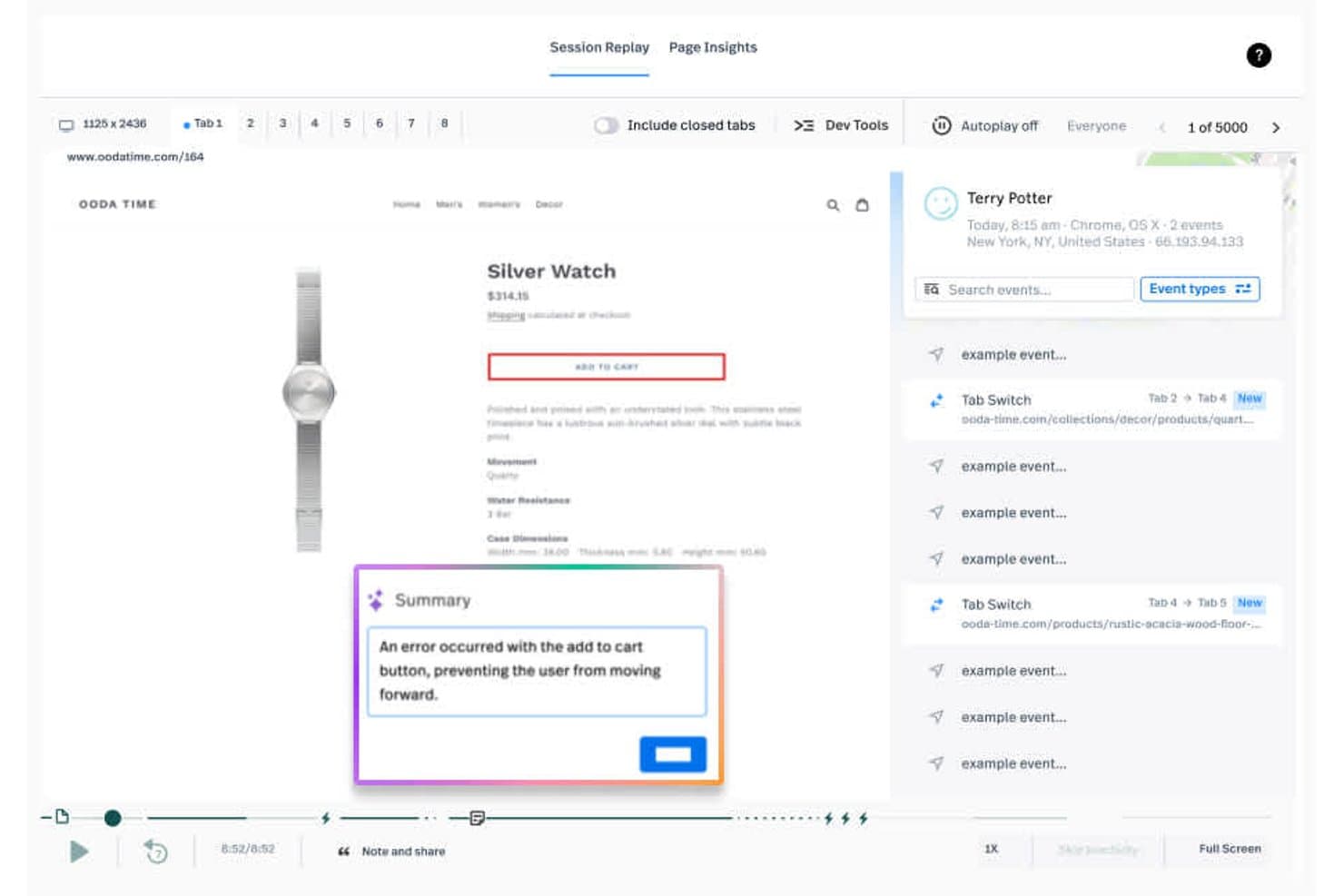
Fullstory rileva immediatamente gli errori nelle sessioni, come i flussi di aggiunta al carrello non funzionanti. Fullstory è una piattaforma di analisi dell'esperienza digitale che combina la riproduzione automatica delle sessioni, le mappe di calore, l'analisi comportamentale, i report su funnel e fidelizzazione e guide e sondaggi in-app senza codice.
Per chi è più adatto Fullstory?
Fullstory è una soluzione ideale per i team di prodotto e crescita che vogliono osservare le sessioni degli utenti reali e agire immediatamente su ciò che vedono, lanciando guide in-app mirate senza dover cambiare strumento.
Perché ho scelto Fullstory
Ho scelto Fullstory come una delle soluzioni migliori perché è l'unico strumento della mia lista in cui la riproduzione delle sessioni e la guida in-app condividono lo stesso livello dati. Quando un utente fa clic ripetutamente per frustrazione o abbandona un funnel, posso lanciare un tooltip o una checklist mirata utilizzando esattamente lo stesso segmento comportamentale, senza dover ricostruire nulla. Le risposte ai sondaggi sono inoltre collegate alla riproduzione della sessione, così posso vedere con precisione cosa ha sperimentato un utente prima di inviare il feedback NPS.
Funzionalità principali di Fullstory
- Acquisizione automatica Fullcapture™: Registra automaticamente ogni interazione degli utenti sulle app web e mobili, senza richiedere l'etichettatura manuale degli eventi.
- Riepiloghi StoryAI: Riepiloghi generati dall'IA che spiegano perché gli utenti si comportano in un determinato modo, disponibili in tutti i piani.
- Anywhere: Attivazione: Trasmette istantaneamente a CRM, strumenti di assistenza e marketing segnali comportamentali in tempo reale, come clic ripetuti per frustrazione e abbandoni.
- Analisi dei funnel e della fidelizzazione: Report personalizzabili sui funnel con diagnostica degli abbandoni e analisi della fidelizzazione, disponibili nei piani Advanced ed Enterprise.
Integrazioni di Fullstory
Fullstory offre integrazioni con Salesforce, Intercom, Zendesk, Braze, Adobe Experience Platform, Segment, Tealium e RudderStack. Supporta inoltre integrazioni personalizzate tramite la sua API aperta, la sincronizzazione con i data warehouse Snowflake, BigQuery e Amazon Redshift e Zapier.
Pros and Cons
Pros:
- Collega la riproduzione delle sessioni alla guida in-app
- Collega le risposte ai sondaggi al contesto della sessione
- L'acquisizione automatica rivela i punti di attrito senza etichettatura degli eventi
Cons:
- Gli approfondimenti avanzati richiedono l'accesso a un piano di livello superiore
- Le guide attualmente supportano solo le esperienze web
Learn more about Fullstory: Najlepsze rozwiązanie do ujednoliconej analityki i przewodników w aplikacji
- Dostępny bezpłatny plan
- Cennik dostępny na żądanie
Visit WebsiteCustomer Rating:4.3/5
Amplitude przedstawia strategię PLG — od bezpłatnej rejestracji po monetyzację. Amplitude to platforma wzrostu produktowego, która łączy analitykę behawioralną, przewodniki i ankiety w aplikacji, odtwarzanie sesji, mapy cieplne oraz eksperymenty w jednym ujednoliconym zestawie narzędzi.
Dla kogo Amplitude jest najlepszym rozwiązaniem?
Amplitude to dobry wybór dla zespołów produktowych, które chcą korzystać z jednej platformy do analizowania zachowań użytkowników, uruchamiania przewodników w aplikacji i testowania zmian w produkcie bez konieczności korzystania z oddzielnych narzędzi.
Dlaczego wybrałem Amplitude
Amplitude znalazło się na mojej krótkiej liście, ponieważ jest jedynym narzędziem tutaj, które pozwala analizować zachowania użytkowników i reagować na nie — za pomocą przewodników i ankiet w aplikacji — bez opuszczania platformy. Podoba mi się, że te same kohorty behawioralne, które zasilają raporty dotyczące lejka i retencji, mogą natychmiast uruchomić ukierunkowaną listę kontrolną wdrażania lub ankietę NPS dla dokładnie tego segmentu użytkowników. W praktyce oznacza to, że mój zespół może utworzyć przewodnik bez kodu, przetestować go metodą A/B za pomocą Amplitude Experimentation i zmierzyć wzrost adopcji w jednym miejscu.
Najważniejsze funkcje Amplitude
- Kohorty behawioralne: Twórz dynamiczne segmenty użytkowników na podstawie danych o zdarzeniach w czasie rzeczywistym i udostępniaj je w analityce, przewodnikach, ankietach oraz eksperymentach bez powielania danych.
- Odtwarzanie sesji: Oglądaj zarejestrowane sesje użytkowników, aby dokładnie sprawdzić, gdzie użytkownicy się wahają lub rezygnują, korzystając z maksymalnie 50 tys. odtworzeń miesięcznie w planie Enterprise.
- Eksperymentowanie z funkcjami: Testuj metodą A/B zmiany w produkcie i przewodniki w aplikacji bezpośrednio w Amplitude oraz mierz ich wpływ na adopcję w odniesieniu do istniejących danych dotyczących retencji i lejka.
- Analityka internetowa: Wdróż śledzenie w witrynie za pomocą jednej linii kodu, aby uzyskać automatyczne informacje o zachowaniach odwiedzających obok danych o zdarzeniach w produkcie.
Integracje Amplitude
Amplitude oferuje natywną synchronizację kohort z HubSpot i Salesforce Marketing Cloud. Integracje te łączą segmenty behawioralne z dalszymi przepływami pracy marketingowej, umożliwiając prowadzenie ukierunkowanych kampanii wzrostu produktowego.
Pros and Cons
Pros:
- Współdzielone kohorty uruchamiają ukierunkowane przewodniki w aplikacji
- Lejki łączą adopcję z rezultatami retencji
- Odtwarzanie sesji ujawnia problemy utrudniające wdrażanie
Cons:
- Brak natywnego modelu oceny PQL
- Limity przewodników ograniczają programy wdrażania obejmujące wiele przepływów
Learn more about Heap (by Contentsquare): Ideale per ottenere informazioni sull'adozione del prodotto guidate dall'IA
- Prova gratuita di 14 giorni + demo gratuita disponibile
- A partire da $299/mese
Visit WebsiteCustomer Rating:4.7/5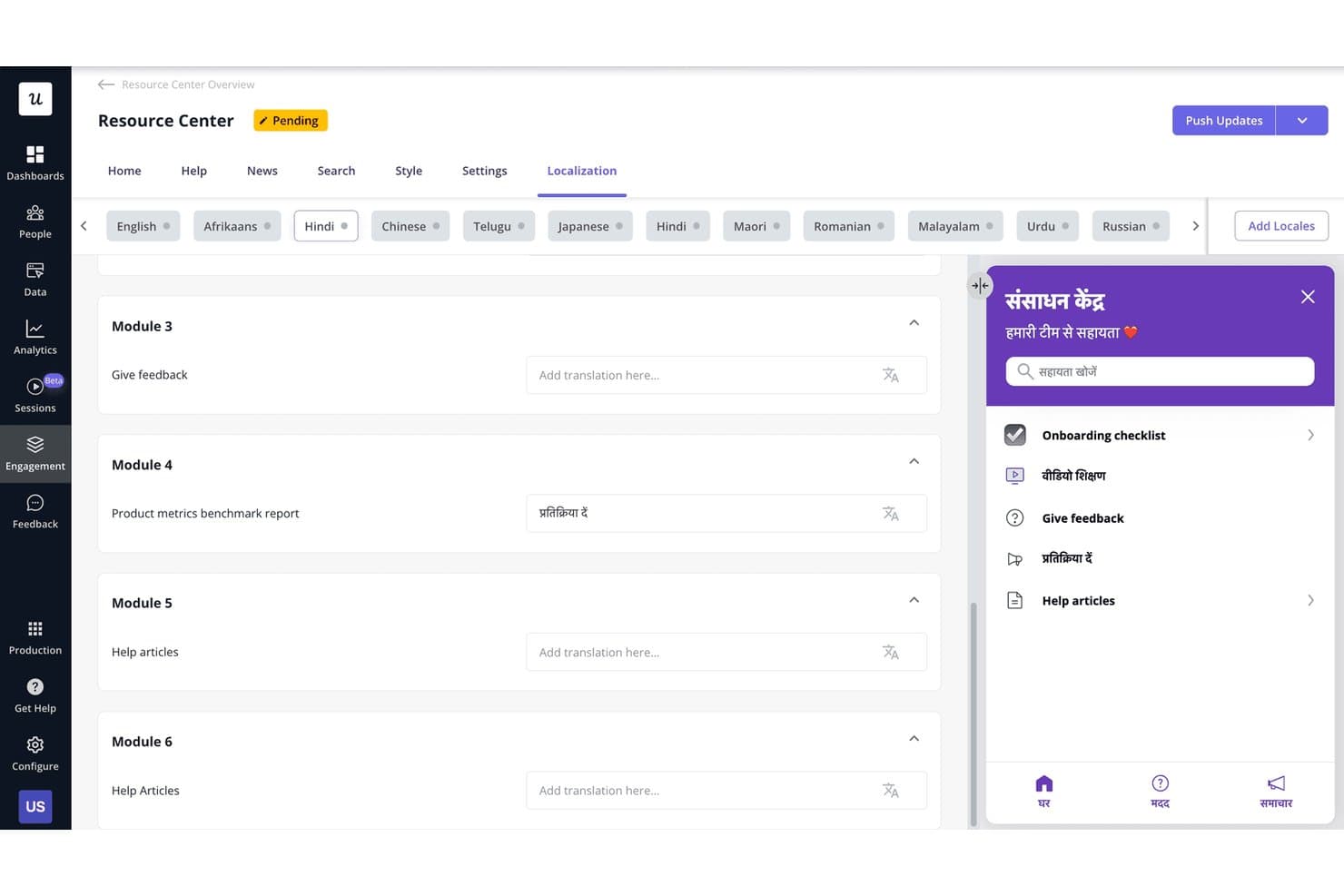
Userpilot consente agli utenti di localizzare i contenuti del Centro risorse in più lingue. Userpilot è una piattaforma di crescita guidata dal prodotto che riunisce analisi del prodotto, coinvolgimento nell'app senza codice, segmentazione degli utenti, riproduzione delle sessioni e strumenti per la raccolta dei feedback in un unico posto.
Per chi è più adatto Userpilot?
Userpilot è particolarmente adatto ai responsabili di prodotto e ai responsabili del marketing di prodotto delle aziende SaaS B2B che hanno bisogno di analisi, coinvolgimento nell'app e feedback degli utenti in un unico posto.
Perché ho scelto Userpilot
Ho scelto Userpilot come una delle soluzioni migliori perché il suo agente IA Lia cambia davvero il modo in cui i team di prodotto interpretano i dati sull'adozione. Invece di analizzare manualmente i funnel e i report sulle coorti, posso porre a Lia una domanda diretta sull'adozione di una funzionalità e ottenere una risposta predittiva in pochi secondi. Anche l'acquisizione automatica retroattiva degli eventi è un punto di forza per i flussi di lavoro PLG, poiché significa non essere mai esclusi dall'analisi storica solo perché si è definito un nuovo evento in ritardo.
Funzionalità principali di Userpilot
- Strumento per creare coinvolgimento nell'app senza codice: Crea flussi a più passaggi, suggerimenti contestuali, checklist e banner senza scrivere una sola riga di codice.
- NPS e sondaggi nell'app: Raccogli il feedback degli utenti direttamente all'interno del tuo prodotto utilizzando NPS, CSAT e formati di sondaggio personalizzati.
- Riproduzione delle sessioni con segnali di frustrazione: Guarda le sessioni degli utenti registrate, che segnalano automaticamente i clic ripetuti e gli errori associati agli abbandoni del funnel.
- Segmentazione degli utenti: Crea segmenti basati sul comportamento, sugli attributi degli utenti e sui dati aziendali per indirizzare i contenuti nell'app in tempo reale.
Integrazioni di Userpilot
Userpilot offre sei integrazioni native documentate, tra cui Segment, Mixpanel, Amplitude, Heap, Intercom e Slack. Il piano Enterprise aggiunge le integrazioni con HubSpot e Salesforce, mentre i piani Growth e superiori includono un'API HTTP e webhook per connettività personalizzata.
Pros and Cons
Pros:
- Le risposte dell'IA chiariscono rapidamente le tendenze di adozione
- L'acquisizione retroattiva conserva la cronologia degli eventi mancati
- I flussi senza codice vengono lanciati senza il supporto del team tecnico
Cons:
- Le analisi avanzate richiedono l'accesso a un piano superiore
- I recensori segnalano occasionali blocchi e malfunzionamenti
Learn more about Userpilot: Ideale per l'avvio degli utenti senza codice con risultati dal primo giorno
- Prova gratuita disponibile
- Prezzi su richiesta
Visit WebsiteCustomer Rating:4.7/5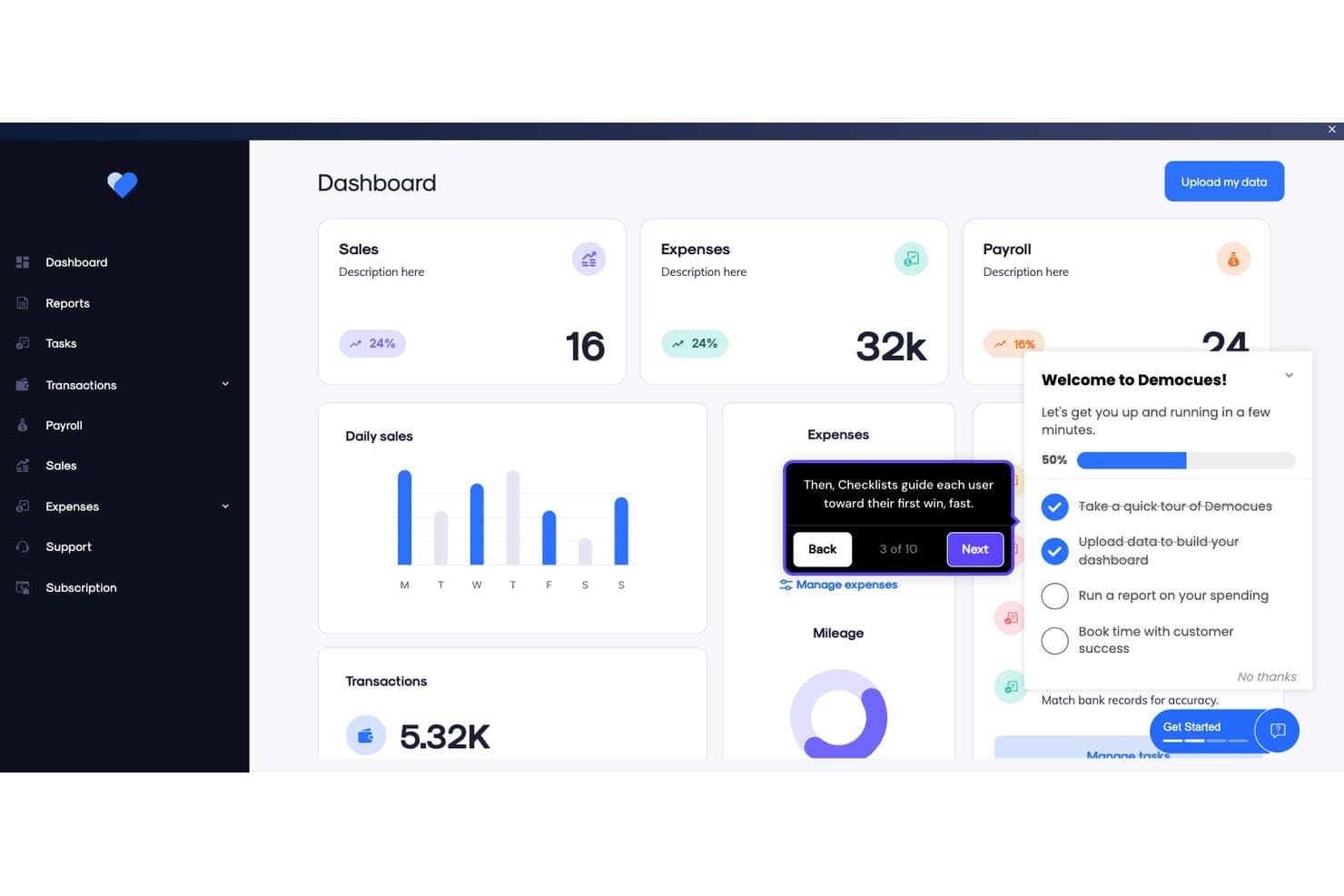
Appcues guida gli utenti durante l'avvio con checklist e suggerimenti contestuali. Appcues è una piattaforma di crescita guidata dal prodotto senza codice che combina strumenti di coinvolgimento nel prodotto—flussi, checklist, suggerimenti contestuali, banner e sondaggi—con analisi del prodotto e creazione di esperienze assistita dall'intelligenza artificiale.
Per chi è più indicato Appcues?
Appcues è particolarmente adatto ai responsabili del prodotto e del marketing del prodotto delle aziende SaaS che devono lanciare flussi di avvio degli utenti ed esperienze nel prodotto senza coinvolgere il reparto di ingegneria.
Perché ho scelto Appcues
Ho scelto Appcues come una delle soluzioni migliori perché il suo strumento di creazione senza codice offre davvero risultati fin dal primo giorno: la maggior parte dei team pubblica il primo flusso di avvio degli utenti entro 24 ore dall'installazione, senza coinvolgimento del reparto di ingegneria. Mi piace il fatto che gli elementi della marca vengano caricati una volta sola e riutilizzati automaticamente in ogni flusso, checklist e suggerimento contestuale. L'intelligenza artificiale crea bozze delle esperienze sulla base dei dati del prodotto e segnala i collegamenti non funzionanti nei flussi attivi, così l'avvio degli utenti rimane accurato senza continue verifiche manuali.
Funzionalità principali di Appcues
- Segmentazione basata sul comportamento: Indirizza gli utenti in base ad azioni e attributi specifici nel prodotto, arricchiti con dati provenienti dal tuo CRM, CDP o archivio dati.
- Indirizzamento tramite e-mail e notifiche push: Attiva campagne e-mail e push insieme alle esperienze nel prodotto da un'unica piattaforma, utilizzando le stesse regole di segmentazione.
- Analisi dell'incremento: Misura se una specifica esperienza ha modificato il comportamento degli utenti che l'hanno visualizzata, rispetto a quelli che non l'hanno visualizzata.
- Integrazione con il server MCP: Interroga direttamente i dati dei prodotti Appcues in tempo reale da strumenti di intelligenza artificiale come Claude, ChatGPT e Cursor utilizzando il linguaggio naturale.
Integrazioni di Appcues
Appcues offre integrazioni native bidirezionali con Salesforce, HubSpot, Segment, Mixpanel, Heap, Intercom e Slack per collegare il coinvolgimento nel prodotto ai flussi di lavoro di crescita e ricavi. Fornisce inoltre API e webhook, oltre a Zapier.
Pros and Cons
Pros:
- Lancia l'avvio degli utenti senza il reparto di ingegneria
- Misura l'incremento oltre l'adozione delle funzionalità
- Indirizza le tappe di attivazione con esperienze contestuali
Cons:
- Nessun punteggio PQL integrato
- La riproduzione delle sessioni richiede un altro prodotto
Learn more about Appcues: Ideale per analisi unificate e guide nell'app
- Piano gratuito disponibile
- Prezzi su richiesta
Visit WebsiteCustomer Rating:4.5/5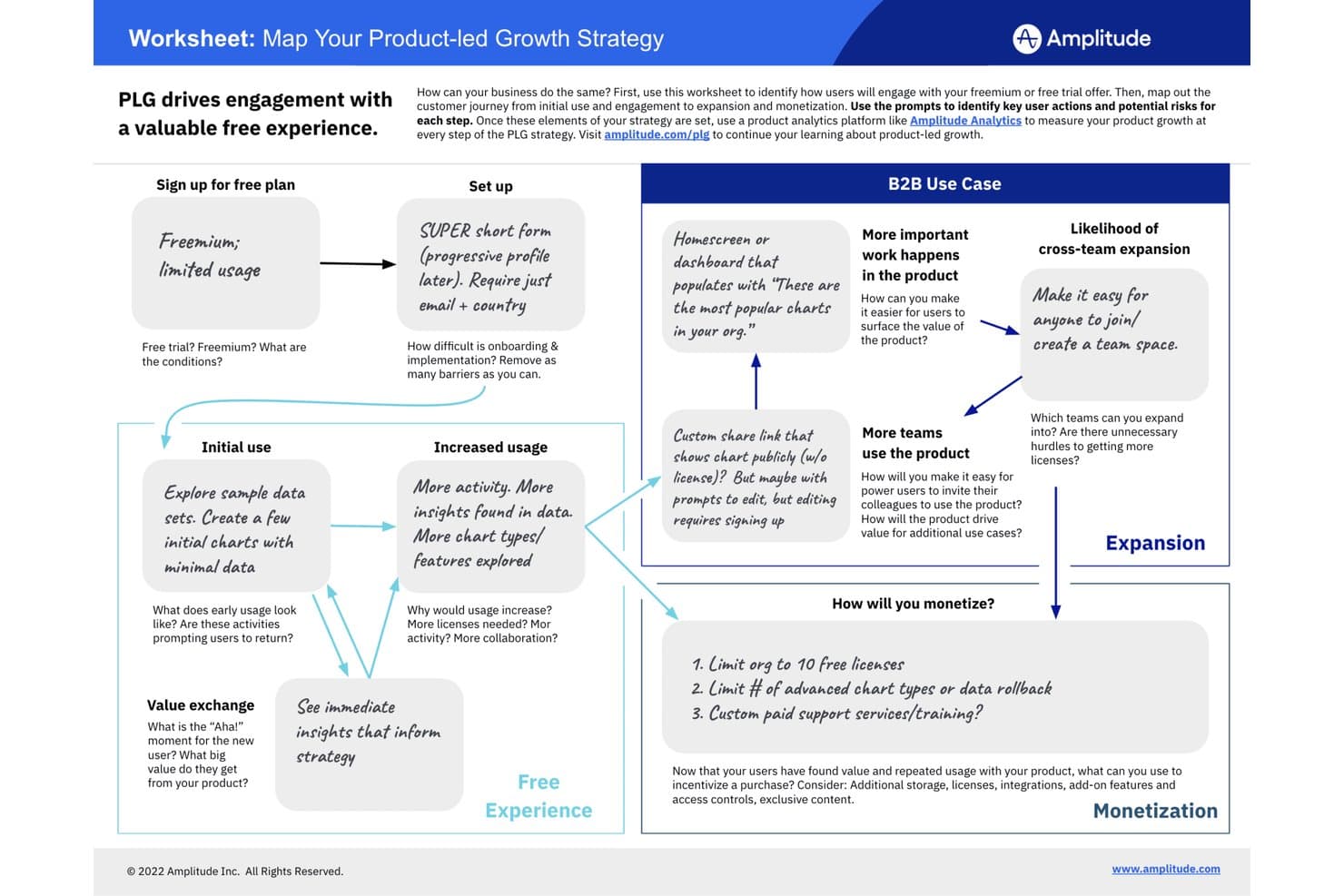
Amplitude rappresenta la strategia di crescita guidata dal prodotto, dalla registrazione gratuita alla monetizzazione. Amplitude è una piattaforma di crescita guidata dal prodotto che combina analisi comportamentali, guide e sondaggi nell'app, riproduzione delle sessioni, mappe di calore e sperimentazione in un unico set di strumenti integrato.
Per chi è più adatto Amplitude?
Amplitude è una soluzione ideale per i team di prodotto che desiderano un'unica piattaforma per analizzare il comportamento degli utenti, creare guide nell'app e testare le modifiche al prodotto senza dover gestire strumenti separati.
Perché ho scelto Amplitude
Amplitude si è guadagnato un posto nella mia lista ristretta perché è l'unico strumento qui presente che consente di analizzare il comportamento degli utenti e agire di conseguenza, tramite guide e sondaggi nell'app, senza mai uscire dalla piattaforma. Mi piace molto il fatto che le stesse coorti comportamentali che alimentano i report sui percorsi e sulla fidelizzazione possano attivare istantaneamente una checklist di avviamento mirata o un sondaggio NPS per quel preciso segmento di utenti. In pratica, il mio team può creare una guida senza codice, sottoporla a un test A/B tramite la sperimentazione di Amplitude e misurare l'aumento dell'adozione tutto in un unico posto.
Funzionalità principali di Amplitude
- Coorti comportamentali: Crea segmenti dinamici di utenti a partire dai dati degli eventi in tempo reale e condividili tra analisi, guide, sondaggi e sperimentazioni senza alcuna duplicazione.
- Riproduzione delle sessioni: Guarda le sessioni registrate degli utenti per vedere esattamente dove esitano o abbandonano, con fino a 50K riproduzioni al mese nel piano Enterprise.
- Sperimentazione delle funzionalità: Esegui test A/B sulle modifiche al prodotto e sulle guide nell'app direttamente all'interno di Amplitude e misura l'impatto sull'adozione rispetto ai dati esistenti su fidelizzazione e percorsi.
- Analisi web: Implementa il monitoraggio web con una sola riga di codice per ottenere informazioni automatizzate sul comportamento dei visitatori insieme ai dati degli eventi nel prodotto.
Integrazioni di Amplitude
Amplitude offre la sincronizzazione nativa delle coorti con HubSpot e Salesforce Marketing Cloud. Queste integrazioni collegano i segmenti comportamentali ai flussi di lavoro di marketing a valle per campagne di crescita guidate dal prodotto mirate.
Pros and Cons
Pros:
- Le coorti condivise attivano guide mirate nell'app
- I percorsi collegano l'adozione ai risultati di fidelizzazione
- Le riproduzioni delle sessioni evidenziano gli ostacoli nell'avviamento
Cons:
- Nessun modello nativo di attribuzione del punteggio PQL
- I limiti delle guide ostacolano i programmi di avviamento con più flussi
Learn more about Amplitude: Ideale per l'onboarding tra più app con flussi guidati dall'intelligenza artificiale
- Piano gratuito + prova gratuita di 30 giorni + demo gratuita disponibile
- Prezzi su richiesta
Visit WebsiteCustomer Rating:4.4/5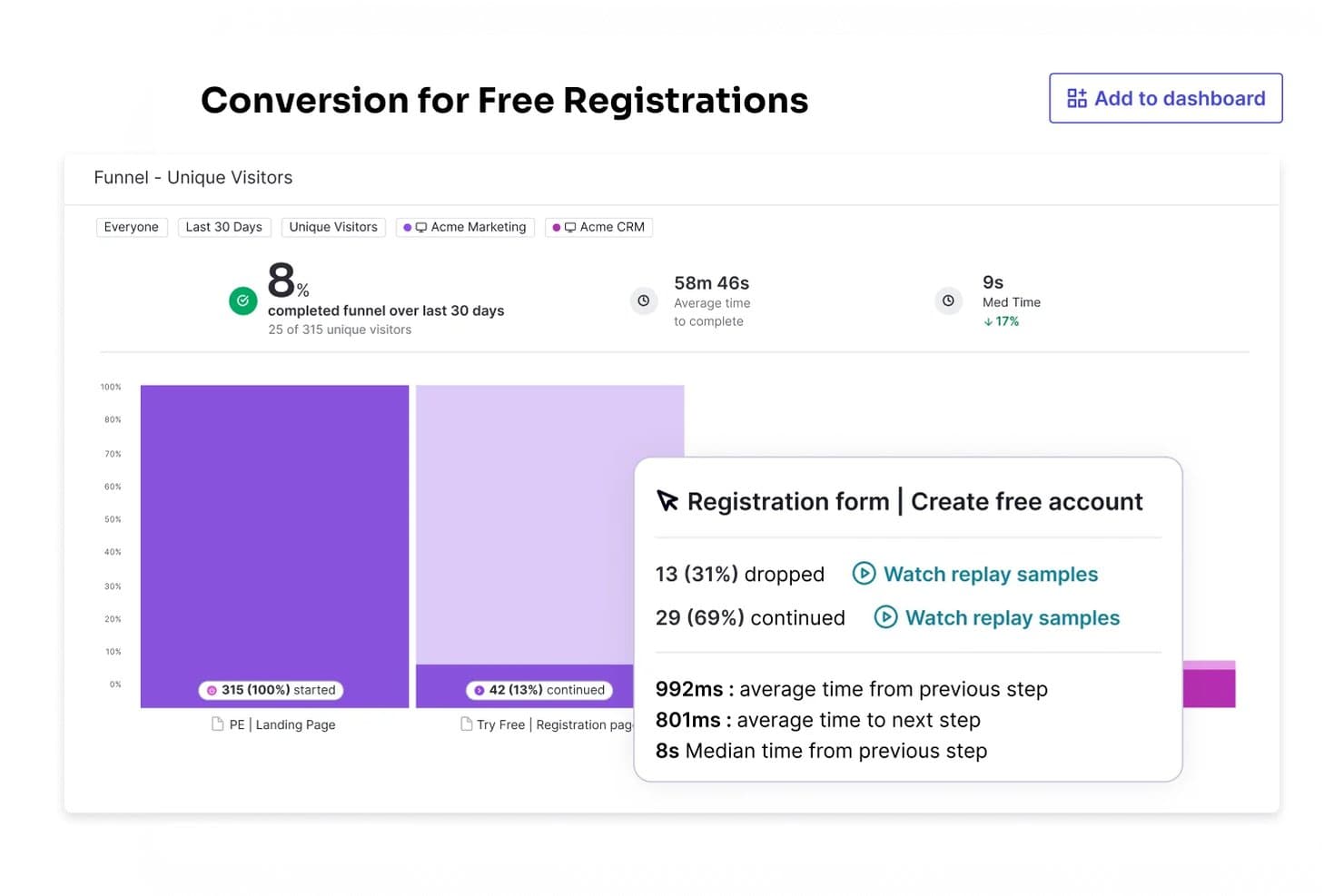
Pendo monitora i tassi di conversione del funnel per identificare i punti di abbandono. Pendo è una piattaforma per la crescita guidata dal prodotto che combina analisi del prodotto, guide in-app senza codice, riproduzione delle sessioni, segmentazione degli utenti, raccolta dei feedback e strumenti di coinvolgimento basati sull'intelligenza artificiale per app web e mobili.
Per chi è più adatto Pendo?
Pendo è una soluzione particolarmente adatta ai product manager e ai team di customer success di aziende del mercato medio e di livello enterprise che gestiscono l'onboarding e la fidelizzazione su più app web e mobili.
Perché ho scelto Pendo
Pendo si è guadagnato un posto tra le migliori soluzioni della mia selezione perché gestisce l'onboarding su più app senza richiedere un SDK separato per ciascuna di esse. Mi piace molto il fatto che la diramazione delle guide consenta di creare flussi condizionali che si adattano in tempo reale in base a ciò che l'utente fa effettivamente, così un utente in prova che salta un passaggio della configurazione visualizza un percorso diverso rispetto a uno che lo completa. Leo AI può anche creare una prima bozza di queste guide a partire da un prompt in linguaggio naturale, consentendo al mio team di testare e perfezionare i flussi di onboarding senza dover attendere l'intervento del team tecnico.
Funzionalità principali di Pendo
- Punteggio di coinvolgimento del prodotto (PES): Una singola metrica che combina adozione, fidelizzazione e crescita per offrire una panoramica dello stato di salute complessivo del prodotto.
- Riproduzione delle sessioni: Registra e riproduce le sessioni reali degli utenti, permettendo di vedere esattamente dove esitano o abbandonano il percorso.
- Predict AI: Un componente aggiuntivo che utilizza i dati di utilizzo per segnalare gli account a rischio di abbandono o pronti per una conversazione di upselling.
- Sondaggi NPS e CSAT nativi: Sondaggi di feedback integrati che collegano direttamente i dati sul sentiment alle analisi comportamentali nella stessa piattaforma.
Integrazioni di Pendo
Pendo elenca più di 85 integrazioni, tra cui Salesforce, HubSpot, Gainsight, Intercom, Jira, Snowflake, BigQuery, Slack e Zapier. Offre inoltre un'API e un server MCP per la connettività personalizzata e le query sui dati del prodotto assistite dall'intelligenza artificiale.
Pros and Cons
Pros:
- L'onboarding tra più app supporta percorsi di prodotto complessi
- Le guide ramificate si adattano al comportamento degli utenti
- Le analisi retrospettive rivelano rapidamente le tendenze di adozione
Cons:
- L'assegnazione manuale dei tag può rallentare l'implementazione
- I segnali predittivi non includono un punteggio PQL dedicato
Learn more about Pendo: 10Ideale per analisi approfondite del prodotto a codice aperto
PostHog
- Piano gratuito + demo gratuita disponibile
- A partire da $0.005/registrazione
Visit WebsiteCustomer Rating:4.5/5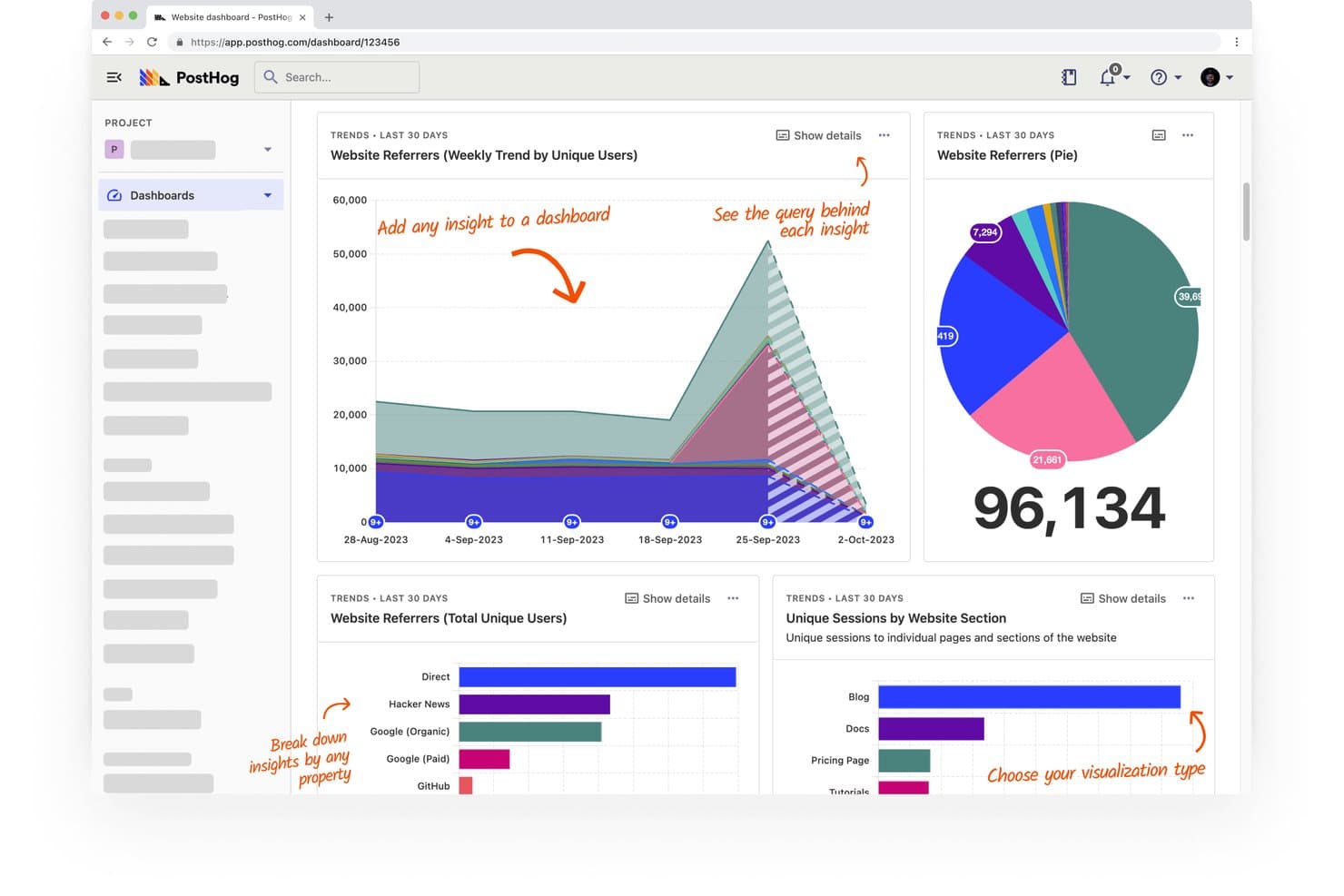
PostHog monitora le fonti di provenienza e le sessioni del sito web attraverso pannelli di controllo visivi. PostHog è una piattaforma a codice aperto per la crescita guidata dal prodotto che combina analisi del prodotto, riproduzione delle sessioni, flag delle funzionalità, test A/B, sondaggi e un CDP integrato in un unico account.
Per chi è più adatto PostHog?
PostHog è particolarmente adatto ai team di prodotto tecnici, soprattutto a quelli con risorse di sviluppo, che desiderano analisi approfondite, riproduzione delle sessioni e sperimentazione in un'unica piattaforma a codice aperto.
Perché ho scelto PostHog
PostHog è entrato nella mia rosa di candidati soprattutto per la profondità delle analisi disponibili fin da subito. Parlo di interrogazioni HogQL, analisi dei percorsi, report sul ciclo di vita e metriche di frequenza d'uso, tutto in un unico posto: in questo modo il mio team può diagnosticare con precisione dove gli utenti abbandonano il percorso e perché. Apprezzo particolarmente il modo in cui le riproduzioni delle sessioni si collegano direttamente ai punti di abbandono dei percorsi di conversione: invece di fare supposizioni, puoi osservare utenti reali alle prese con ostacoli reali.
Funzionalità principali di PostHog
- Flag delle funzionalità: controlla quali utenti possono vedere nuove funzionalità o modifiche, consentendoti di distribuire gli aggiornamenti del prodotto a segmenti specifici senza un rilascio completo.
- Test A/B: esegui esperimenti integrati che misurano l'impatto delle modifiche al prodotto sui risultati di attivazione, fidelizzazione e conversione.
- Sondaggi NPS e sui riscontri: raccogli i riscontri degli utenti all'interno del prodotto tramite modelli di sondaggio integrati, incluso l'NPS, direttamente collegati ai dati comportamentali.
- CDP con oltre 50 destinazioni: invia i dati comportamentali a strumenti come Salesforce, HubSpot e Customer.io utilizzando trasformazioni in tempo reale e la distribuzione tramite webhook.
Integrazioni di PostHog
Il CDP di PostHog si collega a oltre 50 destinazioni, tra cui Salesforce, HubSpot, Braze, Customer.io, Vitally, Gainsight, Slack e PagerDuty. Si collega inoltre a Snowflake e BigQuery, con trasformazioni in tempo reale e distribuzione tramite webhook attraverso le funzioni Hog.
Pros and Cons
Pros:
- I percorsi di conversione approfonditi evidenziano gli abbandoni durante l'attivazione
- Le riproduzioni delle sessioni collegano gli ostacoli al comportamento
- Le coorti supportano sperimentazioni e sondaggi mirati
Cons:
- I tour del prodotto sono ancora poco maturi per l'avviamento
- Il punteggio PQL richiede la definizione manuale dei segnali
Learn more about PostHog:
Altri software per la crescita guidata dal prodotto
Ecco alcune ulteriori opzioni di software per la crescita guidata dal prodotto che non sono entrate nella mia selezione ristretta, ma che vale comunque la pena valutare:
- 11MixpanelIdeale per l'analisi comportamentale senza SQL
- 12Gainsight PXIdeale per collegare l'utilizzo del prodotto ai punteggi di salute del successo del cliente
- 13ChartMogulIdeale per collegare le fasi del funnel PLG ai ricavi
- 14ChameleonIdeale per il targeting degli utenti in-app sincronizzato con il CRM
Come valuto il software per la crescita guidata dal prodotto
Divido la mia valutazione in tre parti. La funzionalità principale ha il peso maggiore: cerco strumenti che creino flussi di inserimento nell'app e monitorino l'utilizzo a livello di funzionalità. Poi considero caratteristiche distintive come i creatori di flussi senza codice, oltre a fattori che vanno al di là delle funzionalità, come la complessità dell'implementazione e il supporto del fornitore.
Funzionalità principali (requisiti minimi per questo elenco)
Quando seleziono gli strumenti per il mio elenco, assegno a ciascuno un punteggio su una scala da 0 (non offre la funzionalità) a 5 (eccelle in quest'area) per ogni funzionalità principale elencata di seguito. Converto poi il totale in una percentuale per contribuire a valutare l'idoneità complessiva di ciascuno strumento, attribuendo un peso aggiuntivo alle funzionalità che ho considerato essenziali.
- Coinvolgimento nell'app (essenziale): valuto se i team possono creare procedure guidate, suggerimenti, checklist e annunci che si attivano in base alle azioni degli utenti anziché secondo pianificazioni statiche.
- Analisi dell'utilizzo del prodotto (essenziale): cerco il monitoraggio a livello di funzionalità con analisi di canalizzazione, fidelizzazione e coorti, non soltanto il conteggio degli accessi o delle visualizzazioni di pagina.
- Segmentazione degli utenti: i segmenti dovrebbero aggiornarsi dinamicamente in base al comportamento e agli attributi, così i team possono indirizzare i flussi di inserimento agli utenti in prova che non hanno raggiunto un'importante tappa di attivazione.
- Identificazione dei PQL: verifico se lo strumento può segnalare gli account che superano determinate soglie di utilizzo, come l'utilizzo ripetuto di una funzionalità premium, senza richiedere estrazioni manuali dei dati.
- Controlli per la sperimentazione e il rilascio: strumenti come Amplitude e Pendo affrontano questo aspetto in modo diverso, quindi valuto se i team possono eseguire test A/B o rilasci graduali mirati a coorti specifiche di utenti.
- Integrazioni con il prodotto e i ricavi: cerco sincronizzazioni bidirezionali con piattaforme CRM e di fatturazione, affinché i segnali di utilizzo confluiscano direttamente nei flussi di lavoro delle vendite e del successo del cliente.
Una volta ottenuto un elenco di strumenti che soddisfano i criteri, considero ciò che distingue ogni piattaforma.
Fattori distintivi (ciò che differenzia i fornitori)
Ecco come confronto e metto a confronto i diversi fornitori:
Caratteristiche distintive
Le registrazioni delle sessioni e le mappe di calore mostrano esattamente dove gli utenti si bloccano nel mezzo di un flusso, aiutandomi a individuare gli ostacoli che i soli grafici di canalizzazione non riescono a evidenziare. Cerco anche informazioni generate dall'IA che segnalino gli account a rischio o le anomalie nell'adozione senza dover creare query manualmente. Anche i creatori di flussi senza codice sono importanti: verifico se i responsabili di prodotto possono apportare modifiche all'inserimento senza aprire richieste al team di sviluppo. Pendo e Amplitude offrono entrambi editor visuali, ma il livello di dettaglio della logica di segmentazione varia.
Oltre le funzionalità
Valuto innanzitutto la complessità dell'implementazione: alcune piattaforme richiedono settimane di strumentazione dell'SDK prima di mostrare dati, mentre altre consentono di contrassegnare visivamente gli eventi già dal primo giorno. Questa differenza è importante quando il team di sviluppo è già impegnato in diverse attività di prodotto. Verifico inoltre come ogni fornitore gestisce la governance dei dati, incluse le opzioni di residenza, i diritti di esportazione e le certificazioni di conformità come SOC 2 o GDPR, poiché i dati comportamentali confluiscono spesso direttamente nei flussi di lavoro CRM e di fatturazione. Infine, esamino come i prezzi aumentano in base al numero mensile di utenti o eventi monitorati, perché uno strumento adatto a 5.000 utenti può diventare un problema di budget con 50.000.
Come scegliere il software per la crescita guidata dal prodotto
È facile perdersi in lunghi elenchi di funzionalità e strutture di prezzo complesse. Per aiutarti a rimanere concentrato mentre affronti il tuo specifico processo di selezione del software, ecco una lista di fattori da tenere a mente:
| Fattore | Cosa considerare |
|---|---|
| FattoreScalabilità | Cosa considerareIl software crescerà insieme alle esigenze del tuo team? Valuta se è in grado di gestire un numero maggiore di utenti e di dati man mano che il prodotto cresce. Cerca piani flessibili che permettano di sostenere la crescita senza aumenti di prezzo significativi. |
| FattoreIntegrazioni | Cosa considerareSi collega agli strumenti che già utilizzi? Verifica la compatibilità con i sistemi attuali, come CRM, piattaforme di analisi e di comunicazione. Evita gli strumenti che richiedono troppi aggiramenti o costi aggiuntivi. |
| FattorePersonalizzazione | Cosa considerarePuoi adattarlo ai tuoi flussi di lavoro? Valuta se il software ti consente di modificare impostazioni, percorsi degli utenti e report in base ai tuoi requisiti specifici. Evita i sistemi rigidi che limitano l'adattabilità. |
| FattoreSemplicità d'uso | Cosa considerareÈ facile da usare per il tuo team? Valuta l'interfaccia utente e la navigazione. Uno strumento complesso può rallentare l'adozione e ridurre l'efficienza. Cerca un design intuitivo e istruzioni chiare. |
| FattoreImplementazione e avvio | Cosa considerareQuanto tempo occorrerà per iniziare a utilizzarlo? Considera il tempo e le risorse necessari per la configurazione e la formazione. Gli strumenti che offrono un supporto completo all'avvio, come tutorial e modelli, possono velocizzare il processo. |
| FattoreCosto | Cosa considerareRientra nel tuo budget? Confronta i piani tariffari e le funzionalità incluse. Fai attenzione ai costi nascosti, come le tariffe per utenti aggiuntivi o gli addebiti per il supporto premium. |
| FattoreMisure di sicurezza | Cosa considerareSoddisfa le tue esigenze di sicurezza? Verifica la crittografia dei dati, la conformità a standard come il GDPR e gli aggiornamenti di sicurezza regolari. La protezione dei dati degli utenti dovrebbe essere una priorità assoluta. |
| FattoreDisponibilità del supporto | Cosa considerareQuali opzioni di supporto sono disponibili? Cerca assistenza 24 ore su 24, 7 giorni su 7, chat dal vivo e una base di conoscenza completa. Considera quanto supporto sarà necessario al tuo team e con quale rapidità sarà possibile risolvere i problemi. |
Che cos'è il software per la crescita guidata dal prodotto?
Il software per la crescita guidata dal prodotto è uno strumento che aiuta a utilizzare il proprio prodotto come mezzo principale per attirare, convertire e fidelizzare i clienti. I responsabili di prodotto, i team dedicati alla crescita e i professionisti del marketing utilizzano questi strumenti per guidare gli utenti, monitorarne il comportamento e aumentare il coinvolgimento, facendo sì che sia il prodotto stesso a svolgere la maggior parte del lavoro di vendita e di vendite aggiuntive. Questo aiuta i team a individuare ciò che mantiene soddisfatti gli utenti e favorisce una crescita naturale.
Funzionalità
Quando scegli il software per la crescita guidata dal prodotto, presta attenzione alle seguenti funzionalità chiave:
- Introduzione degli utenti: guida i nuovi utenti attraverso il prodotto, migliorando la loro esperienza iniziale e aumentando i tassi di fidelizzazione.
- Messaggistica nell'app: consente di comunicare con gli utenti direttamente nell'app, fornendo assistenza e aggiornamenti tempestivi.
- Analisi degli utenti: monitora il comportamento e le interazioni degli utenti, offrendo informazioni utili per orientare le decisioni e i miglioramenti del prodotto.
- Raccolta dei feedback: raccoglie i feedback degli utenti tramite sondaggi e questionari, aiutandoti a comprenderne le esigenze e il livello di soddisfazione.
- Opzioni di personalizzazione: consentono di adattare l'esperienza utente al tuo marchio e di soddisfare esigenze specifiche degli utenti.
- Funzionalità di integrazione: si connette agli strumenti e alle piattaforme esistenti per creare un ecosistema tecnologico coerente.
- Misure di sicurezza: proteggono i dati degli utenti tramite la crittografia e la conformità agli standard di protezione dei dati.
- Scalabilità: supporta l'aumento del numero di utenti e dei carichi di dati durante l'espansione dell'attività, senza problemi di prestazioni.
- Tour interattivi del prodotto: forniscono una guida passo passo per aiutare gli utenti a comprendere e utilizzare efficacemente le nuove funzionalità.
- Informazioni in tempo reale: offrono dati e analisi istantanei, consentendo di prendere decisioni e apportare modifiche rapidamente.
Vantaggi
L'implementazione di un software per la crescita guidata dal prodotto offre diversi vantaggi al tuo team e alla tua attività. Ecco alcuni dei benefici che puoi aspettarti:
- Maggiore coinvolgimento degli utenti: gli strumenti di messaggistica nell'app e di introduzione degli utenti mantengono gli utenti attivi e coinvolti nel tuo prodotto.
- Decisioni basate sui dati: le analisi degli utenti e le informazioni in tempo reale aiutano il tuo team a prendere decisioni informate basate sul comportamento effettivo degli utenti.
- Maggiore soddisfazione degli utenti: la raccolta dei feedback consente di comprendere e soddisfare le esigenze degli utenti, portando a una maggiore soddisfazione dei clienti.
- Aumento dei tassi di fidelizzazione: un'introduzione efficace e i tour interattivi del prodotto assicurano che gli utenti comprendano rapidamente il valore del prodotto.
- Uso efficiente delle risorse: le funzionalità di integrazione collegano gli strumenti esistenti, riducendo la necessità di inserire manualmente i dati e facendo risparmiare tempo.
- Crescita scalabile: le funzionalità di scalabilità assicurano che il software possa crescere insieme all'attività senza compromettere le prestazioni.
- Flessibilità nella personalizzazione: le opzioni di personalizzazione consentono di adattare le esperienze degli utenti, allineandole all'identità del marchio e alle esigenze specifiche degli utenti.
Costi e prezzi
La scelta di un software per la crescita guidata dal prodotto richiede la comprensione dei vari modelli e piani tariffari disponibili. I costi variano in base alle funzionalità, alle dimensioni del team, ai componenti aggiuntivi e ad altri fattori. La tabella seguente riassume i piani più comuni, i relativi prezzi medi e le funzionalità tipicamente incluse nelle soluzioni software per la crescita guidata dal prodotto:
Tabella comparativa dei piani per il software per la crescita guidata dal prodotto
| Tipo di piano | Prezzo medio | Funzionalità comuni |
|---|---|---|
| Tipo di pianoPiano gratuito | Prezzo medio$0 | Funzionalità comuniIntroduzione di base degli utenti, analisi limitate e personalizzazione minima. |
| Tipo di pianoPiano personale | Prezzo medio$10-$30/utente/mese | Funzionalità comuniStrumenti di introduzione avanzati, messaggistica nell'app di base e analisi standard. |
| Tipo di pianoPiano aziendale | Prezzo medio$50-$100/utente/mese | Funzionalità comuniAnalisi avanzate degli utenti, flussi di introduzione personalizzabili e integrazione con strumenti di terze parti. |
| Tipo di pianoPiano per grandi aziende | Prezzo medio$150-$300/utente/mese | Funzionalità comuniOpzioni di personalizzazione complete, assistenza prioritaria e funzionalità complete per le informazioni sui dati e la sicurezza. |
Domande frequenti sul software per la crescita guidata dal prodotto
Ecco alcune risposte alle domande comuni sul software per la crescita guidata dal prodotto:
Sono necessarie competenze tecniche per utilizzare il software per la crescita guidata dal prodotto?
No, in genere non sono necessarie competenze tecniche avanzate per utilizzare il software per la crescita guidata dal prodotto. Molte piattaforme offrono interfacce intuitive con funzionalità di trascinamento, che consentono di creare flussi di onboarding e analizzare i dati senza scrivere codice. Tuttavia, alcune attività di personalizzazione e integrazione potrebbero richiedere conoscenze tecniche di base o il supporto del team IT.
Come posso misurare il successo dell'utilizzo del software per la crescita guidata dal prodotto?
Misura il successo del software per la crescita guidata dal prodotto monitorando indicatori chiave di prestazione (KPI), come i tassi di coinvolgimento degli utenti, i tassi di completamento dell’onboarding e la fidelizzazione dei clienti. Utilizza gli strumenti di analisi integrati nel software per monitorare queste metriche nel tempo. Esamina e modifica regolarmente le tue strategie sulla base degli insight ottenuti, per migliorare continuamente l’impatto del prodotto.
Quali metriche dovresti monitorare quando utilizzi il software per la crescita guidata dal prodotto?
Dovresti monitorare i tassi di coinvolgimento, attivazione, fidelizzazione e conversione. Queste metriche ti aiutano a comprendere come gli utenti interagiscono con il prodotto e in quale punto del percorso abbandonano. Esaminare regolarmente questi dati fornisce al tuo team indicazioni sull’efficacia della strategia di crescita.
Quale ruolo svolge il successo del cliente in un approccio di crescita guidata dal prodotto?
I team dedicati al successo dei clienti aiutano gli utenti a rimanere coinvolti e a raggiungere i propri obiettivi all’interno del prodotto. Analizzano i modelli di utilizzo per individuare gli utenti che potrebbero aver bisogno di ulteriore assistenza o incoraggiamento. Questo approccio proattivo crea fiducia e mantiene gli utenti attivi nel tempo.
In che modo il feedback sul prodotto influenza le strategie di crescita guidata dal prodotto?
Il feedback degli utenti indica al tuo team cosa migliorare o semplificare. Agendo sulla base di questo feedback, rendi il prodotto più facile da utilizzare e più in linea con le esigenze degli utenti. Questo ciclo continuo contribuisce a promuovere l’adozione organica e la crescita a lungo termine.