

In qualità di responsabile di prodotto, devi affrontare la sfida di comprendere i tuoi utenti senza spendere una fortuna. Hai bisogno di informazioni sul comportamento degli utenti per migliorare il tuo prodotto, ma gli strumenti costosi non sono sempre un'opzione. È qui che entra in gioco il software gratuito per il monitoraggio degli utenti.
Ho esaminato e testato diverse opzioni per aiutarti a trovare le migliori soluzioni gratuite. Grazie alla mia esperienza nel settore della gestione dei prodotti, mi propongo di offrirti una recensione imparziale e ben documentata delle migliori soluzioni che offrono piani o periodi di prova gratuiti.
In questo articolo scoprirai software che possono aiutare la tua squadra a ottenere informazioni preziose sul comportamento degli utenti, permettendoti di prendere decisioni informate senza un investimento finanziario significativo. Esaminiamo le opzioni che potrebbero adattarsi perfettamente alle tue esigenze.
Perché fidarsi dei nostri consigli sui software
6,700+
Reviews
20
Industry experts
16+
Evaluation factors
14
Years
Il nostro team testa e recensisce software dal 2012. In quanto product manager noi stessi, sappiamo quanto sia difficile — e importante — scegliere il software giusto.
Per questa guida, abbiamo valutato gli strumenti attraverso test pratici e ricerche indipendenti, assegnando un punteggio agli strumenti in base ai nostri criteri di selezione.
Le nostre recensioni riflettono il nostro giudizio editoriale umano, non un discorso di vendita.
Revisori esperti:
- Andrew LumbySenior TPM
- Cristiano ValimSenior UI/UX Lead


Tabella comparativa: software gratuiti per il monitoraggio degli utenti
Questa tabella comparativa riassume i dettagli sui prezzi delle mie migliori selezioni di software gratuiti per il monitoraggio degli utenti.
| Tool | Best For | Trial Info | Price | ||
|---|---|---|---|---|---|
| 1 | Ideale per rilevare i clic ripetuti e gli abbandoni | Prova gratuita di 30 giorni + piano gratuito disponibile | A partire da $55 al mese | Website | |
| 2 | Ideale per mappe di calore con funnel e analisi degli abbandoni | Prova gratuita di 14 giorni + piano gratuito disponibile | A partire da $32/mese | Website | |
| 3 | Ideale per mappe di calore con acquisizioni gratuite illimitate | Piano gratuito disponibile | A partire da $39/mese (con fatturazione annuale) | Website | |
| 4 | Ideale per 12 mesi di conservazione gratuita delle riproduzioni delle sessioni | Piano gratuito disponibile | Prezzi su richiesta | Website | |
| 5 | Ideale per la riproduzione delle sessioni collegata all'analisi su larga scala | Piano gratuito disponibile | Prezzi su richiesta | Website | |
| 6 | Ideale per la riproduzione delle sessioni con ostacoli individuati dall'IA | Piano gratuito disponibile | A partire da $39/mese | Website | |
| 7 | Bedst til fejlfindingsfokuseret sessionsafspilning | 14 dages gratis prøveperiode – ingen permanent gratis plan | Fra $176/måned (faktureres årligt) | Website | |
| 8 | Ideale per analizzare gli abbandoni negli imbuti di conversione e i clic ripetuti compulsivi | Piano gratuito disponibile | Da $140/mese | Website | |
| 9 | Ideale per il monitoraggio auto-ospitato e senza consenso | Prova gratuita di 21 giorni | A partire da $26/mese (con fatturazione annuale) | Website | |
| 10 | Ideale per la riproduzione delle sessioni incentrata sulla risoluzione dei problemi | Prova gratuita di 14 giorni + piano gratuito disponibile | A partire da $176/mese (con fatturazione annuale) | Website |


Recensioni dei migliori software gratuiti per il monitoraggio degli utenti
Di seguito trovi i miei riepiloghi dettagliati dei migliori software gratuiti per il monitoraggio degli utenti che sono entrati nel mio elenco. Le mie recensioni offrono un’analisi dettagliata delle funzionalità principali, dei pro e dei contro, delle integrazioni e dei casi d’uso ideali di ogni strumento, per aiutarti a trovare quello più adatto a te. Mentre alcuni di questi strumenti offrono una versione completamente gratuita, altri offrono un periodo di prova gratuito. In ogni recensione ho aggiunto una nota su ciò che è gratuito.
 Ideale per rilevare i clic ripetuti e gli abbandoni
- Prova gratuita di 30 giorni + piano gratuito disponibile
- A partire da $55 al mese
Visit WebsiteCustomer Rating:4.6/5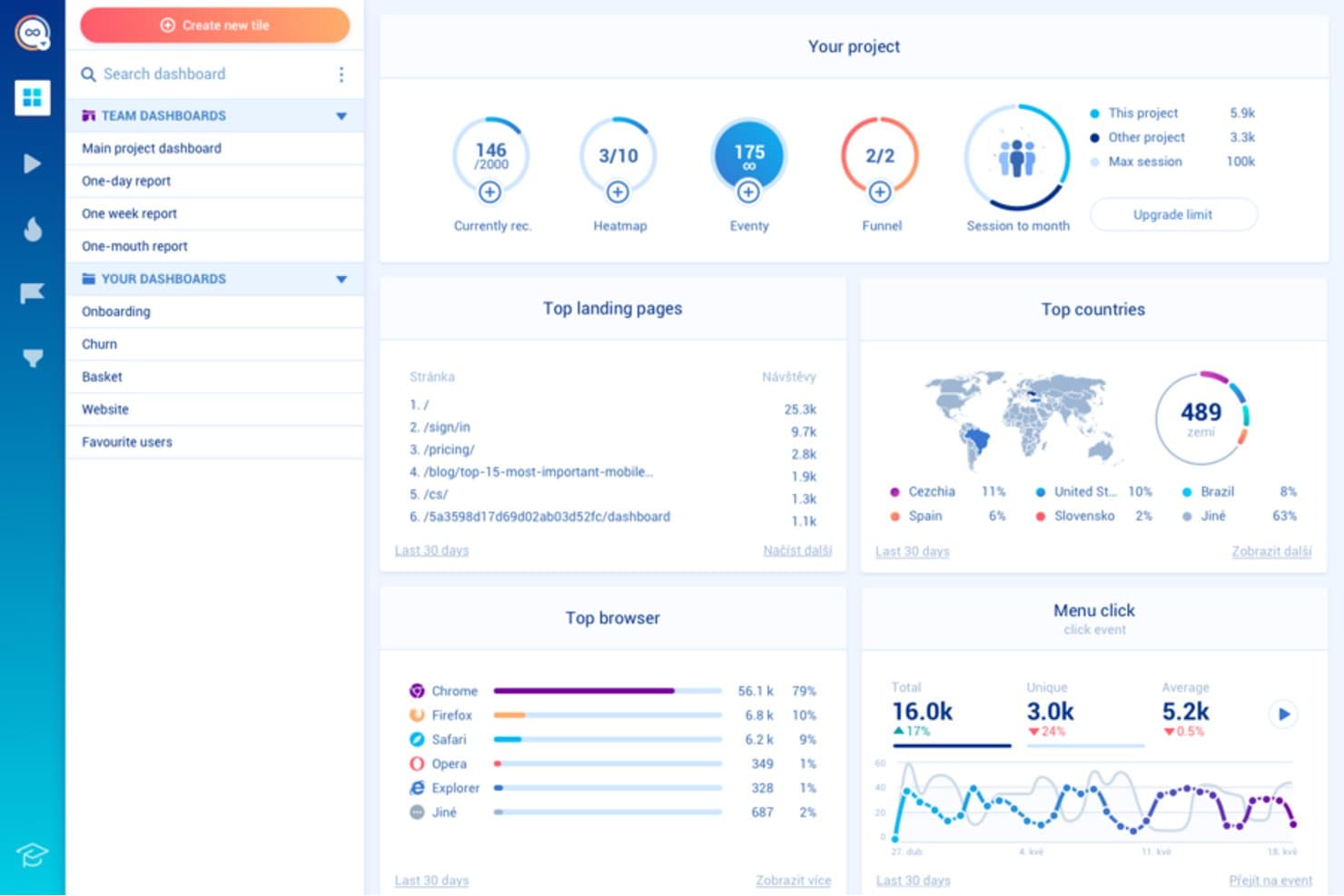
Smartlook mostra come gli utenti interagiscono per migliorare la progettazione e l'esperienza utente. Smartlook è un software gratuito di tracciamento degli utenti progettato per responsabili di prodotto e designer UX. Rivela come gli utenti interagiscono con il tuo sito web o la tua app per favorire una progettazione e un'esperienza utente migliori.
Perché ho scelto Smartlook: Il piano gratuito di Smartlook offre funzionalità come le registrazioni delle sessioni e le mappe di calore, essenziali per comprendere il comportamento degli utenti. Ti consente di monitorare eventi illimitati, offrendo una visione completa delle interazioni degli utenti. Puoi analizzare i percorsi degli utenti e identificare le aree da migliorare. Questo lo rende una scelta eccellente per i team che desiderano dati comportamentali approfonditi senza costi iniziali.
Funzionalità e integrazioni distintive:
Le funzionalità includono l'analisi dei percorsi di conversione, il monitoraggio degli eventi e gli avvisi automatici per aiutarti a monitorare efficacemente il comportamento degli utenti. L'analisi dei percorsi di conversione mostra dove gli utenti abbandonano il processo di conversione, aiutandoti a identificare i punti di attrito. Il monitoraggio degli eventi registra azioni specifiche degli utenti, mentre gli avvisi automatici ti informano in tempo reale sui cambiamenti o sulle attività importanti.
Le integrazioni includono Google Analytics, Slack, Mixpanel, Intercom, Zendesk, HubSpot, Salesforce, WordPress, Shopify e Adobe Commerce.
Cosa è gratuito? Smartlook offre un piano gratuito per sempre, con limitazioni sul numero di eventi e registrazioni che puoi archiviare ogni mese.
Pros and Cons
Pros:
- Monitoraggio illimitato degli eventi
- Analisi dettagliata del percorso degli utenti
- Funzionalità di avvisi automatici
Cons:
- Spazio di archiviazione limitato per le registrazioni
- Interfaccia complessa per i nuovi utenti
Learn more about Smartlook: Ideale per mappe di calore con funnel e analisi degli abbandoni
- Prova gratuita di 14 giorni + piano gratuito disponibile
- A partire da $32/mese
Visit WebsiteCustomer Rating:4.7/5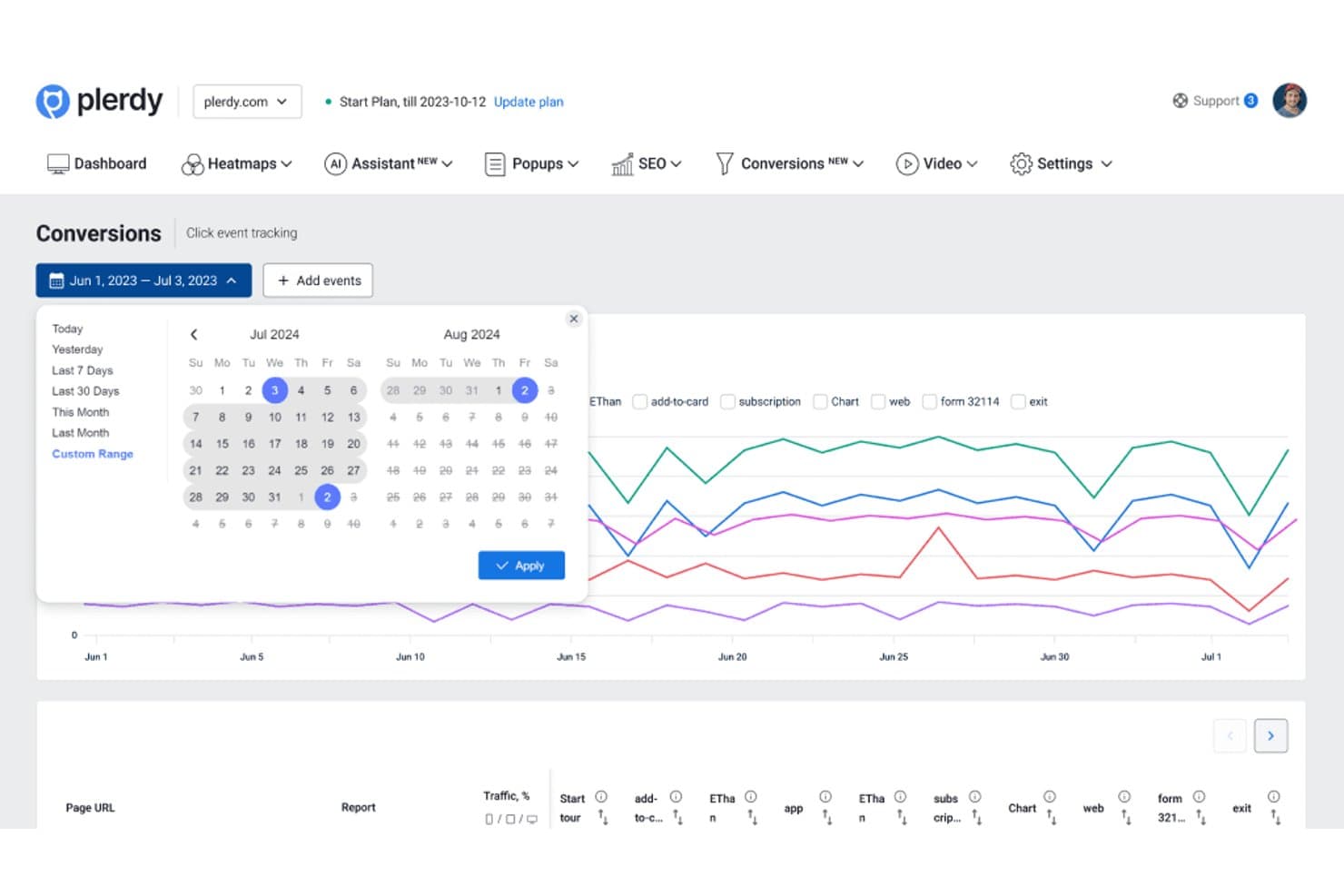
Plerdy consente agli utenti di analizzare gli eventi di conversione su intervalli di date personalizzati. Plerdy è una piattaforma di monitoraggio degli utenti e analisi dei siti web che combina mappe di calore, registrazioni delle sessioni, monitoraggio degli eventi, analisi delle conversioni e report sulle prestazioni dei moduli in un'unica interfaccia.
Per chi è più adatto Plerdy?
Plerdy è adatto ai team che si occupano di crescita, commercio elettronico e prodotto e che devono collegare il comportamento mostrato dalle mappe di calore all'analisi delle conversioni del funnel e degli abbandoni.
Perché ho scelto Plerdy
Ho scelto Plerdy perché collega i dati sul comportamento visivo all'analisi delle conversioni. Le sue mappe di calore mostrano dove gli utenti fanno clic, scorrono e perdono interesse, mentre i report del funnel rivelano quali passaggi generano abbandoni. Uso queste visualizzazioni insieme per individuare gli ostacoli nel processo di pagamento o stabilire la priorità degli esperimenti sul prodotto.
Funzionalità principali di Plerdy
- Registrazioni delle sessioni : Riproduci le singole visite per esaminare i percorsi di navigazione reali.
- Monitoraggio degli eventi : Monitora le interazioni personalizzate tra pagine ed elementi dell'interfaccia.
- Analisi dei moduli : Esamina il coinvolgimento a livello di campo e gli abbandoni nei moduli del sito web.
- Sondaggi sul feedback degli utenti : Raccogli risposte dirette dai visitatori tramite richieste mostrate sul sito.
Integrazioni di Plerdy
Plerdy si integra con Google Analytics 4 e supporta l'installazione tramite Shopify e WordPress. Supporta inoltre Zapier tramite una chiave API per l'invio dei dati dei moduli.
Cosa è gratuito?
Plerdy offre un piano gratuito permanente, non solo una prova a tempo limitato. Include fino a 100 mappe di calore al giorno, 500 sessioni video, 5.000 audit SEO e 100 visualizzazioni di finestre pop-up, quindi i team con volumi più elevati dovranno sottoscrivere un piano a pagamento.
Pros and Cons
Pros:
- Collega le mappe di calore agli abbandoni del funnel
- Include registrazioni delle sessioni per l'analisi del percorso
- Monitora l'abbandono dei moduli a livello di campo
Cons:
- I limiti del piano gratuito restringono l'analisi dei volumi più elevati
- Le visualizzazioni di finestre pop-up possono distrarre dall'analisi principale
Learn more about Plerdy: Ideale per mappe di calore con acquisizioni gratuite illimitate
- Piano gratuito disponibile
- A partire da $39/mese (con fatturazione annuale)
Visit WebsiteCustomer Rating:4.5/5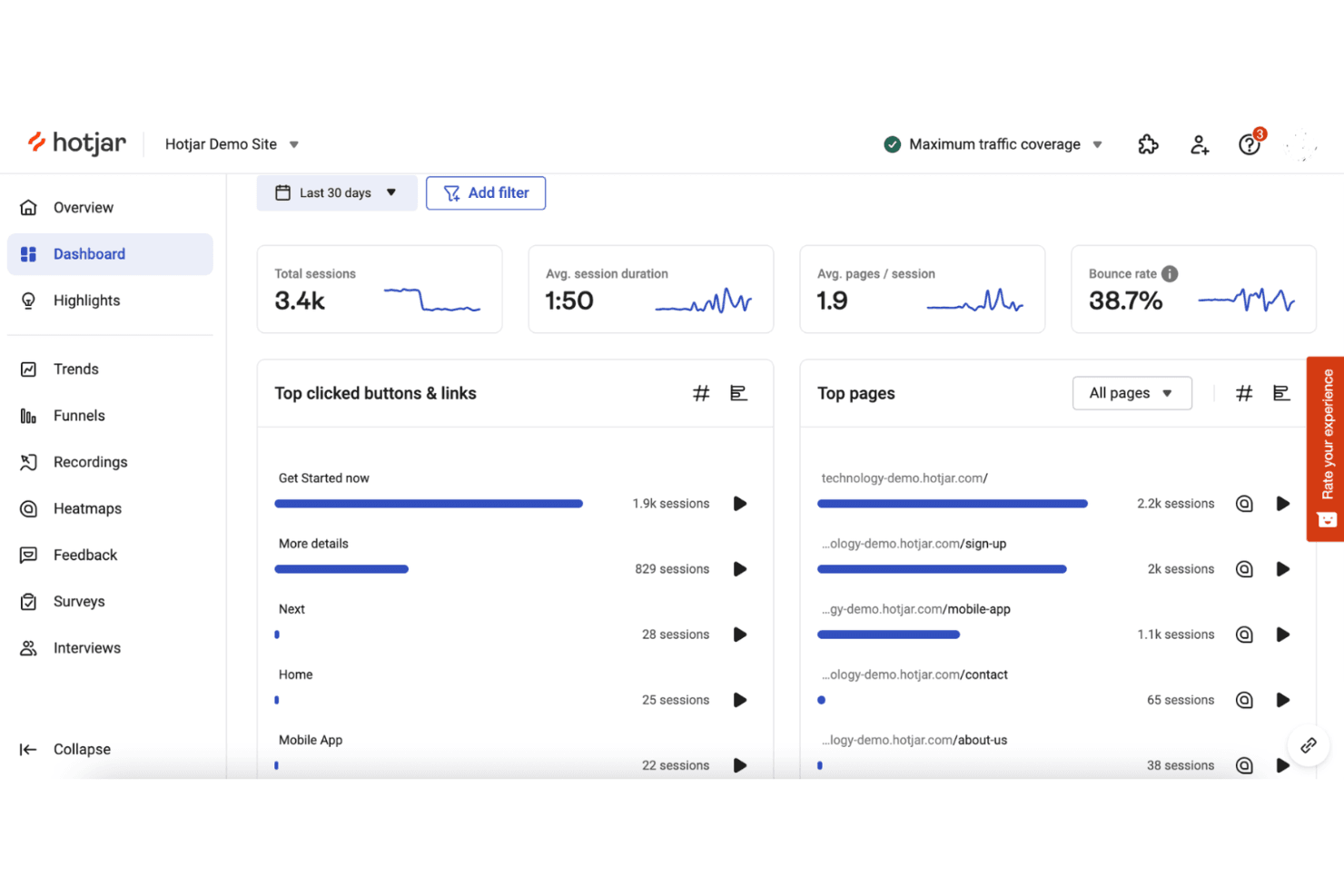
Hotjar monitora il comportamento degli utenti con mappe di calore e registrazioni delle sessioni. Hotjar (di Contentsquare) è un software di tracciamento degli utenti per mappe di calore, registrazioni delle sessioni, sondaggi di feedback, questionari e analisi del comportamento degli utenti su siti web e prodotti digitali.
Per chi è più adatto Hotjar (di Contentsquare)?
Hotjar è adatto ai team di prodotto e UX che hanno bisogno di mappe di calore con acquisizioni gratuite illimitate per comprendere il comportamento degli utenti senza un budget elevato per l’analisi.
Perché ho scelto Hotjar (di Contentsquare)
Ho scelto Hotjar (di Contentsquare) perché è ideale per le mappe di calore con acquisizioni gratuite illimitate. Utilizzo le mappe di calore dei clic, dei movimenti e dello scorrimento per vedere dove gli utenti interagiscono o abbandonano le pagine chiave. Le registrazioni delle sessioni aiutano poi a collegare questi schemi a specifici problemi di navigazione e usabilità.
Funzionalità principali di Hotjar (di Contentsquare)
- Sondaggi: Crea sondaggi sul sito per raccogliere risposte mirate degli utenti.
- Widget di feedback: Aggiungi widget che consentono agli utenti di condividere feedback su pagine specifiche.
- Analisi dei funnel: Esamina l’avanzamento degli utenti attraverso fasi di conversione definite.
- Attributi degli utenti: Filtra i dati comportamentali in base a proprietà personalizzate degli utenti.
Integrazioni di Hotjar (di Contentsquare)
Hotjar dispone di integrazioni documentate con Linear, Asana e Unbounce, oltre a Zapier. La sua API supporta connessioni personalizzate per condividere i dati di Hotjar con altri strumenti.
Cosa è gratuito?
Hotjar (di Contentsquare) offre un piano gratuito con acquisizioni illimitate delle mappe di calore, oltre a una prova gratuita di 15 giorni per le funzionalità a pagamento. I limiti del piano gratuito relativi a utenti, sessioni e funzionalità variano in base al livello di utilizzo.
Pros and Cons
Pros:
- Acquisizioni illimitate gratuite delle mappe di calore
- Visualizzazioni del comportamento relative a clic, movimenti e scorrimento
- I sondaggi collegano il feedback al comportamento osservato
Cons:
- I limiti del piano gratuito riguardano utenti e sessioni
- L’analisi avanzata richiede l’accesso a un piano a pagamento
Learn more about Hotjar (by Contentsquare): Ideale per 12 mesi di conservazione gratuita delle riproduzioni delle sessioni
- Piano gratuito disponibile
- Prezzi su richiesta
Visit WebsiteCustomer Rating:4.5/5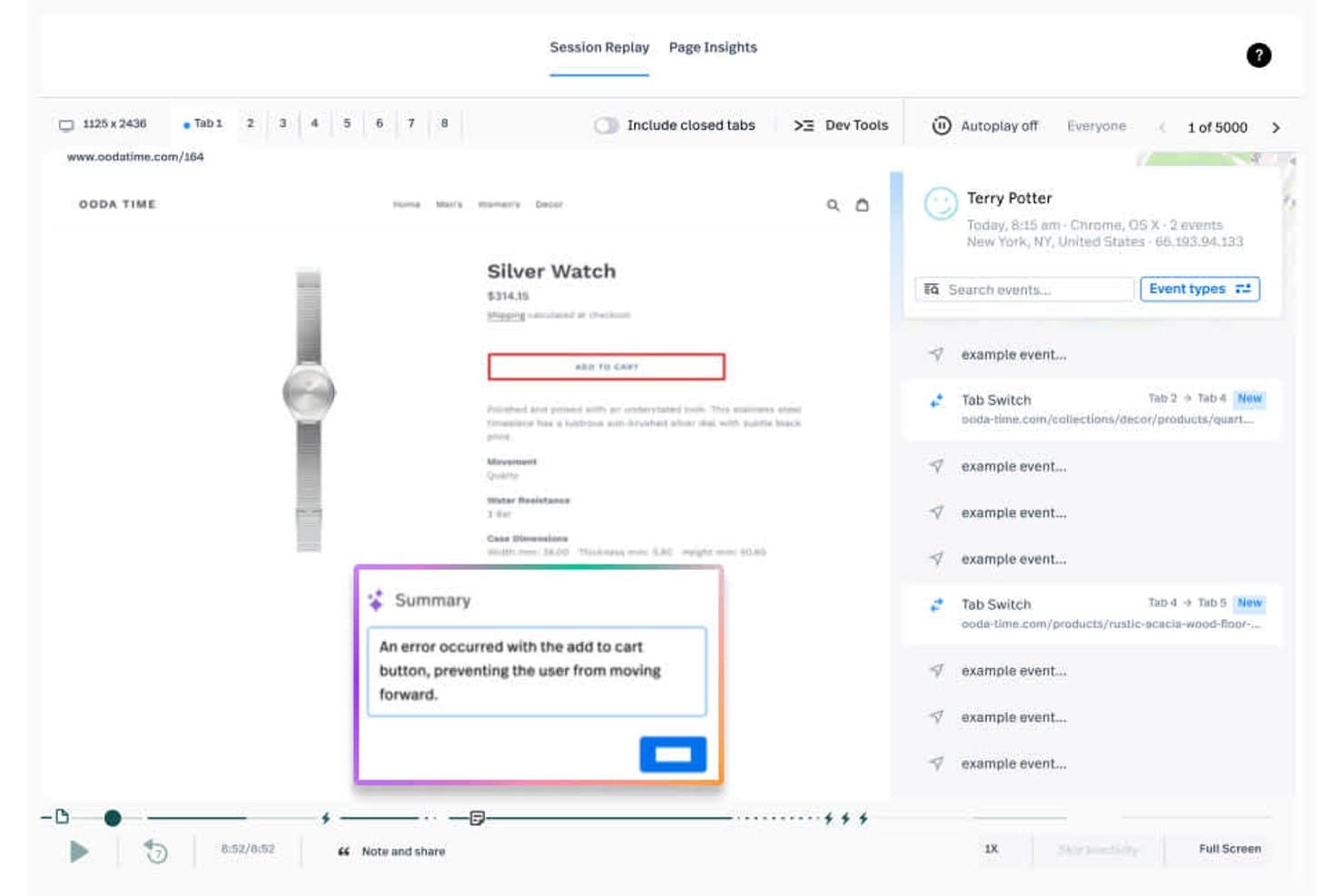
Fullstory consente agli utenti di riprodurre le sessioni e di individuare immediatamente gli errori del carrello. Fullstory è una piattaforma di monitoraggio degli utenti e analisi dei prodotti che combina la riproduzione delle sessioni, il monitoraggio degli eventi, le mappe di calore, i percorsi di conversione e i segnali di attrito per analizzare le esperienze digitali.
A chi è più adatto Fullstory?
Fullstory è adatto ai team di prodotto e UX di aziende digitali in crescita che hanno bisogno della riproduzione delle sessioni a lungo termine per analizzare gli ostacoli e convalidare le decisioni sul prodotto.
Perché ho scelto Fullstory
Ho scelto Fullstory perché abbina 12 mesi di conservazione gratuita delle riproduzioni delle sessioni al monitoraggio degli eventi e ai segnali di attrito. Posso esaminare sessioni utente meno recenti, collegarle agli eventi di conversione e analizzare clic ripetuti o clic a vuoto ricorrenti. Questo facilita il confronto tra le modifiche al prodotto e il comportamento storico degli utenti.
Funzionalità principali di Fullstory
- Mappe di calore: Visualizza i clic, la profondità di scorrimento e i modelli di interazione nelle pagine.
- Analisi dei percorsi di conversione: Crea percorsi di conversione per identificare i punti in cui gli utenti abbandonano.
- Pannelli di controllo: Organizza le metriche del prodotto e gli approfondimenti sull'esperienza in viste condivise.
- Integrazioni: Collega Fullstory ad altri strumenti del tuo insieme di analisi dei prodotti.
Integrazioni di Fullstory
Fullstory documenta le integrazioni con Google Analytics, Google Tag Manager, Adobe Analytics, Bugsnag e Google BigQuery. La sua API per sviluppatori supporta le integrazioni personalizzate.
Cosa è gratuito?
Il piano gratuito di Fullstory è disponibile senza scadenza e consente un massimo di 30.000 sessioni al mese, 12 mesi di conservazione dei dati e il supporto per un massimo di 10 utenti. Include la riproduzione delle sessioni, l'analisi di base e la risoluzione dei problemi, ma non comprende le funzionalità avanzate né il supporto del piano a pagamento; le nuove sessioni vengono sospese se si supera il limite mensile.
Pros and Cons
Pros:
- Conserva le riproduzioni delle sessioni gratuite per 12 mesi
- Collega le riproduzioni agli eventi di conversione
- Segnala i clic ripetuti e i clic a vuoto
Cons:
- Le nuove sessioni vengono sospese dopo il superamento dei limiti mensili
- L'analisi avanzata richiede un piano a pagamento
Learn more about Fullstory: Ideale per la riproduzione delle sessioni collegata all'analisi su larga scala
- Piano gratuito disponibile
- Prezzi su richiesta
Visit WebsiteCustomer Rating:4.5/5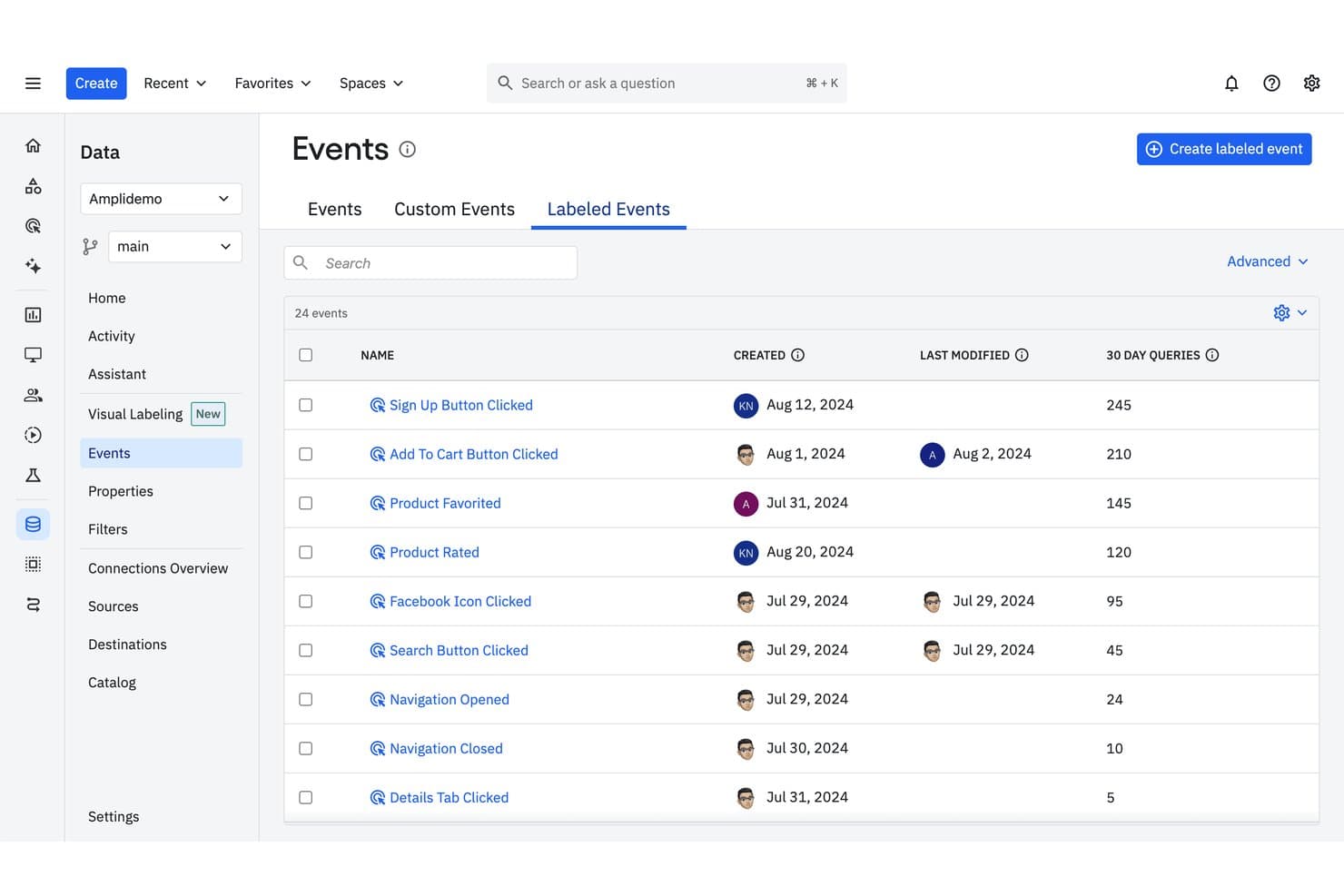
Amplitude monitora gli eventi etichettati con la frequenza delle query e la cronologia delle modifiche. Amplitude è un software di tracciamento degli utenti che combina analisi del prodotto, tracciamento degli eventi, canalizzazioni, report sulla fidelizzazione, coorti e riproduzione delle sessioni in un'unica piattaforma.
Per chi è più adatto Amplitude?
Team di prodotto presso aziende in crescita che necessitano di una riproduzione delle sessioni collegata all'analisi su larga scala, per mettere in relazione il comportamento degli utenti con le decisioni sul prodotto.
Perché ho scelto Amplitude
Ho scelto Amplitude perché è la soluzione migliore per la riproduzione delle sessioni collegata all'analisi su larga scala. Utilizzo flussi di eventi, canalizzazioni e report sulla fidelizzazione per individuare i punti in cui gli utenti incontrano difficoltà, quindi esamino le relative riproduzioni delle sessioni per comprendere il comportamento sottostante. Le coorti aiutano a confrontare questi schemi tra diversi segmenti di utenti prima di stabilire le priorità per le modifiche al prodotto.
Funzionalità principali di Amplitude
- Profili utente: Visualizza le proprietà dei singoli utenti e la cronologia delle loro attività.
- Percorsi: Traccia i percorsi seguiti dagli utenti all'interno del prodotto.
- Dashboard: Riunisci grafici e metriche in spazi di lavoro condivisibili.
- Governance dei dati: Gestisci le definizioni degli eventi, le proprietà e i piani di tracciamento.
Integrazioni di Amplitude
Le integrazioni documentate includono Segment, Iterable, Chameleon e Snowflake. Amplitude offre inoltre API per l'acquisizione personalizzata degli eventi e gli aggiornamenti delle proprietà degli utenti.
Cosa offre il piano gratuito?
Amplitude offre un piano gratuito permanente che non richiede una carta di credito. Include 2 milioni di eventi al mese, utenti illimitati e 10.000 riproduzioni delle sessioni al mese, ma i dati delle riproduzioni vengono conservati per un mese e alcune funzionalità, tra cui esperimenti, Guide e Sondaggi, sono limitate.
Pros and Cons
Pros:
- Collega le riproduzioni delle sessioni all'analisi del prodotto
- Il piano gratuito supporta volumi di eventi consistenti
- Le coorti rivelano il comportamento tra i segmenti di utenti
Cons:
- La cronologia delle riproduzioni del piano gratuito scade dopo un mese
- Le funzionalità avanzate di sperimentazione richiedono un piano a pagamento
Learn more about Amplitude: Ideale per la riproduzione delle sessioni con ostacoli individuati dall'IA
- Piano gratuito disponibile
- A partire da $39/mese
Visit WebsiteCustomer Rating:4.1/5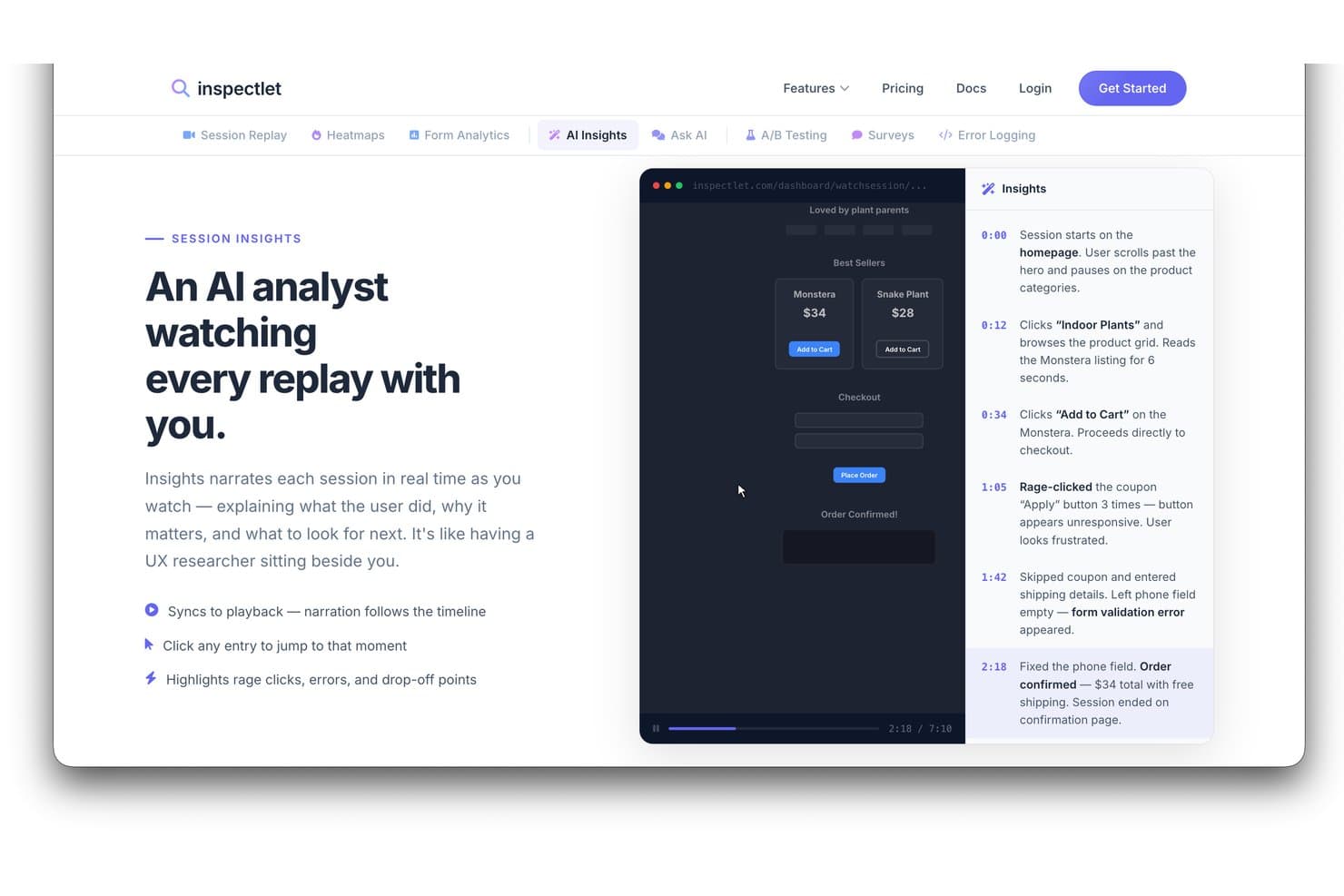
Gli Approfondimenti IA di Inspectlet narrano le riproduzioni delle sessioni per evidenziare il comportamento degli utenti. Inspectlet è un software per il monitoraggio degli utenti e l'analisi del comportamento che combina registrazioni delle sessioni, mappe di calore, monitoraggio degli eventi, funnel e analisi dei moduli per l'analisi dei prodotti e dei siti web.
Per chi è più adatto Inspectlet?
Inspectlet è adatto ai team di prodotto e ai responsabili del marketing della crescita che hanno bisogno della riproduzione delle sessioni per individuare gli ostacoli degli utenti e migliorare le esperienze sul sito web.
Perché ho scelto Inspectlet
Ho scelto Inspectlet per la rassegna dei migliori software gratuiti per il monitoraggio degli utenti perché abbina la riproduzione delle sessioni all'individuazione degli ostacoli tramite l'IA. Utilizzo le registrazioni e le mappe di calore per verificare in quali punti i visitatori incontrano difficoltà, quindi esamino l'analisi dei funnel e dei moduli per collegare questi problemi agli abbandoni. Questo aiuta i team di prodotto a indagare sui flussi poco chiari, sui moduli abbandonati e sulle conversioni non riuscite.
Funzionalità principali di Inspectlet
- Monitoraggio dei visitatori in tempo reale: Osserva i visitatori attivi mentre navigano sul tuo sito in tempo reale.
- API JavaScript: Invia dati personalizzati e controlla il monitoraggio tramite JavaScript.
- Controlli della privacy: Maschera i campi sensibili e limita i dati registrati dei visitatori.
- Monitoraggio VIP: Ricevi notifiche quando le sessioni corrispondono ai criteri selezionati.
Integrazioni di Inspectlet
Inspectlet documenta le integrazioni e le opzioni di installazione per HubSpot, Google Tag Manager, WordPress e Shopify. La sua API REST basata su JSON supporta integrazioni personalizzate.
Cosa è gratuito?
Inspectlet offre un piano gratuito permanente senza carta di credito richiesta né limiti di tempo. Include 2.500 sessioni registrate al mese su un massimo di tre siti web, oltre alla riproduzione delle sessioni, alle mappe di calore e ai test A/B; la conservazione dei dati è limitata a un mese e Inspectlet interrompe la registrazione di nuove sessioni dopo il raggiungimento del limite mensile.
Pros and Cons
Pros:
- L'IA individua gli ostacoli all'interno delle riproduzioni delle sessioni
- Il piano gratuito supporta tre siti web
- Combina registrazioni, mappe di calore e funnel
Cons:
- La conservazione dei dati nel piano gratuito dura un mese
- La registrazione si interrompe dopo il raggiungimento del limite mensile di sessioni
Learn more about Inspectlet: Bedst til fejlfindingsfokuseret sessionsafspilning
- 14 dages gratis prøveperiode – ingen permanent gratis plan
- Fra $176/måned (faktureres årligt)
Visit WebsiteCustomer Rating:4.5/5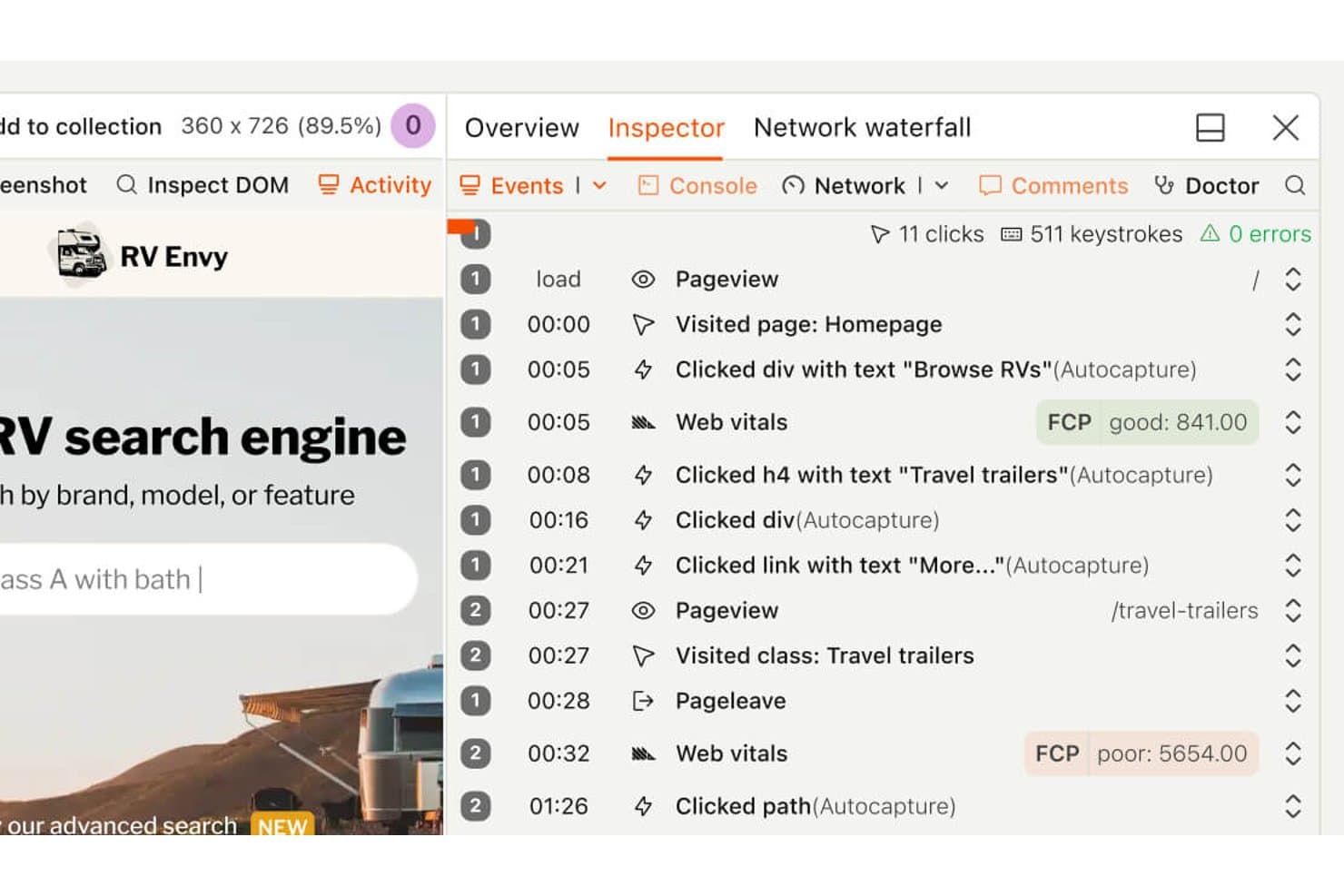
LogRocket viser brugerproblemer, analyser og sessionsafspilninger i ét kontrolpanel. LogRocket er en platform til brugersporing og produktanalyse, der kombinerer sessionsafspilning, hændelsesanalyse, fejlsøgning og overvågning af frontend-ydeevne i ét arbejdsområde.
Hvem er LogRocket bedst egnet til?
Produkt- og udviklingsteams, der har brug for at forbinde frontend-fejl med brugersessioner, vil finde LogRocket velegnet i praksis.
Hvorfor valgte jeg LogRocket?
Jeg valgte LogRocket, fordi den fejlfindingsfokuserede sessionsafspilning forbinder frontend-fejl med de brugersessioner, der ligger bag dem. Jeg bruger sessionsoptagelser, hændelsesanalyse og fejlsøgning til at spore problemer som mislykkede betalingsforløb eller ødelagt navigation. Overvågningen af frontend-ydeevne tilføjer kontekst, når langsomme oplevelser påvirker produktets adfærd.
LogRockets vigtigste funktioner
- Konsollogning: Registrerer browserens konsoloutput sammen med hver brugersession.
- Netværksovervågning: Registrerer anmodninger, svar, fejl og tidsoplysninger.
- Registrering af frustrerede klik: Identificerer gentagne klik på det samme grænsefladeelement.
- Redux-inspektion: Viser Redux-handlinger og tilstandsændringer under sessioner.
LogRocket-integrationer
LogRocket tilbyder integrationer med Zendesk, Intercom, BugHerd, Jira og Linear, så sessionsafspilninger kan forbindes med support- og problemhåndteringsarbejdsgange. Den understøtter også webhooks og en Web API til brugerdefinerede integrationer.
Hvad er gratis?
LogRocket tilbyder en gratis prøveperiode på 14 dage i stedet for en permanent gratis plan, og der kræves ikke kreditkort. Prøveperioden omfatter adgang til alle funktioner, men du skal bruge en betalingsplan, når den udløber, hvor prisen er baseret på antallet af registrerede sessioner.
Pros and Cons
Pros:
- Fejlfindingsfokuseret sessionsafspilning
- Forbinder frontend-fejl med brugersessioner
- Registrerer konsol-, netværks- og Redux-aktivitet
Cons:
- Ingen permanent gratis plan
- Sessionsregistrering kan blive dyr i stor skala
Learn more about PostHog: Ideale per analizzare gli abbandoni negli imbuti di conversione e i clic ripetuti compulsivi
- Piano gratuito disponibile
- Da $140/mese
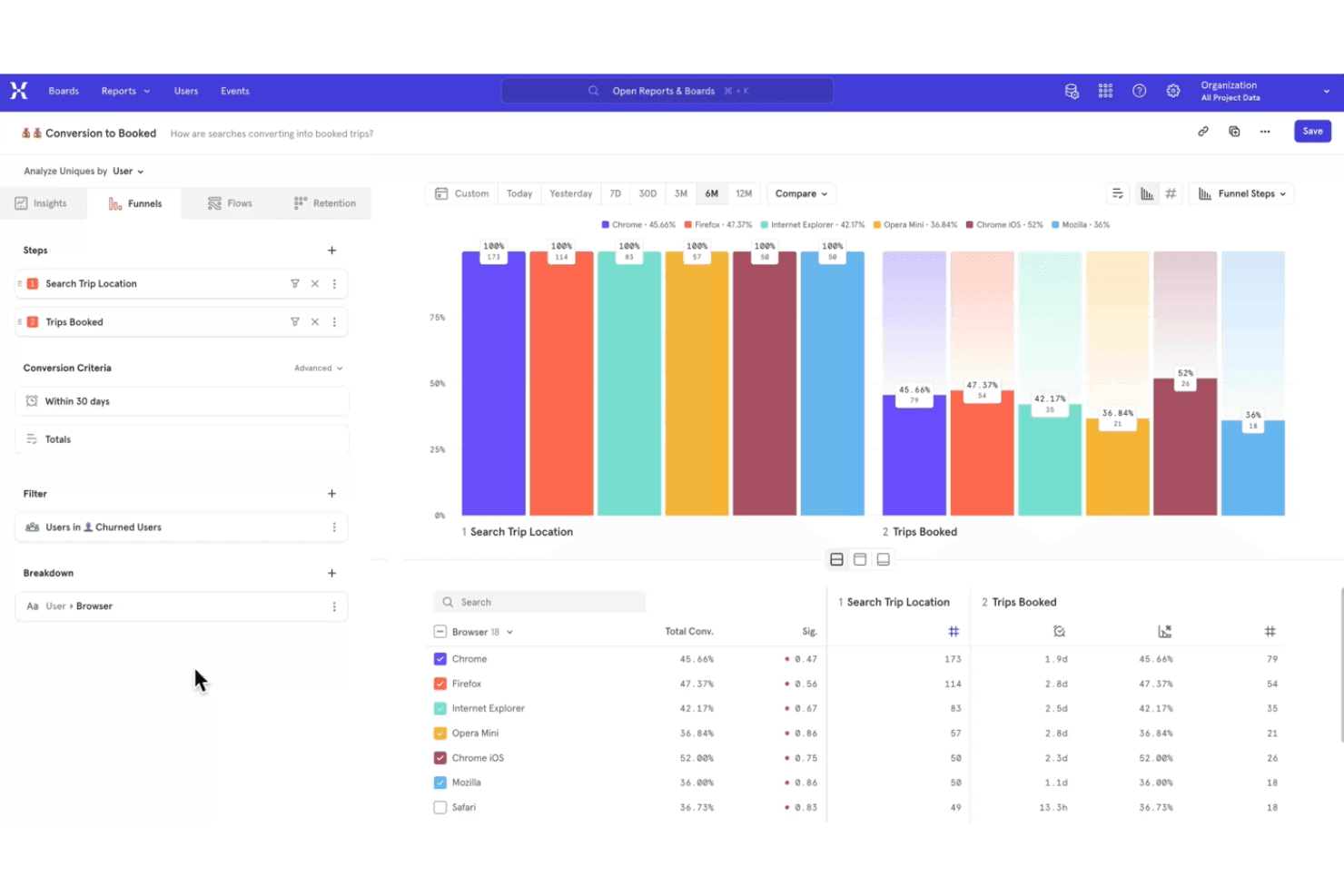
Mixpanel monitora le interazioni degli utenti per ottimizzare le esperienze dei prodotti digitali. Mixpanel è una piattaforma di analisi dei prodotti e monitoraggio degli utenti che acquisisce i dati degli eventi, mappa i percorsi degli utenti e fornisce report su coorti, fidelizzazione e utilizzo del prodotto.
Per chi è più adatto Mixpanel?
Mixpanel è adatto ai team di prodotto delle aziende digitali che necessitano di informazioni basate sugli eventi riguardo al comportamento degli utenti, alla fidelizzazione e all'adozione delle funzionalità.
Perché ho scelto Mixpanel
Ho scelto Mixpanel perché è ideale per analizzare gli abbandoni negli imbuti di conversione e i clic ripetuti compulsivi. I suoi imbuti di conversione basati sugli eventi mostrano dove gli utenti abbandonano la registrazione o il pagamento, mentre la riproduzione delle sessioni rivela le schermate associate ai clic ripetuti. Il piano gratuito offre ai team di prodotto un modo pratico per analizzare gli ostacoli prima di stabilire la priorità degli interventi.
Funzionalità principali di Mixpanel
- Report sulla fidelizzazione : Confronta gli utenti che ritornano durante periodi di tempo selezionati.
- Analisi delle coorti : Crea coorti sulla base di proprietà condivise o azioni degli utenti.
- Report sull'impatto : Misura in che modo gli eventi influenzano la conversione o la fidelizzazione.
- Connettori per i magazzini dati : Esporta i dati di Mixpanel nei sistemi di magazzino dati supportati.
Integrazioni di Mixpanel
Mixpanel si integra con BigQuery, Snowflake, Amazon Redshift, Segment e strumenti partner come ConfigCat e Marketo. Offre inoltre API per la raccolta personalizzata degli eventi e per le integrazioni.
Cosa è gratuito?
Mixpanel offre un piano gratuito permanente con posti illimitati e senza necessità di una carta di credito. Include fino a 1 milione di eventi e 10.000 riproduzioni di sessioni al mese, con conservazione delle riproduzioni per 30 giorni e limiti per report salvati, avvisi, esperimenti e flag delle funzionalità.
Pros and Cons
Pros:
- I report sugli imbuti di conversione individuano con precisione gli abbandoni durante la registrazione
- La riproduzione delle sessioni rivela i clic ripetuti compulsivi
- Il piano gratuito supporta volumi significativi di eventi
Cons:
- La configurazione degli eventi richiede una strumentazione rigorosa
- I limiti di conservazione delle riproduzioni ostacolano l'analisi storica
Learn more about Mixpanel: Ideale per il monitoraggio auto-ospitato e senza consenso
- Prova gratuita di 21 giorni
- A partire da $26/mese (con fatturazione annuale)
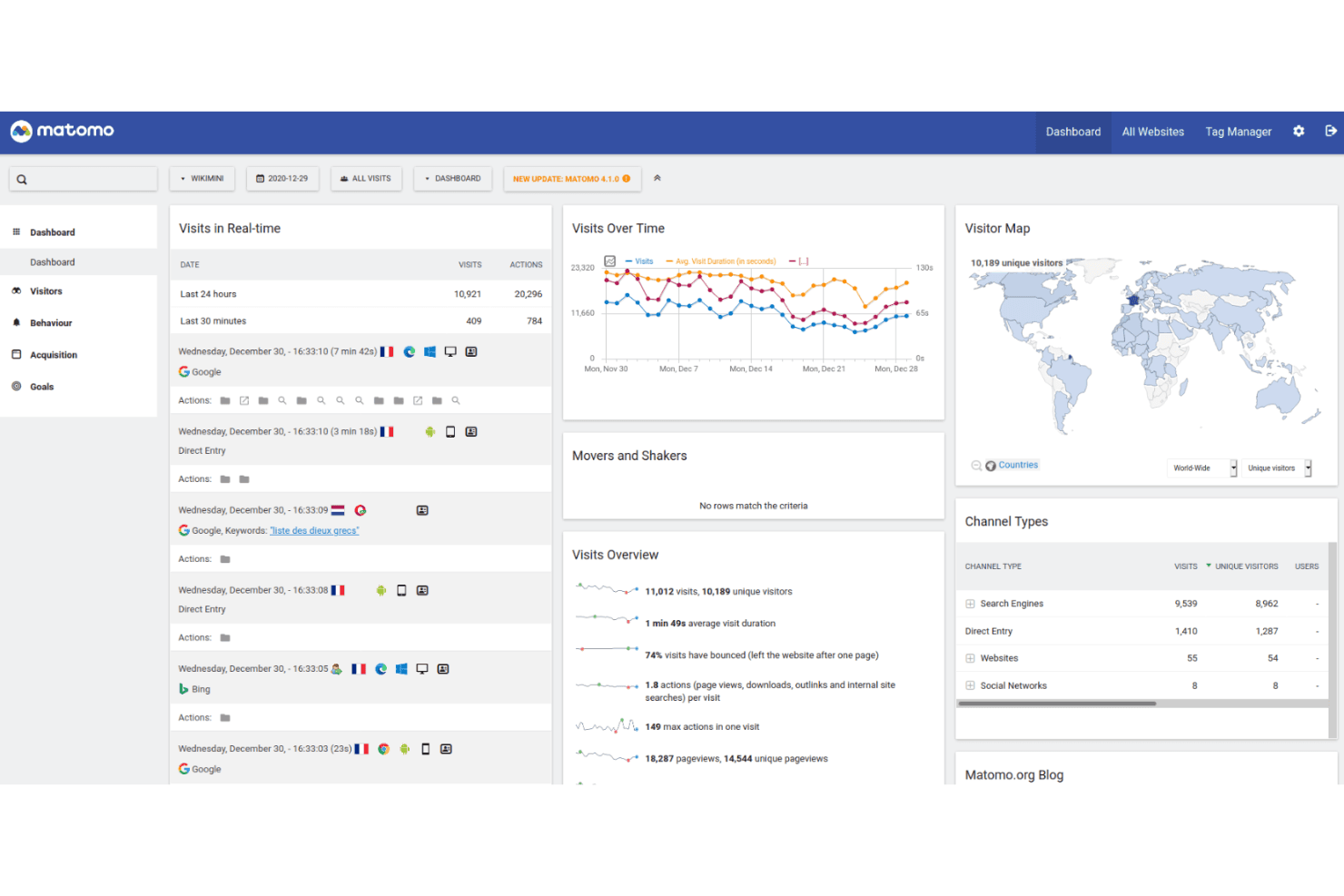
Matomo monitora l'attività degli utenti offrendo il pieno controllo dei dati e un hosting incentrato sulla privacy. Matomo è una piattaforma di monitoraggio degli utenti e analisi web con monitoraggio degli eventi, registrazioni delle sessioni, mappe di calore, attribuzione delle campagne e report personalizzabili per siti web e prodotti.
Per chi è più adatto Matomo?
I team di prodotto e le organizzazioni attente alla privacy che necessitano di un monitoraggio auto-ospitato e senza consenso troveranno in Matomo una soluzione pratica.
Perché ho scelto Matomo
Ho scelto Matomo perché supporta il monitoraggio auto-ospitato e senza consenso senza inviare i dati del prodotto a un fornitore terzo di analisi. Utilizzo il monitoraggio degli eventi, le registrazioni delle sessioni e le mappe di calore per collegare il comportamento degli utenti alle decisioni sul prodotto. I suoi report personalizzabili aiutano inoltre i team ad analizzare i percorsi dei clienti secondo le proprie regole di governance dei dati.
Funzionalità principali di Matomo
- Attribuzione delle campagne: Monitora visite e conversioni provenienti da diverse fonti di campagne di marketing.
- Monitoraggio degli obiettivi: Misura le azioni dei visitatori rispetto agli obiettivi di conversione definiti.
- Gestore dei tag: Aggiunge e gestisce i tag di monitoraggio senza modificare il codice del sito.
- Analisi dell'e-commerce: Registra visualizzazioni dei prodotti, ordini, ricavi e attività del carrello.
Integrazioni di Matomo
Matomo si integra con oltre 100 tecnologie, tra cui WordPress, WooCommerce, Shopify, Drupal, Magento 2 e Jira Cloud. Le sue API di analisi e monitoraggio supportano integrazioni personalizzate, mentre il Marketplace di Matomo aggiunge connessioni basate su plugin.
Cosa è gratuito?
L'edizione Community di Matomo On-Premise è gratuita per sempre, con utenti e visite illimitati, ma la gestione dell'hosting e della manutenzione spetta a te, mentre i plugin premium e il supporto richiedono un pagamento. Matomo Cloud offre una prova gratuita di 21 giorni con tutte le funzionalità principali e senza carta di credito; successivamente, il prezzo dipende dal traffico mensile.
Pros and Cons
Pros:
- L'implementazione auto-ospitata mantiene i dati all'interno dell'organizzazione
- Il monitoraggio senza consenso supporta misurazioni orientate alla privacy
- I report personalizzati supportano il processo decisionale sul prodotto
Cons:
- L'hosting e la manutenzione restano a tuo carico
- I report avanzati possono richiedere competenze di analisi
Learn more about Matomo: Ideale per la riproduzione delle sessioni incentrata sulla risoluzione dei problemi
- Prova gratuita di 14 giorni + piano gratuito disponibile
- A partire da $176/mese (con fatturazione annuale)
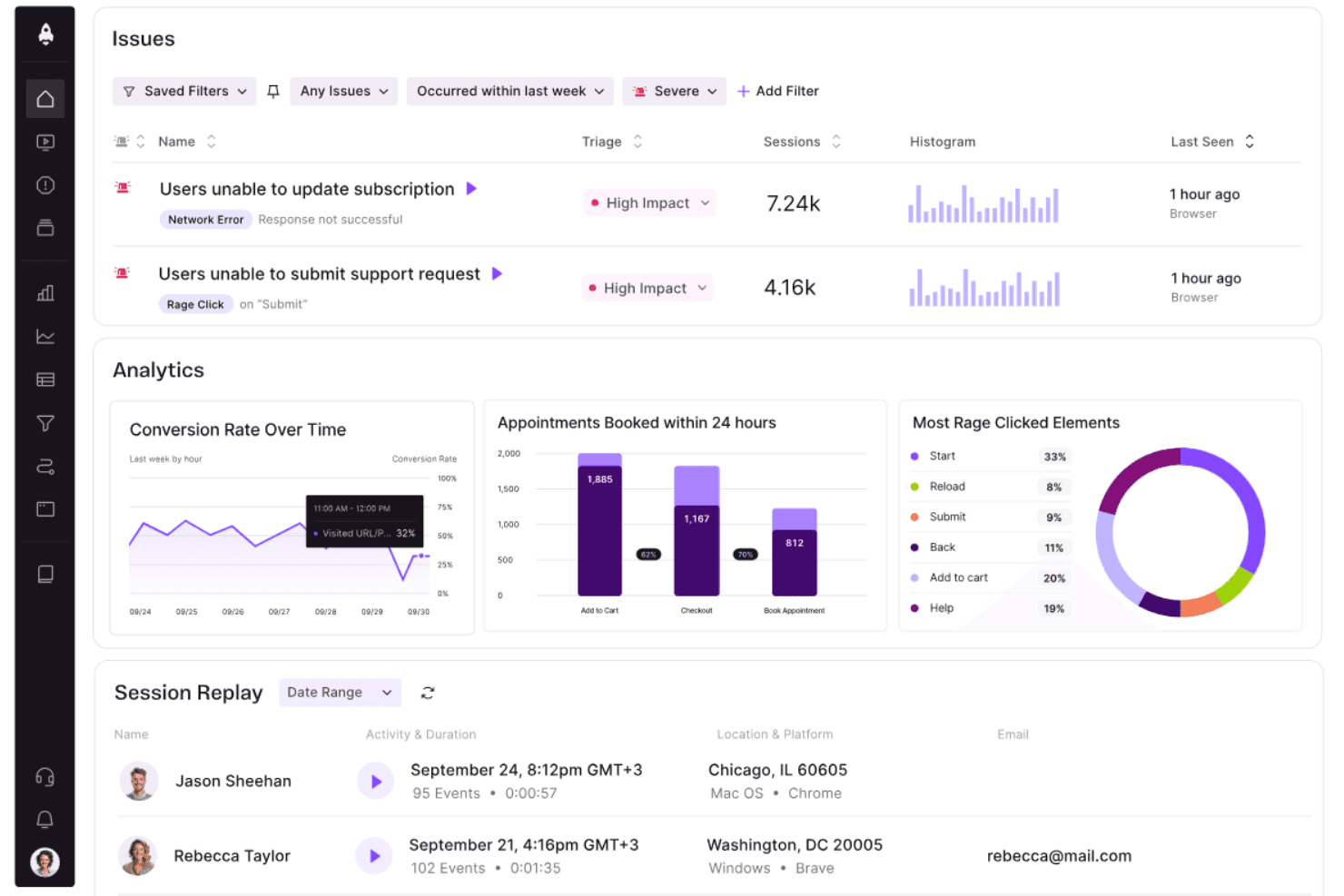
LogRocket riunisce problemi degli utenti, analisi e riproduzioni delle sessioni in un unico pannello di controllo. LogRocket è una piattaforma di monitoraggio degli utenti e analisi del prodotto che combina la riproduzione delle sessioni, l'analisi degli eventi, il monitoraggio degli errori e il monitoraggio delle prestazioni dell'interfaccia utente in un unico spazio di lavoro.
Per chi è più adatto LogRocket?
I team di prodotto e ingegneria che devono collegare gli errori dell'interfaccia utente alle sessioni degli utenti troveranno LogRocket una soluzione pratica.
Perché ho scelto LogRocket
Ho scelto LogRocket perché la sua riproduzione delle sessioni, incentrata sulla risoluzione dei problemi, collega gli errori dell'interfaccia utente alle sessioni degli utenti a cui sono associati. Utilizzo le registrazioni delle sessioni, l'analisi degli eventi e il monitoraggio degli errori per tracciare problemi come flussi di pagamento non riusciti o problemi di navigazione. Il monitoraggio delle prestazioni dell'interfaccia utente aggiunge contesto quando le esperienze lente influenzano il comportamento del prodotto.
Funzionalità principali di LogRocket
- Log della console: Acquisisce l'output della console del browser insieme a ogni sessione utente.
- Monitoraggio della rete: Registra richieste, risposte, errori e dettagli relativi ai tempi.
- Rilevamento dei clic ripetuti: Identifica i clic ripetuti sullo stesso elemento dell'interfaccia.
- Ispezione di Redux: Visualizza le azioni di Redux e le modifiche allo stato durante le sessioni.
Integrazioni di LogRocket
LogRocket offre integrazioni con Zendesk, Intercom, BugHerd, Jira e Linear per collegare le riproduzioni delle sessioni ai flussi di lavoro dell'assistenza e della gestione dei problemi. Supporta inoltre i webhook e un'API Web per le integrazioni personalizzate.
Cosa è gratuito?
LogRocket offre una prova gratuita di 14 giorni anziché un piano gratuito permanente, senza richiedere una carta di credito. La prova include l'accesso a tutte le funzionalità, ma al termine sarà necessario un piano a pagamento, con prezzi basati sulle sessioni acquisite.
Pros and Cons
Pros:
- Riproduzione delle sessioni incentrata sulla risoluzione dei problemi
- Collega gli errori dell'interfaccia utente alle sessioni degli utenti
- Acquisisce l'attività della console, della rete e di Redux
Cons:
- Nessun piano gratuito permanente
- L'acquisizione delle sessioni può diventare costosa su larga scala
Learn more about LogRocket:
Altri software gratuiti per il monitoraggio degli utenti
Ecco alcune ulteriori opzioni di software per il monitoraggio degli utenti che offrono anch’esse piani o periodi di prova gratuiti. Sebbene questi strumenti non siano entrati nel mio elenco, vale comunque la pena valutarli:
- 11OpenReplayIdeale per la riproduzione delle sessioni con hosting autonomo e piena proprietà dei dati
- 12
- 13Google AnalyticsIdeale per analizzare il traffico web e gli abbandoni nel funnel
- 14
- 15UserpilotIdeal para analisar o tráfego Web e as desistências no funil
- 16Microsoft ClarityIdeale per funnel senza codice e segnali di frustrazione
Come valuto i software gratuiti di tracciamento degli utenti
Per prima cosa, definisco cosa si intende per gratuito. Per i software di tracciamento degli utenti, richiedo un piano gratuito senza scadenza, non una versione di prova, con funzionalità utilizzabili nonostante i limiti relativi a utenti, dati o funzionalità. Poi suddivido la valutazione in tre parti: funzionalità principali, a cui assegno il peso maggiore, come la riproduzione delle sessioni e il tracciamento delle azioni; funzionalità distintive, come la strumentazione con acquisizione automatica; e funzionalità aggiuntive, come un chiaro percorso di upgrade.
Funzionalità principali (requisiti fondamentali per questo elenco)
Oltre ai requisiti relativi al piano gratuito, utilizzo un sistema di punteggio per selezionare gli strumenti da includere nel mio elenco. Assegno a ciascuno un punteggio su una scala da 0 (non offre la funzionalità) a 5 (eccelle in quest'area) per ogni funzionalità principale elencata di seguito, in base a ciò che è disponibile nel piano gratuito. Poi converto il totale in una percentuale per contribuire a valutare l'idoneità complessiva di ciascuno strumento, con un peso aggiuntivo per le funzionalità che ho considerato essenziali.
- Tracciamento del comportamento degli utenti (essenziale): cerco dati relativi a clic, scorrimenti, percorsi di navigazione e tempo trascorso sulla pagina, che rivelino dove gli utenti interagiscono o abbandonano.
- Registrazione delle sessioni (essenziale): valuto se le riproduzioni aiutano a esaminare i problemi, confrontare i percorsi e comprendere gli ostacoli nelle sessioni di utenti reali.
- Report visivi sul comportamento: verifico la presenza di mappe utilizzabili dei clic, degli scorrimenti o dei movimenti, che rendano più chiari i modelli di interazione nelle pagine principali.
- Tracciamento di più pagine: valuto se il tracciamento segue i percorsi attraverso pagine di destinazione, aree dell'account, fasi del pagamento o più schermate dell'applicazione.
- Accesso ai dati e reportistica: cerco filtri, dashboard ed esportazioni che consentano ai team di prodotto di esaminare i risultati o condividere report utilizzabili.
Una volta ottenuto un elenco di strumenti che soddisfano i criteri, considero ciò che distingue ciascuna piattaforma.
Fattori distintivi (ciò che differenzia i fornitori)
Ecco come confronto i diversi fornitori:
Funzionalità distintive
La strumentazione con acquisizione automatica è un elemento importante: verifico se uno strumento registra automaticamente clic, tocchi e visualizzazioni di pagina, così i responsabili di prodotto non devono aspettare che il team di sviluppo aggiunga tag a ogni nuovo elemento. I creatori di canalizzazioni senza codice sono altrettanto importanti, perché consentono di modificare al volo le fasi di conversione quando le priorità cambiano nel corso dello sprint. Valuto anche la parità degli SDK per dispositivi mobili, poiché strumenti come PostHog e Mixpanel offrono il tracciamento nativo per iOS e Android nei piani gratuiti, una caratteristica essenziale se il prodotto non è esclusivamente web.
Oltre le funzionalità
Verifico per quanto tempo ciascun piano gratuito conserva i dati grezzi degli eventi, poiché una finestra di 30 giorni può rendere impossibile confrontare le coorti di fidelizzazione tra trimestri diversi. Anche l'impegno richiesto per l'implementazione è importante: strumenti con acquisizione automatica, come PostHog o Hotjar, mi consentono di iniziare a raccogliere informazioni senza aspettare che il team di sviluppo aggiunga la strumentazione a ogni pulsante. Valuto anche i limiti relativi agli utenti autorizzati, perché un piano gratuito che limita i collaboratori a due o tre persone impone un upgrade prima ancora che il team di prodotto possa condividere i risultati.
Come scegliere un software gratuito per il monitoraggio degli utenti
Gli elenchi di funzionalità complessi e le strutture dei prezzi possono rendere difficile capire cosa si sta realmente ottenendo da un software gratuito per il monitoraggio degli utenti. Per aiutarti a rimanere concentrato mentre porti avanti il processo di selezione del software, ecco alcuni fattori da tenere a mente:
| Fattore | Cosa considerare |
|---|---|
| FattorePortata dell'offerta gratuita | Cosa considerareControlla cosa è incluso nel piano gratuito. Assicurati che copra funzionalità essenziali come il monitoraggio degli utenti e l'analisi dei dati, senza costi nascosti. |
| FattoreScalabilità | Cosa considerareConsidera se lo strumento può crescere insieme alla tua squadra. Cerca opzioni che consentano aggiornamenti semplici con l'espansione delle tue esigenze. |
| FattoreIntegrazioni | Cosa considerareAssicurati che il software si integri con gli strumenti che già utilizzi, come le piattaforme CRM o di marketing, per semplificare i flussi di lavoro. |
| FattoreSemplicità d'uso | Cosa considerareScegli un software che richieda una formazione minima e offra una visualizzazione chiara dei dati. Un'interfaccia intuitiva è indispensabile. |
| FattorePrivacy dei dati | Cosa considerareAssicurati che lo strumento sia conforme alle normative sulla protezione dei dati come il GDPR, soprattutto se gestisci informazioni sensibili. |
| FattorePersonalizzazione | Cosa considerareCerca un software che ti permetta di adattare report e pannelli di controllo alle tue esigenze e preferenze specifiche. |
| FattoreAssistenza | Cosa considerareValuta il livello di assistenza clienti disponibile, come la chat dal vivo o i forum, per ricevere aiuto quando necessario. |
| FattorePrestazioni | Cosa considerareControlla se lo strumento fornisce aggiornamenti dei dati in tempo reale e un'elaborazione rapida, per mantenere la tua squadra informata senza ritardi. |
Che cos'è un software gratuito per il monitoraggio degli utenti?
Il software di monitoraggio degli utenti è uno strumento che monitora e analizza le interazioni degli utenti su siti web o app, spesso disponibile con piani gratuiti o versioni di prova. Questi strumenti vengono generalmente utilizzati da product manager, esperti di marketing e designer UX per ottenere informazioni sul comportamento degli utenti e migliorare la loro esperienza. Funzionalità come le registrazioni delle sessioni, le mappe di calore e l'analisi in tempo reale aiutano a comprendere il coinvolgimento degli utenti, identificare i punti critici e migliorare l'usabilità del prodotto.
Funzionalità del software gratuito di monitoraggio degli utenti
Esaminiamo le funzionalità comunemente presenti nei software di monitoraggio degli utenti e quali sono generalmente incluse nei piani gratuiti rispetto a quelli a pagamento.
Funzionalità generalmente gratuite del software di monitoraggio degli utenti
- Registrazioni delle sessioni: Catturano e riproducono le interazioni degli utenti per comprenderne il comportamento e identificare eventuali problemi.
- Mappe di calore: Visualizzano i punti in cui gli utenti fanno clic e scorrono, aiutandoti a capire quali aree del sito risultano più coinvolgenti.
- Analisi in tempo reale: Forniscono informazioni immediate sull'attività attuale degli utenti, consentendo di reagire rapidamente alle tendenze.
- Monitoraggio di base degli eventi: Monitora azioni specifiche degli utenti, come clic o invii di moduli, per analizzare i modelli di interazione.
- Segmentazione dei visitatori: Raggruppa gli utenti in base al comportamento o ai dati demografici per personalizzare esperienze e contenuti.
- Conformità alla privacy: Garantisce che la raccolta dei dati rispetti normative come il GDPR, tutelando la privacy degli utenti.
- Dashboard personalizzabili: Consentono di adattare la visualizzazione dei dati per concentrarsi sulle metriche più importanti per il team.
Funzionalità generalmente a pagamento del software di monitoraggio degli utenti
- Segmentazione avanzata: Crea gruppi di utenti dettagliati sulla base di criteri complessi per un'analisi più mirata.
- Test A/B: Permette di testare diverse versioni del sito o dell'app per determinare quale offre prestazioni migliori per gli utenti.
- Analisi del funnel: Tiene traccia dei percorsi degli utenti nel sito per identificare i punti di abbandono e ottimizzare i percorsi di conversione.
- Reportistica automatizzata: Genera automaticamente report dettagliati per risparmiare tempo e garantire un'analisi coerente dei dati.
- Monitoraggio su più dispositivi: Monitora le interazioni degli utenti su più dispositivi per ottenere una visione completa del loro percorso.
- Esportazione avanzata dei dati: Esporta i dati in diversi formati per un'analisi più approfondita o l'integrazione con altri strumenti.
- Creazione di eventi personalizzati: Definisce eventi specifici per monitorare azioni personalizzate e uniche per le esigenze della tua attività.
Vantaggi del software gratuito di monitoraggio degli utenti
L'implementazione di un software gratuito di monitoraggio degli utenti offre diversi vantaggi al team e all'azienda. Eccone alcuni:
- Informazioni convenienti: Ottieni informazioni preziose sul comportamento degli utenti senza investimenti finanziari, consentendoti di destinare le risorse ad altri ambiti.
- Miglioramento dell'esperienza utente: Utilizza funzionalità come le registrazioni delle sessioni e le mappe di calore per identificare e risolvere i problemi di usabilità, aumentando la soddisfazione degli utenti.
- Processo decisionale rapido: L'analisi in tempo reale fornisce dati immediati, consentendo al team di prendere rapidamente decisioni informate.
- Targeting migliorato: La segmentazione dei visitatori aiuta a personalizzare contenuti ed esperienze per gruppi di utenti specifici, aumentando il coinvolgimento.
- Garanzia della privacy dei dati: Il rispetto delle normative sulla privacy, come il GDPR, garantisce che i dati degli utenti vengano raccolti in modo responsabile, rafforzando la fiducia del pubblico.
- Flessibilità di personalizzazione: Le dashboard personalizzabili consentono di concentrarsi sulle metriche più importanti, ottimizzando il processo di analisi.
- Prova senza impegno: Le versioni gratuite consentono di testare le funzionalità del software e valutarne direttamente i vantaggi prima di scegliere un piano a pagamento.
Costi e prezzi del software gratuito di monitoraggio degli utenti
Mi rendo conto che sei arrivato a questo articolo cercando le migliori opzioni di software gratuito di monitoraggio degli utenti disponibili. Tuttavia, poiché i piani gratuiti offrono solo funzionalità limitate, è molto probabile che in futuro dovrai passare a un piano superiore, motivo per cui ho incluso la tabella qui sotto.
La tabella seguente riassume i piani più comuni, i relativi prezzi medi e le funzionalità generalmente incluse nelle soluzioni software di monitoraggio degli utenti:
Tabella comparativa dei piani per il software di monitoraggio degli utenti
| Tipo di piano | Prezzo medio | Caratteristiche comuni |
|---|---|---|
| Tipo di pianoPiano gratuito | Prezzo medio$0 | Caratteristiche comuniAnalisi di base, registrazioni delle sessioni, mappe di calore e segmentazione dei visitatori. |
| Tipo di pianoPiano personale | Prezzo medio$5-$25/utente/mese | Caratteristiche comuniAnalisi avanzate, tracciamento degli eventi personalizzati, dati in tempo reale e reportistica di base. |
| Tipo di pianoPiano aziendale | Prezzo medio$50-$100/utente/mese | Caratteristiche comuniAnalisi dei funnel, test A/B, report automatici e tracciamento su più dispositivi. |
| Tipo di pianoPiano per grandi aziende | Prezzo medio$150+/utente/mese | Caratteristiche comuniIntegrazioni personalizzate, assistenza dedicata, esportazione avanzata dei dati e personalizzazione completa. |
Domande frequenti sul software gratuito per il monitoraggio degli utenti
Ecco alcune risposte alle domande più comuni sul software gratuito per il monitoraggio degli utenti:
In che modo il software gratuito per il monitoraggio degli utenti protegge la privacy degli utenti?
Il software gratuito per il monitoraggio degli utenti include spesso funzionalità di conformità alla privacy per garantire che i dati vengano raccolti e archiviati in modo responsabile. Cerca strumenti conformi a normative come il GDPR e che offrano opzioni per rendere anonimi i dati degli utenti. È fondamentale scegliere un software che fornisca informative sulla privacy chiare e opzioni per il consenso degli utenti.
Posso integrare il software gratuito per il monitoraggio degli utenti con altri strumenti?
Molte soluzioni software gratuite per il monitoraggio degli utenti offrono integrazioni con strumenti diffusi come i sistemi CRM e le piattaforme di marketing. Tuttavia, la gamma di integrazioni potrebbe essere limitata rispetto alle versioni a pagamento. Verifica che il software supporti le integrazioni essenziali di cui il tuo team ha bisogno per ottimizzare i flussi di lavoro.
Quali limitazioni devo aspettarmi con un piano gratuito?
I piani gratuiti presentano in genere limitazioni come una conservazione dei dati ridotta, meno funzionalità o un numero limitato di utenti. Sebbene questi piani siano ottimi per le esigenze di monitoraggio di base, i team con requisiti in crescita potrebbero dover passare a un piano superiore per accedere a funzionalità più avanzate e a una maggiore capacità di dati.
Quanto sono accurati i dati del software gratuito per il monitoraggio degli utenti?
Il software gratuito per il monitoraggio degli utenti generalmente fornisce dati accurati per metriche di base come le visualizzazioni di pagina e le sessioni degli utenti. Tuttavia, il livello di precisione e profondità potrebbe non essere paragonabile a quello dei piani a pagamento, soprattutto per l’analisi avanzata. Per le decisioni aziendali critiche, valuta se la versione gratuita soddisfa le tue esigenze di accuratezza.
Posso personalizzare i report nel software gratuito per il monitoraggio degli utenti?
Le opzioni di personalizzazione dei report nel software gratuito per il monitoraggio degli utenti sono spesso limitate. Sebbene di solito sia possibile accedere ai dati di base e creare report standard, le funzionalità di personalizzazione avanzata potrebbero richiedere un piano a pagamento. Valuta se la personalizzazione disponibile soddisfa i requisiti di reportistica del tuo team.
È disponibile l'assistenza per il software gratuito per il monitoraggio degli utenti?
Le opzioni di assistenza per il software gratuito per il monitoraggio degli utenti possono variare. Alcuni fornitori offrono forum della community o basi di conoscenza, mentre altri possono fornire un’assistenza via email limitata. Se prevedi che il tuo team avrà bisogno di un supporto più diretto, valuta il livello di assistenza disponibile con il piano gratuito.