

Gli strumenti per la pianificazione dei prodotti aiutano i team a definire, stabilire le priorità e programmare le funzionalità dei prodotti, così che tutti rimangano allineati dall’ideazione al lancio. Se stai cercando una soluzione gratuita, probabilmente senti la pressione di dover gestire roadmap, tempistiche e contributi del team senza poter contare su un budget elevato per il software.
Questa guida fa chiarezza esaminando i migliori strumenti gratuiti per la pianificazione dei prodotti disponibili oggi. Ho testato autonomamente ciascuno di essi per aiutarti a capire in cosa eccellono e dove potrebbero presentare delle limitazioni, così potrai scegliere uno strumento adatto al tuo flusso di lavoro e al tuo budget.
Che tu faccia parte di una startup snella o gestisca il prodotto in un’azienda in crescita, qui troverai opzioni pratiche e gratuite che possono migliorare la chiarezza, la collaborazione e la capacità di consegna.
Perché fidarsi dei nostri consigli sui software
6,700+
Reviews
20
Industry experts
16+
Evaluation factors
14
Years
Il nostro team testa e recensisce software dal 2012. In quanto product manager noi stessi, sappiamo quanto sia difficile — e importante — scegliere il software giusto.
Per questa guida, abbiamo valutato gli strumenti attraverso test pratici e ricerche indipendenti, assegnando un punteggio agli strumenti in base ai nostri criteri di selezione.
Le nostre recensioni riflettono il nostro giudizio editoriale umano, non un discorso di vendita.
Revisori esperti:
- Andrew LumbySenior TPM
- Cristiano ValimSenior UI/UX Lead


Tabella comparativa dei software gratuiti per la pianificazione dei prodotti
Questa tabella comparativa riassume i dettagli dei prezzi delle mie migliori selezioni di software gratuiti per la pianificazione dei prodotti:
| Tool | Best For | Trial Info | Price | ||
|---|---|---|---|---|---|
| 1 | Ideale per uno spazio di lavoro tutto-in-uno | Piano gratuito + demo gratuita disponibile | A partire da $7/utente/mese (con fatturazione annuale) | Website | |
| 2 | Ideale per roadmap multi-visualizzazione e pianificazione degli sprint gratuite | Piano gratuito + demo gratuita disponibile | A partire da $10/utente/mese (fatturati annualmente) | Website | |
| 3 | Ideale per la pianificazione nativa per gli sviluppatori di sprint e roadmap | Piano gratuito + prova gratuita di 14 giorni + demo gratuita disponibile | A partire da $8.50/utente/mese (con fatturazione annuale) | Website | |
| 4 | Ideale per punteggi e roadmap collegati ai feedback | Demo gratuita disponibile | Prezzo su richiesta | Website | |
| 5 | Ideale per la pianificazione basata sugli sprint con membri illimitati | Piano gratuito disponibile | A partire da $10/utente/mese (fatturato annualmente) | Website | |
| 6 | Ideale per la gestione dei database | Piano gratuito + demo gratuita + prova di 14 giorni disponibile | A partire da $20/utente/mese | Website | |
| 7 | Ideale per la pianificazione e gli sprint nativi di GitHub | Piano gratuito + prova gratuita di 14 giorni + demo gratuita disponibile | A partire da $4.99/utente/mese (fatturato annualmente) | Website | |
| 8 | Ideale per trasformare i feedback in roadmap con votazioni pubbliche | Piano gratuito disponibile | A partire da $29/user/month (con fatturazione annuale) | Website | |
| 9 | Ideale per definire le priorità del backlog in base ai feedback | Piano gratuito + prova gratuita + demo gratuita disponibili | A partire da $12/utente/mese (fatturato annualmente) | Website | |
| 10 | Ideale per l'assegnazione di punteggi e la definizione delle priorità delle idee collegate a Jira | Piano gratuito disponibile | A partire da $10/utente/mese | Website |


Recensione dei migliori software gratuiti per la pianificazione dei prodotti
Di seguito trovi i miei riepiloghi dettagliati dei migliori software gratuiti per la pianificazione dei prodotti inclusi nel mio elenco. Le mie recensioni offrono uno sguardo approfondito alle funzionalità principali, ai vantaggi e svantaggi, alle integrazioni e ai casi d’uso ideali di ogni strumento, per aiutarti a trovare quello più adatto a te. Sebbene alcuni di questi strumenti offrano una versione completamente gratuita, altri propongono un periodo di prova gratuito. In ciascuna recensione ho aggiunto una nota su ciò che è gratuito
 Ideale per uno spazio di lavoro tutto-in-uno
- Piano gratuito + demo gratuita disponibile
- A partire da $7/utente/mese (con fatturazione annuale)
Visit WebsiteCustomer Rating:4.6/5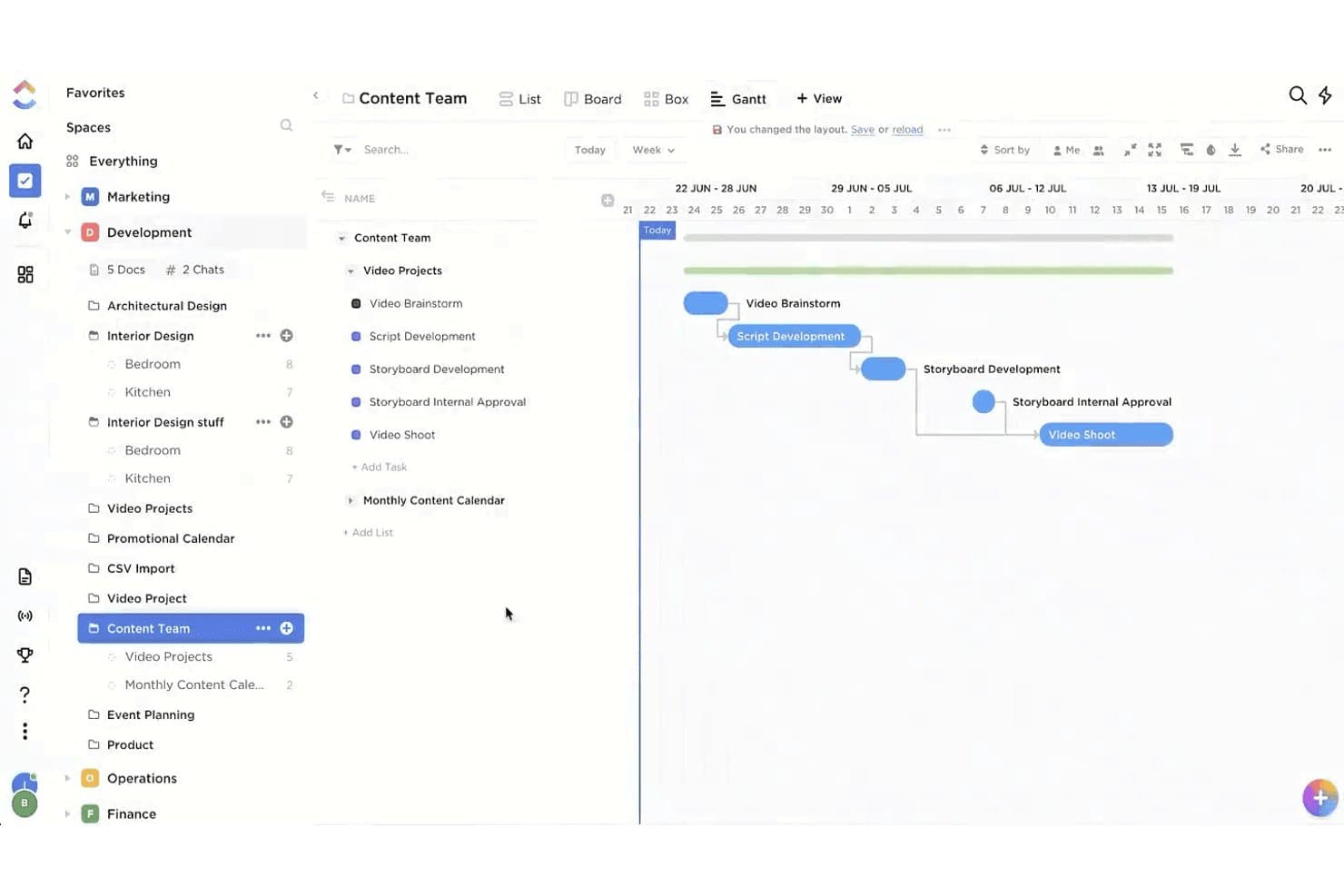
La vista Gantt di ClickUp mappa le dipendenze delle attività per le tempistiche del progetto video. ClickUp è un software per la pianificazione dei prodotti che combina modelli di roadmap, attività del backlog, campi di priorità personalizzati, pianificazione degli sprint, cronologie Gantt, documenti collaborativi, moduli e molteplici viste in un unico spazio di lavoro.
A chi è più adatto ClickUp?
Responsabili di prodotto e fondatori di startup che devono coordinare roadmap, backlog e sprint in un unico spazio di lavoro flessibile.
Perché ho scelto ClickUp
ClickUp si è guadagnato un posto nella mia rosa dei preferiti perché riunisce la pianificazione dei prodotti in un unico spazio di lavoro. Utilizzo il suo modello di roadmap del prodotto per assegnare un punteggio alle iniziative in base a impatto, impegno e livello di fiducia, quindi trasferisco lo stesso lavoro nelle viste Gantt, Bacheca o sprint. I documenti, i moduli e le attività illimitate aiutano il mio team a collegare brief di prodotto, feedback e attività di sviluppo senza frammentare il contesto tra diversi strumenti.
Funzionalità principali di ClickUp
- Gestione delle dipendenze: collega le attività con quattro tipi di dipendenza, tra cui fine-inizio e inizio-inizio.
- Stati personalizzati: configura le fasi del flusso di lavoro per le attività di prodotto e i processi di sviluppo.
- Campi personalizzati per le votazioni: consenti agli stakeholder di votare sulle richieste di funzionalità direttamente all'interno delle attività.
- Condivisione tramite link pubblici: condividi attività, documenti, lavagne, moduli e viste senza richiedere account.
Integrazioni di ClickUp
ClickUp pubblicizza oltre 200 integrazioni native, tra cui GitHub, GitLab, Bitbucket, Slack, Figma e Google Drive. La sua API pubblica supporta le integrazioni personalizzate, mentre è disponibile anche Zapier; molte integrazioni sono limitate nel piano gratuito.
Cosa include il piano gratuito?
ClickUp offre un piano gratuito permanente anziché solo una prova a tempo limitato. Include attività illimitate, ma alcune integrazioni sono limitate nel piano gratuito.
Pros and Cons
Pros:
- Le attività illimitate supportano backlog di prodotto di grandi dimensioni
- Le molteplici viste collegano roadmap e sviluppo
- I campi per le votazioni acquisiscono le richieste di funzionalità prioritarie
Cons:
- I limiti che non si azzerano ostacolano la crescita con il piano gratuito
- Le autorizzazioni degli ospiti non possono essere limitate liberamente
Learn more about ClickUp: Ideale per roadmap multi-visualizzazione e pianificazione degli sprint gratuite
- Piano gratuito + demo gratuita disponibile
- A partire da $10/utente/mese (fatturati annualmente)
Visit WebsiteCustomer Rating:4.6/5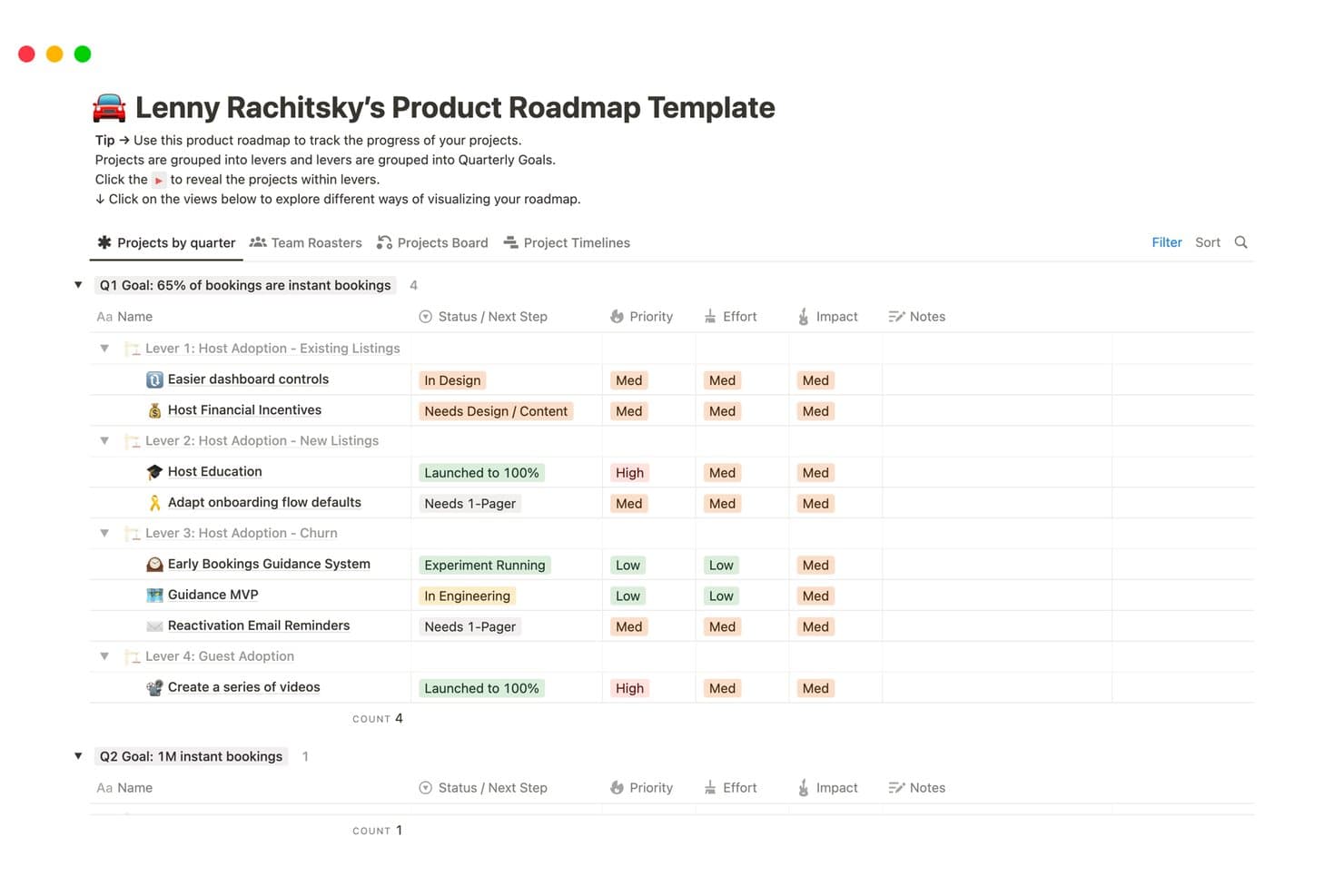
Notion organizza le roadmap dei prodotti per trimestre, leva e priorità. Notion è uno spazio di lavoro flessibile per la pianificazione dei prodotti che combina database configurabili, roadmap, bacheche degli sprint, visualizzazioni della sequenza temporale, moduli, documenti e pagine pubbliche in un unico ambiente con piano gratuito.
Per chi è più adatto Notion?
Notion è adatto ai responsabili di prodotto e ai fondatori di startup che hanno bisogno di roadmap flessibili, bacheche degli sprint e pianificazione collaborativa in un unico spazio di lavoro.
Perché ho scelto Notion
Ho scelto Notion perché la sua roadmap multi-visualizzazione gratuita e la pianificazione degli sprint supportano flussi di lavoro reali dei prodotti senza imporre un unico formato di pianificazione. Utilizzo le visualizzazioni della sequenza temporale, della bacheca, del calendario e delle dipendenze per collegare i rilasci trimestrali agli arretrati degli sprint. Il suo database nativo degli sprint crea inoltre le visualizzazioni Sprint corrente, Pianificazione dello sprint e Arretrato per il lavoro di distribuzione.
Funzionalità principali di Notion
- Moduli: Raccogli feedback direttamente in un database collegato.
- Proprietà dei database: Aggiungi stati, priorità, tag, formule e campi personalizzati.
- Pagine pubbliche: Pubblica i contenuti della roadmap su un dominio notion.site gratuito.
- Commenti e menzioni: Discuti i piani e invia notifiche ai membri del team all'interno delle pagine.
Integrazioni di Notion
Notion documenta sei integrazioni native, tra cui Slack, Jira Cloud, GitHub, Figma, Amplitude e Asana. Le sincronizzazioni con Jira Cloud e GitHub richiedono il piano Business, mentre Notion offre anche un'API pubblica e Zapier.
Cosa è gratuito?
Notion offre un piano gratuito permanente per singoli utenti e piccoli team, con database, roadmap, bacheche degli sprint, moduli e pagine pubbliche. Le integrazioni avanzate, comprese le sincronizzazioni con Jira Cloud e GitHub, richiedono il piano Business.
Pros and Cons
Pros:
- Più visualizzazioni della roadmap supportano diversi approcci alla pianificazione
- Gli sprint nativi collegano gli arretrati ai rilasci
- Le pagine pubbliche condividono le roadmap con gli stakeholder
Cons:
- La valutazione manuale complica le decisioni di definizione delle priorità
- Gli spazi di lavoro dei team raggiungono un limite cumulativo di blocchi
Learn more about Notion: Ideale per la pianificazione nativa per gli sviluppatori di sprint e roadmap
- Piano gratuito + prova gratuita di 14 giorni + demo gratuita disponibile
- A partire da $8.50/utente/mese (con fatturazione annuale)
Visit WebsiteCustomer Rating:4.5/5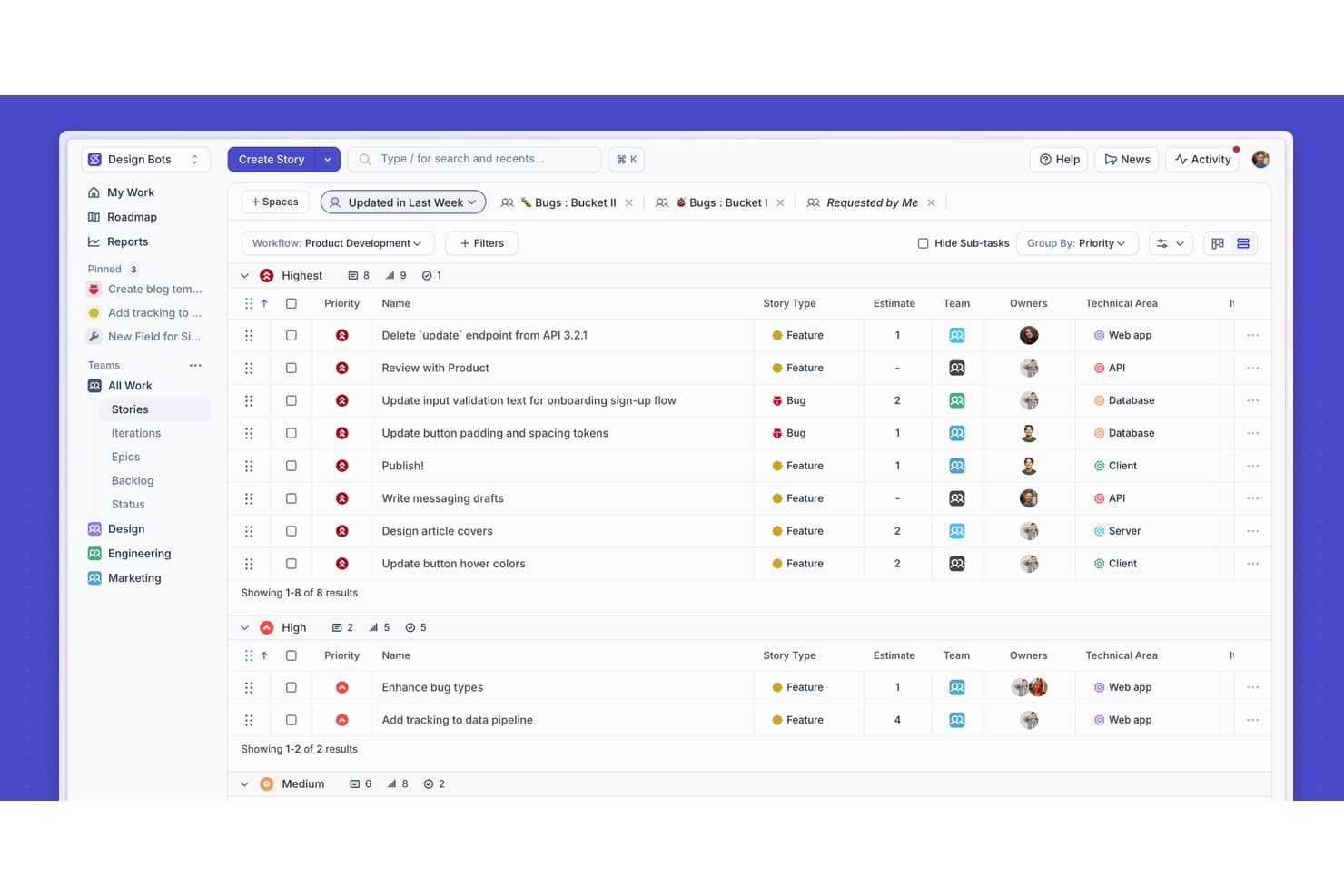
Shortcut organizza le storie per priorità con filtri e raggruppamento. Shortcut è una piattaforma di pianificazione dei prodotti per i team software che combina viste della roadmap, Epic, prioritizzazione del backlog, Iterazioni, bacheche Kanban, Documenti e Report in un piano gratuito per sempre.
Per chi è più adatto Shortcut?
Shortcut è adatto ai team di prodotto e di ingegneria che devono collegare l'esecuzione degli sprint alla pianificazione della roadmap in un unico spazio di lavoro incentrato sugli sviluppatori.
Perché ho scelto Shortcut
Shortcut si distingue perché collega la pianificazione degli sprint e della roadmap nativa per gli sviluppatori in un unico spazio di lavoro. Uso le viste Tabella roadmap e Sequenza temporale per organizzare in sequenza gli Epic, monitorarne lo stato e allineare le date di rilascio. Le Iterazioni collegano quindi questi impegni della roadmap all'avanzamento degli sprint e alle dipendenze.
Funzionalità principali di Shortcut
- Integrazione con GitHub: collega le richieste pull, i commit e i rami alle Storie.
- Bacheche Kanban: organizza le Storie tra stati del flusso di lavoro personalizzabili.
- Report: monitora l'avanzamento dei progetti con viste di report integrate.
- Documenti: crea e collega la documentazione di pianificazione al lavoro del progetto.
Integrazioni di Shortcut
Shortcut offre integrazioni native con GitHub, Slack, Google Calendar, Google Sheets, Productboard e Miro. Fornisce inoltre un'API REST per le integrazioni personalizzate e supporta Zapier.
Cosa è gratuito?
Shortcut offre un piano gratuito per sempre per i team con un massimo di 10 utenti dopo la prova con accesso completo di 14 giorni. Non è richiesta alcuna carta di credito, ma i team che superano i 10 utenti devono passare a un piano a pagamento.
Pros and Cons
Pros:
- Collega le priorità della roadmap all'esecuzione degli sprint
- Include Storie illimitate nel piano gratuito
- Offre diverse viste della roadmap e del flusso di lavoro
Cons:
- Non dispone di funzionalità native per la votazione e la raccolta delle idee
- La condivisione gratuita limita gli stakeholder non amministratori
Learn more about Shortcut: Ideale per punteggi e roadmap collegati ai feedback
- Demo gratuita disponibile
- Prezzo su richiesta
Visit WebsiteCustomer Rating:4.5/5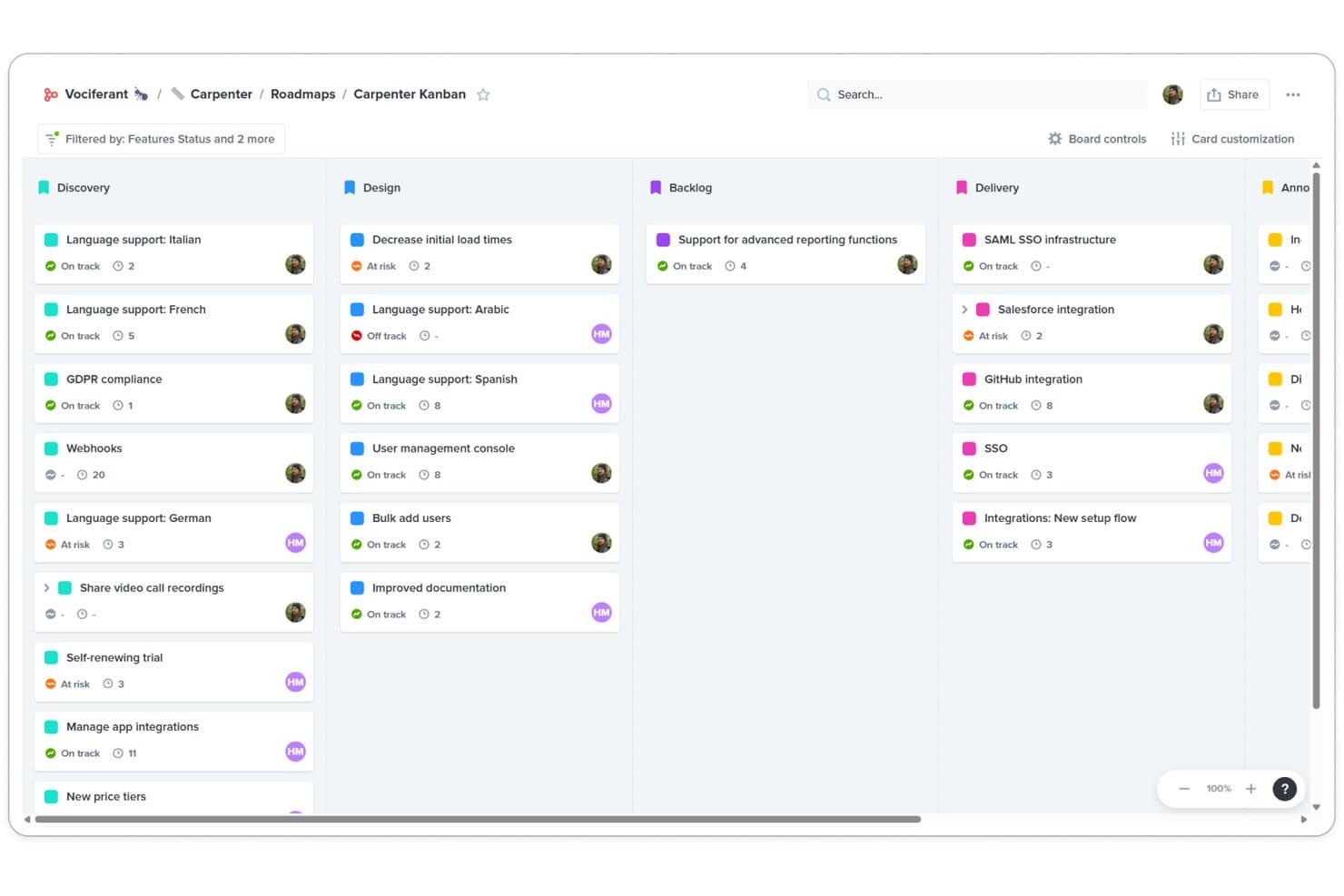
La bacheca Kanban di Productboard organizza le funzionalità per fase tra Scoperta, Progettazione, Backlog e Consegna. Productboard è un software di pianificazione dei prodotti che combina l'acquisizione dei feedback dei clienti, le gerarchie delle funzionalità, la prioritizzazione basata su formule e le roadmap con viste timeline, a colonne e a griglia.
Per chi è più adatto Productboard?
Responsabili di prodotto e responsabili dei team di prodotto che collegano il feedback dei clienti ai punteggi di prioritizzazione e alle roadmap pronte per gli stakeholder.
Perché ho scelto Productboard
Ho scelto Productboard perché collega direttamente il feedback dei clienti alla prioritizzazione e alle roadmap. I voti del Portale dei prodotti alimentano le funzionalità collegate, mentre i punteggi di importanza per i clienti e le formule RICE, WSJF o ICE aiutano a confrontare le opportunità. Le bacheche timeline e a colonne trasformano poi questi punteggi in piani di rilascio, anche se è necessario verificare i limiti del piano gratuito.
Funzionalità principali di Productboard
- Integrazione con Jira: Sincronizza le funzionalità e i rilasci di Productboard con Jira.
- AI Spark: Riassume i feedback, prepara bozze di brief e analizza i concorrenti.
- Pianificazione dei rilasci: Raggruppa il lavoro in rilasci, versioni o trimestri.
- Bacheche a griglia: Organizza le funzionalità con colonne ordinabili, filtri e raggruppamenti.
Integrazioni di Productboard
Productboard offre integrazioni native con Jira, Azure DevOps, GitHub, Slack, Zendesk, Intercom e Microsoft Teams. Supporta la sincronizzazione bidirezionale con Jira, Zapier e un'API REST v2.0 per le integrazioni personalizzate.
Cosa è gratuito?
Productboard offre un piano Starter gratuito dopo una prova di 15 giorni con accesso completo e un numero illimitato di colleghi invitati. Starter ha funzionalità limitate e Productboard non pubblica chiaramente i limiti attuali relativi a creatori, collaboratori o integrazioni.
Pros and Cons
Pros:
- Collega i voti dei clienti alle priorità delle funzionalità
- Supporta i punteggi RICE, WSJF e ICE
- Pubblica viste della roadmap per il feedback degli stakeholder
Cons:
- Le funzionalità del piano gratuito rimangono scarsamente documentate
- I crediti AI condivisi limitano la sperimentazione gratuita
Learn more about Productboard: Ideale per la pianificazione basata sugli sprint con membri illimitati
- Piano gratuito disponibile
- A partire da $10/utente/mese (fatturato annualmente)
Visit WebsiteCustomer Rating:4.6/5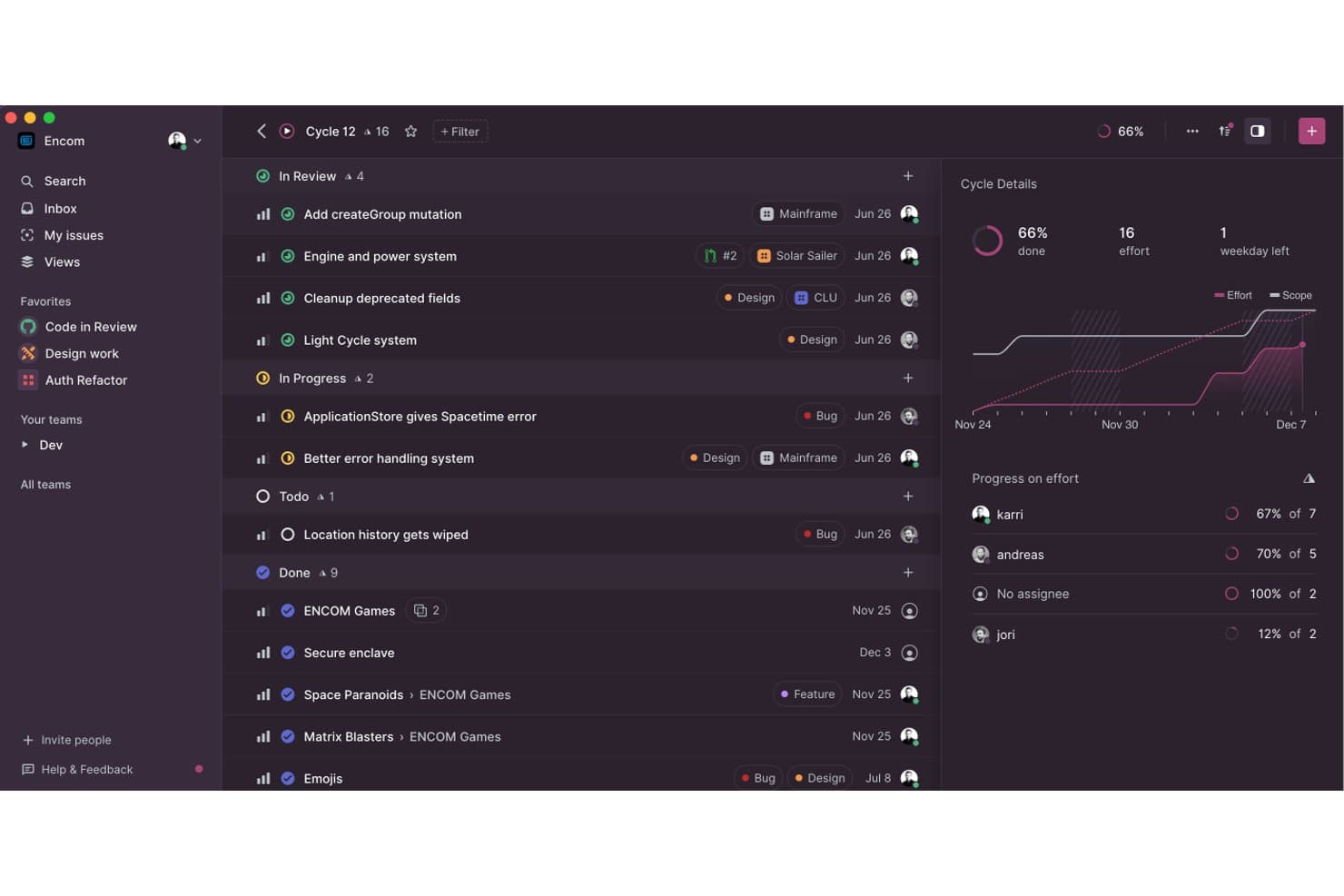
Linear monitora l'avanzamento degli sprint e l'impegno del team nelle visualizzazioni dei cicli. Linear è una piattaforma per la pianificazione dei prodotti che combina il monitoraggio dei problemi, le roadmap dei progetti, i cicli sprint, la pianificazione delle iniziative, le visualizzazioni della sequenza temporale e la gestione delle richieste dei clienti.
Per chi è più adatto Linear?
I responsabili di prodotto e i team di nuove imprese che necessitano di una pianificazione basata sugli sprint, del monitoraggio delle roadmap e di membri illimitati troveranno in Linear una soluzione adatta.
Perché ho scelto Linear
Ho scelto Linear perché il suo piano gratuito supporta la pianificazione basata sugli sprint con membri illimitati. I cicli organizzano periodi di consegna da una a otto settimane, mentre le iniziative e le visualizzazioni della sequenza temporale collegano i progetti a obiettivi, traguardi e dipendenze. Le richieste dei clienti collegano inoltre direttamente i riscontri ai problemi nell'elenco delle attività arretrate.
Funzionalità principali di Linear
- Selezione dei problemi: Accetta, rifiuta, duplica o posticipa i problemi in arrivo.
- Stime dei problemi: Utilizza scale Fibonacci, lineari, esponenziali o basate sulle taglie delle magliette.
- Importatori: Trasferisci il lavoro da Jira, GitHub Issues, Asana o Shortcut.
- Layout delle bacheche: Raggruppa i problemi per stato, progetto, priorità, ciclo o etichetta.
Integrazioni di Linear
La directory delle integrazioni di Linear include GitHub, Slack, Figma, Notion, Google Sheets, Microsoft Teams, Sentry e Datadog. Il piano gratuito include le integrazioni, oltre all'accesso ad API e webhook per connessioni personalizzate.
Cosa è gratuito?
Linear offre un piano gratuito a tempo indeterminato con membri illimitati, due team e fino a 250 problemi. Include integrazioni e accesso ad API e webhook, ma i problemi illimitati, i team privati e le integrazioni avanzate richiedono un piano a pagamento.
Pros and Cons
Pros:
- I membri illimitati supportano team di prodotto numerosi
- I cicli organizzano periodi di consegna sprint mirati
- Le iniziative collegano i progetti agli obiettivi strategici
Cons:
- Il limite di 250 problemi vincola gli elenchi delle attività arretrate in crescita
- Nessun portale nativo per le votazioni sui riscontri
Learn more about Linear: Ideale per la gestione dei database
- Piano gratuito + demo gratuita + prova di 14 giorni disponibile
- A partire da $20/utente/mese
Visit WebsiteCustomer Rating:4.6/5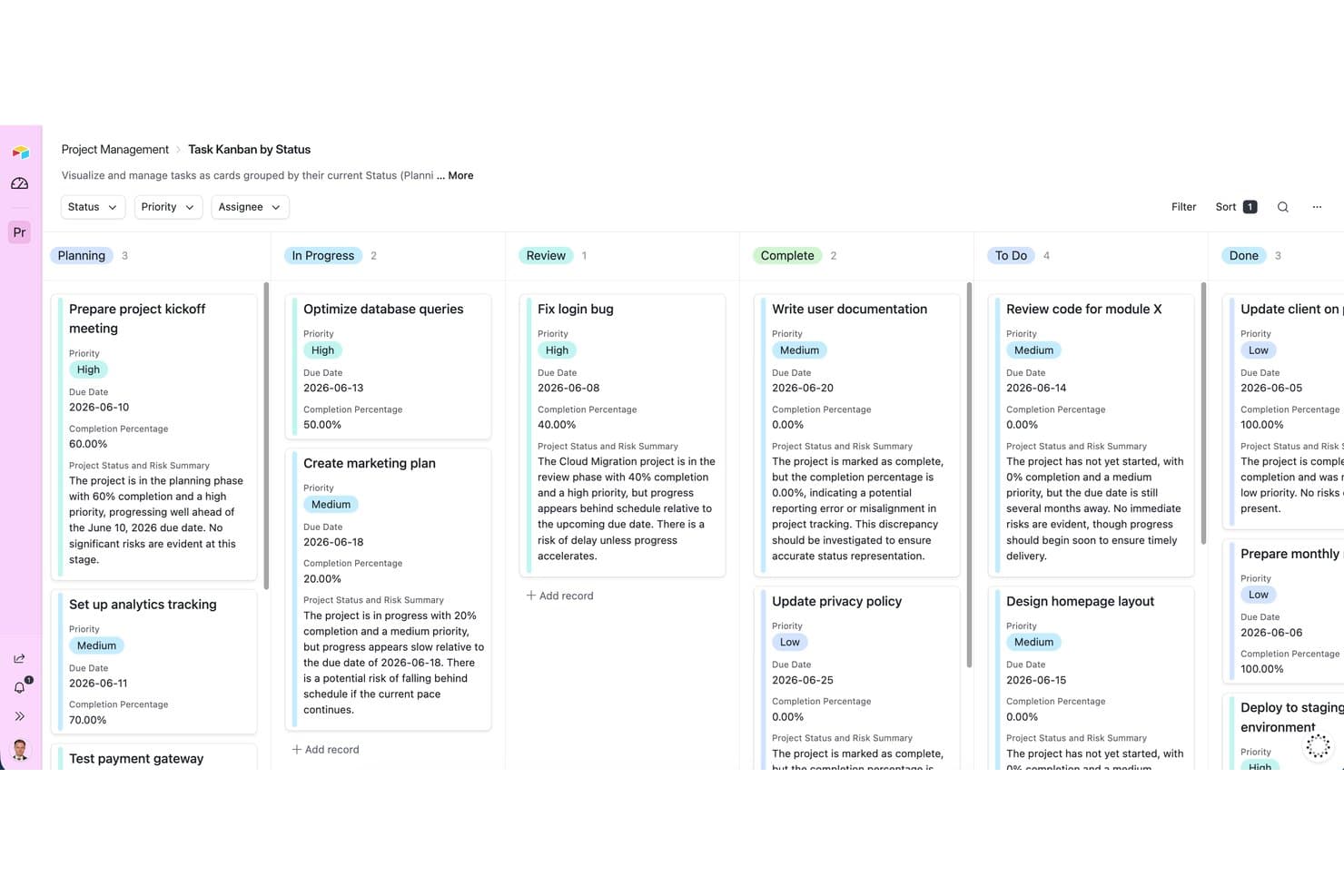
Airtable organizza le attività in base allo stato utilizzando una vista bacheca Kanban. Airtable è una piattaforma gratuita per la pianificazione dei prodotti che combina database relazionali con modelli di piani di sviluppo, viste del backlog, matrici di prioritizzazione, moduli e strumenti di collaborazione, riservando però le viste della sequenza temporale e di Gantt ai piani a pagamento.
Per chi è più adatto Airtable?
Airtable è adatto ai responsabili di prodotto e ai piccoli team di prodotto che necessitano di una pianificazione flessibile del backlog basata sui database e di una collaborazione interfunzionale.
Perché ho scelto Airtable
Ho scelto Airtable perché il suo modello di gestione dei database offre ai team di prodotto uno spazio flessibile per i backlog e i dati di pianificazione. Utilizzo record collegati, viste kanban e modelli di matrici di prioritizzazione per collegare le richieste di funzionalità ai responsabili, ai punteggi e agli obiettivi del prodotto. Il piano gratuito funziona bene per la pianificazione strutturata del backlog, anche se le viste della sequenza temporale e di Gantt richiedono un piano a pagamento.
Funzionalità principali di Airtable
- Moduli per il feedback: Raccogli gli invii che creano automaticamente dei record.
- Progettazione dell'interfaccia: Crea pagine personalizzate per le parti interessate senza scrivere codice.
- Commenti sui record: Aggiungi discussioni in thread, @menzioni e notifiche.
- Crediti AI: Analizza i temi del feedback e prepara bozze delle note di rilascio.
Integrazioni di Airtable
Airtable offre integrazioni con Jira, GitHub, Slack, Google Calendar, Google Drive, Salesforce, Zendesk, Miro, Figma e Azure DevOps. Il piano gratuito include un'API per le integrazioni personalizzate, mentre la sincronizzazione con Jira e le estensioni richiedono piani a pagamento.
Cosa è gratuito?
Airtable offre un piano gratuito a tempo indefinito, accessibile senza costi da tutti gli utenti. Il piano è pensato per singoli utenti e team molto piccoli, con limiti relativi a record, allegati, automazioni e utilizzo dell'API; le viste della sequenza temporale e di Gantt, la sincronizzazione con Jira e le estensioni richiedono un piano a pagamento.
Pros and Cons
Pros:
- I record relazionali organizzano backlog di prodotto complessi
- I modelli supportano la prioritizzazione e l'analisi del feedback
- I moduli acquisiscono automaticamente le richieste di funzionalità
Cons:
- Il piano gratuito non include la visualizzazione del piano di sviluppo nella sequenza temporale
- Il limite di mille record ostacola la crescita dei backlog
Learn more about Airtable: Ideale per la pianificazione e gli sprint nativi di GitHub
- Piano gratuito + prova gratuita di 14 giorni + demo gratuita disponibile
- A partire da $4.99/utente/mese (fatturato annualmente)
Visit WebsiteCustomer Rating:4.3/5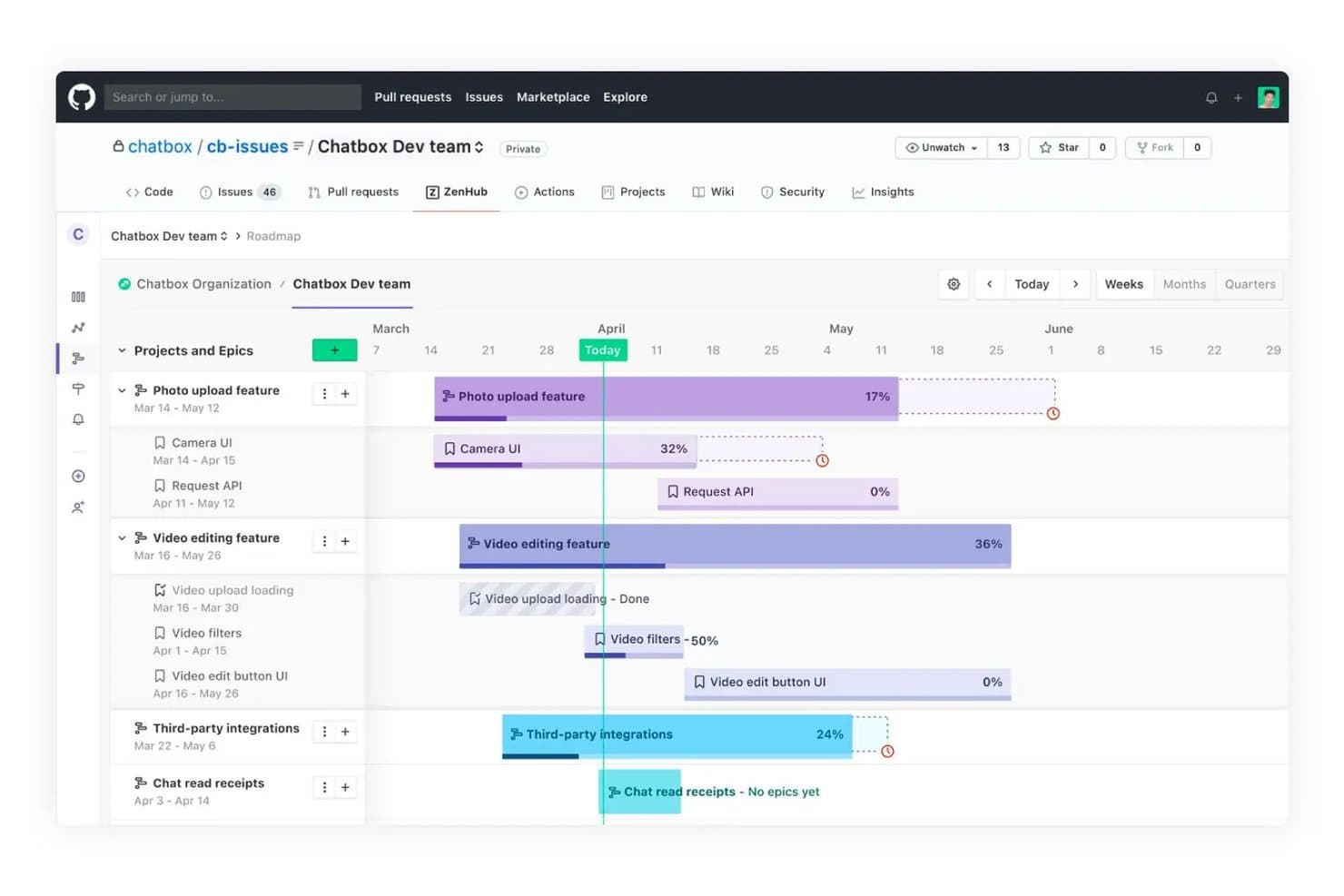
Zenhub consente agli utenti di visualizzare le tempistiche del progetto e l'avanzamento delle attività principali su una tabella di marcia. Zenhub è una piattaforma per la pianificazione dei prodotti che combina i problemi e le richieste di modifica di GitHub con tabelle di marcia, elenchi del lavoro arretrato, pianificazione degli sprint, monitoraggio del lavoro basato su gerarchie, report e diverse viste di pianificazione.
Per chi è più adatto Zenhub?
Zenhub è adatto ai responsabili di prodotto e ai team guidati dall'ingegneria che pianificano tabelle di marcia, elenchi del lavoro arretrato e sprint insieme ai problemi e alle richieste di modifica di GitHub.
Perché ho scelto Zenhub
Considero Zenhub un'ottima soluzione per la pianificazione e gli sprint nativi di GitHub perché sincronizza i problemi e le richieste di modifica in entrambe le direzioni. La sua tabella di marcia collega attività principali, dipendenze, date chiave e previsioni di consegna basate sulla velocità. Gli sprint ricorrenti recuperano il lavoro dagli elenchi prioritari, mentre il lavoro incompleto passa automaticamente allo sprint successivo.
Funzionalità principali di Zenhub
- Gerarchia del lavoro: Organizza iniziative, progetti, attività principali, problemi e sottoattività.
- Pianificazione con votazione a punti: Raccogli stime anonime dei punti storia dai membri del team.
- Monitoraggio del lavoro Kanban: Gestisci i problemi con pipeline e limiti del lavoro in corso.
- Creazione di problemi in Slack: Crea problemi di Zenhub direttamente da Slack.
Integrazioni di Zenhub
Zenhub offre integrazioni native con GitHub e Slack, oltre a integrazioni aziendali con Figma, Loom e Miro. La sua API e il server MCP supportano connessioni personalizzate con Claude, Cursor, Gemini CLI e Windsurf.
Cosa è gratuito?
Zenhub offre un piano gratuito per sempre per un massimo di 50 utenti, uno spazio di lavoro del team, due repository collegati e 250 problemi. È necessario un account GitHub e il piano Teams a pagamento di Zenhub include anche una prova gratuita di 14 giorni con accesso completo a tutte le funzionalità.
Pros and Cons
Pros:
- Sincronizzazione nativa di GitHub per problemi e richieste di modifica
- Le previsioni sulla velocità segnalano i rischi per le scadenze della tabella di marcia
- Gli sprint ricorrenti trasferiscono in avanti il lavoro incompleto
Cons:
- Il piano gratuito limita il numero di problemi e gli spazi di lavoro
- Nessuna votazione o assegnazione di punteggi integrata per i feedback
Learn more about Zenhub: Ideale per trasformare i feedback in roadmap con votazioni pubbliche
- Piano gratuito disponibile
- A partire da $29/user/month (con fatturazione annuale)
Visit WebsiteCustomer Rating:4.7/5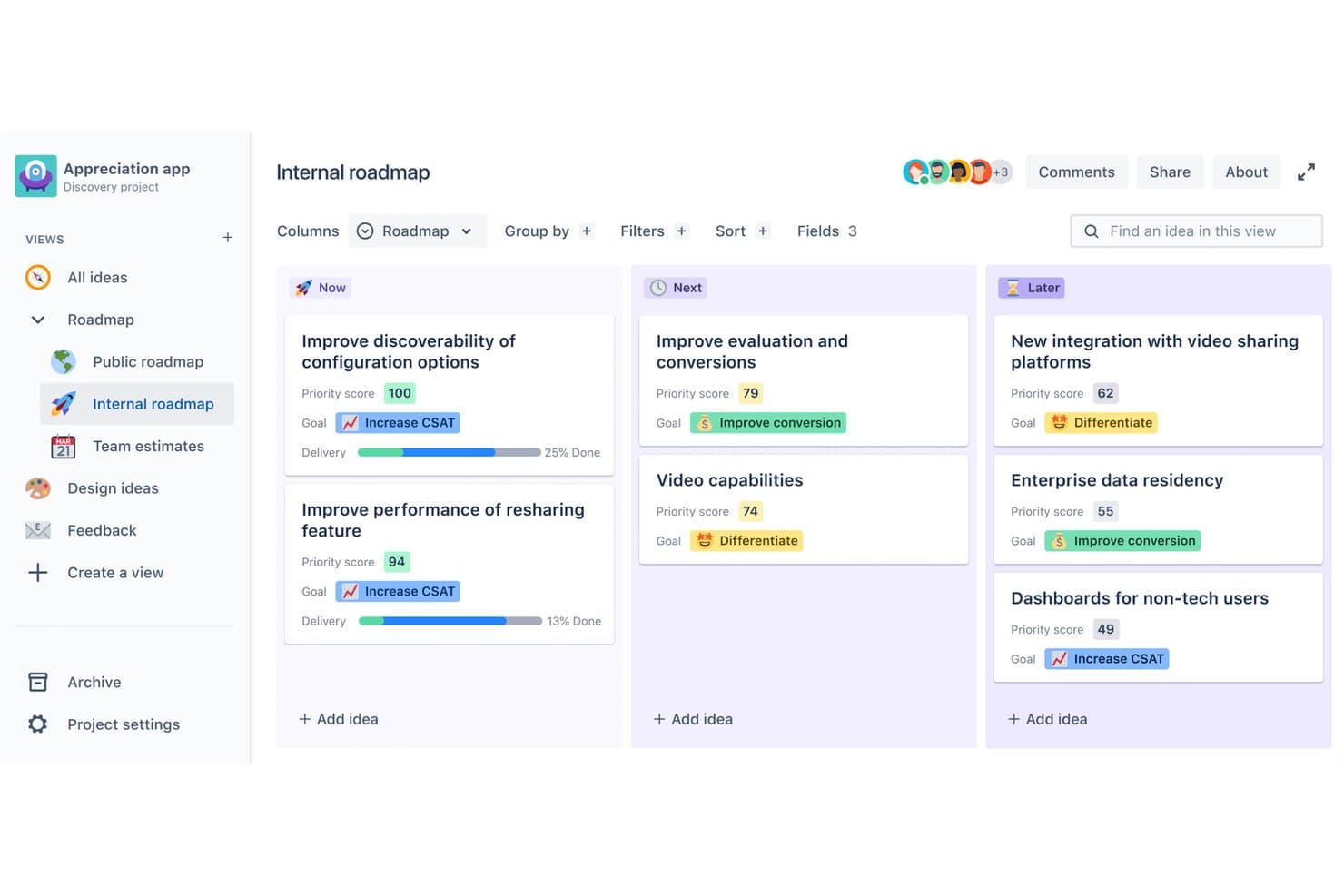
Featurebase organizza le idee di prodotto nelle colonne della roadmap Ora, Dopo e Più avanti. Featurebase è un software per la pianificazione dei prodotti che combina la raccolta dei feedback, la votazione pubblica delle richieste, la definizione delle priorità, roadmap personalizzabili e aggiornamenti del prodotto in un'unica piattaforma.
Per chi è più adatto Featurebase?
Featurebase è adatto ai product manager e ai team SaaS agili che trasformano i feedback dei clienti e le votazioni pubbliche in roadmap prioritarie.
Perché ho scelto Featurebase
Ho scelto Featurebase perché collega direttamente la votazione pubblica alla pianificazione del prodotto. Posso raccogliere le richieste tramite un portale per i feedback, consentire ai clienti di votarle positivamente e poi classificare le opportunità con una valutazione basata sul rapporto valore-sforzo o sui punteggi di impatto. Le sue roadmap personalizzabili trasformano la domanda convalidata in piani rivolti ai clienti, mentre gli aggiornamenti sullo stato notificano ai votanti quando il lavoro viene completato.
Funzionalità principali di Featurebase
- Campi personalizzati per le richieste: Aggiungi categorie, etichette, stati e viste filtrate salvate.
- Controlli sulla privacy delle roadmap: Condividi le roadmap pubblicamente, privatamente o con segmenti di clienti selezionati.
- Roadmap integrate: Pubblica le roadmap su siti web o app utilizzando incorporamenti e branding personalizzato.
- Esportazione CSV: Esporta i dettagli delle richieste, le date previste, le etichette, gli stati e gli ID delle problematiche collegate.
Integrazioni di Featurebase
Featurebase dispone di integrazioni documentate con Jira, Linear, GitHub, ClickUp, Azure DevOps, Slack, Discord, Zendesk, Intercom e HubSpot. Salesforce, Segment, API, MCP, webhook e Zapier ampliano la connettività, anche se le integrazioni e l'accesso alle API richiedono il piano Growth o superiore.
Cosa è gratuito?
Featurebase offre un piano gratuito per sempre senza obbligo di carta di credito, che include la raccolta dei feedback, gli aggiornamenti, conversazioni illimitate e utenti finali illimitati. È limitato a una sola postazione e le funzionalità avanzate, come le integrazioni, l'accesso alle API, i webhook e il supporto basato sull'intelligenza artificiale, richiedono un piano a pagamento.
Pros and Cons
Pros:
- La votazione pubblica collega i feedback alle roadmap
- La valutazione valore-sforzo supporta le decisioni sulla definizione delle priorità
- Gli aggiornamenti ai clienti seguono le richieste completate
Cons:
- Il piano gratuito limita la collaborazione a una sola postazione
- Nessuna pianificazione di traguardi, dipendenze o sprint
Learn more about Featurebase: Ideale per definire le priorità del backlog in base ai feedback
- Piano gratuito + prova gratuita + demo gratuita disponibili
- A partire da $12/utente/mese (fatturato annualmente)
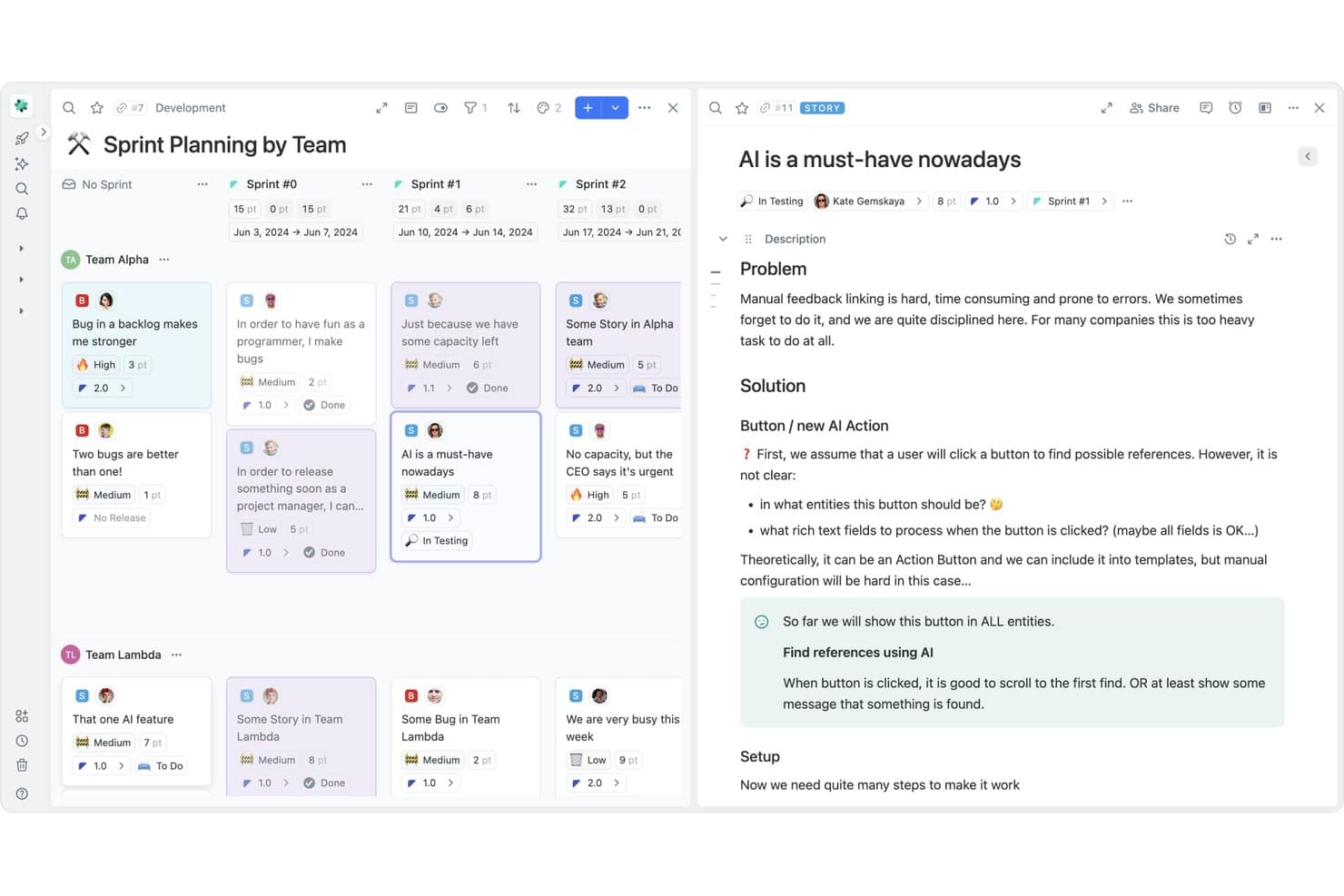
Fibery organizza la pianificazione degli sprint con schede delle storie basate sul team e funzionalità di AI. Fibery è una piattaforma senza codice per la pianificazione dei prodotti con un piano gratuito, roadmap personalizzabili, database del backlog, framework di prioritizzazione, raccolta dei feedback, tempistiche dei rilasci e documenti interfunzionali.
Per chi è più adatto Fibery?
Responsabili di prodotto e team di prodotto snelli che danno priorità ai backlog utilizzando il feedback dei clienti, framework di valutazione e roadmap collegate.
Perché ho scelto Fibery
Ho scelto Fibery perché la sua casella di posta dei feedback collega le richieste dei clienti agli elementi del backlog e li valuta in base a fattori come il segmento di clientela o i ricavi ricorrenti. Le valutazioni personalizzate RICE, WSJF e basate su formule mantengono le priorità legate ai dati quando arrivano nuovi feedback. Questo rende Fibery particolarmente adatto alla definizione delle priorità del backlog basata sui feedback in uno strumento gratuito per la pianificazione dei prodotti.
Funzionalità principali di Fibery
- Documenti collaborativi: aggiungi commenti, menzioni, discussioni in linea e attività all'interno dei documenti condivisi.
- Monitoraggio delle dipendenze: collega i blocchi e modifica automaticamente le date dipendenti quando cambiano le tempistiche.
- Integrazioni per lo sviluppo: collega GitHub, GitLab, Jira, Slack e altri strumenti di lavoro.
- Molteplici formati di visualizzazione: passa dalle visualizzazioni Bacheca, Tabella, Calendario, Gantt, Dashboard e Lavagna.
Integrazioni di Fibery
Fibery offre integrazioni documentate con GitHub, GitLab, Jira, Slack, Trello, Airtable, ClickUp, Linear, HubSpot e Zapier. La sua API supporta operazioni CRUD, modifiche dello schema, webhook e GraphQL per connessioni personalizzate.
Cosa è gratuito?
Fibery offre un piano gratuito senza scadenza per un massimo di 10 utenti e 10 ospiti, oltre a una prova di 14 giorni del piano Pro per i nuovi spazi di lavoro. Il piano gratuito include 10 database, 1 GB di spazio di archiviazione, 14 giorni di cronologia delle versioni, 250 esecuzioni mensili delle automazioni e nessuna azione esterna.
Pros and Cons
Pros:
- La definizione delle priorità collegata ai feedback mantiene i backlog basati sui dati
- La valutazione personalizzata supporta decisioni di prodotto articolate
- Le roadmap collegate fanno da ponte tra strategia e distribuzione
Cons:
- La configurazione iniziale dello spazio di lavoro richiede una pianificazione considerevole
- Il voto dei clienti richiede una soluzione alternativa personalizzata
Learn more about Fibery: Ideale per l'assegnazione di punteggi e la definizione delle priorità delle idee collegate a Jira
- Piano gratuito disponibile
- A partire da $10/utente/mese
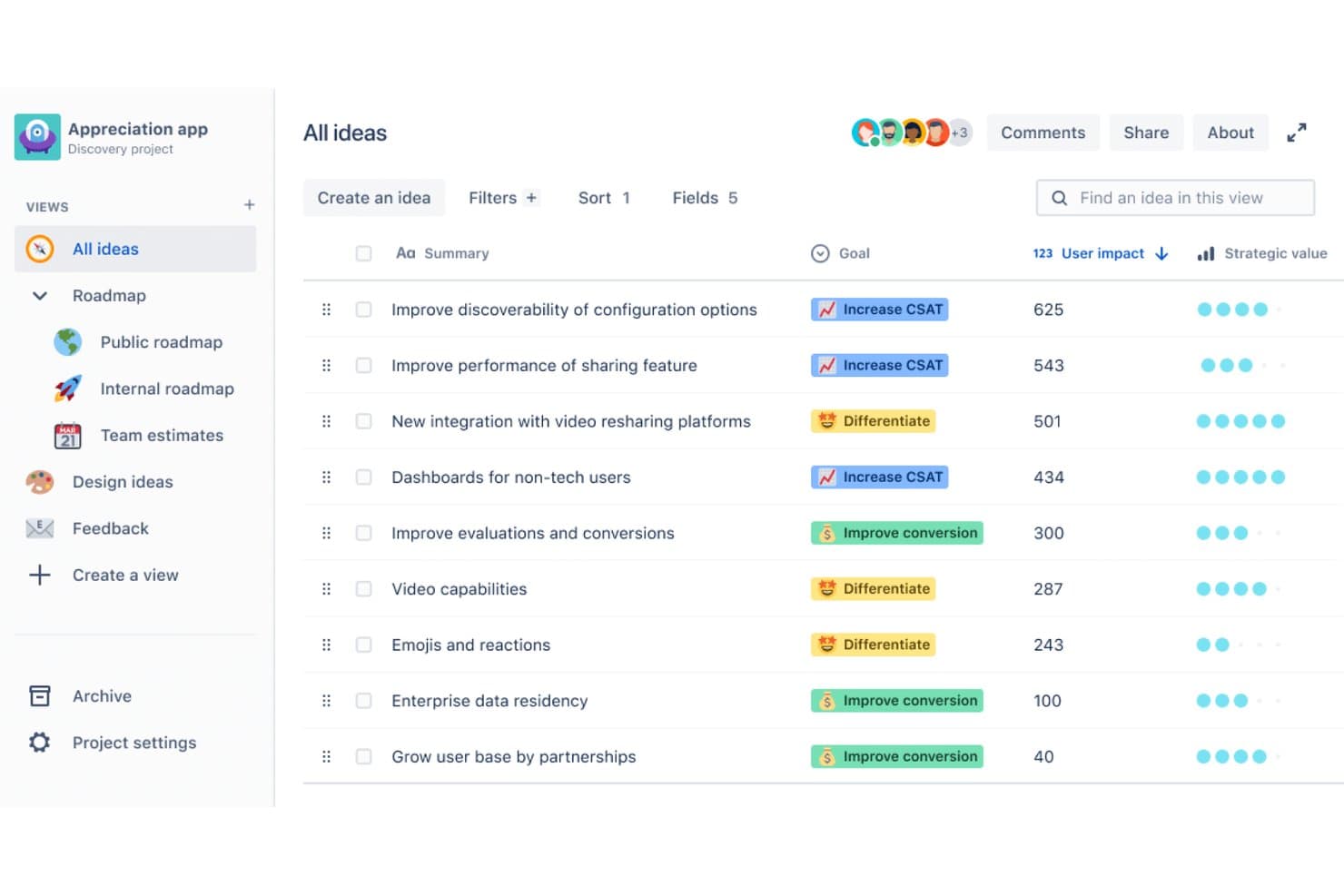
Jira Product Discovery classifica le idee in base all'impatto sugli utenti e al valore strategico. Jira Product Discovery è una piattaforma gratuita per la pianificazione dei prodotti che consente di raccogliere idee, assegnare priorità con formule personalizzate, creare piani sotto forma di elenchi, matrici, bacheche e sequenze temporali e collegare i piani alle attività di sviluppo in Jira.
Per chi è più adatto Jira Product Discovery?
Responsabili di prodotto e responsabili dei team di prodotto che devono assegnare un punteggio alle idee e collegare direttamente le priorità del prodotto alle attività di sviluppo in Jira.
Perché ho scelto Jira Product Discovery
Ho scelto Jira Product Discovery per l'assegnazione dei punteggi e la definizione delle priorità delle idee collegate a Jira. Utilizzo RICE o formule personalizzate per classificare le opportunità, quindi confronto impatto e impegno in una vista a matrice. Collegare le idee selezionate agli epici di Jira consente al mio team di trasferire le priorità del prodotto nello sviluppo, mantenendo il piano gratuito incentrato sulle attività essenziali di pianificazione.
Funzionalità principali di Jira Product Discovery
- Informazioni sui clienti: Allega note di ricerca, ticket di assistenza, dati analitici e opportunità di vendita alle idee.
- Raccolta da Slack e Teams: Crea idee o aggiungi informazioni direttamente dai messaggi del team.
- Tipi di idee personalizzati: Organizza opportunità, problemi e richieste di funzionalità con flussi di lavoro personalizzati.
- Importazione dei dati: Importa record da Google Sheets, Productboard, Aha! o Jira.
Integrazioni di Jira Product Discovery
Jira Product Discovery offre integrazioni native con Jira, Jira Service Management, Confluence, Slack, Microsoft Teams, Salesforce e Usersnap. Supporta inoltre le applicazioni di Atlassian Marketplace e l'importazione da Google Sheets, Productboard e Aha!.
Cosa è gratuito?
Jira Product Discovery offre un piano gratuito senza scadenza per un massimo di tre creatori, con 2 GB di spazio di archiviazione e assistenza della comunità. I collaboratori possono partecipare gratuitamente, ma i team che superano i tre creatori devono usufruire di una prova di 14 giorni di un piano a pagamento o passare a un piano superiore.
Pros and Cons
Pros:
- L'assegnazione di punteggi RICE personalizzati supporta la definizione delle priorità basata sulle evidenze
- Le viste a matrice chiariscono i compromessi tra impatto e impegno
- Quattro viste del piano supportano diverse esigenze di pianificazione
Cons:
- La pianificazione della sequenza temporale rimane limitata a mesi e trimestri
- La votazione pubblica dei clienti richiede strumenti separati
Learn more about Jira Product Discovery:
Altri software gratuiti per la pianificazione dei prodotti
Ecco alcune ulteriori opzioni di software per la pianificazione dei prodotti che offrono anch’esse piani o prove gratuite. Sebbene questi strumenti non siano entrati nel mio elenco, vale comunque la pena esaminarli:
- 11Superhuman DocsIdeale per roadmap basate su documenti con collaboratori gratuiti
- 12MiroIdeale per il brainstorming visivo e le lavagne virtuali
- 13TaskadeIdeale per la pianificazione del team assistita dall'IA
- 14NiftyIdeale per la pianificazione agile degli sprint con un piano gratuito
- 15PortfoleonIdeale per roadmap visive a livello di portfolio
- 16Zoho SprintsIdeale per il monitoraggio gratuito del backlog agile e degli sprint
- 17CannyIdeale per votare le funzionalità e assegnare punteggi al backlog
- 18LoopedInIdeale per stabilire le priorità, dai feedback alla roadmap
- 19PathProIdeale per condividere roadmap pubbliche con gli utenti votanti
Come valuto i software gratuiti per la pianificazione dei prodotti
Definisco come gratuito un piano disponibile per sempre, non una versione di prova, con limiti chiari per utenti o funzionalità. Valuto quindi ogni strumento in base alle funzionalità fondamentali, alle caratteristiche distintive e alla capacità di supportare la crescita del team.
Funzionalità fondamentali
- Visualizzazione del piano di sviluppo: sequenze temporali modificabili per iniziative, funzionalità, rilasci e progressi.
- Definizione delle priorità: raccolta, classificazione, ordinamento e valutazione delle richieste.
- Pianificazione delle tempistiche e dei rilasci: date, tappe fondamentali e cicli di lavoro visualizzati insieme.
- Collaborazione e condivisione: piani condivisi, commenti, autorizzazioni e notifiche.
- Raccolta di idee e feedback: richieste strutturate, tag, votazioni e collegamenti con il piano di sviluppo.
- Più visualizzazioni: schede, elenchi, calendari, sequenze temporali o database.
Fattori distintivi
Confronto le bacheche di feedback con votazione positiva, i portali pubblici del piano di sviluppo e la possibilità di riordinare gli elementi tramite trascinamento. Valuto inoltre la facilità d'uso per gli stakeholder non tecnici, la portabilità dei dati tramite CSV o API e il supporto a flussi di lavoro agili come Kanban e cicli di lavoro di base.
Come scegliere un software gratuito per la pianificazione dei prodotti
Gli elenchi complessi di funzionalità e le strutture dei prezzi possono rendere difficile capire cosa si ottiene realmente da un software gratuito per la pianificazione dei prodotti. Per aiutarti a rimanere concentrato mentre completi il processo di selezione del software, ecco alcuni fattori da tenere presenti:
| Fattore | Cosa considerare |
| Portata dell'offerta gratuita | Valuta cosa include il piano gratuito. Verifica eventuali limitazioni relative agli utenti, alle funzionalità o allo spazio di archiviazione che potrebbero influire sulla produttività del tuo team. |
| Scalabilità | Determina se lo strumento può crescere insieme al tuo team. Considera se offre piani a pagamento adatti alle tue esigenze future o se in seguito dovrai cambiare strumento. |
| Integrazioni | Cerca integrazioni con gli strumenti che il tuo team utilizza già. Assicurati che si colleghi a piattaforme come Slack, Google Drive o Jira per semplificare i flussi di lavoro. |
| Semplicità d'uso | Valuta la curva di apprendimento per il tuo team. Uno strumento facile da usare consente di risparmiare tempo e aiuta il team a iniziare rapidamente senza una formazione approfondita. |
| Personalizzazione | Verifica se puoi adattare il software ai tuoi flussi di lavoro specifici. Dashboard e impostazioni personalizzabili possono migliorare l'efficienza e la soddisfazione del team. |
| Collaborazione | Assicurati che lo strumento supporti funzionalità di collaborazione come la modifica in tempo reale o i thread di commenti, per mantenere il team connesso e far procedere agevolmente i progetti. |
| Sicurezza | Verifica le misure di sicurezza del software, soprattutto se gestisce dati sensibili. Cerca la crittografia e la conformità alle normative sulla protezione dei dati. |
Che cos'è il software gratuito per la pianificazione dei prodotti?
Il software per la pianificazione dei prodotti è uno strumento che aiuta i team a organizzare, stabilire le priorità e monitorare le attività e le tempistiche dello sviluppo dei prodotti. Le offerte gratuite includono solitamente funzionalità o postazioni utente limitate, spesso sotto forma di piano gratuito o periodo di prova. Questi strumenti sono comunemente utilizzati da responsabili di prodotto, sviluppatori e team di progetto per migliorare la collaborazione e l'efficienza. Funzionalità come la gestione delle attività, la creazione di tempistiche e gli strumenti di collaborazione aiutano i team a rimanere organizzati, stabilire le priorità e raggiungere in modo efficiente gli obiettivi dei progetti.
Funzionalità del software gratuito per la pianificazione dei prodotti
Esaminiamo le funzionalità che si trovano comunemente nel software per la pianificazione dei prodotti e quali sono solitamente incluse nei piani gratuiti rispetto a quelli a pagamento.
Funzionalità solitamente gratuite del software per la pianificazione dei prodotti
- Gestione delle attività: consente ai team di creare, assegnare e monitorare le attività per garantire che tutti rispettino le scadenze.
- Creazione di tempistiche: fornisce una rappresentazione visiva delle tempistiche del progetto per aiutare i team a pianificare e gestire efficacemente le scadenze.
- Strumenti di collaborazione: consentono ai membri del team di comunicare e condividere aggiornamenti, favorendo il lavoro di squadra e la trasparenza.
- Monitoraggio delle tappe fondamentali: aiuta i team a monitorare le principali tappe del progetto, garantendo il raggiungimento puntuale degli obiettivi.
- Integrazioni di base: si collega a strumenti diffusi come Slack o Google Drive per migliorare il flusso di lavoro senza richiedere configurazioni complesse.
Funzionalità solitamente a pagamento del software per la pianificazione dei prodotti
- Report avanzati: offrono informazioni dettagliate sulle prestazioni del progetto, aiutando i team a prendere decisioni basate sui dati.
- Funzionalità di automazione: semplificano le attività ripetitive, facendo risparmiare tempo e riducendo il lavoro manuale.
- Dashboard personalizzabili: consentono ai team di adattare il proprio spazio di lavoro per visualizzare informazioni e metriche pertinenti.
- Gestione delle risorse: aiuta ad allocare e ottimizzare le risorse tra i progetti per migliorare l'efficienza.
- Assistenza prioritaria: offre tempi di risposta più rapidi e un'assistenza dedicata per risolvere velocemente i problemi.
Vantaggi del software gratuito per la pianificazione dei prodotti
L'implementazione di un software gratuito per la pianificazione dei prodotti offre diversi vantaggi al tuo team e alla tua azienda. Eccone alcuni:
- Convenienza economica: i piani gratuiti consentono al team di accedere agli strumenti essenziali di pianificazione senza incidere sul budget.
- Collaborazione semplice: funzionalità come la modifica in tempo reale e i thread di commenti mantengono il team connesso e fanno procedere agevolmente i progetti.
- Organizzazione migliorata: la gestione delle attività e la creazione di tempistiche aiutano il team a rimanere organizzato e a stabilire efficacemente le priorità.
- Maggiore visibilità: il monitoraggio delle tappe fondamentali e le tabelle di marcia visive offrono una visione chiara dell'avanzamento del progetto e dei passaggi successivi.
- Adozione rapida: interfacce intuitive e integrazioni di base consentono ai team di iniziare facilmente a utilizzare lo strumento senza una formazione approfondita.
- Flessibilità: i piani freemium offrono funzionalità di base che possono essere ampliate con opzioni a pagamento man mano che crescono le esigenze del team.
Costi e prezzi del software gratuito per la pianificazione dei prodotti
Mi rendo conto che sei arrivato a questo articolo cercando le migliori opzioni di software per la pianificazione dei prodotti disponibili gratuitamente. Tuttavia, poiché i piani gratuiti offrono solo funzionalità limitate, è molto probabile che in futuro dovrai passare a un piano superiore.
La tabella seguente riassume i piani più comuni, i relativi prezzi medi e le funzionalità tipicamente incluse nelle soluzioni software per la pianificazione dei prodotti:
Tabella di confronto dei piani per i software di pianificazione dei prodotti
| Tipo di piano | Prezzo medio | Funzionalità comuni |
| Piano gratuito | $0 | Gestione delle attività, creazione di sequenze temporali, strumenti di collaborazione, monitoraggio delle tappe fondamentali e integrazioni di base. |
| Piano personale | $5-$15/utente/ mese | Gestione avanzata delle attività, campi personalizzati, assistenza prioritaria e spazio di archiviazione aggiuntivo. |
| Piano aziendale | $15-$25/utente/ mese | Funzionalità di automazione, reportistica avanzata, gestione delle risorse e funzionalità di sicurezza avanzate. |
| Piano per grandi aziende | $25-$50/utente/ mese | Pannelli di controllo personalizzabili, responsabile clienti dedicato, sicurezza di livello aziendale e strumenti per la conformità. |
Domande frequenti sui software gratuiti per la pianificazione dei prodotti
Ecco alcune risposte alle domande comuni sui software gratuiti per la pianificazione dei prodotti:
È possibile passare da un piano gratuito a uno a pagamento?
\u003cspan style=\u0022font-weight: 400\u0022\u003eSì, la maggior parte delle soluzioni software gratuite per la pianificazione dei prodotti offre un percorso chiaro per passare ai piani a pagamento. Ciò consente di accedere a funzionalità aggiuntive e di supportare un numero maggiore di utenti man mano che il team cresce. Consulta il sito web del fornitore per conoscere i prezzi e i vantaggi aggiuntivi del passaggio a un piano superiore.\u003c/span\u003e
Quali limitazioni devo aspettarmi dai software gratuiti per la pianificazione dei prodotti?
\u003cspan style=\u0022font-weight: 400\u0022\u003eI piani gratuiti presentano generalmente limitazioni come un numero massimo di utenti, spazio di archiviazione limitato e accesso ridotto alle funzionalità avanzate. È importante valutare se queste limitazioni siano compatibili con le esigenze immediate del team o se potresti aver bisogno di passare presto a un piano superiore.\u003c/span\u003e
La sicurezza dei dati è garantita nei software gratuiti per la pianificazione dei prodotti?
\u003cspan style=\u0022font-weight: 400\u0022\u003eSebbene la maggior parte dei fornitori affidabili offra misure di sicurezza di base nei propri piani gratuiti, le funzionalità di sicurezza avanzate sono spesso riservate ai piani a pagamento. È fondamentale esaminare le politiche di sicurezza del fornitore per assicurarsi che i dati siano protetti a un livello conforme ai propri requisiti.\u003c/span\u003e
Come posso determinare se un piano gratuito soddisfa le esigenze del mio team?
\u003cspan style=\u0022font-weight: 400\u0022\u003eValuta le funzionalità incluse nel piano gratuito e considera i requisiti specifici del team. Esamina la gestione delle attività, gli strumenti di collaborazione e le eventuali funzionalità di integrazione. Se questi elementi soddisfano le tue esigenze, il piano gratuito potrebbe essere sufficiente, almeno inizialmente.\u003c/span\u003e
Esistono costi nascosti nei software gratuiti per la pianificazione dei prodotti?
\u003cspan style=\u0022font-weight: 400\u0022\u003eIn genere, i piani gratuiti non prevedono costi nascosti, ma è consigliabile leggere i termini e le condizioni. Alcuni fornitori potrebbero addebitare costi per servizi aggiuntivi come l’assistenza premium o lo spazio di archiviazione extra, quindi assicurati di comprendere cosa è incluso nell’offerta gratuita.\u003c/span\u003e
Come posso sfruttare al meglio un software gratuito per la pianificazione dei prodotti?
\u003cspan style=\u0022font-weight: 400\u0022\u003eSfrutta al massimo le funzionalità disponibili, come la gestione delle attività e gli strumenti di collaborazione. Incoraggia il team a esplorare appieno le funzionalità del software e a integrarlo con gli altri strumenti utilizzati. Esamina regolarmente le tue esigenze per determinare se un piano a pagamento potrebbe offrire un valore aggiuntivo.\u003c/span\u003e