

Avis sur Hotjar : Avantages, Inconvénients, Fonctionnalités et Tarifs Expliqués
Hotjar se distingue par ses cartes de chaleur conviviales et ses enregistrements de sessions, ce qui le rend idéal pour les équipes recherchant des informations exploitables, bien que les utilisateurs avancés puissent trouver ses analyses moins robustes que certains concurrents.

Nous évaluons les outils de manière indépendante, et les commissions aident à financer nos tests. Consultez notre politique de transparence, notre méthodologie ou suggérez un outil.
Hotjar is a heatmap software that combines click maps, scroll maps, and session recordings with on-site surveys and feedback widgets. It's a natural fit for product teams who want to understand how users behave on their product or website without stitching together multiple tools. I'd consider it over FullStory if your team doesn't need enterprise-grade data governance or deep technical integrations—Hotjar gives you the same core behavior analytics in a setup that's faster to get running and easier for non-technical teammates to use day-to-day.
Hotjar (by Contentsquare) Evaluation Summary
4.5/5
- From $39/month (billed annually)
- Free plan available
Pourquoi faire confiance à nos recommandations de logiciels
6,700+
Reviews
20
Industry experts
16+
Evaluation factors
14
Years
Notre équipe teste et évalue des logiciels depuis 2012. En tant que chefs de produit nous-mêmes, nous savons à quel point il est difficile — et important — de choisir le bon logiciel.
Pour ce guide, nous avons évalué les outils grâce à des tests pratiques et une recherche indépendante, en notant les outils selon nos critères de sélection.
Nos avis reflètent notre jugement éditorial humain, et non un argumentaire de vente.
Réviseurs experts:
- Andrew LumbySenior TPM
- Cristiano ValimSenior UI/UX Lead


Hotjar (by Contentsquare) Overview
Hotjar is a top pick if you're judging heatmap software on ease of use, onboarding, and visual clarity. Its user interface is intuitive, and setup takes minutes, making it accessible for beginners and teams new to user analytics. Hotjar’s pricing is transparent and competitive, especially for small to mid-sized businesses. While its analytics depth and integrations are more limited than some alternatives, Hotjar excels at quick insights and clear visualizations. If you're selecting an all-in-one tool for rapid feedback, UX testing, or prioritizing website changes, Hotjar is a strong contender—especially for product, marketing, or UX teams that value speed and simplicity over advanced features.
Pros
- Visual hotjar heatmaps show click, scroll, and mouse movements data clearly.
- Session recordings help pinpoint user friction and drop off points.
- Survey and feedback tools are built into the same platform.
Cons
- No advanced segmentation for heatmap data filtering.
- Data retention is limited on lower pricing tiers.
- Lacks support for tracking dynamic or single-page applications fully.
Is Hotjar (by Contentsquare) Right For Your Needs?
Who Would be a Good Fit for Hotjar (by Contentsquare)?
Hotjar is a strong choice for teams that need quick, visual insights into user behavior without complex setup or deep technical resources. It's especially useful for digital-first businesses, product teams, and marketers who want to validate design changes, optimize conversion rates, or gather user feedback directly on their site.
Hotjar's built-in surveys and session recordings make it easy to connect qualitative and quantitative data, which is valuable for teams focused on continuous improvement and rapid iteration. As an all-in-one behavior analytics tool, it covers a lot of ground without requiring multiple analytics tools.
- SaaS StartupsHotjar's fast setup and clear heatmaps help startups test and refine landing pages.
- Marketing TeamsBuilt-in feedback polls and surveys support campaign optimization and A/B testing.
- Ecommerce StoresSession recordings reveal checkout issues and product page drop offs.
- UX DesignersVisual heatmaps and recordings help validate design changes and user flows.
- Small AgenciesAffordable pricing and easy onboarding suit agencies managing multiple sites.
- Content TeamsScroll maps show how far users engage with long-form content.
Who Would be a Bad Fit for Hotjar (by Contentsquare)?
Hotjar may not be the best option for organizations that need advanced features, deep integrations, or support for complex web architectures. Enterprises with strict data retention needs, highly dynamic sites, or requirements for granular segmentation may find Hotjar's feature set limiting. Teams that rely on detailed attribution, custom event tracking, or integration with enterprise analytics tools may need a more specialized solution.
- Large EnterprisesLimited data retention and segmentation may not meet enterprise analytics needs.
- Financial ServicesStrict compliance and data privacy requirements may exceed Hotjar's capabilities.
- Single-Page AppsHotjar struggles to track dynamic content changes in SPAs.
- Data AnalystsLacks advanced filtering, custom event tracking, and export options.
- Healthcare ProvidersDoes not offer HIPAA compliance or advanced security certifications.
- Mobile-First ProductsMobile app tracking is not supported, only web-based analytics.
Comment nous testons et notons les outils
Nous avons passé des années à construire, affiner et améliorer notre système de test et de notation de logiciels. Notre grille est conçue pour saisir les nuances de la sélection de logiciels et déterminer ce qui rend un outil efficace, en se concentrant sur les aspects essentiels du processus de décision. Ci-dessous, vous pouvez voir exactement comment fonctionne notre système de test et de notation à travers sept critères. Cela nous permet de fournir une évaluation objective des logiciels basée sur la fonctionnalité de base, les fonctionnalités remarquables, la facilité d’utilisation, l’intégration, l’accompagnement client, les avis clients et le rapport qualité-prix.
Fonctionnalité de base (25 % de la note finale)
Le point de départ de notre évaluation est toujours la fonctionnalité essentielle de l’outil. Dispose-t-il des fonctions et caractéristiques de base attendues ? Certaines fonctions essentielles sont-elles réservées aux offres plus chères ? Globalement, nous nous attendons à ce qu’un outil tienne la comparaison face aux capacités de base de ses concurrents.
Fonctionnalités remarquables (25 % de la note finale)
Ensuite, nous évaluons les fonctionnalités exceptionnelles et peu communes qui vont au-delà de la fonctionnalité de base habituellement proposée dans les outils du même type. Une note élevée reflète la présence de fonctionnalités uniques ou spécialisées qui rendent le produit plus rapide, plus efficace ou qui offrent une valeur ajoutée à l’utilisateur. Nous évaluons également la facilité d’intégration avec d’autres outils courants de la pile technologique afin d’étendre la fonctionnalité et l’utilité du logiciel. Les outils qui proposent de nombreuses intégrations natives, des connexions à des services tiers et un accès API pour créer des intégrations personnalisées obtiennent les meilleures notes.
Facilité d’utilisation (10 % de la note finale)
Nous considérons la rapidité et la simplicité d’exécution des tâches définies par la fonctionnalité de base avec l’outil. Un logiciel bien noté est bien conçu, intuitif, propose des applications mobiles, offre des modèles et simplifie les tâches complexes.
Intégration et prise en main (10 % de la note finale)
Nous savons à quel point il est essentiel qu’une équipe adopte rapidement une nouvelle plateforme, c’est pourquoi nous évaluons la facilité avec laquelle un outil s’apprend et s’utilise sans formation approfondie. Nous vérifions à quelle vitesse un membre d’équipe peut être opérationnel et commencer à utiliser l’outil sans expérience préalable. Les solutions les mieux notées ne requièrent que peu ou pas d’assistance.
Support client (10 % de la note finale)
Nous examinons la rapidité et la simplicité d’accès à une aide en cas de besoin, que ce soit par téléphone, chat en direct ou base de connaissances. Les outils et entreprises offrant un support en temps réel sont les mieux notés, tandis que les chatbots reçoivent les moins bonnes notes.
Avis clients (10 % de la note finale)
Au-delà de nos propres tests et évaluations, nous prenons en compte le score de recommandation nette (NPS) des clients actuels et passés. Nous évaluons leur propension, s’ils en avaient le choix, à reprendre cet outil pour la fonctionnalité essentielle. Un logiciel bien noté reflète un NPS élevé de la part de ses clients.
Rapport qualité-prix (10 % de la note finale)
Enfin, en considérant l’ensemble des autres critères, nous examinons le prix moyen des plans d’entrée de gamme par rapport aux fonctionnalités de base, et nous prenons en compte la valeur des autres critères. Les logiciels offrant davantage pour moins cher seront mieux notés.
Core Features
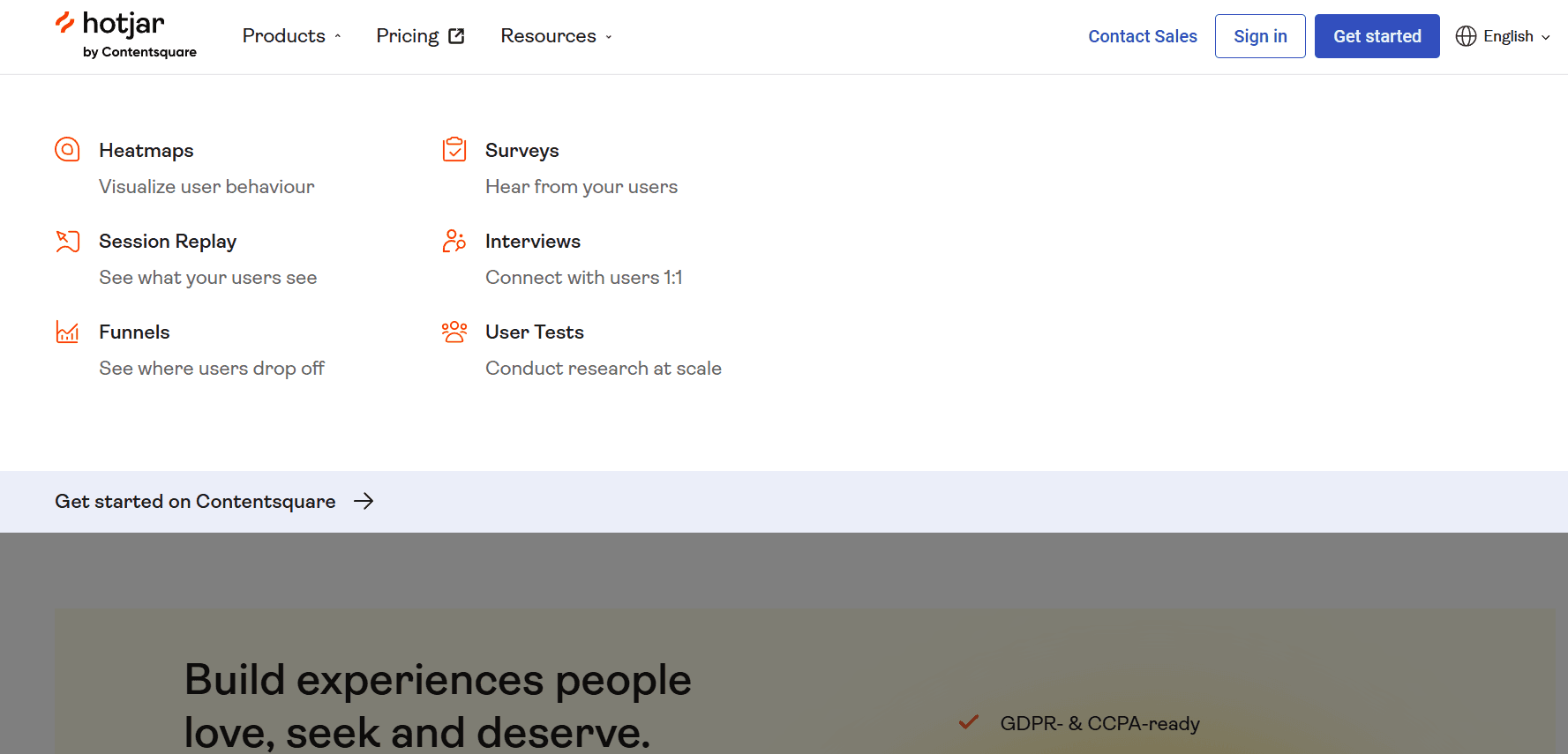
Heatmaps
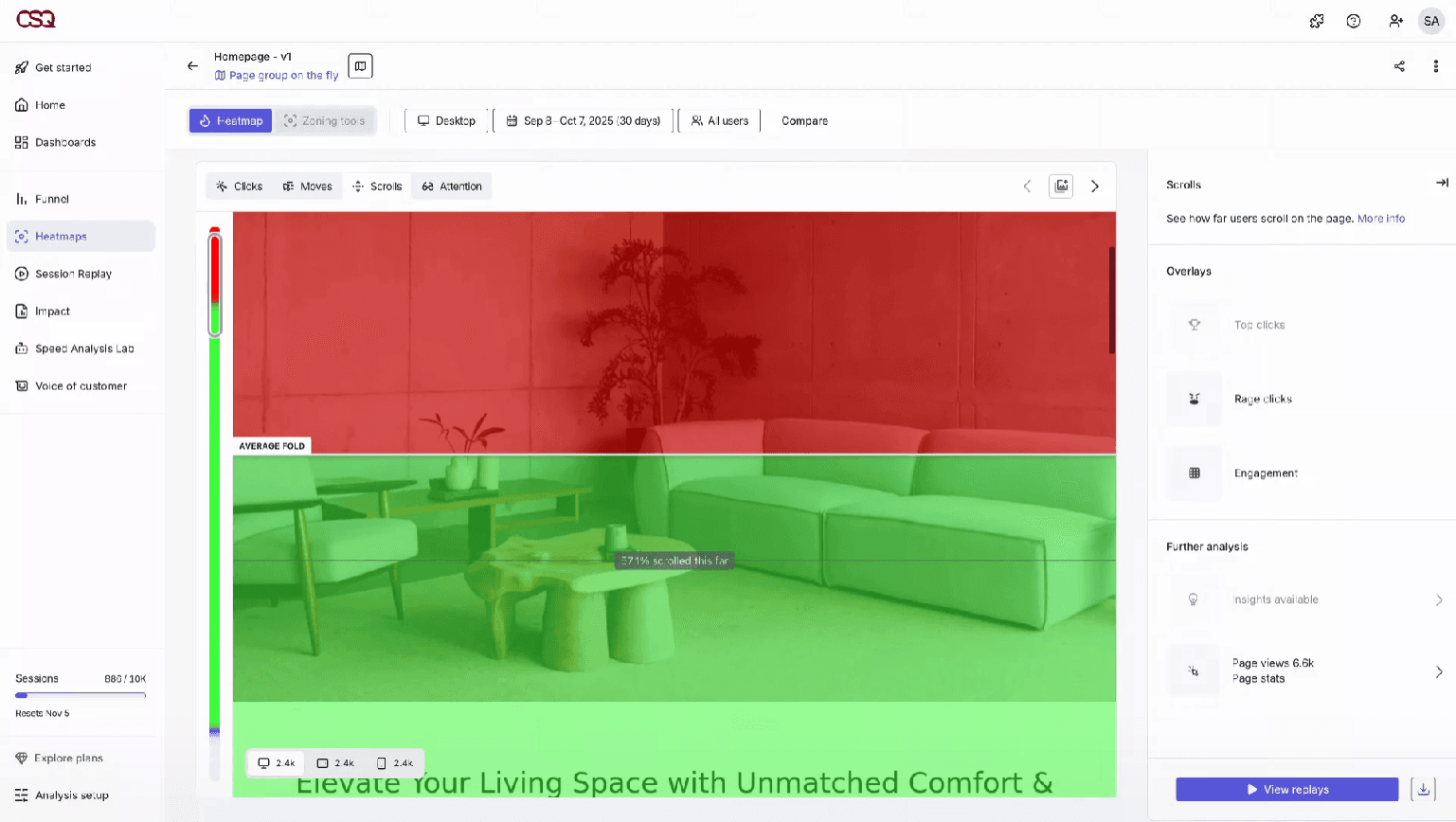
Visualize where users click, move, and scroll on your site. See which page elements attract attention and which get ignored.
Session Recordings
Watch real user sessions to identify friction points and drop offs. Playback tools let you filter by device, page, or user actions.
Surveys
Create on-site surveys to collect user feedback in context. Target questions to specific pages or user behaviors.
Incoming Feedback
Add feedback widgets for users to rate their experience or leave comments. Responses are tied to specific pages for actionable insights.
Funnels
Track user journeys through multi-step processes like signups or checkouts. Identify where users abandon the flow and optimize those steps.
User Interviews
Recruit users for live interviews directly from your website. Schedule and manage calls to gather deeper qualitative insights.
Ease of Use
Hotjar is widely recognized for its intuitive user interface and quick setup, making it accessible even for beginners and non-technical users. Most teams can launch hotjar heatmaps or session replays within minutes, and the dashboard organizes insights in a clear, actionable way. Users often mention that onboarding is straightforward, with helpful guides and tooltips throughout the platform. This usability makes Hotjar a practical choice for teams that want immediate, visual feedback without a steep learning curve.
Integrations
Hotjar integrates with Google Analytics, Slack, HubSpot, Segment, Optimizely, Microsoft Teams, and Trello, among others.
Hotjar also offers an API and connects with third-party integration tools like Zapier for expanded functionality.

Hotjar (by Contentsquare) Specs
- A/B Testing: Yes
- AI Integration: Yes
- Analytics: Yes
- API: Yes
- Big Data: Yes
- Campaign Management: Yes
- Conversion Tracking: Yes
- Custom Reports: Yes
- Dashboard: Yes
- Data Export: Yes
- Data Import: Yes
- Data Visualization: Yes
- External Integrations: Yes
- Feedback Management: Yes
- Keyword Tracking: Yes
- Landing Pages: Yes
- Link Tracking: Yes
- Multi-User: Yes
- Notifications: Yes
- Process Reporting: Yes
- Referral Tracking: Yes
- Sentiment Analysis: Yes
- SEO: Yes
- Workflow Management: Yes


