

Con tantas soluciones de engagement de producto disponibles, resulta complicado averiguar cuál es la más adecuada para ti. Sabes que quieres aumentar la satisfacción del usuario, mejorar las tasas de retención, mejorar la experiencia del usuario y optimizar los diversos puntos de contacto dentro de un producto para aumentar el compromiso de los usuarios, pero necesitas descubrir qué herramienta es la mejor para el trabajo. ¡Te ayudo! En este artículo, te facilito la elección utilizando mis experiencias con docenas de herramientas distintas en equipos grandes y productos diversos para compartir mis selecciones del mejor software de engagement de producto.
Por qué confiar en nuestras recomendaciones de software
6,700+
Reviews
20
Industry experts
16+
Evaluation factors
14
Years
Nuestro equipo lleva probando y evaluando software desde 2012. Como gestores de producto, sabemos lo difícil —y lo importante— que es elegir el software adecuado.
Para esta guía, evaluamos las herramientas mediante pruebas prácticas e investigación independiente, puntuando las herramientas según nuestros criterios de selección.
Nuestras reseñas reflejan nuestro criterio editorial humano, no un discurso de ventas.
Revisores expertos:
 Hannah ClarkSenior TPM
- Cristiano ValimSenior UI/UX Lead

Resumen del mejor software de engagement de producto
Esta tabla comparativa resume los detalles de precios de mis principales selecciones de software de engagement de producto para ayudarte a encontrar el más adecuado para tu presupuesto y necesidades empresariales.
| Tool | Best For | Trial Info | Price | ||
|---|---|---|---|---|---|
| 1 | Ideal para la incorporación de usuarios dentro de la aplicación | Prueba gratuita de 14 días | Desde 174 $/mes (facturado anualmente) | Website | |
| 2 | Ideal para la orientación y el análisis dentro de la aplicación asistidos por IA | Prueba gratuita de 14 días | Desde $500/mes | Website | |
| 3 | La mejor opción para experiencias dentro de la aplicación sin código a gran escala | Prueba gratuita disponible | Precio disponible previa solicitud | Website | |
| 4 | Ideal para unificar la analítica, la reproducción y las guías dentro de la aplicación | Plan gratuito disponible | Precios bajo petición | Website | |
| 5 | La mejor opción para la interacción omnicanal de usuarios impulsada por IA | Demostración gratuita disponible | Precios disponibles previa solicitud | Website | |
| 6 | Ideal para la participación en la aplicación respaldada por análisis | Prueba gratuita de 14 días + demostración gratuita disponible | Desde $299/mes | Website | |
| 7 | Ideal para la orientación dentro de la aplicación en aplicaciones web y de escritorio | Prueba gratuita disponible | Precio bajo consulta | Website | |
| 8 | La mejor opción para la reproducción de sesiones vinculada al análisis del comportamiento | Plan gratuito + demostración gratuita disponible | Precio bajo solicitud | Website | |
| 9 | Ideal para guiar a los usuarios a través de los flujos de trabajo empresariales | No disponible | Precios disponibles previa solicitud | Website | |
| 10 | Ideal para crear guías integradas en la aplicación y solicitudes de funciones | Plan gratuito + prueba gratuita de 30 días disponible | Precios disponibles previa solicitud | Website |


Reseñas del mejor software de engagement de producto
A continuación, encontrarás mis resúmenes detallados de los mejores softwares de engagement de producto que llegaron a mi lista corta. Mis reseñas ofrecen un análisis profundo de las características clave, ventajas y desventajas, integraciones y casos de uso ideales de cada herramienta para ayudarte a encontrar la que mejor se adapte a tus necesidades.
 Ideal para la incorporación de usuarios dentro de la aplicación
- Prueba gratuita de 14 días
- Desde 174 $/mes (facturado anualmente)
Visit WebsiteCustomer Rating:4.7/5This rating combines scores from multiple user review sites to reflect overall customer sentiment about the product.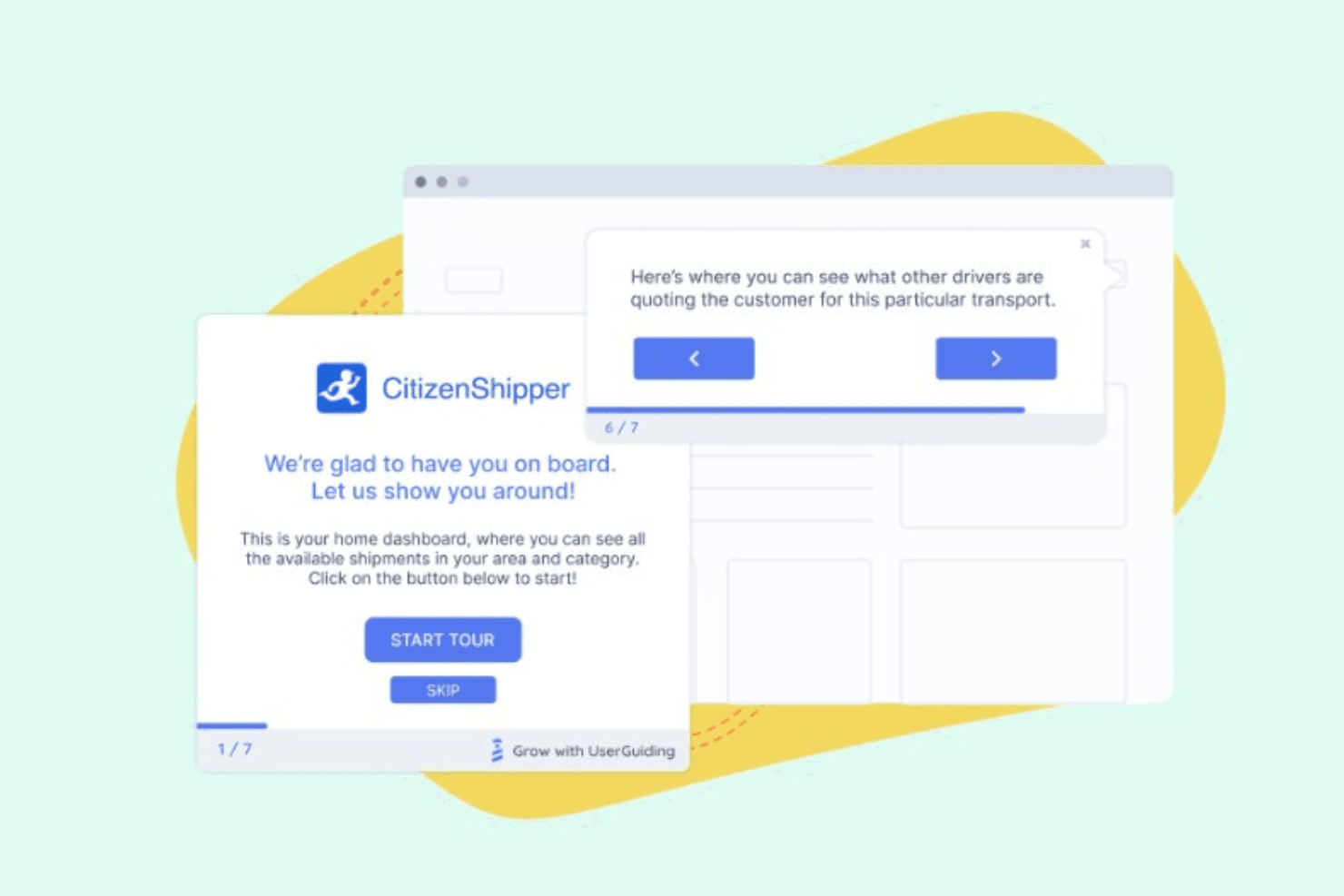
UserGuiding te permite crear ventanas emergentes que destacan nuevas funciones para tus clientes con el fin de aumentar su adopción. UserGuiding es una plataforma de interacción con productos sin código que combina herramientas de orientación dentro de la aplicación, incluidos recorridos del producto, información sobre herramientas, puntos destacados, listas de comprobación de incorporación y ventanas modales de anuncios, con recopilación de comentarios, centros de recursos, segmentación de usuarios y un módulo de análisis integrado.
¿Para quién es más adecuado UserGuiding?
UserGuiding es una opción muy adecuada para los equipos de producto y éxito del cliente de empresas SaaS que desean crear y lanzar flujos de incorporación dentro de la aplicación sin involucrar al equipo de ingeniería.
Por qué elegí UserGuiding
Elegí UserGuiding como una de las mejores opciones porque su creador sin código permite a los equipos de producto implementar recorridos de incorporación, listas de comprobación y puntos destacados sin escribir una sola línea de código. Me gusta especialmente cómo las encuestas dentro de la aplicación y las herramientas de NPS se conectan directamente con los flujos de incorporación, de modo que puedes recopilar comentarios justo en el momento en que un usuario completa un paso clave. El centro de recursos integrado y el Asistente de IA también proporcionan a los usuarios una capa de soporte de autoservicio que reduce el abandono durante la incorporación.
Funciones principales de UserGuiding
- Encuestas dentro de la aplicación y encuestas de NPS: Recopila comentarios estructurados de los usuarios y mide su satisfacción directamente dentro de tu producto, sin redirigirlos a formularios externos.
- Centro de recursos y base de conocimientos: Ofrece a los usuarios un centro de ayuda de autoservicio dentro de la aplicación, donde pueden buscar artículos y acceder a contenido de soporte sin abandonar su flujo de trabajo.
- Reproducción de sesiones: Graba y revisa sesiones reales de usuarios para ver exactamente cómo interactúan con tu producto después de completar los flujos de incorporación.
- Solicitudes de funciones y hoja de ruta pública: Permite a los usuarios enviar ideas de funciones y seguir la hoja de ruta de tu producto directamente dentro de la aplicación, creando un ciclo de comentarios transparente entre tu equipo y tus usuarios.
Integraciones de UserGuiding
Las integraciones nativas no están documentadas con claridad. El servidor MCP de UserGuiding conecta herramientas y agentes de IA con los datos del producto.
Pros and Cons
Pros:
- Los recorridos sin código se lanzan sin el apoyo del equipo de ingeniería
- Los comentarios conectan las encuestas, NPS y hojas de ruta
- Los centros de recursos reducen las solicitudes de soporte durante la incorporación
Cons:
- Los análisis no cuentan con una visualización confirmada del recorrido del embudo
- Enfocado en la web, con soporte limitado para aplicaciones móviles
Learn more about UserGuiding: Ideal para la orientación y el análisis dentro de la aplicación asistidos por IA
- Prueba gratuita de 14 días
- Desde $500/mes
Visit WebsiteCustomer Rating:4.8/5This rating combines scores from multiple user review sites to reflect overall customer sentiment about the product.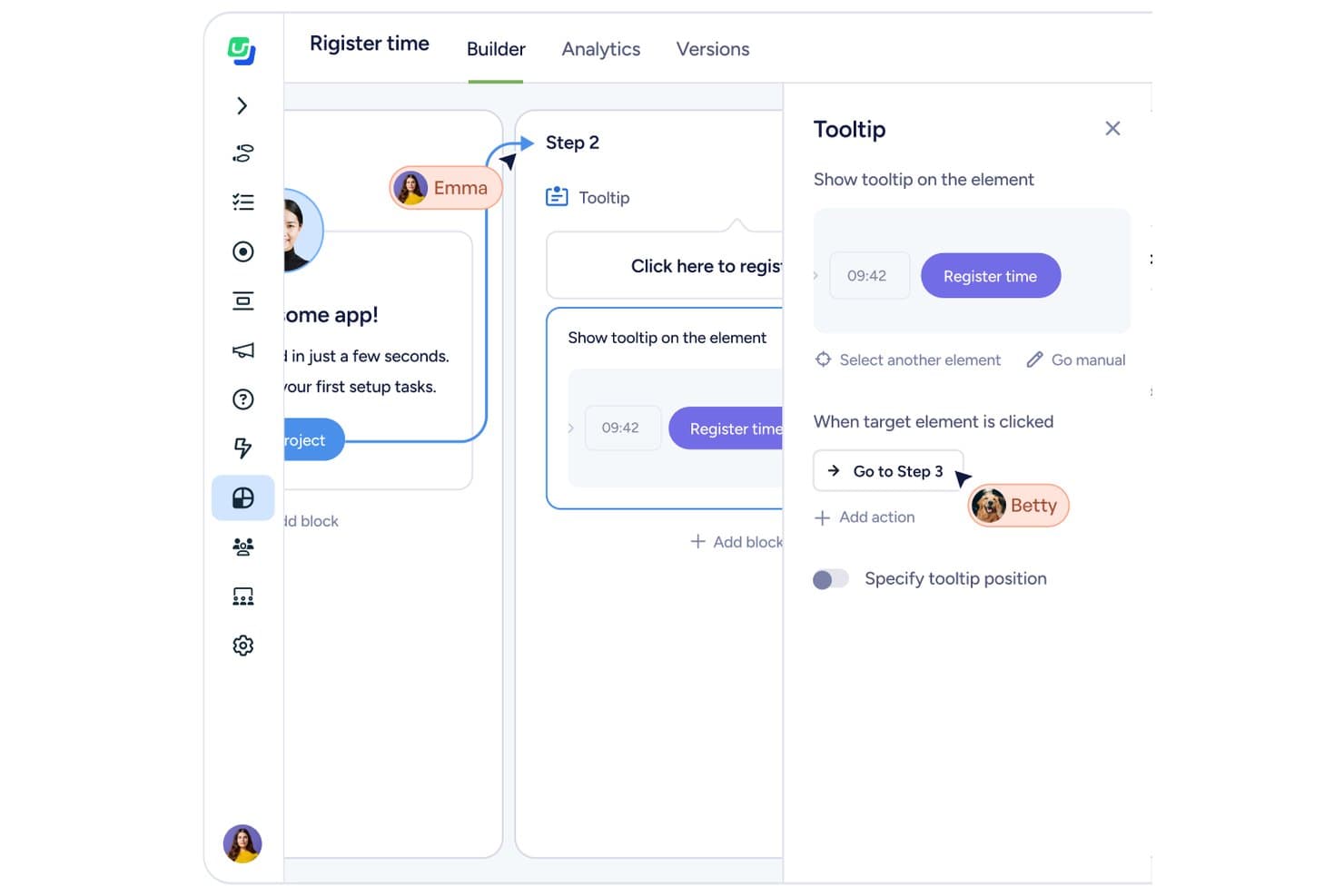
Userflow permite a los usuarios crear información sobre herramientas interactivas vinculadas a elementos de la interfaz de usuario. Userflow es una plataforma de interacción con el producto sin código para aplicaciones web que combina herramientas de orientación dentro de la aplicación —flujos, listas de comprobación, información sobre herramientas, banners y centros de recursos— con un conjunto de análisis integrado y creación de flujos asistida por IA.
¿Para quién es más adecuado Userflow?
Userflow es una excelente opción para equipos de crecimiento basado en el producto centrados en la web que desean incorporar onboarding, orientación y análisis dentro de la aplicación en una sola herramienta sin depender del equipo de ingeniería.
Por qué elegí Userflow
Elegí Userflow como una de las mejores opciones porque su creador FlowAI no solo te ayuda a crear flujos más rápido, sino que también analiza activamente cómo los usuarios se mueven por tu producto y muestra los abandonos en tiempo real, para que no tengas que adivinar dónde falla el onboarding. También me encanta que el conjunto de herramientas integrado de información sobre la adopción del producto coloque embudos, gráficos y paneles junto a tus herramientas de orientación, lo que significa que puedes detectar un problema y desplegar una información sobre herramientas o una lista de comprobación específica sin cambiar de plataforma. La integración con MCP lo lleva aún más lejos, ya que te permite consultar patrones de uso o crear segmentos en lenguaje natural mediante Claude o ChatGPT.
Características principales de Userflow
- Localización y traducción: Crea flujos en cualquier idioma, incluidos los sistemas de escritura de derecha a izquierda, con traducción asistida por IA que detecta automáticamente el texto que falta o ha cambiado y admite la importación y exportación en CSV y XLIFF.
- Seguimiento de eventos sin código: Registra clics en botones, visitas a páginas e interacciones con formularios sin escribir una sola línea de código y, después, envía esos datos directamente a gráficos y paneles.
- Encuestas dentro de la aplicación y NPS: Despliega encuestas y solicitudes de NPS dirigidas a segmentos de usuarios específicos, con respuestas vinculadas a datos de comportamiento para obtener un contexto más completo.
- Análisis de embudos: Crea embudos de hasta 10 pasos con tasas de finalización por paso, recuentos de abandonos y comparaciones entre segmentos, además de exportar en CSV los usuarios de cualquier paso.
Integraciones de Userflow
Userflow ofrece integraciones nativas con HubSpot, Salesforce, Slack, Mixpanel, Heap y Amplitude, además de una API REST y webhooks para integraciones personalizadas.
Pros and Cons
Pros:
- La creación de flujos asistida por IA reduce el tiempo de lanzamiento
- Los embudos integrados conectan la orientación con los datos de adopción
- La localización admite RTL y flujos de traducción
Cons:
- La compatibilidad exclusiva con la web excluye las aplicaciones móviles nativas
- El análisis de embudos se limita a diez pasos
Learn more about Userflow: La mejor opción para experiencias dentro de la aplicación sin código a gran escala
- Prueba gratuita disponible
- Precio disponible previa solicitud
Visit WebsiteCustomer Rating:4.7/5This rating combines scores from multiple user review sites to reflect overall customer sentiment about the product.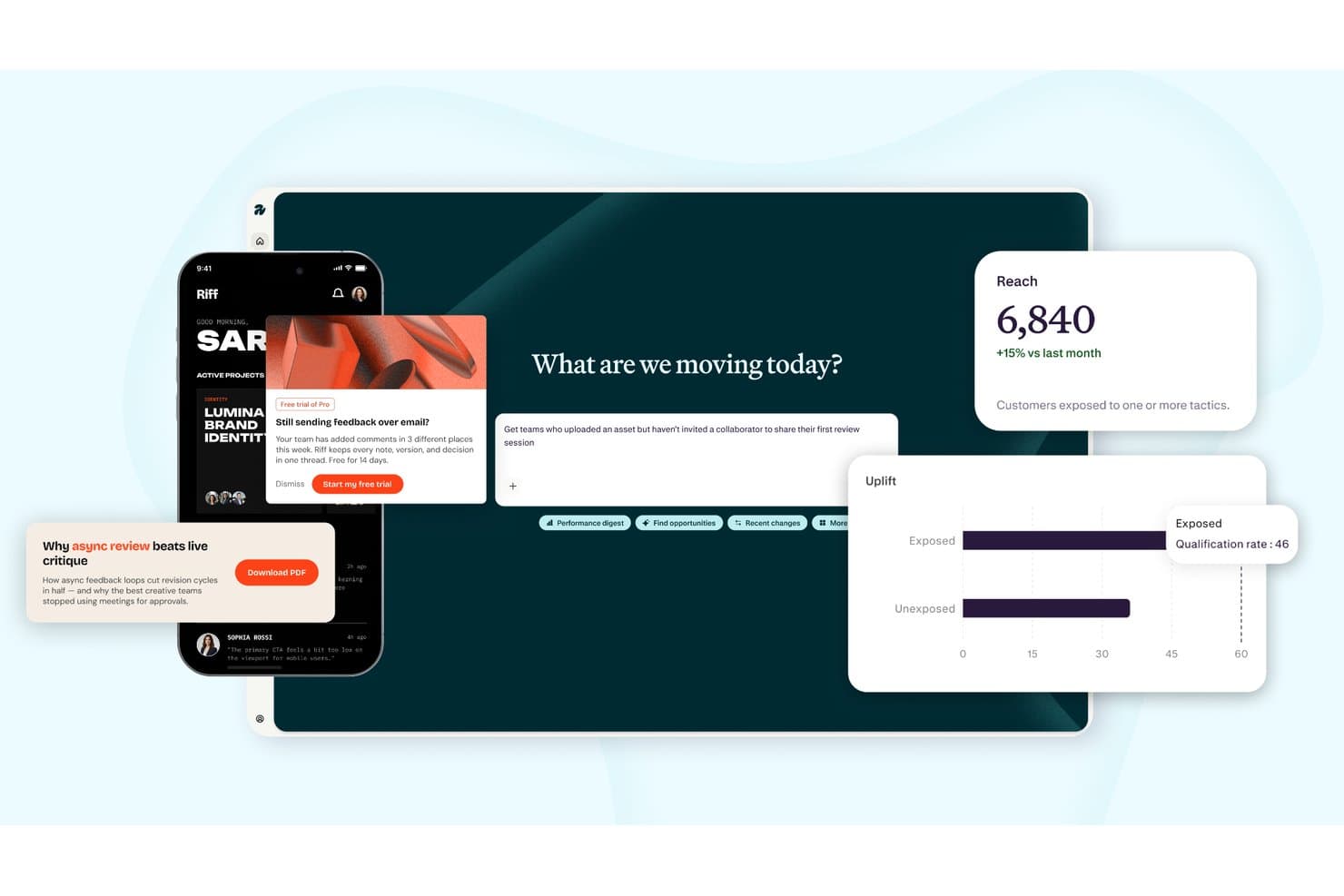
Appcues realiza un seguimiento del alcance, la mejora y la interacción en campañas multicanal. Appcues es una plataforma de interacción con el producto que combina la creación de experiencias dentro de la aplicación sin código, análisis del uso del producto, segmentación de usuarios y mensajería basada en el comportamiento a través de canales dentro de la aplicación, correo electrónico y notificaciones push.
¿Para quién es más adecuado Appcues?
Appcues es una opción excelente para equipos de producto de empresas SaaS medianas que quieren crear, dirigir y medir experiencias dentro de la aplicación sin depender de recursos de ingeniería.
Por qué elegí Appcues
Appcues ocupa un lugar en mi lista de opciones principales porque permite a los equipos de producto crear y publicar experiencias dentro de la aplicación—flujos, listas de comprobación, pines, banners y paneles de lanzamiento—sin escribir una sola línea de código. Me gusta especialmente que configures tu marca una sola vez y que cada experiencia la herede automáticamente, algo importante cuando publicas contenido para docenas de segmentos a gran escala. La capa de IA también es realmente útil: redacta experiencias a partir de indicaciones en lenguaje natural y señala enlaces rotos en flujos activos antes de que los usuarios accedan a ellos.
Características principales de Appcues
- Segmentación basada en el comportamiento: Dirige contenido a los usuarios según sus atributos y acciones dentro del producto, incorporando datos de tu CRM, almacén de datos o CDP para una segmentación precisa de la audiencia.
- Informes de impacto y mejora: Mide si una experiencia específica generó un resultado significativo y si los usuarios que la vieron obtuvieron un mejor rendimiento que aquellos que no la vieron.
- NPS y encuestas dentro de la aplicación: Implementa encuestas de opinión específicas dentro de tu producto, dirigidas a segmentos concretos, con respuestas enviadas directamente a Slack o a tu CRM.
- SDK móviles: Amplía el seguimiento y las experiencias dentro de la aplicación a aplicaciones de iOS, Android, React Native, Flutter e Ionic desde la misma plataforma que utilizas para la web.
Integraciones de Appcues
Appcues ofrece integraciones bidireccionales nativas con Salesforce, HubSpot, Intercom, Slack, Mixpanel y Heap. También admite Segment, API y webhooks de eventos, además de Zapier.
Pros and Cons
Pros:
- Experiencias sin código en la web y dispositivos móviles
- La IA redacta flujos y señala enlaces rotos
- Mide la mejora más allá de las métricas básicas de interacción
Cons:
- No incluye reproducción de sesiones nativa para realizar investigaciones
- No ofrece puntuación de adopción a nivel de cuenta
Learn more about Appcues: Ideal para unificar la analítica, la reproducción y las guías dentro de la aplicación
- Plan gratuito disponible
- Precios bajo petición
Visit WebsiteCustomer Rating:4.5/5This rating combines scores from multiple user review sites to reflect overall customer sentiment about the product.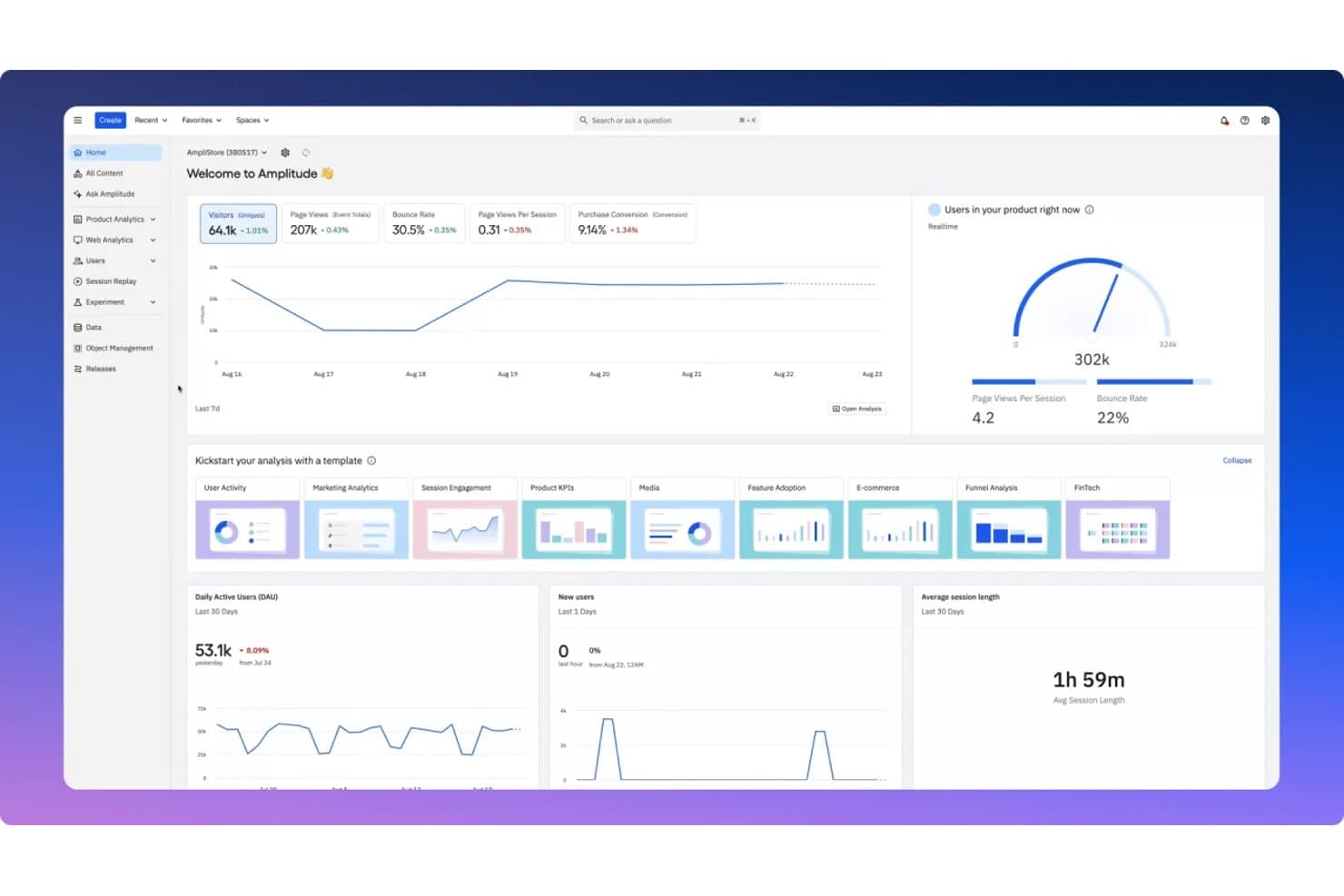
Amplitude centraliza las métricas de interacción con el producto en un panel unificado. Amplitude es una plataforma de analítica de productos que combina analítica del comportamiento, reproducción de sesiones, guías y encuestas dentro de la aplicación, y experimentación en un solo producto.
¿Para quién es más adecuada Amplitude?
Amplitude es una opción excelente para responsables de producto y equipos de crecimiento que quieren disponer de analítica, reproducción de sesiones y guías dentro de la aplicación en un solo lugar, en vez de combinar herramientas independientes.
Por qué elegí Amplitude
Amplitude ocupa un lugar destacado en mi lista de opciones porque integra la analítica, la reproducción de sesiones y las guías dentro de la aplicación en una sola plataforma, de modo que los datos de comportamiento que analizas impulsan directamente las guías que implementas. Me gusta especialmente que su producto Guías y encuestas admita recorridos, listas de comprobación, información sobre herramientas y ventanas modales con activadores basados en el comportamiento y reglas de frecuencia integradas que evitan el exceso de mensajes. La reproducción de sesiones va más allá en los planes Crecimiento y Empresa con resúmenes de IA que señalan automáticamente los puntos de fricción y muestran el sentimiento de los usuarios.
Características principales de Amplitude
- Segmentación de cohortes basada en el comportamiento: Crea cohortes a partir del comportamiento de los usuarios y utilízalas para dirigir guías, encuestas y experimentos sin necesidad de SQL ni del apoyo del equipo de ingeniería.
- Reproducción de sesiones multiplataforma: Captura reproducciones de alta fidelidad en la web, iOS, Android y React Native, con la opción de ejecutar la reproducción como un SDK independiente junto con herramientas como Segment.
- Pruebas A/B para guías: Ejecuta pruebas A/B en guías y encuestas dentro de la aplicación en los planes Crecimiento y Empresa para comparar qué versión genera una mayor interacción.
- Comentarios mediante IA: Analiza automáticamente hasta 2.000 registros de comentarios al mes en todos los planes, incluido el gratuito, para detectar patrones en las respuestas de los usuarios.
Integraciones de Amplitude
Amplitude se conecta con Segment para la reproducción de sesiones y admite conexiones MCP con Claude, Cursor, Lovable y Figma Make. También admite sincronizaciones de cohortes y transmisión en tiempo real a otras herramientas.
Pros and Cons
Pros:
- Unifica la analítica, la reproducción y las guías
- La reproducción con IA muestra patrones de fricción
- La segmentación basada en el comportamiento limita la fatiga por exceso de mensajes
Cons:
- La profundidad de la analítica puede eclipsar los flujos de trabajo de interacción
- Los paneles complejos ralentizan el análisis inicial
Learn more about Amplitude: La mejor opción para la interacción omnicanal de usuarios impulsada por IA
- Demostración gratuita disponible
- Precios disponibles previa solicitud
Visit WebsiteCustomer Rating:4.5/5This rating combines scores from multiple user review sites to reflect overall customer sentiment about the product.
MoEngage personaliza la comunicación omnicanal en cada punto de contacto del recorrido del cliente para elevar la interacción con el producto. MoEngage es una plataforma de interacción con productos basada en información de datos que te ayuda a ofrecer una experiencia de usuario personalizada durante todo el recorrido del cliente para construir relaciones sólidas con los clientes. El software impulsa experiencias digitales con segmentación avanzada, interacción omnicanal, análisis del recorrido del cliente y previsiones basadas en IA.
Por qué elegí MoEngage: Elegí MoEngage por sus capacidades omnicanal impulsadas por IA, que ayudan a mejorar la interacción con los clientes y la experiencia de marca. Esto incluye experimentos inteligentes de pruebas A/B que ayudan a impulsar resultados y fidelizar a los clientes mediante correo electrónico, dentro de la aplicación, notificaciones push y otros canales.Al saber a qué canales responden más tus clientes, puedes maximizar la interacción y configurar eventos en tiempo real.
Funciones e integraciones destacadas de MoEngage
Una función destacada es su Generador de recorridos del cliente impulsado por IA, que crea y automatiza tus campañas sin código de forma fluida en varios canales. Con esta función, puedes incorporar usuarios individuales con ofertas de bienvenida, personalizar las comunicaciones 1:1 para crear relaciones y utilizar capacidades predictivas para oportunidades de venta adicional & venta cruzada. Además, puedes enviar los mensajes a través de sus canales preferidos. La información sobre los consumidores impulsada por IA puede ayudarte a visualizar los recorridos de los clientes en cada etapa y detectar cualquier punto de fricción para volver a captar su atención, todo desde un único panel. En última instancia, esto optimiza la adopción de tus productos, las suscripciones y las conversiones.
Las integraciones incluyen más de 110 herramientas, como Airtable, Amazon S3, EduMe, Freshdesk, Growthbook, LeadSquared, Mailmodo, Open Weather, Shopify, Smashpops, Typeform y Vizard.
MoEngage también se integra con Zapier para permitirte crear flujos de trabajo personalizados en más de 5000 aplicaciones.
Pros and Cons
Pros:
- Compatibilidad con la comunicación multicanal mediante SMS, WhatsApp y correo electrónico
- Creación sencilla de segmentos mediante la incorporación de atributos y eventos
- Análisis e información en tiempo real para crear recorridos automatizados de clientes
Cons:
- Incoherencias de formato en los informes de la base de datos
- La experiencia de usuario podría mejorar en cuanto a facilidad de uso
Learn more about MoEngage: Ideal para la participación en la aplicación respaldada por análisis
- Prueba gratuita de 14 días + demostración gratuita disponible
- Desde $299/mes
Visit WebsiteCustomer Rating:4.7/5This rating combines scores from multiple user review sites to reflect overall customer sentiment about the product.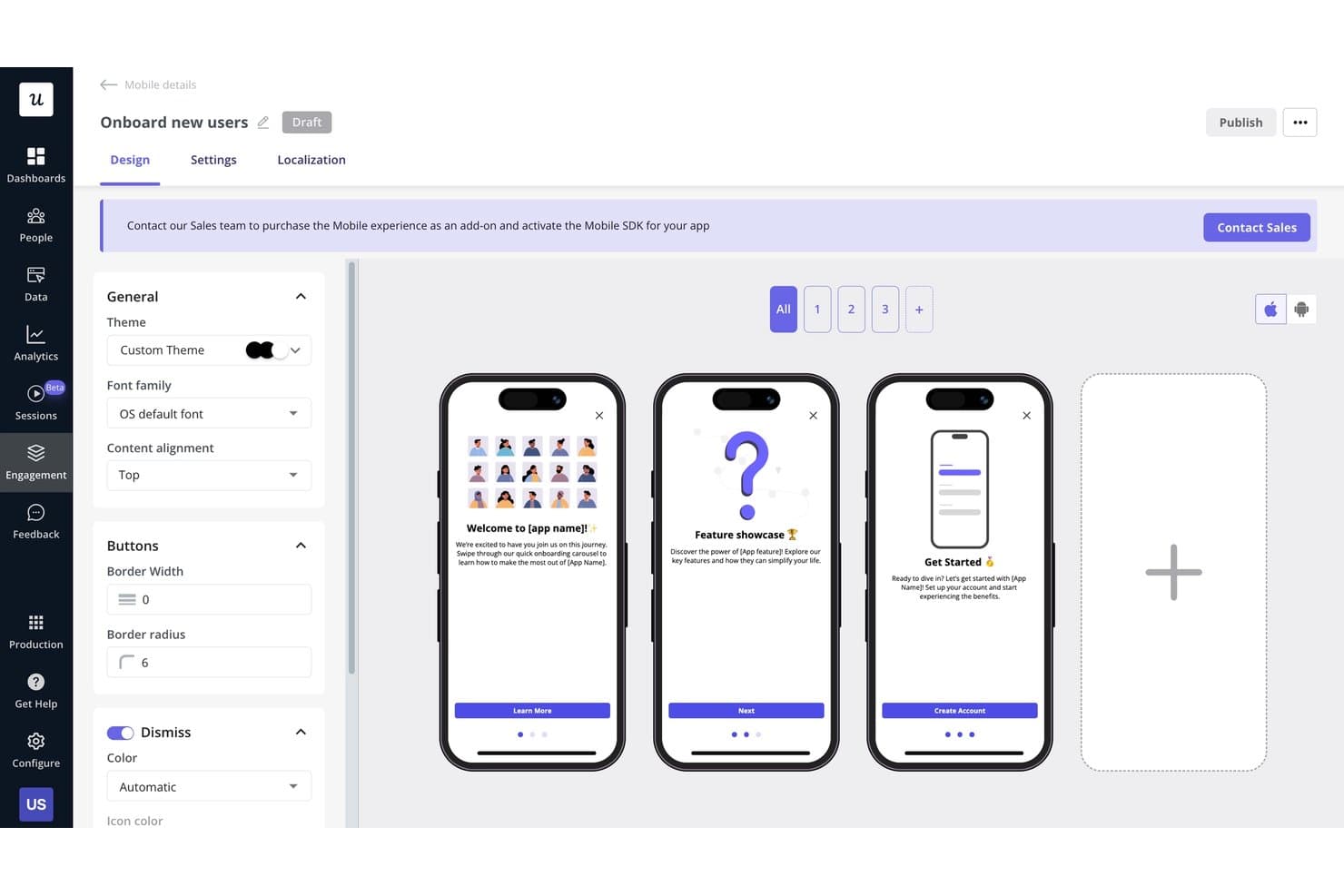
Userpilot permite a los usuarios crear visualmente flujos de incorporación móvil de varios pasos. Userpilot es una plataforma de participación del producto que combina experiencias en la aplicación sin código, análisis de uso, segmentación de usuarios, reproducción de sesiones y herramientas de recopilación de comentarios, como encuestas NPS y CSAT.
¿Para quién es más adecuado Userpilot?
Userpilot es una opción excelente para gerentes de producto y equipos de éxito del cliente que necesitan conectar directamente la participación en la aplicación con los datos de uso.
Por qué elegí Userpilot
Userpilot está en mi lista de opciones principales porque conecta directamente la participación en la aplicación con los datos de uso del producto de una forma que la mayoría de las herramientas no ofrece. Me encanta que puedas crear una guía paso a paso o una lista de verificación dirigida y, después, consultar inmediatamente informes de embudo y de rutas para comprobar si impulsó la adopción. Funciones como la captura automática y la reproducción de sesiones con indicadores de clics repetidos me permiten identificar exactamente dónde abandonan los usuarios antes incluso de crear una solución.
Funciones principales de Userpilot
- Encuestas NPS y CSAT: Recopila comentarios dentro de la aplicación en todos los planes mediante NPS, con tipos de encuesta avanzados, incluido CSAT, disponibles a partir del plan Growth.
- Agente de IA (Lia): Haz preguntas sobre los datos de tu producto, analiza los comentarios de los usuarios y crea guías dentro de la aplicación mediante un agente de IA conversacional incluido en todos los planes.
- Segmentación de usuarios y empresas: Crea segmentos para usuarios individuales o cuentas utilizando datos de comportamiento y atributos, y aplica esos segmentos en análisis, mensajería y comentarios.
- Centro de recursos: Ofrece a los usuarios un centro de ayuda de autoservicio dentro de tu producto, creado sin código, para mostrar guías, anuncios y contenido de asistencia cuando lo necesiten.
Integraciones de Userpilot
Userpilot ofrece seis integraciones nativas documentadas, incluidas Segment, Mixpanel, Amplitude, Heap, Intercom y Slack. También admite webhooks y una API HTTP para integraciones personalizadas, mientras que la sincronización con HubSpot, Salesforce y almacenes de datos está disponible en el plan Enterprise.
Pros and Cons
Pros:
- Los análisis conectan los embudos con los resultados de participación
- La reproducción de sesiones revela la fricción causada por clics repetidos
- Las guías sin código permiten una implementación rápida
Cons:
- La participación móvil requiere acceso Enterprise
- Algunos revisores informan de bloqueos durante la creación
Learn more about Userpilot: Ideal para la orientación dentro de la aplicación en aplicaciones web y de escritorio
- Prueba gratuita disponible
- Precio bajo consulta
Visit WebsiteCustomer Rating:4.6/5This rating combines scores from multiple user review sites to reflect overall customer sentiment about the product.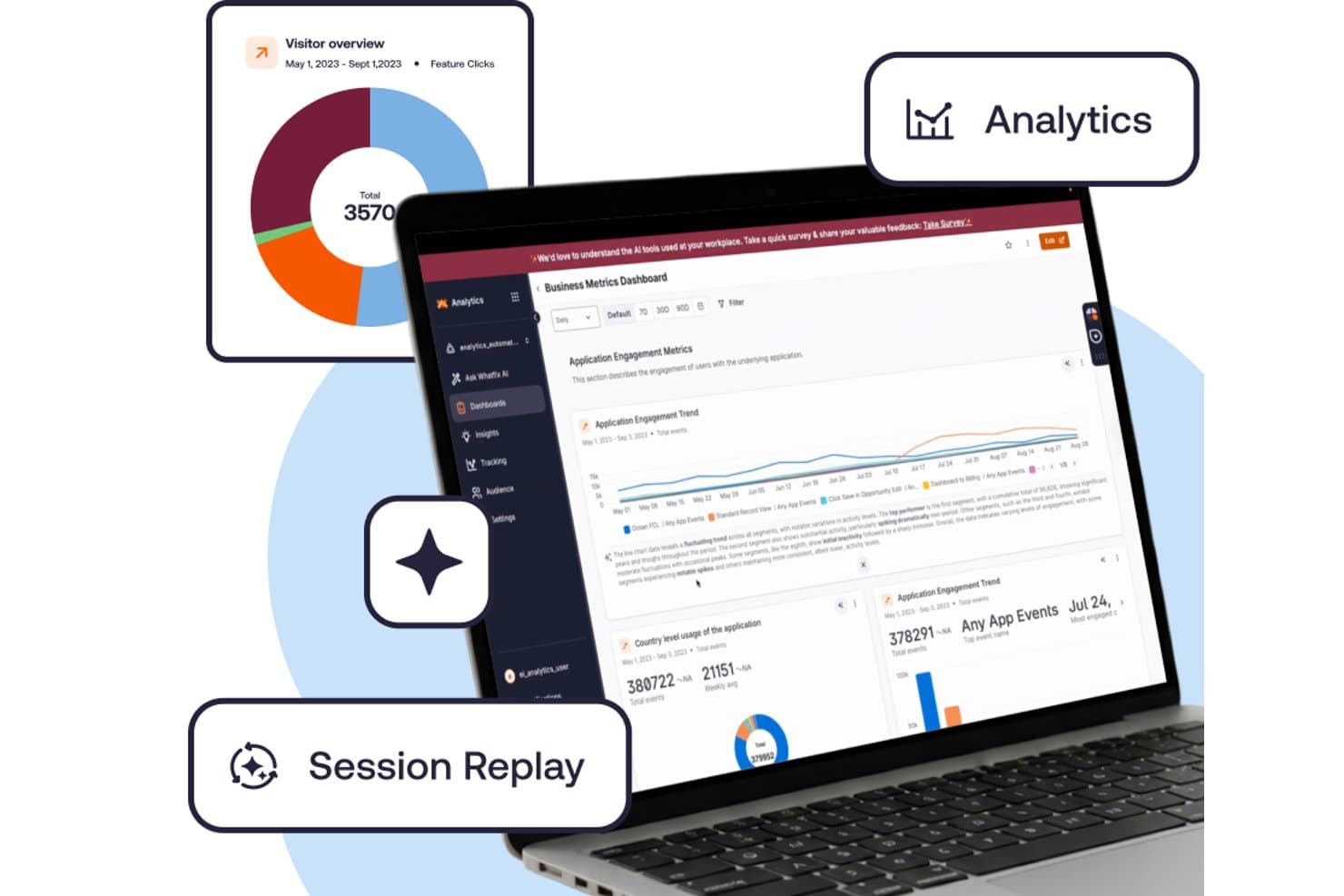
Whatfix realiza un seguimiento de las métricas de interacción mediante análisis y reproducción de sesiones. Whatfix es una plataforma de adopción digital que combina herramientas de orientación dentro de la aplicación, análisis del uso del producto y compatibilidad multiplataforma para entornos web, de escritorio, móviles y de escritorio virtual.
¿Para quién es más adecuado Whatfix?
Whatfix es adecuado para grandes empresas con equipos de UX o L&D que gestionan la orientación en entornos web, de escritorio y de escritorio virtual.
Por qué elegí Whatfix
Whatfix ocupa un lugar en mi lista de finalistas porque ninguna otra herramienta que haya probado cubre la orientación en la web, el escritorio (Windows y Mac), Citrix y Azure Virtual Desktop en una sola plataforma. Me gustan especialmente los Flujos y los Consejos inteligentes, que permiten a los equipos de UX crear recorridos paso a paso e indicaciones a nivel de campo sin escribir una sola línea de código. Las Pruebas automáticas comprueban automáticamente que esos Flujos sigan funcionando después de una actualización de la aplicación, lo que ahorra horas de control de calidad manual en entornos empresariales complejos.
Funciones principales de Whatfix
- Reproducción de sesiones: Un complemento de pago que graba las sesiones de los usuarios con controles de privacidad diseñados para cumplir los estándares de conformidad empresarial.
- Espejo: Un entorno de simulación donde los usuarios pueden practicar flujos de trabajo en una aplicación clonada, con juegos de rol de IA, cuestionarios y exportación SCORM.
- Panel de salud de la adopción: Un panel integrado que realiza un seguimiento de las tendencias de adopción de funciones y muestra patrones de uso a lo largo del tiempo.
- Ayuda autónoma: Una base de conocimientos integrada con búsqueda impulsada por IA, resúmenes y recomendaciones de contenido contextual que se muestran directamente en la aplicación.
Integraciones de Whatfix
Whatfix se integra con Mixpanel, Amplitude y Segment para aplicaciones móviles. El DAP estándar admite dos integraciones con aplicaciones empresariales, pero Whatfix no identifica esas aplicaciones en su página de precios.
Pros and Cons
Pros:
- La orientación abarca la web, el escritorio y los escritorios virtuales
- Las pruebas automáticas de flujos detectan recorridos dañados
- La creación con gobernanza admite aprobaciones y localización
Cons:
- Los análisis de escritorio omiten algunas propiedades de usuario
- La segmentación móvil sigue siendo básica
Learn more about Whatfix: La mejor opción para la reproducción de sesiones vinculada al análisis del comportamiento
- Plan gratuito + demostración gratuita disponible
- Precio bajo solicitud
Visit WebsiteCustomer Rating:4.5/5This rating combines scores from multiple user review sites to reflect overall customer sentiment about the product.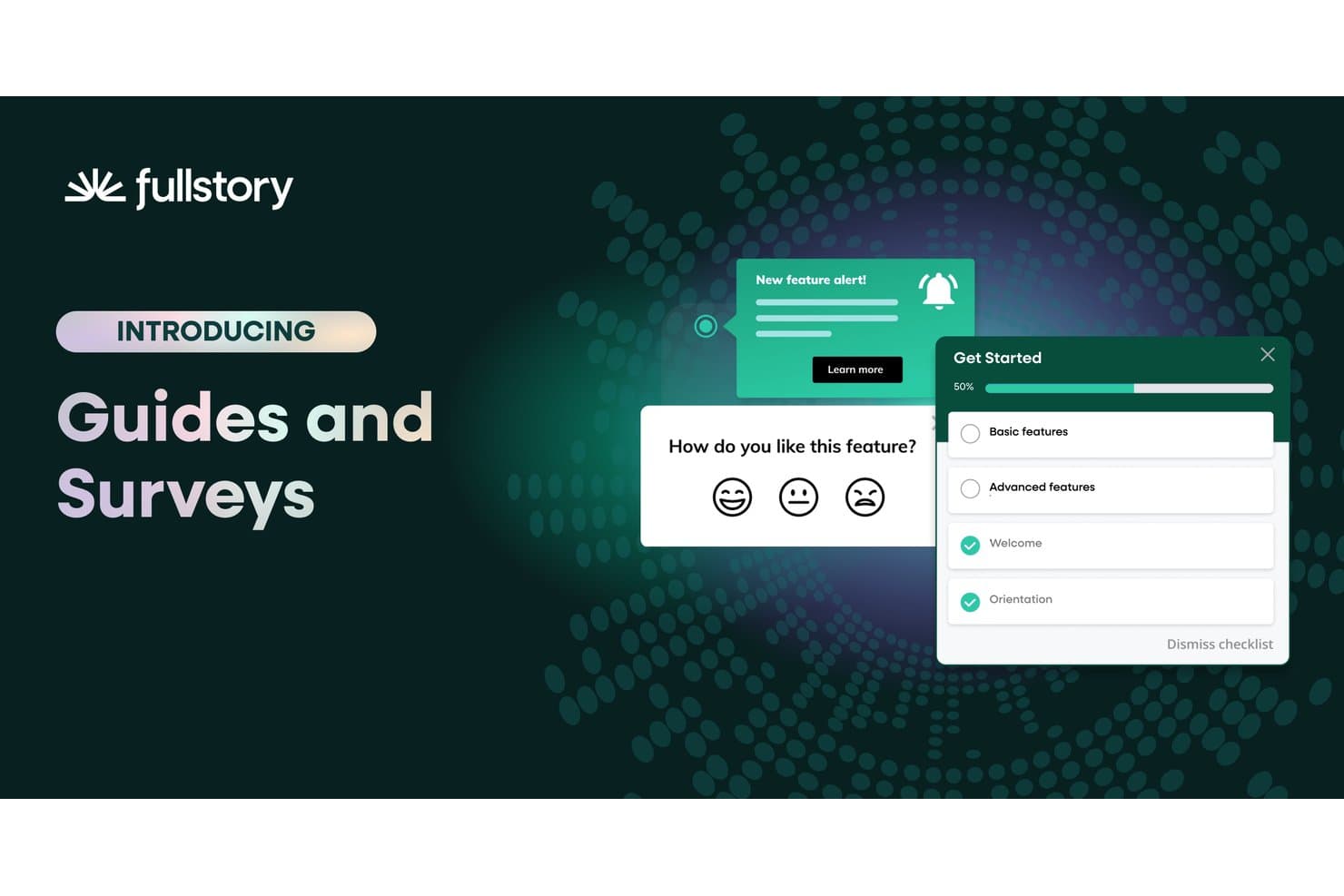
Fullstory permite a los usuarios implementar encuestas y guías de incorporación dentro de la aplicación. Fullstory es una plataforma de análisis del comportamiento y participación del producto que combina la reproducción de sesiones, mapas de calor, análisis de embudos y guías dentro de la aplicación con la captura automática de eventos en la web y dispositivos móviles.
¿Para quién es más adecuado Fullstory?
Fullstory es una opción excelente para equipos de producto y UX que necesitan conectar directamente la reproducción de sesiones con el análisis del comportamiento sin integrar herramientas independientes.
Por qué elegí Fullstory
Fullstory ocupa un lugar en mi lista de opciones finalistas porque es la única herramienta en la que la reproducción de sesiones y el análisis del comportamiento no son flujos de trabajo separados, sino el mismo conjunto de datos. Me encanta que Fullcapture registre automáticamente cada clic, desplazamiento y clic de frustración sin etiquetado manual, de modo que, cuando aparece una caída en un embudo en tus análisis, puedes pasar directamente a la reproducción de la sesión para ver exactamente qué ocurrió. Si a eso le sumas los resúmenes de sesiones de StoryAI, obtienes el «qué» y el «porqué» sin tener que revisar horas de grabaciones.
Características principales de Fullstory
- Fullcapture: Registra automáticamente cada clic, desplazamiento y clic de frustración en la web y dispositivos móviles sin necesidad de etiquetar eventos manualmente.
- Análisis del flujo de páginas: Visualiza las rutas reales que siguen los usuarios por tu producto y muestra dónde navegan antes y después de cada paso.
- Encuestas dentro de la aplicación y NPS: Implementa encuestas directamente dentro de tu producto y vincula cada respuesta con la grabación de la sesión activa del usuario.
- Alertas de segmentos: Te notifica cuando cambia el comportamiento de un segmento de usuarios definido, para que puedas actuar ante las variaciones en la participación sin revisar manualmente los paneles.
Integraciones de Fullstory
Fullstory ofrece integraciones con Adobe Analytics, Google Tag Manager y Segment, además de una API abierta, webhooks y exportación de datos para conexiones personalizadas.
Pros and Cons
Pros:
- La reproducción de sesiones se conecta directamente con el análisis del comportamiento
- La captura automática elimina el etiquetado manual de eventos
- Las encuestas vinculan las respuestas con las grabaciones de sesiones
Cons:
- Las guías móviles nativas siguen sin estar disponibles
- No está disponible la puntuación de salud orientada al cliente
Learn more about Fullstory: Ideal para guiar a los usuarios a través de los flujos de trabajo empresariales
- No disponible
- Precios disponibles previa solicitud
Visit WebsiteCustomer Rating:4.5/5This rating combines scores from multiple user review sites to reflect overall customer sentiment about the product.
WalkMe ofrece una superposición transparente con sus funciones de análisis y participación basadas en AI, que te permiten simplificar las experiencias de los usuarios. WalkMe es esencialmente una plataforma de adopción digital (DAP) que proporciona la visibilidad y los conocimientos necesarios para ofrecer experiencias digitales sin fricciones. El software puede ayudarte a crear potentes experiencias en pantalla que guían a los usuarios en cada paso de un proceso, desde la incorporación de usuarios hasta la gestión del cambio.
Por qué elegí WalkMe: Elegí WalkMe por sus sólidas capacidades, que impulsan la adopción del producto, aumentan la productividad de los usuarios y reducen los riesgos de seguridad. Estas capacidades incluyen análisis de aplicaciones, flujos de trabajo y formularios que informan sobre el nivel de uso del producto e identifican los puntos de fricción que provocan abandonos. WalkMe también te guía a través de los flujos de trabajo empresariales dentro de las aplicaciones y entre ellas mediante orientación integrada en la aplicación, automatización y un editor de contenido conversacional de autoservicio.
Esta herramienta también proporciona plantillas configurables y específicas para cada aplicación destinadas a las acciones más complejas. La DAP de WalkMe también agiliza las experiencias de usuario omnicanal en cualquier producto de software web, móvil o de escritorio para ofrecer personalización mediante hiperautomatización, orientación integrada en la aplicación y participación.
Funciones e integraciones destacadas de WalkMe
Las funciones incluyen sus potentes capacidades de análisis e informes basadas en AI. La herramienta muestra el comportamiento de los usuarios, como cuánto tiempo utilizan tu producto y en qué aspectos tienen dificultades. Puedes utilizar esta información para identificar funciones infrautilizadas y crear procesos de asistencia que impulsen la participación y la adopción de funciones. La plataforma sin código de WalkMe permite que cualquier persona de tu equipo cree sesiones de aprendizaje. La función de inteligencia de la interfaz de usuario pone toda esta información a disposición en un panel sencillo e intuitivo. Además, puedes reducir el tiempo hasta obtener valor y aumentar la fiabilidad durante todo el proceso de creación en WalkMe mediante plantillas preconfiguradas. La función Acelerador de soluciones te ayuda a diseñar flujos de trabajo sin fricciones que aceleran los plazos de implementación y, al mismo tiempo, ofrecen resultados de primer nivel.
Las integraciones incluyen más de 20 herramientas, como Amazon S3, Azure Active Directory, Gainsight, Google Suite, Intercom, LiveAgent, LiveChat, Okta, Segment, Slack, Webhooks y Zendesk.
Pros and Cons
Pros:
- Recorridos inteligentes con pasos y condiciones de activación
- Función de mensajes destacados condicionales para lograr comunicaciones fluidas con los clientes
- Proporciona la cantidad adecuada de ayuda en los distintos puntos del flujo de trabajo de uso del producto
Cons:
- No ofrece gestión de versiones de la ayuda entre una versión y la siguiente
- Falta de plantillas integradas y funciones avanzadas de generación de informes
Learn more about WalkMe: 10Ideal para crear guías integradas en la aplicación y solicitudes de funciones
Pendo
- Plan gratuito + prueba gratuita de 30 días disponible
- Precios disponibles previa solicitud
Visit WebsiteCustomer Rating:4.4/5This rating combines scores from multiple user review sites to reflect overall customer sentiment about the product.
Realiza un seguimiento de la puntuación de participación del producto (PES) a lo largo del tiempo y compara los valores entre diferentes segmentos de audiencia. Pendo es una plataforma todo en uno de participación del producto que te ayuda a ofrecer una experiencia de usuario digital de primera categoría. El software combina análisis retrospectivos y comentarios cualitativos para desarrollar una comprensión completa de cómo se sienten tus clientes respecto a tu producto.
Por qué elegí Pendo.io: Elegí Pendo por sus sólidos recorridos segmentados y guías integradas en la aplicación, que ofrecen incorporación, orientación y asistencia personalizadas. La herramienta te permite enviar los mensajes adecuados a los usuarios adecuados para impulsar la adopción de funciones.
Pendo te ayuda a recopilar, priorizar y gestionar solicitudes de funciones. Como resultado, obtienes acceso a varios datos de producto en tiempo real procedentes de fuentes como entrevistas con usuarios, tickets de asistencia, pruebas beta, etc. Al combinar esto con las sólidas métricas de análisis de productos con poco código de Pendo (como PES), puedes mejorar la planificación de la hoja de ruta y crear el producto adecuado.
Funciones e integraciones destacadas de Pendo.io
Las funciones incluyen su módulo nativo de comentarios. Esto permite a los usuarios enviar solicitudes de funciones y dejar comentarios. Después, puedes conectar estas solicitudes con las iniciativas de tu hoja de ruta para diseñar y desarrollar productos en tiempo real. Además, Pendo también ofrece una función de análisis de opiniones. Con ella, puedes añadir una encuesta NPS u otras encuestas a las funciones recién lanzadas y evaluar la satisfacción de tus clientes.
Las integraciones incluyen más de 50 herramientas, como Algolia, BigQuery, Breadcrumbs, Calendly, Catalyst, Gainsight, HubSpot, Integrately, Intercom, Salesforce, Slack y Tableau. Puedes acceder a miles de aplicaciones adicionales mediante una suscripción de pago a Zapier.
Pros and Cons
Pros:
- Ayuda a organizar todas las solicitudes de mejora de funciones en un solo lugar
- La herramienta Explorador de datos destaca por sus capacidades de generación de informes
- Ofrece recorridos de incorporación, información sobre herramientas y formularios de comentarios
Cons:
- Las capacidades de planificación de hojas de ruta necesitan mejoras
- Los informes personalizados no están disponibles en la aplicación móvil
Learn more about Pendo:
Otros softwares de engagement de producto
Aquí tienes algunas opciones adicionales de software de engagement de producto que no entraron en mi lista corta, pero que igualmente vale la pena revisar:
- 11
- 12
- 13BrazeIdeal para campañas de pruebas A/B y gamificación
- 14Qualtrics XMIdeal para la optimización de funcionalidades basada en estudios de mercado
Cómo evalúo el software de participación del producto
Divido mi evaluación en tres partes: primero, la funcionalidad principal, que es la que tiene mayor peso, específicamente si una herramienta puede realizar un seguimiento del uso de las funcionalidades en todo el producto y permitir que los equipos no técnicos implementen guías dentro de la aplicación sin el apoyo de desarrolladores. Después, analizo funcionalidades destacadas como la reproducción de sesiones o los análisis generados por IA. Por último, considero el soporte para la incorporación y la escalabilidad de los precios.
Funcionalidad principal (requisitos básicos para esta lista)
Cuando selecciono herramientas para mi lista, califico cada una en una escala de 0 (no ofrece la funcionalidad) a 5 (sobresale en esta área) para cada funcionalidad principal que se indica a continuación. Después convierto el total en un porcentaje para ayudar a evaluar la adecuación general de cada herramienta, con un peso adicional para cualquier funcionalidad que haya considerado esencial.
- Análisis del uso del producto (esencial): Compruebo si la herramienta me permite realizar un seguimiento de la adopción de funcionalidades, la frecuencia de uso y las tendencias de participación entre segmentos de usuarios sin depender de un equipo de datos.
- Herramientas de participación dentro de la aplicación (esencial): Busco creadores sin código que permitan a los PMs lanzar información sobre herramientas, recorridos guiados y anuncios dirigidos según el comportamiento del usuario o la etapa del ciclo de vida.
- Segmentación de usuarios: Una buena segmentación va más allá de los atributos estáticos. Evalúo si los segmentos basados en el comportamiento o la actividad en el producto se mantienen en los análisis, la mensajería y las encuestas.
- Mapeo de embudos y recorridos: Analizo con qué flexibilidad una herramienta permite definir embudos de varios pasos e identificar exactamente dónde abandonan los usuarios entre acciones clave, como los flujos de registro a activación.
- Recopilación de comentarios: Evalúo si las encuestas dentro de la aplicación y las solicitudes de NPS pueden dirigirse a segmentos específicos y si los datos de las respuestas se vinculan con el comportamiento de uso para aportar contexto.
- Seguimiento multiplataforma: En el caso de equipos con productos web y móviles, compruebo si los datos de participación se unifican en una sola vista en lugar de permanecer en silos separados.
Una vez que tengo una lista de herramientas que cumplen los criterios, considero qué diferencia a cada plataforma.
Factores diferenciadores (lo que distingue a los proveedores)
Así es como comparo y establezco diferencias entre los distintos proveedores:
Funcionalidades destacadas
La reproducción de sesiones es el aspecto al que dedico más tiempo durante la evaluación. Busco herramientas que permitan filtrar las reproducciones mediante señales de frustración, como clics repetidos o toques sin respuesta, en lugar de limitarse a explorar grabaciones aleatorias. Los análisis generados por IA también son importantes: compruebo si la plataforma detecta anomalías o sugiere experimentos por sí misma, en lugar de obligarme a crear manualmente cada informe. Para los equipos que comercializan productos en varios mercados, también evalúo el soporte de localización para las guías y la información sobre herramientas dentro de la aplicación.
Más allá de las funcionalidades
Evalúo con qué rapidez puede un equipo pasar del registro a obtener su primer análisis. Las plantillas prediseñadas, el etiquetado de captura automática y los asistentes de configuración guiada reducen semanas de implementación. La escalabilidad es igual de importante: compruebo si una plataforma admite varios productos en una misma cuenta con una resolución de identidad compartida, para que los equipos que gestionan aplicaciones web y móviles independientes no terminen pagando por espacios de trabajo aislados. También analizo las integraciones del ecosistema, especialmente las conexiones nativas con almacenes de datos como Snowflake y BigQuery, ya que enviar los datos de participación a una pila de análisis existente evita duplicar el trabajo de instrumentación.
Cómo elegir un software de engagement de producto
Es fácil perderse entre largas listas de características y estructuras de precios complicadas. Para ayudarte a mantener el enfoque durante tu proceso de selección de software, aquí tienes una lista de factores a considerar:
| Factor | Qué tener en cuenta |
|---|---|
| FactorEscalabilidad | Qué tener en cuenta¿Puede el software crecer junto con tu empresa? Considera si soporta un aumento de usuarios y datos sin problemas de rendimiento. Busca precios escalonados o límites de capacidad. |
| FactorIntegraciones | Qué tener en cuenta¿Se conecta con tus herramientas existentes? Verifica la compatibilidad con tu CRM, plataformas de email y analítica para evitar silos de datos. |
| FactorPersonalización | Qué tener en cuenta¿Puedes adaptar el software a tus flujos de trabajo? Busca opciones para personalizar paneles, informes y permisos de usuario. |
| FactorFacilidad de uso | Qué tener en cuenta¿Es fácil de usar para tu equipo? Evalúa la interfaz y la navegación. Una curva de aprendizaje empinada puede dificultar la adopción. |
| FactorImplementación y onboarding | Qué tener en cuenta¿Qué tan rápido puedes comenzar a usarlo? Analiza los recursos necesarios para la puesta en marcha y la disponibilidad de soporte para la incorporación, como guías y tutoriales. |
| FactorCosto | Qué tener en cuenta¿Encaja en tu presupuesto? Compara el costo total, incluyendo tasas de instalación y gastos recurrentes. Estate atento a los costos ocultos en los contratos. |
| FactorMedidas de seguridad | Qué tener en cuenta¿Están seguros tus datos y los de tus usuarios? Busca el cumplimiento de estándares como GDPR y características como encriptación y controles de acceso. |
| FactorDisponibilidad de soporte | Qué tener en cuenta¿El proveedor te ayudará cuando lo necesites? Verifica si ofrecen soporte 24/7 y la calidad de su atención al cliente. |
¿Qué es un software de engagement de producto?
El software de compromiso del producto es una herramienta que ayuda a las empresas a rastrear y mejorar cómo los usuarios interactúan con sus productos. Normalmente utilizado por los gerentes de producto, equipos de marketing y atención al cliente, proporciona información útil para mejorar la experiencia y retención de los usuarios. Funciones como la introducción guiada, la recopilación de comentarios y los análisis ayudan a entender las necesidades de los clientes y a optimizar el uso del producto. En general, estas herramientas ofrecen a las empresas una forma de aumentar la satisfacción y el compromiso de los usuarios.
Características
Al elegir un software de compromiso del producto, tenga en cuenta las siguientes características clave:
- Introducción guiada para usuarios: Guía a los nuevos usuarios a través del producto para asegurar que comprendan cómo utilizarlo de forma eficaz y rápida.
- Recopilación de comentarios: Recoge opiniones y experiencias de los usuarios para mejorar las funciones del producto y responder a inquietudes.
- Analíticas: Ofrece información sobre el comportamiento y el compromiso del usuario para ayudar a optimizar el rendimiento del producto y la experiencia del usuario.
- Mensajería dentro de la aplicación: Permite la comunicación directa con los usuarios dentro del producto para ofrecer soporte o comunicar novedades.
- Segmentación de usuarios: Clasifica a los usuarios según su comportamiento o datos demográficos para adaptar las estrategias de marketing y compromiso.
- Paneles personalizables: Permite a los usuarios adaptar la visualización de datos y métricas para centrarse en lo que más les interesa.
- Procesamiento de datos en tiempo real: Asegura que las interacciones y el compromiso de los usuarios se rastreen y analicen al instante para obtener información actualizada.
- Pruebas A/B: Ayuda a probar diferentes versiones de funcionalidades del producto para determinar cuál tiene mejor acogida entre los usuarios.
- Segmentación por comportamiento: Utiliza datos de comportamiento del usuario para personalizar los contenidos y las estrategias de compromiso y obtener mejores resultados.
- Medidas de seguridad: Protege los datos de los usuarios y garantiza el cumplimiento de normativas como el RGPD para mantener la confianza y seguridad.
Beneficios
Implementar un software de compromiso del producto aporta varios beneficios a su equipo y su empresa. Estos son algunos de los más destacados:
- Mejora de la experiencia del usuario: Al guiar a los usuarios en la introducción y proporcionar soporte en la aplicación, estas herramientas les ayudan a aprovechar al máximo su producto.
- Información valiosa sobre los clientes: Las analíticas y la recopilación de comentarios aportan datos útiles sobre el comportamiento y las preferencias de los usuarios, ayudando a tomar decisiones fundamentadas.
- Aumento de la retención de usuarios: Al entender y atender las necesidades de los usuarios mediante estrategias de compromiso específicas, conseguirá que los usuarios regresen.
- Comunicación personalizada: Funciones como la segmentación de usuarios y la mensajería en la aplicación permiten interacciones adaptadas que conectan con diferentes grupos de usuarios.
- Optimización eficiente del producto: Las pruebas A/B y el procesamiento de datos en tiempo real permiten identificar rápidamente lo que mejor funciona y así realizar mejoras ágiles.
- Cumplimiento en la seguridad de datos: Las medidas de seguridad garantizan que los datos de los usuarios estén protegidos, generando confianza y cumpliendo con los requisitos establecidos.
Costes y Precios
Seleccionar un software de compromiso del producto requiere comprender los distintos modelos y planes de precios disponibles. Los costes varían según las funciones, el tamaño del equipo, los complementos y más. La siguiente tabla resume los planes más comunes, sus precios promedio y las características típicas incluidas en las soluciones de software de compromiso del producto:
Tabla comparativa de planes para software de compromiso del producto
| Tipo de Plan | Precio Promedio | Funciones Comunes |
|---|---|---|
| Tipo de PlanPlan Gratuito | Precio Promedio$0 | Funciones ComunesAnalíticas básicas, introducción limitada y mensajería básica dentro de la aplicación. |
| Tipo de PlanPlan Personal | Precio Promedio$5-$25/user/month | Funciones ComunesAnalíticas avanzadas, segmentación de usuarios y paneles personalizables. |
| Tipo de PlanPlan Empresarial | Precio Promedio$30-$75/user/month | Funciones ComunesIntroducción avanzada, pruebas A/B y procesamiento de datos en tiempo real. |
| Tipo de PlanPlan Corporativo | Precio Promedio$100-$200/user/month | Funciones ComunesProtección de seguridad integral, amplias integraciones y recursos de soporte y formación dedicados. |
Preguntas frecuentes sobre software de engagement del producto
Aquí tienes algunas respuestas a preguntas comunes sobre el software de engagement del producto:
¿Es adecuado el software de engagement del producto para pequeñas empresas?
Sí, el software de engagement del producto puede ser adecuado para pequeñas empresas. Muchos proveedores ofrecen planes escalables que se adaptan a equipos más pequeños con presupuestos limitados. Como pequeña empresa, puedes usar estas herramientas para comprender el comportamiento de los usuarios, mejorar el soporte al cliente e incrementar la retención sin necesidad de un equipo grande. Busca soluciones con precios flexibles y funciones que se alineen con tus objetivos de crecimiento.rn
¿Cómo se crea el engagement del producto?
Para crear engagement en el producto, las organizaciones deben incorporar estrategias que destaquen el valor que su producto ofrece al usuario, crear una experiencia interactiva y priorizar la optimización basada completamente en el comportamiento del cliente y los análisis.rnrnPuedes fomentar el engagement del producto mediante el diseño personalizado del recorrido del cliente. También puedes configurar el envío de emails según detonantes de acciones, reforzar el soporte al cliente para una resolución más rápida de incidencias, construir presencia en redes sociales, introducir recompensas gamificadas para usuarios leales y más.rn
¿Cómo se mide el engagement del producto?
Cuando se trata de medir el engagement del producto, es esencial definir los parámetros y métricas objetivo.rnrnAlgunas métricas reconocidas para medir el engagement del producto incluyen el puntaje de engagement del producto (PES), usuarios activos semanales o mensuales (que indican la capacidad de retención del producto), tasa de adopción de funcionalidades, tasas de retención y abandono, y tiempo en el producto (es decir, el tiempo promedio que una persona pasa en el sitio web o app del producto durante una sesión).rn
¿Qué sigue?
Si estás investigando opciones de software de engagement del producto, conéctate gratis con un asesor de SoftwareSelect para obtener recomendaciones.
Solo tienes que rellenar un formulario y tener una breve charla donde profundizarán en tus necesidades. Después recibirás una lista corta de software para evaluar. Incluso te apoyarán durante todo el proceso de compra, incluyendo la negociación de precios.